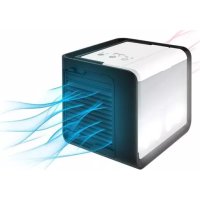
Breezy Cube - Air Conditioning LANAFORM - Free user manual and instructions
Find the device manual for free Breezy Cube LANAFORM in PDF.


| Product type | Personal evaporative air cooler |
| Brand | Lanaform |
| Model | Breezy Cube |
| Power supply | USB (2.0 A power adapter included) |
| Water tank capacity | Not specified in the manual (estimated: about 1 L) |
| Battery life on full tank | Variable depending on evaporation, can reach several hours |
| Airflow | 3 adjustable speeds |
| Timer | 2 h or 4 h |
| LED lighting | Yes, ambient light with night mode |
| Filter | Antibacterial filter, replaceable every 6 months or 500 h |
| Noise level | Less than 53 dB |
| Recommended use | Indoor, personal: office, bedroom, living room |
| Optimal efficiency conditions | Hot temperature, relative humidity < 60% |
| Recommended water type | Clean fresh water, distilled or demineralized |
| Tank maintenance | Clean every 2 days; vinegar if limescale |
| Filter maintenance | Brush with a soft brush |
| Filter replacement | Every season or after 500 h of use |
| Warranty | 2 years, limited |
| Country of origin | Belgium (Lanaform headquarters) |
| Important prohibitions | Do not use essential oils, do not immerse, water max 40 °C |
Frequently Asked Questions - Breezy Cube LANAFORM
User questions about Breezy Cube LANAFORM
0 question about this device. Answer the ones you know or ask your own.
Ask a new question about this device
Download the instructions for your Air Conditioning in PDF format for free! Find your manual Breezy Cube - LANAFORM and take your electronic device back in hand. On this page are published all the documents necessary for the use of your device. Breezy Cube by LANAFORM.
USER MANUAL Breezy Cube LANAFORM
natural_image
Black and white photo of a modern, compact air conditioner unit with ventilation grilles (no visible text or symbols)
LOWERS THE TEMPERATURE
REFRESHING UP TO 2 METERS
2 INTENSITY LEVELS
TIMER
FUNCTION

ANTIBACTERIAL FILTER
REFROIDISSEUR D'AIR PERSONNEL
PERSOONLIJKE LUCHTKOELER
LUFTKÜHLER FÜR DEN PRIVATGEBRAUCH
REFRIGERADOR DE AIRE PERSONAL
natural_image
Line drawing of two industrial air purifiers with heat sinks and ventilation grilles (no text or symbols)3




4
5


4/56
ENGLISH
INTRODUCTION
Thank you for choosing LANAFORM's Breezy Cube personal air cooler.
The Breezy Cube air cooler is designed to cool warm ambient air and help you relax with a breeze. It can be used at the office, in a bedroom, in the lounge or in any place in which you want to cool your personal internal space. In the winter, it also helps you restore a proper humidity level and eliminate the discomfort associated with dry air.
HOW DOES THE COOLING THROUGH EVAPORATION WORK?
Water needs energy to evaporate. When it evaporates naturally, water pumps this energy into the heat of the ambient air, which reduces the air temperature. It is this phenomenon that produces the coolness felt close to a drying sheet or a stream. The Breezy Cube works along the same lines: the water in the reservoir flows into the lower tank and is then absorbed by capillary action through the filter's fabric. This provides a large area of contact with the air and therefore allows fast evaporation. The fan again accelerates this evaporation and diffuses the cooled air. Throughout the process of evaporation, the fabric stays damp when emptying the reservoir.
▲ PLEASE READ ALL THE INSTRUCTIONS BEFORE USING YOUR HUMIDIFIER, ESPECIALLY THIS BASIC SAFETY INFORMATION:
- This appliance can be used by children aged from 8 years and above and persons with reduced physical, sensory or mental capabilities or lack of experience and knowledge if they have been given supervision or instruction concerning use of the appliance in a safe way and understand the hazards involved. Children shall not play with the appliance. Cleaning and user maintenance shall not be made by children without supervision.
- Use this device only in accordance with the instructions given in this manual.
- Check that your mains voltage is the same as that of your device.
• Always place the device on a hard, flat and level surface. Keep it away from walls (at least 15cm) and heat sources such as stoves, radiators, etc.
- Do not connect or disconnect the plug of the device with wet hands.
- If the power cable is damaged, it must be replaced by a similar cable available from the supplier or the supplier's after-sales department.
- Do not leave the device exposed to direct sunlight.
- Fill the reservoir with clean, fresh, distilled or demineralised water.
- Do not dismantle the device entirely. If you notice any problems, return the humidifier to the supplier or the supplier's after-sales department.
- Do not switch on the device when there is no water in the reservoir.
- Do not shake the device. This might affect its operation.
- Never touch the water or components when the unit is running.
- If there is an unusual smell when the device is being used as described in this manual, switch off the device, unplug it and have it examined by the supplier or the supplier's after-sales department.
- Do not use essential oils with this device.
- Do not pour hot water, i.e. water with a temperature above 40^ C, into the reservoir.
- Unplug the device before cleaning it or removing the reservoir.
- Do not wash the entire unit with water and do not immerse it in water. Consult the cleaning instructions in this manual.
- The device must be cleaned regularly. To do this, consult the cleaning instructions in this manual and follow them.
- If it falls into water, unplug it immediately before retrieving it.
• Electrical appliances should never be left unattended when connected. Unplug it when you are not using it. - Keep the power cable away from hot surfaces.
- Do not put items of clothing or towels on top of the device. If the air vent is obstructed, this may cause the device to malfunction.
- Never point the air vent towards electrical devices, books or wooden objects that could present a risk of mould.
- When moving the device, lift it up by the handle and not by the water reservoir.
- The device is designed for indoor and domestic use only.
- Use only the accessories supplied with this device. The use of any unauthorised accessory will not be covered by the warranty.
- Never clean the device or its water tank by scraping it with a hard object.
-
NEVER insert any object into any opening (warm air intake grill and air vent).
-
DO NOT USE IT when aerosol products (sprays) are being used or if oxygen is being administered.
- This device is not designed to be used in bathrooms or other damp internal spaces. Never install the device in a place where it might fall into a bathtub or a water container.
- Do not tilt and do not move the device when it is running. Switch it off and pull the plug out of the socket before moving it.
- NEVER use the device in places where explosive gases are present.
- NEVER use the device if its power cord or plug are damaged, if it does not run properly, if it has been damaged or if it has fallen into water.
- Use only the mains adaptor supplied with this device. The adaptor supplied must be used only with the device and not for other purposes.
- For optimum performance, replace the filter every 6 months or after approximately 500 hours of use. The length of time may vary depending on the hardness of the water being used.
- Replace it only with a similar model from the supplier.
COMPONENTS OF THE DEVICE [ 1]
1 Hot air vent
2 Anti-bacterial filter
3 Water reservoir
4 Cool air vent
5 Handle
6 Touch control buttons
7 LED atmospheric light
8 Reservoir cap
9 USB port
10 USB cable
11 Cooler tank drain plug
INSTRUCTIONS FOR USE
The refreshing effect of the Breezy Cube increases as the relative humidity falls. The drier the surrounding air, the more you will feel the cooling effect. The personal space cooler is most effective when it is used in warm, slightly humid weather when humidity does not exceed 60%.
Moving the device
Make sure you always move the Breezy Cube using the handle, according to [ ■ 2].
Instructions prior to using the device for the first time
Remove the air cooler from its original packaging and check that it does not have any faults. If you notice any faults, return it to the supplier or the supplier's after-sales department.
▲ Remove the air vent and the piece of foam on the top of the filter: this was used to transport the device so you can dispose of it.
Place the Breezy Cube personal air cooler in the room half an hour before turning it on to allow it to adjust to room temperature.
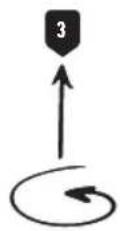
Filling the reservoir [■ 3]
▲ Please note:
Before filling the device with water, disconnect the power adapter from the wall socket and from the device.
Use only clean distilled or demineralised water in order to avoid any malfunction.
Make sure the reservoir cap is tightly closed after filling in order to avoid any leakage or electric shocks.
The reservoir must be kept clean. Please refer to the chapter on "Maintenance and storage" below.
- Remove the reservoir by lifting it [■1] and keep it upside down [■2].
- Turn the reservoir cap in an anti-clockwise direction to open it [■3].
- Then pour clean, fresh, distilled or demineralised water into the reservoir [ ■4].
- Replace the cap and turn in a clockwise direction to close it tightly.
- Before placing the reservoir on the base of the device, make sure you close the cooler tank drain plug tightly [1 1 11]. to avoid any leakage or electric shocks.
- Finally, fit the reservoir correctly on to the base of the device.
Instructions for use [☐ 4]
Do not move the air cooler when it is being used or when water is left in the reservoir. In fact, a system for draining water that has accumulated is provided to ensure your safety and this might cause leakages when moving the device if it still has water in it. Always therefore empty the reservoir before moving the device.
▲ Make sure your hands are completely dry when connecting and disconnecting the device.
The Breezy Cube personal air cooler comes with a USB cable and an adaptor of 2.0A. Once the air cooler is turned on, it is ready for use.
- Adjust the slots of the air vent upwards or downwards to direct the air flow as required.
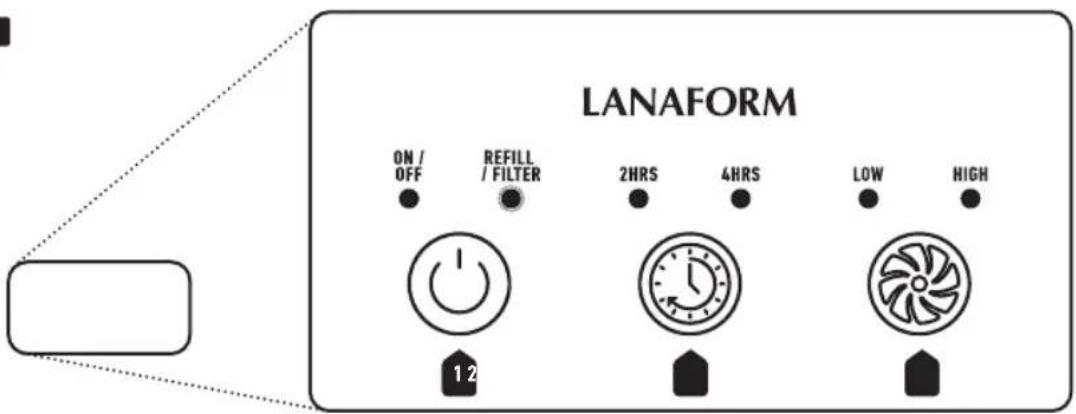
- Press the ON/OFF button [▶ 1]: a blue LED light indicates that the ventilation and the atmospheric light are working.
- Press it a second time: the atmospheric light is disabled.
① Turning the mood light off enters the unit in night mode. It then automatically switches to the lowest intensity to be quieter. To exit the night mode and return to the previous settings, press the intensity or timer button.
- The cooler runs continuously by default. Press the timer button (■2) once to set the run time for 2 hours and a second time to set a 4-hour run time. A blue LED light indicates the length of time selected.
- Press the intensity control button [ ■ 3] to go from the lowest intensity to the highest intensity and vice versa. A blue LED light indicates the intensity selected.
- When the reservoir is empty, a red luminous light appears on the ON/OFF button [▶ 1].
① The device can continue to be used when the reservoir is empty in order to benefit from the fan. It is even recommended that the fan be allowed to turn with the reservoir empty from time to time in order to dry the filter completely.
- If this same light flashes, the filter must be replaced (approximately every 6 months). Please refer to the chapter on "replacing the filter" below.
- Press the ON/OFF button once again: the air cooler switches off.
▲ DO NOT LEAVE THE DEVICE CONNECTED WHEN YOU ARE NOT USING IT.
MAINTENANCE AND STORAGE
• Always switch off the air cooler before cleaning it or storing it.
- If the water contains too much calcium and magnesium, it may deposit a "white powder" in the device. If too much foam is deposited on the device, this will prevent it from working properly.
Maintenance
We recommend:
1 Using clean distilled or demineralised water each time the device is used.
2 Cleaning the reservoir every 2 days.
3 Cleaning the device (see explanations below) and making sure that all of its parts are completely dry when it is not in use.
To clean the reservoir:
1 Clean the water reservoir with water using a soft cloth and vinegar if there are any foam or limescale deposits on the inside.
2 Rinse the reservoir in clean water.
To clean the filter:
1 Remove the filter by referring to [■5].
2 Clean by brushing with a soft brush (not supplied).
To clean the surface of the cooler:
1 Clean the surface of the device with a clean, soft, slightly damp cloth as often as necessary.
2 Never use detergents, an excessive volume of water, treated cloths, cleaning agents or abrasive sprays.
Storage
If you do not intend to use the device for a lengthy period, remove the filter and allow it to dry completely [5 1-3], then wrap it in a protective package and store it with the clean, dry device in a cool, dry place away from the light.
7/56 English
REPLACING THE FILTER [ 5]
For optimum performance, replace the filter every three months or after approximately 500 hours of use. When the filter reaches the end of its serviceable life, the light below the "Refill/Filter" flashes [■4 ■1].
① If you live in a place where the water is hard, it may need to be changed more frequently. In these cases, you will see minerals accumulating on the cooling device which might in time obstruct the air flow.
- Disconnect the air cooler. [▶1]
-
Remove the air vent with the push-button at the top right of the vent. [▶2]
• Take out the used filter. [ ■ 3] -
Then insert the new filter, making sure it is positioned correctly as on the diagram, i.e. with the opening towards the bottom and slot it in towards you. [■4]
- Re-insert the air vent and connect the device so that it can be used again.
TROUBLESHOOTING
In the event of a malfunction under normal conditions of use, please refer to the following list:
| Troubleshooting Cause Solution | ||
| The device is overflowing. Cooler | tank drain plug in the wrong place. | Replace the cooler tank drain plug so that it is tightly closed. |
| Unstable surface Place the device | on a horizontal, stable, flat surface and do not move the device if it still contains water. | |
| Cracked or damaged reservoir. | Contact your supplier's after-sales service. | |
| The device is not working / The fan is not turning / No light indicator. | Adapter not powerful enough. Use only the mains adaptor supplied with this device. | |
| No voltage, no current. Check that the USB connector is securely attached to the device; check whether the device is connected and that there is no mains fault. | ||
| Cable out of service. Use another | USB cable (type B USB micro) or contact your supplier's after-sales service. | |
| The device does not cool down / not sufficiently. | Relative humidity too high / ambient temperature too low. | The device cools down through evaporation (please see chapter on “How does cooling work through evaporation”), and may vary depending on the conditions. |
| Evaporation has not yet started. | Wait for a few minutes because evaporation takes a little time before the freshness is noticeable. | |
| Empty reservoir / dry filter. Add water to the reservoir. | ||
| Unpleasant smell. The air cooler is new. Drain the water from the reservoir and leave it to air for at least 12 hours. | ||
| Unusual noise emitted during operation. | The device is on an unstable or non-flat surface. | Unplug the device and place it on a flat, stable surface. |
| Minerals accumulating in the cooling device. | Using hard water. Clean the device and use distilled water. | |
▲ The following effects are not regarded as malfunctions:
1 If your water is particularly hard (contains a lot of minerals), the device may produce a sort of white dust. This is not a malfunction. The solution is to clean it more frequently or to use water that is not as hard.
2 The device runs very calmly but not entirely quietly. A sound level of less than 53DB is regarded as normal.

ADVICE ON WASTE DISPOSAL
The packaging consists entirely of environmentally-friendly materials that can be taken to your local waste sorting centre to be used as secondary materials. Cardboard can be placed in a paper collection contain-
er. Packing film must be taken to your local sorting and recycling centre.
When you are no longer using the device, dispose of it in an environmentally responsible manner and in compliance with the statutory requirements.
LIMITED WARRANTY
LANAFORM guarantees that this product will be free from any material and workmanship defects for a period of two years from the date it was purchased, other than as specified below.
The LANAFORM warranty does not cover damage caused by normal wear and tear on this product. In addition, the warranty on this LANAFORM product does not cover damage caused as a result of any abusive, inappropriate or incorrect use, accident, attachment of any unauthorised accesso-
ry, modification of the product or any other situation of whatever kind, beyond the control of LANAFORM.
LANAFORM shall not be held liable for any type of incidental, consequential or special damage.
Any implied warranties of the product's fitness for purpose are limited to a period of two years from the original purchase date on presentation of a copy of the proof of purchase.
Upon receipt, LANAFORM will repair or replace your device, as appropriate, and return it to you. The warranty may only be used at the LANAFORM Service Centre. Any maintenance and repair work carried out on this product by any person other than the LANAFORM Service Centre will invalidate this warranty.
FRANÇAIS
INTRODUCTION
MANUFACTURER & IMPORTER
LANAFORM SA
POSTAL ADDRESS