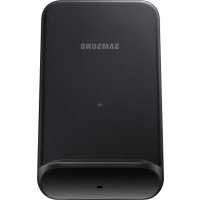
EPN3300 - Battery charger SAMSUNG - Free user manual and instructions
Find the device manual for free EPN3300 SAMSUNG in PDF.
 FR
FR
 BG
BG
 CS
CS
 DA
DA
 DE
DE
 EL
EL
 EN
EN
 ES
ES
 ET
ET
 FI
FI
 HU
HU
 IT
IT
 KK
KK
 KO
KO
 LT
LT
 LV
LV
 NL
NL
 NO
NO
 PL
PL
 PT
PT
 RO
RO
 RU
RU
 SK
SK
 SL
SL
 SV
SV
 TR
TR
 UK
UK
 ZH
ZH
| Product Type | Wireless Charging Station |
| Brand | Samsung |
| Model | EPN3300 |
| Power Supply | USB Adapter 9.0 V / 1.67 A |
| Connectivity | USB Type-C (on the station) |
| Compatibility | Qi-compatible mobile devices, Galaxy Buds |
| Main Functions | Wireless charging, tilting phone stand, fast wireless charging |
| Indicator Light | Red (charging), Green (fully charged), Orange (connection), Flashing red (error) |
| Fast Charging | Yes, for compatible devices |
| Simultaneous Charging | Two charging zones: mobile device and Galaxy Buds |
| Included Accessories | Charging station, USB adapter, USB cable, quick start guide |
| Weight | Approx. 120 g (estimated) |
| Dimensions | Approx. 10 x 10 x 2 cm (estimated) |
| Safety | Contains magnets; keep away from medical devices |
| Care and Cleaning | Unplug before cleaning; use a soft, dry cloth |
| Spare Parts and Repairability | Not user-repairable; no spare parts available |
| General Information | Trademark of Samsung Electronics Co., Ltd. © 2020 |
Frequently Asked Questions - EPN3300 SAMSUNG
User questions about EPN3300 SAMSUNG
0 question about this device. Answer the ones you know or ask your own.
Ask a new question about this device
Download the instructions for your Battery charger in PDF format for free! Find your manual EPN3300 - SAMSUNG and take your electronic device back in hand. On this page are published all the documents necessary for the use of your device. EPN3300 by SAMSUNG.
USER MANUAL EPN3300 SAMSUNG
WIRELESS CHARGER CONVERTIBLE
USER MANUAL
Table of Contents
English (UK) Suomi
François Dansk
Deutsch Eληνικα
Italiano Slovencina
Espanol Slovencina
Magyar Čestina
Polski Türkce
Romana
BbIrapckn
Hrvatski Pycckn
Srpski YkpaIHcbka
Portugués Ka3ak tiJI
Please read this manual before using the device to ensure safe and proper use.
- Images may differ in appearance from the actual product. Content is subject to change without prior notice.
- Before using the wireless charger, make sure it is compatible with your device.
Instructional icons

Warning: situations that could cause injury to yourself or others

Caution: situations that could cause damage to your device or other equipment

Notice: notes, usage tips, or additional information
Getting started
Package contents
Check the product box for the following items:
- Wireless charger
USB power adaptor
USB cable - Quick start guide

- Wireless charging covers are sold separately.
- The items supplied with the device and any available accessories may vary depending on the region or service provider.
- The supplied items are designed only for this device and may not be compatible with other devices.
- Appearances and specifications are subject to change without prior notice.
- You can purchase additional accessories from your local Samsung retailer. Make sure they are compatible with the device before purchase.
- Use only Samsung-approved accessories. Using unapproved accessories may cause the performance problems and malfunctions that are not covered by the warranty.
- Availability of all accessories is subject to change depending entirely on manufacturing companies. For more information about available accessories, refer to the Samsung website.
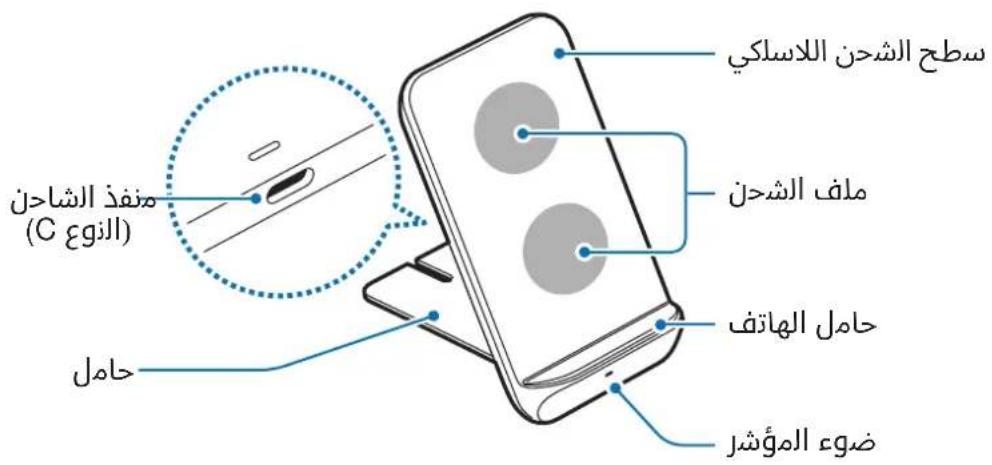
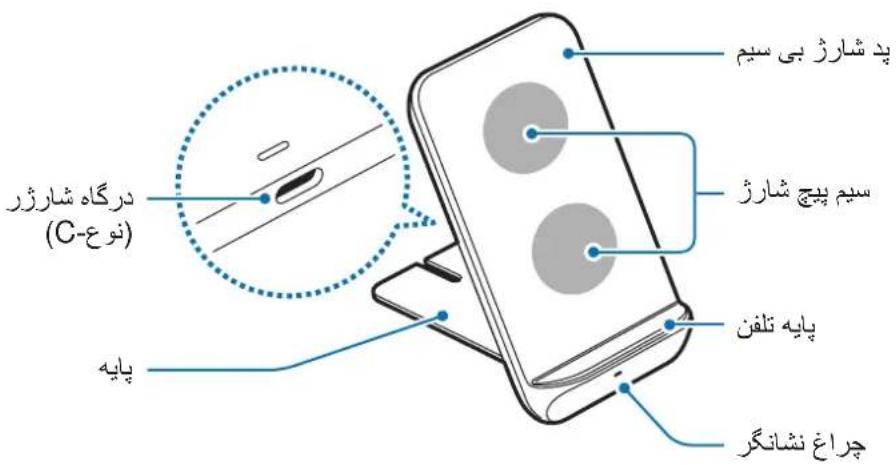
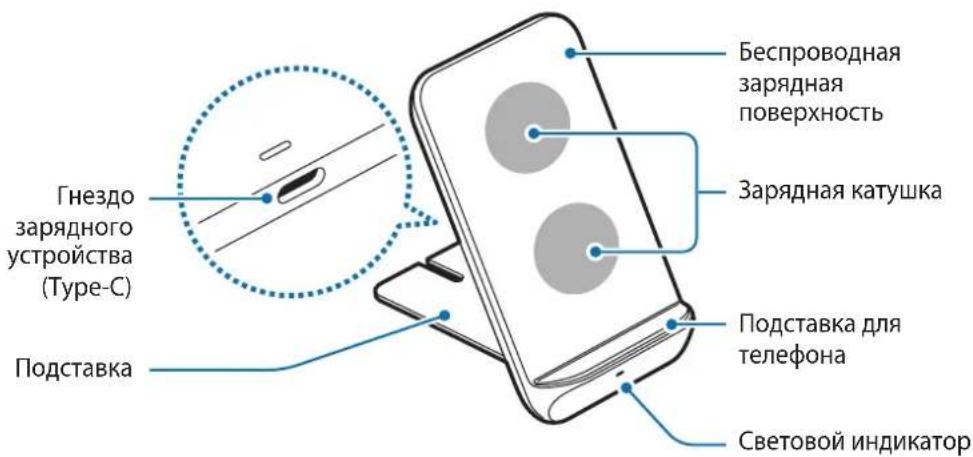
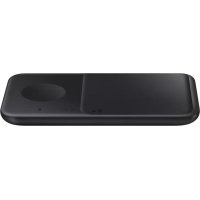
Device layout
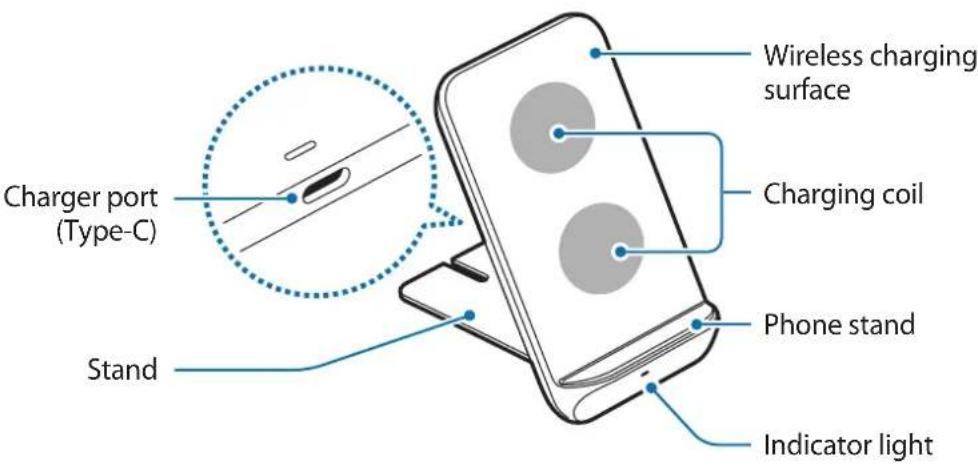

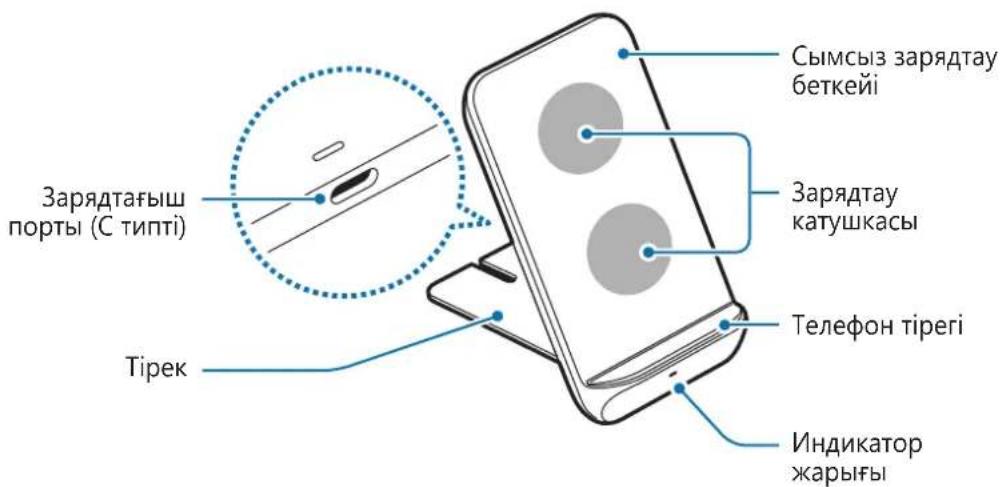
Your device contains magnets, which may affect medical devices, such as pacemakers or implantable cardioverter defibrillators. If you are using any of these medical devices, keep your device a safe distance from them and consult with your physician before you use the device.
Using the wireless charger
Charging the device
Charging your mobile device
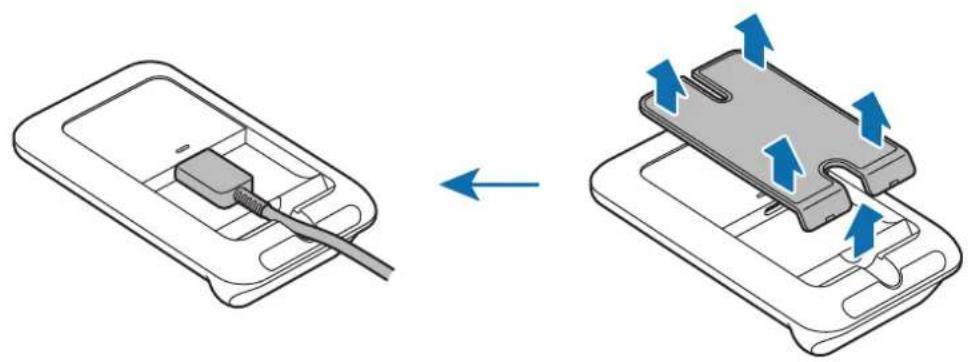
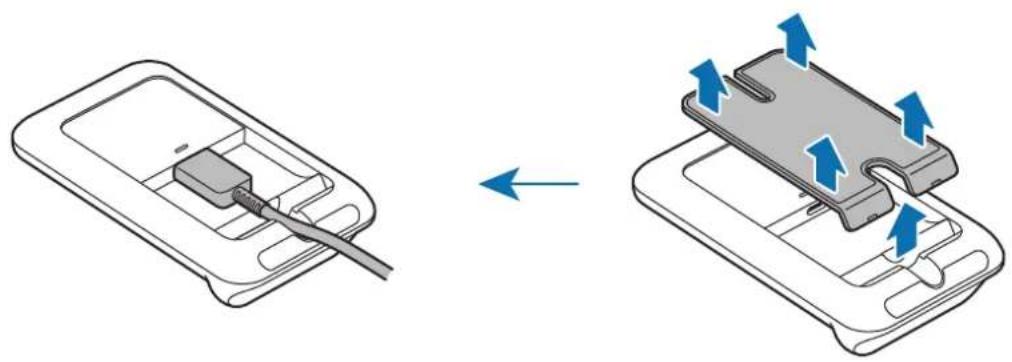
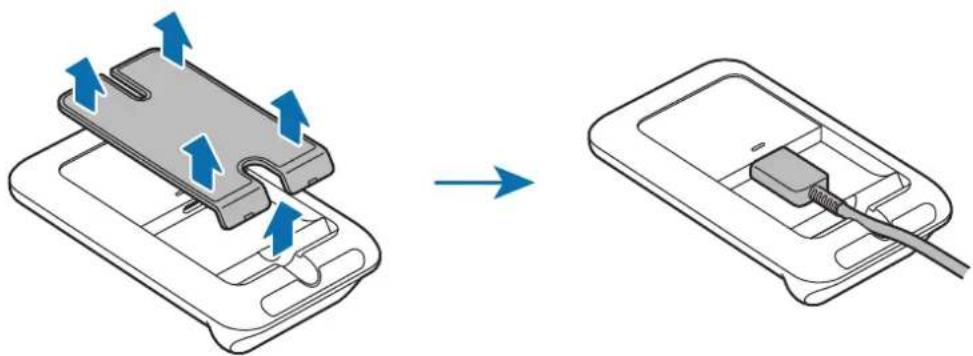
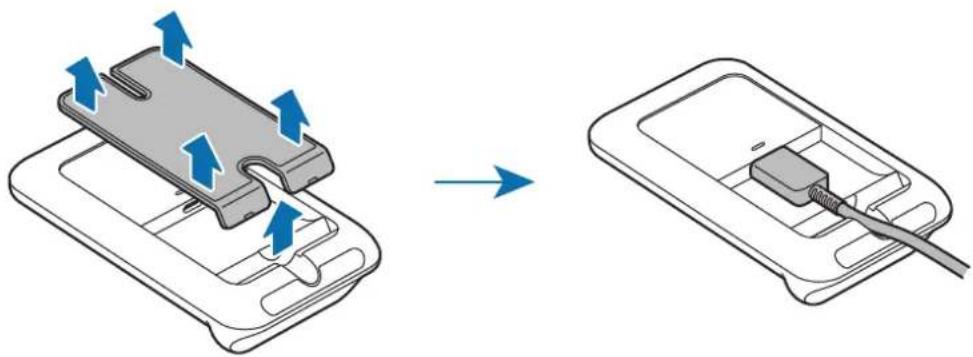
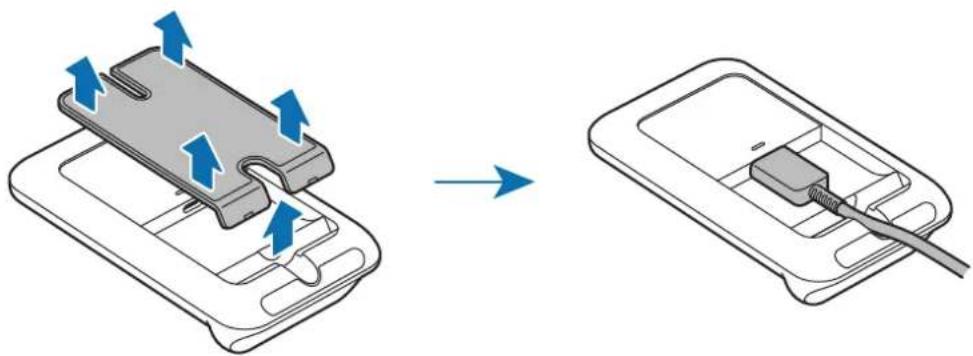
1 Detach the stand from the wireless charger and connect the charger to the wireless charger.
When the charger is correctly connected to the wireless charger, the indicator light flashes red, green, and orange, and then turns off.

Use only the charger (9.0 V/1.67 A) and cable supplied with the device.
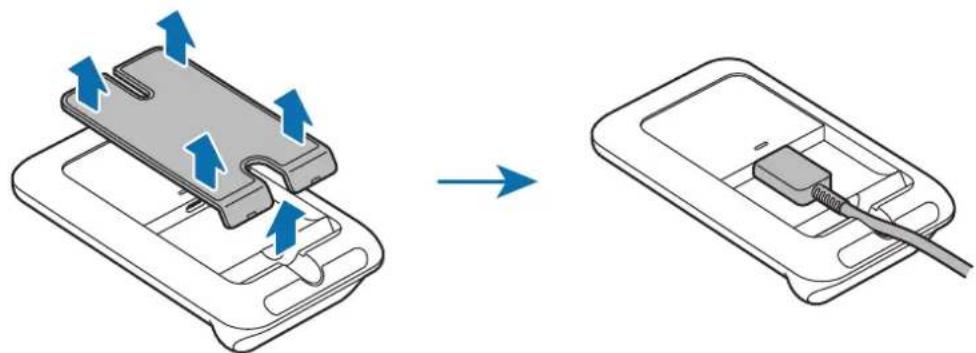
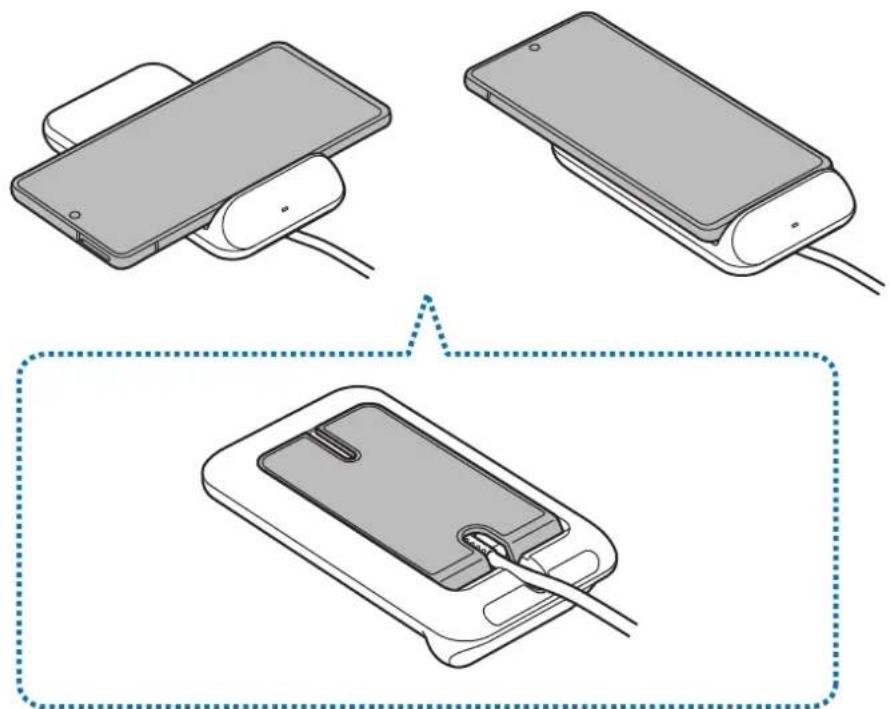
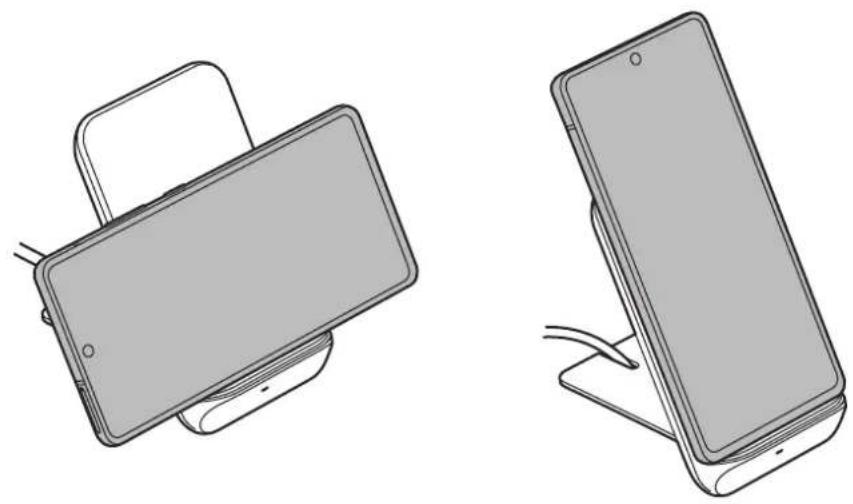
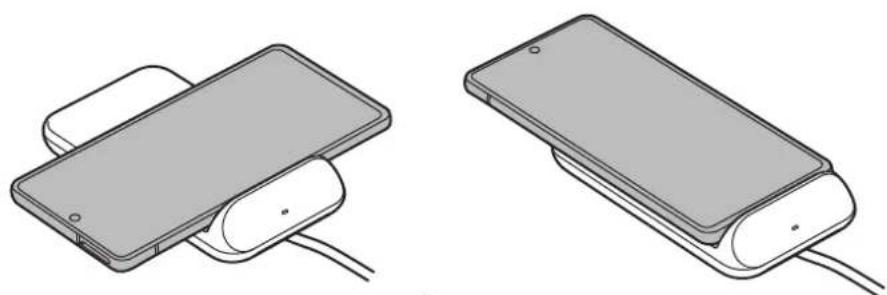
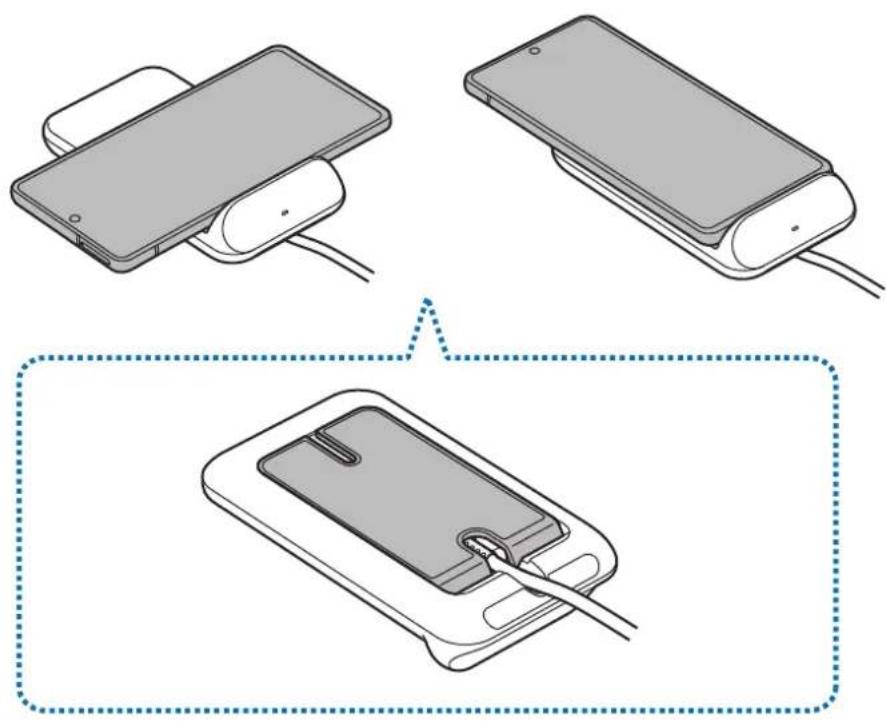
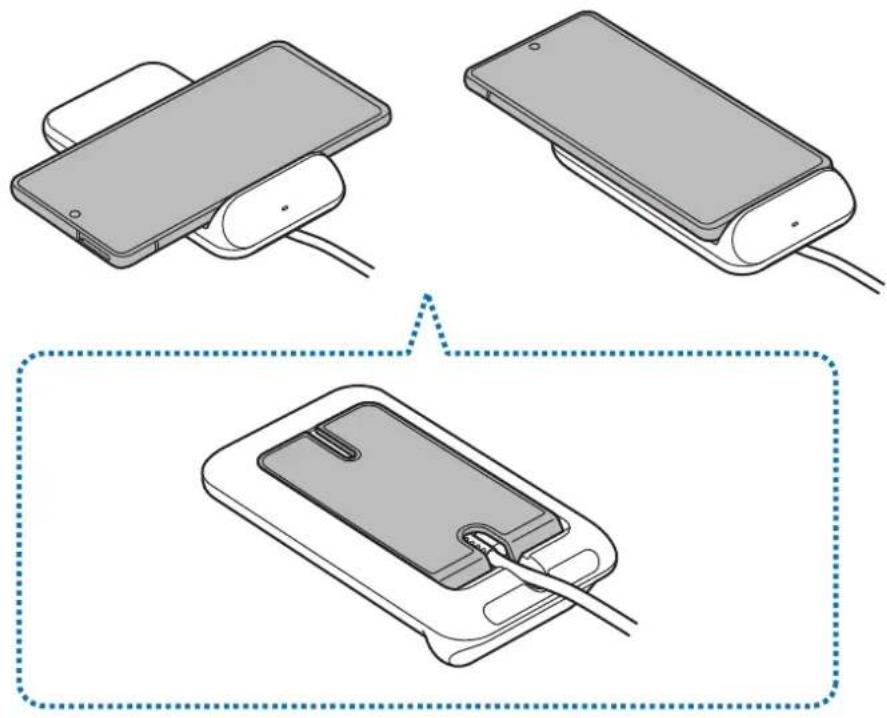
2 Place a supported mobile device on the phone stand.
- Charging will begin when the wireless charging surface comes into contact with the mobile device's wireless charging coil.
- Check the charging icon displayed on the mobile device's screen for the charging status.
- To begin fast wireless charging, place a mobile device that supports fast wireless charging on the wireless charger. For more information, refer to the mobile device's user manual.
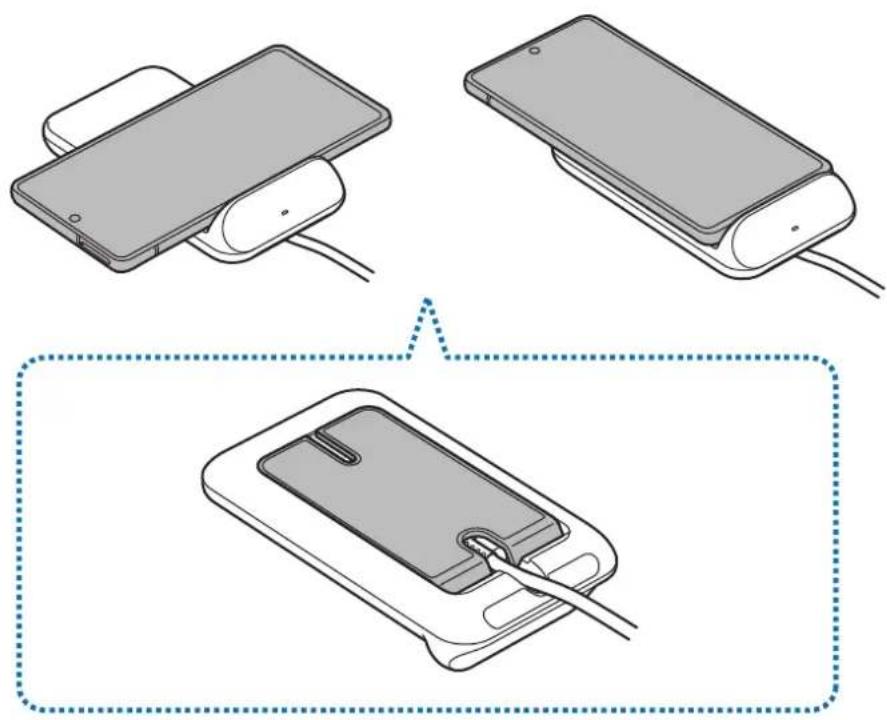
3 When the mobile device is fully charged, remove the mobile device from the wireless charger.

Precautions for mobile device charging
- Do not place the mobile device on the wireless charger with a credit card or radio-frequency identification (RFID) card (such as a transportation card or a key card) placed between the back of the mobile device and the mobile device cover.
- Do not place the mobile device on the wireless charger when conductive materials, such as metal objects and magnets, are placed between the mobile device and the wireless charger.
The mobile device may not charge properly or may overheat, or the mobile device and the cards may be damaged.

- You may need to purchase a charger separately depending on the wireless charger you bought.
- Depending on the location of the mobile device's wireless charging coil, your mobile device may not charge properly.
- Wireless charging may not work properly if you have attached a thick case to your mobile device. If your case is thick, remove it before placing your mobile device on the wireless charger.
- If you connect a charger to the mobile device during wireless charging, the wireless charging feature will be unavailable.
- If you use the wireless charger in areas with weak network signals, you may lose network reception.
- Qi wireless charging may produce noise during wireless charging.
- To save energy, unplug the charger when not in use. The charger does not have a power switch, so you must unplug the charger from the electric socket when not in use to avoid wasting power. The charger should remain close to the electric socket and easily accessible while charging.
Charging your mobile device with the phone stand upright
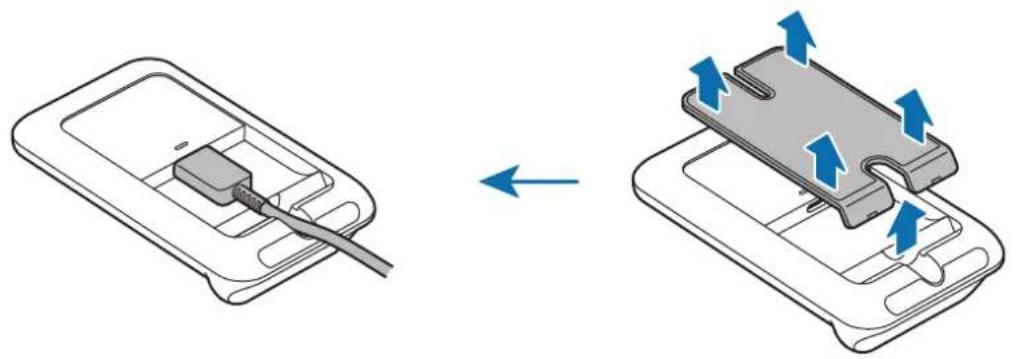
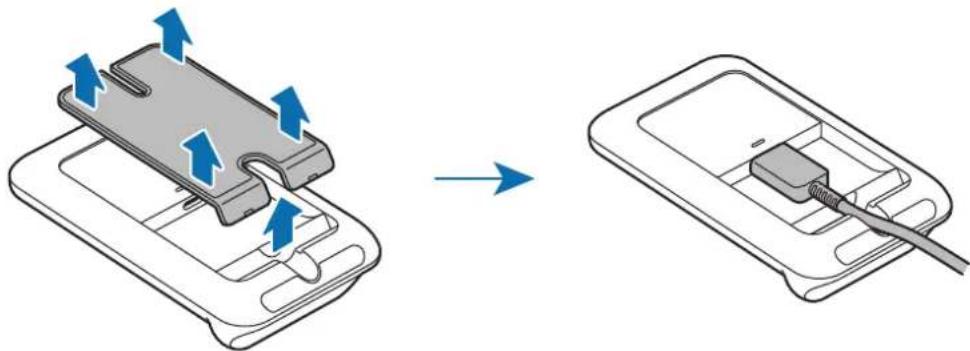
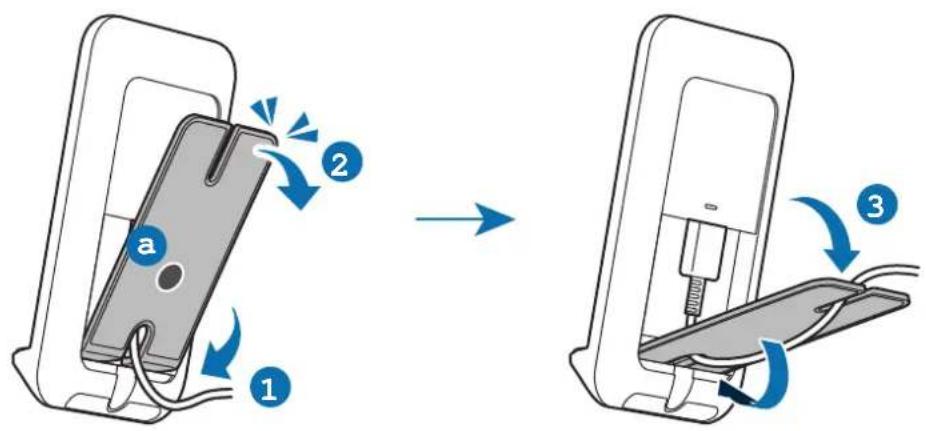
1 Detach the stand from the wireless charger and connect the charger to the wireless charger.

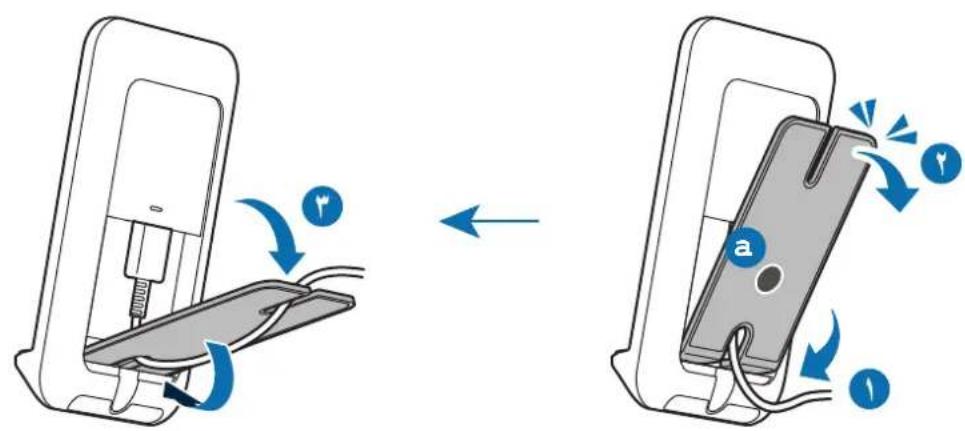
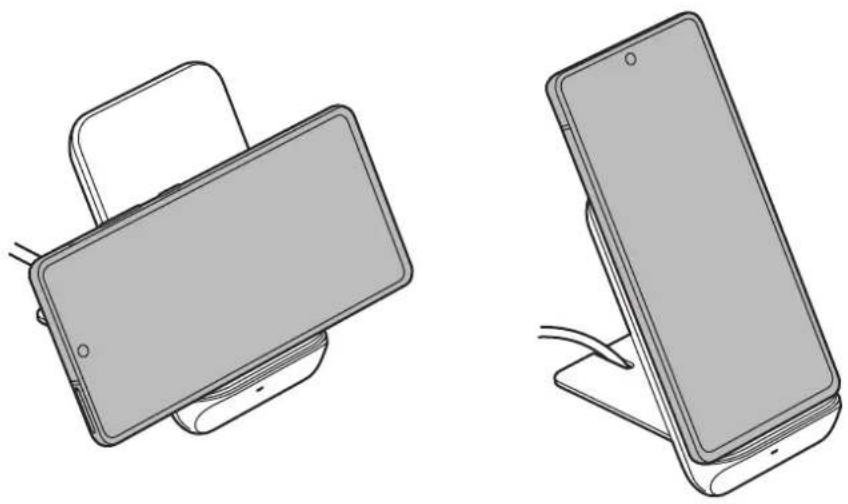
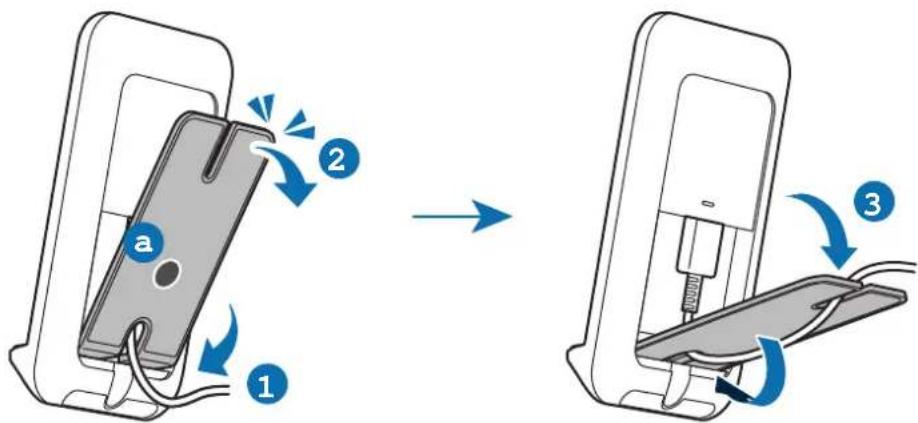
2 Insert the stand to the space on the bottom of the back side and push it down while pressing a part.
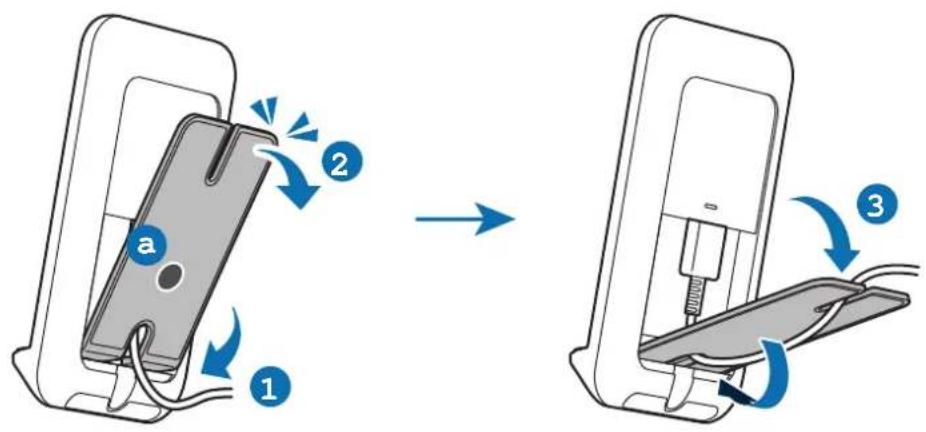
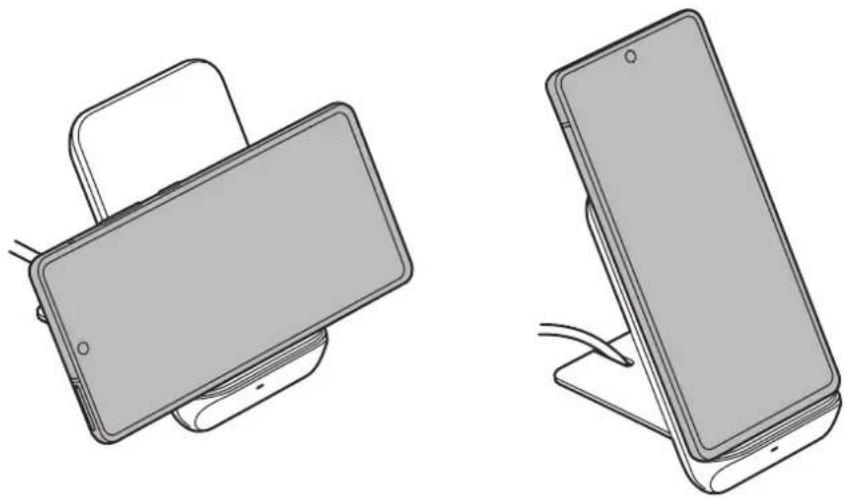
3 Place a supported mobile device on the phone stand.

4 When the mobile device is fully charged, remove the mobile device from the wireless charger.
Charging your Galaxy Buds
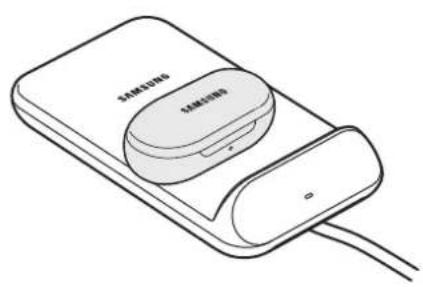
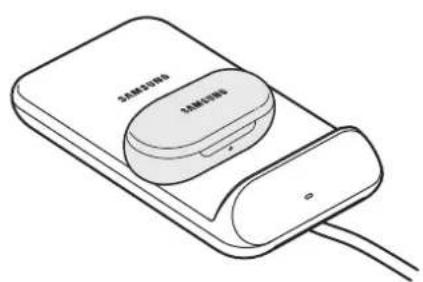
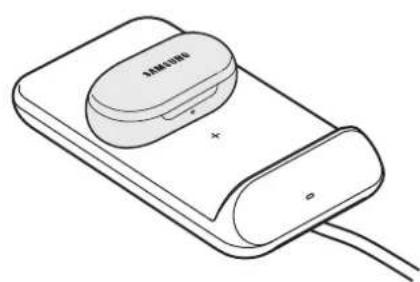
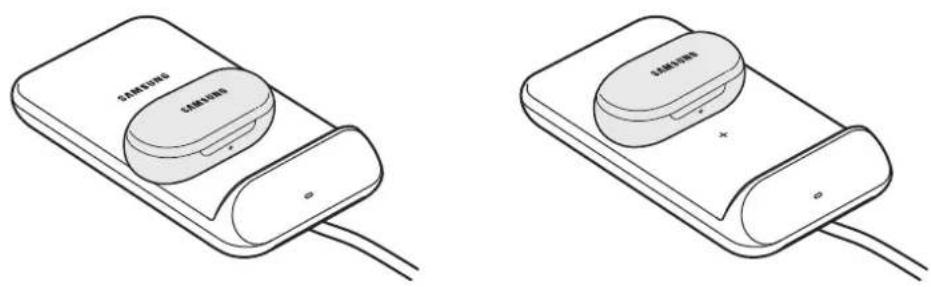
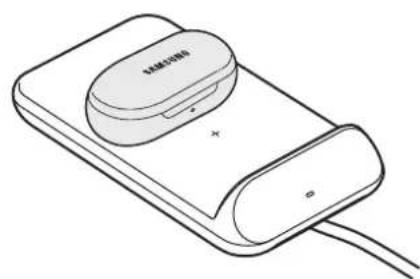
The device has two built-in wireless charging coils. You can charge Galaxy Buds using the wireless charger. Charging will begin when the charging coil comes into contact with the wireless charging coil of Galaxy Buds.

Indicator light identification
The indicator light alerts you to the wireless charger's status.
| Colour Status | |
| Red → Green → Orange | ·When connected to a power outlet |
| Red | ·When charging |
| Green | ·When fully charged |
| Flashing red | ·When not charging properly due to a general error |
| Off | ·When the mobile device is removed from the wireless charger or when the wireless charger is not connected to a power outlet |

- If the indicator light does not work as described, disconnect the charger from the wireless charger and reconnect it.
- The indicator light may work differently depending on the mobile device or the wireless charging cover.
Copyright
Copyright © 2020 Samsung Electronics Co., Ltd.
This manual is protected under international copyright laws.
No part of this manual may be reproduced, distributed, translated, or transmitted in any form or by any means, electronic or mechanical, including photocopying, recording, or storing in any information storage and retrieval system.
Trademarks
- SAMSUNG and the SAMSUNG logo are registered trademarks of Samsung Electronics Co., Ltd.
All other trademarks and copyrights are the property of their respective owners.
Copyright © 2020 Samsung Electronics Co., Ltd.
Copyright © 2020 Samsung Electronics Co., Ltd.
Copyright © 2020 Samsung Electronics Co., Ltd.
IdeHTnΦnKaZna Ha CBeTnHHnHa HnDnKaTOp
CBeTINHHNRT INHnKATOp Bn CnIHn3npa 3a cbCTOHNTo Ha 6e3XnHOTo 3apAHO yCTPOIcTBO.
| Цват Сьстория | |
| Червен → 3е leiн → Oранжев | · Ри вклювае Кьм ИЗTOчник на захранвае |
| Червен | · Ри зарожданe |
| Зелен | · Когат e нально заредena |
| Мигацу червено | · Ри неревно зарожданe поади об Luca гравka |
| Изкешино | · Когат мобiliansOTO устрийстBO ce OTстрази OT 6e3жуното зардно устрийстBO He e CBbv3aHO Кьм Мөжов KOHTaKT |

- Ako CBetTINHHNAT INHdNKaTOP He ΦyHKcNoHnpa NO OnncAHNaH, n3KlOcTe 3aprHOTO yCTPOJCTBO OT 6e3xMnHOTo 3aprHOb YCTPOJCTBO I rO CbpbXeTe OTHOBO.
CBeTINHHNt INDnKaTOp MOKe Da pa6OTn NO pa3NIuH NaUNB 3aBNCMOCT OT Mo6UHOTO yCTPOIcTBo INI KAnaka 3a 6e3JNUHO 3apeKdaHe.
ABTOPcko npaBO
Abtopcko npabo © 2020 Samsung Electronics Co., Ltd.
Toba pBkoBOdCTBO e 3aunTeHO OT MeKdyHapOHN 3aKOHn 3a aBTopCKNTe npaba.
HnkOaCTOTpBKOBOcTBOTO He moKe da 6bJe Bb3POn3BexJaHa,pa3nPoCTpaHraHa, npEBeXdaHa
IINnpExBbPrlHa NOk KaBbTo I Da e oOpMa IINI NO KaKbBTO I Da e HauH, eNeKTPOHeH IINI
MexAHnueH,B TOBa YnCNo oTOKOpnIPAHe, 3aNc IINI CbXpaHeHne B KaKBaTO I Da e CNCTema 3a
IHOpMaunHO CbxPaHeHne Nn3BnUaHe.
TbproBcN MapKn
SAMSUNG i noroTo ha SAMSUNG ca pernctpupaH TbproBckn MapKn Ha Samsung Electronics Co., Ltd.
- Bcunkn octaHaTIbProBCKn MapKn ca co6CTBeHOCT Ha cbOTBeHTHe NTm npNTexKaTeJI.
Prvo ovo pročitajte
Priere koriistenja urea procitajte ovaj priučnik da biste osigurali sigurno i pravilno koristenje.
Copyright © 2020 Samsung Electronics Co., Ltd.
Este manual está protegado ao abrigo de leis de copyright internacional.
Identification of indicatorlys
Telif Hakki © 2020 Samsung Electronics Co., Ltd.
s jlll 1j1j1j1j1j1j1j1j1j1j1j1j1j1j1j1j1j1j1j1j1j1j1j1j1j1j1j1j1j1j1j

aIgai Icogao gI piai jilai gI cldxol:

a
iill jlll 1000
sLxJnJ
USB
USB
J
.
aaiiaaii iiaiaaiiaaiiaiaiaiaiaiaiaiaiaiaiaiaiaiaiaiaiaiaiaiaiaiaiaiaiaiaiaiaiaiaiaiaiaiaiaiaiaiaiaiaiaiaiaiaiaiaiaiaiaiaiaiaia
.
.
Ji j Jn Samsung
.
Samsung
Jaaal
Jg 1
Samsung
jglalbbs
yj j 11111111111111111111111111111111111111

s
j
Jooaaa
1
j 1,7V/2g9.)Jl


iell Jolc Iogdo Jgao 0

Jgssll sll lnnn nnnn nn nnnn nnnnnn nnnnnn
Jn Jnnn nn nnnnnnnnnnnnnnnnnnnnnnnnnnnnnnnnnnnnnnnnnnnnnnnnnnnnnnnnnnnnnnnnnnnnnnnnnnnnnnnnnnnnnnnnnnnnnnnnnnnnnnnnnnn
Jd JSLXLLN jLl 1sLxlln JgJgJgJgJgJgJgJgJgJgJgJgJgJg
Jgssll jgsj 1
Slll jn Jgssll jglj gssll jgl jlaic

Jgaa Jgaaa

yagell jai ly jai ly jai ly jai ly jai ly jai ly jai ly jai ly jai ly jai ly jai ly jai ly jai ly jai ly jai ly jai ly jai ly jai ly jai ly jai ly jai ly jai ly jai ly jai ly jai ly jai ly jai ly jai ly jai ly jai ly jai ly jai ly jai ly jai ly
g 1 1 1 1 1 1 1 1 1 1 1 1 1 1 1 1 1 1 1 1 1 1 1 1 1 1 1
.
.
J51 Jgaoall jlgaiy 1bce kjbjc 1d jkui ju
SuljI jolil 100000000000000000000000000000000000000000000
.
J 1
a ≤ b ≤ 1
SuluJn Jui elui eui Qi SsuUj nui jui
y 1
i j 1
1 1

gagaaagaaagaaagaaagaaagaaagaaagaaagaaagaaagaaagaaagaaagaaagaaagaaagaaagaaagaaagaaagaaagaaagaaagaaagaaagaaagaaagaaagaaagaaagaaagaaagaaagaaagaaagaaagaaagaa
1
a 1e baiiie i jw y aaiy gaiy jaiy
eell Jolc IogcJgao 0
J 1
Galaxy Buds
Galaxy Buds 1


gall gaiy
Sull jalil lla gllg
J 1 J 1 J 1 J 1 J 1 J 1 J 1 J 1 J 1 J 1 J 1
L
.
.
J 1 J 1 1 1 1 1 1 1 1 1 1 1 1
J 15 Jw oK w Lai S
o 1
aaii iiai aiee eae eae eae eae eae eae eae eae eae eae eae eae eae eae eae eae eae eae eae eae eae eae eae eae eae eae eae eae eae eae eae eae eae eae eae eae eae eae eae eae eae eae
1 1

O
1 1

#
1
1 1
1.25 1.9V/1g9.)05

1
jz jz jz jz jz jz jz jz jz jz jz jz jz jz jz
S ACD = S COD + S_ DCE
1
()
1
12 < - 52 < + 52

1
01

(RFID)
jolr jolil olls 15 01 15
1
i j 1
1
2j 1 j 1 j 1 j 1 j 1 j 1 j 1 j 1 j 1 j 1 j 1 j 1 j 1 j 1 j
ii 1
.
i 1
2
1 1
1 = 2
J 1
.281
JiK 1
1
i 1
Jz.
1 1
i 1
.

0d
1
1r 1
1

1
1
Galaxy Buds
J 1 J

i
.2jLg 100
Copyright © 2020 Samsung Electronics Co., Ltd.
L 1111111111111111111111111111111111
S
Samsung Electronics Co., Ltd. S
BheuHn Bnd yCTpoiCTBa

UcTpoICTBO CODepKNT MaHHTbI, KOToPbIE MOryT BnIaTb Ha pa6Otu yCtpoICTB MeNtHCKOTO Ha3HaueHnra, TaKx KaK KApDIOCTMMyJrTOpbl NII NmPiAHTpyEmbIe KapDIOBepTepeΦn6pnnlAToPbI. B Cnyae nCNoJIb3OBaHnRA IIO6Oro n3 TaKnx UcTpoICTB CNeDuET COXpaHrTB 6e3OnaChoe pacCToRHe MExdY HayuHKamn IN 3TNMIyUcTPOICTBaAMn INpeed nCNoJIb3OBaHnEm HauShNKOB Heo6xOdIMO npOKOHcyIbTIPOBA TbCBc C BpaQOM.
ИспOLSване
6ecnpobODHOro 3apYdHOrO
yctpoiCTBa
3apяdka yctpoiCTBa
3apraKa mo6nIbHoro yCTpoiCTBa
1 Chnmtte noctabky c 6ecnpoBODHoro 3apdHoro yctpoiCTBa n noKIOuHTe erO K 6ecnpoBODHOMy 3apdHOMy yctpoiCTBy.
Korda 3apdHoe yctpoCTBO NOkIouaETcK 6ecnpoBODHomy 3apdHOMy yctpoCTBy, CBETOHNikatop Mrraet KpaChbIM, 3eJeHbIM, opaHKeBbIM N BblKnIOuaETcR.

IcnoB3yIe TOnbKO NoCTaBnEMbIe B KOMnJIeKTe C yCTpOiCTBOM 3apAnHOe yCTpoiCTBO (9,0 B/1,67 A) n Ka6eNb.
2 IomeCTIte Mo6nIbHoe yCtpoiCTBO Ha NOcTaBky dJa TeJefoHa.
- Пюцecc Зардкн НачNETся КК Только установпся KOHTaKT Meжду 6ecnpobODHоЗарднОй NOBepxHOCTBIO И KaTyшКо ДЯ 6ecnpobODHоЗapdkn MObNbHorO yctpoiCTBa.
- Дя поверки сатуca зардкп посмOTиTe Ha 3Haayok 3apdкн Ha ekpaHe MO6nIbHOrO yCTpoiCTBa.
- UTo6bI BKNIOHTb 6bICTpyIO 6ecnpoBOHyIO 3apAky, pa3MeCTnTe MO6nIbHOe yCTPOICTBO, KOtOpoe NOdEpeKINBaET cyHKUIO 6bICTpoi 6ecnpoBOHOH 3apAkn, Ha IOBepxHOCTN 6ecnpoBOHOrO 3apAHHORO yCTPOIcTBa. IJIy DOONHITeHbHOH INΦOPMaUN CM. pYKOBOIDCTBO NOJb3OBATEJI M6NBHOrO yCTPOIcTBa.

3 Послп понов зардк mo6иьногу устpoиства снмITE erо c 6ecnpobodnogo 3apdHoro yctpoiCTBa.

Mepblnpedoctopoxhoctn np3aprakMe6nbHbIX yctpoiCTB
He pa3meaTe mo6nIbHoe yCTpoiCTBO Ha 6ecnpoBODHom 3aprHOM yCTPOICTBE, ecn MeKdy 3aJHeN pAnHeIbIO MO6nIbHOro yCTpoiCTBa n erO qExlOM paCnOlaRaETcKpeDHTHa KaP Ta IIN paDNoUacTOTHa IeHTnΦnKaUcnoHNa KaP Ta (RFID) (HaNP., TpaHCnOpTHa KaP Ta IIN KJIouc-KaP Ta).
He pa3meaIte mo6nIbHoe yCTpoiCTBO Ha 6ecnpoBODHom 3apAHDom yCTPOICTBe, ecnn MeJxuMo6nIbHbIM yCTPOICTBOM u6ecnpoBODhbIM 3apAHDbIM yCTPOICTBOM paCnOlaIaOTcTOKOpOBODIe MaTePnaJIb, TaKne KaK MetaJIInueCKNe IpeDMeTbI n MaHHTbl.
Mo6nIbHoe yCTpoiCTBO MoKeT He 3apJxKaTbcra DOLKhbIM O6pa3OM nIN nepepeTbcra, a TaKke MOryT 6blTb NOBpeXdHebl MO6nIbHoe yCTpoiCTBO IN KapTbl.

B 3aBnCmOCTn OT npno6peTeHHoro 6ecnpoBOJHO 3apAHO yCTPOIcTBA BO3MOxH NoTpe6yeTcra DOnONHtJIbHO npno6peCTn ceTeBOe 3apAHOe yCTPOIcTBO.
- Mo6nIbHoe yCTpoiCTBO MOKeT 3apJXaTbcr HnPpaBnIbHO B 3aBnCmOCTN OT MeCTOnoIooKeHnKaTuShKn 6ecnpoBOdHou 3apJKn B Mo6nIbHOM yCTpoiCTB.
- Φункця 6ecnpobODHON 3apЯdkn moKeT pa6oTaTb He npabNlbHO, ecn MO6nIbHoe yCTpoiCTBO HaxOHTcB B PNOTHOM YexJe. Ecn YexOJ PNOThBi, CHIMITE erO nepeD TeM, KaK pa3MeCTNTb MO6nIbHoe yCTpoiCTBO Ha 6ecnpobODHom 3apЯIDHom yCTpoiCTBe.
- Ecnn nodknouhtb 3apdHoe yctpoiCTBO K MObInbHomy yctpoiCTby BO BpeMa 6ecnpoBODHO 3apdKn, fynKcna 6ecnpoBODHO 3apdKn 6ydET HeIOCTynHa.
- Пи Использовани 6ecпровдого зардого устpoиства в мостax ссябим сигналом сети ппем OT Hee может 6ыт b Heюctупен.
- BeçnpoBODHà 3apJkα cTaNdapTa Qi moXeT 6bITb npUHHO'B03HnKHOBeHnIyMa BO BpEÀmpaocceca 6ecnpoBODHô 3apJkN.
B ceIax 3KOHOMn 3JIeKTPo3Heprn OTKIOUaTe 3apJHoe yCTPOIcTBO,ecnOHO He nCNoJIb3YeTc. 3ApJHoe yCTPOIcTBO He oChauEHO BbIKIOuAteJeM NITAHN, NO3TOMy erO HxKHO OTKIOUaTB, YTO6bl npepBaTb Ipouecc 3apJKn IN C3KOHOMtB 3JIeKTPo3Heprn. PpN IcNoJIb3OBaHnn 3apJHoe yCTPOIcTBO DOJXHO IIOTHO pPnIeRaTB K PO3ETKe I HxODNTbcB I JERKOIOCTYPHOM MeCTe.
3apraKa Mo6nIbHOrO yCTpoiCTBa Ha nOcTaBKe B BeptuKaIbHOM noLoXeHn
1 Chmnte noctabky c 6ecnpoBODHoro 3apdHoro yCTpoiCTBa n nodklouHTe erO K 6ecnpoBODHOMy 3apdHOMy yCTpoiCTBy.

2 BcTaBbTe nOCTaBky B npocTpaHCTBO B HnKHe yactn 3aHHe nAHeN yCTpOInCTBa nHaDaBNTe Bn3, Haxmna Ha o6NaCTb a.

3 IomeCTIte Mo6nIbHoe yCtpoiCTBO Ha NOcTAbKy dJa TeJefoHa.

4 Iocne noHno 3apAkn MObIbHoro yCTpoiCTBa cHIMTe erO c6ecnpoBODHO 3apAnHO rCTPOiCTBa.
3apЯнka 6ecnpoBODhblx HayshnKOB Galaxy Buds
UcTpoIcTBo IMeET DBe BcTpoEHHbIe KaTuShKn IJIa 6ecnpoBOJHO 3apAKn. BeCnpoBOJHbIe HayuHKn Galaxy Buds MoXHo 3apAkaTb C NOMOUsIO 6ecnpoBOJHO 3apAHorO UcTpoIcTbA. IpOucec 3apAdkn Hauchetc, KOrDa yCTaHOBITc KOHTaKT MeKdy 3apAHorO KaTuShKoN i KaTuShKoN dJIa 6ecnpoBOJHO 3apAKn HayuHKnOB Galaxy Buds.
IdeHTnΦnKaZna INHnKaTopa
CBeTOBoi INHnKaTOp INHΦOpMnpyet BaO COCToAHnn 6ecnpoBOJHO 3apAHorO yCTpOiCTBa.
TEXHHECKNX PERJAMEHTOB TAMOXEHHORO COIO3a
DOnonHnTeBHyIO INOpMaUIO O npOdyKmN Bbl MoKeTe y3HaTb y
IMNOpTepa/0oHnuaJIbHOrO IpeIcTaBnTeJHa TeppuTOpM
Pocncko Fepaunn Ha ha caiTe npOn3bOuTeJra.
Cpok rapaHTn - 6 MecaueB C MOMeHTa npno6peTeHn npOyKta.
Cpok cnyxb1 - 1 roD.
TexHnueckne xapaKTepeNCTnKn B3y:9V 1.67A
TexHHueckne xapaKTepeNCTnK n C3Y:BxO:100-240V AC,50-60Γu;
BbIXoD:5.0V 2.0Annn9.0V 1.67A
*Modenb n3dennr, cTpaHn DaTa npOn3BODCTBa, ycIOBnN cNoIb3OBaHn N xpaHe
Hnra, a TaKxpe DeIcTBn npu ObHapyKeHHn HncnpaBHOCTn yKa3aHbI
Ha ynaKOBKe.
OOO «CamaHr 3neKtpoHHc Pyc KomnaHn», PocchicKaФeepaun, 123242,
r. MockBa, HOBHckn 6yNbBap, D. 31, nomeeHne 1, 2.
U3roTOBntenb: Camcyhr 3JneKtpoHnKc Kf. JtIa
IOpndueckn aDpec
(M3TaH-DoHr) 129, CamcyHr-po, EHHToHr-r, r. CyBOH, KHeHr-No,
Pecnyblica Koper
m3rTOBNTeIa:
Aapeca 3aBoIOB*:
WITS VINA CO., Ltd., Lot cn7, Diem Thuy Ip(A area), Hong Tien Commune, Pho Yen Town, Thai Nguyen Province, BbeTHAM
Abtopckne npaba
© 2020 Samsung Electronics Co., Ltd.
Данhoe руковдъво 3aшицено мждунарови 3akohm n ob abtopcknx npabax.
3a npesaaetc Bocnpo3BODntb, pacnpoctpaHrTb, npeboNTb nn nepedaBaTb KaKneIIO6 yactn daHHoro pykoBDCTBa B IIO60 fOpMe n IIO6bIM cnoco6om, 3JIeKTPOHHbIMnn MexaHueckm, BKIOUay fOTOKOINpOBaHne, 3aNcB n XpaHeHne B IIO60 cnCTemExpaHEny n noncKa IHfOpMaun.
TobapHbIe 3HaKn
- SAMSUNG i nlorotin SAMSUNG yBnIOTc3apeHnCTpnpOBaHHbIMn TOBaHPbIMn 3HaKaMn KOMNaHnSamsung Electronics Co., Ltd.
- ПразиabTOPCKne npaba N TOBAPHbIe 3HaKIN YBnIOTc co6CTBeHHOCtBIO COOTBETCTBYUOxN BnaIeNbueB.
Ozhannomtece nepeid noyaTkOM BnKOpncTaHn
Ipeed KopncTyBaHHm npnctpoem yBaXno npouHTaTe uei noci6Hnik KopncTyBaayd 6e3neuHoro Ta HalexHOro BnKOpNCtAHnn.
3o6paXeHHa MoKyTb BiDiPi3HraTnca BiD iIChOrO BnpO6y. Bmict MoKe 3MiHIOBaTnca 6e3 3aBvachoro nonepdXeHHa.
-Перш hix викоростовуbatи 6e3dpoTobи 3apaHn npnctri, nepekoHaTecra, zu BIn cymicn i3 BaHIM MObHIM npicTpoem.
POn3Hauchn

NonepexHH: cHTyaui, 0o MoKytb npu3Becn Do TpaBMvBaHH Ba c a6o iHux oci6

Ybara: cnTuayi, iO MOkyb cpiuHHn noWKoJxHnn npictpo a6o iHoro 06naHaHH

3ayBaXeHHn: npmITKn, npaI 3 KopnCTyBaHH Ta doaTkoBI BiOMOcTi
Початок роботи
Kompanečaίя
IpebeipTe HareBhicty KOMnneKti Taknx KOMnoHeHTiB:
- Be3dpoTobN 3apdHn npucTp i
- BLOK XINBHeHHA USB
Ka6enb USB
KopoTkn noci6nK KopncTyBaHa

Be3dpoToBI 3apAHI KPNiKNI pOdaIOTbcra OKpEmo.
KOMnOHeHTN, IO BXoJrTb DO KOMnJIeKTu npIcTpoIO, Ta 6yDb-ЯKI DoCTynHi akceCyapn MoKyTb pi3HNTuCra 3aJIexKHO bID KpaIHn a60 onepaTopa MepeXi.
- ПпстocуBaHHЯ, сь BXODЯТь до KOMNJIeKTy, пиЗнayeHo BnKЛIOUHо дя цboro npnCTpoI; BOHN MOxKyTB 6yTN HeCymiChIMN 3 iHшIMN ппстpoIaM.
3OBHIHnBnIaTxaXapakTePncTNKMOxytb 3miHIOBaTnca 6e3 3aBuacHoro nonepdKeHH.
-ДоаТКОВIakceCyapn moKHa npiNb6aTn y MicueBOro npoJaBua Bnpo6iB Samsung.перд КупВлeю akceCyapiv CiiD nepekoHaTncsA, lo BOHc cyMiChi 3 npicTpOeM.
BukopncToByte TlBKn akcecyapn, peKomeHdoBaHi fipmo Jo Samsung. BnkOpncTaanHecxBaJIeHNx akcecyapIB MoKe np3BeCTn Do npo6IeM i3 cyHKIOHyBaHHm pnpctpoTO TaDo NOrO HeCnpaBHOCTi. Ha Taki BnnaKn dIra rapaHTII He nouPioEtbca.
- Доступнистб удь-якх akcecуapib може зMiHIOBaTиСЯ на Вlaани розудixhIX KOMпанИВиробнкIB.Длг OTримання дokладhiwoi iHΦopMaцii zuoDo docTyHHx akcecуapib BiDbIaIte Be6-caIT Samsung.
Bvrgia npnctroo


Bau npucptpiMiCTb MarHITn, kI MOKytB BnNBAuHa MeuHi npcTpoi, taKi KaPioCTmUyTAOpn a6o imnlaHTOBaHI KAPIOBepTe-Dephi6puiAToPi. RaKIo BVnKopncTOByeTe Ha3BaHi MeuHi npcTpoi, TpMaIte BaW npcTpi Hi 6e3neuHi BiCTaHi BID HIX Ta npOKOHcyMbTyIeTec 3 Ikapem NepeD Tm, kK KopNCyBaTuCb npcTpoEM.
BnKopncToByIe IiIe ToI 3apAHi npNCTpi (9,0 V/1,67 A) Ta Ka6eIb, Io BxOJaTb Do KOMPJIekTy NOCTaHaHHa NpNCTpoI.
2 Poklaaditb niDtpmUbaHn MO6IbHn npucpii Ha niDCTaBky dny Tepeohy.
3apJxHnnoHc, 0iHO mIX NOBepXHeo 6e3dpoTOBOrO 3apJHOrO npCTPOTo KaTuykoIO Iy 6e3dpoTOBOrO 3apJxHnHO MOiNbHO rPNCpTOO 6yIe BCTaHOJIeHO KOHTaKT.
- IpepeBipTe cTah 3apJxHnHa Mo6IbHOro npicToIO. Ha HbOrO Bka3yE nIKtorpAma 3apJxHnHa ekpaHI.
- 506 po3noaTn wBnIke 6e3dpoTOBE 3apJxHn, NOMICTb MO6InbHn npCTpi, 1o nIITpIMyE 1O fYHKciHO, Ha 6e3dpoTOBn 3apJHn npCTpi. DoklaHw y IHOpMaio HabeJeHO B noci6NkU KOpNCtBuBaHa MO6InbHoro npCTPOIO.
3 KoliMo6iBnI npicpii noBHicTIO 3apAHTbcra, BntaHITb Ioro 3 6e3dpoTOBOrO 3apAHoro npictpo.

3axoNi 6e3neKn 70do 3apAkaHHaMo6iNbHx npncTpoIB
- UctahOBIOUOHN MOiBnHn npNCTpiHa 6e3dpoTOBn 3apAHDn npNCTpi, nepeKoHaTecra, 10 MIX 3aDhBOIO NaHeIIO Ta YoXlOM MOiBHOrO npNCTPOIO HemaE KpeDHTOi KapTKn a60 KapTKn paioactOTHOI iJeHTuKaui (RFID) (rk-OT eNEKTPOHHN KBITOK uMaHITHa KIOU-KapTa).
He BCTabIaIe Mo6IbHn IpnCTpiy y 6e3dpoTobn 3apAHN npNCTpi, kUO mIX HmN eJekTPoNPoBIDHi MaTePiAn, k-OT MeTaneBi npEdMeTu a6o MarHITn.
Mobibn npicpi moke He 3apjkaTnc HaJeKHM uHOM a6o neperpibaTnc. Kpim toro, ce moke npn3BecTu DO NOwKOJKeHHa MOiNbHorO npicptpo a6o KapToK.

- Do komnlekty deaKnx MoedeJe 6e3dpoTOBux 3apAHHx npncTpoIB He BXoHtB MepeXeBn 3apAHHn npncTpi, TOK noRo notpio HO npuaTaN OkpemO.
- Hanelkne 3apjkaHnMo6inbHOro npncpoIO 3aneKntb BiD po3TaUyBaHHN noRo 6e3dpoTOBOi 3apJHOI KOTuKN.
-ЯкutoMO6iNbHn npncTpiy y TOBCTOMy 0oxni,ce MoKe nepeWkoJxATu 6e3dpoTObOMy 3apAnKaHHIO.Y TAKOMy pa3i 3HIMtB 0oxoI 3 MO6iNbHOrO npncTpoU,nePsh HIX KnaCTn Ioro Ha 6e3dpoTObHn 3apAnHn npncTpi. - Ykso nizac 6e3dpoTOBOrO 3apJxHnro DO MO6iNbHOrO npncTPOIO nID'cHaTHmepexEbn 3apJHnnpNCptpi, fynKciA 6e3dpoTOBOrO 3apJxHnraCTaHe HeoctyHNO.
- Y pa3i BUKOPNCTaHn8 6e3dpoToboro 3apAHHo npncTPOB B Micx 3i Cna6Km MepxeBm CnHaIOM 3B'3OK i3 MepeJeIO MoKe 6yTu BtpaueHo.
-Пдчacзаряжаннгбeздротовизаряншпст piMoKe CTBOPOBaTN shym.
ДяЗоцаджehня ekeTpoeHeprii Bi'd'edHyIte 3apdHni npicpti, ksoBn He BnKOpNCTOByetbCra. JaKso Ha 3apdHomy npicTpoi Hemae nepemukaya JKNBHeHHa, Ioro cIiD BnMaTn 3 po3ETKn, KOnBn He BnKOpNCTOByetbcra, dJa 3aozadJKeHHa ekeTpoeHeprii. Pid yac 3apdXeHHa 3apdHni npicTpi Mae uiNbHO npnilraTu Do rHi3da Ta 6byu Ierko DOCTyHIM.
3apJxHnMo6IbHOro npCtpoo 3 niCTaBKOIO dJe TenefoHy y BeptnKaIbHOMy nolOKeHHi
1 Biikpinitb niDcTabky BiD 6e3dpoToboro 3apndoro npncptpoTa npneHaHTe do Hboro MepeXeBn 3apdHni npnstpi.
2 YcTaBTe nDCTabky B OTBip yHn3y Ha 3aHi CTOpOHi Ta HATNCiTb Ha YaCTINHy a, 0o6 3aΦikCyBaTu.
3 IoknaiItb niTpmyBaHm MOibHn npucpiHa niCTabky dny Tepeohy.

4 Koln Mo6IbHn npucpii noBHicTIO 3apAHTbcra, BntaRHiTb Ioro 3 6e3dpoTOBoro 3apAHOro npucptpo.
3apdkaHnHaBvHnKiB Galaxy Buds
Пристрий макды Вмонтоваши КOTушки дя 6e3dpoTOBOrO зарджань. Habушнин Galaxy Buds Moжна зарджати 3a дономогою 6e3dpoTOBOrO зардного писчю. 3apdжань розnotсьс, коли зардна КOTушka 3'EDhaTbCS 3 KOTuShKOIO дя 6e3dpoTOBOrO зарджань HabuyshnikiB Galaxy Buds.
3наченя iнданkaTopa
CbitIOBm iHnKATOp nobIDomJIpe npo CTaH 6e3dpoTobOro 3apJHoro npicTpOIO.
© Samsung Electronics Co., Ltd., 2020
Cen nociHnK 3axuIeHO 3rIIO 3 MIXHKApOHNM 3aKOHAMN OTOA BTOPCbKnX npab.
3a6oponeho BiTbOpOBaTN, po3noBcOJkyBaTN, nepeKlaDaTN a6o nepeJaBaTN B 6yb-jaKi fOpMi cn 6yb-akmN 3ac06amN, eNEKTPOHHMn a6o MexaHlHuHMN, BKIIOUHO 3 KcepOKoPiOBAHHM, 3aIncyBaHHM a6o 36epirAHm Ha 6yb-akOMy npNCtpoi dny 36epiraHHaHnx YN B iNΦopMaizHoNo7ykoBicnCTeMi, 6yb-ky qactInHy cboRo noci6Hnka.
Tobaphi 3HaKn
SAMSUNG i norotin SAMSUNG e 3apeectroBaHIMn TOBAPHMn 3HaKaMn KOMnaHii Samsung Electronics Co., Ltd.
- Yci iHsi TOBapHi 3HaKn aBTopcbKi npaBa HaneJaTb BiIDNoBiDHM BlaCHNKaM.
MaHbI3dbl Kipicne
Kayinci3 xhe npbc naiDalaHydbl KaMTamaCbI 3 eTy ywiH Kpyblfbln naDalaHyaan 6ypbIH OcbI HxCKaydbI OKblHbI3.
- KeckiHep 乌BaHaBbEhIMHeH e3reWeJey 60nybI MymKIn. Ma3myn eckepTyci3 3reptinyi MymKIn.
CbIMcbI3 3apraTafbl7bl naJaIaHa6ac 6ypbH, OHbIH KypblfblHbI36eH yIeCiMdi eKeHdiIHe K03 JeTKi3iH3.
Hycayb6elriwelep

A6aIbI3: 03iH3re Hemece 6ackaIapfXapaKaT KeItipetIH XaFdaIap

A6aIahb3: Kypblfba Hemece 6aca Ka6dbkTapfa HyKcaH KeJIipeTIN KaFdaIap

Xa6apIama: Xa36anap, naIdaIaNHy TypalbKeHecTepe Hemece KocbIMwa mJIImeTTep
Kmbictbi 6actay
KopantbIn iwiHderici
ΘhIMHIn Kopa6bHnDa KeIeci ΘleMeHTTep 6ap eKeHiN TeKcepiH3:
CbIMcbI3zaPraTafblu
USB kyaat aanterpi
USB ka6eji
XbIJaam 6actay HcyckaylbIfbl

CbIMcbI3aPraTayKaKaNaTapbl6eJIeKcaTbIaIabl.
KypbIfBImeH 6epiIeTIn 3JIeMeHTTep XaHe Ke3 KeIReH KOJIKeTIIdi KepeK-JapaKTap aIMaKa Hemece Kbl3Met npoBaIdepIe 6aIIaHbICTbl apTpplbOJybl MyMKH.
XnHaKeH 6epiIeTih 3IeMeHTeP TeK OcbI Kypblfblfa apHaJIraH XaHe 6aKa KaYpbIflbIapMeH YIneCneyi MymKiH.
CbipTkblTyplepMeHTexHnKaIbIKcunatamalapbI eceptYci3 3reptiLiyIMMkiH.
- Xepriikti Samsung catyubicbHaH KocbIMwa KepeK-JapaKTap catbIn aIyblb3fa 6oIaI. CatbIn aImac 6ypbIH OApdbIH KypblfBImeH yIeCiMdi eKeHdiriHe Ke3 XeTKi3iH3.
Samsung KyntaHaKepeK-JkapakTapbI FaHa NaJaIaHaHbIHb3. KyntaMaHaKepeKJkapakDbI NaJaIaHy HAnxKeciHne KeiJaIKNeH KaMTbImaHTbIH eHIMdiIK MocelJIepi MeH aKaaybIKTap opbH aIybl MyMKIn.
-БарлбдakceccsyapnapdlnKoJxetimdiinirToIbikTaN Hdpuyi KOMnHaHnApFa 6aJIaHbICTbl E3reWeleHyi MymkIn. KoJxetimDi KepeK-JapaKTap TpaJIb I KocBIMwa aKnapaattbI Samsung Be6-caTbIHan KapaHbI3.
KypblfblHbIH KypblbIMbl

CnKtbl MeiHnHaIbIK Kypblfblapfa Tepic acep etyi MymkiH MaHHTep 6ap. OcbI MeiHnHaIbIK KypblfblapdbH 6ipih naJaHaHaTbH 6oJcaHb3, KypblfblHb3dbl OlapdaH Kayinci3 KaWbIKTBkTa yCTan, KypblfblHbI naJaHaHy aJDbIHda dApirepiH3re xa6aplaacblb3.
CbIMcbI3 3apraTafbltbl naJaHaHy
KypblfblHbI 3apdTay
Mo6nIbdi KypblfblHbI3dbI 3aprday
1 TipeKti cblcI3 3apraTafblTaH aXbipaTbIN, 3apraTafblTbI CblcMbI3 3apraTafblkKa KocblbI3. 3apraTafblcBIMCbI3 3apraTafblka Dpybc KocblfAH Ke3De, INHnKATOP KbIbI, Xacbl JxHe Kbl3fbIcapbl TycneH XblbIKTaNdbI, codah Kein OweDi.

Tek KypbIITbIMeH 6ipre 6epiIrrn 3apraTaBbI (9,0 B/1,67 A) peH Ka6eJIbdi KoJdaHbIHbI3.
2 Konday kopeceitein moBnIbI KypblfblHbI Telefoh TiperHe KoBihb3.
CbIMcbI3 3apraTay 6eTIHe MOBnIbI KypblfblHbIH CbIMcbl 3apraTay KaTyWKacbl XaHaACKaH Ke3ne 3apraTay npoueci 6actanaIbI.
3apay Kyin H Kepy yin MO6nIbdi KypblfblHbIH 3KpaHbIHda KepceTilreH 3apay 6JIiwecin Tekcepiniz.
XbIaM cbIMcbI3 3apTaydbI 6actay ywiH Xblam CbIMcbI3 3apTayfa KOnday KepceTeIH MOBnIbI KypblfbiHbI CbIMcbI3 3apTafbiKa KObIbI3. KocIMwa aKnapaT any yuIN MOBnIbI KypblfbiHbI NaadalaHywI HyCKaylbIFbIH KaPaHbI3.
3 Mo6nJIbdi Kypblfbl TOJbIKtaa 3apraTalFaH Ke3de cbIMcbI3 3apraTafblTaHaIbIn TaCTaHbI3.

Mo6nIbdi KypblfblHb3apraTay Ke3iHderi caKtbik wapaIapbl
Mo6nIbdi KypblfbiHbIH apTKbl Xafbl MeH Mo6nIbdi KypblfbiHbIH KaKnafbHbIH apacbHa KpeiTTik KapTa Hemece paDno-xxiIKti ndENTuNkaua (RFID) KapTacbIH (TpaHCnOpTTbIK KapTa Hemece KiIT KapTa CnKaTbI) KOybln, Mo6nIbdi KypblfbiHbl CbIMCbI 3apraTafblWka KOImaHbI3.
MoibI Kypblfbi MeH cbIMcbI3 3apraTafblw apacbHa MeTaJI 3aTTap MeH MaHTTEP CnAeKtbl ETKi3riu MaTePnaIadap 6oJFaH Ke3de, MoIBI KypblfblHbI CbIMcbl3 3apraTafblka KOImaHbI3.
Mo6nIbdi Kypblfbl dypbc 3apraaHMece KaTbI KbI3bIN KeTyi He Mo6nIbdi Kypblfbl MeH KapTaJap 3aKbIMdaJybl MymKiH.

- C3diH catbIn aIraH cbIMcbI3 3aprTaftbIHbI3ra 6aJIaHbICTbl 6eJIeK 3aprTaftbITbl catbIn aIybiHbI3 KepeK 6Olybl MymKiH.
Moibdi KypblfblHbIH CbIMCbI3 3apdTay KaTyWKacblH, opHaJnackaH JepiHe 6aJIaHbICTbl MOIBdi KypblfblHbI3 Dypbic 3apTalMaybl MymKiH.
Mo6nIbdi KypblfbiHb3fa KaIbIH Kan Kuri3ceH3 cbIMcbI3 3apraTafbiUdypbcXyMbIC icTeMeyi MymkiH. Erep ci3deri Kan KaIbIH 6oJca, OHBI cbIMcbI3 3apraTafbiUka Mo6nIbdi KypblfbiHb3dbI KOIMac 6ypblaHbI3.
CbIMcbI3 3apraTany ke3iHde MO6nIbdi KypblfbiHbI3fa 3apraTafblWtbl KOCCAHbI3, cbIMcbI3 3apraTay fYHKUncBcI KOJKeTImDi 6OImaIbI. - Erep kei ciHnbI aIci3 kepIepIe cbIMcbI 3apraTafblWbI KOJaHcaHbI3, keJI Ka6blndaybIH KofaTbIN anybIHbI3 MymKiH.
CbIMcbI3 3apJdTay Ke3IHDe Qi cbIMcbI3 3apJTaftbiWbI WbIfapByMymKiH.
KyaTbI yHemDey ysiH naJaIaHaBImMaFaH Ke3e 3apraTaftbIXeJIiEh axbipatbIHb3. 3apraTaftbIHTbIH Kyat KockblWbIKoK, COHbIKTaH Kyat bICbpab6bIH 6OJdbIpMay ywiH naJaIaHa6afAH Ke3e 3apraTaftbITbI eKeKtp po3eTKa YrcbIHah axbipaty kepek. 3aprTay Ke3iHde 3apraTaftbIw eKeKtp po3eTKa YacbIH XaKaBH XHe OHa KOn XeTimdi 6OJybl Kepek.
Telefoh tiperi tik kyinde mo6nbdi Kypblfblb3dbI 3apraTay
1 TipeKti cblmb3 3apraTafblTaH aXbIpaTbIN, 3apraTafblTbI cbIMcbl3 3apraTafblkKa Kocblb3.

2 TipeKti apTkbl naneBdiH actbHfbl XaftbHdaftbl 6oc opbIHfa eHri3iH3 de, a 6eJIirH 6aca OTbIPbIN, OHbl TemeH nTepiH3.
3 Kojday kopeetilein Moibdi KypbIrfHbI Telefoh Tiperine KoibHbI.
4 Mo6nJIbdi Kypblfbl TOIbIKtaJ 3apraTalFaH Ke3de cbIMcbI3 3apraTaBbITah aIbIn TaCTaHbI3.
Galaxy Buds kýlačka6bɪN ɜpǎdTay
KypbIbIa eki kipiktiipilreH 3aprTay katuKacbl 6ap. CbIMcbI3 3aprTaftbI naHaIahbln, Galaxy Buds KyaKa6bln 3aprTayfa 6oIaIbI. 3aprTay katuKacbl Galaxy Buds KyaKa6bln4aIbI cbIMcbI3 3aprTay katuKacblMeH XaHaCKaH Ke3de 3aprTay npoueci 6actaIadbl.

HdNKaTOP шамыньи ndeHTNФКацясbl
HdkatopXapbIfbIcbIMcbl3aPraTafblWtblH KyHH KepceTei.
| Tусi Кун | |
| Кызblл →Жасbll →Кызflblт capbl | ·ЭлькtrpoЗeТКасына Косkaн Ke3дe |
| Кызbll | ·Зарадту кезіндe |
| Жасbl | ·ТолыflbIMeH зарадталfaH Ke3дe |
| Кызbl 60lbɪn Жыпblыltaɪdbl | ·Жалпь кateлікten 60lbɪn дурьс 3арадталmafahда |
| Θшірулì | ·Мбильдì курblflbɪнblсымсbl3 зарадтafbltah alfaH HeMece сымсbl3 зарадтafblш Кут розеткасынжалfaHбafan Ke3дe |

- INHdkatop xapbIfbl cINaTTaHaHdAn XyMbIC icTeMeCe, cbIMcbl3 3aprTaftbIHTaH 3aprTaftbITbI aXbIPaTbIN, KaNTaDaH KOCbIHbI3.
- Mo6nJIbdi KypblIbIfa Hemece cbIMcbl3 3apraTafblu KaKnaTbHa 6aJlaHbICTbl HHdNKATOp 7aMbI aPTypPi JxMbcic ICTeyi MymKiH.
EAC
ABTOPbIK KyKbIK
Copyright © 2020 Samsung Electronics Co., Ltd.
Bny HcyKaybIK xaibikapaibIK aBTOPbIK KkykbIK Typaibl 3aHdap 6oHyIHwa KoPfAflHa.
Бул hyсaylbiktbiH eшбip 6eIirih Ke3 KeIreH Tpyde Hemece Ke3 KeIreH aIcpeH (JIeKtpoHbIK He MexaHnkaBk), cohBi iwiHne, foTOKeWipy, Ka3y Hemece Ke3 KeIreH aKnapaTbIK KoMaJa XHe IblfapbIn any JxuieciHde caTay apKbIbI KeWipyre, TapaTyfa, aydapyFa Hemece TaCbImaJdAyfa 6OlmamdbI.
Cayda 6eIrilepi
SAMSUNG JAne SAMSUNG Iorotnni — Samsung Electronics Co., Ltd. KOMnaHnrcbHbHt tipKeIreH cayda 6elrilepi.
- Baplbk 6aca cayda 6eirilepi MeH aBTOpbIK KYKbIKTap OlanpdbH Tnicti nelepiHmehwiri 60bln Ta6bila.
Read me first
Please read this manual before using the device to ensure safe and proper use.
- Images may differ in appearance from the actual product. Content is subject to change without prior notice.
- Before using the wireless charger, make sure it is compatible with your device.
Instructional icons

Warning: situations that could cause injury to yourself or others

Caution: situations that could cause damage to your device or other equipment

Notice: notes, usage tips, or additional information
Getting started
Package contents
Check the product box for the following items:
- Wireless charger
USB power adaptor
USB cable - Quick start guide

- Wireless charging covers are sold separately.
- The items supplied with the device and any available accessories may vary depending on the region or service provider.
- The supplied items are designed only for this device and may not be compatible with other devices.
- Appearances and specifications are subject to change without prior notice.
- You can purchase additional accessories from your local Samsung retailer. Make sure they are compatible with the device before purchase.
- Use only Samsung-approved accessories. Using unapproved accessories may cause the performance problems and malfunctions that are not covered by the warranty.
- Availability of all accessories is subject to change depending entirely on manufacturing companies. For more information about available accessories, refer to the Samsung website.
Device layout
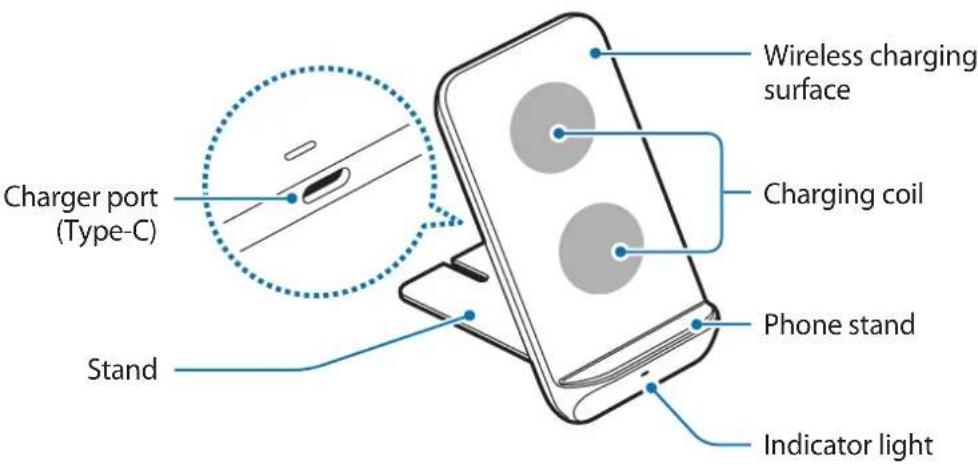

Your device contains magnets, which may affect medical devices, such as pacemakers or implantable cardioverter defibrillators. If you are using any of these medical devices, keep your device a safe distance from them and consult with your physician before you use the device.
Using the wireless charger
Charging the device
Charging your mobile device
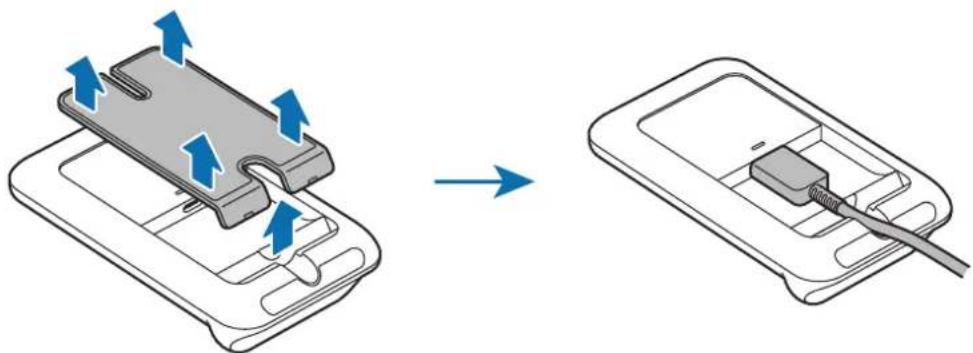
1 Detach the stand from the wireless charger and connect the charger to the wireless charger.
When the charger is correctly connected to the wireless charger, the indicator light flashes red, green, and orange, and then turns off.

Use only the charger (9.0 V/1.67 A) and cable supplied with the device.
2 Place a supported mobile device on the phone stand.
- Charging will begin when the wireless charging surface comes into contact with the mobile device's wireless charging coil.
- Check the charging icon displayed on the mobile device's screen for the charging status.
- To begin fast wireless charging, place a mobile device that supports fast wireless charging on the wireless charger. For more information, refer to the mobile device's user manual.
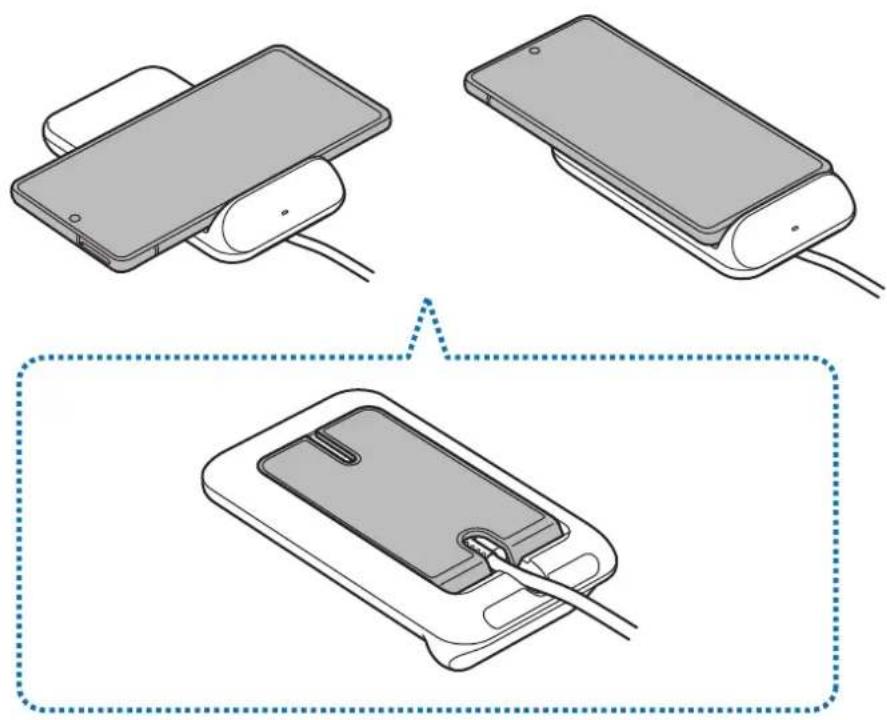
3 When the mobile device is fully charged, remove the mobile device from the wireless charger.

Precautions for mobile device charging
- Do not place the mobile device on the wireless charger with a credit card or radio-frequency identification (RFID) card (such as a transportation card or a key card) placed between the back of the mobile device and the mobile device cover.
- Do not place the mobile device on the wireless charger when conductive materials, such as metal objects and magnets, are placed between the mobile device and the wireless charger.
The mobile device may not charge properly or may overheat, or the mobile device and the cards may be damaged.

- You may need to purchase a charger separately depending on the wireless charger you bought.
- Depending on the location of the mobile device's wireless charging coil, your mobile device may not charge properly.
- Wireless charging may not work properly if you have attached a thick case to your mobile device. If your case is thick, remove it before placing your mobile device on the wireless charger.
- If you connect a charger to the mobile device during wireless charging, the wireless charging feature will be unavailable.
- If you use the wireless charger in areas with weak network signals, you may lose network reception.
- Qi wireless charging may produce noise during wireless charging.
- To save energy, unplug the charger when not in use. The charger does not have a power switch, so you must unplug the charger from the electric socket when not in use to avoid wasting power. The charger should remain close to the electric socket and easily accessible while charging.
Charging your mobile device with the phone stand upright
1 Detach the stand from the wireless charger and connect the charger to the wireless charger.
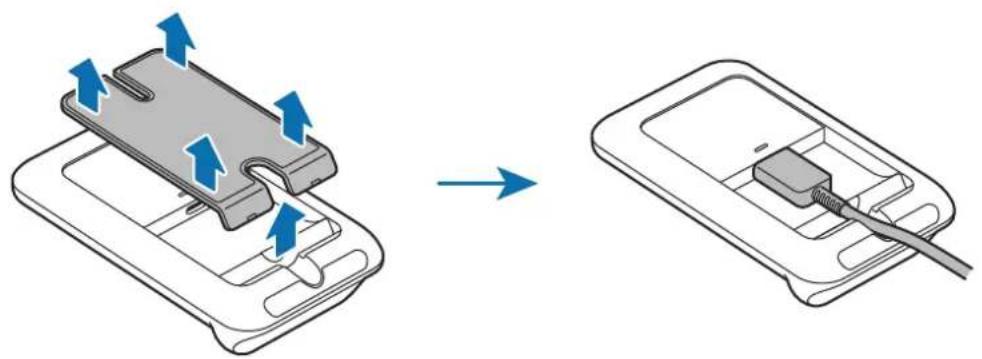
2 Insert the stand to the space on the bottom of the back side and push it down while pressing a part.

3 Place a supported mobile device on the phone stand.
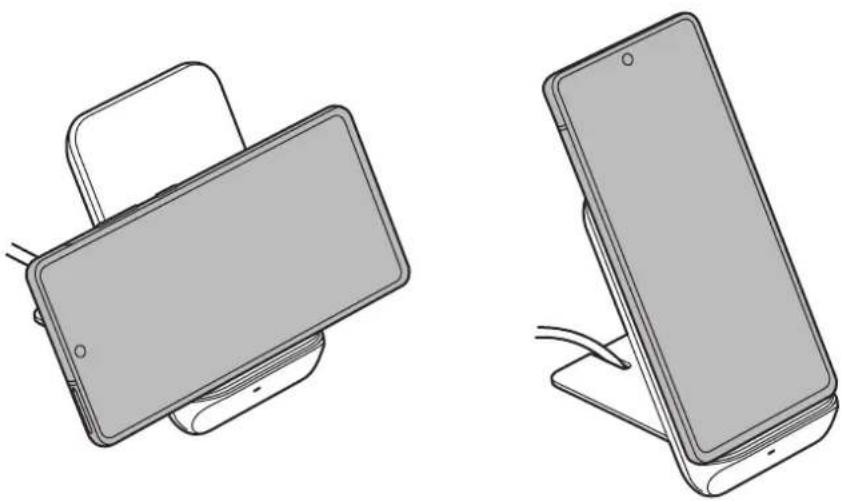
4 When the mobile device is fully charged, remove the mobile device from the wireless charger.
Charging your Galaxy Buds
The device has two built-in wireless charging coils. You can charge Galaxy Buds using the wireless charger. Charging will begin when the charging coil comes into contact with the wireless charging coil of Galaxy Buds.

Indicator light identification
The indicator light alerts you to the wireless charger's status.
| Color Status | |
| Red → Green → Orange | ·When connected to a power outlet |
| Red | ·When charging |
| Green | ·When fully charged |
| Flashing red | ·When not charging properly due to a general error |
| Off | ·When the mobile device is removed from the wireless charger or when the wireless charger is not connected to a power outlet |

- If the indicator light does not work as described, disconnect the charger from the wireless charger and reconnect it.
- The indicator light may work differently depending on the mobile device or the wireless charging cover.
Copyright
Copyright © 2020 Samsung Electronics Co., Ltd.
This manual is protected under international copyright laws.
No part of this manual may be reproduced, distributed, translated, or transmitted in any form or by any means, electronic or mechanical, including photocopying, recording, or storing in any information storage and retrieval system.
Trademarks
- SAMSUNG and the SAMSUNG logo are registered trademarks of Samsung Electronics Co., Ltd.
All other trademarks and copyrights are the property of their respective owners.
Leer primo
- USER MANUAL
- Table of Contents
- Instructional icons
- Getting started
- Package contents
- Device layout
- Using the wireless charger
- Charging the device
- Charging your mobile device
- Precautions for mobile device charging
- Charging your mobile device with the phone stand upright
- Charging your Galaxy Buds
- Indicator light identification
- Copyright
- Trademarks
- IdeHTnΦnKaZna Ha CBeTnHHnHa HnDnKaTOp
- ABTOPcko npaBO
- TbproBcN MapKn
- Prvo ovo pročitajte
- Identification of indicatorlys
- a
- s
- gagaaagaaagaaagaaagaaagaaagaaagaaagaaagaaagaaagaaagaaagaaagaaagaaagaaagaaagaaagaaagaaagaaagaaagaaagaaagaaagaaagaaagaaagaaagaaagaaagaaagaaagaaagaaagaaagaa
- Galaxy Buds
- gall gaiy
- O
- #
- i
- BheuHn Bnd yCTpoiCTBa
- ИспOLSване
- 6ecnpobODHOro 3apYdHOrO
- yctpoiCTBa
- 3apяdka yctpoiCTBa
- 3apraKa mo6nIbHoro yCTpoiCTBa
- Mepblnpedoctopoxhoctn np3aprakMe6nbHbIX yctpoiCTB
- 3apraKa Mo6nIbHOrO yCTpoiCTBa Ha nOcTaBKe B BeptuKaIbHOM noLoXeHn
- 3apЯнka 6ecnpoBODhblx HayshnKOB Galaxy Buds
- IdeHTnΦnKaZna INHnKaTopa
- Abtopckne npaba
- TobapHbIe 3HaKn
- Ozhannomtece nepeid noyaTkOM BnKOpncTaHn
- POn3Hauchn
- Початок роботи
- Kompanečaίя
- Bvrgia npnctroo
- 3axoNi 6e3neKn 70do 3apAkaHHaMo6iNbHx npncTpoIB
- 3apJxHnMo6IbHOro npCtpoo 3 niCTaBKOIO dJe TenefoHy y BeptnKaIbHOMy nolOKeHHi
- 3apdkaHnHaBvHnKiB Galaxy Buds
- 3наченя iнданkaTopa
- Tobaphi 3HaKn
- MaHbI3dbl Kipicne
- Hycayb6elriwelep
- Kmbictbi 6actay
- KopantbIn iwiHderici
- KypblfblHbIH KypblbIMbl
- CbIMcbI3 3apraTafbltbl naJaHaHy
- Mo6nIbdi KypblfblHbI3dbI 3aprday
- Mo6nIbdi KypblfblHb3apraTay Ke3iHderi caKtbik wapaIapbl
- Telefoh tiperi tik kyinde mo6nbdi Kypblfblb3dbI 3apraTay
- Galaxy Buds kýlačka6bɪN ɜpǎdTay
- HdNKaTOP шамыньи ndeHTNФКацясbl
- EAC
- ABTOPbIK KyKbIK
- Cayda 6eIrilepi
- Read me first
- Leer primo
Brand : SAMSUNG
Model : EPN3300
Category : Battery charger