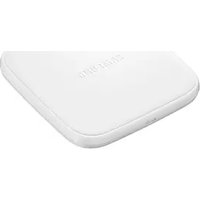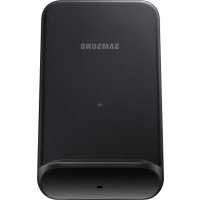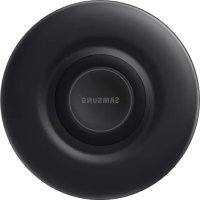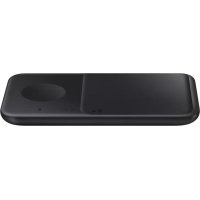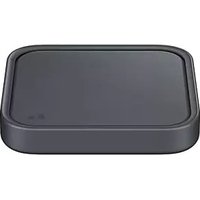
EP-P2400 - Battery charger SAMSUNG - Free user manual and instructions
Find the device manual for free EP-P2400 SAMSUNG in PDF.



User questions about EP-P2400 SAMSUNG
0 question about this device. Answer the ones you know or ask your own.
Ask a new question about this device
Download the instructions for your Battery charger in PDF format for free! Find your manual EP-P2400 - SAMSUNG and take your electronic device back in hand. On this page are published all the documents necessary for the use of your device. EP-P2400 by SAMSUNG.
USER MANUAL EP-P2400 SAMSUNG
Please read this manual before using the device to ensure safe and proper use.
- Images may differ in appearance from the actual product. Content is subject to change without prior notice.
• Before using the wireless charger, make sure it is compatible with your device.
Instructional icons

Warning: situations that could cause injury to yourself or others

Caution: situations that could cause damage to your device or other equipment

Notice: notes, usage tips, or additional information
Getting started
Package contents
Check the product box for the following items:
- Wireless charger
- USB power adaptor
- USB cable
- Quick start guide

- Wireless charging covers are sold separately.
- The items supplied with the device and any available accessories may vary depending on the region or service provider.
- The supplied items are designed only for this device and may not be compatible with other devices.
- Appearances and specifications are subject to change without prior notice.
- You can purchase additional accessories from your local Samsung retailer. Make sure they are compatible with the device before purchase.
- Use only Samsung-approved accessories. Using unapproved accessories may cause the performance problems and malfunctions that are not covered by the warranty.
- Availability of all accessories is subject to change depending entirely on manufacturing companies. For more information about available accessories, refer to the Samsung website.
Device layout
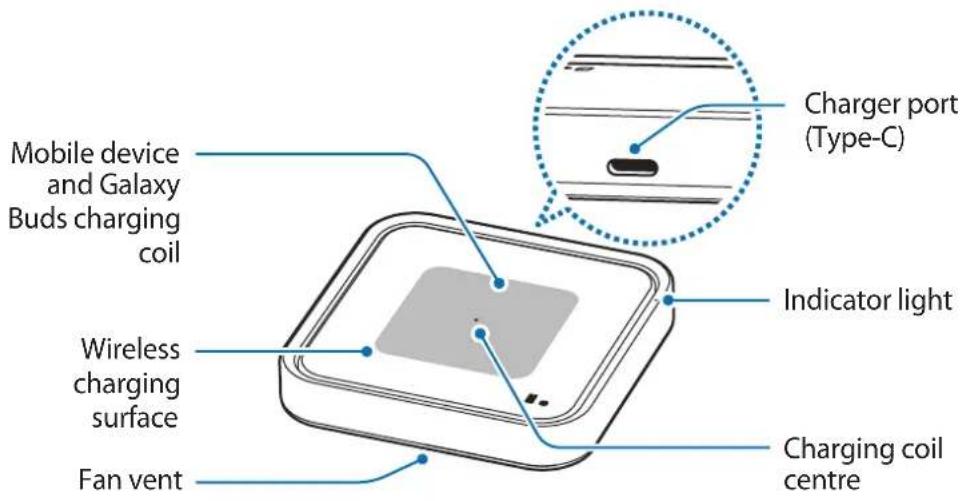
▶ EP-P2400:
text_image
Mobile device and Galaxy Buds charging coil Wireless charging surface Fan vent Charger port (Type-C) Indicator light Charging coil centre▶ EP-P5400:
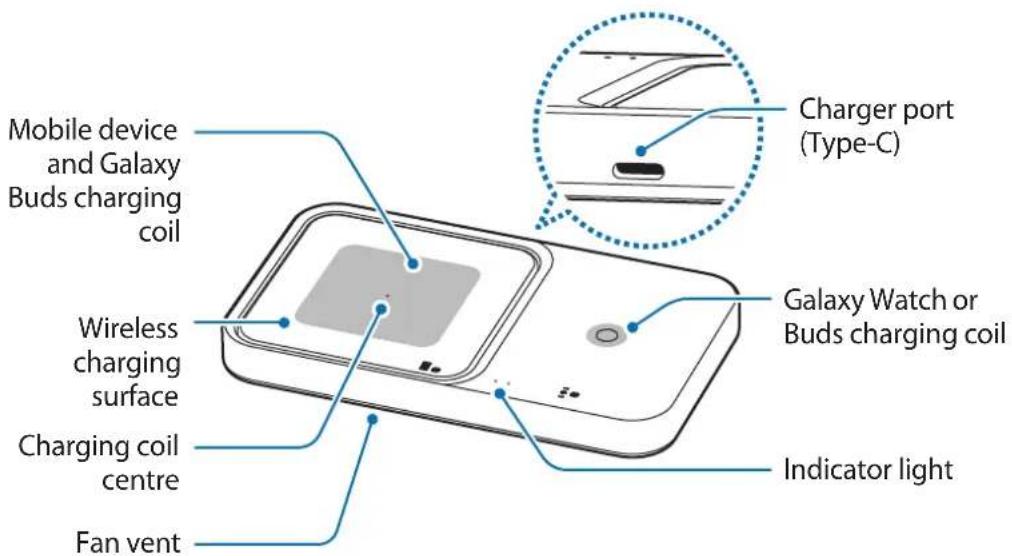
text_image
Mobile device and Galaxy Buds charging coil Wireless charging surface Charging coil centre Fan vent Charger port (Type-C) Galaxy Watch or Buds charging coil Indicator light
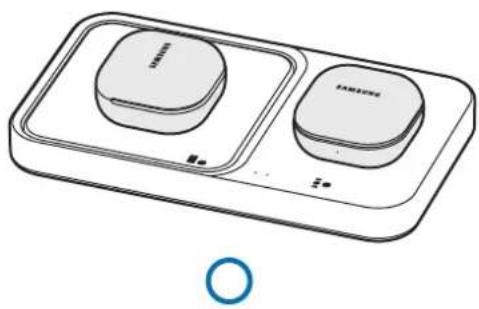
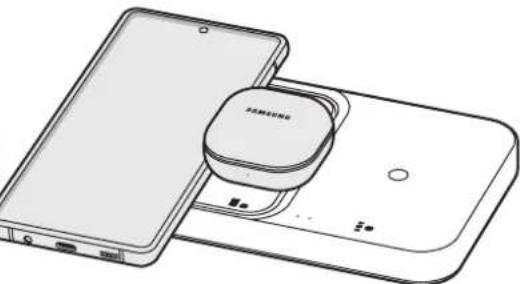
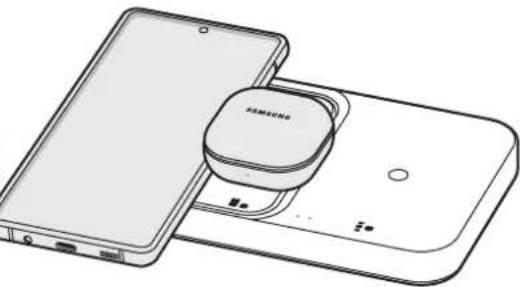
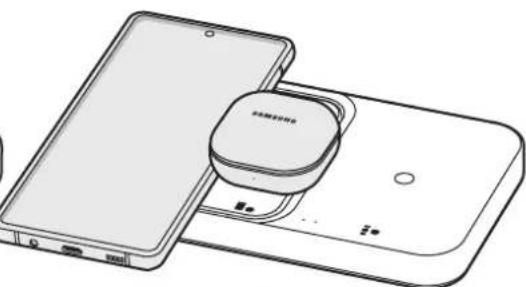
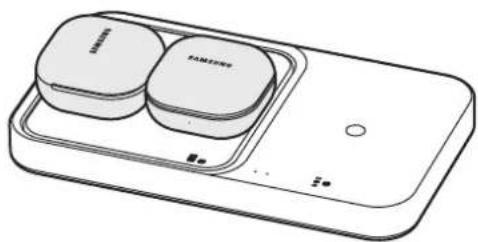
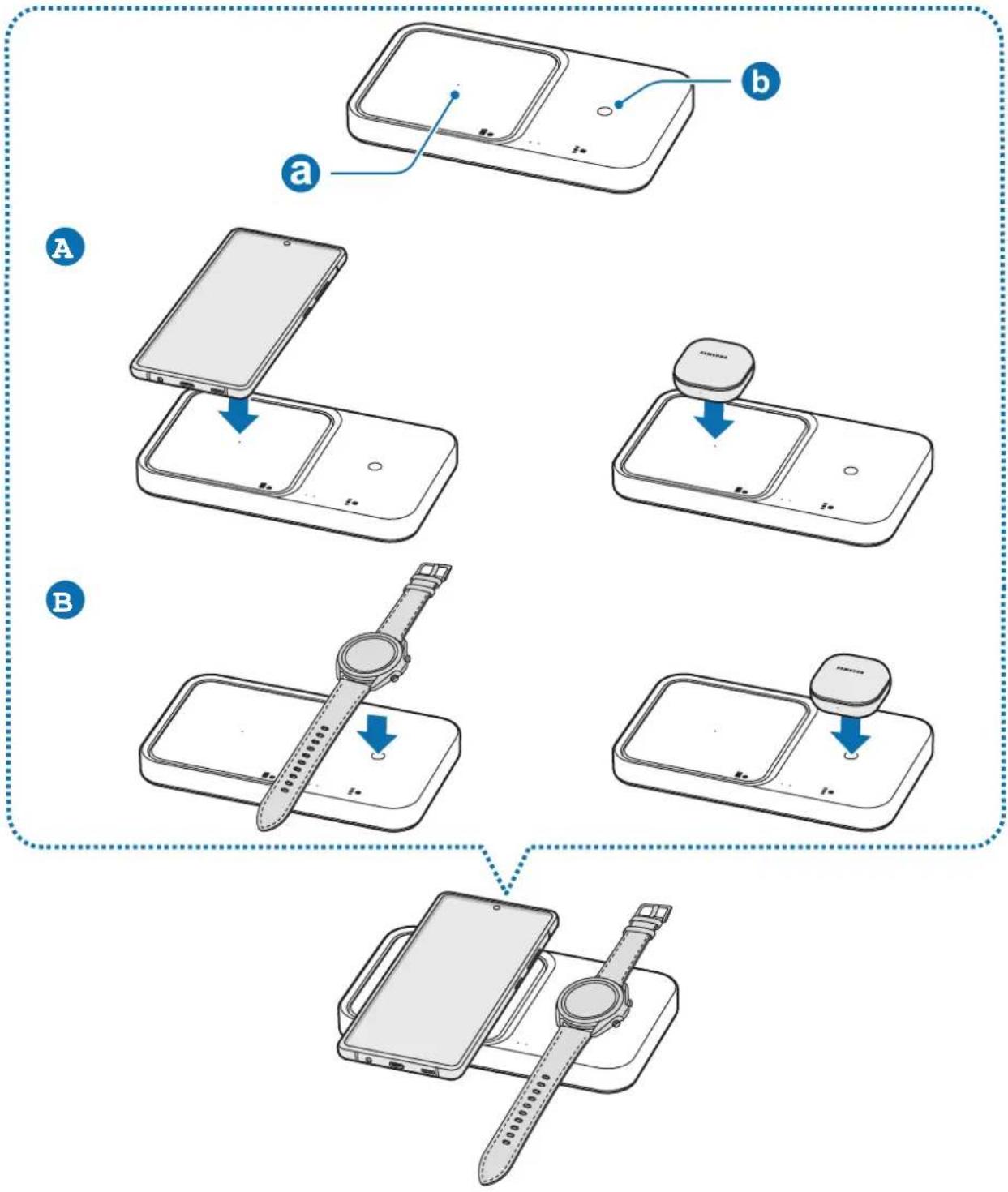
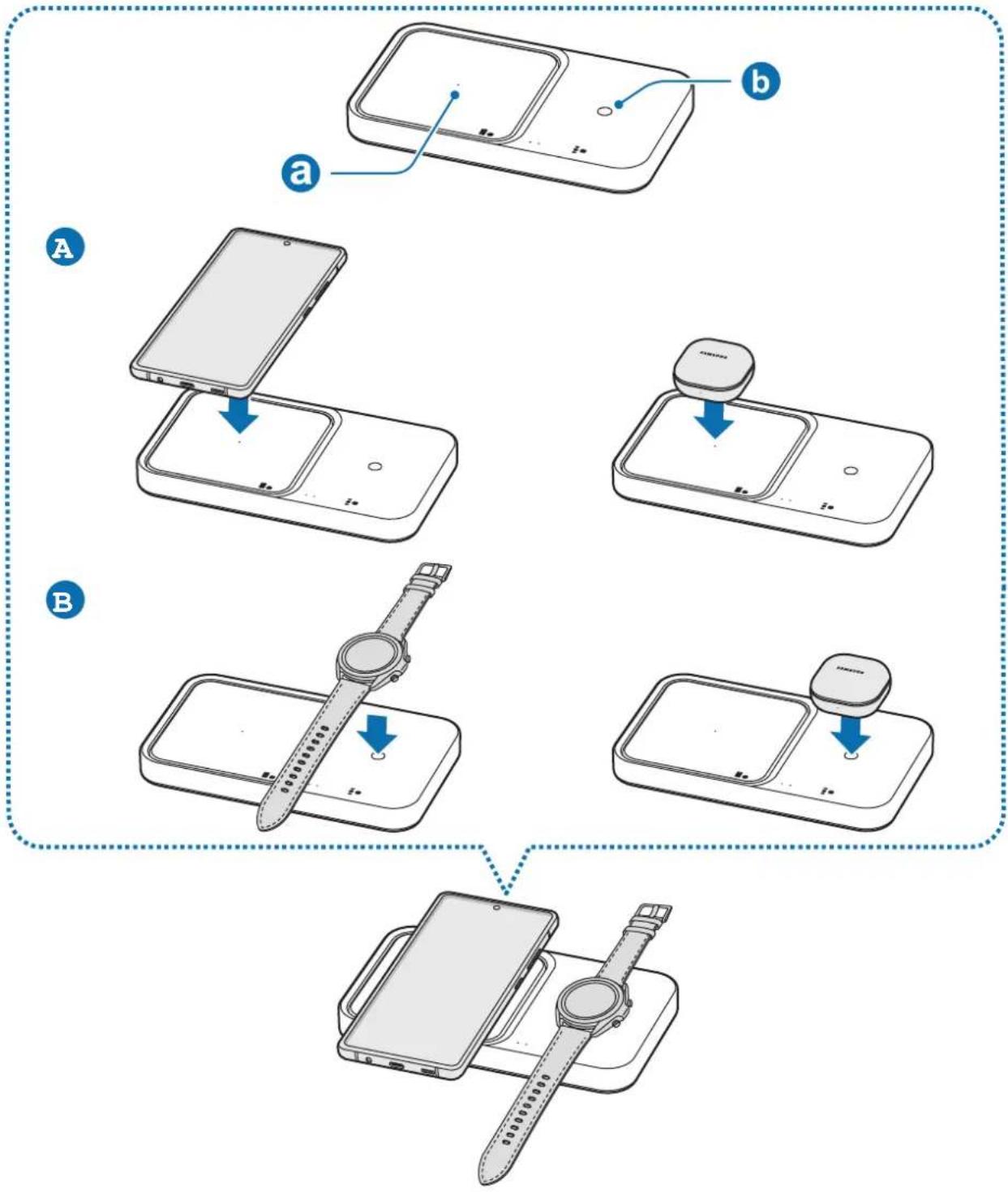
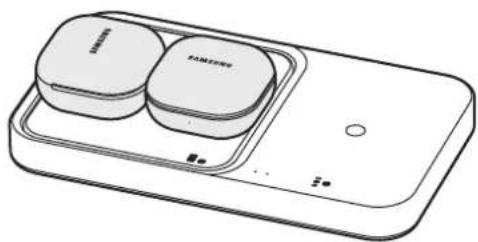
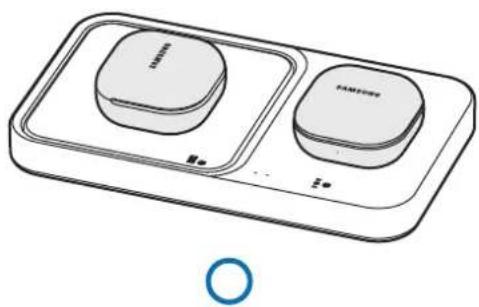
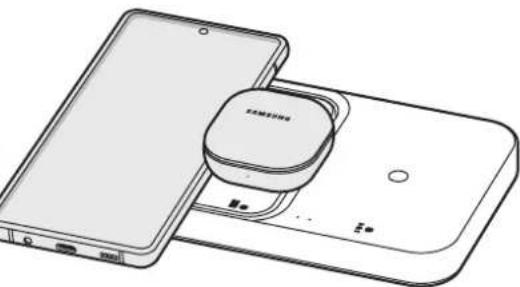
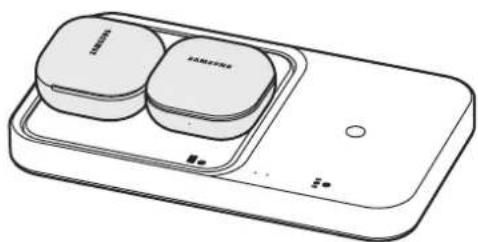
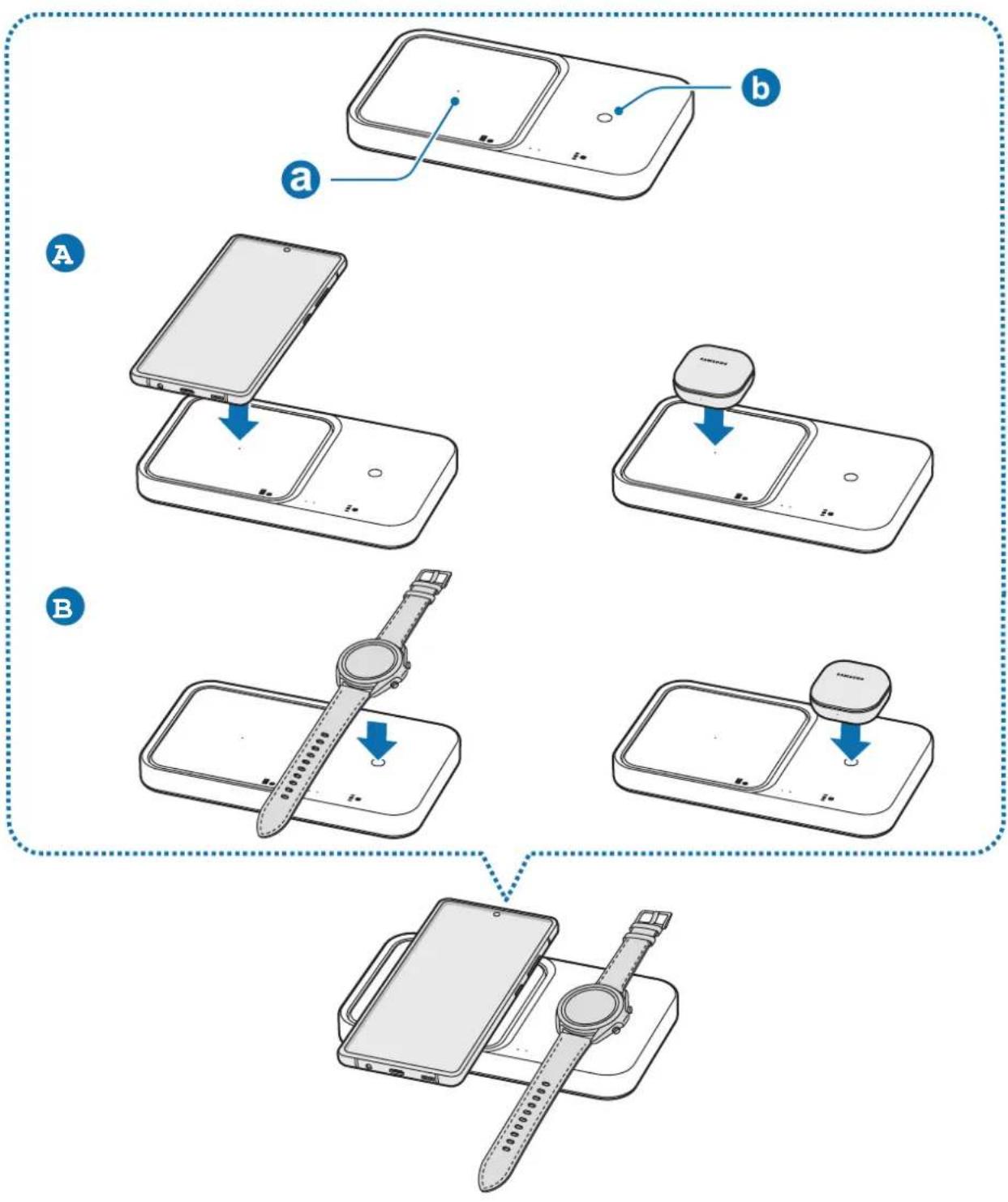
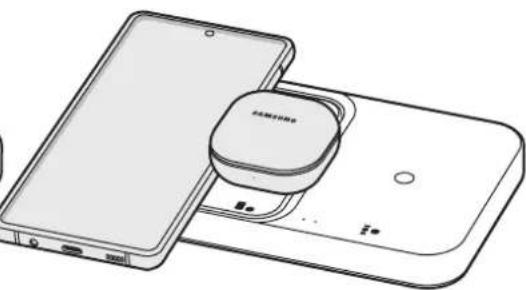
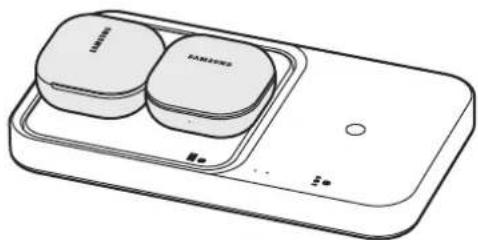
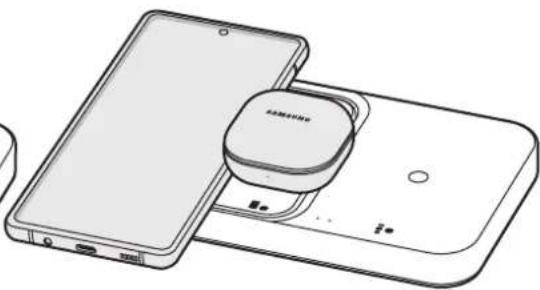
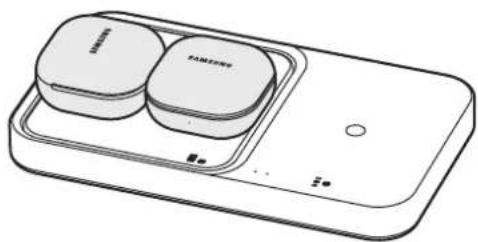
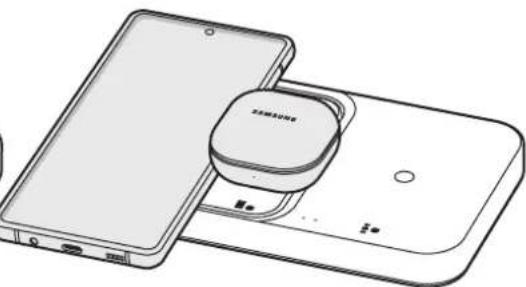
The Wireless charger can charge one device on the mobile device and Galaxy Buds charging coil and watch or buds charging coil.
Using the wireless charger
Charging the device
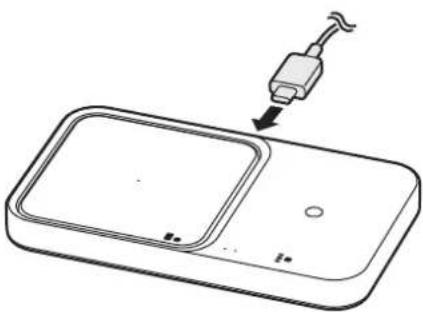
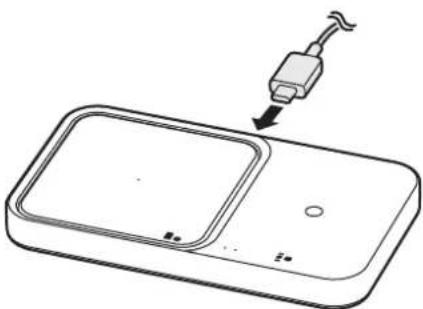
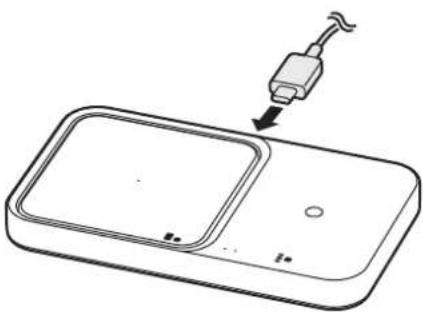
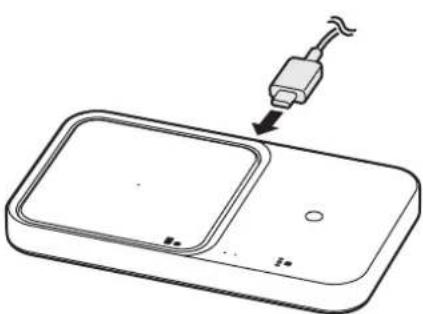
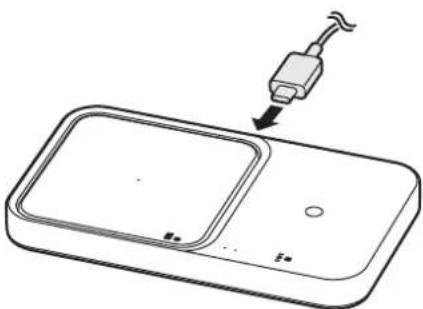
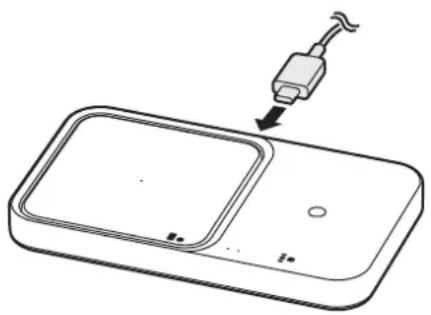
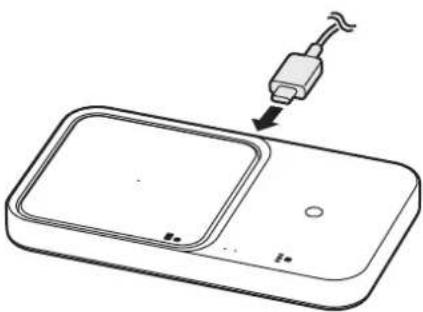
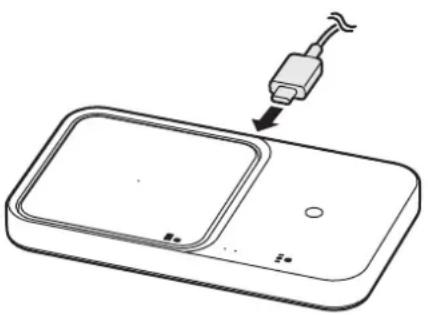
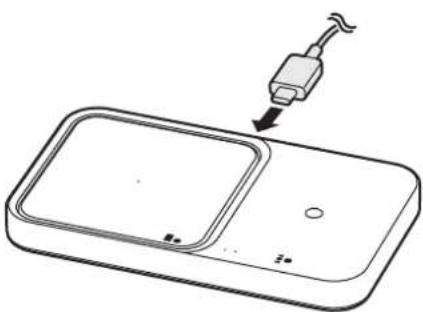
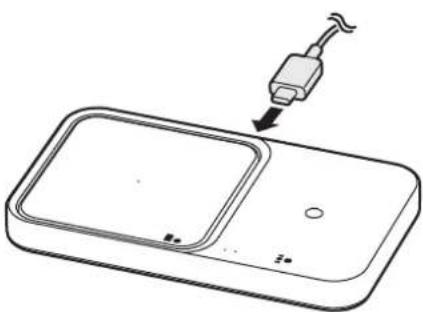
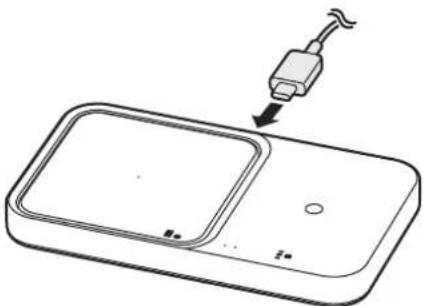
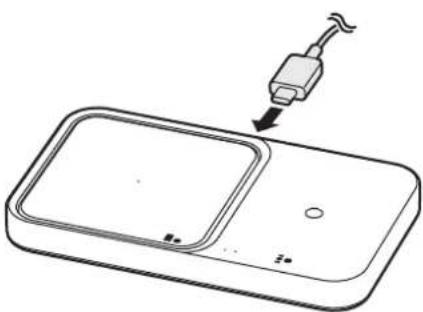
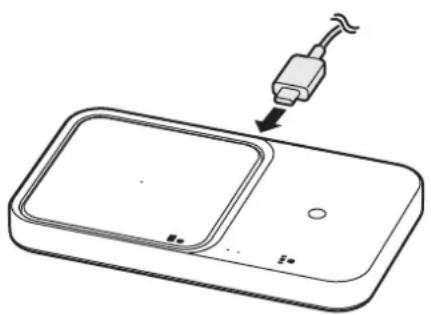
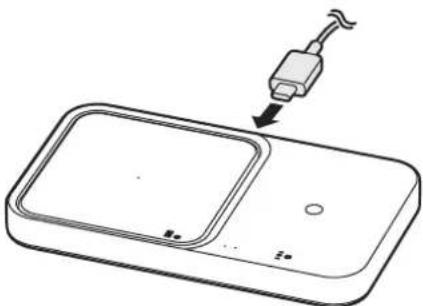
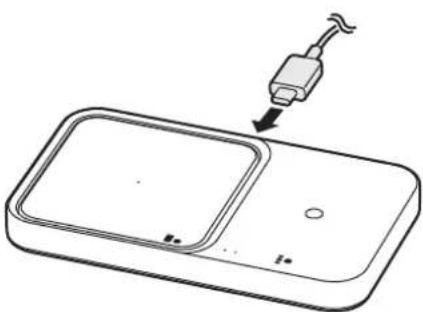
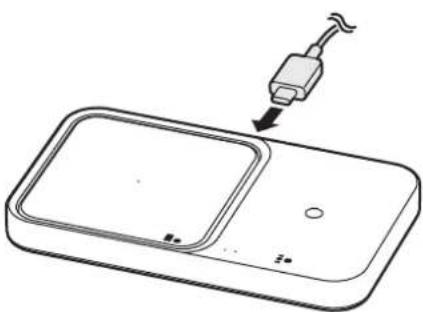
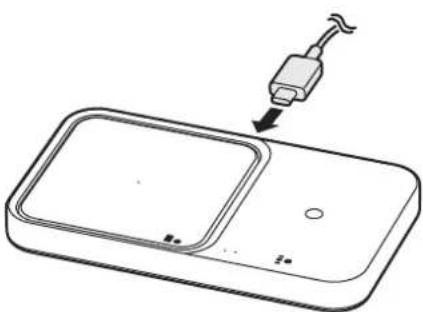
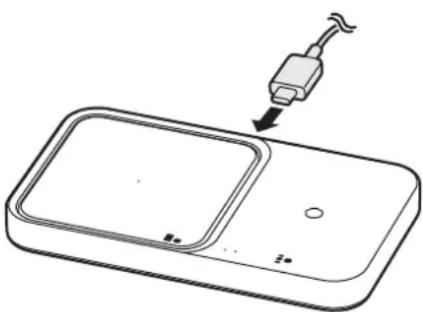
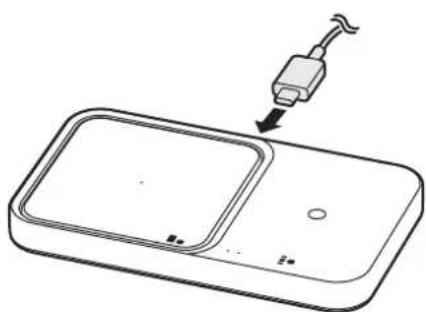
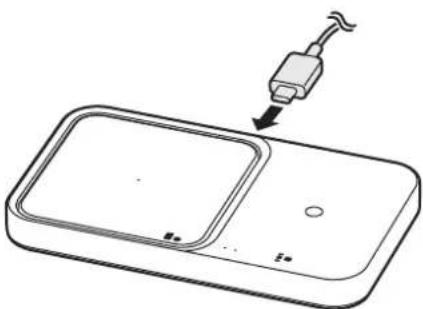
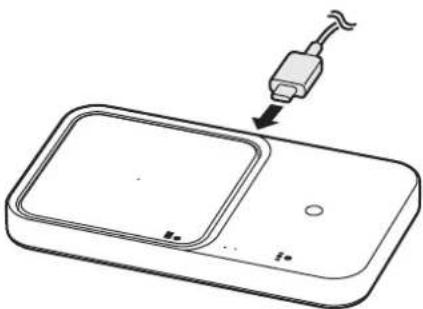
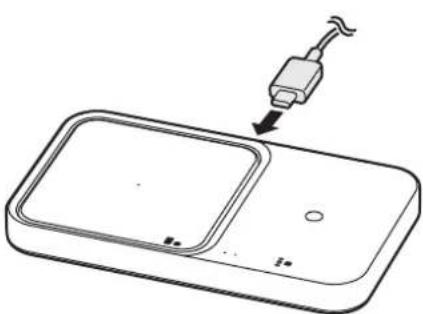
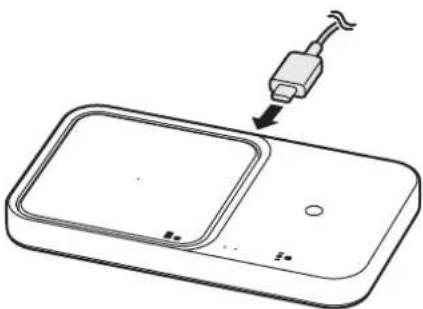
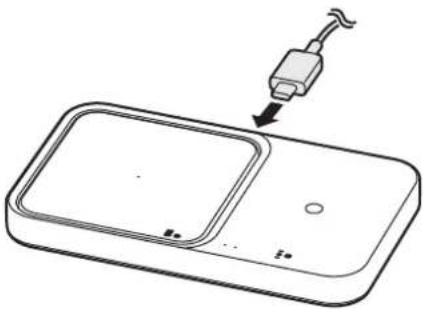
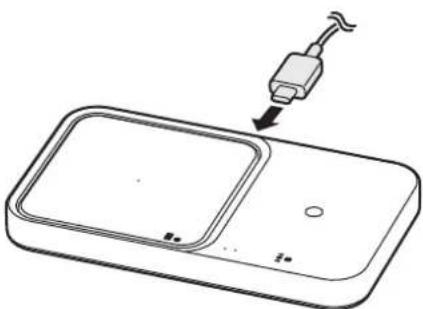
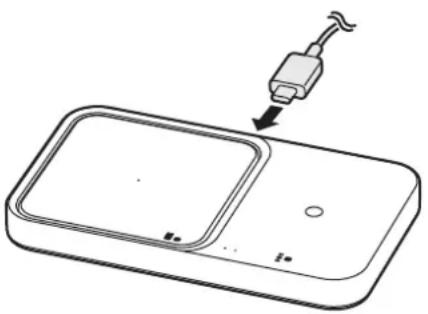
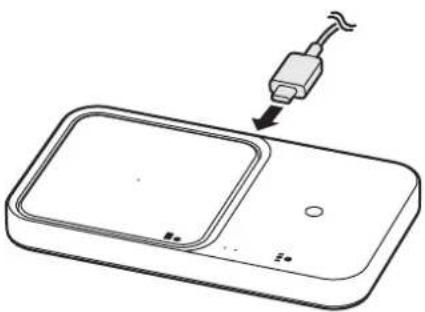
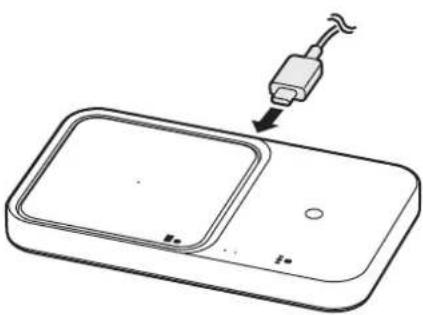
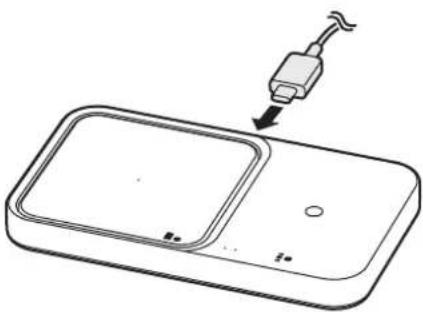
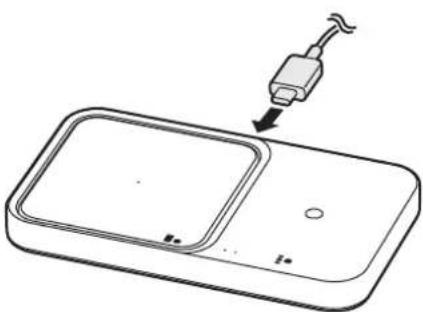
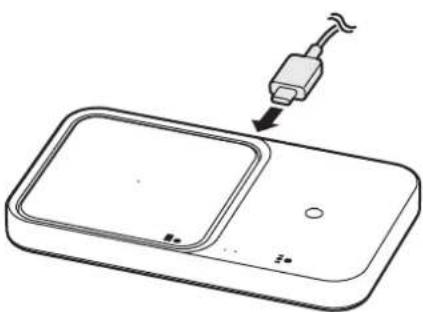
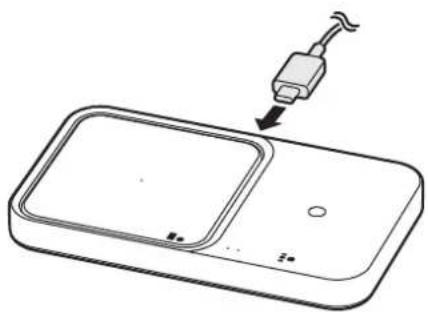
1 Connect the charger to the wireless charger.
When the charger is correctly connected to the wireless charger, the indicator light flashes red, green, and orange, and then turns off.

The wireless charger is not compatible with chargers that do not support AFC (Adaptive Fast Charging) and SFC (Super Fast Charging). To use the 15W fast wireless charging 2.0 feature, use the charger (9.0V/2.77A) supplied with the device, an SFC charger, or a PD (Power Delivery) charger (25W and higher). If a PD charger (less than 25W) or an AFC charger is used, the 7.5W fast wireless charging 1.0 feature may work.
▶ EP-P2400:
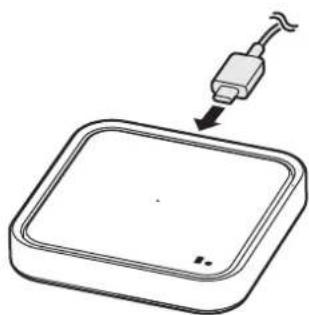
natural_image
Simple line drawing of a square electronic device with a plug inserted, no text or symbols present▶ EP-P5400:
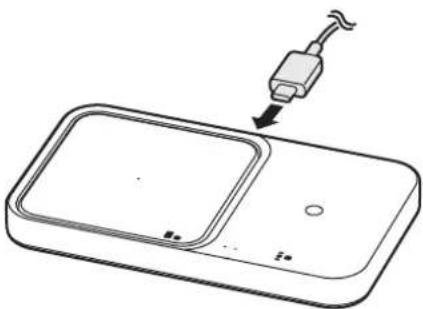
natural_image
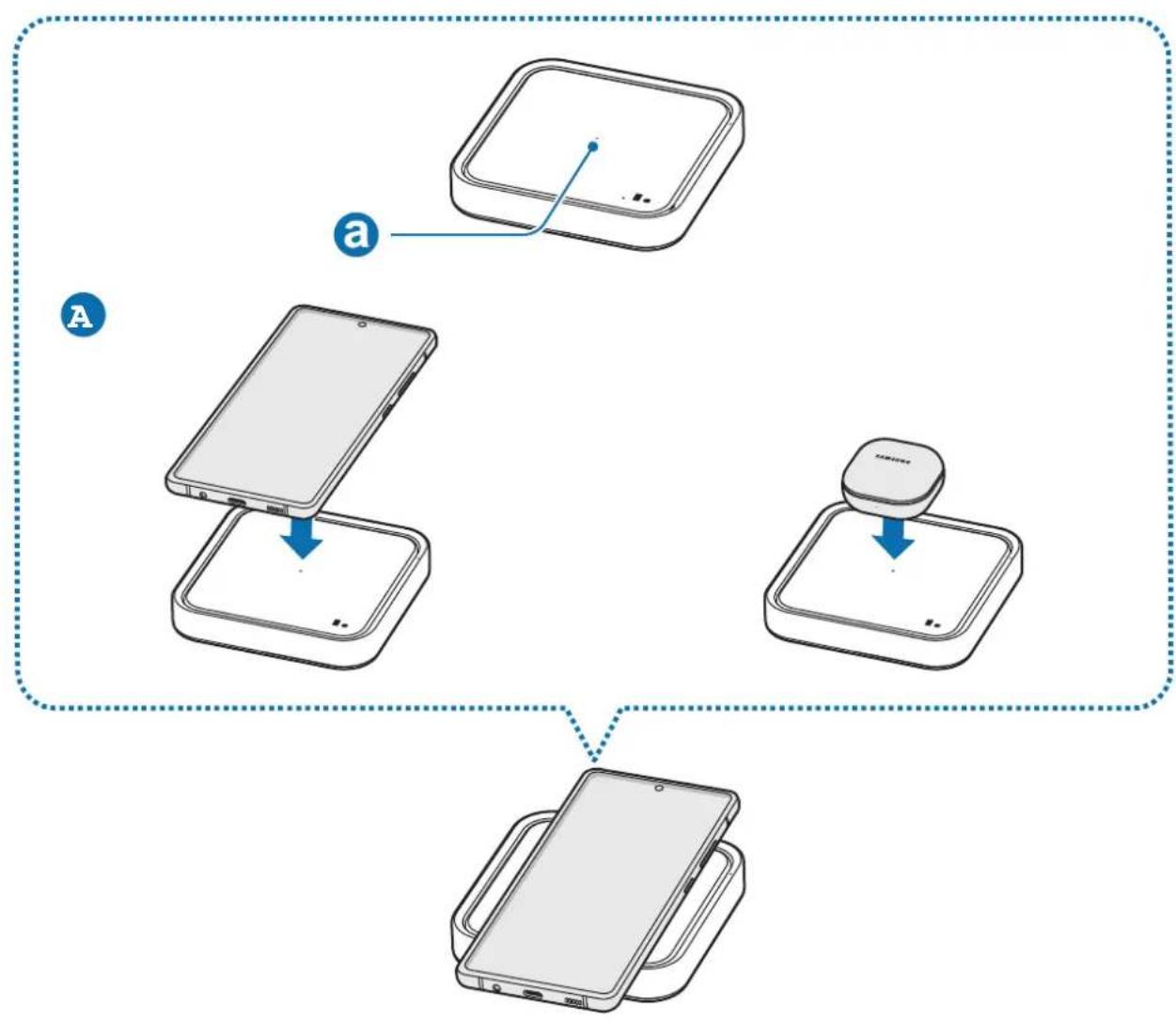
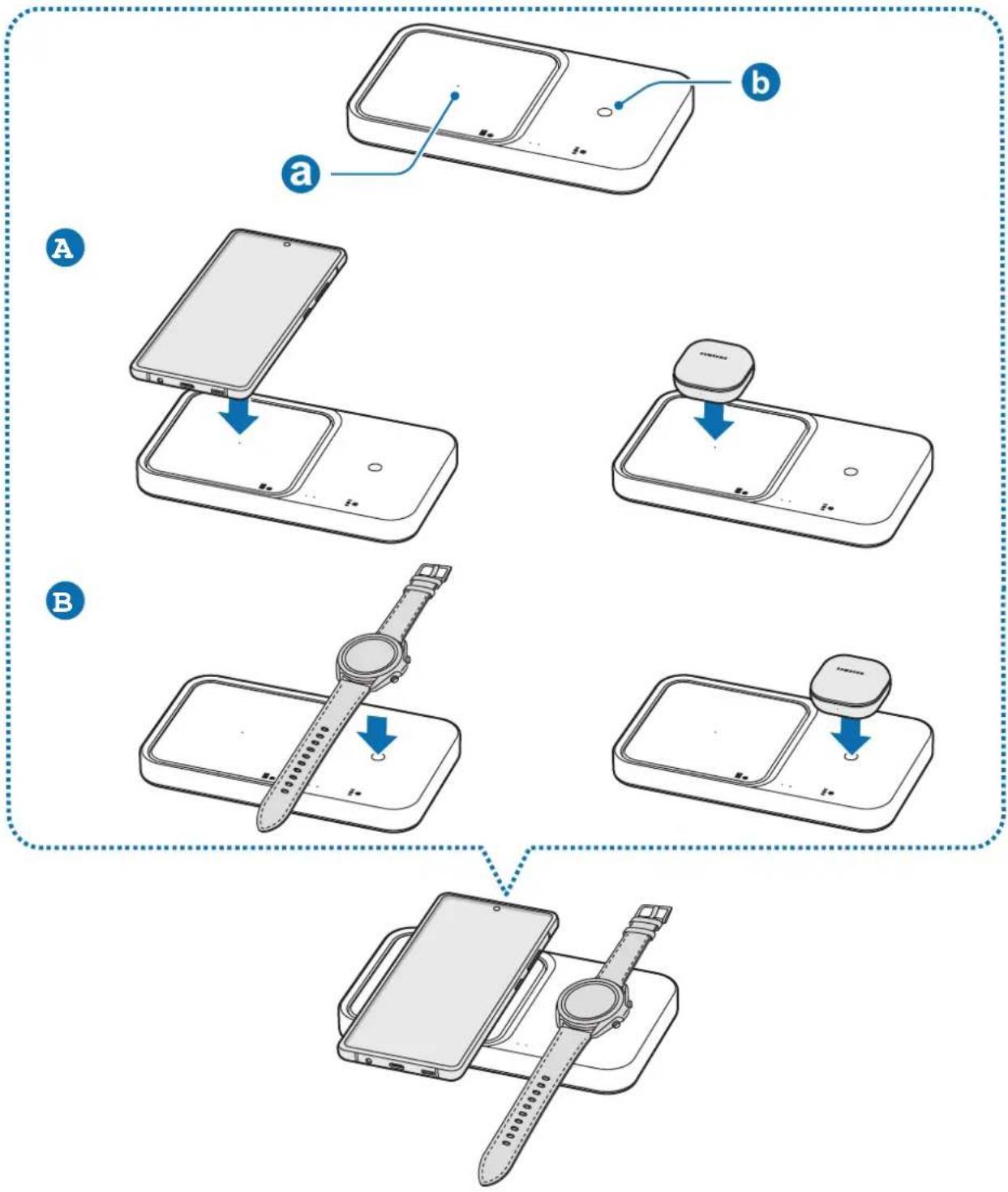
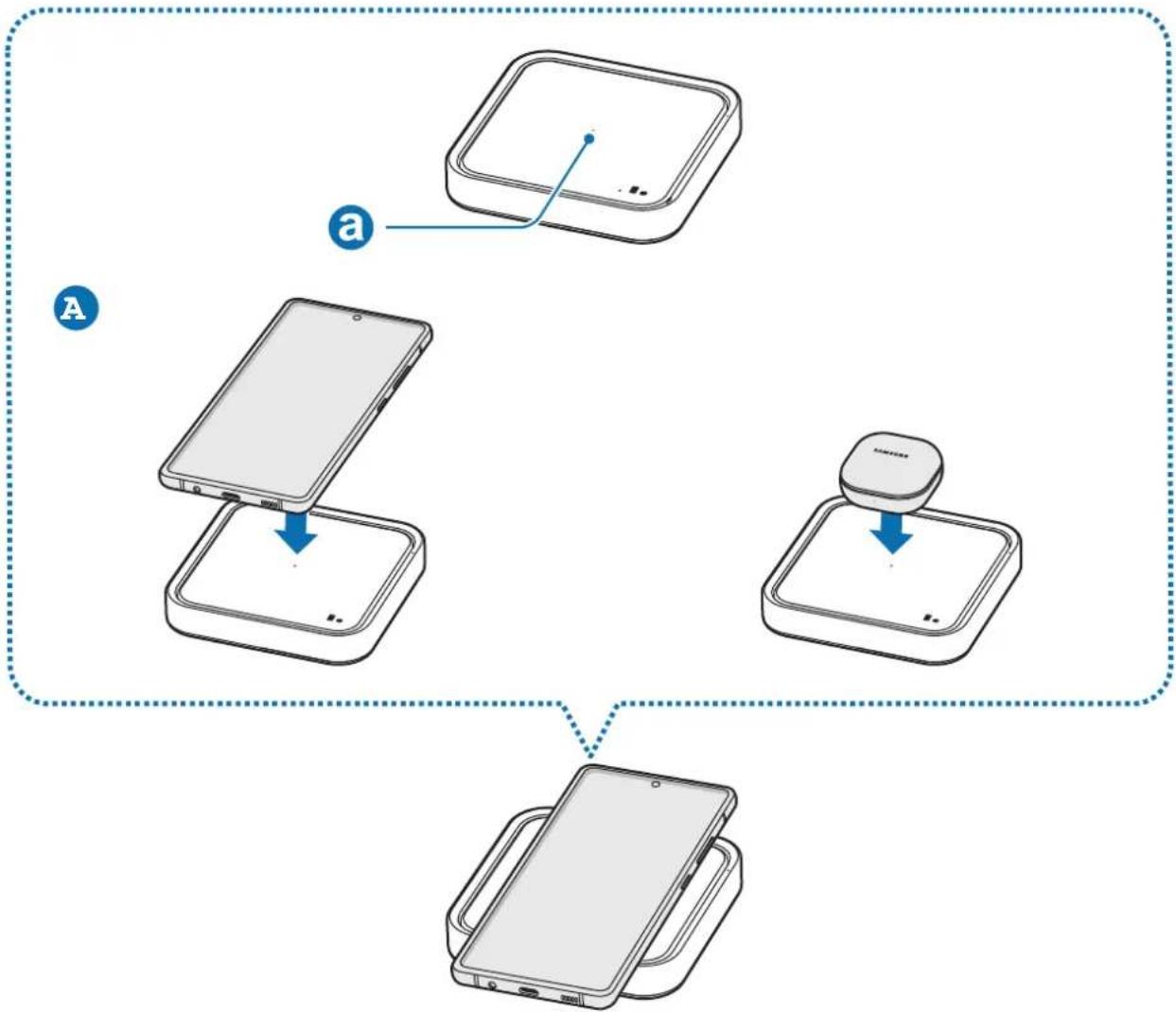
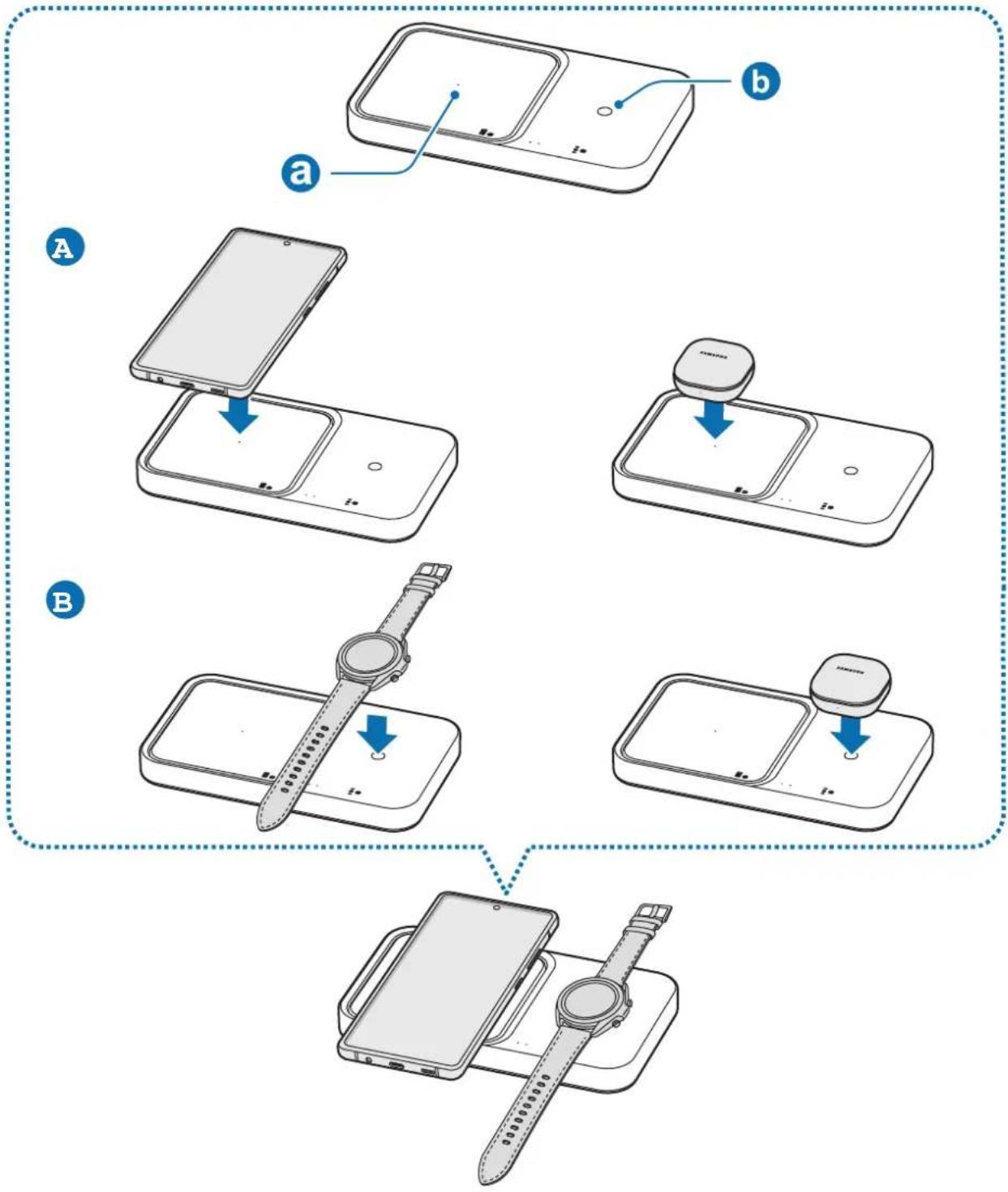
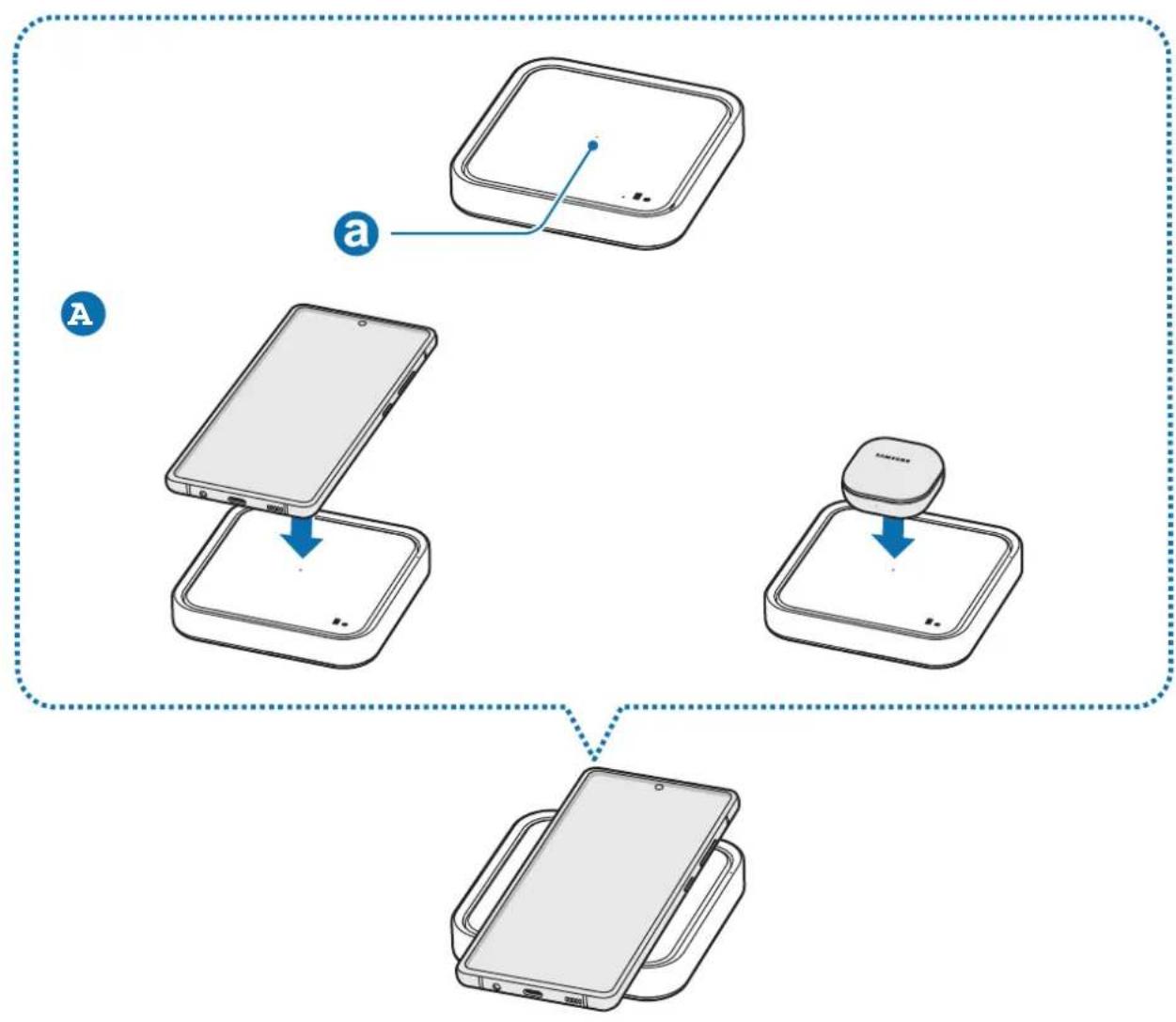
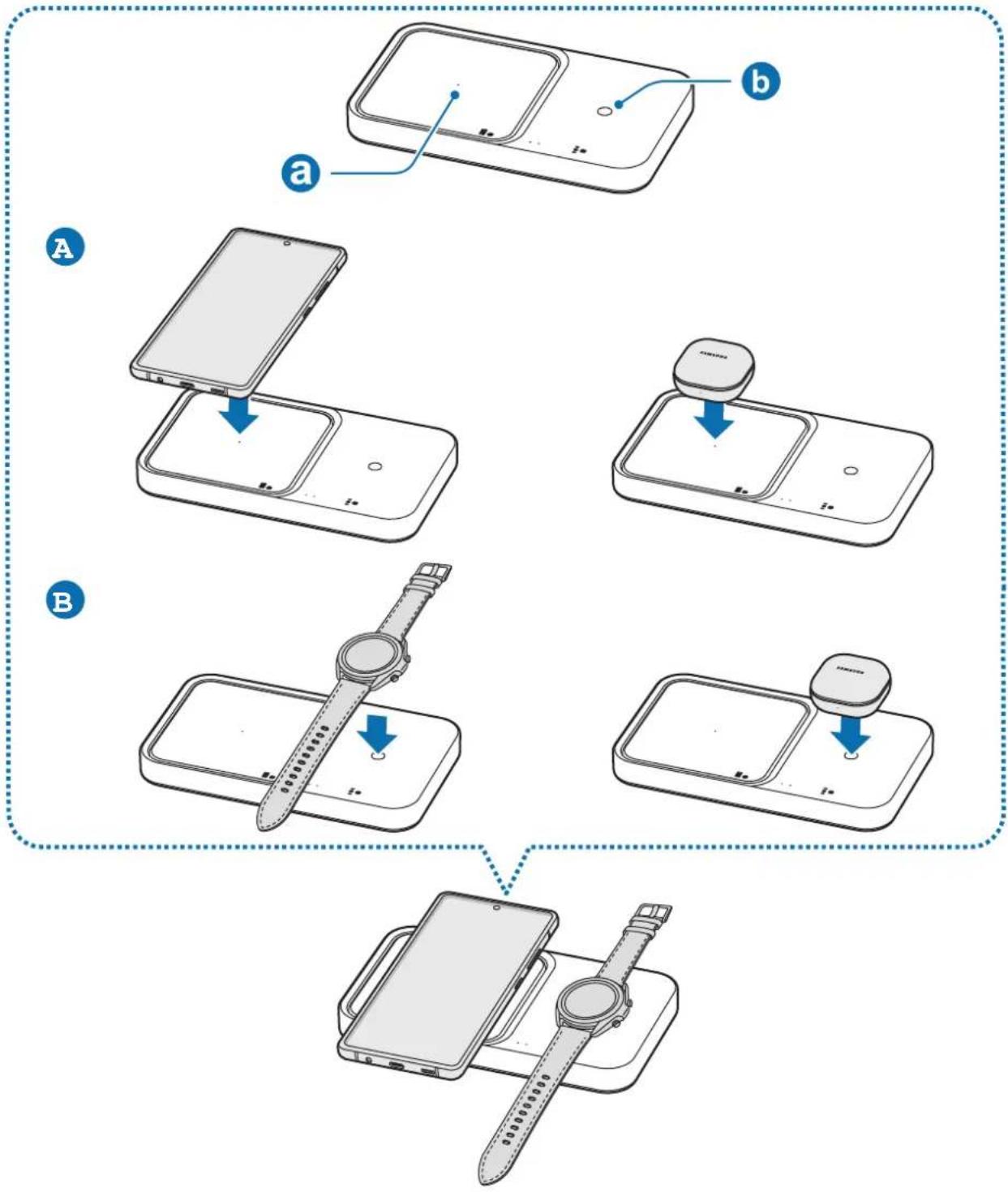
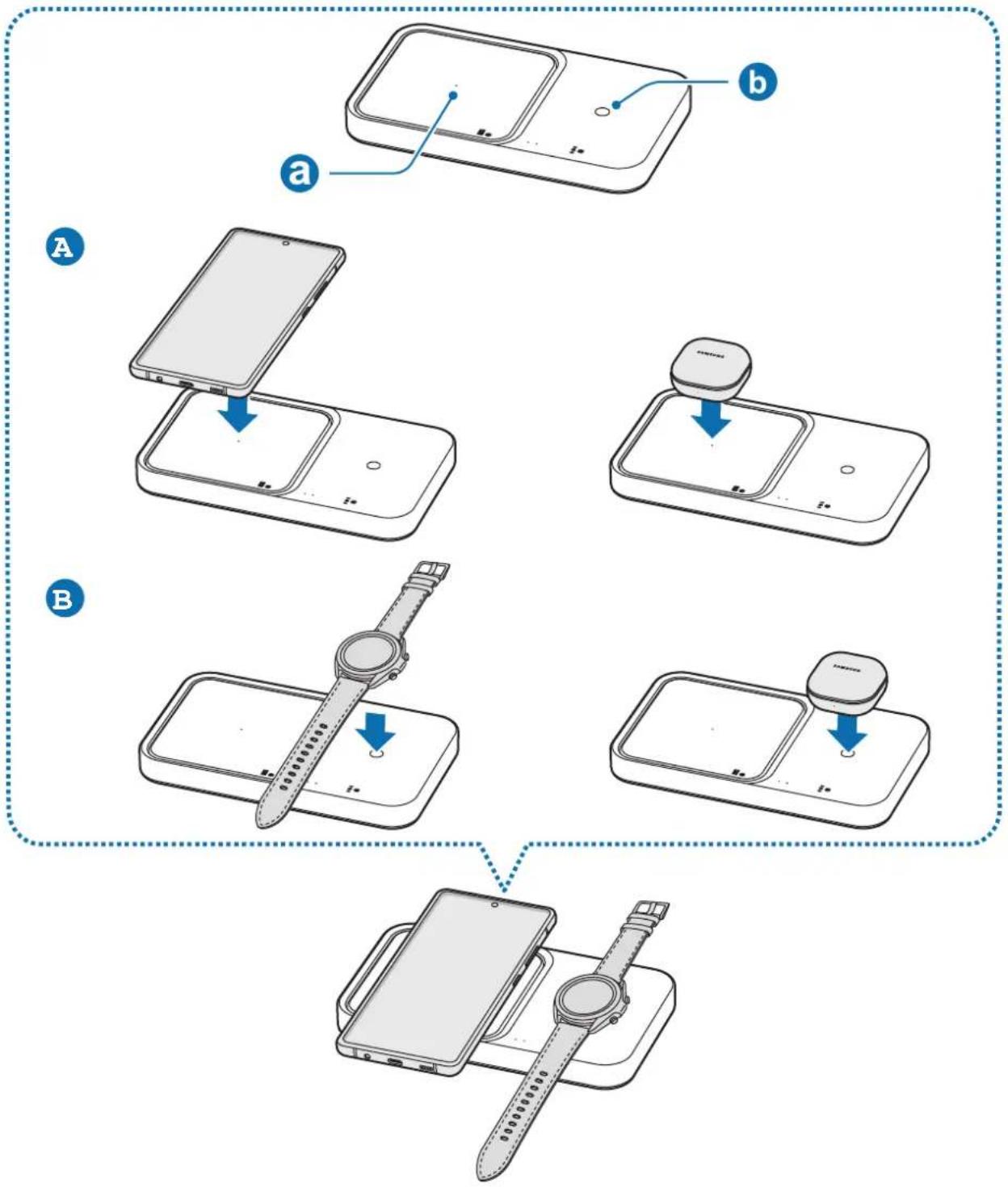
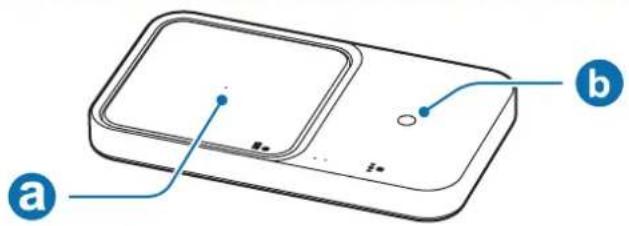
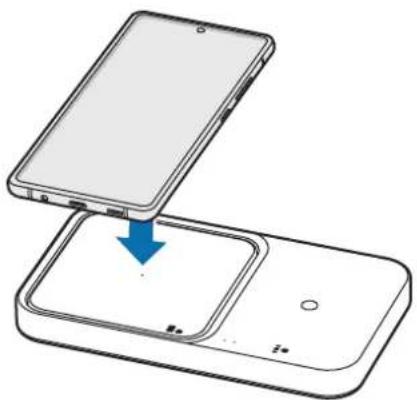
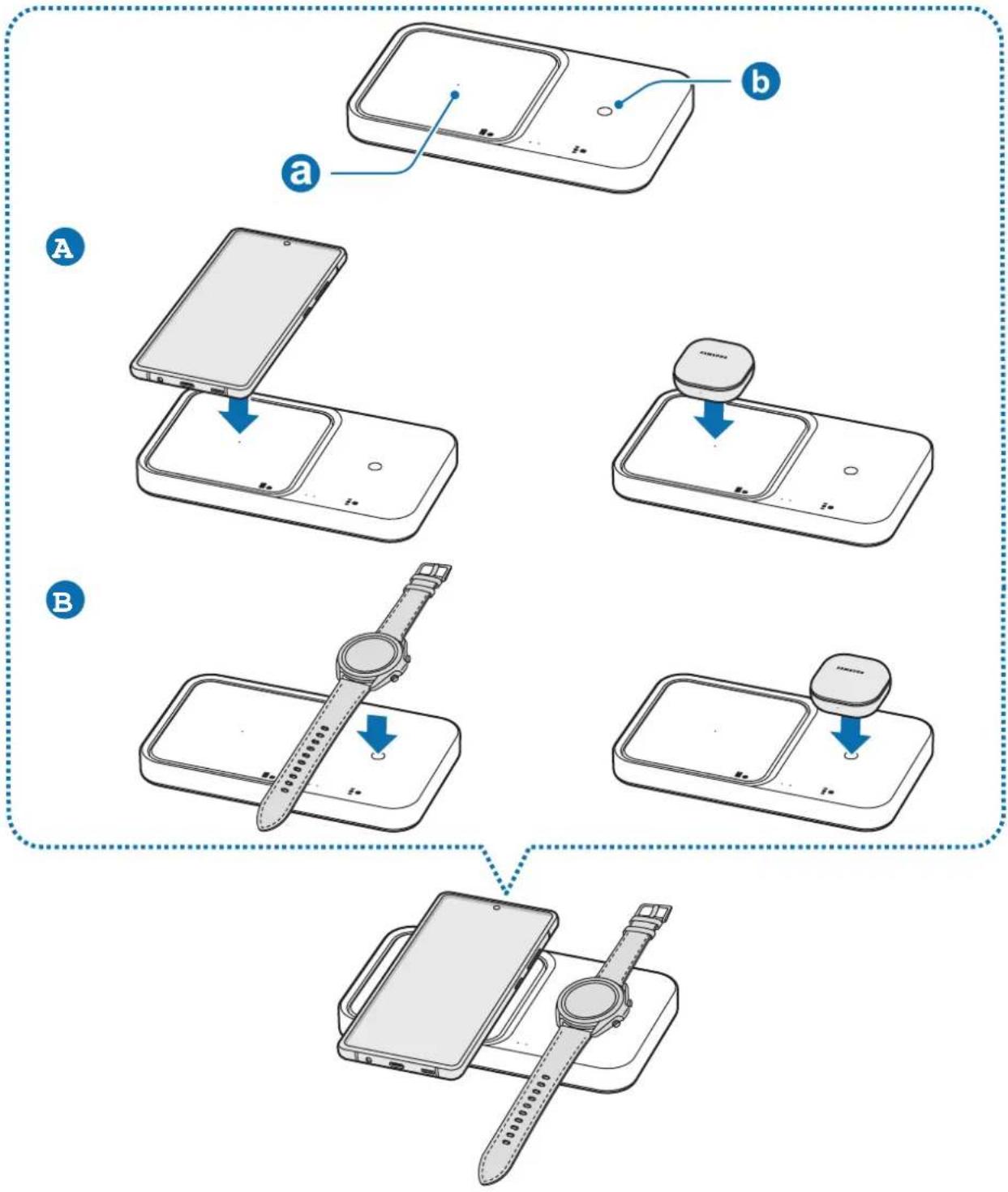
Line drawing of a handheld device with a cable inserted, showing a screen and tray (no text or symbols)2 Place the centre of supported mobile device or Galaxy Buds on the charging coil centre (a) to charge it (A). You can also charge the Galaxy Watch or Buds on the watch or buds charging coil (b) of the wireless charger (B)
- Charging will begin when the charging coil comes into contact with the wireless charging coil of the mobile device, Galaxy Buds or the Watch.
- Check the charging icon displayed on the mobile device's and Galaxy Watch's screen for the charging status. Check the charging status of the earbuds and charging case through the color of the battery status indicator on the Galaxy Buds.
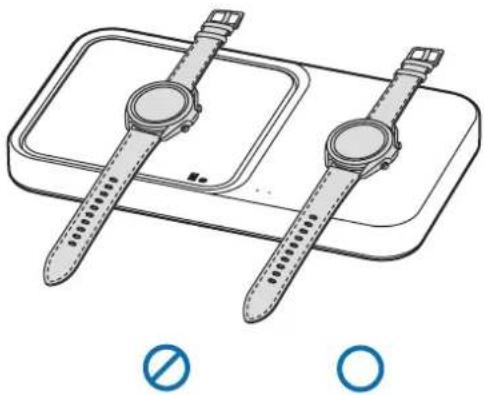
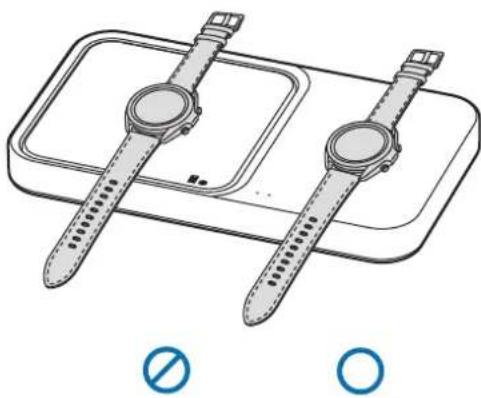
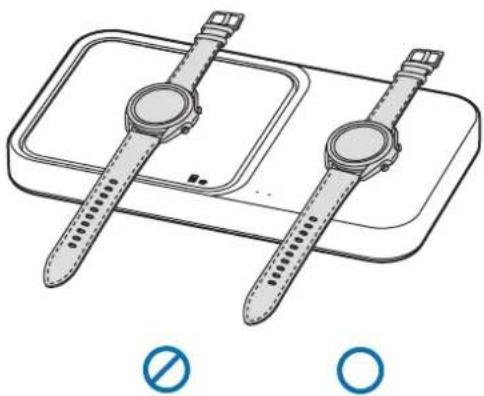
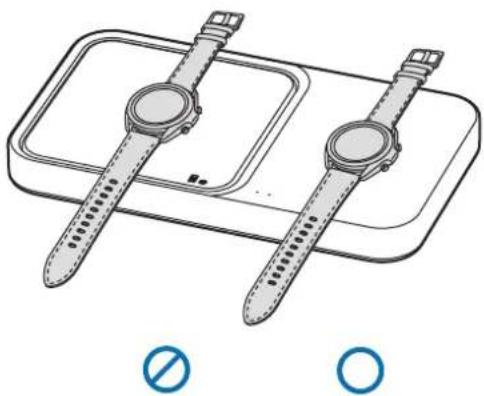
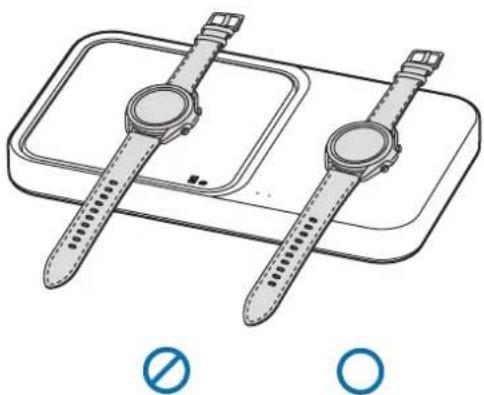
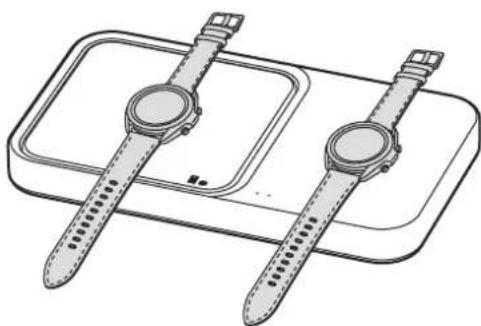
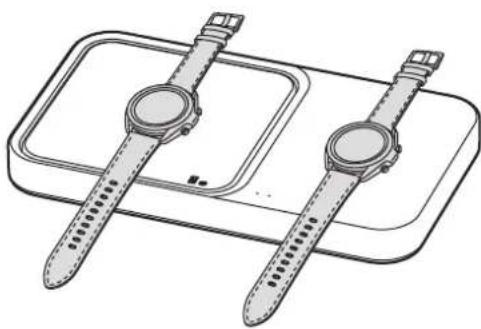
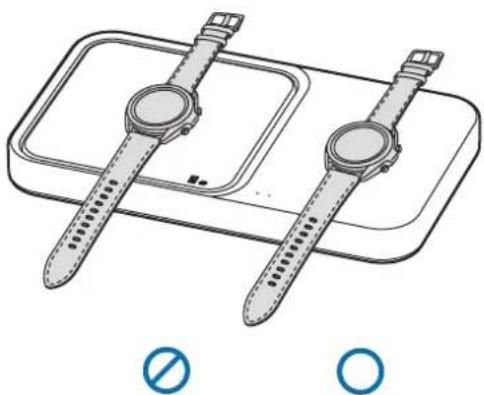
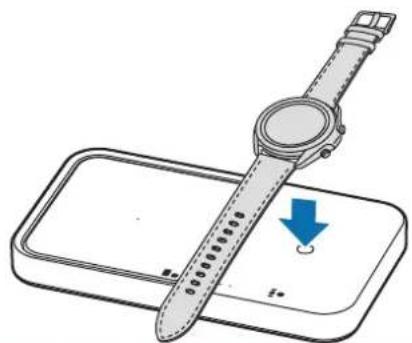
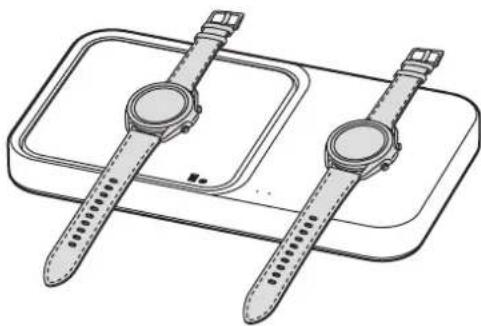
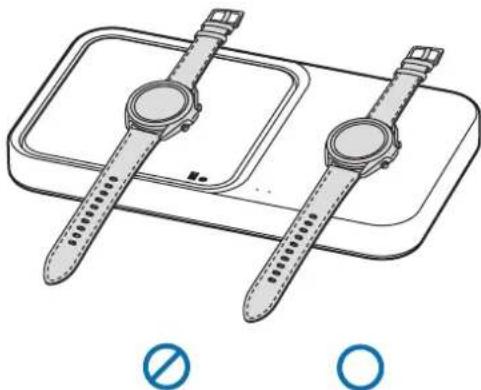
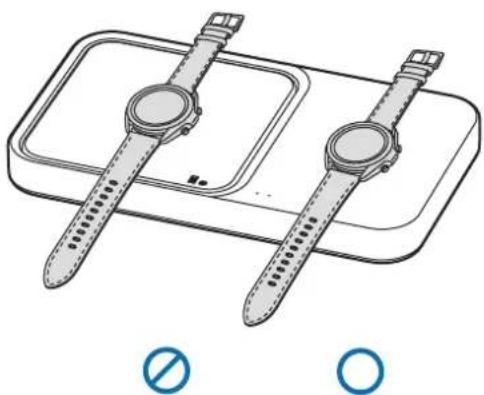
- If you place a Galaxy Watch with both connecting straps together on the wireless charging surface, the Galaxy Watch may not charge because the charging coil is not coming into contact with the wireless charging coil of the Galaxy Watch.
- When conductive materials are placed on the wireless charger, noise may occur from the wireless charger.
- To begin fast wireless charging, place a mobile device that supports fast wireless charging on the wireless charger. For more information, refer to the mobile device's user manual.
▶ EP-P2400:
flowchart
graph TD
    A["Device 1"] --> B["Device 2"]
    B --> C["Device 3"]
    C --> D["Device 4"]
    style A fill:#f9f,stroke:#333
    style B fill:#ccf,stroke:#333
    style C fill:#cfc,stroke:#333
    style D fill:#fcc,stroke:#333
▶ EP-P5400:
flowchart
graph TD
    A["Device 1: Display"] --> B["Device 2: Display"]
    B --> C["Device 3: Display"]
    C --> D["Device 4: Display"]
    D --> E["Device 5: Display"]
    style A fill:#f9f,stroke:#333
    style B fill:#ccf,stroke:#333
    style C fill:#cfc,stroke:#333
    style D fill:#fcc,stroke:#333
    style E fill:#ffc,stroke:#333
3 When the mobile device, Galaxy Buds or the Watch is fully charged, remove the mobile device, Galaxy Buds or the Watch from the wireless charger.

Precautions for mobile device, Galaxy Buds or the Watch charging
- Do not place the mobile device on the wireless charger with a credit card or radio-frequency identification (RFID) card (such as a transportation card or a key card) placed between the back of the mobile device and the mobile device cover.
- Do not place the mobile device, Galaxy Buds or the Watch on the wireless charger when conductive materials, such as metal objects and magnets, are placed between the mobile device, Galaxy Buds or the Watch and the wireless charger.
The mobile device, Galaxy Buds or the Watch may not charge properly or may overheat, or the mobile device, Galaxy Buds, Galaxy Watch, or the cards may be damaged.

- You may need to purchase a charger separately depending on the wireless charger you bought.
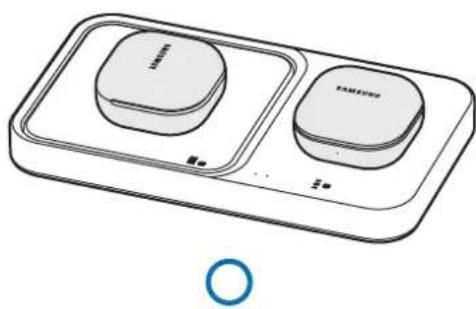
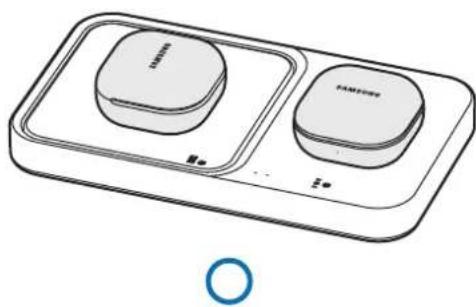
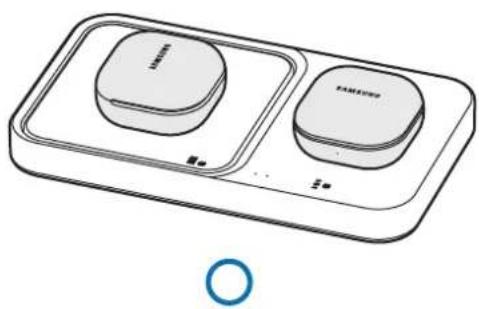
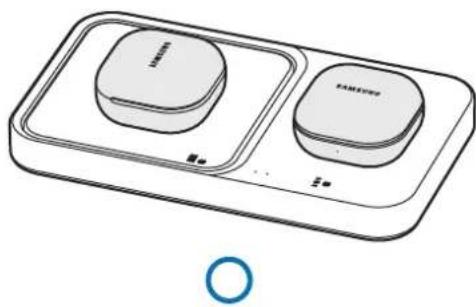
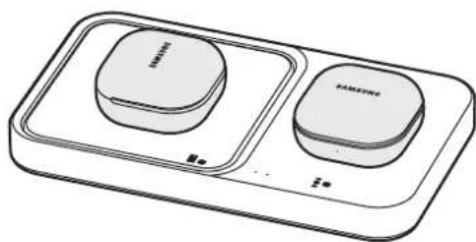
- Place the centre of mobile device or Galaxy Buds on the charging coil centre, and the Galaxy Watch or Buds on the watch or buds charging coil. If you do not place them correctly, the charging speed may decrease or they may not be charged properly.
- Wireless charging may not work properly if you have attached a thick case to your mobile device or Galaxy Buds. If your case is thick, remove it before placing your mobile device on the wireless charger.
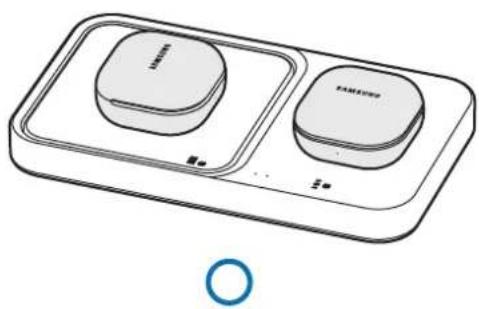
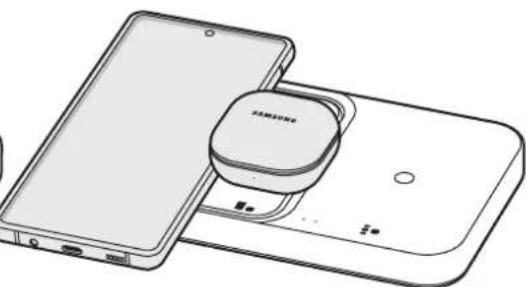
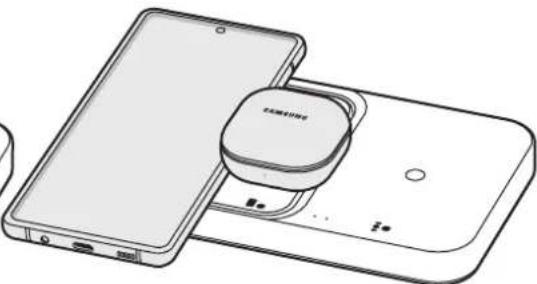
- Charging more than one device at the same time may decrease the charging speed.
- If you connect a charger to the mobile device or Galaxy Buds during wireless charging, the wireless charging feature will be unavailable.
- When charging a Galaxy Watch, update the Galaxy Watch to the latest software. If the latest software is not installed, the charging speed may be slow.
- If you use the wireless charger in areas with weak network signals, you may lose network reception.

- During wireless charging, noise may occur from the wireless charger.
- When wirelessly charging the Galaxy Buds or Watch, or charging the mobile device via fast wireless charging, the fan inside the wireless charging pad may produce noise. To reduce the fan noise while charging your mobile device, deactivate the fast wireless charging feature. To see how to deactivate the fast wireless charging feature, refer to the mobile device's user manual.
- To save energy, unplug the charger when not in use. The charger does not have a power switch, so you must unplug the charger from the electric socket when not in use to avoid wasting power. The charger should remain close to the electric socket and easily accessible while charging.
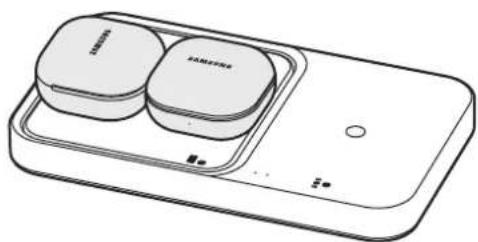
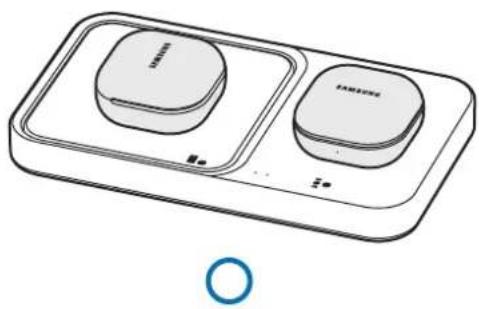
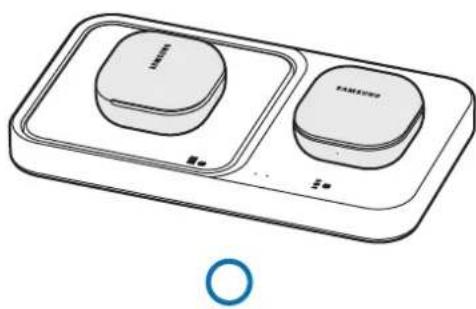
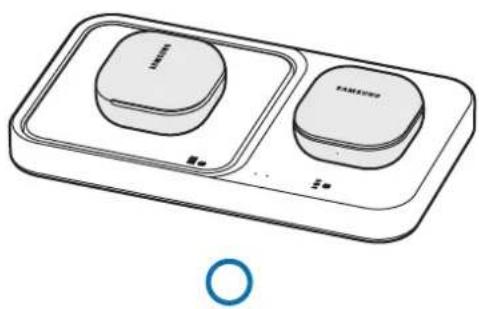
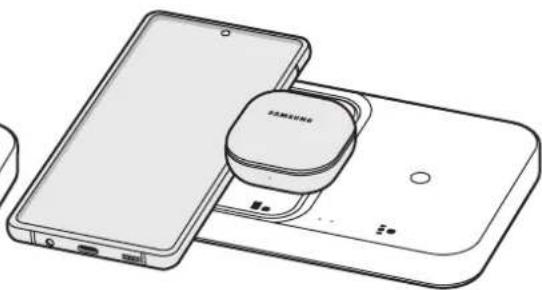
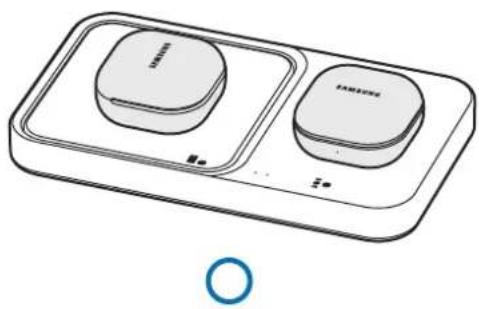
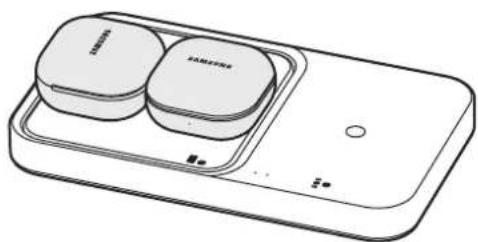
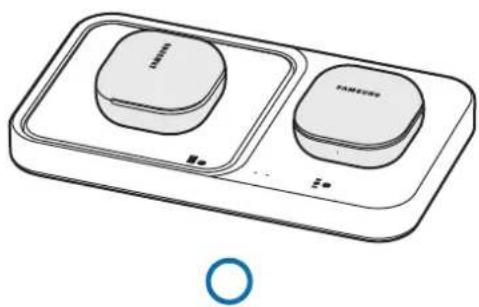
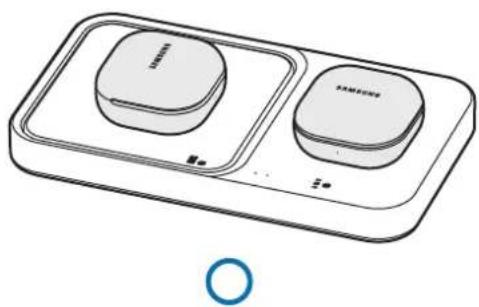
Charging multiple devices at the same time
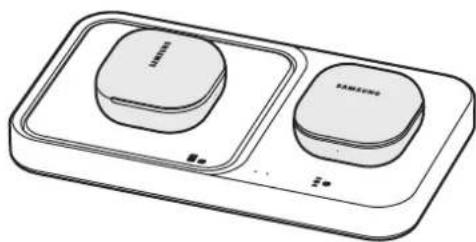
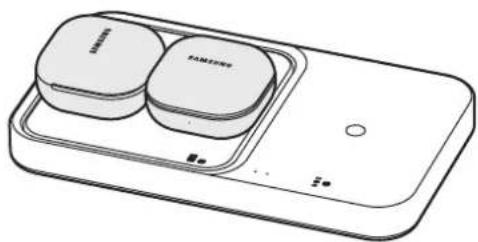
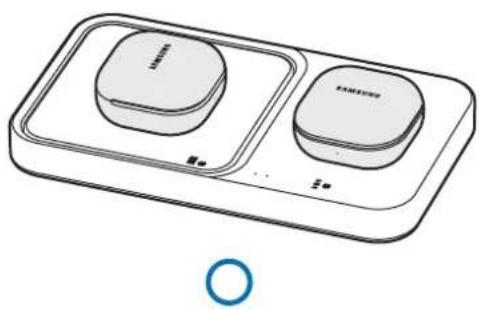
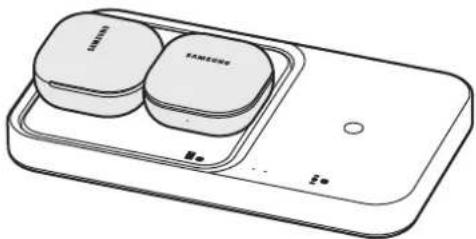
▶ Charging the mobile device and Galaxy Buds
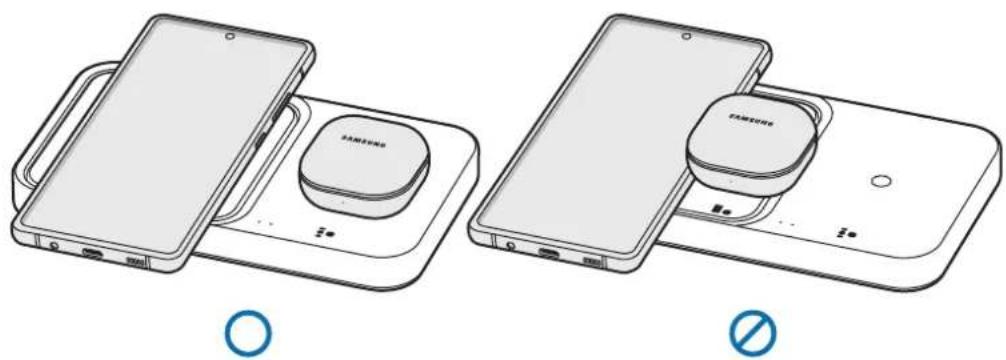
natural_image
Two line drawings of smartphone charging devices with no visible text or symbols▶ Charging the Galaxy Watches
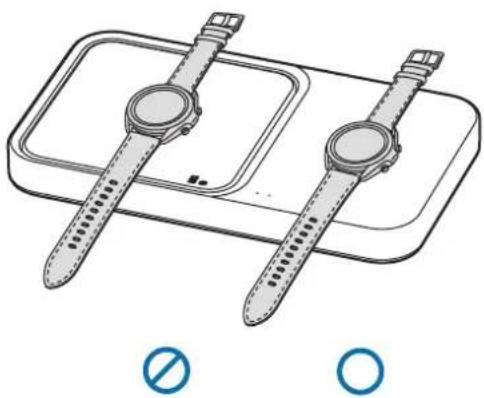
natural_image
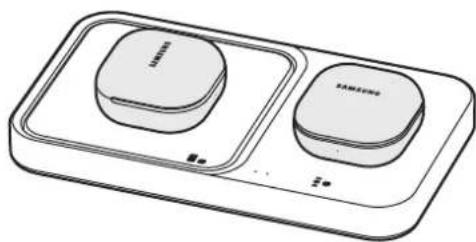
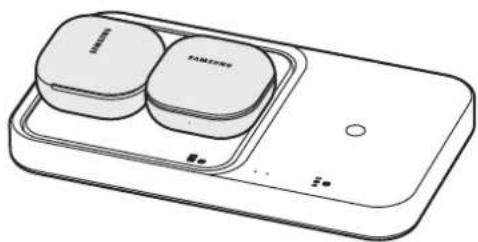
Illustration of a smartwatch and its dual-band display case with no text or symbols▶ Charging the Galaxy Buds
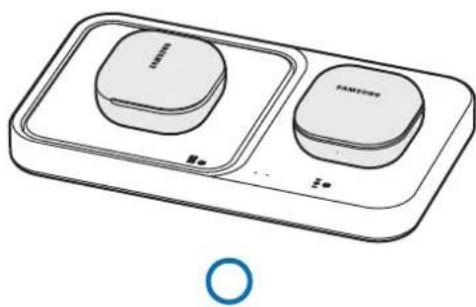
natural_image
Line drawing of a two-tiered Samsung washing machine with two buttons and a circular button (no text or symbols)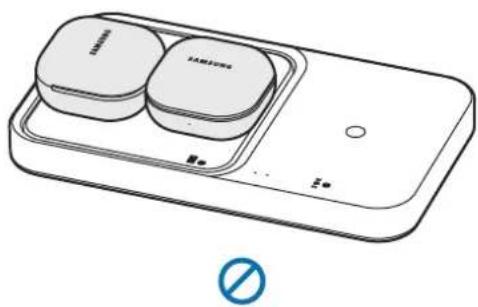
natural_image
Line drawing of a smartphone with two Samsung buttons and a battery, no text or symbols presentIndicator light identification
The indicator light alerts you to the wireless charger's status.
| Colour Status | |
| Red → Green → Orange | When connected to a power outlet |
| Red | When charging |
| Green | When fully charged |
| Flashing red | When not charging properly due to a general error |
| Flashing orange | When not charging properly due to a not approved charger |
| Off | When the mobile device, Galaxy Buds or the Watch is removed from the wireless charger or when the wireless charger is not connected to a power outlet |

- If the indicator light does not work as described, disconnect the charger from the wireless charger and reconnect it.
- The indicator light may work differently depending on the mobile device, wireless charging cover, Galaxy Buds, or the Watch.
Copyright
Copyright © 2022 Samsung Electronics Co., Ltd.
This manual is protected under international copyright laws.
No part of this manual may be reproduced, distributed, translated, or transmitted in any form or by any means, electronic or mechanical, including photocopying, recording, or storing in any information storage and retrieval system.
Trademarks
- SAMSUNG and the SAMSUNG logo are registered trademarks of Samsung Electronics Co., Ltd.
• All other trademarks and copyrights are the property of their respective owners.
natural_image
Simple line drawing of a square electronic device with a plug inserted into it (no text or symbols)▶ EP-P5400 :
natural_image
Line drawing of a device with a plug inserted into a tray (no text or symbols)flowchart
graph TD
    A["Device Shipped"] --> B["Shipped into Display"]
    B --> C["Shipped down the door"]
    C --> D["Shipped down the door with a wristwatch"]
    D --> E["Shipped down the door with a watchman"]
    E --> F["Shipped down the door with a wristwatch on top"]
    style A fill:#f9f,stroke:#333
    style B fill:#ccf,stroke:#333
    style C fill:#cfc,stroke:#333
    style D fill:#fcc,stroke:#333
    style E fill:#cff,stroke:#333
    style F fill:#ffc,stroke:#333
natural_image
Two line drawings of smartphone charging devices, one with a circular button and the other with a battery (no text or symbols)natural_image
Illustration of a smartwatch and its dual plate with no visible text or symbols▶ Chargement de Galaxy Buds
natural_image
Line drawing of a two-tiered Samsung washing machine with two circular buttons and a blue circular symbol below (no text or labels)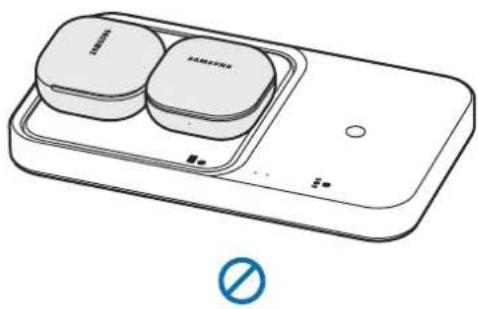
natural_image
Line drawing of a smartphone with two branded buttons and a 'No' symbol (no text or labels)Copyright © 2022 Samsung Electronics Co., Ltd.
natural_image
Simple line drawing of a square electronic device with a plug inserted, no text or symbols present▶ EP-P5400:
natural_image
Line drawing of a device with a plug inserted into a tray (no text or symbols)natural_image
Two line drawings of smartphone charging devices, one with a Samsung logo and the other with a Samsung logo, both without any text or symbols.▶ Galaxy Watches laden
natural_image
Illustration of a pair of smartwatches on a battery tray, with no text or symbols present.▶ Galaxy Buds laden
natural_image
Line drawing of a Samsung washing machine with two buttons and a matching tray (no text or symbols)O
natural_image
Line drawing of a Samsung smartwatch with two charging case modules and a display unit (no text or symbols)(no text)
Copyright © 2022 Samsung Electronics Co., Ltd.
natural_image
Simple line drawing of a square electronic device with a plug inserted into it (no text or symbols)▶ EP-P5400:
natural_image
Line drawing of a device with a plug inserted into a tray (no text or symbols)flowchart
graph TD
    A["Device Shipped"] --> B["Shipped with a strap"]
    B --> C["Shipped with a strap on top"]
    C --> D["Shipped with a strap on front panel"]
    D --> E["Shipped with a strap on side panel"]
    E --> F["Shipped with a strap on back panel"]
    F --> G["Shipped with a strap on rear panel"]
    G --> H["Shipped with a strap on front panel"]
natural_image
Line drawing of a smartphone connected to a Samsung charging station (no text or symbols)O
natural_image
Line drawing of a smartphone and its dual-chamber device (no text or symbols)(no text)
natural_image
Line drawing of a smartwatch and its dual-band charging case (no text or symbols)∅
O
natural_image
Line drawing of a two-tiered Samsung air conditioner unit (no text or symbols)O
natural_image
Line drawing of a smart appliance with two labeled buttons and a control panel (no text or symbols)(no text)
Copyright © 2022 Samsung Electronics Co., Ltd.
natural_image
Simple line drawing of a square electronic device with a plug inserted, no text or symbols present▶ EP-P5400:
natural_image
Line drawing of a device with a plug inserted into a tray (no text or symbols)natural_image
Two line drawings of Samsung smartphones with charging devices, one open and one closed, both without any text or symbols.▶ Cargar el Galaxy Watch
natural_image
Illustration of a smartwatch and its dual plate with no text or symbols▶ Cargar los Galaxy Buds
natural_image
Line drawing of a two-tier smart appliance with two circular buttons and a blue circular icon at the bottom (no text or symbols)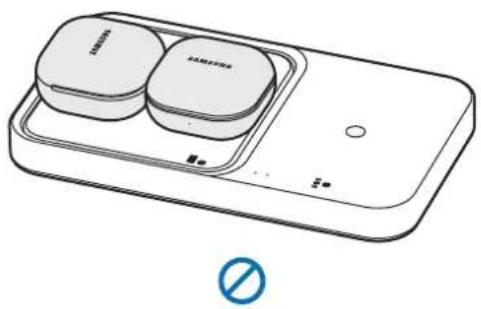
natural_image
Illustration of a smart appliance with two circular components and a switch, no text or symbols present.Copyright © 2022 Samsung Electronics Co., Ltd.
natural_image
Simple line drawing of a square object with a tool inserted, no text or symbols present▶ EP-P5400:
natural_image
Line drawing of a device with a plug inserted into a tray (no text or symbols)natural_image
Two line drawings of smartphone charging devices, one open and one closed, both without any text or symbols.natural_image
Illustration of a pair of smartwatches on a battery pack, no text or symbols presentnatural_image
Line drawing of a two-tiered Samsung washing machine with two buttons and a circular button (no text or symbols)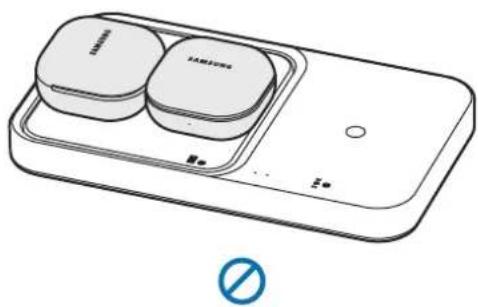
natural_image
Line drawing of a smartphone with two Samsung buttons and a battery, no text or symbols presentJelzőfény jelentése
Copyright © 2022 Samsung Electronics Co., Ltd.
natural_image
Simple line drawing of a square electronic device with a cable inserted, no text or symbols present▶ EP-P5400:
natural_image
Line drawing of a device with a plug inserted into a tray (no text or symbols)flowchart
graph TD
    A["Device Shipped"] --> B["Shipment Shipped"]
    B --> C["Shipment Shipped"]
    C --> D["Shipment Shipped"]
    D --> E["Shipment Shipped"]
    E --> F["Shipment Shipped"]
natural_image
Line drawing of a smartwatch and its dual-band display case (no text or symbols)(no text)
O
natural_image
Line drawing of a two-tiered smart appliance with two circular buttons and a blue circular symbol below (no text or labels)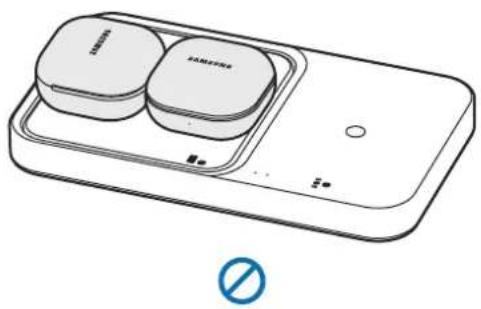
natural_image
Illustration of a smart appliance with two circular buttons and a switch, no text or symbols present.Kolory kontrolki
Copyright © 2022 Samsung Electronics Co., Ltd.
natural_image
Simple line drawing of a square electronic device with a plug inserted into it (no text or symbols)▶ EP-P5400:
natural_image
Line drawing of a device with a plug inserted into a tray (no text or symbols)flowchart
graph TD
    A["Device Shipped"] --> B["Shipped to Product"]
    B --> C["Shipped to Product with Sensor"]
    C --> D["Shipped to Product with Sensor"]
    D --> E["Shipped to Product with Sensor"]
natural_image
Line drawing of a smartphone connected to a Samsung charging station (no text or symbols)O
natural_image
Line drawing of a smartphone with a compact charging case and a battery, shown from front and side views (no text or symbols)(no text)
natural_image
Line drawing of a smartwatch and its dual-band display case (no text or symbols)(no text)
O
natural_image
Line drawing of a two-tier smart appliance with two circular buttons and a blue circular symbol below (no text or labels)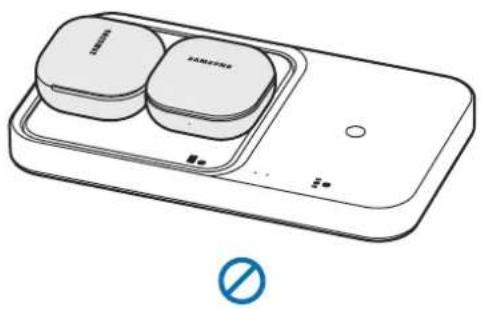
natural_image
Illustration of a smart appliance with two labeled blocks and a 'No' symbol (no text or symbols on the main diagram)natural_image
Simple line drawing of a square object with a tool inserted, no text or symbols present▶ EP-P5400:
natural_image
Line drawing of a device with a plug inserted into a tray (no text or symbols)2
natural_image
Line drawing of a smartphone connected to a charging station with a circular device (no text or symbols visible)O
natural_image
Line drawing of a smartphone and its rear-right charging device (no text or symbols)(no text)
natural_image
Line drawing of a smartwatch and its dual-band display case (no text or symbols)(no text)
O
natural_image
Line drawing of a Samsung washing machine with two buttons and a matching tray (no text or symbols)O
natural_image
Line drawing of a Samsung smartwatch with two charging case modules and a display unit (no text or symbols)(no text)
Copyright © 2022 Samsung Electronics Co., Ltd.
natural_image
Simple line drawing of a square electronic device with a plug inserted into it (no text or symbols)▶ EP-P5400:
natural_image
Line drawing of a handheld device with a cable inserted, showing a screen and tray (no text or symbols)2 Središnji dio podržanog mobilnog uređaja ili slušalice Galaxy Buds stavite na centar zavojnice za punjenje (a) kako biste ih napunili (A) Na zavojnici za punjenje sata ili slušalica (b) bežičnog punjača (c) možete puniti i Galaxy Watch ili slušalice.
- Punjenje će započeti kada zavojnica za punjenje dođe u dodir s bežičnom zavojnicom za punjenje mobilnog uređaja, slušalica Galaxy Buds ili sata Galaxy Watch.
- Provjerite ikonu punjenja koja se prikazuje na zaslonu mobilnog uređaja i sata Galaxy Watch kako biste provjerili status punjenja. Provjerite status punjenja slušalica i kućišta za punjenje putem boje indikatora baterije na slušalicama Galaxy Buds.
- Ako sat Galaxy Watch postavite s obadva spojna remena zajedno na površinu za bežično punjenje, Galaxy Watch možda se neće puniti, jer zavojnica za punjenje ne dolazi u dodir sa bežičnom zavojnicom za punjenje na satu Galaxy Watch.
- Kada se na bežični punjač stave provodni materijali, iz bežičnog punjača može se čuti šum.
- Da biste započeli brzo bežično punjenje, postavite mobilni uređaj koji podržava brzo bežično punjenje na bežični punjač. Više informacija potražite u korisničkom priručniku za mobilni uređaj.
▶ EP-P2400:
flowchart
graph TD
    A["Receipt"] --> B["Shipment"]
    B --> C["Product"]
    C --> D["Order"]
▶ EP-P5400:
flowchart
graph TD
    A["Device 1: Display"] --> B["Device 2: Display"]
    B --> C["Device 3: Display"]
    C --> D["Device 4: Display"]
    D --> E["Device 5: Display"]
    style A fill:#f9f,stroke:#333
    style B fill:#ccf,stroke:#333
    style C fill:#cfc,stroke:#333
    style D fill:#fcc,stroke:#333
    style E fill:#ffc,stroke:#333
3 Kada su mobilni uređaj, slušalice Galaxy Buds ili Galaxy Watch u potpunosti napunjeni, uklonite mobilni uređaj, Galaxy Buds ili Galaxy Watch s bežičnog punjača.

Mjere opreza za mobilni uređaj, Galaxy Buds ili Galaxy Watch koji se pune
- Nemojte stavljati mobilni uređaj na bežični punjač s kreditnom karticom ili karticom za radiofrekvencijsku identifikaciju (RFID) (primjerice karticom za prijevoz ili karticom za otključavanje) između stražnje strane mobilnog uređaja i poklopca mobilnog uređaja.
- Ne stavljajte mobilni uređaj, slušalice Galaxy Buds ili sat Galaxy Watch na bežični punjač kada se provodni materijali, kao što su metalni predmeti i magneti, nalaze između mobilnog uređaja, slušalica Galaxy Buds ili sata Galaxy Watch i bežičnog punjača.
natural_image
Two line drawings of Samsung smartphones with charging devices, one open and one closed, both without any text or symbols.▶ Punjenje sata Galaxy Watch
natural_image
Line drawing of a smartwatch and its tray with no text or symbols▶ Punjenje slušalica Galaxy Buds
natural_image
Line drawing of a two-tier smart appliance with two rounded square units and a blue circular symbol at the bottom (no text or labels)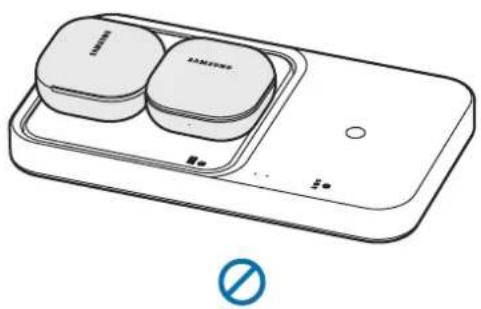
natural_image
Line drawing of a smartphone with two Samsung buttons and a battery, no text or symbols presentIdentifikacija boje indikatora
Copyright © 2022 Samsung Electronics Co., Ltd.
Ovaj je priručnik zaštićen međunarodnim zakonima o autorskim pravima.
natural_image
Simple line drawing of a square electronic device with a plug inserted, no text or symbols present▶ EP-P5400:
natural_image
Line drawing of a handheld device with a cable inserted, showing a screen and tray (no text or symbols)2 Postavite središte podržanog mobilnog uređaja ili Galaxy Buds na središte kalema za punjenje (a) da biste ih napunili (A). Takođe možete da napunite Galaxy Watch ili Buds na kalemu za punjenje sata ili uređaja Buds (b) na bežičnom punjaču (B)
- Punjenje će početi kada kalem za punjenje dođe u kontakt sa kalemom za bežično punjenje u mobilnom uređaju, uređaju Galaxy Buds ili Galaxy Watch.
- Proverite ikonu za punjenje prikazanu na ekranu mobilnog uređaja i Galaxy Watch kako biste videli status punjenja. Proverite status punjenja bubica i kućišta za punjenje pomoću boje indikatora statusa baterije na uređaju Galaxy Buds.
- Ako Galaxy Watch postavite zajedno sa oba spojna kaiša na površinu za bežično punjenje, Galaxy Watch se možda neće puniti jer kalem za punjenje ne dolazi u kontakt sa kalemom za bežično punjenje na uređaju Galaxy Watch.
- Kada se provodljivi materijali stave na bežični punjač, može se pojaviti šum iz bežičnog punjača.
- Da biste počeli brzo bežično punjenje, postavite mobilni uređaj koji podržava brzo bežično punjenje na bežični punjač. Više informacija potražite u korisničkom priručniku za mobilni uređaj.
▶ EP-P2400:
flowchart
graph TD
    A["Device 1: Top Left"] --> B["Device 2: Bottom Left"]
    B --> C["Device 3: Top Right"]
    C --> D["Device 4: Bottom Right"]
    style A fill:#f9f,stroke:#333
    style B fill:#ccf,stroke:#333
    style C fill:#cfc,stroke:#333
    style D fill:#fcc,stroke:#333
▶ EP-P5400:
flowchart
graph TD
    A["Device 1: Display"] --> B["Device 2: Display"]
    B --> C["Device 3: Display"]
    C --> D["Device 4: Display"]
    D --> E["Device 5: Display"]
    style A fill:#f9f,stroke:#333
    style B fill:#ccf,stroke:#333
    style C fill:#cfc,stroke:#333
    style D fill:#fcc,stroke:#333
    style E fill:#ffc,stroke:#333
3 Kada je mobilni uređaj, uređaj Galaxy Buds ili Galaxy Watch potpuno napunjen, skinite mobilni uređaj, Galaxy Buds ili Galaxy Watch sa bežičnog punjača.

Mere predostrožnosti za punjenje mobilnog uređaja, uređaja Galaxy Buds ili Galaxy Watch
- Nemojte postavljati mobilni uređaj na bežični punjač kada se kreditna kartica ili kartica za radio-frekventnu identifikaciju (RFID) (kao što je kartica za prevoz ili ključ-kartica) nalazi između zadnje strane mobilnog uređaja i maske mobilnog uređaja.
- Nemojte stavljati mobilni uređaj, uređaj Galaxy Buds ili Galaxy Watch na bežični punjač ako se provodni materijali, poput metalnih predmeta i magneta, nalaze između mobilnog uređaja, uređaja Galaxy Buds ili Galaxy Watch i bežičnog punjača.
Mobilni uređaj, uređaj Galaxy Buds ili Galaxy Watch se možda neće ispravno puniti ili će se pregrejati ili može doći do oštećenja mobilnog uređaja, uređaja Galaxy Buds ili Galaxy Watch ili kartica.

- Možda ćete morati zasebno da kupite punjač u zavisnosti od bežičnog punjača koji ste kupili.
- Postavite središte mobilnog uređaja ili slušalice Galaxy Buds na središte kalema za punjenje, a sat Galaxy Watch ili slušalice Galaxy Buds na kalem za punjenje sata ili slušalica. Ako ih ne postavite pravilno, brzina punjenja se može smanjiti ili se možda neće pravilno napuniti.
natural_image
Two line drawings of Samsung smartphones with charging devices, one open and one closed, both without any text or symbols.▶ Punjenje dva uređaja Galaxy Watch
natural_image
Line drawing of a smartwatch and its tray with no text or symbols▶ Punjenje uređaja Galaxy Buds
natural_image
Line drawing of a Samsung washing machine with two circular buttons and a blue ring (no text or symbols)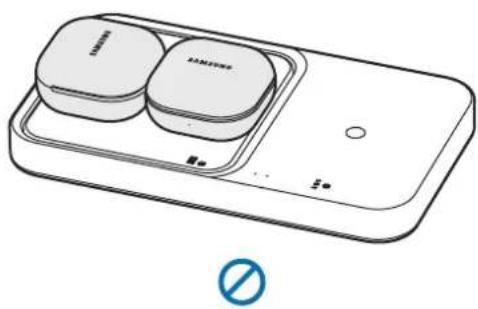
natural_image
Line drawing of a smartphone with two Samsung buttons and a battery, no text or symbols presentIdentifikacija lampice indikatora
Copyright © 2022 Samsung Electronics Co., Ltd.
natural_image
Simple line drawing of a square electronic device with a plug inserted, no text or symbols present.▶ EP-P5400:
natural_image
Line drawing of a device with a plug inserted into a tray (no text or symbols)natural_image
Line drawing of a smartwatch and its dual-band display case (no text or symbols)(no text)
O
Carregar os Galaxy Buds
natural_image
Line drawing of a Samsung washing machine with two circular buttons and a blue ring (no text or symbols)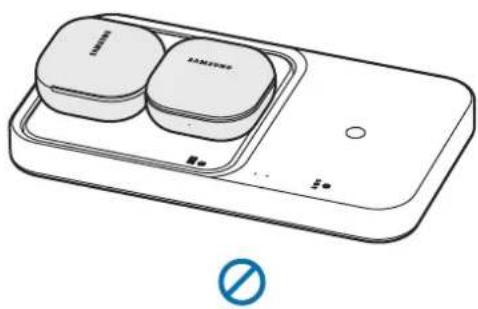
natural_image
Line drawing of a smartphone with two Samsung buttons and a battery, no text or symbols presentCopyright © 2022 Samsung Electronics Co., Ltd.
Este manual está protegido ao abrigo de leis de copyright internacional.
natural_image
Simple line drawing of a square electronic device with a plug inserted into it (no text or symbols)▶ EP-P5400:
natural_image
Line drawing of a handheld electronic device with a cable inserted, showing a screen and tray (no text or symbols)flowchart
graph TD
    A["Device with two parts"] --> B["Assembly step 1"]
    B --> C["Device with one part"]
    C --> D["Assembly step 2"]
▶ EP-P5400:
flowchart
graph TD
    A["Device 1: Display"] --> B["Device 2: Display"]
    B --> C["Device 3: Display"]
    C --> D["Device 4: Display"]
    D --> E["Device 5: Display"]
    E --> F["Device 6: Display"]
    style A fill:#f9f,stroke:#333
    style B fill:#ccf,stroke:#333
    style C fill:#cfc,stroke:#333
    style D fill:#fcc,stroke:#333
    style E fill:#cff,stroke:#333
    style F fill:#ffc,stroke:#333
natural_image
Line drawing of a pair of smartwatches on a rectangular device (no text or symbols)(no text)
O
▶ Galaxy Buds uzlāde
natural_image
Line drawing of a two-tier smart appliance with two rounded square units and a circular base, no text or symbols present.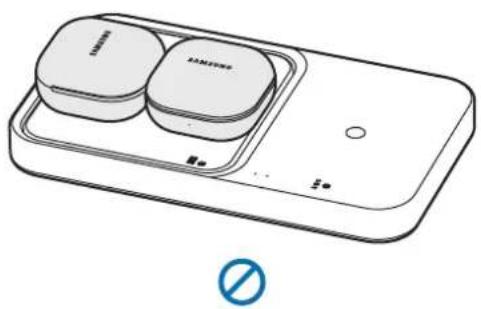
natural_image
Line drawing of a smartphone with two Samsung branded blocks on top, no text or symbols presentnatural_image
Simple line drawing of a square electronic device with a plug inserted, no text or symbols present▶ EP-P5400:
natural_image
Line drawing of a device with a plug inserted into a tray (no text or symbols)natural_image
Two line drawings of smartphone charging devices with no visible text or symbols▶ „Galaxy Watch“ ikrovimas
natural_image
Illustration of a pair of smartwatches on a battery pack, with no text or symbols present.▶ „Galaxy Buds“ ikrovimas
natural_image
Line drawing of a two-tiered Samsung washing machine with two buttons and a circular button (no text or symbols)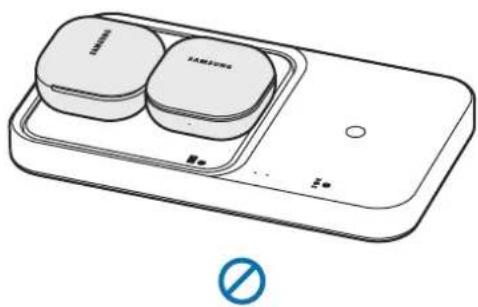
natural_image
Line drawing of a device with two labeled blocks and a 'No' symbol below (no text or symbols on main components)natural_image
Simple line drawing of a square electronic device with a plug inserted, no text or symbols present▶ EP-P5400:
natural_image
Line drawing of a device with a plug inserted into a tray (no text or symbols)natural_image
Line drawing of a pair of smartwatches on a rectangular device (no text or symbols)(no text)
O
▶ Galaxy Budside laadimine
natural_image
Line drawing of a two-tier smart appliance with two rounded square units and a circular base, no text or symbols present.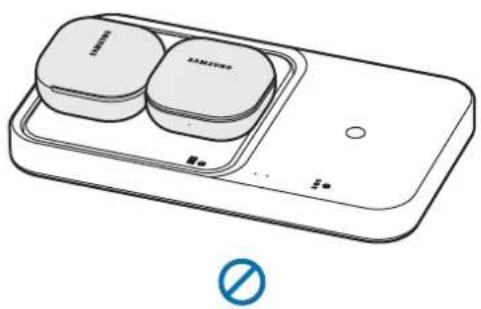
natural_image
Line drawing of a smartphone with two Samsung buttons and a battery, no text or symbols presentMärgutule tähendus
Copyright © 2022 Samsung Electronics Co., Ltd.
natural_image
Simple line drawing of a square electronic device with a plug inserted, no text or symbols present▶ EP-P5400:
natural_image
Line drawing of a handheld device with a cable inserted, showing a tray and control panel (no text or symbols)flowchart
graph TD
    A["Device Shipped"] --> B["Shipped to Product"]
    B --> C["Shipped to Product with Sensor"]
    C --> D["Shipped to Product with Sensor"]
    D --> E["Shipped to Product with Sensor"]
    E --> F["Shipped to Product with Sensor"]
natural_image
Line drawing of a smartphone connected to a Samsung charging station (no text or symbols)O
natural_image
Line drawing of a smartphone with a compact charging case and a battery, shown from front and side views (no text or symbols)(no text)
▶ Twee Galaxy Watches opladen
natural_image
Line drawing of a smartwatch and its dual-band display case (no text or symbols)(no text)
O
▶ Twee paar Galaxy Buds opladen
natural_image
Line drawing of a two-tier smart appliance with two circular buttons and a blue circular symbol below (no text or labels)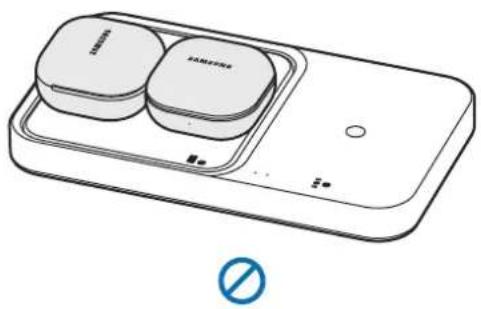
natural_image
Illustration of a smart appliance with two circular components and a switch, no text or symbols present.Identificatielampje
Copyright © 2022 Samsung Electronics Co., Ltd.
natural_image
Simple line drawing of a square electronic device with a plug inserted into it (no text or symbols)▶ EP-P5400:
natural_image
Line drawing of a handheld device with a cable inserted, showing a screen and tray (no text or symbols)natural_image
Two line drawings of smartphone charging devices, one open and one closed, both with no visible text or symbols.▶ Ladda Galaxy Watch
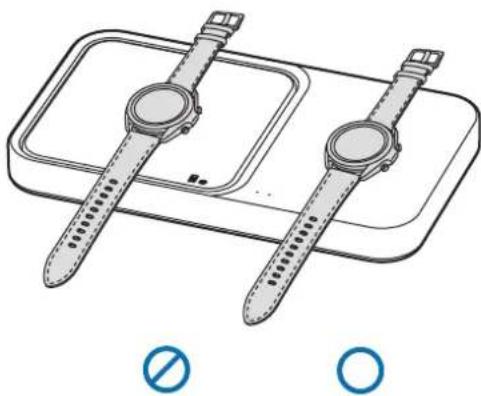
natural_image
Illustration of a smartwatch and its dual-band charging tray (no text or symbols)▶ Ladda Galaxy Buds
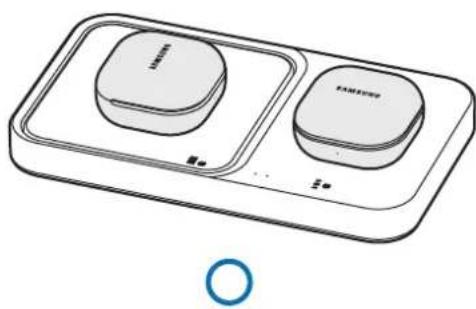
natural_image
Line drawing of a two-tiered Samsung washing machine with two circular buttons and a blue ring at the bottom (no text or symbols)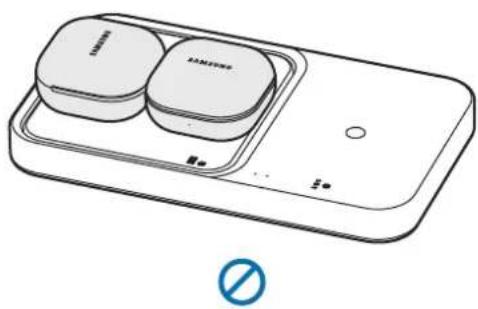
natural_image
Line drawing of a smartphone with two Samsung buttons and a battery, no text or symbols presentIdentifiera indikatorlamporna
Copyright © 2022 Samsung Electronics Co., Ltd.
natural_image
Simple line drawing of a square electronic device with a plug inserted, no text or symbols present▶ EP-P5400:
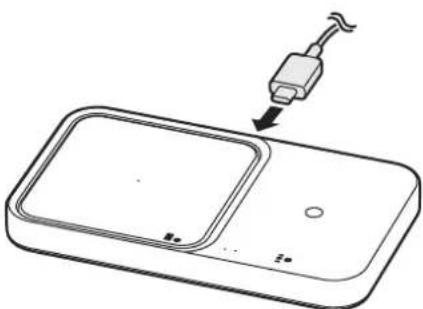
natural_image
Line drawing of a device with a plug inserted into a tray (no text or symbols)2 Plasser midtpunktet av den støttede mobilenheten eller Galaxy Buds på midtpunktet av ladespolen (a) for å lade den (A). Du kan også lade Galaxy Watch eller Buds på ladespolen (b) til den trådløse laderen (E) for klokken eller Buds.
▶ Lade Galaxy Watch-er
natural_image
Line drawing of a pair of smartwatches on a rectangular device (no text or symbols)(no text)
O
▶ Lade Galaxy Buds
natural_image
Line drawing of a two-tier smart appliance with two rounded square units and a circular base, no text or symbols present.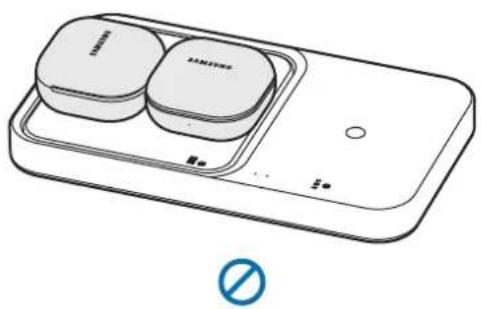
natural_image
Line drawing of a smartphone with two Samsung buttons and a battery, no text or symbols presentIdentifisere indikatorlampene
natural_image
Simple line drawing of a square electronic device with a cable inserted, no text or symbols present.▶ EP-P5400:
natural_image
Line drawing of a device with a plug inserted into a tray (no text or symbols)flowchart
graph TD
    A["Device with two parts"] --> B["Assembly step 1"]
    B --> C["Device with one part"]
    C --> D["Assembly step 2"]
▶ EP-P5400:
flowchart
graph TD
    A["Device 1: Display"] --> B["Device 2: Display"]
    B --> C["Device 3: Display"]
    C --> D["Device 4: Display"]
    D --> E["Device 5: Display"]
    style A fill:#f9f,stroke:#333
    style B fill:#ccf,stroke:#333
    style C fill:#cfc,stroke:#333
    style D fill:#fcc,stroke:#333
    style E fill:#cff,stroke:#333
natural_image
Line drawing of a pair of smartwatches on a rectangular device (no text or symbols)(no text)
O
natural_image
Line drawing of a two-tier smart appliance with two rounded square units and a blue circular symbol at the bottom (no text or labels)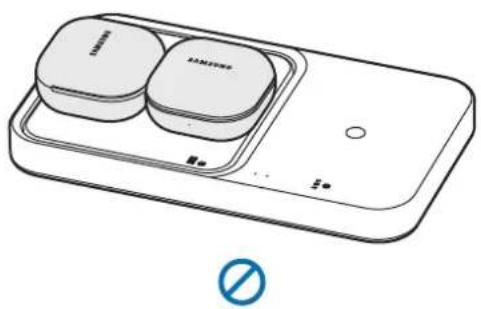
natural_image
Line drawing of a smartphone with two Samsung buttons and a battery, no text or symbols presentCopyright © 2022 Samsung Electronics Co., Ltd.
natural_image
Simple line drawing of a square electronic device with a plug inserted, no text or symbols present▶ EP-P5400:
natural_image
Line drawing of a handheld device with a cable inserted, showing a screen and tray (no text or symbols)natural_image
Line drawing of a pair of smartwatches on a rectangular device (no text or symbols)(no text)
O
natural_image
Line drawing of a two-tier smart appliance with two rounded square units and a circular base, no text or symbols present.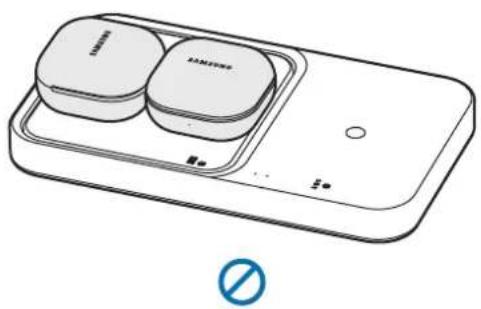
natural_image
Line drawing of a smartphone with two Samsung buttons and a battery, no text or symbols presentIdentifikation af indikatorlys
natural_image
Simple line drawing of a square electronic device with a plug inserted, no text or symbols present▶ EP-P5400:
natural_image
Line drawing of a handheld device with a plug inserted into a tray (no text or symbols)natural_image
Two line drawings of smartphone charging devices, one with a circular button and the other with a battery (no text or symbols)natural_image
Illustration of a smartwatch and its dual-band display case (no text or symbols)natural_image
Line drawing of a Samsung washing machine with two buttons and a matching tray (no text or symbols)O
natural_image
Line drawing of a Samsung smartwatch with two charging case modules and a display unit (no text or symbols)(no text)
natural_image
Simple line drawing of a square object with a tool inserted, no text or symbols present▶ EP-P5400:
natural_image
Line drawing of a device with a plug inserted into a tray (no text or symbols)flowchart
graph TD
    A["Base Product"] --> B["Shipment Step a"]
    B --> C["Shipment Step b"]
    C --> D["Shipment Step c"]
    D --> E["Final Shipment"]
▶ EP-P5400:
flowchart
graph TD
    A["Device 1: Display"] --> B["Device 2: Display"]
    B --> C["Device 3: Display"]
    C --> D["Device 4: Display"]
    D --> E["Device 5: Display"]
    style A fill:#f9f,stroke:#333
    style B fill:#ccf,stroke:#333
    style C fill:#cfc,stroke:#333
    style D fill:#fcc,stroke:#333
    style E fill:#ffc,stroke:#333
natural_image
Two line drawings of smartphone charging devices with no visible text or symbolsPolnjenje ur Galaxy Watch
natural_image
Illustration of a pair of smartwatches on a battery pack, with no text or symbols present.▶ Polnjenje slušalk Galaxy Buds
natural_image
Line drawing of a two-tiered smart appliance with two rounded buttons and a circular button, no text or symbols present.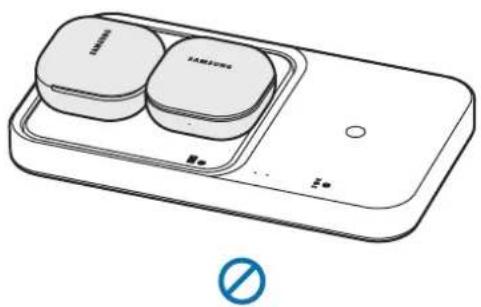
natural_image
Illustration of a smartphone with two circular buttons and a switch, no text or symbols presentBarve indikatorja
natural_image
Simple line drawing of a square electronic device with a plug inserted into it (no text or symbols)▶ EP-P5400:
natural_image
Line drawing of a device with a plug inserted into a tray (no text or symbols)natural_image
Line drawing of a smartphone connected to a Samsung charging station (no text or symbols)O
natural_image
Line drawing of a smartphone with a compact charging case and a battery pack (no text or symbols)(no text)
natural_image
Line drawing of a smartwatch with two lenses placed on a rectangular device (no text or symbols)∅
O
▶ Nabíjanie slúchadiel Galaxy Buds
natural_image
Line drawing of a Samsung washing machine with two buttons and a matching tray (no text or symbols)O
natural_image
Line drawing of a Samsung smartwatch with two charging case modules and a display unit (no text or symbols)(no text)
Copyright © 2022 Samsung Electronics Co., Ltd.
natural_image
Simple line drawing of a square electronic device with a plug inserted, no text or symbols present▶ EP-P5400:
natural_image
Line drawing of a handheld device with a plug inserted into a tray (no text or symbols)natural_image
Line drawing of a smartphone connected to a Samsung charging station (no text or symbols)O
natural_image
Line drawing of a smartphone and its dual electronic device (no text or symbols visible)(no text)
natural_image
Line drawing of a smartwatch and its dual-band display case (no text or symbols)∅
O
natural_image
Line drawing of a two-tiered electronic device with two square buttons and a circular button, no text or symbols present.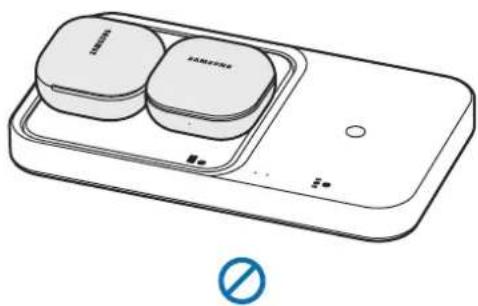
natural_image
Line drawing of a smartphone with two Samsung branded buttons and a blue prohibition symbol (no text or labels)Copyright © 2022 Samsung Electronics Co., Ltd.
natural_image
Simple line drawing of a square electronic component with a plug inserted, no text or symbols present▶ EP-P5400:
natural_image
Line drawing of a handheld device with a cable inserted, showing a switch and screen (no text or symbols)flowchart
graph TD
    A["Device Shipped"] --> B["Shipped with a wristwatch"]
    B --> C["Shipped with a watchman"]
    C --> D["Shipped with a wristwatch on top"]
    D --> E["Shipped with a watchman on front panel"]
    E --> F["Shipped with a wristwatch on back panel"]
    F --> G["Final Purchase"]
natural_image
Line drawing of a smartphone connected to a charging station with a Samsung logo (no text or symbols on device)O
natural_image
Line drawing of a smartphone connected to a compact charging device (no text or symbols visible)(no text)
natural_image
Line drawing of a smartwatch and its dual-band display case (no text or symbols)(no text)
O
natural_image
Line drawing of a Samsung washing machine with two buttons and a matching tray (no text or symbols)O
natural_image
Line drawing of a smart appliance with two square buttons and a control panel (no text or symbols)(no text)
natural_image
Simple line drawing of a square tray with a tool inserted, no text or symbols presentEP-P5400:
natural_image
Line drawing of a device with a plug inserted into a tray (no text or symbols)flowchart
graph TD
    A["Receipt"] --> B["Shipment"]
    B --> C["Product"]
    C --> D["Order"]
EP-P5400:
natural_image
Line drawing of a smartphone connected to a Samsung charging station (no text or symbols)O
natural_image
Line drawing of a smartphone and its dual electronic device (no text or symbols visible)(no text)
natural_image
Line drawing of a smartwatch and its dual-band display case (no text or symbols)(no text)
O
natural_image
Line drawing of a two-tiered Samsung air conditioner unit (no text or symbols)O
natural_image
Line drawing of a smart appliance with two circular buttons and a control panel (no text or symbols)(no text)
การระบุไฟแสดงสถานะ
Copyright © 2022 Samsung Electronics Co., Ltd.
natural_image
Simple line drawing of a square electronic device with a plug inserted, no text or symbols present:EP-P5400

natural_image
Line drawing of a device with a plug inserted into a tray (no text or symbols)flowchart
graph TD
    A["Receipt"] --> B["Shipment"]
    B --> C["Transmit"]
    C --> D["Product"]
natural_image
Diagram of a rectangular electronic device with labeled points (a, b), showing internal components and connections (no text or symbols beyond labels)A
natural_image
Illustration of a smartphone being placed into a flip-flop device, showing the device's internal structure and blue arrow indicating compression (no text or symbols present)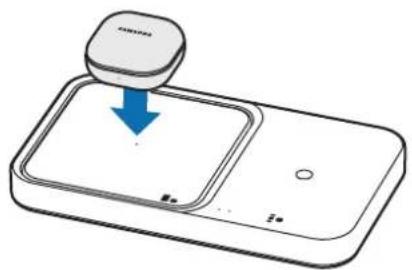
natural_image
Illustration of a smartwatch with a blue download arrow pointing to the screen (no text or symbols)B
natural_image
Illustration of a wristwatch resting on a tray with a blue arrow indicating motion (no text or symbols)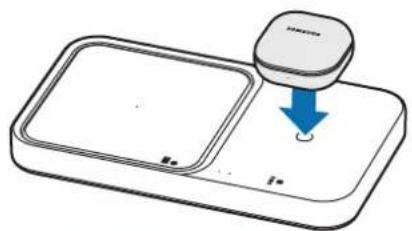
natural_image
Diagram of a mobile phone with a hand icon and blue arrow indicating action (no text or symbols)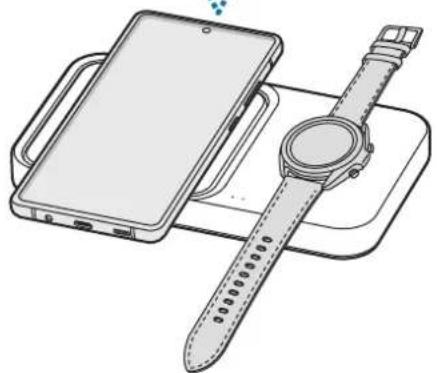
natural_image
Line drawing of a smartphone charging with a wristwatch on a charging tray (no text or symbols)natural_image
Line drawing of a smartphone connected to a Samsung charging station (no text or symbols)O
natural_image
Line drawing of a smartphone and a charging device (no text or symbols)(no text)
Galaxy Watch شحن ساعات
natural_image
Line drawing of a smartwatch and its dual-band display case (no text or symbols)(no text)
O
Galaxy Buds شحن سماعات
natural_image
Line drawing of a two-tiered Samsung air conditioner unit (no text or symbols)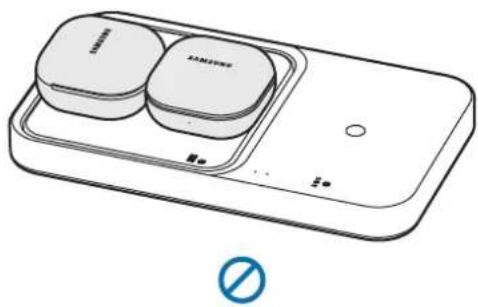
natural_image
Line drawing of a smartphone with two Samsung buttons and a battery, no text or symbols presentnatural_image
Simple line drawing of a square electronic device with a cable inserted, no text or symbols present▶ EP-P5400:
natural_image
Line drawing of a device with a plug inserted into a tray (no text or symbols)natural_image
Two line drawings of smartphone charging devices, one with a Samsung logo and the other with a Samsung logo, both without any text or symbols.▶ Зарядка Galaxy Watch
natural_image
Illustration of a pair of smartwatches on a battery pack, no text or symbols presentnatural_image
Line drawing of a Samsung washing machine with two buttons and a matching tray (no text or symbols)O
natural_image
Line drawing of a Samsung smartwatch with two charging case modules and a display unit (no text or symbols)(no text)
natural_image
Simple line drawing of a square object with a tool inserted, no text or symbols present▶ EP-P5400:
natural_image
Line drawing of a device with a plug inserted into a tray (no text or symbols)natural_image
Line drawing of a smartwatch and its dual-band display case (no text or symbols)(no text)
O
natural_image
Line drawing of a two-tiered Samsung washing machine with two buttons and a circular button (no text or symbols)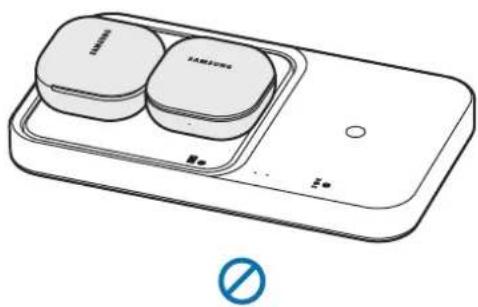
natural_image
Line drawing of a device with two labeled blocks and a 'No' symbol below (no text or symbols on main components)Значення індикатора
natural_image
Simple line drawing of a square electronic device with a plug inserted into it (no text or symbols)▶ EP-P5400:
natural_image
Line drawing of a device with a plug inserted into a tray (no text or symbols)natural_image
Two line drawings of smartphone charging devices, one open and one closed, with no visible text or symbols.natural_image
Illustration of a pair of smartwatches on a battery pack, with no text or symbols present.natural_image
Line drawing of a Samsung washing machine with two buttons and a matching case (no text or symbols)O
natural_image
Line drawing of a Samsung smartwatch with two charging case compartments and a display unit (no text or symbols)(no text)
Copyright © 2022 Samsung Electronics Co., Ltd.
Please read this manual before using the device to ensure safe and proper use.
- Images may differ in appearance from the actual product. Content is subject to change without prior notice.
• Before using the wireless charger, make sure it is compatible with your device.
Instructional icons

Warning: situations that could cause injury to yourself or others

Caution: situations that could cause damage to your device or other equipment

Notice: notes, usage tips, or additional information
Getting started
Package contents
Check the product box for the following items:
- Wireless charger
- USB power adaptor
- USB cable
- Quick start guide

- Wireless charging covers are sold separately.
- The items supplied with the device and any available accessories may vary depending on the region or service provider.
- The supplied items are designed only for this device and may not be compatible with other devices.
- Appearances and specifications are subject to change without prior notice.
- You can purchase additional accessories from your local Samsung retailer. Make sure they are compatible with the device before purchase.
- Use only Samsung-approved accessories. Using unapproved accessories may cause the performance problems and malfunctions that are not covered by the warranty.
- Availability of all accessories is subject to change depending entirely on manufacturing companies. For more information about available accessories, refer to the Samsung website.
Device layout
▶ EP-P2400:
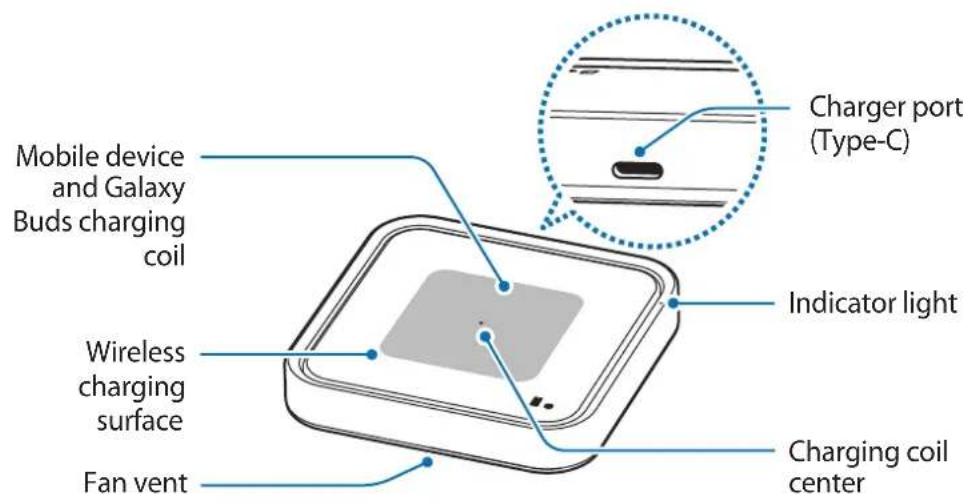
text_image
Mobile device and Galaxy Buds charging coil Wireless charging surface Fan vent Charger port (Type-C) Indicator light Charging coil center▶ EP-P5400:
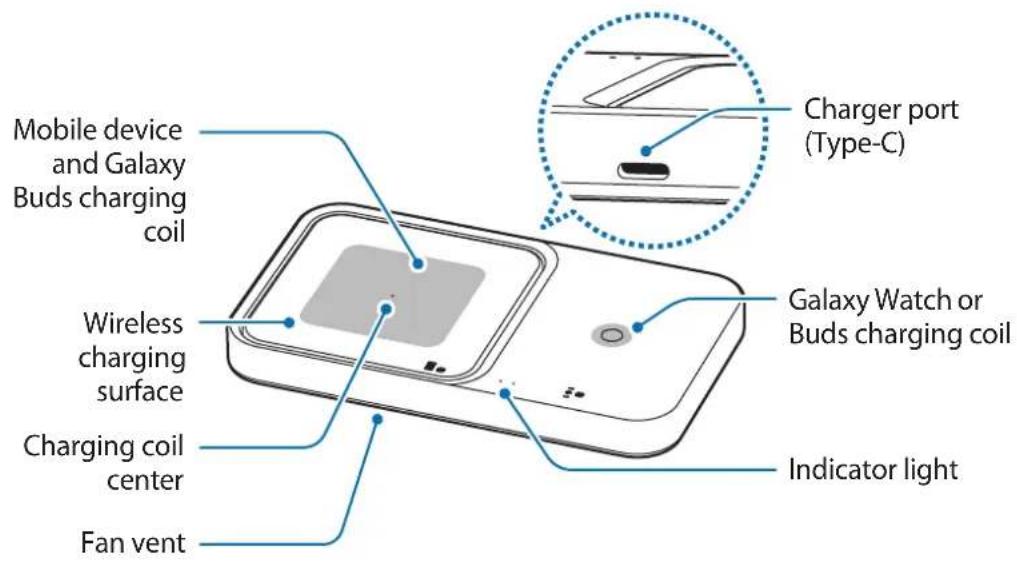
text_image
Mobile device and Galaxy Buds charging coil Wireless charging surface Charging coil center Fan vent Charger port (Type-C) Galaxy Watch or Buds charging coil Indicator light
The Wireless charger can charge one device on the mobile device and Galaxy Buds charging coil and watch or buds charging coil.
Using the wireless charger
Charging the device
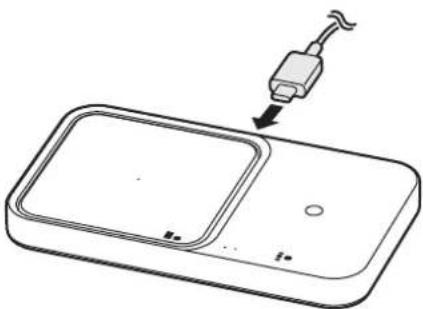
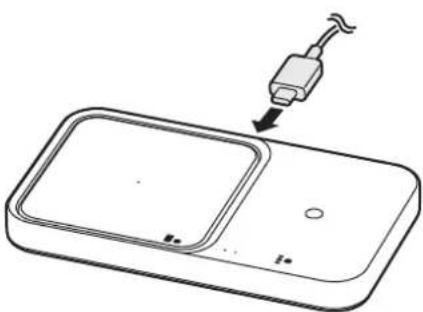
1 Connect the charger to the wireless charger.
When the charger is correctly connected to the wireless charger, the indicator light flashes red, green, and orange, and then turns off.

The wireless charger is not compatible with chargers that do not support AFC (Adaptive Fast Charging) and SFC (Super Fast Charging). To use the 15W fast wireless charging 2.0 feature, use the charger (9.0V/2.77A) supplied with the device, an SFC charger, or a PD (Power Delivery) charger (25W and higher). If a PD charger (less than 25W) or an AFC charger is used, the 7.5W fast wireless charging 1.0 feature may work.
▶ EP-P2400:
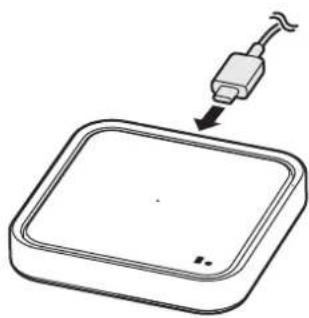
natural_image
Simple line drawing of a square tray with a tool inserted, no text or symbols present▶ EP-P5400:
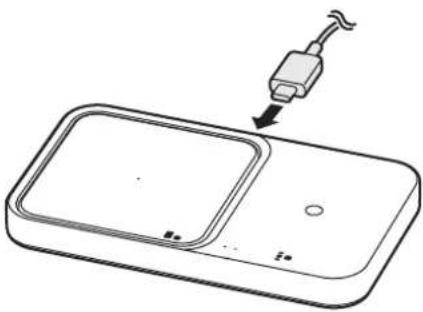
natural_image
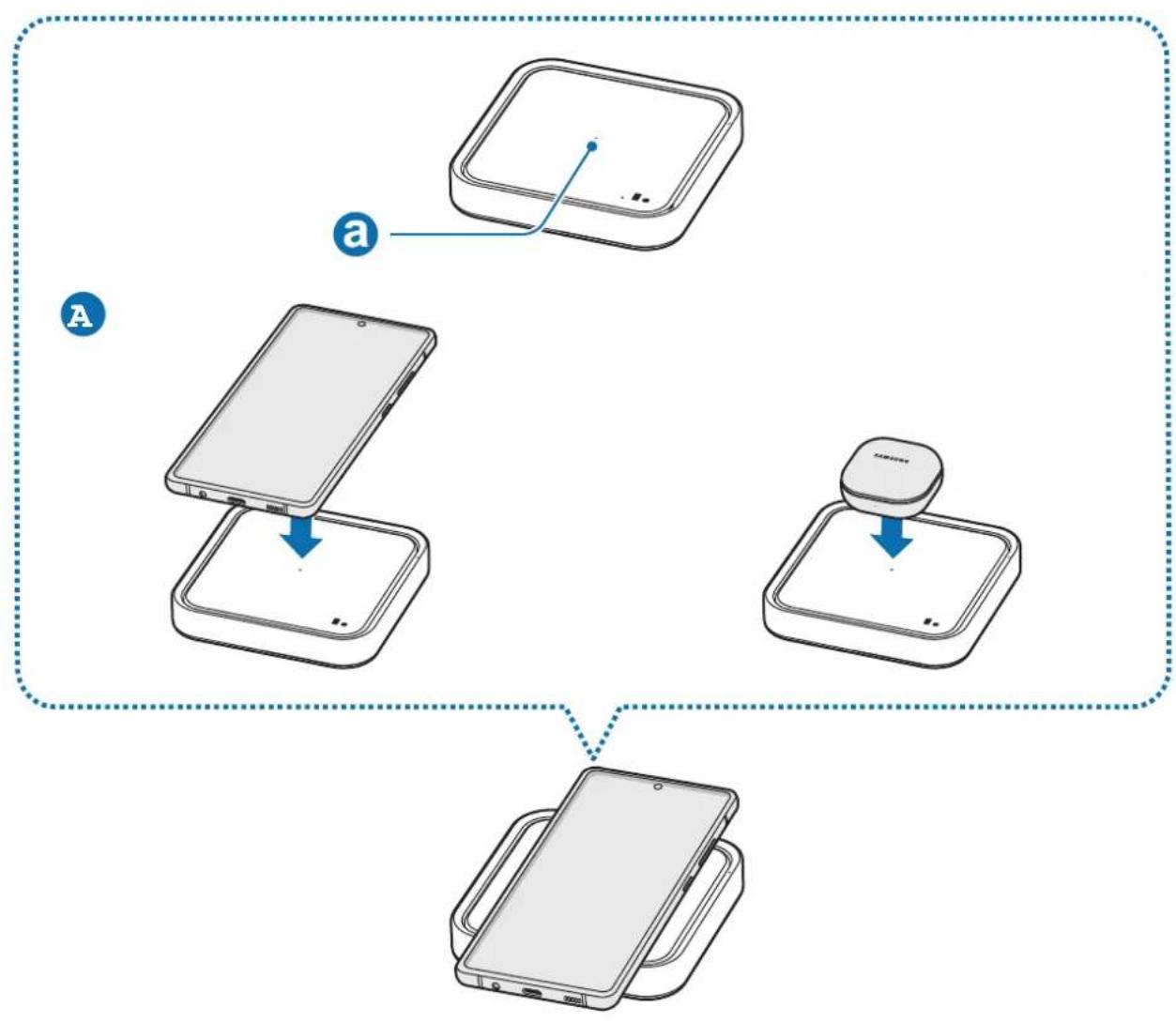
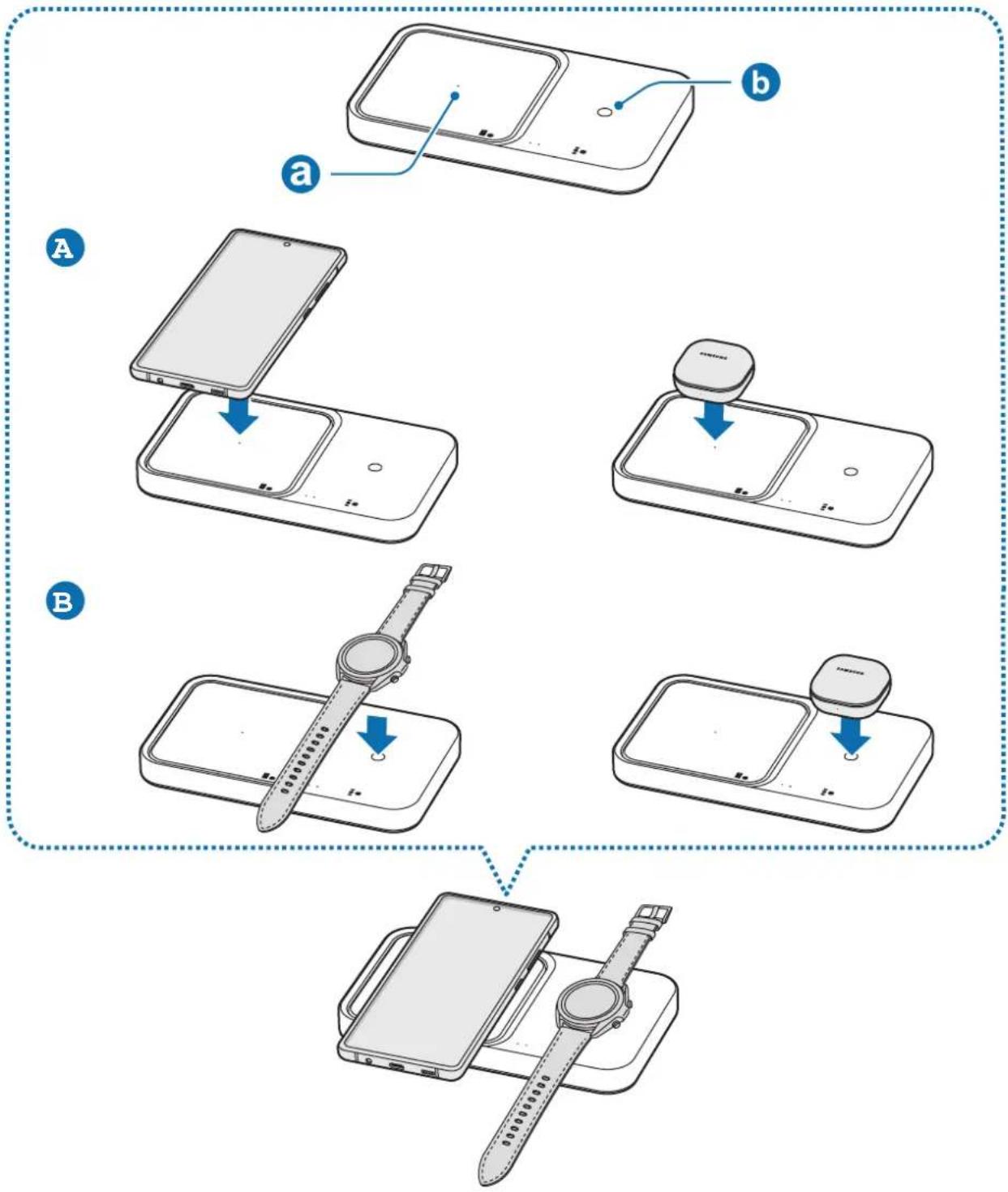
Line drawing of a device with a plug inserted into a tray (no text or symbols)2 Place the center of supported mobile device or Galaxy Buds on the charging coil center (a) to charge it (A). You can also charge the Galaxy Watch or Buds on the watch or buds charging coil (b) of the wireless charger (B)
- Charging will begin when the charging coil comes into contact with the wireless charging coil of the mobile device, Galaxy Buds or the Watch.
- Check the charging icon displayed on the mobile device's and Galaxy Watch's screen for the charging status. Check the charging status of the earbuds and charging case through the color of the battery status indicator on the Galaxy Buds.
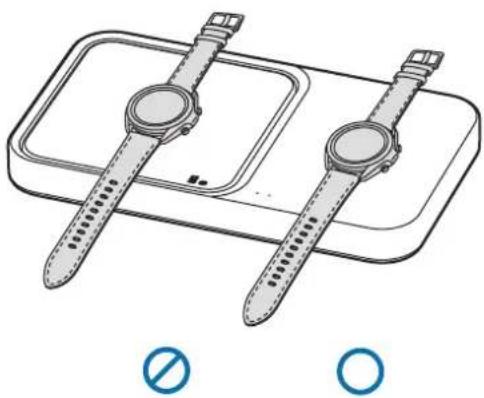
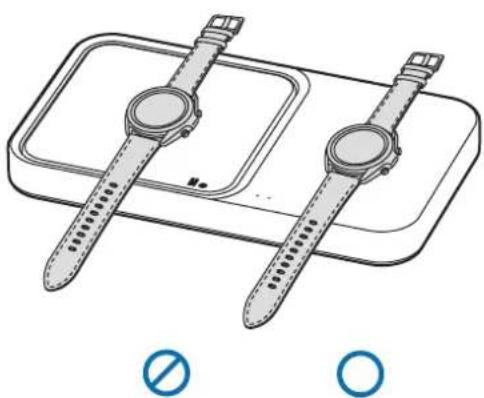
- If you place a Galaxy Watch with both connecting straps together on the wireless charging surface, the Galaxy Watch may not charge because the charging coil is not coming into contact with the wireless charging coil of the Galaxy Watch.
- When conductive materials are placed on the wireless charger, noise may occur from the wireless charger.
- To begin fast wireless charging, place a mobile device that supports fast wireless charging on the wireless charger. For more information, refer to the mobile device's user manual.
▶ EP-P2400:
flowchart
graph TD
    A["Device 1: Top Left"] --> B["Device 2: Bottom Left"]
    B --> C["Device 3: Top Right"]
    C --> D["Device 4: Bottom Right"]
    style A fill:#f9f,stroke:#333
    style B fill:#ccf,stroke:#333
    style C fill:#cfc,stroke:#333
    style D fill:#fcc,stroke:#333
▶ EP-P5400:
flowchart
graph TD
    A["Device 1: Display"] --> B["Device 2: Display"]
    B --> C["Device 3: Display"]
    C --> D["Device 4: Display"]
    D --> E["Device 5: Display"]
    style A fill:#f9f,stroke:#333
    style B fill:#ccf,stroke:#333
    style C fill:#cfc,stroke:#333
    style D fill:#fcc,stroke:#333
    style E fill:#ffc,stroke:#333
3 When the mobile device, Galaxy Buds or the Watch is fully charged, remove the mobile device, Galaxy Buds or the Watch from the wireless charger.

Precautions for mobile device, Galaxy Buds or the Watch charging
- Do not place the mobile device on the wireless charger with a credit card or radio-frequency identification (RFID) card (such as a transportation card or a key card) placed between the back of the mobile device and the mobile device cover.
- Do not place the mobile device, Galaxy Buds or the Watch on the wireless charger when conductive materials, such as metal objects and magnets, are placed between the mobile device, Galaxy Buds or the Watch and the wireless charger.
The mobile device, Galaxy Buds or the Watch may not charge properly or may overheat, or the mobile device, Galaxy Buds, Galaxy Watch, or the cards may be damaged.

- You may need to purchase a charger separately depending on the wireless charger you bought.
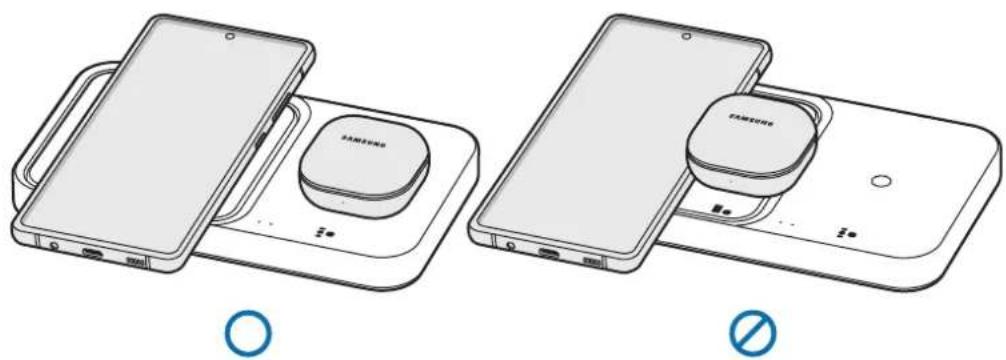
- Place the center of mobile device or Galaxy Buds on the charging coil center, and the Galaxy Watch or Buds on the watch or buds charging coil. If you do not place them correctly, the charging speed may decrease or they may not be charged properly.
- Wireless charging may not work properly if you have attached a thick case to your mobile device or Galaxy Buds. If your case is thick, remove it before placing your mobile device on the wireless charger.
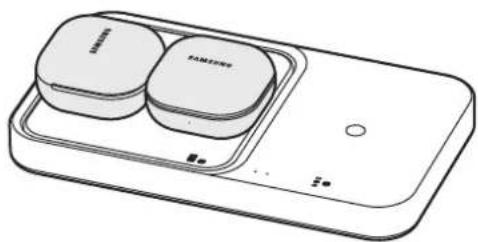
- Charging more than one device at the same time may decrease the charging speed.
- If you connect a charger to the mobile device or Galaxy Buds during wireless charging, the wireless charging feature will be unavailable.
- When charging a Galaxy Watch, update the Galaxy Watch to the latest software. If the latest software is not installed, the charging speed may be slow.
- If you use the wireless charger in areas with weak network signals, you may lose network reception.

- During wireless charging, noise may occur from the wireless charger.
- When wirelessly charging the Galaxy Buds or Watch, or charging the mobile device via fast wireless charging, the fan inside the wireless charging pad may produce noise. To reduce the fan noise while charging your mobile device, deactivate the fast wireless charging feature. To see how to deactivate the fast wireless charging feature, refer to the mobile device's user manual.
- To save energy, unplug the charger when not in use. The charger does not have a power switch, so you must unplug the charger from the electric socket when not in use to avoid wasting power. The charger should remain close to the electric socket and easily accessible while charging.
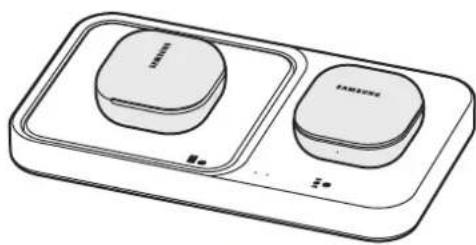
Charging multiple devices at the same time
▶ Charging the mobile device and Galaxy Buds
natural_image
Two line drawings of smartphone charging devices with no visible text or symbols▶ Charging the Galaxy Watches
natural_image
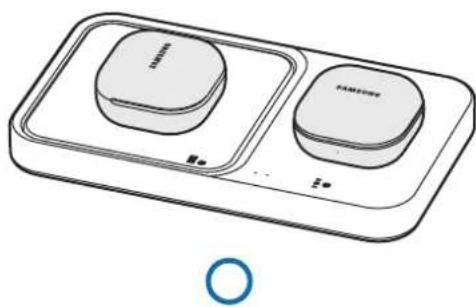
Illustration of a smartwatch and its dual-band display case with no text or symbols▶ Charging the Galaxy Buds
natural_image
Line drawing of a two-tiered Samsung washing machine with two buttons and a circular button (no text or symbols)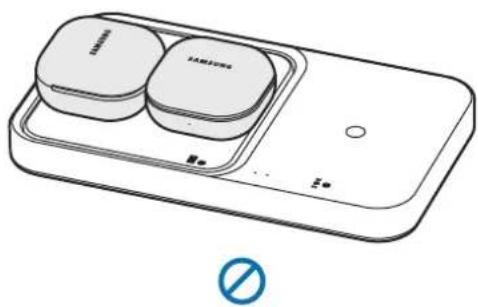
natural_image
Line drawing of a smartphone with two Samsung buttons and a battery, no text or symbols presentIndicator light identification
The indicator light alerts you to the wireless charger's status.
| Color Status | |
| Red → Green → Orange | When connected to a power outlet |
| Red | When charging |
| Green | When fully charged |
| Flashing red | When not charging properly due to a general error |
| Flashing orange | When not charging properly due to a not approved charger |
| Off | When the mobile device, Galaxy Buds or the Watch is removed from the wireless charger or when the wireless charger is not connected to a power outlet |

- If the indicator light does not work as described, disconnect the charger from the wireless charger and reconnect it.
- The indicator light may work differently depending on the mobile device, wireless charging cover, Galaxy Buds, or the Watch.
Copyright
Copyright © 2022 Samsung Electronics Co., Ltd.
This manual is protected under international copyright laws.
No part of this manual may be reproduced, distributed, translated, or transmitted in any form or by any means, electronic or mechanical, including photocopying, recording, or storing in any information storage and retrieval system.
Trademarks
- SAMSUNG and the SAMSUNG logo are registered trademarks of Samsung Electronics Co., Ltd.
• All other trademarks and copyrights are the property of their respective owners.
Leer primero
natural_image
Simple line drawing of a square electronic device with a plug inserted, no text or symbols present▶ EP-P5400:
natural_image
Line drawing of a handheld device with a scroll wheel and a downward arrow pointing to it (no text or symbols)natural_image
Two line drawings of smartphone charging devices, one with a circular button and the other with a battery (no text or symbols)▶ Carga de varios Galaxy Watch
natural_image
Illustration of a pair of smartwatches on a battery tray, no text or symbols present▶ Carga de Galaxy Buds
natural_image
Line drawing of a two-tiered Samsung washing machine (no text or symbols)O
natural_image
Line drawing of a smart appliance with two labeled buttons and a control panel (no text or symbols)(no text)
Copyright © 2022 Samsung Electronics Co., Ltd.
natural_image
Simple line drawing of a square tray with a tool inserted, no text or symbols present▶ EP-P5400:
natural_image
Line drawing of a device with a plug inserted into a tray (no text or symbols)natural_image
Line drawing of a smartwatch and its dual-band display case (no text or symbols)∅
O
▶ 对 Galaxy Buds 充电
natural_image
Line drawing of a two-tier appliance with two circular buttons and a blue circular symbol at the bottom (no text or labels)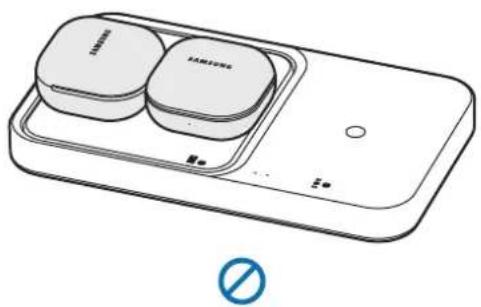
natural_image
Line drawing of a smart appliance with two labeled blocks and a 'No' symbol (no text or symbols on main components)指示灯识别
指示灯为您提醒无线充电器的状态。
natural_image
Simple line drawing of a square electronic device with a plug inserted, no text or symbols present▶ EP-P5400 :
natural_image
Line drawing of a device with a plug inserted into a tray (no text or symbols)flowchart
graph TD
    A["Device Shipped"] --> B["Shipped with a wristwatch"]
    B --> C["Shipped with a watchman"]
    C --> D["Shipped with a wristwatch on phone"]
    D --> E["Shipped with a watchman on phone"]
    E --> F["Shipped with a wristwatch on phone"]
natural_image
Line drawing of a smartwatch with dual lenses on a rectangular device (no text or symbols)(no text)
O
▶ 爲 Galaxy Buds 充電
natural_image
Line drawing of a two-tiered smart appliance with two rounded square buttons and a circular button, no text or symbols present.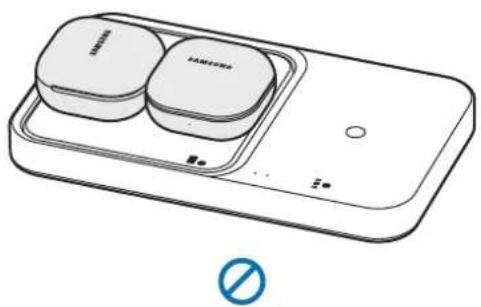
natural_image
Line drawing of a Samsung smartwatch with two circular buttons and a battery, no text or symbols present.指示燈識別
指示燈可警示無線充電器的狀態。
Copyright © 2022 Samsung Electronics Co., Ltd.
本手册受國際著作權法所保護。
natural_image
Simple line drawing of a square electronic device with a plug inserted, no text or symbols present▶ EP-P5400 :
natural_image
Line drawing of a handheld device with a cable inserted, showing a tray and control panel (no text or symbols)flowchart
graph TD
    A["Device Shipped"] --> B["Shipped into Display"]
    B --> C["Shipped out to Display"]
    C --> D["Shipped down to Display"]
    D --> E["Shipped down to Display"]
    E --> F["Shipped down to Display"]
    F --> G["Shipped down to Display"]
natural_image
Two line drawings of Samsung smartphones with charging devices, one open and one closed, both without any text or symbols.▶ Recharge des montres Galaxy Watch
natural_image
Illustration of a pair of smartwatches on a battery pack, with no text or symbols present.natural_image
Line drawing of a two-tier smart appliance with two circular buttons and a blue circular icon at the bottom (no text or symbols)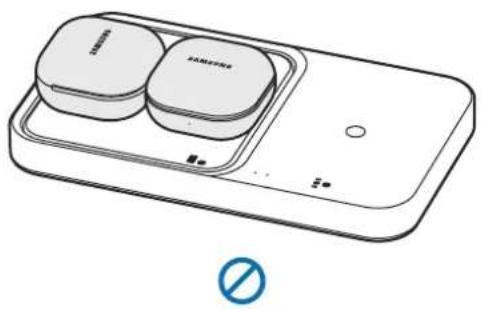
natural_image
Illustration of a smart appliance with two circular components and a switch, no text or symbols present.natural_image
Simple line drawing of a square electronic device with a plug inserted into it (no text or symbols)▶ EP-P5400:
natural_image
Line drawing of a handheld device with a cable inserted, showing a screen and tray (no text or symbols)flowchart
graph TD
    A["Receipt"] --> B["Shipment"]
    B --> C["Product"]
    C --> D["Order"]
▶ EP-P5400:
flowchart
graph TD
    A["Device 1: Display"] --> B["Device 2: Display"]
    B --> C["Device 3: Display"]
    C --> D["Device 4: Display"]
    D --> E["Device 5: Display"]
    style A fill:#f9f,stroke:#333
    style B fill:#ccf,stroke:#333
    style C fill:#cfc,stroke:#333
    style D fill:#fcc,stroke:#333
    style E fill:#ffc,stroke:#333
natural_image
Line drawing of a smartphone connected to a charging station with a circular device (no text or symbols visible)O
natural_image
Illustration of a smartphone with a compact charging case and a battery pack (no text or symbols)(no text)
natural_image
Line drawing of a smartwatch and its dual-band display case (no text or symbols)(no text)
O
natural_image
Line drawing of a two-tier smart appliance with two rounded square units and a circular base, no text or symbols present.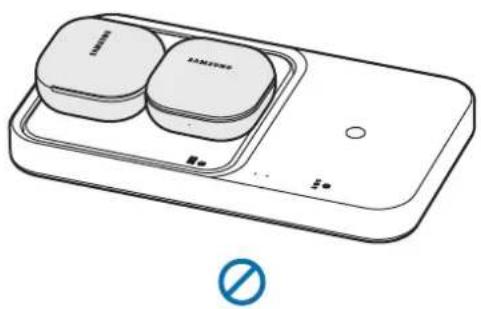
natural_image
Line drawing of a smartphone with two Samsung buttons and a battery, no text or symbols presentnatural_image
Simple line drawing of a square object with a tool inserted, no text or symbols present▶ EP-P5400:
natural_image
Line drawing of a device with a plug inserted into a tray (no text or symbols)natural_image
Line drawing of a smartwatch and its dual-band display case (no text or symbols)∅
O
▶ 갤럭시 버즈만 충전 시
natural_image
Line drawing of a two-tiered Samsung air conditioner unit (no text or symbols)O
natural_image
Line drawing of a smartphone with two Samsung branded buttons on top (no text or symbols)(no text)