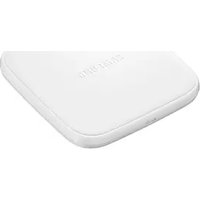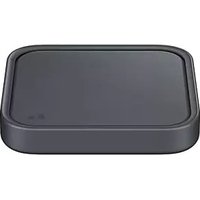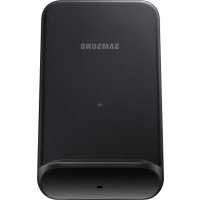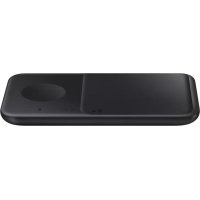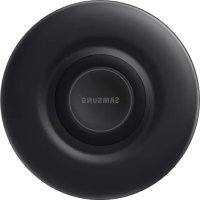
EPP3105 - Battery charger SAMSUNG - Free user manual and instructions
Find the device manual for free EPP3105 SAMSUNG in PDF.
 FR
FR
 BG
BG
 CS
CS
 DA
DA
 DE
DE
 EL
EL
 EN
EN
 ES
ES
 ET
ET
 FI
FI
 HU
HU
 IT
IT
 KK
KK
 KO
KO
 LT
LT
 LV
LV
 NL
NL
 NO
NO
 PL
PL
 PT
PT
 RO
RO
 RU
RU
 SK
SK
 SL
SL
 SV
SV
 TR
TR
 UK
UK
 ZH
ZH
| Product Type | Wireless Charger |
| Brand | Samsung |
| Model | EPP3105 |
| Power Supply (Input) | 9.0 V / 1.67 A (USB adapter included) |
| Connectivity | USB Type-C Port |
| Compatibility | Mobile devices and Galaxy Watch compatible with wireless charging (except Gear S2) |
| Main Functions | Standard wireless charging, fast wireless charging, status LED indicator |
| LED Indicator | Red (charging), Green (fully charged), Flashing red (error), Flashing orange (incompatible charger), Off (removed/disconnected) |
| Cooling | Internal fan (louder in fast charging) |
| Included Accessories | Wireless charging pad, USB adapter, USB cable, quick start guide |
| Sold Separately | Wireless charging cases |
| Protection | Overheating protection (mentioned in precautions) |
| Usage Precautions | Do not place RFID cards or metal objects between the device and charger; remove thick cases; do not use in areas with weak network reception |
| Safety | Use only Samsung-approved accessories; do not expose to moisture |
| Maintenance | Unplug the charger when not in use; clean the charging surface with a soft cloth |
| Recommended Use | Near a power outlet, on a flat and stable surface |
| Mains Power Required | Yes (via USB adapter) |
Frequently Asked Questions - EPP3105 SAMSUNG
User questions about EPP3105 SAMSUNG
0 question about this device. Answer the ones you know or ask your own.
Ask a new question about this device
Download the instructions for your Battery charger in PDF format for free! Find your manual EPP3105 - SAMSUNG and take your electronic device back in hand. On this page are published all the documents necessary for the use of your device. EPP3105 by SAMSUNG.
USER MANUAL EPP3105 SAMSUNG
Please read this manual before using the device to ensure safe and proper use.
- Images may differ in appearance from the actual product. Content is subject to change without prior notice.
- Before using the wireless charger, make sure it is compatible with your device.
Instructional icons

Warning: situations that could cause injury to yourself or others

Caution: situations that could cause damage to your device or other equipment

Notice: notes, usage tips, or additional information
Getting started
Package contents
Check the product box for the following items:
- Wireless charger
- USB power adaptor
- USB cable
- Quick start guide

- Wireless charging covers are sold separately.
- The items supplied with the device and any available accessories may vary depending on the region or service provider.
- The supplied items are designed only for this device and may not be compatible with other devices.
- Appearances and specifications are subject to change without prior notice.
- You can purchase additional accessories from your local Samsung retailer. Make sure they are compatible with the device before purchase.
- Use only Samsung-approved accessories. Using unapproved accessories may cause the performance problems and malfunctions that are not covered by the warranty.
- Availability of all accessories is subject to change depending entirely on manufacturing companies. For more information about available accessories, refer to the Samsung website.
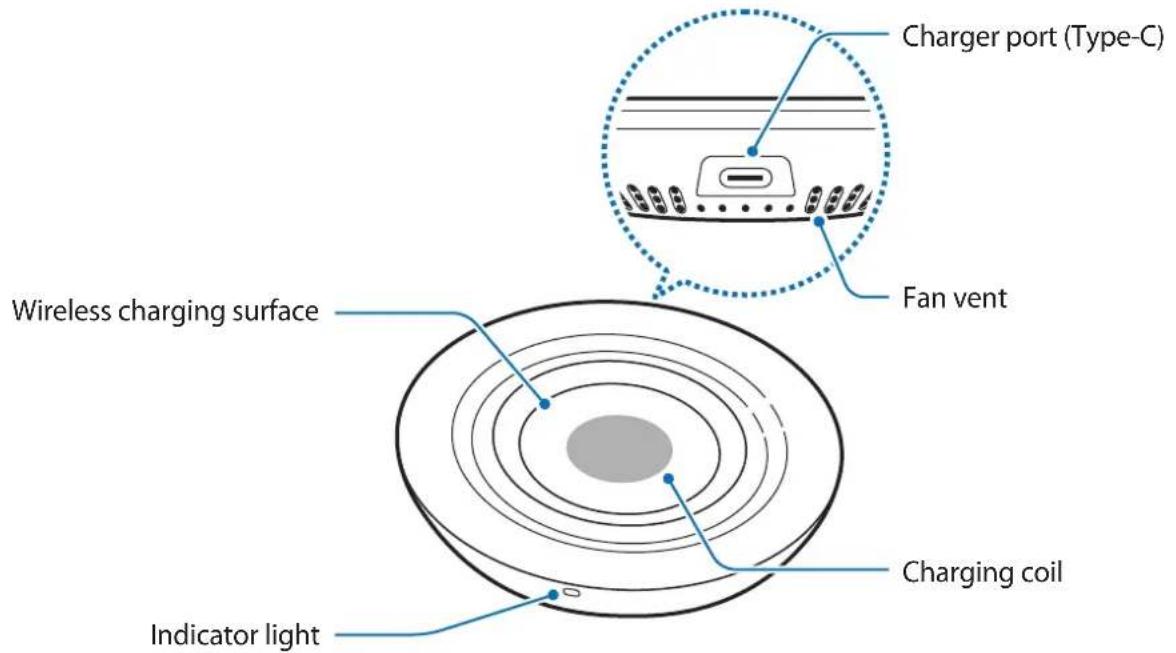
Device layout
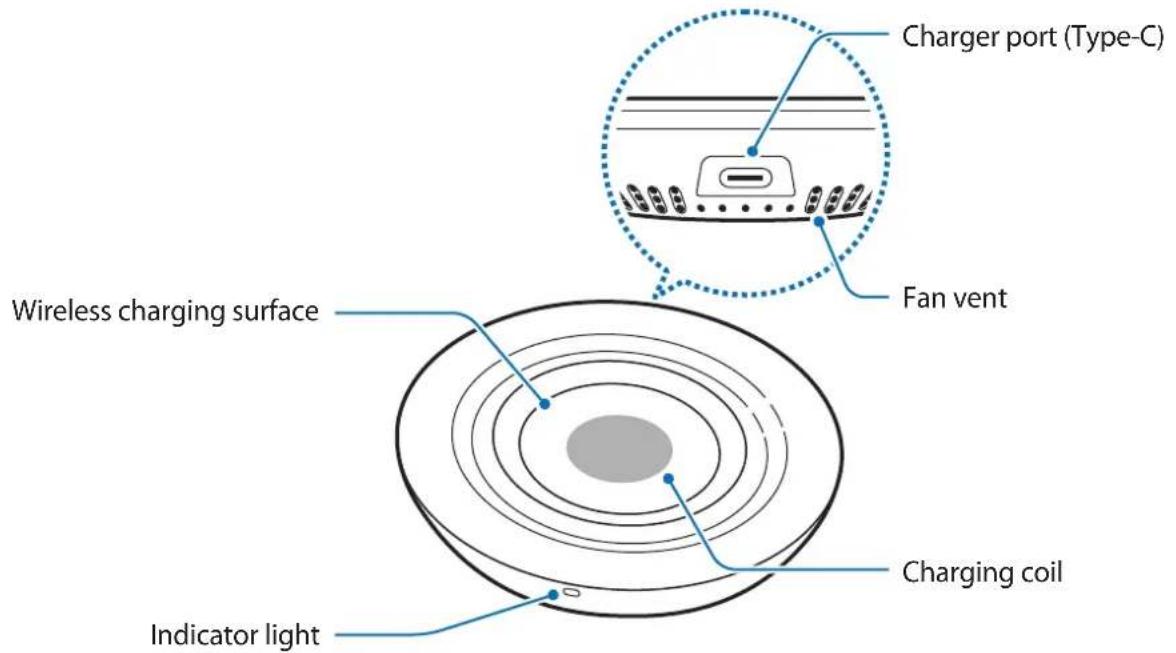
text_image
Charger port (Type-C) Fan vent Wireless charging surface Charging coil Indicator lightUsing the wireless charger
Charging your device
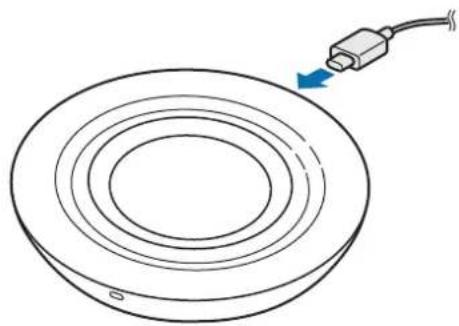
1 Connect the charger to the wireless charger.
When the charger is correctly connected to the wireless charger, the indicator light flashes red, green, and orange, and then turns off.

Use Samsung-approved chargers (9.0 V/1.67 A) provided with the wireless charger.
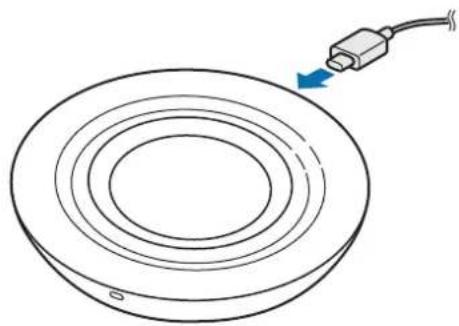
natural_image
Diagram of a circular mechanical component with a cable inserted, showing concentric rings and a blue arrow indicating direction (no text or symbols)2 Place a supported mobile device or Galaxy Watch on the wireless charging surface.
- Charging will begin when the wireless charging surface comes into contact with the the wireless charging coil of the mobile device or the Galaxy Watch.
- Check the charging icon displayed on the screen of the mobile device or the Galaxy Watch for the charging status.
- To begin fast wireless charging, place a mobile device that supports fast wireless charging on the wireless charger. For more information, refer to the mobile device's user manual.
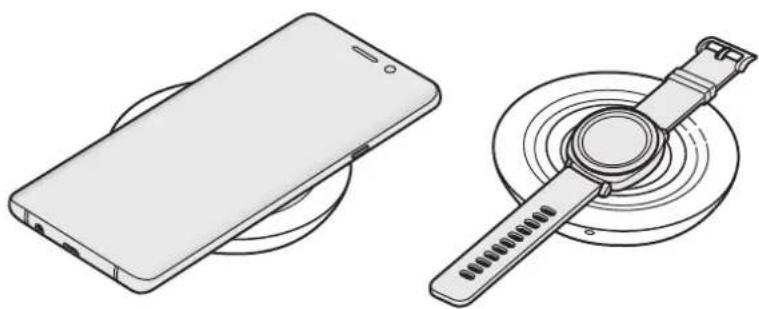
natural_image
Technical line drawings of a smartphone and a circular device with a strap (no text or symbols)3 When the mobile device or the Galaxy Watch is fully charged, remove the mobile device or the Galaxy Watch from the wireless charger.

Precautions for the mobile device or the Galaxy Watch charging
- Do not place the mobile device on the wireless charger with a credit card or radio-frequency identification (RFID) card (such as a transportation card or a key card) placed between the back of the mobile device and the mobile device cover.
- Do not place the mobile device or the Galaxy Watch on the wireless charger when conductive materials, such as metal objects and magnets, are placed between the mobile device or the Galaxy Watch and the wireless charger.
The mobile device or the Galaxy Watch may not charge properly or may overheat, or the mobile device, the Galaxy Watch, or the cards may be damaged.

- You may need to purchase a charger separately depending on the wireless charger you bought.
- Depending on the location of the wireless charging coil of the mobile device or the Galaxy Watch, your mobile device or your Galaxy Watch may not charge properly.
- Wireless charging may not work properly if you have attached a thick case to your mobile device. If your case is thick, remove it before placing your mobile device on the wireless charger.
- If you connect a charger to the mobile device during wireless charging, the wireless charging feature will be unavailable.
- If you use the wireless charger in areas with weak network signals, you may lose network reception.
- The fan inside the wireless charger may produce noise during fast wireless charging. When you deactivate the fast wireless charging feature, the fan noise will be reduced. To see how to deactivate the fast wireless charging feature, refer to the mobile device's user manual.
- If you place a Galaxy Watch with both connecting bands together on the wireless charging surface, the Galaxy Watch may not charge because the charging coil is not coming into contact with the wireless charging coil of the Galaxy Watch.
- The Gear S2 does not support the wireless charging feature.
- To save energy, unplug the charger when not in use. The charger does not have a power switch, so you must unplug the charger from the electric socket when not in use to avoid wasting power. The charger should remain close to the electric socket and easily accessible while charging.
Indicator light identification
The indicator light alerts you to the wireless charger's status.
| Colour Status | |
| Red → Green → Orange | When connected to a power outlet |
| Red | When charging |
| Green | When fully charged |
| Flashing red | When not charging properly due to a general error |
| Flashing orange | When connected to an unsupported charger |
| Off | When the mobile device or the Galaxy Watch is removed from the wireless charger or when the wireless charger is not connected to a power outlet |

- If the indicator light does not work as described, disconnect the charger from the wireless charger and reconnect it.
- The indicator light may work differently depending on the mobile device, the Galaxy Watch, or the wireless charging cover.
Copyright
Copyright © 2019 Samsung Electronics
This manual is protected under international copyright laws.
No part of this manual may be reproduced, distributed, translated, or transmitted in any form or by any means, electronic or mechanical, including photocopying, recording, or storing in any information storage and retrieval system.
Trademarks
• SAMSUNG and the SAMSUNG logo are registered trademarks of Samsung Electronics.
- All other trademarks and copyrights are the property of their respective owners.
natural_image
Diagram of a circular mechanical component with a blue arrow pointing to it, no text or symbols present.natural_image
Technical line drawings of a smartphone and a circular device with a strap (no text or symbols)Copyright © 2019 Samsung Electronics
natural_image
Diagram of a circular mechanical component with a blue arrow pointing to it, no text or symbols presentnatural_image
Technical line drawing of a smartphone and a circular device with a wrist strap (no text or symbols)Copyright © 2019 Samsung Electronics
natural_image
Diagram of a circular component with concentric rings and a blue arrow pointing to it, connected to a cable (no text or symbols)natural_image
Technical line drawings of a smartphone and a smartwatch (no text or symbols)Copyright © 2019 Samsung Electronics
natural_image
Diagram of a circular mechanical component with a blue arrow pointing to it, no text or symbols present.natural_image
Technical line drawings of a smartphone and a circular device with a wrist strap (no text or symbols)Copyright © 2019 Samsung Electronics
natural_image
Diagram of a circular mechanical component with a cable inserted, showing concentric rings and a blue arrow indicating direction (no text or symbols)natural_image
Technical line drawing of a smartphone and its corresponding smartwatch (no text or symbols)Copyright © 2019 Samsung Electronics
natural_image
Diagram of a circular component with concentric rings and a cable inserted, showing an arrow indicating direction (no text or symbols)natural_image
Technical line drawing of a smartphone and a circular device with a wrist strap (no text or symbols)Copyright © 2019 Samsung Electronics
natural_image
Diagram of a circular device with concentric rings and a cable inserted, showing no text or symbols.natural_image
Technical line drawings of a smartphone and a circular device with a strap (no text or symbols)natural_image
Diagram of a circular mechanical component with a cable inserted, showing concentric rings and a blue arrow indicating direction (no text or symbols)natural_image
Line drawings of a smartphone and a smartwatch on circular stands (no text or symbols)Copyright © 2019 Samsung Electronics
natural_image
Diagram of a circular component with concentric rings and a cable inserted, showing an arrow pointing to the top-right corner (no text or symbols present)natural_image
Technical line drawing of a smartphone and a circular device with a strap (no text or symbols)Copyright © 2019 Samsung Electronics
natural_image
Diagram of a circular component with concentric rings and a blue arrow pointing to it, no text or symbols present.natural_image
Technical line drawings of a smartphone and a circular device with a strap (no text or symbols)Copyright © 2019 Samsung Electronics
Ovaj priručnik je zaštićen međunarodnim zakonima o autorskim pravima.
Nijedan deo ovog priručnika se ne sme reprodukovati, distribuirati, prevoditi niti prenositi ni u jednom obliku niti bilo kojim putem, elektronskim niti mehaničkim, što podrazumeva fotokopiranje, snimanje i skladištenje u okviru bilo kog skladišta informacija i sistema za preuzimanje.
Trgovačke marke
- SAMSUNG i SAMSUNG logotip su registrovane trgovačke marke kompanije Samsung Electronics.
• Sve ostale trgovačke marke i autorska prava su vlasništvo njihovih vlasnika.
Leia primeiro
natural_image
Diagram of a circular component with concentric rings and a blue arrow pointing to it, no text or symbols present.natural_image
Technical line drawings of a smartphone and a smartwatch with circular components (no text or symbols)Copyright © 2019 Samsung Electronics
Este manual está protegido pelas leis internacionais de copyright.
natural_image
Diagram of a circular component with concentric rings and a blue arrow pointing to it, no text or symbols present.2 Novietojiet atbalstitu mobilo ierici vai Galaxy Watch uz bezvadu uzlādes virsmas.
natural_image
Technical line drawings of a smartphone and a circular device with a strap (no text or symbols)natural_image
Diagram of a circular mechanical component with a cable inserted, showing concentric rings and a blue arrow indicating direction (no text or symbols)natural_image
Technical line drawings of a smartphone and a circular device with a strap (no text or symbols)natural_image
Diagram of a circular component with concentric rings and a blue arrow pointing to it, no text or symbols present.natural_image
Technical line drawings of a smartphone and a circular device with a strap (no text or symbols)Copyright © 2019 Samsung Electronics
natural_image
Diagram of a circular mechanical component with a cable inserted, showing concentric rings and a blue arrow indicating direction (no text or symbols)natural_image
Technical line drawings of a smartphone and a handheld device with circular components (no text or symbols)Copyright © 2019 Samsung Electronics
natural_image
Diagram of a circular component with concentric rings and a blue arrow pointing to it, no text or symbols present.natural_image
Technical line drawings of a smartphone and a circular device with a wrist strap (no text or symbols)Copyright © 2019 Samsung Electronics
natural_image
Diagram of a circular mechanical component with a blue arrow pointing to it, no text or symbols present.natural_image
Technical line drawings of a smartphone and a wristwatch (no text or symbols)3 Når mobilenheten eller Galaxy Watch er fulladet, kobler du mobilenheten eller Galaxy Watch fra den trådløse laderen.

© 2019 Samsung Electronics
natural_image
Diagram of a circular mechanical component with a cable inserted, showing concentric rings and a blue arrow pointing to the end (no text or symbols)natural_image
Technical line drawing of a smartphone and its corresponding smartwatch (no text or symbols)Copyright © 2019 Samsung Electronics
natural_image
Diagram of a circular mechanical component with a cable inserted, showing concentric rings and a blue arrow indicating direction (no text or symbols)natural_image
Technical line drawings of a smartphone and a circular device with a wrist strap (no text or symbols)natural_image
Diagram of a circular mechanical component with a blue arrow pointing to it, no text or symbols present.natural_image
Technical line drawing of a smartphone and its corresponding wafer device (no text or symbols)natural_image
Diagram of a circular component with concentric rings and a cable inserted, showing an arrow pointing to the top-right corner (no text or symbols present)natural_image
Technical line drawing of a smartphone and a circular device with a wrist strap (no text or symbols)natural_image
Diagram of a circular component with concentric rings and a blue arrow pointing to it, no text or symbols present.natural_image
Technical line drawing of a smartphone and its corresponding wafer device (no text or symbols)Copyright © 2019 Samsung Electronics
natural_image
Diagram of a circular mechanical component with a blue arrow pointing to it, no text or symbols present.natural_image
Technical line drawings of a smartphone and a circular device with a strap (no text or symbols)Copyright © 2019 Samsung Electronics
natural_image
Diagram of a circular mechanical component with a blue arrow pointing to it, no text or symbols present.natural_image
Technical line drawings of a smartphone and a smartwatch (no text or symbols)Telif hakkı © 2019 Samsung Electronics
natural_image
Diagram of a circular mechanical component with a blue arrow pointing to it, no text or symbols presentnatural_image
Line drawings of a smartphone and a smartwatch on circular stands (no text or symbols)natural_image
Diagram of a circular component with concentric rings and a cable inserted, showing an arrow pointing to the top-right corner (no text or symbols present)natural_image
Technical line drawings of a smartphone and a smartwatch (no text or symbols)Copyright © ๒๐๑๙ Samsung Electronics
natural_image
Diagram of a circular device with concentric rings and a blue arrow pointing to it, connected to a cable (no text or symbols)natural_image
Technical line drawings of a smartphone and a smartwatch (no text or symbols)Русский
© Samsung Electronics, 2019.
natural_image
Diagram of a circular mechanical component with a blue arrow pointing to it, no text or symbols present.natural_image
Technical line drawings of a smartphone and a circular device with a strap (no text or symbols)© Samsung Electronics, 2019
natural_image
Diagram of a circular device with concentric rings and a cable inserted, showing no text or symbols.natural_image
Technical line drawings of a smartphone and a circular device with a wrist strap (no text or symbols)Copyright © 2019 Samsung Electronics
Please read this manual before using the device to ensure safe and proper use.
- Images may differ in appearance from the actual product. Content is subject to change without prior notice.
- Before using the wireless charger, make sure it is compatible with your device.
Instructional icons

Warning: situations that could cause injury to yourself or others

Caution: situations that could cause damage to your device or other equipment

Notice: notes, usage tips, or additional information
Getting started
Package contents
Check the product box for the following items:
- Wireless charger
- USB power adaptor
- USB cable
- Quick start guide

- Wireless charging covers are sold separately.
- The items supplied with the device and any available accessories may vary depending on the region or service provider.
- The supplied items are designed only for this device and may not be compatible with other devices.
- Appearances and specifications are subject to change without prior notice.
- You can purchase additional accessories from your local Samsung retailer. Make sure they are compatible with the device before purchase.
- Use only Samsung-approved accessories. Using unapproved accessories may cause the performance problems and malfunctions that are not covered by the warranty.
- Availability of all accessories is subject to change depending entirely on manufacturing companies. For more information about available accessories, refer to the Samsung website.
Device layout
text_image
Charger port (Type-C) Fan vent Wireless charging surface Charging coil Indicator lightUsing the wireless charger
Charging your device
1 Connect the charger to the wireless charger.
When the charger is correctly connected to the wireless charger, the indicator light flashes red, green, and orange, and then turns off.

Use Samsung-approved chargers (9.0 V/1.67 A) provided with the wireless charger.
natural_image
Diagram of a circular mechanical component with a cable inserted, showing concentric rings and a blue arrow indicating direction (no text or symbols)2 Place a supported mobile device or Galaxy Watch on the wireless charging surface.
- Charging will begin when the wireless charging surface comes into contact with the the wireless charging coil of the mobile device or the Galaxy Watch.
- Check the charging icon displayed on the screen of the mobile device or the Galaxy Watch for the charging status.
- To begin fast wireless charging, place a mobile device that supports fast wireless charging on the wireless charger. For more information, refer to the mobile device's user manual.
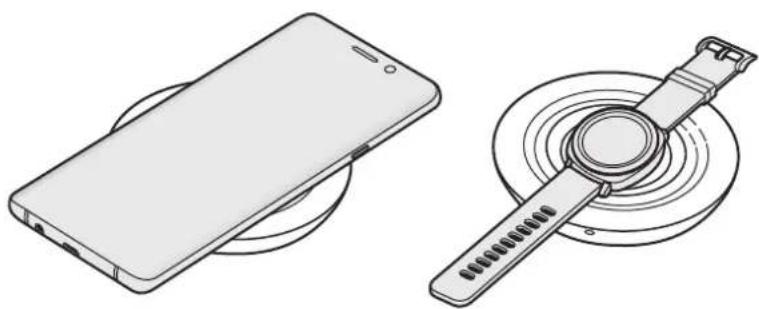
natural_image
Technical line drawings of a smartphone and a circular device with a strap (no text or symbols)3 When the mobile device or the Galaxy Watch is fully charged, remove the mobile device or the Galaxy Watch from the wireless charger.

Precautions for the mobile device or the Galaxy Watch charging
- Do not place the mobile device on the wireless charger with a credit card or radio-frequency identification (RFID) card (such as a transportation card or a key card) placed between the back of the mobile device and the mobile device cover.
- Do not place the mobile device or the Galaxy Watch on the wireless charger when conductive materials, such as metal objects and magnets, are placed between the mobile device or the Galaxy Watch and the wireless charger.
The mobile device or the Galaxy Watch may not charge properly or may overheat, or the mobile device, the Galaxy Watch, or the cards may be damaged.

- You may need to purchase a charger separately depending on the wireless charger you bought.
- Depending on the location of the wireless charging coil of the mobile device or the Galaxy Watch, your mobile device or your Galaxy Watch may not charge properly.
- Wireless charging may not work properly if you have attached a thick case to your mobile device. If your case is thick, remove it before placing your mobile device on the wireless charger.
- If you connect a charger to the mobile device during wireless charging, the wireless charging feature will be unavailable.
- If you use the wireless charger in areas with weak network signals, you may lose network reception.
- The fan inside the wireless charger may produce noise during fast wireless charging. When you deactivate the fast wireless charging feature, the fan noise will be reduced. To see how to deactivate the fast wireless charging feature, refer to the mobile device's user manual.
- If you place a Galaxy Watch with both connecting bands together on the wireless charging surface, the Galaxy Watch may not charge because the charging coil is not coming into contact with the wireless charging coil of the Galaxy Watch.
- The Gear S2 does not support the wireless charging feature.
- To save energy, unplug the charger when not in use. The charger does not have a power switch, so you must unplug the charger from the electric socket when not in use to avoid wasting power. The charger should remain close to the electric socket and easily accessible while charging.
Indicator light identification
The indicator light alerts you to the wireless charger's status.
| Color Status | |
| Red → Green → Orange | When connected to a power outlet |
| Red | When charging |
| Green | When fully charged |
| Flashing red | When not charging properly due to a general error |
| Flashing orange | When connected to an unsupported charger |
| Off | When the mobile device or the Galaxy Watch is removed from the wireless charger or when the wireless charger is not connected to a power outlet |

- If the indicator light does not work as described, disconnect the charger from the wireless charger and reconnect it.
- The indicator light may work differently depending on the mobile device, the Galaxy Watch, or the wireless charging cover.
Copyright
Copyright © 2019 Samsung Electronics
This manual is protected under international copyright laws.
No part of this manual may be reproduced, distributed, translated, or transmitted in any form or by any means, electronic or mechanical, including photocopying, recording, or storing in any information storage and retrieval system.
Trademarks
• SAMSUNG and the SAMSUNG logo are registered trademarks of Samsung Electronics.
- All other trademarks and copyrights are the property of their respective owners.
natural_image
Diagram of a circular mechanical component with a cable inserted, showing concentric rings and a blue arrow indicating direction (no text or symbols)natural_image
Technical line drawing of a smartphone and its circular device with a wrist strap (no text or symbols)Copyright © 2019 Samsung Electronics
natural_image
Diagram of a circular component with concentric rings and a blue arrow pointing to it, no text or symbols present.natural_image
Technical line drawing of a smartphone and a circular device with a strap (no text or symbols)natural_image
Diagram of a circular mechanical component with a cable inserted, showing concentric rings and a blue arrow indicating direction (no text or symbols)natural_image
Line drawings of a smartphone and a circular device with a strap (no text or symbols)Copyright © 2019 Samsung Electronics
本手册受國際版權法保護。
natural_image
Diagram of a circular mechanical component with a cable inserted, showing concentric rings and a blue arrow indicating direction (no text or symbols)natural_image
Technical line drawing of a smartphone and its corresponding smartwatch (no text or symbols)© Samsung Electronics, 2019.