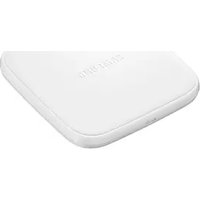
EP-PA510 - Battery charger SAMSUNG - Free user manual and instructions
Find the device manual for free EP-PA510 SAMSUNG in PDF.



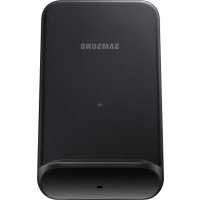
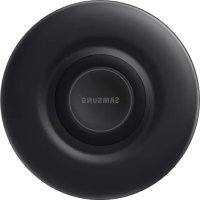
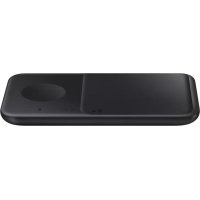
| Product Type | Wireless Battery Charger |
| Brand | Samsung |
| Model | EP-PA510 |
| Power Supply | Power adapter 5V/2A (not included, Samsung certified recommended) |
| Output Power | Up to 10 W (WPC compatible fast charging) |
| Compatibility | WPC (Qi) certified devices, including Samsung and other brand smartphones |
| LED Indicator | Blue (charging), Green (full charge), Orange (slow charging/flashing for error) |
| Dimensions (estimated) | Approximately 100 x 100 x 20 mm |
| Weight (estimated) | Approximately 100 g |
| Power Connector | USB-C (common estimate) |
| Maximum Charging Distance | Up to 8 mm (through thin case) |
| Charging Frequency | 110 – 205 kHz (Qi standard) |
| Standby Power Consumption | Less than 0.5 W (estimated) |
| Safety Features | Foreign object detection, overheat and overcurrent protection |
| Maintenance and Cleaning | Wipe with a dry, soft cloth; do not use liquid or abrasive products |
| Package Contents | Wireless charging station, quick start guide |
| Accessories Sold Separately | Wireless charging case (back cover), power adapter |
| Certifications | CE, WPC Qi, RoHS |
| Warranty | Under Samsung warranty (according to manufacturer's conditions) |
| Color | White / Black (depending on availability) |
Frequently Asked Questions - EP-PA510 SAMSUNG
User questions about EP-PA510 SAMSUNG
0 question about this device. Answer the ones you know or ask your own.
Ask a new question about this device
Download the instructions for your Battery charger in PDF format for free! Find your manual EP-PA510 - SAMSUNG and take your electronic device back in hand. On this page are published all the documents necessary for the use of your device. EP-PA510 by SAMSUNG.
USER MANUAL EP-PA510 SAMSUNG
Please read this manual before using the device to ensure safe and proper use.
- Descriptions are based on the device's default settings.
- Images may differ in appearance from the actual product. Content is subject to change without prior notice.
- The content of this guide is based on the EP-PA510 model.
Instructional icons

Warning: situations that could cause injury to yourself or others

Caution: situations that could cause damage to your device or other equipment

Notice: notes, usage tips, or additional information
Getting started
Package contents
Check the product box for the following items:
Device
- Quick start guide

- Wireless charging cover and travel adaptor sold separately.
- The items supplied with the device and any available accessories may vary depending on the region or service provider.
- The supplied items are designed only for this device and may not be compatible with other devices.
- Appearances and specifications are subject to change without prior notice.
- You can purchase additional accessories from your local Samsung retailer. Make sure they are compatible with the device before purchase.
- Use only Samsung-approved accessories. Using unapproved accessories may cause the performance problems and malfunctions that are not covered by the warranty.
- Availability of all accessories is subject to change depending entirely on manufacturing companies. For more information about available accessories, refer to the Samsung website.
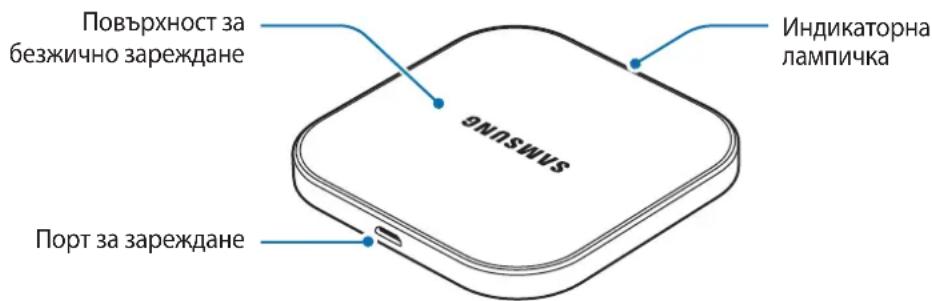
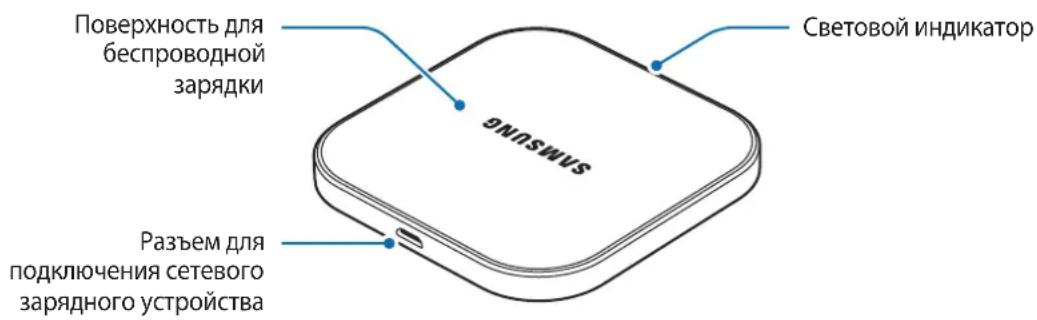
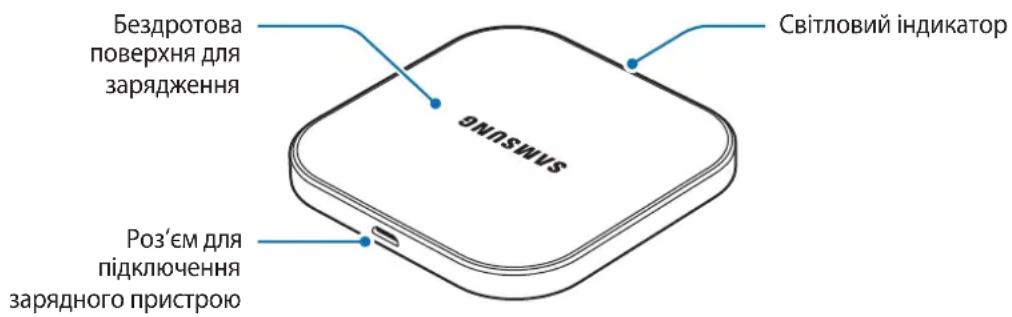
Device layout
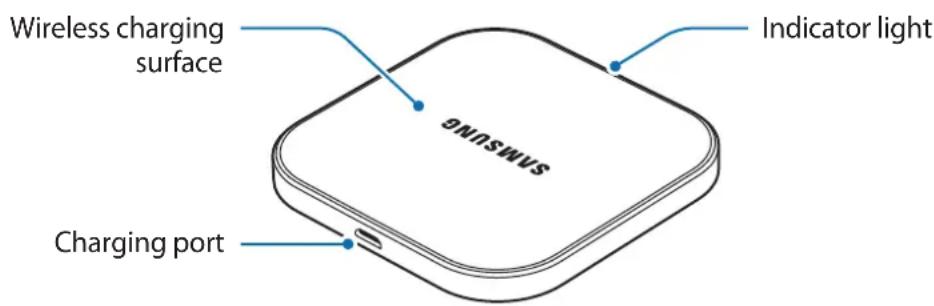
Using the device
Using wireless charger
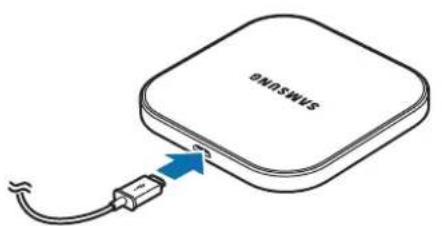
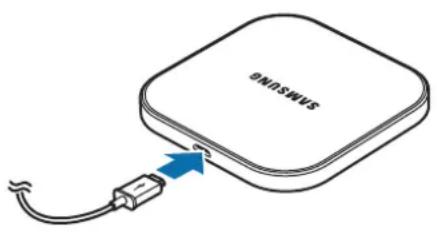
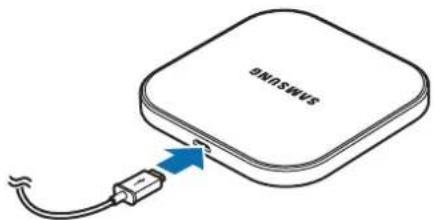
1 Connect the wireless charger and a travel adaptor with a charging cable, and plug the travel adaptor into an electric socket.
When the wireless charger is connected to the electric socket, the indicator light flashes from blue to green to cyan, and then turns off.
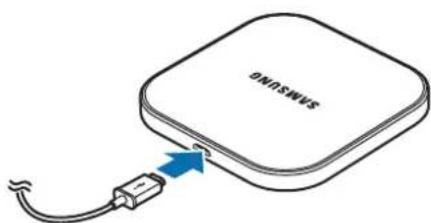

Use only Samsung-approved travel adaptors (5 V/2 A). Unauthorised travel adaptors may cause damage or the wireless charger may malfunction.
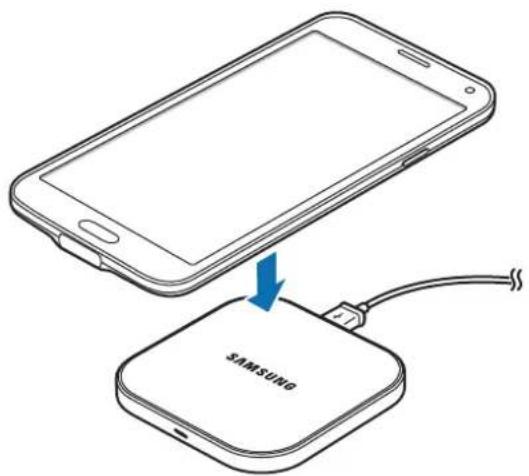
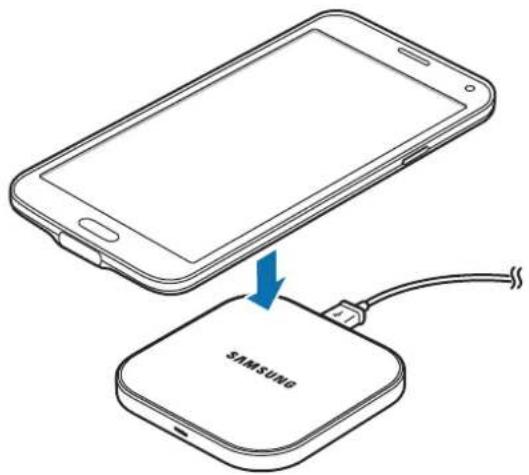
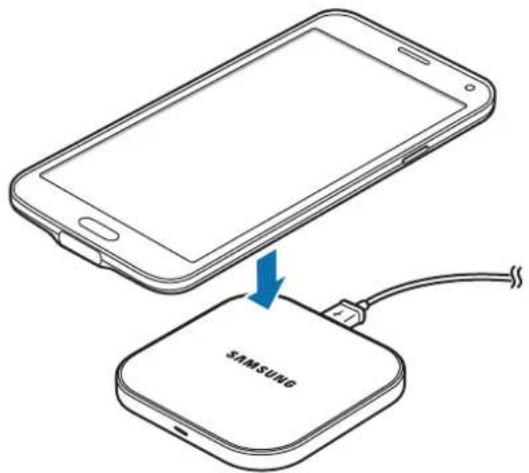
2 Place a supported mobile device in the centre of the charging surface.
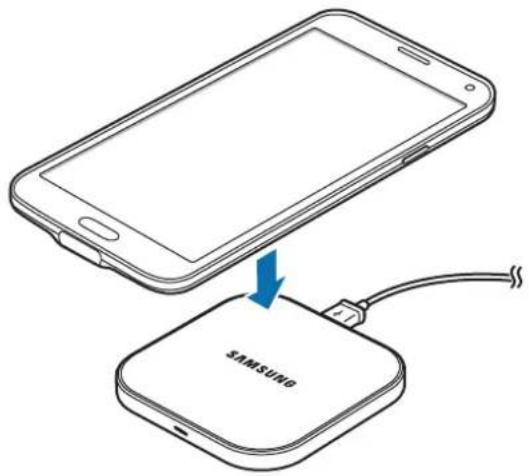

Do not place the wireless charging cover solely on the wireless charger. Doing so may overheat the wireless charger and cause a fire. It may also result in serious burn or device malfunction.
3 When the mobile device is fully charged, remove it from the wireless charger.

Do not place foreign materials, such as metal objects, magnets, and magnetic stripe cards, between the mobile device and the wireless charger. The mobile device may not charge properly or may be damaged due to overheating.

-
Check the mobile device's battery status using the charging icon displayed on the screen.
-
When the mobile device is not placed on the charging surface properly, or depending on the location of the mobile device's wireless charging coil, your mobile device may not charge properly.
-
If you use the wireless charger in areas with weak network signals, you may lose network reception.
-
If you connect a travel adaptor to the mobile device during wireless charging, the wireless charging feature is unavailable.
-
The wireless charger is compatible with WPC certified devices.
-
To save energy, unplug the travel adaptor when not in use. The travel adaptor does not have a power switch, so you must unplug the travel adaptor from the electric socket when not in use to avoid wasting power. The travel adaptor should remain close to the electric socket and be easily accessible while charging.
-
The socket-outlet shall be installed near the equipment and shall be easily accessible.
Indicator light identification
You can check the device's charging status via the notification light.
| Colour Status | |
| Blue → Green → Cyan | When connecting to the power outlet |
| Blue When charging | |
| Green When fully charged | |
| Cyan | When charging with a travel adaptor (less than 5 V/2 A) |
| Flashing blue When not charging properly due to a general error | |
| Off When in Idle mode | |

- If the indicator light is not working properly, reconnect the travel adaptor to the wireless charger.
- The indicator light's colour may vary depending on the mobile device or the wireless charging cover.
Declaration of Conformity
Product details
For the following
Product : WIRELESS CHARGER
Model(s):EP-PA510
C∈0678
Declaration & Applicable standards
[We hereby declare, that the product above is in compliance with the essential requirements of the R&TTE Directive (1999/5/EC) by application of:]
EN 301 489-1 V1.9.2
EN 300 330-1 V1.8.1
EN62311:2008
EN 60950-1:2006 + A11:2009 + A1:2010 + A12:2011 + A2:2013
EN 301 489-3 V1.6.1
EN 300 330-2 V1.6.1
and the Directive (2011/65/EU) on the restriction of the use of certain hazardous substances in electrical and electronic equipment by application of EN 50581:2012.
Representative in the EU
Samsung Electronics Euro QA Lab. (YEAR TO
Blackbushe Business Park BEGIN AFFIXING
Saxony Way, Yateley, Hampshire CE MARKING 2015)
GU46 6GG, UK
shlodoh
18 September 2015 Stephen Colclough / EU Representative
(Place and date of issue) (Name and signature of authorised person)
- This is not the address of Samsung Service Centre. For the address or the phone number of Samsung Service Centre, see the warranty card or contact the retailer where you purchased your product.
Copyright
Copyright © 2015 Samsung Electronics
This manual is protected under international copyright laws.
No part of this manual may be reproduced, distributed, translated, or transmitted in any form or by any means, electronic or mechanical, including photocopying, recording, or storing in any information storage and retrieval system, without the prior written permission of Samsung Electronics.
Trademarks
SAMSUNG and the SAMSUNG logo are registered trademarks of Samsung Electronics.
- All other trademarks and copyrights are the property of their respective owners.
Blackbushe Business Park D'APPOSITION DU
Saxony Way, Yateley, Hampshire MARQUAGE CE:2015)
GU46 6GG, UK
shldodoy
Copyright © 2015 Samsung Electronics
- September 2015 Stephen Colclough / EU-Beaufragter
Copyright © 2015 Samsung Electronics
Blackbushe Business Park INIZIARE AD APPORRE
Saxony Way, Yateley, Hampshire LA MARCATURA CE 2015)
GU46 6GG, UK
shldouh
Copyright © 2015 Samsung Electronics
Copyright © 2015 Samsung Electronics
Copyright © 2015 Samsung Electronics
Copyright © 2015 Samsung Electronics
Blackbushe Business Park APLICARE MARCA
Saxony Way, Yateley, Hampshire CE 2015)
GU46 6GG, UK
shld
- YCTPOIcTBO
KpaTko pboKOBOCTBO

- Kanakbt 3a 6e3xuHNo 3apeXdaHe n PbTHnT aanTepe npoDaBaT OTdEJIHO.
- Elenentte n haHnHnTe npHaIeXHOCTn, DOCTaBeHc yCtpoiCTBOTo, MoKe da ce pa3nuaBAt B 3aBNCIMOcT OT perNoHa nII DoCTaBUnKa Ha ycIyrN.
- Доставец селемпса пedingаизуши само за TOBA усточь и може на He ссывмостимс дугу усточь.
BbHnHnT Bn i CneuNkauNTe ca npedMeT Ha npomHa 6e3 npdun3BeCTne. - Moxete Da 3akynite DoonbHnTeHNn Akcecoapn OT Baunr MeCTeN npOaBaH ha Samsung.
PpeiN 3akynBaHe ce yBepTe, ye Te ca CbBMeCTmN CyCTpOJCTBOTO. - Използваite само одобрени OT Samsung akcecoapи. ИзползванTo Ha Heодобрени akcecoapи може за причинни рpoблемс пpon3ворintelhoctTa и Heизправноctи, КОТо He ce pokpnbAT OT rapaнцята.
HaIuHocTt Ha BCnKn akcecoapn noJleKn Ha npomHa n3cJIO B 3aBucmocT OT npOn3BOInTeJIte. 3a nobue HOpMaun 3a HaIuHNte akcecoapn ce o6bphete KbM ye6 caTa Ha Samsung.
OΦopMJIeHnE Ha yCTpoIcTBOTO
IdeHTnΦnKaζη Na HndnKaTOpHaTa IaMnUyKa
Mожete да поверпге сьсторнeTo Ha 3apexкдeн e Na yctpoiCTBOTO qpe3 JamnukKaTa 3a yBeDOMJIeHnI.
| Цват Състорнке | |
| Син → 3elen → Син bó-3elen | При сьbvрзвае с[eilektpruceckий kONTакт] |
| Син Пи зарожданe | |
| Зelen Korato e нально зарedingо | |
| Син bó-3elen | При зарожданe с пьtenадапетер (no-mалко ot 5 V/2 A) |
| Премигва в син bó Korato He se зарожда правлино поади обucha грушиka | |
| Изkl. Korato e в ржим на rotobнocт |

- Ako INHДИКATOPHaTа Лamпчka He pa6OTn npaBUNHO, CBbpxKeTe OTHOBО nbTHNIA aIaNTep KbM 6e3JINuHOTO 3apAINO yCTPOICTBO.
- LBeTbT ha INHdNkaTopHaTa IaMnUcKa MoKe Ja ce pa3JIuUaBa B 3aBNCIMOcT OT MO6NJHOTO yCTpoiCTBO INI KanaKa 3a 6e3JNUHO 3apeKdaHe.
Copyright © 2015 Samsung Electronics
Toba pBkoBOdCTBO e 3aUHTeHO OT MeKdyHapOHN 3aKOHN 3a aBTOpCKn npaba.
HnKoJtOT pBKOBOCTBOTO He moKe da 6bJe Bb3POn3BexJaHa, pa3npocTpaHbAHa, npBeEkaHa
IINI npExBpIaHa IOD KaKBaTO I Da e oOpMa IINI NO KaKBbTO I Da e HaunH, eNeKTPOHeH IINI
MexAHnueH, B TOBa YncNo oToKOpNIPAHe, 3aIc NII CbXpaHeHne B KaKBaTO I Da e CnCTema 3a
IHopMaunHO cBxaHeHne I n3BnuHaHe, 6e3 npedBapntelHoto pa3peSeHne Ha Samsung
Electronics.
TbproBcN MapKn
SAMSUNG n IoroTo Ha SAMSUNG ca pernctpupaH TbproBckn MapKn Ha Samsung Electronics.
- Bcunkn npyn Tbprobckn Mapkn n aBtOpckn npaba ca co6ctBeHOCT Ha CbOTBeHTHe IM co6ctBeHnCn.
Najprije pročitajte
Prije uporabe uredaja pažljivo procitajte ovaj prisucnik kako biste osigurali sigurnu i pravilnu uporabu.
Blackbushe Business Park STAVLJANJA
Saxony Way, Yateley, Hampshire CE OZNAKA 2015.)
GU46 6GG, UK
shld
Copyright © 2015 Samsung Electronics
Ovaj je prisuCnik zasticen medunarodnim zakonima o zastiti autorskih prava.
Niti jegan dio ovog prisučnika ne smije se reproduci rati, distribuirati, prevoditi ili prenositi u bilokojem obliku, ni na koji način, elektronici ili mehanički, uključujuci fotokopiranje, snimanje ili pohranjivanje na bilo kojem mediju za pohranu informaci je i sustavu dohvata podataka, bez prethodnog pisanog dopusteŋa Samsung Electronicsa.
Zašitni znakovi
SAMSUNG i SAMSUNG logotip su registrarani zašitni znakovi tvrtke Samsung Electronics.
Svi su ostali zašitni znakovi i autorska prava vlasnistvo svojih odgovarajućih vlasnika.
Prvo pročitajte
Copyright © 2015 Samsung Electronics
Ovaj prisučnik je zašićen medunarodnim zakonima o autorskim pravima.
Nijedan deo ovog prisučnika se ne sme reprodukovati, distribuirati, prevoditi niti prenositi ni u Jednom obliku niti bilo kojim putem, elektronskim niti mehaničkim, što podrazumeva fotokopiranje, snimanje i skladistenje u okviru bilo kog skladiša informacija i(systema za preuzimanje, bez prethodne dozvole kompanije Samsung Electronics u pisanom obliku.
Trgovačke marke
SAMSUNG i SAMSUNG logotip su registrovane trgovace marke kompanije Samsung Electronics.
Sve ostale trgovačke marke i autorska prava su vlasništro njihovih vlasnika.
Leia primeiro
Copyright © 2015 Samsung Electronics
Toode: JUHTMEVABA LAADIJA
Mudel(id):EP-PA510
C∈0678
Blackbushe Business Park AFIKS
Saxony Way, Yateley, Hampshire CE-MARGISTUS 2015)
GU46 6GG, UK
shlod
- september 2015. a Stephen Colclough / EL-i volinik
Copyright © 2015 Samsung Electronics
Blackbushe Business Park CE-MARKERING 2015
Saxony Way, Yateley, Hampshire MOET WORDENTOEGEVOEGD)
GU46 6GG, UK
Shlodogh
18 september 2015 Stephen Colclough / EU-vertegenwoordiger
Copyright © 2015 Samsung Electronics
Copyright © 2015 Samsung Electronics
Blackbushe Business Park DET TILFOYES
Saxony Way, Yateley, Hampshire CE-MERKING 2015)
GU46 6GG, UK
shlod
- september 2015 Stephen Colclough / EU-representant
Alternativekanduringevarkundesupportpatelefon81556480.
Opphavsrett
Copyright © 2015 Samsung Electronics
Blackbushe Business Park LIITTÄMISEN
Saxony Way, Yateley, Hampshire ALKAMISVUOSI 2015)
GU46 6GG, UK
sheldeog
Copyright © 2015 Samsung Electronics
Identification of indicatorlys
Du kan tjekke enchedens opladestatus via meddeelseslyset.
Blackbushe Business Park PABEGYNDELSE
Saxony Way, Yateley, Hampshire AF CE-MAERKNING 2015)
GU46 6GG, UK
shldodoy
- september 2015 Stephen Colclough / EU-repraesentant
Blackbushe Business Park ENIKOANHTH
Saxony Way, Yateley, Hampshire ENIISHMAN\SH2 CE 2015)
GU46 6GG, UK
shldodoy
Blackbushe Business Park 2015 SE JE ZACELO
Saxony Way, Yateley, Hampshire OZNACEVANJE Z OZNAKO CE)
GU46 6GG, UK
Shlodogh
Blackbushe Business Park NALEPOVÁNÍ
Saxony Way, Yateley, Hampshire OZNACENICE 2015)
GU46 6GG, UK
Shlodogh
18.zarif 2015 Stephen Colclough / Zastupce pro EU
Copyright © 2015 Samsung Electronics
Telif hakki © 2015 Samsung Electronics
Slll jn jnn n nn nnnn nnnn nnnn nnnn nnnn nnnn nnnn nnnn nnnn nnnn nnnn nnnn nnnn nnnn nnnn nnnn nnnn nnnn nnnn nnnn nnnn nnnn nnnn nnnn nnnn nnnn nnnn nnnn nnnn nnnn nnnn nnnn nnnn nnnn
Slll jll lbc g Jgall jglal g jol cll i

gaa
J 10
a 1
y 1
i 1
a
.
J
1 1
.
1
.15
EP-PA510 JdJr
gai slai
i j 1

j 1

Sj ci cIcXbI y oJaioi slaii j.

oJai
Jgaaa
:
m : x = 1 或 3x + 4y + 1 = 0
()
1

i 1
j5 jw y 80 80 80 80 80 80 80 80 80 80 80 80
i
1
j 1 j 1 j 1 j 1 j 1 j 1 j 1 j 1 j 1
1
i 100000000000000000000000000000000000000000
i 1
1
1
O
O
#
1
1 1

J 1
J 1

1 1
jol 1000000000000000000000000000000000000000000000000000

2000 1

J 1
2
Jaiil Jaii jaii 5
S ACD = S COD + S_ CDA
J 1
2018 2019
WPC
1 1
.
i
1
| (الله رَزَمُ وَالَّهُ وَالَّهُ وَالَّهُ وَالَّهُ وَالَّهُ وَالَّهُ وَالَّهُ وَالَّهُ وَالَّهُ وَالَّهُ وَالَّهُ وَالَّهُ وَالَّهُ وَالَّهُ وَالَّهُ和其他) | (الله رَزَمُ وَالَّهُ和其他) |
| 2.5 | (الله رَزَمُ和其他) |
1

s
Copyright © 2015 Samsung Electronics
.
Samsung Electronics j 1j 0j 0j 0j 0j 0j 0j 0j 0j 0j 0j 0j 0j 0j 0j 0j 0j 0j 0j 0j 0j 0j 0j 0j 0j 0j 0j 0j
J 14 j j j j j j j j j j j j j j j j j j
s
Samsung Electronics
- YCTPOIcTBO
KpaTKoe pyKOBOCTBO

KpbIiKa IJIa 6ecnpoBOHOJ 3aprAnu CeTeBOe 3aprHoe yCTpoiCTBO He NOCTABJIYOTcB KOMIIeKeT.
KoMnIeK T NOCTaBKn I Ha6Op DoCTyINbIX akceccyapOB MOrYT pa3InuATbcR B pa3HbIX perNoHax I ONpeDJIeJIOCTaBUnKOM yCnyr.
- Поставлиемble akceccyapbl npedha3HaueHbI NCKLIOHTeIbHO dIaHHoro yCTPOiCTBa mOryT 6bITb HecOBMeCTUmbI CdpYUMN yCTPOiCTBAMn.
BHeHn BnD n3denn I TexHnueckne xapaKTePnCTnKIMoYr 6bITb N3MeHehbl 6e3 npedBaPntelbHoro yBeOMJIeHn.
- Донипельные akceccуары можно пиоб畴у у мостьх дилесов Компань Samsung. Рерд покоч убадитсь, чо сobмсгимсь CBaшим устор CTВOM.
- Пименяп Te Tobilko akceccyapbl, pekomehdoBaHHbIe KOMnHaHnei Samsung. Испльзоване HepekomehdObaHHbIX AkceccyapOB MokTe npuBecTи K npo6JIeMaMВ pa6Ote n c6oM, Ha KOTopble He pacnpocTpahReTcraPaHTnI.
- Доступноctь лioбьх akceccуapOB цeNKOM И NOIHOCTbIO 3aBcNT OT прИЗБОДТЕЯ. Доступнопеловные сбendeю о доступноы akceccуapax сM. На Be6-caite Samsung.
BheuHn BvD yCTpoiCTBa
Pa6ota c yctpoiCTBOM
ИспOLTьоване 6ecnpobODHOrO 3apяdHOrO yctpoIcTba
1 IopKlIOUHTe 6ecnpoBOJHOe 3apAIDHOe yCTPOIcTBO K cTeBOMy 3apAIDHOMy yCTPOIcTBy C nOMoIbIO Ka6eJIaIg 3apAIDKN, a 3aTeM IopKlIOUHTe ceTeBOE 3apAIDHOe yCTPOIcTBO K 3JeKTpUueCKoI po3ETke.
Iocne npKIOUeHn 6ecnpoBODHO 3apADHOrO yCTPOJCTBa K 3NeKTPnuECKoP03ETKe CBeTOBOH INDkAToP 3AMrAeT CINHM, 3eJIbIM N rOly6bIM, a 3aTeM BbIKIOuHTc.

IcnoJIb3yIte TOnbKO cTeBoe 3apJdHoe yCTpoiCTBO, pa3peUeHHbIe KOMnAHnei Samsung(5 B/2 A). IcnoJIb3ObaHne HeABTOPu3nPoBAHHbIX ceTeBbIX 3apJdHbIX yCTpoiCTB MOKeT Bbl3BaTb NOBpeJdHne iIN C6oB V pa6oTe 6ecnpoBOJHO r 3apJdHOrO yCTpoiCTBa.
2 IIOJXnTe Mo6nIbHoe yCTpOInCTBO, NOIePxNBAUouee FyHKuio 6ecnpoBHOH 3apAKn B cHTpe IOBepxHocTn DnA 3apAKn.

He KlaInte KpbIshky IJIy 6ecnpoBOHOJ 3apJIK Ha 6ecnpoBOHOE 3apJHoe yCTPOINCTBO.3TO MOxET BbI3BaTb nepepeB 6ecnpoBOHOrO 3apJHOrO yCTPOINCTBa N BO3HNKHOBeHne NOXapa. Kpome TOrO, 3TO MOxET npINBeCTN K BO3HNKHOBeHIO OXOROB INN C6OAM B pa6ote yCTPOINCTBA.
3 Послп понов зардк mo6иьногустpoиства откючite erо ot 6ecnpobodnogor zapdHoro yctpoiCTBa.

He nomeuTe KaKne-Jn6o NoCTOpOHnE PpeMeTbI, TaKne KaK MeaJIHueCKne o6BeKTbI, MaHNtBIM KApTbIC MaHNTHOINONOCM MEXy MObNbHbIM yCTPOINCTBOM N 6ecnpOBoHbIM 3apAnbIM yCTPOINCTBOM. Mo6NbHOe yCTPOINCTBO MoXeT He 3apXKaTbCn DOJXHbIM O6pa3OM NNMOxET NOBpeNTbc BcNeDCTBnE neperpeBa.

- Поберпесоюне akумларopa мбиьогустpoиctba c nomoшью 3haчka 3apdkn, oTo6paaxemoro Ha ekpahe.
Mo6nIbHoe yctpoiCTBO MOKeT He 3apjKaTbc4 DOJXHbIM O6pa3OM npn HnnpaBnHOM paCnOJoxHeHH Ha NOBepxHOCTN DJIa 3apJKn IIN B 3aBNCIMOCtN OT NIOJoxHeHH KAtyUKN DJIe 6ecnpoBODHO 3apJKn Mo6nIbHoro yctpoiCTBa. - Пи Использовани 6eспровodного зардного устpoиCTBa B MecTax CO слабIM сигнанOM cetи пием OT Hee может 6bITb yteprn.
Bcnyae nodknueHnn 3apdHoro yctpoNCTBa K MObHOMy yctpoNCTBy BO Bpem 6ecnpoBOHOJ 3apdKn FyHKnJ 6ecnpoBOHOJ 3apdKn HeOCTynHa. - BeçnpoBODHoe 3apJHoe yCTpoiCTBO COBMeCTIMO C yCTpOiCTBaMn C noDpejKoWPC.
B cenx 3Kohomn 3NeKTpo3Hepn n OTKnIOuAte ceTbeO 3apdHoe yCTPOICTBO, eCNI OHO He nCnoJIb3yeTc. CeTbeO 3apdHoe yCTPOICTBO He OCHaUeHO nepeKIOUaTelem PHTAHN, NOTOMy erO Hxho OTKnIOuATb OT 3neKTpueCKo p03eTK, UTO6bl npepBaTb PPOeCC 3ApJDKn IN C3KOHOMNTb 3NeKTPO3Hepn. Ppr nCNoJIb3OBAHn CEtbeO 3apdHoe yCTPOICTBO DOJXHO PnIOTHo PnIneratb K 3neKTpueCKo PO3eTke n 6bITb IerKOIOCTynhblm.
Blackbushe Business Park ICIOJIb3OBAHIN
Saxony Way, Yateley, Hampshire MAPKINPOBKNCE — 2015)
GU46 6GG, UK
shldodoy
18 centa6pra 2015 r. Stephen Colclough / PpeicTabuTeIb EC
(MecTo n daTa BbInycka) (Amnna I noDnncb ynoHMOueHHoro nnca)
© Samsung Electronics, 2015.
Данhoe рукововсBO 3aшишно Мждунови зakohamn o6 abTOPcKIN npabax.
3a nppeaetcB OcnpoN3BODntb, pacnpocTpaHrTb, nepeBoNDt b nnnepeDaBaTb KaKne-Jn6o Yactn DaHHoro pykoBODCTBa B IIO6oF oOpMe n IIO6bIM CnOCOBOM, 3JeKTPoHbIM NnMexaHnueckm, BKJIouyA foTOkOIpOBaHne, 3aIncb n XpaHeHne B IIO6oB CNCTeMe XpaHeHn y NOncKa INHΦopMaun, 6e3 npedBapNTbHO rNcBMeHHOr pa3peSeHn KOMNaHn Samsung Electronics.
ToBapHbIe 3HaKn
SAMSUNG i IoroTn SAMSUNG 3apeHCTpnpOBaHHbIMN TOBapHbIMN 3HaKaMn KOMpaHn Samsung Electronics.
OctaIbHbIe aBTOpCKnepaBa n TOBapHbIe 3HaKn ABJIOTc CO6CTBeHHOCtBIO INx BlaJeNbceB.
Ozhannomtece neped noyaTkOM BnKOpncTaHn
Дя 6e3neuHOrTo Ta HanexKHorO KOpNCTyBaHHЯ npNcTpoE M nepW 3a BCE yBaxHo O3HaIOMTeC8 3 cIM noci6nKOM.
BOnncax BnKOpNCTOByoTbcra TcHdapTHi HanaHTyBaHHnaPnucTPOJ.
3OBHIiHnBnIaNpOdykTu MoKe BiDpi3HrTncB iD 3o6paXeHHa. Bmict MoKe 3miHIOBaTnC8e3 3aBuachoro nonepdXeHHa.
3mictzboTO noci6nka 3aCHOBaHn Ha moJeI EP-PA510.
POncHIOBaJIbHi 3HaUKN

PonepeJxHn: Cntyaui, 10 MoKytb npu3BcTn Do TpaBMyBaHHaCe6e a6o iHux oci6

Ybara: cnTuayi, iO moKytb npn3BcTn do noWkoJxHHe npncTpoo a6o iHoro o6naHaHH

Pnmitka: npmiTkn, npa#n 3 KopncTyBaHna a6o daTKoBa iHopmaucia
Початок роботи
Kompanečaίя
IpebeipTe HaBhICTb y KOMnJIeKTI TaKNX KOMNoHeHTiB:
- Ppuctri
KopoTkn noci6nK KopncTyBaHa

Kpnuka dny 6e3dpoTOBOro 3apJxKeHHa.
KOMnOHeHTN, jki BXoJrTb DO KOMnJIeKTy npIcTpoU, MoKyTb pi3HNTuC 3aIexHNO BiD KpaIH naO onepatopa 3B'ra3Ky.
KOMnoHeHTn, 1o nocTaauTbcB KOMnIeKti, po3po6neHi cneiaIbHo Ira zboTo npncTroTO Ta moKyTB 6yTu HeCymicHmM 3 iHmMn npncTroMn.
3OBHIHINBnI xapaKTePncTNI KMOKytB 3MiHIOBaTnC8e3 3aBuachoro nonepeJxehn.
-Доаткови akcesуари можна пидбати в Мicцeворо постауньнika Samsung.пердix пидбаннам пеpekoнайеся, сц boHи суmichi i3цИМ пистpoem.
BukopncToBvIe Iiue akcecyapn, peKomeHIOBaHI KOMpaHIEo Samsung. BnkOpncTahnHepeKomeHIOBaHIX akcecyapIB MOKe npu3BeCTN Do BHNKHeHHa np6JIem y po6OTi Ta HeCnpabHocTei, Ha kI He pO3NoBcOJxUyETbCra rapaHTi.
- Доступнисту усix akcesуаров може зminюватися заlexно вд компай-Bиробнков. Достаков сю по достуни akcesуаров можна дзотся на Be6-caTi Samsung.
3OBHiShiBnIaD npIcTpoI
Blackbushe Business Park PIK OTPIMAHH
Saxony Way, Yateley, Hampshire MAPKYBAHHA CE: 2015)
GU46 6GG, UK
shldodoy
18 Bepechn 2015 p. Stephen Colclough / Праздравник EC
(micte Ta daTa Bnduci) (im'ra TnPiNnc yynOBHobKeHo oO6n)
- Lé He aDpeca cepBicHoro ueHTpy Samsung. AApecy abo TelefoHHn Homep cepBicHoro ueHTpy Samsung MoXHa 3HaIaTn B rapaHTiHomy TaIohi. 3BepHiTbCra TaKoJ Do npOdaBz BnpOby.
ABTOpcbKe npaBO
© Samsung Electronics, 2015
Ie noci6nK KopncTyBaHa 3axnueHo 3riH0 3 MxHapOnHMn 3aKoHaMn 1Odo ABTOpcbKnX npaB.
3a6opOHeNo BiTbOpIOBaTu, po3noBcIouKyuBaTu, nepeKnaIaTu a6o nepeDaBaTu B 6yb-iaKiΦopMi a6o 6yNb-IAKIMN 3acO6aMn, eNEKTPOHHmN a6o MexaHUnHMN, BKlUOHy i3 KcepOKoIIOBaHNM, 3aINCyBaHNM a6o 36epirAHNM Ha 6yb-IAKOMy npinCTpoI dIy 36epirAHNJaDHnx YI B iHΦopMaizHO- NOwkyKobii cIcTeMi, JODHy qactInHy cboRo noci6Hnka 6e3 nonepedHbOro nncbMOBOrO do3BOJy KompaHii Samsung Electronics.
Tobaphi 3HaKn
- SAMSUNG i norotin SAMSUNG € 3apeectrobaHIMTOBapHIMN 3HaKaMn KOMnaHii Samsung Electronics.
- Yci iHsi TOBAPHI 3NaKn aBTOPcbKi npaba HaleKaTb BiIDNoBIHNM BlaCHNKaM.
KymbICTbl 6actamac 6ypbIH OKbIHbI3
Kayinci3 api dypbic naaalaHy ywiH kypbilfbihbl naaalaH6ac 6ypbIH OcbI HcKaybIKtbi OKbIN WblfbIHbI3.
CunataTamaIap aEeNki KypbIbHbIHnapaMeTpJIepiHe HerizdeJIreH.
CpeTepdiH cbIpTkbl Typi HaKTbI eHimHeh epeKweJeHyi MymKiH. Ma3myn aIdbH aIaeceptyci3 03reptinyi MymKiH.
OcbHcyckayIbIKTbIH Ma3MHyHb EP-PA510 yllricHe Heri3deJreH.
Hycayb6eJIwelepe

Eckepty: 3iH3iH HeMece 6aKaIapbIH XapaKaT aIybiHa AKeJyIMyMKiH KaFdaIap

A6aIHaIbI3: KypblfblHbI HeMece 6aCa Ka6DbIKTbI 3aKbIMdaybl MymKiH KaFdaJap

Eckepim: eckepTuJIep, naДaIaNy TpyaJIbI KeHecTeP HEmeC KocbIMsa aKnapaT
KymbICTbl 6actay
Opama KypaMbI
ΘHIM Kopa6bIHaMbIHa 3aTtap 6ap eKeHi TekcePi3:
Kypblfbl
XbIДam 6aTay HcKayIbIFbl

- CbIMcbI3 3apraTay KaKnafti XaHe caNapfa apHaIFaH aadanTepi 6eIek caTbilaIaIbI.
KypblfbiMeH 6ipre 6epiren 3IeMeHTTep KHe Ke3 KeIReH KOJIeTIIMdi KocalkbI KypaIap aMakKa Hemece KbI3Met KepcetywIRE 6aJlaHbICTbl 3repin OTbpybl MymKiH.
BepiReH 3IeMeHTTep TK OcbI Kypblfblfa apHaJIfAH XaHe 6acka KypblfblnapMeH yInecimdi 6oJMaybl MymKIN.
CbipTkbltypi kHe cunattamanap eckepTci3 e3reptinyi MymkiH.
KocbIMwa KocaIKbl KypalapdbI JepriikTi Samsung catyubicihn catbn anyfa 6oJadbl. Catbn any aJdbHda oJapdbIH, KypblfBIme H yInecimDi eKeHH TeKcepiH3.
Tek Samsung pyKcat etkeH KocalkbI KypalapdbI fHa naJaIaHbIHb3. BeKiTlmerE H KocalkbI KypalapdbI naJaIaHy KeiJdkTe KaMTbImaFah EHiMdiIK MaceJIepeH XHe aKaylbkTapdbI TydbIpbyIMMKIN.
KocalkbI KypaIapdbH, KOJ XeTIMdiNiri Tek eHdipywi KOMnHaJIapFa fHa 6aIIaHbICTbI 6OlaDbI. KoJ XeTIMdi KocalkbI KypaIap TypaIbI KocbIMwa aKnapaT, Samsung Be6-caTbIHda YcBiHbIHaH.
KypbIJIbIHbIH CbIpTKbl KopiHici
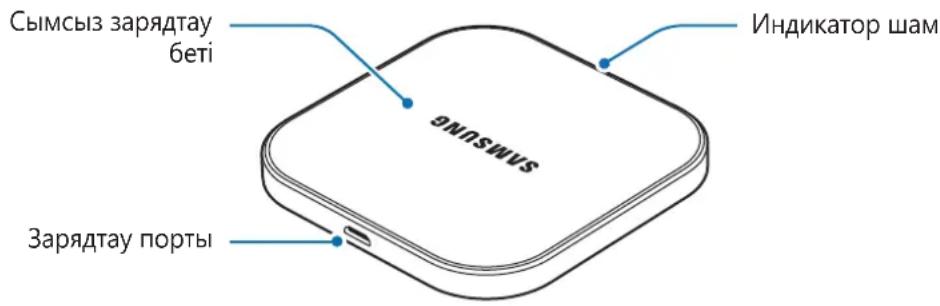
KypbIJIfblHbI NaJaIaIaHy
CbIMcbl3 3apraTafblIITbI naJaIaHy
1 CbIMcbl3 3apraTbIbI JxHe caIapfa apHaJIfAH aIantepdi 3aprIay Ka6JIimeH xAIflan, canapfa apHaJIfAH aIantepdi po3eTKaFA Kocblbl3.
CbIMcbI3 3apraTafblw po3eTKaFa KocblfHaHda INHdkaTOP Wam KeKTeH XacblfA, Kerilipre DeiH XblblkTaNdbI, codah Kein oWeedi.

Tek Samsung 6ekitkeh canapfa apHaIFaH aanTepeipH (5 V/2 A) naJaIaHbIHbI3.
PyKcat etilmereh canapfa apHaIraH aadanteplep 3aKbIM Turi3yIM MymKiH Hemece cbIMcbI3 3apAITafblu dypbic emec xMlbIC icTeyi MymKiH.
2 Konday Kepeetitein Mo6nIbdi KypblfblHbI 3apraTay 6eTIHH opTaCbHa KoBbHb3.

CbIMcbI3 3apraTafblk KaKnafbIn TeK CbIMcbI3 3apraTafblkKa KOnMaHbI3. Byla iCTey
cBIMcbI3 3apraTafblTbIH KbIbIN KeTyIHe XaHe eptKe aKeIyI MymKiH. CoHa-ak, 6yI aybip
Kyuikke Hemece KypblfblaaylbIfbHa aKeIyI MymKiH.
3 Mo6nJIbdi Kypblfbl TOIbIFbIMeH 3apraTalFaH 6oJca, cbIMcbl3 3apraTaftaHa h axblpaTbIHbI3.

Metann HbicaHdap, MarHnTep XaHe MaHnT Kolaftb6ap KapTaIap CnaKtbl 6oRde 3aTTapDbI 3apraTalaTbIH MObNbdi KypblfMeH cbIMCbI 3aprTaftbIHTbIH apacbHa caMaHbI3. MoBnbDi KypblfTnicTI TypDe 3apraTalMaybIMyMKiH Hemece KbI3bIN KeTyi caIapbHaH 6y3blvbl MyMKiH.

- Θкранда керсетілген зар\'дай 6елriшecih na'da'lahbɪn Mбиьdi KурьлfbiHbɪN, 6ataperя КуинTekcepiɪni3.
Mo6nIbdi Kypblfbl, 3apraTafblWtbln, 6eTKi Ka6aTbIHda Aypbc opHaIacnaFah Ke3de Hemece Mo6nIbdi KypblfblHbI CbIMCbI3 3apraTay ywiH opayblWtblN KyiHe 6aJIaHbICTbl, TNICTI TypDe 3apraTalMaybl MymKiH.
3apraTafbiXeI ciHbI TeMeH 6oHaBH XepnepDe KOJaHbIFaH Ke3e, XeJI KocblbIMbl aXbIPaybl MymKiH.
CbIMcbI3 3apTay Ke3iHde canapra apHaIfAH aanTepi MoBnIbI KypblfbIa KaIfacaHbI3, CbIMcbl3 3apTay yHKUncbI KOJ XeTImDi EMc 60laDbI.
CbIMcbI3 3apraTafbl WPC KyaJIkTeHdipirHe NkpblfblapMeH yJleCiMdi.
KyaTbI yHemDey yuH naJaHaBImaHaN Ke3e canapra apHaJIHaH aAdanTepei keJIed H axbipatbHb3. Canapra apHaJIHaH aAdanTepei H KyaT KCKblbIXoK, coHdbIKTaH KyaTTbI bCbipaTaybI 6OJbIPmay yuH naJaHaH6aHaH Ke3e canapra apHaJIHaH aAdanTepei 3JIeKTP po3ETKa YcBHaH axbipaty Kepek. 3aprTay Ke3IHde canapra apHaJIHaH aAdanTepi 3JIeKTP po3ETKa YcBHaH XaKbIH XaHe OHa KJXeTIMdi 6OJbI Kepek.
HndnkaTop шамыньи, xa6aplaHdbipyapbl
KypbIbIbIH 3apTay KyiH xa6aplay wambl apkblb TeKcepyre 6oJaIbI.
[Bi3 ocbimeh KofapbidafbE him R&TTE nipeKTHBaCbIHbI (1999/5/EO):]
EN 301 489-1 V1.9.2
EN 300 330-1 V1.8.1
EN 62311:2008
EN 60950-1:2006 + A11:2009 + A1:2010 + A12:2011 + A2:2013
EN 301 489-3 V1.6.1
EN 300 330-2 V1.6.1
Xe He 6enrili 6ip KayinTi 3aTAPdbI 3JIeKTp XHe 3JIeKTPoHDbIK Xa6DbIKTa NaJaHaHyDbI WeKTeY TpaJIb IInpeKTUBaHbIH (2011/65/EU) Heri3ri TaJaanTapbHa cAKeC eKeHIN MAnIMdeMIm3
(EN 50581:2012 cTahapbIH KOJaHa OTpbpIn).
EyponaIbIK OdaKtaFbl ekil
Samsung Electronics Euro QA Lab. (CE BEJITCIHE
Blackbushe Business Park KAJFAY KOCY
Saxony Way, Yateley, Hampshire BACTAIFAH XblI - 2015)
GU46 6GG, UK
shldodoy
18 KBIPKnyek 2015 X. Stephen Colclough / EO ekilji
(6epiIreH opHbI XaHe KyHi) (ekilneTTI TyIHaBbIH aTbI-XeHI MeH KOItaH6acbl)
* ByI Samsung KbIMet opTaIbIbIHbIH MeKeH-XaIbI 60JIbIN Ta6bIMaIbI. Samsung KbIMet opTaIbIFbIHbIH MeKeH-XaIBH Hemece TeJefoH HemipiH Ta6y yuH KeiJik KapTacbIH KapaHbI3 Hemece TeJeFOHbIHbIDbI CaTbIN aHaH CaTyUbIMeH xa6apJaCbIHbI3.
EAC
ABTOPbIK KyKbIK
Copyright © 2015 Samsung Electronics
BvI HycKayIbIK XaIbIKapaIbIK aBTopJIbIK KyKbIKTap TypaJIbI 3aHapMeH KopfaiFaH.
Samsung Electronics KOMnHaHcBbH aIbH aIa Xa36aHa pyKcTaHcB13, 6yI HycKaYbIKbH e6ip 6eJIirH Ke3 KeIReH TypDe Hemece Ke3 KeIReH aDic, 3JeKTPOHdbIK Hemece MexaHnKaIbIK, coBH iWiHde, fOTOKeWipy, Xa3y Hemece Ke3 KeIReH aKnapaTbIK KOImada XaHe IbIfapbIn any JxynecHde caTay apKblbl KWeipyre, TapaTyfa, aydapyfA Hemece TaCbMaJdaYfA BoImaNDbI.
Cayda 6eIrilepi
SAMSUNG Jxhe SAMSUNG Iorotni — Samsung Electronics KOMnHcBbH, tipKeIreH cayda 6eJIrIepi.
- Baplbyk 6aca cayda beJIrilepi XaHe aBTOpIbIK KYKbIKTap caikec nelepiHmehwiir 6oJIIn Ta6blnAbl.
Read me first
Please read this manual before using the device to ensure safe and proper use.
- Descriptions are based on the device's default settings.
- Images may differ in appearance from the actual product. Content is subject to change without prior notice.
- The content of this guide is based on the EP-PA510 model.
Instructional icons

Warning: situations that could cause injury to yourself or others

Caution: situations that could cause damage to your device or other equipment

Notice: notes, usage tips, or additional information
Getting started
Package contents
Check the product box for the following items:
Device
- Quick start guide

- Wireless charging cover and travel adapter sold separately.
- The items supplied with the device and any available accessories may vary depending on the region or service provider.
- The supplied items are designed only for this device and may not be compatible with other devices.
- Appearances and specifications are subject to change without prior notice.
- You can purchase additional accessories from your local Samsung retailer. Make sure they are compatible with the device before purchase.
- Use only Samsung-approved accessories. Using unapproved accessories may cause the performance problems and malfunctions that are not covered by the warranty.
- Availability of all accessories is subject to change depending entirely on manufacturing companies. For more information about available accessories, refer to the Samsung website.
Device layout
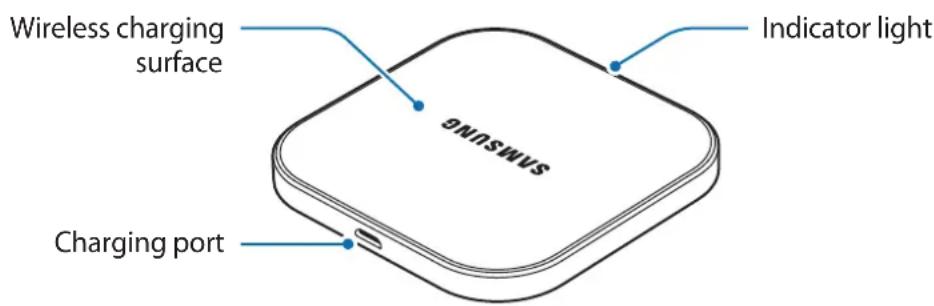
Using the device
Using wireless charger
1 Connect the wireless charger and a travel adapter with a charging cable, and plug the travel adapter into an electric socket.
When the wireless charger is connected to the electric socket, the indicator light flashes from blue to green to cyan, and then turns off.
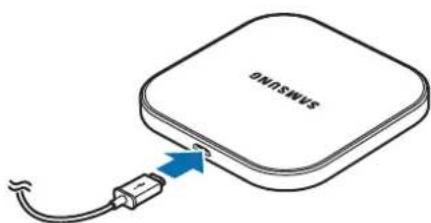

Use only Samsung-approved travel adapters (5 V/2 A). Unauthorized travel adapters may cause damage or the wireless charger may malfunction.
2 Place a supported mobile device in the center of the charging surface.
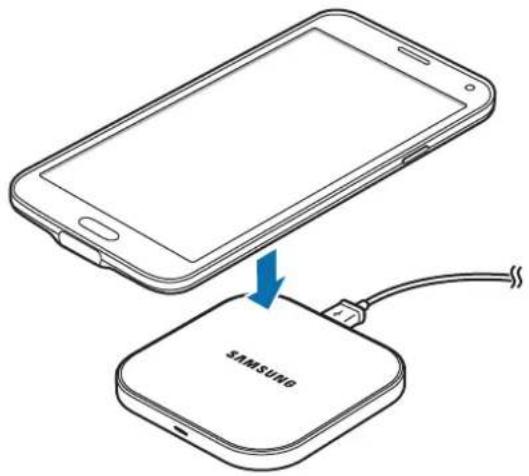

Do not place the wireless charging cover solely on the wireless charger. Doing so may overheat the wireless charger and cause a fire. It may also result in serious burn or device malfunction.
3 When the mobile device is fully charged, remove it from the wireless charger.

Do not place foreign materials, such as metal objects, magnets, and magnetic stripe cards, between the mobile device and the wireless charger. The mobile device may not charge properly or may be damaged due to overheating.

- Check the mobile device's battery status using the charging icon displayed on the screen.
- When the mobile device is not placed on the charging surface properly, or depending on the location of the mobile device's wireless charging coil, your mobile device may not charge properly.
- If you use the wireless charger in areas with weak network signals, you may lose network reception.
- If you connect a travel adapter to the mobile device during wireless charging, the wireless charging feature is unavailable.
- The wireless charger is compatible with WPC certified devices.
- To save energy, unplug the travel adapter when not in use. The travel adapter does not have a power switch, so you must unplug the travel adapter from the electric socket when not in use to avoid wasting power. The travel adapter should remain close to the electric socket and be easily accessible while charging.
Indicator light identification
You can check the device's charging status via the notification light.
| Color Status | |
| Blue → Green → Cyan | When connecting to the power outlet |
| Blue When charging | |
| Green When fully charged | |
| Cyan | When charging with a travel adapter (less than 5 V/2 A) |
| Flashing blue When not charging properly due to a general error | |
| Off When in Idle mode | |

- If the indicator light is not working properly, reconnect the travel adapter to the wireless charger.
- The indicator light's color may vary depending on the mobile device or the wireless charging cover.
This product contains chemicals known to the State of California to cause cancer, birth defects, or other reproductive harm. For more information, please call 1-800-SAMSUNG (726-7864)
Copyright
Copyright © 2015 Samsung Electronics
This manual is protected under international copyright laws.
No part of this manual may be reproduced, distributed, translated, or transmitted in any form or by any means, electronic or mechanical, including photocopying, recording, or storing in any information storage and retrieval system, without the prior written permission of Samsung Electronics.
Trademarks
SAMSUNG and the SAMSUNG logo are registered trademarks of Samsung Electronics.
All other trademarks and copyrights are the property of their respective owners.
Copyright © 2015 Samsung Electronics
Copyright © 2015 Samsung Electronics
本手册受國際版權法保護。
Samsung Electronics, 2015.
- 〜上T E F T E F T E F T E F T E F T E F T E F T E F T E F T E F T E F T E F T E F T E F T E F T E F T E F T E F T E F T E F T E F T E F T E F T E F T E F T E F T E F T E F T E F T E F T E F T E F T E F T E F T
·马拉日尼()
``` 제목 A/S 关係 冗의
A/S 段の声は一部、高層と部,等言。
- Instructional icons
- Getting started
- Package contents
- Device layout
- Using the device
- Using wireless charger
- Indicator light identification
- Declaration of Conformity
- Product details
- Declaration & Applicable standards
- Representative in the EU
- Copyright
- Trademarks
- OΦopMJIeHnE Ha yCTpoIcTBOTO
- IdeHTnΦnKaζη Na HndnKaTOpHaTa IaMnUyKa
- TbproBcN MapKn
- Najprije pročitajte
- Zašitni znakovi
- Prvo pročitajte
- Trgovačke marke
- Leia primeiro
- C∈0678
- Opphavsrett
- Identification of indicatorlys
- J
- oJai
- Jgaaa
- O
- #
- i
- BheuHn BvD yCTpoiCTBa
- Pa6ota c yctpoiCTBOM
- ИспOLTьоване 6ecnpobODHOrO 3apяdHOrO yctpoIcTba
- ToBapHbIe 3HaKn
- Ozhannomtece neped noyaTkOM BnKOpncTaHn
- POncHIOBaJIbHi 3HaUKN
- Початок роботи
- Kompanečaίя
- 3OBHiShiBnIaD npIcTpoI
- ABTOpcbKe npaBO
- Tobaphi 3HaKn
- KymbICTbl 6actamac 6ypbIH OKbIHbI3
- Hycayb6eJIwelepe
- KymbICTbl 6actay
- Opama KypaMbI
- KypbIJIbIHbIH CbIpTKbl KopiHici
- KypbIJIfblHbI NaJaIaIaHy
- CbIMcbl3 3apraTafblIITbI naJaIaHy
- HndnkaTop шамыньи, xa6aplaHdbipyapbl
- EyponaIbIK OdaKtaFbl ekil
- EAC
- ABTOPbIK KyKbIK
- Cayda 6eIrilepi
- Read me first
- ``` 제목 A/S 关係 冗의
Brand : SAMSUNG
Model : EP-PA510
Category : Battery charger