KrümelChef KC502 - Handheld vacuum GRAEF - Free user manual and instructions
Find the device manual for free KrümelChef KC502 GRAEF in PDF.



| Product type | Cordless table vacuum cleaner |
| Brand | Graef |
| Model | KrümelChef KC502 |
| Power supply | Li-ion battery 7.4 V, 2000 mAh (non-removable) |
| Filter type | HEPA filter and nylon filter |
| Dust container capacity | Approx. 0.2 L (estimate) |
| Runtime | Up to 30 min (estimate) |
| Charging time | Approx. 2–3 h (estimate) |
| Features | 2-in-1 brush, stand, charging indicator (red/white) |
| Recommended use | Crumb vacuuming in kitchen, household use |
| Safety | Do not use without filter, do not vacuum liquids, do not immerse |
| Maintenance | Clean nylon filter with clear water, HEPA filter dry, empty container regularly |
| Filter cleaning frequency | Every 3 weeks minimum |
| Spare parts | HEPA filter, nylon filter, original Graef charger |
| Warranty | 24 months (manufacturer warranty) |
| Customer service | +49 (0) 29 32-97 03 677 / service@graef.de |
| Weight | Approx. 0.5 kg (estimate) |
| Dimensions (L × W × H) | Approx. 20 × 10 × 10 cm (estimate) |
| Charger | Original Graef charger, voltage/frequency on type plate |
| Noise level | Not specified |
Frequently Asked Questions - KrümelChef KC502 GRAEF
User questions about KrümelChef KC502 GRAEF
0 question about this device. Answer the ones you know or ask your own.
Ask a new question about this device
Download the instructions for your Handheld vacuum in PDF format for free! Find your manual KrümelChef KC502 - GRAEF and take your electronic device back in hand. On this page are published all the documents necessary for the use of your device. KrümelChef KC502 by GRAEF.
USER MANUAL KrümelChef KC502 GRAEF
natural_image
3D rendering of a GRAEF device with a vertical cylindrical shaft and base (no text or symbols on the device itself)EN Operating Instructions
text_image
Technical diagram of a handheld device with labeled parts including a cable and connector, numbered 8, 9, and 10.natural_image
Symbol of a trash bin with crossed lines indicating no waste or discharge, and a solid black rectangle below (no text or labels)General safety instructions....17
Product overview....19
Product description 19
General aspects....21
Information on these operating instructions 21
Intended use....21
Limitation of liability....22
Warning messages and symbols....22
Handling battery packs....23
Unpacking the unit....23
Charging the battery pack....24
Initial operation....24
Cleaning and maintenance....24
Cleaning the Hepa filter and nylon filter 25
Troubleshooting 25
After-sales service 26
Disposal of the packaging 26
Disposal of the battery 26
Disposal of the unit....27
Warranty....27
General safety instructions
This device conforms to the relevant safety regulations. For safe handling of this unit, please observe the following safety instructions. Improper use can lead to personal injuries and property damages.
- Before using this unit for the first time, check it for visible outer damages on the housing, charging unit and plug. Do not operate a damaged unit.
- If the charging unit is damaged, it may be replaced only by an original Graef charging unit.
- Always disconnect the charging unit by pulling the plug out of the socket; do not pull the connecting cable.
- Make sure that the charging unit is safely laid; getting caught in the cable can cause the unit to drop from the working surface.
- Before connecting the unit, compare the connecting data (voltage and frequency) on the type plate with those of your energy network.
- These details must correspond so that no damage occurs to the unit. In case of uncertainty, contact a qualified electrician.
- The socket has to be protected at least by a 10 amps circuit breaker.
- Make sure that the charging unit is not damaged and is not laid across hot surfaces or sharp edges.
- Do not use the unit if the charging unit or mains plug are damaged.
- Repairs may be carried out only by an expert or by Graef after-sales service. Incorrect repairs may cause considerable hazards for the user. In addition, any claim under guarantee is forfeited.
- Defective parts must be replaced by original spare parts only. It is only with these parts that the safety requirements are met.
-This unit must not be used by children.
-Keep the unit and the charging unit away from children.
- This unit may be used by persons with reduced physical, sensory or mental abilities or deficiencies in experience and knowledge, if they are supervised or have been instructed in the safe use of the unit, and in addition understand the resulting dangers.
-Children must not play with this unit.
- The unit is not intended to be used with an external timer or a separate remove control.
- Packaging materials must not be used for playing. There is a danger of suffocation.
- In the absence of supervision and prior to assembly, disassembly or during cleaning, always disconnect the unit from the mains.
- Keep the unit away from heat and sharp edges which might cause damages.
-Keep the unit away from other heat-producing devices.
-Do not immerse the unit in water or other liquids.
-Do not operate the unit with wet hands.
-Do not expose the unit to water.
-Do not store the unit in direct sunlight or at high humidity.
-Do not use the unit if one of the openings is blocked.
- Do not use the unit to pick up flammable liquids, matches, cigarette butts, hot ash or other hot, combustible or smoking objects.
- Do not use this unit to pick up hard, sharp objects such as glass, nails or similar things.
- Do not use the unit to take up water or other liquids, because otherwise there is danger of electric shock.
- Never operate the unit without the filters.
Product overview
text_image
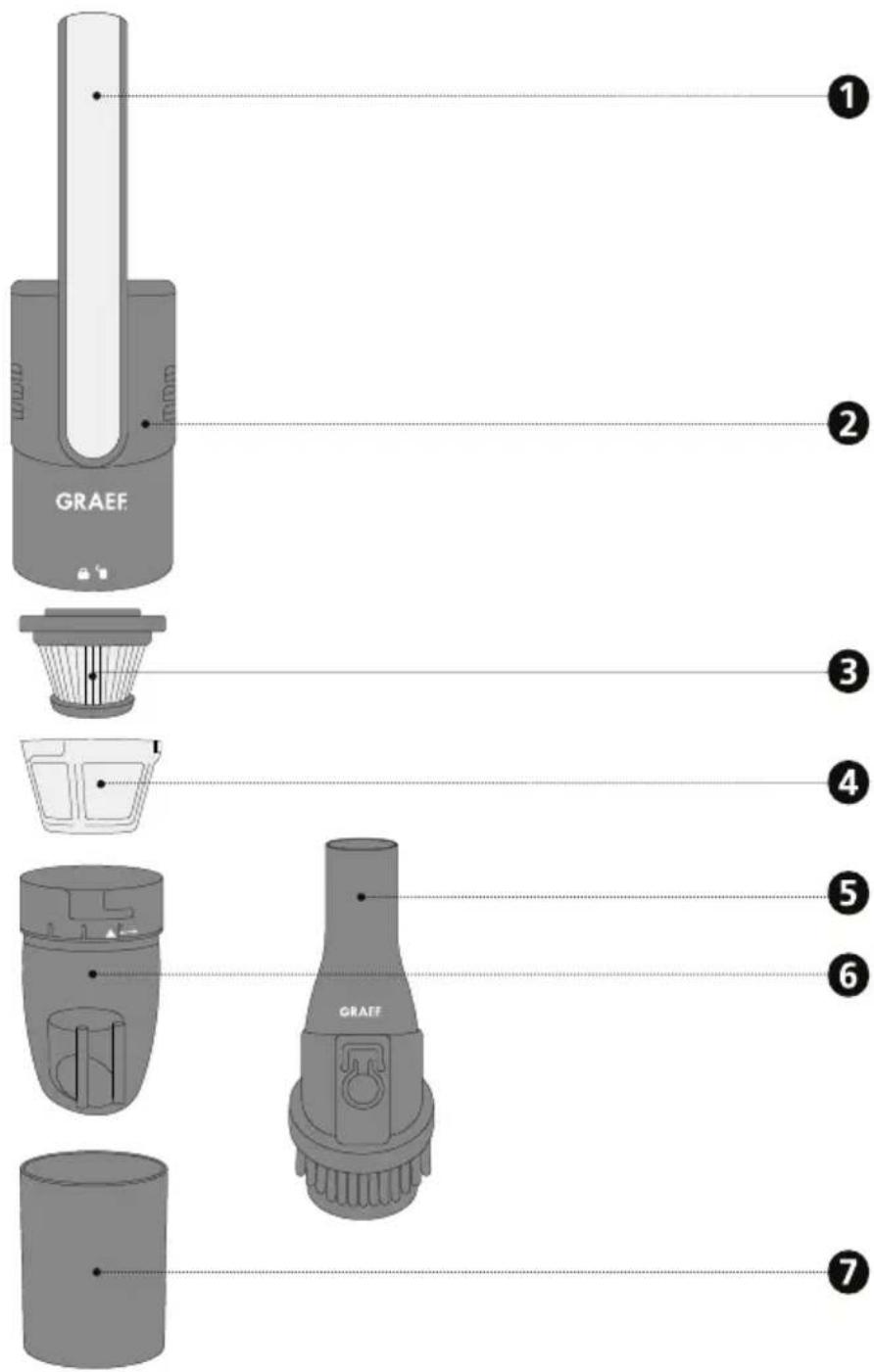
GRAEF 1 2 3 4 5 6 7Product description
① Handle
② Housing
③ Hepa filter
④ Nylon filter
⑤ 2-in-1 brush
6 Dust container
⑦ Pedestal
text_image
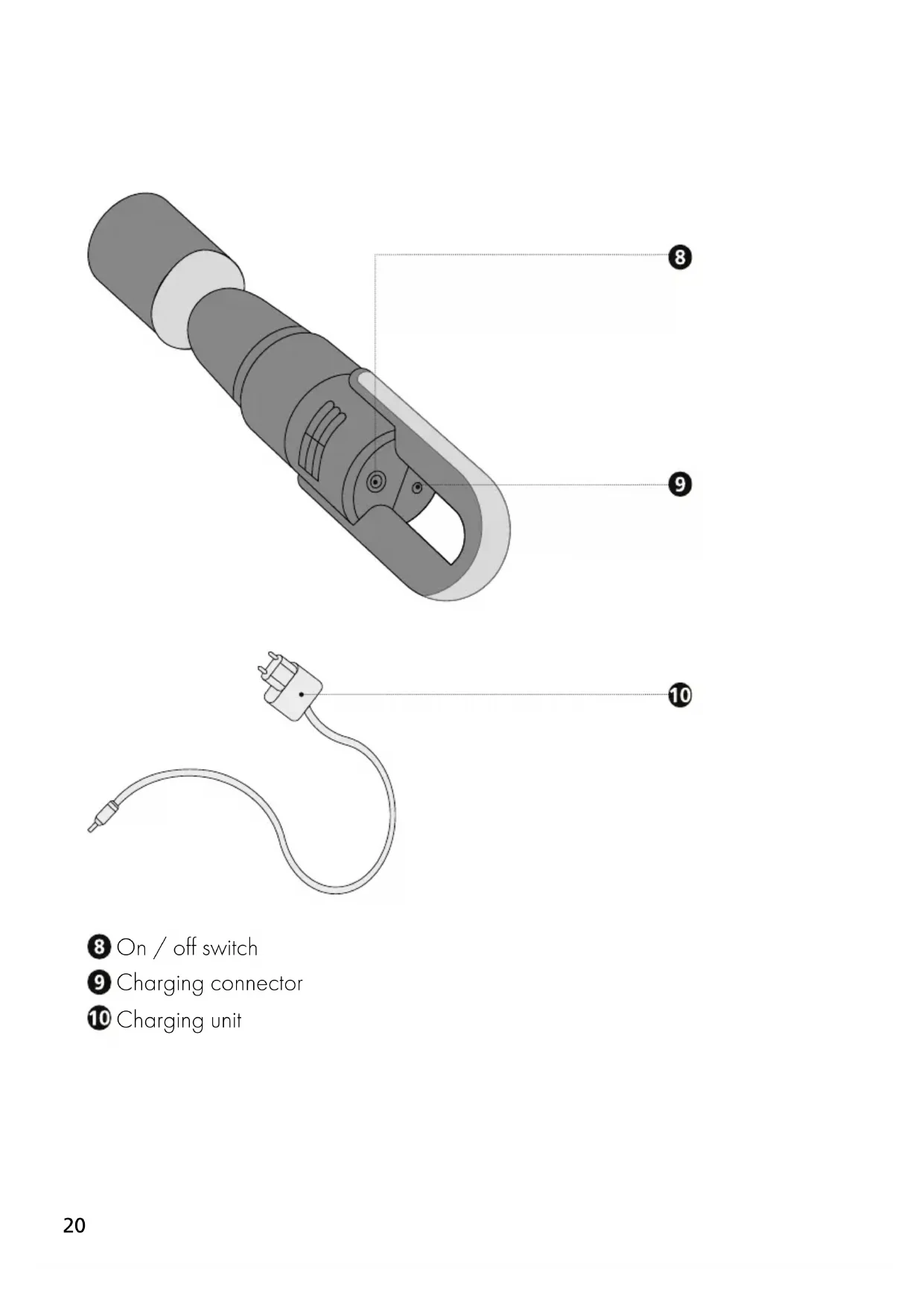
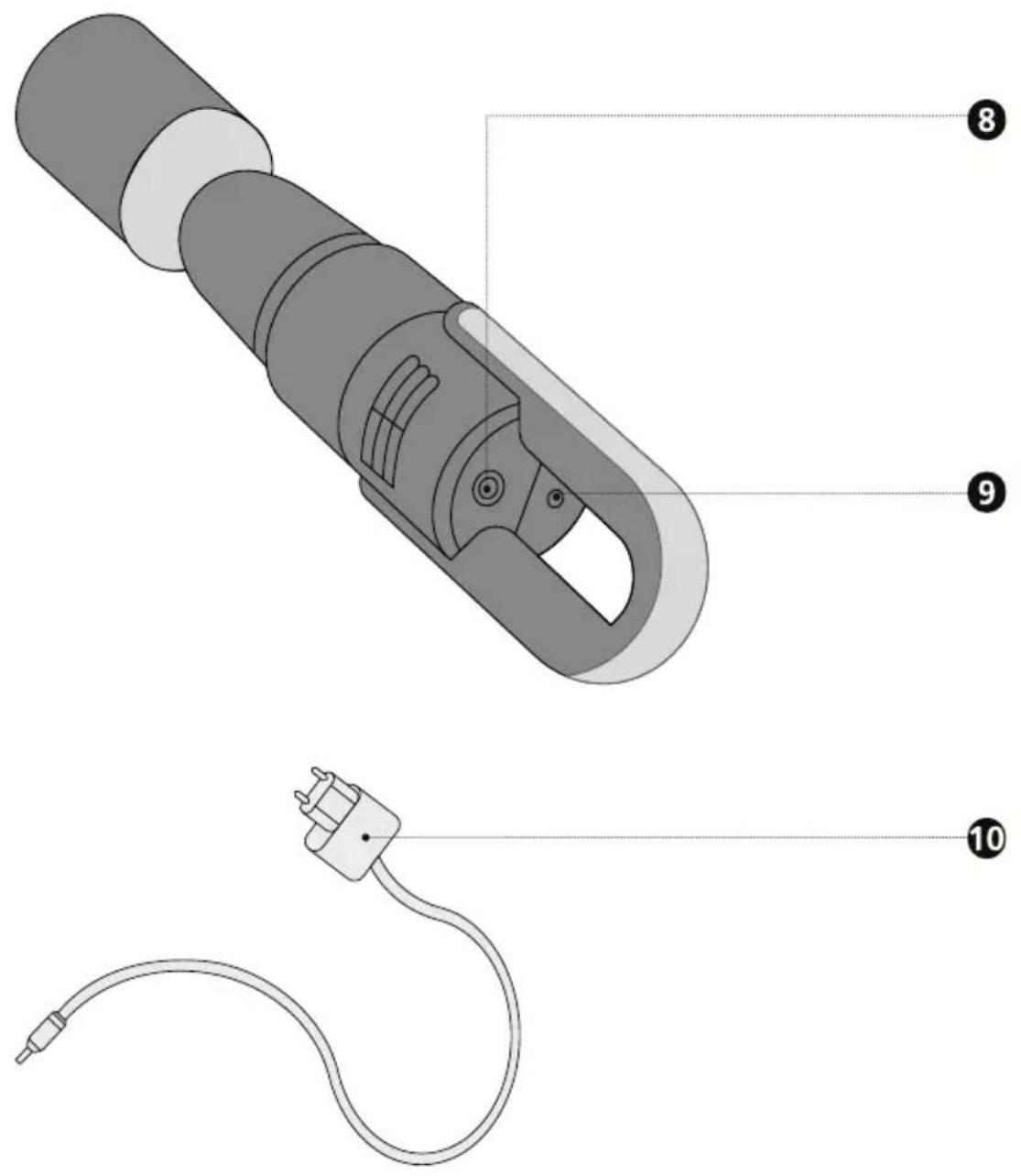
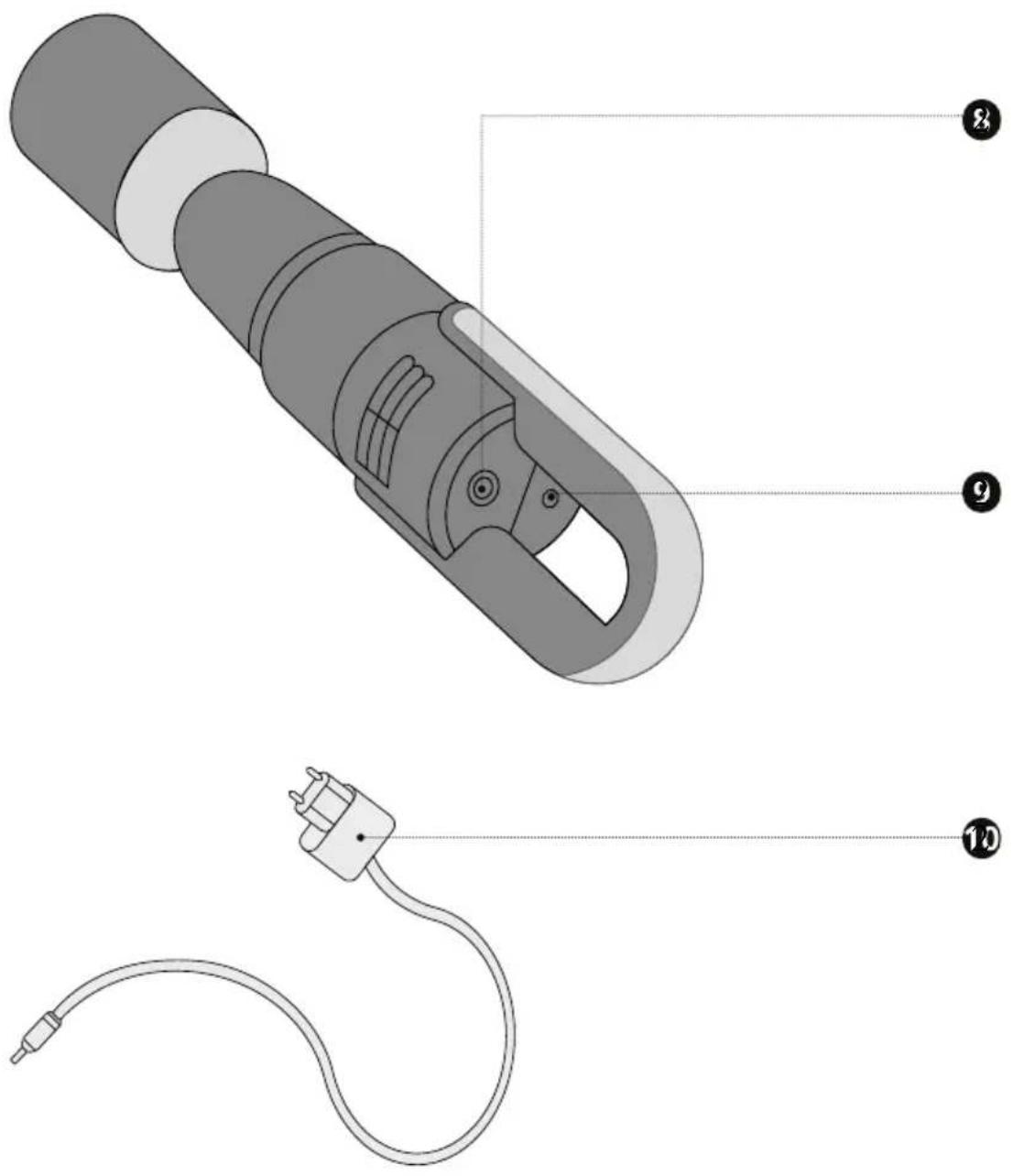
Technical diagram of a handheld device with labeled parts 8, 9, and 108 On / off switch
9 Charging connector
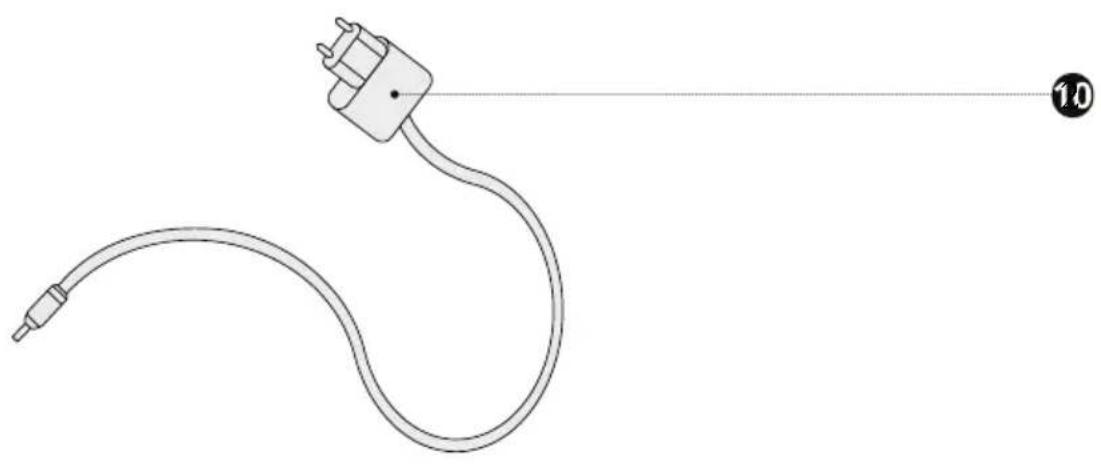
10 Charging unit
General aspects
Dear Customer,
You have made a good choice by buying this professional Crumbchef. You have purchased a recognised quality product. We would like to thank you for buying this machine and wish you a lot of fun with your new Crumbchef.
Information on these operating instructions
These operating instructions provide important information on putting into operation, safety, intended use and care of the Crumbchef (hereinafter referred to as "unit"). The operating instructions shall have to be available at the unit at all times. The instructions have to be read and applied by every person who deals with
- initial operation,
- operation,
- fault correction and/or
• or is instructed to clean the unit.
Keep these operating instructions and pass them on to the next owner along with the unit. These operating instructions cannot take into consideration every conceivable use. For further information or in case of problems which are not dealt with or not dealt with sufficiently in these instructions, please get in touch with Graef customer service or your specialist dealers.
Intended use
This unit is not intended for commercial use. Use the crumble cleaner in closed-up rooms only. Use the unit for sucking away crumbles only. Another or any exceeding use shall not be considered intended. This unit is intended for use in a household.
The appliance can cause dangers, if is not used as intended.
- Use the unit exclusively as intended.
- Observe the procedures described in these operating instructions.
Claims of any kind caused by damage by unintended use shall be excluded. The risk shall be borne sole by the operator.
Limitation of liability
All technical information, data and notes on the installation, the operation and the care contained in these operating instructions correspond to the last status before printing, and are rendered under consideration of our previous experience and to the best of knowledge. No claims may be derived from the particulars, illustrations and descriptions in these instructions.
The manufacturer shall not assume any liability for damage caused by:
• Non-observation of the instructions,
- unintended use,
- incorrect repairs,
- technical modifications,
• use of unapproved spare parts.
Translations shall be carried out to the best of knowledge. We shall not assume any liability for translation mistakes. The original German text only shall be binding.
Warning messages and symbols
In these operating instructions, the following warning messages, signal words and symbols are used:

WARNUNG
This signal symbol indicates a hazard with average risk level which, if not prevented, may result in death or a severe injury.

VORSICHT
This signal symbol indicates a hazard with low risk level which, if not prevented, may result in slight to moderate injury.
HINWEIS
This signal work warns against potential material damage.

This symbol provides additional information on operation.
Handling battery packs
This unit is equipped with a non-removable 7.4V 2,000 mAh lithium-ion battery pack.
-The supply terminals must not be short-circuited.
- If a battery pack leaks, the liquid must not get into contact with the skin or eyes. If such a contact has happened, wash the affected area with plenty of water and call your doctor for medical advice.
- Prior to using it, the battery pack must be charged. After a longer time of storage, it may be necessary to charge and discharge the battery pack several times in order to achieve maximum performance.
- Charge the battery pack only so long until it has been completely charged. Do not charge the battery pack permanently if the unit is not used.
-Only use the supplied charging unit for charging the battery pack.

WARNUNG
Due to improper handling of the battery pack, it can come to severe damages. The battery pack can explode.
-Do not dispose the battery pack in fire.
- Prevent the unit from storing in direct sunlight. Extreme temperatures affect the charging capacity of the battery pack.
- Do not expose the battery pack to heat or fire, because it can explode.
-Do not disassemble, open or crush the battery pack.
-Avoid strong impacts or vibrations.
- Do not dispose used battery packs with general household rubbish. Bring the battery pack to a local recycling station. For further details, contact the local government authorities.
Unpacking the unit
When unpacking the unit, proceed as follows:
- Remove the unit from the box.
- Remove the packaging parts.
- Remove any stickers on the unit (do not remove the type plate).
Charging the battery pack
- Pull the unit out of the packaging.
- Insert the charging unit into the charging connector.
- Insert the plug into the socket.
- The On/Off switch flashed red, the unit is charging.
- Charge the unit completely.
- If the On/Off switch illuminates white, the unit has been completely charged.
Initial operation
- Remove the plug from the socket.
- Remove the charging unit.
- Remove the stand.
- Vacuum directly into the dust container (has already been attached) or put the 2-in-1 brush onto the dust container for more precise works.
- Press the on / off button.
- Now you can start with the suction process.
- After finishing the suction process, press the On/Off button again.
- Put on the lid and stow the unit in a cabinet, for example.
HINWEIS
Never use the unit without the Hepa and the nylon filter.

If the On/Off switch illuminates red, the battery pack is low. Charge the unit again.
Cleaning and maintenance
Empty the dust container regularly.
- Remove the dust container by turning in anti-clockwise. The arrow points towards the open lock.
- Remove the dust container.
- Remove the filters.
- Empty the dust container cautiously. If required, you can use a moist cloth to clean the dust container.
Cleaning the Hepa filter and nylon filter
- Dismantle the filters.
- Brush off the coarsest dust.
- Clean the nylon filter under running, warm water. Do not use cleaning agents.
- Using a small brush, clean the Hepa filter cautiously. Do not hold the Hepa filter under water.
- Let the nylon filter dry before inserting the filter again.
HINWEIS
Depending on user frequency, the Hepa and nylon filter should be cleaned at least every 3 weeks.

VORSICHT
Do not insert the nylon filter until it has completely dried, otherwise it can come to damages on the unit.
HINWEIS
Replace the filters once the suction force diminishes and cleaning does not show any improvement.
Troubleshooting
Symptom Possible reason Solution
| The unit does not charge. | The battery pack has not been connected to the socket. | Insert the plug into the socket. |
| The battery pack has not been correctly inserted into the unit. | Insert the charging unit into the connection provided for the purpose. | |
| The suction force dimi-nishes. | The dust filters are con-taminated. | Switch the unit off and clean the dust filters. |
| The dust container is full. | Empty the dust conati-ner. | |
| The battery pack is low, the lamp illuminates red. | Charge the unit. | |
| The unit does not vacu-um any more. | The battery pack is em-pty. | Charge the unit. |
After-sales service
If your unit is defective, please contact your specialist dealer or the Graef customer service on +49 2932 9703677 or write an e-mail to service@graef.de
Disposal of the packaging

The packaging protects the unit against transport damage. The packaging materials are selected according to the environmental compatibility and disposal-related aspects and can therefore be recycled. The return of packaging into the material cycle saves raw material and reduces the waste volume. Dispose of the packaging material no longer needed at collection points for the "Green Dot" recycling system (in Germany).

If possible, keep the original packaging during the guarantee period of the unit in order to be able to pack the unit correctly in case of guarantee.
Disposal of the battery
- The battery pack must be removed to dispose the unit.
- Make sure that the battery pack is completely discharged. Check this by trying to switch on the unit.
- If the battery pack has not been completely discharged and an electrically conductive connection has been established, there is danger of a short circuit.
- In the event the unit is starting, let the unit run until it will switch off automati-
cally. Try to switch on the unit again in order to verify that the battery pack is completely discharged. Repeat the entire process so long until the unit cannot be switched on any more.
- Loosen the screws on the handle of the unit and dismantle the housing shells.
- Despite of complete discharge, the battery pack has a remaining capacity which can be released in case of a short circuit.
- Remove the battery pack and disconnect the connections of the battery pack individually one by one. Using insulating tape, stick over the individual connections to isolate the contacts.
Battery packs must not be disposed of in household rubbish. Take it to the waste collection depot intended for the purpose.
Disposal of the unit
natural_image
Symbol of a trash bin crossed with no text or labels, accompanied by a black rectangular block below (no readable text or symbols)At the end of its service life, this product cannot be disposed of in normal domestic waste. The symbol on the product and in the operating instructions point out to this fact. Reuse the materials according to their marking. With the reuse, recycling or other forms of recycling of old equipment, you make an important contribution to the protection of our environment. Please ask your municipal administration for the disposal point.
Warranty
For this product, we assume 24 months manufacturer warranty for defects, which are due to production or material defects. Your legal warranty claim in conformity with Section 439 et seq. of the German Civil Code (BGB) shall remain unaffected by this regulation. The guarantee does not cover any damage which is caused by incorrect handling or use as well as defects which only slightly influence the function or the value of the unit. We do not assume any liability for damage caused by lack of or insufficient maintenance. In this case, the warranty will become null and void as well. Moreover, transport damage provided we are not responsible shall be excluded from the claims under guarantee. Guarantee shall be ruled out for damage, the repair of which has not been carried out by us or one of our representations. In case of justified complaints, we shall repair the defective product or replace it by a product without defects at our discretion.
Table des matières
natural_image
3D technical illustration of a mechanical clamp or connector component (no text or symbols)
natural_image
Line drawing of a flexible electrical plug with a curved cable, no text or symbols presentnatural_image
Symbol of a trash bin crossed with a diagonal line, no text or labels present① Greep
② Behuizing
② Hepa filter
4 Nylon filter
2-in-1 borstel
Stofbak
⑦ Voet
text_image
Technical diagram of a handheld device with labeled parts, including a cable and connector pin.-Demonteer of open de accu's niet.
natural_image
Symbol of a trash bin with no text or labels, crossed by two diagonal lines and a solid black rectangle below (no text or symbols present)natural_image
3D mechanical component diagram showing internal structure with numbered annotations (8 and 9) for reference.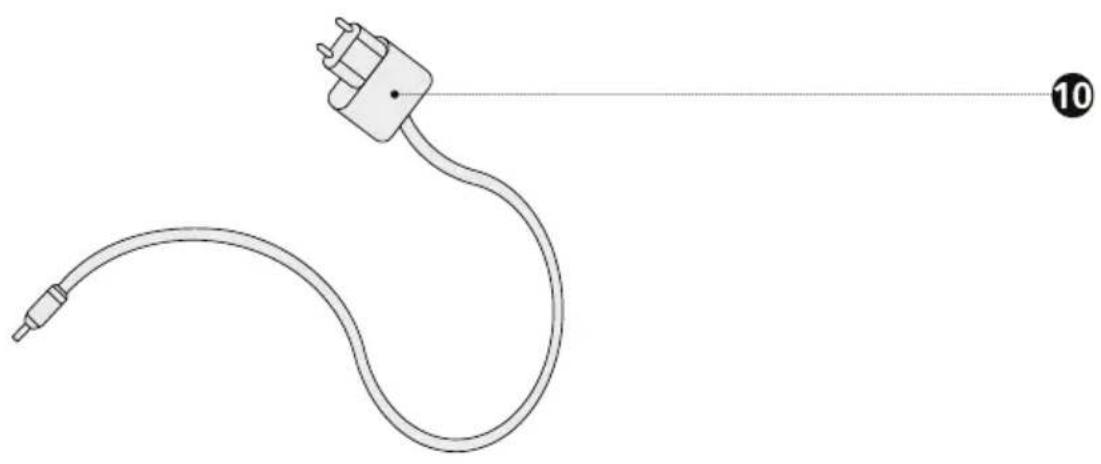
natural_image
Line drawing of a flexible electrical plug with a curved cable, no text or symbols presentnatural_image
Symbol of a trash bin crossed with no text or labels, accompanied by a black rectangular block below (no readable text or symbols)natural_image
3D technical illustration of a mechanical clamp or connector component (no text or symbols)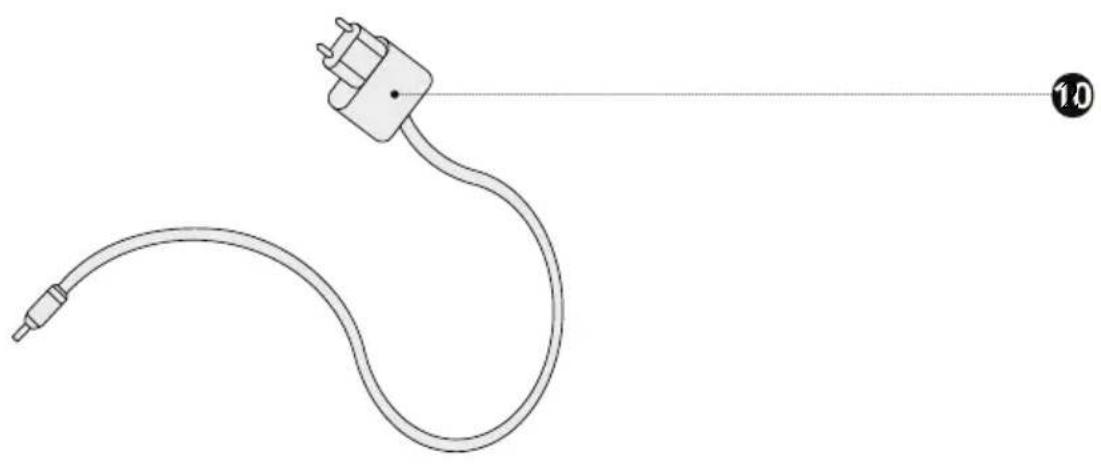
natural_image
Line drawing of a flexible electrical plug with a curved cable, no text or symbols presentnatural_image
Symbol of a trash bin crossed with no text or labels, accompanied by a black rectangular block below (no readable text or symbols)text_image
Technical diagram of a handheld device with labeled parts, including a cable and connector pin.natural_image
Symbol of a trash bin crossed with a diagonal line, no text or labels presenttext_image
Technical diagram of a handheld device with labeled parts, including a cable and connector pin.natural_image
Symbol of a trash bin crossed with no visible text or labelstext_image
Technical diagram of a handheld device with labeled parts, including a cable and connector pin.8 På/av-bryter
9 Ladetilkobling
10 Lader
Generelt
Kjære kunde,
natural_image
Symbol of a trash bin crossed with no visible text or labelsnatural_image
3D technical illustration of a mechanical clamp or connector component (no text or symbols)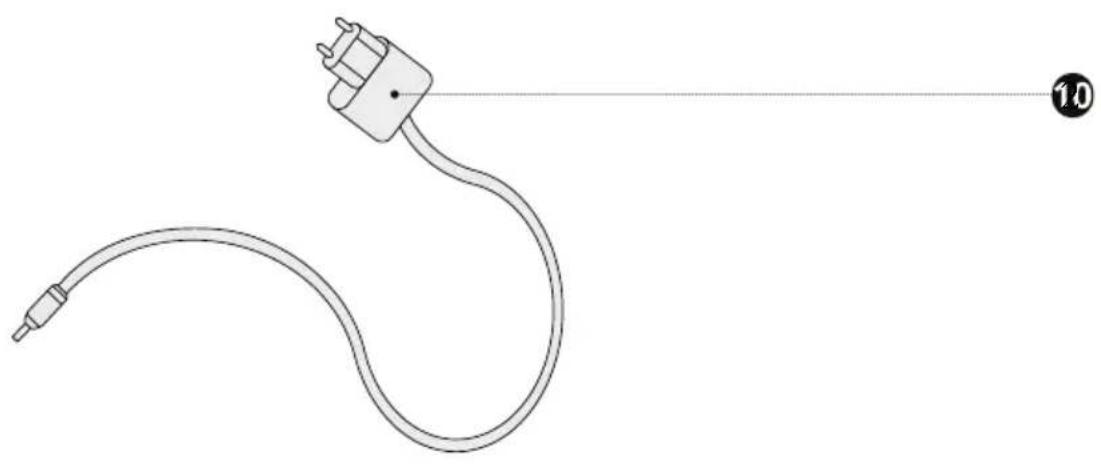
natural_image
Line drawing of a flexible electrical plug with a curved cable, no text or symbols presentnatural_image
Symbol of a trash bin with crossed lines indicating no waste or discharge, and a solid black rectangle below (no text or labels)natural_image
3D technical illustration of a mechanical clamp or connector component (no text or symbols)