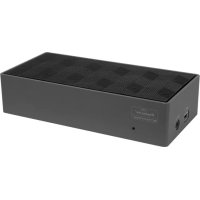
DOCK190EUZ - Docking station TARGUS - Free user manual and instructions
Find the device manual for free DOCK190EUZ TARGUS in PDF.



| Product Type | Docking Station |
| Brand | Targus |
| Model | DOCK190EUZ |
| Video Connectivity | 2 DisplayPort (DP++ 1.2), 1 HDMI 2.0 |
| Maximum Resolution | 4096 x 2160 (4K) via DisplayPort or HDMI |
| USB Upstream Ports | 1 USB-C (USB 3.2 Gen1, compatible with Power Delivery 3.0, up to 100 W) |
| USB Downstream Ports | 4 USB-A 3.2 Gen1 (5 Gbps, 1 port with BC 1.2 charging up to 2.4 A), 1 USB-C 3.2 Gen2 (10 Gbps, no video) |
| Network | RJ-45 Gigabit Ethernet |
| Audio | 3.5 mm combo audio input/output jack |
| Power Supply | 150 W AC adapter (input 20 V, 7.5 A); USB-C Power Delivery up to 100 W |
| Security | Kensington lock slot |
| Compatible Operating Systems | Windows 10 (32/64-bit), macOS 10.14+, Android 5.0+, Chrome OS, Ubuntu 14.04/16.04 |
| Operating Temperature | 0 °C to 40 °C |
| Box Contents | Docking Station, USB-C to USB-C cable, 150 W AC adapter |
| Care and Cleaning | Clean with a soft dry cloth; do not use abrasive products or solvents |
| Spare Parts and Repairability | No user-serviceable parts; contact Targus customer service |
| General Information | Universal docking station with dual 4K output and 100 W Power Delivery |
Frequently Asked Questions - DOCK190EUZ TARGUS
User questions about DOCK190EUZ TARGUS
0 question about this device. Answer the ones you know or ask your own.
Ask a new question about this device
Download the instructions for your Docking station in PDF format for free! Find your manual DOCK190EUZ - TARGUS and take your electronic device back in hand. On this page are published all the documents necessary for the use of your device. DOCK190EUZ by TARGUS.
USER MANUAL DOCK190EUZ TARGUS
USB-C Dual 4K Docking Station 100W PD w/Legacy Power USB-C Dual 4K Docking Station 100W PD w/Legacy Power

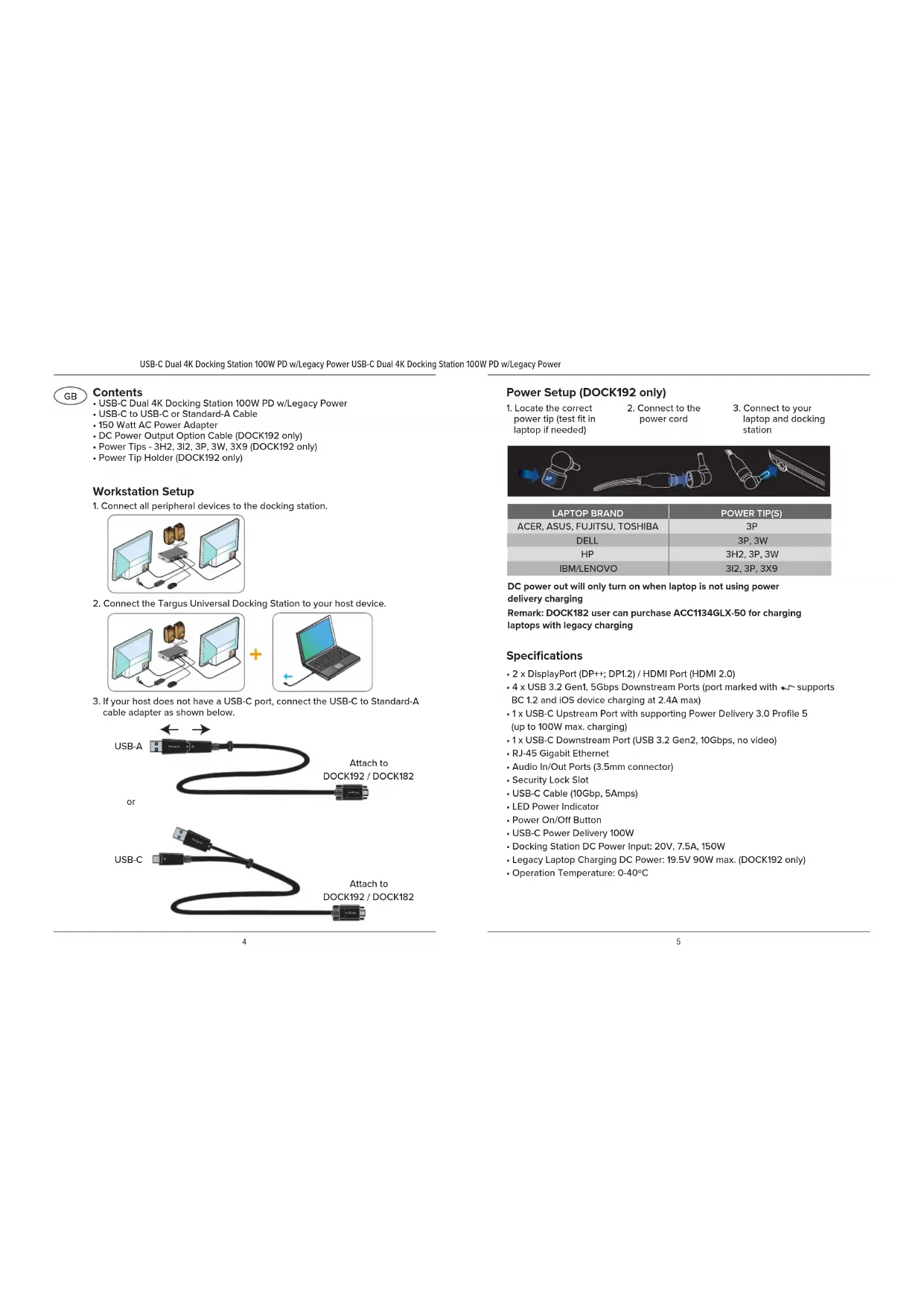
Contents
USB-C Dual 4K Docking Station 100W PD w/Legacy Power
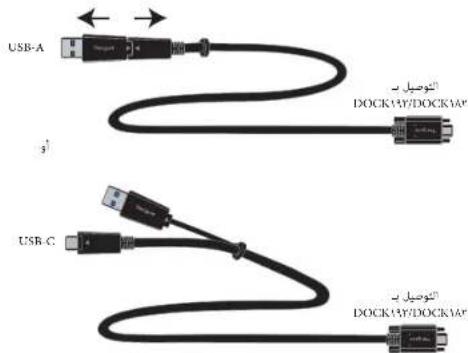
- USB-C to USB-C or Standard-A Cable
- 150 Watt AC Power Adapter
DC Power Output Option Cable (DOCK192 only)
Power Tips - 3H2, 3I2, 3P, 3W, 3X9 (DOCK192 only)
Power Tip Holder (DOCK192 only)
Workstation Setup
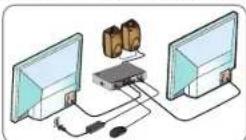
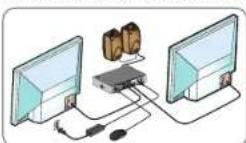
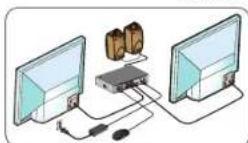
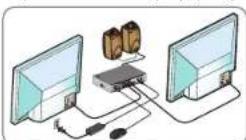
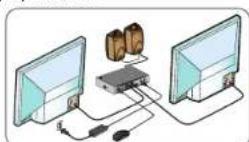
- Connect all peripheral devices to the docking station.
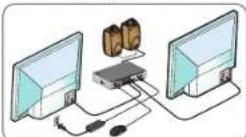
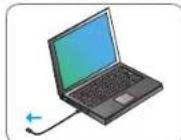
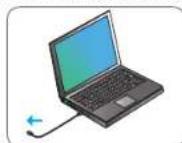
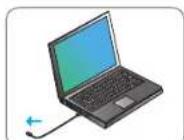
- Connect the Targus Universal Docking Station to your host device.

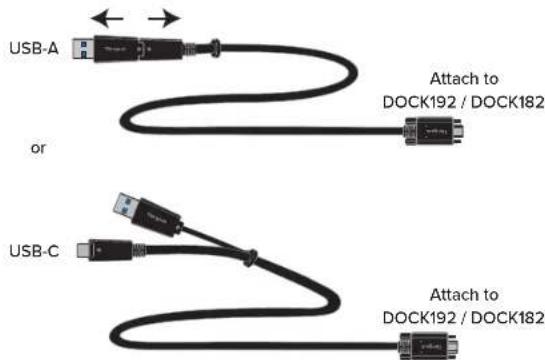
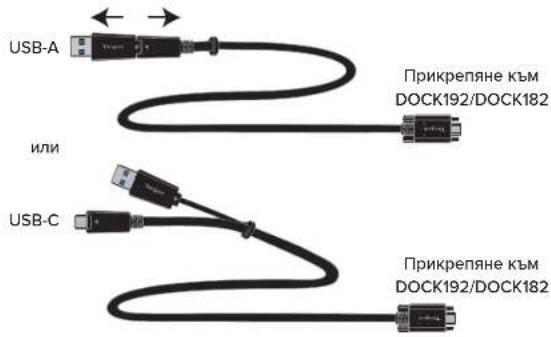
- If your host does not have a USB-C port, connect the USB-C to Standard-A cable adapter as shown below.
Power Setup (DOCK192 only)
-
Locate the correct power tip (test fit in laptop if needed)
-
Connect to the power cord
-
Connect to your laptop and docking station
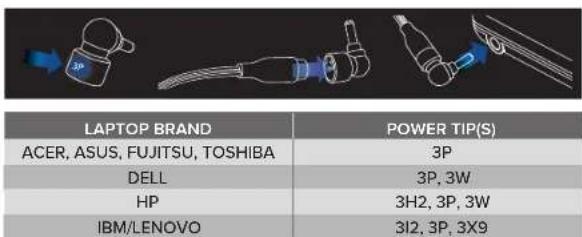
DC power out will only turn on when laptop is not using power delivery charging
Remark:DOCK182 user can purchase ACC1134GLX-50 for chalaptops with legacy charging
Specifications
- 2 x DisplayPort (DP++; DP1.2) / HDMI Port (HDMI 2.0)
- 4 x USB 3.2 Gen1, 5Gbps Downstream Ports (port marked with supports BC 1.2 and iOS device charging at 2.4A max)
- 1 x USB-C Upstream Port with supporting Power Delivery 3.0 Profile 5 (up to 100W max. charging)
- 1 x USB-C Downstream Port (USB 3.2 Gen2, 10Gbps, no video)
RJ-45 Gigabit Ethernet
Audio In/Out Ports (3.5mm connector)
Security Lock Slot
USB-C Cable (10Gbp, 5Amps) - LED Power Indicator
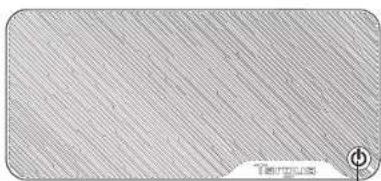
Power On/Off Button
USB-C Power Delivery 100W
Docking Station DC Power Input: 20V, 7.5A, 150W
Legacy Laptop Charging DC Power: 19.5V 90W max. (DOCK192 only)
Operation Temperature: 0 - 40^
System Requirements
Hardware
- USB 3.2 Gen1 Port
Operating System (any of the following)
Microsoft Windows 10 (32/64-bit)
macOS v. 10.14 or later
Android 5.0 or later
- Chromebooks
- Ubuntu 14.04.x LTS and 16.04 LTS on x86 platform
Visit www.targus.com for a list of the latest compatible operating systems

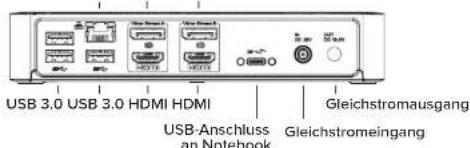
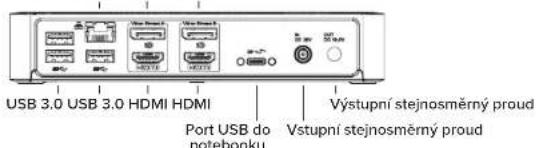
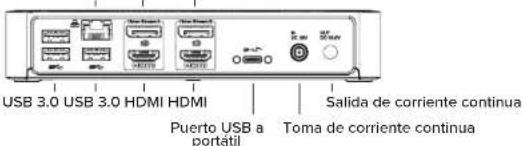
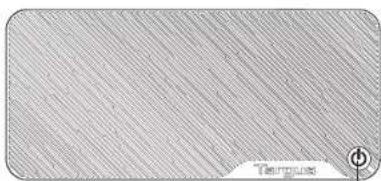
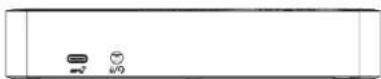
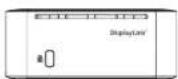
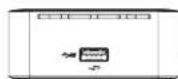
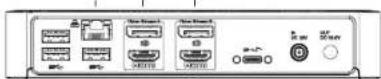
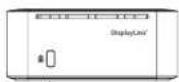
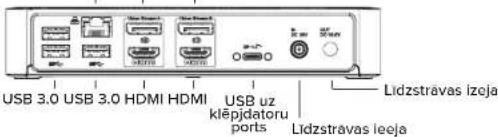
Docking Station Diagram
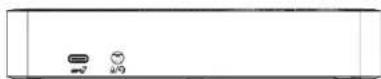
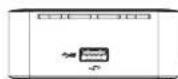
Power Button
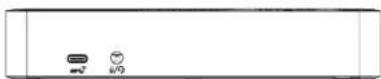
USB-C port (10Gbps) Audio Headset Connector
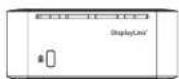
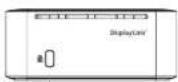
Lock Slot
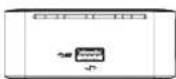
USB 3.2 Gen1Port
(supports charging)
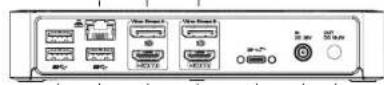
Gigabit Ethernet DP++ DP++
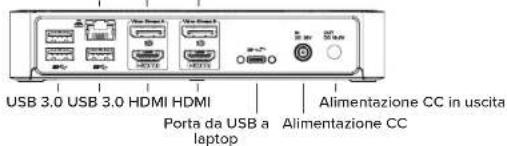
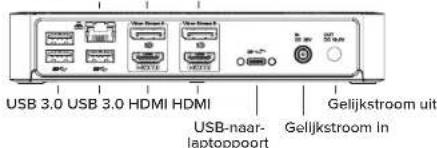
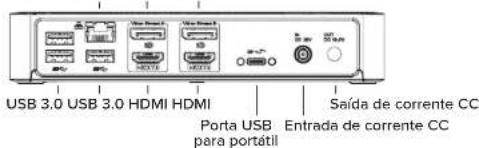
USB 3.0 USB 3.0 HDMI HDMI USB to DC DC Power Out
Laptop Power Port In
Windows Setup
To ensure the best Windows performance, please be sure to update your PC driver and firmware. These updates are often available from your IT department or from the PC manufacturer if you have Administrator rights to download and install drivers for your PC.
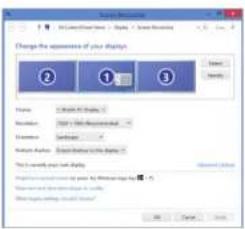
Targus Universal Docking Station DisplayLink Manager. If not already installed, can be downloaded from a Windows Update server or from www.targus.com. It is represented by the icon in the Windows Task Tray and allows you to easily connect additional monitors to your laptop or desktop via the Targus Docking Station. Using the Windows Control Panel Display Screen Resolution window, the connected monitors can be configured to either mirror your main screen, or extend the Windows desktop allowing visibility of more applications at the same time. The DisplayLink USB Graphics devices can also be configured to be the main display.
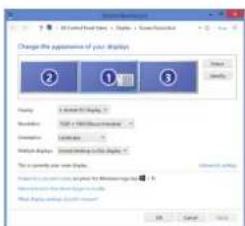
The DisplayLink Manager allows full configuration of all additional USB displays, including:
Support for addition USB Displays in Windows 10 and later
- Resolution up to 4096 x 2160 for Displayport or HDMI
- Display orientation and location modification
- Layout of displays
DisplayLink software also provides drivers for Sound and Ethernet built-in. These can also be selected in the Windows Control Panel.
USB-C Dual 4K Docking Station 100W PD w/Legacy Power USB-C Dual 4K Docking Station 100W PD w/Legacy Power
macOS Setup
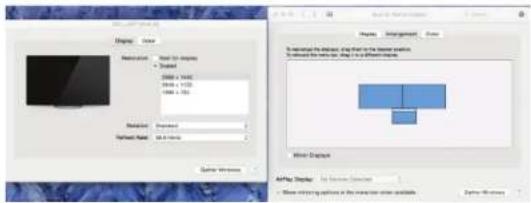
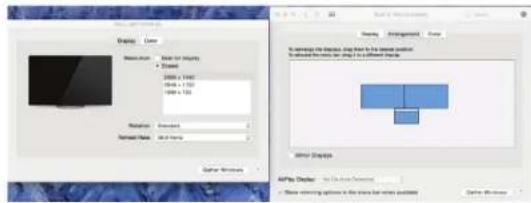
Upon installation of the DisplayLink software for macOS available at www.targus.com, MacBook users can use the System Preferences for Displays to adjust the external monitors. macOS allows configuration of all additional USB displays.
Android Setup
Install the DisplayLink Desktop application for Android 5.0 and later from the Google Play Store. You may also need to enable USB Debugging/Host mode on your Android device.
External Power Supply Information
| Manufacturer | Chicony Power Technology Co., Ltd. |
| Address | No. 69, Sec. 2, Guangfu Rd., Sanchong Dist., New Taipei City 241 Taiwan |
| Commercial Registration Number | 24284436 |
| Model | A18 -150P1A |
| Input voltage | 100-240V AC |
| Input AC frequency | 50-60Hz |
| Output voltage | 20.0V |
| Output current | 7.5A |
| Output power | 150.0W |
| Average active efficiency | 89.0% |
| Efficiency at low load (10 %) | 79.0% |
| No-load power consumption | 0.15W |
Above information can be found at importer website www.targus.com
Gigabit-Ethernet DP++ DP++
Windows einrichten
Adress: 1211 North Miller Street,
Anabeim, CA 92806 USA
Adress: Targus EMEA Account Management
EMC Directive 2014/30/EU, RoHS Directive: 2011/65/EU and its implementation Directive (EU)
2015.863
EaP Dnsive: 209/125/EC
COMMISSION REGULATION (EC) No 1275/2008
COMMISSION REGULATION (B) No 100/26)3
RoHS Directive: 2011/65/EU and its amendment Directive (EU) 2015/863.
FNIEC67002018
Director, Targan - Global Sourcing Group
funktion
CFNgoh
N
04/27/2021/18ongkong
Date
Ausstellungsgart

Gigabit Ethernet DP++DP++
Fabricant: Tangus International LLC
Anahein, CA 92806 USA
Importateur: Targus EMEA Account Management
1275/2009,EMC Directive 20/4368),Rolls Directive:2011/63/UL and its amendment Directive (EU)
2015.6.6
Pou Pevaiatian ralr aux Droctives auemantienes, les standardis suvants est appliqs:
Low-Voltage Diode: 2014/15/20
EN62368-1:2014-A11:201
EMC Dinee:2014/36/EU
EN55032:2015+AC:2016-07
ENIC61000-3-2:2019
EN61600-3-3:2013-A12019
EN55033:2017/AC:2019
BFP Dective 2019/12/5TC
COMMISSION REGULATION (EC) No L175/2004
COMMISSION REGULATION (FR) No 801-2013
RoBS Dective: 201L65EC and its amnendment Devele (EU) 2015863
ENIEC670002018
Director, Targas - Global Sounding Group
Immaile de la finiere
CFNgab
Non

Gigabit Ethernet DP++DP++
Diagram for dockingstation
Strømknap
USB-C-port (10 Gbps) Forbindelse til headset
Port til lAs
USB 3.2 Gen1-port
(understotter opladning)
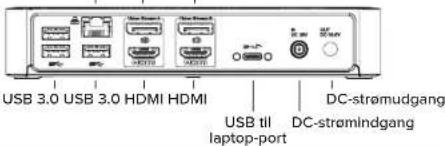
Gigabit Ethernet DP++ DP++
Opsæting i Windows
Gigabit Ethernet DP++ DP++

Windows-asetukset
Gigabit Ethernet DP++DP++
1211 North Miller Street,
Anaheim, CA 92806 USA
TargusEMEAAccountManagement
Yan Huiqian 19,51458K Waiwijk.
NETHERLANDS

Tel: 1-714-765-5555 Fax: 1-714-765-5599
internet: www.targus.com
Tel:+44 (0)20883120
TAROUS, e confers a the Low Voltage Directive 2014/35/93, BrF Directive 2009/125/BC and 1275/2006.
EMC Director 2014/30/EU, RoHS Directive 2011/65/EU and its amendments Directive (EU) 2015/865
Line-Voltage Dective: 2014/5/10
EN62368-1:2014-A11:2017
EMC Disuay:2014/59EU
FNS5037-2011+AC2016-97
5XJ76100912-2018
5610001720102019
EIN5935-2017/AC-2019
EIP Description: 2009.125.EC
COMMISSION REGULATION (EC) No 1275/2008
COMMISSION REGULATION (EU) No 401/2013
Rollerective:2011/65/1U and its amendment:Directive (EU) 2015/863
EN15C+900021X
A
Director, Targets - Global Scoring Group
Furmeia/Titale
CIFN
Norse

Microsoft Windows 10 (32/64-bits)
macOS v. 10.14 of later
Android 5.0 of later
- Chromebooks
- Ubuntu 14.04.x LTS en 16.04 LTS op x86-platform

Diagram docking station
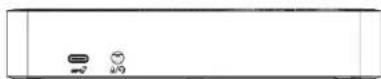
Aan-uitknop
USB-C-poort (10 Gbps) Audio-aansluiting headset
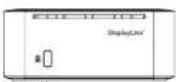
Veiligheidsslot
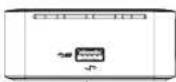
USB 3.2 Gen 1-poort (ndersteun oppladen)
Gigabit-ethernet DP++DP++
Windows-installing
Adres 1211 North Miller Street,
Anheim, CA 92806 VS
In amendment Directive (EU) 2015.863.
Rolls Directive: 2011/65/EU and its amendment Directive (EU) 2015/863.
ENIEC63002018
Jaren not begin I-markering: 2021
Director Targus, Global Sourcing Group
Functebel
CFN_goh
Nam

Gigabit Ethernet DP++ DP++
Ethernet Gigabit DP++ DP++
Fabricante Targus International LLC
Morada 1211 North Miller Street
Anaheim, CA 92806 USA
Targus EMEA Account Management
Van Hilststra 19,5145 RK Wazwijk
NETHERLANDS

Tel: 1-714-765-5555
Fax: 1-714-765-5599
Internet: www.taurus.com
Tel: +44 (0)20 8831 2013
Viroos po este meo confirmar que a proaio ooc a designao 1NAC Dual 4C Bocing Station 100W PD
wLogan powerwith Power/Adher, A18-159P1A), n" de moduloDOCK192, DOCK320 da marca "TARGUS".
e 1000000000000000000000000000000000000000000
FMC Dective 2014/04/07, RCHDective 2011/63/EU and in amendment Dective (EU 2015/WAI)
No inatiaie repodn is Drrivw hri rredus tinn apnncs as regns crnn
Low:Voltage Directive:2014/35/EU
EN62368-1:2014+A11:2017
EPCP#201439TV
EN55032:2015-AC2016-07
ENIC61000-3-2-2019
EN61000-3-2:2011+A1:2018
E
EPD Directive: 2009/125/EC
COMMISSION REGULATION (EC No 1275/2008)
COMMISSION REGULATION (EU) No 801/2013
RoHS Directive: 2011/65/EU and its amendment Directive (EU) 2015/96
EN IEC 63006:2018
Administrator, Turgus - Global Sourcing Group
图
CFNgoh
Name
04/27/2021: Hong Kong
Assume a representation of Targus
Dok-CTAHNUSB-C Dual 4K 100 BT PD (c yctapeBwne cnCTeMoN nTaHn)
Dok-CTAHUN USB-C Dual 4K 100 BT PD (cctapeBwun CnTEmoH nHTAHA)

KOMNNEKT NOCTABKN
-ДOK-СТанцИ USB-C Dual 4K 100 BT PD (c yctapeBwei cnCTeMoI nHTaHnI)
Ka6eIb-nepexodnK USB-C - USB-A nn Standard-A
AaTep nTaHnpepeMeHHoro ToKa Ha 150 BT
-DononHHTenbHbBbIXoHn Ka6eNb NHTAHN NOCTOHHOROTOKA
ToIbko DnA DOCK192)
- Cmehhble uTekepb3H2, 3I2, 3P, 3W, 3X9 (Tolbko DOCK192)
-Дерхателдясмehногошtekepa(TonbkoДЯ DOCK192)
HactpoKa pa6oey cTahm
- POKKIOHTe Bce nepHnepeHHbIe yCTpoIcTBA K DOK-CTAHIN.
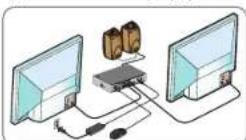
2.ПОДКЛЮЧЕУНБЕРСАЛБИЙДОК-СТAHЦИТARGUSKITANBOMHYCtpoIyCTBY.

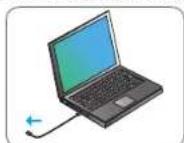
- EcnHa Baaem rnaBHom yctpoIcTBe OTCyTcTByET npT USB-C, noDcoeHNHTe Ka6eIb-nepexoHnK USB-C -Standard-A, kak noka3aHo HNKe.

HactpoKa nTaHn (Tolbko dny DOCK192)
1.Bb6epnte HxhnhcmHnhn uTekep (npn Heo6xdmoctn nonpo6yte yctaHOBNTb erO B HOYt6yK)
Bmoprep: Targus Europe Ltd.
http://www.targaq.com
teqdoc: -44 (020) 8831 213
Aspec: Targus EMEA Account Management
Van Hildestraat 19, 5145 RK Waalswijk NETHERLANDS
Hacto y
w/Legacy pprty(with Pwr/Adper, A11-150PA), Mssn N DOCK190, DOCK320
Harehneepnne Tae, gnnnne the Low Volatge Dective 2014/35/EU. EPI Dective
2018/135EC and 1752008 EMC Dispact 2014/30E, Roll 16 Dispaat 2011/45 E and it.
amendment Directive (EU) 2015/863
Iip npocnne cncn b corohtctn c mcynnnnn nnnn nnnn nnnn nnnn nnnn
(2018年)
Low-Voltage Directive: 2014/35/EU
EN62568-1-2014+A11:2017
EMC Driective:291435/EU
EN55032-2015-AC2016-97
EN JCI 61000-3-2-2018
EN61000-3-3-2013+A1-2019
EN55035:2017/AC2019
EnP Directive:2009/125/EC
COMMISSION REGULATION (EC) No 1275/2008
COMMISSION REGULATIOn (FID No 101/2013)
ROHS Dircive 2011/65/EU and its amendment Directive (EU) 2015-863 EN IEC 6400-2016
To 2021
Apecoop, Targus - Global Soaring Group
1
CT Npoh
04/27/2021
Hang Kong
A

IIOJINCK OF HEMTH
Gigabit Ethernet DP++ DP++
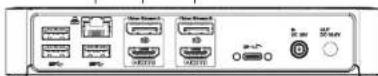
USB 3.0 USB 3.0 HDMI HDMI
DCGuCgKiksi
USB-Dizisti Builgisayar Baglanti Noktası
DC Guc Girisi
Windows Kurulumu
Targus International LLC
Advs
1211 North Miller Street,
Anabeim, CA 92806 USA
thala
Firma: Targus Europe Ltd.
Adres
Targus EMEA Account Management
m = 311
Van Hlststra 19,5145 RK Waalwijk.
NETHERLANDS

Tel: 1-714-765-5555
Fals 1-714-765-5599
Internet www.tangus.com
TeT 44(0)2088312013
Hu bege de apabde detaylan verlen USHC-Dual 4K Dacking Station 109W PD w/Leasy
power with Power Adapter, A18-150P1A1, Model No. DCK192, DCK320, Marks all "TARGUS"
unilndina, the Low Voltage Directive 2014/35 EU, Erf Directive 2009/135/EC and 1275/2008, EMC
Dre 2014/10/EU, RoHS Drective: 2011/65 EU and its amndment Deictive (EU) 2013/863
Yukanda Y oenergelere ngkion degendireme icn agada veien standardar ygpaanmip
Low-Voltage Directive: 2014/35/EU
EN62368.1:2014+A11-2017
EMC Directive: 2014/30/EU
EN55632:2015-AC2016-07
ENCE61000-3-22019
EN61000-3-3:2013-A1:2019
EN55035:2017/AC-2019
E/P DInotive:2009/125/T
COMMISSION REGULATION (EC) No 1275/2008
COMMISSION REGULATION (EU) No 801/2013
RoHS Directive: 2011/65/EU and its amendment Directive (EU) 2015/863. EN IEC 63009:2018
CE iqarinin beglmnc yib 2021
Diraktor, Targus - Global Kaynak Kullanm
Grubu
Key Groups
CF Npoh
04/27/2021/Hong Kong
T
/PhesnssYs]

Turgus icin ve Turgus adna matalamantur
ES
Contenido
Gigabit Ethernet DP++ DP++
Direcction: 1211 North Miller Street,
Dircclion: Targus EMEA Account Management
TARGUS, empue con his nntnibus the Low Volur yr 2014/35/EU. Tp Dctive 2014/25/EC and
12752018,EMC Dssive 2014/16/3),Rolls Dssive 2011)6511 and in amendment Dssive (337)
2015.863
Exp Dective: 3994125EC
COMMISSION REGULATION (EC) No 1275/2008
COMMISSION REGULATION (EU) No 801/2013
Rolls Directive, 2011/45/EU and its appendant Directive (EU) 2015/863.
EN IEC 40092018
Abe a partir did quo se ta rna CB 2021
Director: Tangas-Distribuators mundial
G Ngh
中
Nane
04272021/Hong Kong

Futa /Lager de emision
Turgus Universal Docking Station
S (Standard-A) JyUg USH-C JyUg UusB-C 100
Lagcay Power 1000000000000000000000000000000000000000000000000000000
(do DOCK19)all
nannnnn nnnnnnnnnnnnnnnnnnnnnnnnnnnnnnnnnnnnnnnnnnnnnnnnnnnnnnnnnnnnnnnnnnnnnnnnnnnnnnnnnnnnnnnnnnnnnnnnnnnnn
(1) 1,2,3,4 (2) 1,2,3,4
(y)y
ailll lL Jnssy.
cljy11d00gJgoad

aBbBbBbBbBbBbBbBbBbBbBbBbBbBbBbBbBbBbBbBbBbBbBbBbBbBbBbBbBbBbBbBbBbBbBbBbBbBbBbBbBbBbBbBb
cwwyiyibao bai
()bC@e1-)Cttll ju USB k#jik
1
GENYUSB
()
Cg Cg 10+DP+
USB10USB10HDMI HDMI
gaae jgsaes
Leyage Power 1000000000000000000000000000000000000000000000000000000
Legacy Power 4a 100000000000000000000000000000000000000000000000000000
Windows
MacOs sla
g aegdss saa gaae eae aagaae gaae gaae gaae gaae gaae gaae gaae gaae gaae gaae gaae gaae gaae gaae gaae gaae gaae gaae gaae gaae gaae gaae gaae gaae gaae gaae gaae
www. www. Windows Update 10.2023-05-24 16:48:37 Targus Universal Docking Station DisplayLink Manager 10.2023-05-24 16:48:37 Targus Universal Docking Station DisplayLink Manager 10.2023-05-24 16:48:37 Targus Universal Docking Station DisplayLink Manager 10.2023-05-24 16:48:37 Targus Universal Docking Station DisplayLink Manager
105 34.85 95 1U88 U88 62 5 Display Link Manager dd
- x 6.9 JdHDMJI 2y CwJyIyIyIyIyIyIyIyIyIyIyIyIyIyIyIy
01y1yjyj
上
Windows 2008
pall 1234567890123456789012345678901234567890123456789012345678901234567890123456789012345678901234567890123456789
Android
gag Jai 112d Gnagle Play jaa Ja 0,Android pld DisplayLink: Daskot g a
USB-C DBOHnA 4K DOKHHr CTAHmIg 100W PD c HacneDeHO enKtpo3aPbHBaHe
USB-C DBOHa 4K DOKHnT CTANm100W PD C hacnepeHo eneKtpo3aXpaHbAe

KOMNNEKTbT BKIOUyBa
USB-CDBAH4KDKOINRCTAUN100WPDcHacneDeHO
- Ka6e USB-C KMB USB-C WNI CTaHdapt A
- AC 3axpaHbauA aadantep 150 V
Ka6eI 3a BapnAHT 3a I3XoD c DC 3axpaHbAHe (cMo 3a DOCK192)
- HakpanHn3a 3axpaHbaHe - 3H2, 3I2, 3P, 3W, 3X9 (cmo 3a DOCK192)
-ДьрхачзанкраинкзахранbaHe (camo 3a DOCK192)
HactpoKaHa pa6OThaTcTaHn
1.Cbpxte BCnKn nepnepnH yctpoCTBa KbM DOKnHcTaNrTa.
2.CbPkeTe yHnEpcalHATAdoKINrCTaHcIaTargus KbMaBauTeoXocTycpOCTBO.

3.AkoXocTbBnHMAUSUB-CnopT,CbbpKTeKa6eHNHa aanTp USB-C KbM CTanhaprA,KaKToeNOKa3aHONo-dony.
9899
HactpoBaHe 3a 3axpaHbAhe (cmo 3a DOCK192)
1.HamepeTe npaBnHnna HapaiNk 3aXpaHbAne (npoBaIte dAn naBa nHaTOna, aKo e HeOxOdoMo)
2.CbpxkTe KbM 3axpaHBaunia ka6en
3.CbbpxeteKbM IaTOnaNnDOKINH CTAHUNTA

| MAPKA JAIITOTI | HAKPARIHILIM 3A 3AXPAHBAHE |
| ACER, ASUS, FUJITSU, TOSHIBA | 3P |
| DELL | 3P, 3W |
| HP | 3H2, 3P, 3W |
| IBM/LENOVO | 3I2, 3P, 3X9 |
MxOdbT 3a DC 3axpaHbAe He Ce BKnOuCmO KOrato nantOnbT He noDaba 3apeKdAe
3a6eJekka: noTpe6bTeIaH Na DOCK182 Moke da 3akynn ACC1134GLX-50 3a 3apeKdahe Ha IaTOni c HacneJeHO 3apeKdahe
CneuΦkaaui
- 2 x nopTa DisplayPort (DP++; DP1.2) / HDMI (HDMI 2.0)
-4xUSB3.2Gen1,5GbpsDownstreamnopra(noproBe,MapknpaHc←,noDtpxat3apejxdaneHaycptpoiCTBaBC1.2nIOSnpmAKCMMy2,4A)
-1xUSB-CUpstreamnpcr cnoippbkkaHa npofoin 53a Power Delivery 3.0 (MaKc.3apejdahe do 100 W)
-1x USB-C Downstream nopT (USB 3.2 Gen2, 10 Gbps, 6ea Bnpeo)
RJ-45 Gigabit Ethernet
BxOeH/3xOeH ayDnO npT (3,5 mm KOHeKTop)
OcHypntenH cnot 3a 3akIOU4BaHe
USB-C ka6en (10 Gbps, 5 Amps) - LED INHDAKATOP 3a 3axpaHbAHe
- BytoTH 3a BKNIOUBAHe/H3KNOUBAHe Ha 3axpaHbHaTeO
- USB-C staHaprt 3a apeXdahe Power Delivery 100 W
BxOa DC xaxpHbHe Ha DOKHr CTaHnra: 20 V,7,5 A,150 W - DC 3axpaHbAe 3a 3apeJdahe Ha no-CTapn cTaNaptn nanttonn: 19,5 V 90 W maxc. (camo 3a DOCK192)
Pa60tha TemnepaTypa: 0-40 C
CnCTeMHN H3NCKBaHn
Xapnyep
- USB 3.2 Gen1 nopT
OnepauHnHa cHcTeMa (HrkOaT CneHnTe)
Microsoft Windows 10 (32/64 nt)
macOS v.10.14 no-no-HoBA Bepcna
Android 5.0 no no-hoBa Bepcna
- Chromebook
- Ubuntu 14.04.x LTS u 16.04 LTS ha nnaTφopMa x86
Iocetete www.targus.com 3a cnncbk c Hai-akTyajHnTe cbbMeCTMMonepaioHHn CNTeMM
CxemaHaDOKnHrCTaHnraTa
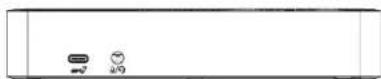
Bytoh3a3axpaHbAe
USB-C nopT (10 Gbps) Aydno konektop 3a cnyuaan
Ocnpyntenen cnot
Gigabit Ethernet DP++ DP++
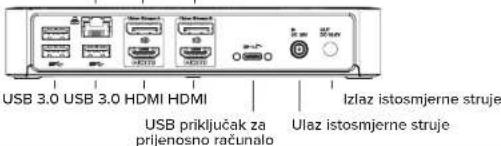
USB-C dvostruka 4K prikljucna stanica 100 W PD s kompatibilnim strujnim napajanjem
Postavke sustava Windows
Kako biste osigurali najbolje performanse sustava Windows, obvezno azurirajte upravljacki program i firmver racunala. Ta azuriranja cesto su dostupna putem vaseg odjela za informacijski tekhnologiju ili ih dobivate od proizvodača računala ako imate administratorska prava za preuzimanje i instaliranje upravljackih programa za svoje računalo.
Targus Universal Docking Station DisplayLink Manager. Ako vec nije instaliran, moguce ga je preuzeti s posluizitelja Windows Update ili na adresi www.targus.com. On je prikazanikonom u paleti sa zadacima sustava i omogucava vam jegnostavno spajanje dodatnih monitora na vase prijenosno racunalo ili na stolnro racunalo putem priključne stanice Targus. S pomocu prozera Windows Control Panel Display Resolution (Razlučivost zahlona upravljacke ploce), povezani monitori mogu se konfigurirati tako da ili rizale vaš glavni zaşlon ili prosiriju radnu povrsinu sustava Windows omogucavajuci istodobnru vidljivost vise aplikacija. Uredaji DisplayLink USB Graphics takoder se megu konfigurirati da budu glavni zaşlon.
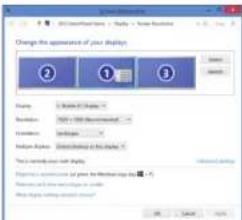
Display Link Manager omogucije potpunu konfiguraciju svih dodatnih USB zaslona, ukjučujuci:
Gigabit Ethernet DP++ DP++
USB 3.2 "Gen1" prievadas
Operaciné殿堂 (bet kuri iš siy systemd)
Microsoft Windows 10 (32/64 bitu)
macOS v. 10.14" arba nauesne versija
Android5.0 arba nauesne versija
-Chromebook
"Ubuntu" 14.04.x LTS ir 16.04 LTS x86 platformoje
Naujausi suderinamu operacinuiystemysarasasyra patelktas www.targus.com.
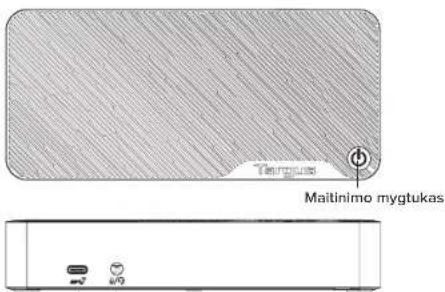
Prijungimo stoties schema
USB-C prievadas (10 Gbps) Garso austinjungtis
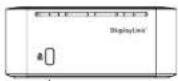
Garso austinjungtis
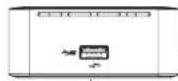
USB 3.2, Gen 1" preveadas (paloiko Jkrovima)
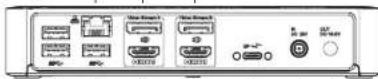
Gigabity eternetas DP++ DP++
USB 3.0 USB 3.0 HDMI HDMI
Nuolatines groves maltinimo iiyvas
USB prievadas j Nuolatinas sroves neisjojamajkl kompiuterj maitinimo jvadas
Gigabit Ethernet DP++ DP++

USB 3.0 USB 3.0 HDMI HDMI Intrare de alimentare c.c.
Port USB cadre Intrare de alimentare c.c. laptop
Configurare Windows
Gigabit Ethernet DP++ DP++
Toite seadistamine (ainult DOCK192)
Gigabit Ethernet DP++ DP++

USB 3.0 USB 3.0 HDMI HDMI USB- Alalisivooluvallund silearvuti port Alalisivoolusisend
Windowsi seadistamine
For technical questions, please visit:
Internet
English https://uk.targus.com/pages/support
French https://fr.targus.com/pages/support
German https://de.targus.com/pages/support
Phone (language answered in):
Austria: 0179567642 (German)
Belgium: 02-717-2451 (French)
Denmark: +45 35 25 87 51 (English)
Finland: +358 922948016 (English)
France:01-6453-9151 (French)
Germany: 0211-6579-1151 (German)
Netherlands: 02 0504 0671 (English)
Norway: +472257729 (English)
Portugal; +351 21 415 4123 (English)
South Africa: +27 211 003 270 (English) -
Calls answered 10am-6pm South African time
Spain: 91745 6221 (Spanish)
Sweden: 08-751-4058 (English)
Switzerland: +41 (0) 44 212 0007 (French or German)
UK: 020-7744-0330 (English)
Eastern Europe and others not listed above:
+44 (0) 207 744 0330 (English)
Warranty
3 YEAR LIMITED WARRANTY: We pride ourselves on the quality of our products. For complete warranty details and a list of our worldwide offices, please visit www.targus.com
Features and specifications are subject to change without notice. All trademarks and registered trademarks are the property of their respective owners. All rights reserved. ©2019 Manufacturer or Imported by Targus Europe Ltd., Fourth Floor, One London Road, Staines, TW18 4EX, UK. All rights reserved.
Regulatory Compliance (applicable to products with electronic circuitry/parts only)
This device complies with Part 15 of the FCC Rules. Operation is subject to the following two conditions: (1) This device may not cause harmful interference, and (2) this device must accept any interference received, including interference that may cause undesired operation.
FCC Statement
Tested to Comply
This equipment has been tested and found to comply with the limits of a Class B digital device, pursuant to Part 15 of the FCC Rules. These limits are designed to provide reasonable protection against harmful interference in a residential installation. This equipment generates, uses, and can radiate radio frequency energy, and if not installed and used in accordance with the instructions may cause harmful interference to radio communications. However, there is no guarantee that interference will not occur in a particular installation. If this equipment does cause harmful interference to radio or television reception, which can be determined by turning the equipment off and on, the user is encouraged to try to correct the interference by one or more of the following measures:
- Reorient or relocate the receiving antenna;
- Increase the separation between the equipment and receiver;
- Connect the equipment into an outlet on a circuit different from that to which the receiver is connected;
- Consult the dealer or an experienced radio/TV technician for help
Changes or modifications not authorized by the party responsible for compliance could void the user's authority to operate this product.
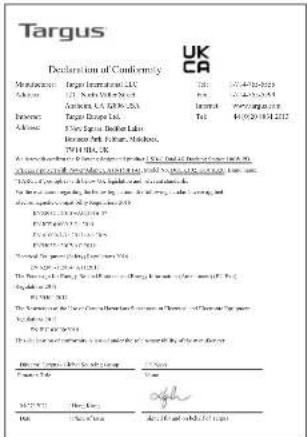
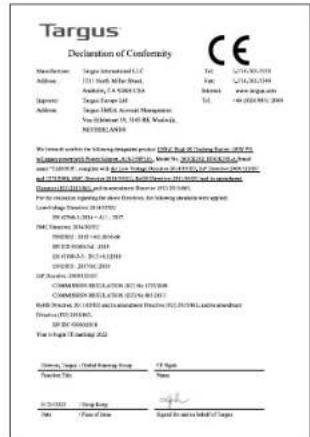
Declaration of Conformity
Targus hereby declares that this device is in compliance with the essential requirements and other relevant provisions of Directive 2014/30/EU.
Targus Recycling Directive
At the end of this product's useful life please dispose at an appropriate recycling collection point provided in your country.
- Contents
- Workstation Setup
- Power Setup (DOCK192 only)
- Specifications
- System Requirements
- Hardware
- Operating System (any of the following)
- Windows Setup
- macOS Setup
- Android Setup
- Windows einrichten
- 2015.6.6
- Diagram for dockingstation
- Opsæting i Windows
- Windows-asetukset
- Windows-installing
- KOMNNEKT NOCTABKN
- HactpoKa pa6oey cTahm
- HactpoKa nTaHn (Tolbko dny DOCK192)
- Windows Kurulumu
- ES
- Contenido
- (do DOCK19)all
- Windows
- MacOs sla
- Android
- KOMNNEKTbT BKIOUyBa
- HactpoKaHa pa6OThaTcTaHn
- HactpoBaHe 3a 3axpaHbAhe (cmo 3a DOCK192)
- CneuΦkaaui
- CnCTeMHN H3NCKBaHn
- Xapnyep
- OnepauHnHa cHcTeMa (HrkOaT CneHnTe)
- Postavke sustava Windows
- Configurare Windows
- Toite seadistamine (ainult DOCK192)
- Windowsi seadistamine
- Internet
- Phone (language answered in):
- Warranty
- Regulatory Compliance (applicable to products with electronic circuitry/parts only)
- FCC Statement
- Tested to Comply
- Declaration of Conformity
- Targus Recycling Directive
Brand : TARGUS
Model : DOCK190EUZ
Category : Docking station