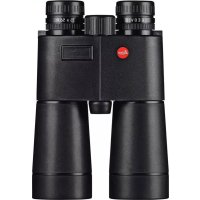
Geovid 15x56 R - Binoculars LEICA - Free user manual and instructions
Find the device manual for free Geovid 15x56 R LEICA in PDF.



| Product Type | Binoculars |
| Brand | Leica |
| Model | Geovid 15x56 R |
| Magnification | 15x |
| Objective Diameter | 56 mm |
| Exit Pupil | 3.7 mm |
| Twilight Factor | 28.98 |
| Geometric Brightness | 13.94 |
| Field of View at 1000 m | 72 m / 4.0° |
| Close Focusing Distance | approx. 5.5 m |
| Interpupillary Distance | 58 – 74 mm |
| Prism | Roof, with P40 phase correction |
| Lens Coating | High Durable Coating (HDC™) and Aqua-Dura hydrophobic |
| Diopter Adjustment | ± 3.5 diopters |
| Operating Temperature | -25 to +55 °C |
| Waterproofness | 0.5 bar (5 m depth) |
| Housing Material | Cast aluminum |
| Measuring Range | 10 m to approx. 1100 m |
| Measuring Accuracy | ±1 m (up to 350 m), ±2 m (up to 700 m), ±0.5% (beyond) |
| Ballistic Function | Equivalent Horizontal Distance (EH-) |
| Display | 4-digit LED |
| Power Supply | 1 x 3V CR2 lithium battery (≥ 2000 measurements) |
| Dimensions (L x H x D) | 135 x 208 x 68 mm |
| Weight (with battery) | approx. 1245 g |
| Laser | Class 1 (eye protection) |
| Supplied Accessories | CR2 battery, carrying strap, case, eyepiece and objective covers, warranty card |
| Care and Cleaning | Clean lenses with a soft, lint-free cloth, avoid pressure, rinse with clear water |
| Spare Parts | Eyecups, straps, covers: contact Leica customer service |
Frequently Asked Questions - Geovid 15x56 R LEICA
User questions about Geovid 15x56 R LEICA
0 question about this device. Answer the ones you know or ask your own.
Ask a new question about this device
Download the instructions for your Binoculars in PDF format for free! Find your manual Geovid 15x56 R - LEICA and take your electronic device back in hand. On this page are published all the documents necessary for the use of your device. Geovid 15x56 R by LEICA.
USER MANUAL Geovid 15x56 R LEICA
LEICA GEOVID 8x42 R/10x42 R
LEICA GEOVID 8x56 R/15x56 R
Product Support / Software Support
Am Leitz-Park 5
D-35578 Wetzlar
Tel.: +49(0)6441-2080-111 /-108
Fax: +49(0)6441-2080-490
info@leica-camera.com /
software-support@leica-camera.com
LEICA CUSTOMER CARE
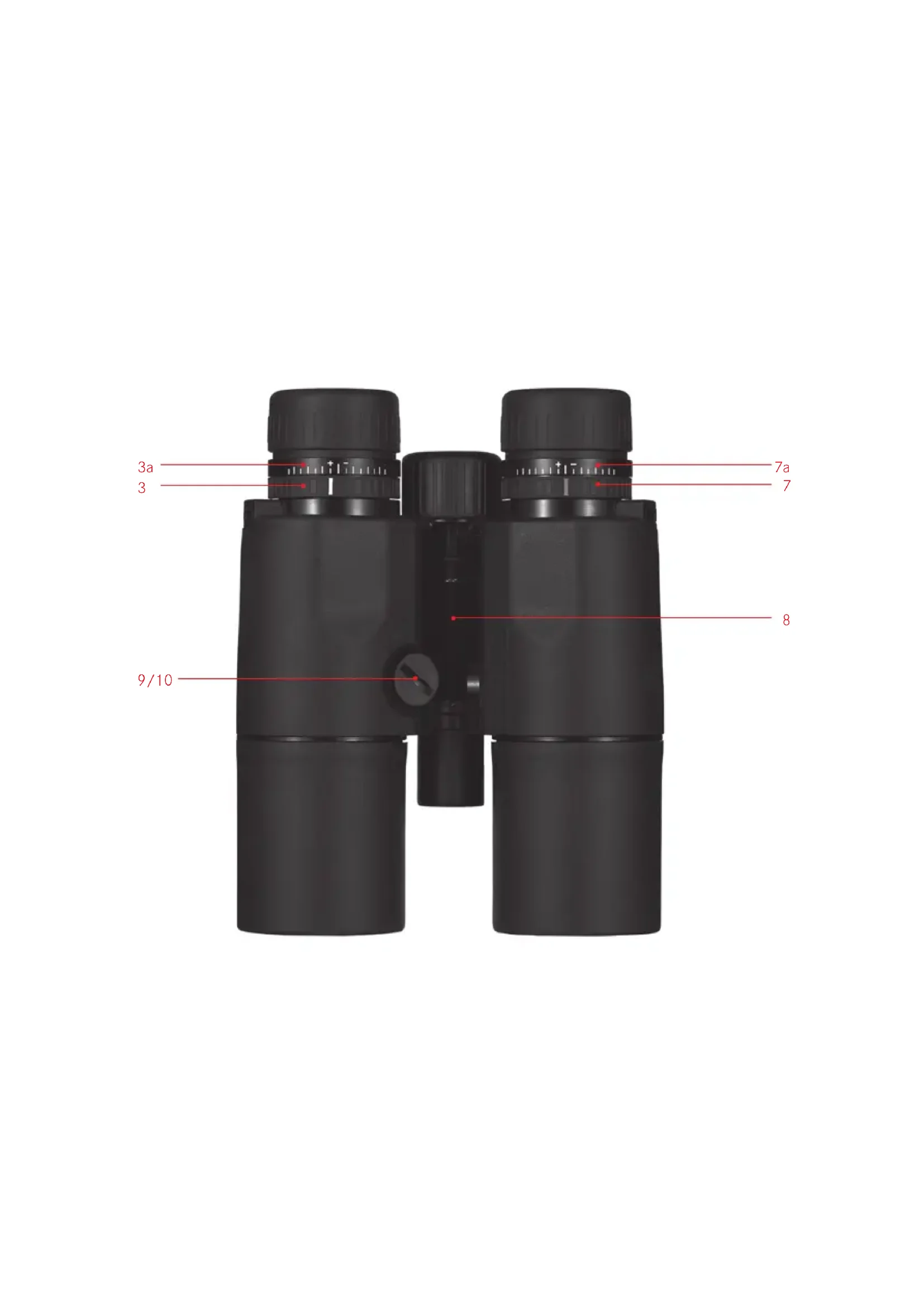
Position a: Extended for viewing without glasses
Position b: Retracted for viewing with glasses
- Central focusing dial
- Diopter compensation dial with a. Scale
- Eyes for carrying strap
- Release button for distance metering
- Laser transmission optics
- Diopter compensation for reticule with a. Scale
- Hinged axis for adjusting the eye spacing
- Battery compartment
- Battery compartment cover
FOREWORD
Dear Customer,
All over the world, "Leica" stands for top quality, precision engineering with extreme reliability and a long life.
We wish you a great deal of enjoyment and success with your new Leica Geovid R binoculars. To ensure that you use them correctly, we recommend that you read these instructions first.
PACKAGE CONTENTS
- Binoculars
- 13V lithium round cell, type CR2
- Carrying strap
Ever ready case
Eyepiece cover - 2 lens covers
Warranty card
CONTENTS
Designation of parts. 17
Foreword 17
Package contents 17
Disposal of electrical and electronic equipment 19
Potential applications. 19
Attaching the carrying strap and the eyepiece cover..19
Attaching the lens covers. 19
Inserting and replacing the battery 20
Battery charge level 21
Adjusting the eyepiece cups /
Using with and without glasses. 22
Adjusting the eye spacing 22
Setting the focus / Diopter compensation. 23
Distance metering. 24
Equivalent horizontal range (Ehr) 25
Scan mode 26
Measurement range and accuracy 26
Maintenance / cleaning. 28
Accessories 28
Spare parts. 28
Troubleshooting 29
Technical data 30
Leica Product Support. 32
Leica Customer Care 32
Warning: As with any binoculars, avoid looking directly at bright sources of light when using the Leica Geovid R, to prevent eye injury.
DISPOSAL OF ELECTRICAL AND ELECTRONIC EQUIPMENT
(Appplies within the EU, and for other European countries with segregated waste collection systems)
This device contains electrical and/or electronic components and should therefore not be disposed of in general household waste. Instead it should be disposed of at a recycling collection point provided by the local authority. This costs you nothing. If the device itself contains removable batteries or rechargeable batteries, these should first be removed and, if necessary, properly disposed of (refer to the specifications in the manual for your device). Further information on this issue is available from your local authority, your local waste disposal company, or in the store where you purchased this device.
POTENTIAL APPLICATIONS
Leica Geovid R binoculars have a robust aluminum housing, allowing them to be used even under adverse conditions. There's no need to worry about moisture-they are absolutely waterproof to a depth of 5m and the internal optics do not become fogged and a nitrogen filling means that the internal optics do not become fogged.
ATTACHING THE CARRYING STRAP AND THE EYEPIECE COVER
If you want to attach the eyepiece cover to the carrying strap, you must thread the strap through the eyelet on the eyepiece cover before you attach the carrying strap to the left-hand side of the binoculars.
ATTACHING THE LENS COVERS
To fit the two lens covers, the rubber rings on the covers are pushed over the binocular tubes from the lens side in such a way that the covers fold downwards.
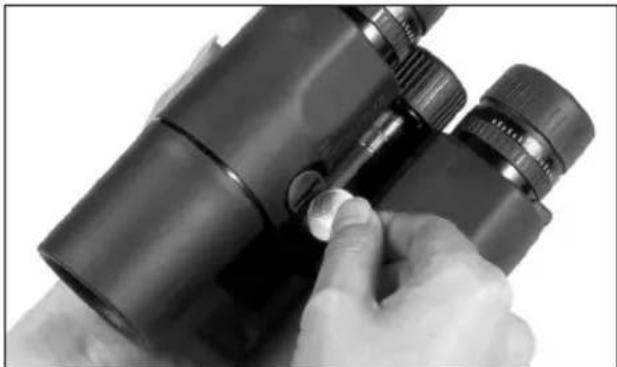
INSERTING AND CHANGING THE BATTERY
The Leica Geovid R binoculars are powered by a 3 Volt lithium round cell (e.g. Duracell DL CR2, Ucar CR2, Varta CR2 or other CR2 types).
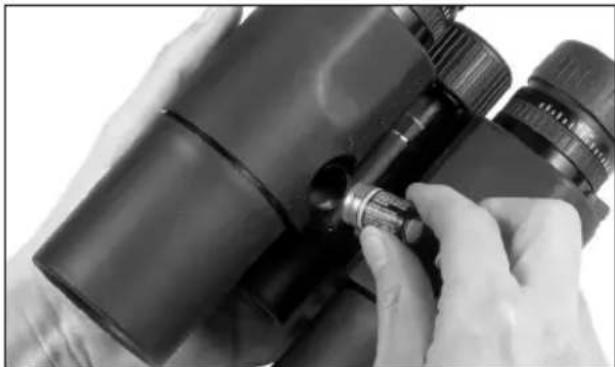
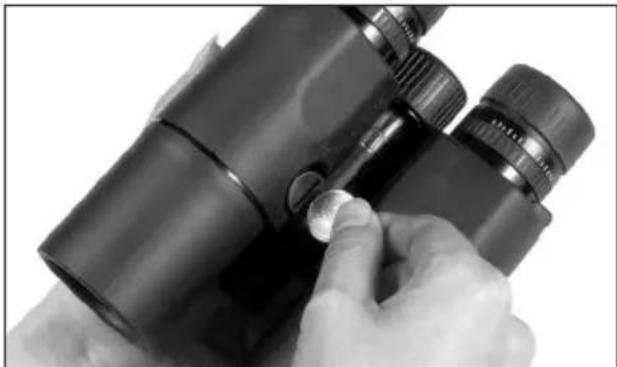
- Open the cover (10) over the battery compartment (9) by turning it anticlockwise, e.g. with a coin.
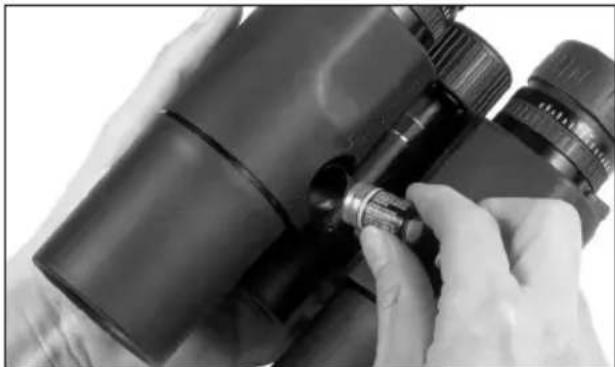
- Insert the battery so that the positive contact goes in first (as shown by the markings in the battery compartment).
- Close the cover again by turning it clockwise.
Notes:
- Batteries should be stored in a cool dry place.
- If the binoculars are not going to be used for a long time, the battery should be removed.
Caution:
- Batteries should never be put in a fire, heated, recharged, taken to pieces or broken apart.
- Used batteries may not be disposed of as normal, household waste as they contain toxic materials that are harmful to the environment. To ensure that they are properly recycled, they should be returned to the dealer or disposed of as special waste (at a collection point).
BATTERY CHARGE LEVEL
A new battery lasts for around 2000 measurements at 20^ . Depending on the conditions of use, the battery life can be significantly shorter or longer than this. Low temperatures and frequent use of scan mode shorten the battery life. A used battery is indicated by a flashing measured value and reticule display. When flashing starts, around another 50 measurements are possible, but with a continuously reduced range.
Caution:
Cold conditions impair the battery performance. Therefore, at low temperatures the LEICA Geovid R should be kept as close to the body as possible and a new battery should be used.
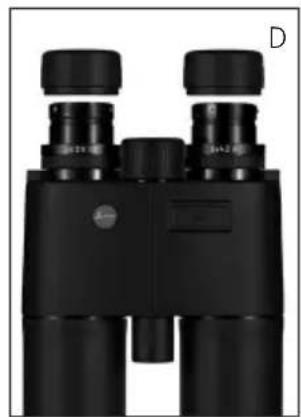
ADJUSTING THE EYEPIPCE CUPS / USING WITH AND WITHOUT GLASSES
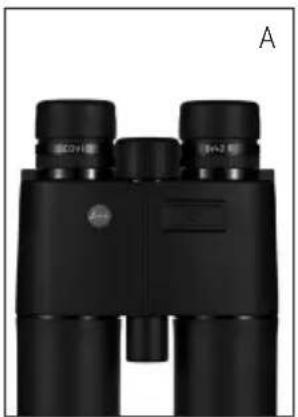
The eyepiece cups (1) can easily be adjusted by turning them and they lock securely in the selected positions. They can be removed completely for thorough cleaning.
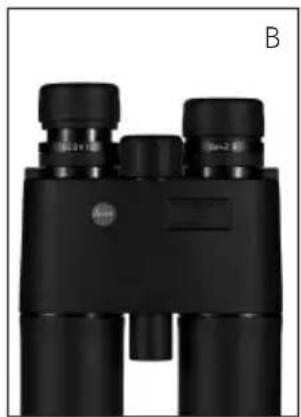
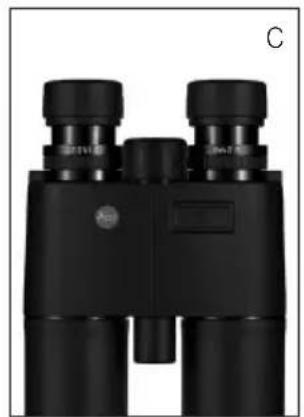
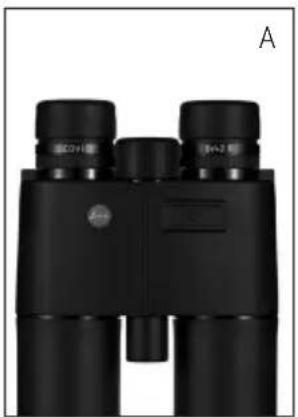
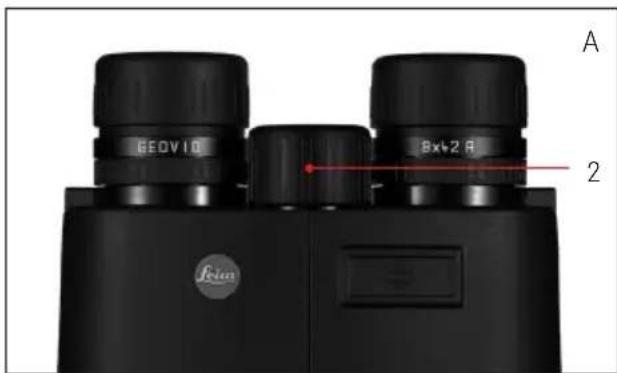
For viewing with glasses (Figure A), they remain in the fully screwed in position. For viewing without glasses, they are extended by turning them anticlockwise.
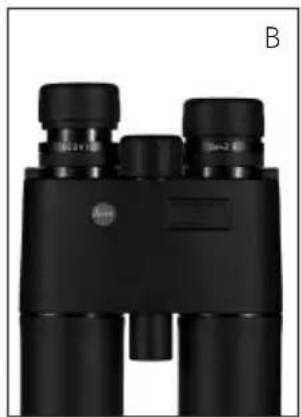
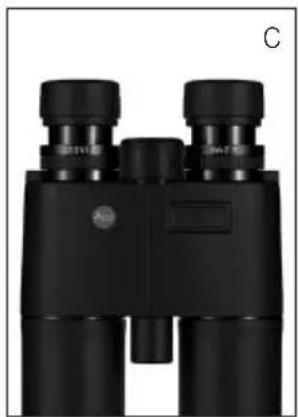
Two positions are available for optimum adjustment (Figures B, C).
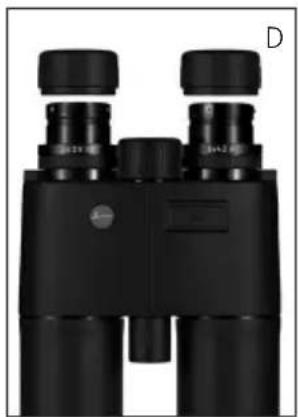
If the eyepieces are heavily soiled, we recommend removing the cups for cleaning (Figure D).
They are removed by gently pulling them in the fully extended position.
Bending the binoculars about the hinged axis (8) individually adjusts the eye spacing. The right and left field of vision should merge into a circular image.
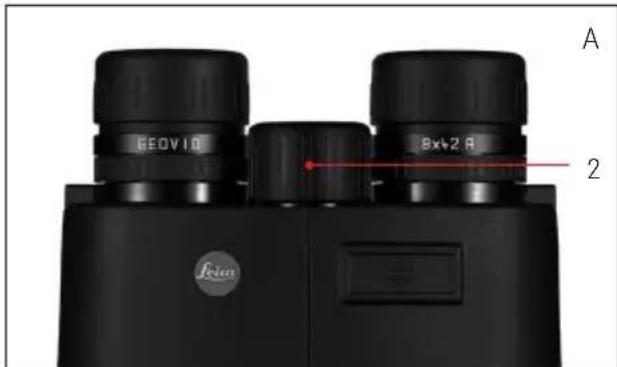
SETTING THE FOCUS / DIOPTER COMPENSATION
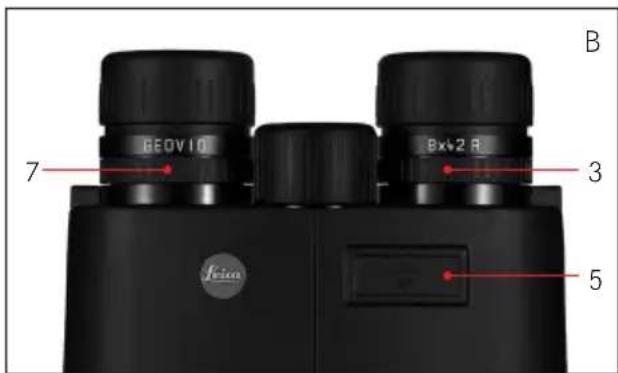
On the Leica Geovid R binoculars, the focus is set for objects different distances away using the central focusing dial (2). The two diopter compensation dials (3/7) are used to compensate for individual eyesight problems when viewing without glasses and to focus the reticule. Carefully run through the steps described below. Only then can you utilize the full capabilities of the optical system.
- Turn the two diopter compensation dials to their zero positions.
- When viewing with both eyes, adjust them to a distant object using the central focusing dial.
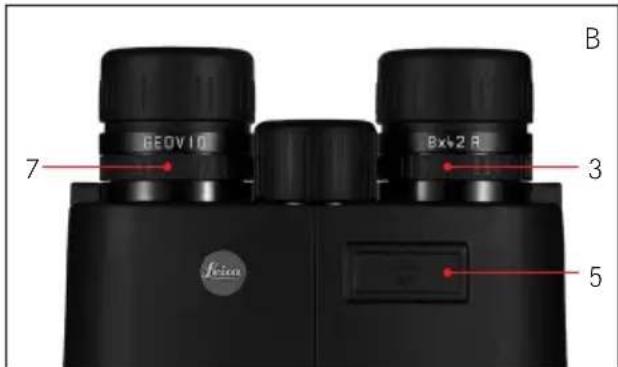
- Press the release button (5) to activate the reticule.
- When the reticule appears, while continuing to view with both eyes, adjust the right diopter compensation dial (red index) so that the reticule can be seen in focus in the right optical system.
- Then, with the reticule still activated but only viewing with the right eye, use the central focusing dial to adjust the image in the right barrel until it is exactly in focus.
- Finally, set the image in the left barrel to an optimum focus with the left diopter dial (3). The set values can be read using the "+" or "-" values on the diopter scales (3a/7a).
Note:
When looking through just the left or right side, the other eye should be squeezed shut or you can simply hold the corresponding half of the binoculars on the lens at the front.
DISTANCE METERING
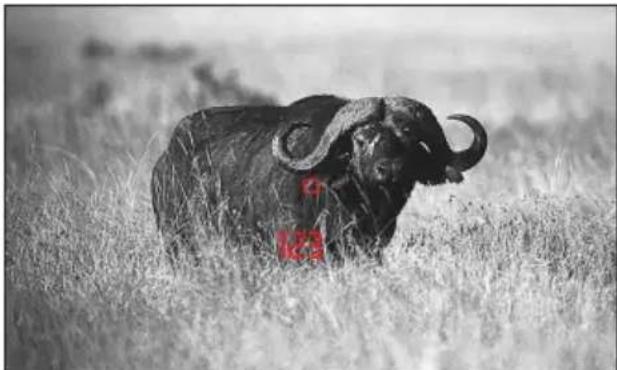
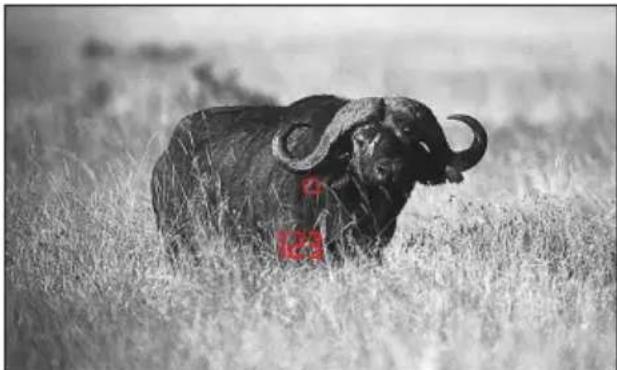
To measure the distance to an object, you must aim directly at it. To do this, activate the reticule by pressing the release button (5) once. When you release the button, the reticule remains lit for around another 4s. With the button held down, the reticule remains lit continuously. While it is lit, aim at the object and press the release button to repeat the distance measurement, and the measured value is then displayed. The reticule disappears briefly during the measurement.
Pressing the release button again allows a new measurement to be started at any time, provided the reticule is still lit.
If the distance to the object is less than 10 meters, the measuring range is exceeded or the object is not sufficiently reflective, "---" appears in the display.
When the display disappears, the distance meter is automatically deactivated.
Notes:
Depending on the set eye spacing, the displays may be slightly skewed.
- The Leica Geovid R binoculars are available in different versions for displaying the distance in meters or yards. The different versions can be identified externally by the specifications on the cover of the central focusing dial.
EQUIVALENT HORIZONTAL RANGE (EH)
Shots at targets at a higher or lower position are subject to changed ballistic conditions. Therefore, they require knowledge of the equivalent horizontal range, which is relevant for hunting.
For example, knowing the EH is important when using ballistic reticles.
The Leica Geovid R calculates this EH from the linear range measured, a correction factor, and from the measured angle.
For individual measurements, the Leica Geovid R will always show you the direct linear distance to the target first. After around 2s, the display changes to the equivalent horizontal range.
Note:
- EH values are only specified between 10m and 1100m for safety reasons. The actual measured linear range is also specified.
- The EH-F function cannot be disabled.
Important:
- Please note that particularly at long ranges, the influence of all relevant ballistic influencing factors is greatly increased and considerable variations can occur. The ballistic values displayed should therefore only be viewed as a guideline.
- Regardless of whether this information is used, you are responsible for assessing the relevant hunting situation.
SCAN MODE
The Leica Geovid R binoculars can be used to measure continuously. Holding down the release button (5) the 2nd time it is pressed switches the device to scan mode after around 0.5s and it then performs continuous measurements. This can be seen by a change in the display: Around every 1.5s a new measured value is shown. Scan mode is particularly practical for measuring small targets.
Notes:
- Because of the continuous measurements, power consumption is greater in scan mode than for single measurements.
After 10s, scan mode is automatically deactivated to conserve the battery if the button has been pressed unintentionally. - In scan mode, the EH+ value is only displayed for the last measurement.
MEASUREMENT RANGE AND ACCURACY
The measuring accuracy of the Leica Geovid R binoculars is up to ± 1 meter/yard. The maximum range is achieved with well reflecting target objects and a visual range of 10km . The measuring range is influenced by the following factors:
| Range Longer Shorter | ||
| Color of object | White Black | |
| Angle to object | Perpendicular | Acute |
| Object size | Large Small | |
| General brightness | Low (cloudy) High (miday sun) | |
| Atmospheric conditions | Clear Hazy | |
| Object structure | Homogeneous (wall of building) | Inhomogeneous (bush, tree) |
In sunlight and with good vision, the following ranges and accuracies can be achieved:
| Range | 10m to approx. 1100m/1200yds |
| Accuracy | ±1m up to 350m ±2m up to 700m ±0.5% over 700m |
MAINTENANCE / CLEANING
Your Leica Geovid R binoculars do not require any special care. Coarse dirt particles, such as sand, should be removed with a fine hair brush or blown away. Fingerprints etc. on the lenses or eyepieces can be wiped off with a soft, clean leather or dust-free cloth. For excessive soiling, e.g. to the rotating eyepiece sleeves, the binoculars can be cleaned simply be rinsing them under running water. Saltwater can be rinsed off in the same way.
Caution:
Do not exert excessive pressure, even when wiping very dirty lens surfaces. Although the coating is highly abrasion resistant, it can be damaged by sand or salt crystals. All Leica Geovid R binoculars have their "personal" serial number in addition to the type designation. Note this number in your documentation for security.
ACCESSORIES
Order No.
Tripod adapter with 1 / 4^ thread. 42 220
Swimming carrying strap, orange. 42 163
SPARE PARTS
If you should require any spare parts for your binoculars, e.g. eyepiece cups, covers or a carrying strap, please contact our Customer Service department or the Leica office in your country (see warranty card for addresses).
TROUBLESHOOTING
| Problem Cause Remedy | ||
| The image is not circular when viewing. | a) The binoculars are not properly adjusted to your personal eye spacing. | a) Correct the spacing of the two barrels of the binoculars simply by bending the binoculars about the hinged axis to a greater or lesser extent. |
| b) The viewer's pupil is not located in the binoculars' exit pupil. | b) Correct the position of the head, the eyes or the binoculars. | |
| c) The position of the rotating eyepiece sleeves does not match that for correct use with and without glasses. | c) Correct the adjustment: If wearing glasses, screw in the eyepiece sleeves; if viewing without glasses: Extend the eyepiece sleeves. | |
| Display not focused Diopter compensation not exact Repeat diopter compensation | ||
| When measuring the range, the display shows "- - - " | a) Above or below measuring range Refer to measuring range specifications | |
| b) The object is not sufficiently reflective | ||
| Display flashes or no measurement is possible | Battery dead Replace the battery | |
TECHNICAL DATA
LEICA GEOVID 8x42 R LEICA GEOVID 10x42 R
| Magnification | 8x | |
| Lens diameter | 42mm | |
| Exit pupil | 5.25mm | |
| Twilight number | 18.33 | |
| Geometric luminous intensity | 27.56 | 17.64 |
| Field of vision ((at 1000m/yards) 125m | /7.1° 110m/6.3° (wide angle) | |
| Close up limit (at 0 diopter) Approx. 5.6m | Approx. 5.6m | |
| Exit pupil longitudinal distance | 18.5mm | 15.6mm |
| Pupil distance | 56-74mm | |
| Prism type | Ridge | |
| Coating on lenses on prisms Phase correction coating P40 | High Durable Coating (HDCTM) and hydrophobic Aqua-Dura coating on external lenses coating P40 | |
| Diopter compensation Approx. ±3,5 diopter | ||
| Suitable for use when wearing glasses | Yes | |
| Operating temperature -25 °to +55 °C | ||
| Storage temperature | -40 °C to +85 °C | |
| Water tightness | 0.5 bar (approx. 5m water depth) | |
| Housing material | Die cast aluminum | |
| Maximum range | Approx. 1100m | |
| Minimum range | 10m | |
| Measuring accuracy | ±1m up to 350m ±2m up to 700m ±0.5% over 700m | |
| Ballistic function | Display of equivalent horizontal range (E+) from 10m/y to 1100m/1200y | |
| Display | 4 digit LED | |
| Battery | 1 3V lithium round cell, type CR2 | |
| Battery life1 | ≥ 2000 measurements | |
| Laser | Safe for eyes, in compliance with EN and FDA Class 1 | |
| Laser beam divergence | 2.5 x 0.5mrad | |
| Maximum measurement duration | Approx. 1.4s | |
| Dimensions (W2 x H3 x D2) | Approx. 124 x174 x 65mm | |
| Weight (with battery) | Approx. 900g | |
At 20^ and with average usage profile 2 At eye spacing 65mm 3 With eyepiece cups screwed in
4.2mm
TECHNICAL DATA
LEICA GEOVID 8x56 R LEICA GEOVID 15x56 R
| Magnification | 8x | |
| Lens diameter | 56mm | |
| Exit pupil | 7mm | |
| Twilight number | 21.17 | |
| Geometric luminous intensity | 49 | 13.94 |
| Field of vision ((at 1000m/yards) | 118m/6,8° | 72m/4.1° |
| Close up limit (at 0 diopter) Approx. 5.5m Approx. 5.5m | ||
| Exit pupil longitudinal distance | 18.5mm | 15.6mm |
| Pupil distance | 58-74mm | |
| Prism type | Ridge | |
| Coating on lenses on prisms Phase correction coating P40 | High Durable Coating (HDCTM) and hydrophobic Aqua-Dura coating on external lenses | |
| Diopter compensation Approx. ±3,5 diopter | ||
| Suitable for use when wearing glasses | Yes | |
| Operating temperature | -25 °C to +55 °C | |
| Storage temperature | -40 °C to +85 °C | |
| Water tightness | 0.5 bar (approx. 5m water depth) | |
| Housing material | Die cast aluminum | |
| Maximum range | Approx. 1100m | |
| Minimum range | 10m | |
| Measuring accuracy | ±1m up to 350m±2m up to 700m±0.5% over 700m | |
| Ballistic function | Display of equivalent horizontal range (H+) from 10m/y to 1100m/1200y | |
| Display | 4 digit LED | |
| Battery | 1 3V lithium round cell, type CR2 | |
| Battery life1 | ≥ 2000 measurements | |
| Laser | Safe for eyes, in compliance with EN and FDA Class 1 | |
| Laser beam divergence | 2.5 x 0.5mrad | |
| Maximum measurement duration | Approx. 1.4s | |
| Dimensions (W2 x H3 x D2) | Approx. 135 x174 x 68mm | Approx. 135 x 208 x 68mm |
| Weight (with battery) | Approx. 1100g | Approx. 1245g |
1 At 20^ and with average usage profile2 At eye spacing 65mm^3 With eyepiece cups screwed in
LEICA PRODUCT SUPPORT
The Leica information service can provide you with an answer to any technical application questions relating to the Leica range either in writing, on the telephone or by e-mail.
Leica Camera AG
Product Support / Software Support
Am Leitz-Park 5
D-35578 Wetzlar
Tel.: +49(0)6441-2080-111 /-108
Fax: +49(0)6441-2080-490
info@leica-camera.com /
software-support@leica-camera.com
LEICA CUSTOMER CARE
For servicing your Leica equipment or in the event of damage, the Leica Camera AG Customer Care department or the repair service provided by authorized Leica agents in your country are available (see the warranty card for a list of addresses).
Leica Camera AG
Customer Care
Am Leitz-Park 5
D-35578 Wetzlar
Tel.: +49(0)6441-2080-189
Fax: +49(0)6441-2080-339
customer.care@leica-camera.com
Chere cliente, cher client,
Leica Product Support. 48
Leica Customer Care 48
Product Support / Software Support
Am Leitz-Park 5
D-35578 Wetzlar
TEL.: +49(0)6441-2080-111/-108
Fax: +49(0)6441-2080-490
info@leica-camera.com /
software-support@leica-camera.com
LEICA CUSTOMER CARE
Leica Product Support. 64
Leica Customer Care 64
Product Support / Software Support
Am Leitz-Park 5
D-35578 Wetzlar
Tel.: +49(0)6441-2080-111 /-108
Fax: +49(0)6441-2080-490
info@leica-camera.com /
software-support@leica-camera.com
LEICA CUSTOMER CARE
Leica Product Support. 80
Leica Customer Care 80
Product Support / Software Support
Am Leitz-Park 5
D-35578 Wetzlar
Tel.: +49(0)6441-2080-111 /-108
Fax: +49(0)6441-2080-490
info@leica-camera.com /
software-support@leica-camera.com
LEICA CUSTOMER CARE
Product Support / Software Support
Am Leitz-Park 5
D-35578 Wetzlar
Tel.: +49(0)6441-2080-111 /-108
Fax: +49(0)6441-2080-490
info@leica-camera.com /
software-support@leica-camera.com
LEICA CUSTOMER CARE
Leica Product Support. 112
Leica Customer Care 112
Product Support / Software Support
Am Leitz-Park 5
D-35578 Wetzlar
Tel.: +49(0)6441-2080-111 /-108
Fax: +49(0)6441-2080-490
info@leica-camera.com /
software-support@leica-camera.com
LEICA CUSTOMER CARE
Toproba Mapka Leica raIaTcBcemnpho
H3BeCTbIM 6pHDOM BbICOaHKeO KaueCTBa,
PPOdyKUIN KOTOPOrO UeHITc3a MEXAHueCKyIO
TOuHOCTb, NCKJIIOHTeJIbHyIO HaJeKHOCTb I
60JIbwoCpOK cnyk6bl.
Mbl JeIaEM Bam NOLyuHTb MHOrO yIOBOJIbCTBnI IO6ntbcx XopoUHX pe3yIbTaTob C BaIIM HOBbIM 6HOKnEM Leica Geovid R.ДЯ TOrO yTO6bl BbI MOrII npabNtBHO C Hm pa6oTaTb, Mbl peKOMeHN dyem Bam ChauHa npouHTaTb DaHHyIO INHCTpyK- UIO.
KOMNJIEKT NOCTABKN
BnHOKJIb
-1 nTneBbI Kpyrbln 3nEmeHT nTaHn 3 B, Tn CR2
- PemehbДЯперehockn
-Футлар
- 3aunTHa KpbuKoKypa
-23aunTHbIe KpbIuKn ObeKeTINBa
-「IapaHTnHbIJIINCT
OJABJIENHE
HaMeHOBaHne deTanei 113
PpeinocnoBne. 113
KoMnJIeKT nocTaBKn. 113
YTNIN3aunn 3neKtpnuecknx n 3neKtpnoHHbix ycTpoNCTB....115
Bo3MOxHocTH npumHeHHa 115
KpeHJIeHne peMHra IJIa IpeHocKn H 3aUHTHOI KpbIuKN OkyIpa. 115
POncoeHHeHHe 3aunTHbIX KpbIueK oBeKeTbBa.....115
YcTaHOBKa n 3aMeHa 6aTapeu. 116
YpOBeH 3apJa 6aTapei. 117
Perynipobka okyipob/ nCnoB3OBAHnE C Ouykamn 6e3 Hx. 118
Perynpobka pacctoHm Mxdy rna3amn 118
Perynipobka pe3kocn/
perynipobka nnoptni 119
I3mepenhepacctoHn1 120
3KbBaIeHTHoe roPn3oHTaIbHoe paCCToHne (EHr)..121
Pekim cKaHnpoBaHn 122
ToHocTbN daJIbHOCTb N3MepeHnra 122
YxOJ/OuNcTka. 124
BcnoMOraTeIbHoe o6OpyIOBaHne 124
3anachbte deann 124
UTo delaTb,ecn1. 125
Texnueckx xapaKtepcntkn 126
Leica Product Support. 128
Leica Customer Care 128
IpeynpexdHHe: He cmotpnte ueep3 BaW Leica Geovid R, kak n ueep3 IIO6oI pyro8 6nHOKlb, Ha npKne nCTOuHNKn CBeta, UTO6bl He npuHHtB Bpei rna3am.
YTHIN3AUHNAJ 3JEKTPNUECKNXI 3JEKTPOHHbIX YCTPOICTB
(PacnpoctpaHareTcHa cTpaHbI Ebponeckoro Co1o3a, a TaKHe Ha npyRne ebPoneiCKne rOcyapCTBa, B KOTOpbIX nCnOlb3yeTcPa3dEJIbHaN CnCTema c6opa OTxoIDOB)
B KOHCTpykUIN DaHHoro yCtpoNCTBa coJepKATcA əJIeKTpUueckne N/UNI NəJIeKTpOHhIe DeTAlN I NOaTOMy OHO He MOKeT 6bITb yTIN3nPOBaHO BMeCTe C 0bUHbIMN 6bITOBbIMN OTXoJaM!
BmecTo 3TOrO B ueJx BTOpHOro IcNoIb3OBaHn DaHHO yCTpoNCTBa, eRo Heo6xoDIMO OTHeCTu B OOnH n3 CneuaJIIN3npOBaHHbIX NyHKTOB npHema, KOtOpBle OprAHn30BbIBaIOTCr OprAHAM MeCTHO camOynpabVeHn. DaHnA IpOeUpya ABnEeTCs 6ecnlaTHOH. EcIn yCTPONCTBO IMeET CMeHHbIe 6aTapei NHTAHn IINn AKKymJaTOpbl, To INX Heo6xoDIMO n3BLeCb n, ecIn B 3TOM eCTb Heo6xoDIMOCTb, yTuIN3npOBaTB COIaCHO HnCTpyKznnM (CM. INHΦopMaunIO B INHCTpyKznn K ycSTpoNCTBy). Boone IOndpo6HyIO INHΦopMaunIO Bbl MoKeTe IOnyUHTB BAWeM KOMMyHaJIbHOM UnpaBLeHn, ppeInpraTtn No c6opy n yTuIN3a- znn OTxODOB nII B MaRa3nHe, B KOTOpOM Bbl npNo6peN daHHoe yCTpoNCTBO.
BO3MOXHOCTI PIPMEHEHNA
BHHOKnLeica Geovid R ImeOT KpeKnAnHmHHeBbI Kopnyc, 6laTogapra KOtOpomyCTaHOBNTc BO3MOxHOn 3KcNpyataun DaJpe npINIOHX yCNOBnX. He cIeNyET o6paatbBHIMAHn DaJKe Ha cbipyIO nOry - 3TN 6HHOKnPpN OngpyKeHN B Body Ha rIy6nHy Do 5 MocTAIoTc a6COJIOTHO RepMeTHNbIMn, a paCNoLO-JKeHHa BHTPN ONTnKa He 3anoteBaet 6laTogapraa3OTHomY HApONHeHIO.
KPEJIENHE PEMHJIJIPEEHOCKNI 3AUHTHOJKbIKOKyJIPA
EcnBbIXOTnTe 3aKpeNITb 3aIHTHyIO KpbIshKy OKyIpaHa pemHe IJIa NpeHocKn, Bam HyxHO npOeTb nOcJIeHN B IpoyuHNy 3aIHTHOJ KpbIshKn OKyIpa Do TOro KaK 3aKpeNITb peMeHb IJIa NpeHocKn C JEBOCTOPOHb 6INOKJI.
KPEIJIENHE 3AUHTbIX KPbIWEK O5bEKTHBA
Iy yctaHOBKn 06eNx 3aunTHbIX KpbIweK
ObeKTNa Heo6xOIMHO HATryHytpe3nHOBbie
Kolba Ka KpbIweK Ha Tpy6kn 6HHOKJr CO CTOpOHbl
ObeKTBa TaKIM O6pa3OM, UTo6bl KpbIwKn
3aKpbIINCb.
YCTAHOBKA H 3AMEHA BATAPEH
B KaueCTBe NcToUHnKa 3JIeKTPoNTaHnI dIg
6bHokLei Leica Geovid R cIyKHT OINH IITHeBbIK KpyIbI 3JIeMeHT PHTaHnI HAnpJKeHnEM 3 BoIbT (HaNPmEp, Duracell DL CR2, Ucar CR2, Varta CR2 nII npYrme MapKn TnPa CR2).
- OTKpOte KpbIuKy (10) OTCeKa dIa 6aTapeN (9), NOBepHyB ee, HApPmEp, C NOMoUbMOHeTbI, POTINB YacOBON CTpeJIKN.
- BCTaBbTe 6aTapeIO noIoxHteJIbHbIM KOHTaKTOM BnpeEi (Kak noka3aHO Ha pncyHke BOTcKe IJRA 6aTapeN).
- 3aKpoTe KpbIuKy, NOBepHyB ee no yacobOn CTpeJIke.
Yka3aHnHa:
- BaTapeu cIeNyET xpaHHTb B npoxnaHOM n cyXOM MeCTe.
- Ecn6HOKnb DOJrOe BpeMn He nCnOJb3yETc, Heo6xoJIMO n3BJeCb 6aTapeo.
BHHMaHHe!
- Batape 3aIpeaaetc6pocatbB orohb, HarpBaTb, 3apKaTb, pa3bnpaTb nn pa3nBaTb.
- Otpa6oTaHHbIe 6atapen 3anpeuaeTcBbl6paCbIBaTB C obbyHbIMn IOMaHmNOTXODAMN, NOCKOJIbKy OHI COePjAt RaOBHTbIE IN BpeHNbIe IIN OKpyKaIOUeN CpeDbI BeueCTBa.IIrTO rTO6bl IOBeprHytB 6atapENBTOpNUHOI nepepa60TKe, Hx Heo6xOdmoCdaBaTB B TOPOBbIX ToQkAX IIN Bbl6paCbIBaTBBMecTe CO CneOToXoJam (nyHKT npHeMa).
CTENHe 3APRA DA BATAPEN
HOB6batapexBaHTIyBbIOJIHeHH60Jee
cem 2000 n3MepeHn npn 20^ B 3aBncmocTn OT yCNOBn IprimeHEnra cPOK
cLy6b6batapeN MoKet 6bITb 3HaHTeJIbHO
kopoe nn DoJIbSe. Ha cokpaueHne cPoka
cLy6b6batapeN BnIeT Hn3KaY TempepaTypa N
caCTOE nCNoJIb3OBAHne pexIMa CkaHnpOBAHn.
MraUoHn INDnKATOp n3MepeHHo BeINuHbI N
Bn3InpHO MapKn CoO6uaet O Tom, YTO batape
n3pacXoDobana cBoi pecypc. Pocne nepBoro
MIRaHn MOxHO BbIOJNHtB eIe OKOLO 50
n3MepeHn, PpaBda, CO CTpeMHTeJIbHO yMeHbJa- IOseCn DaJIbHOCTbIO DeICTBn.
BHHMaHne!
OToxoIoJa yMeHbwaetcMoUHocTb 6aTapeN.
IoAToMBy BO BpeM NcNoIb3OBaHnI npn Hn3KoI
Tempepatye Heo6xOIMo Hocntb Leica Geovid R
KaK MoXHo 6JInxKe K TeNy n UCTaHOBnTb HOByIO
6aTapeIO.
PEYJINPOBKA OKYJIAPOB/HCNOJIb3OBAHNE C OUYKAMN I 6E3 HNX
OkynpaI (1) nerko perynnyiOTcnyTeM
BpaueHn HaedxHo qNKcnpyOTc B BbIbpaHOM IIOXeHH. YTo6bl BbINOHHTb TtateJIbHyOuNCTKy, IN MOXHO NlHOCTbIO CHrTb.
Дяо6o3peHnB OuyKaX (pncyHOK A) OHI
OCTaIOTcB NIOJIHOCTbIO BKpyeHHOM NIOJIOKeHIN.
IЯобозренибe3 OUCOB OHN BbIKpyuHBAOTcI pyTeM BpaueHnnpOTnB acobOv CTpeKN.
IЯ OITIMaJIbHOJ aIaNTaUH NIOCTyNbI DBa INoIoxeHn (pncyHKn B, C).
Ecni OkjIpaBcNlBHO 3aqr3HeHb, peKOMeHnyetCra ChrTb INI IIOcJeDyUoSeI OuNCTKN (pncyHOK D).YTo6bl 3TO cDeIaTb, Heo6xoJIMo npINOJIHOCTbIO BblkpyeHHOM NIOJOxEHNI OKjIpaOB CJIeRka NotraHyTb INX.
PEYJINPOBKA PACCTOHHM MEXDy TIA3AMN
Ipytem crn6aHnna 6nHOKn no shapnnpno8 (8) yCTaHaBnBaetc HnDnBnuAylbHoe pacctoHne meKdy Ila3am. PpaBni nLeBbN ceKTop o63opa npn 3TOM DOJXHbI CInTBcR B eINHOe OKpyrNoe n3O6paxKeHne.
PEYINPOBKA PE3KOCTN/ PEYINPOBKA INOTPPN
PerynnpobKa pe3KocTn Ha pa3JIuHbIe ydaJIeHHbIe o6bekTbI nOCTnraetcHa 6nHOKJx Leica Geovid RC NOMOuBIO ueHTpaNBHO KOJIbua φOKycnpoBKn
(2).ДляКOMпeнcaиИнDNBnDyalbHOn ametponnnIЯобозрен6e3OчOBиДЯ ФokycnpoBaHn Bn3npHOn МаркСужКТДВa KOBlapergynpOBKnДиОntprn(3/7).
BHHMaTeIbHO BbIOnHnTe OINcaHHbIe HIXe IeNCTBn. TOnbKO NocLe 3TOrO Bbl CMOKeTe IcNoJIb30BaT BcO MOUHOCTb ONTNK.
- Поворачивая оба Кolybaа рergyнровки Дноотри, установпг ex B hyneBoe поожене.
- C nOMOuBIO ueHTpaIbHOrO KOJIbua φokycn-POBKN, CMOTpy OBOUMN rIa3amN, CφOKyCNpyTECb Ha ydaJIeHHOM obEkTe.
- C nOMOJIbIO cnyCKOBoi KHOJKN (5) aKTINBn-pyIte Tenepb Bn3npHyIO Mapky.
4.Послп поьени Bn3nHOn Марки,Встakxe CMOTpr O6OUMI rIa3amN,OTpeYnnpyTe npaboe KOLbU OpeYnnpOBKn DIOENTPN (KpaCHbI yKa3aTeNb) TAKIM O6pa3OM,чTo6bl B npaBOM O6BeKTIBe Bbl MOrJI YeTko BnDetB Bn3nHyO MapKy. - 3aTeM OTperpynnpyIe C NOMOuBIO ueHtpaJIb-HOro KOJIbua FOKycnpoBKn pe3KoCTb H3O6paKeHH B IpaBOI Tpy6Ke Iprn BKIOueHHo BN3nHPOH MapKe, HO CMOTpA TeNepb TOJbKO IpaBBIM rna3OM.
- B 3akIIOueHHe OTperyIpyTe ONTImaJIbHyIO pe3KocTb N3O6paXeHnB IeBOI Tpy6Ke C NOMOuBIO JeBOrO KOJbCa DnONTPn (3).
YCTaHOBHeHHbI BeHnHbI BbMOXeTe npOCMOTpeTB ^ + " IIN,--"3HaueHnX kKabI dNoNTpN (3a/7a).
Yka3aHHe:
Pnp npocmOtpe uepe3 neBbI nnn npabBnOBbeKTHB Heo6xOAnMo npuUpyntb dpyroIra3Hnn npocTo ydepXNBaTb COOTBETCTBYUOIOJNOBHy 6HOKJIpeep ObekTNBOM.
N3MEPEHNE PACCTOHHN
UTo6bI n3Mepntb paCCTOAHne do o6bekTa,ero HuyKHO TOUHO 3aBn3HPOBaTb. DnA eTOrO cJeDyET aKTHBnPBOaTB Bn3HpyHO MapKy, HaxaB CnyCKOBYIO KhoNky (5) OdnH pa3. NocIe OTnyckAHNA KhoNk BN3HpaH MaPKa 6yDet npoJHXaTB CBETNbCRe Eue B TeueHne 4c. Ecnn HaxaTB u YdepXHBaTB KhoNky, To BN3HpaH MaPKa 6yDet CBETNbCRe HepepbIBHO. Poka OHa CBETTCs, ObBeKT 6yDet 3aBn3HPOBaH, a npn NOBtOPHom HaxaTHN CnyCKOB0n KHONKn 6yDet BblNOJIHeHO n3MepeHne paCCTOAHN I NOKa3aHO n3MepeHHoe 3NaueHne.
BoBpMaH3MepeHnBn3npHaMapKa6bICTpo rachET. Pn noBtOpHm HaxkATn CnyCKOBo KHONKBCERda MOXHO BblNOJHHTb HOBOe H3MepeHne, noka Bn3npHa MapKa eue CBETNTc. EcnnpacCTOaHnE do oBekTa coCTaBnEe MeHee 10 MeTPOB, nHn ecnn npeBbIWeHa daNbHOCTb H3MepeHn HnOBeKT HeoCTaTOUHO OTPaKaETC, To NOrBnTCr Hndkaun, --".PocNe TOro KaHnDnKaun NorachET, daNbHomep 6ydet ABTomatNueeCKn BbIKIOUeH.
Yka3aHnHa:
B3aBnCmOCTNOTyCTaHOBHeHHOro pacCTOHHMEXKnyIpa3Amu,INHnKaunMOxHO TaKKe IPOCMATPBtB NOI He6bHUM YrLOM.
- Imeotcpa3nHbIe Bepcn 6nHokLei Leica Geovid R: c nHnkaunen pacctoHnB MeTpax nn npax. BheWhe pa3nHbIe Bepcn npacno3HaOTcNo daHHbIM, yKa3aHHbIM Ha KpbIwke CEHTpaIbHO KOJIbua QOKycuPobKn.
3KBBBAJIENTHOE TOPN3OHTAJIbHOE PACCTOJHNE (EH-)
BbIcTpEnbI no pacnoJIOKeHHbIM BblIe nHn HnKe
CenlAM C8a3Ahbl C n3MeHeHHbIMn 6aJIInCTUeCKnM yCIOBnMI. IOnTOMy OHI Tpe6yOT 3HaHnA
3KbVBaJIeHTHO rOpN3OHTaJIbHO rPacCToHnR (Equivalent Horizontal Range), mHeIoUero
3NaueHne dIra OxOtbl. 3HaHne EHR BaXHo,
HaNPmEp, npn NcNoJIb3OBaHnn 6aJIInCTUeCKo
HaBOdKn.
3To 3NaueHneEH-6nHoKbLeica Geovid R paccuHTbIaet n3 JInHeNHO n3MepeHHoro pacctOHa, nonpaBOUHO r KOaΦnCHeHTa, a TAKKe n3 N3MepeHHoro yrna.
Pn BbIOnHeHn eHNuHbIX n3MepeHn 6nHOKnb Leica Geovid R 6ydet BCerda cHaayana noka3bBaTb IInHeHoe, npAme pacCToHne do uei. Ypeez npIM.2 C INNkauaun H3MeHHTc Ha 3KBuBaeHTHOe rOpN3OHTaJIbHOe pacCToHne.
Yka3aHne:
- I3 coo6paXeHn 6e30nacHocTn 3naueHnEHH yka3bBAOTc TOnbKO B npedeJax Dnana3OHa 10 -1100M. Kpome TOrO, yka3bBaETc 7aKTnueCKN n3MepeHHoe, JInHeHoe pacCTOHNHe.
- DyHKnEH-He BbIKJIOuaeTcra.
BaxhO:
- ПOMHHTe O TOM,ЧTO KaK pa3 пр 60JIbIUX paccToHnIX BnIaHnE BCEx 6aJIInCTnueCKNX φakTOpOB BnIaHnI 3HaunTeIbHO yBeIuNByAEtCn I MOrY BO3HnKHyTb CyIecTBeHHbIe OTKNoHeHnI. NOrTomy NOKa3bIbAemble 6aJIInCTnueckne npapamTpbl HAcToTcIbHo peKOMeHnyETc IcNoIb3OBaTb B KaueCTBE BCnOMoTaTeIbHbIX cpeIcTB!
He3aBnCmO OT NcIb3OBaHnE 3ToHnHOpMaAuN 3a OueHky COOTBeTCTByIOUe HcTyauN HaOXOTE HeCETe OTBETCTBeHHOCt bMeHHo Bbl!
PEKIM CKAHPOBAHNA
C nOmoUbIO 6HnOKJIe Leica Geovid R BbInOnHЯTb
H3MepEnHe BO3MOxHO TaKKe B HeNpepbIBHom
peKIme pa6oTb. Ecnn CnycKOBa KHOJa (5) npi
BTOpOM Haxatm N ydepXKBaETcB HaxaTOM
NoJoxEHn, TO No NCTeueHN pIpm. 0,5 c npI6op
peKJIouHTcB peXIM cKaHnpOBaHn I 6yJeT
HeNpepbIBHO BbINONHb H3MepENHa. 3TO BnIDHO
NO MeHAnOSeIcN HnDKaUH. IIO NCTeueHN
PpIM. 1,5 C 6yJeT NOKa3aHO HOBOe H3MepenHoe
3NaueHne.
Pekim ckaHnpobAHnOc06eHHo ydo6en npn H3MepeHn Ha He6oJbuxx 6bEkTx.
Yka3aHnHa:
BpeKIme cKaHnpOBaHnI np BbINOpHeHn HnpepbIBhbx N3MepeHn IOTpe6JeHne ToKa 6oJbWe, yem npBbINOpHeHn eDHHuHbIX N3MepeHn.
- ПОИСTeueHn10cpeKIMCKaHIpOBAHn6yIeT aBToMaTnueckn BbIKNoUeH,HTo6bl HepacxOIOBaTb3apJd 6aTapeN n3-3a HeymblNeH-Horo HaxaTHN KHOtOK.
BpeKIMe cKaHnpOBaHn 3NaueHneEH-6yJeT nOKa3aHO TOnbKO C NocJIeHNm I3MepeHHeM, Ho He paNbIe.
TOUHOCTb IДАЛьHOCTb I3MEPEHINr
ToHOCb H3MepenH6HOKLei Leica Geovid R COCTaBnAeTdo ± 1 MeTpA/rapda.MakcImaHna DaIbHOCTb DeIcTBnMAoKet 6bITb DOCTnHyTa npn HAnuHN XOpOo OtpaxaembIX ObekTOB IN Bn3yAlbHOJ DaJIbHOCTN BuIMOCTH paBHOJ 10 KM. DaIbHOCTb H3MepenH3aBNCIT OT CneNyUxX pAKTOPOB:
TEXHNUECKNEXAPAKTEPHCTNKN
LEICA GEOVID 8x42 R LEICA GEOVID 10x42 R
TEXHNUECKHEXAPAKTEPHCTNKN
LEICA GEOVID 8x56 R LEICA GEOVID 15x56 R
Product Support / Software Support
Am Leitz-Park 5
D-35578 Wetzlar
Tei.: +49(0)6441-2080-111 /-108
c: + 49(0)6441 - 2080 - 490
info@leica-camera.com /
software-support@leica-camera.com
LEICA CUSTOMER CARE
Дя ТхнчecKOrO O6cIyKbAHnBaJero 6obopydOBaHnLeica,aTaKxBe BcIyuaX IOnOMKn K BaWMUcIyram OTdEN TExHnuecko NOpdeKKN
Leica Camera AG Или мacrрcka npedctabntbCTBa Leica B Baawe cTpahe
(cnncok aapecob yka3aH B rapaHTnHOM nIcTe).
Leica Camera AG
Customer Care
Am Leitz-Park 5
D-35578 Wetzlar
Tei.: +49(0)6441-2080-189
c: + 49(0)6441 - 2080 - 339
customer.care@leica-camera.com
(JAPAN ONLY)
This is a Class B product based on the standard of the Voluntary Control Council for Interference from Information Technology Equipment (VCCI). If this is used near a radio or television receiver in a domestic environment, it may cause radio interference. Install and use the equipment according to the instruction manual.
FCC NOTE: (U.S. ONLY)
This equipment has been tested and found to comply with the limits for a Class B digital device, pursuant to Part 15 of the FCC Rules. These limits are designed to provide reasonable protection against harmful interference in a residential installation. This equipment generates, uses, and can radiate radio frequency energy and, if not installed and used in accordance with the instructions, may cause harmful interference to radio communications. However, there is no guarantee that interference will not occur in a particular installation. If this equipment does cause harmful interference to radio or television reception, which can be determined by turning the equipment off and on, the user is encouraged to try to correct the interference by one or more of the following measures:
- Reorient or relocate the receiving antenna.
- Increase the separation between the equipment and receiver.
- Connect the equipment into an outlet on a circuit different from that to which the receiver is connected.
- Consult the dealer or an experienced radio/TV technician for help.
(CANADA ONLY)
CANICES-3(B)/NMB-3(B)
FCC CAUTION:
To assure continued compliance, follow the attached installation instructions and use only shielded interface cables with ferrite core when connecting to computer or peripheral devices. Any changes or modifications not expressly ap proved by the party responsible for compliance could void the user's authority to operate this equipment.
Trade Name: LEICA
Model: Geovid R
Responsible party/ Leica Camera Inc.
Support contact: Leica Camera Inc.
1 Pearl Count, Unit A
Allendale, New Jersey 07401
Tel.: +1 201 995 0051
Fax:+12019951684
technicalinfo@leicacamerausa.com
This device complies with Part 15 of the FCC Rules. Operation is subject to the following two conditions
(1) This device may not cause harmful inter ference, and
(2) this device must accept any interference re ceived, including interference that may cause undesired operation.
Complies with 21 CRF 1040.1 and 1040.11
LEICA GEOVID R

Tested To Comply With FCC Standards
FOR HOME OR OFFICE USE

DAS WESENTLICHE
Leica Camera AG | Am Leitz-Park 5 | 35578 WETZLAR | DEUTSCHLAND
Telefon +49 (0) 6441-2080-0 | Telefax +49 (0) 6441-2080-333 | www.leica-camera.com
