IAN 373943 - Fitness Equipment CRIVIT - Free user manual and instructions
Find the device manual for free IAN 373943 CRIVIT in PDF.



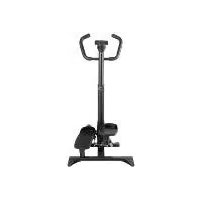
| Product type | Stepper with resistance bands and computer |
| Model | IAN 373943 |
| Brand | Crivit |
| Maximum load capacity | 100 kg |
| Computer power supply | 1 battery 1.5 V LR03/AAA |
| Display | Number of steps (REPS), time (TMR), calories (CAL), total number of steps (TTR) |
| Pedal inclination adjustment | Via adjustment screw (12) |
| Smartphone/tablet holder | Integrated into support tube |
| Resistance bands | 2 resistance bands with carabiners, max stretching length 165 cm |
| Material | Plastic and metal |
| Dimensions (approx.) | Approx. 60 x 40 x 30 cm (assembled) |
| Weight (approx.) | Approx. 8 kg |
| Appliance class | HC (domestic use), accuracy class C |
| Standards | DIN EN ISO 20957-8, DIN 32935 - A |
| Use | Indoor only, private use, non-medical |
| Safety | Do not exceed 100 kg, max stretching length 165 cm, check before each use |
| Care and cleaning | Clean with a damp cloth, no aggressive products |
| Storage | Dry, clean place at room temperature, remove batteries if not used for long |
| Warranty | 3 years (excluding normal wear and batteries) |
| After-sales service (France) | Tel. 0800 919270, email deltasport@lidl.fr |
| After-sales service (Belgium) | Tel. 070 270 171 (0.15 EUR/min), email deltasport@lidl.be |
Frequently Asked Questions - IAN 373943 CRIVIT
User questions about IAN 373943 CRIVIT
0 question about this device. Answer the ones you know or ask your own.
Ask a new question about this device
Download the instructions for your Fitness Equipment in PDF format for free! Find your manual IAN 373943 - CRIVIT and take your electronic device back in hand. On this page are published all the documents necessary for the use of your device. IAN 373943 by CRIVIT.
USER MANUAL IAN 373943 CRIVIT
Operating instructions
M
SWING-STEPPER
Bedieninoshandieing
SWING STEPPER
Naxad kobolzky
SWING STEPPER
Instruetiones de manepo


B ④
Before reading, fold out the ilustration page and get to know all of the functions of your unit.
00
Pioe 10000000000000000000000000000000000000000000
[paegn]
华
Kp yep he Ie e pina n de aedinpen np an oak xeropoea vamayd me ale
fumies you but appear
f 1
hukciu zadzeris
Fired 1991 x reiehre vlae a nly s aonrse s e y iin hnsm Pstiro
()
sne nne nee eae 1nne nne nne nne nne nne nne nne nne nne nne nne nne nne nne nne nne nne nne nne nne nne nne nne nne nne nne nne nne nne nne nne nne nne nne nne nne nne nne nne nne nne nne nne nne nne nne nne nne nne nne
hunkclamarstrog
fcty 10000000000000000000000000000000000000000000000
一
Knirnndnnrnnnneonrnnn nn nnnn nn nnnn nn nnnn
mnnnne nnnnne
C5/IE Operating and safety information Page 16
51 + u + 4q = 1 + u + uq dH
N,be Dssirrgs en wignneisns Regro 4
FL Wskzowki dol abvui bepiiee
- Pekuoy 1072
SK Polyny pre abuohu bezpeacost 62
ES Inssions de mscis x regidd Paaing 3
Exercices d'étirements 43-45
Risks for children 26
Package contents 26
Technical data 26
Intended use 27
Safety information 27-28
Assembling the stepper 28-29
Adjusting the height of the support pole 29
Using the holder 29
Transporting the stepper 29
Operating the computer 29-30
Replacing the battery 30
Training instructions 30-32
Stretching exercises 32-33
Exercises without expanders 33
Exercises with expanders 33-35
Storage, cleaning 35
Disposal 35
Notes on the guarantee and
service handling 35-36
NL BE
Veiligheidstips
Transport steppera 64
Obstuga komputera 64
Wymiana baterii 65
Transport of stepperen 108
Betjening of computeren 108-109
Udskiftning of batteri 109
You have chosen to purchase a high-quality product. Familiarise yourself with the product before using it for the first time.

Read the following operating instructions carefully.
Use the product only as described and only for the given areas of application. Store these operating instructions carefully. When passing the product on to third parties, please also hand over all accompanying documents.

Safety information Risks for children!
- This apparatus may be used by children from 8 years of age upwards, as well by persons with diminished physical, sensory or mental abilities, or those with little experience and knowledge, if they are supervised or instructed with regard to its safe use, provided they also understand the potential risks.
Children may not play with the apparatus. - Cleaning and maintenance must not be carried out by children without supervision.
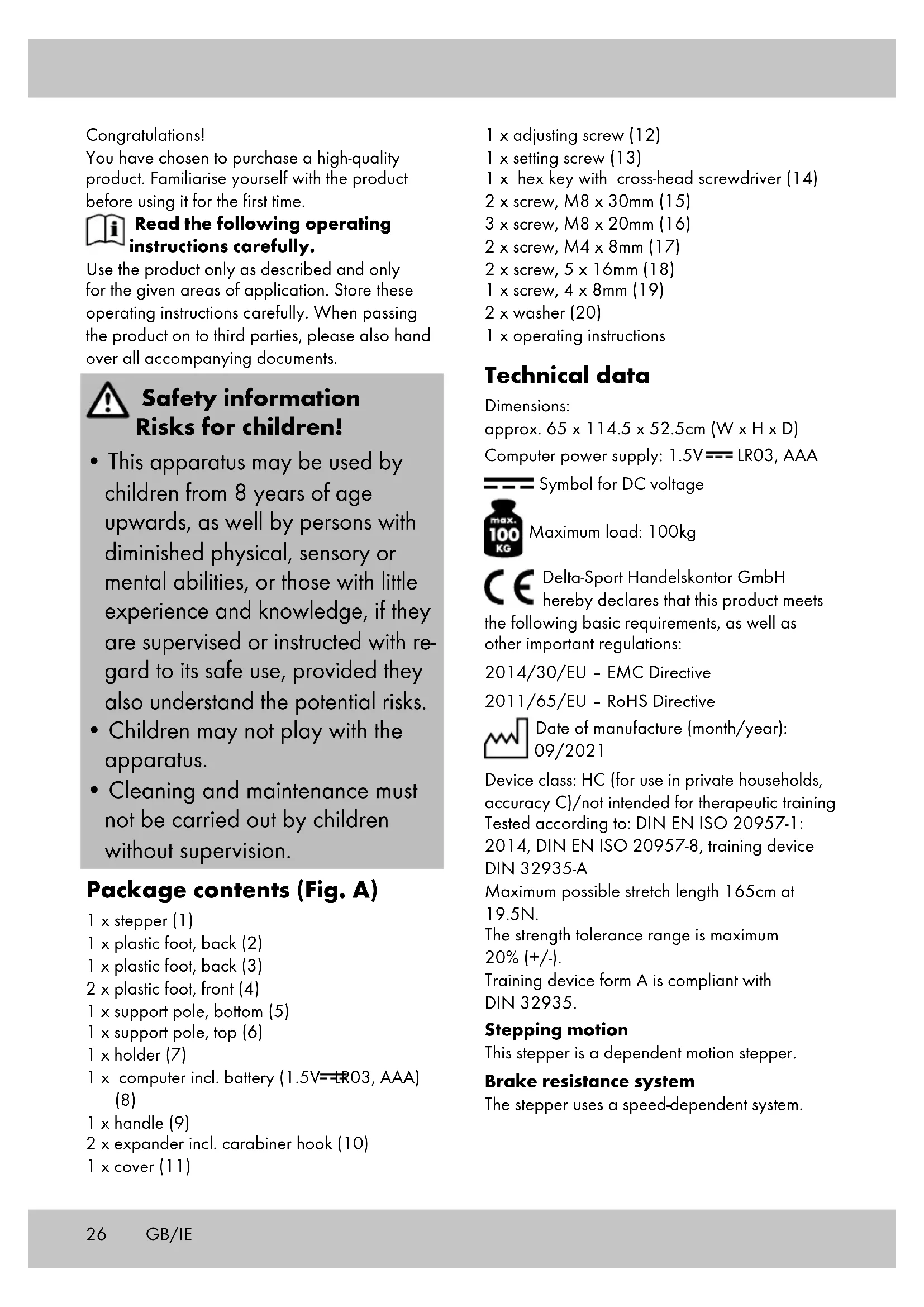
Package contents (Fig. A)
1 x stepper (1)
1 x plastic foot, back (2)
1 x plastic foot, back (3)
2× plastic foot, front (4)
1 x support pole, bottom (5)
1 x support pole, top (6)
1 x holder (7)
1 x computer incl. battery (1.5V=R03, AAA) (8)
1 x handle (9)
2× expander incl.carabiner hook (10)
1 × cover (11)
1 x adjusting screw (12)
1 x setting screw (13)
1 x hex key with cross-head screwdriver (14)
2× screw, M8× 30mm (15)
3× screw, M8× 20mm (16)
2× screw, M4× 8mm (17)
2× screw, 5× 16mm (18)
1x screw,4x 8mm (19)
2 × washer (20)
1 x operating instructions
Technical data
Dimensions:
approx. 65 × 114.5 × 52.5 ~cm(W × H × D)
Computer power supply: 1.5V = = LRO3 AAA

Symbol for DC voltage

Maximum load: 100kg
Delta-Sport Handelskontor GmbH hereby declares that this product meets
the following basic requirements, as well as other important regulations:
2014/30/EU - EMC Directive
2011/65/EU - RoHS Directive

Date of manufacture (month/year): 09/2021
Device class: HC (for use in private households, accuracy C)/not intended for therapeutic training
Tested according to: DIN EN ISO 20957-1: 2014, DIN EN ISO 20957-8, training device DIN 32935-A
Maximum possible stretch length 165cm at 19.5N.
The strength tolerance range is maximum 20% (+/-) .
Training device form A is compliant with DIN 32935.
Stepping motion
This stepper is a dependent motion stepper.
Brake resistance system
The stepper uses a speed-dependent system.
Intended use
The product is solely intended for use as a training device. The product is designed for private use and is not suitable for medical or commercial purposes. The product is suitable for indoor use.

Safety information General hazards
- Keep the packaging materials away from children. There is a risk of suffocation!
- Never let children play with the battery. Swallowing it can cause serious harm to your health.
- Keep children away from the pedals while you are training (danger of crushing).
- The product is not a children's toy. When not in use, please store it in a location inaccessible to children.
Maximum load: the product is designed for a maximum body weight of 100kg - Do not pull the expanders beyond the maximum possible stretch length of 165cm
- The stretch length may not be adjusted beyond the 'MIN.' marking.
- There must be no adjustment devices protruding from the product that could impede the user's movements. The product must be positioned in an area that gives you enough space for training. An area of at least 2 × 2m is necessary.
- Position the product on a flat, level surface so it is stable during training and does not wobble.
- Ensure the product is in perfect condition before each use. Do not use it if this is not the case. Defective parts must be replaced, as otherwise function and safety are impaired.
- Repairs may only be performed by authorised technicians.
- Only original replacement parts may be used.
- The product must only be used with sports shoes.
- There must be an area of approx. 0.6m of space around the training area (Fig. X).
- The elastomers in the expander must be protected from direct sunlight.
Risk of burns!
- The hydraulic dampers become hot during training. Do not touch them immediately after training under any circumstances.
Risks due to incorrect/excessive training!
It is imperative that you observe all the instructions in the 'Training instructions' section.
Damage to property!
- Oil can leak from the hydraulic dampers. To avoid staining of floors or carpets, place the product on a level, non-slip surface.
- Ensure that fluid does not get into the computer. The sensitive electronics could become damaged. Protect the computer from direct sunlight.
- Regularly check that all screws and nuts are tight. Self-locking nuts cannot be loosened by vibration. However, this characteristic is only guaranteed when tightened once. In the event that the stepper is dismantled, all self-locking nuts must be replaced.
- If the product is not needed for a long period, remove the battery from the computer, as it can go flat and cause damage.
- We recommend using an underlay during training to prevent damage to the floor.

Battery warning notices!
- Remove the batteries when they are flat, or if the product is not in use for an extended period.
- Do not use different types or brands of batteries together, or new and used batteries, or ones with different capacities, as they can leak and cause damage.
- Ensure the polarity (+/-) is correct when inserting the batteries.
- Replace all batteries at the same time and dispose of the old batteries as prescribed.
- Warning! Batteries must not be charged or reactivated by other means, taken apart, thrown into fire or short-circuited.
- Always keep batteries out of reach of children.
- Do not use rechargeable batteries!
-
Cleaning and maintenance must not be carried out by children without supervision.
-
Clean the battery and device contacts as needed and before inserting.
- Do not expose the batteries to extreme conditions (e.g. radiators or direct sunlight). Otherwise there is an increased risk of leakage.
- Batteries can be life-threatening if swallowed. Therefore, store batteries in a place inaccessible to small children. Medical attention must be sought immediately if a battery is swallowed.
Danger!
- Handle damaged or leaking batteries with extreme caution and dispose of them properly as soon as possible. Wear gloves when doing so.
If you come into contact with battery acid, wash the affected area with soap and water. If battery acid gets in your eye, rinse it with water and seek medical attention immediately! - The connection terminals must not be short-circuited.
Assembling the stepper
Step 1 (Fig. B)
- Place the stepper (1) with the bottom side up on a flat and level surface.
- Insert the plastic back feet (2) and (3) into the frame of the stepper (1) as shown in Fig. B. The rippled surfaces of the plastic back feet (2) and (3) are facing upward and the pointed ends are facing backward.
- Place the plastic front feet (4) onto the frame of the stepper (1) as shown in Fig. B. The wheels of the plastic front feet (4) are facing upward and forward.
- Fasten each of the plastic back feet (2) and (3) with one screw (18) and each of the plastic front feet (4) with one screw (17).
Note: make sure that the pre-drilled holes in the frame and in the plastic feet line up.
Step 2 (Fig. C)
- Connect the top (6) and bottom (5) support poles.
Note: ensure that the screw holes are correctly aligned.
- Select one of the four holes on the top support pole (6) and fasten the connection with the setting screw (13).
Step 3
- Lead the cable (8a) of the computer (8) through the holder (7) and place the computer in the holder (Fig. D).
Note: make sure that the computer is correctly positioned in the holder and that the cable does not get caught on anything.
-
Lead the cable (8a) of the computer through the grab poles so that a section of the cable is hanging out below (Fig. E).
-
Place the holder (7) into the top grab pole (6) (Fig. E).
- Fasten the holder to the top grab pole (6) with the screw (19) (Fig. E).
Step 4 (Fig. F)
- Turn the stepper (1) back over and connect the end of the cable (1a) of the stepper (1) to the end of the cable (8a) of the computer (8).
- Lead the connected cables into the bottom opening (1b) of the stepper.
Note: make sure that the cables do not get caught in the process.
Step 5 (Fig. G)
- Place the grab poles into the stepper.
Note: ensure that the screw holes are correctly aligned.
- Fasten the support poles to the front of the stepper with two screws (16) and to the back of the stepper with one screw (16).
- Turn the adjusting screw (12) into the thread on the front of the stepper.
Note: you can use the adjusting screw to set the step height of the pedals.
To increase the step height, turn the adjusting screw in a clockwise direction.
To reduce the step height, turn the adjusting screw anti-clockwise.
Step 6 (Fig. H)
- Place the handle (9) with the cover (11) onto the top support pole (6).
- Attach the handle with the cover with two screws (15) and two washers (20).
Step 7 (Fig.1)
- Clasp the carabiner hook (10a) of the expander (10) into the eyelet (1b) on the stepper (1) and screw it tightly.
Important! Before training, check that the expanders are securely attached and that the carabiner hooks are securely screwed in. Warning!
The eyelets are secured for tensile loads upwards only, and may not be subjected to transverse loads.
There is a risk of injury, or damage to the stepper.
If you are not training with the expanders, unhook them from the eyelets to avoid tripping over them.
Check whether all screws and nuts are securely tightened.
Step 8 (Fig. J)
Note the max. stretch length of the expanders.
The shorter you set the expanders, the greater the strength required.
- Shorten the expanders (10) by fixing the rubber hose (10b) in place with the securing ball (10c).
IMPORTANT! Make sure that you do not shorten the expanders too much. Do not go past the 'MIN.' marking!
Adjusting the height of the support pole (Fig. K)
- Slightly loosen the setting screw (13) and pull its handle out a little.
Note: the setting screw consists of a thread and a locking pin, which is why it does not have to be completely unscrewed.
- Set the desired grab pole (6) height and release the handle of the setting screw so that the locking pin audibly locks in place.
- Refasten the setting screw.
Using the holder (Fig. K)
- Use one hand to pull the clip (7a) on the holder (7) upward.
-
Use your other hand to place your smartphone or tablet into the holder.
-
Carefully fix your smartphone or tablet in place with the clip.
Transporting the stepper
- Place your right foot on the front of the stepper frame.
- Grab the stepper by the handle and carefully tilt the stepper towards yourself.
- Roll the stepper to the desired location and slowly return it to an upright position.
Operating the computer
The stepper corresponds to accuracy class C, i.e. there is no guarantee that what is displayed on the computer is accurate.
Turning the product on and off
When you start exercising or operating the pedals, the computer switches on automatically. If the stepper is out of operation for approx. 4 minutes, the computer switches off automatically.
Display
The top row displays:
- 'STOP' when the training is paused;
- the number of steps per minute (projection)
Selecting the mode
The 4 modes are displayed on the bottom row. Briefly press the 'MODE' button to change from one mode to the next.
TMR: previous training time from 0:00 to 99:59min
- 'REPS': number of steps completed during the current training session from 0 to 9999
CAL: calories* burned from 0 to 9999cal
- 'TTR': number of training steps since inserting the battery, from 0 to 9999
- The calculation is based on pre-programmed standard values that only serve as a guide. Calories burned by using the expanders are not considered.
You may display all of the training data one after the other. To do this, press the 'MODE' button a few times, until the 'TMR' row blinks.
The display will then automatically change from mode to mode every 5 seconds.
Entering training goals
You may enter one or more goals:
- training duration (TMR)
number of steps (REPS) -
calorie consumption (CAL)
-
Hold the 'MODE' button until the bottom row displays '0:00 (TMR)' and the first 0 is flashing (approx. 7 sec).
-
To specify a training duration, press the 'MODE' button repeatedly until the display shows the desired duration in minutes.
- After a few seconds the display will show the next mode (REPS). Press the 'MODE' button, to set the amount of steps in increments of 10.
- You can set the desired calorie consumption in the next mode (CAL) in increments of 10.
- Now you can start your workout. The computer counts down the pre-programmed values to '0:00'.
- Once the pre-set goal has been achieved, the computer ceases to count for approx.
10 seconds. Afterwards, the computer starts again at 0.
Resetting the display
The display is on 0 only when used for the first time. With all subsequent training sessions, the computer continues counting from the last time you trained. To reset the display, keep the 'MODE' button pressed down until all symbols can be seen at the same time.
To reset the total number of training steps (TTR), remove the battery.
Replacing the battery
WARNING! Observe the following instructions to avoid mechanical and electrical damage.
Danger!
There is one battery in the product. Replace the battery once it is flat.
- Tilt the computer (8) up on the side and carefully remove it from the holder (7). The battery can be found on the back of the computer.
- Carefully remove the flat battery from the battery compartment and replace it with a new battery. The battery must be completely fitted into the battery compartment.
Note: pay attention to the plus/minus poles on the battery and insert the battery accordingly.
- Carefully place the computer back in the holder.
Note: make sure that the computer is correctly positioned in the holder.
Training instructions
General
Consult your doctor before you start training!
Goal-setting
Various goals can be achieved through appropriate training:
improving overall fitness
- increasing stamina
- greater well-being
Success is essentially dependent on the following points, which we would particularly like to bring to your attention:
- regular training for sufficient periods
appropriate nutrition
monitoring training success
Who can train?
If you haven't trained or participated in sport for an extended period, have cardiovascular or orthopaedic problems, take medication, or are pregnant, you should consult your doctor before you commence training. Tell him/her which training equipment you intend to use. Undergo an examination to ascertain which training programmes are suitable for you. To be sure, take these instructions for use with you, so your doctor can devise an individual training programme with you.
In general, every physically healthy person, whether young or old, can begin a fitness training programme, if he/she has consulted a doctor beforehand.
Note!
Incorrect or excessive training can endanger your health.
Strain
Intensive workouts make demands on the entire body, and not merely the leg muscles.
The body, especially the heart and circulatory system, requires time to adapt to the changes brought on by the training sessions.
For this reason, it is important to increase levels slowly, and to ensure that appropriate breaks are taken during and after training.
Ensure that you train at an appropriate level, i.e. one in which you do not over-strain yourself. Listen to your body; end the workout immediately if you feel unwell, are short of breath or experience dizziness.
You are exercising at the correct level if you can converse normally during your training session.
Cooling down/relaxing
A cool-down, i.e. a relaxation programme is as important as a warm-up regime. Always end your training session appropriately; reduce your pace and effort level, and do light stretching exercises when you have dismounted the product. This gives your pulse time to calm down, and your body is able to recover more effectively for future efforts.
The duration of recovery periods between training sessions should be based on your fitness level.
Avoid excessive exercise intensity to prevent overtraining. Excessive strain can cause health problems and lead to death. You must end the training immediately if you feel tired or weak. To determine your individual training intensity, you may use the following calculation formula to ascertain your approximate maximum heart rate (MHR):
$$ M H R = 2 2 0 - y o u r a g e $$
Depending on your training goal, there are 5 training zones within which you may push the effort level to your maximum heart rate.
Zones
Regeneration zone = 50 - 60% of your MHR
Fat-burning zone = 60 - 70% of your MHR
Carbohydrate-burning zone = 70 - 80% of your MHR
Anaerobic zone = 80 - 90% of your MHR
Warning zone = 90 - 100% of your MHR
- Regeneration zone/health zone
This training is aimed at basic physical fitness. It consists of longer endurance exercises, which are to be performed slowly. It is especially suitable for beginners and/or people in weak physical condition.
- Fat-burning zone
Optimised for fat-burning, the workout is designed for strengthening the cardiovascular system. In this zone, the body burns proportionately the most kilojoules from fat. During your training session, you should feel relaxed and be able to converse.
- Carbohydrate-burning zone
In this zone, more carbohydrates are burned than fat. The training effort is more strenuous, but also more effective.
Mounting the stepper
Press one pedal down completely with your foot, so that the pedal arm rests with its stopper on the base frame.
Then place your foot on the pedal of the lowered pedal arm.
Place your other foot on the other pedal, which is slanting upwards.
Dismounting
Standing on the stepper, press one of the pedals all the way down so that the pedal arm stopper rests on the base frame.
Take your foot off the pedal which is positioned upward and place it on the floor. Then take your foot off the pedal which is positioned downward. Hold tightly onto the handle with both hands if necessary.
Movement of the stepper during training
Your stepper simulates climbing stairs.
The swinging effect not only moves the pedals up and down, but also moves them to the left and right.
Muscle groups exercised
Training without expanders primarily exercises the leg and buttock muscles.
Exercises in which you step and use the expanders strengthen the buttock, leg, arm and shoulder muscles.
Exercises in which you do not step but do use the expanders strengthen your arm and shoulder muscles.
Body posture
Please ensure that you keep your body straight during training sessions. It is important not to arch your back.
Important: while exercising, keep constant abdominal tension and keep your upper body erect!
If you maintain an even stepping motion, the pedal arm stoppers should not touch the floor frame.
Just before standing up each time you step, shift your body weight from one leg to the other. It can also be helpful if you bend your arms slightly and let them swing in front of your upper body while stepping in a rhythmic motion.
Stretching exercises
Stretching the lower back (Fig. L) Starting position
- Get down on all fours.
- Position your wrists and knees below your shoulders and hips respectively.
End position
- Tense your abdominal muscles and arch your back up like a cat, until you feel a stretch across your entire back.
- Your gaze is directed at your hands.
- Remain in this position for a moment and then return to the starting position.
- Repeat the exercise 2 to 3 times in three sets.
Important: keep your back and pelvis straight in the all-fours position.
Stretching the hamstring muscles (Fig. M)
Starting position
- Lie with your back on the floor. Your legs are stretched out in a relaxed position.
End position
- Tense your abdominal muscles and lift one leg up into a vertical position.
- Hold your thigh with your hands and pull it towards you to increase the stretch.
- Your toes are pointing down and the other leg remains lying stretched out on the floor.
-
Hold this position for a moment and then return to the starting position.
-
Repeat the exercise 2 to 3 times in three sets and then switch legs.
Important: some people have very short hamstring muscles. If this applies to you, you may use a towel to help pull your thigh towards yourself.
Stretching the chest muscles (Fig. N)
Variation 1
Starting position
- Place your forearm and elbow against a wall with your hand pointing up, so that your upper arm and forearm form a right angle.
End position
- Maintain contact and turn your upper body slightly away from the wall.
- Repeat the exercise 2 to 3 times in three sets and then switch sides.
Variation 2
Starting position
- Stretch your forearms up at your sides, so that your forearms and upper arms form a right angle.
- Lean yourself slightly in front of a door frame.
End position
- Gently push your upper body forwards so that you feel the stretch in your chest area.
- Repeat the exercise 2 to 3 times in three sets.
Important: hold the stretch for approx. 5 seconds.
Stretching the neck muscles (Fig. O) Starting position
- Stand up straight.
End position
- Tilt your head to the side towards your shoulder, pulling the other shoulder down at the same time. You should feel the stretch on the side of your neck.
- Remain in this position for approx. 5 seconds and then return to the starting position.
- Repeat the exercise 2 to 3 times in three sets and then switch sides.
Important: keep your head looking straight forward, without twisting your neck. Performing this exercise in front of a mirror will facilitate the correct posture.
Stretching the front thigh muscles (Fig. P)
Starting position
- Stand up straight and tense your abdominal muscles.
- Pull your pelvis up to avoid arching your back.
- For improved stability you can support yourself with your hand on a wall.
End position
- While maintaining the tension, grasp one ankle and pull it up towards your buttock. Keep your legs parallel during this movement.
- You should feel the stretch in the front of the thigh of the bent leg.
- Remain in this position for approx. 5 seconds and then return to the starting position.
- Repeat the exercise 2 to 3 times in three sets and then switch legs.
Important: some people have very short front thigh muscles. If this applies to you, you may use a towel to help pull your foot towards yourself.
Stretching the hip flexors (Fig. Q) Starting position
- Take a lunging step forward and lower your back leg with your shin on the floor.
- Your front knee is bent at a right angle and your arms rest on your front leg.
End position
- With a straight, upright back, push your pelvis forwards towards the floor, so that you feel a stretch in the hip area of your back leg.
- Your front knee should not extend beyond your toes.
- Ensure that your back leg and hip are aligned throughout the movement and that you do not twist your pelvis outwards.
- Remain in this position for approx. 5 seconds and then return to the starting position.
- Repeat the exercise 2 to 3 times in three sets and then switch legs.
Important: keep your back straight during the exercise.
Stretching the inner upper thigh (Fig. R)
Starting position
- Stand with your legs wide apart and bend one leg forwards in this position.
- Place your hands loosely on your hips.
End position
- Stretch the other leg out to the side and shift your body weight onto the bent leg.
- Keep the foot of the outstretched leg flat on the floor, so that you feel a stretch in the inner thigh of the outstretched leg.
- Remain in this position for approx. 5 seconds and then return to the starting position.
- Repeat the exercise 2 to 3 times in three sets and then switch legs.
Important: keep your back and pelvis straight during the exercise.
Exercises without expanders For thighs, calves and buttocks (Fig. S)
Starting position
- Stand on the product and hold onto the handle with both hands.
End position
- Tense your buttock and abdominal muscles.
- Press the pedals of the product down with your feet alternately.
- Your head is an extension of your spine and your upper body is upright.
- Repeat the exercise 2 to 3 times in three sets.
Exercises with expanders
Note on training with expanders! The expander may be stretched to a maximum length of 165cm. Otherwise it can become damaged and injure the user.
The further you stretch the expander, the more strength you will need to apply.
The correct grip
Make sure that you always hold the handles horizontally when pulling on the expanders.
Do not bend your wrists, as this can strain them.
Exercises
For all the following exercises, please note:
Take hold of the handles.
- Perform the movements in a controlled fashion.
- Keep your arms tense.
- Before each workout with the expanders, make sure that the screwed connections of the carabiner hooks are tightly closed.
- The duration of the exercise sets should be based on your personal fitness level. Divide the exercises into multiple sets and pause between individual sets.
We recommend 3 sets per exercise. The duration of the repetitions is based on your fitness level.
For arms, shoulders, legs and buttocks (Fig. T)
Starting position
- Stand on the product.
- Grab the expanders. The backs of your hands are pointing upwards.
End position
- Tense your arm, buttock and abdominal muscles.
- Lift your left arm, slightly bent, in front of you up to shoulder height while you press down on the right pedal with your foot.
- Lower your left arm and lift your right arm at the same time, while pressing down on the left pedal with your foot.
- Your head is an extension of your spine and your upper body is upright.
- Repeat the exercise 10 to 15 times in three sets.
Important: your arms swing in the opposite direction of your legs, and your pelvis remains straight.
For arms, especially for the shoulders (Fig. U)
Starting position
- Stand on the product. The pedals are not needed for this exercise.
- Grasp the expanders and hold your hands at hip height.
End position
- Tense your arm and abdominal muscles.
- Pull your right arm towards your chin. Move your elbow out to the side up to shoulder height, with the back of your hand pointing up.
- At the same time, lower your left arm.
- Remain in this position for a moment and then return to the starting position.
7.Pull your left arm towards your chin. Move your elbow out to the side up to shoulder height, with the back of your hand pointing up. - Lower your right arm at the same time.
- Repeat the exercise 10 to 15 times in three sets.
Important: during this exercise, keep your upper body and pelvis straight.
For arms, legs, buttocks and especially the upper arms (Fig. V) Starting position
- Stand on the product.
- Grasp the expanders and hold your hands at hip height. Your elbows remain close to your body. The palms of your hands are pointing upwards.
End position
- Tense your arm and abdominal muscles.
- Lift your right forearm, and at the same time press the left pedal down with your foot.
- Now lift your left forearm, and at the same time press the right pedal down with your foot.
- You lower your right arm simultaneously.
- Repeat the exercise 10 to 15 times in three sets.
Important: during this exercise, keep your upper body and pelvis straight.
For back, shoulders, chest, legs and buttocks (Fig. W)
Starting position
- Stand on the product.
- Grasp the expanders and hold your hands close to your sides.
End position
- Tense your buttock and abdominal muscles.
- Press the pedals of the product down with your feet alternately.
- Your head is an extension of your spine and your upper body is upright.
- With your arms outstretched, pull the expanders out to the sides at shoulder height, and then lower them again. The palms of your hands are pointing downwards.
- Repeat the exercise 10 to 15 times in three sets.
Important: during this exercise, keep your upper body and pelvis straight. Variation: perform the exercise with the palms of your hands facing upwards.
Storage, cleaning
Do not forget that regular maintenance and cleaning contribute to the safety and preservation of the product.
When not in use, always store the product clean, dry, without a battery and at room temperature. Clean only with water and wipe dry afterwards with a cloth.
IMPORTANT! Never clean the product with harsh cleaning agents.
Disposal
In the interest of protecting the environment, do not throw your product into the household waste once you are finished
with it, but rather take it to a specialty disposal facility. Find out about collection sites and their hours of operation from your local authority. Defective or used batteries must be recycled pursuant to Directive 2006/66/EC and changes to it. Return batteries and/or the product via the collecting sites provided. Packaging materials, such as plastic bags, must be kept away from children. Keep the packaging materials out of reach of children.

Environmental damage caused by improper disposal of batteries! Batteries may not be disposed of with household They may contain toxic heavy metals and object to hazardous waste treatment. The metal symbols of the heavy metals are as Cd = cadmium, Hg = mercury, pad. Dispose of used batteries at a coal collection site.

Dispose of the product and packaging in an environmentally friendly manner.

Note the label on the packaging materials when separating waste, as these are labelled with abbreviations (a) mbers (b) with the following meaning: astics/20-22: paper and card80-98: composite materials.
The product and the packaging materials can be recycled, dispose of them separately for better treatment of waste. The Triman logo only applies to France. Find out how to dispose of the used product from your municipal or city administration.
Notes on the guarantee and service handling
he product was produced with great care and under continuous quality control. DELTA-SPORT HANDELSKONTOR GmbH gives private end customers a three-year guarantee on this product from the date of purchase (guarantee period) in accordance with the following provisions. The guarantee is only valid for material and manufacturing defects. The guarantee does not cover parts subject to normal wear and tear that are thus considered wear parts (e.g. batteries) or fragile parts such as switches, rechargeable batteries, or parts made of glass. Claims under this guarantee are excluded if the product has been used incorrectly, improperly, or contrary to the intended purpose, or if the provisions in the instructions for use were not observed, unless the end customer proves that a material or manufacturing defect exists that was not caused by one of the aforementioned circumstances.
Claims under the guarantee can only be made within the guarantee period by presenting the original sales receipt. Please therefore keep the original sales receipt. The guarantee period is not extended by any repairs carried out under the guarantee, under statutory guarantees, or as a gesture of goodwill. This also applies to replaced and repaired parts.
If you wish to make a claim please first contact the service hotline mentioned below or contact us by e-mail. If there is a guarantee case, then the product will be repaired or replaced free of charge to you or the purchase price will be refunded, depending on our choice.
Your legal rights, in particular guarantee claims against the respective seller, are not limited by this guarantee.
IAN:373943_2104
GB Service Great Britain
Tel.: 0800 404 7657
E-Mail: deltasport@lidl.co.uk
IE Service Ireland
Tel.: 1890 930 034
(0,08 EUR/Min., {peak}))
(0,06 EUR/Min., (off peak))
E-Mail: deltasport@lidl.ie
Felicitations!
2011/65/UE - Directive RoHS

Exercices d'étirements
$$ M T F = 2 2 0 - v a s v e k $$
$$ M S F = 2 2 0 - v a s v e k $$
Symbol for jaevnspaending

Maks. capacite: 100kg
C e Hermed erklærer Delta-Sport Handels-kontor GmbH, atijke artikel er i
overensstemmelse med fologende grundlaeggen de krav og de ovrige gaeldende bestemmelser:
2014/30/EU - EMC-direktiv
2011/65/EU - RoHS-direktiv

Fremstillingsdato (måned/år): 09/2021
Fare for forbending!
- Hydraulikdaemperne bliver varme under traeningen. Undlad at rere ved dem umiddelbart after traeningen.
Fare ved forkert/overdreven traening!
Transport of stepperen




- NL BE
- Read the following operating instructions carefully.
- Safety information Risks for children!
- Package contents (Fig. A)
- Technical data
- Stepping motion
- Brake resistance system
- Intended use
- Safety information General hazards
- Risk of burns!
- Risks due to incorrect/excessive training!
- Damage to property!
- Battery warning notices!
- Danger!
- Assembling the stepper
- Step 1 (Fig. B)
- Step 2 (Fig. C)
- Step 3
- Step 4 (Fig. F)
- Step 5 (Fig. G)
- Step 6 (Fig. H)
- Step 7 (Fig.1)
- Step 8 (Fig. J)
- Adjusting the height of the support pole (Fig. K)
- Using the holder (Fig. K)
- Transporting the stepper
- Operating the computer
- Turning the product on and off
- Display
- Selecting the mode
- Entering training goals
- Resetting the display
- Replacing the battery
- WARNING! Observe the following instructions to avoid mechanical and electrical damage.
- Training instructions
- General
- Goal-setting
- Who can train?
- Note!
- Incorrect or excessive training can endanger your health.
- Strain
- Cooling down/relaxing
- Zones
- - Regeneration zone/health zone
- - Fat-burning zone
- - Carbohydrate-burning zone
- Mounting the stepper
- Dismounting
- Movement of the stepper during training
- Muscle groups exercised
- Body posture
- Important: while exercising, keep constant abdominal tension and keep your upper body erect!
- Stretching exercises
- Stretching the lower back (Fig. L) Starting position
- End position
- Important: keep your back and pelvis straight in the all-fours position.
- Stretching the hamstring muscles (Fig. M)
- Starting position
- Important: some people have very short hamstring muscles. If this applies to you, you may use a towel to help pull your thigh towards yourself.
- Stretching the chest muscles (Fig. N)
- Variation 1
- Variation 2
- Important: hold the stretch for approx. 5 seconds.
- Stretching the neck muscles (Fig. O) Starting position
- Important: keep your head looking straight forward, without twisting your neck. Performing this exercise in front of a mirror will facilitate the correct posture.
- Stretching the front thigh muscles (Fig. P)
- Important: some people have very short front thigh muscles. If this applies to you, you may use a towel to help pull your foot towards yourself.
- Stretching the hip flexors (Fig. Q) Starting position
- Important: keep your back straight during the exercise.
- Stretching the inner upper thigh (Fig. R)
- Important: keep your back and pelvis straight during the exercise.
- Exercises without expanders For thighs, calves and buttocks (Fig. S)
- Exercises with expanders
- Note on training with expanders! The expander may be stretched to a maximum length of 165cm. Otherwise it can become damaged and injure the user.
- The further you stretch the expander, the more strength you will need to apply.
- The correct grip
- Exercises
- For arms, especially for the shoulders (Fig. U)
- For arms, legs, buttocks and especially the upper arms (Fig. V) Starting position
- For back, shoulders, chest, legs and buttocks (Fig. W)
- Important: during this exercise, keep your upper body and pelvis straight. Variation: perform the exercise with the palms of your hands facing upwards.
- Storage, cleaning
- Disposal
- Notes on the guarantee and service handling
- Exercices d'étirements
- Fare for forbending!
- Fare ved forkert/overdreven traening!
- Transport of stepperen
Brand : CRIVIT
Model : IAN 373943
Category : Fitness Equipment