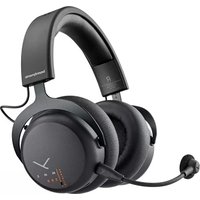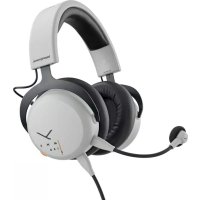
MMX 150 - Headphones BEYERDYNAMIC - Free user manual and instructions
Find the device manual for free MMX 150 BEYERDYNAMIC in PDF.



| Brand | Beyerdynamic |
| Model | MMX 150 |
| Product type | Headset |
| Transducer principle (headphone) | Dynamic |
| Operating principle | Closed |
| Ear coupling | Circumaural |
| Frequency response (headphone) | 5 - 30 000 Hz |
| Impedance | 32 Ω |
| Maximum sound pressure level | 116 dB SPL (at 1 mW / 500 Hz) |
| Harmonic distortion factor | < 0.5% |
| Weight (without cable) | 304 g |
| Connection | USB-C (and 4-pole jack via included cable) |
| Microphone type | Electret condenser |
| Directional pattern (microphone) | Cardioid |
| Frequency response (microphone) | 5 - 18 000 Hz |
| Signal-to-noise ratio (microphone) | 67 dB |
| Included accessories | USB-C to USB-A cable (2.4 m), USB-C to 4-pole jack cable (1.2 m), wind shield |
| Functions | Volume wheel, mute (press), Enhanced mode (long press 2 s), indicator light |
| Maintenance | Clean with a soft cloth dampened with water; do not use solvents or vacuum cleaner |
| Spare parts | Replaceable ear pads (available at www.beyerdynamic.com) |
| Safety instructions | Risk of hearing damage; do not use in traffic; low volume when connecting |
| Disposal | Do not dispose of with household waste; WEEE recycling |
Frequently Asked Questions - MMX 150 BEYERDYNAMIC
User questions about MMX 150 BEYERDYNAMIC
0 question about this device. Answer the ones you know or ask your own.
Ask a new question about this device
Download the instructions for your Headphones in PDF format for free! Find your manual MMX 150 - BEYERDYNAMIC and take your electronic device back in hand. On this page are published all the documents necessary for the use of your device. MMX 150 by BEYERDYNAMIC.
USER MANUAL MMX 150 BEYERDYNAMIC
natural_image
Abstract black Y-shaped line on white background (no text or symbols)beyerdynamic
MMX 150
USB GAMING HEADSET
MANUAL
CONTENTS
Safety instructions....3
Service....3
Supplied accessories.... 3
Accessories / Replacement parts.... 3
Maintenance.... 3
Disposal 3
Connect the microphone to the headset 4
Connect the cable to the headset. 4
Connect the cable to your device 5
Connect the headset to an analogue jack socket (game controller, soundcard, mobile etc.) 5
Headset connected to a device 5
Changing the volume 5
Functions available when connected via USB 6
Mute and un-mute the microphone....6
Augmented mode 6
Replacing the ear pads 7
Technical specifications....7
Congratulations to your Meta Pick! We hope you will enjoy your MMX 150 USB Headset from beyerdynamic.
Please take some time to read carefully through this manual before using the product.
ENJOY THE SOUND!
Your beyerdynamic Team
SAFETY INSTRUCTIONS

Risk of injury
We would like to point out that excessively high volumes and long listening times may cause hearing damage. Hearing defects always constitute an irreversible impairment of hearing ability. If you suffer from tinnitus, do not use headphones or reduce the volume.
When connecting the headset, please ensure that the volume is turned down to minimum. Adjust the volume after putting on the headset.

Danger to life
▶Headphones drastically reduce perception of external sounds. Using headphones in road traffic can be potentially dangerous. The user's hearing must not be impaired to the extent that it causes road safety risks. Please also make sure that you do not use the headphones in traffic, especially within an area of potentially dangerous machines and tools.
▶ Furthermore, avoid using headphones in situations where hearing must not be affected, especially when crossing a railway crossing or at a construction site.
Liability / intended use
▶ Do not use the product for any application which is not described in this product information.
▶ beyerdynamic is not liable for improper use of the product and its accessories.
SERVICE
▶ If you require service, please contact qualified service personnel or directly:
beyerdynamic Service- und Logistik Center
E-mail: service@beyerdynamic.de
▶ Dismantling the headset yourself will invalidate the guarantee.
SUPPLIED ACCESSORIES
▶1 x USB-C to USB-A cable, 2.4 m (7.9 ft), to connect the headset to a computer
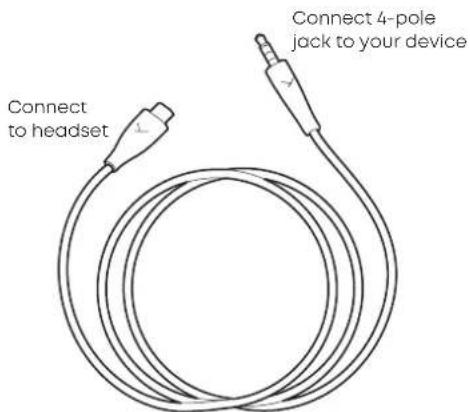
▶1 x USB-C to 4-pole Jack (CTIA) cable, 1.2 m (3.9 ft), to connect the headset to analogue/mobile devices*
▶1 x Microphone pop shield
*Control elements and Augmented Mode are not available when using this cable
ACCESSORIES / REPLACEMENT PARTS
▶ Accessories and replacement equipment can be found at: www.beyerdynamic.com
▶ If you have technical questions while using the headset or need further guidance, please visit our FAQ website at: support.beyerdynamic.com
MAINTENANCE
▶ Use a soft cloth moistened with water to clean the surface.
▶ Make sure that no water enters the headset.
▶ Do not use cleaning agents containing solvents.
▶ Never use a vacuum cleaner for cleaning the headset, as this may cause irreparable damage.
DISPOSAL
At the end of its operating life this product may not be disposed of along with normal household waste. Please take it to a designated recycling point for electric and electronic appliances.
This is indicated by the symbol on the product, the operating instructions or the packaging.

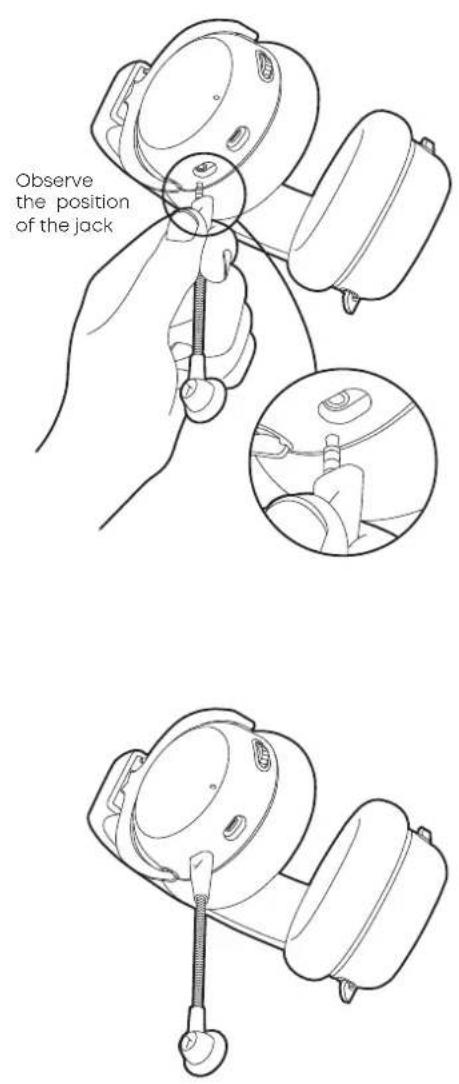
CONNECT THE MICROPHONE
TO THE HEADSET
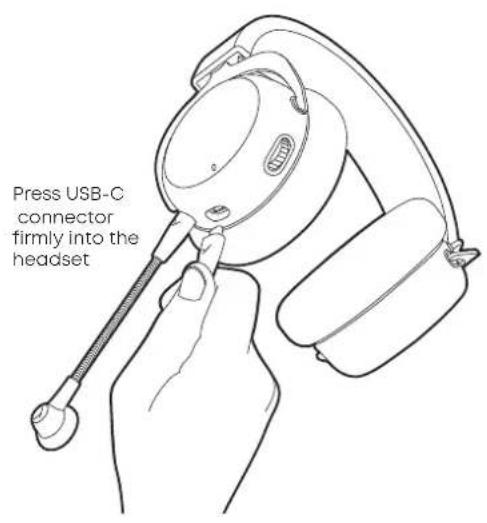
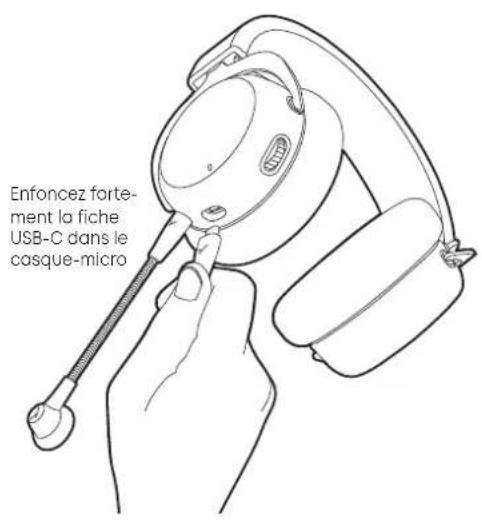
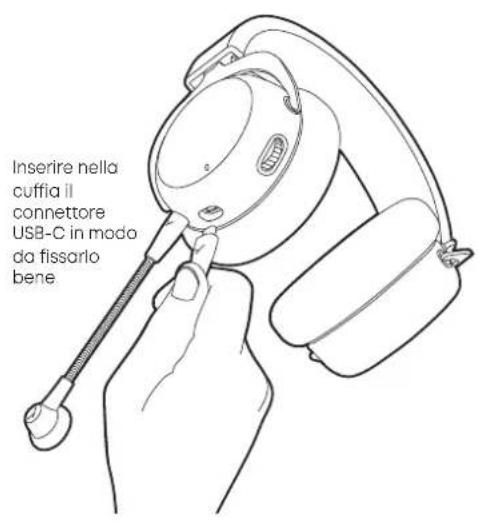
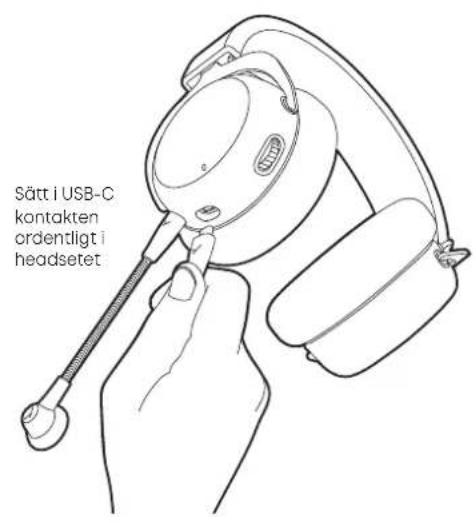
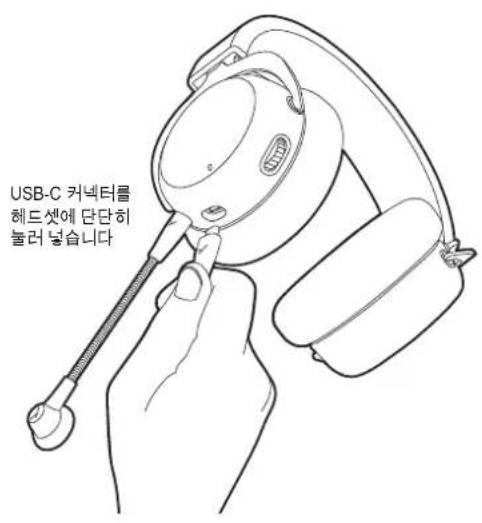
CONNECT THE CABLE TO THE HEADSET
text_image
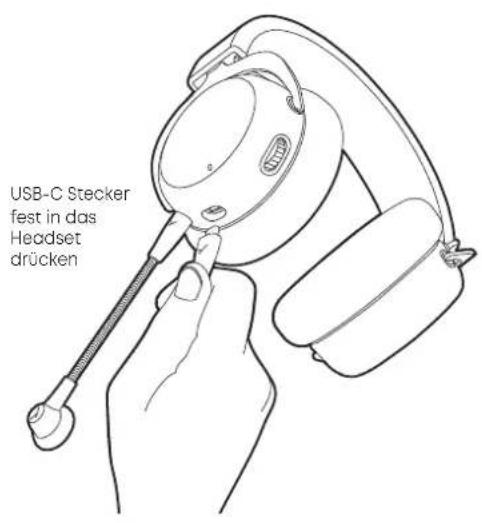
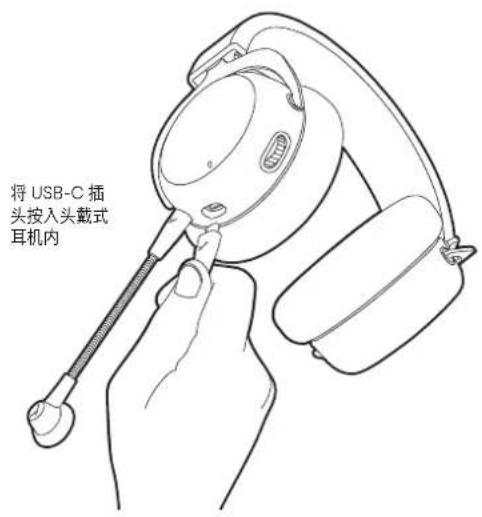
Press USB-C connector firmly into the headset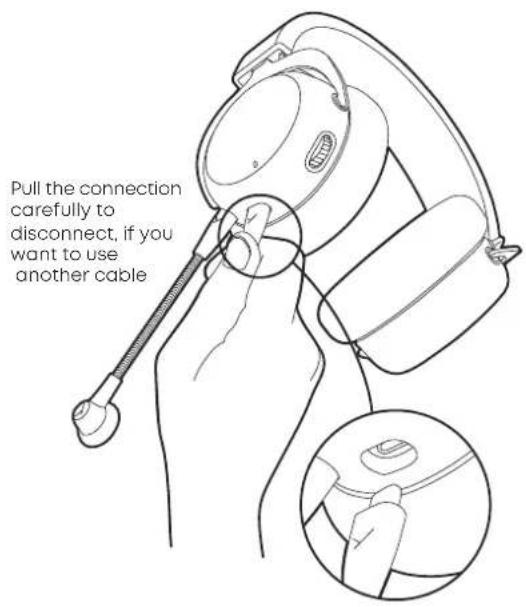
text_image
Pull the connection carefully to disconnect, if you want to use another cableCONNECT THE CABLE TO YOUR DEVICE
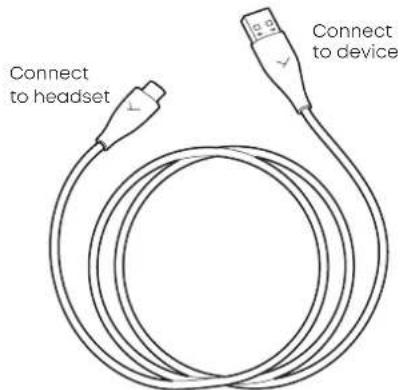
Using the USB-C to USB-A cable, connect the headset (USB-C) and the other end (USB-A) to your device (e.g. computer / console).
For devices with USB-C ports, please use a third-party USB-A to USB-C adapter or cable.
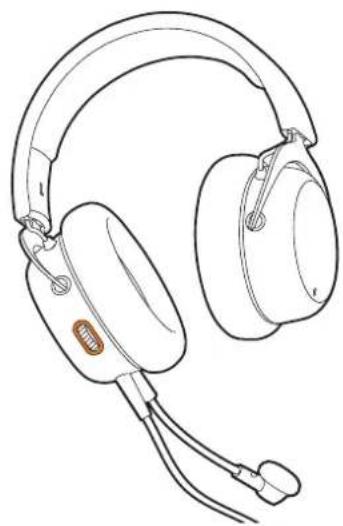
Once the headset is connected, it will automatically install the drivers. This may take a few seconds. It should now be ready and selected as the main device. The lightguide around the control wheel will illuminate orange.
▶ Please also check your systems audio settings and select the MMX 150 as input and output device, if it's not already selected.
text_image
Connect to headset Connect to deviceCONNECT THE HEADSET TO AN ANALOGUE JACK SOCKET (GAME CONTROLLER, SOUNDCARD, MOBILE ETC.)
Connect the USB cable as previously described and connect it to your device's jack socket. The output signal should now be played back by the MMX 150, as well as input signals that will be picked up by the microphone. When on a computer please also check your systems audio setting and select your computers sound card as input and output device.
▶Please note: The control elements and Augmented Mode are not available when using this cable, since there is no power supply.
Caution: Connect the jack connector of the cable to a headphone socket only! If you connect the headset to any other jack socket, the headset could be damaged.
text_image
Connect to headset Connect 4-pole jack to your deviceHEADSET CONNECTED TO A DEVICE
The lightguide will illuminate orange, when the headset is connected to a device (e.g. computer / console) and nothing else has been activated.
natural_image
Line drawing of a pair of headsets with earplands and microphone (no text or symbols)CHANGING THE VOLUME
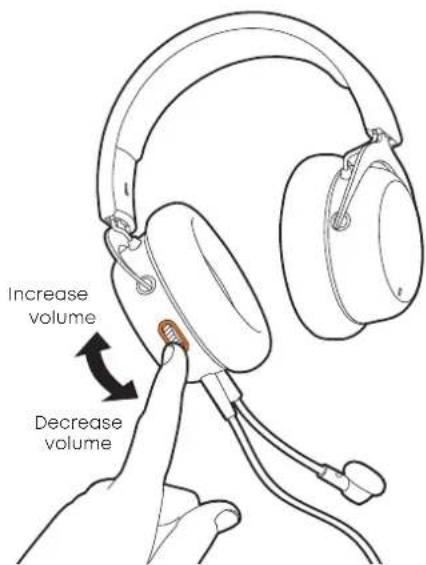
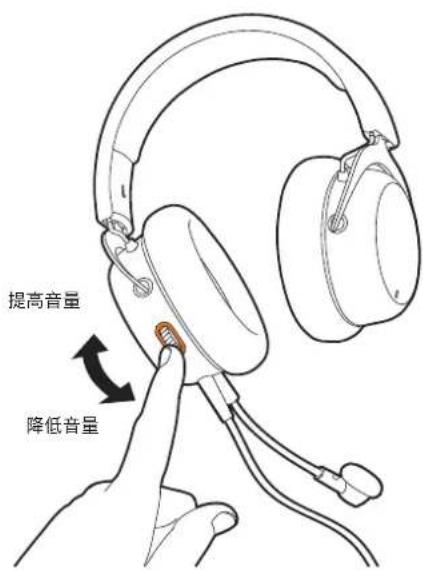
The headphone volume can easily be increased by turning the control wheel up.
▶ To decrease the volume, turn the control wheel down.
text_image
Increase volume Decrease volumeFUNCTIONS AVAILABLE WHEN CONNECTED VIA USB
MUTE AND UN-MUTE THE MICROPHONE
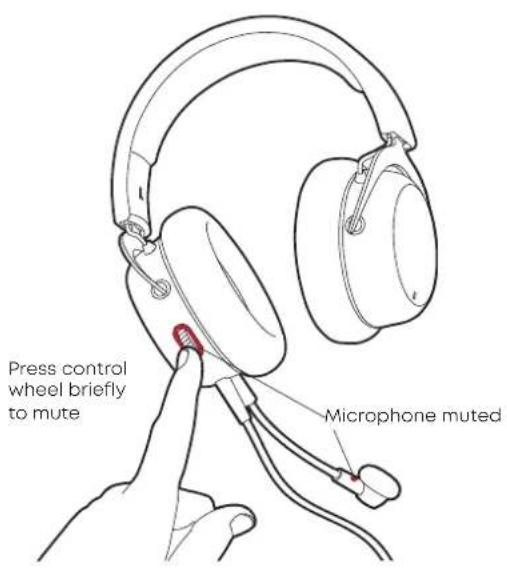
Press the control wheel briefly to mute the microphone.
A high sound will indicate the mute status and a red light at the end of the microphone, as well as around the control wheel, will illuminate.
text_image
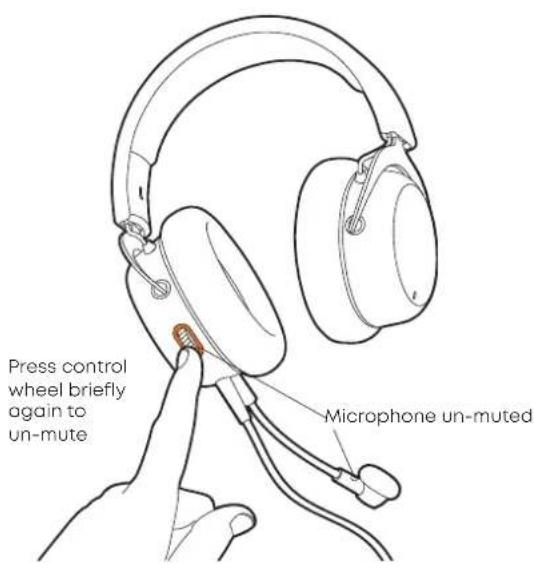
Press control wheel briefly to mute Microphone muted▶Press the control wheel briefly again to un-mute the microphone. A deep sound will indicate the un-muted status and the red light will go off
text_image
Press control wheel briefly again to un-mute Microphone un-mutedAUGMENTED MODE
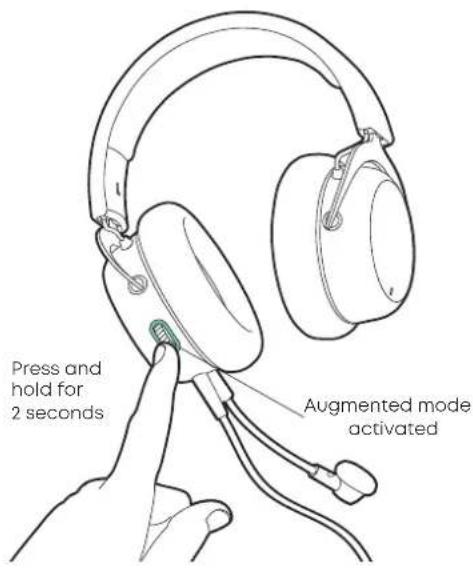
Using the Augmented Mode, your headphones works as if they were open i.e. you can hear your own voice more naturally and your surroundings such as people talking to you or the doorbell.
▶ Press and hold the control wheel (2 seconds). The Augmented Mode is enabled when you hear the voice prompt. The lightguide around the control wheel will illuminate turquoise.
text_image
Press and hold for 2 seconds Augmented mode activated▶ To disable the Augmented Mode, press and hold the control wheel again for 2 seconds. The turquoise light will go off.
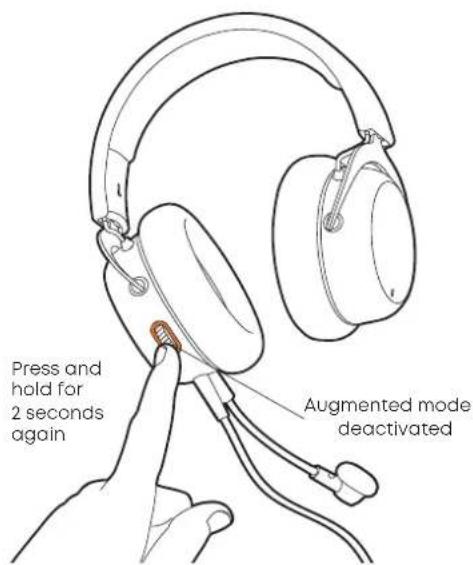
text_image
Press and hold for 2 seconds again Augmented mode deactivatedREPLACING THE EAR PADS
▶ To remove the ear pad, gently turn it counter-clockwise and pull it off.
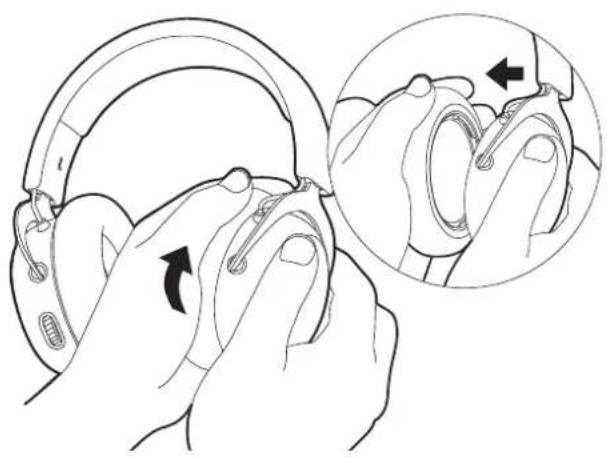
natural_image
Illustration of hands adjusting a helmet with a magnified inset showing the detail (no text or symbols)Turn counter-clockwise and pull off
TECHNICAL SPECIFICATIONS
Headphone
Transducer type....Dynamic
Operating principle .... Closed
Sound coupling to the ear..... Circumaural
Frequency response 5 - 30,000 Hz
Impedance 32 Ω
Max. sound pressure level
@1 mW / 500 Hz....116 dB SPL
THD < 0.5%
Headband pressure 4.5 N
Connection USB-C
Weight (headphone) 304 g (10.72 oz)
Microphone
Transducer type.... Electret condenser
Capsule diameter....9.9 mm (0.39")
Polar pattern....Cardioid
Frequency response 5 - 18,000 Hz
Max. SPL....118 dB
Signal-to-noise ratio....67 dB
▶To attach the ear pad, place it onto the orange housing and gently turn it clockwise until it sits tight.
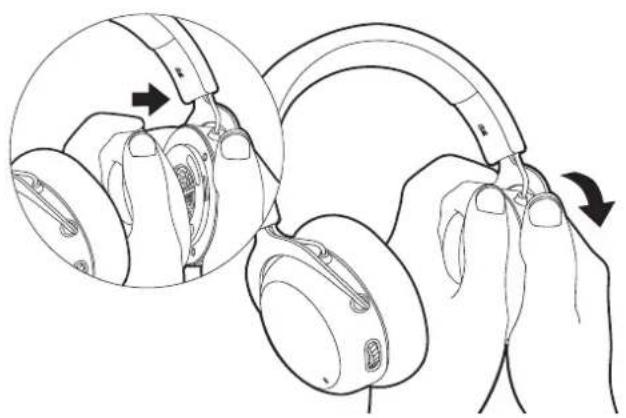
natural_image
Illustration of hands holding headphones with a close-up inset showing the ear and hand positioning (no text or symbols)Replace ear pad and turn clockwise
INHALT
natural_image
Line drawing of a mechanical device with a handle and base (no text or symbols)KABEL AN HEADSET ANSCHLIESSEN
natural_image
Line drawing of a pair of headsets with earplugs and connector cables (no text or symbols)natural_image
Illustration of hands adjusting a helmet with an inset showing the hand holding a key (no text or symbols present)natural_image
Illustration of hands holding headphones with a close-up inset showing the ear and finger positioning (no text or symbols)natural_image
Line drawing of a mechanical device with a handle and mounting bracket (no text or symbols)BRANCHER LE CÂBLE
SUR LE CASQUE-MICRO
natural_image
Line drawing of a pair of headsets with earplands and cables (no text or symbols)RÉGLER LE VOLUME SONORE
REEMPLACER LES COUSSINETS
natural_image
Illustration of hands adjusting a helmet with an inset showing the hand holding a ring (no text or symbols present)natural_image
Illustration of hands holding headphones with a close-up inset showing the ear and finger positioning (no text or symbols)natural_image
Line drawing of a pair of headsets with earplands and connector cables (no text or symbols)AJUSTE DEL VOLUMEN
natural_image
Illustration of hands adjusting a helmet with an inset showing the hand holding a key (no text or symbols present)natural_image
Illustration of hands holding headphones with a close-up inset showing the ear and finger positioning (no text or symbols)natural_image
Line drawing of a mechanical device with a handle and mounting bracket (no text or symbols)COLLEGAMENTO DEL CAVO
ALLA CUFFIA
natural_image
Line drawing of a pair of headsets with earplands and cables (no text or symbols)natural_image
Illustration of hands adjusting a helmet with a magnified inset showing the hand positioning (no text or symbols)natural_image
Illustration of hands holding a headset with a close-up inset showing the ear and finger positioning (no text or symbols)natural_image
Line drawing of a mechanical device with a handle and mounting bracket (no text or symbols)ANSLUTA SLADD TILL HEADSET
natural_image
Line drawing of a pair of headsets with earplugs and cable (no text or symbols)STÄLLA IN VOLYMEN
natural_image
Illustration of hands adjusting a helmet with a magnified inset showing the detail of the joint (no text or symbols present)natural_image
Illustration of hands holding headphones with a close-up inset showing the ear and finger mechanism (no text or symbols)natural_image
Line drawing of a mechanical device with a handle and mounting bracket (no text or symbols)natural_image
Line drawing of a pair of headsets with earplands and earphones (no text or symbols)natural_image
Illustration of hands adjusting a helmet with an inset showing the hand holding a key (no text or symbols present)natural_image
Illustration of hands holding headphones with a close-up inset showing the ear and finger positioning (no text or symbols)natural_image
Line drawing of a mechanical device with a handle and mounting bracket (no text or symbols)헤드셋에 케이블 연결
natural_image
Line drawing of a pair of hardcover headphones with earplands and cable (no text or symbols)음량 조절
text_image
Close-up Close up Close upnatural_image
Illustration of hands adjusting a helmet with an inset showing the hand holding a clip (no text or symbols present)시계 반대 방향으로 돌려 빼냅니다.
기술 자료
헤드폰
컨버터원리...동적
작동 원리 ....... 밀폐형
착용 유형.오바이어
주파수 특성 5-30,000 Hz
정격 임피던스 32Ω
최대 사운드 압력 레벨
@1 mW / 500 Hz. 116 dB SPL
왜곡률 <0.5%
측압 4.5 N
연결 USB-C
무게(헤드폰) 304 g
마이크
컨버터 원리. 전자 콘덴서
캡슐 직경....9.9 mm
폴라 패턴....카디오이드
주파수 특성 5-18,000 Hz
최대 사운드 압력 레벨 118 dB
신호/잡음비 67 dB
natural_image
Illustration of hands holding a headset with a close-up inset showing the ear and finger positioning (no text or symbols)natural_image
Line drawing of a pair of headsets with earplugs and connector cables (no text or symbols)音量設定
natural_image
Illustration of hands adjusting a helmet with an inset showing the hand holding a key (no text or symbols present)反時計方向に回して、取り外す。
技術データ
ヘッドホン
変換原理……ダイナミック
作動原理....密閉型
装着方式……オーバーイヤー
周波数特性 5\~30,000 Hz
インピーダンス....32Ω
最大感度
@1 mW / 500 Hz....116 dB SPL
歪み係数 <0.5%
压力....4.5 N
接続 USB-Cコネクタ
重量(ヘッドホン) 304 g
マイク
natural_image
Illustration of hands holding a pair of headphones with a close-up inset showing the ear and grip mechanism (no text or symbols)natural_image
Line drawing of a mechanical device with a handle and base (no text or symbols)头戴式耳机的转接线连接方法
natural_image
Line drawing of a pair of headsets with earplugs and connector cables (no text or symbols)音量调节
▶ 仅需向上转动滚轮即可提高音量。
▶ 仅需向下转动滚轮即可降低音量。
natural_image
Illustration of hands adjusting a helmet with an inset showing the hand holding a clip (no text or symbols present)沿逆时针方向转动并取下。
技术指标
耳机
换能方式....动圈式
工作原理……封闭式
耳垫接触方式……耳罩式
频率响应 5 - 30 kHz
阻抗 32Ω
最大声压级
@1 mW / 500 Hz....116 dB SPL
畸变因数 < 0.5%
压紧力....4.5 N
接口类型....USB-C
重量(耳机) 304 g
麦克风
换能方式……电容式
胶囊圈铁直径 9.9 mm
方向特性……心形指向型
频率响应 5-18 kHz
最大声压级 118 dB
信号/信噪比 67 dB
natural_image
Illustration of hands holding earchairs with a magnified inset showing the ear structure (no text or symbols)放置新耳垫并沿顺时针方向转动。
your beyerdynamic
www.beyerdynamic.com
beyerdynamic GmbH & Co. KG
For further distributors worldwide, please go to www.beyerdynamic.com
Non-contractual illustrations. Subject to change without notice.
EN-DE-FR-ES-IT-SV-RU-JA-KO-ZH 1 / MMX 150 / (11.21)