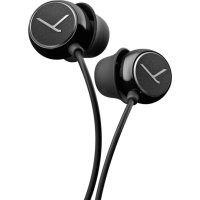
MMX 101 iE - Headphones BEYERDYNAMIC - Free user manual and instructions
Find the device manual for free MMX 101 iE BEYERDYNAMIC in PDF.


| Product Type | In-ear headphones with microphone |
| Brand | Beyerdynamic |
| Model | MMX 101 iE |
| Dimensions | Headphone body: approx. 15 x 20 x 25 mm |
| Weight | Approx. 18 g (including cable) |
| Cable Length | 1.2 m |
| Connector | 3.5 mm 4-pole jack (CTIA standard) |
| Power Supply | Passive, no battery required |
| Frequency Response | 20 Hz - 20 kHz |
| Impedance | 32 Ω |
| Sound Pressure Level | 108 dB SPL at 1 mW |
| Microphone Type | Omnidirectional electret condenser |
| Microphone Frequency Response | 100 Hz - 10 kHz |
| Main Functions | Music playback, hands-free calling, remote control (play/pause, track skip, volume) |
| Eartip Sizes | S, M, L silicone eartips included |
| Maintenance & Cleaning | Clean with a dry, soft cloth; remove eartips and rinse with water if needed |
| Safety Warnings | Avoid prolonged use at high volume to prevent hearing damage |
| Spare Parts & Repairability | Replacement eartips and cable available; consult Beyerdynamic support |
| General Information | Designed for mobile devices with 3.5 mm headphone jack |
Frequently Asked Questions - MMX 101 iE BEYERDYNAMIC
User questions about MMX 101 iE BEYERDYNAMIC
0 question about this device. Answer the ones you know or ask your own.
Ask a new question about this device
Download the instructions for your Headphones in PDF format for free! Find your manual MMX 101 iE - BEYERDYNAMIC and take your electronic device back in hand. On this page are published all the documents necessary for the use of your device. MMX 101 iE by BEYERDYNAMIC.
USER MANUAL MMX 101 iE BEYERDYNAMIC
text_image
feel the energy of soundMMX 101 iE PRODUKTINFORMATION PRODUCT INFORMATION
beyerdynamic))))
MMX 101 iE
Deutsch 4
English....8
Produktinformation MMX 101 iE
natural_image
Two-step illustration of a dental implant device, showing the end with a close-up view (no text or symbols)Congratulations on your purchase of MMX 101 iE beyerdynamic in-ear phones. Thank you for the trust you have placed in our brand. Please take a few minutes to review these instructions carefully before using your headphones. We wish you many enjoyable hours of first-class musical enjoyment!
Included in your purchases
After opening the packaging, please make sure all contents have been included. The purchase of your MMX 101 iE in-ear phones includes the following items:
1 MMX 101 iE in-ear phones
3 pairs of ear-pieces
1 Skype adapter for the use with a PC or laptop
1 softcase for storing and carrying your in-ear phones (or also your MP3 player)
1 cable clip
1 user manual
Connection
- The MMX 101 iE in-ear phones provide a 4-pin mini jack plug (3.5 mm) to connect to an iPhone, iPad, Blackberry, HTC and other compatible mobile phones (not compatible with Nokia, Sony Ericsson, Samsung etc.).
- With the supplied Skype/VolP adapter you can connect the MMX 101 iE directly to a PC or laptop. The microphone and headphone connectors are appropriately marked.
How to use the microphone
- When you receive a call, you can operate the integrated microphone as follows:
Press key: Answers the phone call
Press key again: Ends the phone call
With some mobile phones you have to press the key a little bit longer to end the phone call.
Depending on the software of the mobile phone you can use the microphone key for controlling other functions such as playing music.
Using your in-ear phones – selecting the right ear-pieces
Select the right size of ear-pieces before using the in-ear phones. The MMX 101 iE in-ear phones come with three pairs of ear-pieces – one of these pairs has been already assembled for you at the factory. The ear-pieces are easy to switch by hand (see figure 1). You can find out which ear-pieces fit best by trying on each of the different ear-pieces one after another with the headphones, placing the ear-pieces carefully inside your ear. The ear-pieces are the right size when they do not fall out if you move your head moderately quickly and you can hear the low-frequency bass sounds clearly and ambient noises only slightly.
If cable noise occurs, it can be minimised by guiding the cable behind the ear (see figure 2).
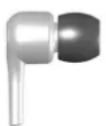
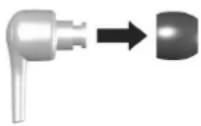
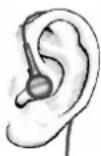
Fig. 1:
Changing the ear-pieces
Fig. 2:
Guiding the cable behind the ear
Maintenance
- Use a damp cloth to clean the ear-pieces of your in-ear phones regularly, drying them afterwards with a soft cloth.
- Never use chemical agents to clean your in-ear phones, such as a solvent-based cleaner. Such agents can corrode the ear-pieces.
- When you are not using the in-ear phones, store them in the case provided.
Safety Information
- Danger!
In-ear phones dramatically reduce your ability to hear ambient noise. Using the in-ear phones while in road traffic is potentially very dangerous and is therefore prohibited by law. Also, please make sure that you do not use your in-ear phones when in the vicinity of possibly dangerous machines and tools.
• Caution! Protect your hearing!
When connecting the in-ear phones, be sure you have turned the volume down to the minimum. Adjust the volume only after the in-ear phones are in place. To avoid any potential damage to your hearing, do not use the in-ear phones at loud volumes for extended periods of time. As a rule of thumb, when you have the in-ear phones on, set the volume to a level at which you can still hear your own voice when you speak at a normal volume while listening.
• Caution! Risk of injury!
When wearing wired headphones, avoid any sudden motion. You could seriously injure yourself, especially if you have any piercings or wear earrings or glasses, etc. that can get caught in the wire.
- Altered auditory perception
10 | 11
Many people need some time at first to get used to wearing the in-ear phones. Your auditory perception of your own voice and body, and even the sounds in your inner ear while walking, are very different from "normal" situations when you are not wearing the ear-pieces. This strange sensation will usually abate after wearing the in-ear phones for a while.
Reordering ear-pieces
If you should lose your ear-pieces or need to order new ones, you can get them from the spare parts store on the beyerdynamic website. Visit us at http://www.beyerdynamic.com/service.html. Select your model from the list and complete your purchase online.
If you are ordering from a country other than Germany, please contact your beyerdynamic distributor for reordering.
For assistance on who to contact, please visit:
http://www.beyerdynamic.com
Contacting beyerdynamic
For any questions and ideas concerning headphones and beyerdynamic, please contact us at any time during business hours:
beyerdynamic GmbH & Co. KG | Theresienstrasse 8 | 74072 Heilbronn – Germany
- E-mail: consumerproducts@beyerdynamic.de
- Phone: +49 (0) 7131 / 617 - 430
- Fax: +49 (0) 7131 / 617 - 499
Business hours:
Monday – Thursday: 8:00 am – 5:00 pm
Friday: 8:00 am – 2:00 pm
This symbol on the product, in the instructions or on the packaging means that your electrical and electronic equipment should be disposed at the end of its life separately from your household waste. There are separate collection systems for recycling in the EU. For more information, please contact the local authority or your retailer where you purchased the product.
beyerdynamic))))
beyerdynamic GmbH & Co. KG
Törsienstr. 8 | 74072 Heibrann - Germany
Tel: (49)0)7131/617-0 | Fax: (49)0)7131/617-204
info@beyerdynamic.de | www.beyerdynamic.com
For further distributors worldwide, please go to www.bryerdynamic.com