RoboVac G20 - Robot vacuum eufy - Free user manual and instructions
Find the device manual for free RoboVac G20 eufy in PDF.



| Product Type | Robotic Vacuum Cleaner |
| Brand | Eufy |
| Model | RoboVac G20 |
| Dimensions (Diameter x Height) | 330 mm x 76 mm |
| Weight | 2.8 kg |
| Power Supply | AC Adapter 19 V / 0.6 A |
| Battery Type | Li-ion 14.4 V, 2600 mAh |
| Battery Life | Up to 100 min (Silent mode) |
| Charge Time | 300 - 360 min |
| Dustbin Capacity | 600 ml |
| Suction Power | 55 W |
| Cleaning Modes | Auto, Spot, BoostIQ™ |
| Suction Levels | Silent, Standard, Turbo, Max |
| Connectivity | Wi-Fi 2.4 GHz, EufyHome app |
| Voice Compatibility | Amazon Alexa, Google Assistant |
| Sensors | Drop detection, bumper, floor sensors |
| Brushes | Rolling brush, 2 side brushes |
| Filter | Washable filter (replace every 6 months) |
| Maintenance | Regular cleaning of dustbin, filter, brushes, sensors |
| Safety | Auto shut-off, obstacle detection, indoor use |
| Package Contents | RoboVac, charging base, adapter, side brushes, additional filter, cleaning tool, cable ties, manual |
Frequently Asked Questions - RoboVac G20 eufy
User questions about RoboVac G20 eufy
0 question about this device. Answer the ones you know or ask your own.
Ask a new question about this device
Download the instructions for your Robot vacuum in PDF format for free! Find your manual RoboVac G20 - eufy and take your electronic device back in hand. On this page are published all the documents necessary for the use of your device. RoboVac G20 by eufy.
USER MANUAL RoboVac G20 eufy
For FAQs and more information, please visit:
www.eufylife.com
RoboVac G20
Owner's Manual
T225751005003'38V01
English
Deutsch
Espanol
Français
Italiano
Türkce
Pycckn
Nederland
219
259
Table of Contents
02 Important Safety Instructions
08 About Your RoboVac
What's in the Box
RoboVac Anatorny
LED Indication
12 Using Your RoboVac
Important Tips Before Use
Preparation
Charge Your RoboVac
Use Your RoboVac with the EufyHome App
Start/Stop Cleaning
Select a Cleaning Mode
Select a Suction Power Level
SelectBooSSQTMfeature
Use Your RoboVac with Amazon Alexa / Google
Assislanl
22 Cleaning and Maintenance
Clean the Dust Collector and Filter
Clean the Rolling Brush
Clean the Side Brush
Replace the Side Brush
Clean the Sensors and Charging Pins
Clean the Swivel Wheel
30 Troubleshooting
Voice Alert
34 Specifications
35 Customer Service
Thank you for purchasing RoboVac. Carefully read all the instructions below before using this device, and keep this manual for future reference.
Important Safety Instructions
To reduce the risk of injury or damage, keep these instructions at hand when setting up, using, and maintaining this device.
WARNING SYMBOLS USED
#
This is the safety alert symbol. This symbol alerts you to potential hazards that could result in property damage and/or serious bodily harm or death.
This device can be used by children aged from 8 years and above and persons with reduced physical, sensory or mental capabilities or lack of experience and knowledge if they have been given supervision or instruction concerning use of this device in a safe way and understand the hazards involved.
Children should be supervised to ensure they do not play with this device.
- Cleaning and maintenance shall not be performed by children without adult supervision.
- This device is only to be used with the power supply unit provided.
Before cleaning or maintaining this device, the plug must be removed from the outlet.
The battery in this device should only be replaced by a skilled professional.
- When removing the battery, disconnect the device from the supply mains.
To recharge the battery, only use the detachable adapter (US/CA: GSCU0600S019V12E; UK: GSCB0600S019V12E; EU: GSCV0600S019V12E; AU: GSCS0600S019V12E) provided with this device.
The battery must be removed before this device is disposed of. To remove the battery, first unscrew the screws on the bottom, then remove the back cover. Remove the battery by disconnecting the quick connector.
The used battery should be placed in a sealed plastic bag and disposed of safely according to local environmental regulations.
- The external flexible cable or cord of the power supply unit cannot be replaced; if the cord is damaged, the power supply unit shall be disposed of.
This device is for indoor use only.
- This device is not a toy. Do not sit or stand on this device. Small children and pets should be supervised when this device is operating.
- Store and operate this device in room temperature environments only.
- Do not use this device to pick up anything that is burning or smoking.
- Do not use this device to clean up spills of bleach, paint, chemicals, or anything wet.
- Before using this device, pick up objects like clothing and loose paper. Lift up cords for blinds or curtains. Move power cords, sharp-pointed and fragile objects out of the way. If this device passes over a power cord and drags it, an object could be pulled off a table or shelf.
- If the room to be cleaned has a balcony, a physical barrier should be used to prevent access to the balcony and to ensure safe operation.
- Do not place anything on top of this device.
- Be aware that this device moves around on its own.
Take care when walking in the area where this device is operating to avoid stepping on it.
- Do not operate this device in areas with exposed electrical outlets on the floor.
- Do not expose the electronics of this device, its battery, or the integrated Charging Base. There are no user-serviceable parts inside.
- Do not use this device on an unfinished, unsealed, waxed or rough floor. It may result in damage to the floor and this device. Use only on hard floor surfaces or low-pile carpets, and not on carpets with tasseled edges or loose threads.
This device has been designed to be used on floors without scratching them. We still recommend that you test this device on a small area of the room to be cleaned to ensure no scratches are made before cleaning the whole room.
Only use attachments recommended or described in this manual. - Do not handle the appliance or plug with wet hands.
- Ensure that the dust bag and/or filters are correctly in-place before usage.
- Do not use a battery pack or appliance that is damaged or modified. Damaged or modified batteries may exhibit unpredictable behavior resulting in fire, explosion, or risk of injury.
- Do not expose the battery pack or appliance to fire or excessive temperature. Exposure to fire or temperature above 130^ may cause an explosion.
- Do not modify or attempt to repair the appliance or the battery pack (as applicable), except as indicated in the instructions for use and care.
- Follow all charging instructions and do not charge the battery pack or appliance outside of the temperature range specified in the instructions. Charging improperly or at temperatures outside of the specified range may damage the battery and increase the risk of fire.
04 EN EN 05
Notice

This symbol on the device or its packaging indicates:
Do not dispose of electrical appliances as unsorted municipal waste; use separate collection facilities. Contact your local authority for information regarding the collection systems available. If electrical appliances are disposed of in landfills or dumps, hazardous substances can leak into the groundwater and get into the food chain, damaging your health and well-being. When replacing old appliances with new ones, the retailer is legally obliged to take back your old appliance for disposal at least free of charge.
FCC Statement
This device complies with Part 15 of the FCC Rules. Operation is subject to the following two conditions: (1) This device may not cause harmful interference, and (2) this device must accept any interference received, including interference that may cause undesired operation.
Warning: Changes or modifications not expressly approved by the party responsible for compliance could void the user's authority to operate the equipment.
Note: This equipment has been tested and found to comply with the limits for a Class B digital device, pursuant to Part 15 of the FCC Rules. These limits are designed to provide reasonable protection against harmful interference in a residential installation.
This equipment generates, uses, and can radiate radio frequency energy and, if not installed and used in accordance with the instructions, may cause harmful interference to radio communications. However, there is no guarantee
that interference will not occur in a particular installation. If this equipment does cause harmful interference to radio or television reception, which can be determined by turning the equipment off and on, the user is encouraged to try to correct the interference by one or more of the following measures: (1) Reorient or relocate the receiving antenna. (2) Increase the separation between the equipment and receiver. (3) Connect the equipment into an outlet on a circuit different from that to which the receiver is connected. (4) Consult the dealer or an experienced radio / TV technician for help.
ISED Compliance Statement
This device contains license-exempt transmitter(s)/ receiver(s) that comply with Innovation, Science and Economic Development Canada's license-exempt RSS(s). Operation is subject to the following two conditions:
- This device may not cause interference.
- This device must accept any interference, including interference that may cause undesired operation of the device.
RF Exposure Compliance Statement
This equipment complies with FCC/IC radiation exposure limits set forth for an uncontrolled environment. This equipment should be installed and operated with minimum distance 20cm between the radiator and your body.
Declaration of Conformity
This product complies with the radio interference requirements of the European Community. Hereby, Anker Innovations Limited declares that the radio equipment type T2257 is in compliance with Directive 2014/53/EU. The full text of the EU declaration of conformity is available at the following internet address: https://www.eufylife.com/
06 EN EN 07
Maximum output power: 18 dBm (For EU)
Frequency band: 2.4G band (2.4000GHz - 2.4835GHz)
GB Declaration of Conformity
Hereby, Anker Innovations Limited declares that the product type T2257 is in compliance with Radio Equipment Regulations 2017 and The Restriction of the Use of Certain Hazardous Substances in Electrical and Electronic Equipment Regulations 2012. The full text of the GB declaration of conformity is available at the following internet address: https://www.eufy.com.
The following importer is the responsible party (contract for EU and UK matters)
Anker Technology (UK) Ltd
Suite B, Fairgate House, 205 Kings Road, Tyseley, Birmingham, B11 2AA, United Kingdom
Amazon, Echo, Alexa and all related logos are trademarks of Amazon.com, Inc. or its affiliates.
Apple and the Apple logo are trademarks of Apple Inc., registered in the U.S. and other countries. App Store is a service mark of Apple Inc., registered in the U.S. and other countries.
- Google Play and the Google Play logo are trademarks of Google Inc.
- Google Home is a trademark of Google Inc.
About Your RoboVac
What's in the Box
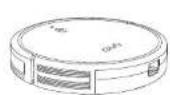
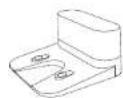
RoboVac Charging Base Power Adapter
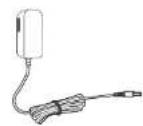
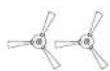
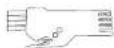
Side Brushes (×2) Additional Hiter Cleaning Tool
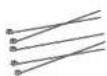

Cable Ties (x) Owner's Manual
& Other Documents
RoboVac Anatomy
A. Top & Side
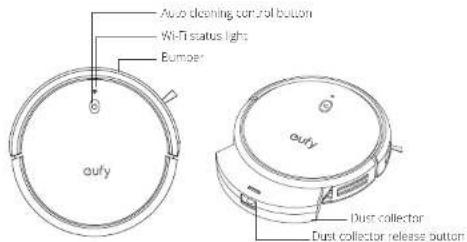
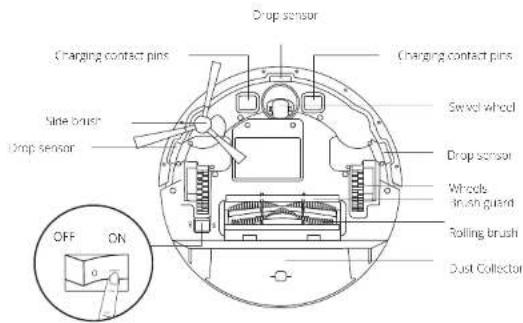
B. Bottom
Men power switch (On/Off)
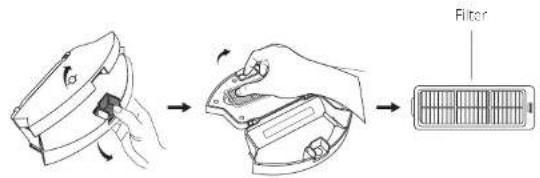
C. Dust Collector
D. Suction Inlet
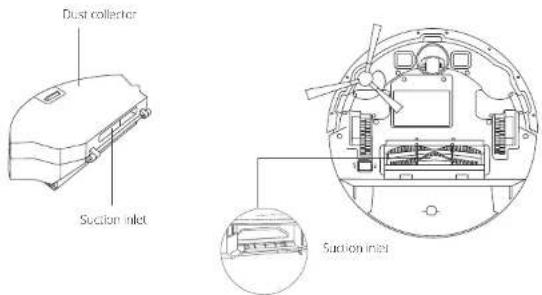
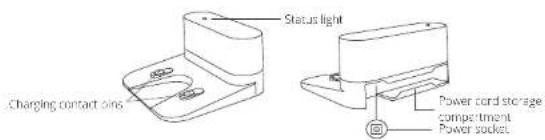
E. Charging Base
10 EN EN 11
LED Indication
You can see the status of RoboVac from the LFD indicators.
| (Power Status Light) | Status |
| Pulsing orange Charging | |
| Solid blue Standby / Cleaning | Fully charged |
| Solid orange Low power and no turning to Charging Base. | |
| Off | • RoboVac is off • To conserve power, the light automatically turns off when RoboVac is not docked to the Charging Base and has been inactive for 10 minutes. |
| Flashing red & Voice alert | RoboVac has an error. Refer to the "Troubleshooting>Voice Alert" section in this manual for solutions. |
| (Wi-Fi Status Light) | Status |
| Slowly flashing blue waiting for connection | |
| Rapidly flashing blue Connecting with your wireless router | |
| Solid blue Connected to your wireless router | |
Using Your RoboVac
Important Tips Before Use
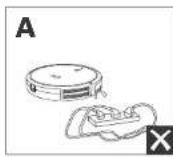
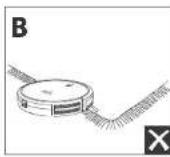
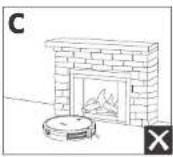
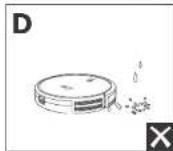
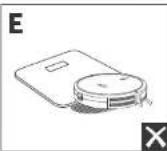
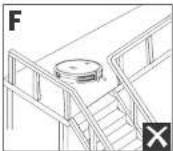
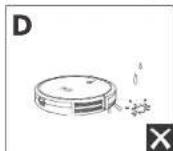
Remove power cords and small objects from the floor that may entangle RoboVac. Use the supplied cable ties to organize your wires and power cords.
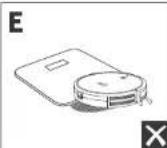
Fold tasseled edges of area rugs underneath to prevent tanging RoboVac. Avoid cleaning very dark-colored high-pile rugs or rugs thicker than 1.02 in/26 mm as they may cause RoboVac to malfunction.
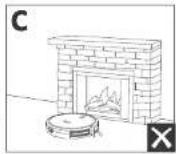
It is strongly recommended to place boundary strips (solid separately) in front of fireplaces and certain areas (i.e. air vents) that may cause damage to RoboVac if entered.
Keep Ropovac away from wet areas during cleaning.
RobVac may climb on top of objects less than 0.67 in/17 mm in height. Remove these objects if possible.
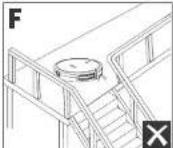
Anti drop sensors will prevent RoboVac from tumbling downstairs and sleep drops in most cases. Sensors are less effective if dirty or used or carried/reflective/very dark-colored floors. It is recommended to place physical barriers to block off areas where RoboVac may fall.
Preparation
1 Remove the foam blocks beside the bumper before use.
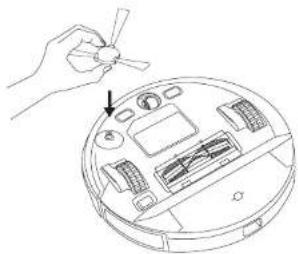
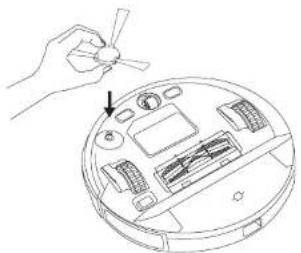
2 Install the side brush before use.
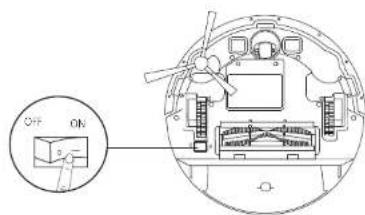
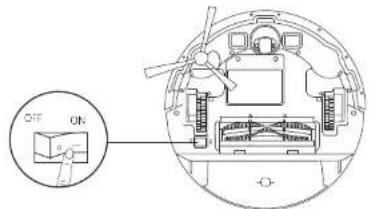
Turn on the main power switch on the bottom of RoboVac.
12 EN EN 13
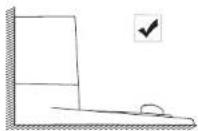
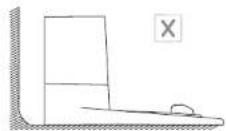
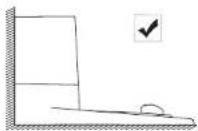
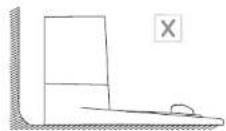
4 Flare The Chngg Base on a level surface and agarst a wall.
5 Remove objects within 3ft /1m of the left and right side and within 6 ft/2 m of the front of the Charging Base. If you cannot remove the objects, move RoboVac to a new place and check whether RoboVac can return to the Charging Base normally; if not, contact early customer service for help

6 Connect the adapter to the Charging Base and a wall out et.
When the Charging Base connects to AC power, the LED indicator on the Charging Base is SQUID WHITE.
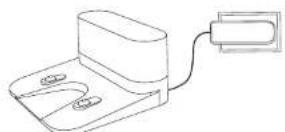
Install the Charging Base in local area that RoboVac can easily access. It is recommended to place the Charging Base against a wall, and on a hard level surface rather than on rugs or carpets.
- Always keep the Charging Base plugged in, otherwise RoboVac will not automatically return to it.
Charge Your RoboVac
Make sure RobcVar is fully charged before use
- RoboVac will return to the Charging Base at the end of a cleaning cycle when its battery is running low.
Attach RoboVac to the Charging Base by aligning its charging pins with the charging pins on the base.
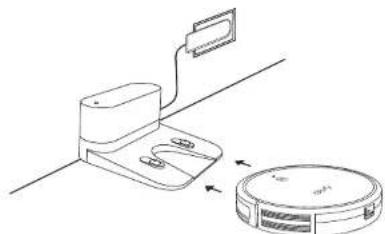
Turn off the main power switch if RoboVac will not be used for a long period of time. To preserve the battery's lifespan, recharge at least once every 6 months.
14 EN EN 15
Use Your RoboVac with the EufyHome App
To enjoy all available features, it is recommended to control your RoboVac via the EarlyHome app.
Before you start, make sure that:
- Your smartphone or tablet is connected to a Wi-Fi network.
- Your smartphone or tablet is running iOS 10.0 (or above) or Android 5.0 (or above).
The 2.4GH band wireless signal is enabled on your wireless router.
The Wi-Fi status light on RoboVac is slowly flashing blue. - RoboVac is attached to the Charging Base to ensure it has enough power during setup.

Download
App Store

Google Play
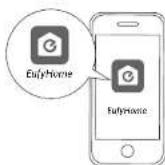
- Download the Eufly-home app from the App Store (iOS devices) or Google Play (Android devices).
- Open the app and create a user account.
- Tap Ine ^ 一 + ^ icon to add "RoboVac G70" to your EufyHome account.
-
Follow the instructions in the app to set up the Wi-Fi connection.
-
After connecting successfully, you can control Rupovac via the app.
- With the app, you can select a cleaning mode, set the time, schedule a cleaning
view the system status, receive notifications and access additional features.

If RoboVac gets stuck in any space, tap Find My Robot in the app and find the
machine.
Reset the Wi-Fi connection
To reset the Wi-Fi connection: press and hold (br 10 seconds until) you hear a voice prompt. At the same time, RoboVac will restore the factory default settings.
The Wi-Fi status light will slowly flash blue. Now you can follow the Wi-Fi
Instructions in the Euty Home app to set up the Wi-Fi connection.
Schedule Cleaning
With the EflyHome app, you can schedule RuboVac to start cleaning at a particular time.

- You can set the time and customize the cleaning schedules from Sunday
to Saturday on the baby home app . This function is available in the app
only.
Start/Stop Cleaning

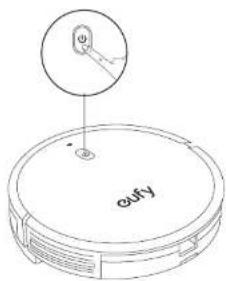
Make sure the main power switch on the bottom of RoboVac is turned
or defc
- You can also start or stop clearing via the EufyHorse app.
Wi-Fi Status Light
| Slowly flashing blue Waiting for connection |
| Rapidly flashing blue Connecting with your wireless router |
| Solid blue Connected with your wireless router |
16 EN EN 17
Press start cleaning in Auto cleaning mode.
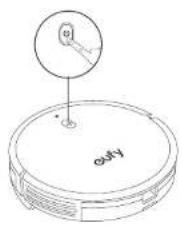
Press Ugei to pause cleaning.
Select a Cleaning Mode
Auto Cleaning Mode
After startup, RoboVac moves from the Charging Base and automatically determines its cleaning route, following a bow-shaped charging method. When the entire clean is finished, RoboVac automatically returns to the Charging Base.
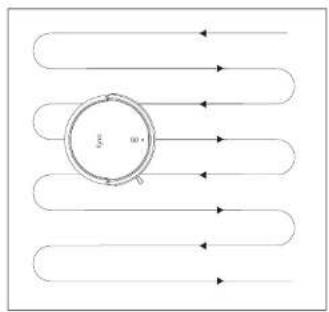
18 EN EN 19
Press start clearing in Auto clearing mode.
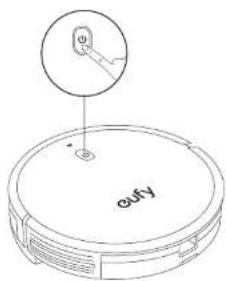
During cleaning, RoboVac will return to the Charging Base automatically if the battery level becomes low. Once recharged, RoboVac will resume itsVIN1 finish the normal cleaning.
- By default, RoboVac starts in Auto-cleaning mode when it is turned on.
Spot Cleaning Mode
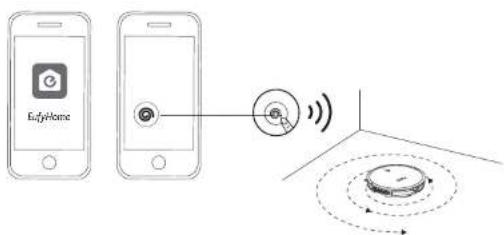
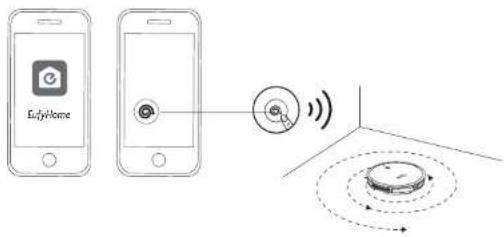
You can select the Spot cleaning mode in the Eulfi home app. In this mode, RobeVac intensively cleans a specific area for 2 minutes in a spiral pattern, useful if there is a concentrated area of dust or debris.
Select a Suction Power Level
In the Eu'YHome app, selc a suction power level according to your needs.
·Quiet
Standard (Default)
Turbo
- Max

When RoboVac starts cleaning the next time, it will clean according to the suction power level you previously selected.
Select BoostIQ™ feature
In the Elyl lone apo, selecT the BoostiQTM feature according to your needs. RoboVac will automatically increase the suction power if it detects that stronger power is needed to ensure the best clean. BoostiQTM is ideal for cleaning thicker carpets and hard-to-sweep messes, which will reduce the total cleaning time, but increase the noise level. If the vacuuming noise caused by BoostiQTM discurs you, you can disable this feature.
Use Your RoboVac with Amazon Alexa / Google Assistant
Amazon Alexa or Google Assistant is a smart voice control device that enables you to control RoboVac with your voice.
Before you start, make sure that:
- BobVac is attached to the Charging Base to ensure there is enough power
RoboVac is connected with the EutyHome app - You have an Amazon Alexa-enabled device (i.e. Amazon Echo, Echo Dot and Amazon Tap, Echo Snow, Echo Spot) or a device enabled with the Google Assistant (i.e. Google Home, Google Home Mini). These devices are sold separately.
- The Amazon Alexa app or Google Home app is already installed on your smart device, and you have created an account.
To control RoboVac with Amazon Alexa or Google Assistant
- Open the Eufy home app and find "Smart Integrations" in the top left.
- Follow the on-screen instructions to complete the setup.

Currently this feature only supports English, German, French, and Spanish. You could check regularity if more languages are supported at https://www.euylif.com/support/.
Cleaning and Maintenance
Before cleaning and maintaining, turn off the device and unplug the adapter.
For optimal performance, follow the instructions below to clean and maintain RoboVac regularly. The cleaning / replacement frequency will depend on your RoboVac usage habits.
Recommended Cleaning / Replacement Frequency
| RoboVac Part Cleaning Frequency Replacement Frequency | |
| Dus. Colloclor After each use | |
| Filter Once every week (“twice a week if you have a pet”) | Every 6 months or after every 50 rounds of cleaning |
| Side Brush Once every month Every 3-6 months (or when visibly worn) | when (very visibly worn) |
| Brush guard Once every month Every 3-6 months (or when visibly worn) | when (very visibly worn) |
| Sensors Once every month - | |
| Charging Pins Once every month - | |
| Swivel Wheel Once every month - | |
Clean the Dust Collector and Filter
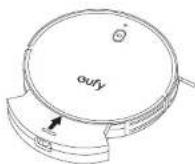
Press the dust collector release button to pull the dust collector out.
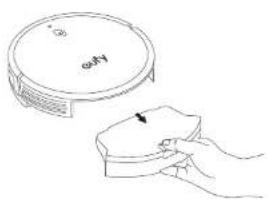
2 Open and empty the dust collection
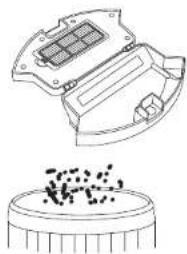
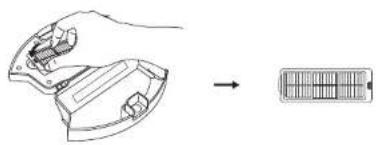
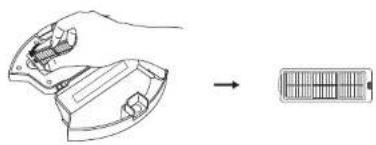
3 Remove the filter.
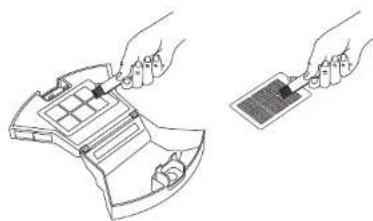
Clean the dust collector and filter with the cleaning brush
22 EN EN 23
5 Rinse the dust collector and filter thoroughly with water.
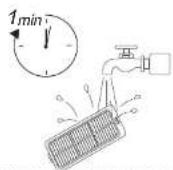
Do not use hot water or any detergent to clean the filter.
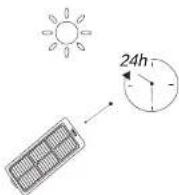
Air dry the dust collector and filter completely before next use. You may use another filter if the original one is not dry.
7 Place the filter back into the dust collector.
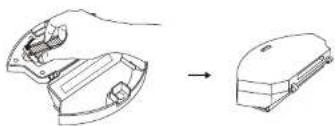
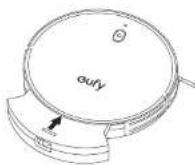
Push the dust collector back into the main unit.
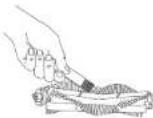
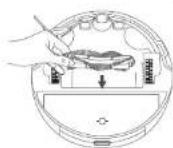
Clean the Rolling Brush
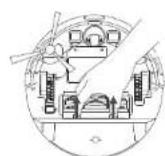
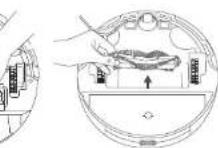
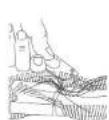
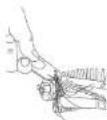
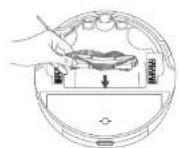
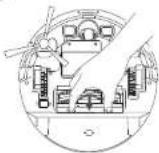
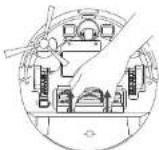
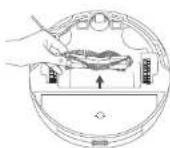
1 Pull on the release tabis to unlock the brush guard as shown.
Lill the rolling brush to remove.
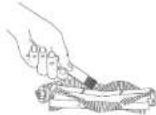
Clean the rolling brush with the cleaning tool.
4 Reinstal the rolling brush by inserting the fixed protruding and first and then clicking into place.
Press down to snap the brush guard into place.
24 EN EN 25
1
3
4
5
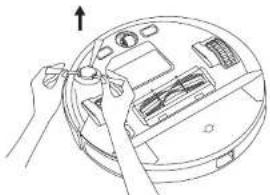
Clean the Side Brush
Foreign substances, such as hair, can easily get tangled in the side brush, and dirt may adhere to it. Be sure to clean it regularly.
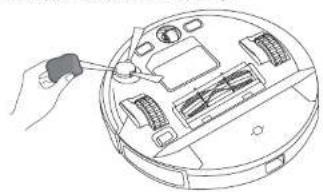
1 Remove the side brush.
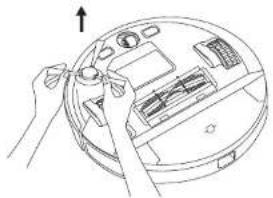
Carefully unwind and pull off any hair or string that is wrapped between the main unit and the side brush.
Use a cloth dampened with warm water to remove dust from the brush or to gently reshape it.
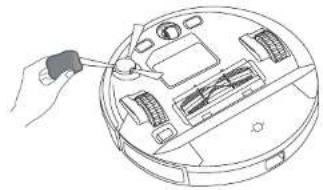

Only use the side brush when it is completely dry.
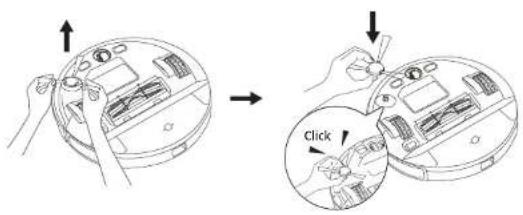
Replace the Side Brush
The side brush may become damaged after being used for a period of time. Follow the instructions below to replace it.
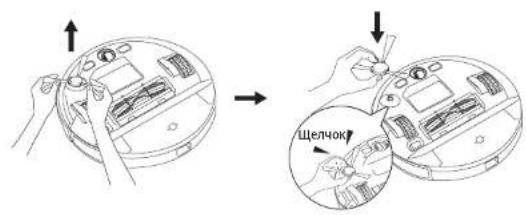
Pull off the old side brush and snap the new one into place until you hear a click
26 EN EN 27
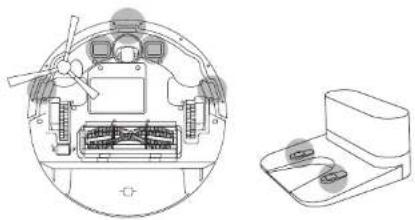
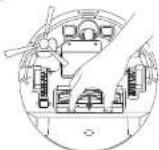
Clean the Sensors and Charging Pins
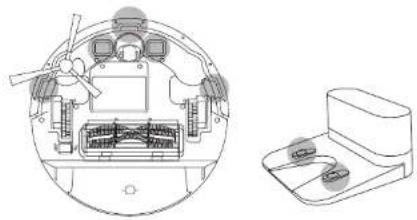
To maintain the best performance, clean line drop sensors and charging pins regularly.
- Dust off the drop sensors and charging contact pins using a cloth or cleaning brush.
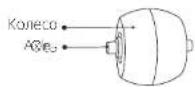
1 Remove the swivel wheel
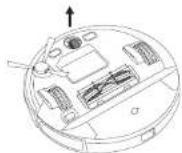
Clean any hair or debris wrapped around the wheel or antangled inside the wheel cavity.
Reinstal the wheel and push in untIt clicks into place.
Do not clean the swivel wheel with water.
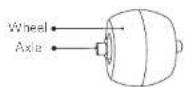
Clean the Swivel Wheel
Hair or dust particles can easily get entangled in the swivel wheel. Be sure to clean the swivel wheel periodically and as needed.
28 EN EN 29
Troubleshooting
The solutions below are for general questions, if your problem persists, visit www.cuelfylife.com, go to Eucyl formo app, or contact support@eculfy.fcof.com for help.
| Problems Solutions | |
| RoboVac cannot he activated. | Make sure the main power switch is in the ON position Make sure the battery is fully charged.If you still have trouble, turn off the main power switch and then turn it back on. |
| RoboVac stops working suddenly. | Check if RoboVac is trapped or stuck on an obstacle Check if the battery level is low low.If you still have trouble, turn off the main power switch, wait for 2 seconds, and then turn it back on. Check if RoboVac has aerted you with any voice prompts or LEO indicators. Refer to the "Voice Alert" section in th's manual. |
| You cannot schedule cleanings. | Make sure the main power switch on the bottom of RoboVac is turned on. Make sure the scheduled time has been set correctly. Check if the time zone in the EufyHome app is consistent with that on your mobile device. Check if RoboVac's power is too low to start cleaning. Cleaning schedules are erased when RoboVac is powered off or when reset to factory default settings. If RoboVac is powered on without Internet access, cleaning schedules will not synchronize and must be reset via the app. |
| Suction power is weak. | Check if any obstructions are blocking the suction inlet. Empty the dust collector. Check if the filter is wet due to water or other liquid on the floor. An-dry the filter completely before use. |
| RoboVac cannot be charged. | Check if the indicator on the Charging Base lights up. If not, reconnect the adabater with the Charging Base and try a new power outlet. If the problem persists, contact the eufy service center to repair or replace the Charging Base. Dust of the charging contact pins with a dry cloth. Check if you can hear a beep when RoboVac's docked into the Charging Base. If no, contact the eufy service center to repair or replace the Charging Base. |
| Problems Solutions | |
| RoboVac cannot return to the Charging Base. | Remove objects within 3 ft/1 m to the left and right side and within 6 ft/2 m of the front of the Charging Base. Check if RoboVac is stuck by any objects. Clean the charging contact pins. |
| RoboVac's movements or travel path are abnormal. | Clean the sensors carefully with a dry cloth. Restart RoboVac by turning the power switch off and on. |
| RoboVac's cleaning time becomes shorter. | Make sure RoboVac is fully charged (indicated by a solid blue LED light) before cleaning. The cleaning time will be affected by the suction mode and floors/rugs to be cleaned. On floors: approx. 100 / 80 / 70 / 40 minutes of cleaning in Quiet / Standard / Turbo / Max suction mode respectively On rugs: approx. 80 / 60 / 55 / 30 minutes of cleaning in quiet / Standard / Turbo / Max suction mode respectively Check if RoboVac has alerted you with any voice prompts or LED indicators. Refer to the "Voice Alert" section in this manual. If your cleaning time is much less than the time mentioned above, contact eufy customer service for help. |
| RoboVac cannot connect to a Wi-Fi network. | Make sure you entered the Wi-Fi password correctly. Make sure your RoboVac router, and mobile phone are close enough to ensure a strong signal strength. Make sure your Wi-Fi router supports the 2.4GHz and 802.11b/g/n bands; hhu 5GHz band is not supported. |
| You cannot control RoboVac with Amazon Alexa. | Check if there are any Internet connection problems. Check whether you have installed the Amazon Alexa app onto your smart device and enabled "EufyHome RoboVac" Skill in the Amazon Alexa app. For details, refer to the "Smart Integrations" page in the eufyHome App. Make sure you have an EufyHome account and have connected in RoboVac. Make sure you are using correct Alexa voice commands. |
| You cannot control RoboVac with the Google Assistant. | ·Check if there are any internal connection problems ·Check if you have installed the Google Home app onto your smart device and initiated the "FulHome" action in the Google Home app. For details, refer to the "Smart Integrations" page in the FulyHome App. ·Check if you are using the proper commands when talking to the Google Assistant. When making your request, first say the wake words "Ok Google". ·Repeat your question. Speak clearly to the Google Assistant. |
Voice Alert
Which RoboVac encounters a problem, the red indicator on RoboVac will flash and you will hear the relevant voices prompts.
The voice prompts below are only for reference and may be changed slightly after voice pack updates. Please to low the voice prompts you have heard to find the cause and solution below.
| Voice Prompt Cause and Solution | |
| Error 1: Front Bumper Stuck | Front bumper is stuck. Tap it repeatedly to remove any dust. Trail, move the device to a new position and try again. |
| Error 2: Wheel Sluck | Wheel may be stuck or trapped. Clean any obstacles in the surrounding area and check the wheel for any trapped dust. Move the device to a new position and try again. |
| Error 3: Side Brush Stuck | Brush may be stuck. Clean it and try again. |
| Error 4: Rolling brush stuck. Remove and clean the rolling brush | Remove the rolling brush, roller joint, roller brush cover, and suction inlet to clean it. Once cleaned, place the items back into the device and try again. |
| Error 5: Device Stuck or Trapped | Device is trapped. Clean any obstacles in the surrounding area and try again. |
| Error 6: Device Sluck or Trapped | Device may be suspended in air. Move it to a new position close to the original position and try again. If the device is still unable to start, clean the edge sensor and try again. |
| Voice Prompt Cause and Solution | |
| Error 7: Wheel Suck Hanging | Wheels may be suspended in air. Move the device to a flat surface and a new position close to the original position then try again. |
| Error 8: Low Battery Shutting Down | Low Battery system will shut down. Charge the device and try again. |
| Error 9: Magnetic Boundary Strip deactivated. Move device to a different area | Device is too close to a strong magnetic field or strip. Move the device to a different area and try again. |
| Error 10: Battery Error | - Open the battery compartment and check whether the battery is connected and restart the device. Battery Temperature may be too high or low, wait until the battery falls to normal temperatures before usage (0 °C - 40 °C / 32 °C to 104 °F). - If the issue persists, contact customer support for help. |
| Error 11: Wheel Module Error | - Check whether the wheels are stuck or thrust is trapped inside before restarting the device. - If the issue persists, contact customer support for help. |
| Error 12: Side Brush Error | - Check whether the side brush is stuck in an unknown object before restarting the device. - If the issue persists, contact customer support for help. |
| Error 13: Suction Fan Error | - Check whether the fan blades are stuck in an unknown object before restarting the device. - Clean the dust bin and filter before restarting the device. - If the issue persists, contact customer support for help. |
| Error 14: Rolling Brush Error Refer to Owner's Manual or App for help | - Remove and clean the roller brush, roller brush connection, roller brush cover and suction inlet before restarting the device. - If the issue persists, contact customer support for help. |
Specifications
| Battery Voltage | 14.4 V= |
| Power Consumption 55 W | |
| Battery Type | 14.4 V= Li-on 2600 mAh |
| Dust Collection Capacity | 600 ml |
| Charging Time 300 - 360 mns | |
| Insul | 19 V=0.6 A |
| Output | 19 V=0.6 A |
| Input | 100-240 V=0.5 A Max |
| Output | 19 V=0.6 A |
| Frequency 50/60 Hz |
Customer Service
For tutorial videos, FAQs, manuals, and more information, please visit support eufyllie.com
Contact Us
support@eufyllife.com
www.eufylife.com

(US) +1 (800) 988 7973 Mon-Fri 6:15-17:00 (PT);
Sat-Sun 6:30-16:30 (PT)
UK+4401604936200Mon-Fri6:00-17:00
Sat-Sun 6:00-14:00
(DE)4906995797960Mo-Fr8:00-16:00
For more support phone numbers, please visit:
support eufylife.com/s/phorecontactus
Or scan the QR code below:

@EufyOfficial @EufyOfficial @EufyOfficial @EufyOfficial
Anker Innovations Limited
Room 1318-19, Hollywood Plaza, 610 Nathan Road, Mengkok, Kowloon, Hong Kong
Deutsch
Inhaltsverzeichnis
Alexa/Google Assistant
ANKER TECHNOLOGY (UK) LTD
Suite B, Fairgate House, 205 Kings Road, Tyseley, Birmingham, B11 2AA, Vereinigtes Königreich
Download on the App Store

SET ON Google Play
(US) +1 (800) 988 7973 Mon-Fri 6:15-17:00 (PT);
Sat-Sun 6:30-16:30 (PT)
(UK) +44 (0) 1604 936200 Mon-Fri 6:00-17:00;
Sat-Sun 6:00-14:00
(DE) +49 (0) 69 9579 7960 Mo-Fr 8:00-16:00
support eufylife.com/s/phonecontactus
Downloaded on the App Store

GET ON Google Play
support@eufyllife.com
www.eufylife.com

(US) +1 (800) 988 7973 Mon-Fri 6:15-17:00 (PT);
Sat-Sun 6:30-16:30 (PT)
UK+4401604936200Mon-Fri 6:00-17:00
Sat-Sun 6:00-14:00
(DE)49(0)6995797960Mo-Fr8:00-16:00
ANKER TECHNOLOGY (UK) LTD
Suite B, Fairgate House, 205 Kings Road, Tyseley, Birmingham, B11 2AA, Royaume-Uni
support@eufyllife.com
www.eufylife.com
US)18009887973
Mon-Fri 6:15-17:00 (PT) Sat-Sun 8:30-16:30 (PT)
UK) +44 01604936200 Mon-Fri 6:00-17:00 Sun-Sun 6:00-14:00
(DE)49(0)6995797960Mo-Fr8:00-16:00
ANKER TECHNOLOGY (UK) LTD
Suite B, Fairgate House, 205 Kings Road, Tyseley, Birmingham, B11 2AA, Regno Unito
Download on the App Store

GETION Google Play
support@eufyllife.com
www.eufylife.com
(US) +1 (800) 988 7973 Mon-Fri 6:15-17:00 (PT);
Sat-Sun 6:30-16:30 (PT)
UK+4401604936200Mon-Fri 6:00-17:00
Sat-Sun 6:00-14:00
(DE) +49 (0) 69 9579 7960 Mo-Fr 8:00-16:00
support eufylife.com/s/phonecontactus
Oppure estguire la scansion de la codice QR qui sotie:
@EufyOfficial
@EufyOfficiat
@EufyOfficial
@EufyOfficial
Türkce
icindekiler
BoostIQTM Özelligininseme
RoboVacimizi Amazon Alexa/Google Assistant
Ile Kullanma
ANKER TECHNOLOGY (UK) LTD
Suite B, Fairgate House, 205 Kings Road, Tyseley, Birmingham, B11 2AA, United Kingdom
Download on the App Store

Google Play
| Girls | 19 V = 0.6 A |
| Sikas | 19 V = 0.6 A |
| Girls | 100-240 V - 0.5 A Maximum |
| Gks | 19 V = 0.6 A |
| Frekans 50/60 Hz |
| İTHALATÇI FIRMA | |||
| İthalatçı Firma | Alsan ile ve Dis Tic. Ltd.§i | Adres: | Süleymaniye Mah. Ord.Prof.Dr.Cemil Birsel Cad. Üç Kapil Şelamet Han No:261 Çaki No:412 Fatih/ Istanbul |
| Telefon: 0850 | 460 14 14 | Teknik Servis Adres: | Seyşantepe mah. Cekirmaz sek. No:12/B Kırtnane/Istanbul |
GARANTI SARTLARI
Garant suresl malin teslm tanhincn itibaren baslerve 2 yidir.
support@eufylife.com

www.eutylife.com

(US)-1(800)9887973
Mon-Fri 6:15-17:00 (PT)
Sat-Sun 6:30-16:30 (PT)
(UK)+44(0)1604936200 Mon-Fri 6:00-17:00
Sat-Sun 6:00-14:00
(DE)49(0)6995797960 Pzt-Cuma 8:00-16:00
Bb6Op ypoBH MoHOCn BcAcBaHH
UcnnoB3ObaHne cyHKcun BoostIQ
Mcnonb3OBaHne RoboVac cRHeKc.Anica
NcnoIb3OBAHme RoBoVac c rOncOBBMn NOMOJIHKAMM Amazon Alexa n Google ACCnCTeHT
242 OuHCTKa H6cnyKbAHne
OuHCTKa Nblnc6bOpHNka nΦnltpa
OuHcTKaBpaauoueenCyeK
OuHcTka 60koBOU ueTkn
3aMeHa 60KOBOU 8eTKN
OuHcTka DaTChKOB N KOHTaKTOB 3apRdK
OuNTKa NOBOPOTHOKOJecA
249 NOnck uYcTaPAnHe HEnCnPaBHOCTe
TolocOBOnCnHn
255 TexHnueckne XapaKTepeNCTKN
257 06cnyKuBaHne KnHeTOB
Enaogaoim Bac 32 hnpoBefeHne Poobta-Nhneocca RoBOvAc. BHIMAI HIOI OHNAKOMTcBc COCEM HNIKKeENEHNHINH INCTyPCHINIEI HNCIIHOBbAHEM YCIPONCTSA X COPAANITE DAHOHOpyKOBODCTOJI OAOBPOAHJ K HEMY B CyUdEJM
Pycckn
Baxhble nHctpyKuN no TexHnke 6e3oNaChocTn
IINCHJHENHINCKA NOJUeyHIN TpaBMBI NIOBpeKHeHn yCTpoNCTBa DEPKNTe 3TN INHCTpyKUnn NOTEXHNKE630NaChOCTN NO pyKo npn HAcTPOKe, IcNoJIb3OBaHHN IOBCnyKBAHN daHHORO yCTpoNCTBa.
NCIOb3yEMbIE CUMBOJIbI IPEyIPKDEHIN

3TO CMBON npedynpexdeHnO6 ONaCHOCTN. 3TOT CMBON npedynpexdaET Bac O BO3MOKHBIX ONaCHOCTX, KOtOpBle MOYr NOBNeyb 3a CoBOI NOBpeKeHne HmUeCTBa N/INn PpNHHeHne cepbe3HO BpeDa 3DopOBbIO nCmePTb.
JaHHOe yCTPOIcTB MOrY nCnOJIb3OBaTb
TeN CTAPWe 8NET NnIuCa COrpaHnueHHbIMN
mNueCKMn, CEHCOPHbIMn NnY mCTBeHHbIMN
CNOcO6HoCTaMn, a TAKKe INuCA 6e3
COOTBETCTByIOE OOnIta N3HaHm, ECIN OHN
NCNoJb3yIOr Eo NOp INPcMOTpOM Nm DaHbI
NHCTpyKnn No 6e3OnaCHOMy NCnOJIb3OBaHnO
DaHHORO yCTPOIcTBa N OHN OCo3HaHT HaHnHe
ONaCHOCTn.
-He no3B0JnTe DetTm UrpaTb C3TmUyCTPOuCTBOM.
TeH He OJKNbOcUeCTBnTb OuNTKy N 06CnyKnBaHne yctpoNCTBa 6e npncmotpa B3pocblx.
JaHHOy yCTPOIcTB CnEMyET NcNoB3OBaTb TOnbKO C NOCTABJIeMbIM NCTOCHNKOM NITAHJ.
-ПелегоунсткоииOBcIyKINBaHnEMdAHHOrO yctpoiCTBa Heo6xOIMOBbHyTb BnIKyN3 po3eTKn.
3aMeHa aKKyMylTOpa B bTOM yCTPOIcTBe DOJIKHbBbIOJIHrTbcra TOnbKO KBaIIuNpOBAHHbIM CNEUHaJICTOM.
-ПиИЗВLEЧЕНУАKKUMЛТОРАОТКИСHTYECTPOICTBOOTANEKTPOCETN.
ДлгаянakkyмлтopaиспьзутTeTOLькCBemHbIaNTep(US/CA:GSCU0600S019V12E;UK:GSCB0600S019V12E;EU:GSCV0600S019V12E;AU:GSCS0600S019V12E),noCTabJIЯEMbIc3TmUMyCTPOICTBOM.
- PpeyTnIN3aIeynycTpOcTBHa Heo6xOIMN0n3BneHn3 Hero aKKymyIaTOp.4To6bl CHrTaAKKMyIaTOp, ChauJa OTkpyTNE BnHTb CHN3y, a 3aTe mCHmnte 3aHIO KpbIky. CImnteAKKmyIaTOp,OTcoEINHB bIcTpopa3bEmhbnpa3bem.
NcnoB3oBaHHbAkkMyTApTOHc6xOIMMO NOMECTMbB3AkPbItbPiactKOBbPi NaKeT uYTHIN3nPOBaTB6e3OnaChbIM 06pa3OM B COOTBEETBmC MeCThBMN EKOJOrnueckmH HOpMaMn.
BHeuHnIg6KnKabEnbnnuHyp nCTOCHNk aNTaHnHE noDnEeNt 3aMeHe.Ecnn uHyp NOBpeXdE, NCTOCHNk NITaHn Heo6xOaMo yTINImuPOBaTb.
JaHHOyeyCTPOINpEHa3HaueHoTOnbKOJnI INcNoB3OBaHHN BHYTpNIOMeHn.
JaHnHOe yCTPOIcTBo He ABJRAETC npyuKoH.He caNTecb HHe BCTaBAITe Ha 3TO yCTPOIcTBO. KorJa yCTPOIcTBo pa6ToaET, Heo6xOIMIO npNCmATPnBaTb 3a MaJIeHbKIMn DEtBMn I DOMaUHMN JKNBOTbIM.
XpaHnTe HcNoB3yInTe DaHHoe yCTPOCTBO TOnbKO pN KOMHaTHOH Tempeatype.
-He nCnOb3yUte yCTPOINCTBO dIy y6OpKu DblIMaXxCRAIII IOPAUX OObEeKToB.
Pycckn
He nCnoJIb3yIte yCTpoIcTBO IyJaIeHnpa3JIbIbX paCTBOpITeJIe, KpACKN, XIMUKaTOB INKaKnx-Ⅱ6o KxNkOcTeJ.
- Penei nCIOJIb3OBAHnEM yCTPOINCTBa NOHMnTE C NoA TAKne pEmMeTbI, KAc OeJy NII Bmya. IOnHMnITE WHypbI dIg JxAIHO3N INI INI WTOp. Y6epTe C nyTn WHypbI NITAHnO,OCTpBe i xpynKne pEmMeTbI. EcnI 3TO yCTPOINCTBO pPoedET NO UHpy NITAHnI NOTHTa Hero, pEmET MoKeT yNaCTb CO CTOnA INI NOLKn.
EcnnB KOMHaTe nIy6OpKn ecTb 6aKOH, Heo6xOIMO nCIOB3OBAt bHnueckn 6apbep, T06bI npedOTBaPATNb DOctyn K aKohony n o6ecneuHTb 6e3onacHOCTb paOToY yctpOCTBa.
He pa3meaainTe kaKne-ni6o npedMeTbHa yctpoiCTBe.
- IMeTe B BuDy, YTo yCTpOuCTBO DnBnKeTcA camocToTaeHb.Bo 30He, rde paObaTeYCTPOUCTBO, CTapaiTeCb XoJNTb AkKypaTHo, YTO6bl He HAcTyNtBu Ha Hero.
He nCnOJIb3yIte yCTpOINCTBO B NOMEeHnX C ORoJIeHHbIMN 3JIeKTPnueCKnMn KOHTaKTaMn Ha NOly.
HeOTKpbIbAte yCTPOINCTBO IIN DOCTyna Kero 3NEKTPOHHBM KOMNOHEHTAM,AKKYMnTOpy INN BCTPOEHOH 3OpaHHO6a3.BHyTpHnET DeTanei, 06CNYKBAeBmIX NIOJb3OBaTeJIem.
He nCnoJIb3yIte daHnOe yCTpoNCTBO Ha He3aBepWeHHOM, Heo6pa6oTaHHOM NIN BOeHOM NOy. 3TO MOKeT npHBecTN KOBpeXeHNO HNoJa U yCTpoNCTBa. NcNoJIb3yIte yCTpoNCTBO TOnbKO HA TBeDbix HAnOJIbHbIX NOKpBTnX IN NIOKOBpAX C Hn3KIMBOPCOM. He nCnoJIb3yIte erO Ha KOBpAX C KNCTOChkAMN IO Kpaam INI TopuAunm HHTKaMn.
- YCTPOINCTBO pa3pa6oTAnO IINNCIOB3OBAHn HA NOJAX 6e3 uapananbI. PpeJe HEm y6npaTb BcO KOMHaTy, Mbl peKOMEHyEM Bam IpOTECHPObATb 3TO YCTPOINCTBO Ha He6oNbWOM yactKe KOMHaTb, B KOTOPON 6ydet NPOBOuNTbcr y6OpKa, TTo6bl y6eINtbcR, qTOYCTPOINCTBO He octabnreT capanHH.
-ICN0nB3yntTeTolbKO pINHaJNeKHOCTN, peKOMeHIOBaHHbIe IIN OINCAHHbIe B DaHHOM pyKOBOcTBe.
He npikacaiTecb K yctpoiCTBy uin BnIke MOKpbIMn pykAMN.
-76eintecb,TO MeoK IINI PbInn n/nniΦnltpbipapBnBHO yCTaHOBHeHbI nepeNcNoB3OBAHnEM.
He nOJb3yIte aKKMyJIaTOpHbI 6IOKnn YCTPOINCTBO, ECNI OHN 6BII NIOBpeXDeHbI nn N3MeHeHbI. NOBpeXDeHHbI nn N3MeHeHHbIe aKKMyJIaTOpbI MOrYt paOtaTb HnpeDcKa3yEmo N MOrYt 3aOpetbCra, B3OpBaTbCn NN PnBcETN K TpaBMam.
He noBepraTte aKKymyIaTOpHb 6nok nnN yCTPOUCTBO B03dEiCTBIO ORH NNN BBICOKNX Tempepatyp. Bo3eCTBNE ORH NNN TempepaTybblIe 130°C MoKET BHI3BaTb B3pIB.
He n3meHnTe He nbTaItecbpeMOHTnpOBaTb yCTPOUICTBO Hnn AKKyMnyTOpHbI BLOK (ecNn npMeHHMo), 3a NCKNIOeHNEm CnyHaeb, yKa3AHHbIX B INCTpyKcIINx NO EKCNlNyatauINn I yXOy.
Cneyte Bcem HNCTpyKmIgmo3apRKeH He 3apJkaTe aKKymIaTOpHb 6IOKnn YCTPOuCTBO BHe dnaan3oHa Tempepatyp, yKa3aHHOrB INHCTpyKmIX. HenpaBnIbHaa 3apJa KaKymIaTopa nIN Bo3JeIcTBne Ha Hero Tempepatpyb, BbIXOJaEe 3a npedebl yKa3aHHoro DNana30Ha, MoXET NOBpeDIt bKKymIaTOp N NOBicITb PnCK BO3rOpAHIa.
Pycckn
Ppimechane.

3TOT CMBON Ha ycTpOuCTBe nIn erO ynaKOBKe O3HaVaeT:
He BbIbpaCbIbAaTe 3JIeKTpueckne npu6Opbl HecopTnpoBaHbIe KOMMyHaJIbHbIe OTxObl. IcNoIb3yIte OTdIbHbIe nyHKtbl c6opa. DnI NOnyueHn HhOpMaun O TOM, rHe HaxoJrTa CnCTemblc6opa OTxOIOB, CBXkITcB C MeCTHBIMn OprAHAMn ynpaBHeHn. EcnN 3JIeKTpueckne npu6Opbl BbIpaCbBaTb Ha CBAIky, OnaChbIe BeIeCTBa MOrTy nONACTb B rpyHTOBBe BOIbN upe3 HINx BcNoOvKny pOnu3BODCTBa NIIeBOI npOyKUn, YTO HAnecet Bpe3 3OpOBbIO JIoJe. PnI 3aMeHe cTapBx npu6OpOB HObIMn, npOdaBeu No 3aKOHy o6ra3Ah 3a6paTb cTape OYcTpoiCTBO dNyTuIn3aUHN 6ecnnatHO.
3aBHeNe o FCC
DaHHoe yCTPOINCTBO NOHNHReTc npABnIaM, npEeCTabHeHbIM BAcTn 15 PpaBnI FCC. NcNoIb3OBaTB ycPToINCTBO pa3peWaeTc npn C6NIOJeHN cIeNyIOuNX dByx ycIOBn: 1) OHO He DOJHKHO YBAITCBs ICTOUYHKOM KpTNuecknx NOMex;2) OHO DOJHKHO DOnyCKaTB nPmE IIO6bIX NOMex,BKIIIOUaY Te, KOtOpBle MOrT Bb3bIABaTb C6On B erO pa60te.
PpeynpeKeHne.13MeHeHnIuMoNouKauHn, KOTOpBle He 6blnnIprmo OoObeHb CTOpHOH, OTBeTCTBeHHOn 3a COOTBeTCTBnE Tpe6oBaHNm,MOKET npNBecTN K 3aIpeTy Ha NcNoJIb3OBaHne yCTpoiCTBa NOJb3OBATeJeM.
PpmeHne. DAnHoe o6bpyoBaHnE 6blnpoTeCTnPOBaHO Ha COOTBcTCTBnE TexHueckmOrpaHHeHnM dIe uHpObX yCTpoCTB KNaCCaB, npdctabHeHbIM B Yactn 15 PpaBnF CC.3tnOrpaHHeHn PpeHa3HaYeHbI dIy ObecneHnpa3MyH0 3aunbl O kPTnuecknx Nomex npNyCTaHOBe B Xnblx NomeeHnx.
DaHHoe o6OpuyoBaHnI rHepepyeT, nCNoJIb3yeT n MoKET n3IyUaTb paNIOuacTOTHyO 3HePruK. EcIn OHO yCTaHOBneHO uCNOJb3yeTcR He B COOTBeTCTBn C HHTpykUaMn, OHO MOKeT COzDABaTaB paNIOomExn. OHaKO Het rapaHTn, YTO NOMEXn HE BO3HNUHYr npKoHNpEOHouYCTaHOBKe. EcIn 3To o6OpuyoBaHnE co3JaET KpNTUeCKNe NOMexn dIra npEma paNIO nn TeneBn3NOHBIX CNrHAIOB, YTO MOxHO ONPeDENTb NyTem erO BKlHooHEN I BVkLNQHeHn, peKoMeHdyETc NObITaBcR yCTpaHNTb TaKne NOMEXn ODHNM IIN HeCKOJbKNMn I3 CNEduYOuNX cnOCob0: I) nepeOpneHTnpUYte IIN nepeMeCTnte npEmHyO aHTEHny; 2) yBeNtBe pacCToHnne Mekdy o6OpuyoBaHnEM npEIMHKOM; 3) NODKluOHte o6OpuyoBaHnE K po3eTke B cEN, OTNIHOr OT ToI, K KOTopoN IOdKnIOueh npEIMNK; 4) o6patNTecb 3a NOMouBIO K DNepy INOnbIHOMy CneuaNtcy no paNIO INI TeneBnuDeHIO.
Pycckn
3aBHeHne o COOTBeTCTBnI SIED
3To yctpoiCTBO COePKNOT OIN H Nn HECKoNbKO He Tpebyuixn IuueH3n INpepaTCHNKOB/npneMHNKOB, COOTBETCTBYUOxvCTaHOBHeHHbIM MInHNCtepCTBOM npomblIeHHOCTN KaHaDbIyPOBnM pInHmMaemoro cnHana, He Tpebyuizm IuueH3n. McNoJb3OBaTb ycTpoiCTBO pa3pewaeTc npn Co6NIODeHN cJeDyUOx DByx YCNOBn:
- 3To yCTpoiCTBO He doJIHKHO Bbl3bBAbTb NOMEX.
- 3TO yCTPOIcTB DOJXHO DOnyCKaTb IIO6bIe NOMEXN, BKNIOUaY Te, KOToPbIE MOrY T Bbl3bIBaTb C60N Bero pa6ote.
3aBHeHne O COOTBeTCTBUN BO3eJcTBIO paNoOAcToTHOro N3nyueHn
JaHoe 60bOaHHe COOTBeTCTByET Tpe6oBaHnM FCC/IC B OTHoueHHn paDnaUHOHOrO BO3DeNCTBnA, yCTaHOBHeHHbIM nI HeKOHrPoJIpyEmo Cpebl.
3To 06OpOyOBaHn CJIeNyt yCTaHaBnBaTb N 3KcPnyAtnpoBaTb Ha pacCToRHN He MeHee 20 cm Mekdy H3NyHaTeJEM BaWIM TeIOM.
DeknapaunO COOTBETCTBUN
3To yCTPOINCTBO COOTBETCTBYe Tpe6OBAHnM NO
paDNONHTepfepenu EBponeckoro coo6ueCTBa.
Hactoanm Anker Innovations Limited 3aBnAeT,
TO Tn pAnotexHNueckoro o6OpyDobAHnT2257
COOTBETCTBye DnpeKtune 2014/53/EU. POnhBi
TEKT DeKLapauu O COOTBETCTBN nE EC MoXHO
HaHTn Ha CneJeYooem Be6-caIte: https://www.
eufylife.com/
MaKcMnAbHnA MoUHOCb BbIXoHOrO CNrHaJIa Bluetooth: 18 nBm (nIe EC)
ДианэзончстOT:2,4Γ(2,4000-2,4835Γ)
226RU RU 227
Deklapaun o cootBeTcTBn (BENKo6puTahna)
HactoI Anker Innovations Limited 3aBnAeT, TTO TIN IPOyKTA T2257 COOTBETCTBye TpabNAM no paDIOO6OpUBOAHNO (u3DAHne 2017 roa) IN PpaBNAM NO ORPAHueHIO NcNoB3OBAHNA ONaCHbIX BeueCTB B3JIeKTPuYeCKOM N3JIeKTPoHHOM o6OpUdoBAHNN (u3DAHne 2012 roda). PONHb TEKCT DEknapauN O COOTBeTCTBUN DnB BeNIko6puTaHIN MOKHO HaHTN HA CNeDuOeEM Be6-caTe: https:// www.eufy.com.
CneIyUOuHIMNOpTepAIBnEeTcO TBeCTBeHHo CTOpOH (KOHTpaKT TOnbKO no BONpocam EC n BeNIko6puTaHUN)
ANKER TECHNOLOGY (UK) LTD
Suite B, Fairgate House, 205 Kings Road, Tyseley, Birmingham, B11 2AA, Beiko6pntaHnA
CBeToDnOHDhI INHdkaTOp
CBetOnHnDhHe HnHnKaTApBcOo6aHOTocCToHnPa50TbRoboVac.
| (CbetoBov HMHKATOP NHTAHNA) | CoctoHnne |
| MHIaTeApOAIeXeBIM CBETOM | 3apSyKa |
| PoToTOrHHo rOpHT CAnHIM | OxuIaHmVe/YbOpKa /PoiNIOCTbU 3apSyKeH |
| PoAIIbApOAIeXeBIM CBeT | HbAaKIVyocBcHb 3apSyAa HbOaBpTa HbApDHyu 63ay |
| Bekl. | • RoboVac BbIKNoCH. •ДдЯЗКOMMn 3IePITN CuTeBOV MHIaNKATOp ABytOMAtWcEckn BbIKNoCHetC, KcJIa RoboVac He pOJIcNoHcN 3apSyHOb6Base n He HcIbByeTcB TceHnne 10 MmHyl. |
| MHrOCT KpOChHcM CBETOM 3ByHT PONOCAOB CNTHaI | BpbOte RoboVac npOaCOna OoHb6a. PeeHemn IpoSbEmb cM, BpaSaTepeFONCKn ycIpaHemn ENoCpBaHIOCTe FTOncOB CINHAN bIcM pyKoAocdCae. |
BaxKbIe coBeTbI nepeHaayaJOM nCNoJIb3OBAHn
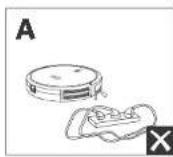
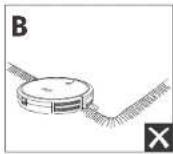
1 DAnHHaBnTbO TnaneHn B 6oBnHnCTBe CryAeB npeoTbpaiaiot
naneHn RoobVac c TcHmN, n OepxHcctn H, pckmm npcpam
bbocBo, dnnnnaPabaoTn MeHne AeKTHBOE, eCn OHn Pp3hne
HnPi XCNbOBaHHn HbIEcoca HkopoBOM ToKpETHM
CbeTOOTPAuHX NOBepXHOCTX/0eH hEmhXnONax. PeKomeHyetc
paMouatb PhnHexNCHe BaOpob, TbObblNoKnpoBaTb Obnactn
BO3MOHOro NaepHn RoobVac.
IpoAroTOBka
1 PepenncnnoBbHem cHmte nCnactc bampea.
2 NepaHIOJIbOBAHHem yCPOXCTBa yCTAHOBnTe 6oKaoyIeKy.
6YbepntcnoaHpybHHTAHnHmEHNKHe npdeMTe, B KOTopBx RoboVac MOKET 3actPb. HcNtBeyteXOuHnue B COMIeK TKBEBHbCIE CINNN, OIOBNIPIEENI aHIOPOKIOPOOa HIOHyIOHNIAN.
PnOHTeKCTOaN No Kpaam KOBPOB, T06b1 RoboVac He bactpH. He npOBOHtne CYKQCHYTEKMHX KOBPOCB HBCOKM BOPOM HIN KOBPOB ROHIOH 600ee 26 MM, TAK KAK INHIOB3OBAHNA HA HIX RoboVac MOKET CHOMATCB.
HactoTbeIpo peKOMeUyETc paMaeeTaB oPamNHTenbIe IeITb (npaoTc0rOToJbnHO) HAnpTOB KAMHHIO INpymX OObCTeR (HapnMep, AHTTNARNNHbX OTeBPCTM), NoaHaHE B KOTOpBE MoKET (RepeBtRe Robovac.
BbPbM6y6opKn RoboVac He D0Jekn 3axOaHnTb Hn BnAaKHe bnpoxhNt
ROvOAcMOKET3A3AHTbHnPpDMTHBUCOTOHHOKe17M.EcN0 803MOHk,yOePTe3TNpEMDAt
BKKHHTeTnABHbBukkHcTaTe bNtAHHa HnKHeHcYacTb RoboVac.
232RU RU 233
Pycckn
4 NomeCTe 3apyHy 6aBy Ha porHy noepxHcyteHn.
Pnnoenne nnoe noepnpe nppe pnnnppepnppepepepepepepepepepepepepepepepepepepepepepepepepepepepepepepepepepepepepepepepepepepepepepepepepepepepepepepepepepepepepepepepepepepepepepepepepepepepepepepepepepepepepepepepepepe pe
HdkaTopcoCToHHWi-Fi
HaxmteKnock noBtio, yOobnpocraHOBBy60ky.
Bb60ppeKmay60kN
Pexm mABToMaTnueckoyn6Opkn
Pocn3anycko Robovac otwee3kaeotapnHb6aam HABOTAMTHCCN paCCHTBaeTdyroecbaHHmApuyy yObpK, KOrdaYbOpka3abeepcha, Robovac atatmaTneooBospaauTaHnaepayy 0
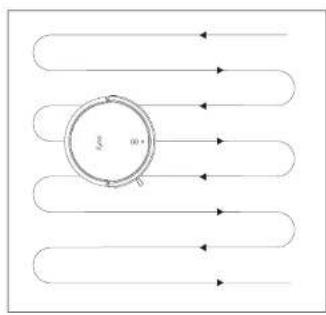
HAKMNE KHOKU,TO6b3aYcTbYbOpyaABOTMaTHueckOMpeKHM.
238RU RU 239
Bo Bpve y60rKn Robovac ABOMATHCCKBCPHTC H a3apHyb6aay, cim npoueB 3apua kkymTToRa CTanet H3kM. Nocne nopa4nKn Robovac npdoonnt paOby, Tto6bl 3abepuynb6yOcY
-Пуюмлимл�RobovacSalycigderaTautomatheckom
peKIMeYbOOPmNPRBKOJIENHekn.
PekmToueyHou y6OpKn
B npnrokenn Huyfome moKHO uHbpaTb Pekm Toeeyoh yboepKa. B 10aPeknme RobocVac HHTENCBOH OynpaTe oIpeDeHNHyO bnaCTe B TceNc2 MHTIO CINPAH.3TO yOIO,ecnB aToon Obnactn NIO IOIIMM mnn Mycopa.
Pycckn
Bb6Op ypOBH MoHOCn BCacbHaHH
Bb6epnTcypoBcHbVouHocTHBCaCBAHHB pnpOKeHHuEuyHome B COOTBeCTBnC BaAAMNNotpe6HOCTMn:
Tnx
CtapTHbI (HOyMOHnHO)
Typo
MARCIMMBiHb

KorDa RoBovac HauHETy6bOpy B cIeDyounn pa3,ycTpoCtBO 6yderpa0a1abHnpeBaapTeBbAoBbOpaHHNMOuHocn BCsauHnn.
IcnoJb3ObaHne yHKzMn BoostlIQTM
Bubephtc yhHIOoBoostQ" npnnoKCHN UCFyHOmC aCOOTRECTHM C BALMM NTOEPOBOHNN:ROBOVACTONTENCKYOBHNTM OMOHCTb BCBAHNN, cOINbOHPKIT, TIOI pAONeEHNI HANAYIIEKO ANOHCTa yboPKN TPOcyETCNBOAACCUBMK MOHCTb, CYHIIJI KooBHIOHTNOOIOHPTNAOCTKIOKOBOPK TpyDIO NOIMCTACMO MyCOPaTOOKPAIaTe 06ee apempeyopk, IIO pIaTOMpOBeHb WMya YEHNMBaTC. EcinBa BcEOOHTKWM paBOTHBHeCCA, B3BHHH HNCNtBNsAHHEM FyHIOoBoostQ" bMokote OTKnHbte.
IcnoJIb3OBAHnE RoBoVac cYHKeKc.AInca
JHekcA/An3, 310 HtIeMJIyIaIbHO yIpyoB ITOIIOcO BOYIaIbIaN, KOIPOE noanRanBAM ypaynpIbIpbobotov-IMnEOcO C NOMIOIIIOI NOCA.
PpeKdE HcHaaTb, y6eHntecb, uTO;
Robovac noKIOHEN K3apHNO6a3,HTo6bl oecenntb doCTaehHO 1NTAHAC.
RoboVac noqknnoe H npnokeHm EufyHome.
YBaCctbYCTPOCTBcO CnoepdkKoHJDECkAnXkCb(HnPmHep,HJDECKCTaHnH)3THyCTPOCTBnpDaiotocTgAeHIO.
Ipynokheny Bnyc yce yciacno Hhaaenn Cmpdfoe, H aBcogdaynyhtyHcytaNbc
- YnpBaneHne RoboVac nomoubjoHdEcAnncbi
1.OTKPOJTE pnpOKeHcE EUYHomc HnAaHTe NHTeNtEeTaybHcN HNTepaunB JEBoEM BepxHemYfyn
2. NaJIeIe 5JIeKcN CIEJyTe IYHCT pyKuIMn Hn EKpHa eI hZaepueHn HbTcPnK.
240RU RU 241
MbHaHeemc,TOyBaHcNE30HHHHTnp6IeAIOJIKNHOeHNMyIEcc. AINChb,HO cENB BamOTpE6yETOnHnAOMoHb-6yIeYeBepNb, Mbl cIeJeBce HEOxOxOInn,TObBnOxOvBam!
McnoIb3OBAHne RoboVac c roIocobIMn NOMOuHKamm Amazon Alexa n GoogleAccnteHT
TOnocOBue NmOJIHnAaMazAton AlexaNMyGooIgceAccnCTeHT-30ymmHc yCPOiBaTOMOCBOI OYipABHeHH,KOIpoeIIOBBOISHOITyipABiBTb RoBOvCtCMoLIOBTOIOCOBEXKOMADH.
IpepeHauanomncnonb3oBAnHy6eDntcB CnedeYooem:
RobovacnKapnok K3apnHcBase,HTo5606ecneHt,doCTaTOHOE KOINHEIIOO 3aepda.
Robovac noqknouen knpnoxeneu EufyHome.
YBaHMeEChyCtpoiHO CIOIooepKMOAzmOn Alexa (Haipmep, Amazon Echo, Echo Dot nMazAmazon Tap, Echo Show, Echo Spot), Nio6o yc1pO1c0 CIOIooepKMOGgOaCCsTeHb (Haipmep, Gogge Home, Google Home Mini).Otn yctpoiTaBnpDaaTcTdEJIbHO.
PipinoKHeA Amazon Alexa nHn Google Hm yck yctaHncho Ha BaIcM cmpt yctpoiCTBE, nBac MeTc yETHaBnBaIe.
TtO6bI ynpabnIy RoboVac c nOmooubIO roNOCOBx NOMOuHKOB Amazon Alexa Hm Google AccnCTeHT, BInOnHte CneHyounie DeCTBn.
- Opkoe imponno EufyHome HauZnne paadien XInHeIeKUaBna Hnnn paaia aiebvo bexhiem yIy.
2.CnpeyTe NCTpyKUAM HAekpAe,HTo5b3aBepuNTsHACtpOky.

B Hactoiee Bpema daHnna CyHKnA DocTyHa TOnIbKO pnnn HmKIO, HEmcIO, FpHauy3CIO I NAnHcIO O RABIO. HOpmaia o npodpckx dpYnx BHKOB BytP PpcDtaBnHa ha Bo6-cntc https://www.cutyfylle.com/support/.
Pycckn
OuNCTka n 06cnyKbHaHne
IpeoONIOHnO hOcBnBnAHHmEycipocBaOTKHOHnTeEOHO 0coeOOHNtIaDHTTINTHIA
JINI NOEPXAHHAN HANYHIN PNOBBOHTENBHOCTCNEPYTE
HNKPCNPOECHHHM HCTPCKH NOCOHTCN OBCNYHABHIO ROBoVac
pcyrrnapHO. TaTOAOTOH KMOONHOHTOBAMCHPACDOHIX MaTePHAOB
6byedanacertb o1 xapakepa mnohOBsabHnro RoVac.
PeKoMEnyMaMa Tachota OUcHtKN KOMPOHeHToB/3aMeHb paCXoHbX MaTePnAIOB
8 BCTABTc nnnnc6bpHMK 6bpaTHOBYCTPOICTBQ.
OuncTkBaBpaaJoueienCzETK
1 Notainre 3a aenik, rrobpaaonpoabatbauinye HnK
2 TIOHMMTBCpaiaioyckcAETky,HTO6hCH8bcc
3 OInCTHe BpaauooucIeTKy cIIOuObK HcTpyMeHa dHcNtK.
4 YCTANIOHIE HA MECO IpaIIOIOOY CROI KCTB, OCTABIN CHaIHa3. FcIKCPOIOIOI bACTNOIOIOIOHOKeIe, a 3ATEM IpyrOIO HOKeIo IOIOHOJIe.
HadaBNTC,HTo6bYcTaHOBTBaUHTy 3aHTK HA CC MccTo.
Pycckn
0
2
3
4
5
OuHCTKa 6OKOBoU ΜeTkn
PaaHHHpe npnmtu, TaKMe KAK BONO, nKcK aanythiaotC B 60KORc
IeKe MoiY cOpaTb PnB. O6BaTeBbHO peynpnoOnuaie ee.
1 CHAMITE BOKOAYI WHTKY.
Akkypatho paMOTaHc HynnHTe RCE BONCHNHN HHTK, KOTOPcHAMOTAHMOXdyyCTPOCTBOM 60KOBOH LCTKOH.
HIOIbEyIe1KABHcMOeHHyEOIIOI BOOIOIIOE ydaIbIbIco

McNordyBATE SOKOYIO IIETKY TONKO NOCE TORI, KAK CHI HIOHOCBO BIXOXEHIT.
3aMeHa 60KOBOu TKeTn
EOKOABI KETK MOKET BIBI HIOPEIMENIC HOIE PLOPODKOJYEMHOTNIOJIIOB3OHNII. CIEDYE TIKHT PUKYNAMNHKE, NTOBI 3AMENITIe ee
CHIMMTECTAPYIO60KOByIOUcTKyBCTaBbTeHOByIOoCnNka
Pycckn
OuNTka daTchNKOB KOHTaKToB 3apAdkn
IaNIOAeepKAnHnHuaHcnpnoBdUHTbHocnpeyIyRHOOuHaTe TATIKINEPENEDA BbCOTU KONKTAKTbZAPKnD.
YJADHNTBbCnCBNCHKOB3310IOTaNEHNIKOHCTOIBJZABQIKNCIOIOIOIOIOIOIOIOIOIOIOIOIOIOIOIOIOIOIOIOIOIOIOIOIOIOIOIOIOIOIOIOIOIOIOIOIOIOIOIOIOIOIOIOIOIOIOIOIOIOIOIOIOIOIOIOIOIO
OuNTKa nobopoTHoro Koneca
BIOOcHbHAcCTuHbHbMoTyrNcKo3actpe8aTuNobopoTHOMKOEC, C63aTeIbHNoOHHaIIe NOBopoTHcE KOECnepHOmUeCKn H No Mepe Heo6xDmOCTn.
248RU RU 249
1 CHIMITE HOOPOTHOE KOHECO.
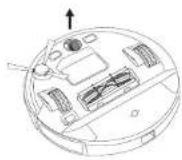
2 Ydane BCE BONcB MyCOP,CKOTINBIIeecBOKpyI KONECAH 3anyTabuieecB NOCTN TgKoneca.
3 YcTaHOBHTeKOncOHaNecToHAdaBHTeHaHeroDIO
He moTne noBopatHoe konco BdoJ.
support@eufylife.com

www.eufylife.com

(US) = 1 (800)9887973 Mon-Fri 6:15-17:00 (PT);
Sat-Sun 6:30-16:30 (PT)
(UK) +44 (0) 1604 936200 Mon-Fri 6:00-17:00;
Sat-Sun 6:00-14:00
(DE)49(0)6995797960Mo-Fr8:00-16:00
support.eufylife.com/s/phonecontactus.
HnOckaHpyHe3o1QR-Ko

@EufyOfficial

@EutyOfficial

@EufyOfficial

@EufyOfficial
Iapannr:1 rou
Cpok cyjkb2r0da
KoMaHx Anker Innovations Limited
Onc 1318-19, Tommye'Iaana, 610 Ihatan Poyz, Morkoc, Koyny, Tonhong (Room 1318-19, Hollywood Plaza, 610 Nathan Road, Morgkoc, Kowloon, Hong Kong)
Inhoudsopgave
Warning: Changes or modifications not expressly approved by the party responsible for compliance could void the user's authority to operate the equipment.
Nederlandss
ANKER TECHNOLOGY (UK) LTD
Suite B, Fairgate House, 205 Kings Road, Tyseley, Birmingham, B11 2AA, Verenigd Koninkrijk
Nederlandss
RoboVac met Amazon Alexa of Google Assistant bedieren
3 Verwieder her filiter.
support eufylife.com/s/phonecontactus
Of scan understaende QR-code:
@EulyOfficial
@EuyOfficial
@Eulfoficial
@EufyOfficial
