
DIC22412 - Intercom SMARTWARES - Free user manual and instructions
Find the device manual for free DIC22412 SMARTWARES in PDF.



User questions about DIC22412 SMARTWARES
0 question about this device. Answer the ones you know or ask your own.
Ask a new question about this device
Download the instructions for your Intercom in PDF format for free! Find your manual DIC22412 - SMARTWARES and take your electronic device back in hand. On this page are published all the documents necessary for the use of your device. DIC22412 by SMARTWARES.
USER MANUAL DIC22412 SMARTWARES
natural_image
White mobile phone with digital display and control panel (no visible text or symbols)
natural_image
Three smiling young people outdoors, one taking a selfie with her hand (no text or symbols visible)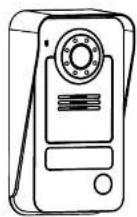
natural_image
Blank rectangular device with control panel and navigation buttons (no text or symbols)DIC-224 Series
EN Instruction manual....4.
- Please read these instructions carefully before installing and using the product.
- Do not cut the power supply cable to extend it; the device (transformer) will not work with a longer cable. Do not plug in the device until all the wiring has been finished.
INSTALLATION SAFETY
- Keep children and bystanders away while installing the products. Distractions can cause you to lose control.
- Do not overreach when installing this product. Keep proper footing and balance at all times. This enables better control in unexpected situations.
- This product is not a toy. Mount it out of reach of children.
OPERATION SAFETY
- Do not operate electrically powered products in explosive atmospheres, such as in the presence of flammable liquids, gases, or dust. Electrically powered products create sparks which may ignite the dust or fumes.
- The warnings, precautions, and instructions discussed in this instruction manual cannot cover all possible conditions and situations that may occur. It must be understood by the operator that common sense and caution are factors which cannot be built into this product, but must be supplied by the operator.
- Do not expose the Power Adapter of this product to rain or wet conditions. Water entering the Power Adapter will increase the risk of electric shock.
- Do not abuse the Power Cord. Never use the cord for unplugging the plug from the outlet. Keep cord away from heat, oil, sharp edges or moving parts. Damaged or entangled cords increase the risk of electric shock.
- The adapter must match the outlet. Never modify the plug in any way. Unmodified plugs and matching outlets will reduce risk of electric shock.
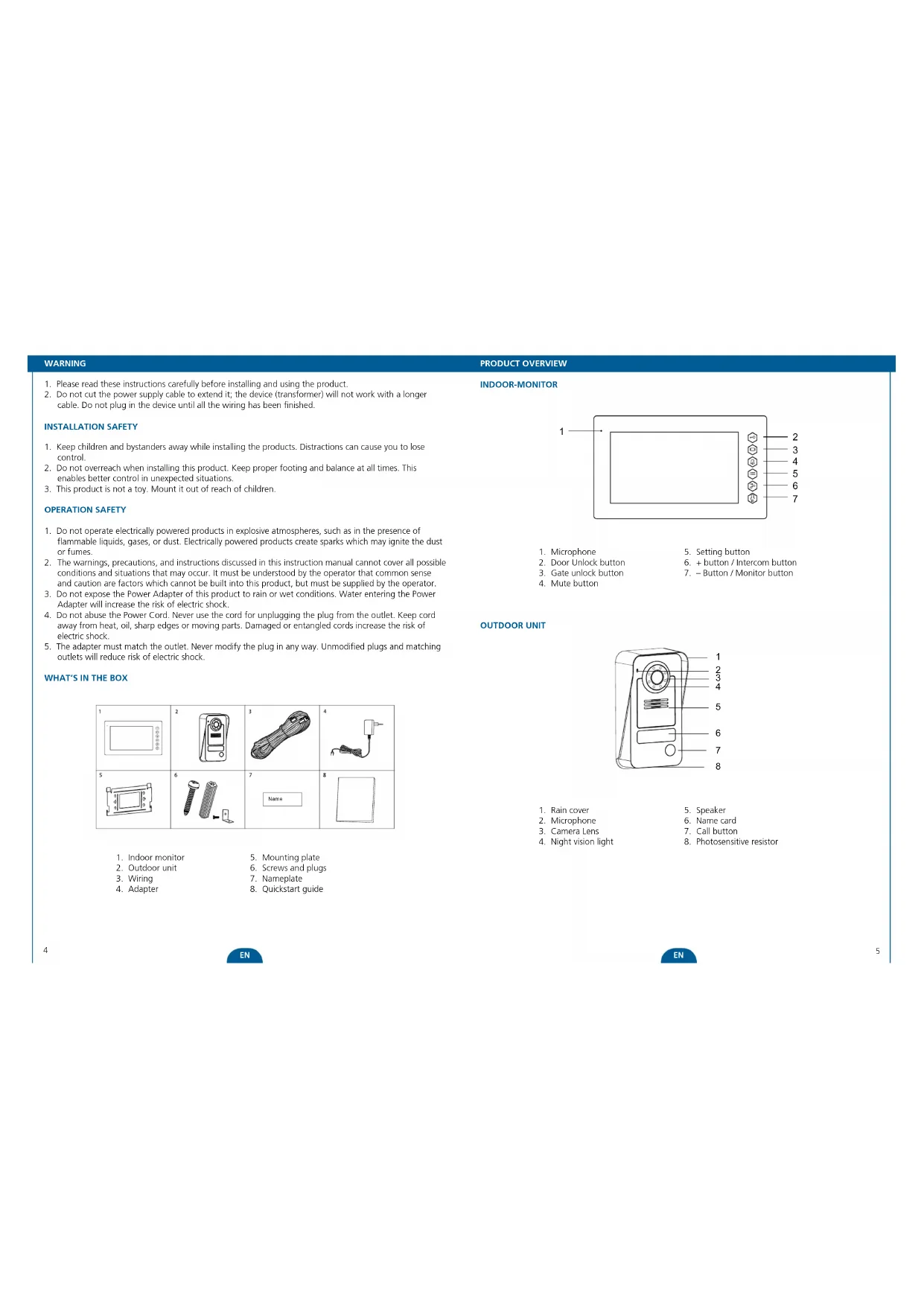
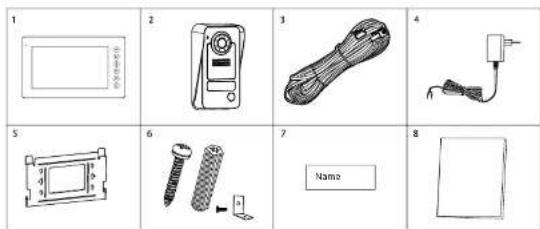
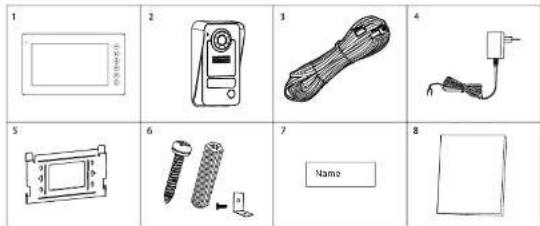
WHAT'S IN THE BOX
text_image
1 2 3 4 5 6 7 8 Name- Indoor monitor
- Outdoor unit
- Wiring
- Adapter
- Mounting plate
- Screws and plugs
- Nameplate
- Quickstart guide
PRODUCT OVERVIEW
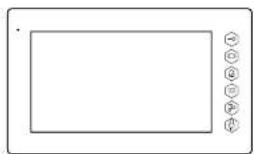
INDOOR-MONITOR
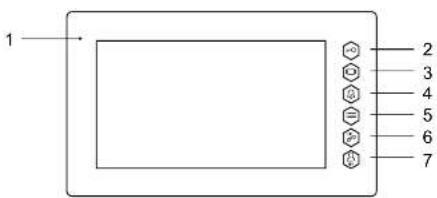
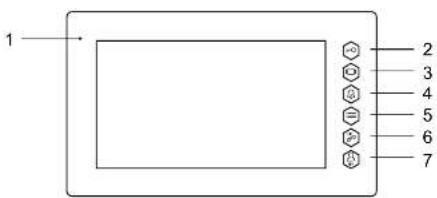
text_image
1 2 3 4 5 6 7- Microphone
- Door Unlock button
- Gate unlock button
-
Mute button
-
Setting button
-
- button / Intercom button
-
- Button / Monitor button
OUTDOOR UNIT
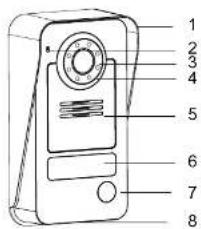
text_image
1 2 3 4 5 6 7 8- Rain cover
- Microphone
- Camera Lens
-
Night vision light
-
Speaker
- Name card
- Call button
- Photosensitive resistor
INSTALLATION
INSTALLATION

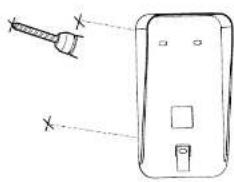
natural_image
Diagram of a handheld device with two ports and a screwdriver, no text or symbols present- When installing the outdoor unit, make sure that the location you wish to install it is dry. It is important that the camera or the electronics do not get wet.
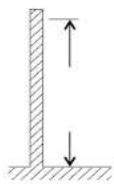
- Choose a suitable place.

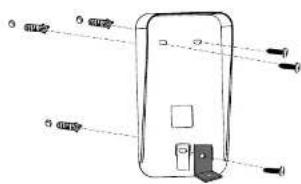
-
Drill holes in the wall, insert the wall plugs in the holes. Place the bracket and tighten the screws.
-
Connect the wires.
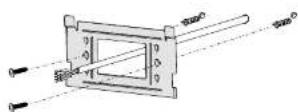
- Mount backing plate of indoor-monitor by drilling holes in the wall, and screwing the backing plate firmly, making provision for the cable to pass through.

natural_image
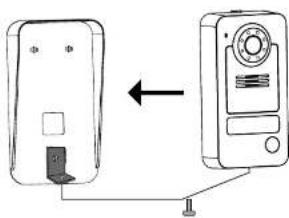
Diagram showing two devices connected by a cable, one with a button and arrow indicating direction (no text or symbols)- Mount the outdoor unit on the bracket. Make sure it is properly secured.
natural_image
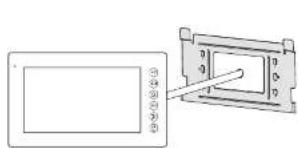
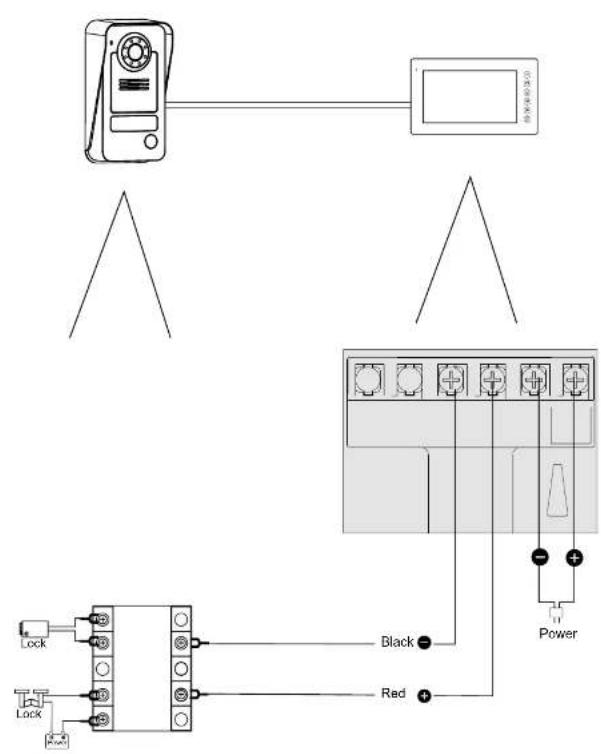
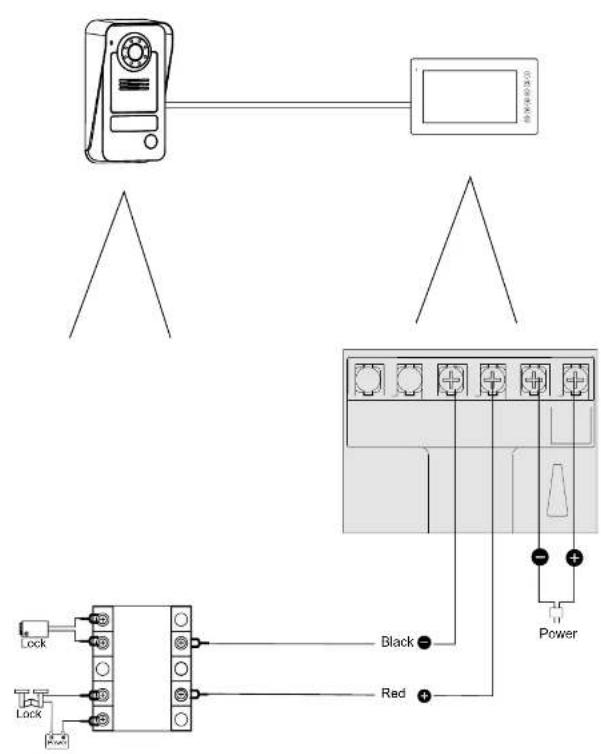
Diagram showing a device with a screen and a separate view of a rectangular device with a pointer (no text or symbols)- Connect the wires to screw terminals as per diagram.
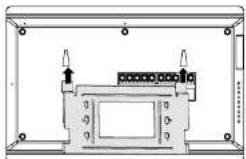
natural_image
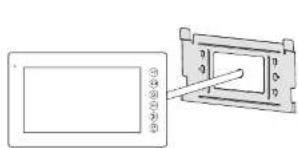
Technical line drawing of a mechanical enclosure or enclosure with internal components and mounting holes (no text or symbols)- Insert the bracket into the slots of indoor-monitor.
6
EN
EN
7
text_image
Diagram showing connection between a device and a power connector with labeled pins Black and Red, including a power outlet.USE
Intercom function: When in standby, when a visitor presses the call button on the outdoor unit, the indoor-monitor will chime and you will see a live view of the visitor on the screen. Press the intercom button to speak to the visitor.
Monitor function: Press this button on the indoor-monitor unit to see a live view of the outdoor unit camera.
Unlock: After identifying the visitor, press the unlock button to open the door/gate for the visitor.
Mute switch: The ring tone can be muted, for when you don't want to be disturbed. Press the button to turn the mute function on or off. When muting is activated the mute LED will be lit.
SETTINGS
Use the Setting button and the + and - buttons to navigate the main menu. Change with the + and - buttons, confirm with the Setting button.
You can adjust these settings:
Brightness
Contrast
Colour
Ring volume
Ringtone
EN
TECHNICAL SPECIFICATION
INDOOR MONITOR
| Supply Voltage DC 15V 1A | |
| Color Configuration R.G.B.delta | |
| Video System PALNTSC | |
| Effective Pixels S00X3(RG3)X480 | |
| Consumption Current 500±100mA | |
| Operation Temperature -5°~+50° | |
| Operation Humidity 85%(Max) | |
| Screen size 7"(Diagonal) inch |
OUTDOOR CAMERA
| Imaging Sensor Type 1/4"CMOS | |
| View Angle about 70 degrees | |
| Power supply Indoor monitor | |
| Night vision distance 0.5m ~ 1m | |
| Consumption Current 200~250mA | |
| Operating Temperature -10° ~ +50° | |
| Storage Temperature -20° ~ +60° | |
| Operating Humidity ±85%RH |
SAFETY INFORMATION
Precaution
Do not cover the ventilation openings with objects such as newspaper, table cloths, curtains etc.
Do not allow this product to get directly into contact with heat sources or naked flames.
The normal operation of the product may be disturbed by strong electro-magnetic interference.
This equipment is built exclusively for domestic use.
The device must not be exposed to splashes and it must not be submerged
No object containing liquids, such as a vase, may be placed on the device
Maintain a minimum safety distance of 10cm all around the product in order to insure proper ventilation.
Insure the outdoor unit is not installed where it may be covered by water or rain.
Do not allow children to play with the device

Conforms to all relevant European Directives.

This symbol is known as the "Crossed-out Wheelie Bin Symbol". When this symbol is marked on a product or battery, it means that it should not be disposed of with your general household waste. Some chemicals contained within electrical/electronic products or batteries can be harmful to the environment. Only dispose of electrical/electronic/battery items in separate collection schemes, which enter for the recovery and recycling of materials contained within. Your co-operation is vital to ensure the success of these schemes and for the protection of the environment.
10

WARNUNG
natural_image
Diagram of a handheld device with two ports and a screw, showing no text or symbolsnatural_image
Diagram showing two devices connected by a cable, one with a button and arrow indicating direction (no text or symbols)natural_image
Diagram showing a device with a screen and a separate view of a rectangular device with a pointer (no text or symbols)natural_image
Technical line drawing of a mechanical enclosure or enclosure with internal components and mounting holes (no text or symbols)text_image
Diagram showing connection between a device and its power panel, with labeled components including Lock, Black, Red, and Power terminals.VERWENDUNG

text_image
Diagram of a device with numbered parts labeled 1 through 8, likely for labeling or identification.natural_image
Diagram of a handheld device with two ports and a screw, showing no text or symbolsnatural_image
Diagram showing two devices connected by a cable, one with a button and arrow indicating direction (no text or symbols)natural_image
Diagram showing a device with a screen and a separate view of a rectangular device with a pointer (no text or symbols)natural_image
Technical line drawing of a mechanical enclosure or enclosure with internal components and mounting holes (no text or symbols)text_image
Diagram showing connection between a device and a power connector with labeled pins Black and Red, including a close-up of its black terminal.GEBRUIK
PRESENTATION DU PRODUIT
MONITEUR D'INTERIEUR
text_image
1 2 3 4 5 6 7text_image
Diagram of a device with numbered parts labeled 1 through 8, likely for labeling or identification.natural_image
Diagram of a handheld device with two ports and a screw, showing no text or symbolsnatural_image
Diagram showing two devices connected by a cable, one with a button and arrow indicating direction (no text or symbols)natural_image
Diagram showing a device with a screen and a separate view of a rectangular device with a pointer (no text or symbols)natural_image
Technical line drawing of a mechanical enclosure or enclosure with internal components and mounting holes (no text or symbols)text_image
Diagram showing connection between a device and a power connector with labeled pins Black and Red, including a close-up of its black terminal.UTILISATION

For example, the best options are applicable.

text_image
Diagram of a mobile phone with numbered labels pointing to different ports or modules.natural_image
Diagram of a handheld device with two ports and a screw, showing no text or symbolsnatural_image
Diagram showing two devices connected by a cable, one with a button and arrow indicating direction (no text or symbols)natural_image
Diagram showing a device with a screen and a separate view of a rectangular device with a pointer (no text or symbols)natural_image
Technical line drawing of a mechanical enclosure or enclosure with internal components and mounting holes (no text or symbols)text_image
Diagram showing connection between a device and its power panel, with labeled components including Lock, Black, Red, and Power terminals.
USO
natural_image
Diagram of a handheld device with two ports and a screw, showing no text or symbolsnatural_image
Diagram showing two devices connected by a cable, one with a switch and the other with a screen (no text or symbols)natural_image
Diagram showing a device with a screen and a separate rectangular component with a pointer (no text or symbols)natural_image
Technical line drawing of a mechanical enclosure or enclosure with internal components and mounting holes (no text or symbols)text_image
Diagram showing connection between a device and a power connector with labeled pins Black and Red, including a separate schematic view.
UTILIZZO
natural_image
Diagram of a handheld device with two ports and a screw, showing no text or symbolsnatural_image
Diagram showing two devices connected by a cable, one with a button and arrow indicating direction (no text or symbols)natural_image
Diagram showing a device with a screen and a separate view of a rectangular device with a pointer (no text or symbols)natural_image
Technical line drawing of a mechanical enclosure or enclosure with internal components and mounting holes (no text or symbols)text_image
Diagram showing connection between a device and a power panel with labeled components including Black, Red, and Power terminals.
UŻYTKOWANIE

natural_image
Diagram of a handheld device with two ports and a screw, showing no text or symbolsnatural_image
Diagram showing two devices connected by a cable, one with a button and arrow indicating direction (no text or symbols)natural_image
Diagram showing a device with a screen and a separate view of a rectangular device with a pointer (no text or symbols)natural_image
Technical line drawing of a rectangular enclosure with internal components and mounting holes (no text or symbols)text_image
Diagram showing connection between a device and a power connector with labeled pins Black and Red, including a separate schematic view.
POUŽITI

VAD SOM FINNS I FÖRPACKNINGEN
text_image
1 2 3 4 5 6 7 8 Namenatural_image
Diagram of a handheld device with two ports and a screw, showing no text or symbolstext_image
Diagram of a device with labeled ports and indicators, showing internal components and connections.natural_image
Diagram showing two devices connected by a cable, one with a button and arrow indicating direction (no text or symbols)natural_image
Technical line drawing of a mechanical enclosure or enclosure with internal components and mounting holes (no text or symbols)text_image
Diagram showing connection between a device and a power connector with labeled pins Black and Red, including a close-up of its black terminal.
ANVÄNDNING
text_image
Diagram of a mobile phone with numbered labels pointing to different ports or modules.natural_image
Diagram of a handheld device with two ports and a screw, showing no text or symbolsnatural_image
Diagram showing two devices connected by a cable, one with a button and arrow indicating direction (no text or symbols)natural_image
Diagram showing a device with a screen and a separate panel with a pointer (no text or symbols)natural_image
Technical line drawing of a mechanical enclosure or enclosure with internal components and mounting holes (no text or symbols)- Insira o suporte nas ranhuras do monitor-interior.
text_image
Diagram showing connection between a device and a power connector with labeled pins Black and Red, including a close-up of its black terminal.
UTILIZAÇÃO

Enconformable can today as 'Inclusive Europe stock market'

natural_image
Diagram of a handheld device with two ports and a screw, showing no text or symbolsnatural_image
Diagram showing two devices connected by a cable, one with a button and arrow indicating direction (no text or symbols)- Namontujte exteriérovú jednotku na svorku. 7abezpečte, aby bola porladne zaistená.
natural_image
Diagram showing a device with a screen and a separate view of a rectangular device with a pointer (no text or symbols)natural_image
Technical line drawing of a mechanical enclosure or enclosure with internal components and mounting holes (no text or symbols)text_image
Diagram showing connection between a device and a power connector with labeled pins Black and Red, including a separate schematic view.POUŽITIE

natural_image
Diagram of a handheld device with two ports and a screw, showing no text or symbolsnatural_image
Diagram showing two devices connected by a cable, one with a button and arrow indicating direction (no text or symbols)natural_image
Diagram showing a device with a screen and a separate view of a rectangular device with a pointer (no text or symbols)natural_image
Technical line drawing of a mechanical enclosure or enclosure with internal components and mounting holes (no text or symbols)text_image
Diagram showing connection between a device and its power panel, with labeled components including Lock, Black, Red, and Power terminals.KULLANIM
Hydromolecules Distribution operator

Bu verboh, Lden Çarulle İçaret Çiş Ür ve Sambola cizak zilal. Bu verboh bilirin seja palandlerim, çenlerde umlanlıhe bilkəm artıvarı as geringbələm irin rupal. Desirlihi, eelirri kürlerin veve zile in lergidəl bəm oryazlar, sarge ve pereve zara o azili. Yelmeu u kəlkičištekemljuči jingjins, jima hal mərən ke kinin konzamunu os weri denjedvulmes ir sargeyor am too ara veine atni, obinig n z bu plerləm bapınmezmi sorganski ve vgen na kormas ni haim dan form darjinder.
98