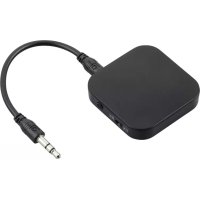
00184093 - Bluetooth Receiver HAMA - Free user manual and instructions
Find the device manual for free 00184093 HAMA in PDF.


| Brand | Hama |
| Model | 00184093 |
| Product type | Bluetooth receiver and transmitter (transceiver) |
| Bluetooth version | 5.0 |
| Supported Bluetooth profiles | A2DP (Advanced Audio Distribution Profile) |
| Bluetooth range | Less than 10 meters |
| Power supply | Lithium-polymer battery 3.7 V, charging via micro USB port 5 V / 240 mA |
| Charging time | Approx. 1 hour |
| Battery life in transmitter mode | Approx. 13 hours |
| Battery life in receiver mode | Approx. 12 hours |
| Connectors | 3.5 mm audio port (AUX), micro USB port |
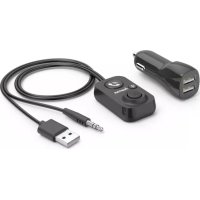
| Package contents | 2-in-1 adapter, 3.5 mm jack cable, micro USB cable, user manual |
| Main functions | Bluetooth reception and transmission, automatic pairing, simultaneous mode with two devices in TX |
| LED indicator | Charging and connection status: solid red (charging), solid blue (connected), blue/red flashing (pairing), red flashing (low battery) |
| Multifunction button | Power on/off (3s), double press for pairing |
| Mode switch | Transmitter (TX) / Receiver (RX) |
| Care and cleaning | Clean with a slightly damp lint-free cloth; no harsh detergent |
| Safety | Do not expose to moisture, heat, shocks; do not open; use only indoors |
| Recycling | Do not dispose of with household waste; return to collection point |
| Frequency bands | 2402 – 2480 MHz |
| Maximum RF power | 3.94 mW (E.I.R.P.) |
Frequently Asked Questions - 00184093 HAMA
User questions about 00184093 HAMA
0 question about this device. Answer the ones you know or ask your own.
Ask a new question about this device
Download the instructions for your Bluetooth Receiver in PDF format for free! Find your manual 00184093 - HAMA and take your electronic device back in hand. On this page are published all the documents necessary for the use of your device. 00184093 by HAMA.
USER MANUAL 00184093 HAMA
Bluetooth® AudioTransceiver
OperatingInstructions
Bedienungsanleitung
Moded'emploi
Instruccionesdeuso
1.SwitchforBluetooth ^® transmitter/receivermode
2. Multifunctionbutton
3.StatusLED
4.3.5mmaudioconnection(AUX)
5. Micro-USBconnection
Thankyouforchoosinga H amaproduct.
Take your time and read the following instructions and information completely. Please keep these instructions in a safe place for future reference. If you sell the device, please pass these operating instructions onto thenewowner.
1. ExplanationofWarningSymbolsandNotes
Warning

This symbol is used to indicate safety instructions or to draw your attention to specific hazards andrisks.
Note

Thissymbolisusedtoindicateadditionalinformationorimportantnotes.
2.PackageContents
- Blue® transmitter/receiver, 2 -in-1 adapter
• 3 .5mmjackcable
• M micro-USBcharging/connectingcable
• T heseoperatinginstructions
3.SafetyNotes
• T heproductisintendedforprivate,non-commercialuseonly.
- Protect the product from dirt, moisture and overheating, and only use it in a dry environment.
- Do not use the product in the immediate vicinity of heaters or other heat sources or in direct sunlight.
- Do not allow yourself to be distracted by the product, for example when driving a vehicle or operating sports equipment. Always pay attention to the surrounding traffic and your environment.
• D o n otdroptheproductanddonotexposeittoanymajorshocks.
- Do not operate the product outside the power limits given in the specifications.
- Do not open the device or continue to operate it if it becomes damaged.
- Since the battery is integrated and cannot be removed, you will need to dispose of the product as a w hole.Dothisincompliancewiththelegalrequirements.
• D isposeofpackagingmaterialimmediatelyaccordingtolocallyapplicableregulations.
- Do not modify the product in any way. Doing so voids the warranty.
• U setheproductforitsintendedpurposeonly.
• U setheitemonlyinmoderateclimaticconditions.
- Do not use the product in areas where the use of electronic devices is not permitted.
- Do not attempt to service or repair the product yourself. Leave any and all service work to qualified experts.
- Do not throw the battery or the product into fire.
- Do not tamper with or damage/heat/disassemble the batteries/rechargeable batteries.
- Take care that components such as airbags, safety areas, controls, instruments, etc. and visibility are not blocked or restricted.
- Check that the product is safely mounted before beginning your journey.
Warning-Battery

- O nlyusesuitablechargingdevicesorUSBconnectionsforcharging.
- As a rule, do not charge devices or USB connections that are defective and do not try to repair themyourself.
- Do not overcharge the product or allow the battery to completely discharge.
- A voidstoring, chargingorusingthedeviceinextremetemperaturesandextremelylow atmosphericpressure (forexample,athighaltitudes).
- When stored over a long period of time, batteries should be charged regularly (at least every three months).
4. Getting Started
- The adapter is equipped with a rechargeable battery. The battery must be fully charged before using the device for the first time.
- Beginchar gingbyconnectingtheincludedMicr o-USBchar ging/connectingcabletotheadapter's Micro-USB connection (5) and to a suitable USB charger. Please refer to the operating instructions fortheUSBchargerused.
- The adapter's status LED (3) emits a constant red light during charging.
- It can take up to 1 hour to fully charge the battery.
- C hargingbeginsandendsautomatically.
5.Operation
5.1.Switchingtheadapteron/off
- Switchingon:
With the device off, press and hold the multifunction button (2) for 3 seconds. The status LED (3) lightsupinblue.
- Switchingoff:
With the device on, press and hold the multifunction button (2) for 3 seconds. The status LED (3) emits two red flashes before the device turns off.
The first time the device is turned on, pairing is automatically started – see 5.2 Bluetooth® pairing inreceiver(RX)mode.
5.2. Bluetooth ^® pairinginreceiver(RX)mode
Note- Pairing

- M akesure thatyourBluetooth®-capableterminaldeviceisonandBluetooth ® isactivated.
-
For more information, please refer to the operating instructions of your terminal device.
-
Connectyourterminaldevicetotheadapterusingtheincluded3.5mmjackcableandtheaudio connection(AUX)(4).
- Select the adapter's RX mode by moving the switch (1) to the right.
- T header and the terminal devices should be further than 10 metres apart. The shorter the distance, the better.
- With the adapter on, press the multifunction button (2) twice. After approximately 3 seconds, the status LED (3) will emit flashes of alternating blue and red light to indicate the device is in pairing mode.
- O pentheBluetooth® settings on your terminal device and wait until Hama BT Transceiver appearsinthelistofBluetooth® devicesfound.
- Select Hama BT Transceiver and wait until the adapter is listed as connected in the Bluetooth® settingsonyourterminaldevice.
Note- Bluetooth® password

Some terminal devices require a password in order to connect to another Bluetooth ^® device.
- If your terminal device requests a password to establish the connection, enter 0000, 1234, 1111 or 8888.

Note
- I f p airingwassuccessful, thestatusLED(3)lightsupinblue.
- Y oucannowusetheadapter.
5.3. Bluetooth ^® pairingintransmitter(TX)mode

Note-Pairing
- M akesure t hatyourBluetooth®-capableterminaldeviceisonandBluetooth ® isactivated.
-
For more information, please refer to the operating instructions of your terminal device.
-
C onnectyourterminaldevicetotheadapterusingtheincluded3.5mmjackcableandtheaudio connection(AUX)(4).
- Select the adapter's TX mode by moving the switch (1) to the left.
- T urnonBluetooth® onyourBluetooth® headphones/speaker.
- For more information, please refer to the operating instructions of your terminal device.
- T header and the Bluetooth ^ headphones/speakers should be further than 10 metres apart. Theshorterthedistance, the better.
- With the adapter on, press the multifunction button (2) twice. After approximately 3 seconds, the statusLED(3)willemitflashesofbluelighttoindicatethedeviceisinpairingmode.
• T heconnectionisnowestablishedautomatically.
5.4.AutomaticBluetooth ^® connection(aftersuccessfulpairing)

Note-Pairing
- M akesure t hatyourBluetooth®-capableterminaldeviceisonandBluetooth ® isactivated.
- For more information, please refer to the operating instructions of your terminal device.
• M akesure t hattheadapterison.
- A fterthedeviceshavebeenpairedonce,theconnectionisthenestablishedautomatically.
- Y oucannowusetheadapter.
Note

- I f p airingwassuccessful, thestatusLED(3)willbelitblue.
- It may be necessary to make settings on your terminal device to enable automatic connection to the repaired adapter.
Note- C onnectionimpaired

Afterthedeviceshavebeenpairedonce,theconnectionisthenestablishedautomatically. If the Bluetooth® connectionisnotestablishedautomatically, checkthefollowing:
- C hecktheBluetooth® settings of your terminal device to see whether Hama BT Transceiver isconnected.
- If not, repeat the steps listed in 5.2 Bluetooth® pairing.
- Check whether obstacles are impairing the range. If so, move the devices closer together.
- The performance can also be affected by a weak battery.
5.5. Pairingintransmitter(TX) modewithtwodevicesatthesametime
- S witchontheadapterandyourtwoBluetooth®-capableaudiodevices(BTheadphones/speaker) asdescribedin5.2Bluetooth® pairing.
- The adapter automatically names the two terminal devices A and B, and establishes a connection.
5.6.Deletingthepairinglist
- Switch off the adapter in the current mode (TX or RX). After approximately 3 seconds, move the switch(1)totheothermodeandswitchtheadapteronagain;thiswilldeleteallpaireddevices fromthelist.
5.7.Batterycapacity
- The status LED (3) begins flashing red when the battery charge is low.
- C hargetheadapterasdescribedin4.Gettingstarted.
6. Care and Maintenance
Only clean this product with a slightly damp, lint-free cloth and do not use aggressive cleaning agents.
7.WarrantyDisclaimer
Hama GmbH & Co KG assumes no liability and provides no warranty for damage resulting from improper installation/mounting, improper use of the product or from failure to observe the operating instructionsand/orsafetynotes.
8.TechnicalData
| Bluetooth® version5.0 | |
| ProfileA2DP, A V R C P | |
| Range< 1 0 m | |
| BatterytypeLithiumpolymerrechargeablebattery/ 3 ,7V | |
| Input5 V 240mA | --- |
| ChargingtimeApprox.1h | |
| BatterylifeofBluetooth ® transmitterApprox.13h | |
| BatterylifeofBluetooth ® receiverApprox.12h |
9. Recycling Information
Noteonenvironmentalprotection:
AftertheimplementationoftheEuropeanDirective2012/19/EUand2006/66/EUinthenationallegalsystem,thefollowingapplies:Electricandelectronicdevicesaswellas batteries must not be disposed of with household waste. Consumers are obliged by law to returnelectricalandelectronicdevicesaswellasbatteriesattheendoftheirservicelives tothepubliccollectingpointssetupforthispurposeorpointofsale.Detailstothisare
defined by the national law of the respective country. This symbol on the product, the instruction manual or the package indicates that a product is subject to these regulations. By recycling, reusing the materials or other forms of utilising old devices/Batteries, you are making an important contribution to protecting our environment.
10. Declaration of Conformity


Hereby, Hama GmbH & Co KG declares that the radio equipment type [00184093] is in compliance with Directive 2014/53/EU. The full text of the EU declaration of conformity is available at the following internet address:
www.hama.com->00184093->Downloads.
| Frequencyband(s) | 2402– 2 480MHz |
| Maximum radio-frequency power transmitted | 3.94 mW E.I.R.P. |
The Bluetooth ^® word mark and logos are registered trademarks owned by Bluetooth SIG, Inc. and any use of such marks by Hama GmbH & Co KG is under license. Other trademarks and trade names are those of their respective owners.
All listed brands are trademarks of the corresponding companies. Errors and omissions excepted, and subject to technical changes. Our general terms of delivery and payment are applied.
- Bluetooth® AudioTransceiver
- ExplanationofWarningSymbolsandNotes
- Warning
- Note
- 2.PackageContents
- 3.SafetyNotes
- Warning-Battery
- Getting Started
- 5.Operation
- 5.1.Switchingtheadapteron/off
- - Switchingon:
- - Switchingoff:
- Bluetooth ® pairinginreceiver(RX)mode
- Note- Pairing
- Note- Bluetooth® password
- Bluetooth ® pairingintransmitter(TX)mode
- Note-Pairing
- 5.4.AutomaticBluetooth ® connection(aftersuccessfulpairing)
- Note- C onnectionimpaired
- Pairingintransmitter(TX) modewithtwodevicesatthesametime
- 5.6.Deletingthepairinglist
- 5.7.Batterycapacity
- Care and Maintenance
- 7.WarrantyDisclaimer
- Recycling Information
- Noteonenvironmentalprotection:
- Declaration of Conformity
Brand : HAMA
Model : 00184093
Category : Bluetooth Receiver