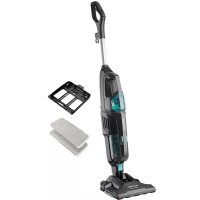
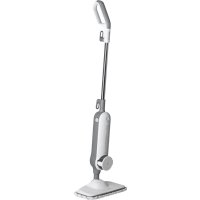
CP3010 - Steam cleaner Concept - Free user manual and instructions
Find the device manual for free CP3010 Concept in PDF.


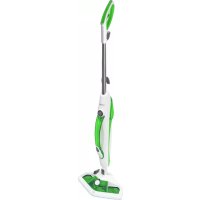
| Product type | Steam cleaner with vacuum function |
| Brand | Concept |
| Model | CP3010 |
| Power supply | 220-240 V ~ 50/60 Hz |
| Power | 1700 W |
| Sound power level | ≤1.8 dB(A) |
| Water tank capacity | Approximately 1 litre |
| Main functions | Steam cleaning (high and low intensity), vacuum, steam adjustment |
| Included accessories | Microfiber cloth, carpet glider, cloth holder, nozzle support |
| Water filter maintenance | Replace every 80 to 100 hours of use |
| Recovery tank filter maintenance | Regular cleaning, washing with water and drying |
| Washing the microfiber cloth | Machine washable up to 40°C, without fabric softener |
| Important safety instructions | Use only distilled water; do not direct steam at people, animals or plants; do not use without water; unplug before maintenance |
| Intended use | Domestic, hard surfaces (tiles, varnished wood, linoleum, etc.) |
| Unsuitable surfaces | Silk, leather, velvet, waxed furniture, thin plastics, untreated parquet |
| Spare parts and accessories | Available on order from the manufacturer or retailer |
| Repairability | Internal repairs only by authorized center |
| Warranty | 24 months from purchase (excluding normal wear and consumables) |
| Weight | Not specified in the manual |
Frequently Asked Questions - CP3010 Concept
User questions about CP3010 Concept
0 question about this device. Answer the ones you know or ask your own.
Ask a new question about this device
Download the instructions for your Steam cleaner in PDF format for free! Find your manual CP3010 - Concept and take your electronic device back in hand. On this page are published all the documents necessary for the use of your device. CP3010 by Concept.
USER MANUAL CP3010 Concept
OCHRANA ZIVOTNÉHO PROSTMEDIA
- Preferujte recyklaciu obalovych materiayov a starich spotrebičov.
- Skatufu od spotrebica mozte daf do zberu triedeneho oppadu.
- Plastové vrecúska z polyetylenu (PE) odovzdajte ako zberny odpad na recykláciu.
Recyklácia spotrebica na konci jeho zivotnosti:

Tento spotrebic je oznaceny v sulade s europskou smerlco2 2012/19/EU o elektrickom odapde a elektrickych zariaidenach (WEEE). Symbol na yrovibru alebo jeho obala udava, ze totro yrobuk nepatr do domaceho odapdu Treba ho odovzlat na zberne miesto na recykliu elektrickych a elektronickych zaradien. Zaistenm spravnej likvidacile tohto yrovibru zabrjne negativnym dolskem na zvoitr od prostredu a ludzkezdarek. Likhidacia musi byt ykponana va suldje praskim di sredne za loky kudriakovi odapdu. Podrobnjele informatie o recykliu tohto yrovibru zistte na prisluasn miestnom iustre du, u sluzby na likvidaciu domoveho odapdu alebo v obchodne, kde ste yrobuk kupili.

Thank you for purchasing a Concept product. We wish you much joy with your new appliance every day you use it. Please read the Instruction manual carefully before initial use. To refer to this manual any time you need to, we recommend you to keep it in a safe place. And please pass it to any future owner of the appliance.
| Technical specifications | |
| Voltage 220-240 V - 50/60 Hz | |
| Input 1700 W | |
| Acoustic noise level ≤81.8 dB (A) | |
IMPORTANT SAFETY PRECAUTIONS
Do not leave the appliance unattended when it is plugged in. When using the electrical appliance, the following safety precautions must always be followed:
- Always unplug the appliance when performing maintenance or when you are not using it.
- Do not use the appliance outside or on a wet surface.
- Do not use the appliance in an upright and locked position.
- Do not leave the appliance running for prolonged period of time without moving it. Keep the appliance constantly moving while it is in operation.
- Do not allow the appliance to be used as a toy. Care should be taken when using the appliance near children.
- Use the appliance only as described in this manual. Use manufacturer-recommended accessories only.
- CAUTION! Use only distilled water to fill the water tank!
- Always unplug the appliance when filling it with distilled water, emptying it or when the appliance is not in use.
- Do not use the appliance if the power cord or the plug is damaged. If the appliance malfunctions, has fallen down, is damaged, has been left outside or has fallen into water, contact an authorized service centre.
- Do not pull the power cord, do not carry the appliance by holding the power cord, do not use the power cord as a handle, do not close the door on the power cord and do not wrap the power cord around sharp edges or corners.
- Keep the power cord away from hot surfaces.
concept
concept
- Do not run the appliance over the power cord.
- When disconnecting the appliance from the wall outlet, never pull the power cord, grasp the plug end and disconnect it by removing it from the receptacle.
- Do not touch the appliance or the plug with wet hands.
- Do not use the appliance without the lid of the water tank.
- Do not use the steam if there is no water in the water tank.
- If you do not use the appliance for a prolonged period of time, empty the water tank.
- Do not insert any objects into the openings. Do not use the appliance if any of the openings is blocked. Keep the appliance clean and free of dust, fibres, hair and anything that could reduce its performance.
- Contact a manufacturer/seller (see warranty and service conditions). Incorrect installation and repair can cause electric shock to persons using the steam cleaner.
- Keep hair, loose pieces of clothing, fingers and other parts of the body at a safe distance from openings and all moving parts.
- Never release the steam on another person. The steam is very hot and may cause burns. Do not use the appliance in the presence of explosive or flammable vapours.
- Switch off the appliance before unplugging it.
- Do not use the appliance to vacuum hot or smoking objects, such as cigarettes, matches or hot ashes.
- Be especially careful when cleaning the stairs.
- Do not use the appliance to vacuum flammable or explosive liquids, such as petrol or lighter liquid. Do not use the appliance in places where these liquids may be present.
- Do not use the appliance in an enclosed space where flammable, explosive or toxic fumes may be released from oil paints, thinners or moth-proofing preparations. Do not use the appliance in the presence of flammable dust. The use of chemicals may damage the appliance. Using chemicals will void your warranty.
- Do not use the appliance to vacuum toxic substances, such as chlorine bleach, drain cleaner, petrol, etc.
-
Never add additives such as perfumes, stain removers or alcoholic substances to the water. They could damage the appliance or the appliance could become dangerous to the user.
-
Before using the appliance, make sure that the water tank cap is completely screwed on.
- Do not touch the hot parts of the appliance. It is normal for the appliance to heat up during operation.
- Do not use the appliance to clean a piece of clothing that you or another person is wearing.
- The power and temperature of the hot steam can have a detrimental effect on some materials. Always test the steam cleaner on a small spot first to see if the material is suitable to be cleaned by the hot steam.
- Never point the appliance at animals, people or plants (risk of scalding)! Do not point the appliance at electrical equipment or wires.
- Do not repair the appliance yourself. Contact an authorized service centre.
- This device can be used by children aged from 8 years and above and persons with reduced physical, sensory or mental capabilities or persons not familiar with the operation must use the appliance only under the supervision of a responsible person and a person familiar with the operation. Cleaning and maintenance must not be carried out by children unless they are at least 8 years old and under supervision. Children aged under 8 years of age must be kept away from the appliance and its power cord. Do not let children play with the appliance.
Damages from failure to follow the manufacturer's instructions are not covered by the warranty.
Only for household use.
The steam mop and vacuum cleaner is designed for use on hard surfaces such as ceramics, glass, stone, marble, concrete, vinyl, linoleum, sealed wood floor and carpet. The appliance is not intended to be used on fine silk, leather, velvet or any other fine materials sensitive to hot steam. Next, do not use on waxed furniture, very thin plastics, unsealed wood floors, ceilings, plasterboard, car exterior jacquers, electronics or electrical objects.
NOTE: Heat and steam may not be suitable for floors that are sensitive to high temperatures or hot steam. In case of any doubts, we recommend requesting the information directly from the manufacturer of your floor and test the steam cleaner on small and hidden area before use.
concept
concept
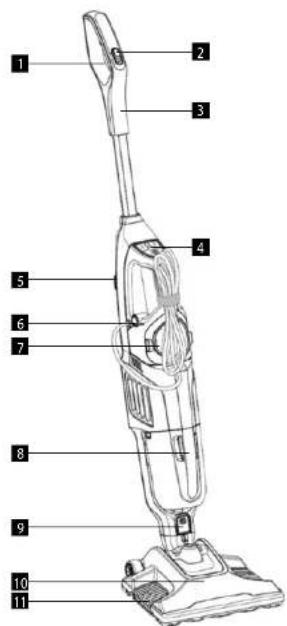
PRODUCT DESCRIPTION
1 Steam release lever
2 Steam release safety lock
3 Handle
4 Display
5 Vacuuming On/Off button
6 Steam On/Off button
7 Water tank
8 Dust container
9 Nozzle release button
10 Nozzle
11 Cleaning cloth holder
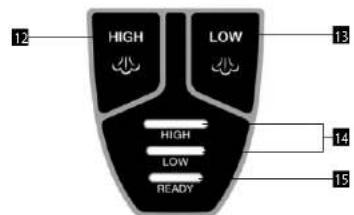
12 High intensity steam button
13 Low intensity steam button
14 Selected steam intensity indication
15. Heat on indication
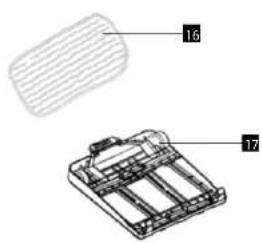
16 Cleaning cloth
17 Carpet glider
OPERATING INSTRUCTIONS
Assembly
- Insert the handle into the body of the appliance; the connecting latch of the handle must fit into the opening in the body (Fig. 1). Push until you hear a click.
- Lock - step on the suction nozzle with your foot and tilt the handle slightly backwards. This releases the lock and the appliance is ready for use. When you return the handle to the vertical position, the lock is activated.
- Power cord release - turn the hook 45^ to release and remove the cable
- Easy storage of the power cord - turn the hook to a vertical position, wrap the cord around the upper hook and the lower hook located under the handle.
- Handle for carrying - the handle is located on the front of the appliance body for easy lifting, carrying and use on stairs.
- Microfibre steam mop cover holder
A. Place the suction head on the microfibre steam mop cover holder to attach it.
B. To release the microfibre steam mop cover holder, step on the release pedal with your foot and lift the entire appliance out of the holder (Fig. 2).
Very important notice
To ensure maximum lifetime of the appliance, we strongly recommend using only distilled or demineralized water. If you live in an area with hard water, limescale will clog the appliance and reduce its efficiency!
After each use, remove the water tank and empty it!
Vacuum cleaner control
NOTE: Do not use the steam mop cover holder when vacuuming.
7. Press the Vacuuming On/Off button.
8. To empty the dirt container, grasp the handle of the container, press the release button and remove the container (Fig. 3).
9. After sliding the filter out, empty the container.
10. Place the dirt container back into the appliance.
NOTE: Do not use the vacuum cleaner if the dirt container is not installed correctly.
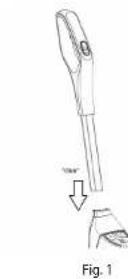
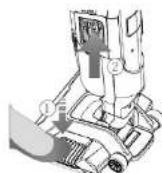
Fig.2
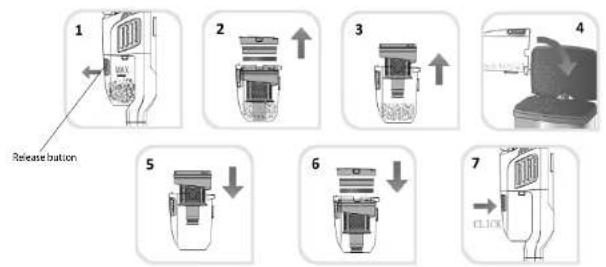
Fig.3
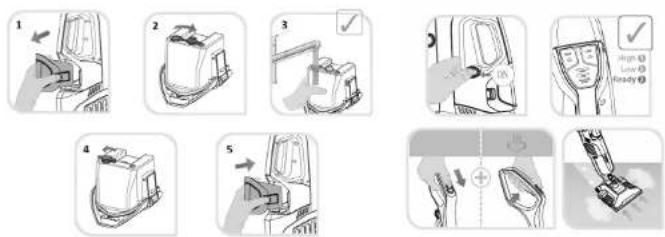
Fig.4 Fig.5
Steam mop control
- Attach the cleaning cloth on the steam mop cover holder.
- Attaching the steam mop cover holder: Place the cover holder in the centre of the nozzle and push it slightly until it clicks into its place.
NOTE: Never use the steam cleaner without the microfibre cover properly fitted. - When cleaning carpets, always use a carpet glider. Remove the carpet glider when using the steam cleaner on hard floors.
- Grasp the water tank release levers, pull it forward and remove it (Fig. 4).
- Loosen the plug on the back of the water tank and fill the tank with water. Make sure that the plug is properly closed. Place the water tank back into the appliance.
NOTE: Do not use the steam mop if there is no water in the water tank. - Press the button to turn on the steam. The Steam ready indicator ("READY") is flashing (Fig. 5).
- After the steam heats up (the "READY" indicator is on), use the Steam intensity buttons to set the intensity to either HIGH for high intensity or LOW for low intensity.
- Once you have set the steam intensity, press the steam release lock so you can press the steam release lever and start steam cleaning.
- When the steam mop stops producing hot steam, switch off the appliance and fill the water tank with water. 10. Steam setting:
Tiles/stone - maximum Sealed wood floor - minimum
NOTE: If the microfibre cover is too wet or dirty, replace it with a clean one.
The microfibre cover can be washed in a washing machine at 40^
USE AND MAINTENANCE
Maintenance
- After you have finished cleaning, switch off the appliance and unplug the power cord.
- Pour the remaining water out of the water tank.
- Remove the microfibre steam mop cover holder. The microfibre cover can be washed in a washing machine at a temperature up to 100^ . If the cover is very dirty, let it soak in warm water with detergent or stain remover. Allow the cover to dry before storing it. NOTE: DO NOT USE FABRIC SOFTENER.
Replacing the water filter
The water filter helps to filter out minerals contained in water which reduce the efficiency of the steam cleaner. The filter should be changed every 80-100 hours, depending on the frequency of the use of the appliance. Pour only distilled water into the steam mop. If you live in an area with hard water, deposits of this water may form on the heating element, which will then reduce the performance of the cleaner. Use only distilled water. By doing so, you will extend the life of the water filter and the heating element.
WARNING: Unplug the appliance before performing any maintenance.
Dust container filter maintenance
Remove the dust container from the vacuum cleaner. Remove the filter unit from the dust container. Turn the coarse outer filter counterclockwise and remove it. Pull out the dust container filter from the top part. Wash all the filters and let them dry before re-installing them. Insert the dust container filter into the top part of the coarse filter. After attaching the filter, attach the top part of the coarse filter and align the unlock symbol with the arrow symbol on the coarse filter. Turn the coarse filter clockwise until the arrow is next to the unlock symbol. Place the filter unit back into the dust container. Place the dust container back into the appliance body.
concept
concept
TROUBLESHOOTING
Problems associated with the function of the appliance, which sometimes may seem serious, can often be solved easily. Some you can solve yourself with the help of the following troubleshooter. Any further maintenance should be done at an authorized service centre.
| Problem Cause Remedy | ||
| The appliance has no power. | The appliance is not properly plugged in or switched on. | Plug in the appliance and switch on the steam cleaner. |
| The electric plug is faulty. | Check the plug by unplugging the appliance and plugging the steam cleaner into another electrical socket. | |
| The vacuum cleaner does not vacuum. | The dirt container is full. Empty the dirt container. | |
| A big piece of dirt has clogged the suction. | Remove the dirt from the suction opening. | |
| You need to clean the filter. | See the Filter maintenance chapter. Contact the Concept service centre. | |
| No or weak current of steam after switching on the steam cleaner. | The water tank is empty. Make sure the water tank is full. | |
| You have not pressed the steam spray lever. | Press the steam spray lever and activate the pump. | |
| You have not selected the steam function. | Check that the "STEAM" function is selected. | |
| The steam indicator is not on. | Wait until the steam indicator is on. If the indicator does not light up after one minute, contact the Concept service centre. | |
| You need to replace the water filter. See the Replacing the water filter chapter. | ||
| The steam cleaner is still not working properly. | Check all the above points. Contact the Concept service centre. | |
OPTIONAL ACCESSORIES
All the accessories and the spare parts can be purchased separately.
When making an order, state the model number of your appliance specified on the name plate on the bottom side of the appliance.
SERVICE CENTRE
Extensive maintenance or repair, which requires access to internal parts of the product, has to be performed by a qualified specialist or the service centre.
ENVIRONMENTAL CONCERNS
-
Packaging materials and old appliances should be recycled.
-
Packaging materials may be disposed of as sorted waste.
-
Dispose the plastic bags made of polyethylene (PE) of as sorted waste.
Recycling of the appliance at the end of its lifespan:

This appliance is labelled in accordance with European Directive 2012/19/EU concerning used electrical and electronic appliances (Waste Electrical and Electronic Equipment - WEEE). The symbol on the product or on its packaging indicates that this product may not be treated as household waste. Instead, it should be taken to the appropriate collection point for the recycling of electrical and electronic equipment. By ensuring this product is disposed of correctly, you will help prevent potential negative consequences for the environment and human health, which could otherwise be caused by inappropriate waste handling of this product. The disposal of such material has to be done according to the recycling regulations. For more detailed information about recycling of this appliance see the authorized local office or service for household waste disposal or the shop, where you purchased the appliance.

The product meets all the necessary requirements of the EU directives applicable to the specific product.
Changes in text, design, and technical specifications are subject to change without prior notice and we reserve the right to change them.
DANKSAGUNG
www; www.my-concept.com
Podrobnosti o produktu
CONCEPT POLSKA sp. z o.o.
ul Ostrowskiego 30, 53-238 Wroclaw
tel: +48 71 339 04 44, fax: 71 339 04 14
The manufacturer (or importer) is responsible for ensuring the product complies with the requirements of applicable legal regulations as well as those of the relevant technical standards. Moreover, they are responsible for ensuring the product has the properties the manufacturer described in documents related to the goods or those reasonably expected by the customer with regard to the nature of the goods or based on advertising produced by the manufacturer, and further they are responsible for ensuring the product is fit for the purpose proposed by the manufacturer or that a product of the same type is normally used for.
The quality warranty term is 24 months from product takeover by the customer.
The warranty does not apply to wear and tear caused by regular use. The customer shall not be entitled to any warranty claims if, prior to taking the product over, they knew the product contained a defect or if the defect is attributable to the customer.
In terms of these warranty conditions, a defective battery is considered a battery that is electronically inoperative (i.e., does not communicate with the base unit, the charging or discharging circuits are defective, etc.) or has an internal short circuit.
Defects or changes in parameters caused by normal use and wear (e.g. natural capacity decrease) are in no way considered a defect in terms of warranty.
The battery is provided warranty service for a period of 6 months. In terms of these warranty conditions, the battery has the nature of a consumable, for more details see,Consumables".
Consumables
For consumables (batteries, etc.) we guarantee the preservation of technical parameters for 6 months, in case it was not damaged by improper use and its lifetime has not expired.
The warranty specifically does not apply:
- if the product installation, operation and service conditions stipulated in the product operating manual have not been adhered to,
to malfunctions caused due to mechanical, heat or chemical damage, short circuit, over voltage or incorrect installation.
to malfunctions caused by an inexpert third-party intervention,
- to malfunctions caused by natural disaster,
- to malfunctions caused by insufficient or inappropriate maintenance in violation of the operating manual, including malfunctions caused by water and other sediments.
to changes in colour of the heating surface or to scratching of the surface caused as a result of using the products in an unusual manner,
to appearance and functional changes caused by exposure to sunlight, thermal radiation of water and other sediments.
- if the service life of certain product parts expires, e.g. for accumulators, bulbs, etc.
The warranty does not apply to any products and services provided along with the product (gifts, promotional articles, etc.).
Filing a complaint
A complaint against a product defect must be filed as soon as identified, yet no later than before the end of the warranty term.
The customer must file a product complaint with the dealer from which they have purchased the product, or with any authorised service centre, a list of which is included in the product package, or available at www.my-concept.com.
While filing a product complaint, the product must be duly cleaned and securely packed so as to prevent any damage during its transport to an authorised service centre, where relevant, unless the product is delivered in person.
The customer must submit proof of having concluded a purchase contract for the product by producing the receipt.
While filing their complaint, the customer must indicate the noted defect and identify the preferred complaint application method.
Complaints processing
As long as the noted defect may be removed, the user has the right to have the defect duly removed free of charge on a timely basis.
If the noted defect is not removable, or if the customer becomes entitled to replacement of the product or a part thereof, yet the replacement is not possible, for example due to the product having been sold out, the customer has the right to return the product (withdrawal from the contract).
The customer shall have the right to a new product (replacement) or to replacement of a part of the product even if the defect can be removed, provided they cannot properly use the product due to repeated occurrence of the defect or due to a high number of such defects. In such a case, the customer also has the right to return the product (by withdrawing from the contract).
If the product is not returned (the customer does not withdraw from the contract), or if the customer does not apply the right to a new defect-free product (replacement), to replacement of a part thereof or to repair of the product, they may request a reasonable discount. The customer also has a right to a reasonable discount if a new defect-free product cannot be supplied to them, or if a product part cannot be replaced or the product repaired unless the situation is remedied within a reasonable time limit, or if remedying the situation would create major discomfort on the part of the customer.
The seller, authorised service centre or a staff member authorised by them must decide about each complaint immediately or within three business days in complicated cases. This term does not include a reasonable period of time, depending on the type of product concerned, required for the defect to be assessed by an expert. A complaint, including defect removal, must be dealt with without any undue delay, yet no later than within 30 calendar days of the complaint filing date, unless the seller and the customer agree on a later deadline.
On returning the product (withdrawing from the contract) the customer must return any accessories and documents supplied along with the product.
The customer does not have the right to keep the defective parts and components of the product replaced as part of a repair of the product.
This shall be without prejudice to any other rights the customer may have in relation to the purchase of the product.
Remark: Complaints against products damaged in transport are governed by the carrier's complaints procedure.
Manufacturer
Jindrich Valenta - Concept
Vysokomytska 1800,56501 Chocen
Czech Republic
tel.: +420 465 471 400
fax+420465473304
Company ID No. 13216660
email: servis@my-concept.cz
www.www.my-concept.com
Product data
| Model: | |
| Production number: | |
| Date of purchase: Seal and signature of vendor: | |

concept concept

GARANTIEBEDINGUNGEN
Garantie
www.www.my-concept.com
Produktdetails
CONDITIONS DE GARANTIE
Garantie
Material consumabili
www.www.my-concept.com
Date despre produs
CONCEPT POLSKA sp. z o.o.
Ostrowskiego 30, 53-238 Wroclaw
Tel.: +48 713 390 444, Fax: 713 390 414
www.my-concept.pl

ASPICO KFT
- OCHRANA ZIVOTNÉHO PROSTMEDIA
- Recyklácia spotrebica na konci jeho zivotnosti:
- IMPORTANT SAFETY PRECAUTIONS
- concept
- Damages from failure to follow the manufacturer's instructions are not covered by the warranty.
- Only for household use.
- PRODUCT DESCRIPTION
- OPERATING INSTRUCTIONS
- Assembly
- Very important notice
- Vacuum cleaner control
- Steam mop control
- USE AND MAINTENANCE
- Maintenance
- Replacing the water filter
- Dust container filter maintenance
- TROUBLESHOOTING
- OPTIONAL ACCESSORIES
- SERVICE CENTRE
- ENVIRONMENTAL CONCERNS
- Recycling of the appliance at the end of its lifespan:
- DANKSAGUNG
- Consumables
- Filing a complaint
- Complaints processing
- Manufacturer
- concept concept
- GARANTIEBEDINGUNGEN
- Garantie
- CONDITIONS DE GARANTIE
- Material consumabili
- CONCEPT POLSKA sp. z o.o.
- ASPICO KFT
Brand : Concept
Model : CP3010
Category : Steam cleaner