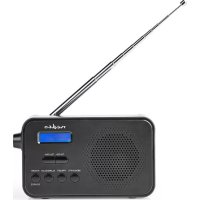
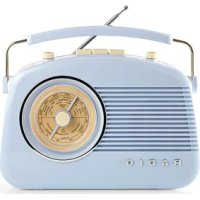
RDDB1000BK - Radio NEDIS - Free user manual and instructions
Find the device manual for free RDDB1000BK NEDIS in PDF.



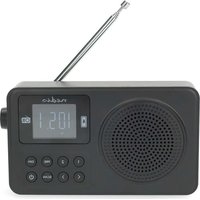
| Product type | DAB+ / FM clock radio |
| Brand | Nedis |
| Model | RDDB1000BK |
| Dimensions (L x W x H) | 160 x 45 x 94 mm |
| Weight | 300 g |
| Power supply | 5 VDC 1 A via micro-USB or 4 AAA batteries (not included) |
| RMS power | 1.2 W |
| Peak power | 3.6 W |
| DAB+ frequencies | 174 - 240 MHz |
| FM frequencies | 87.5 - 108 MHz |
| Number of presets | 20 DAB+ / 20 FM |
| Tuning type | PLL |
| Display | Backlit LCD |
| Main functions | DAB+ and FM radio, dual alarm clock, sleep, presets, system menu |
| Alarm clock | Yes, 2 adjustable alarms with DAB+/FM/buzzer source |
| Connectivity | 3.5 mm auxiliary output, micro-USB input |
| Antenna | Telescopic antenna |
| Care and cleaning | Wipe with a dry, soft cloth. Do not use abrasive cleaners. |
| Safety | Do not expose to water or moisture. Repair by qualified technician only. |
| Spare parts and repairability | No user-serviceable parts. Contact customer service. |
Frequently Asked Questions - RDDB1000BK NEDIS
User questions about RDDB1000BK NEDIS
0 question about this device. Answer the ones you know or ask your own.
Ask a new question about this device
Download the instructions for your Radio in PDF format for free! Find your manual RDDB1000BK - NEDIS and take your electronic device back in hand. On this page are published all the documents necessary for the use of your device. RDDB1000BK by NEDIS.
USER MANUAL RDDB1000BK NEDIS
with alarm clock radio
RDDB1000BK
EN Quick start guide 4
DE Kurzanleitung 8
DAB+ / FM radio RDDB1000BK
For more information see the extended manual online: ned.is/rddb1000bk
Intended use
The product is exclusively intended to be used as a radio with alarm clock. Any modification of the product may have consequences for safety, warranty and proper functioning.
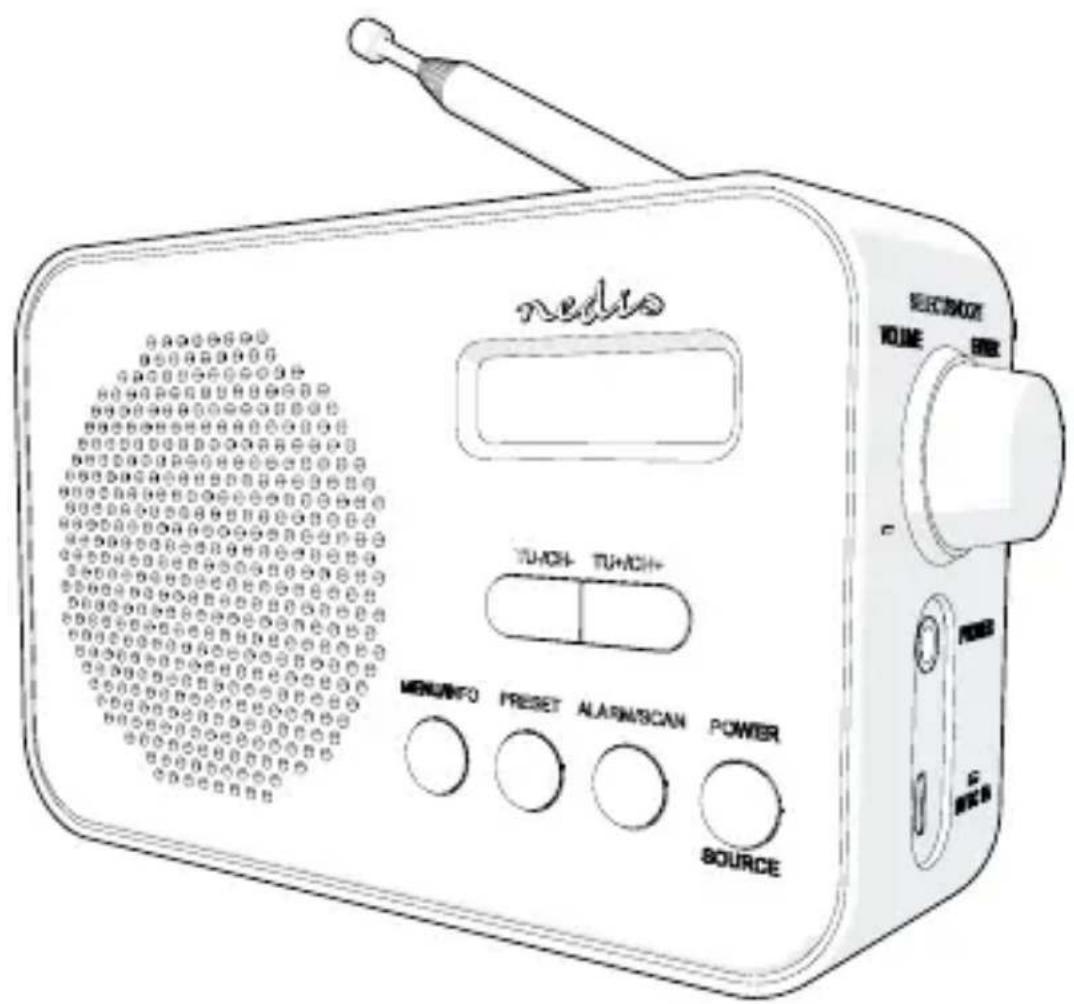
Main parts (image A)
1 DAB+ / FM radio
2 Display
3 Tuning-/Channel-button
4 Tuning+ / Channel+ button
5 Menu / Info button
6 Preset button
7 Alarm / Scan button
8 Power / Source button
9 Volume / Select / Snooze / Enter wheel
10 3.5 mm stereo jack
11 Micro-USB power input
12 Antenna
13 Battery compartment
14 Battery compartment lid
Safety instructions
WARNING
- Only use the product as described in this manual.
- Read the instructions before use.
- Do not let water enter the product.
- Do not use the product in wet or damp environments.
- Do not use the product in dusty environments.
- This product may only be serviced by a qualified technician for maintenance to reduce the risk of electric shock.
Setup
- Connect the micro USB cable to A ⑪ and an USB adapter.
- Extend the antenna A ⑫.
Alternatively, you can use built-in battery.
- Open the battery compartment lid A ⑭ .
- Insert 4 AAA batteries in the battery compartment A ⑬.
- Close the battery compartment A ⑭.
Setting date and time
If a DAB+ signal is found, date and time will be set automatically. You can set the time manually if a DAB+ signal is not present.
- Press A ⑧ to switch on the product.
- Press Menu / Info A ⑤.
- Press A ③ or A ④ to select "System".
- Press A ⑨ to confirm.
- Select "Time" and confirm.
- Select "Set Time/Date" and confirm to set time and date.
- Select "Set hour" and confirm to set the hour.
- Select "Set minute" and confirm to set the minutes.
- Select "Set month" and confirm to set the month.
- Select "Set date" and confirm to set the date.
- Select "Set year" and confirm to set the year.
Other date and time options:
| Auto update options | Update from any / update from DAB / update from FM / No update |
| Set 12/24 hour Switch | between 12 hour / 24 hour time display |
| Set date format Switch | between DD-MM-YYYY / MM-DD-YYYY |
DAB+ mode
- When the radio is in FM mode, press and hold A ⑧ to switch to DAB+. The radio automatically scans for available DAB+ stations.
- Press A ③ or A ④ to switch stations.
FM mode
- When the radio is in DAB+ mode, press and hold Source A ⑧ to switch to FM.
- Press A ③ or A ④ to switch stations. Press and hold to scan for stations.
Saving and listening to preset stations
- Press and hold A ⑥ to store a preset.
The display shows "Preset store#":".
- Press A ③ or A ④ to choose a preset number.
- Press A ⑨ to confirm.
- To listen to a preset station, press A ⑥.
- Press A ③ or A ④ to browse preset stations.
- Press Enter A ⑨ to confirm.
Using the alarm
Two different alarms can be set.
- Press A ⑦ to select alarm 1.
- Press A ⑦ again to select alarm 2.
- Press A ⑨ to edit the selected alarm.
- Turn A ⑨ to set the hours of the wake up time. Press A ⑨ to confirm.
- Turn A ⑨ to set the minutes. Press A ⑨ to confirm.
- Turn A ⑨ to set the duration of the alarm in minutes. Press A ⑨ to confirm.
- Turn A ⑨ to choose the source of the alarm: DAB+ / FM or buzzer. Press A ⑨ to confirm.
- Turn A ⑨ to choose when to sound the alarm. Choose between Daily / Weekends / Weekdays / Once. Press A ⑨ to confirm.
- Turn A ⑨ to switch the alarm on or off. Press A ⑨ to confirm.
Advanced DAB+ options
- Press A ⑤ to select what information to be shown on the display. For example: signal strength, frequency, time and date.
- Turn Tune A ⑨ to choose between:
| Full scan Perform a scan for DAB+ stations | |
| Manual tune Enable manual tuning for DAB+ stations | |
| DRC (Dynamic Range Compression) | Reduce the difference in volume between radio stations. |
| Prune Remove all ‘invalid’ stations, marked with ‘?’ | |
| System Change system settings | |
Advanced FM options
- Press A ⑤ to select the information to be shown on the display.
- Turn Tune A ⑨ to choose between:
| Scan setting Strong stations only / All stations |
| Audio setting Stereo allowed / Force mono |
| System Change system settings |
Changing system settings
- Press and hold A ⑤ to enter the menu. Select "System" and confirm.
- Turn Tune A ⑨ to choose between:
| Sleep Set time to stand by: Sleep off / 15 mins / 30 mins / 45 mins / 60 mins / 90 mins | |
| Time See chapter 4.1 | |
| Backlight Set time to backlight off: 10 sec / 20 sec / 30 sec / 45 sec / 60 sec / 90 sec / 120 sec / 180 sec / On | |
| Language Danish, Dutch, English, Finnish, French, German, Italian, Norwegian, Polish, Spanish | |
| Factory reset Reset to factory defaults | |
| Software version Display software version | |
Specifications
| Product DAB+ / FM radio | |
| Article number RDDB1000BK | |
| Dimensions (l x w x h) 160 x 45 x 94 mm | |
| Weight | 300 g |
| Power input | 5 VDC 1 A / 4 x AAA / LR03 (not included) |
| Power (RMS) | 1.2 W |
| Peak power | 3.6 W |
| DAB+ frequency | 174 - 240 MHz |
| FM frequency | 87.5 - 108 MHz |
| DAB+ presets 20 | |
| FM presets 20 | |
| Tuning type PLL | |
| LCD display Yes | |
| Alarm clock Yes | |
| Connections AUX output, micro USB |
Declaration of Conformity
We, Nedis B.V. declare as manufacturer that the product RDDB1000BK from our brand Nedis ^® , produced in China, has been tested according to all relevant CE standards and regulations and that all tests have been passed successfully. This includes, but is not limited to the RED 2014/53/EU regulation.
The complete Declaration of Conformity (and the safety datasheet if applicable) can be found and downloaded via webshop.nedis.com/RDDB1000BK#support
For additional information regarding the compliance, contact the customer service:
Web: www.nedis.com
E-mail: service@nedis.com
Phone: +31 (0)73-5991055 (during office hours)
Nedis B.V., de Tweeling 28
5215 MC 's-Hertogenbosch, the Netherlands

Kurzanleitung
5215 MC 's-Hertogenbosch, the Netherlands
De Tweeling 28, 5215 MC 's-Hertogenbosch – The Netherlands 09/19
- with alarm clock radio
- RDDB1000BK
- DAB+ / FM radio RDDB1000BK
- Intended use
- Main parts (image A)
- Safety instructions
- WARNING
- Setup
- Setting date and time
- DAB+ mode
- FM mode
- Saving and listening to preset stations
- Using the alarm
- Advanced DAB+ options
- Advanced FM options
- Changing system settings
- Specifications
- Declaration of Conformity
- Kurzanleitung
Brand : NEDIS
Model : RDDB1000BK
Category : Radio