EasyManual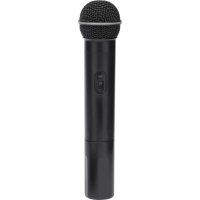
Stage v266 Dual Vocal - Microphone SAMSON - Free user manual and instructions
Find the device manual for free Stage v266 Dual Vocal SAMSON in PDF.



User questions about Stage v266 Dual Vocal SAMSON
0 question about this device. Answer the ones you know or ask your own.
Ask a new question about this device
Download the instructions for your Microphone in PDF format for free! Find your manual Stage v266 Dual Vocal - SAMSON and take your electronic device back in hand. On this page are published all the documents necessary for the use of your device. Stage v266 Dual Vocal by SAMSON.
USER MANUAL Stage v266 Dual Vocal SAMSON
Stage v266: Dual Handheld Wireless Important Safety Information CAUTION: TO REDUCE THE RISK OF ELECTRIC SHOCK, DO NOT REMOVE COVER (OR BACK). NO USER-SERVICEABLE PARTS INSIDE. REFER SERVICING TO QUALIFIED SERVICE PERSONNEL. This lightning ash with arrowhead symbol within an equilateral triangle is intended to alert the user to the presence of non-insulated “dangerous volt- age” within the product’s enclosure that may be of sucient magnitude to constitute a risk of electric shock. The exclamation point within an equilateral triangle is intended to alert the user to the presence of important operating and maintenance instructions in the literature accompanying the appliance. If you want to dispose this product, do not mix it with general household waste. There is a separate collection system for used electronic products in accordance with legislation that requires proper treatment, recovery and recycling. Private household in the 25 member states of the EU, in Switzerland and Norway may return their used electronic products free of charge to designated collection facilities or to a retailer (if you purchase a similar new one).For Countries not mentioned above, please contact your local authorities for a correct method of disposal.By doing so you will ensure that your disposed product undergoes the necessary treatment, recovery and recycling and thus prevent potential negative effects on the environment and human health. ATTENTION RISQUE D’ÉLECTROCUTION ! NE PAS OUVRIR ! WARNING TO PREVENT FIRE OR SHOCK HAZARD. DO NOT USE THIS PLUG WITH AN EXTENSION CORD, RE- CEPTACLE OR OTHER OUTLET UNLESS THE BLADES CAN BE FULLY INSERTED TO PREVENT BLADE EXPOSURE. TO PREVENT FIRE OR SHOCK HAZARD. DO NOT EXPOSE THIS APPLIANCE TO RAIN OR MOISTURE. TO PREVENT ELECTRICAL SHOCK, MATCH WIDE BLADE PLUG TO WIDE SLOT AND FULLY INSERT.4 Important Safety Information
1. Read these instructions.
2. Keep these instructions.
3. Heed all warnings.
4. Follow all instructions.
5. Do not use this apparatus near water.
6. Clean only with dry cloth.
7. Do not block any ventilation open-
ings. Install in accordance with the manufacturer’s instructions.
8. Do not install near any heat sources
such as radiators, heat registers, stoves, or other apparatus (including ampliers) that produce heat.
9. Do not defeat the safety purpose
of the polarized or grounding type plug. A polarized plug has two blades with one wider than the other. A grounding type plug has two blades and a third grounding prong. The wide blade or the third prong are provided for your safety. If the provided plug does not t into your outlet, consult an electrician for replacement of the obsolete outlet.
10. Protect the power cord from being
walked on or pinched particularly at the plugs, convenience receptacles, and at the point where they exit from the apparatus.
11. Only use attachments/accessories
specied by the manufacturer.
12. Use only with the cart, stand, tripod,
bracket, or table specied by the manufacturer, or sold with the ap- paratus. When a cart is used, use caution when moving the cart/ apparatus combina- tion to avoid injury from tip-over.
13. Unplug the apparatus during light-
ening storms, or when unused for long periods of time.
14. Refer all servicing to qualied
personnel. Service is required when the apparatus has been damaged in any way, such as power supply cord or plug is damaged, liquid has been spilled or objects have fallen into the apparatus has been exposed to rain or moisture, does not operate normally, or has been dropped.
15. This appliance shall not be exposed
to dripping or splashing water and that no object lled with liquid such as vases shall be placed on the ap- paratus.
16. Caution-to prevent electrical shock,
match wide blade plug wide slot fully insert.
17. Please keep a good ventilation envi-
ronment around the entire unit.
18. The direct plug-in adapter is used as
disconnect device, the disconnect device shall remain readily operable.
19. Batteries (battery pack or batteries
installed) shall not be exposed to excessive heat such as sunshine, re or the like.ENGLISH
- Stage v266: Dual Handheld Wireless Table of Contents Introduction p. 6
- Receiver Controls and Features p. 7
- Transmitter Controls and Features p. 8
- Quick Start Guide p. 9
- Specifications p. 12
- Troubleshooting Congratulations on purchasing the Samson Stage v266 Dual Vocal Wireless System! The Stage v266 system is the perfect solution for any application requiring two high quality, wireless micro- phones in an easy to use, compact package. The system features the SR266 dual channel receiver with individual and mixed outputs. Also included are two HT6 handheld microphone transmit- ters. With the Stage v266 system, you’ll have great sound quality with clear reception, and the ability to walk freely around your venue. For any live sound application (karaoke, schools, conferences, houses of worship, etc.) the Stage v266 is the ideal tool for your dual-channel wireless micro- phone needs. The Stage v266 always provides outstanding performance and reliability. Although this product is designed for intuitive operation, we suggest you take some time to go through these pages to learn how we’ve implemented a number of unique features, and to get step-by-step instructions for setting up your system. If your Stage v266 was purchased in the United States, you’ll also nd a warranty card enclosed—please don’t forget to ll it out and mail it in so that you can receive online technical support, and so that we can send you updated information about this and other Samson products. Also, be sure to check out our website (www.samsontech.com) for complete information about our full product line. We recommend that you record your serial number in the space provided below, for future refer- ence. Serial number:_______________________________ Date of purchase:____________________________ Should your unit ever require servicing, a Return Authorization (RA) number must be obtained before shipping your unit to Samson. Without this number, the unit will not be accepted. Please call Samson at 1-800-3SAMSON (1-800-372-6766) for an RA number prior to shipping your unit. Please retain the original packing materials and, if possible, return the unit in the original carton. If you purchased your Samson product outside the United States, please contact your local dis- tributor for warranty information and service. p. 136
- Professional, dual-handheld wireless system.
- Easy setup and operation.
- Crystal-controlled, Superheterodyne circuitry for clear and reliable reception.
- Individual or mixed ¼” outputs
- Up to 250’ of line-of-sight operating range.
- Two professional HT6 handheld transmitters with mute switches
- Each HT6 transmitter provides nine hours of battery life, using standard 9-volt batteries. IntroductionENGLISH
1. Power Switch - Press to turn
the receiver on or o.
2. Power Indicator - Lights red
when the receiver is powered on.
3. Volume Control (Channel 1) - Rotate to adjust the level of the audio signal output from the
4. Channel 1 RF Indicator - Lights green when the corresponding Channel 1 HT6 transmitter is
powered on, and there is an RF signal present and detected by the receiver.
5. Volume Control (Channel 2) - Rotate to adjust the level of the audio signal output from the
6. Channel 2 RF Indicator - Lights green when the corresponding Channel 2 HT6 transmitter is
powered on, and there is an RF signal present and detected by the receiver.
7. DC Input - Connect the sup-
plied 12-volt, 200 mA power adapter here.
WARNING: The substitution
of any other kind of power adapter can cause severe dam- age to the SR266 and will void your warranty.
8. Channel 1 Output - Use this
unbalanced, ¼” jack to connect the SR266 Channel 1 receiver to the line level input of a mixer, amplifier, or other audio equipment. For a mixed signal of both receivers, only plug into one output on the SR266. Otherwise, Channel 1 and Channel 2 will output separate signals.
9. Channel 2 Output - Use this unbalanced, ¼” jack to connect the SR266 Channel 2 receiver to
the line level input of a mixer, amplifier, or other audio equipment. For a mixed signal of both receivers, only plug into one output on the SR266. Otherwise, Channel 1 and Channel 2 will output separate signals.
10. Adaptor Strain Relief - Loop the included adaptor’s cord through the
strain relief to prevent the plug from accidentally detaching from the receiver.
11. Antenna - The antenna mountings allow full rotation for optimum
placement. In normal operation, both antennas should be placed in a vertical position. The antennas can be folded inward for convenience when transporting the SR266.
SR266 Receiver Controls and Features
1. Audio ON/OFF Switch - When set to the ON position, audio signal
is transmitted. When set to the OFF position, the audio signal is muted. Note that moving this switch to the OFF position does not turn o the transmitter power—it is simply a way to temporarily mute the transmission of audio signal. When not in use for extended periods, the transmitter power should be turned o by using the power ON/OFF switch.
2. Power ON/OFF Switch - Use this switch to turn the HT6 on or o (to
conserve battery power, be sure to leave it o when not in use). Be sure to mute the audio signal at your external mixer or amplifier before turning transmitter power on or off, or an audible pop may result.
3. Power Indicator - LED lights green when the transmitter is powered
4. Battery Compartment - Insert a standard 9-volt alkaline battery
here. Be sure to observe the plus and minus polarity markings when installing the battery. We recommend the Duracell MN 1604 type battery for use with this device. Although rechargeable Ni-Cad batteries can be used, they do not supply adequate current for more than four hours.
WARNING: Do not insert the battery backwards; doing so can cause
severe damage to the HT6 and will void your warranty.
5. Channel Marking - Printed number corresponding to the appro-
priate channel on the SR266 receiver. HT6 Transmitter Controls and Features
Stage v266: Dual Handheld Wireless Follow these basic procedures for setting up and using your Stage v266 Series Wireless System.
1. Connect the SR266 receiver power adaptor to the rear panel DC input, and then to an electrical outlet.
2. Connect the receiver’s appropriate ¼” output to the input of a mixer, stereo, karaoke machine, or any other line level input (see below).
Use the included ¼” to ¼” cable to connect the SR266 receiver to a mixer.
Use the included ¼” to dual RCA cable to connect the SR266 recevier to a stereo or other HI-FI device.
5. Installing a 9-volt battery into the receiver.
3. Plugging the receiver into a stereo using the 1/4" - RCA cable.
4. Plugging the receiver into a Karaoke machine using 1/4" - 1/4" cable.
5. Installing a 9-volt battery into the receiver.
3. Plugging the receiver into a stereo using the 1/4" - RCA cable.
4. Plugging the receiver into a Karaoke machine using 1/4" - 1/4" cable.10
Use the included ¼” to ¼” cable to connect the SR266 receiver to a karaoke machine.
of the HT6 transmitter, rotate the bottom section and slide down to expose the battery compartment. Insert a standard 9-volt alkaline battery, being sure to follow the plus and minus polarity markings.
4. Turn on the HT6 transmitter by sliding the POWER
switch to the right, and replace the bottom section.
5. Installing a 9-volt battery into the receiver.
3. Plugging the receiver into a stereo using the 1/4" - RCA cable.
4. Plugging the receiver into a Karaoke machine using 1/4" - 1/4" cable.
1. Plugging the receiver into the wall.
2. Plugging the receiver into a mixer using 1/4" - 1/4" cable.
4. Plugging the receiver into a Karaoke machine using 1/4" - 1/4" cable.ENGLISH
5. Place the SR266 receiver where it will
be used (the general rule of thumb is to maintain “line of sight” between the receiver and transmitters so that the person(s) using the transmitter can see the receiver). Turn on the power of the SR266 receiver.
6. Turn on the connected amplifier and/
or mixer, but keep its volume all the way down. Next, make sure that your transmitter is un-muted by setting its Audio switch to ON. Then, set the Volume Control knob on the SR266 fully clockwise; this is unity gain. Speak or sing into the mic at a normal performance level while slowly raising the volume of your amplifier/mixer until the desired level is reached. Quick Start Guide12
OVERALL SYSTEM SPECIFICATIONS
Operating Frequency VHF 173.80 MHz to 213.20 MHz Number of Channels Fixed channel Frequency Stability ±0.005% Modulation Mode FM Maximum Deviation ±15 kHz Operating Range 250’ (line of sight) Operating Temperature Range 40° F (4° C) to 110° F (43° C) Frequency Response 80 Hz to 15 kHz
RF Power Output 10 mW Microphone Element H6 Dynamic unidirectional Typical Battery Life (9-volt alkaline battery) 9-hours Current Consumption 30 mA typical Dimensions Ø2.1” x 9.3” Ø52.6 mm x 235.5 mm Net Weight 0.4 lbs
Stage v266: Dual Handheld Wireless Issue Solutions No Audio Turn on the HT6 transmitter using the Power ON/OFF switch. Ensure the HT6 transmitter’s batteries are installed correctly. Check that the HT6 Audio ON/OFF switch is in the ON position. Conrm that the SR266 adaptor is correctly connected and plugged into an electrical outlet. Turn on the SR266 receiver. Make sure the SR266 output and audio input connections are securely connected. Ensure that the SR266 receiver and HT6 transmitters are in line of sight with one another. Check the receiver and audio input device level controls. Distorted Audio Check the receiver output level and audio input device level. Check the HT6’s batteries and replace if low. Another transmitter may be broadcasting on the same channel. Turn o transmitter that may be causing interference. Audio Dropout The transmitter may be too far away from the receiver. Move closer to the receiver, or reposition the antennas. Remove any sources that may cause RF interference, such as cell phones, cordless phones, lighting equipment, computers, etc. Transmitters and Receiver on Dierent Channels Contact your Samson reseller or distributor for assistance. TroubleshootingFCC Rules and Regulations Samson wireless receivers are certified under FCC Rules part 15 and transmitters are certified under FCC Rules part 74. Licensing of Samson equipment is the user’s responsibility and licensability depends on the user’s classification, appli- cation and frequency selected. This device complies with RSS-210 of Industry & Science Canada. Operation is subject to the following two conditions: (1) this device may not cause harmful interference and (2) this device must accept any interference received, includ- ing interference that may cause undesired operation. NOTE: This equipment has been tested and found to comply with the limits for a Class B digital device, pursuant to Part 15 of the FCC Rules. These limits are designed to provide reasonable protection against harmful interference in a residential installation. This equipment gener- ates, uses and can radiate radio frequency energy and, if not installed and used in accordance with the instructions, may cause harmful inter- ference to radio communications. However, there is no guarantee that interference will not occur in a particular installation. If this equipment does cause harmful interference to radio or television reception, which can be determined by turning the equipment off and on, the user is encouraged to try to correct the interference by one or more of the fol- lowing measures:
- Reorient or relocate the receiving antenna.
- Increase the separation between the equipment and receiver.
- Connect the equipment into an outlet on a circuit different from that to which the receiver is connected.
- Consult the dealer or an experienced Radio/TV technician for help.
WARNING: Changes or modifications not expressly approved by the
party responsible for compliance could void the user’s authority to operate the equipment.ENGLISH
5. Installing a 9-volt battery into the receiver.
3. Plugging the receiver into a stereo using the 1/4" - RCA cable.
4. Plugging the receiver into a Karaoke machine using 1/4" - 1/4" cable.
5. Installing a 9-volt battery into the receiver.
3. Plugging the receiver into a stereo using the 1/4" - RCA cable.
4. Plugging the receiver into a Karaoke machine using 1/4" - 1/4" cable.22
5. Installing a 9-volt battery into the receiver.
3. Plugging the receiver into a stereo using the 1/4" - RCA cable.
4. Plugging the receiver into a Karaoke machine using 1/4" - 1/4" cable.
1. Plugging the receiver into the wall.
2. Plugging the receiver into a mixer using 1/4" - 1/4" cable.
4. Plugging the receiver into a Karaoke machine using 1/4" - 1/4" cable.ENGLISH
5. Installing a 9-volt battery into the receiver.
3. Plugging the receiver into a stereo using the 1/4" - RCA cable.
4. Plugging the receiver into a Karaoke machine using 1/4" - 1/4" cable.
5. Installing a 9-volt battery into the receiver.
3. Plugging the receiver into a stereo using the 1/4" - RCA cable.
4. Plugging the receiver into a Karaoke machine using 1/4" - 1/4" cable.34
5. Installing a 9-volt battery into the receiver.
3. Plugging the receiver into a stereo using the 1/4" - RCA cable.
4. Plugging the receiver into a Karaoke machine using 1/4" - 1/4" cable.
1. Plugging the receiver into the wall.
2. Plugging the receiver into a mixer using 1/4" - 1/4" cable.
4. Plugging the receiver into a Karaoke machine using 1/4" - 1/4" cable.ENGLISH
5. Installing a 9-volt battery into the receiver.
3. Plugging the receiver into a stereo using the 1/4" - RCA cable.
4. Plugging the receiver into a Karaoke machine using 1/4" - 1/4" cable.
5. Installing a 9-volt battery into the receiver.
3. Plugging the receiver into a stereo using the 1/4" - RCA cable.
4. Plugging the receiver into a Karaoke machine using 1/4" - 1/4" cable.46
5. Installing a 9-volt battery into the receiver.
3. Plugging the receiver into a stereo using the 1/4" - RCA cable.
4. Plugging the receiver into a Karaoke machine using 1/4" - 1/4" cable.
1. Plugging the receiver into the wall.
2. Plugging the receiver into a mixer using 1/4" - 1/4" cable.
4. Plugging the receiver into a Karaoke machine using 1/4" - 1/4" cable.ENGLISH
5. Installing a 9-volt battery into the receiver.
3. Plugging the receiver into a stereo using the 1/4" - RCA cable.
4. Plugging the receiver into a Karaoke machine using 1/4" - 1/4" cable.
5. Installing a 9-volt battery into the receiver.
3. Plugging the receiver into a stereo using the 1/4" - RCA cable.
4. Plugging the receiver into a Karaoke machine using 1/4" - 1/4" cable.58
5. Installing a 9-volt battery into the receiver.
3. Plugging the receiver into a stereo using the 1/4" - RCA cable.
4. Plugging the receiver into a Karaoke machine using 1/4" - 1/4" cable.
1. Plugging the receiver into the wall.
2. Plugging the receiver into a mixer using 1/4" - 1/4" cable.
4. Plugging the receiver into a Karaoke machine using 1/4" - 1/4" cable.ENGLISH
- per assistenza, rivolgersi al rivenditore o a un tecnico radiotelevisivo qualificato. ATTENZIONE: qualsiasi cambiamento o modifica non espressamente approvato dalla parte competente in materia di conformità potrebbe invalidare il diritto dell’utente di utilizzare l’apparecchio.R&TTE Declaration of Conformity In accordance with EN ISO 17050:2005 We, Samson Technologies Corporation, located at 45 Gilpin Ave, Hauppauge, NY 11788 USA declare under our own responsibility that the products: Product Name: Stage 266 Wireless Microphone Trade Name: Samson Type or Model: SR266 (Receiver), HT6 (Transmitter) are in conformity with the essential requirements of the following EC Directive(s) when installed in accordance with the installation instructions contained in the product documentation: 2006/95/EC - LVD Directive 2004/108/EC - EMC Directive 1999/5/EC - R&TTE Directive The product is in conformity with the following standards and/or other normative documents: EN60065:2002 +A1+A11 Audio, video and similar electronic apparatus - Safety requirements EN301 489-1 V1.8.1 Common technical requirements. EN301 489-9 V1.4.1 Specic conditions for wireless microphones, similar Radio Frequency (RF) audio link equipment, cordless audio and in-ear monitoring. EN300 422-1 V1.3.2 Technical characteristics and methods. EN300 422-2 V1.2.2 Harmonized EN covering essential requirements of article 3.2 of the R&TTE directive EN50371:2002 Generic standard to demonstrate the compliance of low power electronic and electrical apparatus with the basic restrictions related to human exposure to electromagnetic elds (10 MHz - 300 GHz). General public Year of CE Marking (Low Voltage Directive): 2012 Identication Mark: 1797 (Notied body number) This equipment will also carry the Class 2 equipment identier: Authorized Representative: Douglas Bryant Position: Vice President Engineering Date: January 16, 2012 This equipment is intended for use in wireless microphone applications. The equipment is subject to license. Please contact your national frequency authority for information on available legal use in your area. Any changes or modifications not expressly approved by Samson Technologies Corp. could void your authority to operate the equipment.Samson Technologies 45 Gilpin Avenue Hauppauge, New York 11788-8816 Phone: 1-800-3-SAMSON (1-800-372-6766) Fax: 631-784-2201 www.samsontech.com