AirLine AH8 - Microphone SAMSON - Free user manual and instructions
Find the device manual for free AirLine AH8 SAMSON in PDF.




| Product type | UHF wireless headset |
| Brand | Samson |
| Model | AirLine AH8 |
| Category | Microphone |
| Microphone type | Unidirectional electret condenser |
| Audio frequency response | 50 Hz - 15 kHz |
| Operating range | Up to 100 m (300 ft) line of sight |
| Battery life | 8 hours |
| Power supply | Rechargeable lithium-ion battery 3.6 V / 500 mAh |
| Dimensions (L x W x H) | 150 x 170 x 100 mm |
| Weight | 60 g |
| Charging connector | Waterproof gold-plated magnetic port |
| Included accessories | 4 foam windscreens, 1 stainless steel windscreen, rubber headband |
| Main functions | Power on/off (3s), mute (short press), volume adjustment (+/- buttons), infrared pairing with receiver |
| Status indicator | Green LED (normal), orange (mute), flashing red (low battery/charging), solid red (charging complete) |
| Water resistance | Yes (waterproof microphone and housing) |
| Headband adjustment | Adjustable headband (do not bend the arms) |
| Care and cleaning | Clean with a damp cloth after each use; wash windscreens with clean water |
| Safety instructions | Do not expose to excessive heat (sun, fire); use only the supplied charger; do not open the transmitter |
| Spare parts and repairability | User-replaceable battery (contact distributor); no user-serviceable parts inside |
Frequently Asked Questions - AirLine AH8 SAMSON
User questions about AirLine AH8 SAMSON
0 question about this device. Answer the ones you know or ask your own.
Ask a new question about this device
Download the instructions for your Microphone in PDF format for free! Find your manual AirLine AH8 - SAMSON and take your electronic device back in hand. On this page are published all the documents necessary for the use of your device. AirLine AH8 by SAMSON.
USER MANUAL AirLine AH8 SAMSON
Headset Wireless System
natural_image
Black SAMSON wireless earchairs device with external antennas and control buttons (no readable text beyond branding)OWNER'S MANUAL
Copyright 2020, Samson Technologies Corp.
v5
This product is covered by the US patent: US9,602,053 and D843,347
Samson Technologies Corp.
278-B Duffy Ave
Hicksville, NY 11801
www.samsontech.com
Important Safety Information
ATTENTION RISQUE D'ÉLECTROCUTION ! NE PAS OUVRIR !
CAUTION: TO REDUCE THE RISK OF ELECTRIC SHOCK, DO NOT REMOVE COVER (OR BACK). NO USER-SERVICEABLE PARTS INSIDE. REFER SERVICING TO QUALIFIED SERVICE PERSONNEL.
This lightning flash with arrowhead symbol within an equilateral triangle is intended to alert the user to the presence of non-insulated “dangerous voltage” within the product’s enclosure that may be of sufficient magnitude to constitute a risk of electric shock.
The exclamation point within an equilateral triangle is intended to alert the user to the presence of important operating and maintenance instructions in the literature accompanying the appliance.
WARNING
TO PREVENT FIRE OR SHOCK HAZARD. DO NOT USE THIS PLUG WITH AN EXTENSION CORD, RECEPTACLE OR OTHER OUTLET UNLESS THE BLADES CAN BE FULLY INSERTED TO PREVENT BLADE EXPOSURE. TO PREVENT FIRE OR SHOCK HAZARD. DO NOT EXPOSE THIS APPLIANCE TO RAIN OR MOISTURE. TO PREVENT ELECTRICAL SHOCK, MATCH WIDE BLADE PLUG TO WIDE SLOT AND FULLY INSERT.
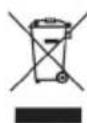
If you want to dispose this product, do not mix it with general household waste. There is a separate collection system for used electronic products in accordance with legislation that requires proper treatment, recovery and recycling.
Private household in the 28 member states of the EU, in Switzerland and Norway may return their used electronic products free of charge to designated collection facilities or to a retailer (if you purchase a similar new one).
For Countries not mentioned above, please contact your local authorities for a correct method of disposal.
By doing so you will ensure that your disposed product undergoes the necessary treatment, recovery and recycling and thus prevent potential negative effects on the environment and human health.
AirLine 88x Headset Wireless System 3
Important Safety Information
- Read these instructions.
- Keep these instructions.
- Heed all warnings.
- Follow all instructions.
- Do not use this apparatus near water.
- Clean only with dry cloth.
- Do not block any ventilation openings. Install in accordance with the manufacturer's instructions.
- Do not install near any heat sources such as radiators, heat registers, stoves, or other apparatus (including amplifiers) that produce heat.
-
Do not defeat the safety purpose of the polarized or grounding type plug. A polarized plug has two blades with one wider than the other. A grounding type plug has two blades and a third grounding prong. The wide blade or the third prong are provided for your safety. If the provided plug does not fit into your outlet, consult an electrician for replacement of the obsolete outlet.
-
Protect the power cord from being walked on or pinched particularly at the plugs, convenience receptacles, and at the point where they exit from the apparatus.
-
Only use attachments/accessories specified by the manufacturer.
-
Use only with the cart, stand, tripod, bracket, or table specified by the manufacturer, or sold with the apparatus. When a cart is used, use caution when moving the cart/ apparatus combination to avoid injury from tip-over.
-
Unplug the apparatus during lightening storms, or when unused for long periods of time.
- Refer all servicing to qualified personnel. Service is required when the apparatus has been damaged in any way, such as power supply cord or plug is damaged, liquid has been spilled or objects have fallen into the apparatus has been exposed to rain or moisture, does not operate normally, or has been dropped.
- This appliance shall not be exposed to dripping or splashing water and that no object filled with liquid such as vases shall be placed on the apparatus.
- Caution-to prevent electrical shock, match wide blade plug wide slot fully insert.
- Please keep a good ventilation environment around the entire unit.
- The direct plug-in adapter is used as disconnect device, the disconnect device shall remain readily operable.
- Batteries (battery pack or batteries installed) shall not be exposed to excessive heat such as sunshine, fire or the like.

natural_image
Symbolic illustration of a person climbing a ladder inside a circle (no text or symbols)Important Safety Information
FCC Rules and Regulations
Samson wireless receivers are certified under FCC Rules part 15 and transmitters are certified under FCC Rules part 74. Licensing of Samson equipment is the user's responsibility and licensability depends on the user's classification, application and frequency selected.
This device complies with Part 15 of the FCC rules Class B and RSS-210 of Industry & Science Canada.
Operation is subject to the following two conditions:
(1) This device must not cause harmful interference, and
(2) This device must accept any interference received including interference that may cause undesired operation. Suitable for home or office use.
NOTE: This equipment has been tested and found to comply with the limits for a Class B digital device, pursuant to Part 15 of the FCC Rules. These limits are designed to provide reasonable protection against harmful interference in a residential installation. This equipment generates, uses and can radiate radio frequency energy and, if not installed and used in accordance with the instructions, may cause harmful interference to radio communications. However, there is no guarantee that interference will not occur in a particular installation. If this equipment does cause harmful interference to radio or television reception, which can be determined by turning the equipment off and on, the user is encouraged to try to correct the interference by one or more of the following measures:
- Reorient or relocate the receiving antenna.
- Increase the separation between the equipment and receiver.
- Connect the equipment into an outlet on a circuit different from that to which the receiver is connected.
- Consult the dealer or an experienced Radio/TV technician for help.
WARNING: Changes or modifications not expressly approved by the party responsible for compliance could void the user's authority to operate the equipment.
This equipment is intended for use in wireless microphone applications.
Equipment is intended for sale in: AT, BE, CH, CY, CZ*, DK, EE, FI*, FR*, DE*, GR*, HU, IE, IS, IT, LV, LT*, LU, MT*, NL, NO*, PL* PT, RO, SK, SI, ES, SE, UK
*Subject to license. Please contact your national frequency authority for information on available legal use in your area. Any changes or modifications not expressly approved by Samson Technologies Corp. could void your authority to operate the equipment.
Hereby, Samson Technologies Corp., declares that this CR88x and AH8 are in compliance with the essential requirements and other relevant provisions of Directive 2014/53/EU. The declaration of conformity may be consulted at:
http://www.samsontech.com/site_media/support/manuals/AirLine88x_AH8_DOC.pdf
Introduction
Congratulations on purchasing the Samson AirLine 88x AH8 Fitness Headset system. The AirLine 88x offers true wireless freedom without the hassle of a beltpack or cable. Featuring a lightweight, water-resistant micro transmitter headset with a secure yet comfortable fit, the system provides professional sound, premium reliability and a 300' operating range for fitness instructors and active performers. Offering frequency-agile UHF operation, the CR88x receiver provides 100 available channels to secure reliable wireless performance. The receiver provides easy setup with 1-touch scan that analyzes and selects the clearest operating channel and infrared set to pair the transmitter with the receiver.
The AH8 combines a micro transmitter and adjustable stainless steel gooseneck into a low profile headset that molds to the shape of your head. Other great features of the AH8 Headset Transmitter include an internal 8-hour rechargeable lithium ion battery and easily accessible Gain and Mute controls. The AirLine 88x system ensures clear, interruption-free performance by combining tone-key with auto-mute. This configuration allows only the transmitter's audio to pass through the receiver, and mutes the output if there is any interference. For travel or permanent installation, the AirLine 88x includes a standard 19" rackmount kit.
In these pages, you'll find a detailed description of the features of the AirLine 88x wireless system, as well as a guided tour through its control panel, step-by-step instructions for its setup and use, and full specifications. If your wireless system was purchased in the United States, you'll also find a warranty card enclosed—don't forget to fill it out and mail it in so that you can receive online technical support and so that we can send you updated information about this and other Samson products in the future. Also, be sure to check out our website (www.samsontech.com) for complete information about our full product line.
We recommend you keep the following records for reference, as well as a copy of your sales receipt.
Receiver Serial number: ____
Transmitter Serial number: ____
Date of purchase: ____
Dealer name: ____
If you have any questions or comments regarding the AirLine 88x AH8 Fitness Headset system or any other products from Samson, do no hesitate to contact us at support@samsontech.com.
With proper care and maintenance, your AirLine 88x System will operate trouble-free for many years. Should your AirLine 88x System ever require servicing, a Return Authorization (RA) number must be obtained before shipping your unit to Samson. Without this number, the unit will not be accepted. Please visit www.samsontech.com/ra for an RA number prior to shipping your unit. Please retain the original packing materials and, if possible, return the unit in its original carton. If your AirLine 88x System was purchased outside of the United States, contact your local distributor for warranty details and service information.
Quick Start
In order for your wireless system to work correctly, both the receiver and transmitter must be set to the same channel.
Follow this basic procedure for setting up and using your AirLine 88x Headset wireless system:
Physically place the CR88x receiver where it will be used, and extend the antennas vertically. The general rule of thumb is to maintain “line of sight” between the receiver and transmitter so that the person using or wearing the transmitter can see the receiver.
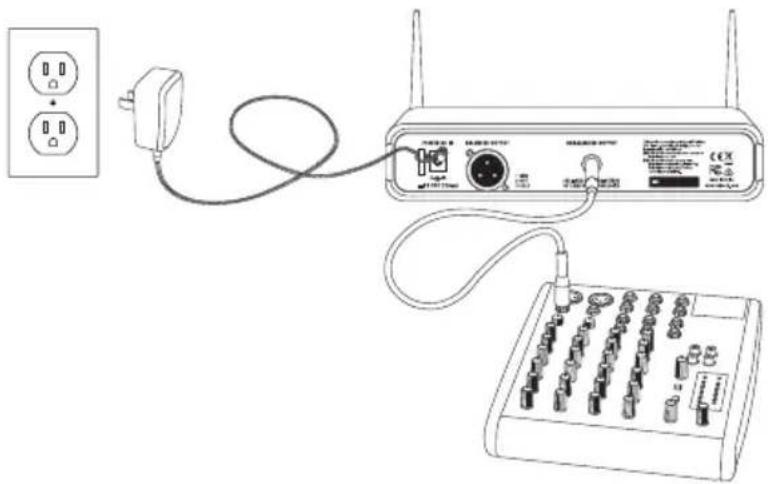
With the CR88x powered off, connect the included power adapter. Turn the CR88x on momentarily to confirm that the unit is receiving power. You'll see the LED display light up. Then turn the CR88x power off.
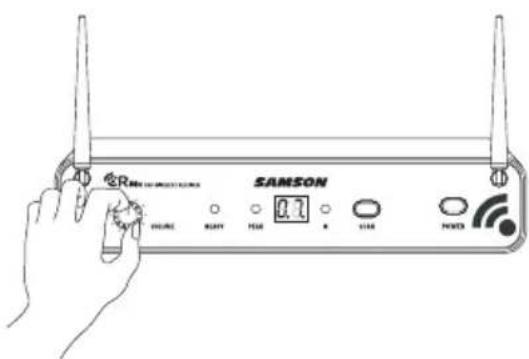
With your amplifier or mixer off and volume control all the way down, connect the CR88x receiver output jack to the mic or line level input of a mixer or amplifier using the balanced XLR output or unbalanced 1/4" line level output. Turn the Level knob on the CR88x completely counterclockwise, then turn its power on.
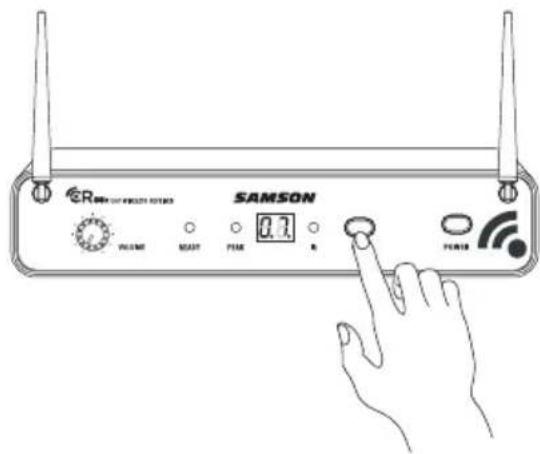
Press the SCAN button for more than 2 seconds (the display will start to flash quickly) on the front of the CR88x receiver to scan for an available channel. Once the optimal channel is selected the receiver will enter IR Set mode. The display will flash slowly in IR Set mode.
If you want to set a transmitter to the receiver's currently selected channel, press and hold the SCAN button for more than 10 seconds (until the display flashes slowly) to enter IR Set mode directly.
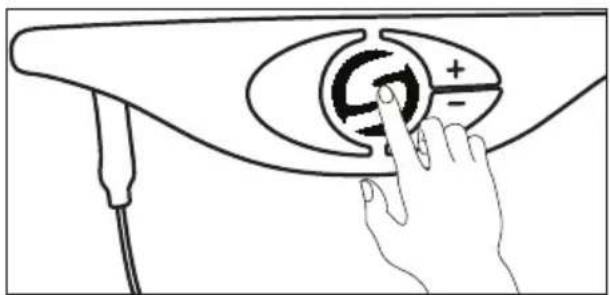
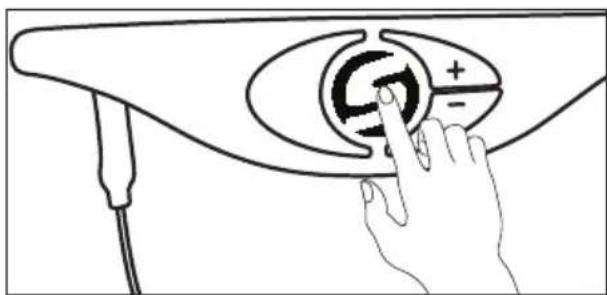
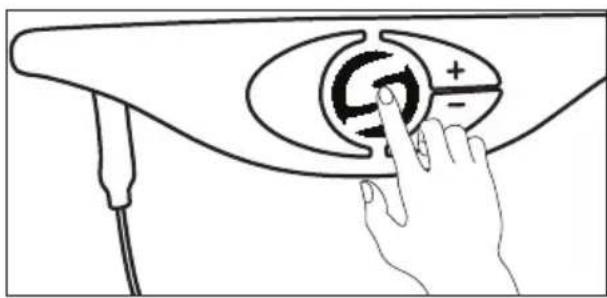
Make sure the AH8 Headset transmitter is fully charged (see section "Charging the AH8 Transmitter"). Turn on the power to the transmitter by pressing and holding the Power button for 3 seconds; the indicator LED will light yellow when the button is pressed and turns green when released and the AH8 is powered on.
natural_image
Line drawing of a hand pressing a button on a device handle (no text or symbols)Quick Start
Position the AH8 transmitter about 3–12" (8–30 cm) from the front of the CR88x with the transmitter's IR window facing the IR transmitter on the front panel of the CR88x receiver.
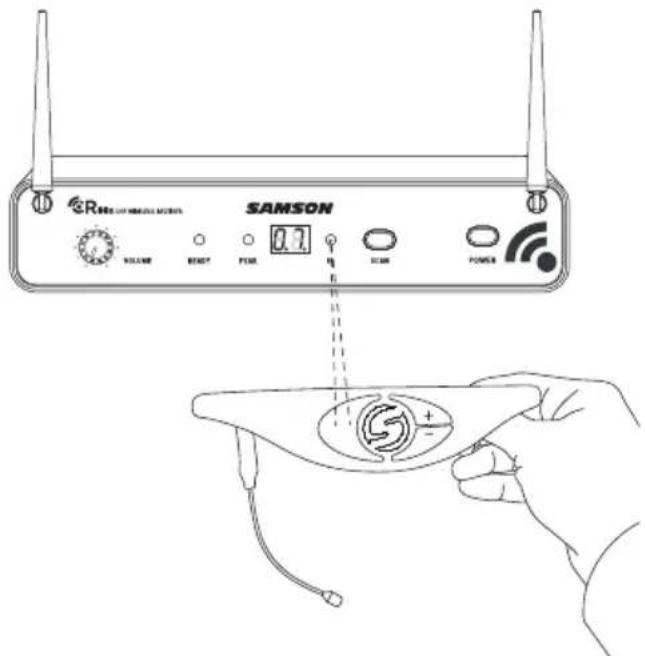
Note: The AH8 will only accept infrared transmission from the receiver for the first 10 seconds after the AH8 is powered on. If you need to change the operating channel, the AH8 must be first powered off, then powered on again to receive the new channel.
When the transmission is complete, the CR88x will receive RF signal from the transmitter. The READY indicator will light on the front panel of the CR88x receiver.
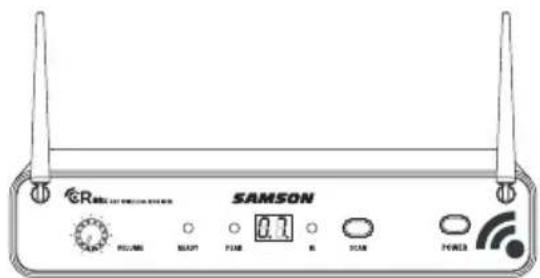
Turn on your connected amplifier or mixer, but keep the volume all the way down. Set the Volume knob on the CR88x fully clockwise (to its "10" setting). This is unity gain.
Speak or sing into the microphone and slowly raise the volume of your amplifier or mixer until the desired level is reached.
If you find the system has noticeable dropouts, reduced overall working range, or unexpected noise bursts, change the operating channel of the system using the steps above.
Quick Start
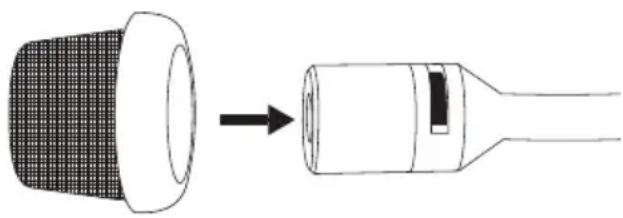
It is recommended to use one of the included foam or stainless steel windscreens when using the AH8 headset. This will help reduce breath or wind noise.
To attach the stainless steel windscreen, line up the windscreen with the end of the microphone capsule and push straight on until it is securely affixed.
natural_image
Diagram showing a device with a grid-patterned head and a connector emitting a black arrow (no text or symbols)If you hear distortion at the desired volume level, check to see whether the PEAK Indicator LED on the receiver is lighting RED. If it is not lit, make sure that the gain structure of your audio system is set correctly (consult the owners manual of your mixer and/or amplifier for details). If the PEAK Indicator on the receiver lights RED, it may be as simple as moving the microphone further from your mouth.
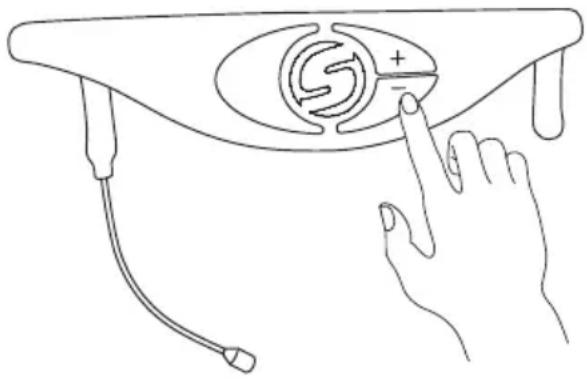
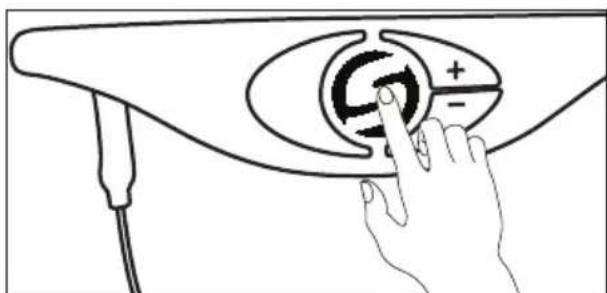
If the level of the microphone needs further adjustment, press and hold the AH8 “+” or “-”
level buttons until the indicator starts flashing indicating that the transmitter is in the Volume Adjustment mode. Press the “+” button to raise the level or the “−” button to lower the level. As the level increases the indicator flashes faster. When the level decreases the indicator flashes slower. When the desired level is reached, release the volume buttons. The AH8 will return to normal operation after 10 seconds, and the Status Indicator will be steady GREEN.
For best signal to noise performance, set the AH8 transmitter volume so that the PEAK indicator on the CR88x receiver flashes occasionally when speaking or singing with your loudest voice.
natural_image
Line drawing of a hand pressing down on a medical device with a circular dial and probe inserted (no text or symbols)Multiple System Setup
When using multiple systems, each system must be set to a different operating channel. Transmitter and receiver pairs must be on the same channel plan in order to work together.
When setting an additional transmitter, make sure to move all other transmitters away from the CR88x receiver to prevent setting multiple transmitters to the same channel.
Charging the AH8 Transmitter
-
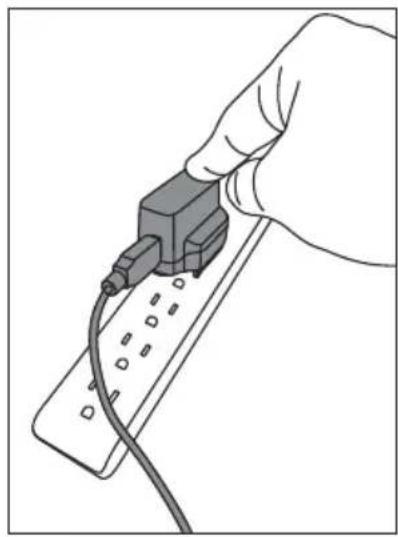
Snap in place the appropriate mains connector plug into the adapter.
-
Insert the magnetic power cable to the included USB AC plug (or any 5-volt DC adapter that has a USB port). Insert the AC plug into an electrical outlet.
-
Place the AH8 transmitter on a flat surface.
-
Attach the magnetic connector to the gold contact power port on the bottom of the AH8 transmitter. The cable attaches to the port magnetically. The magnetic connector is keyed so it will only connect in one direction.
Note: Transmission is disabled during charging.
-
Look at the indicator light on the AH8 transmitter to determine when the transmitter has finished charging. When the light is flashing red, the AH8 is charging. When the red light stops flashing it indicates that the AH8 is fully charged.
-
Disconnect the magnetic power cable from the AH8 when the unit is fully charged.
If you notice your AH8 battery life is becoming shorter after a full charge, you can order a user replaceable battery from your local Samson distributer.
natural_image
Hand inserting a plug into a remote control panel (no text or symbols visible)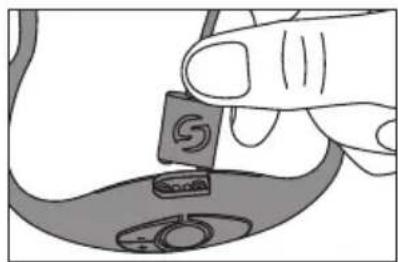
natural_image
Illustration of a hand holding a small electronic component with a circular base (no text or symbols visible)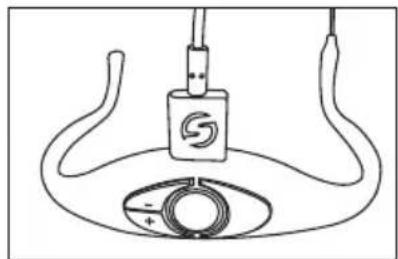
natural_image
Simple line drawing of a device with a circular base and cable, no text or symbols presentGetting the most out of the rechargeable battery:
• Completely charge the batteries before first use
• Fully charge the battery before it will be used.
- After the battery is charged, unplug the charger from the outlet or remove the battery from the charger.
- The optimal temperature range for using and storing the battery is 50^ F - 86^ F ( 30^ C - 50^ C). The battery performance and operation may decrease in temperatures below 50^ F ( 30^ C).
Warning: Batteries (battery pack or batteries installed) shall not be exposed to excessive heat such as sunshine, fire or the like.
CAUTION: Danger of explosion if battery is incorrectly replaced. Replace only with the same or equivalent type attention should be drawn to the environmental aspects of battery disposal
Wearing the AH8 Transmitter
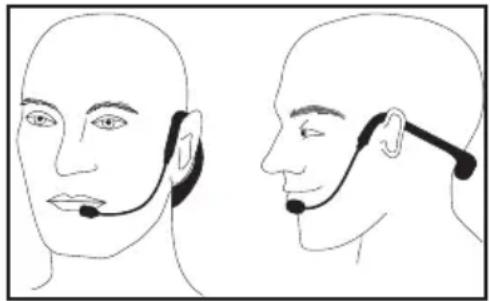
The AH8 can be re-sized to fit comfortably on your head. The correct way to wear your AH8 Headset transmitter is over the ears, as you would wear a pair of eyeglasses. Because the AH8 Headset is specially designed to be used up close, be sure to position the microphone near the corner of your lips. To avoid feedback problems, take care not to cover the mic capsule with your hand.
Position the AH8 over your head so that the body of the transmitter is behind your head. Adjust the headset so that it fits comfortably on your ears and is secure against your head.
Position the microphone towards the corner of your mouth, approximately 1/2" away from the lips.
natural_image
Side-by-side line drawings of a person's head and neck with earphones, no text or symbols presentTo help reduce p-popping, install one of the included windscreens.
Note: If wearing glasses, it is recommended to put the AH8 transmitter on first than place glasses over the transmitter.
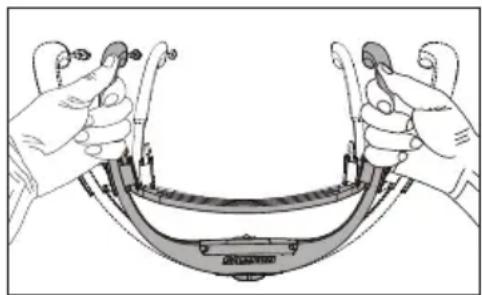
If the AH8 headset is too large, push the sides of the headband in to decrease the width. If the transmitter is too small, pull the sides of the headband out to increase the width.
natural_image
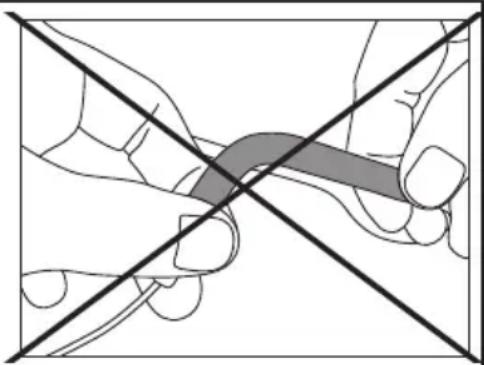
Illustration of hands holding a curved mechanical component with no visible text or symbolsWarning: The ear hooks are NOT adjustable. DO NOT bend the earhooks as this will cause damage to the headset.
natural_image
Diagram showing two hands holding a tool with a shaded area, intersected by two diagonal lines (no text or symbols)Cleaning the AH8 transmitter:
The headset, microphone and gooseneck should be cleaned after each use. Use clean, fresh water on a towel or clean rag, gently wiping away any contaminations that may have accumulated during use.
The windscreens should be washed with clean water after each use.
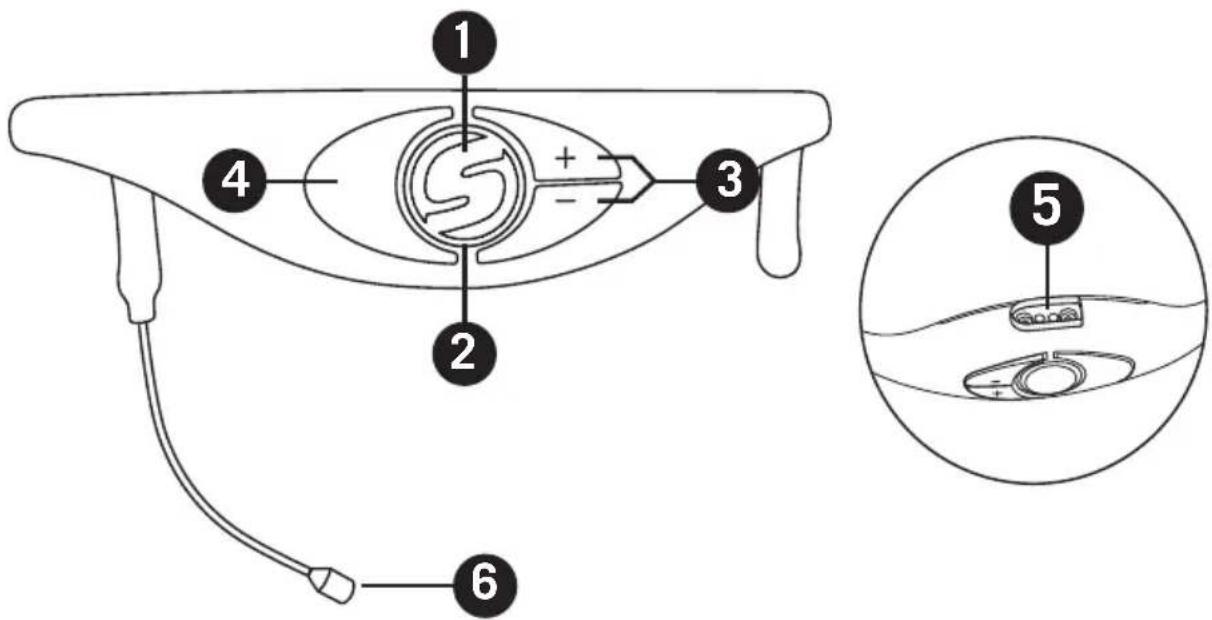
AH8 Headset Transmitter Callouts
-
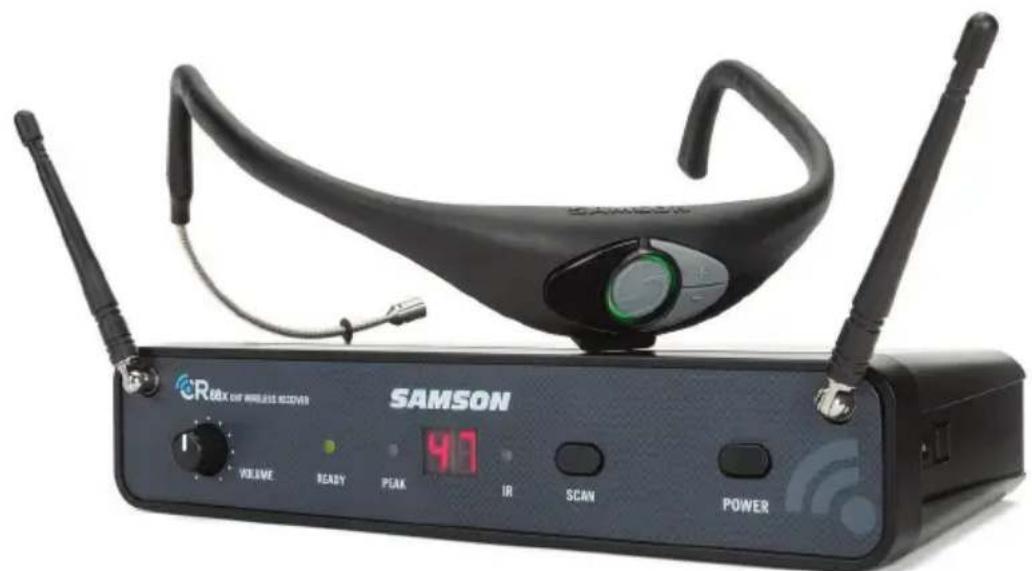
Power/Mute Button - Press and hold for 3 seconds to turn the unit on or off. A quick press and release will mute or unmute the transmitter when the transmitter is on.
-
Status Indicator - This LED displays the operation mode, low battery and recharge status of the transmitter. The chart defines the LED colors for each function.
| GREEN Normal Operation | |
| AMBER Mute | |
| Flashing RED | Low Battery |
| Charging | |
| RED Fully Charged | |
-
Volume +/- Buttons - Press and hold either Volume button to adjust the volume. Pressing the + or - button increases or decrease the level by one step with each push of the button. There is a total 9 volume levels. The Status Indicator light will flash faster for each increased step and slower for each decrease.
-
IR Lens - This window is used to capture the infrared signal sent from the receiver during the IR SET to channelize the transmitter. The IR Lens is only active for the first 10 seconds when the transmitter is powered on.
-
Charging Connector - Connect the supplied magnetic charging cable to this sealed, gold contact charging connector to recharge the internal Lithium Ion battery. The AH8 can be recharged by connecting the cable to a USB connector on a computer USB port, or any 5-volt DC adapter that has a USB output.
NOTE: The included adapter will charge the AH8 faster than a computer USB port.
- Microphone - Waterproof, micro-miniature, unidirectional microphone capsule in a marine-grade stainless steel housing.
CR88x Receiver Features - Front Panel
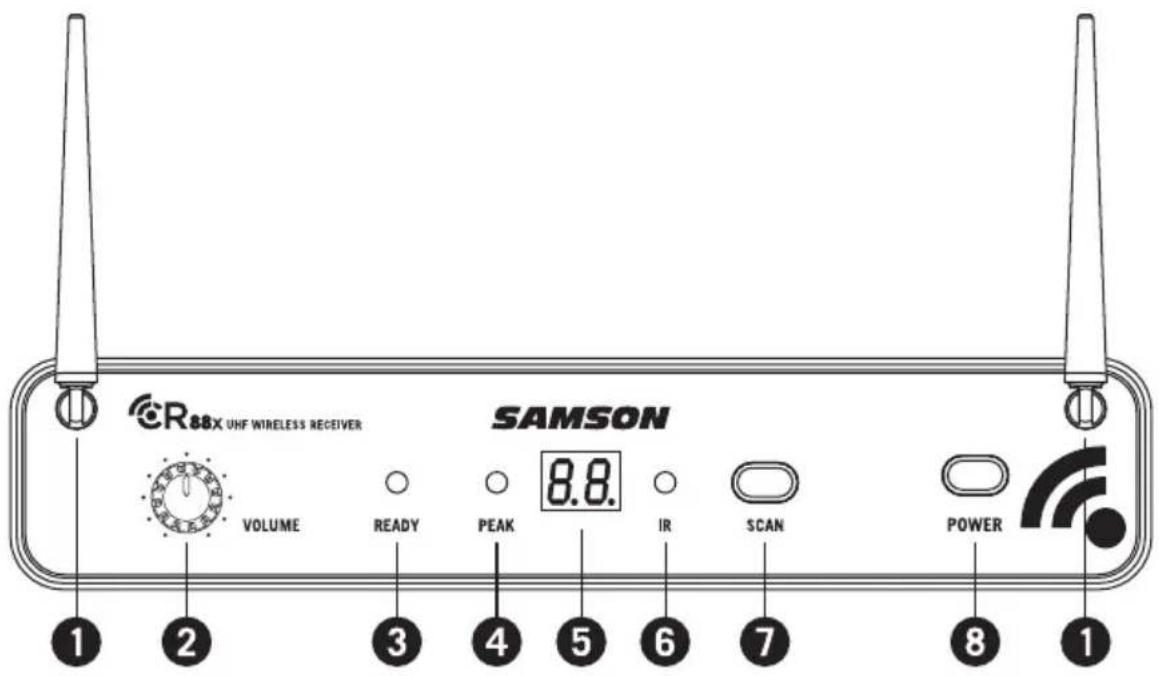
-
Antennas - The antenna mountings allow full rotation for optimum placement. In normal operation, both antennas should be placed in a vertical position. Both antennas can be folded inward for convenience when transporting the CR88x.
-
VOLUME Control - This knob sets the level of the audio signal being output through both the balanced and unbalanced output jacks on the rear panel. Reference level is obtained when the knob is turned fully clockwise (to its "10" setting).
-
READY Indicator - This indicator lights green when the CR88x is receiving RF signal and the system is ready to use.
-
PEAK Indicator - This indicator lights red when the transmitted audio signal is overloaded.
-
LED Display - The two digit, 7-segment LED display shows the receiver's current operating channel.
-
IR Transmitter - During "IR SET" an infrared light is used to set the transmitter channel.
-
SCAN Button - Press this button for more than 2 seconds to enter scan mode, the display will flash quickly. The receiver will scan through the 100 operating channels to find the optimal channel for performance. Once the scan is complete, the CR88x will enter IR Set mode and send the selected channel to the transmitter.
Press and hold the button for more than 10 seconds to enter IR set mode, the display will flash slowly. This will send the receiver's current selected channel to the transmitter.
- POWER Switch - Use this to turn the CR88x power on and off.
CR88x Receiver Features - Rear Panel
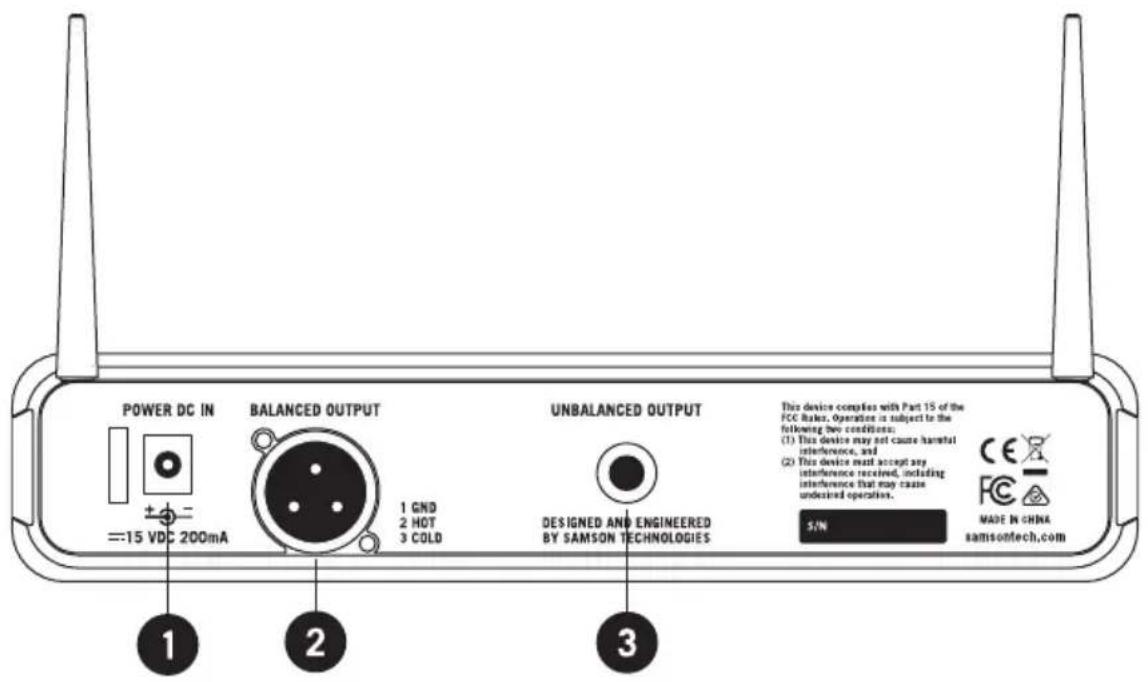
- DC Input - Connect the supplied power adapter here, using the strain relief as shown in the illustration below. WARNING: Do not substitute any other kind of power adapter. Doing so can cause severe damage to the CR88x and will void your warranty.
- BALANCED OUTPUT - Use this electronically balanced low impedance (600 Ohm) XLR jack when connecting the CR88x to professional (+4dBu) audio equipment. Pin wiring is as follows: Pin 1 ground, Pin 2 high (hot), and Pin 3 low (cold).
- UNBALANCED OUTPUT - Use this unbalanced high impedance (5K Ohm) 1/4" jack when connecting the CR88x to consumer (-10dBV) audio equipment. Wiring is as follows: tip hot, sleeve ground.
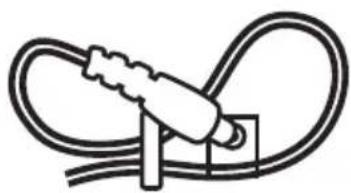
natural_image
Simple line drawing of a plug inserted into a socket (no text or symbols)Using the strain relief: Gather up a loop of wire and pass it through the strain relief, then pass the adapter plug through the loop in order to create a knot.
Rack Mounting
The CR88x receiver can be installed into a standard 19" rack for transport or permanent installation using the included rack ears. Follow the simple steps below to mount the CR88x:
Attach the included rack ears by sliding each rack ear into the groove on either side of the CR88x until they lock into place, and the receiver flush with the front panel.
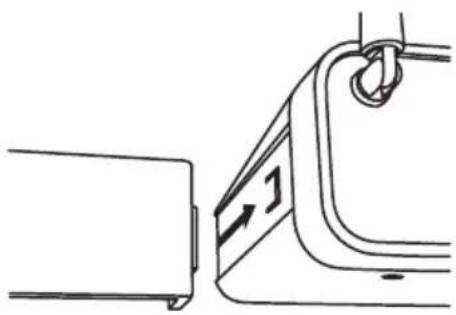
natural_image
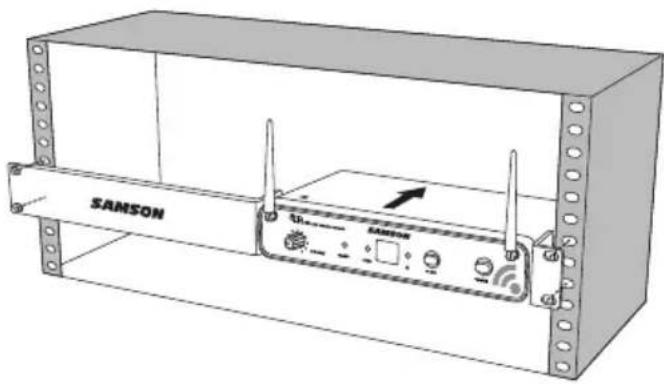
Technical line drawing of a mechanical component with no visible text or symbolsPosition the CR88x receiver into an available rack space and slide in until the rack ears are touching the rails of the rack case and are aligned with the rack rail holes.
natural_image
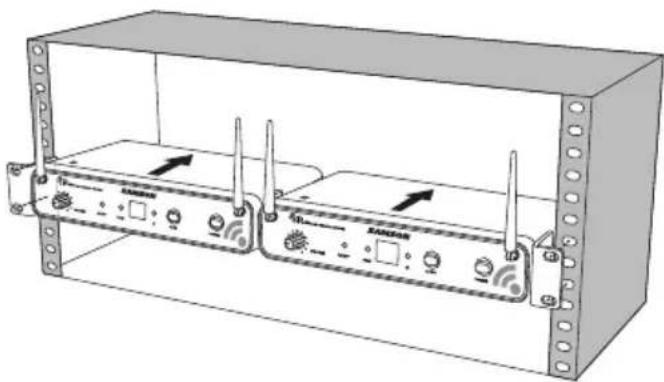
Line drawing of a SAMSON wireless router with ventilation slots and indicator lights (no text or symbols on the device itself)Mount the receiver into the rack using the appropriate size rack screws (not included). To ensure equal tension and balance when installing the receiver, you should secure screws in a crisscross pattern of opposite corners: top left -> bottom right -> top right -> bottom left.
natural_image
Technical line drawing of a two-port network device enclosed in a rectangular enclosure, showing ports, switches, and ventilation slots (no text or labels)In order to mount two CR88x receivers in one rack space, the system includes a center connection piece. Slide the center connection piece into the groove of each receiver and attach the short rack ears to each receiver. Mount the receivers into the rack using the crisscross pattern described above.
Troubleshooting
| Issue Solutions | |
| No Audio | Make sure that the transmitter and receiver are both powered on. |
| Ensure the AH8 transmitter's batteries are fully charged. | |
| Check that the transmitter is not muted. | |
| Confirm that the CR88x adapter is correctly connected and plugged into an electrical outlet. | |
| Turn on the CR88x receiver. | |
| Make sure the CR88x audio output connections are securely connected. | |
| Ensure that the receiver and transmitter are in line of sight with one another. | |
| Check the receiver and audio input device level controls. | |
| Ensure that the transmitter and receiver are set to the same operating channel. If unsure, reset the channel by following the steps in the “Quick Start”. | |
| Distorted Audio | The receiver output level or audio input device level may be too high. |
| The input gain on the transmitter (AH8) may be too high. | |
| Audio Dropout | The transmitter may be too far away from the receiver. Move it closer to the receiver, or reposition the antennas. |
| Remove any sources that may cause RF interference such as cell phones, cordless phones, lighting equipment, computers, metal structures, etc. | |
| Receiver will not power on | Check the adapter to ensure it is properly connected and plugged into an outlet providing power. |
| Transmitter will not power on (LED lights RED) | Ensure the AH8 transmitter's batteries are fully charged. |
| Unwanted noise or interference | If using multiple systems, make sure none of the systems are operating on the same channel. If the problem persists, change one or all of the systems channels. |
Specifications
System
Working Range 300' (100m) line of sight
Audio Frequency Response 50 Hz - 15 kHz
T.H.D. (Overall) <1% (@AF 1 kHz, RF 46 dBu)
Dynamic Range >100 dB A-weighted
Signal to Noise >95 dB
Operating Temperature -10^ ( 14^ ) to +60^ (+ 140^ )
Tone Key Frequency 35 kHz
AH8 Headset Microphone Transmitter
Microphone Element Condenser Mic
Microphone Polar Pattern Unidirectional
Input Gain Range 20dB
RF Power 10mW EIRP
Power Requirements 3.6V 500mAh
Lithium Ion rechargeable battery
Battery Life 8 hours
Included Accessories 4 foam windscreens, 1 stainless steel windscreen, rubber headband
Dimensions (LxWxH) 5.9" x 6.7" x 3.9"
150mm x 170mm x 100mm
Weight 0.13lb / 60g
CR88x Receiver
Audio Output Level - Unbalanced +14 dBu
Audio Output Level - Balanced +9 dBu
Audio Output Impedance - Unbalanced 810 Ohms
Audio Output Impedance - Balanced 240 Ohms
Sensitivity -100 dBm / 30 dB sinad
Image Rejection >50 dB
Operating Voltage 15 VDC 200mA
Dimensions (LxWxH) 8.25" x 4.9" x 1.75"
210mm x 125mm x 44mm
Weight 0.88lb / 400g
At Samson, we are continually improving our products, therefore specifications and images are subject to change without notice.
Operating Bands and Frequency Ranges
| Band Frequency Range | |
| K^a 470–494 | MHz |
| D^a 542–566 | MHz |
| IL* 794–806 | MHz |
| B* 806–810 | MHz |
| G* 863–865 | MHz |
* Not for use in the USA and Canada.
European Frequency Operation
Note: This equipment is intended for professional musical and similar applications, and may be capable of operating on some frequencies not authorized in your region. Please contact your national authority to obtain information on authorized frequencies for wireless microphone products in your region.
| Band Frequency Range EU Country Codes Note | |||
| K^a 470 | -494 MHz AT, BE, BG | CY, CZ, DK, EE, FI, FR, DE, GR, HU, IS, IE, IT, LV, LT, LU, MT, NL, NO, PL, PT, RO, SK, SI, ES, SE, CH, UK | |
| D** | 542–566 MHz | ||
| IL** | 794–806 MHz | For use in Israel | |
| B** | 806–810 MHz | For use in Japan | |
| G | 863–865 MHz | AT, BE, BG, CY, CZ, DK, EE, FI, FR, DE, GR, HU, IS, IE, IT, LV, LT, LU, MT, NL, NO, PL, PT, RO, SK, SI, ES, SE, CH, UK | License Free |
** Not for use in the EU.
^a Licensing: Note that a ministerial license to operate this equipment may be required in certain areas. Consult your national authority for possible requirements. Licensing of Samson wireless microphone equipment is the user's responsibility, and licensability depends on the user's classification and application, and on the selected frequency.
natural_image
Silhouette of a person climbing a ladder inside a circular frame (no text or symbols)natural_image
Line drawing of a hand pressing a button on a device (no text or symbols)Démarrage rapide
Démarrage rapide
natural_image
Diagram showing a device with a grid-patterned head and a connector, connected by an arrow (no text or symbols present)natural_image
Line drawing of a hand pressing down on a medical device with a circular dial and probe (no text or symbols)natural_image
Hand inserting a plug into a remote control panel (no text or symbols visible)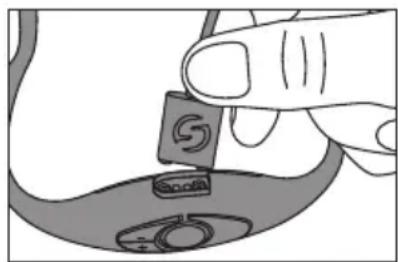
natural_image
Illustration of a hand holding a small object with a circular symbol, partially visible on a curved surface (no text or symbols)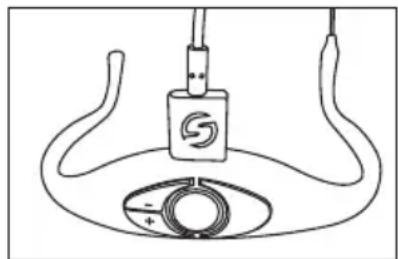
natural_image
Simple line drawing of a device with a central logo and circular base (no text or symbols)natural_image
Side-by-side line drawings of a person's head and neck with earphones, no text or symbols presentnatural_image
Illustration of two hands adjusting a curved mechanical component (no text or symbols visible)natural_image
Diagram showing two intersecting diagonal lines with a shaded rectangular area, no text or symbols presentnatural_image
Simple line drawing of a plug inserted into a socket (no text or symbols)natural_image
Technical line drawing of a mechanical bracket with a side detail and mounting hole (no text or symbols)natural_image
Line drawing of a wireless router device labeled 'SAMSON' with no visible text or symbols beyond the labelnatural_image
Technical line drawing of a two-port network device enclosed in a rectangular enclosure, showing ports, switches, and ventilation slots (no text or labels)T.H.D. (Globalement) < 1 % (@AF 1 kHz, RF 46 dBu)
natural_image
Silhouette of a person climbing a ladder inside a circle (no text or symbols)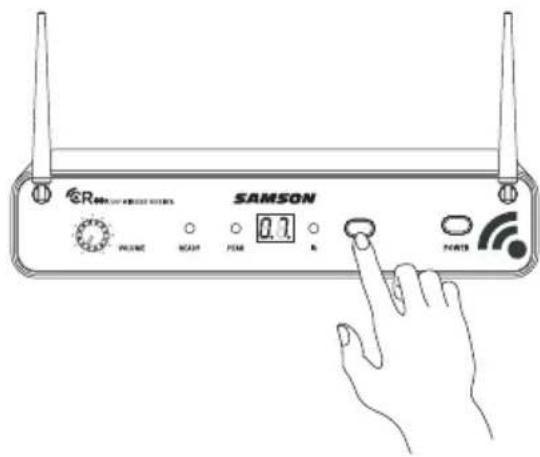
natural_image
Line drawing of a hand pressing down on a circular component with a plus/minus scale (no text or symbols)Schnellstart
natural_image
Diagram showing a device with a grid-patterned head and an arrow pointing to a cylindrical component (no text or symbols)natural_image
Line drawing of a hand pressing down on a medical device with a circular dial and plus/minus symbols (no text or labels)natural_image
Hand inserting a plug into a remote control panel (no text or symbols visible)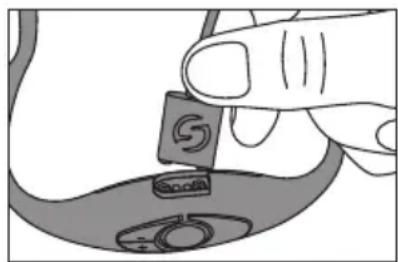
natural_image
Illustration of a hand holding a small object with a circular symbol, partially visible on a curved surface (no text or symbols)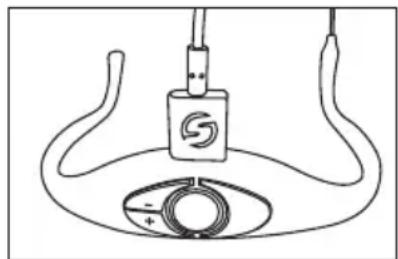
natural_image
Simple line drawing of a device with a central logo and circular base (no text or symbols)natural_image
Side-by-side line drawings of a human head and neck with earphones, no text or symbols presentnatural_image
Illustration of two hands holding a curved mechanical component with no visible text or symbolsnatural_image
Diagram showing two hands holding a tool with a shaded area, intersected by two diagonal lines (no text or symbols)natural_image
Simple line drawing of a cable with a plug inserted into a socket (no text or symbols)natural_image
Technical line drawing of a mechanical component with no visible text or symbolsnatural_image
Diagram of a SAMSON wireless router with two ports and signal icons, enclosed in a rectangular enclosure (no text or symbols on the device itself)natural_image
Diagram of a server rack unit with two connected devices and wireless ports, enclosed in a transparent enclosure (no text or labels)150mm x 170mm x 100mm
(5,9" × 6,7" × 3,9")
60g (0,13lb)
CR88x Empfänger
210mm x 125mm x 44mm
(8,25" x 4,9" x 1,75")
400g (0,88lb)
natural_image
Silhouette of a person climbing a ladder inside a circle (no text or symbols)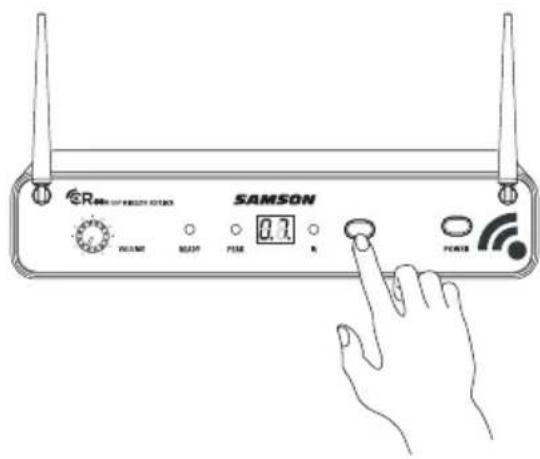
natural_image
Line drawing of a hand pressing a button on a curved surface, no text or symbols presentInicio rápido
Inicio rápido
natural_image
Diagram showing a device being processed into a cylindrical component (no text or symbols present)natural_image
Line drawing of a hand pressing down on a medical device with a circular dial and probe inserted (no text or symbols)natural_image
Hand inserting a plug into a remote control panel (no text or symbols visible)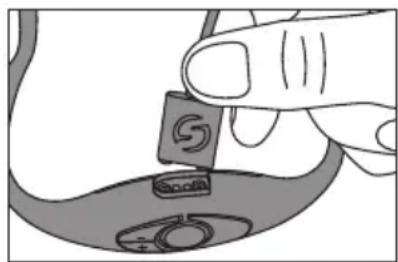
natural_image
Illustration of a hand holding a small object with a circular symbol, partially visible on a curved surface (no text or symbols)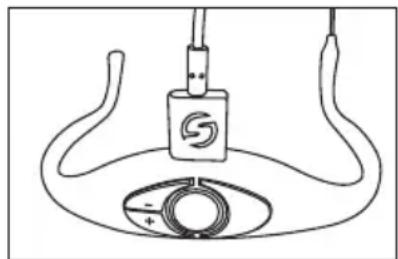
natural_image
Simple line drawing of a device with a central logo and circular base (no text or symbols)natural_image
Side-by-side line drawings of a person's head and ear with a headset, no text or symbols presentnatural_image
Illustration of hands holding a helmet with a belt and handle, no text or symbols presentnatural_image
Diagram showing two hands holding a tool with a shaded area, intersected by two diagonal lines (no text or symbols)natural_image
Simple line drawing of a plug inserted into a socket (no text or symbols)natural_image
Technical line drawing showing a mechanical component with a bracket and attached bracket (no text or symbols)natural_image
Diagram of a SAMSON wireless router with two ports and signal icons, enclosed in a rectangular enclosure (no text or symbols on the device itself)natural_image
Diagram of a server rack unit with two connected devices and wireless ports, enclosed in a transparent enclosure (no text or labels)210mm x 125mm x 44mm
Peso 0,88lb / 400g
natural_image
Silhouette of a person climbing a ladder inside a circular frame (no text or symbols)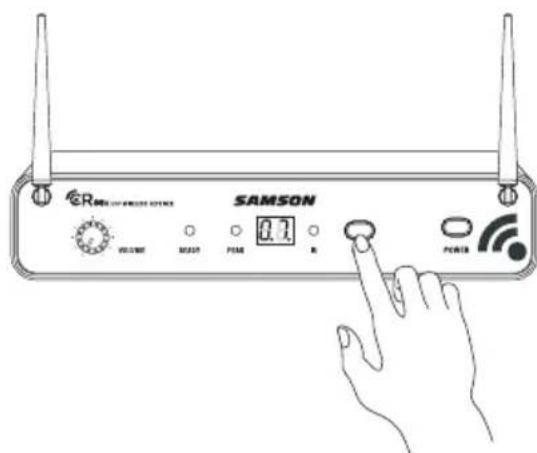
natural_image
Line drawing of a hand pressing a button on a curved device with a plus/minus indicator (no text or symbols)Avvio rapido
natural_image
Diagram showing a device with a grid-patterned head and a connector emitting a black arrow (no text or symbols)natural_image
Line drawing of a hand pressing down on a medical device with a circular dial and plus/minus symbols (no text or labels)natural_image
Hand inserting a plug into a remote control panel (no text or symbols visible)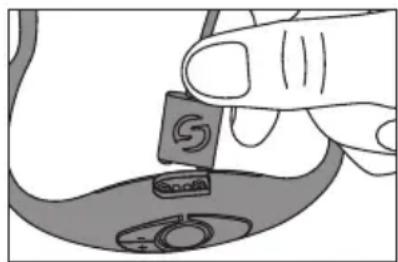
natural_image
Illustration of a hand holding a small object with a circular symbol, partially visible on a curved surface (no text or symbols)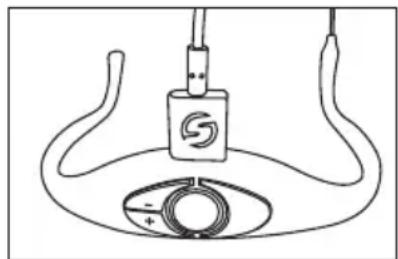
natural_image
Simple line drawing of a device with a central logo and circular base (no text or symbols)natural_image
Side-by-side line drawings of a person's head and neck with earphones (no text or symbols)natural_image
Illustration of two hands adjusting a curved mechanical component (no text or symbols visible)natural_image
Diagram showing two hands holding a tool with a shaded area, intersected by two diagonal lines (no text or symbols)natural_image
Simple line drawing of a cable with a plug inserted, no text or symbols presentnatural_image
Technical line drawing of a mechanical bracket with a side detail and mounting hole (no text or symbols)natural_image
Diagram of a SAMSON wireless router with two ports and signal icons, enclosed in a rectangular enclosure (no text or symbols on the device itself)natural_image
Diagram of a server rack with two connected devices and wireless ports, enclosed in a transparent enclosure (no text or labels)Having Trouble with your AirLine Wireless System? We can help!

CONTACT OUR SUPPORT TEAM: support@samsontech.com Our experts can help you resolve any issues.
Follow us:



@samson @samsontech @samson_technologies
- Headset Wireless System
- Important Safety Information
- WARNING
- FCC Rules and Regulations
- Introduction
- Quick Start
- Multiple System Setup
- Charging the AH8 Transmitter
- Getting the most out of the rechargeable battery:
- Wearing the AH8 Transmitter
- Cleaning the AH8 transmitter:
- AH8 Headset Transmitter Callouts
- CR88x Receiver Features - Front Panel
- CR88x Receiver Features - Rear Panel
- Rack Mounting
- Specifications
- System
- AH8 Headset Microphone Transmitter
- CR88x Receiver
- Operating Bands and Frequency Ranges
- European Frequency Operation
- Démarrage rapide
- Schnellstart
- CR88x Empfänger
- Inicio rápido
- Avvio rapido
Brand : SAMSON
Model : AirLine AH8
Category : Microphone