
HXD1 - Microphone SAMSON - Free user manual and instructions
Find the device manual for free HXD1 SAMSON in PDF.
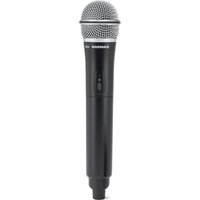


| Product Type | Microphone |
| Brand | Samson |
| Model | HXD1 |
| Microphone Type | Dynamic |
| Polar Pattern | Cardioid |
| Frequency Response | 50 Hz - 15 kHz |
| Impedance | 600 Ohms |
| Connector | XLR (3-pin) |
| Dimensions (L x W x H) | 18.5 x 5.0 x 5.0 cm |
| Weight | 0.34 kg |
| Power Requirement | None (passive) |
| Accessories Included | Microphone clip, carry pouch |
| Cleaning | Wipe with a dry cloth |
| Safety | Keep away from moisture |
| Spare Parts Availability | Contact Samson support |
Frequently Asked Questions - HXD1 SAMSON
User questions about HXD1 SAMSON
0 question about this device. Answer the ones you know or ask your own.
Ask a new question about this device
Download the instructions for your Microphone in PDF format for free! Find your manual HXD1 - SAMSON and take your electronic device back in hand. On this page are published all the documents necessary for the use of your device. HXD1 by SAMSON.
USER MANUAL HXD1 SAMSON
Quick Start Guide
Important Safety Information

If you want to dispose of this product, do not mix it with general household waste. There is a separate collection system for used electronic products in accordance with legislation that requires proper treatment, recovery and recycling.
Private households in the 28 member states of the EU, in Switzerland and Norway may return their used electronic products free of charge to designated collection facilities or to a retailer (if you purchase a similar new one).
For countries not mentioned above, please contact your local authorities for a correct method of disposal.
By doing so you will ensure that your disposed product undergoes the necessary treatment, recovery and recycling and thus prevent potential negative effects on the environment and human health.
Hereby, Samson Technologies Corp., declares that this Stage XPD2
(RX:RXD2, TX:HXD1 or PXD1) is in compliance with the essential requirements and other relevant provisions of Directive 2014/53/EU.
The declaration of conformity may be consulted at:
http://www.samsontech.com/site_media/support/manuals/Stage_XPD2_DOC.pdf
Important Safety Information
Attention should be drawn to the environmental aspects of battery disposal. The use of apparatus in moderate climates
CAUTION
Danger of explosion if battery is incorrectly replaced.
Replace only with the same or equivalent type.
Batteries (battery pack or batteries installed) shall not be exposed to excessive heat such as sunshine, fire or the like.
iPad, iPhone, and iPod touch are trademarks of Apple Inc., registered in the U.S. and other countries. iPad Air and iPad mini are trademarks of Apple Inc. The trademark “iPhone” is used with a license from Aiphone K.K.
Important Safety Information
FCC Notice
- This device complies with Part 15 of the FCC Rules. Operation is subject to the following two conditions:
(1) This device may not cause harmful interference. (2) This device must accept any interference received, including interference that may cause undesired operation.
- Changes or modifications not expressly approved by the party responsible for compliance could void the user's authority to operate the equipment.
FCC Statement
This equipment has been tested and found to comply with the limits for a Class B digital device, pursuant to Part 15 of the FCC Rules. These limits are designed to provide reasonable protection against harmful interference in a residential installation.
This equipment generates uses and can radiate radio frequency energy and, if not installed and used in accordance with the instructions, may cause harmful interference to radio communications. However, there is no guarantee that interference will not occur in a particular installation. If this equipment does cause harmful interference to radio or television reception, which can be determined by turning the equipment off and on, the user is encouraged to try to correct the interference by one or more of the following measures:
Reorient or relocate the receiving antenna.
Increase the separation between the equipment and receiver.
Connect the equipment into an outlet on a circuit different from that to which the receiver is connected.
Consult the dealer or an experienced radio/TV technician for help.
RF Warning Statement
The device has been evaluated to meet general RF exposure requirement. The device can be used in portable exposure condition without restriction. This device complies with RSS-310 of Industry Canada. Operation is subject to the condition that this device does not cause harmful interference.
Introduction
Samson XPD2 USB Digital Wireless System brings the convenience of wireless to your computer recordings and beyond. With a wireless receiver built into a USB stick and a handheld transmitter, the Stage XPD2 allows you to wirelessly record stunning audio straight to your Mac/PC and favorite digital audio software. It's the ideal wireless system for presentations, podcasting, YouTube performances, karaoke video games, voice over projects and much more. Additionally, the Stage XPD2 is the perfect accessory for expanding the Samson Expedition Series Portable PA Systems that include USB wireless ports, for full range wireless capability in live applications.
XPD2 operates in the license-free 2.4GHz frequency band, is extremely fast and easy to setup and with 100 feet of operating range (environment dependent) the system provides plenty of room to work wirelessly.
We recommend you keep the following records for reference, as well as a copy of your sales receipt.
Serial number: ____
Date of purchase: ____
If you have any questions or comments regarding the XPD2 USB Digital Wireless System or any other products from Samson, do not hesitate to contact us at support@samsontech.com.
With proper care and maintenance, your XPD2 USB Digital Wireless System will operate trouble-free for many years. Should your XPD2 USB Digital Wireless System ever require servicing, a Return Authorization (RA) number must be obtained before shipping your unit to Samson. Without this number, the unit will not be accepted. Please visit www.samsontech.com/ra for an RA number prior to shipping your unit. Please retain the original packing materials and, if possible, return the unit in its original carton. If your XPD2 USB Digital Wireless System was purchased outside of the United States, contact your local distributor.
RXD2 Controls
- USB Connector - Plugs into the USB jack on the rear panel of a wirelessly enabled Samson audio device. The receiver can also plug directly into a computer USB port and will be recognized as a USB audio device. The unit passes audio to the device and receives power from the device through this connector. If connecting the LINE output to an analog device, the RXD2 can be powered using a standard 5 Volt adapter.
- PAIR Switch - Press for more than 5 seconds to enter pairing mode.
- STATUS Indicator - This LED displays the operation mode: Amber: Normal Operation; Flashing Amber: Pairing; No Light: Not paired, transmitter out of range, or no power.
- LINE / Headphone Output - Use this 3.5mm jack when connecting to an analog line input or headphones for monitoring.

HXD1 Controls
- Status Indicator - This LED displays the operation mode: Amber: Normal Operation; Flashing Amber: Pairing or Low Battery.
- Power/Pair Switch - Press for less than 5 seconds to turn the unit on or off. Press for more than 5 seconds to enter pairing mode.
- Battery Cover - Unscrew the battery cover and slide down to open the HXD1 battery compartment.
- Battery Holder - Open the battery holder by pressing the tab and lifting the cover. Insert two standard AA (LR6) batteries here, being sure to observe the plus and minus polarity markings shown. WARNING: Do not insert the batteries backwards; doing so can cause severe damage to the HXD1 and will void your warranty.
- Input GAIN Control - This control adjusts the transmitter input sensitivity.
- Screwdriver - Used to adjust the input GAIN control.


Quick Start
- Plug the RXD2 USB receiver into the USB jack on a wireless-enabled Samson audio device, or to an available USB port on a computer. Note: When using the XPD2 wireless system with a computer, you must set the computer's audio input device to "Samson RXD Wireless Receiver". In most computer operating systems, audio software must be used to record or monitor the audio from the USB receiver.
- Place a fresh set of AA (LR6) batteries in the transmitter battery holder, taking care to observe the polarity markings.
- If using a Samson audio device, turn the wireless level knob on the audio device completely counterclockwise, then turn the power of the audio device to the ON position.
- Turn on the power to the transmitter by pressing and holding the Power switch; the indicator LED will light amber.
- If the transmitter and receiver have not been previously paired, press and hold the button on the RXD2 receiver for more than 5 seconds, until it begins to flash. Press and continue to hold the Power button on the transmitter until the LED indicators on both units light steady, indicating that the receiver and transmitter are paired and ready for operation.
- Speak or sing into the microphone at a normal performance level and raise the input level on the audio device until the desired level is reached. For best signal-to-noise operation, set the input Gain control as high as possible without overloading.
- If you hear distortion, turn down the input level on the audio device. If distortion is still audible, use the supplied screwdriver to turn the Gain control in the HXD1 transmitter slowly counterclockwise until the distortion disappears. Conversely, if you hear a weak, noisy signal at the desired volume level and with the wireless level control of the audio device set to maximum, use the screwdriver to turn the Gain control in the HXD1 transmitter slowly clockwise until the signal reaches an acceptable level.
Computer Setup
Windows
- The first time you plug the XPD2 into a USB port, Windows will install the USB driver for that port.
- To set the XPD2 as your default input/recording device, or to change its settings, open the Control Panel, Hardware & Sound settings, then click SOUND. Under the Recording tab, select the “Samson RXD Wireless Receiver” from the list of devices and press the Set

Default button to set it as the default audio input device.
- To set the gain of the microphone, click the Properties button, and then select the Levels tab. Slide the control until the desired level is reached.
Apple MAC OSX
- Plug the RXD2 receiver into an available USB port.
- Select the XPD2 as the computer's audio input, open System Preferences from the dock or the main Apple Menu.
- Next, open the Sound preferences, choose the Input tab and select "Samson RXD Wireless Receiver". To set the gain of the microphone, adjust the Input volume slider at the bottom of the Sound dialog box. The Input Level meter will show the recording level.
Connecting to a Line Input
The XPD2 wireless system can work with any audio gear that accepts a line input like a mixer or portable PA system. Follow these steps to connect your XPD2 system using the analog output:
- Plug the RXD2 receiver into a standard 5 Volt USB adapter and plug the adapter into an available AC outlet.
- Turn the volume on the input channel that you are connecting to the XPD2 system all the way down.
- Using a 1/8" (3.5mm) cable, connect the RXD1 LINE / Headphone output to the line input on the audio device.
- Turn on the power to the transmitter by pressing and holding Power switch; the indicator LED will light amber.
- Speak or sing into the microphone at a normal performance level and raise the input level control on the input channel until the desired level is reached.

Connecting to a smartphone

The RXD2 receiver can be used with a smartphone to add a wireless microphone to your live streams or mobile filmmaking.
To use the XDP2 system with an iPhone or iPad, you will need to use the Apple Lightning to USB Camera Adapter (not included).
To use the XPD2 system with an Android device, you will need to use a Host OTG adapter.
You can connect headphones to the 1/8" (3.5mm) Headphone output to monitor the wireless signal.
Specifications
Simultaneous Systems 2
Working Range 100' line of sight
Working Frequency 2.404~2.476 GHz
Modulation type GFSK
Audio Frequency Response 20 Hz – 17 kHz (-1 dB)
T.H.D <0.1% (at 1 kHz, -10 dBu)
Signal to Noise >85 dB
Operating Temperature -10°C ~ +40°C
HXD1 Transmitter
Microphone Element Q6 Dynamic
RF Power <10 mW EIRP
Power Requirements Two AA (LR6) alkaline batteries
Battery Life 20 hours
Audio Sample Rate 32 kHz
Dimensions 10.2" x ∅2.1"
260 mm x ∅54 mm
Weight
0.5 lb / 218 g
RXD2 Receiver
Max. Analog Audio Output Level 9 dBu
Headphone Output 22 mW into 16 Ω or 32 Ω
Operating Voltage 5V DC
Dimensions (LxDxH) 3.5" x 0.9" x .31"
89mm x 23mm x 8mm
Weight 0.35oz / 10g
At Samson, we are continually improving our products, therefore specifications and images are subject to change without notice.
Having Trouble with your XPD2 Wireless System? We can help!

CONTACT OUR SUPPORT TEAM: support@samsontech.com Our experts can help you resolve any issues.
Follow us:


@samson @samsontech @samson_technologies
Samson Technologies Corp.
278-B Duffy Ave
Hicksville, New York 11801
Phone: 1-800-3-SAMSON (1-800-372-6766)
www.samsontech.com


Brand : SAMSON
Model : HXD1
Category : Microphone