CR77 Receiver - Microphone SAMSON - Free user manual and instructions
Find the device manual for free CR77 Receiver SAMSON in PDF.

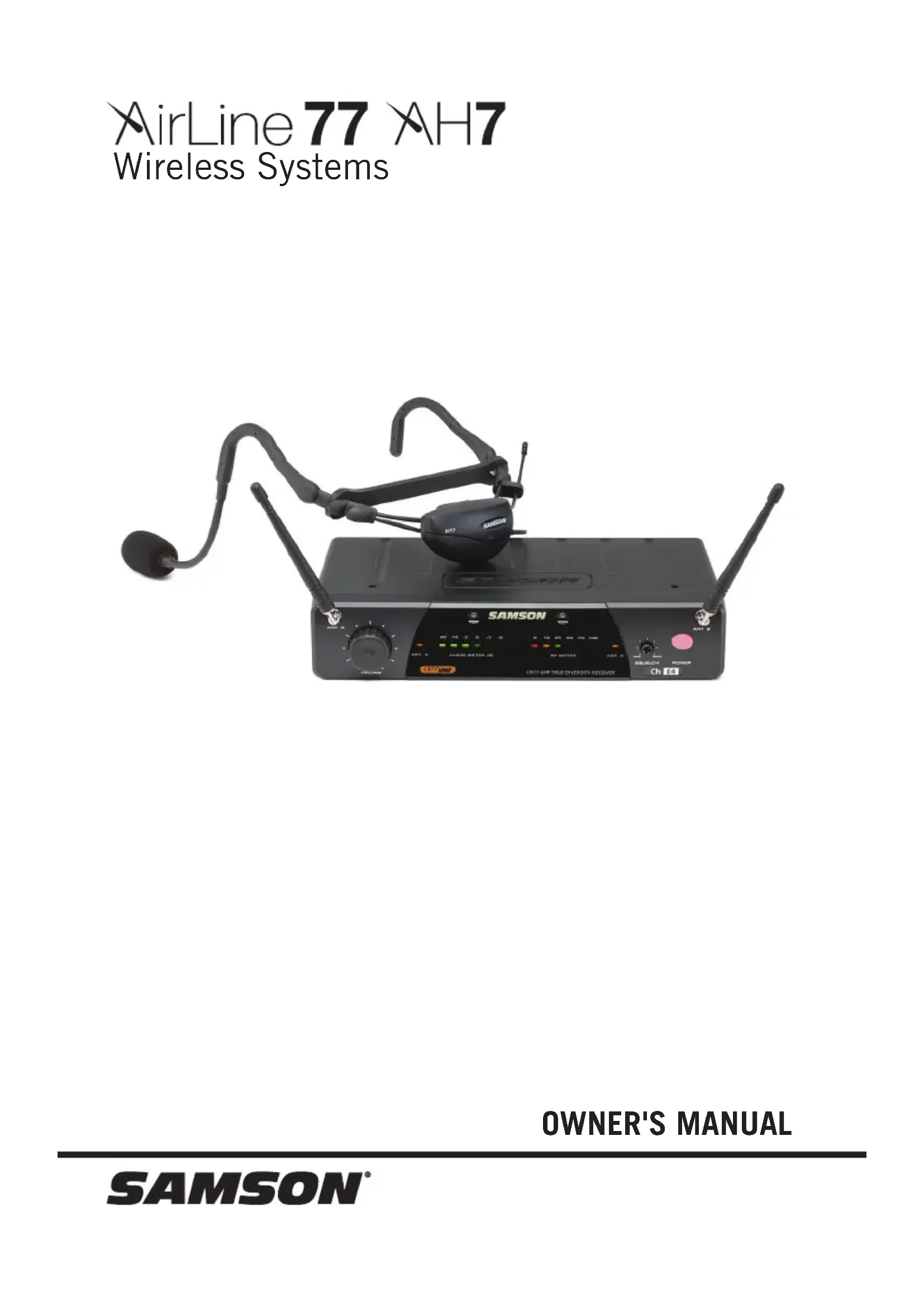


| Product Type | UHF True Diversity Receiver for wireless microphone system |
| Brand | Samson |
| Model | CR77 Receiver |
| Category | Microphone |
| Reception Type | True Diversity with two antennas (A and B) |
| Display | RF Meter (6 segments) and Audio Meter (6 segments) |
| Controls | Volume, Squelch (adjustable), Power On/Off switch |
| Audio Outputs | Balanced XLR (600 Ω) and unbalanced 6.35 mm jack (5 kΩ) |
| Output Level | Unbalanced: 0 dBV; Balanced: -20 dBm (line) or -40 dBm (mic) |
| Frequency Band | Band K (477-492 MHz) or Band E (863-865 MHz) depending on region |
| Oscillation Type | PLL (Phase Locked Loop) |
| Power Supply | 12 V DC ±10% via included power adapter (160 mA consumption) |
| Consumption | 160 mA (all LEDs on) |
| Sensitivity | 18 dBm (@ 2% THD) |
| Signal-to-Noise Ratio | 90 dB (with IHF-A filter) |
| Audio Frequency Response | 50 Hz - 15 kHz (± 3 dB) |
| Total Harmonic Distortion | < 1% (@ AF 1 kHz, RF 46 dBu) |
| Residual Noise | 90 dBV (IHF-A filter) |
| Operating Temperature | 0 °C to 50 °C |
| Maintenance and Cleaning | Clean with a dry cloth; do not use water or solvents |
| Safety | Follow FCC guidelines (part 15) and safety warnings (avoid water, heat, etc.) |
| General Information | Professional or home use; requires a compatible transmitter (AH7) |
Frequently Asked Questions - CR77 Receiver SAMSON
User questions about CR77 Receiver SAMSON
0 question about this device. Answer the ones you know or ask your own.
Ask a new question about this device
Download the instructions for your Microphone in PDF format for free! Find your manual CR77 Receiver - SAMSON and take your electronic device back in hand. On this page are published all the documents necessary for the use of your device. CR77 Receiver by SAMSON.
USER MANUAL CR77 Receiver SAMSON
natural_image
Black SAMSON audio recording device with earphones and control knobs (no visible text or symbols on main body)OWNER'S MANUAL
Important Safety Information
- Read these instructions.
- Keep these instructions.
- Heed all warnings.
- Follow all instructions.
- Do not use this apparatus near water.
-
Clean only with dry cloth.
-
Do not block any ventilation openings. Install in accordance with the manufacturer's instructions.
-
Do not install near any heat sources such as radiators, heat registers, stoves, or other apparatus (including amplifiers) that produce heat.
-
Do not defeat the safety purpose of the polarized or grounding type plug. A polarized plug has two blades with one wider than the other. A grounding type plug has two blades and a third grounding prong. The wide blade or the third prong are provided for your safety. If the provided plug does not fit into your outlet, consult an electrician for replacement of the obsolete outlet.
-
Protect the power cord from being walked on or pinched particularly at the plugs, convenience receptacles, and at the point where they exit from the apparatus.
-
Only use attachments/accessories specified by the manufacturer.
- Use only with the cart, stand, tripod, bracket, or table specified by the manufacturer, or sold with the apparatus. When a cart is used, use caution when moving the cart/apparatus combination to avoid injury from tip-over.

-
Unplug the apparatus during lightening storms, or when unused for long periods of time.
-
Refer all servicing to qualified personnel. Service is required when the apparatus has been damaged in any way, such as power supply cord or plug is damaged, liquid has been spilled or objects have fallen into the apparatus has been exposed to rain or moisture, does not operate normally, or has been dropped.
-
This appliance shall not be exposed to dripping or splashing water and that no object filled with liquid such as vases shall be placed on the apparatus.
-
Caution-to prevent electrical shock, match wide blade plug wide slot fully insert.
-
Please keep a good ventilation environment around the entire unit.
-
The direct plug-in adapter is used as disconnect device, the disconnect device shall remain readily operable.
-
Batteries (battery pack or batteries installed) shall not be exposed to excessive heat such as sunshine, fire or the like.
If you want to dispose this product, do not mix it with general household waste. There is a separate collection system for used electronic products in accordance with legislation that requires proper treatment, recovery and recycling.
Private household in the 28 member states of the EU, in Switzerland and Norway may return their used electronic products free of charge to designated collection facilities or to a retailer (if you purchase a similar new one).
For Countries not mentioned above, please contact your local authorities for a correct method of disposal.
By doing so you will ensure that your disposed product undergoes the necessary treatment, recovery and recycling and thus prevent potential negative effects on the environment and human health.
Copyright 2019, Samson Technologies Corp. v3
Samson Technologies Corp.
278-B Duffy Avenue
Hicksville, NY 11801
www.samsontech.com
Important Safety Information
FCC Rules and Regulations
Samson wireless receivers are certified under FCC Rules part 15 and transmitters are certified under FCC Rules part 74. Licensing of Samson equipment is the user's responsibility and licensability depends on the user's classification, application and frequency selected.
This device complies with Part 15 of the FCC rules Class B and RSS-210 of Industry & Science Canada.
Operation is subject to the following two conditions:
(1) This device must not cause harmful interference, and
(2) This device must accept any interference received including interference that may cause undesired operation. Suitable for home or office use.
NOTE: This equipment has been tested and found to comply with the limits for a Class B digital device, pursuant to Part 15 of the FCC Rules. These limits are designed to provide reasonable protection against harmful interference in a residential installation. This equipment generates, uses and can radiate radio frequency energy and, if not installed and used in accordance with the instructions, may cause harmful interference to radio communications. However, there is no guarantee that interference will not occur in a particular installation. If this equipment does cause harmful interference to radio or television reception, which can be determined by turning the equipment off and on, the user is encouraged to try to correct the interference by one or more of the following measures:
- Reorient or relocate the receiving antenna.
- Increase the separation between the equipment and receiver.
- Connect the equipment into an outlet on a circuit different from that to which the receiver is connected.
- Consult the dealer or an experienced Radio/TV technician for help.
WARNING: Changes or modifications not expressly approved by the party responsible for compliance could void the user's authority to operate the equipment.
This equipment is intended for use in wireless microphone applications.
Equipment is intended for sale in: AT, BE, CH, CY, CZ*, DK, EE, FI*, FR*, DE*, GR*, HU, IE, IS, IT, LV, LT*, LU, MT*, NL, NO*, PL* PT, RO, SK, SI, ES, SE, UK
*Subject to license. Please contact your national frequency authority for information on available legal use in your area. Any changes or modifications not expressly approved by Samson Technologies Corp. could void your authority to operate the equipment.
Hereby, Samson Technologies Corp., declares that this CR77 and AH7 is in compliance with the essential requirements and other relevant provisions of Directive 2014/53/EU. The declaration of conformity may be consulted at:
http://www.samsontech.com/site_media/support/manuals/AirLine77_AH7_DOC.pdf
Introduction
Welcome to Samson AirLine, the original micro-wireless microphone systems. Wireless microphone systems were originally developed to eliminate cables, providing unparalleled freedom of movement. AirLine takes this concept to a new level with transmitters so small, lightweight and ergonomic, they are nearly invisible, providing a completely hassle-free user experience. To create the world's smallest wireless transmitters, we developed new proprietary technology featuring miniaturized circuitry and the ability to operate on a single tiny AAA battery (with 8 hours typical battery life). The AirLine System combines the lightweight AH7 headset transmitter with a Samson Qe Fitness or DE10 low profile headset microphone.
In these pages, you'll find a detailed description of the features of the AirLine Wireless System, as well as step-by-step instructions for its setup and use. If your wireless system was purchased in the United States, you'll also find a registration card enclosed—don't forget to follow the instructions so that you can receive online technical support and so that we can send you updated information about this and other Samson products in the future. Also, be sure to check out our website www.samsontech.com for complete information about our full product line.
We recommend you keep the following records for reference, as well as a copy of your sales receipt:
Receiver Serial number: ____
Transmitter Serial number: ____
Date of purchase: ____
If you have any questions or comments regarding the AirLine Wireless Microphone System or any other products from Samson, do no hesitate to contact us at support@samsontech.com.
With proper care and maintenance, your AirLine Wireless System will operate trouble-free for many years. Should your AirLine Wireless System ever require servicing, a Return Authorization (RA) number must be obtained before shipping your unit to Samson. Without this number, the unit will not be accepted. Please visit www.samsontech.com/ra for an RA number prior to shipping your unit. Please retain the original packing materials and, if possible, return the unit in its original carton. If your AirLine Wireless System was purchased outside of the United States, contact your local distributor for warranty details and service information.
Guided Tour - CR77 Receiver / Front Panel
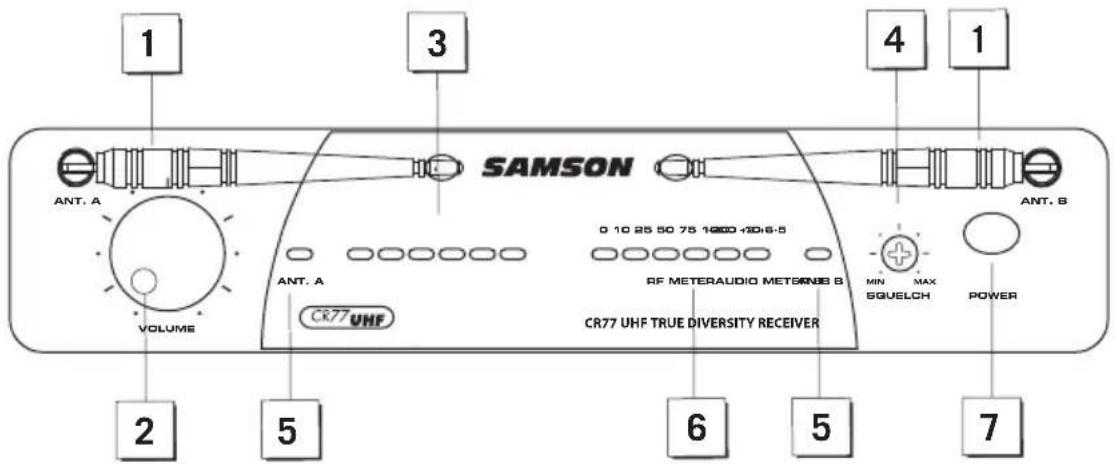
- Antennas (A and B) - The antenna mountings allow full rotation for optimum placement. In normal operation, both antennas should be placed in a vertical position. The antennas can be folded inward for convenience when transporting the CR77.
- VOLUME control - This knob sets the level of the audio signal being output through both the balanced and unbalanced output jacks on the rear panel. Reference level is obtained when the knob is turned fully clockwise (to its "10" setting).
- AUDIO METER - This display indicates the strength of the incoming audio signal. When the "O" segment is lit, the incoming signal is optimized at unity gain; when the "+6" segment is lit, the signal is overloading. When only the left-most "-20" segment is lit, the incoming signal is at just 10% of optimum strength. If no segments are lit, little or no signal is being received.
- Squelch control - This control determines the maximum range of the CR77 before audio signal dropout. Although it can be adjusted using the supplied plastic screwdriver, it should normally be left at its factory setting.
- ANT. A/B Antenna Indicators - When signal is being received, one of these will be lit green, showing you whether the (left) "A" or (right) "B" antenna is currently being used.
- RF METER (Radio Frequency) - This display indicates the strength of the incoming radio signal. When the “100%” segment is lit, the incoming RF signal is fully modulated and at optimum strength. When only the second most left-most “10%” segment is lit, the incoming signal is at just 10% of optimum strength. If no segments are lit, little or no signal is being received.
- Power switch - Use this to turn the CR77 power on and off. When the receiver is on, the internal Power LED is lit.
Guided Tour - CR77 Receiver / Rear Panel
-
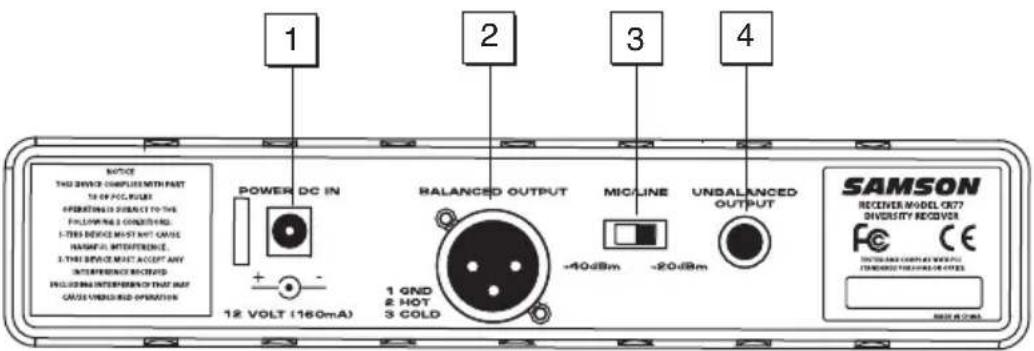
DC Input - Connect the supplied power adapter here, using the strain relief as shown in the illustration below. WARNING: Do not substitute any other kind of power adapter. Doing so can cause severe damage to the CR77 and will void your warranty.
-
BALANCED OUTPUT* - Use this electronically balanced low impedance (600 Ohm) XLR jack when connecting the CR77 to professional (+4 dBu) audio equipment. Pin wiring is as follows: Pin 1 ground, Pin 2 high (hot), and Pin 3 low (cold).
-
MIC/LINE Switch - Sets the audio output level attenuation of the balanced output to -20 dBm (line level) or -40 dBm (mic level).
-
UNBALANCED OUTPUT* - Use this unbalanced high impedance (5 kΩ) 1/4" jack when connecting the CR77 to consumer (-10 dBV) audio equipment. Wiring is as follows: tip hot, sleeve ground.
*If required, both the unbalanced and balanced outputs can be used simultaneously.
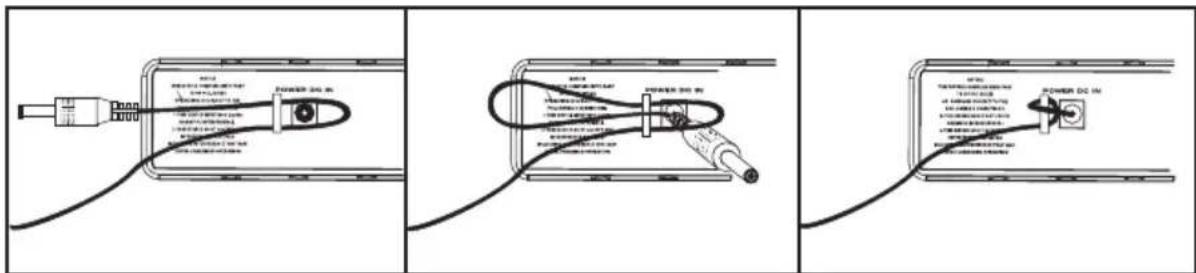
Using the strain relief: Gather up a loop of wire and pass it through the strain relief, then pass the adapter plug through the loop in order to create a knot.
Guided Tour - AH7 Transmitter
-
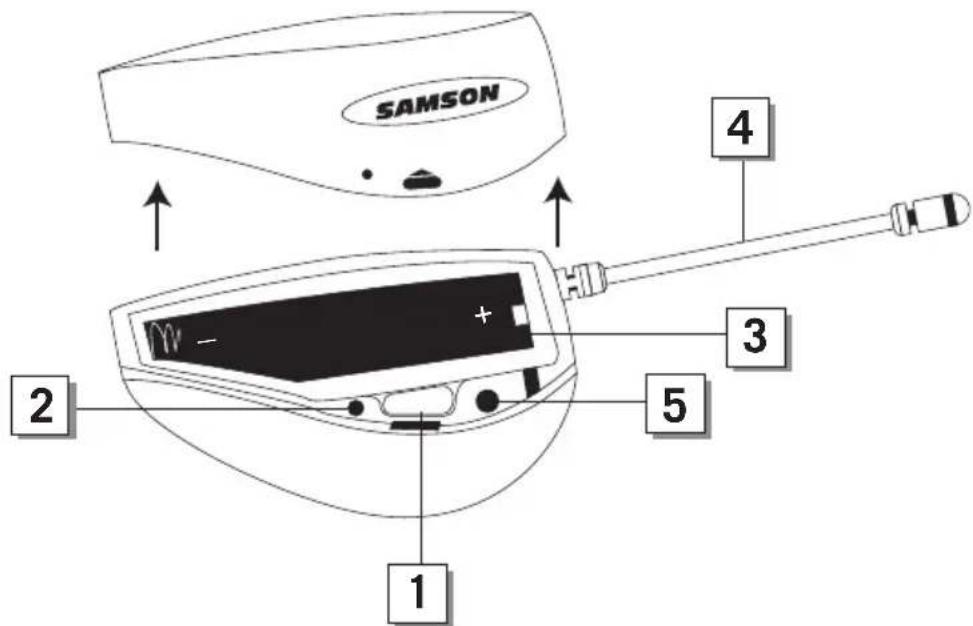
Power switch - Press and hold this switch to power on and off the AH7 transmitter (to conserve battery power, be sure to turn the AH7 off when not in use). To eliminate the possibility of an audible pop, mute the audio signal at your external mixer or amplifier before turning the AH7 power on or off.
-
Power / Battery LED - This LED flashes once when the AH7 is first turned on and lights steadily red when there is less than 2 hours of battery power remaining, indicating that the battery needs to be changed.
-
Battery compartment - Insert a standard AAA alkaline battery here, being sure to observe the plus and minus polarity markings shown. We recommend the Duracell type battery. Although rechargeable Ni-Cad batteries can be used, they do not supply adequate current for more than four hours.
WARNING: Do not insert the battery backwards; doing so can cause severe damage to the AH7 and will void your warranty.
-
Antenna - This permanently attached flexible antenna should be fully extended during normal operations.
-
Input Gain Control - This control adjusts the transmitter input sensitivity (gain). For optimal performance, using the included screwdriver, set the input Gain control to where you see the CR77 AUDIO METER level at 0dB during normal performance and reaching +3dB under high levels. If your level is at +6dB, the audio signal will be distorted and the input Gain control should be turned down.
Wearing the AH7 Headset Microphone
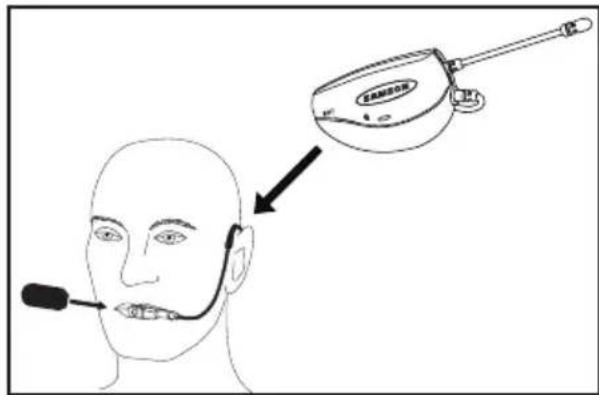
As shown in the illustration, the correct way to wear your Qe fitness headset microphone, is over the ears, as you would wear a pair of eyeglasses. Because the Qe microphone is specially designed to be used up close, be sure to position the microphone directly in front of your lips. To avoid feedback problems, take care not to cover the microphone capsule with your hand.
Position the headset over your head so that the body of the transmitter is behind your head. Adjust the headset so that it fits comfortably on your ears and is secure against your head.
Note: If wearing glasses, it is recommended to put the AH7 transmitter on first than place glasses over the transmitter.
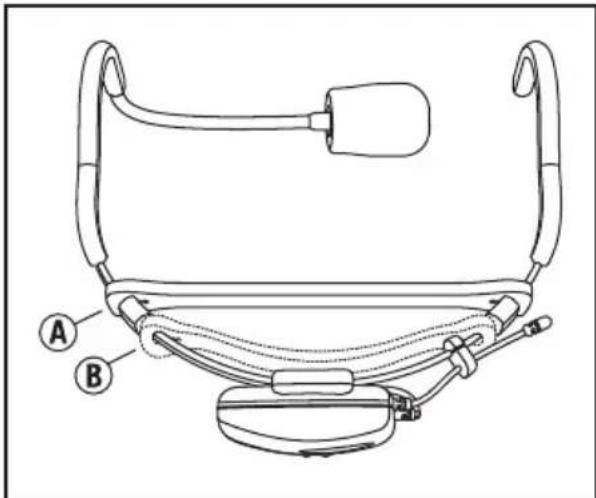
For added comfort and fit, the headset includes an adjustable headband. To fit the headband, pull elastic strap over the ear hooks and locate in front of the stop point (A). For larger sizing, the headband can be moved behind the stop point (B) or completely removed by sliding the elastic band over the ear hooks and microphone capsule.
Note: When removing the headband, first take off the microphone windscreen.
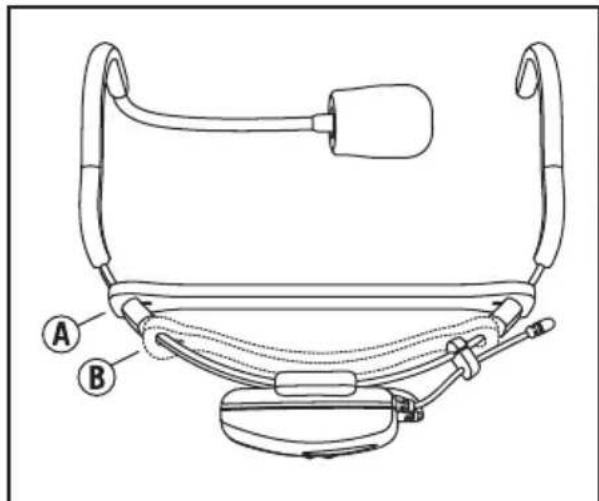
DE10 Headset
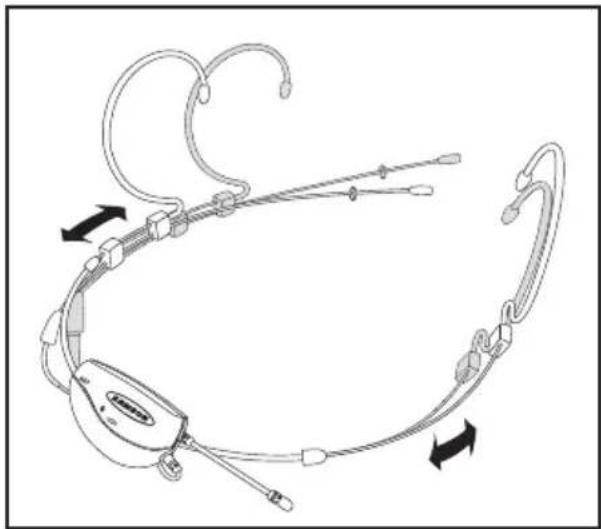
Fitting the DE10 Headset
natural_image
Diagram of a medical or surgical device with attached tubing and connectors, showing directional arrows (no text or symbols)The DE10 headset can be sized by sliding the ear hooks to fit snug around your head. If the DE10 is loose and will not stay in place, slide the ear hook wires back for a tighter fit.
natural_image
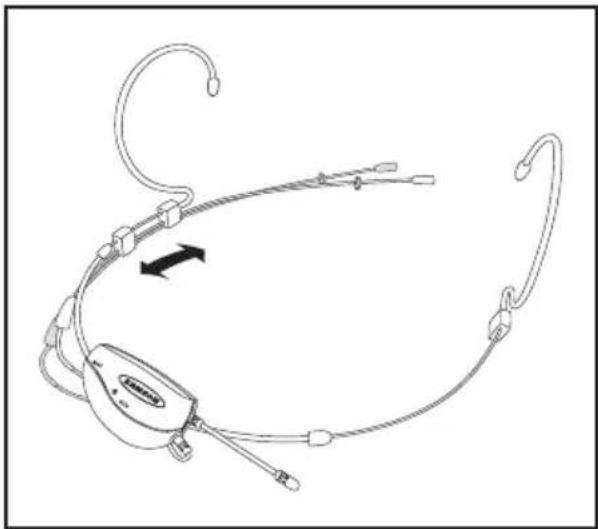
Line drawing of a medical or surgical device with attached tubing and connectors, showing no text or symbols.Adjust the microphone position by holding the left ear hook wire and slide the boom forward or back. For optimum performance the microphone should be close to the skin and towards the corner of the mouth, approximately a half inch away.
Position the moisture guard ring as close to the capsule as possible.
For outdoor use and to help reduce p-popping, use the included windscreens.
Mic Positioning
natural_image
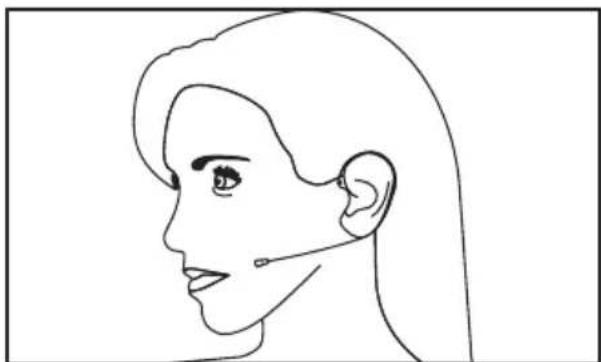
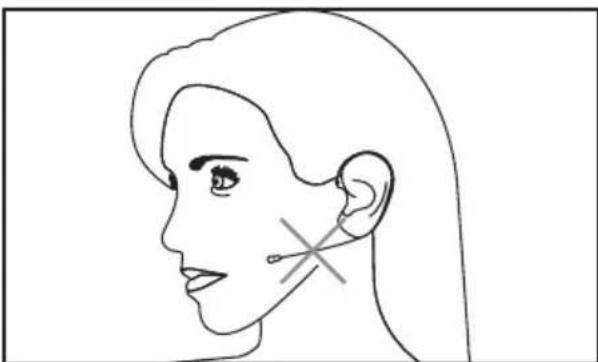
Side profile line drawing of a woman's face and ear (no text or symbols)Position the DE10 microphone element about 0.25" – 1" behind the corner of your mouth. Since the DE10 is an omnidirectional capsule, the end of the microphone does not need to be facing your mouth. To avoid breadth noise and p-pops, do not place the microphone directly in front of your mouth.
natural_image
Side profile line drawing of a human head and ear with a medical device symbol (no text or labels)If the microphone is too far away from your mouth you will need to increase the gain and reduce isolation.
To minimize additional noise, do not locate the microphone tight against your cheek.
Specifications
AH7 Transmitter
Operating Power Voltage 1.5V Typical, 1.05V Minimum, 2V Maximum
Current Consumption 60mA Typical
Battery Life 8 Hours (AAA size battery)
RF Output Power (5mW) -4dB Minimum, +3dB Maximum
THD < 2% (1 kHz deviation 15kHz)
Audio Frequency Response 50Hz - 15kHz (±3.5 dB)
Controls Internal Power Switch
Indicators Power On (LED Flash)
Low Battery (LED On)
CR77 Receiver
Oscillation Type PLL
Antennas 1/4 Wavelength Rod
Indicators Receiver A/B (Green), Power On (Red),
AF Level (6 segment), RF Level (6 segment)
Level Control Audio Level Volume, Squelch Level Control
Operating Temperature 0°C / 50°C
Operating Voltage 12 Volts ±10%
Current Consumption 160 mA (all LED lights illuminated)
Sensitivity 18 dBm (@ THD 2%)
Squelch Sensitivity 0 - 40 dBm (Adjustable)
T.H.D. (Overall) 1% Max (@AF 1 kHz, RF 46 dBu)
S/N Ratio (Overall) 90 dB (w/IHF-A Filter)
Residual Noise 90 dBv (w/IHF-A Filter)
AF Frequency Response 50 Hz – 15 kHz (±3 dB overall)
Unbalanced: 0 dBv
Balanced: -20 dBm (Line), -40 dBm (Mic)
Unbalanced: 5 kΩ
Balanced: 600 Ω
At Samson, we are continually improving our products, therefore specifications and images are subject to change without notice.
Channel Plan
| K-Band E-Band* | |||
| Ch Frequency Ch Frequency | |||
| K1 | 489.050 MHz E1 863 | .125 | MHz |
| K2 | 490.975 MHz E2 863 | .625 | MHz |
| K3 | 492.425 MHz E3 864 | .500 | MHz |
| K4 | 477.525 MHz E4 864 | .875 | MHz |
| K5 | 479.100 MHz | ||
| K6 | 480.475 MHz | ||
* Not for use in the USA and Canada. For questions regarding available channels in your area contact your local Samson distributor.
Casque DE10
natural_image
Diagram of a medical or laboratory device with attached tubing and connectors, showing directional arrows indicating movement (no text or symbols present)natural_image
Line drawing of a medical or surgical device with attached tubing and connectors, showing no text or symbols.natural_image
Line drawing of a human head profile with ear and earlobe (no text or symbols)natural_image
Side profile line drawing of a human head and ear with a medical cross mark on the ear (no text or symbols)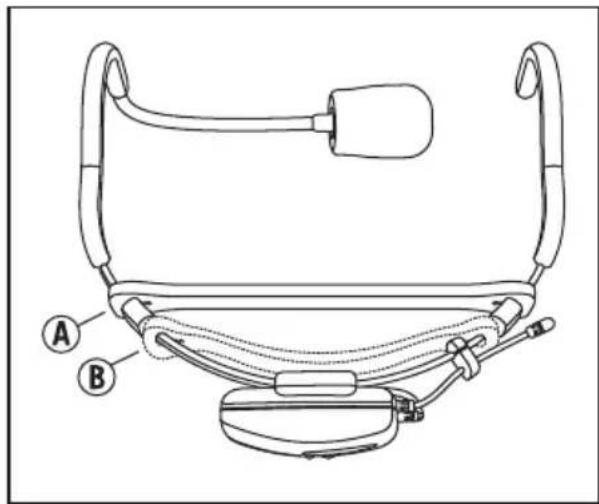
Headset DE10
natural_image
Diagram of a medical or surgical device with attached tubing and connectors, showing directional arrows indicating movement (no text or symbols present)natural_image
Line drawing of a medical or surgical device with attached tubing and connectors, showing no text or symbols.natural_image
Side profile line drawing of a woman's face and ear (no text or symbols)natural_image
Side profile line drawing of a human head and ear with a medical device symbol (no text or labels)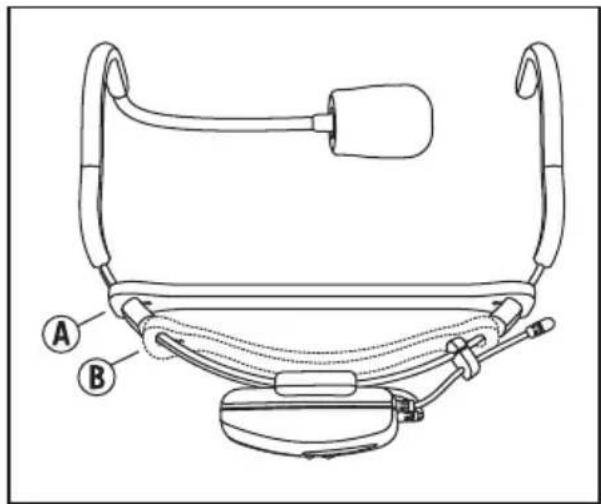
Auriculares DE10
natural_image
Diagram of a medical or surgical device with attached tubing and connectors, showing directional arrows (no text or symbols)natural_image
Line drawing of a medical or surgical device with attached tubing and connectors (no text or symbols)natural_image
Side profile line drawing of a woman's face and ear (no text or symbols)natural_image
Side profile line drawing of a human head and ear with a medical device symbol (no text or labels)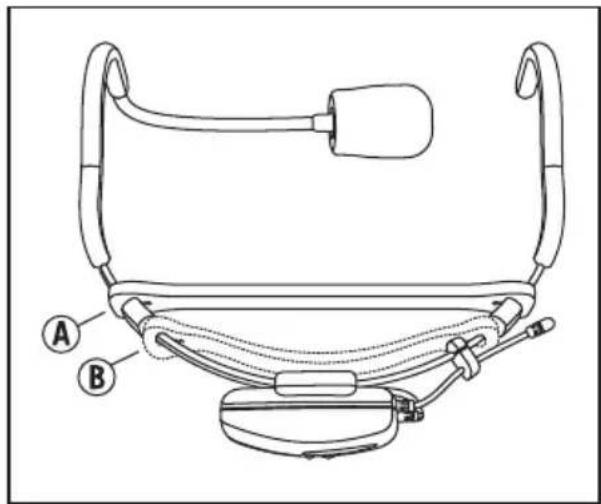
Cuffie DE10
natural_image
Diagram of a medical or surgical device with attached tubing and connectors, showing directional arrows indicating movement (no text or symbols present)natural_image
Line drawing of a medical or surgical device with attached tubing and connectors, showing no text or symbols.natural_image
Side profile line drawing of a woman's face and ear (no text or symbols)natural_image
Side profile line drawing of a human head and ear with a medical device symbol (no text or labels)Having Trouble with your AirLine Wireless System?
We can help!

CONTACT OUR SUPPORT TEAM: support@samsontech.com
Our experts can help you resolve any issues.
Follow us:



@samson @samsontech @samson_technologies
- Important Safety Information
- FCC Rules and Regulations
- Introduction
- Guided Tour - CR77 Receiver / Front Panel
- Guided Tour - CR77 Receiver / Rear Panel
- Guided Tour - AH7 Transmitter
- Wearing the AH7 Headset Microphone
- DE10 Headset
- Fitting the DE10 Headset
- Mic Positioning
- Specifications
- AH7 Transmitter
- CR77 Receiver
- Channel Plan
- Casque DE10
- Headset DE10
- Auriculares DE10
- Cuffie DE10
Brand : SAMSON
Model : CR77 Receiver
Category : Microphone