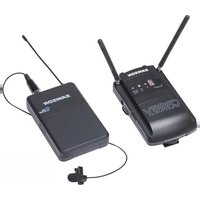
SAMSON Concert 88 Camera - Microphone

Concert 88 Camera - Microphone SAMSON - Free user manual and instructions

Find the device manual for free Concert 88 Camera SAMSON in PDF.

📄 108 pages English EN 💬 AI Question
Notice SAMSON Concert 88 Camera - page 6
View the manual : Français FR Deutsch DE English EN Español ES Italiano IT

User questions about Concert 88 Camera SAMSON

0 question about this device. Answer the ones you know or ask your own.

Ask a new question about this device

L'email reste privé : il sert seulement à vous prévenir si quelqu'un répond à votre question.

No questions yet. Be the first to ask one.

Download the instructions for your Microphone in PDF format for free! Find your manual Concert 88 Camera - SAMSON and take your electronic device back in hand. On this page are published all the documents necessary for the use of your device. Concert 88 Camera by SAMSON.

USER MANUAL Concert 88 Camera SAMSON

Important Safety Information CAUTION: TO REDUCE THE RISK OF ELECTRIC SHOCK, DO NOT REMOVE COVER (OR BACK). NO USER-SERVICEABLE PARTS IN- SIDE. REFER SERVICING TO QUALIFIED SERVICE PERSONNEL. This lightning flash with arrowhead symbol within an equilateral triangle is intended to alert the user to the presence of non-insulated “danger- ous voltage” within the product’s enclosure that may be of sufficient magnitude to constitute a risk of electric shock. The exclamation point within an equilateral triangle is intended to alert the user to the presence of important operating and maintenance in- structions in the literature accompanying the appliance. ATTENTION RISQUE D’ÉLECTROCUTION ! NE PAS OUVRIR ! WARNING TO PREVENT FIRE OR SHOCK HAZARD. DO NOT USE THIS PLUG WITH AN EXTENSION CORD, RECEPTACLE OR OTHER OUTLET UNLESS THE BLADES CAN BE FULLY INSERT- ED TO PREVENT BLADE EXPOSURE. TO PREVENT FIRE OR SHOCK HAZARD. DO NOT EXPOSE THIS APPLIANCE TO RAIN OR MOISTURE. TO PREVENT ELECTRICAL SHOCK, MATCH WIDE BLADE PLUG TO WIDE SLOT AND FULLY INSERT. If you want to dispose this product, do not mix it with general household waste. There is a separate collection system for used electronic products in accordance with legislation that requires proper treatment, recovery and recycling. Private household in the 28 member states of the EU, in Switzerland and Norway may return their used electronic products free of charge to designated collection facilities or to a retailer (if you purchase a similar new one). For Countries not mentioned above, please contact your local authorities for a correct method of disposal. By doing so you will ensure that your disposed product undergoes the necessary treatment, re- covery and recycling and thus prevent potential negative effects on the environment and human health.4 Important Safety Information

1. Read these instructions.

2. Keep these instructions.

3. Heed all warnings.

4. Follow all instructions.

5. Do not use this apparatus near

6. Clean only with dry cloth.

7. Do not block any ventilation open-

ings. Install in accordance with the manufacturer’s instructions.

8. Do not install near any heat sourc-

es such as radiators, heat registers, stoves, or other apparatus (includ- ing amplifiers) that produce heat.

9. Do not defeat the safety purpose

of the polarized or grounding type plug. A polarized plug has two blades with one wider than the other. A grounding type plug has two blades and a third ground- ing prong. The wide blade or the third prong are provided for your safety. If the provided plug does not fit into your outlet, consult an electrician for replacement of the obsolete outlet.

10. Protect the power cord from being

walked on or pinched particularly at the plugs, convenience recep- tacles, and at the point where they exit from the apparatus.

11. Only use attachments/accessories

specified by the manufacturer.

12. Use only with the cart, stand,

tripod, bracket, or table specified by the manufacturer, or sold with the apparatus. When a cart is used, use caution when moving the cart/apparatus combination to avoid injury from tip-over.

13. Unplug the apparatus during light-

ening storms, or when unused for long periods of time.

14. Refer all servicing to qualified per-

sonnel. Service is required when the apparatus has been damaged in any way, such as power supply cord or plug is damaged, liquid has been spilled or objects have fallen into the apparatus has been exposed to rain or moisture, does not operate normally, or has been dropped.

15. This appliance shall not be

exposed to dripping or splashing water and that no object filled with liquid such as vases shall be placed on the apparatus.

16. Caution-to prevent electrical shock,

match wide blade plug wide slot fully insert.

17. Please keep a good ventilation en-

vironment around the entire unit.

18. The direct plug-in adapter is used

as disconnect device, the discon- nect device shall remain readily operable.

19. Batteries (battery pack or batteries

installed) shall not be exposed to excessive heat such as sunshine, fire or the like.5 Concert 88 Wireless System ENGLISH

FRANÇAISDEUTSCHEESPAÑOLITALIANO

  • Table of Contents Introduction p. 6
  • System Features p. 7
  • System Components p. 7
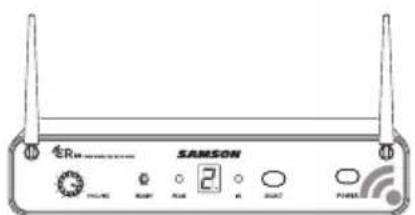
  • Guided Tour - CR88 Receiver p. 8
  • Guided Tour - CB88 Belt Pack Transmitter p. 10
  • Guided Tour - CH88 Handheld Transmitter p. 12
  • Quick Start - Single System Setup p. 13
  • Quick Start - Multiple System Setup p. 17
  • Rack Mounting p. 19
  • Concert 88 Channel Plans p. 20
  • Troubleshooting p. 21
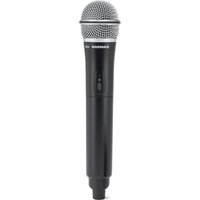
  • Specifications Congratulations on purchasing the Samson Concert 88 wireless system. The Concert 88 is the ideal solution for the active performer who needs a reliable, great sounding system for wireless applications. Featuring simple operation, with 16 available chan- nels and infrared set for the transmitter channel, the Concert 88 can quickly be up and running out of the box. The Concert 88 system ensures clear, interruption-free performance by combining tone-key with auto-mute. This configuration allows only the transmitter’s audio to pass through the receiver, and mutes the output if there is any interference. The Concert 88 comes in four configurations. The vocal handheld system includes the CH88 handheld transmitter and dynamic microphone capsule. The CB88 belt pack system can be configured with either the HS5 headset microphone, LM5 lava- lier microphone, or a ¼" instrument cable. For travel or permanent installation, the Concert 88 includes a standard 19" rackmount kit. In these pages, you’ll find a detailed description of the features of the Concert 88 wireless system, as well as a guided tour through its control panel, step-by-step instructions for its setup and use, and full specifications. If your wireless system was purchased in the United States, you’ll also find a warranty card enclosed—don’t forget to fill it out and mail it in so that you can receive online technical support and so that we can send you updated information about this and other Samson products in the future. Also, be sure to check out our website (www.samsontech.com) for com- plete information about our full product line. We recommend you keep the following records for reference, as well as a copy of your sales receipt. Receiver Serial number: _________________________________________ Transmitter Serial number: ______________________________________ Date of purchase: ______________________________________________ Dealer name: __________________________________________________ With proper care and maintenance, your Concert 88 wireless system will operate trouble-free for many years. Should your wireless system ever require servicing, a Return Authorization (RA) number must be obtained before shipping your unit to Samson. Without this number, the unit will not be accepted. Please call Samson at 1-800-3SAMSON (1-800-372-6766) for an RA number prior to shipping your unit. Please retain the original packing materials and, if possible, return the unit in its original carton. If your Concert 88 system was purchased outside of the United States, contact your local distributor for warranty details and service information. Introduction7 Concert 88 Wireless System ENGLISH p. 226

FRANÇAISDEUTSCHEESPAÑOLITALIANO

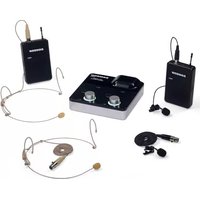
System Components System Features All systems CR88 receiver Power Supply ¼" to ¼" audio cable Rack Accessories Long rack ear, short rack ear, two receiver adaptor Owner's Manual Handheld system CH88 handheld transmitter with dynamic microphone capsule Headset system CB88 belt pack transmitter HS5 headset microphone with mini-XLR connector Lavalier System CB88 belt pack transmitter LM5 lavalier microphone with mini-XLR connector Tie clip Instrument System CB88 belt pack transmitter ¼" to mini-XLR instrument cable

  • Professional wireless system for use in both live sound and sound contracting applications
  • True diversity technology maximizes active range (up to 300 feet) and reduces potential interference
  • 16 available channels operating in the UHF band designed for maximum system compatibility in the same location without interference
  • The CR88 receiver is a half-rack unit that can be used freestanding or can be mounted in any standard 19" rack using the included rack kit, making it easy to integrate into any traveling or fixed installation audio system
  • Tone-key and auto-mute ensures clear, interruption-free performance allowing only the transmitter’s audio to pass through the receiver, and mutes the output if there is any interference
  • Up to eight hours of battery life, using two standard AA batteries8

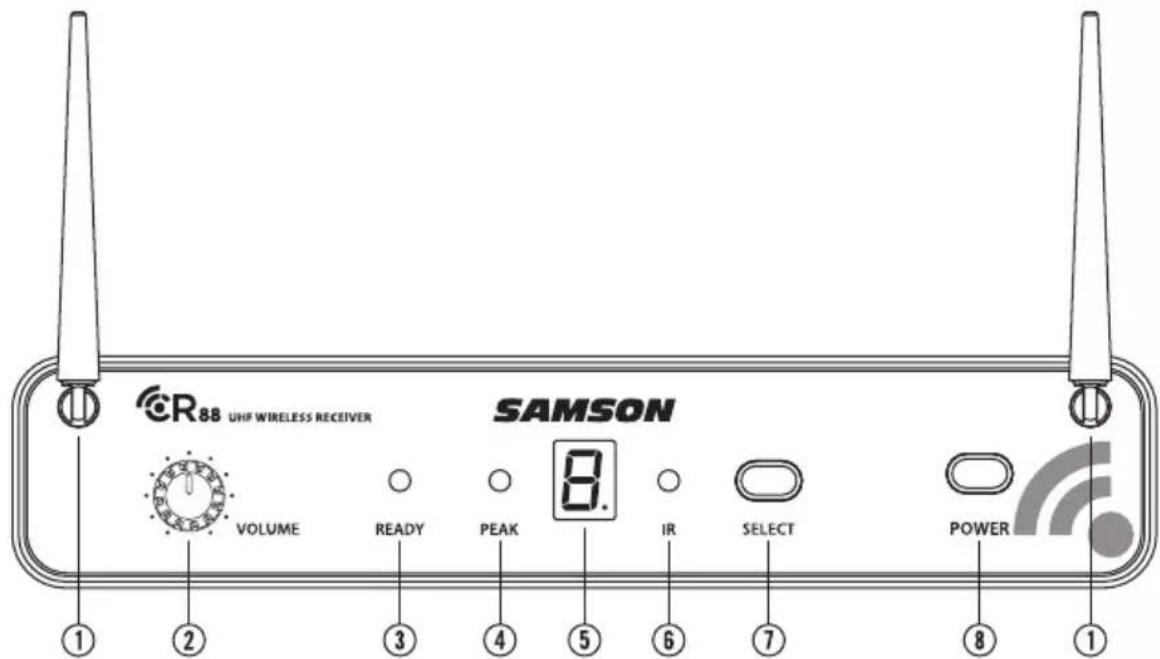
1. Antennas - The antenna mountings allow full rotation for optimum placement. In

normal operation, both antennas should be placed in a vertical position. Both antennas can be folded inward for convenience when transporting the CR88.

2. VOLUME Control - This knob sets the level of the audio signal being output

through both the balanced and unbalanced output jacks on the rear panel. Reference level is obtained when the knob is turned fully clockwise (to its “10” setting).

3. READY Indicator - This indicator lights green when the CR88 is receiving RF sig-

nal and the system is ready to use.

4. PEAK Indicator - This indicator lights red when the transmitted audio signal is

5. LED Display - The 7-segment LED display shows the receiver's current operating

channel. The CR88 channels are indicated by 0-9 and A-F.

6. IR Transmitter - During “IR SET” an infrared light is used to set the transmitter

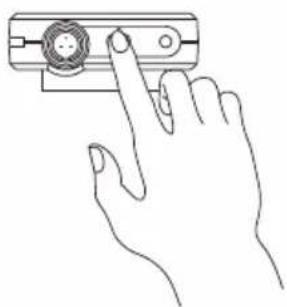
7. SELECT Button - Press this button to cycle through the receiver's operating chan-

nels. Press and hold this button to send the channel information to the transmit- ter via infrared transmission.

8. POWER Switch - Use this to turn the CR88 power on and off.

Guided Tour - CR88 Receiver9 Concert 88 Wireless System ENGLISH

FRANÇAISDEUTSCHEESPAÑOLITALIANO

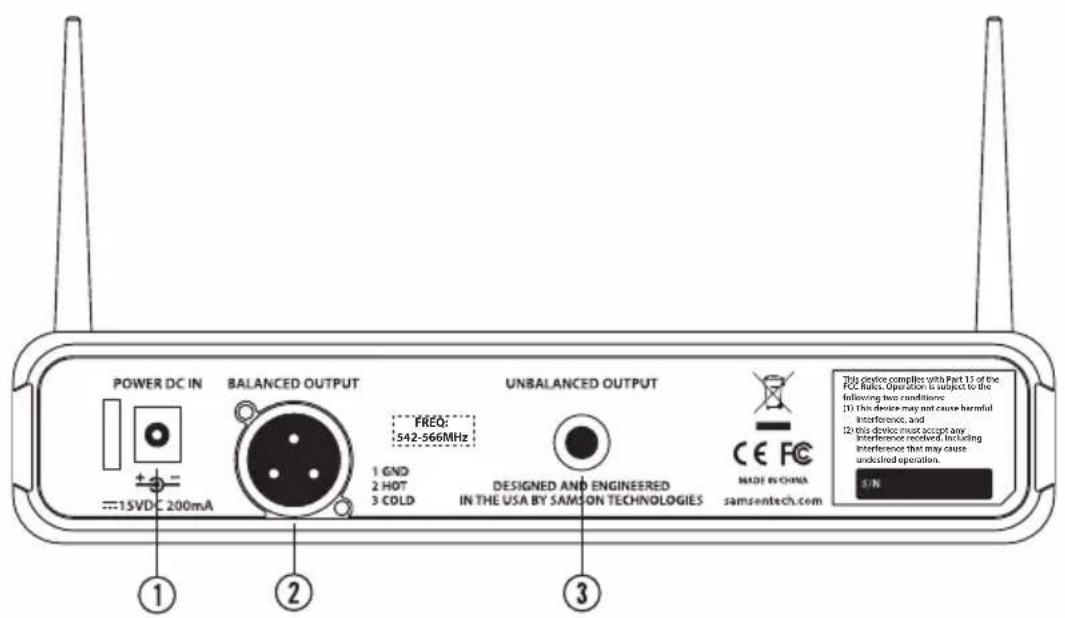
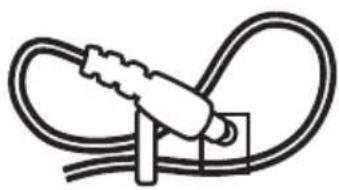
This device complies with Part 15 of the FCC Rules. Operation is subject to the following two conditions: (1) This device may not cause harmful interference, and (2) this device must accept any interference received, including interference that may cause undesired operation. FREQ: 542-566MHz Using the strain relief: Gather up a loop of wire and pass it through the strain relief, then pass the adapter plug through the loop in order to create a knot. Guided Tour - CR88 Receiver

1. DC Input - Connect the supplied power adapter here, using the strain relief as

shown in the illustration below. WARNING: Do not substitute any other kind of power adapter. Doing so can cause severe damage to the CR88 and will void your warranty.

2. BALANCED OUTPUT - Use this electronically balanced low impedance (600 Ohm)

XLR jack when connecting the CR88 to professional (+4dBu) audio equipment. Pin wiring is as follows: Pin 1 ground, Pin 2 high (hot), and Pin 3 low (cold).

3. UNBALANCED OUTPUT - Use this unbalanced high impedance (5K Ohm) ¼" jack

when connecting the CR88 to consumer (-10dBV) audio equipment. Wiring is as follows: tip hot, sleeve ground.10

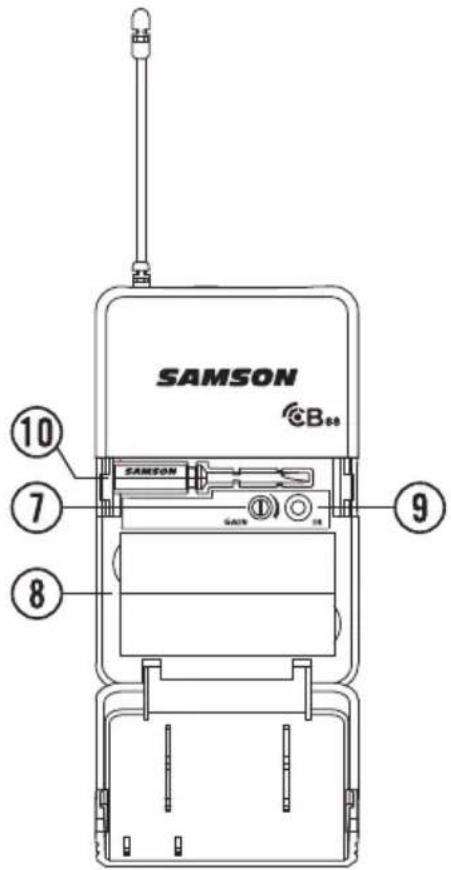
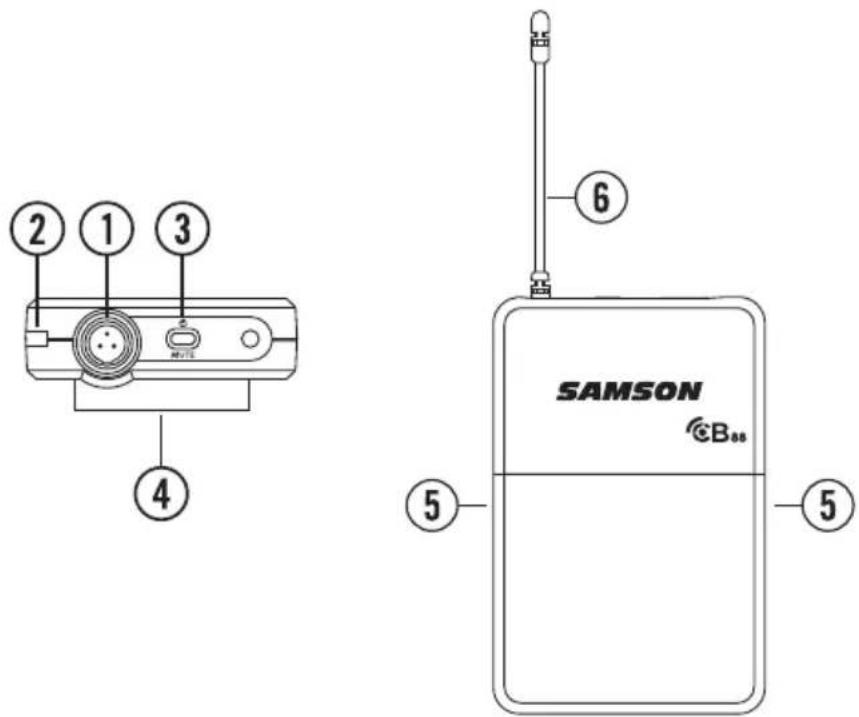
1. Input Connector - Connect the input device via the mini-XLR connector. The CB88

is supplied with either a lavalier, headset microphone or ¼" instrument cable.

2. Status Indicator - This LED displays the operation mode:

GREEN Normal Operation RED Mute Flashing GREEN Low Battery

3. Power/Mute Switch - Press and hold to turn the unit on or off. Press and release

to mute or unmute the transmitter.

4. Belt Clip - Use this clip to fasten the CB88 transmitter to a belt or guitar strap.

5. Battery Cover Release - Push in both sides and pull back to open the CB88 bat-

6. Antenna - This permanently attached transmitter antenna should be fully extend-

ed during normal operation. Guided Tour - CB88 Belt Pack Transmitter11 Concert 88 Wireless System ENGLISH

with microphone and instruments inputs. For optimal performance, using the included screwdriver, set the input GAIN control to where you see the CR88 PEAK indicator start to light under high levels, then turn down slowly until the PEAK light stops lighting.

8. Battery Holder - Insert two standard AA (LR6) batteries here, being sure to

observe the plus and minus polarity markings shown. Although rechargeable Ni-Cad batteries can be used, they do not supply adequate current for more than four hours. WARNING: Do not insert the batteries backwards; doing so can cause severe damage to the CB88 and will void your warranty.

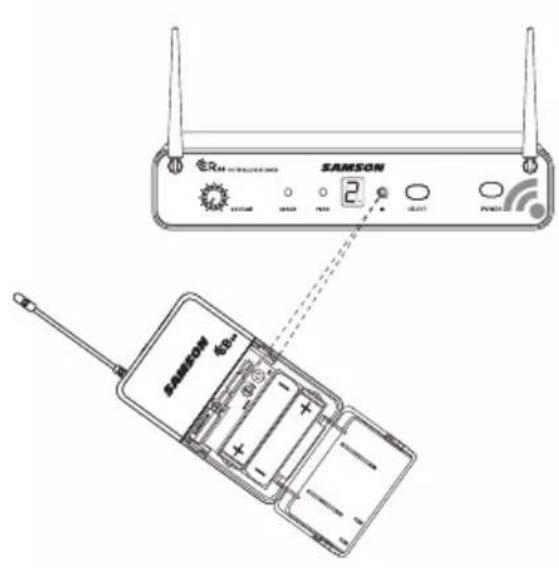
9. IR Lens - This window is used to capture the infrared signal sent from the CR88

during the IR SET to channelize the transmitter.

10. Plastic Screwdriver - Designed for use in adjusting the CB88 input GAIN (#7)

control. Guided Tour - CB88 Belt Pack Transmitter12

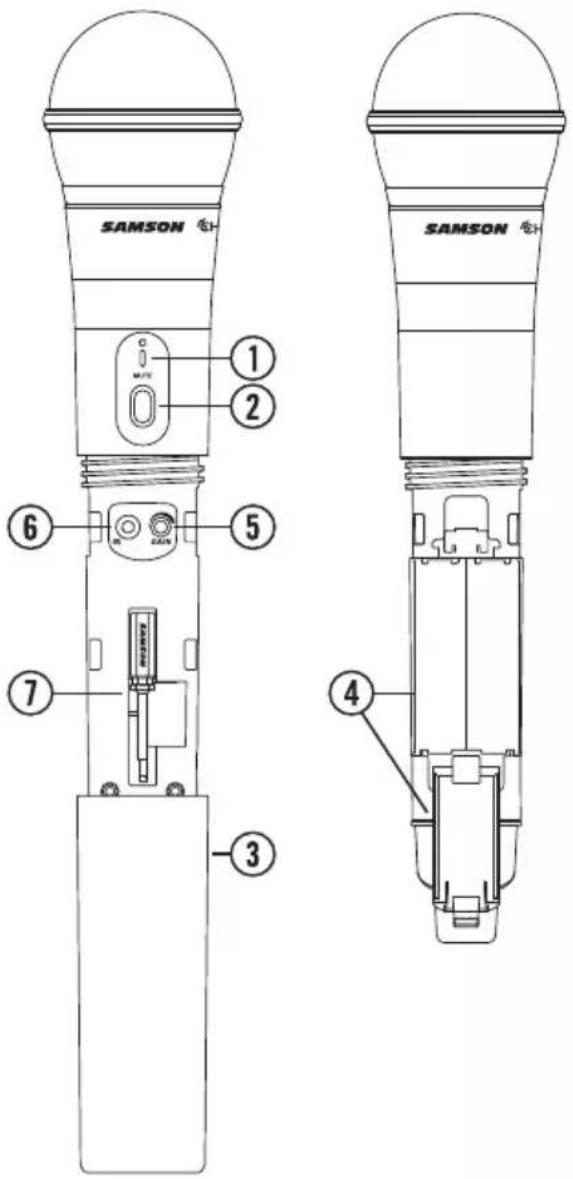
1. Status Indicator - This LED displays the

operation mode: GREEN Normal Operation RED Mute Flashing GREEN Low Battery

2. Power/Mute Switch - Press and hold to

turn the unit on or off. Press and release to mute or unmute the transmitter.

3. Battery Cover - Unscrew the battery cover

and slide down to open the CH88 battery compartment.

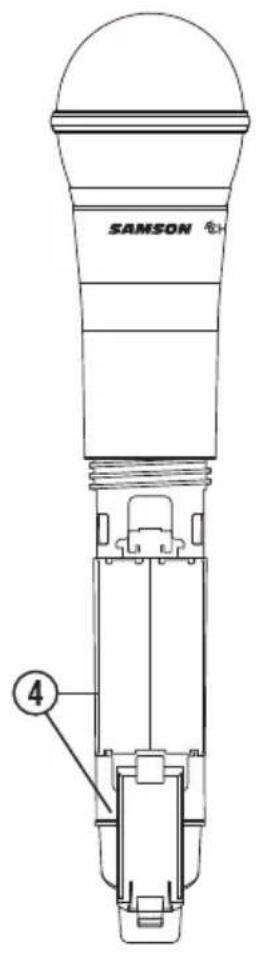
4. Battery Holder - Open the battery holder

by pressing the tab and lifting the cover. Insert two standard AA (LR6) batteries here, being sure to observe the plus and minus polarity markings shown. Although rechargeable Ni-Cad batteries can be used, they do not supply adequate cur- rent for more than four hours. WARNING: Do not insert the batteries backwards; doing so can cause severe damage to the CH88 and will void your warranty.

5. Input GAIN Control - This control adjusts

the transmitter input sensitivity. For optimal performance, using the included screwdriver, set the input GAIN control to where you see the CR88 PEAK indica- tor start to light under high levels, then turn down until the PEAK light stops lighting.

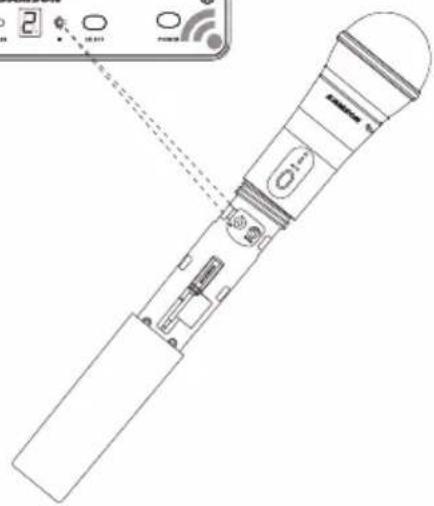
6. IR Lens - This window is used to capture the infrared signal sent from the CR88

during the IR SET to channelize the transmitter. The battery cover must be open and the IR Lens facing towards the receiver to load the selected channel.

7. Plastic Screwdriver - Designed for use in adjusting the CB88 input GAIN control

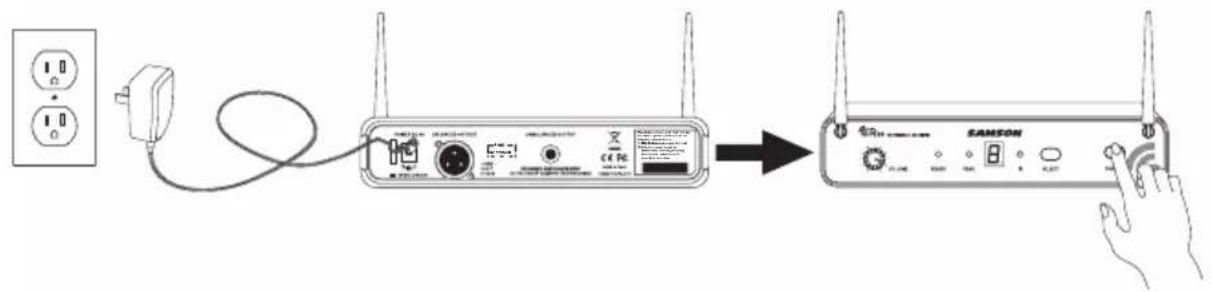
Quick Start - Single System Setup In order for your wireless system to work correctly, both the receiver and transmitter must be set to the same channel. Follow this basic procedure for setting up and using your Concert 88 wireless system: Physically place the CR88 receiver where it will be used, and extend the anten- nas vertically. The general rule of thumb is to maintain “line of sight” between the receiver and transmitter so that the person using or wearing the transmitter can see the receiver. With the CR88 powered off, connect the included power adapter. Turn the CR88 on momentarily to confirm that the unit is receiving power. You’ll see the LED display light up. Then turn the CR88 power off. This device complies with Part 15 of the FCC Rules. Operation is subject to the following two conditions: (1) This device may not cause harmful interference, and (2) this device must accept any interference received, including interference that may cause undesired operation. FREQ:542-566MHz This device complies with Part 15 of the FCC Rules. Operation is subject to the following two conditions: (1) This device may not cause harmful interference, and (2) this device must accept any interference received, including interference that may cause undesired operation. FREQ:542-566MHz
3. Plug in receiver 4. Turn on receiver

5. Plug receiver into audio system 6. Press Select button to change channel 9. Press and hold SELECT button to IR set 10. Adjust Volume control7. Install batteries 8. Press button on transmitter to turn on

9. Press and hold Select button to IR set7. Install batteries 8. Turn on belt pack transmitter

This device complies with Part 15 of the FCC Rules. Operation is subject to the following two conditions: (1) This device may not cause harmful interference, and (2) this device must accept any interference received, including interference that may cause undesired operation. FREQ:542-566MHz This device complies with Part 15 of the FCC Rules. Operation is subject to the following two conditions: (1) This device may not cause harmful interference, and (2) this device must accept any interference received, including interference that may cause undesired operation. FREQ:542-566MHz

3. Plug in receiver 4. Turn on receiver

5. Plug receiver into audio system 6. Press Select button to change channel 9. Press and hold SELECT button to IR set 10. Adjust Volume control7. Install batteries 8. Press button on transmitter to turn on

9. Press and hold Select button to IR set7. Install batteries 8. Turn on belt pack transmitter

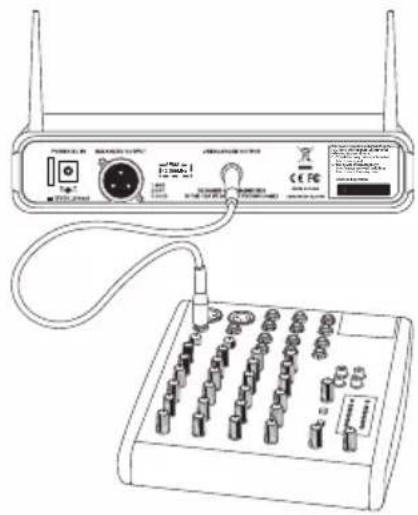
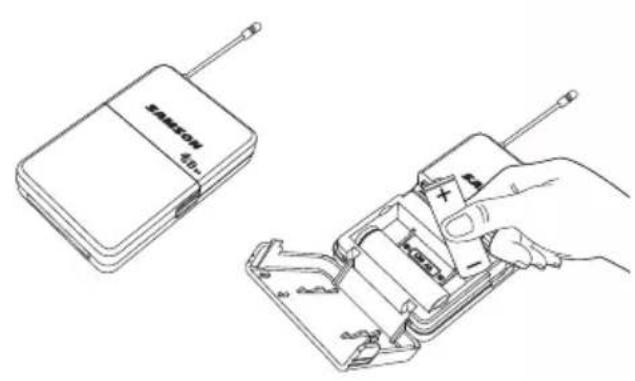
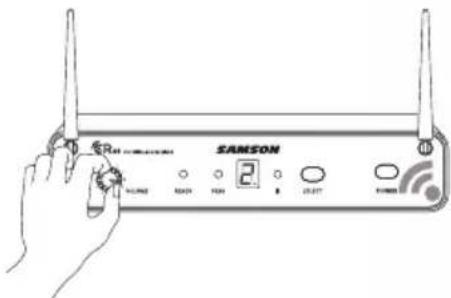
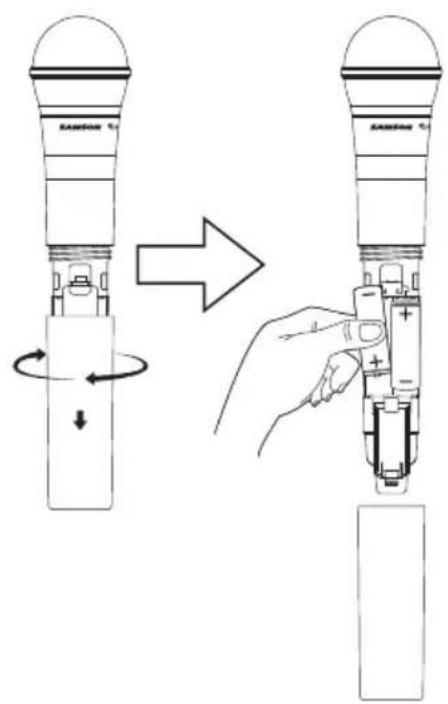
With your amplifier or mixer off and volume control all the way down, connect the CR88 receiver output jack to the mic or line level input of a mixer or amplifier using the balanced XLR output or unbalanced ¼" line level output. Turn the Level knob on the CR88 completely counterclockwise, then turn its power on.14 Quick Start - Single System Setup With the transmitter powered off, install two fresh AA batteries into the CB88 belt pack or CH88 handheld transmitter. Leave the battery compartment open. This device complies with Part 15 of the FCC Rules. Operation is subject to the following two conditions: (1) This device may not cause harmful interference, and (2) this device must accept any interference received, including interference that may cause undesired operation. FREQ:542-566MHz This device complies with Part 15 of the FCC Rules. Operation is subject to the following two conditions: (1) This device may not cause harmful interference, and (2) this device must accept any interference received, including interference that may cause undesired operation. FREQ:542-566MHz
3. Plug in receiver 4. Turn on receiver

5. Plug receiver into audio system 6. Press Select button to change channel 9. Press and hold SELECT button to IR set 10. Adjust Volume control7. Install batteries 8. Press button on transmitter to turn on

9. Press and hold Select button to IR set7. Install batteries 8. Turn on belt pack transmitter

This device complies with Part 15 of the FCC Rules. Operation is subject to the following two conditions: (1) This device may not cause harmful interference, and (2) this device must accept any interference received, including interference that may cause undesired operation. FREQ:542-566MHz This device complies with Part 15 of the FCC Rules. Operation is subject to the following two conditions: (1) This device may not cause harmful interference, and (2) this device must accept any interference received, including interference that may cause undesired operation. FREQ:542-566MHz

3. Plug in receiver 4. Turn on receiver

5. Plug receiver into audio system 6. Press Select button to change channel 9. Press and hold SELECT button to IR set 10. Adjust Volume control7. Install batteries 8. Press button on transmitter to turn on

9. Press and hold Select button to IR set7. Install batteries 8. Turn on belt pack transmitter

This device complies with Part 15 of the FCC Rules. Operation is subject to the following two conditions: (1) This device may not cause harmful interference, and (2) this device must accept any interference received, including interference that may cause undesired operation. FREQ: 542-566MHz This device complies with Part 15 of the FCC Rules. Operation is subject to the following two conditions: (1) This device may not cause harmful interference, and (2) this device must accept any interference received, including interference that may cause undesired operation. FREQ: 542-566MHz

3. Plug in receiver 4. Turn on receiver

5. Plug receiver into audio system 6. Press Select button to change channel 9. Press and hold SELECT button to IR set 10. Adjust Volume control7. Install batteries 8. Press button on transmitter to turn on

9. Press and hold Select button to IR set7. Install batteries 8. Turn on belt pack transmitter

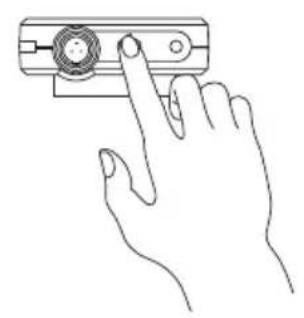
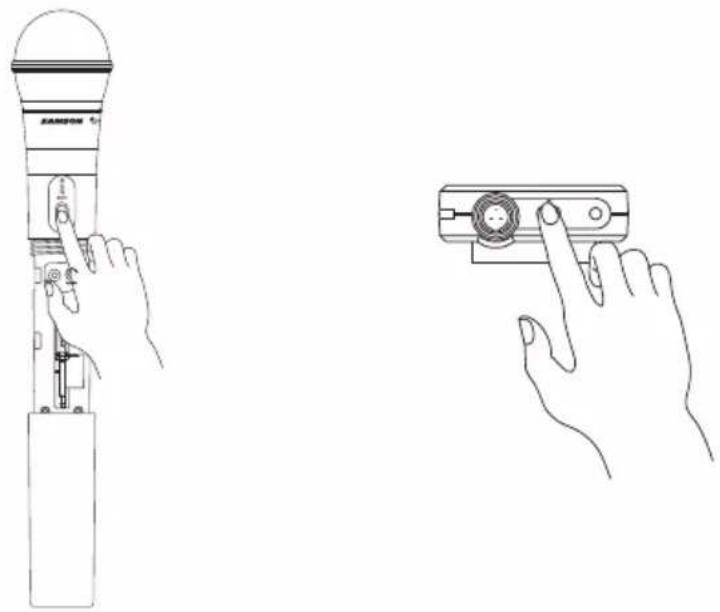
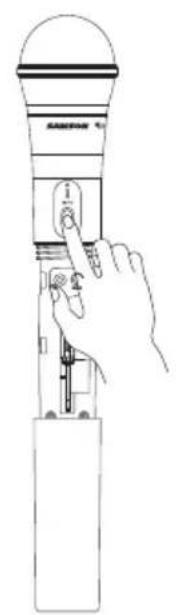
Turn on the power to the transmitter by pressing and holding Power switch; the indi- cator LED will light green. This device complies with Part 15 of the FCC Rules. Operation is subject to the following two conditions: (1) This device may not cause harmful interference, and (2) this device must accept any interference received, including interference that may cause undesired operation. FREQ:542-566MHz This device complies with Part 15 of the FCC Rules. Operation is subject to the following two conditions: (1) This device may not cause harmful interference, and (2) this device must accept any interference received, including interference that may cause undesired operation. FREQ:542-566MHz

3. Plug in receiver 4. Turn on receiver

5. Plug receiver into audio system 6. Press Select button to change channel 9. Press and hold SELECT button to IR set 10. Adjust Volume control7. Install batteries 8. Press button on transmitter to turn on

9. Press and hold Select button to IR set7. Install batteries 8. Turn on belt pack transmitter15

Quick Start - Single System Setup This device complies with Part 15 of the FCC Rules. Operation is subject to the following two conditions: (1) This device may not cause harmful interference, and (2) this device must accept any interference received, including interference that may cause undesired operation. FREQ: 542-566MHz This device complies with Part 15 of the FCC Rules. Operation is subject to the following two conditions: (1) This device may not cause harmful interference, and (2) this device must accept any interference received, including interference that may cause undesired operation. FREQ: 542-566MHz

3. Plug in receiver 4. Turn on receiver

5. Plug receiver into audio system 6. Press Select button to change channel 9. Press and hold SELECT button to IR set 10. Adjust Volume control7. Install batteries 8. Press button on transmitter to turn on

9. Press and hold Select button to IR set7. Install batteries 8. Turn on belt pack transmitter

This device complies with Part 15 of the FCC Rules. Operation is subject to the following two conditions: (1) This device may not cause harmful interference, and (2) this device must accept any interference received, including interference that may cause undesired operation. FREQ: 542-566MHz This device complies with Part 15 of the FCC Rules. Operation is subject to the following two conditions: (1) This device may not cause harmful interference, and (2) this device must accept any interference received, including interference that may cause undesired operation. FREQ: 542-566MHz

3. Plug in receiver 4. Turn on receiver

5. Plug receiver into audio system 6. Press Select button to change channel 9. Press and hold SELECT button to IR set 10. Adjust Volume control7. Install batteries 8. Press button on transmitter to turn on

9. Press and hold Select button to IR set7. Install batteries 8. Turn on belt pack transmitter

Position the transmitter about 6-12" (15-30 cm) from the front of the CR88 with the transmitter's IR window facing the IR transmitter on the front panel of the CR88 receiver. This device complies with Part 15 of the FCC Rules. Operation is subject to the following two conditions: (1) This device may not cause harmful interference, and (2) this device must accept any interference received, including interference that may cause undesired operation. FREQ: 542-566MHz This device complies with Part 15 of the FCC Rules. Operation is subject to the following two conditions: (1) This device may not cause harmful interference, and (2) this device must accept any interference received, including interference that may cause undesired operation. FREQ: 542-566MHz

3. Plug in receiver 4. Turn on receiver

5. Plug receiver into audio system 6. Press Select button to change channel 9. Press and hold SELECT button to IR set 10. Adjust Volume control7. Install batteries 8. Press button on transmitter to turn on

9. Press and hold Select button to IR set7. Install batteries 8. Turn on belt pack transmitter

This device complies with Part 15 of the FCC Rules. Operation is subject to the following two conditions: (1) This device may not cause harmful interference, and (2) this device must accept any interference received, including interference that may cause undesired operation. FREQ: 542-566MHz This device complies with Part 15 of the FCC Rules. Operation is subject to the following two conditions: (1) This device may not cause harmful interference, and (2) this device must accept any interference received, including interference that may cause undesired operation. FREQ: 542-566MHz

3. Plug in receiver 4. Turn on receiver

5. Plug receiver into audio system 6. Press Select button to change channel 9. Press and hold SELECT button to IR set 10. Adjust Volume control7. Install batteries 8. Press button on transmitter to turn on

9. Press and hold Select button to IR set7. Install batteries 8. Turn on belt pack transmitter

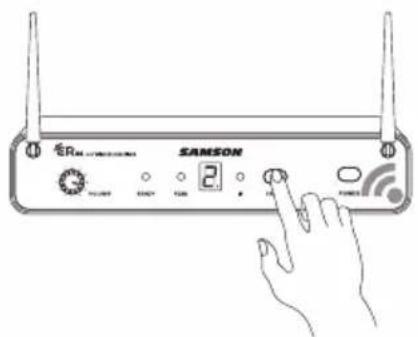
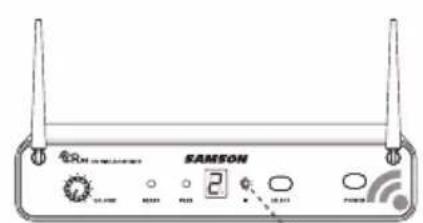
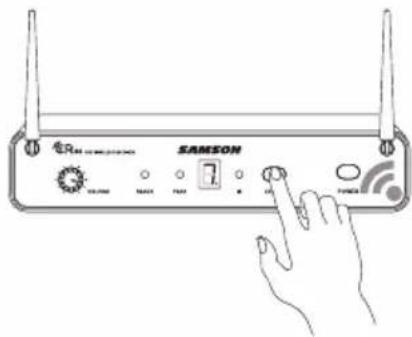
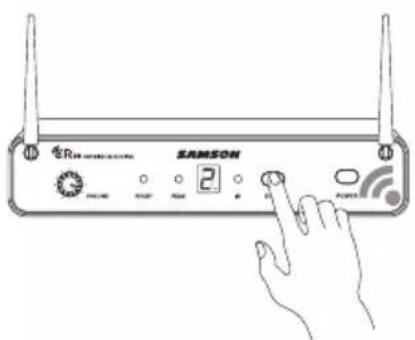
Press and hold the CR88 SELECT button to set the transmitter to the same channel as the receiver via infrared transmission Press the SELECT button on the front of the CR88 receiver to choose an available channel. The channel number will increase by one digit, from 0-9 then A-F. Once the last channel has been reached, the count will cycle back to 0.16 Turn on your connected amplifier or mixer, but keep the volume all the way down. Set the Volume knob on the CR88 fully clockwise (to its “10” setting). This is unity gain. Speak or sing into the microphone, or if you are using the transmitter with a con- nected instrument, play the instrument at normal performance level. Slowly raise the volume of your amplifier or mixer until the desired level is reached. If you find the system has noticeable dropouts, reduced overall working range, or unexpected noise bursts, change the operating channel of the system using the steps above. This device complies with Part 15 of the FCC Rules. Operation is subject to the following two conditions: (1) This device may not cause harmful interference, and (2) this device must accept any interference received, including interference that may cause undesired operation. FREQ: 542-566MHz This device complies with Part 15 of the FCC Rules. Operation is subject to the following two conditions: (1) This device may not cause harmful interference, and (2) this device must accept any interference received, including interference that may cause undesired operation. FREQ: 542-566MHz

3. Plug in receiver 4. Turn on receiver

5. Plug receiver into audio system 6. Press Select button to change channel 9. Press and hold SELECT button to IR set 10. Adjust Volume control7. Install batteries 8. Press button on transmitter to turn on

9. Press and hold Select button to IR set7. Install batteries 8. Turn on belt pack transmitter

This device complies with Part 15 of the FCC Rules. Operation is subject to the following two conditions: (1) This device may not cause harmful interference, and (2) this device must accept any interference received, including interference that may cause undesired operation. FREQ: 542-566MHz This device complies with Part 15 of the FCC Rules. Operation is subject to the following two conditions: (1) This device may not cause harmful interference, and (2) this device must accept any interference received, including interference that may cause undesired operation. FREQ: 542-566MHz

3. Plug in receiver 4. Turn on receiver

5. Plug receiver into audio system 6. Press Select button to change channel 9. Press and hold SELECT button to IR set 10. Adjust Volume control7. Install batteries 8. Press button on transmitter to turn on

9. Press and hold Select button to IR set7. Install batteries 8. Turn on belt pack transmitter

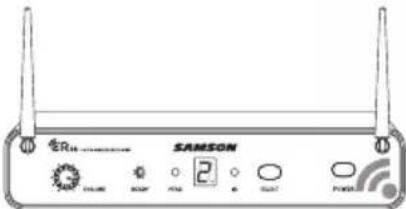
Quick Start - Single System Setup When the transmission is complete, the CR88 will receive RF signal and the tone key from the transmit- ter. The READY indicator will light on the front panel of the CR88 receiver.17 Concert 88 Wireless System ENGLISH

FRANÇAISDEUTSCHEESPAÑOLITALIANO

To change the operating channel of a system, press the SELECT button on the front of the CR88 receiver. The channel number will increase by one digit, from 0-9 then A-F. Once the last channel has been reached, the count will cycle back to 0. Quick Start - Multiple System Setup When using multiple systems, each system must be set to a different operating channel. Transmitter and receiver pairs must be on the same channel plan in order to work together (See "Concert 88 Channel Plans" on page 20). When setting an additional transmitter, make sure to close all other transmitter bat- tery compartments to ensure that the IR Lens is covered. This device complies with Part 15 of the FCC Rules. Operation is subject to the following two conditions: (1) This device may not cause harmful interference, and (2) this device must accept any interference received, including interference that may cause undesired operation. FREQ:542-566MHz This device complies with Part 15 of the FCC Rules. Operation is subject to the following two conditions: (1) This device may not cause harmful interference, and (2) this device must accept any interference received, including interference that may cause undesired operation. FREQ:542-566MHz

3. Plug in receiver 4. Turn on receiver

5. Plug receiver into audio system 6. Press Select button to change channel 9. Press and hold SELECT button to IR set 10. Adjust Volume control7. Install batteries 8. Press button on transmitter to turn on

9. Press and hold Select button to IR set7. Install batteries 8. Turn on belt pack transmitter

Turn on the power to the transmitter by pressing and holding the Power switch; the indicator LED will light green. This device complies with Part 15 of the FCC Rules. Operation is subject to the following two conditions: (1) This device may not cause harmful interference, and (2) this device must accept any interference received, including interference that may cause undesired operation. FREQ:542-566MHz This device complies with Part 15 of the FCC Rules. Operation is subject to the following two conditions: (1) This device may not cause harmful interference, and (2) this device must accept any interference received, including interference that may cause undesired operation. FREQ:542-566MHz
3. Plug in receiver 4. Turn on receiver

5. Plug receiver into audio system 6. Press Select button to change channel 9. Press and hold SELECT button to IR set 10. Adjust Volume control7. Install batteries 8. Press button on transmitter to turn on

9. Press and hold Select button to IR set7. Install batteries 8. Turn on belt pack transmitter

This device complies with Part 15 of the FCC Rules. Operation is subject to the following two conditions: (1) This device may not cause harmful interference, and (2) this device must accept any interference received, including interference that may cause undesired operation. FREQ:542-566MHz This device complies with Part 15 of the FCC Rules. Operation is subject to the following two conditions: (1) This device may not cause harmful interference, and (2) this device must accept any interference received, including interference that may cause undesired operation. FREQ:542-566MHz

3. Plug in receiver 4. Turn on receiver

5. Plug receiver into audio system 6. Press Select button to change channel 9. Press and hold SELECT button to IR set 10. Adjust Volume control7. Install batteries 8. Press button on transmitter to turn on

9. Press and hold Select button to IR set7. Install batteries 8. Turn on belt pack transmitter18

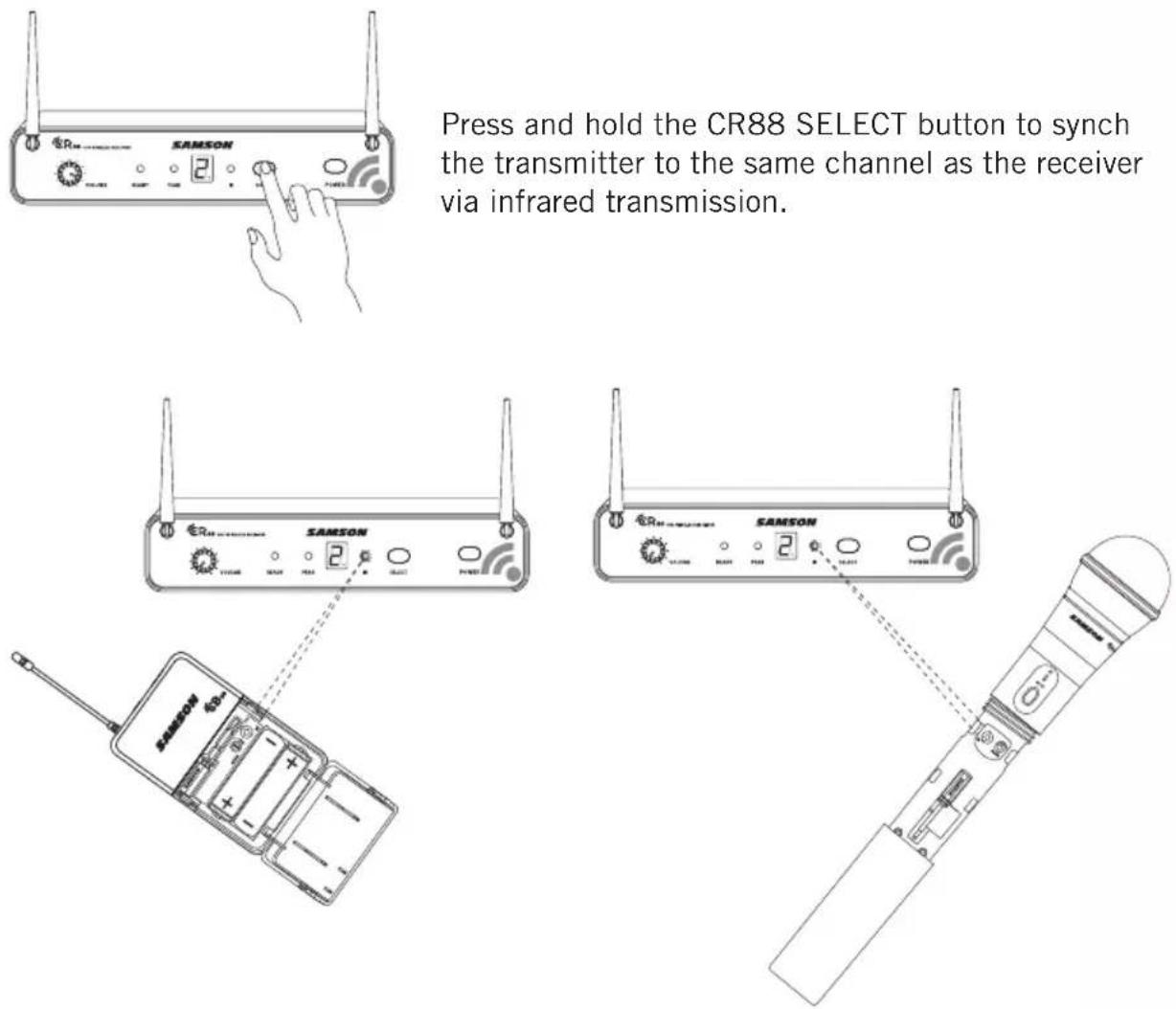
Position the transmitter about 6-12" (15-30 cm) from the front of the CR88 with the transmitter's IR window facing the receiver's IR transmitter. This device complies with Part 15 of the FCC Rules. Operation is subject to the following two conditions: (1) This device may not cause harmful interference, and (2) this device must accept any interference received, including interference that may cause undesired operation. FREQ: 542-566MHz This device complies with Part 15 of the FCC Rules. Operation is subject to the following two conditions: (1) This device may not cause harmful interference, and (2) this device must accept any interference received, including interference that may cause undesired operation. FREQ: 542-566MHz

3. Plug in receiver 4. Turn on receiver

5. Plug receiver into audio system 6. Press Select button to change channel 9. Press and hold SELECT button to IR set 10. Adjust Volume control7. Install batteries 8. Press button on transmitter to turn on

9. Press and hold Select button to IR set7. Install batteries 8. Turn on belt pack transmitter

This device complies with Part 15 of the FCC Rules. Operation is subject to the following two conditions: (1) This device may not cause harmful interference, and (2) this device must accept any interference received, including interference that may cause undesired operation. FREQ: 542-566MHz This device complies with Part 15 of the FCC Rules. Operation is subject to the following two conditions: (1) This device may not cause harmful interference, and (2) this device must accept any interference received, including interference that may cause undesired operation. FREQ: 542-566MHz

3. Plug in receiver 4. Turn on receiver

5. Plug receiver into audio system 6. Press Select button to change channel 9. Press and hold SELECT button to IR set 10. Adjust Volume control7. Install batteries 8. Press button on transmitter to turn on

9. Press and hold Select button to IR set7. Install batteries 8. Turn on belt pack transmitter

This device complies with Part 15 of the FCC Rules. Operation is subject to the following two conditions: (1) This device may not cause harmful interference, and (2) this device must accept any interference received, including interference that may cause undesired operation. FREQ: 542-566MHz This device complies with Part 15 of the FCC Rules. Operation is subject to the following two conditions: (1) This device may not cause harmful interference, and (2) this device must accept any interference received, including interference that may cause undesired operation. FREQ: 542-566MHz

3. Plug in receiver 4. Turn on receiver

5. Plug receiver into audio system 6. Press Select button to change channel 9. Press and hold SELECT button to IR set 10. Adjust Volume control7. Install batteries 8. Press button on transmitter to turn on

9. Press and hold Select button to IR set7. Install batteries 8. Turn on belt pack transmitter

When the transmission is complete, and the CR88 is receiving RF signal from the transmitter, the READY indicator will light on the front panel of the CR88 receiver. If you find the system has noticeable dropouts, reduced overall working range, or unexpected noise bursts, change the operating channel of the system using the steps above. This device complies with Part 15 of the FCC Rules. Operation is subject to the following two conditions: (1) This device may not cause harmful interference, and (2) this device must accept any interference received, including interference that may cause undesired operation. FREQ: 542-566MHz This device complies with Part 15 of the FCC Rules. Operation is subject to the following two conditions: (1) This device may not cause harmful interference, and (2) this device must accept any interference received, including interference that may cause undesired operation. FREQ: 542-566MHz
3. Plug in receiver 4. Turn on receiver

5. Plug receiver into audio system 6. Press Select button to change channel 9. Press and hold SELECT button to IR set 10. Adjust Volume control7. Install batteries 8. Press button on transmitter to turn on

9. Press and hold Select button to IR set7. Install batteries 8. Turn on belt pack transmitter

Quick Start - Multiple System Setup Press and hold the CR88 SELECT button to synch the transmitter to the same channel as the receiver via infrared transmission.19 Concert 88 Wireless System ENGLISH

FRANÇAISDEUTSCHEESPAÑOLITALIANO

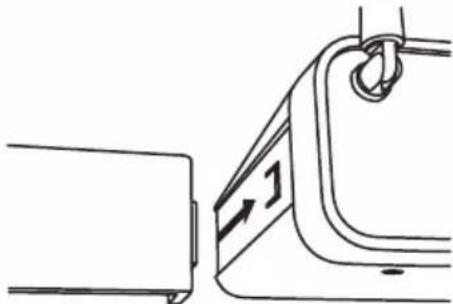
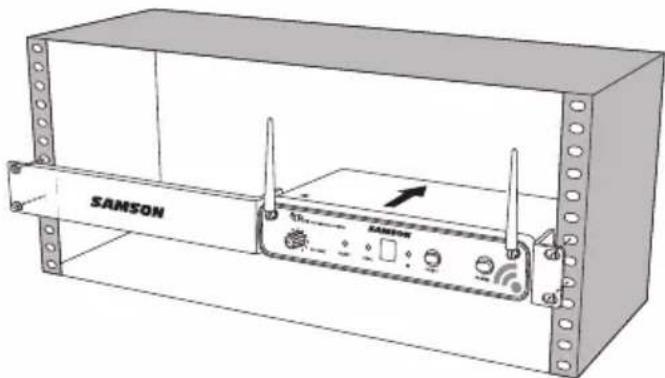
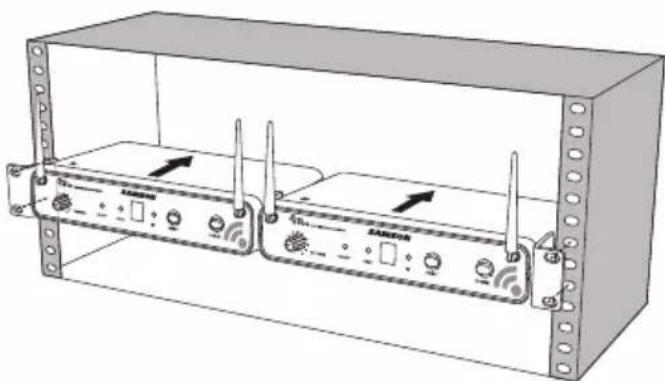
The CR88 receiver can be installed into a standard 19” rack for transport or per- manent installation using the included rack ears. Follow the simple steps below to mount the CR88: Attach the included rack ears by sliding each rack ear into the groove on either side of the CR88 until they lock into place, and the receiver flush with the front panel. Position the CR88 receiver into an available rack space and slide in until the rack ears are touching the rails of the rack case and are aligned with the rack rail holes. Mount the receiver into the rack using the appropriate size rack screws (not includ- ed). To ensure equal tension and balance when installing the receiver, you should secure screws in a crisscross pattern of opposite corners: top left -> bottom right -> top right -> bottom left. In order to mount two CR88 receiv- ers in one rack space, the system includes a center connection piece. Slide the center connection piece into the groove of each receiver and attach the short rack ears to each receiver. Mount the receivers into the rack using the crisscross pattern described above. Rack Mounting20 Group A* 925-938 MHz Group B* 806-809 MHz Group C 638-662 MHz Group D 542-566 MHz Group F* 606-630 MHz Group G* 863-865 MHz Ch Freq Ch Freq Ch Freq Ch Freq Ch Freq Ch Freq
  • Not for use in the USA and Canada. For questions regarding available channels in your area con- tact your local Samson distributor.21 Concert 88 Wireless System ENGLISH

FRANÇAISDEUTSCHEESPAÑOLITALIANO

Troubleshooting Issue Solutions No Audio Make sure that the transmitter and receiver are both powered on. Ensure the transmitter’s batteries are installed correctly. Check that the transmitter is not muted. Confirm that the CR88 adaptor is correctly connected and plugged into an electrical outlet. Turn on the CR88 receiver. Make sure the CR88 audio output connections are se- curely connected. Ensure that the receiver and transmitter are in line of sight with one another. Check the receiver and audio input device level controls. Ensure that the transmitter and receiver are set to the same operating channel. If unsure, reset the channel by performing an IR set. Distorted Audio The receiver output level or audio input device level may be too high. Check the transmitters batteries, and replace if low. The input gain on the transmitter (CB88) or audio source level may be too high. Audio Dropout The transmitter may be too far away from the receiver. Move it closer to the receiver, or reposition the antennas. Remove any sources that may cause RF interference such as cell phones, cordless phones, lighting equipment, com- puters, metal structures, etc. Receiver will not power on Check the adaptor to ensure it is properly connected and plugged into an outlet providing power. Transmitter will not power on (LED lights RED) Replace the transmitter batteries. Unwanted noise or interference If using multiple systems, make sure none of the systems are operating on the same channel. If the problem per- sists, change one or all of the systems channels.22 Specifications System Working Range 300' (100m) line of sight Audio Frequency Response 50 Hz - 15 kHz T.H.D. (Overall) <1% (@AF 1 kHz, RF 46 dBu) Dynamic Range >100 dB A-weighted Signal to Noise >90 dB Operating Temperature –10°C (14°F) to +60°C (+140°F) Tone Key Frequency 32.768 kHz CB88 Belt pack Transmitter Input Connector Mini-XLR (P3) Input Impedance 1MΩ Input Gain Range 38 dB RF Power 10 mW EIRP Power Requirements Two AA (LR6) alkaline batteries Battery Life 8 hours Dimensions (HxLxD) 3.75" x 2.44" x 0.75" 96mm x 62mm x 18.5mm Weight 0.2 lb / 93 g CH88 Handheld Transmitter Microphone Element Dynamic Input Gain Range 28 dB RF Power 10 mW EIRP Power Requirements Two AA (LR6) alkaline batteries Battery Life 8 hours Dimensions (HxØ) 10.23" x 2.1" 260mm x 54mm Weight 0.48 lb / 218 g CR88 Receiver Audio Output Level - Unbalanced +14 dBu Audio Output Level - Balanced +9 dBu Audio Output Impedance - Unbalanced 810 Ohms Audio Output Impedance - Balanced 240 Ohms Sensitivity -100 dBm / 30 dB sinad Image Rejection >50 dB Operating Voltage 15 VDC 200mA Dimensions (LxWxH) 8.25" x 4.9" x 1.75" 210mm x 125mm x 44mm Weight 0.85 lb / 388 g At Samson, we are continually improving our products, therefore specifications and images are subject to change without notice.23 Concert 88 Wireless System ENGLISH

FRANÇAISDEUTSCHEESPAÑOLITALIANO

FCC Rules and Regulations Samson wireless receivers are certified under FCC Rules part 15 and transmitters are certified under FCC Rules part 74. Licensing of Samson equipment is the user’s responsibility and licensability depends on the user’s classification, application and frequency selected. This device complies with RSS-210 of Industry & Science Canada. Operation is subject to the following two conditions: (1) this device may not cause harmful interference and (2) this device must accept any interference received, including interference that may cause undesired operation. Hereby, Samson Technologies Corp., declares that this CR88, CH88, CB88 is in compli- ance with the essential requirements and other relevant provisions of Directive 1999/5/ EC. The declaration of conformity may be consulted at http://www.samsontech.com/site_media/support/manuals/Concert_88_DOC.pdf NOTE: This equipment has been tested and found to comply with the limits for a Class B digital device, pursuant to Part 15 of the FCC Rules. These limits are designed to provide reasonable protection against harmful interference in a residential installation. This equipment generates, uses and can radiate radio frequency energy and, if not installed and used in accordance with the instructions, may cause harmful interference to radio communications. However, there is no guarantee that interference will not occur in a par- ticular installation. If this equipment does cause harmful interference to radio or televi- sion reception, which can be determined by turning the equipment off and on, the user is encouraged to try to correct the interference by one or more of the following measures:

  • Reorient or relocate the receiving antenna.
  • Increase the separation between the equipment and receiver.
  • Connect the equipment into an outlet on a circuit different from that to which the receiver is connected.
  • Consult the dealer or an experienced Radio/TV technician for help.

WARNING: Changes or modifications not expressly approved by the party responsible for

3. Plug in receiver 4. Turn on receiver

5. Plug receiver into audio system 6. Press Select button to change channel 9. Press and hold SELECT button to IR set 10. Adjust Volume control7. Install batteries 8. Press button on transmitter to turn on

9. Press and hold Select button to IR set7. Install batteries 8. Turn on belt pack transmitter

This device complies with Part 15 of the FCC Rules. Operation is subject to the following two conditions: (1) This device may not cause harmful interference, and (2) this device must accept any interference received, including interference that may cause undesired operation. FREQ:542-566MHz This device complies with Part 15 of the FCC Rules. Operation is subject to the following two conditions: (1) This device may not cause harmful interference, and (2) this device must accept any interference received, including interference that may cause undesired operation. FREQ:542-566MHz

3. Plug in receiver 4. Turn on receiver

5. Plug receiver into audio system 6. Press Select button to change channel 9. Press and hold SELECT button to IR set 10. Adjust Volume control7. Install batteries 8. Press button on transmitter to turn on

9. Press and hold Select button to IR set7. Install batteries 8. Turn on belt pack transmitter

FRANÇAISDEUTSCHEESPAÑOLITALIANO

Configuration rapide - Installation d'un seul système L'émetteur étant hors tension, mettez en place deux piles AA neuves dans le clip de ceinture CB88 ou dans l'émetteur portatif CH88. Laissez le logement à piles ouvert. This device complies with Part 15 of the FCC Rules. Operation is subject to the following two conditions: (1) This device may not cause harmful interference, and (2) this device must accept any interference received, including interference that may cause undesired operation. FREQ:542-566MHz This device complies with Part 15 of the FCC Rules. Operation is subject to the following two conditions: (1) This device may not cause harmful interference, and (2) this device must accept any interference received, including interference that may cause undesired operation. FREQ:542-566MHz

3. Plug in receiver 4. Turn on receiver

5. Plug receiver into audio system 6. Press Select button to change channel 9. Press and hold SELECT button to IR set 10. Adjust Volume control7. Install batteries 8. Press button on transmitter to turn on

9. Press and hold Select button to IR set7. Install batteries 8. Turn on belt pack transmitter

This device complies with Part 15 of the FCC Rules. Operation is subject to the following two conditions: (1) This device may not cause harmful interference, and (2) this device must accept any interference received, including interference that may cause undesired operation. FREQ:542-566MHz This device complies with Part 15 of the FCC Rules. Operation is subject to the following two conditions: (1) This device may not cause harmful interference, and (2) this device must accept any interference received, including interference that may cause undesired operation. FREQ:542-566MHz

3. Plug in receiver 4. Turn on receiver

5. Plug receiver into audio system 6. Press Select button to change channel 9. Press and hold SELECT button to IR set 10. Adjust Volume control7. Install batteries 8. Press button on transmitter to turn on

9. Press and hold Select button to IR set7. Install batteries 8. Turn on belt pack transmitter

This device complies with Part 15 of the FCC Rules. Operation is subject to the following two conditions: (1) This device may not cause harmful interference, and (2) this device must accept any interference received, including interference that may cause undesired operation. FREQ:542-566MHz This device complies with Part 15 of the FCC Rules. Operation is subject to the following two conditions: (1) This device may not cause harmful interference, and (2) this device must accept any interference received, including interference that may cause undesired operation. FREQ:542-566MHz

3. Plug in receiver 4. Turn on receiver

5. Plug receiver into audio system 6. Press Select button to change channel 9. Press and hold SELECT button to IR set 10. Adjust Volume control7. Install batteries 8. Press button on transmitter to turn on

9. Press and hold Select button to IR set7. Install batteries 8. Turn on belt pack transmitter

Mettez l'émetteur sous tension (Marche) en maintenant l'interrupteur Power (Marche/ Arrêt) enfoncé; le témoin LED s'allumera en vert. This device complies with Part 15 of the FCC Rules. Operation is subject to the following two conditions: (1) This device may not cause harmful interference, and (2) this device must accept any interference received, including interference that may cause undesired operation. FREQ:542-566MHz This device complies with Part 15 of the FCC Rules. Operation is subject to the following two conditions: (1) This device may not cause harmful interference, and (2) this device must accept any interference received, including interference that may cause undesired operation. FREQ:542-566MHz

3. Plug in receiver 4. Turn on receiver

5. Plug receiver into audio system 6. Press Select button to change channel 9. Press and hold SELECT button to IR set 10. Adjust Volume control7. Install batteries 8. Press button on transmitter to turn on

9. Press and hold Select button to IR set7. Install batteries 8. Turn on belt pack transmitter36

Configuration rapide - Installation d'un seul système This device complies with Part 15 of the FCC Rules. Operation is subject to the following two conditions: (1) This device may not cause harmful interference, and (2) this device must accept any interference received, including interference that may cause undesired operation. FREQ: 542-566MHz This device complies with Part 15 of the FCC Rules. Operation is subject to the following two conditions: (1) This device may not cause harmful interference, and (2) this device must accept any interference received, including interference that may cause undesired operation. FREQ: 542-566MHz

3. Plug in receiver 4. Turn on receiver

5. Plug receiver into audio system 6. Press Select button to change channel 9. Press and hold SELECT button to IR set 10. Adjust Volume control7. Install batteries 8. Press button on transmitter to turn on

9. Press and hold Select button to IR set7. Install batteries 8. Turn on belt pack transmitter

This device complies with Part 15 of the FCC Rules. Operation is subject to the following two conditions: (1) This device may not cause harmful interference, and (2) this device must accept any interference received, including interference that may cause undesired operation. FREQ: 542-566MHz This device complies with Part 15 of the FCC Rules. Operation is subject to the following two conditions: (1) This device may not cause harmful interference, and (2) this device must accept any interference received, including interference that may cause undesired operation. FREQ: 542-566MHz

3. Plug in receiver 4. Turn on receiver

5. Plug receiver into audio system 6. Press Select button to change channel 9. Press and hold SELECT button to IR set 10. Adjust Volume control7. Install batteries 8. Press button on transmitter to turn on

9. Press and hold Select button to IR set7. Install batteries 8. Turn on belt pack transmitter

Positionnez l'émetteur à environ 6 à 12" (15 à 30 cm) de la face avant du CR88, la fenêtre infra-rouge de l'émetteur étant tournée vers l'émetteur infra-rouge situé sur la face avant du récepteur CR88. This device complies with Part 15 of the FCC Rules. Operation is subject to the following two conditions: (1) This device may not cause harmful interference, and (2) this device must accept any interference received, including interference that may cause undesired operation. FREQ: 542-566MHz This device complies with Part 15 of the FCC Rules. Operation is subject to the following two conditions: (1) This device may not cause harmful interference, and (2) this device must accept any interference received, including interference that may cause undesired operation. FREQ: 542-566MHz

3. Plug in receiver 4. Turn on receiver

5. Plug receiver into audio system 6. Press Select button to change channel 9. Press and hold SELECT button to IR set 10. Adjust Volume control7. Install batteries 8. Press button on transmitter to turn on

9. Press and hold Select button to IR set7. Install batteries 8. Turn on belt pack transmitter

This device complies with Part 15 of the FCC Rules. Operation is subject to the following two conditions: (1) This device may not cause harmful interference, and (2) this device must accept any interference received, including interference that may cause undesired operation. FREQ: 542-566MHz This device complies with Part 15 of the FCC Rules. Operation is subject to the following two conditions: (1) This device may not cause harmful interference, and (2) this device must accept any interference received, including interference that may cause undesired operation. FREQ: 542-566MHz

3. Plug in receiver 4. Turn on receiver

5. Plug receiver into audio system 6. Press Select button to change channel 9. Press and hold SELECT button to IR set 10. Adjust Volume control7. Install batteries 8. Press button on transmitter to turn on

9. Press and hold Select button to IR set7. Install batteries 8. Turn on belt pack transmitter

3. Plug in receiver 4. Turn on receiver

5. Plug receiver into audio system 6. Press Select button to change channel 9. Press and hold SELECT button to IR set 10. Adjust Volume control7. Install batteries 8. Press button on transmitter to turn on

9. Press and hold Select button to IR set7. Install batteries 8. Turn on belt pack transmitter

This device complies with Part 15 of the FCC Rules. Operation is subject to the following two conditions: (1) This device may not cause harmful interference, and (2) this device must accept any interference received, including interference that may cause undesired operation. FREQ: 542-566MHz This device complies with Part 15 of the FCC Rules. Operation is subject to the following two conditions: (1) This device may not cause harmful interference, and (2) this device must accept any interference received, including interference that may cause undesired operation. FREQ: 542-566MHz

3. Plug in receiver 4. Turn on receiver

5. Plug receiver into audio system 6. Press Select button to change channel 9. Press and hold SELECT button to IR set 10. Adjust Volume control7. Install batteries 8. Press button on transmitter to turn on

9. Press and hold Select button to IR set7. Install batteries 8. Turn on belt pack transmitter

Configuration rapide - Installation d'un seul système Lorsque la transmission est terminée, le CR88 recevra un signal HF et le code de tonalité de l'émetteur. Le témoin READY s'allumera sur la façade avant du récep- teur CR88.38 Pour modifier le canal en fonctionnement d'un sys- tème, appuyez sur le bouton SELECT à l'avant du récepteur du CR88. Le numéro du canal augmentera de un, de 0 à 9 puis de A à F. Une fois parvenu au dernier canal, le sens de comptage s'inversera pour revenir à 0. Configuration rapide - Installation de plusieurs systèmes Lorsqu'on utilise plusieurs systèmes, chaque système doit être réglé sur un canal en fonction- nement différent. Les paires d'émetteurs et de récepteurs doivent être sur le même plan de canaux pour fonctionner ensemble (voir "Concert 88 Channel Plans" on page 41). En mettant en place un émetteur supplémentaire, faites en sorte de bien fermer tous les autres compartiments à piles de l'émetteur pour s'assurer que la Lentille infra- rouge soit masquée. This device complies with Part 15 of the FCC Rules. Operation is subject to the following two conditions: (1) This device may not cause harmful interference, and (2) this device must accept any interference received, including interference that may cause undesired operation. FREQ:542-566MHz This device complies with Part 15 of the FCC Rules. Operation is subject to the following two conditions: (1) This device may not cause harmful interference, and (2) this device must accept any interference received, including interference that may cause undesired operation. FREQ:542-566MHz

3. Plug in receiver 4. Turn on receiver

5. Plug receiver into audio system 6. Press Select button to change channel 9. Press and hold SELECT button to IR set 10. Adjust Volume control7. Install batteries 8. Press button on transmitter to turn on

9. Press and hold Select button to IR set7. Install batteries 8. Turn on belt pack transmitter

Mettre l'émetteur sous tension (Marche) en maintenant l'interrupteur Power (Marche/ Arrêt) enfoncé; le témoin LED s'allumera en vert. This device complies with Part 15 of the FCC Rules. Operation is subject to the following two conditions: (1) This device may not cause harmful interference, and (2) this device must accept any interference received, including interference that may cause undesired operation. FREQ:542-566MHz This device complies with Part 15 of the FCC Rules. Operation is subject to the following two conditions: (1) This device may not cause harmful interference, and (2) this device must accept any interference received, including interference that may cause undesired operation. FREQ:542-566MHz

3. Plug in receiver 4. Turn on receiver

5. Plug receiver into audio system 6. Press Select button to change channel 9. Press and hold SELECT button to IR set 10. Adjust Volume control7. Install batteries 8. Press button on transmitter to turn on

9. Press and hold Select button to IR set7. Install batteries 8. Turn on belt pack transmitter

This device complies with Part 15 of the FCC Rules. Operation is subject to the following two conditions: (1) This device may not cause harmful interference, and (2) this device must accept any interference received, including interference that may cause undesired operation. FREQ: 542-566MHz This device complies with Part 15 of the FCC Rules. Operation is subject to the following two conditions: (1) This device may not cause harmful interference, and (2) this device must accept any interference received, including interference that may cause undesired operation. FREQ: 542-566MHz

3. Plug in receiver 4. Turn on receiver

5. Plug receiver into audio system 6. Press Select button to change channel 9. Press and hold SELECT button to IR set 10. Adjust Volume control7. Install batteries 8. Press button on transmitter to turn on

Positionnez l'émetteur à environ 6 à 12" (15 à 30 cm) de l'avant du CR88, la fenêtre infra-rouge de l'émetteur étant tournée vers l'ouverture infra-rouge du récepteur. This device complies with Part 15 of the FCC Rules. Operation is subject to the following two conditions: (1) This device may not cause harmful interference, and (2) this device must accept any interference received, including interference that may cause undesired operation. FREQ: 542-566MHz This device complies with Part 15 of the FCC Rules. Operation is subject to the following two conditions: (1) This device may not cause harmful interference, and (2) this device must accept any interference received, including interference that may cause undesired operation. FREQ: 542-566MHz

3. Plug in receiver 4. Turn on receiver

5. Plug receiver into audio system 6. Press Select button to change channel 9. Press and hold SELECT button to IR set 10. Adjust Volume control7. Install batteries 8. Press button on transmitter to turn on

9. Press and hold Select button to IR set7. Install batteries 8. Turn on belt pack transmitter

This device complies with Part 15 of the FCC Rules. Operation is subject to the following two conditions: (1) This device may not cause harmful interference, and (2) this device must accept any interference received, including interference that may cause undesired operation. FREQ: 542-566MHz This device complies with Part 15 of the FCC Rules. Operation is subject to the following two conditions: (1) This device may not cause harmful interference, and (2) this device must accept any interference received, including interference that may cause undesired operation. FREQ: 542-566MHz

3. Plug in receiver 4. Turn on receiver

5. Plug receiver into audio system 6. Press Select button to change channel 9. Press and hold SELECT button to IR set 10. Adjust Volume control7. Install batteries 8. Press button on transmitter to turn on

9. Press and hold Select button to IR set7. Install batteries 8. Turn on belt pack transmitter

This device complies with Part 15 of the FCC Rules. Operation is subject to the following two conditions: (1) This device may not cause harmful interference, and (2) this device must accept any interference received, including interference that may cause undesired operation. FREQ: 542-566MHz This device complies with Part 15 of the FCC Rules. Operation is subject to the following two conditions: (1) This device may not cause harmful interference, and (2) this device must accept any interference received, including interference that may cause undesired operation. FREQ: 542-566MHz

3. Plug in receiver 4. Turn on receiver

5. Plug receiver into audio system 6. Press Select button to change channel 9. Press and hold SELECT button to IR set 10. Adjust Volume control7. Install batteries 8. Press button on transmitter to turn on

9. Press and hold Select button to IR set7. Install batteries 8. Turn on belt pack transmitter

Lorsque l'émission sera terminée et que le CR88 recevra un signal radio de l'émetteur, le témoin READY s'allumera sur la façade avant du récepteur du CR88. Si vous estimez que le système présente des décro- chages notables, une plage de fonctionnement globale réduite ou des pointes de bruit, modifiez le canal en fonctionnement du système en suivant les étapes ci-dessus. This device complies with Part 15 of the FCC Rules. Operation is subject to the following two conditions: (1) This device may not cause harmful interference, and (2) this device must accept any interference received, including interference that may cause undesired operation. FREQ: 542-566MHz This device complies with Part 15 of the FCC Rules. Operation is subject to the following two conditions: (1) This device may not cause harmful interference, and (2) this device must accept any interference received, including interference that may cause undesired operation. FREQ: 542-566MHz

3. Plug in receiver 4. Turn on receiver

5. Plug receiver into audio system 6. Press Select button to change channel 9. Press and hold SELECT button to IR set 10. Adjust Volume control7. Install batteries 8. Press button on transmitter to turn on

9. Press and hold Select button to IR set7. Install batteries 8. Turn on belt pack transmitter

This device complies with Part 15 of the FCC Rules. Operation is subject to the following two conditions: (1) This device may not cause harmful interference, and (2) this device must accept any interference received, including interference that may cause undesired operation. FREQ: 542-566MHz Einführende Tour - CR88 Receiver

3. Plug in receiver 4. Turn on receiver

5. Plug receiver into audio system 6. Press Select button to change channel 9. Press and hold SELECT button to IR set 10. Adjust Volume control7. Install batteries 8. Press button on transmitter to turn on

9. Press and hold Select button to IR set7. Install batteries 8. Turn on belt pack transmitter

This device complies with Part 15 of the FCC Rules. Operation is subject to the following two conditions: (1) This device may not cause harmful interference, and (2) this device must accept any interference received, including interference that may cause undesired operation. FREQ:542-566MHz This device complies with Part 15 of the FCC Rules. Operation is subject to the following two conditions: (1) This device may not cause harmful interference, and (2) this device must accept any interference received, including interference that may cause undesired operation. FREQ:542-566MHz

3. Plug in receiver 4. Turn on receiver

5. Plug receiver into audio system 6. Press Select button to change channel 9. Press and hold SELECT button to IR set 10. Adjust Volume control7. Install batteries 8. Press button on transmitter to turn on

9. Press and hold Select button to IR set7. Install batteries 8. Turn on belt pack transmitter

Schalten Sie Ihren Verstärker aus und drehen Sie die Lautstärkeregler vollkommen herab. Schließen Sie dann die CR88 Empfänger Ausgangsbuchse an den Mikrofon- oder Line-Pegel Eingang eines Mischpults oder Verstärkers mit dem symmetrischen XLR Ausgang oder asymmetrische 1/4" Line-Level Ausgang. Drehen Sie den Level- Regler auf des CR88 Geräts ganz nach links und schalten Sie das Gerät ein.56 Kurzanleitung - Einstellung eines einzelnen Systems Schalten Sie den Sender aus. Legen Sie zwei neue AA Batterien in die CB88 Gürteltasche oder den tragbaren CH88 Sender. Lassen Sie das Batteriefach geöffnet. This device complies with Part 15 of the FCC Rules. Operation is subject to the following two conditions: (1) This device may not cause harmful interference, and (2) this device must accept any interference received, including interference that may cause undesired operation. FREQ:542-566MHz This device complies with Part 15 of the FCC Rules. Operation is subject to the following two conditions: (1) This device may not cause harmful interference, and (2) this device must accept any interference received, including interference that may cause undesired operation. FREQ:542-566MHz

3. Plug in receiver 4. Turn on receiver

5. Plug receiver into audio system 6. Press Select button to change channel 9. Press and hold SELECT button to IR set 10. Adjust Volume control7. Install batteries 8. Press button on transmitter to turn on

9. Press and hold Select button to IR set7. Install batteries 8. Turn on belt pack transmitter

This device complies with Part 15 of the FCC Rules. Operation is subject to the following two conditions: (1) This device may not cause harmful interference, and (2) this device must accept any interference received, including interference that may cause undesired operation. FREQ:542-566MHz This device complies with Part 15 of the FCC Rules. Operation is subject to the following two conditions: (1) This device may not cause harmful interference, and (2) this device must accept any interference received, including interference that may cause undesired operation. FREQ:542-566MHz

3. Plug in receiver 4. Turn on receiver

5. Plug receiver into audio system 6. Press Select button to change channel 9. Press and hold SELECT button to IR set 10. Adjust Volume control7. Install batteries 8. Press button on transmitter to turn on

9. Press and hold Select button to IR set7. Install batteries 8. Turn on belt pack transmitter

This device complies with Part 15 of the FCC Rules. Operation is subject to the following two conditions: (1) This device may not cause harmful interference, and (2) this device must accept any interference received, including interference that may cause undesired operation. FREQ: 542-566MHz This device complies with Part 15 of the FCC Rules. Operation is subject to the following two conditions: (1) This device may not cause harmful interference, and (2) this device must accept any interference received, including interference that may cause undesired operation. FREQ: 542-566MHz

3. Plug in receiver 4. Turn on receiver

5. Plug receiver into audio system 6. Press Select button to change channel 9. Press and hold SELECT button to IR set 10. Adjust Volume control7. Install batteries 8. Press button on transmitter to turn on

9. Press and hold Select button to IR set7. Install batteries 8. Turn on belt pack transmitter

Schalten Sie den Sender ein, indem Sie den Netzschalter betätigen und halten; die Indikator LED leuchtet grün auf. This device complies with Part 15 of the FCC Rules. Operation is subject to the following two conditions: (1) This device may not cause harmful interference, and (2) this device must accept any interference received, including interference that may cause undesired operation. FREQ:542-566MHz This device complies with Part 15 of the FCC Rules. Operation is subject to the following two conditions: (1) This device may not cause harmful interference, and (2) this device must accept any interference received, including interference that may cause undesired operation. FREQ:542-566MHz

3. Plug in receiver 4. Turn on receiver

5. Plug receiver into audio system 6. Press Select button to change channel 9. Press and hold SELECT button to IR set 10. Adjust Volume control7. Install batteries 8. Press button on transmitter to turn on

9. Press and hold Select button to IR set7. Install batteries 8. Turn on belt pack transmitter57

Kurzanleitung - Einstellung eines einzelnen Systems Kurzanleitung - Einstellung eines einzelnen Systems This device complies with Part 15 of the FCC Rules. Operation is subject to the following two conditions: (1) This device may not cause harmful interference, and (2) this device must accept any interference received, including interference that may cause undesired operation. FREQ: 542-566MHz This device complies with Part 15 of the FCC Rules. Operation is subject to the following two conditions: (1) This device may not cause harmful interference, and (2) this device must accept any interference received, including interference that may cause undesired operation. FREQ: 542-566MHz

3. Plug in receiver 4. Turn on receiver

5. Plug receiver into audio system 6. Press Select button to change channel 9. Press and hold SELECT button to IR set 10. Adjust Volume control7. Install batteries 8. Press button on transmitter to turn on

9. Press and hold Select button to IR set7. Install batteries 8. Turn on belt pack transmitter

This device complies with Part 15 of the FCC Rules. Operation is subject to the following two conditions: (1) This device may not cause harmful interference, and (2) this device must accept any interference received, including interference that may cause undesired operation. FREQ: 542-566MHz This device complies with Part 15 of the FCC Rules. Operation is subject to the following two conditions: (1) This device may not cause harmful interference, and (2) this device must accept any interference received, including interference that may cause undesired operation. FREQ: 542-566MHz

3. Plug in receiver 4. Turn on receiver

5. Plug receiver into audio system 6. Press Select button to change channel 9. Press and hold SELECT button to IR set 10. Adjust Volume control7. Install batteries 8. Press button on transmitter to turn on

9. Press and hold Select button to IR set7. Install batteries 8. Turn on belt pack transmitter

Positionieren Sie den Sender etwa 6-12" (15-30 cm) von der Vorderseite des CR88 entfernt, wobei das IR Fenster des Senders auf den IR Sender an der Frontplatte des CR88 Empfängers gerichtet ist. This device complies with Part 15 of the FCC Rules. Operation is subject to the following two conditions: (1) This device may not cause harmful interference, and (2) this device must accept any interference received, including interference that may cause undesired operation. FREQ: 542-566MHz This device complies with Part 15 of the FCC Rules. Operation is subject to the following two conditions: (1) This device may not cause harmful interference, and (2) this device must accept any interference received, including interference that may cause undesired operation. FREQ: 542-566MHz

3. Plug in receiver 4. Turn on receiver

5. Plug receiver into audio system 6. Press Select button to change channel 9. Press and hold SELECT button to IR set 10. Adjust Volume control7. Install batteries 8. Press button on transmitter to turn on

9. Press and hold Select button to IR set7. Install batteries 8. Turn on belt pack transmitter

This device complies with Part 15 of the FCC Rules. Operation is subject to the following two conditions: (1) This device may not cause harmful interference, and (2) this device must accept any interference received, including interference that may cause undesired operation. FREQ: 542-566MHz This device complies with Part 15 of the FCC Rules. Operation is subject to the following two conditions: (1) This device may not cause harmful interference, and (2) this device must accept any interference received, including interference that may cause undesired operation. FREQ: 542-566MHz

3. Plug in receiver 4. Turn on receiver

5. Plug receiver into audio system 6. Press Select button to change channel 9. Press and hold SELECT button to IR set 10. Adjust Volume control7. Install batteries 8. Press button on transmitter to turn on

9. Press and hold Select button to IR set7. Install batteries 8. Turn on belt pack transmitter

Drücken und halten Sie die CR88 SELECT Taste, um den Sender über Infrarot Übertragung auf den glei- chen Kanal wie den Empfänger zu stellen. Betätigen Sie die SELECT Taste auf der Vorderseite des CR88 Empfängers, um einen verfügbaren Kanal zu wählen. Die Kanalnummer wird um eine Stelle erhöht, von 0-9 AF. Sobald der letzte Kanal erreicht wurde, wird der Zähler wieder auf 0 zurückspringen.58 Schalten Sie den angeschlossenen Verstärker und / oder Mixer ein, halten Sie dabei jedoch die Lautstärke niedrig. Drehen Sie den Volume Knopf am CR88 vollkommen im Uhrzeigersinn (auf seine Position "10”). Dies ist Einsverstärkung. Sprechen oder singen Sie in das Mikrofon, oder wenn Sie den Sender mit einem Gerät verbunden haben, spielen Sie das Instrument bei normalem Leistungsniveau. Heben Sie dann langsam die Lautstärke des Verstärkers oder des Mischpults an, bis der gewünschte Pegel erreicht ist. Wenn beim System Aussetzer zu hören sind, reduzierten Sie die Übertragungsdistanz oder unerwartete plötzliche Geräusche, ändern Sie den Betriebskanal des Systems mit Hilfe der oben beschriebenen Schritte. This device complies with Part 15 of the FCC Rules. Operation is subject to the following two conditions: (1) This device may not cause harmful interference, and (2) this device must accept any interference received, including interference that may cause undesired operation. FREQ: 542-566MHz This device complies with Part 15 of the FCC Rules. Operation is subject to the following two conditions: (1) This device may not cause harmful interference, and (2) this device must accept any interference received, including interference that may cause undesired operation. FREQ: 542-566MHz

3. Plug in receiver 4. Turn on receiver

5. Plug receiver into audio system 6. Press Select button to change channel 9. Press and hold SELECT button to IR set 10. Adjust Volume control7. Install batteries 8. Press button on transmitter to turn on

9. Press and hold Select button to IR set7. Install batteries 8. Turn on belt pack transmitter

This device complies with Part 15 of the FCC Rules. Operation is subject to the following two conditions: (1) This device may not cause harmful interference, and (2) this device must accept any interference received, including interference that may cause undesired operation. FREQ: 542-566MHz This device complies with Part 15 of the FCC Rules. Operation is subject to the following two conditions: (1) This device may not cause harmful interference, and (2) this device must accept any interference received, including interference that may cause undesired operation. FREQ: 542-566MHz

3. Plug in receiver 4. Turn on receiver

5. Plug receiver into audio system 6. Press Select button to change channel 9. Press and hold SELECT button to IR set 10. Adjust Volume control7. Install batteries 8. Press button on transmitter to turn on

9. Press and hold Select button to IR set7. Install batteries 8. Turn on belt pack transmitter

Um das Betriebskanal eines Systems zu ändern, drücken Sie die SELECT Taste auf der Vorderseite des CR88 Empfängers. Die Kanalnummer wird um eine Stelle erhöht, von 0-9 AF. Sobald der letzte Kanal erreicht wurde, wird der Zähler wieder auf 0 zurück- springen. Kurzanleitung - Einstellung eines mehrfachen Systems Bei der Verwendung von mehreren Systemen muss jedes System auf einen anderen Betriebskanal eingestellt werden. Sender und Empfänger Paare müssen auf dem glei- chen Kanal eingestellt werden, um zusammen zu arbeiten (siehe "Concert 88 Kanal- Auflistung" auf Seite 62). Stellen Sie bei der Einstellung eines zusätzlichen Senders sicher, dass alle anderen Sender Batteriefächer geschlossen sind, damit alle IR Fenster abgedeckt sind. This device complies with Part 15 of the FCC Rules. Operation is subject to the following two conditions: (1) This device may not cause harmful interference, and (2) this device must accept any interference received, including interference that may cause undesired operation. FREQ:542-566MHz This device complies with Part 15 of the FCC Rules. Operation is subject to the following two conditions: (1) This device may not cause harmful interference, and (2) this device must accept any interference received, including interference that may cause undesired operation. FREQ:542-566MHz

3. Plug in receiver 4. Turn on receiver

5. Plug receiver into audio system 6. Press Select button to change channel 9. Press and hold SELECT button to IR set 10. Adjust Volume control7. Install batteries 8. Press button on transmitter to turn on

9. Press and hold Select button to IR set7. Install batteries 8. Turn on belt pack transmitter

Schalten Sie den Sender ein, indem Sie den Netzschalter betätigen und halten; die Indikator LED leuchtet grün auf. This device complies with Part 15 of the FCC Rules. Operation is subject to the following two conditions: (1) This device may not cause harmful interference, and (2) this device must accept any interference received, including interference that may cause undesired operation. FREQ:542-566MHz This device complies with Part 15 of the FCC Rules. Operation is subject to the following two conditions: (1) This device may not cause harmful interference, and (2) this device must accept any interference received, including interference that may cause undesired operation. FREQ:542-566MHz

3. Plug in receiver 4. Turn on receiver

5. Plug receiver into audio system 6. Press Select button to change channel 9. Press and hold SELECT button to IR set 10. Adjust Volume control7. Install batteries 8. Press button on transmitter to turn on

9. Press and hold Select button to IR set7. Install batteries 8. Turn on belt pack transmitter

This device complies with Part 15 of the FCC Rules. Operation is subject to the following two conditions: (1) This device may not cause harmful interference, and (2) this device must accept any interference received, including interference that may cause undesired operation. FREQ:542-566MHz This device complies with Part 15 of the FCC Rules. Operation is subject to the following two conditions: (1) This device may not cause harmful interference, and (2) this device must accept any interference received, including interference that may cause undesired operation. FREQ:542-566MHz

3. Plug in receiver 4. Turn on receiver

5. Plug receiver into audio system 6. Press Select button to change channel 9. Press and hold SELECT button to IR set 10. Adjust Volume control7. Install batteries 8. Press button on transmitter to turn on

9. Press and hold Select button to IR set7. Install batteries 8. Turn on belt pack transmitter60

Positionieren Sie den Sender etwa 6-12" (15-30 cm) von der Vorderseite des CR88 entfernt, wobei das IR Fenster des Senders auf den IR Sender des Empfängers geri- chtet ist. This device complies with Part 15 of the FCC Rules. Operation is subject to the following two conditions: (1) This device may not cause harmful interference, and (2) this device must accept any interference received, including interference that may cause undesired operation. FREQ: 542-566MHz This device complies with Part 15 of the FCC Rules. Operation is subject to the following two conditions: (1) This device may not cause harmful interference, and (2) this device must accept any interference received, including interference that may cause undesired operation. FREQ: 542-566MHz

3. Plug in receiver 4. Turn on receiver

5. Plug receiver into audio system 6. Press Select button to change channel 9. Press and hold SELECT button to IR set 10. Adjust Volume control7. Install batteries 8. Press button on transmitter to turn on

9. Press and hold Select button to IR set7. Install batteries 8. Turn on belt pack transmitter

This device complies with Part 15 of the FCC Rules. Operation is subject to the following two conditions: (1) This device may not cause harmful interference, and (2) this device must accept any interference received, including interference that may cause undesired operation. FREQ: 542-566MHz This device complies with Part 15 of the FCC Rules. Operation is subject to the following two conditions: (1) This device may not cause harmful interference, and (2) this device must accept any interference received, including interference that may cause undesired operation. FREQ: 542-566MHz

3. Plug in receiver 4. Turn on receiver

5. Plug receiver into audio system 6. Press Select button to change channel 9. Press and hold SELECT button to IR set 10. Adjust Volume control7. Install batteries 8. Press button on transmitter to turn on

9. Press and hold Select button to IR set7. Install batteries 8. Turn on belt pack transmitter

This device complies with Part 15 of the FCC Rules. Operation is subject to the following two conditions: (1) This device may not cause harmful interference, and (2) this device must accept any interference received, including interference that may cause undesired operation. FREQ: 542-566MHz This device complies with Part 15 of the FCC Rules. Operation is subject to the following two conditions: (1) This device may not cause harmful interference, and (2) this device must accept any interference received, including interference that may cause undesired operation. FREQ: 542-566MHz

3. Plug in receiver 4. Turn on receiver

5. Plug receiver into audio system 6. Press Select button to change channel 9. Press and hold SELECT button to IR set 10. Adjust Volume control7. Install batteries 8. Press button on transmitter to turn on

9. Press and hold Select button to IR set7. Install batteries 8. Turn on belt pack transmitter

Wenn die Übertragung abgeschlossen ist und der CR88 Empfänger HF-Signal vom Sender empfängt, wird die READY-Anzeige auf der Frontplatte der CR88 Empfänger leuchten. Wenn beim System Aussetzer zu hören sind, reduzierten Sie die Übertragungsdistanz oder unerwartete plötzliche Geräusche, ändern Sie den Betriebskanal des Systems mit Hilfe der oben beschriebenen Schritte. This device complies with Part 15 of the FCC Rules. Operation is subject to the following two conditions: (1) This device may not cause harmful interference, and (2) this device must accept any interference received, including interference that may cause undesired operation. FREQ: 542-566MHz This device complies with Part 15 of the FCC Rules. Operation is subject to the following two conditions: (1) This device may not cause harmful interference, and (2) this device must accept any interference received, including interference that may cause undesired operation. FREQ: 542-566MHz

3. Plug in receiver 4. Turn on receiver

5. Plug receiver into audio system 6. Press Select button to change channel 9. Press and hold SELECT button to IR set 10. Adjust Volume control7. Install batteries 8. Press button on transmitter to turn on

9. Press and hold Select button to IR set7. Install batteries 8. Turn on belt pack transmitter

3. Plug in receiver 4. Turn on receiver

5. Plug receiver into audio system 6. Press Select button to change channel 9. Press and hold SELECT button to IR set 10. Adjust Volume control7. Install batteries 8. Press button on transmitter to turn on

9. Press and hold Select button to IR set7. Install batteries 8. Turn on belt pack transmitter

This device complies with Part 15 of the FCC Rules. Operation is subject to the following two conditions: (1) This device may not cause harmful interference, and (2) this device must accept any interference received, including interference that may cause undesired operation. FREQ:542-566MHz This device complies with Part 15 of the FCC Rules. Operation is subject to the following two conditions: (1) This device may not cause harmful interference, and (2) this device must accept any interference received, including interference that may cause undesired operation. FREQ:542-566MHz

3. Plug in receiver 4. Turn on receiver

5. Plug receiver into audio system 6. Press Select button to change channel 9. Press and hold SELECT button to IR set 10. Adjust Volume control7. Install batteries 8. Press button on transmitter to turn on

9. Press and hold Select button to IR set7. Install batteries 8. Turn on belt pack transmitter

FRANÇAISDEUTSCHEESPAÑOLITALIANO

Inicio Rápido - Configuración de Sistema Simple Con el transmisor apagado, instale dos pilas AA nuevas en el transmisor de petaca CB88 o en el transmisor manual CH88. Deje el compartimento de las pilas abierto. This device complies with Part 15 of the FCC Rules. Operation is subject to the following two conditions: (1) This device may not cause harmful interference, and (2) this device must accept any interference received, including interference that may cause undesired operation. FREQ:542-566MHz This device complies with Part 15 of the FCC Rules. Operation is subject to the following two conditions: (1) This device may not cause harmful interference, and (2) this device must accept any interference received, including interference that may cause undesired operation. FREQ:542-566MHz

3. Plug in receiver 4. Turn on receiver

5. Plug receiver into audio system 6. Press Select button to change channel 9. Press and hold SELECT button to IR set 10. Adjust Volume control7. Install batteries 8. Press button on transmitter to turn on

9. Press and hold Select button to IR set7. Install batteries 8. Turn on belt pack transmitter

This device complies with Part 15 of the FCC Rules. Operation is subject to the following two conditions: (1) This device may not cause harmful interference, and (2) this device must accept any interference received, including interference that may cause undesired operation. FREQ:542-566MHz This device complies with Part 15 of the FCC Rules. Operation is subject to the following two conditions: (1) This device may not cause harmful interference, and (2) this device must accept any interference received, including interference that may cause undesired operation. FREQ:542-566MHz

3. Plug in receiver 4. Turn on receiver

5. Plug receiver into audio system 6. Press Select button to change channel 9. Press and hold SELECT button to IR set 10. Adjust Volume control7. Install batteries 8. Press button on transmitter to turn on

9. Press and hold Select button to IR set7. Install batteries 8. Turn on belt pack transmitter

This device complies with Part 15 of the FCC Rules. Operation is subject to the following two conditions: (1) This device may not cause harmful interference, and (2) this device must accept any interference received, including interference that may cause undesired operation. FREQ:542-566MHz This device complies with Part 15 of the FCC Rules. Operation is subject to the following two conditions: (1) This device may not cause harmful interference, and (2) this device must accept any interference received, including interference that may cause undesired operation. FREQ:542-566MHz

3. Plug in receiver 4. Turn on receiver

5. Plug receiver into audio system 6. Press Select button to change channel 9. Press and hold SELECT button to IR set 10. Adjust Volume control7. Install batteries 8. Press button on transmitter to turn on

9. Press and hold Select button to IR set7. Install batteries 8. Turn on belt pack transmitter

Conecte la alimentación al transmisor pulsando y mantenimiento pulsado el interrup- tor de Encendido; el LED indicador se iluminará en color verde. This device complies with Part 15 of the FCC Rules. Operation is subject to the following two conditions: (1) This device may not cause harmful interference, and (2) this device must accept any interference received, including interference that may cause undesired operation. FREQ:542-566MHz This device complies with Part 15 of the FCC Rules. Operation is subject to the following two conditions: (1) This device may not cause harmful interference, and (2) this device must accept any interference received, including interference that may cause undesired operation. FREQ:542-566MHz

3. Plug in receiver 4. Turn on receiver

5. Plug receiver into audio system 6. Press Select button to change channel 9. Press and hold SELECT button to IR set 10. Adjust Volume control7. Install batteries 8. Press button on transmitter to turn on

9. Press and hold Select button to IR set7. Install batteries 8. Turn on belt pack transmitter78

Inicio Rápido - Configuración de Sistema Simple This device complies with Part 15 of the FCC Rules. Operation is subject to the following two conditions: (1) This device may not cause harmful interference, and (2) this device must accept any interference received, including interference that may cause undesired operation. FREQ: 542-566MHz This device complies with Part 15 of the FCC Rules. Operation is subject to the following two conditions: (1) This device may not cause harmful interference, and (2) this device must accept any interference received, including interference that may cause undesired operation. FREQ: 542-566MHz

3. Plug in receiver 4. Turn on receiver

5. Plug receiver into audio system 6. Press Select button to change channel 9. Press and hold SELECT button to IR set 10. Adjust Volume control7. Install batteries 8. Press button on transmitter to turn on

9. Press and hold Select button to IR set7. Install batteries 8. Turn on belt pack transmitter

This device complies with Part 15 of the FCC Rules. Operation is subject to the following two conditions: (1) This device may not cause harmful interference, and (2) this device must accept any interference received, including interference that may cause undesired operation. FREQ: 542-566MHz This device complies with Part 15 of the FCC Rules. Operation is subject to the following two conditions: (1) This device may not cause harmful interference, and (2) this device must accept any interference received, including interference that may cause undesired operation. FREQ: 542-566MHz

3. Plug in receiver 4. Turn on receiver

5. Plug receiver into audio system 6. Press Select button to change channel 9. Press and hold SELECT button to IR set 10. Adjust Volume control7. Install batteries 8. Press button on transmitter to turn on

9. Press and hold Select button to IR set7. Install batteries 8. Turn on belt pack transmitter

Coloque el transmisor a una distancia de aproximadamente 15-30 cm de la parte frontal del CR88 con la ventana IR del transmisor orientada hacia el transmisor IR del panel frontal del receptor CR88. This device complies with Part 15 of the FCC Rules. Operation is subject to the following two conditions: (1) This device may not cause harmful interference, and (2) this device must accept any interference received, including interference that may cause undesired operation. FREQ: 542-566MHz This device complies with Part 15 of the FCC Rules. Operation is subject to the following two conditions: (1) This device may not cause harmful interference, and (2) this device must accept any interference received, including interference that may cause undesired operation. FREQ: 542-566MHz

3. Plug in receiver 4. Turn on receiver

5. Plug receiver into audio system 6. Press Select button to change channel 9. Press and hold SELECT button to IR set 10. Adjust Volume control7. Install batteries 8. Press button on transmitter to turn on

9. Press and hold Select button to IR set7. Install batteries 8. Turn on belt pack transmitter

This device complies with Part 15 of the FCC Rules. Operation is subject to the following two conditions: (1) This device may not cause harmful interference, and (2) this device must accept any interference received, including interference that may cause undesired operation. FREQ: 542-566MHz This device complies with Part 15 of the FCC Rules. Operation is subject to the following two conditions: (1) This device may not cause harmful interference, and (2) this device must accept any interference received, including interference that may cause undesired operation. FREQ: 542-566MHz

3. Plug in receiver 4. Turn on receiver

5. Plug receiver into audio system 6. Press Select button to change channel 9. Press and hold SELECT button to IR set 10. Adjust Volume control7. Install batteries 8. Press button on transmitter to turn on

9. Press and hold Select button to IR set7. Install batteries 8. Turn on belt pack transmitter

3. Plug in receiver 4. Turn on receiver

5. Plug receiver into audio system 6. Press Select button to change channel 9. Press and hold SELECT button to IR set 10. Adjust Volume control7. Install batteries 8. Press button on transmitter to turn on

9. Press and hold Select button to IR set7. Install batteries 8. Turn on belt pack transmitter

This device complies with Part 15 of the FCC Rules. Operation is subject to the following two conditions: (1) This device may not cause harmful interference, and (2) this device must accept any interference received, including interference that may cause undesired operation. FREQ: 542-566MHz This device complies with Part 15 of the FCC Rules. Operation is subject to the following two conditions: (1) This device may not cause harmful interference, and (2) this device must accept any interference received, including interference that may cause undesired operation. FREQ: 542-566MHz

3. Plug in receiver 4. Turn on receiver

5. Plug receiver into audio system 6. Press Select button to change channel 9. Press and hold SELECT button to IR set 10. Adjust Volume control7. Install batteries 8. Press button on transmitter to turn on

9. Press and hold Select button to IR set7. Install batteries 8. Turn on belt pack transmitter

Inicio Rápido - Configuración de Sistema Simple Una vez finalizada la transmisión, el CR88 recibirá la señal de RF y la clave de tono del transmisor. El indicador READY se iluminará en el panel frontal del receptor CR88.80 Para cambiar el canal operativo de un sistema, pulse el botón SELECT en la parte frontal de receptor CR88. El número de canal se incrementará un dígito, de 0 a 9, y después de A a F. Cuando se haya alcanzado el último canal, el número de canal volverá a situarse en 0. Inicio Rápido - Configuración de Sistemas Múltiples Cuando se utilicen múltiples sistemas, cada sistema debe ajustarse en un canal operativo diferente. Los pares de transmisor y receptor deben estar en el mismo canal para ope- rar juntos (Consultar "Planes de Canales del Concert 88" en la página 83). Cuando se ajuste un transmisor adicional, es necesario cerrar los compartimentos de la pilas de todos los demás transmisores para asegurar que la Lente IR esté cubierta. This device complies with Part 15 of the FCC Rules. Operation is subject to the following two conditions: (1) This device may not cause harmful interference, and (2) this device must accept any interference received, including interference that may cause undesired operation. FREQ:542-566MHz This device complies with Part 15 of the FCC Rules. Operation is subject to the following two conditions: (1) This device may not cause harmful interference, and (2) this device must accept any interference received, including interference that may cause undesired operation. FREQ:542-566MHz

3. Plug in receiver 4. Turn on receiver

5. Plug receiver into audio system 6. Press Select button to change channel 9. Press and hold SELECT button to IR set 10. Adjust Volume control7. Install batteries 8. Press button on transmitter to turn on

9. Press and hold Select button to IR set7. Install batteries 8. Turn on belt pack transmitter

Conecte la alimentación al transmisor pulsando y mantenimiento pulsado el interrup- tor de Encendido; el LED indicador se iluminará en color verde. This device complies with Part 15 of the FCC Rules. Operation is subject to the following two conditions: (1) This device may not cause harmful interference, and (2) this device must accept any interference received, including interference that may cause undesired operation. FREQ:542-566MHz This device complies with Part 15 of the FCC Rules. Operation is subject to the following two conditions: (1) This device may not cause harmful interference, and (2) this device must accept any interference received, including interference that may cause undesired operation. FREQ:542-566MHz

3. Plug in receiver 4. Turn on receiver

5. Plug receiver into audio system 6. Press Select button to change channel 9. Press and hold SELECT button to IR set 10. Adjust Volume control7. Install batteries 8. Press button on transmitter to turn on

9. Press and hold Select button to IR set7. Install batteries 8. Turn on belt pack transmitter

This device complies with Part 15 of the FCC Rules. Operation is subject to the following two conditions: (1) This device may not cause harmful interference, and (2) this device must accept any interference received, including interference that may cause undesired operation. FREQ: 542-566MHz This device complies with Part 15 of the FCC Rules. Operation is subject to the following two conditions: (1) This device may not cause harmful interference, and (2) this device must accept any interference received, including interference that may cause undesired operation. FREQ: 542-566MHz

3. Plug in receiver 4. Turn on receiver

5. Plug receiver into audio system 6. Press Select button to change channel 9. Press and hold SELECT button to IR set 10. Adjust Volume control7. Install batteries 8. Press button on transmitter to turn on

9. Press and hold Select button to IR set7. Install batteries 8. Turn on belt pack transmitter81

Coloque el transmisor a una distancia de aproximadamente 15-30 cm de la parte frontal del CR88 con la ventana IR del transmisor orientada hacia el transmisor IR del receptor. This device complies with Part 15 of the FCC Rules. Operation is subject to the following two conditions: (1) This device may not cause harmful interference, and (2) this device must accept any interference received, including interference that may cause undesired operation. FREQ: 542-566MHz This device complies with Part 15 of the FCC Rules. Operation is subject to the following two conditions: (1) This device may not cause harmful interference, and (2) this device must accept any interference received, including interference that may cause undesired operation. FREQ: 542-566MHz

3. Plug in receiver 4. Turn on receiver

5. Plug receiver into audio system 6. Press Select button to change channel 9. Press and hold SELECT button to IR set 10. Adjust Volume control7. Install batteries 8. Press button on transmitter to turn on

9. Press and hold Select button to IR set7. Install batteries 8. Turn on belt pack transmitter

This device complies with Part 15 of the FCC Rules. Operation is subject to the following two conditions: (1) This device may not cause harmful interference, and (2) this device must accept any interference received, including interference that may cause undesired operation. FREQ: 542-566MHz This device complies with Part 15 of the FCC Rules. Operation is subject to the following two conditions: (1) This device may not cause harmful interference, and (2) this device must accept any interference received, including interference that may cause undesired operation. FREQ: 542-566MHz

3. Plug in receiver 4. Turn on receiver

5. Plug receiver into audio system 6. Press Select button to change channel 9. Press and hold SELECT button to IR set 10. Adjust Volume control7. Install batteries 8. Press button on transmitter to turn on

9. Press and hold Select button to IR set7. Install batteries 8. Turn on belt pack transmitter

This device complies with Part 15 of the FCC Rules. Operation is subject to the following two conditions: (1) This device may not cause harmful interference, and (2) this device must accept any interference received, including interference that may cause undesired operation. FREQ: 542-566MHz This device complies with Part 15 of the FCC Rules. Operation is subject to the following two conditions: (1) This device may not cause harmful interference, and (2) this device must accept any interference received, including interference that may cause undesired operation. FREQ: 542-566MHz

3. Plug in receiver 4. Turn on receiver

5. Plug receiver into audio system 6. Press Select button to change channel 9. Press and hold SELECT button to IR set 10. Adjust Volume control7. Install batteries 8. Press button on transmitter to turn on

9. Press and hold Select button to IR set7. Install batteries 8. Turn on belt pack transmitter

Cuando haya finalizado la transmisión y el CR88 esté recibiendo la señal de RF del transmisor, el indicador READY se iluminará en el panel frontal del receptor CR88. Si observa que el sistema sufre interrupciones evidentes, su rango operativo es menor del que debiera o se producen estallidos sonoros imprevistos, cambie el canal opera- tivo del sistema siguiendo los pasos indicados anteriormente. This device complies with Part 15 of the FCC Rules. Operation is subject to the following two conditions: (1) This device may not cause harmful interference, and (2) this device must accept any interference received, including interference that may cause undesired operation. FREQ: 542-566MHz This device complies with Part 15 of the FCC Rules. Operation is subject to the following two conditions: (1) This device may not cause harmful interference, and (2) this device must accept any interference received, including interference that may cause undesired operation. FREQ: 542-566MHz

3. Plug in receiver 4. Turn on receiver

5. Plug receiver into audio system 6. Press Select button to change channel 9. Press and hold SELECT button to IR set 10. Adjust Volume control7. Install batteries 8. Press button on transmitter to turn on

9. Press and hold Select button to IR set7. Install batteries 8. Turn on belt pack transmitter

3. Plug in receiver 4. Turn on receiver

5. Plug receiver into audio system 6. Press Select button to change channel 9. Press and hold SELECT button to IR set 10. Adjust Volume control7. Install batteries 8. Press button on transmitter to turn on

9. Press and hold Select button to IR set7. Install batteries 8. Turn on belt pack transmitter

This device complies with Part 15 of the FCC Rules. Operation is subject to the following two conditions: (1) This device may not cause harmful interference, and (2) this device must accept any interference received, including interference that may cause undesired operation. FREQ:542-566MHz This device complies with Part 15 of the FCC Rules. Operation is subject to the following two conditions: (1) This device may not cause harmful interference, and (2) this device must accept any interference received, including interference that may cause undesired operation. FREQ:542-566MHz

3. Plug in receiver 4. Turn on receiver

5. Plug receiver into audio system 6. Press Select button to change channel 9. Press and hold SELECT button to IR set 10. Adjust Volume control7. Install batteries 8. Press button on transmitter to turn on

9. Press and hold Select button to IR set7. Install batteries 8. Turn on belt pack transmitter

Con l'amplificatore o il mixer spenti e il volume completamente abbassato, collegare il jack di uscita del ricevitore CR88 all'ingresso del microfono o a quello a livello di linea di un mixer o di un amplificatore utilizzando l'uscita XLR bilanciata o l'uscita sbilanciata a livello di linea da ¼" . Ruotare completamente in senso antiorario la manopola del livello sul ricevitore CR88 poi accenderlo.98 Guida introduttiva - Configurazione di un sistema singolo Con il trasmettitore spento inserire due batterie AA nuove nel trasmettitore belt pack CB88 o nel trasmettitore portatile CH88. Lasciare il vano batterie aperto. This device complies with Part 15 of the FCC Rules. Operation is subject to the following two conditions: (1) This device may not cause harmful interference, and (2) this device must accept any interference received, including interference that may cause undesired operation. FREQ:542-566MHz This device complies with Part 15 of the FCC Rules. Operation is subject to the following two conditions: (1) This device may not cause harmful interference, and (2) this device must accept any interference received, including interference that may cause undesired operation. FREQ:542-566MHz

3. Plug in receiver 4. Turn on receiver

5. Plug receiver into audio system 6. Press Select button to change channel 9. Press and hold SELECT button to IR set 10. Adjust Volume control7. Install batteries 8. Press button on transmitter to turn on

9. Press and hold Select button to IR set7. Install batteries 8. Turn on belt pack transmitter

This device complies with Part 15 of the FCC Rules. Operation is subject to the following two conditions: (1) This device may not cause harmful interference, and (2) this device must accept any interference received, including interference that may cause undesired operation. FREQ:542-566MHz This device complies with Part 15 of the FCC Rules. Operation is subject to the following two conditions: (1) This device may not cause harmful interference, and (2) this device must accept any interference received, including interference that may cause undesired operation. FREQ:542-566MHz

3. Plug in receiver 4. Turn on receiver

5. Plug receiver into audio system 6. Press Select button to change channel 9. Press and hold SELECT button to IR set 10. Adjust Volume control7. Install batteries 8. Press button on transmitter to turn on

9. Press and hold Select button to IR set7. Install batteries 8. Turn on belt pack transmitter

This device complies with Part 15 of the FCC Rules. Operation is subject to the following two conditions: (1) This device may not cause harmful interference, and (2) this device must accept any interference received, including interference that may cause undesired operation. FREQ: 542-566MHz This device complies with Part 15 of the FCC Rules. Operation is subject to the following two conditions: (1) This device may not cause harmful interference, and (2) this device must accept any interference received, including interference that may cause undesired operation. FREQ: 542-566MHz

3. Plug in receiver 4. Turn on receiver

5. Plug receiver into audio system 6. Press Select button to change channel 9. Press and hold SELECT button to IR set 10. Adjust Volume control7. Install batteries 8. Press button on transmitter to turn on

9. Press and hold Select button to IR set7. Install batteries 8. Turn on belt pack transmitter

Accendere il trasmettitore premendo e mantenendo premuto l'interruttore di accen- sione; la spia a LED si accenderà assumendo colore verde. This device complies with Part 15 of the FCC Rules. Operation is subject to the following two conditions: (1) This device may not cause harmful interference, and (2) this device must accept any interference received, including interference that may cause undesired operation. FREQ:542-566MHz This device complies with Part 15 of the FCC Rules. Operation is subject to the following two conditions: (1) This device may not cause harmful interference, and (2) this device must accept any interference received, including interference that may cause undesired operation. FREQ:542-566MHz

3. Plug in receiver 4. Turn on receiver

5. Plug receiver into audio system 6. Press Select button to change channel 9. Press and hold SELECT button to IR set 10. Adjust Volume control7. Install batteries 8. Press button on transmitter to turn on

9. Press and hold Select button to IR set7. Install batteries 8. Turn on belt pack transmitter99

Guida introduttiva - Configurazione di un sistema singolo This device complies with Part 15 of the FCC Rules. Operation is subject to the following two conditions: (1) This device may not cause harmful interference, and (2) this device must accept any interference received, including interference that may cause undesired operation. FREQ: 542-566MHz This device complies with Part 15 of the FCC Rules. Operation is subject to the following two conditions: (1) This device may not cause harmful interference, and (2) this device must accept any interference received, including interference that may cause undesired operation. FREQ: 542-566MHz

3. Plug in receiver 4. Turn on receiver

5. Plug receiver into audio system 6. Press Select button to change channel 9. Press and hold SELECT button to IR set 10. Adjust Volume control7. Install batteries 8. Press button on transmitter to turn on

9. Press and hold Select button to IR set7. Install batteries 8. Turn on belt pack transmitter

This device complies with Part 15 of the FCC Rules. Operation is subject to the following two conditions: (1) This device may not cause harmful interference, and (2) this device must accept any interference received, including interference that may cause undesired operation. FREQ: 542-566MHz This device complies with Part 15 of the FCC Rules. Operation is subject to the following two conditions: (1) This device may not cause harmful interference, and (2) this device must accept any interference received, including interference that may cause undesired operation. FREQ: 542-566MHz

3. Plug in receiver 4. Turn on receiver

5. Plug receiver into audio system 6. Press Select button to change channel 9. Press and hold SELECT button to IR set 10. Adjust Volume control7. Install batteries 8. Press button on transmitter to turn on

9. Press and hold Select button to IR set7. Install batteries 8. Turn on belt pack transmitter

Posizionare il trasmettitore a circa 15-30 cm (6-12") di distanza dalla parte anteriore del ricevitore CR88 con l'apertura IR del trasmettitore di fronte al dispositivo trasmit- tente a raggi infrarossi situato sul pannello frontale del ricevitore CR88. This device complies with Part 15 of the FCC Rules. Operation is subject to the following two conditions: (1) This device may not cause harmful interference, and (2) this device must accept any interference received, including interference that may cause undesired operation. FREQ: 542-566MHz This device complies with Part 15 of the FCC Rules. Operation is subject to the following two conditions: (1) This device may not cause harmful interference, and (2) this device must accept any interference received, including interference that may cause undesired operation. FREQ: 542-566MHz

3. Plug in receiver 4. Turn on receiver

5. Plug receiver into audio system 6. Press Select button to change channel 9. Press and hold SELECT button to IR set 10. Adjust Volume control7. Install batteries 8. Press button on transmitter to turn on

9. Press and hold Select button to IR set7. Install batteries 8. Turn on belt pack transmitter

This device complies with Part 15 of the FCC Rules. Operation is subject to the following two conditions: (1) This device may not cause harmful interference, and (2) this device must accept any interference received, including interference that may cause undesired operation. FREQ: 542-566MHz This device complies with Part 15 of the FCC Rules. Operation is subject to the following two conditions: (1) This device may not cause harmful interference, and (2) this device must accept any interference received, including interference that may cause undesired operation. FREQ: 542-566MHz

3. Plug in receiver 4. Turn on receiver

5. Plug receiver into audio system 6. Press Select button to change channel 9. Press and hold SELECT button to IR set 10. Adjust Volume control7. Install batteries 8. Press button on transmitter to turn on

9. Press and hold Select button to IR set7. Install batteries 8. Turn on belt pack transmitter

Premere e tenere premuto il tasto SELEZIONE del CR88 per impostare il trasmettitore sul medesimo canale del ricevitore attraverso la trasmissione a infrarossi Premere il tasto SELEZIONE sul lato anteriore del rice- vitore CR88 e scegliere un canale disponibile. Il nume- ro di canale aumenterà di una cifra, da 0 a 9 poi da A ad F. Quando l'ultimo canale è stato raggiunto, il ciclo del conteggio tornerà a 0.100 Accendere l'amplificatore o il mixer collegato, ma tenerne il volume completamente abbassato. Ruotare la manopola del volume sul CR88 comple- tamente in senso orario (sull'impostazione “10” ). Ciò comporta un guadagno unitario. Parlare o cantare nel microfono oppure, se si sta usando il trasmettitore con uno strumento collegato, suonare lo strumento al normale livello che si avrebbe durante una performance. Alzare lentamente il volume dell'amplificatore o del mixer fino a raggiungere il livello desiderato. Se si riscontra che il sistema ha dei drop-out considerevoli, un ridotto range di eser- cizio complessivo o improvvise manifestazioni di rumore, modificare il canale su cui il sistema funziona effettuando le operazioni sopra elencate. This device complies with Part 15 of the FCC Rules. Operation is subject to the following two conditions: (1) This device may not cause harmful interference, and (2) this device must accept any interference received, including interference that may cause undesired operation. FREQ: 542-566MHz This device complies with Part 15 of the FCC Rules. Operation is subject to the following two conditions: (1) This device may not cause harmful interference, and (2) this device must accept any interference received, including interference that may cause undesired operation. FREQ: 542-566MHz

3. Plug in receiver 4. Turn on receiver

5. Plug receiver into audio system 6. Press Select button to change channel 9. Press and hold SELECT button to IR set 10. Adjust Volume control7. Install batteries 8. Press button on transmitter to turn on

9. Press and hold Select button to IR set7. Install batteries 8. Turn on belt pack transmitter

This device complies with Part 15 of the FCC Rules. Operation is subject to the following two conditions: (1) This device may not cause harmful interference, and (2) this device must accept any interference received, including interference that may cause undesired operation. FREQ: 542-566MHz This device complies with Part 15 of the FCC Rules. Operation is subject to the following two conditions: (1) This device may not cause harmful interference, and (2) this device must accept any interference received, including interference that may cause undesired operation. FREQ: 542-566MHz

3. Plug in receiver 4. Turn on receiver

5. Plug receiver into audio system 6. Press Select button to change channel 9. Press and hold SELECT button to IR set 10. Adjust Volume control7. Install batteries 8. Press button on transmitter to turn on

9. Press and hold Select button to IR set7. Install batteries 8. Turn on belt pack transmitter

Per modificare il canale di funzionamento di un siste- ma, premere il tasto SELEZIONE posto sul lato ante- riore del ricevitore CR88. Il numero di canale aumen- terà di una cifra, da 0 a 9 poi da A ad F. Quando l'ultimo canale è stato raggiunto, il ciclo del conteggio tornerà a 0. Guida introduttiva - Configurazione di sistemi multipli Quando si usano sistemi multipli, ciascun sistema deve essere impostato su un canale di funzionamento diverso. Gli accoppiamenti di trasmettitore e ricevitore devono essere sul piano del medesimo canale affinché i dispositivi possano lavorare insieme (V. "Concert 88 Channel Plans" on page 104). Quando si imposta un trasmettitore aggiuntivo, accertarsi di chiudere i vani batteria di tutti gli altri trasmettitori per garantire che la lente IR sia coperta. This device complies with Part 15 of the FCC Rules. Operation is subject to the following two conditions: (1) This device may not cause harmful interference, and (2) this device must accept any interference received, including interference that may cause undesired operation. FREQ:542-566MHz This device complies with Part 15 of the FCC Rules. Operation is subject to the following two conditions: (1) This device may not cause harmful interference, and (2) this device must accept any interference received, including interference that may cause undesired operation. FREQ:542-566MHz

3. Plug in receiver 4. Turn on receiver

5. Plug receiver into audio system 6. Press Select button to change channel 9. Press and hold SELECT button to IR set 10. Adjust Volume control7. Install batteries 8. Press button on transmitter to turn on

9. Press and hold Select button to IR set7. Install batteries 8. Turn on belt pack transmitter

Accendere il trasmettitore premendo e mantenendo premuto l'interruttore di accen- sione; la spia a LED si accenderà assumendo colore verde. This device complies with Part 15 of the FCC Rules. Operation is subject to the following two conditions: (1) This device may not cause harmful interference, and (2) this device must accept any interference received, including interference that may cause undesired operation. FREQ:542-566MHz This device complies with Part 15 of the FCC Rules. Operation is subject to the following two conditions: (1) This device may not cause harmful interference, and (2) this device must accept any interference received, including interference that may cause undesired operation. FREQ:542-566MHz

3. Plug in receiver 4. Turn on receiver

5. Plug receiver into audio system 6. Press Select button to change channel 9. Press and hold SELECT button to IR set 10. Adjust Volume control7. Install batteries 8. Press button on transmitter to turn on

9. Press and hold Select button to IR set7. Install batteries 8. Turn on belt pack transmitter

This device complies with Part 15 of the FCC Rules. Operation is subject to the following two conditions: (1) This device may not cause harmful interference, and (2) this device must accept any interference received, including interference that may cause undesired operation. FREQ:542-566MHz This device complies with Part 15 of the FCC Rules. Operation is subject to the following two conditions: (1) This device may not cause harmful interference, and (2) this device must accept any interference received, including interference that may cause undesired operation. FREQ:542-566MHz

3. Plug in receiver 4. Turn on receiver

5. Plug receiver into audio system 6. Press Select button to change channel 9. Press and hold SELECT button to IR set 10. Adjust Volume control7. Install batteries 8. Press button on transmitter to turn on

9. Press and hold Select button to IR set7. Install batteries 8. Turn on belt pack transmitter102

Posizionare il trasmettitore a circa 15-30 cm (6-12") di distanza dalla parte anteriore del ricevitore CR88 con l'apertura IR del trasmettitore di fronte al dispositivo trasmit- tente a raggi infrarossi del ricevitore. This device complies with Part 15 of the FCC Rules. Operation is subject to the following two conditions: (1) This device may not cause harmful interference, and (2) this device must accept any interference received, including interference that may cause undesired operation. FREQ: 542-566MHz This device complies with Part 15 of the FCC Rules. Operation is subject to the following two conditions: (1) This device may not cause harmful interference, and (2) this device must accept any interference received, including interference that may cause undesired operation. FREQ: 542-566MHz

3. Plug in receiver 4. Turn on receiver

5. Plug receiver into audio system 6. Press Select button to change channel 9. Press and hold SELECT button to IR set 10. Adjust Volume control7. Install batteries 8. Press button on transmitter to turn on

9. Press and hold Select button to IR set7. Install batteries 8. Turn on belt pack transmitter

This device complies with Part 15 of the FCC Rules. Operation is subject to the following two conditions: (1) This device may not cause harmful interference, and (2) this device must accept any interference received, including interference that may cause undesired operation. FREQ: 542-566MHz This device complies with Part 15 of the FCC Rules. Operation is subject to the following two conditions: (1) This device may not cause harmful interference, and (2) this device must accept any interference received, including interference that may cause undesired operation. FREQ: 542-566MHz

3. Plug in receiver 4. Turn on receiver

5. Plug receiver into audio system 6. Press Select button to change channel 9. Press and hold SELECT button to IR set 10. Adjust Volume control7. Install batteries 8. Press button on transmitter to turn on

9. Press and hold Select button to IR set7. Install batteries 8. Turn on belt pack transmitter

This device complies with Part 15 of the FCC Rules. Operation is subject to the following two conditions: (1) This device may not cause harmful interference, and (2) this device must accept any interference received, including interference that may cause undesired operation. FREQ: 542-566MHz This device complies with Part 15 of the FCC Rules. Operation is subject to the following two conditions: (1) This device may not cause harmful interference, and (2) this device must accept any interference received, including interference that may cause undesired operation. FREQ: 542-566MHz

3. Plug in receiver 4. Turn on receiver

5. Plug receiver into audio system 6. Press Select button to change channel 9. Press and hold SELECT button to IR set 10. Adjust Volume control7. Install batteries 8. Press button on transmitter to turn on

9. Press and hold Select button to IR set7. Install batteries 8. Turn on belt pack transmitter

Quando la trasmissione è completa e il CR88 sta rice- vendo il segnale RF dal trasmettitore, sul pannello anteriore del ricevitore CR88 si accenderà la spia indi- cante lo stato di PRONTO. Se si riscontra che il sistema ha dei drop-out considerevoli, un ridotto range di eser- cizio complessivo, o improvvise manifestazioni di rumore, modificare il canale su cui il sistema funziona effettuando le operazioni sopra elencate. This device complies with Part 15 of the FCC Rules. Operation is subject to the following two conditions: (1) This device may not cause harmful interference, and (2) this device must accept any interference received, including interference that may cause undesired operation. FREQ: 542-566MHz This device complies with Part 15 of the FCC Rules. Operation is subject to the following two conditions: (1) This device may not cause harmful interference, and (2) this device must accept any interference received, including interference that may cause undesired operation. FREQ: 542-566MHz

3. Plug in receiver 4. Turn on receiver

5. Plug receiver into audio system 6. Press Select button to change channel 9. Press and hold SELECT button to IR set 10. Adjust Volume control7. Install batteries 8. Press button on transmitter to turn on

9. Press and hold Select button to IR set7. Install batteries 8. Turn on belt pack transmitter

Manual assistant
Powered by Anthropic
Waiting for your message
Product information

Brand : SAMSON

Model : Concert 88 Camera

Category : Microphone