
CFVCB331 - Battery charger PANASONIC - Free user manual and instructions
Find the device manual for free CFVCB331 PANASONIC in PDF.
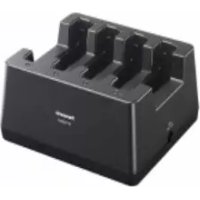



| Brand | Panasonic |
| Model | CFVCB331 |
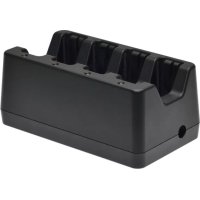
| Product Type | Battery Charger for Panasonic Laptop |
| Dimensions (L × H × D) | 192 mm × 169 mm × 84 mm |
| Weight | Approximately 0.7 kg |
| Power Supply | AC Adapter CF-AA5713A: input 100-240 V AC, 50/60 Hz; output 15.6 V DC, 7.05 A |
| Compatible Batteries | CF-VZSU1A and CF-VZSU1B series |
| Charge Time (CF-VZSU1A) | Approximately 2 hours |
| Charge Time (CF-VZSU1B) | Approximately 4 hours |
| Package Contents | Charger, AC adapter CF-AA5713A, power cord, user manual |
| Usage Precautions | Use only with specified batteries; do not use other adapters; avoid damaging the cord; unplug during thunderstorms; clean dust regularly |
| Maintenance and Cleaning | Disconnect the adapter and battery, turn the charger over and remove dust from the connectors with a dry cloth |
| Safety | Do not touch connectors; remove battery before transport; do not subject to shocks; stop immediately if malfunction occurs |
| General Information | Compliant with EU directives; separate disposal of electronic waste |
Frequently Asked Questions - CFVCB331 PANASONIC
User questions about CFVCB331 PANASONIC
0 question about this device. Answer the ones you know or ask your own.
Ask a new question about this device
Download the instructions for your Battery charger in PDF format for free! Find your manual CFVCB331 - PANASONIC and take your electronic device back in hand. On this page are published all the documents necessary for the use of your device. CFVCB331 by PANASONIC.
USER MANUAL CFVCB331 PANASONIC
Printed in Taiwan
Battery Charger
Model No. CF-VCB331 Series
HS0517-0
DHQX1330ZA/T1

| English | OPERATING INSTRUCTIONS | |
| Deutsch | BEDIENUNGSANLEITUNG | |
| Français | INSTRUCTIONS D’UTILISATION | |
| Italiano | ISTRUZIONI PER L’USO | |
| Español | INSTRUCCIONES DE FUNCIONAMIENTO | |
| Svenska | BRUKSANVISNING | |
| Polski | INSTRUKCJA OBSŁUGI | |
| Čeština | NÁVOD K OBSLUZE | |
| Magyar | HASZNÁLATI UTASÍTÁS | |
| Suomi | KÄYTTÖOHJEET | |
| Slovensky | NÁVOD NA POUŽITIE | |
| РУССКИЙ | ИНСТРУКЦИЯ ПО ЭКСПЛУАТАЦИИ | |
| ҚАЗАҚША | ҚОЛДАНУ НЎСҚАУЛАРЫ | |
| УКРАЇНСЬКА | ПОСІБНИК З ЕКСПЛУАТАЦІЇ | |
| 繁體中文 | 使用説明 | |
| 한국어 | 사용설명서 | |
| 日本語 | 取扱説明書 |
With warranty certificate (for Japan only)
Disposal of Old Equipment
Only for European Union and countries with recycling systems
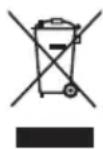
This symbol on the products, packaging, and/or accompanying documents means that used electrical and electronic products must not be mixed with general household waste.
For proper treatment, recovery and recycling of old products, please take them to applicable collection points in accordance with your national legislation.
By disposing of them correctly, you will help to save valuable resources and prevent any potential negative effects on human health and the environment. For more information about collection and recycling, please contact your local municipality.
Penalties may be applicable for incorrect disposal of this waste, in accordance with national legislation.
36-E-2
DEUTSCH
Use of an interface cable longer than 3 m {9.84 feet} is not recommended.
11-E-1
Interface cable
Declaration of Conformity (DoC)
"Hereby, Panasonic declares that this Battery Charger is in compliance with the essential requirements and other relevant provisions of EU Council Directives."
Authorised Representative:
Panasonic Testing Centre
Panasonic Marketing Europe GmbH
Winsbergring 15, 22525 Hamburg, Germany
18-E-0

Panasonic Testing Centre
Panasonic Marketing Europe GmbH
Panasonic Testing Centre
Panasonic Marketing Europe GmbH
Panasonic Testing Centre
Panasonic Marketing Europe GmbH
Winsbergring 15, 22525 Hamburg, Germany
18-lt-1
CE
Panasonic Testing Centre
Panasonic Marketing Europe GmbH
Winsbergring 15, 22525 Hamburg, Germany
18-Sp-1
CE
Declaration of Conformity (DoC)
Panasonic Testing Centre
Panasonic Marketing Europe GmbH
Winsbergring 15, 22525 Hamburg, Germany
18-Sw-0
CE
Panasonic Testing Centre
Panasonic Marketing Europe GmbH
Winsbergring 15, 22525 Hamburg, Germany
18-Fi-0
CE
Panasonic Testing Centre
Panasonic Marketing Europe GmbH
Winsbergring 15, 22525 Hamburg, Germany
18-Sk-0
CE
Panasonic Testing Centre
Panasonic Marketing Europe GmbH
Panasonic Testing Centre
Panasonic Marketing Europe GmbH
Federal Communications Commission Radio Frequency Interference Statement
Note: This equipment has been tested and found to comply with the limits for a Class B digital device, pursuant to Part 15 of the FCC Rules. These limits are designed to provide reasonable protection against harmful interference in a residential installation. This equipment generates, uses and can radiate radio frequency energy and, if not installed and used in accordance with the instructions, may cause harmful interference to radio communications. However, there is no guarantee that interference will not occur in a particular installation. If this equipment does cause harmful interference to radio or television reception, which can be determined by turning the equipment off and on, the user is encouraged to try to correct the interference by one or more of the following measures:
- Reorient or relocate the receiving antenna.
- Increase the separation between the equipment and receiver.
- Connect the equipment into an outlet on a circuit different from that to which the receiver is connected.
- Consult the Panasonic Service Center or an experienced radio/TV technician for help.
Warning
To assure continued compliance, use only shielded interface cables when connecting to a computer or peripheral. Also, any changes or modifications not expressly approved by the party responsible for compliance could void the user's authority to operate this equipment.
This device complies with Part 15 of the FCC Rules. Operation is subject to the following two conditions:
(1) This device may not cause harmful interference, and (2) This device must accept any interference received, including interference that may cause undesired operation.
This device is Class B verified to comply with Part 15 of FCC Rules when used with Panasonic Notebook Computer.
Responsible Party: Panasonic Corporation of North America
Two Riverfront Plaza
Newark, NJ 07102
Support Contact: http://business.panasonic.com/support-computerstablets
For UK
For your safety, please read the following text carefully.
This appliance is supplied with a molded three-pin mains plug for your safety and convenience.
A 3-ampere fuse is fitted in this plug.
Should the fuse need to be replaced, please ensure that the replacement fuse has a rating of 3 amperes and that it is approved by ASTA or BSI to BS1362.
Check for the ASTA mark or the BSI mark on the body of the fuse.
If the plug contains a removable fuse cover, you must ensure that it is refitted when the fuse is replaced.
If you lose the fuse cover, the plug must not be used until a replacement cover is obtained. A replacement fuse cover can be purchased from your local dealer.
If the fitted molded plug is unsuitable for the socket outlet in your home, then the fuse should be removed and the plug cut off and disposed of safely.
There is a danger of severe electrical shock if the cut-off plug is inserted into any 13-ampere socket.
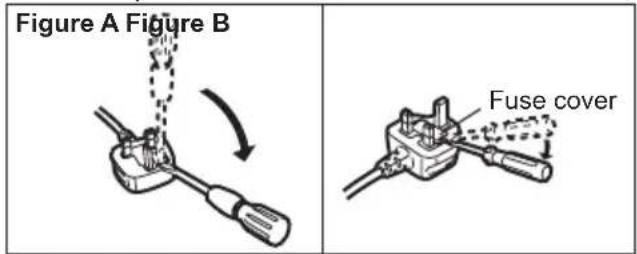
How to replace the fuse
The location of the fuse differs according to the type of AC mains plug (figures A and B).
Confirm the AC mains plug fitted and follow the instructions below. Illustrations may differ from the actual AC mains plug.
Open the fuse cover with a screwdriver, replace the fuse, and close or attach the fuse cover.
For India
Declaration of Conformity with the requirements of the e-waste (Management and Handling) Rules, 2011. (adopted by Notification S.O.1035(E) of Ministry of Environment and Forests)
The Product is in conformity with the requirements of Rule 13 of the e-waste Rules.
The content of hazardous substance with the exemption of the applications listed in SCHEDULE II of the e-waste Rules:
- Lead (Pb) - not over 0.1% by weight;
- Cadmium (Cd) - not over 0.01% by weight;
- Mercury (Hg) - not over 0.1% by weight;
- Hexavalent chromium (Cr6+) - not over 0.1% by weight;
- Polybrominated biphenyls (PBBs) - not over 0.1% by weight;
- Polybrominated diphenyl ethers (PBDEs) - not over 0.1% by weight.
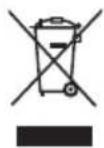
For the purpose of recycling to facilitate effective utilization of resources, please return this product to a nearby authorized collection center, registered dismantler or recycler, or Panasonic service center when disposing of this product.
Please see the Panasonic website for further information on collection centers, etc.
http://www.panasonic.com/in/corporate/sustainability/panasonic-india-i-recycle-program.html
Service helpline: 1800 103 1333 or 1800 108 1333
68-M-2
For Canada
Canadian ICES-003
CAN ICES-3(B)/NMB-3(B)
7-M-2
For Turkey
Accordance with the WEEE Regulation.
Disposal of Old Equipment and Batteries Only for European Union and countries with recycling systems
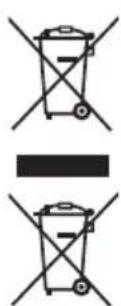
These symbols on the products, packaging, and/or accompanying documents mean that used electrical and electronic products and batteries must not be mixed with general household waste.
For proper treatment, recovery and recycling of old products and batteries, please take them to applicable collection points in accordance with your national legislation.
By disposing of them correctly, you will help to save valuable resources and prevent any potential negative effects on human health and the environment. For more information about collection and recycling, please contact your local municipality.
Penalties may be applicable for incorrect disposal of this waste, in accordance with national legislation.
53-E_Tr-1
Declaration of Conformity with the requirements of Technical Regulation on the Restriction Of the use of certain Hazardous Substances in Electrical and Electronic Equipment (adopted by Order №1057 of Cabinet of Ministers of Ukraine)
The Product is in conformity with the requirements of Technical Regulation on the Restriction Of the use of certain Hazardous Substances in electrical and electronic equipment (TR on RoHS).
The content of hazardous substance with the exemption of the applications listed in the Annex №2 of TR on RoHS:
- Lead (Pb) – not over 0,1wt % or 1000wt ppm;
- Cadmium (Cd) – not over 0.01 wt% or 100 wt ppm;
- Mercury (Hg) – not over 0.1 wt% or 1000 wt ppm;
- Hexavalent chromium (Cr6+) – not over 0.1 wt% or 1000 wt ppm;
- Polybrominated biphenyls (PBBs) – not over 0.1 wt% or 1000 wt ppm;
- Polybrominated diphenyl ethers (PBDEs) – not over 0.1 wt% or 1000 wt ppm.

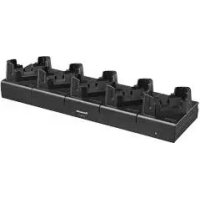
The battery charger is designed for charging the battery pack for the Panasonic computer series. Read these Operating Instructions, the computer's Operating Instructions, and the Operating Instructions - Reference Manual before using.
- Parts Included
OPERATING INSTRUCTIONS (This book) 1
AC Adaptor (CF-AA5713A).... 1
AC Cord 1

: Refer to the on-screen manuals.
- Some illustrations are simplified to help your understanding and may look different from the actual unit.
FOR USE WITH MODEL NO.: CF-AA5713A
20-Ca-1
Precautions
- Use this charger to charge only the specified battery pack and no other.
Electrolyte leakage, generation of heat, or rupture may result.
- Use only the specified AC adaptor with this product.
Using an AC adaptor other than the one supplied (supplied with the unit or one sold separately as an accessory) may result in a fire.
- Do not do anything that may damage the AC cord, the AC plug, or the AC adaptor.
Do not damage or modify the cord, place it near hot tools, bend, twist, or pull it forcefully, place heavy objects on it, or bundle it tightly. Continuing to use a damaged cord may result in fire, short circuit, or electric shock.
Continuing to use a damaged cord may result in fire, short circuit, or electric shock.
Do not continue to use a damaged AC cord, AC plug, and AC adaptor. Contact your technical support office for repair.
- Do not connect the AC adaptor to a power source other than a standard household AC outlet. Otherwise, a fire due to overheating may result.
Connecting to a DC/AC converter (inverter) may damage the AC adaptor. On an airplane, only connect the AC adaptor/charger to an AC outlet specifically approved for such use.
- Do not pull or insert the AC plug if your hands are wet. Electric shock may result.
- Do not touch this product in a thunderstorm if connected with the AC cable or any other cables. Electric shock may result.
- Clean dust and other debris from the AC plug regularly.
If dust or other debris accumulates on the plug, humidity, etc. may cause a defect in the insulation, which may result in a fire.
- Pull the plug, and wipe it with a dry cloth. Pull the plug if the computer is not being used for a long period of time.
- Insert the AC Plug Completely
If the plug is not inserted completely, fire due to overheating or electric shock may result.
- Do not use a damaged plug or loose AC outlet.
- Do Not Move This Product While the AC Plug Is Connected
The AC cord may be damaged, resulting in fire or electric shock.
- If the AC cord is damaged, unplug the AC plug immediately.
- Do Not Subject the AC Adaptor To Any Strong Impact
Using the AC adaptor after a strong impact such as being dropped may result in electric shock, short circuit, or fire.
- Hold the Plug When Unplugging the AC Plug
Pulling on the cord may damage the cord, resulting in a fire or electric shock.
- If a Malfunction or Trouble Occurs, Immediately Stop Use If a Malfunction Occurs, Immediately Unplug the AC Plug
• This product is damaged • Foreign object inside this product - Smoke emitted - Unusual smell emitted - Unusually hot
Continuing to use this product while any of the above conditions are present may result in fire or electric shock.
- If a malfunction or trouble occurs, immediately unplug the AC plug.
Then contact your technical support office for repair.
CAUTION
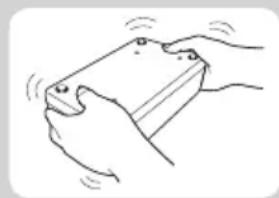
• Install or remove the battery pack on a flat stable surface. - Remove the battery before transporting the battery charger. The battery pack may fall out while the charger is being carried. - Do not touch the battery charger connectors as it can damage or transfer dust to the connectors and cause malfunction. - Refer to the “Operating Instructions” that came with the computer for information on proper handling of the AC adaptor. - If dust or dirt has built up on the connectors, disconnect the AC adaptor and battery pack, turn the battery charger over, and remove the dust and dirt. Dust buildup can cause faults and prevent charging from being performed successfully. Clean away dust regularly. Do not drop the battery charger or subject it to heavy impacts.
- Specified Battery Pack
| Battery Pack Charging Time* | 1 |
| CF-VZSU1A series Approx. 2 hours | |
| CF-VZSU1B series Approx. 4 hours |
*1 Charging times given above are applicable regardless of the number of batteries.
Specifications
| Item Description | |
| Power Supply AC adaptor | |
| AC Adaptor*2 | Input: 100 V - 240 V AC, 50 Hz / 60 Hz,Output: 15.6 V DC, 7.05 A[Do not use other than the specified AC adaptor(Model No. CF-AA5713A).] |
| Dimensions(W × H × D) | Approx. 192 mm × 169 mm × 84 mm{7.6" × 6.7" × 3.3"} |
| Weight Approx. 0.7 kg {1.5 lb.} | |
*2
The AC adaptor is compatible with power sources up to 240 V AC adaptor.
This battery charger is supplied with a 125 V AC compatible AC cord.
20-M-2-1
- Specified Battery Pack
- Specified Battery Pack
Panasonic System Communications Company of North America
Two Riverfront Plaza
Newark, NJ 07102
Panasonic Canada Inc.
5770 Ambler Drive Mississauga, Ontario L4W 2T3
Importer's name & address pursuant to the EU legislation
Panasonic System Communications Company Europe, Panasonic Marketing
Europe GmbH
Hagenauer Straße 43
65203 Wiesbaden
Germany
55-E-1
Web Site: https://panasonic.net/cns/pc/
Free repair regulations
This warranty is valid only in Japan.
Panasonic
Carry-in repair
Battery Charger Warranty Certificate
- BATTERY CHARGER
- MODEL NO. CF-VCB331 SERIES
- DISPOSAL OF OLD EQUIPMENT
- ONLY FOR EUROPEAN UNION AND COUNTRIES WITH RECYCLING SYSTEMS
- DEUTSCH
- INTERFACE CABLE
- DECLARATION OF CONFORMITY (DOC)
- FEDERAL COMMUNICATIONS COMMISSION RADIO FREQUENCY INTERFERENCE STATEMENT
- WARNING
- FOR UK
- FOR YOUR SAFETY, PLEASE READ THE FOLLOWING TEXT CAREFULLY
- HOW TO REPLACE THE FUSE
- FOR INDIA
- FOR CANADA
- CANADIAN ICES
- FOR TURKEY
- ACCORDANCE WITH THE WEEE REGULATION
- PARTS INCLUDED
- PRECAUTIONS
- CAUTION
- SPECIFICATIONS
- FREE REPAIR REGULATIONS
- PANASONIC
- BATTERY CHARGER WARRANTY CERTIFICATE
Brand : PANASONIC
Model : CFVCB331
Category : Battery charger