
FZVCBN141 - Battery charger PANASONIC - Free user manual and instructions
Find the device manual for free FZVCBN141 PANASONIC in PDF.
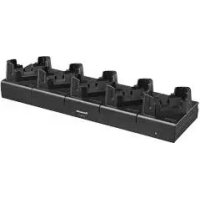



| Brand | Panasonic |
| Model | FZ-VCBN141 |
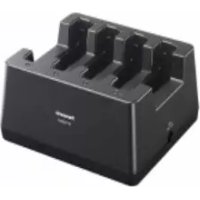
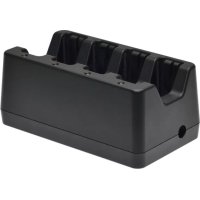
| Product type | Charging dock (5 bays) / Battery charger |
| Dimensions (L × D × H) | Approx. 400 mm × 115 mm × 80 mm (excluding protrusions) |
| Weight | Approx. 1.2 kg |
| Power supply (input) | 15.6 V DC, 7.05 A via CF-AA5713A AC adapter |
| Power supply (AC adapter) | Input: 100-240 V AC, 50/60 Hz; Output: 15.6 V DC, 7.05 A |
| Number of charging bays | 5 |
| Compatible units | Panasonic FZ-N1 and FZ-F1 series (as of February 2018) |
| Compatible batteries | FZ-VZSUN110, FZ-VZSUN120 |
| Included accessories | CF-AA5713A AC adapter, power cord, operating instructions |
| Operating temperature | 10 °C to 35 °C |
| Operating humidity | 30 % to 80 % RH |
| Maintenance | Unplug before cleaning; use a soft dry cloth; do not use solvents (benzene, thinner, alcohol); clean terminals if dirty |
| Safety | Do not disassemble, repair, or modify; do not expose to water; use only the specified adapter; unplug if not in use for extended periods |
| Indicator light | Green power indicator (on); unit charging indicator orange (charging) / green (charging complete) |
| Repairability | Contact technical support representative if problems occur |
| General information | Charging dock only; do not use other adapters; keep instructions |
Frequently Asked Questions - FZVCBN141 PANASONIC
User questions about FZVCBN141 PANASONIC
0 question about this device. Answer the ones you know or ask your own.
Ask a new question about this device
Download the instructions for your Battery charger in PDF format for free! Find your manual FZVCBN141 - PANASONIC and take your electronic device back in hand. On this page are published all the documents necessary for the use of your device. FZVCBN141 by PANASONIC.
USER MANUAL FZVCBN141 PANASONIC
Operating Instructions
Thank you for purchasing a Panasonic product.
Before operating this product, please read these instructions and precautions, and save them for future use.
Operating Instructions
Federal Communications Commission Radio Frequency Interference Statement
Note:
- This equipment has been tested and found to comply with the limits for a Class A digital device, pursuant to part 15 of the FCC Rules. These limits are designed to provide reasonable protection against harmful interference when the equipment is operated in a commercial environment.
This equipment generates, uses, and can radiate radio frequency energy and, if not installed and used in accordance with the instruction manual, may cause harmful interference to radio communications. Operation of this equipment in a residential area is likely to cause harmful interference in which case the user will be required to correct the interference at his own expense.
Warning:
- Any changes or modifications not expressly approved by the party responsible for compliance could void the user's authority to operate this equipment.
This device complies with Part 15 of the FCC Rules. Operation is subject to the following two conditions:
- This device may not cause harmful interference, and
- This device must accept any interference received, including interference that may cause undesired operation.
Responsible party
Panasonic Corporation of North America
Two Riverfront Plaza, Newark, NJ 07102, USA
Support contact: http://business.panasonic.com/support-computerstables
For Europe
Declaration of Conformity (DoC)
"Hereby, Panasonic declares that this 5-Bay Charge only Cradle is in compliance with the essential requirements and other relevant provisions of EU Council Directives."
Authorised Representative:
Panasonic Testing Centre
Panasonic Marketing Europe GmbH
Winsbergring 15, 22525 Hamburg, Germany
Warning: This equipment is compliant with Class A of CISPR 32. In a residential environment this equipment may cause radio interference.
Disposal of Old Equipment
Only for European Union and countries with recycling systems
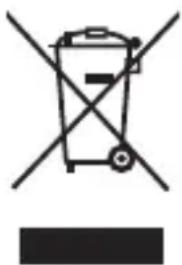
This symbol on the products, packaging, and/or accompanying documents means that used electrical and electronic products must not be mixed with general household waste.
For proper treatment, recovery and recycling of old products, please take them to applicable collection points in accordance with your national legislation.
By disposing of them correctly, you will help to save valuable resources and prevent any potential negative effects on human health and the environment. For more information about collection and recycling, please contact your local municipality.
Penalties may be applicable for incorrect disposal of this waste, in accordance with national legislation.
For UK
For your safety, please read the following text carefully.
This appliance is supplied with a molded three pin mains plug for your safety and convenience.
A 3 ampere fuse is fitted in this plug.
Should the fuse need to be replaced please ensure that the replacement fuse has a rating of 3 ampere and that it is approved by ASTA or BSI to BS1362.
Check for the ASTA mark or the BSI mark on the body of the fuse.
If the plug contains a removable fuse cover you must ensure that it is refitted when the fuse is replaced.
If you lose the fuse cover the plug must not be used until a replacement cover is obtained. A replacement fuse cover can be purchased from your local dealer.
If the fitted molded plug is unsuitable for the socket outlet in your home then the fuse should be removed and the plug cut off and disposed of safely.
There is a danger of severe electrical shock if the cut off plug is inserted into any 13-ampere socket.
How to replace the fuse
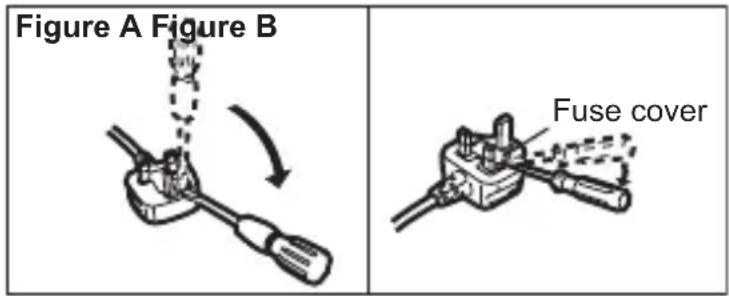
The location of the fuse differs according to the type of AC mains plug (figures A and B).
Confirm the AC mains plug fitted and follow the instructions below. Illustrations may differ from actual AC mains plug.
Open the fuse cover with a screwdriver and replace the fuse and close or attach the fuse cover.
India Only
Declaration of Conformity with the requirements of the E-Waste (Management) Rules
The Product is in conformity with the requirements of the reduction of hazardous substances of the E-Waste Rules.
The content of hazardous substance with the exemption of the applications listed in SCHEDULE II of the E-waste Rules:
- Lead (Pb) – not over 0.1% by weight;
- Cadmium (Cd) – not over 0.01% by weight;
- Mercury (Hg) – not over 0.1% by weight;
- Hexavalent chromium (Cr6+) – not over 0.1% by weight;
- Polybrominated biphenyls (PBBs) – not over 0.1% by weight;
- Polybrominated diphenyl ethers (PBDEs) – not over 0.1% by weight.
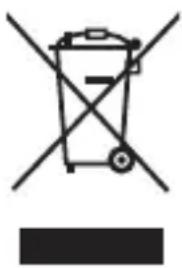
For the purpose of recycling to facilitate effective utilization of resources, please return this product to a nearby authorized collection center, registered dismantler or recycler, or Panasonic service center when disposing of this product.
Please see the Panasonic website for further information on collection centers, etc., or call the toll-free number below.
Website:
http://www.panasonic.com/in/corporate/sustainability/panasonic-india-i-recycle-program.html
Service helpline: 1800 103 1333 or 1800 108 1333
Contents
Introduction page 6
Safety precautions page 7
Handling and maintenance page 9
Description of parts page 10
Connections page 11
Docking and removing the unit page 12
Troubleshooting page 13
Specifications page 13
Introduction
This product is designed for use with the Panasonic FZ-N1 and FZ-F1 series (hereinafter referred to as "the unit") (as of February 2018).
Up to five units can be charged at the same time.
- Also thoroughly read the Operating Instructions of the unit.
Compatible batteries
FZ-VZSUN110 FZ-VZSUN120
Included accessories
- AC Adaptor (Model number CF-AA5713A) x 1
- AC Cord*1 x 1
- Operating Instructions (this document) x 1 *1 Do not use the supplied AC cord with any products other than CF-AA5713A.
Note:
- Some illustrations in this document may look different from the actual product. Also, the details of the descriptions may vary due to differences between the software versions of the unit. Information in this document is subject to change without notice.
Safety precautions
- Charge only specified units or batteries.
Charging unspecified units or batteries may result in electrolyte leakage, overheating, smoke, rupture, or a fire.
- When using the product for extended periods, do not expose your skin to the AC adaptor for a prolonged period.
Generated heat can cause low-temperature burns.
- Do not disassemble, repair, or modify the product.
Doing so may cause a short circuit or overheating, which may result in a fire or electric shock.
- Do not insert foreign objects into the product.
Doing so may cause a short circuit or overheating, which may result in a fire or electric shock.
- Do not expose the product to water or other liquids.
Doing so may cause a short circuit, generation of heat, overheating, or rupture, which may result in a fire, electric shock or injury.
- If the product gets wet, immediately unplug the AC adaptor and AC plug, remove the unit, and then contact your technical support representative.
- Do not touch the product, AC adaptor or cables during lightning storms if the product is connected to an AC adaptor.
There is a remote chance of electric shock.
- Immediately stop using the product if any of the following occurs.
- Product is damaged. Water or foreign objects enter the product. Product emits smoke.
- Product emits unusual smell or sound.
- Product becomes unusually hot.
Continuing use may result in fire or electric shock. Immediately unplug the AC plug, remove the unit, and then contact your technical support representative.
- Do not do anything that may damage the AC cord, the AC plug, or the AC adaptor.
Do not damage or modify the cord, place it near hot tools, bend, twist, or pull it forcefully, place heavy objects on it, or bundle it tightly.
Continuing to use a damaged cord, plug or AC adaptor may result in a fire, or electric shock.
- Contact your technical support representative if any malfunction occurs.
- Clean dust and other debris on the AC plug regularly.
If dust or other debris accumulates on the plug, humidity, etc. may cause a defect in the insulation, which may result in a fire.
- Pull the plug, and wipe it with a dry cloth.
- Pull the plug if the product is not being used for a long period of time.
- Insert the AC plug completely.
If the plug is not inserted completely, fire due to overheating or electric shock may result.
- Do not use a damaged plug or loose AC outlet.
- Do not pull or insert the AC plug if your hands are wet.
Electric shock may result.
- Do not connect the AC adaptor to a power source other than a standard household AC outlet.
Otherwise, a fire due to overheating may result. Connecting to a DC/AC converter (inverter) may damage the AC adaptor. On an airplane, only connect the AC adaptor/charger to an AC outlet specifically approved for such use.
- Do not allow conductive materials such as metal objects to touch the bus connector terminals. Also, do not touch the terminals with your hands.
This may result in a fire, burn, or electric shock.
- Do not leave the product in areas with a high concentration of moisture, steam, dust, oily vapors, etc.
Foreign material that enters the product may cause a fire or electric shock.
- Do not move the product while the AC plug is connected.
The AC cord may be damaged, resulting in a fire or electric shock.
- If the AC cord is damaged, unplug the AC plug immediately.
- Do not subject the AC adaptor to any strong impact.
Using the AC adaptor after a strong impact such as being dropped may result in a fire or electric shock.
- Contact your technical support representative if any malfunction occurs.
- Make sure not to charge the product when it is used with a wet unit.
This may result in a fire or electric shock.
- Do not leave the product in extremely high temperature environments for an extended period.
Leaving the product where it will be exposed to extremely high temperatures, such as near fire or in direct sunlight, may deform the product or cause damage or malfunction to its internal components. Using the product in these conditions may cause short circuit, insulation defects, etc., which may in turn cause a fire or electric shock.
- Do not place the product on an unstable surface.
The product may drop, resulting in an injury.
- Use only specified AC adaptors and the supplied AC cord.
Use of unspecified AC adaptors or AC cords may result in a fire or electric shock.
- When cleaning the product or if you will not use it for a long period of time, unplug the AC plug for your safety.
Failure to do so may result in a fire or electric shock.
- Hold the plug when unplugging the AC plug.
Pulling on the cord may damage the cord, resulting in a fire or electric shock.
Handling and maintenance
Obey the following to ensure proper use and operation of this product.
Operating environment
- Place the product on a flat, stable surface.
- Do not leave the product in places under direct sunlight or around heating appliances.
- Using this product continuously in a hot environment will shorten the product life. Avoid use in these types of environments.
Handling cautions
- Do not drop the product or subject it to impacts. Doing so may cause malfunctions or damage.
- If the unit you are using with the product is wet, remove the water by wiping off the moisture, and thoroughly dry the unit before docking it in the product.
Maintenance
- Always disconnect the AC adaptor before cleaning the product. Clean the product with a soft, dry cloth.
- Do not clean the product with solvents such as benzene, thinner, alcohol, or kitchen detergent because they may affect the surface of the product.
- If the bus connector terminals are dirty, battery charging may not be possible. Clean them with a soft, dry cloth.
- Be careful not to bend the bus connector terminals.
Description of parts
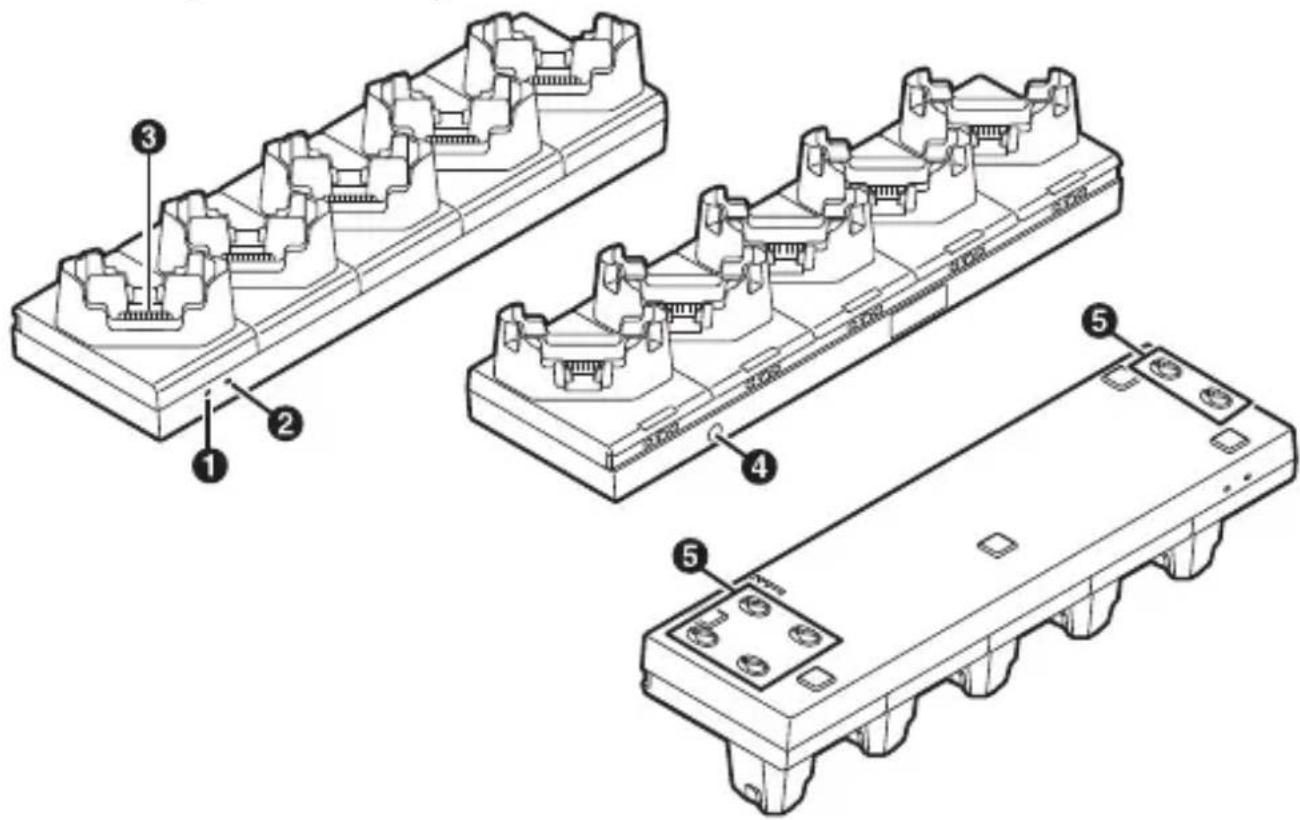
Power indicator (1)
Green, lit: Power on
Off: Power off
Function indicator (not used for this product) (2) Bus connector terminals (3)
Supplies power to the unit.
DC input jack
Allows you to connect an AC adaptor to the product.
Positioning hole
Allows you to hook and fix the product onto studs for installation on flat bases.
Explanation of graphical symbol on nameplate
~ : Alternating current; ⎓ : Direct current
Connections
Connect the AC adaptor as shown below.
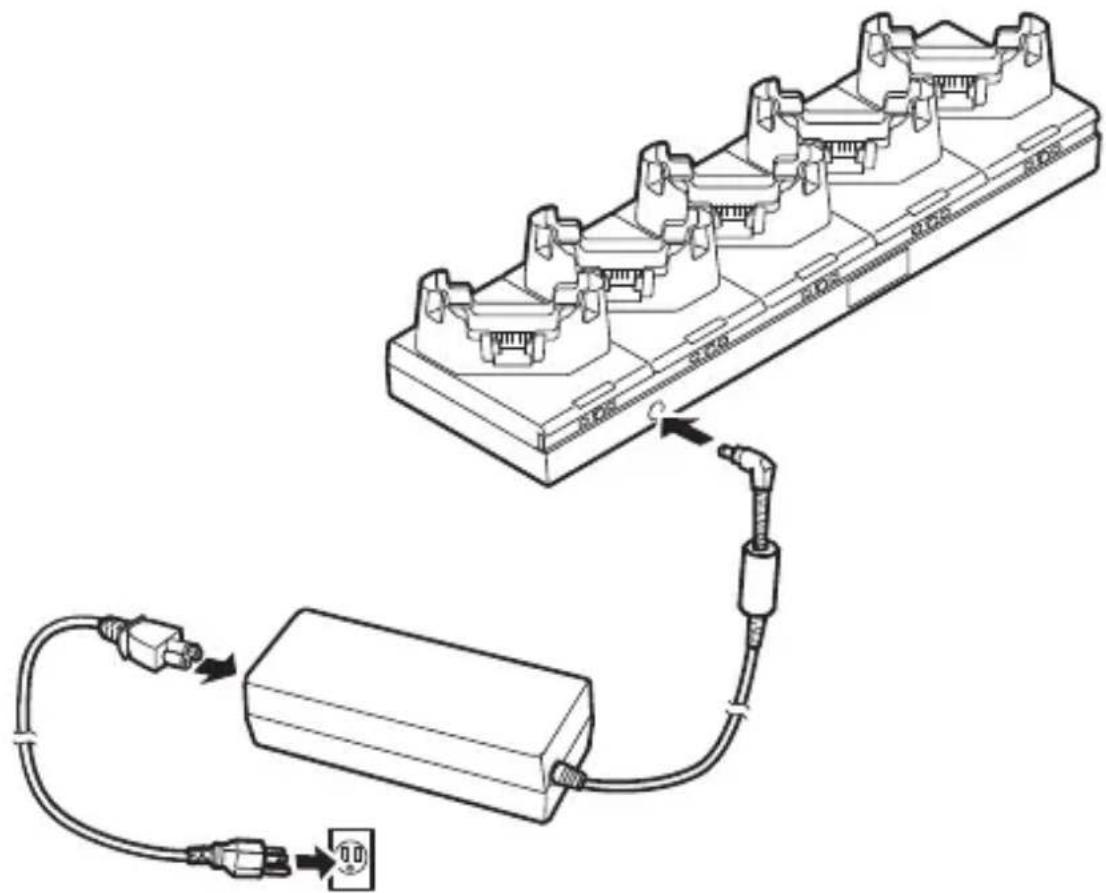
The AC cord may vary depending on the country.
Note:
- The AC adaptor must be connected to use the product.
Docking and removing the unit
Dock the unit as shown below. Make sure the unit is inserted fully into the product.
- When the unit is docked, the unit's indicator (①) lights in orange while the battery is charging, and lights in green when charging is complete. For more about the charging time, refer to the Operating Instructions of the unit.
- Charge the battery in environments with an ambient temperature of 10°C to 35°C (50°F to 95°F).
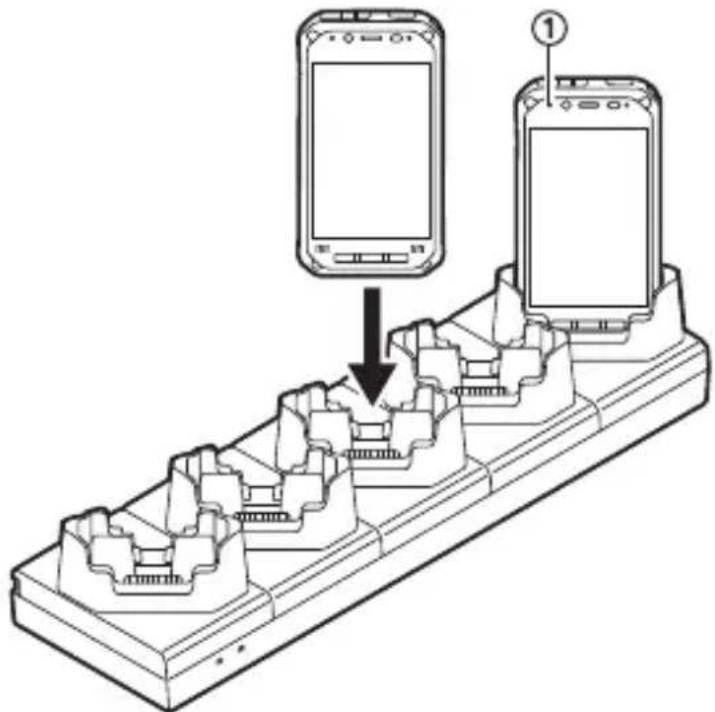
To remove the unit, pull out the unit straight in the direction opposite of that when it was inserted.
Troubleshooting
If you experience any trouble while using this product, refer to the following information for basic troubleshooting. If the trouble persists, contact your technical support representative.
| The unit does not charge. | ● The unit is not properly inserted. Make sure it is inserted properly. ● The AC adaptor is not properly connected. Confirm the connection. ● The terminals are dirty. Clean the terminals. ● The ambient temperature is too low or too high. Charge the battery in environments with an ambient temperature of 10 °C to 35 °C (50 °F to 95 °F). |
| Charging ends quickly or does not occur at all. | ● The battery may be worn out. Replace the battery with a new one. |
Specifications
| Power supply input 15.6 | V DC, 7.05 A |
| Dimensions (W × D × H) | Approx. 400 mm × 115 mm × 80 mm (15.8 in. × 4.6 in. × 3.2 in.) (excluding protrusions) |
| Weight Approx. 1.2 kg (2.5 lb) | |
| Operating environment | 10 °C to 35 °C (50 °F to 95 °F) 30 % to 80 % RH |
| AC adaptor*1 | Input: 100 V to 240 V AC, 50 Hz/60 Hz Output: 15.6 V DC, 7.05 A |
*1 The AC adaptor is designed for use with power sources that supply up to 240 V AC. The AC cord supplied with the AC adaptor is designed for use with power sources that supply up to 125 V AC.
For Europe
Panasonic Testing Centre
Panasonic Marketing Europe GmbH
Winsberging 15, 22525 Hamburg, Deutschland
Panasonic Testing Centre
Panasonic Marketing Europe GmbH
Winsberging 15, 22525 Hamburg, Allemagne
Panasonic Mobile Communications Co., Ltd. 600 Saedo-cho, Tsuzuki-ku, Yokohama-city, Kanagawa 224-8539, Japan
Panasonic System Solutions Company of North America Two Riverfront Plaza, Newark, NJ 07102, USA
Panasonic Canada Inc. 5770 Ambler Drive, Mississauga, Ontario L4W 2T3
Importer's name & address pursuant to the EU legislation Panasonic System Communications Company Europe, Panasonic Marketing Europe GmbH Hagenauer StraBe 43 65203 Wiesbaden Germany
Web site: https://panasonic.net/cns/pc/
© Panasonic Mobile Communications Co., Ltd. 2018
(無料修理規定)
- OPERATING INSTRUCTIONS
- FEDERAL COMMUNICATIONS COMMISSION RADIO FREQUENCY INTERFERENCE STATEMENT
- NOTE
- WARNING
- RESPONSIBLE PARTY
- FOR EUROPE
- DECLARATION OF CONFORMITY (DOC)
- DISPOSAL OF OLD EQUIPMENT
- ONLY FOR EUROPEAN UNION AND COUNTRIES WITH RECYCLING SYSTEMS
- FOR UK
- FOR YOUR SAFETY, PLEASE READ THE FOLLOWING TEXT CAREFULLY
- HOW TO REPLACE THE FUSE
- INDIA ONLY
- CONTENTS
- SAFETY PRECAUTIONS PAGE
- INTRODUCTION
- COMPATIBLE BATTERIES
- INCLUDED ACCESSORIES
- SAFETY PRECAUTIONS
- HANDLING AND MAINTENANCE
- OPERATING ENVIRONMENT
- HANDLING CAUTIONS
- MAINTENANCE
- DESCRIPTION OF PARTS
- CONNECTIONS
- DOCKING AND REMOVING THE UNIT
- TROUBLESHOOTING
- (無料修理規定)
Brand : PANASONIC
Model : FZVCBN141
Category : Battery charger