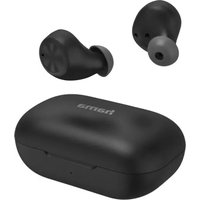
Style - Bluetooth Headset HAMA - Free user manual and instructions
Find the device manual for free Style HAMA in PDF.


| Product type | Wireless Bluetooth headset |
| Brand | Hama |
| Model | Style |
| Bluetooth technology | Bluetooth 5.0 |
| Supported Bluetooth profiles | A2DP, AVRCP, HFP, HSP, SPP, PBAP |
| Range | Up to 10 m |
| Frequency band | 2402-2480 MHz |
| Maximum RF power | 1.33 mW (E.I.R.P.) |
| Battery type (earpieces) | Lithium-Polymer 3.7 V, 38 mAh |
| Battery type (case) | Lithium-Polymer 3.7 V, 590 mAh |
| Charging time (earpieces) | Approx. 1 hour |
| Charging time (case) | Approx. 2 hours |
| Playback time | Approx. 4 hours |
| Standby time | Approx. 40 hours |
| Talk time | Approx. 3 hours |
| Weight (per earpiece) | Approx. 5 g |
| Weight (case with earpieces) | Approx. 50 g |
| Main functions | Touch control, voice assistant, hands-free calling, play/pause, track skipping |
| Care and cleaning | Clean with a soft, dry cloth; avoid liquids |
| Safety | Do not open, do not expose to heat, do not dispose of in fire |
| Spare parts and repairability | Not specified; contains a non-replaceable built-in battery |
| Package contents | 1 pair of earpieces, 1 charging case, 1 USB cable, 3 pairs of ear tips (S, M, L), instruction manual |
Frequently Asked Questions - Style HAMA
User questions about Style HAMA
0 question about this device. Answer the ones you know or ask your own.
Ask a new question about this device
Download the instructions for your Bluetooth Headset in PDF format for free! Find your manual Style - HAMA and take your electronic device back in hand. On this page are published all the documents necessary for the use of your device. Style by HAMA.
USER MANUAL Style HAMA
Bluetooth® Headphones
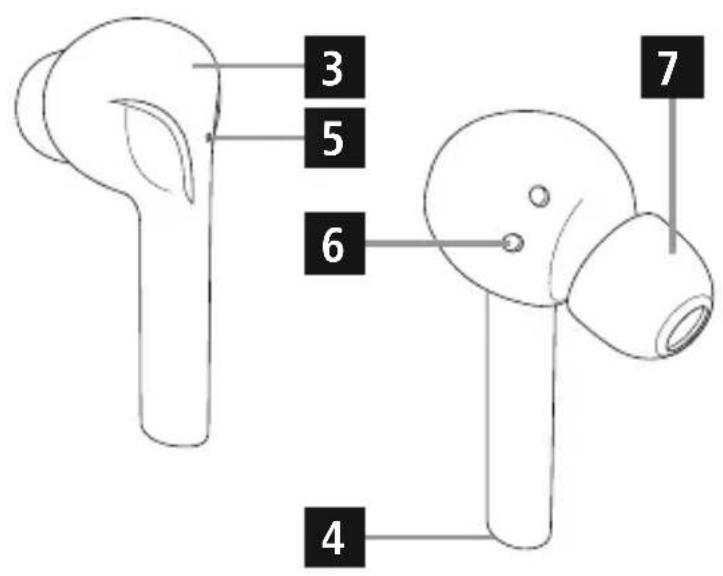
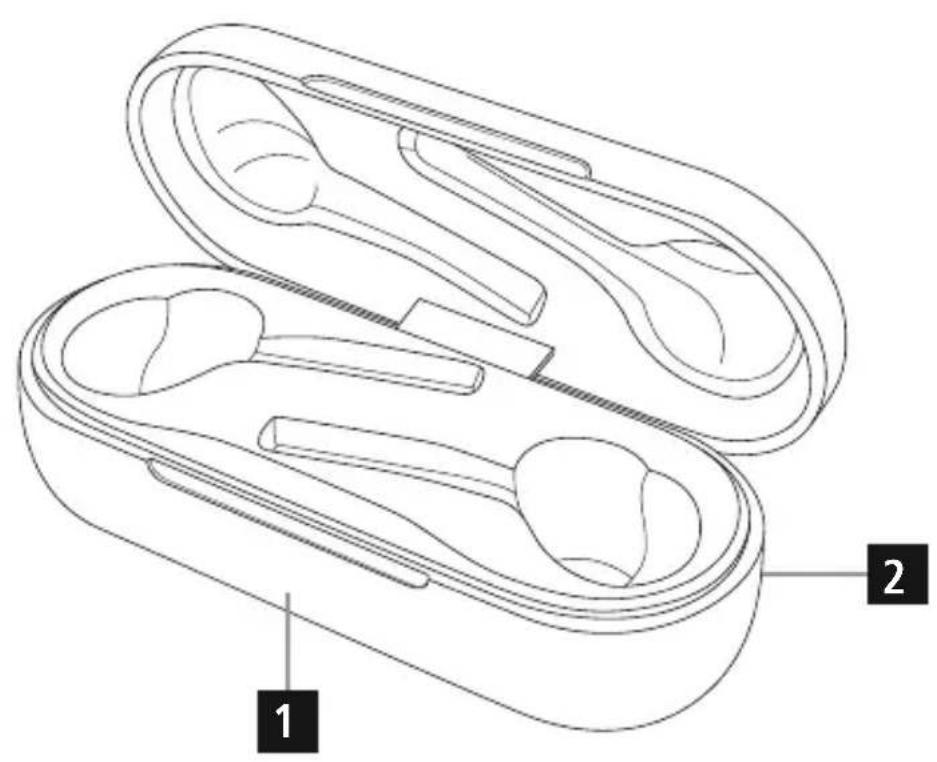
ControlsandDisplays
1.Storage/chargingbox
2. Micro-USBconnectionandchargingcontrolLED
3.Multifunctiontouchsensor
4.Microphone
5.EarphoneststatusLED
6. Chargingcontacts
7.Siliconeearpads
Thankyouforchoosinga H amaproduct.
Takeyourtimeandreadthefollowinginstructionsandinformation completely. Please keep these instructions in a safe place for future reference. If you sell the device, please pass these operating instructions ontothenewowner.
1.ExplanationofWarningSymbolsandNotes
Warning
Thissymbolisusedtoindicatesafetyinstructionsortodrawyour attentionospecific h azardsandrisks.

Note
Thissymbolisusedtoindicateadditionalinformationorimportant notes.

2.PackageContents
- 1 x 'Style'fullywireless Bluetooth® earphones
- 1 x storage/chargingbox
- 1 x USBChargingcable
- 3 p airsofearpadsinvarioussizes(S,M,L)
Theseoperatinginstructions
3.SafetyNotes
The product is intended for private, non-commercial use only.
- Protect the product from dirt, moisture and overheating, and only useitina d ryenvironment.
- Donotallowyourselftobedistractedbytheproduct,forexample whendrivinga vehiclesoroperatingsportsequipment.Alwayspay attention to the surrounding traffic and your environment.
- Donotdroptheproductanddonotexposeittoanymajorshocks.
- Donotoperatetheproductoutsidethepowerlimitsgiveninthe specifications.
- Donotopenthedevicereorcontinuetooperateitifitbecomes
damaged.
- Sincethebatteryisintegratedandcannotberemoved, you will needtodisposeoftheproductasa w hole. Dothisincompliance withthelegalrequirements.
- Disposeofpackagingmaterialimmediatelyaccordingtolocally applicableeregulation.
- Do not modify the product in any way. Doing so voids the warranty.
- Do not throw the battery or the product into fire.
- Donottamperwithordamage/heat/disassemblethebatteries/rechargeablebatteries.
- Usetheproductforitsintendedpurposeonly.
- Use the item only in moderate climatic conditions.
- Do not attempt to service or repair the product yourself. Leave any andallserviceworktoqualifiedexperts.
- Do not use the product in areas where the use of electronic devices isnot permitted.
Warning-Battery

- OnlyusesuitablechargingdevicesorUSBconnectionsfor charging.
- As a rule, do not charge devices or USB connections that are defective anddonottrytorepairthemyourselves.
- Donotovercharge the productor allow the battery to completely discharge.
- Avoidstoring, charging or using the device in extreme temperatures and extremely low atmospheric pressure (for example, at high altitudes).
- When stored over a long period of time, batteries should be chargedregularly(atleasteverythree months).
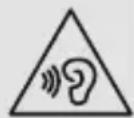
Warning-Highvolumes

Highsoundpressure level!
- There is a risk of hearing damage.
- To prevent hearing loss, avoid listening at high volume levels for longperiods.
- Always keep the volume at a reasonable level. Loud volumes, evenovershortperiods, can cause hearingloss.
- Usingthisproductlimitsyourperceptionof ambientnoise.For thisreason, donot operateanyvehiclesormachineswhile usingthisproduct.
4. Getting Started
- The two earphones and the charging box are equipped with a rechargeablebattery.
- The batteries must be fully charged before using the product for the firsttime.
- Ensure that the earphones are switched off before charging them.
- BeginchargingbyconnectingtheincludedUSBchargingcableto the charging terminal (2), and to the USB connection of a PC/ laptopsporto s suitable USBpowersupplyunit.
- Placetheearphonesinthechargingbox, makingsure to match them with their correct positions (refer to the L and R labelling on theproduct).
- The status LEDs of the earphones (5) are constantly lit red duringcharging.
- It can take up to 1 hour to fully charge the earphone batteries, 2 hourstofullychargethebattery ofthechargingbox.
- Oncetheearphoneshavebeenfullycharged, thestatusLED(5) is litbluefor1 m inuteandthendoesnout.
- The LED of the charging box (2) flashes red during charging. Oncechargingiscomplete, itisconstantlylitred.
- Disconnectable and mainsconnectionsafteruse.
Note
If you havenotusedtheitemforafewmonth,it may take 15-30 minutes for the status LEDs (2/5) to red when charging.

5. Operation
Switchingtheearphones/off
- TurnOn:
Removethearphonesfromthechargingcradleatthesametime. Botherephonesswitchonautically. A voicesays, 'Poweron' and thestatusLEDs(5)flashblue.
-TurnOff:
Toswitchoffthearphones,simplyplacethembackinthecharging box.
Thefirsttimethedevicesturnedon,pairingisautomaticallystarted
- see5.1 Bluetooth® pairing.
5.1. Bluetooth® pairing
Note-Pairing

- Makes sure that your Bluetooth®-capableterminaldeviceison and Bluetooth® is activated.
-
For more information, please refer to the operating instructions of yourterminaldevice.
-
Theearphonesandtheterminaldevicesshouldbenofurtherthan1 metre a part.Thessmallerthedistance,thebetter.
- Make sure that the earphones are switched off.
Device off: To activate the earphones, remove them from the chargingboxatthesametimeandplacethembackinthecharging box. The status LEDs of the earphones (5) are lit red. Remove theearphonesonceagain.Theynowswitchonautatically, a voicesays,'Poweron'andthestatusLEDs(5)flashblue.After about5 s econds,pairingbeginsandthetwoearphonesconnectto one another. As soon as one of the two status LEDs (5) begins to emit flashes of alternating red and blue light, your earphones are ready to be connected to your smartphone. A voice says, 'Pairing'. Theearphonesare searchingfora Bluetooth® connection. - Openthe Bluetooth® settingsonyourterminaldeviceandwait untilHamaStyleappearsinthelistof Bluetooth® devicesfound.
- Bluetooth® devicesfound.
- Select Hama Style and wait until the earphones are listed as connectedinthe Bluetooth® settingsonyourterminaldevice.A voicesays, 'Connected'.
Note-Bluetooth®password

If your terminal device requests a password to establish the connection, enter 0000.
Note

Ifpairingwassuccessful, thestatusLEDsoftheearphones(5) slowlyflashblue.A v oicessays,'Connected'.
- You can now use the earphones.
5.2.Automatic Bluetooth® connection (aftersuccessfulpairing)
Note

- Makes sure that your Bluetooth®-capableterminaldeviceison and Bluetooth® is activated.
-
For more information, please refer to the operating instructions of yourterminaldevice.
-
Removethearphonesfromthechargingboxatthesametime.A voicesays, 'Poweron-C onnected'.
- Aftertheheadsetandterminaldevicehavebeenpaired, a connectionistablishedautomatically.
- You can now use the earphones.
Note
- Ifpairingwasssuccessful, thestatusLEDsofttheearphones(5) slowlyflashblue.A v oicessays, 'Connected'.
- It may be necessary to change the settings your terminal device to enable itto automatically connect to the paired earphones.

Note- C onnnectionimpaired
Aftertheheadsetandterminaldevicehavebeenpaired,a connectionistablishedautomatically. If the Bluetooth® connectionisnotestablishedautomatically, checkthefollowing:

- Gotothe Bluetooth® settingsonyourterminaldeviceandcheck whether the Hama Style earphones are connected. If not, repeat the steps listed under 5.1Bluetooth ® pairing.
- Check whether obstacles are impairing the range. If so, move the devicesclosertogether.
- The performance can also be affected by a weak battery.
5.3.Hands-freefunction
Note
- Notethatsupportforcertainkeyfunctionsmayvarydepending onyourterminaldevice.
- For more information, please refer to the operating instructions of yourterminaldevice.
You can use the earphones as a hands-free set for your mobile phone.
Making a call
- Dial the number directly on your terminal device to make a call.
Acceptingcalls
- Tap the Multifunction touch sensor (3) on the left or right earphonetwicetoacceptanincomingcall. Alternatively, you can useyourtelephonetoaccepta c all.
Rejectinganincomingcall
- To reject an incoming call, tap and hold the Multifunction touch sensor (3) on the left or right earphone for about 2 seconds. You will hear a short acoustic signal. Alternatively, you can reject the call using your telephone.
Endinga c a l I
- To end a call, tap the Multifunction touch sensor (3) on the left or rightearphonetwiceduringthecall.
5.4.VoiceAssistantfunction
TheVoiceAssistantisanintegrated,interactivefunctionthat enablesyouostartcommunicationwithyourSiriorGoogle Assistant.Thisfunctionenablesyoutoaskquestionsandgetvarious formsohelpfromyourvoiceassistantant,evenifyouare n otholding yourtelephoneinyourhands.Belowyouwillfindsomeexamples selectedfromthelargenumberofpossibilities.
Note-Siri
SiriiasonlyavailableonsuitableterminaldeviceswithiOS5or higher(fromiPhone4sonwards).

Note- GoogleAssistant
- TheGoogleAssistantonlyavailableonsuitableterminaldevices with Android 5.0 or higher, Google Play Services, >1.5 GB of freememoryanda minumscreenresolutionof720P.
- TheGoogleAssistantappmustbeavailableonyourterminal deviceandsetasthedefaultvoiceassistant.
Tap the Multifunction touch sensor (3) on the left earphone twice while theearphonesare connected via Bluetooth® tostart communicationwithyourSiriorGoogleAssistant. Assoonasyouhear anacousticsignal,yourvoiceassistantisreadytohelpyou.
Example1:
Tap the Multifunction touch sensor (3) on the left earphone twice. Anacoustics signals should sound. Thenspeak into your earphones: 'What's t heweatherliketoday?' The voice assistant will answer as follows,forexample: 'Mainlycloudywithsomeshowers'
Example2:
Tap the Multifunction touch sensor (3) on the left earphone twice. Anacousticsignalsshouldsound. Thenspeakintoyour earphones: 'Whattimeisit? Thevoiceassistantwillansweras follows,forexample: 'Itis8 p m'
- Other examples: Set an alarm for tomorrow at 7 am.
Playmusic.
What's in thenews?
5.4.1.Redial
- Tap the Multifunction touch sensor (3) on the left earphone twicetocallthenumberofthelastcall.
- You will hear a short acoustic signal. Then say 'Redial'.
5.4.2.Volumecontrol
ThevolumeiscontrolledusingtheVoiceAssistantfunction.
- Tap the Multifunction touch sensor (3) on the left earphone twice. Anacoustics signals should sound. Thenspeak into your earphones: 'Increasethevolumeby 50% or Decreasethevolume by 30% or Maximum volume'. Your voice assistant adjuststhe volumeasrequested.
- Alternatively, you can control the volume using your smartphone.
5.5.Audiplayback
- Tap and hold the Multifunction touch sensor (3) on the right earphoneforabout2 s econdstogotothenexttrack.
- Tap and hold the Multifunction touch sensor (3) on the left earphoneforabout2 s econdstogotothepreviousrack.
- Tap the Multifunction touch sensor (3) on the right earphone twicetostartorstopaudiplayback.
5.6.Disconnectingtheearphones
- Switch off the earphones by placing them back in the charging box.
- Disconnecttheearphonesviathe Bluetooth® settingsonyour terminaldevice.
5.7.Batterylevel
Chargingbox
If the battery level of the charging box is low (< 25%) , the status LED(2) flashes blue.
- Chargethechargingboxesdescribedin4. Gettingstarted.
Earphones
-
If the battery level of the earphones is low (<25%), the status LED(5) on the earphone with the low battery level flashes red approximately every 5 seconds. In addition, a voice says, 'Battery low'.
-
Chargethearphonesasdescribedin4. Gettingstarted.
Note

However, thehetalkandstandbytimesmayvarywhenused with differentmobilephonesorothercompatible Bluetooth® devices, usagesettings,usagestylesandenvironments.
6.CareandMaintenance
Onlycleanthisproductwithaslightlydamp,lint-freeclothanddo notuseaggressivecleaningagents.Makesure t hatwaterdoesnot getintotheproduct.
7.WarrantyDisclaimer
Hama GmbH & Co KG assumes no liability and provides no warranty for damages resulting from improper installation/mounting, improper use of the product from failure to observetheoperating instructions and/or safety notes.
8. Technical Data
| Bluetooth® technology | Bluetooth® v5.0 |
| Supportedprofiles | A2DPV1.3,AVRCPV1.6,HFPV1.7,HSPV1.2,SPPV1.2,PBAPV1.0 |
| Frequencyof Bluetooth® transmissions | 2402-2 480MHz |
| Range< 1 0 m | |
| Battery | Battery |
| Batterytype3.7VIithiumpolymer | |
| Min.capacityofearphones/chargingbox | 38mAh/5 90mAh |
| Powerconsumption ofchargingbox | max.5 V 400mA |
| Chargingtimeofearphones~1 h | |
| Chargingtimeofchargingbox~2 h | |
| Standby~4 0 h | |
| Readyforuse~ 1 50days | |
| MusicPlayTime~ 4 h | |
| TalkTime~ 3 h | |
| WeightofearphonesEachearphoneapprox.5g | |
| Weightofchargingcradle incl.earphones | approx.50g |
9.RecyclingInformation
Noteonenvironmentalprotection:
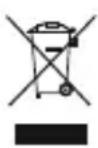
AftertheimplementationoftheEuropeanDirective2012/19/EUand2006/66/EUnthenationallegalsystem, the followingapplies:Electricandecronicdevicesaaswellabatteriesmustnotbedisposedofwithhouseholdwaste.
Consumersareobligebylawtoturnelectricalandelectronic devicesaswell as batteriesattheendoftheirservicelivestothe publiccollectingpointssetupforthispurposeorpointofsale.
Details to this are defined by the national law of the respective country. This symbolontheproduct, the instruction manual or the package indicates that a product is subject to these regulations. By recycling, reusing the materials or other forms of utilising old devices/ Batteries, you are making an important contribution to protecting our environment.
10.DeclarationofConformity

Hereby, Hama GmbH & Co KG declares that the radio equipment type[00177057]isincompliancewithDirective 2014/53/EU. The fulltextoftheEU declarationofconformity
isavailableatthefollowinginternetaddress: www.hama.com->00177057->Downloads.
Frequencyband(s)2402-2480MHz
Maximumradio-frequencypower transmitted
1.33mWE.I.R.P.
Pa3roBOpc a 6oHeHtOM
- HabepiTe Homep aboHenta Ha TeJefoHe.
OTBeTHaBXoJauN3BOHOK
9.IHCTpyKcnnnooyTnIIN3aun
- Pode utilizes additionally as auriculares.
"The Bluetooth® word mark and logos are registered trademarks owned by the Bluetooth SIG, Inc. and any use of such marks by Hama GmbH & Co KG is under license. Other trademarks and trade names are those of their respective owners."
All listed brands are trademarks of the corresponding companies. Errors and omissions excepted, and subject to technical changes. Our general terms of delivery and payment are applied.