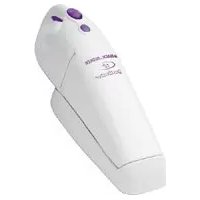
Dustbuster V1250N - Hand vacuum cleaner BLACK & DECKER - Free user manual and instructions
Find the device manual for free Dustbuster V1250N BLACK & DECKER in PDF.



| Product type | Cordless hand vacuum |
| Brand | Black & Decker |
| Model | Dustbuster V1250N |
| Intended use | Vacuuming small debris, domestic use |
| Power supply | Built-in rechargeable 12 V battery |
| Charger supplied | Model CHA002014* (input 100-240 V AC, output 7.2-24 V DC, 85 mA) |
| Charging time | Approximately 24 hours (first charge: 24 hours minimum) |
| Weight | 1.7 kg |
| Dimensions (approx.) | Height: 40 cm, Width: 15 cm, Depth: 20 cm (estimated) |
| Dust container | Removable, transparent, with simple emptying system |
| Filtration system | Washable reusable filters (ref. VF20) |
| Noise level | 85 dB(A) (acoustic pressure) |
| Vibrations | 2.5 m/s² (hand/arm value) |
| Included accessories | None (model V1250N without accessories) |
| Charging base | Yes, with possibility of wall mounting |
| Maintenance | Regular cleaning of filters and dust container |
| Filter replacement | Every 6 to 9 months or depending on wear |
| Warranty | 24 months (excluding professional use, negligence, or unauthorized repair) |
| Country of origin | Not specified in the manual |
Frequently Asked Questions - Dustbuster V1250N BLACK & DECKER
User questions about Dustbuster V1250N BLACK & DECKER
0 question about this device. Answer the ones you know or ask your own.
Ask a new question about this device
Download the instructions for your Hand vacuum cleaner in PDF format for free! Find your manual Dustbuster V1250N - BLACK & DECKER and take your electronic device back in hand. On this page are published all the documents necessary for the use of your device. Dustbuster V1250N by BLACK & DECKER.
USER MANUAL Dustbuster V1250N BLACK & DECKER
Powerful Solutions TM
V1250
V1250N
V4800
V4810
V4820
V7210
V9650
English (Original instructions) 5
Your Black & Decker Dustbuster® hand held vacuum cleaner has been designed for light dry vacuum cleaning purposes. This product is intended for household use only.
Safety instructions
Warning! When using battery-powered appliances, basic safety precautions, including the following, should always be followed to reduce the risk of fire, leaking batteries, personal injury and material damage.
Read this manual carefully before using the appliance.
The intended use is described in this manual. The use of any accessory or attachment or the performance of any operation with this appliance other than those recommended in this instruction manual may present a risk of personal injury.
Retain this manual for future reference.
Using your appliance
Do not use the appliance to pick up liquids or any materials that could catch fire.
Do not use the appliance near water. Do not immerse the appliance in water.
- Never pull the charger lead to disconnect the charger from the socket. Keep the charger lead away from heat, oil and sharp edges.
After use
Unplug the charger before cleaning the charger or charging base.
- When not in use, the appliance should be stored in a dry place. Children should not have access to stored appliances.
Inspection and repairs
Before use, check the appliance for damaged or defective parts. Check for breakage of parts, damage to switches and any other conditions that may affect its operation.
Do not use the appliance if any part is damaged or defective.
- Have any damaged or defective parts repaired or replaced by an authorised repair agent.
Regularly check the charger lead for damage. Replace the charger if the lead is damaged or defective.
Never attempt to remove or replace any parts other than those specified in this manual.
Residual risks
Additional residual risks may arise when using the tool which may not be included in the enclosed safety warnings. These risks can arise from misuse, prolonged use, etc.
Even with the application of the relevant safety regulations and the implementation of safety devices, certain residual risks can not be avoided. These include:
Injuries caused by touching any rotating/moving parts.
Injuries caused when changing any parts, blades or accessories.
Injuries caused by prolonged use of a tool. When using any tool for prolonged periods ensure you take regular breaks.
Impairment of hearing.
Health hazards caused by breathing dust developed when using your tool (example: working with wood, especially oak, beech and MDF).
Safety of others
This appliance is not intended for use by persons (including children) with reduced physical, sensory or mental capabilities, or lack of experience and knowledge, unless they have been given supervision or instruction concerning use of the appliance by a person responsible for their safety.
Children should be supervised to ensure that they do not play with the appliance.
ENGLISH
Additional safety instructions for batteries and chargers
Batteries
- Never attempt to open for any reason.
Do not expose the battery to water.
Do not expose the battery to heat.
Do not store in locations where the temperature may exceed 40^
Charge only at ambient temperatures between 10^ and 40^ .
Charge only using the charger provided with the appliance/tool. - When disposing of batteries, follow the instructions given in the section "Protecting the environment".
Do not damage/deform the battery pack either by puncture or impact, as this may create a risk of injury and fire.
Do not charge damaged batteries.
Under extreme conditions, battery leakage may occur. When you notice liquid on the batteries, proceed as follows:
Carefully wipe the liquid off using a cloth. Avoid skin contact.
In case of skin or eye contact, follow the instructions below.
Warning! The battery fluid may cause personal injury or damage to property. In case of skin contact, immediately rinse with water. If redness, pain or irritation occurs seek medical attention. In case of eye contact, rinse immediately with clean water and seek medical attention.
Chargers
Your charger has been designed for a specific voltage. Always check that the mains voltage corresponds to the voltage on the rating plate.
Warning! Never attempt to replace the charger unit with a regular mains plug.
Use your Black & Decker charger only to charge the battery in the appliance/tool with which it was supplied. Other batteries could burst, causing personal injury and damage.
Never attempt to charge nonrechargeable batteries.
If the supply cord is damaged, it must be replaced by the manufacturer or an authorised Black & Decker Service Centre in order to avoid a hazard.
Do not expose the charger to water.
Do not open the charger.
Do not probe the charger.
- The appliance/tool/battery must be placed in a well ventilated area when charging.
Electrical safety
Your charger has been designed for a specific mains voltage. Always check that the mains voltage corresponds to the voltage on the rating plate.

our charger is doubleinsulated.
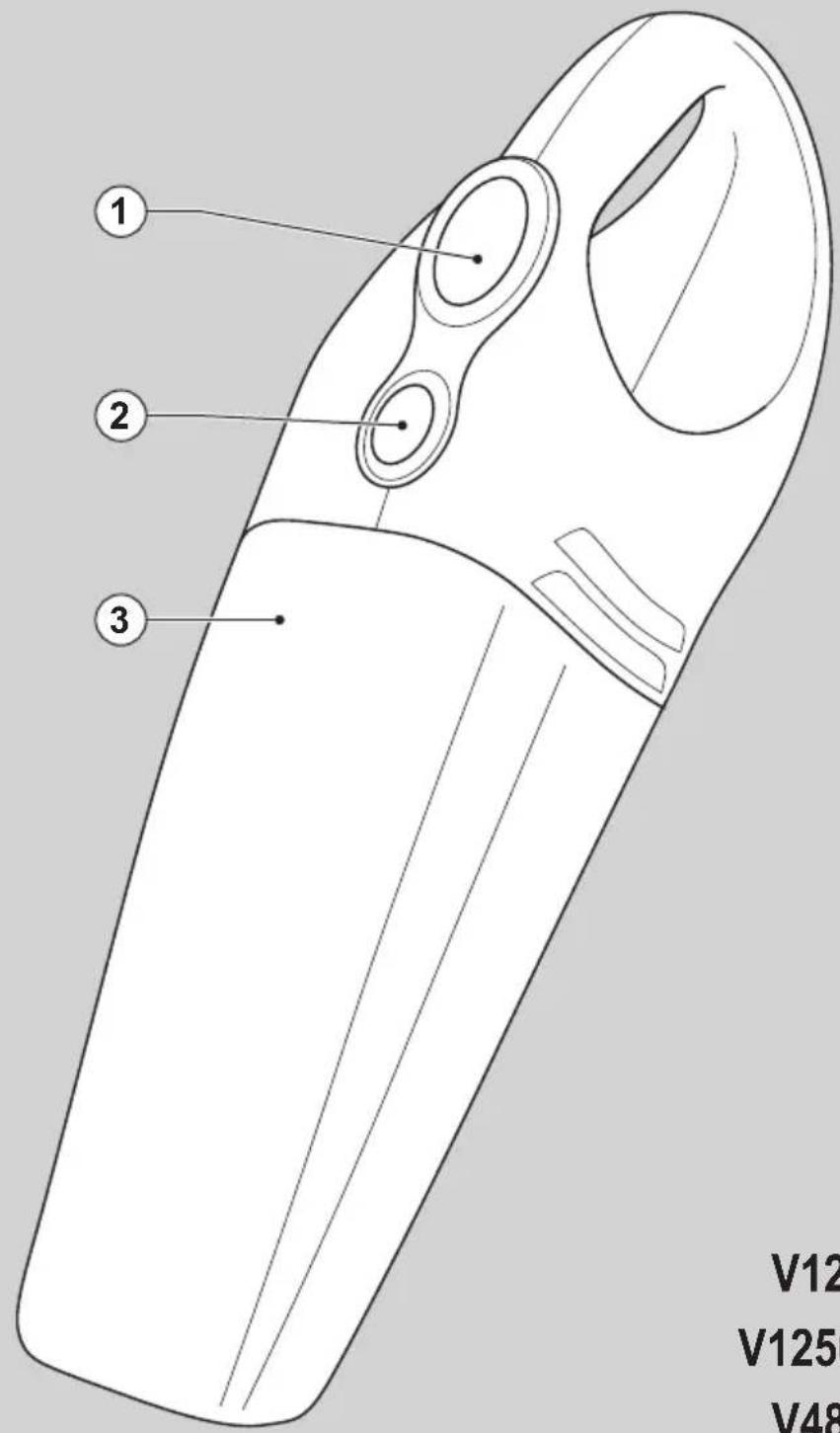
Features
- On/off switch
- Release button
- Dust bowl
Fig. A
- Charging base
- Charger
Installation
Fitting the charging base to the wall
The charging base can be fitted to the wall to provide a convenient storage and charging point for the appliance.
Before first use
Before first use, the battery must be charged for at least 24 hours.
Use
Charging the battery (fig. D)
Make sure that the appliance is switched off. The battery will not be charged with the on/off switch in the on position.
Place the appliance on the charging base as shown.
Plug in the charger.
Switch on at the mains.
ENGLISH
Leave the appliance to charge for at least 24 hours.
Whilst charging, the charger may become warm. This is normal and does not indicate a problem. The appliance can be left connected to the charger indefinitely.
Important! Place the appliance on the charging base whenever it is not in use. Do not charge the battery at ambient temperatures below 10^ or above 40^ .
Operating the appliance (fig. E)
To switch on, slide the on/off switch (1) forward.
To switch off, slide the on/off switch back.
Accessories (fig. B & C)
V1250/V4810/V4820/V7210/V9650
These models are supplied with the following accessories:
a hard brush (6) for furniture and stairs (not for V4820)
a crevice tool (7) for confined spaces
a soft brush (8) for keyboards and lamp shades (V4820)
V1250/V9650
Two additional accessories are stored in a portable caddy located in the charging base:
a soft brush (8) for keyboards and lamp shades
an extendable crevice tool (9) for longer reach in confined spaces
V1250N
This model is not supplied with accessories. To fit an accessory, proceed as follows:
Take the accessories from the appliance.
Insert the appropriate accessory into the front of the appliance.
Cleaning and maintenance
Warning! Regularly clean the filters.
Cleaning the dust bowl and filters (fig. F & G)
The filters are re-usable and should be cleaned regularly.
Press the release button (2) and remove the dust bowl (3).
Empty the dust bowl.
Remove the filters (10) by twisting them clockwise.
Brush any loose dust off the filters.
Wash the filters in warm, soapy water. The bowl can also be washed if necessary. Do not immerse the appliance in water.
Make sure the dust bowl and filters are dry.
- Refit the filters (10) onto the appliance, twisting them counterclockwise until they lock into place.
Refit the dust bowl onto the appliance. Make sure the dust bowl clicks into place.
Warning! Never use the appliance without the filters. Optimum dust collection will only be achieved with clean filters and an empty dust bowl.
Replacing the filters
The filters should be replaced every 6 to 9 months and whenever worn or damaged. Replacement filters are available from your Black & Decker dealer (catalogue number: VF20).
Remove the old filters as described above.
Fit the new filters as described above.
Maintenance
Your tool has been designed to operate over a long period of time with a minimum of maintenance. Continuous satisfactory operation depends upon proper tool care and regular cleaning.
Warning! Before performing any maintenance, switch off and unplug the tool.
ENGLISH
Switch off and unplug the appliance/ tool.
Or switch off and remove the battery from the appliance/tool if the appliance/tool has a separate battery pack.
Or run the battery down completely if it is integral and then switch off.
Unplug the charger before cleaning it. Your charger does not require any maintenance apart from regular cleaning.
Regularly clean the ventilation slots in your tool using a soft brush or dry cloth.
Regularly clean the motor housing using a damp cloth. Do not use any abrasive or solvent-based cleaner.
Regularly open the chuck and tap it to remove any dust from the interior (when fitted).
Protecting the environment

Separate collection. This product must not be disposed of with normal household waste.
Should you find one day that your Black & Decker product needs replacement, or if it is of no further use to you, do not dispose of it with household waste. Make this product available for separate collection.

arate collection of used products and packaging allows materials to be recycled and used again. Re-use of recycled materials helps prevent environmental pollution and reduces the demand for raw materials.
Local regulations may provide for separate collection of electrical products from the household, at municipal waste sites or by the retailer when you purchase a new product.
Black & Decker provides a facility for the collection and recycling of Black & Decker products once they have reached the end of their working life. To take advantage of this service please return your product to any authorised repair agent who will collect them on our behalf.
You can check the location of your nearest authorised repair agent by contacting your local Black & Decker office at the address indicated in this manual. Alternatively, a list of authorised Black & Decker repair agents and full details of our after-sales service and contacts are available on the Internet at: www.2helpU.com
Battery (fig. H)

Black & Decker batteries can be recharged many times. At the end of their useful life, discard batteries with due care for our environment.
If you want to dispose of the product yourself, the battery must be removed as described below and disposed of in accordance with local regulations.
- Discharge the battery by operating the appliance until the motor stops. The battery is located under the back end of the appliance.
Remove the crevice tool from the accessory holder.
Push the slider (12) towards the front of the product.
Remove the accessory holder.
Strike the product on a firm and stable surface as shown in fig. H to dislodge the battery.
Place the battery in suitable packaging to ensure that the terminals cannot be short-circuited.
Take the battery to your service agent or a local recycling station.
Warning! Once removed, the battery cannot be refitted.
Technical data
V1250 H2 V1250N H2
Voltage V 12 12
Weight kg 1.8 1.7
V4800 H2 V4810 H2
Voltage V 4.8 4.8
Weight kg 1.2 1.2
V4820 H2 V7210 H2
Voltage V 4.8 7.2
Weight kg 1.2 1.4
V9650 H2
Voltage V 9.6
Weight kg 1.6
Charger
5102404-08 VA090020D
Model V48 V72
Input voltage V_AC 230/240 230
Output
voltage V 6.4 9
Amperage mA 250/265 200
Approx.
charging time h 24 24
Weight kg 0.3 0.3
5102404-11 CHA002014*
Model V96 V12
Input voltage V_AC 230/240 100-240
Output voltage V_AC 14 7.2-24 Vdc
Amperage mA 130/140 85
Approx.
charging time h 24 24
Weight kg 0.3 0.3
Level of sound pressure according to EN 60745:
Sound pressure (L_p) 85 dB(A), uncertainty (K) 3 dB(A)
Vibration total values (triax vector sum) according to EN 60745:
Hand/arm weighted vibration 2.5m / s^2
Guarantee
Black & Decker is confident of the quality of its products and offers an outstanding guarantee. This guarantee statement is in addition to and in no way prejudices your statutory rights. The guarantee is valid within the territories of the Member States of the European Union and the European Free Trade Area.
If a Black & Decker product becomes defective due to faulty materials, workmanship or lack of conformity, within 24 months from the date of purchase, Black & Decker guarantees to replace defective parts, repair products subjected to fair wear and tear or replace such products to ensure minimum inconvenience to the customer unless:
The product has been used for trade, professional or hire purposes;
The product has been subjected to misuse or neglect;
The product has sustained damage through foreign objects, substances or accidents;
Repairs have been attempted by persons other than authorised repair agents or Black & Decker service staff.
To claim on the guarantee, you will need to submit proof of purchase to the seller or an authorised repair agent. You can check the location of your nearest authorised repair agent by contacting your local Black & Decker office at the address indicated in this manual. Alternatively, a list of authorised Black & Decker repair agents and full details of our after-sales service and contacts are available on the Internet at: www.2helpU.com
Please visit our website
www.blackanddecker.co.uk to register your new Black & Decker product and to be kept up to date on new products and special offers. Further information on the Black & Decker brand and our range of products is available at
www.blackanddecker.co.uk
DEUTSCH
determinati in base a EN 60745:
Reservedele/Reparationer
Do not forget to register your product!
www.blackanddecker.co.uk/productregistration
Register your product online at www.blackanddecker.co.uk/productregistration or send your name, surname and product code to Black & Decker in your country.
DEUTSCH
www.blackanddecker.it/productregistration
www.blackanddecker.nl/productregistration
www.blackanddecker.es/productregistration
Registre su produit on-line en www.blackanddecker.es/productregistration o envie su nombre, apellidos yIELDo de producto a Black & Decker en su pays.
PORTUGUES
www.blackanddecker.pt/productregistration
www.blackanddecker.co.uk/productregistration
Urununuzu online olarak www.blackanddecker.co.uk/productregistration sitesine

- Powerful Solutions TM
- Safety instructions
- Using your appliance
- After use
- Inspection and repairs
- Residual risks
- Safety of others
- ENGLISH
- Additional safety instructions for batteries and chargers
- Batteries
- Chargers
- Electrical safety
- Features
- Fig. A
- Installation
- Fitting the charging base to the wall
- Before first use
- Use
- Charging the battery (fig. D)
- Operating the appliance (fig. E)
- Accessories (fig. B & C)
- V1250/V4810/V4820/V7210/V9650
- V1250/V9650
- V1250N
- Cleaning and maintenance
- Cleaning the dust bowl and filters (fig. F & G)
- Replacing the filters
- Maintenance
- Protecting the environment
- Battery (fig. H)
- Technical data
- V1250 H2 V1250N H2
- V4800 H2 V4810 H2
- V4820 H2 V7210 H2
- V9650 H2
- Charger
- 5102404-08 VA090020D
- 5102404-11 CHA002014*
- Guarantee
- DEUTSCH
- Reservedele/Reparationer
- PORTUGUES
Brand : BLACK & DECKER
Model : Dustbuster V1250N
Category : Hand vacuum cleaner