
FPJ80EUW - Air purifier SHARP - Free user manual and instructions
Find the device manual for free FPJ80EUW SHARP in PDF.
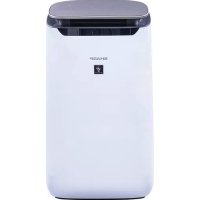



| Product type | Air purifier |
| Brand | SHARP |
| Model | FPJ80EUW |
| Dimensions (W x D x H) | 416 x 291 x 728 mm |
| Weight | 10.6 kg |
| Power supply | 220-240 V, 50/60 Hz |
| Power consumption (MAX/MED/LOW) | 48 W / 28 W / 4.0 W |
| Standby power consumption | 1.3 W |
| Air flow rate (MAX) | 480 m³/h |
| Noise level (MAX) | 47 dBA |
| Recommended room size | Up to 62 m² |
| Area for high-density Plasmacluster ions | ~35 m² |
| Purification technology | Plasmacluster 25000 high-density + Triple filtration (pre-filter, HEPA filter, deodorizing filter) |
| HEPA filter efficiency | Captures 99.97% of particles 0.3 microns |
| Sensors | Dust (sensitive), odor, light, temperature, humidity |
| Operating modes | AUTO, ION SHOWER CLEAN, ION SPOT, SLEEP, manual |
| Timers | Programmable on/off (1, 2, 4, 8 hours) |
| Safety | Child lock, automatic restart after power failure |
| Pre-filter maintenance | Clean with a soft cloth or lukewarm water (soak 10 min) |
| HEPA and deodorizing filter maintenance | Do not wash, gently vacuum dust from the marked surface |
| Filter lifespan | Approximately 10 years after opening |
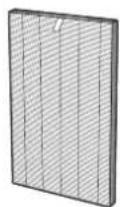
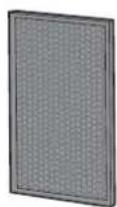
| Replacement parts | HEPA filter (FZ-J80HFX), deodorizing filter (FZ-J80DFX), ion generating unit (IZ-C90MEU) |
| Repairability | Do not repair yourself, contact a Sharp authorized service center |
Frequently Asked Questions - FPJ80EUW SHARP
User questions about FPJ80EUW SHARP
0 question about this device. Answer the ones you know or ask your own.
Ask a new question about this device
Download the instructions for your Air purifier in PDF format for free! Find your manual FPJ80EUW - SHARP and take your electronic device back in hand. On this page are published all the documents necessary for the use of your device. FPJ80EUW by SHARP.
USER MANUAL FPJ80EUW SHARP
"Plasmacluster" and "Device of a cluster of grapes" are trademarks of Sharp Corporation.
HIGH-DENSITY 25000
PL Instrukcja obsługi SI Navodila za uporabo CZ Návod k obsluze SK Návod na použitie HU Használati útmutató LV Lietošanas instrukcija LT Valdymo vadovas ET Kasutamisjuhend RO Manual de utilizare HR Priručnik za upotrebu BG Ръководство за експлоатация UA Інструкція з експлуатації DE Bedienungsanleitung FR Manuel d'utilisation IT Manuale di istruzioni ES Manual de uso NL Bedieningshandleiding EN Operation manual

Air Purifier With Humidifying Function
FP-J80EU / FP-J60EU
TROUBLESHOOTING 12
SPECIFICATIONS 13
PLASMACLUSTER ION ON/OFF
TROUBLESHOOTING 12
SPECIFICATIONS 13

Please read before using the air purifier.
The air purifier draws in room air from the air inlet, circulates it through the pre-filter, deodorizing filter, and HEPA filter, and then discharges the air through the air outlet. The HEPA filter can remove 99.97% of dust particles as small as 0.3 microns and helps absorb odors. The deodorizing filter gradually absorbs odors as they pass through the filter.
PLASMACLUSTER ION DIRECTION MODE
High Density Plasmacluster 25000
PLASMACLUSTER ION ON/OFF
When the Plasmacluster function is turned ON, the Plasmacluster ion lamp lights up. (p. 5)
(When the main unit is turned ON)
ON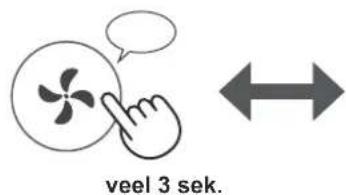
OFF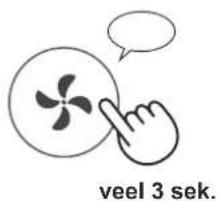
CHANGING DIFFERENT SETTINGS
High Density Plasmacluster 25000
HEPA filter (1 unit) FZ-J80HF
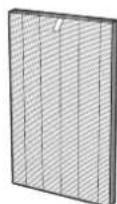
Deodorizing filter (1 unit) FZ-J80DFX
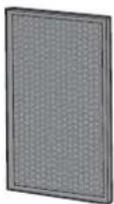
Disposal of filters
Dispose of used filters in accordance with local laws and regulations.
HEPA filter material:
polypropylene · polyethylene
Deodorizing filter material:
Polypropylene · Polyester Activated carbon
Plasmacluster ion generating unit 1
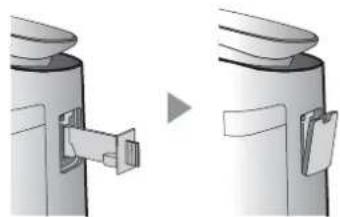
1. Remove the device cover and pull out the holder.
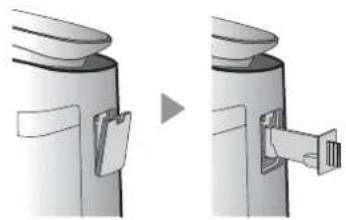
2. Remove dust from the electrode compartment. Cleaning brush
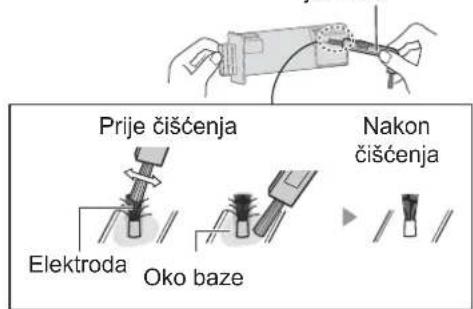
3. Insert the holder into the main unit and replace the cover.
CAUTION
- Clean the device only with the cleaning brush. Otherwise, you may damage the device.
- A bent electrode may crack and fall off during cleaning, but this will not affect performance.
- Do not touch the electrodes directly. Touching the electrodes may cause injury. Do not modify the electrode compartment. Doing so may damage it. Do not touch the contacts. Doing so may damage them.
Plasmacluster Ion Generating Unit 2
UNIT REPLACEMENT INDICATOR
When the total operating time exceeds 17,500 hours, the unit replacement indicator blinks, indicating that the Plasmacluster Ion Generating Unit needs to be replaced.
Operating time
17,500 hours
Blinks slowly
Replace the Plasmacluster Ion Generating Unit
19,000 hours
Flashes quickly
Turn off the Plasmacluster ion discharge.
Plasmacluster ion zone
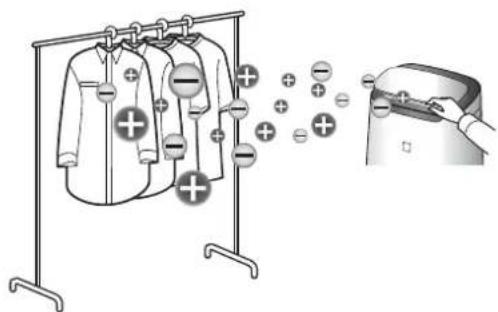
- They are generated when air passes through furniture and curtains, and the ions have a disinfecting effect. The Plasmacluster high-density ion mode is emitted only in the forward direction.
Please, if you have purchased this SHARP air purifier, read this instruction manual carefully before using the product.
Keep it in a safe place for future reference.
CONTENTS
IMPORTANT SAFETY INSTRUCTIONS 2
PART NAMES 4
PREPARATION 6
OPERATION 7
MAINTENANCE / REPLACEMENT …… 10
TROUBLESHOOTING 12
SPECIFICATIONS 13
Thank you for purchasing this air purifier. Please read the instructions carefully before using your new air purifier.
The air purifier draws air through the front opening. The air passes through the pre-filter and then through the HEPA filter in the main module, after which it is released through the air outlet. The HEPA filter can trap 99.97% of dust particles with a diameter of 0.3 microns that pass through the filter, which also helps with the absorption of
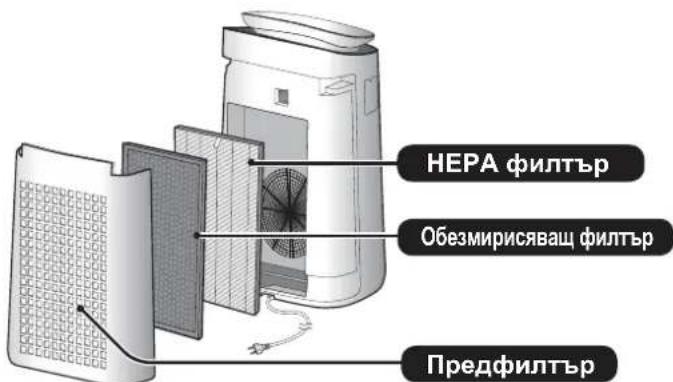
impurities. The pre-filter gradually absorbs impurities that pass through it.
Some impurities, larger than the filter, may be released over time, taking on additional impurities. Depending on the environment, especially when the device is used under extreme conditions, this impurity may become stronger for a shorter time than expected. In case the impurities are retained, the filter must be replaced. (p.11)
CLEANING
The air purifier is intended for removing dust and impurities from the air.
It cannot be used for filtering harmful gases, such as carbon monoxide, which are produced in enclosed spaces.
In case the source of impurities still exists, it is possible that the air purifier will not remove them completely.
When using electrical devices, you must follow the basic safety rules, including:
WARNING - Follow all instructions carefully to avoid the risk of electric shock, fire, or injury.
- Read all instructions.
- Accessories
- Attention
- Attention
- Attention
- This appliance can be used by children aged from 8 years and above and persons with reduced physical, sensory or mental capabilities or lack of experience and knowledge if they have been given supervision or instruction concerning use of the appliance in a safe way and understand the hazards involved. Children shall not play with the appliance. Cleaning and user maintenance shall not be made by children without supervision. If the supply cord is damaged, it must be replaced by the manufacturer, its service agent or similarly qualified persons in order to avoid a hazard. Contact the nearest service center for any problems, adjustments or repairs. Do not attempt to repair or disassemble the appliance without their help.
- When performing maintenance, cleaning, installation or replacement of filters, as well as when the appliance is not used for a long period, make sure you have unplugged it from
- the electrical outlet. Otherwise, there is a risk of short circuit, electric shock or fire.
Do not use the appliance if the power cord or plug is damaged, or if the wall outlet is loose. - Regularly clean the plug. Do not insert fingers or foreign objects into the inlet or outlet openings. - When unplugging from the electrical outlet, pull the plug, not the cord. Otherwise, there is a risk of short circuit, electric shock or fire. - Keep the power cord away from heating appliances. This may cause electric shock, short circuit or fire. Do not pull the cord with wet hands. Do not place the main unit near or on top of hot objects (e.g., stoves or heaters), or in places where it may be exposed to steam. Do not operate the appliance in rooms where aerosols or insecticides have been used, or in the presence of oil, gas, or chemical vapors. Do not place it in rooms with high humidity, e.g., in bathrooms. - Be careful when cleaning the main unit. Do not use cleaning agents that may damage its surface. - Keep the appliance away from water contact. This may cause short circuit or electric shock.
NOTE: Necessary actions in case of interference with radio or television reception caused by the appliance
If the appliance causes interference with radio or television reception, try
the following measures:
Reorient or relocate the receiving antenna.
- Move the appliance farther away from the radio/TV receiver. Plug the appliance into a different electrical outlet than the one used by the receiver.
- Set the volume according to the radio/TV receiver. Turn the volume control to the electrical outlet, different from the gas one, into which the receiver is plugged.
- NotbpcTe cBBeT OT MeCTHnRA TbproBcKn
- PpeDctaBnTeI nII KBaJIuΦnIupaH
- pAnO/TeJIeBn3NoHEn TEXnK.
IPEdynpeKdEHHO THOCHO EKCnloataaHTA
Do not block the air inlet or air outlet. Always operate the appliance in the upright position. Do not move the appliance while it is working. When moving the appliance, use the handles. If the appliance is placed on a surface that may be uneven or soft, it must be lifted when moving. Do not switch on the appliance without a properly installed filter. Never immerse the appliance in water or use it repeatedly. This cannot improve its effectiveness, but may cause electric shock or damage. When cleaning the appliance, use only a dry cloth. Do not use cleaning agents or solvents. The use of abrasive or polishing agents may damage or scratch the surface. Additionally, the sensors may be damaged. Keep the appliance away from water. When cleaning, do not pull the power cord.
INSTALLATION INSTRUCTIONS
- Choose a location where the appliance is placed directly on the floor. This may cause damage.
- Choose a location where furniture, fabrics, or other objects may come into contact with the appliance and affect the incoming or outgoing air flow.
- Avoid using the appliance in places where it may be exposed to condensation or high temperature fluctuations. Suitable operating conditions are at room temperature between 0-35°C.
- Place on a stable surface with sufficient air circulation. If placed on a carpet, the appliance may vibrate.
- Choose a location near where smoke or oil is generated. This may cause damage to the surface or malfunction of the sensors.
- The appliance is effective even when it is 3 cm from the wall. In this case, the nearby wall and floor may become dirty. Keep the appliance away from the wall.
The wall directly behind the appliance may become dirty over time. When using the air purifier for extended periods, clean the walls in its vicinity periodically.
INSTRUCTIONS REGARDING THE FILTER
Follow the instructions in this manual for proper use and maintenance of the filter. (p.11)
BASE MODULE
(FRONT VIEW)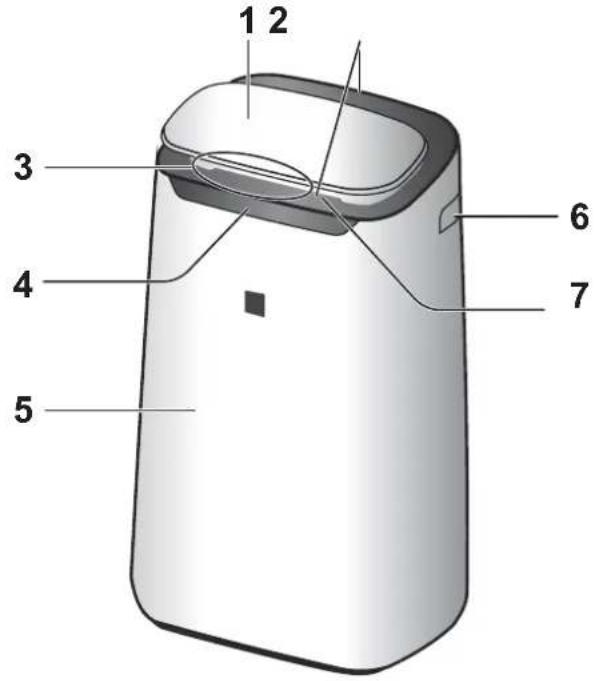
| 1 | Панел за у=npавлике |
| 2 | Въздуно отверсте (otпреД / otЗад) |
| 3 | Монитор за чincота |
| 4 | Прedeи диспей |
| 5 | Осноевен мodyл |
| 6 | Дръжka (нa 2 месда: лява и дясан) |
| 7 | Прedeи Въздунуразимпцеvelно крипо |
| 8 | Заден панел (правдфильtp) |
| 9 | Въздун смухател |
| 10 | О��зирисьаше рильтbp |
| 11 | HEPA рильtp |
| 12 | Сениerteх рильтbp |
| Сениerteх рильтп За мирнима / прах (с виска ч�востbvITEелноct)/ Temпература* Влажноct* (*FP-J80EU) | |
| 13 | Модан* (за reнеригане на Plasmacluster яони) |
| 14 | Дръжka на мodyл* Калak на мodyл* Чека за поочьваны на мodyл* 3axpanваши Кабел, центсян |
(REAR VIEW)
* The term "module" refers to the Plasmacluster Ion generating module.
BG-4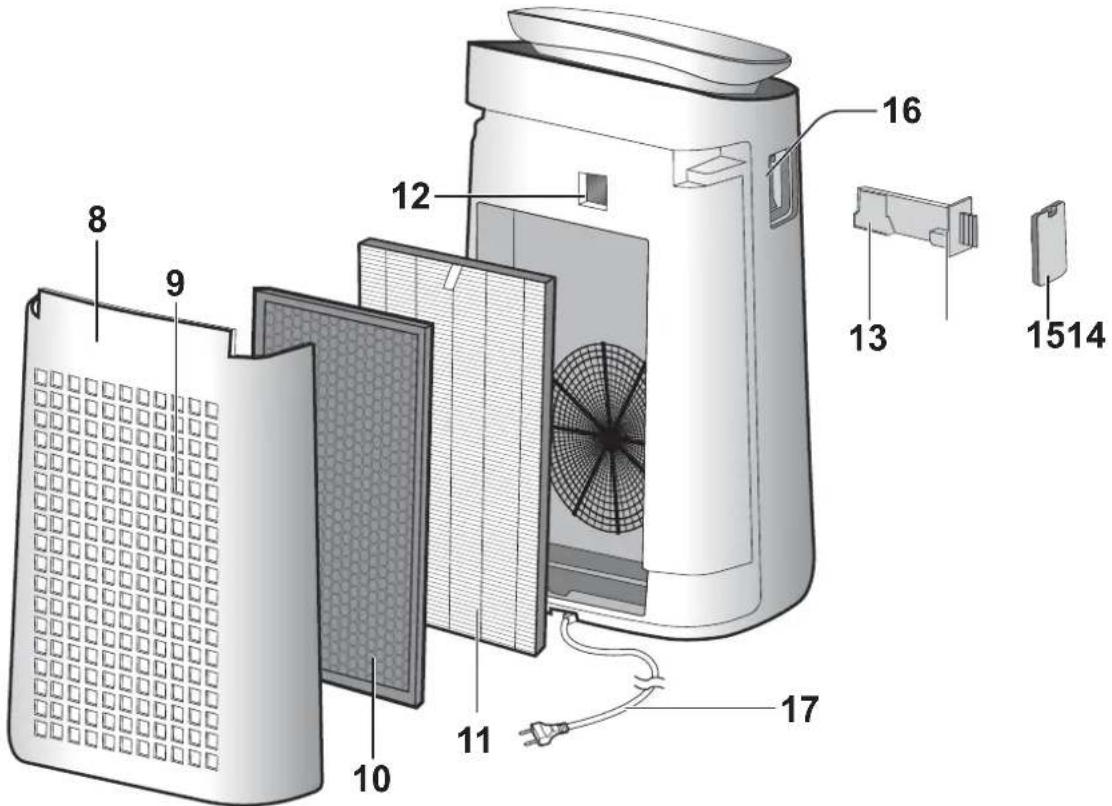
Press the button to start.
CONTROL PANEL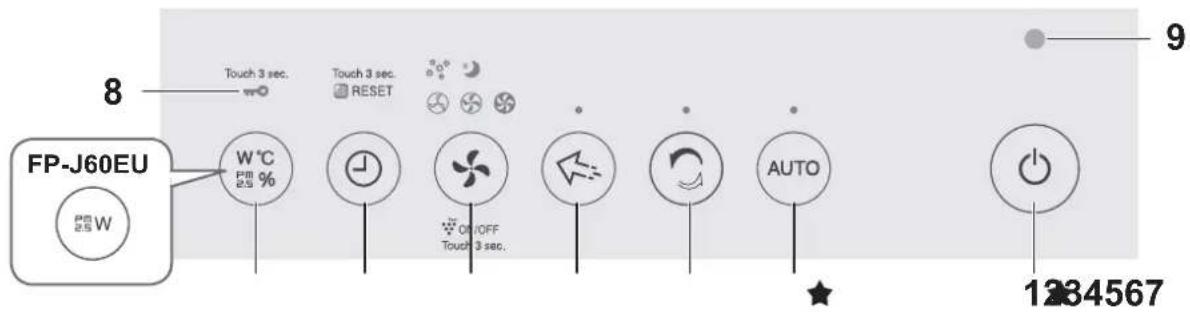
DISPLAY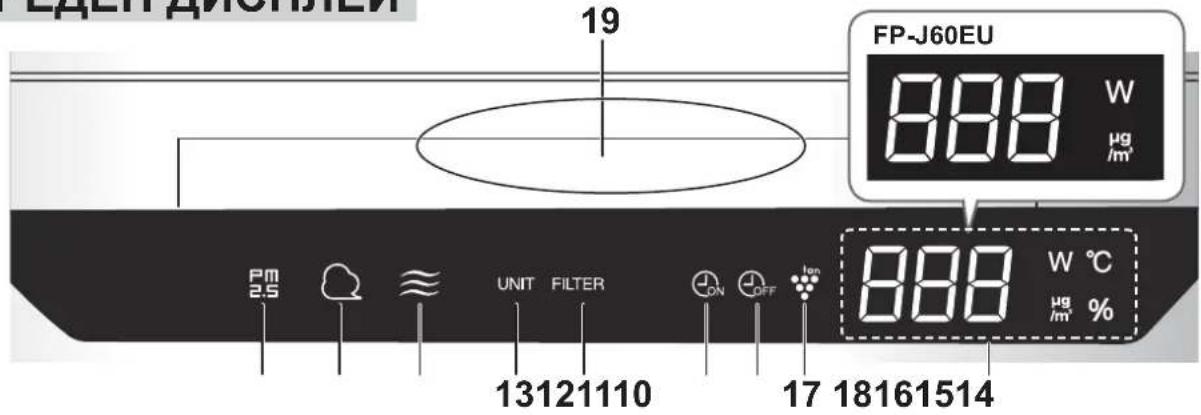
PLASMACLUSTER ION ZONE MODE
This mode is used to remove odors, microbes, and other substances from the air, furniture, or curtains.

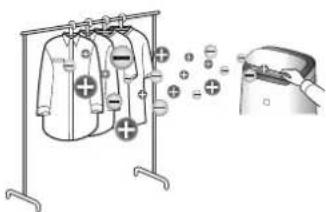
Adjust the airflow direction as desired.
LOCK
- Plasmacluster Ion emits a high density of ions into the air.
- Generates a stronger airflow for about 8 hours. When the operation ends, it automatically returns to the previous setting.
- Plasmacluster ions cannot be
OPERATING MODES

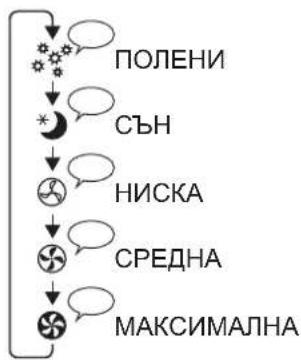
Mode:
In these modes, the fan speed is automatically adjusted depending on the amount of dust in the air and the lighting of the room.
The display and monitor for dust automatically dim and turn off depending on the lighting of the room.
Room is lit: the lights dim
Room is dark: the lights turn off
AUTO:
The sensitivity of the dust sensor automatically increases. In this mode, the device quickly detects dust (like dust particles) and activates high-power air intake.
TIMER FOR SWITCHING ON
Select the desired operating time. After it elapses, the device starts automatically.
Setting in the correct sequence

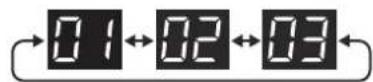
Press
5. Press the button for switching on/off the lock to finish the setting.
Switching off
Setting function
Light control
You can select the brightness level of the display or monitor for clarity.


Exclusion*

Manual

Automatic (by default) The brightness level automatically switches depending on the ambient light in the room.
Dust sensor (with high sensitivity)


High sensitivity sensor


Standard (by default)
LIGHT INDICATOR FOR FILTER MAINTENANCE
The light indicator for filter maintenance activates automatically after approximately 720 hours of operation.
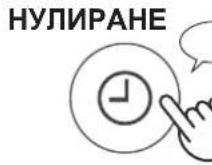

Service reminder when filter maintenance is needed, located on the rear. After you have performed the maintenance, reset the corresponding light indicator.
Reset.
BASE MODULE / REAR PANEL (pre-filter)
Clean with a soft, dry cloth.
Carefully remove dust with a vacuum cleaner, e.g., a dust vacuum.
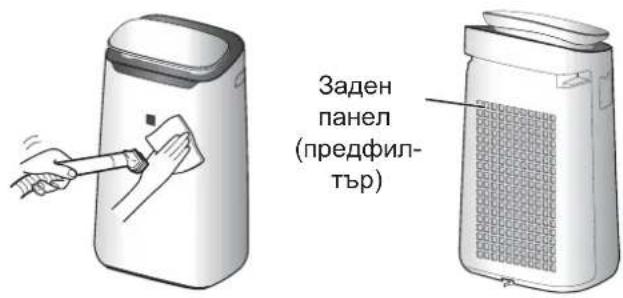
Remove the plug from the socket.
Press the button.
- 10 minutes.
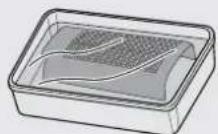
ATTENTION
Do not press the button while the device is in operation.
2. The filter is washed with water. 3. Leave the filter on a clean, dry cloth until it is completely dry.
Sensor
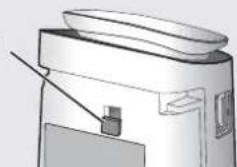
Sensor filter
1. Remove the sensor. 2. Clean the sensor filter. 3. If the sensor filter is heavily soiled, wash it with water and dry it well.
HEPA FILTER / ACTIVATED CARBON FILTER
Replace the filter.
HEPA FILTER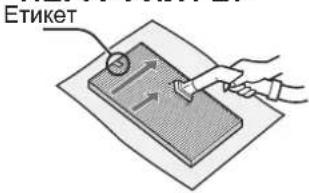
Press the marked side.
The marked side.
The marked side is not for pressing.
Filter the water.
Attention!
Exercise caution.
WARNING
Do not filter. Do not drink.
The water may be unsafe. In case of doubt, consult the manufacturer.
BYPASS FILTER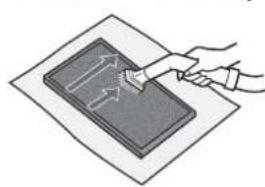
Can be used from both sides.
The filter may be used only if it has been properly maintained. Check it before use.
Check it before use.
The filter element may wear out over time, especially with heavy use. Depending on the operating conditions, especially when used under extreme conditions, the filter element may become less effective sooner than expected.
In such cases, if the filter cannot be cleaned, replace it.
MAINTENANCE
LIFE OF THE FILTER
The service life of the filter varies depending on the operating conditions, the quality of the water used, and the placement of the device. The expected service life of the filter and the bypass filter is calculated based on the use in a standard household, where the water is used for about 5 liters per day, and the filter's capacity is reduced by half compared to a new filter.
If the device is used in a way that significantly deviates from normal household use, we recommend that you have it checked periodically.
Filter:
Designed for one-time use
- Oil filter:
Designed for one-time use
REPLACEMENT
When purchasing a new filter, consult your dealer.
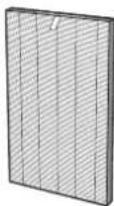
Filter (16 pcs.)
FZ-J80HFX
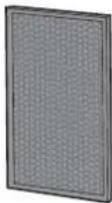
Oil filter (16 pcs.)
FZ-J80DFX
Disposal of the filter
Dispose of used filters in accordance with local laws and regulations.
Filter material:
-Polypropylene -Polyethylene
MAINTENANCE AND REPLACEMENT PERIOD:
The main unit and the filter can be replaced by returning them to us.
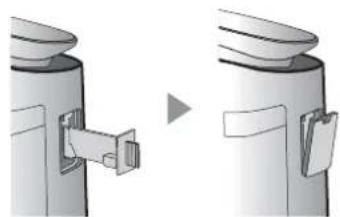
CAUTION
- When cleaning, do not use any tools other than the designated brush. Otherwise, the brush may be damaged. It is possible that during cleaning, the electrodes may be touched or bent, but this will affect the efficiency of the operation. Do not touch the electrodes. This may cause injury/shock. Do not immerse the unit in water. This may cause damage. Do not touch the connection terminals. This may damage them.
Plasmacluster Ion Generating Module
LIGHT INDICATOR FOR REPLACEMENT OF THE PLASMACLUSTER ION GENERATING MODULE
After approximately 17,500 operating hours, the indicator light for replacing the module will begin to flash, indicating that the Plasmacluster Ion generating module needs replacement.
Operating hours
17500 hours

Replace the module
Replace the Plasmacluster Ion generating module.
19000 hours

INTENSIVE REPLACEMENT
Stop the operation of the Plasmacluster Ion generating unit.
- The replacement time is not related to the operating mode.
REPLACEMENT
When purchasing a new module for this model, please consult your dealer.
Model: C90-MEU
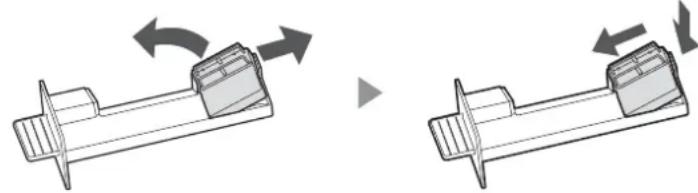
Remove the dust filter (1) and the ion generating unit (2).
Remove the ion generating unit for PlasmaCluster generation.
When disposing of the module, follow local laws and regulations.
Materials:
- Polybutylene terephthalate - electronic components
TROUBLESHOOTING
Before requesting service, please check the following items. If the problem persists, it may not be a malfunction of the product.
The indicator lamp may not turn off.
- Check the filters. Clean or replace them if they are heavily soiled. - Check if the packaging is removed from the filter. (Page 6)
The dust indicator lamp lights up when the air is not clean.
The air may be dirty when the unit is turned on. Turn off the unit, wait a minute, and turn it on again.
The dust indicator lamp lights in red when the air is clean.
The dust filter (with high sensitivity) may be blocked or clogged with dust, which makes its operation difficult. Clean the filter or replace it.
The device emits sound, either to indicate operation or to signal an alarm.
The sound indication or alarm can be turned off from the device during operation.
The released device is supplied with a mains plug.
- Check that the filter is not blocked.
- Clean or replace the filter.
The device does not work when there is a cigarette in the ashtray.
- Make sure the device is placed in a location where it can hold cigarettes.
- Check that the dust filter (with high sensitivity) is not blocked or clogged. If so, clean the filter or replace it.
The new filter is made of foam.
It is possible to replace the lamp or the device directly after unpacking the new packaging. This is not of significant importance for the effectiveness of the filter and does not pose a risk to human health.
The light indicator for filter maintenance is activated.
After each filter maintenance, including connecting the device to the power supply and pressing the filter reset button. (p. 10)
The device is switched off.
When the light control function is set to "Off", the device lights do not function. If you want to turn them on, refer to the "Auto" (automatic mode) or "Darker" (darker) settings. (p. 9)
The monitor for cleanliness changes the color of the screen.
- The cleanliness monitor automatically changes the color when it detects dust (with high sensitivity) and the sensor for dust responds by blinking. If this is not safe, you can change the sensitivity of the sensors. (p.9)
The displayed indication does not match the weather forecast or other hygrometer or thermometer in the room.
External factors in the immediate vicinity (radiators, lamps, etc.) can cause different readings, especially local data. - There are differences in the readings in different parts of the room.
CLEANING THE FILTERS
TECHNICAL SPECIFICATIONS 10
TROUBLESHOOTING 12
(View from behind) UA-4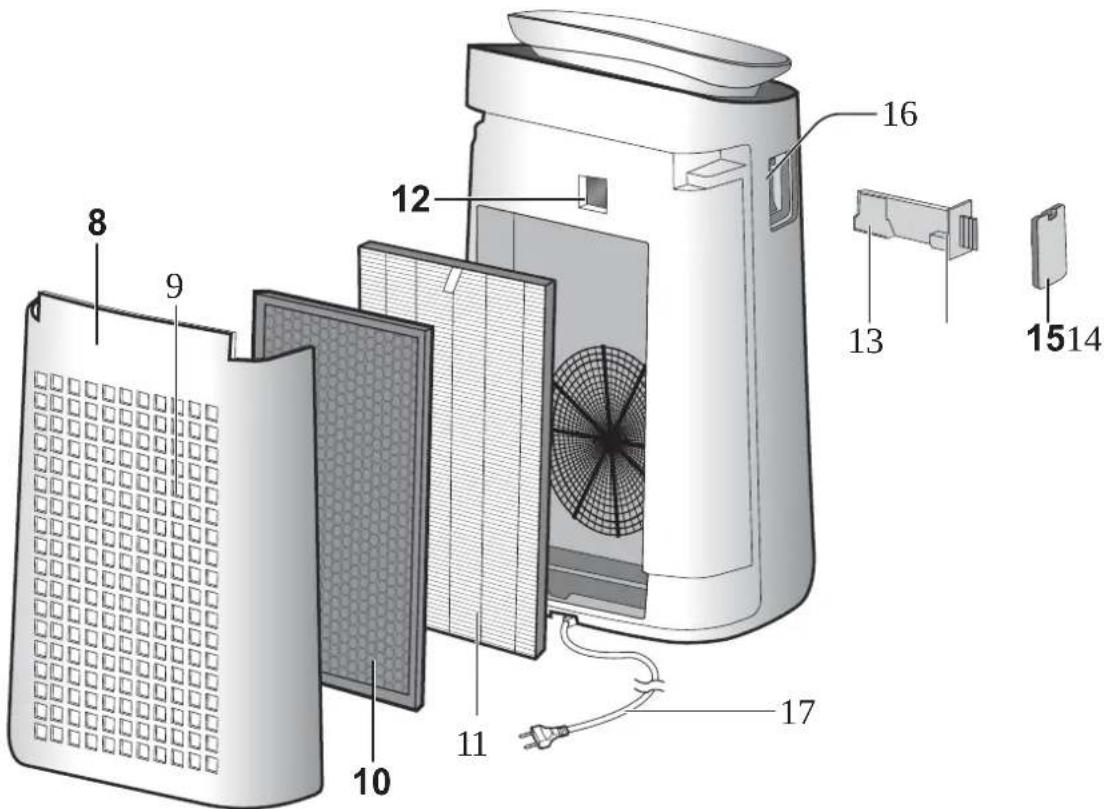
To turn on the device, press the button with the symbol « ★ »
CONTROL PANEL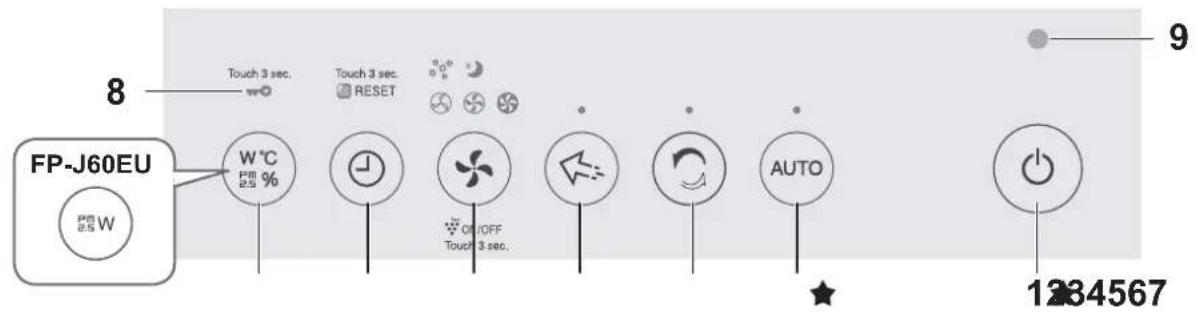
DISPLAY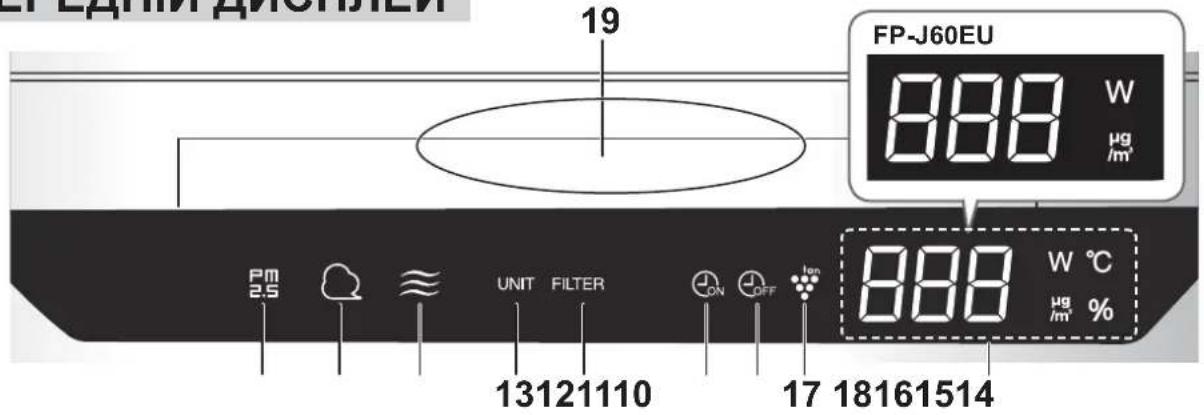
| 1 | Кнорka Вимкачaja Хиньения | 14 | Индikatopdoes any 3a Фльтом |
| 2 | Кнорka AUTO (АВТOMATЧИМ), Иndикатop | 15 | Индikatop taiмера ввимкиения |
| 3 | Кнорka чьстого ioHHORO duшу, iIndikatop | 16 | Индikatop taiмера ввимкиения |
| 17 | Индikatop ioHorehepaTopa Plasmacluster | ||
| 4 | Кнорka рекиму спразмовагоюnotokу ionib Plasmacluster, indikatop | 18 | ДИСПЛЕМ • Иndikatop PM2.5 PM2.5 Biodepaxаe зачehнь BiD 10 MKT/M³ do 499 MKT/M³. 9 MKT/M³ a60 MEnue 34 500 MKT/M³ 500 MKT/M³ a60 MEnue • Иndikatop сponжеванönotyжноcti Biodepaxae сponжевану notyckhiCTb 3a poobomm CTpyMOM. • Иndikatop BOLOROCTI (FP-J80EU) Biodepaxaetbca BoNOricTB BiD 20% do 90%. 20% abo MENue 20 %←55 %←90 %90% a60 6MEnue • Иndikatop TempepaTyprn (FP-J80EU) Biodepaxae зачehнь BiD 0°C do 50°C. -1°C Ch MENue 25 °←H 51°C Ch 6MEnue • Иndikatop taipema Biodepaxae BCTahOBJIeHni 3aIIshKOBni cac taipema BBIMKHHeHry/BVIMKHHeHry. |
| 5 | Кнорka рекиму, indikatop (бiли) | ||
| 6 | Кнорka taiмера (Haticht ha 3 sekydii) Kнорka ckiDAHRA liuMbHKa YAcCy po6otn φiInbTa | ||
| 7 | Кнорka DISPLAY (Диспл律) (Haticht ha 3 sekydii) Kнорka bLOKUBAHNA BID diTei | ||
| 8 | IIndikatop bLOKUBAHNA BID diTei | ||
| 9 | Давач освітlenня | ||
| 10 | IIndikatop PM2.5 Сигналізуpe proTo, lo (BICOKOуТПИВ) daBauch Замел�остi BIVB TOHKOДСперCSHNI ПИ. | ||
| 11 | IIndikatop пилу Сигналізуpe proTo, lo (BICOKOуТПИВ) ceHOCP Замел�osti BIVB 3BvuaHNI ПИ. | ||
| 12 | IIndikatop захів Сигналізуpe proTo, lo (BICOKOуТПИВ) ceHOCN BIMKHEHO OpanJKeBVI YerBoHNI ЧИстNi←→→→→→→→→→→→→→→→→→→→→→→→→→→→→→→→→→→→→→→→→→→→→→→→→→→→→→→→→→→→→→→→→→→→→→→→→→→→→→→→→→→→→→→→→→→→→→→→→→→→→> | ||
| 13 | IIndikatop захін Сигналізуpe proTo, lo daBauch захів BIVB 3anaxn. BIMKHEHO OpanJKeBVI YerBoHNI ЧИстNi←→→→→→→→→→→→→→→→→→→→→→→→→→→→→→→→→→→→→→→→→→→→→→→→→→→→→→→→→→→→→→→→→→→→→→→→→→→→→→> |
INSTALLING THE FILTER
- Remove the back panel.
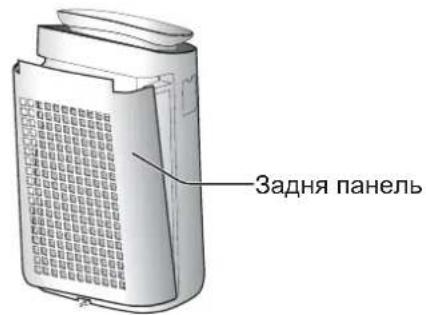
- Remove the plastic bags from all filters.
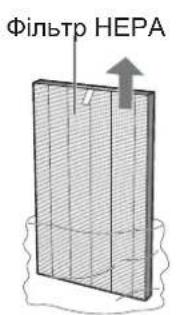
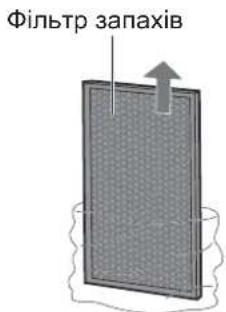
- Insert the filters in the correct order, as shown.

- Set the timer.
START/STOP
START STOP

AUTOMATIC OPERATION
The fan speed is automatically adjusted according to the control parameters. (Humidity (high/low), odor, brightness)

NOTE
- The front panel and the air purity indicator automatically turn on and switch to reduced power mode, depending on the brightness of the room. (When the lighting control is set to automatic mode (page 9)).
CLEAN MODE (IONIC BREEZE)
For about 10 minutes, the main unit emits a gentle Plasmacluster ion breeze with a low airflow and low noise, removing static electricity. The fan speed automatically adjusts according to the degree of contamination, and the unit quickly removes dust and intensively purifies the air for about 50 minutes.

NOTE
- After about 60 minutes in dry mode, the main unit returns to its previous operating mode. During dry mode operation, you can switch to other modes. The Plasmacluster ionizer cannot be turned off.
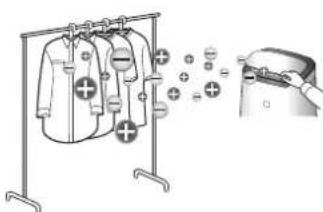
PLASMACLUSTER ION AIRFLOW MODE
This mode is useful for removing odors from the room, such as musty smells and other stubborn odors, microorganisms, and other impurities.

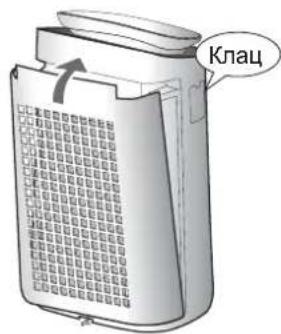
Rotate the front deflector upward.
NOTE
Plasmacluster ion generator in the front panel. - Operates for 8 years after the last air flow. When operation starts, the main unit turns to the previously set operation. The Plasmacluster ion generator cannot be replaced.
OPERATION MODE

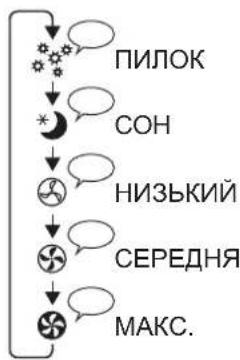
SLEEP:
The main unit operates quietly and automatically changes the fan speed according to the degree of air pollution.
The front panel and the dust indicator automatically switch to reduced brightness mode or turn off, depending on the illumination in the room.
In a bright room: the indicator lights dimly
In a dark room: the indicator turns off.
DUST:
The dust sensor sensitivity automatically increases, allowing the device to quickly detect dust and effectively purify the air.
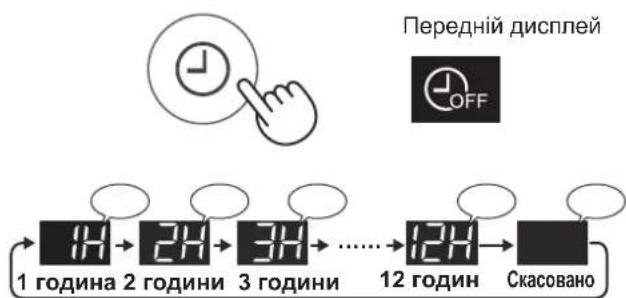
ION GENERATION TIMER
Select the desired duration.
When the set time arrives, the main unit automatically turns off.
(WHEN THE MAIN UNIT IS TURNED OFF)

Front panel


TURN-OFF TIMER
Turn on the power switch.
The main unit will automatically start operating when the power plug is inserted.
(When the main unit is turned on)
Turning on/off the PLASMACLUSTER IONIZER
When the Plasmacluster ionizer is turned on, the Plasmacluster ionizer indicator on the front display lights up. (Page 5)
(When the main unit is turned on)
ON.

OFF.
Press and hold for 3 seconds.
Press and hold for 3 seconds.
How to change the air volume setting
Do not press the operation panel buttons too hard.
2. Press the neutral position with your finger. 3. Dry the filter thoroughly in a well-ventilated place.
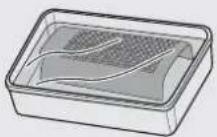
Filter cover
Filter cover
- Remove the front panel. 2. Remove the filter cover.
- The filter cover is attached with brushes; rinse it under water and dry it thoroughly.
HEPA FILTER / CARBON FILTER
Clean the filters from dust.
HEPA FILTER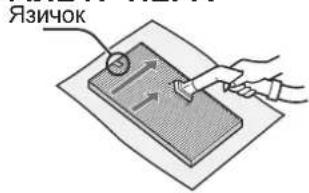
Technical maintenance can only be performed from the side where the control panel is located. Do not tilt it from the opposite side. The filter is fragile, so do not apply excessive force to it.
WARNING
Do not wash the filters. Do not rinse them under running water (they may become unusable).
CARBON FILTER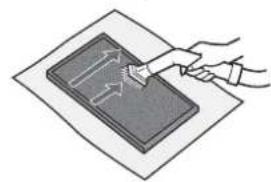
Technical maintenance can be performed from both sides. Do not press too hard; the filter may break, so handle it with care.
Deodorizing filter, when saturated, loses its effectiveness, which leads to the appearance of unpleasant odors. Depending on the operating conditions of the main unit, and especially under extreme conditions (significantly higher than normal household conditions), odors may become noticeable much earlier than expected. Replace the filter in cases where technical maintenance does not allow for its restoration.
FILTER SERVICE LIFE
The service life of the filter depends on the conditions in the room, the mode of use, and the placement of the main unit.
The service life of the HEPA filter and the carbon filter, as well as the recommended replacement intervals, are calculated based on the air exchange in the room where the device operates for 5 cigarettes per day, and over the service life of the main unit, its filtration efficiency decreases compared to a new filter.
If the operating conditions of the main unit are significantly more complex than normal household conditions (PM2.5 too), it is recommended to replace the filter more often.
- HEPA filter:
Replace every 10 years after first use.
-Deodorizing filter:
Replace every 10 years after first use.
REPLACEMENT
When you need to purchase replacement filters, contact your local dealer.
Filter
HEPA (1 pc.)
FZ-J80HFX
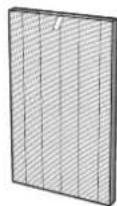
Filter
Deodorizing (1 pc.)
FZ-J80DFX
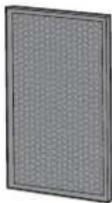
Disposal of filters
Used filters should be disposed of in accordance with national laws and regulations.
HEPA FILTER MATERIAL:
- Insert the ionizing unit into the main unit and install the unit's cover.
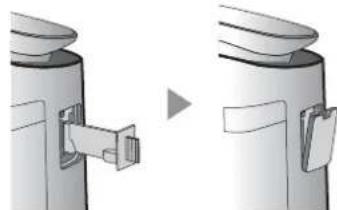
WARNING
- Do not insert the unit with metal objects, except for the unit's specified parts. Otherwise, the unit may fall.
- A bent electrode may break or fall during use, which is not covered by the warranty. Do not touch the electrode directly. It may cause injury.
- Do not modify the structure of the electrode tips. This may lead to their damage. Do not touch the contacts. This may lead to damage.
Plasmacluster Ionizer
REPLACEMENT INDICATOR
After approximately 17,500 hours of cumulative use, the replacement indicator light will illuminate. It indicates the need to replace the Plasmacluster ionizer.
Operating time
17,500 hours

Approximately
Need to replace Plasmacluster ionizer
19,000 hours

Already exceeded
*The replacement time does not depend on the operating mode.
The Plasmacluster ionizer and the filter are dirty.
Model: IZ-C90MEU
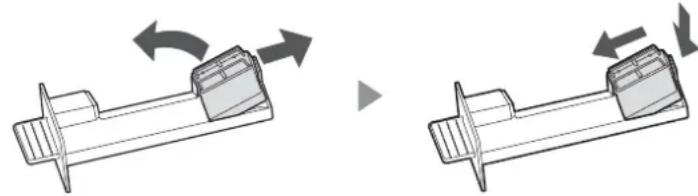
Remove the filter (1) and the Plasmacluster ionizer (2).
Cleaning the Plasmacluster ionizer
The Plasmacluster ionizer should be cleaned in accordance with the laws and regulations of your country.
Materials:
Soft cloth, electronic cleaner
Troubleshooting
Before contacting for repair, please read the following information, as the problem may not be due to a malfunction.
Odors and dirt do not disappear.
- Check the filters. If they are very dirty, clean or replace them.
- Check that the plastic bag has been removed from the filters. (Page 6)
The cleanliness indicator lights up even when the air is clean.
It is possible that the main unit was turned off while the filter was dirty. Turn off the main unit, wait about one minute, and turn it on again.
The filter replacement indicator light comes on when the filter needs to be replaced.
(High-efficiency) filter replacement indicator light comes on because its openings are clogged or dirty. Carefully clean the filter or replace it.
From the main unit, remove the filter cover.
The filter cover may be difficult to remove if the main unit is dirty.
The air coming out of the main unit has a specific smell.
- Check that the filter is not heavily clogged. Clean or replace the filter.
The main unit does not work when the air contains cigarette smoke.
- Check that the main unit is installed in a place where cigarette smoke may be present.
- Check the (high-efficiency) filter replacement indicator openings: possibly they are clogged or dirty. If they are clogged or dirty, clean the filter or replace it.
Smell from a new filter.
- Immediately after unpacking from the plastic bag, the filter may have a slight smell. This smell is not harmful to the filter or to health.
The filter replacement indicator light comes on to indicate the filter's operating time.
To perform technical maintenance and replace filters, first unplug the power cord and press the filter replacement indicator reset button. (Page 10)
Check the display.
- If the backlight is switched to "Off", the indicator will not light up. If you do not need the indicator, set the backlight to "Auto" or "Dim". (Page 9)
The indicator automatically changes color.
- The dirt indicator automatically changes color when the dust collection amount (high concentration) and the odor collection amount are high. If you are not satisfied with the change, you can change the sensitivity of the indicator. (Page 9)
The information on the display of the main unit does not match the readings of the thermometer or hygrometer installed in the room.
- Operating conditions (temperature, intensity of air flow, number of surfaces in the room, etc.) may cause the readings of the device to differ from these data.
- Different rooms have different temperatures and humidity.
TROUBLESHOOTING
| U3 | • 3menшуевся концentраця ioHIB Plasmacluster. →ПробедiTTextичne обсCityobvBaHHa ioni3atopaplasmacluster (BicciKy eJekTroDIB). | C1 C4 C5 C8 | • ВIMKHITb roJOBHn 6IOK, noJeKaIte odHy XBIIHNu Ta BBIMKHITb IJoro 3HOBy. |
| E9 | •Чи павильно BCTablenho ioHi3atop Plasmacluster? →ВиимiTb ioHi3atop Plasmacluster i ce pa3 BCTaBTe IJoro до KINca, a ToDi nobTopitb onepaizio. | ||
SPECIFICATIONS
| Модаль FP-J80EU FP-J60EU | ||||||
| Джереньartzivchenny 220-240 B 50-60 Гц | ||||||
| Налашуваши难得 поcodуковиности вентлиатора MAKC. CEPEДнЯ HN3ык MAKC. CEPEДня HN3ык | ||||||
| Пробденистов вентлиаторa, M³/юd 480 288 60 396 22 60 | ||||||
| Ровеншиму, дБА | 47 | 45 | 15 | 43 | 40 | 15 |
| Hominaьна потужнист, Вт | 48 | 28 | 4,0 | 38 | 18 | 3,6 |
| Стохиная[eheprii] в рекIMI очikubань, Вт | 1,3 | 1,2 | ||||
| Рекомендана пioona等相关ддяпсшимлелемп, M²*2 | прибл. 62 | прибл. 48 | ||||
| Рекомендана пioona等相关ддяз actocуваши ioniizatopa Plasmacluster 3 BISOKOJO KOHentpauciil ionih, M²*2 | прибл. 35 | прибл. 26 | ||||
| Довшинашиhya, М | 2,0 | |||||
| Розмірі, мм | 416 (Ш) × 291 (Г) × 728 (В) | |||||
| Maca, кг | 10,6 | 10,0 | ||||
1 - Recommended floor area for the main unit with maximum productivity of the fan. - Recommended floor area is the floor area where the device can remove dust particles within 30 minutes. (JEM1467) 2 - Floor area where the concentration of dust in the air is approximately 25000 particles/cubic cm at a height of about 1.2 meters above the floor, when the device is operated at standard power and with medium fan productivity.
Power consumption in standby mode
When the plug is inserted into the outlet, the main unit consumes power for the operation of the electrical circuits in standby mode. To save electricity, when the main unit is not in use, unplug it from the outlet.
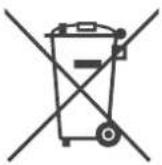

Note: This device is marked with this symbol. This means that the electrical and electronic equipment must not be disposed of with ordinary household waste. There is a separate collection system for their recycling.
High Density Plasmacluster 25000
FILTER INSTRUCTIONS
PLASMACLUSTER IONS MODE
PLASMACLUSTER IONS ON/OFF
- Polypropylene - Polyethylene
PLASMACLUSTER ION SPOT MODE
PLASMACLUSTER IONS ON/OFF
High Density Plasmacluster 25000
PLASMACLUSTER ION SPOT MODE
PLASMACLUSTER IONS ON/OFF
OFF 3 sec. longer 3 sec. longer
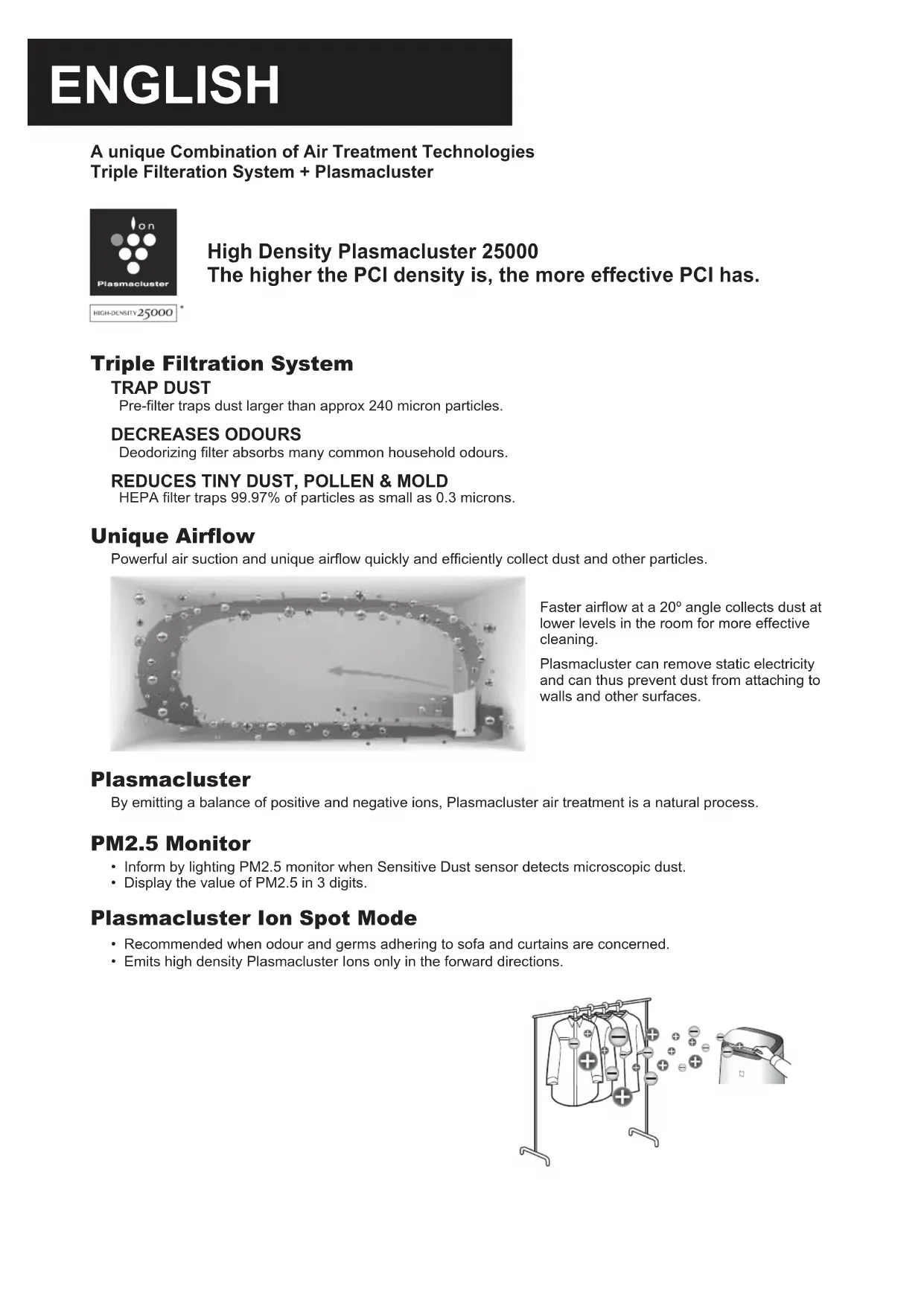
A unique Combination of Air Treatment Technologies
Triple Filtering System + Plasmacluster

HIGH-DENSITY 25000
High Density Plasmacluster 25000
The higher the PCI density is, the more effective PCI has.
Triple Filtration System
TRAP DUST
Pre-filter traps dust larger than approx 240 micron particles.
DECREASES ODOURS
Deodorizing filter absorbs many common household odours.
REDUCES TINY DUST, POLLEN & MOLD
HEPA filter traps 99.97% of particles as small as 0.3 microns.
Unique Airflow
Powerful air suction and unique airflow quickly and efficiently collect dust and other particles.
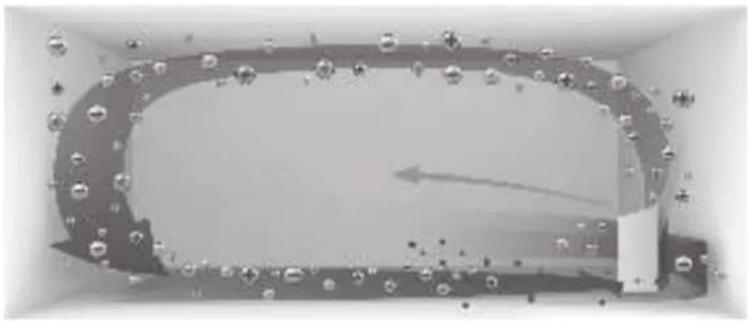
Faster airflow at a 20° angle collects dust at lower levels in the room for more effective cleaning.
Plasmacluster can remove static electricity and can thus prevent dust from attaching to walls and other surfaces.
Plasmacluster
By emitting a balance of positive and negative ions, Plasmacluster air treatment is a natural process.
PM2.5 Monitor
- Inform by lighting PM2.5 monitor when Sensitive Dust sensor detects microscopic dust.
- Display the value of PM2.5 in 3 digits.
Plasmacluster Ion Spot Mode
- Recommended when odour and germs adhering to sofa and curtains are concerned.
- Emits high density Plasmacluster ions only in the forward directions.
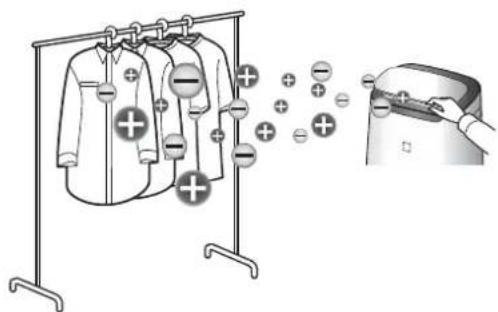
Thank you for purchasing this SHARP Air Purifier.
Please read this manual carefully before using the product.
This manual should be kept in a safe place for handy reference.
CONTENTS
IMPORTANT SAFETY INSTRUCTIONS 2
PART NAMES 4
PREPARATION 6
OPERATION 7
CARE AND MAINTENANCE / REPLACEMENT 10
TROUBLESHOOTING 12
SPECIFICATIONS. 13
Please read before operating your new Air Purifier
The air purifier draws in room air through the air intake, circulates it through a Pre-Filter, a Deodorizing Filter and a HEPA Filter inside the main unit, and then discharges it through the air outlet. The HEPA Filter can remove 99.97% of dust particles as small as 0.3 microns that pass through the filter and also helps absorb odours. The Deodorizing Filter gradually absorbs odours as they pass through the filter.
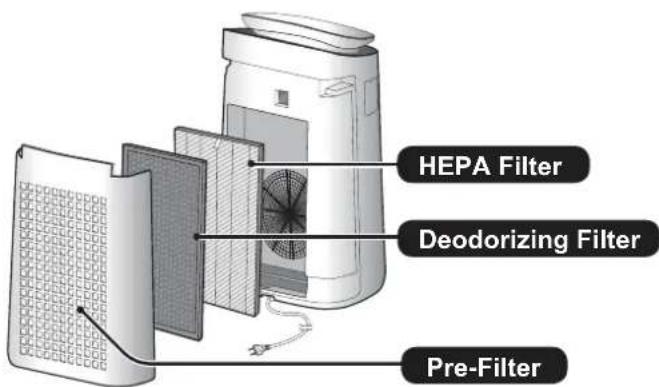
Some odours absorbed by the filters will break down over time, causing additional odours. Depending on usage conditions, and especially if the main unit is used in environments significantly more severe than a normal household, these odours may become noticeable sooner than expected. If these odours persist, replace the filters. (page 11)
NOTE
The air purifier is designed to remove air-suspended dust and odours. It is not designed to remove harmful gases such as carbon monoxide contained in cigarette smoke. The air purifier may not completely remove an odour if the source of the odour is still present.
Always follow basic safety precautions when using electrical appliances, including the following:
WARNING - Always observe the following to reduce the risk of electrical shock, fire, or injury:
- Read all instructions before using the main unit.
- Use only a 220 - 240 volt outlet.
- This appliance can be used by children aged from 8 years and above and persons with reduced physical, sensory or mental capabilities or lack of experience and knowledge if they have been given supervision or instruction concerning use of the appliance in a safe way and understand the hazards involved. Children shall not play with the appliance. Cleaning and user maintenance shall not be made by children without supervision.
- If the power cord is damaged, it must be replaced by the manufacturer, its service agent, a Sharp authorized Service Centre or similarly qualified persons in order to avoid a hazard. Contact the nearest Service Centre for any problems, adjustments, or repairs.
- Do not repair or disassemble the main unit yourself.
- Be sure to remove the power plug, before performing maintenance, when removing and attaching and replacing the filter and when not using for a long time. Failure to do so can cause a short circuit resulting in electrical shock or fire.
- Do not use the main unit if the power cord or plug is damaged or if the connection to the wall outlet is loose. Periodically remove dust from the plug.
- Do not insert fingers or foreign objects into the air intake or air outlet.
- When removing the power plug, always hold the plug and never pull on the cord. Failure to do so can cause a short circuit resulting in electrical shock or fire.
- Be careful not to damage the power cord, it may cause electric shock, excess heat or fires.
- Do not remove the plug when your hands are wet.
- Do not place the main unit near or on hot objects, such as stoves or heaters, or where it may come into contact with steam.
- Do not operate the main unit in rooms where aerosol insecticides are present. Do not operate the main unit in rooms where there is oily residue, incense, sparks from lit cigarettes, or chemical fumes in the air. Do not operate the main unit in places where it may get wet, such as a bathroom.
- Be cautious when cleaning the main unit. Strong corrosive cleansers can damage the exterior.
- Do not expose the main unit to water. Doing so can cause a short circuit or electrical shock.
NOTE - What to do if the main unit interferes with radio or TV reception
If the air purifier interferes with radio or television reception, try one or more of the following measures:
- Adjust or reposition the receiving antenna.
- Increase the distance between the main unit and the radio or TV.
- Connect the equipment into an outlet on a circuit different from that of the radio or TV receiver.
- Consult the dealer or a qualified radio or TV technician.
CAUTIONS CONCERNING OPERATION
- Do not block the air intake or air outlet. Always operate the main unit in an upright position.
- Do not move the main unit when it is in operation.
- When moving the main unit, use the handles on both sides.
- If the main unit is on easily damaged flooring, an uneven surface, or thick-piled carpet, lift it up when moving.
- Do not operate the main unit without the filters properly installed.
- Do not wash and reuse the HEPA filter and the Deodorizing filter. Doing so will not improve filter performance and can also cause electric shock or operating malfunctions.
- Clean the exterior with a soft cloth only. Do not use volatile fluids or detergents. The main unit surface may be damaged or cracked with Benzine, paint thinner or polishing powder. In addition, the sensors may malfunction as a result.
- Keep the main unit away from water.
- Do not scrub the Back Panel hard during its maintenance.
INSTALLATION GUIDELINES
- Avoid locations where the sensors are exposed to direct wind. Doing so can cause the main unit to malfunction.
- Avoid locations where furniture, fabrics, or other objects can come in contact with the main unit and interfere with the intake and outtake of air.
- Avoid locations where the main unit is exposed to condensation or drastic changes in temperature. Appropriate room temperature is between 0 - 35°C.
- Place the main unit on a level and stable surface with sufficient air circulation. When placed on heavy carpet, the main unit may vibrate slightly.
- Avoid locations that generate grease or oily smoke.
- Doing so can cause the main unit exterior to crack and the sensors to malfunction.
- The dust collecting ability of the main unit is effective even when the main unit is as close to 3 cm from the wall, the surrounding walls and floor may get dirty. Please place the main unit at a distance from the wall.
The wall directly behind the air outlet may become dirty over time. When using the main unit for an extended period of time at the same location, periodically clean the walls adjacent to it.
FILTER GUIDELINES
- Follow the instructions in this manual for proper filter care and maintenance. (page 11)
MAIN UNIT
(FRONT)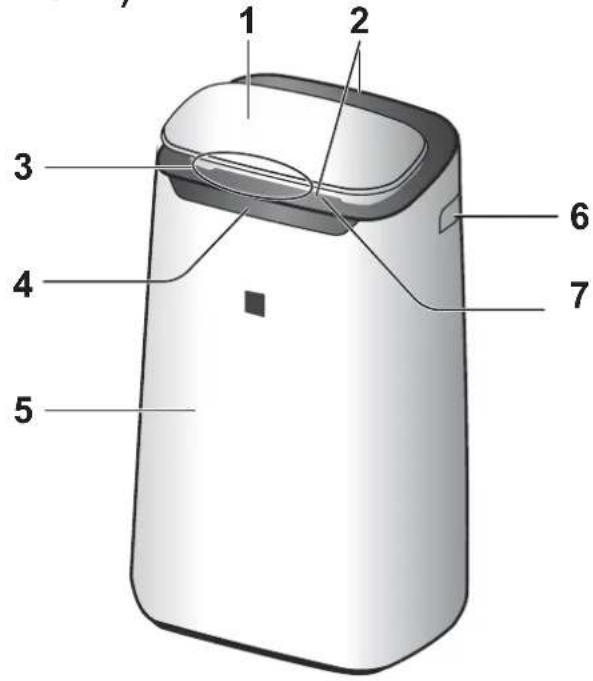
| 1 | Operation Panel |
| 2 | Air Outlet (Front / Back) |
| 3 | Cleanliness Monitor |
| 4 | Front Display |
| 5 | Main Unit |
| 6 | Handle (2 locations: Left and Right) |
| 7 | Front Louver |
| 8 | Back Panel (Pre-Filter) |
| 9 | Air Inlet |
| 10 | Deodorizing Filter |
| 11 | HEPA Filter |
| 12 | Sensor Filter Sensor (Internal) Odour / Dust (sensitive) / Temperature* / Humidity* (* FP-J80EU) |
| 13 | Unit* (Plasmacluster Ion Generating Unit) |
| 14 | Unit* Holder |
| 15 | Unit* Cover |
| 16 | Unit* Cleaning Brush |
| 17 | Power Cord, Plug |
- The Unit refers to Plasmacluster Ion Generating Unit.
(BACK) EN-4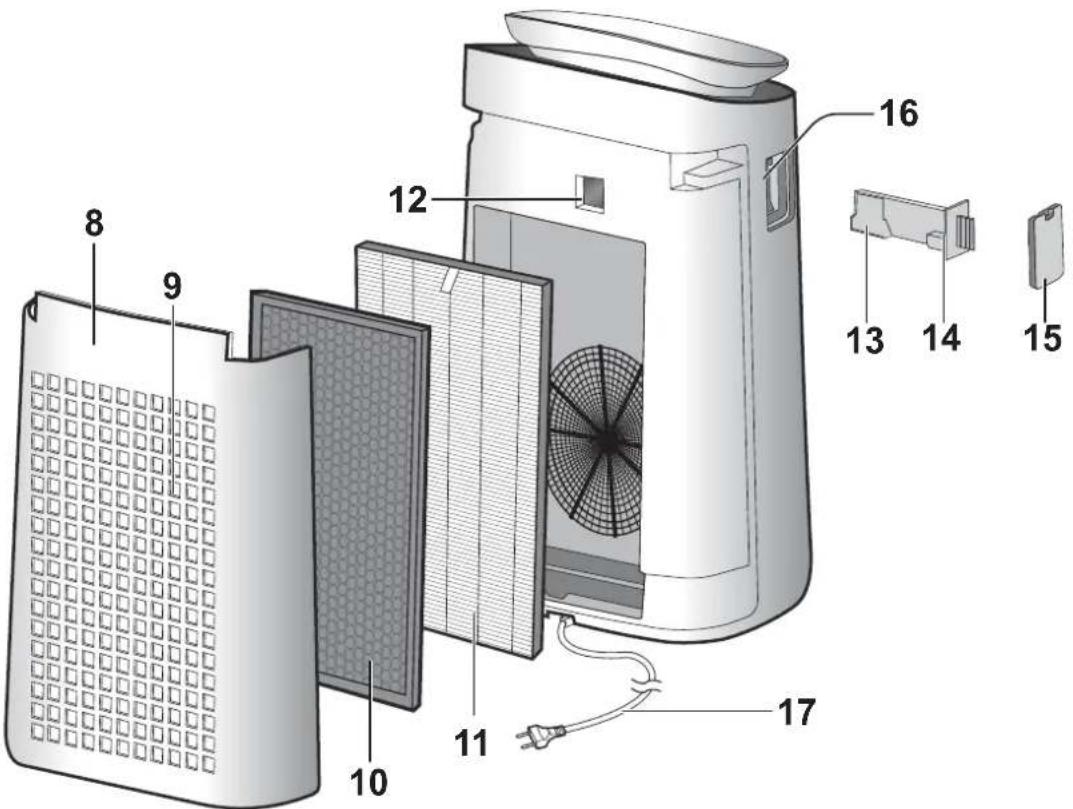
Press the button with “ ” to start.
OPERATION PANEL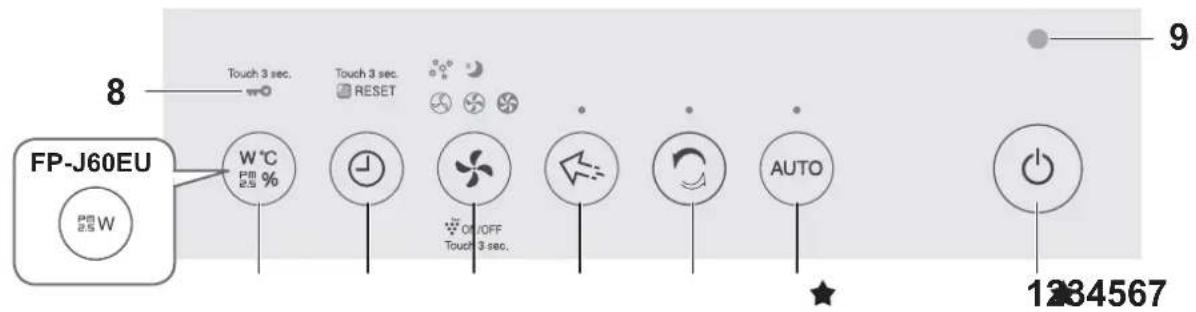
FRONT DISPLAY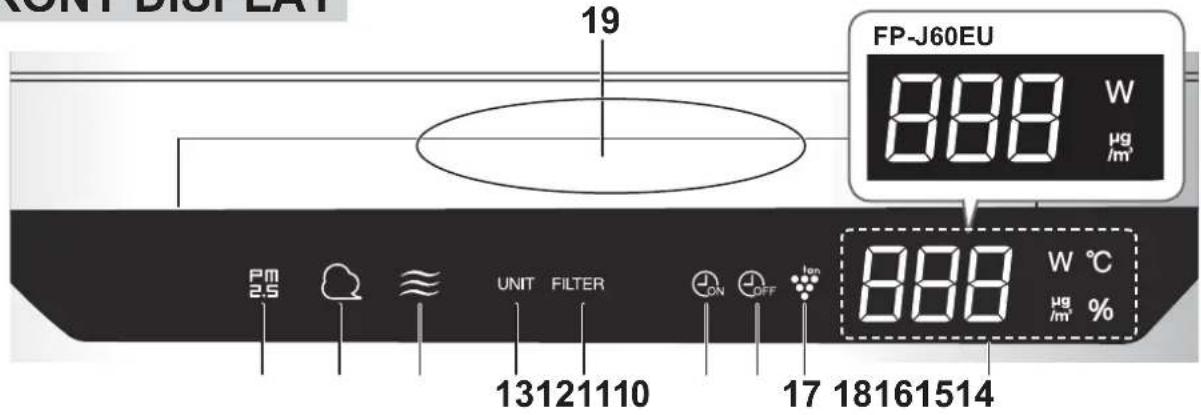
| 1 | Power ON/OFF Button | 14 | Filter Maintenance Indicator Light |
| 2 | AUTO Button, Indicator Light | 15 | ON Timer Indicator Light |
| 3 | CLEAN ION SHOWER Button, Indicator Light | 16 | OFF Timer Indicator Light |
| 17 | Plasmacluster Ion Light | ||
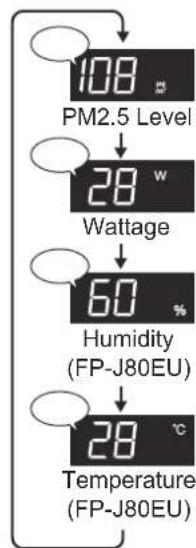
| 4 | Plasmacluster Ion SPOT Button, Indicator Light | 18 | DISPLAY •PM2.5 Monitor PM2.5 10μg/m3to 499μg/m3is displayed. 9μg/m3or less ⇌34 ⇌H ⇌500μg/m3or more •Wattage Monitor Indicates wattage by current operation. •Humidity Monitor (FP-J80EU) Humidity 20% to 90% is displayed. 20% or less ⇌55 ⇌90% or more •Temperature Monitor (FP-J80EU) Temperature 0oC to 50oC is displayed. -1°C or less ⇌25 ⇌H ⇌51°C or more •Timer Monitor Indicates setting time or remaining time of ON/OFF timer. |
| 5 | MODE Button, Indicator Light | ||
| 6 | Timer Button (Press 3 sec.) FILTER RESET Button | ||
| 7 | DISPLAY Button (Press 3 sec.) CHILD-LOCK Button | ||
| 8 | Child-Lock Indicator Light | ||
| 9 | Light Sensor | ||
| 10 | PM2.5 Monitor Indicates the Dust (sensitive) Sensor detects microscopic dust. | ||
| 11 | Dust Monitor Indicates the Dust (sensitive) Sensor detects usual dust. | ||
| 12 | Odour Monitor Indicates the Odour Sensor detects odours. | 19 | Cleanliness Monitor Indicates the air purity of the room in 5 levels with colour changes. Blue Clean Red Impure |
| 13 | Unit Replacement Indicator Light |
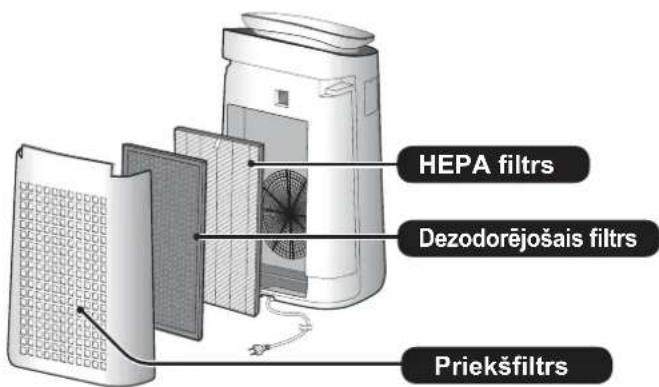
FILTER INSTALLATION
- Remove the Back Panel.
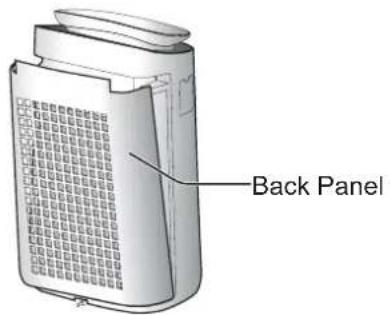
- Remove the plastic bag from the each filter.
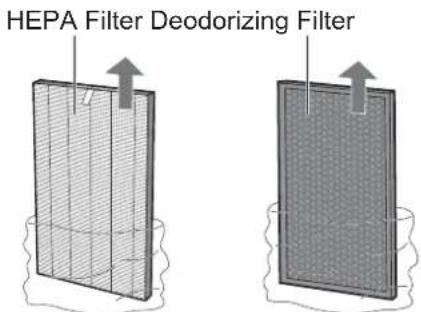
- Install the filters in the correct order as shown.
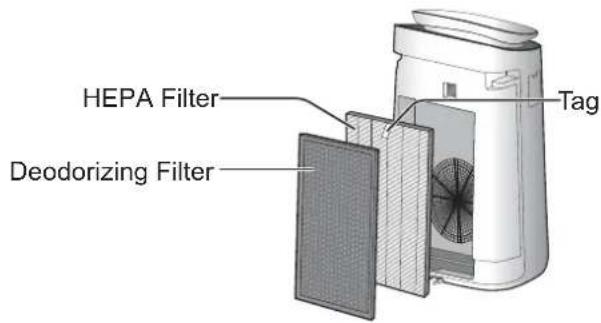
- Install the Back Panel.
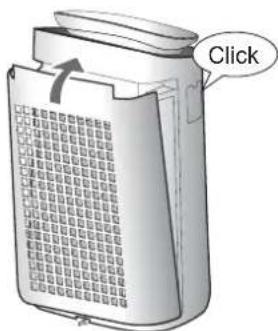
START/STOP
START STOP
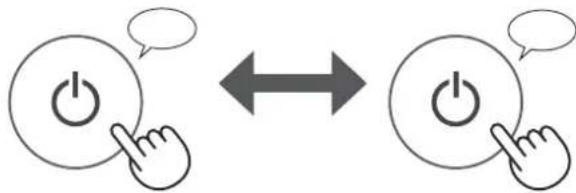
AUTO MODE
The fan speed is automatically controlled depending on the 3 detection. (Dust (sensitive) / Odour / Light)

NOTE
- Front Display, Cleanliness Monitor automatically switch ON and Darker based on room brightness. (When light control is set to "Auto". (page 9))
CLEAN ION SHOWER MODE
The main unit releases Plasmacluster ions with strong airflow and collects dusts while decreasing static electricity for 10 minutes. After that, the DUST sensor sensitivity is automatically increased and quickly detects impurities and clean the air powerfully for 50 minutes.

NOTE
- When the operation finishes after 60 minutes, the main unit will return to the prior operation mode. It is able to change the other mode during this mode.
- The Plasmacluster Ion can not be turned "OFF".
PLASMACLUSTER ION SPOT MODE
Use this mode when you want to remove adhering odour, germs, and other substances from cloths, sofas and curtains.

Adjust Front Louver manually.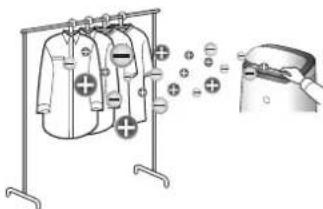
NOTE
- Emits high-density Plasmacluster Ions only in the forward direction.
- Discharges stronger air for 8 hours. When the operation finishes, the main unit will return to its prior operation mode.
- The Plasmacluster Ion cannot be turned "OFF".
SELECTING MODE

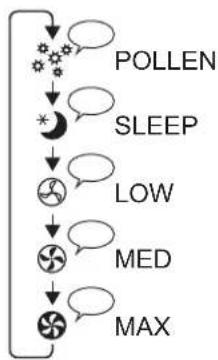
SLEEP:
The main unit will operate quietly, and the fan speed is automatically switched depending on the amount of impurities in the air and room brightness. The Front Display and Cleanliness Monitor automatically switches darker or OFF based on room brightness.
Room is bright: light is darker. Room is dark: light is OFF.
POLLEN:
The DUST SENSOR sensitivity is automatically increased and quickly detects impurities such as dust and pollen and cleans the air powerfully.
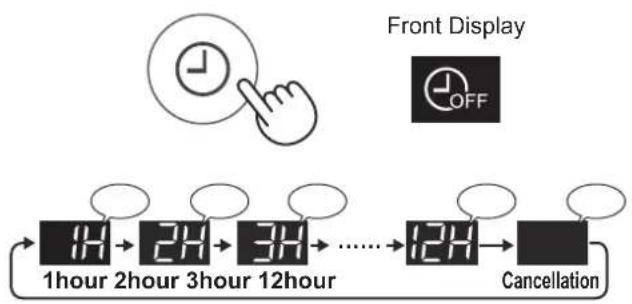
ON TIMER
Select the length of time you want. The main unit automatically starts once the selected time has passed.
(with the main unit OFF)
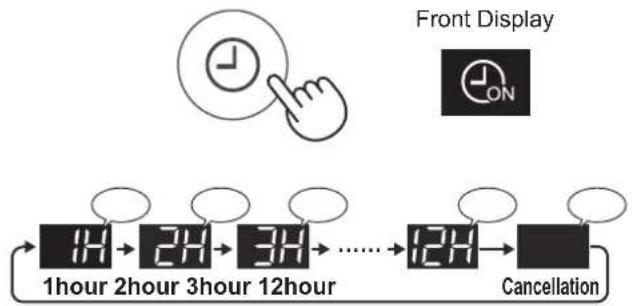
OFF TIMER
Select the length of time you want. The main unit automatically stops once the selected time is reached.
(with the main unit ON)
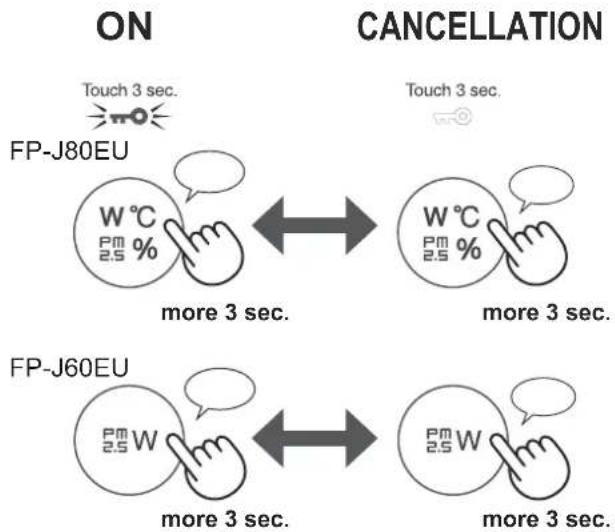
CHILD LOCK
The operation panel will be locked.
SELECTING DISPLAY
(with the Main Unit ON)
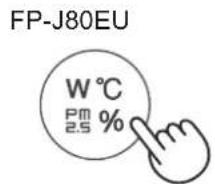
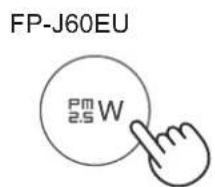
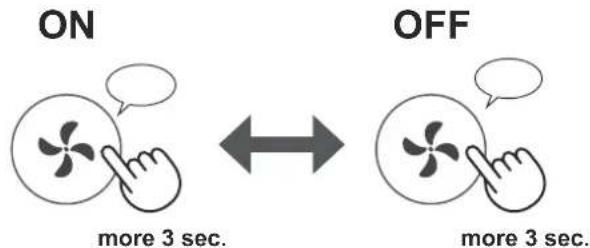
PLASMACLUSTER ION ON/OFF
When the Plasmacluster function is ON, the Plasmacluster Ion light is on. (page 5)
(with the Main Unit ON)
HOW TO CHANGE VARIOUS SETTINGS
You can change the functions listed in the table below.
- Turn the Main Unit power OFF.
2.
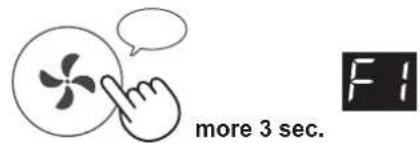
- Select "Function number".
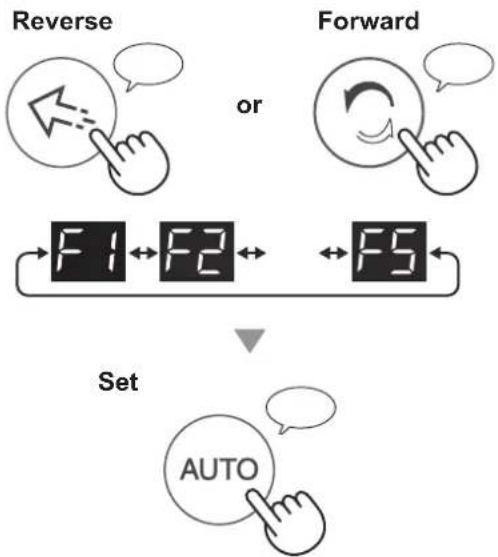
- Select "Setting number".
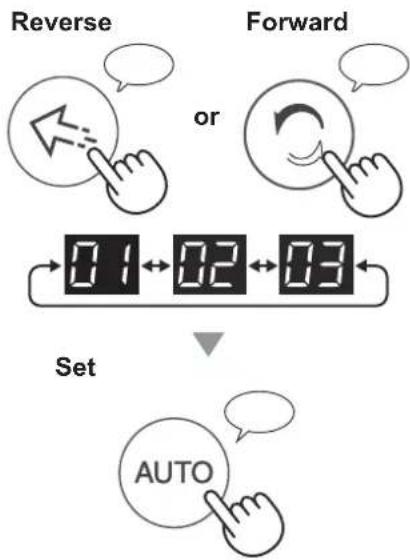
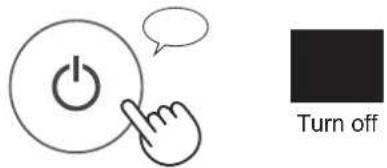
- Press Power ON/OFF Button to finish the setting.
| Function Setting | |||
| Light Control You can select the brightness of the Front Display and Cleanliness Monitor. | Turn off* Darker Auto (default) Light automatically switches based on room brightness. | ||
| Room brightness | Front Display and Cleanliness Monitor | ||
| ALL MODE (Except SLEEP) | SLEEP MODE | ||
| Bright ON | Darker | ||
| Dark Darker | Turn off | ||
| Auto Restart If the Main Unit is unplugged or if there is a power failure, the Main Unit will resume operation with the previous settings after power is restored. | Cancellation ON (default) | ||
| Adjusting Sensor Sensitivity (F3-F5) Light Sensor | Low | ||
| Dust (sensitive) Sensor | Standard (default) | ||
| Odour Sensor | High | ||
- When set to "Turn off", the "Darker" light illuminates for 8 seconds after operation starts and then the light turns off.

FILTER MAINTENANCE INDICATOR
The Filter Maintenance Indicator Light will turn on after approximately 720 hours of operation.

This is a reminder to perform maintenance on the back panel (pre-filter). After maintenance, reset the Filter Maintenance Indicator Light.
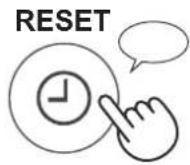
Press for more than 3 seconds.
MAIN UNIT / BACK PANEL (Pre-Filter)
Wipe with a dry, soft cloth.
Remove dust gently with a cleaning tool such as a vacuum cleaner.
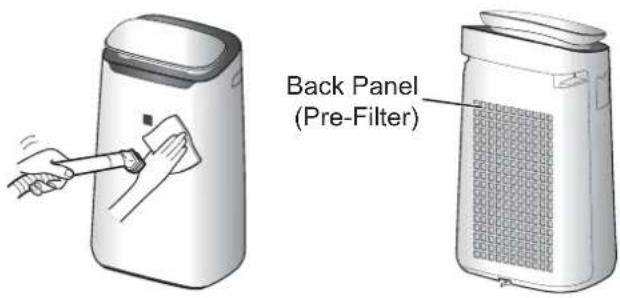
NOTE: How to clean hard-to-remove dirt.
Back Panel
- Add a small amount of neutral detergent to water and soak for about 10 minutes.
CAUTION
Do not apply excessive pressure when scrubbing the back panel.
- Rinse off the neutral detergent with clean water.
- Completely dry the filter in a well-ventilated area.
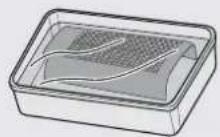
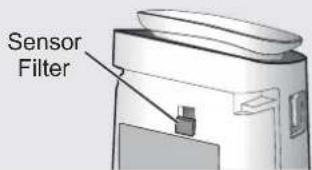
Sensor Filter
- Remove the back panel.
- Remove the sensor filter.
- If the sensor filter is very dirty, wash it with water and dry it thoroughly.
HEPA FILTER / DEODORIZING FILTER
Remove the dust on the filters.
CAUTION
Do not wash the filters. Do not expose to sunlight. (Otherwise these filters may lose efficacy.)
HEPA FILTER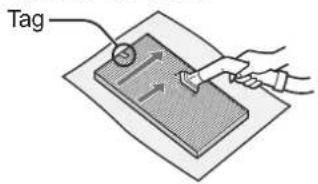
Maintain only the tagged surface. Do not clean up the opposite surface. The filter is fragile, so be careful not to apply too much pressure.
DEODORIZING FILTER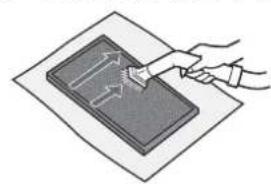
Both surfaces can be maintained. The filter may be broken if too much power is applied on it, so please handle it with care.
Some odours absorbed by the filters will break down over time, causing additional odours. Depending on usage conditions, and especially if the Main Unit is used in environments significantly more severe than a normal household, these odours may become noticeable sooner than expected.
Replace the filter in those cases or if dust is unable to be removed after maintenance.
LIFE OF FILTERS
Filter life varies depending on the room environment, usage conditions, and location of the Main Unit.
Lifespan of HEPA filter and Deodorizing filter and replacement suggestions are based on purifying a room in which 5 cigarettes are smoked per day and the Main Unit's dust collection and deodorizing performance has declined to half the level of a new filter.
We recommend replacing the filter more frequently if the Main Unit is used in conditions significantly more severe (PM2.5 etc.,) than a normal household.
HEPA Filter:
About 10 years after opening
- Deodorizing Filter:
About 10 years after opening
REPLACEMENT
Consult your dealer when purchasing a replacement filter.
Disposing of filters
Dispose of used filters according to local laws and regulations.
HEPA Filter material:
- Polypropylene - Polyethylene
Deodorizing Filter material:
- Polypropylene - Polyester - Activated carbon
Plasmacluster Ion Generating Unit 1
- Remove the unit cover, and pull out the unit holder.
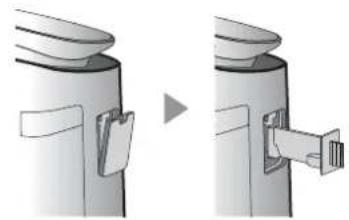
- Remove dusts from the electrode section.
Unit Cleaning Brush
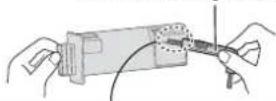
Before cleaning Electrode Around the base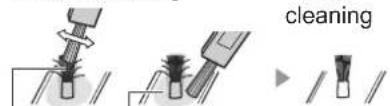
- Insert the unit holder in the Main Unit, and install the unit cover.
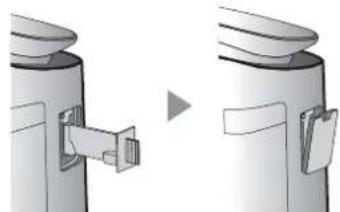
CAUTION
- Do not clean with anything other than the unit cleaning brush. Doing so could lead to failures in the unit.
- A bent electrode could be cut off and dropped during the cleaning process, but it will not change the performance.
- Do not touch the electrode directly. Doing so could lead to pain/itching.
- Do not transform the electrode section. Doing so can damage it.
- Do not touch the connection terminals. Doing so can damage them.
Plasmacluster Ion Generating Unit 2
UNIT REPLACEMENT INDICATOR
When the total operation time exceeds 17,500 hours, the Unit Replacement indicator will flash to indicate that the Plasmacluster Ion Generating Unit needs replacement.
Operating time
17,500 hours

Flash slowly
Replace the Plasmacluster Ion Generating Unit
19,000 hours

Flash quickly
Stop the emission of the Plasmacluster ions.
- The replacement time is not related to the selected operation mode.
REPLACEMENT
Consult your dealer when purchasing a replacement Plasmacluster Ion Generating Unit.
Model: IZ-C90MEU
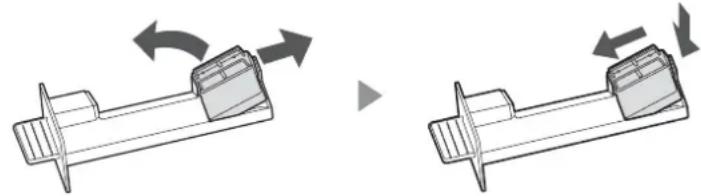
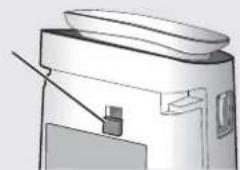
Remove the claw of the unit holder (①), and remove the Plasmacluster Ion Generating Unit (②).
Disposing of Plasmacluster Ion Generating Unit
Dispose of used Plasmacluster Ion Generating Unit according to local laws and regulations. Material:
- Polybutylene terephthalate - electronic parts
TROUBLESHOOTING
Before calling for service, please review the list below, since the problem may not be the product malfunction.
Odour and smoke persists.
- Check the filters. If they appear to be extremely dirty, clean or replace them.
- Check if the plastic bag is removed from the filter. (Page 6)
The Cleanliness Monitor is blue even when the air is not clean.
- The air may have been dirty when the main unit was plugged in. Unplug the main unit, wait one minute, and then plug the main unit in again.
The Cleanliness Monitor light is red even when the air is clean.
- Dirty or clogged dust (sensitive) sensor openings interfere with sensor operation. Gently clean the sensor filter or the back panel.
The Main Unit makes a clicking or ticking sound.
- The main unit may make clicking or ticking sounds when it is generating ions.
Air discharged from the Main Unit has an odour.
- Check to see if the filters are extremely dirty.
- Clean or replace the filters.
The Main Unit does not operate when cigarette smoke is in the air.
- Make sure the Main Unit is installed in a location in which the sensors can detect cigarette smoke.
- Check to see if the dust (sensitive) sensor openings are blocked or clogged. If they are blocked or clogged, clean the sensor filter or the back panel.
Smell from a new filter.
- Immediately after removing the plastic bag, a slight odour may occur. This odour is not harmful for filter performance or human exposure.
The FILTER Maintenance Indicator Light is on.
- Whenever after performing maintenance of the filters, connect the power cord to an outlet and then touch the Filter Reset Button. (page 10)
The Front Display is turned off.
- When Light control is set to "Turn off", the light is always off. If you do not want the light to be off, set Light control to "Auto" or "Darker" setting. (page 9)
The Cleanliness Monitor changes colour frequently.
- The Cleanliness Monitor automatically changes colour when the dust (sensitive) sensor and odour sensor detect impurities. If you are concerned about the change, you can change sensor sensitivity. (page 9)
The Main Unit's Display does not match weather report or another hygrometer or thermometer in the room.
- Outdoor and indoor as well as the home environment (the volume of traffic nearby, number of stories in home, etc.) may cause a reading different than those data. There is a difference in the level within the same room.
ERROR DISPLAY
| U3 | ·The concentration of Plasmacluster ion is descending. →Maintain the Plasmacluster Ion Generating Unit (electrode section). | C1 C4 C6 C8 | ·Unplug the Main Unit, wait one minute, and then plug the Main Unit in again. |
| E9 | ·Is the the Plasmacluster Ion Generating Unit inserted properly? →Pull out the the Plasmacluster Ion Generating Unit and insert it to the end again, and then carry out the operation again. |
SPECIFICATIONS
| Model FP-J80EU FP-J60EU | ||||||
| Power supply 220 - 240 V 50 - | 60 Hz | |||||
| Fan Speed Adjustment MAX MED LOW MAX MED LOW | ||||||
| Fan Speed (m3/hour) 480 288 60 396 222 60 | ||||||
| Noise Level (dBA) | 47 | 45 | 15 | 43 | 40 | 15 |
| Rated Power (W) | 48 | 28 | 4.0 | 38 | 18 | 3.6 |
| Standby Power (W) | 1.3 | 1.2 | ||||
| Recommended Room Size (m2)*1 | ~62 | ~48 | ||||
| High density Plasmacluster ion recommended room size (m2)*2 | ~35 | ~26 | ||||
| Cord Length (m) | 2.0 | |||||
| Dimensions (mm) | 416 (W) × 291 (D) × 728 (H) | |||||
| Weight (kg) | 10.6 | 10.0 | ||||
1 • The recommended room size is appropriate for operating the main unit of maximum fan speed. The recommended room size is an area in which a given amount of dust particles can be removed in 30 minutes. (JEM1467) 2 · Room size in which approximately 25000 ions per cubic centimetre can be measured in the centre of the room when the main unit is placed next to a wall, is running at MED mode settings, and is at a height of approximately 1.2 metres from the floor.
Standby Power
When the main unit's power plug is inserted in a wall outlet, it consumes standby power in order to operate electrical circuits. To conserve energy, unplug the power cord when the main unit is not in use.


Attention: Your product is marked with this symbol. It means that used electrical and electronic products should not be mixed with general household waste. There is a separate collection system for these products.
A. Information on Disposal for Users (private households)
1. In the European Union
IF YOU WISH TO DISPOSE OF THIS EQUIPMENT, DO NOT USE THE ORDINARY WASTE BIN, AND DO NOT PUT IT INTO A FIREPLACE!
Used electrical and electronic equipment should always be collected and treated SEPARATELY in accordance with local law.
Separate collection promotes an environment-friendly treatment, recycling of materials, and minimizing final disposal of waste. IMPROPER DISPOSAL can be harmful to human health and the environment due to certain substances! Take USED EQUIPMENT to a local, usually municipal, collection facility, where available.
If in doubt about disposal, contact your local authorities or dealer and ask for the correct method of disposal.
ONLY FOR USERS IN THE EUROPEAN UNION, AND SOME OTHER COUNTRIES; FOR INSTANCE NORWAY AND SWITZERLAND: Your participation in separate collection is requested by law.
The symbol shown above appears on electrical and electronic equipment (or the packaging) to remind the users of this.
Users from PRIVATE HOUSEHOLDS are requested to use existing return facilities for used equipment. Return is free of charge.
If the equipment has been used for BUSINESS PURPOSES, please contact your SHARP dealer who will inform you about take-back. You might be charged for the costs arising from take-back. Small equipment (and small quantities) might be taken back by your local collection facility. For Spain: Please contact the established collection system or your local authority for take-back of your used products.
2. In other Countries outside the EU
If you wish to discard this product, please contact your local authorities and ask for the correct method of disposal.
For Switzerland: Used electrical or electronic equipment can be returned free of charge to the dealer, even if you don't purchase a new product. Further collection facilities are listed on the homepage of www.swico.ch or www.sens.ch.
B. Information on Disposal for Business Users.
1. In the European Union
If the product is used for business purposes and you want to discard it:
Please contact your SHARP dealer who will inform you about the take-back of product. You might be charged for the costs arising from take-back and recycling.
Small products (and small amounts) might be taken back by your local collection facilities.
For Spain: Please contact the established collection system or your local authority for take-back of your used products.
2. In other Countries outside the EU
If you wish to discard of this product, please contact your local authorities and ask for the correct method of disposal.
SHARP
SHARP CORPORATION

Service & Support
Visit our website:
www.sharphomeappliances.com
Or contact us:



Printed in Thailand
TINS-B270KKRZ 19M-①

- AIR PURIFIER WITH HUMIDIFYING FUNCTION
- PLASMACLUSTER ION ON/OFF
- PLEASE READ BEFORE USING THE AIR PURIFIER
- PLASMACLUSTER ION DIRECTION MODE
- HIGH DENSITY PLASMACLUSTER
- CHANGING DIFFERENT SETTINGS
- DISPOSAL OF FILTERS
- PLASMACLUSTER ION GENERATING UNIT
- REMOVE THE DEVICE COVER AND PULL OUT THE HOLDER
- REMOVE DUST FROM THE ELECTRODE COMPARTMENT. CLEANING BRUSH
- INSERT THE HOLDER INTO THE MAIN UNIT AND REPLACE THE COVER
- CAUTION
- UNIT REPLACEMENT INDICATOR
- PLASMACLUSTER ION ZONE
- CONTENTS
- THANK YOU FOR PURCHASING THIS AIR PURIFIER. PLEASE READ THE INSTRUCTIONS CAREFULLY BEFORE USING YOUR NEW AIR PURIFIER
- CLEANING
- IPEDYNPEKDEHHO THOCHO EKCNLOATAAHTA
- INSTALLATION INSTRUCTIONS
- INSTRUCTIONS REGARDING THE FILTER
- BASE MODULE
- PLASMACLUSTER ION ZONE MODE
- LOCK
- OPERATING MODES
- MODE
- AUTO
- TIMER FOR SWITCHING ON
- PRESS THE BUTTON FOR SWITCHING ON/OFF THE LOCK TO FINISH THE SETTING
- SETTING FUNCTION
- LIGHT CONTROL
- LIGHT INDICATOR FOR FILTER MAINTENANCE
- BASE MODULE / REAR PANEL (PRE-FILTER)
- REMOVE THE PLUG FROM THE SOCKET
- PRESS THE BUTTON
- ATTENTION
- SENSOR FILTER
- HEPA FILTER / ACTIVATED CARBON FILTER
- REPLACE THE FILTER
- WARNING
- MAINTENANCE
- LIFE OF THE FILTER
- REPLACEMENT
- DISPOSAL OF THE FILTER
- PLASMACLUSTER ION GENERATING MODULE
- LIGHT INDICATOR FOR REPLACEMENT OF THE PLASMACLUSTER ION GENERATING MODULE
- REMOVE THE ION GENERATING UNIT FOR PLASMACLUSTER GENERATION
- TROUBLESHOOTING
- THE INDICATOR LAMP MAY NOT TURN OFF
- THE DUST INDICATOR LAMP LIGHTS UP WHEN THE AIR IS NOT CLEAN
- THE DUST INDICATOR LAMP LIGHTS IN RED WHEN THE AIR IS CLEAN
- THE DEVICE EMITS SOUND, EITHER TO INDICATE OPERATION OR TO SIGNAL AN ALARM
- THE RELEASED DEVICE IS SUPPLIED WITH A MAINS PLUG
- THE DEVICE DOES NOT WORK WHEN THERE IS A CIGARETTE IN THE ASHTRAY
- THE NEW FILTER IS MADE OF FOAM
- THE LIGHT INDICATOR FOR FILTER MAINTENANCE IS ACTIVATED
- THE DEVICE IS SWITCHED OFF
- THE MONITOR FOR CLEANLINESS CHANGES THE COLOR OF THE SCREEN
- THE DISPLAYED INDICATION DOES NOT MATCH THE WEATHER FORECAST OR OTHER HYGROMETER OR THERMOMETER IN THE ROOM
- INSTALLING THE FILTER
- START/STOP
- START STOP
- AUTOMATIC OPERATION
- NOTE
- CLEAN MODE (IONIC BREEZE)
- PLASMACLUSTER ION AIRFLOW MODE
- OPERATION MODE
- SLEEP
- DUST
- ION GENERATION TIMER
- TURN-OFF TIMER
- TURNING ON/OFF THE PLASMACLUSTER IONIZER
- HOW TO CHANGE THE AIR VOLUME SETTING
- FILTER COVER
- HEPA FILTER / CARBON FILTER
- CLEAN THE FILTERS FROM DUST
- FILTER SERVICE LIFE
- PLASMACLUSTER IONIZER
- REPLACEMENT INDICATOR
- CLEANING THE PLASMACLUSTER IONIZER
- MATERIALS
- ODORS AND DIRT DO NOT DISAPPEAR
- THE CLEANLINESS INDICATOR LIGHTS UP EVEN WHEN THE AIR IS CLEAN
- THE FILTER REPLACEMENT INDICATOR LIGHT COMES ON WHEN THE FILTER NEEDS TO BE REPLACED
- FROM THE MAIN UNIT, REMOVE THE FILTER COVER
- THE AIR COMING OUT OF THE MAIN UNIT HAS A SPECIFIC SMELL
- THE MAIN UNIT DOES NOT WORK WHEN THE AIR CONTAINS CIGARETTE SMOKE
- SMELL FROM A NEW FILTER
- THE FILTER REPLACEMENT INDICATOR LIGHT COMES ON TO INDICATE THE FILTER'S OPERATING TIME
- CHECK THE DISPLAY
- THE INDICATOR AUTOMATICALLY CHANGES COLOR
- THE INFORMATION ON THE DISPLAY OF THE MAIN UNIT DOES NOT MATCH THE READINGS OF THE THERMOMETER OR HYGROMETER INSTALLED IN THE ROOM
- POWER CONSUMPTION IN STANDBY MODE
- FILTER INSTRUCTIONS
- PLASMACLUSTER IONS MODE
- PLASMACLUSTER IONS ON/OFF
- PLASMACLUSTER ION SPOT MODE
- THE HIGHER THE PCI DENSITY IS, THE MORE EFFECTIVE PCI HAS
- TRIPLE FILTRATION SYSTEM
- TRAP DUST
- DECREASES ODOURS
- REDUCES TINY DUST, POLLEN & MOLD
- UNIQUE AIRFLOW
- PLASMACLUSTER
- PM2.5 MONITOR
- PLEASE READ BEFORE OPERATING YOUR NEW AIR PURIFIER
- NOTE - WHAT TO DO IF THE MAIN UNIT INTERFERES WITH RADIO OR TV RECEPTION
- CAUTIONS CONCERNING OPERATION
- INSTALLATION GUIDELINES
- FILTER GUIDELINES
- MAIN UNIT
- FILTER INSTALLATION
- AUTO MODE
- CLEAN ION SHOWER MODE
- SELECTING MODE
- POLLEN
- ON TIMER
- OFF TIMER
- CHILD LOCK
- SELECTING DISPLAY
- HOW TO CHANGE VARIOUS SETTINGS
- FILTER MAINTENANCE INDICATOR
- MAIN UNIT / BACK PANEL (PRE-FILTER)
- NOTE: HOW TO CLEAN HARD-TO-REMOVE DIRT
- BACK PANEL
- HEPA FILTER / DEODORIZING FILTER
- REMOVE THE DUST ON THE FILTERS
- LIFE OF FILTERS
- DISPOSING OF FILTERS
- DISPOSING OF PLASMACLUSTER ION GENERATING UNIT
- ODOUR AND SMOKE PERSISTS
- THE CLEANLINESS MONITOR IS BLUE EVEN WHEN THE AIR IS NOT CLEAN
- THE CLEANLINESS MONITOR LIGHT IS RED EVEN WHEN THE AIR IS CLEAN
- THE MAIN UNIT MAKES A CLICKING OR TICKING SOUND
- AIR DISCHARGED FROM THE MAIN UNIT HAS AN ODOUR
- THE MAIN UNIT DOES NOT OPERATE WHEN CIGARETTE SMOKE IS IN THE AIR
- THE FILTER MAINTENANCE INDICATOR LIGHT IS ON
- THE FRONT DISPLAY IS TURNED OFF
- THE CLEANLINESS MONITOR CHANGES COLOUR FREQUENTLY
- THE MAIN UNIT'S DISPLAY DOES NOT MATCH WEATHER REPORT OR ANOTHER HYGROMETER OR THERMOMETER IN THE ROOM
- STANDBY POWER
- INFORMATION ON DISPOSAL FOR USERS (PRIVATE HOUSEHOLDS)
- IN THE EUROPEAN UNION
- IN OTHER COUNTRIES OUTSIDE THE EU
- INFORMATION ON DISPOSAL FOR BUSINESS USERS
- SHARP
- SHARP CORPORATION
Brand : SHARP
Model : FPJ80EUW
Category : Air purifier