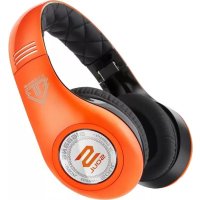
SL300 - Headphones Soul - Free user manual and instructions
Find the device manual for free SL300 Soul in PDF.


| Product Type | Over-ear headphone with active noise cancellation |
| Brand | Soul |
| Model | SL300 |
| Power Supply | 2 AAA batteries (alkaline, non-rechargeable) |
| Connectivity | Wired via detachable audio cable with 3.5mm jack |
| Main Functions | Active noise cancellation, built-in remote control, swivel ear cups, Hi/Lo selector |
| Noise Cancellation Technology | Active, with blue LED indicator |
| Built-in Remote Control | Call management (answer, hang up, reject, call waiting), volume control, play/pause, navigation (next, previous, fast forward, rewind) |
| Remote Control Compatibility | iPhone 4S/4/3GS, iPad 2/iPad (Wi-Fi/3G), iPod touch (2nd/3rd/4th generation), iPod nano (4th/5th/6th generation), iPod classic; limited functionality on Android and BlackBerry |
| Headband Adjustment | Extendable and articulated for comfortable fit |
| Left/Right Indicators | Marked 'L' and 'R' on the inner side of the headband |
| Logo Lighting | Illuminated ring around the Soul logo, with On/Off switch |
| Light Power Button | Located on the left inner side of the headband |
| Box Contents | SL300 headset, audio cable with remote control, standard audio cable, adapters, cleaning cloth, protective carrying case |
| Care and Cleaning | Use a soft, dry cloth; avoid abrasive agents; keep dry |
| Safety | Do not use at high volume to prevent hearing loss; do not use while driving; keep out of reach of children; follow battery instructions |
| Batteries | Use only AAA alkaline batteries; observe polarity; remove exhausted batteries; do not expose to heat |
| Warranty | Product registration required at www.soulelectronics.com |
Frequently Asked Questions - SL300 Soul
User questions about SL300 Soul
0 question about this device. Answer the ones you know or ask your own.
Ask a new question about this device
Download the instructions for your Headphones in PDF format for free! Find your manual SL300 - Soul and take your electronic device back in hand. On this page are published all the documents necessary for the use of your device. SL300 by Soul.
USER MANUAL SL300 Soul
Elite Hi-Definition Noise Cancelling Headphone
Compliance with FCC rules (U.S.A., only)
This device complies with Part 15 of the FCC rules. Operation is subject to the following two conditions: (1) This device may not cause harmful interference, and (2) this device must accept any interference received, including interference that may cause undesired operation.
NOTICE
This equipment has been tested and found to comply with the limits for a Class B digital device, pursuant to Part 15 of the FCC rules. These limits are designed to provide reasonable protection against harmful interference in a residential installation. This equipment generates, uses, and can radiate radio frequency energy and, if not installed and used in accordance with the instructions, may cause harmful interference to radio communications. However, this is no guarantee that interference will not occur in a particular installation. If this equipment does cause harmful interference to radio or television reception, which can be determined by turning the equipment off and on, you are encouraged to try to correct the interference by one or more of the following measures:
-
Reorient or relocate the receiving antenna.
-
Connect the equipment to an outlet on a different circuit than the
-
Increase the separation between the equipment and receiver.
e to which the receiver is connected.
- Consult the dealer or an experienced radio/TV technician for help.
FCC WARNING
Changes or modifications not expressly approved by the party responsible for compliance could void the user's authority to operate this equipment.
- Proper connections must be used for connection to a host computer and/or peripherals in order to meet FCC emission limits.
Safety Information
English
Please read this owner's and product guide
Reading this guide will ensure proper and safe use of your Soul® headphones. Follow all operation guidelines and adhere to all safety warnings and cautions.
Warning
Use your headphones responsibly. Exposure to excessively loud noise can cause Noise Induced Hearing Loss (NIHL). "The loudness of sound is measured in units called decibels. For example, the humming of a refrigerator is 40 decibels, normal conversation is approximately 60 decibels, and city traffic noise can be 85 decibels. Sources of noise that can cause NIHL include motorcycles, firecrackers, and small firearms, all emitting sounds from 120 to 150 decibels. Long or repeated exposure to sounds at or above 85 decibels can cause hearing loss. The louder the sound, the shorter the time period before NIHL can occur. Sounds of less than 75 decibels, even after long exposure, are unlikely to cause hearing loss."
Source: http://www.drf.org . Additional information about preventing hearing damage may be found from The Consumer Electronics Association http://www.ce.org. World Health Organization http://www.who.int, Environmental Protection Agency http://epa.gov
Before plugging your Soul® headphones into your phone or multimedia device, make sure that the volume has been set to zero (0) and the power is off. Once you have turned on the device, increase the volume to a safe and comfortable level. Putting on your headphones and turning on at full volume may cause damage to your hearing.
Keep headphones out of reach of small children. These headphones are not a toy and could be harmful to small children.
Noise-cancelling headphones make it hard to hear outside low-pitched sounds. Take care to recognize warning beeps and other auditory reminders; be aware that the familiar sound of these alerts may be changed by the headphones.
Battery Precautions
- Keep batteries out of the reach of children.
- Use only disposable AAA alkaline batteries.
- Do not use rechargeable batteries.
- Observe correct polarity as marked.
- Remove depleted battery immediately.
-
Please dispose of used batteries properly.
-
Do not use a leaking battery. If battery leakage occurs, avoid contact with skin. If contact occurs, immediately wash thoroughly with soap and water. If battery leakage comes into contact with your eyes, immediately flush with water and seek medical attention.
- Do not expose the battery to excessive heat.
Below is a chart to help you better understand the causes and effects of different sound levels. The noise levels are rated in dB (decibels)
| Environmental Noise | Noise Level dB | Possible Effect | Effects of Exposure |
| Quiet Library 30 dB No Effect - Normal | |||
| Normal Conversation 60 dB Co-Comfortable Hearing | |||
| City Traffic (inside car) 85 dB | Maximum Level before hearing damage begins.OSHA recommends no more than 8 hours of exposure to sound levels of 90 dB daily. | ||
| Power Saw at 3' | 110 dB | Permanent Hearing Loss likely due to prolonged unprotected exposure. | |
| Jet Engine at 100' 120 to 140 dB | At 125 dB the human ear begins to experience pain that can lead to permanent hearing loss even during short unprotected periods. |
Sources: http://www.drf.org, The Consumer Electronics Association http://www.ce.org. World Health Organization http://www.who.int, Environmental Protection Agency http://epa.gov, and the Occupational Safety & Health Organization http://OSHA.gov
Caution
DO NOT operate any motor vehicle or heavy machinery while listening to or wearing your headphones. Doing so is not only dangerous to you or others but illegal in many states. Listening or wearing headphones reduces your ability to hear sounds around you such as emergency vehicle sirens or the horn from another motorist.
It is not recommended to use headphones when cycling, running or walking in heavy traffic areas, where your full attention is necessary for your safety. Always use your headphones responsibly in every situation.
Safety Instructions
Read all instructions before using your headphones.
Always keep the instructions for future reference.
Adhere to all warnings, cautions and suggestions in this owner's and product guide.
Keep your headphones dry and prevent exposure to moisture or water.
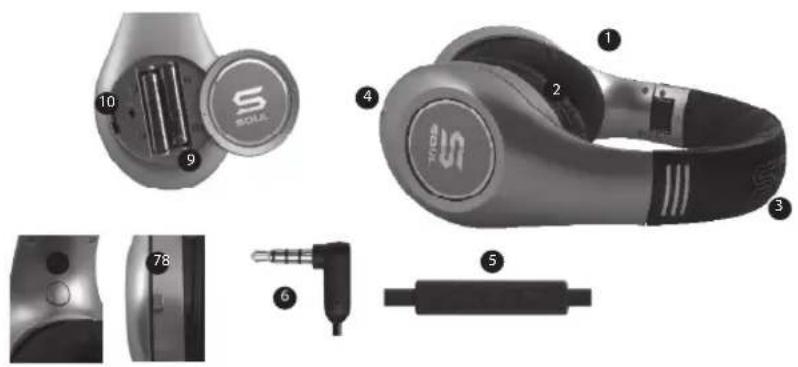
At A Glance
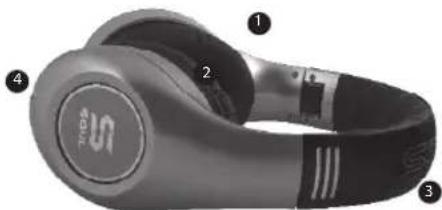
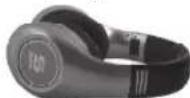
- SL300 Headphone
- Ear cup
- Adjustable Headband
- Audio Cable Input Jack
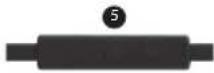
- iPhone, iPod and iPad control switch
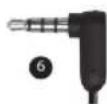
- 1 / 8'' (3.5mm) Gold Plated Plug
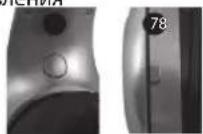
- Active Noise Cancelling Power Slide Switch
- Headphone Badge Light Button
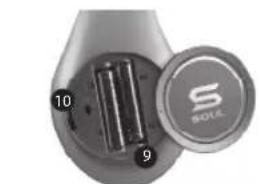
- Battery Compartment
- Hi/Lo Output Switch
Box Contents
SL300 Headphones
Detachable Tangle-Free Audio Cable with In-Line Remote Control
Batteries

Detachable Tangle-Free Audio Cable

Using Your Soul® Headphones
Carefully remove your Soul® headphones from the protective storage road case. You will find the audio cables, adapters and cleaning cloth in the accessory box directly below the headphones. Gently open the headphones all the way one side at a time until you feel them lock into place.
Headband Adjustment
Your Soul® headphones are fully adjustable for the most comfortable fit. Firmly hold the top headband with one hand and the bottom headphone portion with the other. Do not hold by the ear cups when adjusting the headband as damage could occur. Gently slide the two sections up and down until you find the proper fit for you. The ear cups are fully articulating so they will adjust to your head automatically when you put the headphones on. Once you have found the most comfortable fit you are ready to select and connect the audio cable.
Selecting and Connecting the Audio Cable
Your Soul® headphones include two audio cables. The first cable includes the in-line remote control for use with an iPhone®, iPod® or iPad®. The second cable is for use with all other multimedia devices such as a Blackberry®, Android™ phone, multimedia tablet or MP3 player. Once you have selected the proper cable you are ready to connect to the headphone input jack. Both cables have straight and right angle plugs. Connect the straight plug into the headphone input jack. The input jack is located on the bottom left side of the headphone. You can identify the left side by the "L" on the inner headband portion of your headphone. Please ensure that the plug has been inserted all the way into the input jack.
Installing the Batteries and Selecting the Hi/Lo Output
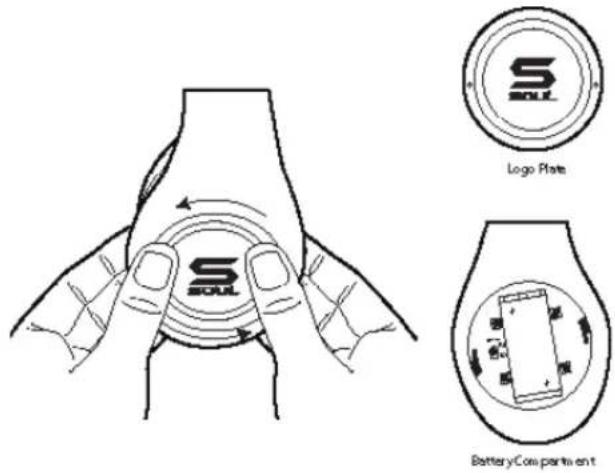
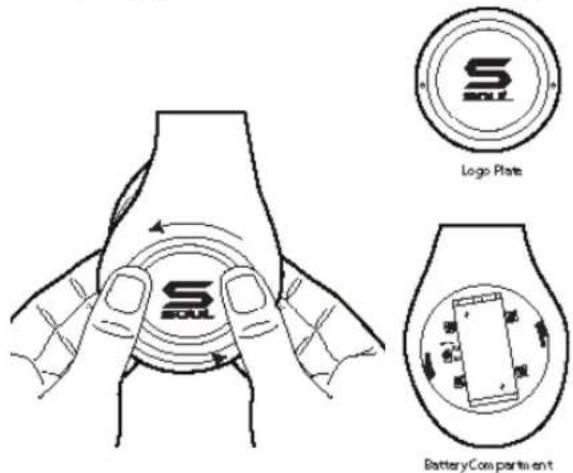
Please take the two AAA batteries included with your accessories and remove the protective plastic shrink wrap. On the right side of your headphones is the battery compartment. Place your thumbs as illustrated in the diagram below on both sides of the battery door (Logo Plate). You will notice two dimples opposite of each other as a guide. Gently press down on the battery door and turn to the left (counter-clockwise) about 1/8 . At this point the battery door should be loose. Install your batteries following the positive + and negtive - symbols. Before replacing the battery cover you will notice a slide switch (see illustration below) labeled Hi and Lo. The switch should be pre-set to the Hi position. If the device you are using has unusually high output you can change the switch to Lo. This will lower the overall sound level output of your headphones. Replace the battery cover and turn gently to the right (clockwise) until the battery cover locks in place.
Warning
Use your headphones responsibly. Exposure to excessively loud noise can cause Noise Induced Hearing Loss (NIHL)
Caution
Do not over tighten or apply too much pressure to the battery cover as you could break the locking tabs.
Headphone Maintenance
Your Soul® headphones include a soft cleaning cloth located in the accessory box. Use the cloth to remove any fingerprints, oily residue or dirt from the headphone. When cleaning your headphones do not use an abrasive cloth as you could scratch the finish. Use a dry soft clean cloth to gently wipe the ear cups and remove any dirt or dust buildup.
Caution
Never use any harsh cleaning agents. Keep your headphones dry at all times. Water could damage the sensitive circuitry inside your headphones.
Using Your Soul® Headphones
Once you have found the proper fit, the audio cable has been connected, batteries have been Installed and you have selected the Hi/Lo output you are ready to start enjoying the full range and quality of your Soul® headphones.
- Place headphones over your ears. Note: the headphones have an "L" for Left and "R" for Right indicators on the inside bottom portion of the headband. It is very important to place the headphones on your head correctly to get full sound benefit and enjoy your listening experience.
- Make sure that the volume is all the way down to zero.
- Turn your device off.
- Plug the 1/8'' (3.5mm) plug into the headphone jack.
- Power Up your device.
- Select the music or movie you wish to hear or view.
- Slowly increase the volume level until you find the safe and appropriate listening level for you.
- Your Soul® SL300 Headphones include "Active Noise Cancellation" technology. This feature reduces the ambient noise around you for a more pleasurable listening experience. To activate this feature slide the switch on the left back portion of the headphone to the "on" position. A blue LED light will Indicate that the Active Noise Cancellation" feature is on. Your SL300 Headphones will still work even if the batteries have been depleted; however, you will need to replace the batteries to continue using the Active Noise Cancellation Feature. Please remember to turn switch to the off position to prevent any unnecessary drain of the batteries.
- Another additional feature of your Soul headphones is the Illuminated light ring around the Soul Logo on the outer portion of the ear cups. On the inner left portion of the headband is a power button to turn this feature on and off.
Caution
Use your headphones responsibly. Exposure to excessively loud noise can cause Noise Induced Hearing Loss (NIHL).
Never put headphones on when unit is at full volume as it may cause permanent damage.
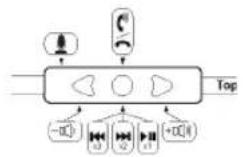
In-Line Remote Control Function and Diagram
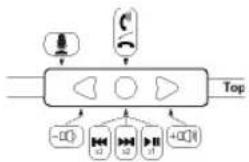
For Controlling Phone Functions
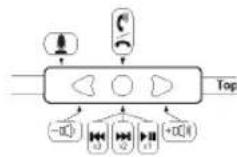
- Answer/Hang Up - During an incoming call press and release the center button (●) once to answer the call. Once you have completed your call press and release the center button once again to hang up the phone.
- Call Rejection - If you do not want to answer an incoming call, you can hold the center button for approximately two seconds. You will hear two beeps once you release the button that indicates the call was rejected.
- Call Waiting - During a call in progress, you may answer another incoming call by pressing the center button. This will place the existing call on hold while you answer the incoming call. If you want to switch to the original call press the center button again. That will place the second caller on hold while you go back to your original call. You may repeat again to go back to second caller.
- Volume Control - When you want to increase the volume of your phone, press the up arrow (A) on your in-line controller. Note: Make sure to increase volume slowly to prevent damage to your hearing. When you want to decrease the volume on your phone, press the down arrow (B) on your controller.
For Controlling Music or Movie Functions
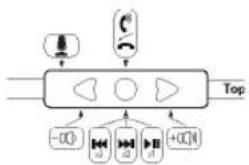
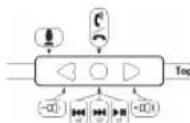
- Volume Control - When you want to increase the volume of your phone or multimedia device press the up arrow (▲) on your in-line controller. Note: Make sure to increase volume slowly to prevent damage to your hearing. When you want to decrease the volume, press the down arrow (▼) on your controller.
- Play or Pause – To play a song or video, press and release the center button (●) once. To pause press and release the center button once during song or movie. To resume again, press and release center button once.
- FFW/REW - To skip forward to the next song or chapter in a movie, quickly press and release the center button twice. To return to the previous song or chapter in a movie, quickly press and release the center button three times
- Scan - To scan forward during a song or movie, press and release the center button once, then immediately press and hold the center button again. This will scan forward. Release the button once you have reached the point in the song or movie you seek. To scan backwards during a song or movie, press and release the center button twice, then immediately press and hold the center button again. Release the button once you have returned to the portion of the song or movie you seek.
Note: Not all functions may work on all models. Functionality will be determined by phone or multimedia device.
In-Line Controller Compatibility Guide
The following Apple models should have full functionality of the controller. iPhone® 4S, iPhone® 4, and iPhone® 3Gs, iPad® 2 Wi-Fi, iPad® 2 3G, iPad® Wi-Fi and iPad® 3G, iPod Touch® 4th Generation, iPod Touch® 3rd Generation and iPod Touch® 2nd Generation, iPod Nano® 6th Generation, iPod Nano® 5th Generation and iPod Nano® 4th Generation, iPod Classic®. For Android™ or BlackBerry® models, not all in-line controller functions may fully work.
Disconnecting Your Soul® Headphones
Once you have finished using your Soul® in-ear headphones, disconnect from your device. Firmly hold your music or phone device. Pull the plug from the device while holding the plug firmly. Store your headphones in the protective case to keep safe and clean. Always store the headphones in the case to prevent damage when not in use.
Caution
Do not try to unplug the headphones by pulling on the cables as it may cause damage.
Trouble Shooting Guide
| Problem Solution | |
| No Sound Check plug; make sure | it is plugged in all the way. Check volume level, increase volume if necessary. Check power, make sure device is on. Check in-line controller, press center button to ensure it is not on Pause. |
| Low Volume Level | Make sure that the headphones are creating a proper seal around your ears. Increase the volume level on your device. Make sure that the Hi/Lo switch located In the battery compartment Is set to Hi. |
| High Volume Level | Lower the volume level on your device or from your In line remote control. Set the Hi/Lo switch located in the battery compartment to Lo. |
| Only One Side Has Volume | Make sure that the plug has been inserted all the way into your device headphone jack. Check the connection to the headphone input jack. Make sure the plug has been inserted all the way. |
| No Active Noise Cancelling | Make sure the slide switch Is in the on position and the LED light Is on. Replace the two AAA batteries. |
Product Registration Website: www.soulelectronics.com
Note: You must register your product for warranty
Customer Support: www.soulelectronics.com
Below is a chart to help you better understand the causes and effects of different sound levels. The noise levels are rated in dB (decibels)
Cable audio amovable

Service clients: www.soulelectronics.com
Sources: http://www.drf.org, The Consumer Electronics Association http://www.ce.org. World Health Organization http://www.who.int, Environmental Protection Agency http://epa.gov, and the Occupational Safety & Health Organization http://OSHA.gov
Precauzioni
IpoHtAe HcTpyKcNIO Do KOHca npExKe, Yem NcNoJb3ObaTb rapHnTpy.
CoxpaHnte HnHCTpyKUIO DnI NocNdeYIOUeOIOCNJb3OBaHn.
CneyuTe BcEM coepkaumcB DaHHOM pyKOBOCTBe Yka3aHnM n peK OMeHdaunm.
XpaHNTe raphHTpy B cyxOM MeCTe H He NOBepraTte ee DeiCTBIO BObl N CbipocTN.
Kpatkni 063op komnneKtaun
- TapHnIpya SL300
- uAshaKa
- Perynipyemoe oronobbe
- BxOJHOI WTeKepeaynoka6eJIa
- Npeeknouatebn w3puTy 品 6 w3uB* u3ΦB
6.Полочьнь pa3bem 1/8"(3,5MM) - NOn3yHKOBbI nepeKIOUaTeNb aKTHBHO rO WymoNo DaBJeHn
- KhoNka NocBETKn IJorOTtna
- OTeCek dIa 3JIeMeHToB nITaHnI
- NepeknioaTeJIb BbIXoJa Hi/Lo
CopeKMMoeynaKOBKn
TapHnIpya SL300 CbemHbI HenyT aoiuimc aydnokaeb
CBCTPO eHHbIM NyIbTOM

CbeHbI HeNyTaIOUcNcA

NITaHNA
Mcnonb3OBaHne TapHtypb Soul
OcToPoxHo BbHbTe raphInTypy Soul" n3 3aunTHoynakOBKn. B Kopo6ke c akceccyapamn HneocpeCTBeHHo noi raphHtypoi Bbl HaJeTe aynokabeHn, aadantepbI uNCTaUyIO cafoKy. OcToPoxHo5 OTkpBaJIte raphHtpy Chauana do KOHca C oDHou CTOpOHbI, a 3aTeM C npYrO CTOpOHbI, noka He NouyBCTByeTe, yTO OHa 3aΦHKCnpObaanacB BOTkpbTOM NOJKeHHn.
PerylipoBkArorNoBb
TarpHnTypa Soul" nonHocTbI OpeynpIyETcI HaH6OJIe KOMΦOpTHOrO xBaTa. HAdEJHO yDpeKJBauTe Bepx OrOnOBbI OndH pyKo, a HNHHIOU cAcb TarpHnTypbI pyroI pyKo. He dApKIne TarpHnTypy 3a qAaKn BO BpeM perynipOBKn orOnOBbI BO n36exKaHne NolomKn. OctopokNo nepemeuaiTe Ibe cekunBBePx IN BnI3 DoTex np, noka He hainTe NOJoxHeNe, KOtOpoe yDobHo IraBac. Yaakn IMeOT KpeHNHe Co BCEMn Heo6XoIMbIMn CTeneHmN CBO6OblI DnI TORO, YTO6bl ABTomATnueckn OXBAtbIBaTB rIooby. Pocne HAcToPkn yDobHoro IraBac OXBaTa rAhpHnTypbI bbl MoKeTe Bbl6paTb NIOKNIOUHT bayIOKA6ebIb.
Bb6op nIOpkIoueHme aydnoka6eJ
TapHnTypa Soul" IMeET B KOMPnIeKTe Dba ayDIOKa6BJI. IepBbI IMeET BCTPOeHbI pyIbI ynpabIeHna iPhone", iPod" nn iPad." BToPoR Ka6JIb IpeHa3NaueH dIy BCex OCTaIBhIX MylbTmEIMNbIX yCTpoICTB, TAKIX KA yCTpoIcTBa Blackberry", TelefoHb AndroidTM, MylbTmEIMN HbIe PnAHeTbI nMP3-nIeepb. BbIbpa COOTBeTcByOuIN Ka6JIb, NODKIIoUHTe eR K BXoHOMy pa3bemy raphHTypbl. YkaxdoRo n3 Ka6eJIe Ectb npAmO IN yrNoBOI wTEKepb. IOnkLIQUHTe pJAMOuM WTEKEp K BXoHOMy pa3bemy raphHTypbl. BxOHOH pa3bEM hAXoHITCB IeBOI HnXHNe YaCTN raphHTypbl. JEBYIO CTOPOHy MOXHO OTNIuHTb NO MeTke "L" Ha BHYTpEHHe CTOpOHe ORoIOBBa. Y6eINTeCb, YTO wTEKeP BCTABEN B pa3bEm Do KOHca.
YcTaHObKa 3JemeHToB HHTaHnN BbI6Op BbIXoHa Hi/Lo
Bo3bMnte DBe 6aTapeKn AAA, HaxoJIeNecB BMeTe c Akceccyapamn, n YdaJIte 3aunTHyo TepMooyadoHyO ynaKOBky. Ha npabOn CTOpOHe raphHTypbl HaxoJITcR OTCek dnn 3JeMeHToB NITAHn. IomeCTnte naLeu Ha o6e CTopoHb IDBepU bOTceKa dny 3JeMeHToB NITAHn (PiactnHa C NoTOnom), KAK NOKa3aHO Ha PncyHke. Bb 3aMeTIte DBA yrny6neHn. OctopoxHo haxmnte Ha DBepuy OTCEKA dnn 3JeMeHToB NITAHn INOBepHIne BLeBO (IpOTNB YacobO BcTpeLKn) pnpmePHo Ha 3 MM. B 3OT MOMENT DBepua DOJXHA OTKpbITcR. YCTAHOBte 6aTapeKn CORnacHO NOJpHocTN, O603aueHHo 3HaKaAMn + - . NepeD TEM, KAK 3aKpbItb DBepuy, Bbl yBnDIne cKONb3Aun nepeKlouaTeNb (CM. mllIOCTpaCNIHO HxKe), 603aueHHb Hi N Lo. NepeKlIOvateNb N3HaayalbHO UCTAHOBnE H NINOJxHne Hi. Ecnn ycTpoiCTBO, K KOtOPOMy Bbl npncoeINHaeTe raphHTpy, IMeET Heo6bHuHO CnIBhB My BixOHDH
CnHnI, n3MeHnTe nONoXeHnne nepeKnOuTaTnHa Lo. 3To yMeHbUnr TpyOBeH rPOMKoCTn 3ByKa Ha BbIXoJe. YcTaHOBtne DBepy Ha MeCTOn NIOBepHnTe ee octOpOxHo BnPaBO (no YacOBo CTrpeNke) Do Tex nop, NOKa OHa He 3aΦNKcnpyETca Ha MecTe.
PpeynpexdHne
Ponb3yntecb rapHHTpyoI OTBeTCTBENHO.CnNkOM rpoMKnE 3ByKn MOrTy Bbl3bBaTb yxydHeHne CnyxA B pe3yNbTaTe BO3deiCTBnA Wyma (NIHL)
OctopoXHo
He 3aTnBaaTe DBepu OTeKa dIy IeMeHToB nTuHa C Upe3MepHbIM ycInnem H He HaDaBnBaTe Ha He cNtKOM CnIbHO, TTO6bl He cNoMaTb fNKcnpuyuine BbCTynbl.
YxoД 3a rapHnTpyoN
B KOMNNEKT RAPHNTypb Soul BKNIOUeHa MMRKAA NCTAua CaΦeTKa, KOtOPa HaxoNDTCB Kopo6Ke c Akceccyapamn. Ppu ee NOMOUs CneDyET YdAraTb C rAPHNTypbl OTNeuATKn NaIbueB, CneIbI Jknpa Irp3n. Ppu NCTKe rAPHTypbl He NCNoB3ynte a6pa3NBHyIO TKAHb, TAK KAK MOXHO NoCuapanatb OTDeNky. CyxOJ MArKOJ CaΦeTKOJ OCTOpOXHO IpOTnpaJIte YauKIN ydaJaIte IIO6yIO HAKONINBwUyOcR pr3b nn nIpbIb.
OctopoXHo
Hikorda He nCnoB3yTe CnIbHbIe MOUuNcpeDCTBa. Bcerda dep KInTe raphHTpy B cyXOM MecTe. Boda moKet noBpeDntb 3JIeKTPOHHbIe KOMNOHeHTblraphHTpyB N BBBeCTn ee n3 CTpor.
IcnoB3OBAHnne FapHnTypb Soul
Iocne HacpoKn ONtMaHbHO OXBaTa, NOckIOueHna ayIOka6eY, yCTaHOBKn 3NeMeHTOB nITaHn N Bb6Opa 3NaueHn BbIXoHa Hi nn Lo, Bbl MoKeTe Hacladntbcra IONHbIM dNanAzoHOM N KaueCTBOM raphHTypb Soul.
- Hanehte raphnhtpy. PnpmeaHne: npabra n neba cToPObI raphnhtpyl nomeehbl 6ykbam "L" (neba) n R" (npabra) B hnxHeJ uactn bHytpenHe CTOPHO bOrOIOBb. OueHb BaXHo HaeBaTb raphnhtpy npabInbHO dIg toro, TTObI noLyatb noIHOceHHb3ByK uYdoBOJIbCTBnE OT IpocnyuBaHna.
2.Y6eNTecb,yTO rPOMKoCTb yCTaHOBNeHa Ha 0. - BbIKIIOHTe yCTpOINCTBO.
4.BCTaBbTe 1/8" (3,5MM) Bpa3bEmnra rapHntypbl.
5.BkInouHTe yctpoiCTBO. - BbIepeHte My3bIKy nIIu BnIeO, KOtOpoe Bbl 6yTe CnywAub NIN CMOTpeTb.
- MeDneHNo yBEnuBaIte rPOMKoCTb Do 6eOnaNCHOr N KOMΦOpTHOr OyPOBHa.
- TAPHNTypa Soul* SL300 cha6xeha fynkuiene akTINBHO r yMOnoDabHeHn. 3Ta fynKUry MeHbuaet OkpykaOu nIyM dIy 60JIbWero KOMphipta BOCnpnTn. IyB KLIIOeHn 3TOI fyHKUIN nepeBeJeNte nepeKIOUaTe h NaIeBOH NIXHne CTOpOHe rapHTypbl B noIOXeHne "on". TopAun CInH CNH CBeTOIOHb HNDNKaTOp NOKa3bIaE, YTO fyHKUry AKTINBHO r yMOnoDABHeHn BKIOUeHa. EcII 3apRd 3IeMeHTOB PITAHN INCTOUITCRAr pHTypa SL300 BCE eue 6yDen pa6oTa; ODAKO, YTO6bI PNOJOLKaTb NOJB3OBA tCB4 cyHKUeA kTINBHO r yMOnoDABHeHn, 3IeMeHTb IITAHN INPDeTcR 3AmEHt. He 3a6bIbaTe BBIKIOUaTb fyHKUIO aKTINBHO r yMOnoDABHeHn, YTO6bI N36ExaTb INCTOUIHEHn 3Apra d AmeHTOB NITAHN.
- Eue Onda DonoHnTeIbHaay fHKunrahpHTypb Soul - KpyroBa noCBeTka Bokpyr Norottna Soul Ha BHeWHe CTopohe yauek. H BHyTpneHHe CTopoHe JeBOy ChtN OROOBBy IMeETcKHOJaNTaHN, No3BOJIaIOUaB BKJIOuTa N BbIKIOUaTb NOCBeTKy.
OctopoxHo
Pb3yTeB raphnTpyo OTBeCTbeHNO.CNIuKOMrpoMKe 3ByKn MOrTy Bbl3bIbTa bYxUdHe NcLyXaBpe3yNbTaTe Bo3eJCTBna Uyma (NIHL). HkOrda He HaedeBaIte raphnTpy,ecn yctPoIcTBO BKIOUeHO Ha NoNHy IO rpoMKoCTb: 3TO MOKe TpNBECTN K HenOpipABIMOMy uep6y dny 3nopobja.
BcTpoehhbl nyIbTy npaBJeHna
UnpablenHe ΦyHKmMn TelefoHa
- Pnem/3aBepHHe Bb3OBA - Bo Bpem BxOJaIero Bb3OBA HaxMITE N OTNcyTNTe CEHTpaJIbHyIO KHOKNy (o) OIN pa3 nIra OTBeTa Ha Bbl3OB. Iocne OKOHuaHn pa3roBopa haxMITE N OTNcyTNTe CEHTpaJIbHyIO KHOKNy eIe pa3 nIra 3aBepHHeHn Bbl3OBA.
2.OTKIOHeHne Bb3OBA - EcnBb He XOTnTe OTBeuAtb Ha Bbl3OB, Bbl MoKeTe yepKunBaTb ceHTpaIbHyIO KHONky B TeueHne np6n3nteNo DByx cekyHd. Korda Bbl OTnyCTnTe KONKy, Bbl YcNbiWnte Dba 3ByKObbxCnHaJa, KOtOpbie O3HaayoT, Yo Bbl3OB OTKIOHeH.
3.OxuaoBn BbIOB-Bo Bpempa3ROBopa Bbl MoKeTe OTBeTntb Ha DpyroB BXOaun Bbl3OB HaaTaHMe LcHTpaIbHO KNOHNI. 3TO NOMeCTNT TeKyuun Bbl3OB B pexm OxuaHna HA BpeM OTBaHa HObB Bbl3OB.ECN Bbl XOTNE PeeknouTbcra 6bPAHO Ha nepBOHaayhBi Bbl3OB, HaxMITE CEHTpaJIbHyIO KHONky eue pa3. 3TO NOMECTNT TeKyuun Bbl3OB B pexm OXuaHna, NOKA Bbl 3aHrTb NepBBIM pa3ROBOPOM. Pn Heo6xoImocTb Bbl MoKeTe CHOBa BEpyTBCa KO BTOPOMy Bbl3OBY.
- rpmkocb - Ecnn Bbl xOTte yBeneuNTb rpmkoctb TelefoHa, Haxmnte CTepeKy BBepx ( ) Ha BCTpoEHOM nyIbTe.
PpmeHne: YBeunuBaTe rpmkoctb NocteHHO, UTo6b N36ExKaTb BO3JeCTBn, KOtOpoe MoXet PpNBecTN K yxydHeNIO cnYxa. Ecnn Bbl xOTte yMeHbWntb rpmkoctb TelefoHa, Haxmnte CTepeKy BHn3 ( ) Ha BCTpoEHOM nyIbTe.
YnpaBHeHne yHKnIyM My3bIKN n Bndeo
- rpmkocb - EcnBbXOTeYBeHnHb rpmKoCTb TelefoHaNIMyIbTMnEHHoro yCTPOJcBA, haxMNTe CTpejky BBepx ( ) HABCTpoEHOM nyIbTe. PmueaHHe: YBeHnHBaHTe rpmKoCTb NocTeHHO, TTo6bl N36ExKaTb BO3dEChTBn, KOTOPoe MOKeT npNBecTN K yxyDHeHIO CNYxa. Ecn BbXOTeYMeHbHHTb rpmKoCTb, haxMNTe CTpejky BHIN3 ( ) HA BCTpoEHOM NyIbTe.
- Bocnpon3BedeHne nnay3a -ДЯ BOCpON3BedeHnMy3bKaJIbHOKOMIOZnIIN NIN BINOEO HAXMITE n OTNcyTNTe CEHTpaJIbHyO KHOKNy (o) OINn pa3.ДЯ npIOCTAHOBKn BOCpON3BedeHn HAXMITE n OTNcyTNTe CEHTpaJIbHyIO KHOKNy OINn pa3 BO BpeM BOCpON3BedeHn. 4To6bl npOJOnKInb BOCpON3BedeHne, HAXMITE n OTNcyTNTe CEHTpaJIbHyIO KHOKNy eIe pa3.
3.Пямайообраимапемота -Чтбы петей Кслдуюше Мьыкальнй KOMN03ици ИИчactn Фильma,Двжды 6bICtpо HaKMITE nOTnyCTITE ueHTpaIbHyIO KONky.Чтбы петей Кпрдуюшe My3ыкальнй KOMN03ици ИИчactn Фильma,Тржды 6bICtpо HaKMITE nOTnyCTITE ueHTpaIbHyIO KONky. - Nocck -Дя NOcKa BpePeB OBO Bpema BOCPON3BeHnMy3bIaJIbHOJ KOMN03UIN ININ HJbMa HaxMnte n OTnyCTte UeHTpaJIbHyIO KHONky OINn pa3, 3aTe MHeMeIeHNO HaxMnte ueHTpaJIbHyIO KONKy eue pa3 u yepKJBaIte ee. HaHETcN nonck BpePe. OTnyCTte KONky, KaK TOnbKO DOCTnHETe HxKHOrO MeCTa. JIA NOcKa Ha3aD BO BpeMa BOCPON3BeHnMy3bIaJIbHOJ KOMN03UIN ININ HJbMa HaxMnte n OTnyCTte CEHTpaJIbHyIO KONKy IBaXDbI, 3aTe MHeMeIeHNO HaxMnte ueHTpaJIbHyIO KONKy eue pa3 u yepKJBaIte ee. OTnyCTte KONky, KaK TOnbKO DOCTnHETe HxKHOrO MeCTa.
PpmeaHHe:HeKOpBle FyHKmMOryTpa6oTaBHe Ha Bcex MoeJax. FyHKUHOHaNbHoCtb onpeJeIeTcra TelefoHOM mIM MylbTMMeiHbIM yctpoCTBOM.
CbeHnO o cobmectu BCTpoHHOro nylbTa
Cneyuune Moen Apple doJnxbI MeTb noHnyo COBmecTUMocTc nyltom. iPhone4S, iPhone4n iPhone3Gs, iPad2Wi-Fi iPad2 3G, iPadWi-Fi n iPad3G, iPod Touch4th Generation, iPod Touch3rd Generation n iPod Touch2nd Generation, iPod Nano6th, iPod Nano5th Generation n iPod Nano4th Generation, iPod Classic.C moeJIaMn AndroidTM n BlackBerry* HeKOTOpBte fynkun n ynbTa mOryt He pa60TaTb.
OToeHNHeHne rapHnTypbI Soul
Korda Bbl He noIb3yeTecb rapHnTpyo Soul, oTKIOUaHTe ee ot yctpoiCTBa. HAdexHO ydepxNBAte My3bkaJIbHOe yctpoiCTBO nII TelefoH. BbHbTe wTekep n3 pa3bema. TaHNTe 3a wTekep, a He 3a Ka6eNb. XpaHnTe rapHnTpy B cyTnpe, YTO6bl 3aunITb ee ot nobpeJckHeHH n 3arpr3HeHH. Bcerda y6npaiTe rapHnTpy B cyTnap, KOrda OHa He nCnONb3yeTcra.
OctopoxHo
He nbTaIteCb OTcoeHINHTb raphNtPy, BbldeprnBaB ee 3a Ka6JIb, TaK KaK 3TO MoKeT pNpBecT N K NobpeXdHIO.
Nonck nyctpaHne HenoJaOK
Forra: h://ww. drg. . Additional inomation about preventing hearing damage may be found from The Conmer Electronics Association http:/www.c.org. World Health Organization htt:// www.who.int, Environmental Protection Agency http://epa.gov.
Forrs: http://www.drf.org, The Consumer Electronics Association http://www.ce.org. World Health Organization http://www.who.int, Environmental Protection Agency http://epa.gov, and the Occupational Safety & Health Organization http://OSHA.gov
Figyelmezetés
Kildr: http://www.drf.org, The Consumer Electronics Association http://www.ce.org. World Health Organization http://www.who.int, Environmental Protection Agency http://epa.gov, and the Occupational Safety & Health Organization http://OSHA.gov
Advarsel
Headphone Vedlikehold
In-Line Remote Control Function and Diagram
1025 Greenwood Blvd, Lake Mary, FL 32746
All trademarks are the property of their respective owners.
iPhone, iPod classic, iPod nano, and iPod touch are trademarks of Apple Inc., registered in the U.S. and other countries. iPad is a trademark of Apple Inc.
MADE IN CHINA
VER.4/2011
LITSL300-1