SL300WB - Headphones Soul - Free user manual and instructions
Find the device manual for free SL300WB Soul in PDF.


| Product Type | Wireless Over-Ear Headphones |
| Brand | Soul |
| Model | SL300WB |
| Dimensions (W x H x D) | 180 x 200 x 80 mm (approx.) |
| Weight | 250 g (approx.) |
| Power Source | Rechargeable Li-ion battery (300 mAh, approx.) |
| Charging | USB-C (typical) |
| Battery Life | Up to 20 hours (estimated) |
| Connectivity | Bluetooth 5.0 (typical) |
| Frequency Response | 20 Hz - 20 kHz (typical) |
| Driver Unit | 40 mm (approx.) |
| Impedance | 32 Ω (typical) |
| Microphone | Built-in with noise reduction |
| Noise Cancellation | Active Noise Cancellation (ANC) |
| Controls | On-ear buttons for volume, playback, calls |
| Foldable Design | Yes, for portability |
| Ear Cushions | Replaceable memory foam with leatherette |
| Accessories Included | USB charging cable, audio cable, carrying case |
| Cleaning | Wipe with a soft, dry cloth; avoid liquids |
| Safety | Do not use at high volumes for extended periods |
| Repairability | Ear pads and headband padding user-replaceable |
| General Information | Designed for immersive audio experience |
Frequently Asked Questions - SL300WB Soul
User questions about SL300WB Soul
0 question about this device. Answer the ones you know or ask your own.
Ask a new question about this device
Download the instructions for your Headphones in PDF format for free! Find your manual SL300WB - Soul and take your electronic device back in hand. On this page are published all the documents necessary for the use of your device. SL300WB by Soul.
USER MANUAL SL300WB Soul
Cancelling Headphone

natural_image
Abstract black geometric logo design with stylized 'S' shape (no text or symbols)SOUL®
by Ludacris
natural_image
Black and silver wireless earbuds with 'JULI' branding, shown from front and side (no additional text or symbols)Compliance with FCC rules (U.S.A., only)
This device complies with Part 15 of the FCC rules. Operation is subject to the following two conditions: (1) This device may not cause harmful interference, and (2) this device must accept any interference received, including interference that may cause undesired operation.
NOTICE
This equipment has been tested and found to comply with the limits for a Class B digital device, pursuant to Part 15 of the FCC rules. These limits are designed to provide reasonable protection against harmful interference in a residential installation. This equipment generates, uses, and can radiate radio frequency energy and, if not installed and used in accordance with the instructions, may cause harmful interference to radio communications. However, this is no guarantee that interference will not occur in a particular installation. If this equipment does cause harmful interference to radio or television reception, which can be determined by turning the equipment off and on, you are encouraged to try to correct the interference by one or more of the following measures:
- Reorient or relocate the receiving antenna.
- Connect the equipment to an outlet on a different circuit than the
- Increase the separation between the equipment and receiver.
one to which the receiver is connected.
- Consult the dealer or an experienced radio/TV technician for help.
FCC WARNING
- Changes or modifications not expressly approved by the party responsible for compliance could void the user's authority to operate this equipment.
- Proper connections must be used for connection to a host computer and/or peripherals in order to meet FCC emission limits.

Products with CE marking comply with the EMC Directive(2004/108/EC). The complete Declaration of Conformity can be found soulelectronics.com.
Safety Information
Please read this owner's and product guide
Reading this guide will ensure proper and safe use of your Soul® headphones. Follow all operation guidelines and adhere to all safety warnings and cautions.
▲ Warning
Use your headphones responsibly. Exposure to excessively loud noise can cause Noise Induced Hearing Loss (NIHL). "The loudness of sound is measured in units called decibels. For example, the humming of a refrigerator is 40 decibels, normal conversation is approximately 60 decibels, and city traffic noise can be 85 decibels. Sources of noise that can cause NIHL include motorcycles, firecrackers, and small firearms, all emitting sounds from 120 to 150 decibels. Long or repeated exposure to sounds at or above 85 decibels can cause hearing loss. The louder the sound, the shorter the time period before NIHL can occur. Sounds of less than 75 decibels, even after long exposure, are unlikely to cause hearing loss."
Source: http://www.drf.org. Additional Information about preventing hearing damage may be found from The Consumer Electronics Association http://www.ce.org. World Health Organization http://www.who.int, Environmental Protection Agency http://epa.gov
Before plugging your Soul® headphones into your phone or multimedia device, make sure that the volume has been set to zero (0) and the power is off. Once you have turned on the device, increase the volume to a safe and comfortable level. Putting on your headphones and turning on at full volume may cause damage to your hearing.
Keep headphones out of reach of small children. These headphones are not a toy and could be harmful to small children.
Noise-cancelling headphones make it hard to hear outside low-pitched sounds. Take care to recognize warning beeps and other auditory reminders; be aware that the familiar sound of these alerts may be changed by the headphones.
English
Battery Precautions
- Keep batteries out of the reach of children.
- Use only disposable AAA alkaline batteries.
- Do not use rechargeable batteries.
- Observe correct polarity as marked.
- Remove depleted battery immediately.
-
Please dispose of used batteries properly.
-
Do not use a leaking battery. If battery leakage occurs, avoid contact with skin. If contact occurs, immediately wash thoroughly with soap and water. If battery leakage comes into contact with your eyes, immediately flush with water and seek medical attention.
- Do not expose the battery to excessive heat.
Below is a chart to help you better understand the causes and effects of different sound levels. The noise levels are rated in dB (decibels)
| Environmental Noise | Noise Level dB | Possible Effects of Exposure |
| Quiet Library 30 dB No Effect - Normal | ||
| Normal Conversation 60 dB Comfortable Hearing | ||
| City Traffic (inside car) 85 dB Maximum Level damage begins. OSHA recommends no more than 8 hours of exposure to sound levels of 90 dB daily. | before hearing | |
| Power Saw at 3' 110 dB Permanent to prolonged unprotected exposure. | Hearing Loss likely due | |
| Jet Engine at 100' 120 to 140 dB At 125 dB experience pain that can lead to permanent hearing loss even during short unprotected periods. | the human ear begins to |
Sources: http://www.drf.org, The Consumer Electronics Association http://www.ce.org. World Health Organization http://www.who.int, Environmental Protection Agency http://epa.gov, and the Occupational Safety & Health Organization http://OSHA.gov
▲Caution
DO NOT operate any motor vehicle or heavy machinery while listening to or wearing your headphones. Doing so is not only dangerous to you or others but illegal in many states. Listening or wearing headphones reduces your ability to hear sounds around you such as emergency vehicle sirens or the horn from another motorist.
It is not recommended to use headphones when cycling, running or walking in heavy traffic areas, where your full attention is necessary for your safety. Always use your headphones responsibly in every situation.
Safety Instructions
Read all instructions before using your headphones.
Always keep the instructions for future reference.
Adhere to all warnings, cautions and suggestions in this owner's and product guide.
Keep your headphones dry and prevent exposure to moisture or water.
At A Glance
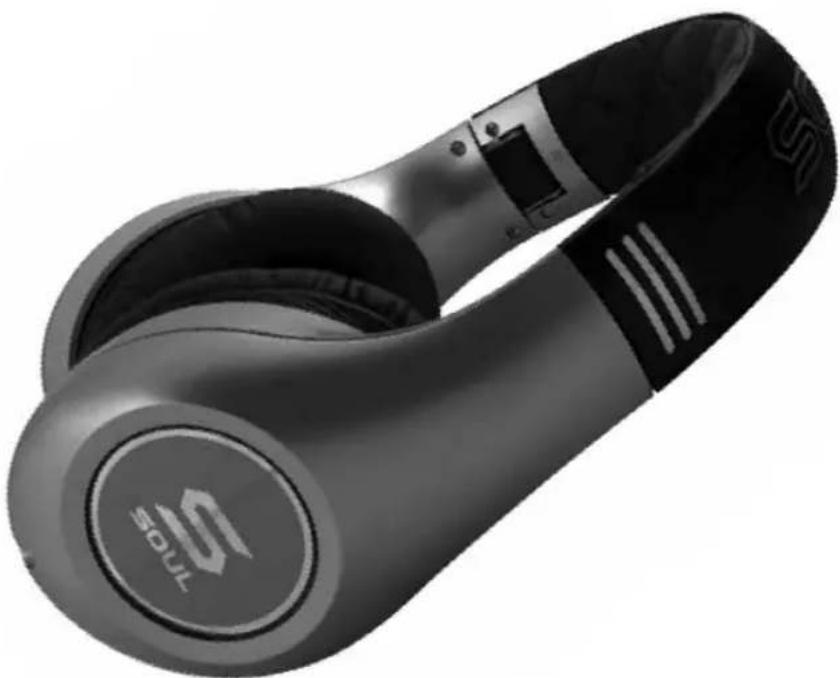
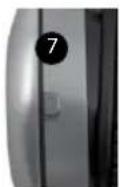
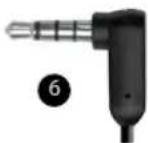
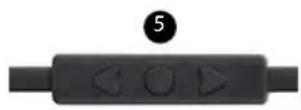
- SL300 Headphone
- Ear cup
- Adjustable Headband
- Audio Cable Input Jack
- iPhone ^® , iPod ^® and iPad ^® control switch
- 1/8" (3.5mm) Gold Plated Plug
- Active Noise Cancelling Power Slide Switch
- Headphone Badge Light Button
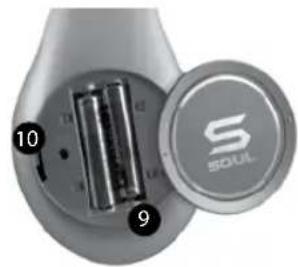
- Battery Compartment
- Hi/Lo Output Switch
natural_image
Close-up of a handheld electronic device showing two batteries and a circular cover labeled 'S SOUL' (no text or symbols on the main body)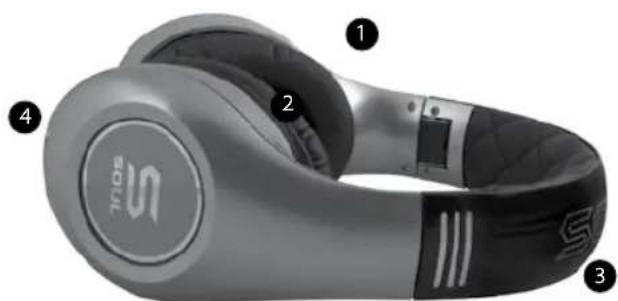
natural_image
Close-up of a silver MiSOS-branded ear with labeled parts (no text or symbols on the device itself)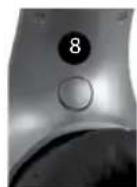
Box Contents
SL300 Headphones
Detachable Tangle-Free Audio Cable with In-Line Remote Control
Detachable Tangle-Free Audio Cable
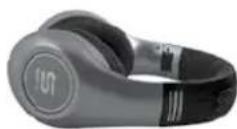
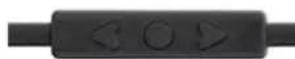

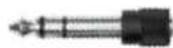
1/8" (3.5mm) to ¼" Gold Plated Adapter
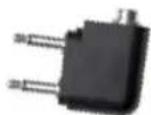
Airline Gold-Plated Adapter
Storage Road Case
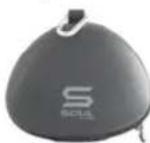
Cleaning Cloth
Batteries
Using Your Soul® Headphones
Carefully remove your Soul ^® headphones from the protective storage road case. You will find the audio cables, adapters and cleaning cloth in the accessory box directly below the headphones. Gently open the headphones all the way one side at a time until you feel them lock into place.
Headband Adjustment
Your Soul® headphones are fully adjustable for the most comfortable fit. Firmly hold the top headband with one hand and the bottom headphone portion with the other. Do not hold by the ear cups when adjusting the headband as damage could occur. Gently slide the two sections up and down until you find the proper fit for you. The ear cups are fully articulating so they will adjust to your head automatically when you put the headphones on. Once you have found the most comfortable fit you are ready to select and connect the audio cable.
Selecting and Connecting the Audio Cable
Your Soul® headphones include two audio cables. The first cable includes the in-line remote control for use with an iPhone, iPod or iPad. The second cable is for use with all other multimedia devices such as a Blackberry®, Android™ phone, multimedia tablet or MP3 player. Once you have selected the proper cable you are ready to connect to the headphone input jack. Both cables have straight and right angle plugs. Connect the straight plug into the headphone input jack. The input jack is located on the bottom left side of the headphone. You can identify the left side by the "L" on the inner headband portion of your headphone. Please ensure that the plug has been inserted all the way into the input jack.
Installing the Batteries and Selecting the Hi/Lo Output
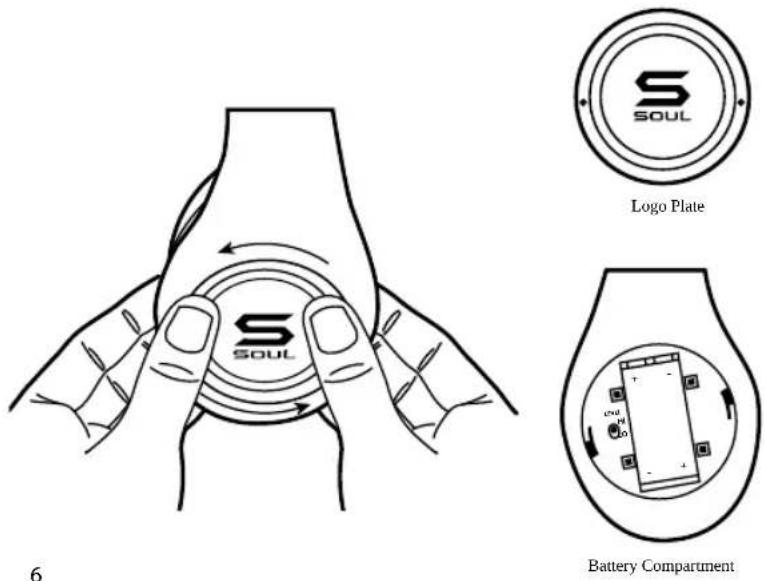
Please take the two AAA batteries included with your accessories and remove the protective plastic shrink wrap. On the right side of your headphones is the battery compartment. Place your thumbs as illustrated in the diagram below on both sides of the battery door (Logo Plate). You will notice two dim-ples opposite of each other as a guide. Gently press down on the battery door and turn to the left (counter-clockwise) about 1/8". At this point the battery door should be loose. Install your batteries following the positive + and negative - symbols. Before replacing the battery cover you will notice a slide switch (see illustration below) labeled Hi and Lo. The switch should be pre-set to the Hi position. If the device you are using has unusually high output you can change the switch to Lo. This will lower the overall sound level output of your headphones. Replace the battery cover and turn gently to the right (clock-wise) until the battery cover locks in place.
Warning
Use your headphones responsibly. Exposure to excessively loud noise can cause Noise Induced Hearing Loss (NIHL)
▲Caution
Do not over tighten or apply too much pressure to the battery cover as you could break the locking tabs.
Headphone Maintenance
Your Soul® headphones include a soft cleaning cloth located in the accessory box. Use the cloth to remove any fingerprints, oily residue or dirt from the headphone. When cleaning your headphones do not use an abrasive cloth as you could scratch the finish. Use a dry soft clean cloth to gently wipe the ear cups and remove any dirt or dust buildup.
▲Caution
Never use any harsh cleaning agents. Keep your headphones dry at all times. Water could damage the sensitive circuitry inside your headphones.
Using Your Soul® Headphones
Once you have found the proper fit, the audio cable has been connected, batteries have been installed and you have selected the Hi/Lo output you are ready to start enjoying the full range and quality of your Soul® headphones.
- Place headphones over your ears. Note: the headphones have an "L" for Left and "R" for Right indicators on the inside bottom portion of the headband. It is very important to place the headphones on your head correctly to get full sound benefit and enjoy your listening experience.
- Make sure that the volume is all the way down to zero.
- Turn your device off.
- Plug the 1/8" (3.5mm) plug into the headphone jack.
- Power Up your device.
- Select the music or movie you wish to hear or view.
-
Slowly increase the volume level until you find the safe and appropriate listening level for you.
-
Your Soul® SL300 Headphones include "Active Noise Cancelling" technology. This feature reduces the ambient noise around you for a more pleasurable listening experience. To activate this feature slide the switch on the left back portion of the headphone to the "on" position. A blue LED light will indicate that the "Active Noise Cancelling" feature is on. Your SL300 Headphones will still work even if the batteries have been depleted; however, you will need to replace the batteries to continue using the "Active Noise Cancelling Feature". Please remember to turn switch to the off position to prevent any unnecessary drain of the batteries.
-
Another additional feature of your Soul headphones is the Illuminated light ring around the Soul Logo on the outer portion of the ear cups. On the inner left portion of the headband is a power button to turn this feature on and off.
Caution
Use your headphones responsibly. Exposure to excessively loud noise can cause Noise Induced Hearing Loss (NIHL).
Never put headphones on when unit is at full volume as it may cause permanent damage.
In-Line Remote Control Function and Diagram
For Controlling Phone Functions
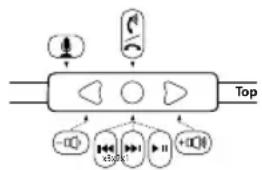
- Answer/Hang Up – During an incoming call press and release the center button ( ●) once to answer the call. Once you have completed your call press and release the center button once again to hang up the phone.
flowchart
graph TD
    A["Input Signal"] --> B["Processing Block"]
    B --> C["Output 100"]
    B --> D["Output 200"]
    B --> E["Output 300"]
    B --> F["Output 400"]
    B --> G["Output 500"]
    B --> H["Output 600"]
    B --> I["Output 700"]
    B --> J["Output 800"]
    B --> K["Output 900"]
    B --> L["Output 1000"]
-
Call Rejection – If you do not want to answer an incoming call, you can hold the center button for approximately two seconds. You will hear two beeps once you release the button that indicates the call was rejected.
-
Call Waiting – During a call in progress, you may answer another incoming call by pressing the center button. This will place the existing call on hold while you answer the incoming call. If you want to switch to the original call press the center button again. That will place the second caller on hold while you go back to your original call. You may repeat again to go back to second caller.
-
Volume Control - When you want to increase the volume of your phone, press the up arrow ( ) on your in-line controller. Note: Make sure to increase volume slowly to prevent damage to your hearing. When you want to decrease the volume on your phone, press the down arrow ( ) on your controller.
For Controlling Music or Movie Functions
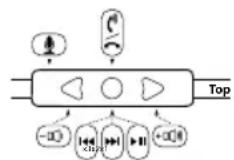
- Volume Control – When you want to increase the volume of your phone or multimedia device press the up arrow (▲) on your in-line controller. Note: Make sure to increase volume slowly to prevent damage to your hearing. When you want to decrease the volume, press the down arrow (▼) on your controller.
-
Play or Pause – To play a song or video, press and release the center button ( ●) once. To pause press and release the center button once during song or movie. To resume again, press and release center button once.
-
FFW/REW – To skip forward to the next song or chapter in a movie, quickly press and release the center button twice. To return to the previous song or chapter in a movie, quickly press and release the center button three times.
-
Scan – To scan forward during a song or movie, press and release the center button once, then immediately press and hold the center button again. This will scan forward. Release the button once you have reached the point in the song or movie you seek. To scan backwards during a song or movie, press and release the center button twice, then immediately press and hold the center button again. Release the button once you have returned to the portion of the song or movie you seek.
Note: Not all functions may work on all models. Functionality will be determined by phone or multimedia device.
In-Line Controller Compatibility Guide
The following Apple models should have full functionality of the controller. iPhone ^® 4, and iPhone ^® 3Gs, iPad ^® Wi-Fi and iPad ^® 3G, iPod Touch ^® 4th Generation, iPod Touch ^® 3rd Generation and iPod Touch ^® 2nd Generation, iPod Nano ^® 5th Generation and iPod Nano ^® 4th Generation. For Android ^™ or BlackBerry ^® models, not all in-line controller functions may fully work.
Disconnecting Your Soul® Headphones
Once you have finished using your Soul® in-ear headphones, disconnect from your device. Firmly hold your music or phone device. Pull the plug from the device while holding the plug firmly. Store your headphones in the protective case to keep safe and clean. Always store the headphones in the case to prevent damage when not in use.
Caution
Do not try to unplug the headphones by pulling on the cables as it may cause damage.
Trouble Shooting Guide
Problem Solution
No Sound Check plug; make sure it is plugged in all the way.
Check volume level, increase volume if necessary.
Check power, make sure device is on.
Check in-line controller, press center button to ensure it is not on Pause.
Low Volume Level Make sure that the headphones are creating a proper seal around your ears.
Increase the volume level on your device.
Make sure that the Hi/Lo switch located In the battery compartment Is set to Hi.
High Volume Level Lower the volume level on your device or from your In line remote control.
Set the Hi/Lo switch located in the battery compartment to Lo.
Only One Side Has Volume Make sure that the plug has been inserted all the way into your device headphone jack.
Check the connection to the headphone input jack. Make sure the plug has been inserted all the way.
No Active Noise Cancelling Make sure the slide switch Is in the on position and the LED light Is on.
Replace the two AAA batteries.
Product Registration Website: http://www.soulelectronics.com
Note: You must register your product for warranty
Customer Support Line: 800-566-7685(SOUL)
1 YEAR LIMITED WARRANTY
SIGNEO USA, LLC ("Company") warrants to the original retail purchaser of this product that should the product or any part thereof are proven defective in material or workmanship within 1 year from the date of original purchase, such defects will be repaired or replaced, at the Company's option, without charge for parts or labor.
To obtain replacement within the terms of this warranty, the product should be delivered, transportation prepaid, to the Dealer where purchased or to the Company, along with proof of date of purchase. Call 800-566-7685 to obtain information regarding the procedure for proper return of your product, if your Dealer does not honor the warranty. This warranty is valid in the USA only.
THIS WARRANTY DOES NOT APPLY TO ANY PRODUCT OR PART THEREOF WHICH HAS BEEN DAMAGED THROUGH ALTERATION, CLEANING, MAINTENANCE, MISHANDLING, MISUSE, NEGLECT, ACCIDENT, EXTERNAL CAUSES, IMPROPER INSTALLATION OR UNAUTHORIZED REPAIR. THIS WARRANTY ONLY APPLIES TO NONCOMMERCIAL USE OF THIS PRODUCT AND IS NOT TRANSFERABLE OR ASSIGNABLE.
THIS WARRANTY IS LIMITED, EXCLUSIVE AND IN LIEU OF ANY AND ALL OTHER WARRANTIES, EXPRESSED OR IMPLIED, INCLUDING WITHOUT LIMITATION THE IMPLIED WARRANTIES OF MERCHANTABILITY AND FITNESS FOR A PARTICULAR PURPOSE AND ANY OBLIGATION, LIABILITY, RIGHT, CLAIM OR REMEDY IN CONTRACT OR TORT, WHETHER OR NOT ARISING FROM THE COMPANY'S NEGLIGENCE, ACTUAL OR IMPUTED. NO PERSON OR REPRESENTATIVE IS AUTHORIZED TO ASSUME FOR THE COMPANY ANY OTHER LIABILITY IN CONNECTION WITH THE SALE OF THIS PRODUCT. IN NO EVENT SHALL COMPANY BE LIABLE FOR INDIRECT, INCIDENTAL, PUNITIVE OR CONSEQUENTIAL DAMAGES. THIS WARRANTY IS LIMITED TO THE REPAIR OR REPLACEMENT OF THE PRODUCT. IN NO EVENT SHALL THE COMPANY BE LIABLE FOR MORE THAN THE PURCHASE PRICE OF THE PRODUCT.
This warranty gives you specific legal rights and you may also have other rights which vary from state to state, so some of the above limitations or exclusions may not apply to you.

natural_image
Abstract black geometric logo design with stylized 'S' shape (no text or symbols)SOUL®
by Ludacris
1025 Greenwood Blvd, Lake Mary, FL 32746
All trademarks are the property of their respective owners.
iPhone, iPod classic, iPod nano, and iPod touch are trademarks of Apple Inc., registered in the U.S. and other countries. iPad is a trademark of Apple Inc.
MADE IN CHINA
VER.4/2011
LITSL300-1