
PAWD 20Li A1 - Battery PARKSIDE - Free user manual and instructions
Find the device manual for free PAWD 20Li A1 PARKSIDE in PDF.



| Product type | Rechargeable lithium-ion battery |
| Model | PAP 20 B3 |
| Rated voltage | 20 V max |
| Capacity | 4.0 Ah |
| Energy value | 80 Wh |
| Cell type | Lithium-ion |
| Number of cells | 10 |
| Charging temperature | +4 to +40 °C |
| Operating temperature | +4 to +40 °C |
| Recommended storage temperature | +20 to +26 °C |
| Compatibility | Parkside X 20 V Team series devices |
| Compatible chargers | Parkside X 20 V TEAM chargers (PLG 20 A4, PLG 20 C3, etc.) |
| Charging time (example) | 60 min with PLG 20 A3 charger |
| Charge indication | Red LED (charging), green LED (charged) |
| Charge level indication | 3 LEDs (red/orange/green) via button |
| Protection | Against heat, fire, water and humidity |
| Package contents | 1 battery, 1 instruction manual |
| Warranty | 3 years |
| After-sales service (France) | 0800 904 879 |
| After-sales service (Belgium) | 0800 71 011 |
Frequently Asked Questions - PAWD 20Li A1 PARKSIDE
User questions about PAWD 20Li A1 PARKSIDE
0 question about this device. Answer the ones you know or ask your own.
Ask a new question about this device
Download the instructions for your Battery in PDF format for free! Find your manual PAWD 20Li A1 - PARKSIDE and take your electronic device back in hand. On this page are published all the documents necessary for the use of your device. PAWD 20Li A1 by PARKSIDE.
USER MANUAL PAWD 20Li A1 PARKSIDE
Operation and safety notes
FR BE
20 V / 4 Ah BATTERIE
Pokyny pro obsluhu a
bezpečnostníPokyny
SK
20 V / 4 Ah
AKUMULATOR
Pokyny pre obsluhu a
bezpečnostnéPokyny
ES
20 V / 4 Ah BATERIA
Operation and safety notes Page 32
FR/BE
WARNING! EXPLOSIONSGEFAHR!
Warnings and symbols used. Page 33
Introduction. Page 37
Intended Use Page 37
Features . Page 38
Package contents. Page 39
Technical data. Page 39
General SafetyWarnings . . . Page 41
Use. Page 44
Charging the rechargeable battery . Page 44
LED status . Page 45
Checking the rechargeable battery charge level. Page 46
Removing/inserting the rechargeable battery. Page 47
Maintenance and storage . . . Page 47
Cleaning . Page 48
Disposal. Page 48
Warranty . Page 51
Warranty claim procedure.. Page 52
Service . Page 54
Warnings and symbols used
These instructions for use contain the following symbols and warnings:

DANGER! This symbol with the signal word “DANGER” indicates a hazard with a high level of risk which, if not avoided, will result in serious injury or death.

WARNING! This symbol with the signal word "WARNING" indicates a hazard with a medium level of risk which, if not avoided, will result in serious injury or death.
| CAUTION! This symbol with the signal word “CAUTION” indicates a hazard with a low level of risk which, if not avoided, could result in minor or moderate injury. | |
| ATTENTION! This symbol with the signal word“ATTENTION” indicates a potential property damage, if not avoided, could result in property damage. | |
| NOTE: This symbol with the signal word “NOTE” provides additional useful information. | |
| Direct current / voltage | |
| 警告 | WARNING! EXPLOSION HAZARD! A warning with this symbol and word “WARNING! EXPLOSION HAZARD” indicates the potential threat of explosion. Failure to observe this warning may result in serious or fatal injuries and potential property damage. Follow the instructions in this warning to prevent serious injuries, a danger to life or property damage! |
| Li-lon | Lithium-ion battery |
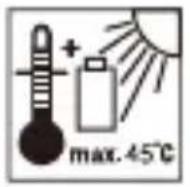
| max.45°C | Protect the battery pack against heat and continuous intense sunlight. |
| Protect the battery pack from fire. | |
| Protect the battery pack against water and moisture. | |
| This symbol means that the operating instructions must be observed before using the product. | |
| CE | CE mark indicates conformity with relevant EU directives applicable for this product. |
20V / 4Ah RECHARGEABLE BATTERY
Introduction
We congratulate you on the purchase of your new product. You have chosen a high quality product. The instructions for use are part of the product. They contain important information concerning safety, use and disposal. Before using the product, please familiarise yourself with all of the safety information and instructions for use. Only use the product as described and for the specified applications. If you pass the product on to anyone else, please ensure that you also pass on all the documentation with it.
Intended Use
The rechargeable battery is compatible with all devices from the Parkside X 20 V Team series. The rechargeable battery may only be charged using chargers from the Parkside X 20 V TEAM series.
This rechargeable battery is not intended for commercial use. Any other usage of or modification to the appliance is deemed to be improper and carries a significant risk of accidents. The manufacturer accepts no responsibility for damage(s) attributable to misuse.
Features
1 Release button for rechargeable battery
2 Rechargeable battery
3 Charging level LEDs (red/ orange/green)
4 button (charging level)
5 Power cord with power plug
6 Rapid battery charger (not included)
7 Charging control LED - red
8 Charging control LED - green
Package contents
1 20V / 4Ah Rechargeable Battery
1 Set of operating instructions
Technical data
Battery: PAP 20 B3
Type: LITHIUM ION
Rated voltage: max. 20V
Capacity: 4.0Ah
Cells: 10
Energy value: 80 Wh
Recommended
ambient
temperature: max. 45^ C
While charging: +4 to +40 °C
During operation: +4 to +40 °C
During storage: +20 to +26 °C
To charge the rechargeable battery, only
use the chargers from the Parkside X
20 V TEAM series.
Charging time for battery PAP 20 B3:
| Charger | PLG 20 C1 PLG 20 A4 | 120 minutes |
| PLG 20 C3 PLG 20 A3 PDSLG 20 A1 | 60 minutes | |
| Smart PLGS 2012 A1 | 42 minutes (quick charging mode) 240 minutes (ECO charging mode) |
NOTE: The actual charging time may be slightly different from the above stated depending on the ambient temperature and the condition of the battery pack. The information is subject to change without prior notice.
Customers can order compatible replacement batteries and chargers from Lidl online shops for the following countries:
Germany (lidl.de), France (lidl.fr), Belgium (lidl.be), Czech Republic (lidl.cz), Netherlands (lidl.nl), Poland (lidl.pl), Slovakia (lidl.sk), Spain (lidl.es)
Customers from all other countries can order from www.optimex-shop.com.

General SafetyWarnings
WARNING! Read all safety warnings and all instructions. Failure to follow the warnings and instructions may result in electric shock, fire and/or serious injury.
SAVE ALL WARNING AND INSTRUCTIONS FOR FUTURE REFERENCE.
a) Recharge only with the charger specified by the manufacturer. A charger that is suitable for one type of rechargeable battery may create a risk of fire when used with another rechargeable battery.
b) Use power tools only with specifically designated rechargeable battery. Use of any other rechargeable batteries may create a risk of injury and fire.
c) When the rechargeable battery is not in use, keep it away from other metal objects, like paper clips, coins, keys, nails, screws or other small metal objects, that can make a connection from one terminal to another. Shorting the battery terminals together may cause burns or a fire.
d) Under abusive conditions, liquid may be ejected from the rechargeable battery; avoid contact. If contact accidentally occurs, flush with water. If liquid contacts eyes, additionally seek medical help. Liquid ejected from the battery may cause irritation or burns.

CAUTION! RISK OF EXPLOSION!


Never charge non-rechargeable batteries!
Protect the rechargeable battery from heat, for example from continuous exposure to sunlight, fire, water and moisture. There is a risk of explosion.
e) Do not use a rechargeable battery for tool that is damaged or modified. Damaged or modified batteries exhibit unpredictable behaviour resulting in fire, explosion or risk of injury.
f) Do not expose a rechargeable battery or tool to fire or excessive temperature. Exposure to fire or temperature above 130^ C may cause an explosion.
g) Follow all charging instruction and do not charge the rechargeable battery or tool outside the temperature range specified in the instructions. Charging improperly or at temperatures outside the specified
range may damage the battery and increase the risk of the fire.
h) The safety instructions of the compatible chargers must be observed.
Service
a) Have your power tool serviced by a qualified repair person using only identical replacement parts. This will ensure that the safety of the power tool is maintained.
b) Never service damaged battery packs. Service of battery packs should only be performed by the manufacturer or authorized service providers.
Use
- Charging the rechargeable battery
NOTE: The rechargeable battery 2 may be charged at any time without reducing the life. Interrupting the charging process
does not damage the rechargeable battery 2.
Charge the rechargeable battery 2 before use when it is at medium or low charging level.
The charging control LEDs (red 7 and green 8) indicate the status of the charger 6 (not included) and the rechargeable battery 2.
Insert the rechargeable battery 2 into the charger 6 (not included).
- Connect the power plug 5 to a socket-outlet.
- When the rechargeable battery 2 is fully charged: Remove the rechargeable battery from the charger 6 (not included). Disconnect the power plug 5 from the socket-outlet.
LED status
Red LED lights up The rechargeable battery is charging.
Green LED lights up The rechargeable battery is fully charged.
Green and red LED flashing The
rechargeable battery is defective.
Red LED flashing The rechargeable
battery is too cold or too warm.
Green LED lights up (without
rechargeable battery ) Charger is ready for use.
- Checking the rechargeable battery charge level
-
Press the button 4 to check the status of the rechargeable battery 2. The status/remaining charge will be shown on the charging level LED 3 as follows:
-
Red / orange / green = maximum charge
-
Red / orange = medium charge
- Red = low charge
- Removing/inserting the rechargeable battery
Only insert the rechargeable battery 2 once the battery operated tool is ready for use. Risk of injury!
- To insert the rechargeable battery 2, place it on the guide track and push it into the appliance. It will audibly snap in.
- To remove the rechargeable battery 2 from the appliance, press the rechargeable battery release button 1 and pull out the rechargeable battery 2.
- Maintenance and storage
- Only store the rechargeable battery 2 partially charged. The rechargeable battery ② should be charged to 40 to 60 % (red and orange LED in the charge indicator 3 light up) before storing for extended periods.
Check the rechargeable battery 2 charge about every 3 months
when storing for extended periods. Recharge as necessary.
Cleaning
Clean out dust and debris from charger vent and electrical contacts using a soft brush.
- Never use flammable or combustible solvents around battery packs, charger, or tools.
Disposal
The packaging is made of environmentally friendly materials, which may be disposed of through your local recycling facilities.

Observe the marking of the packaging materials for waste separation, which are marked with abbreviations (a) and numbers (b) with following meaning: 1-7: plastics/20-22: paper and fibreboard/80-98: composite materials.
Product:

The product incl. accessories, manual and packaging materials are recyclable and are subject to extended producer responsibility.
Dispose them separately, following the illustrated Info-tri (sorting information), for better waste treatment.
The Triman logo is valid in France only.

Contact your local refuse disposal authority for more details of how to dispose of your workout product.
To help protect the environment, please dispose of the product properly when it has reached the end of its useful life and not in the household waste. Information on collection points and their opening hours can be obtained from your local authority.
Faulty or used batteries/rechargeable batteries must be recycled. Return the batteries/rechargeable batteries and the product to the available collection points.
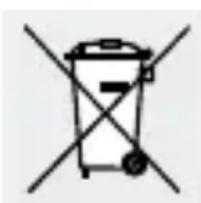
Environmental damage through incorrect disposal of the batteries / rechargeable batteries!
Remove the batteries / battery pack from the product before disposal.
Batteries / rechargeable batteries may not be disposed of with the usual domestic waste. They may contain toxic heavy metals and are subject to hazardous waste treatment rules and regulations. The chemical symbols for heavy metals are as follows:
Cd = cadmium, Hg = mercury, Pb = lead. That is why you should dispose of used batteries / rechargeable batteries at a local collection point.
Warranty
The product has been manufactured to strict quality guidelines and meticulously examined before delivery. In the event of material or manufacturing defects you have legal rights against the retailer of this product. Your legal rights are not limited in any way by our warranty detailed below.
The warranty for this product is 3 years from the date of purchase. The warranty period begins on the date of purchase. Keep the original sales receipt in a safe location as this document is required as proof of purchase.
Any damage or defects already present at the time of purchase must be reported without delay after unpacking the product.
Should the product show any fault in materials or manufacture within 3 years from the date of purchase, we will repair or replace it – at our choice – free of charge to you. The warranty period is
not extended as a result of a claim being granted. This also applies to replaced and repaired parts.
This warranty becomes void if the product has been damaged, or used or maintained improperly.
The warranty covers material or manufacturing defects.
Warranty claim procedure
So that your request can be processed quickly, please observe the following instructions:
For all inquiries, please have the receipt and item number (e.g., IAN 505127_2501) ready as proof of purchase.
The article number can be taken from the identification label on the product, engraving on the product, the front cover of your manual (at the bottom left), or the sticker on the back or bottom of the product.
If malfunctions or other defects arise, first contact the service department indicated below by phone or email.
You can then send a product recorded as defective to the communicated service address postage-free, making sure to enclose proof of purchase (receipt) and information on the details of the defect and when it occurred.
You can download and view this and numerous other manuals at parkside-diy.com. This QR code takes you directly to parkside-diy.com. Choose your country and use the search screen to search for the operating instructions. Entering the item number (IAN) 505127_2501 takes you to the operating instructions for your item.
PDF ONLINE
parkside-diy.com
Service

Service Great Britain
Tel.:08000569216
E-Mail: owim@lidl.co.uk

Service Ireland
Tel.:1800200736
E-Mail: owim@lidl.ie

Avertissements et
Introduction. Page 60
adversel, for at forbhindre
Nominal spending: maks. 20V =
Kapacitet: 4,0Ah
Celler:10
Energiværdi: 80 Wh


- WARNING! EXPLOSIONSGEFAHR!
- Warnings and symbols used. Page 33
- Introduction. Page 37
- General SafetyWarnings . . . Page 41
- Use. Page 44
- Maintenance and storage . . . Page 47
- Cleaning . Page 48
- Disposal. Page 48
- Warranty . Page 51
- Warnings and symbols used
- 20V / 4Ah RECHARGEABLE BATTERY
- Introduction
- Intended Use
- Features
- Package contents
- Technical data
- General SafetyWarnings
- SAVE ALL WARNING AND INSTRUCTIONS FOR FUTURE REFERENCE.
- CAUTION! RISK OF EXPLOSION!
- Service
- Use
- - Charging the rechargeable battery
- LED status
- Green and red LED flashing The
- Red LED flashing The rechargeable
- Green LED lights up (without
- - Checking the rechargeable battery charge level
- - Removing/inserting the rechargeable battery
- - Maintenance and storage
- Cleaning
- Disposal
- Product:
- Environmental damage through incorrect disposal of the batteries / rechargeable batteries!
- Warranty
- Warranty claim procedure
- Avertissements et
Brand : PARKSIDE
Model : PAWD 20Li A1
Category : Battery