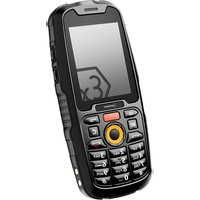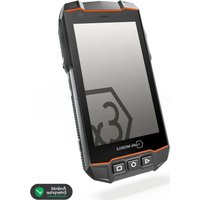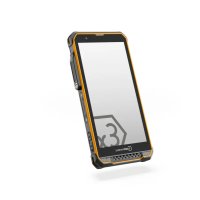
IS880.2 - Smartphone i.safe Mobile - Free user manual and instructions
Find the device manual for free IS880.2 i.safe Mobile in PDF.



User questions about IS880.2 i.safe Mobile
0 question about this device. Answer the ones you know or ask your own.
Ask a new question about this device
Download the instructions for your Smartphone in PDF format for free! Find your manual IS880.2 - i.safe Mobile and take your electronic device back in hand. On this page are published all the documents necessary for the use of your device. IS880.2 by i.safe Mobile.
USER MANUAL IS880.2 i.safe Mobile
text_image
i.safe MOBILE
text_image
IS880.2OPERATING MANUAL
i.safe MOBILE
IS5880.2 | MODEL M880A01
Document No. 1074MM01REV01
Version: 2024-09-30
i.safe MOBILE GmbH
i_Park Tauberfranken 10
97922 Lauda-Koenigshofen
Germany
Tel.+49 9343 60148-0
info@isafe-mobile.com
www.isafe-mobile.com
(c) 2024 i.safe MOBILE GmbH Template: TEMPMM01REV10
CONTENTS
English....4
Deutsch....24
Česky 44
Dansk....64
Español....84
Suomi....104
Français....124
Magyar 144
Italiano 164
Nederlands 184
Norsk 204
Polski 224
Português (EU) 244
Português (BR) 264
Русский.... 284
Svenska 304
Hrvatski....324
Slovenská 344
Српски 364
Korean 384
Japanese 404
Chinese 424
Arabic 444
This Operating Manual complies with these standards:
IEC 60079, IEC 82079, ANSI Z535.6
IEC 60079, IEC 82079, ANSI Z535.6
ENGLISH

PROTECT YOUR LIFE AND READ THE OPERATING MANUAL
This Operating Manual is part of the device IS880.2 (model M880A01).
This Operating Manual provides important information for safe use of the device.
» Before using the device, read this Operating Manual carefully and pay particular attention to the „Ex-relevant Safety Regulations“ section and the warnings highlighted with the warning symbol. If you do not follow these instructions or do not understand them, this could lead to death, severe injuries and damage to the device.
» Make sure you have access to this Operating Manual when you need it. You can find the current Operating Manual at www.isafe-mobile.com/en/support/downloads
» Follow all instructions given on the device and on the packaging.
»Follow local safety regulations.
» Only use the device in explosion hazardous areas of zones 2/22 or outside of explosion hazardous areas.
» Before entering an explosion hazardous area with the device,
- make sure that only approved accessories are connected to the device, see section "Connecting approved accessories",
- make sure that no gap can be seen between the two halves of the device,
- make sure the device is not damaged,
- make sure that all the labels on the device are readable,
- make sure that only the battery supplied or an approved replacement battery is installed in the device,
- make sure that the battery is not older than 2 years or damaged, see section „Changing the battery“,
- make sure the battery is screwed tight.
» If you use the device in an explosion hazardous area,
- do not loosen the screws on the device,
- do not connect any accessories to the device,
- do not open any interface cover,
- do not charge the device,
- do not open the device,
- do not damage the device.
» Switch off the device immediately and leave the explosion hazardous area without delay if
- malfunctions occur on the device,
- you have damaged the housing of the device,
- you have exposed the device to excessive loads,
- the device has been stored improperly,
- the labels on the device are no longer readable.
» Do not modify the device structurally.
» Do not expose the device to high temperatures.
» Do not expose the device to strong UV radiation.
» Do not expose the device to processes with high electrical charges.
» Do not expose the device to aggressive acids or bases. » Protect the device from strong electrical magnetic fields as for example those emitted by induction cookers or microwave ovens, for example.
» Only use accessories approved by i.safe MOBILE GmbH.
» Do not open the device or carry out any repairs yourself.
» Do not use the device in places where its use is prohibited.
» Turn off the device in clinics or other medical facilities.
» Always keep a safety distance of at least 15 cm between the device and a pacemaker or hearing aid. The device can affect the functioning of medical devices such as pacemakers and hearing aids.
» When using the device while driving a motor vehicle, be sure to comply with applicable national laws.
» Do not charge the device in the vicinity of flammable substances.
» Only charge the device using the charging equipment approved by i.safe MOBILE GmbH.
» Only charge the device at ambient temperatures between 0 °C to +45 °C (+32 °F to +113 °F).
» Only charge the device under dry indoor conditions.
» Do not charge the device in environments dusty or humid.
» Do not touch the display with sharp objects.
» When using earphones or headsets at the maximum volume setting, first set the volume control on the device to 50 % of the maximum volume. Gradually adjust the volume.

EX-RELEVANT SAFETY REGULATIONS
Use of this device assumes that the operator observes the conventional safety regulations and has read and understood Operating Manual, Safety Instructions and certificate.
When used in explosion hazardous areas, the following Safety Instructions must also be complied with:
» To ensure the IP-protection, it has to be ensured that all gaskets are present and functional.
» Physical connections to IS880.2 are only allowed outside explosion hazardous areas.
» The battery may be charged outside explosion hazardous areas only.
The device may only be charged at temperatures between 0 °C to +45 °C (+32 °F to +113 °F).
» The device may not be exposed to any aggressive acids or alkalis.
» The device may only be used in zones 2 or 22.
» The device must be protected from impacts with high impact energy, against excessive UV light emission and high electrostatic charge processes.
» Only accessories approved by i.safe MOBILE GmbH may be used.
BATTERY
The battery contains flammable materials such as organic solvents. Mishandling the battery may cause fire, smoke or an explosion. This poses a risk of death and serious injury!
The following must be observed:
» If the device is used daily, the battery should be replaced 2 years after first use, but at the latest after 500 charging cycles or when the operating time has been significantly reduced.
» The battery must not be used if there are noticeable abnormalities, such as smell, heat, discoloration or deformity.
» A leaking battery must not be used and touched.
» The battery must not be used or placed near an open flame, heater or high Temperature (above 80 °C (176 °F)).
» The battery must not be used where static electricity in excess of 100 V is generated.
» The battery must not be immersed in liquid such as water, beverages or other fluids.
» The battery must not be placed in or near a microwave or other cooking appliances.
» The battery must not be used in devices for which it was not intended.
» No short-circuit must be applied to the battery.
» The battery must not be exposed to excessive impacts.
» The battery must not be penetrated with a nail or strike with a hammer.
» The battery must not be disassembled.
» The battery must be packed securely in a case or carton for transport.
» The battery must not be charged in the vicinity of flammable substances.
»The battery must only be charged using the charging equipment approved by i.safe MOBILE GmbH.
» The battery must only be charged at ambient temperatures between 0 °C to +45 °C (+32 °F to +113 °F).
» The battery must only be charged under dry indoor conditions only.
» The battery must not be charged in environments dusty or humid.
» If the battery is not to be used for a longer period of time, it must be removed from the device. The battery must be charged to approx. 50 % to 70 % every 3 to 6 months to avoid deep discharge.
» The battery must be stored in a cool, dry place to keep it functional.
» The battery must not be stored with any metal objects.
» The battery must not be thrown away with household waste.
» The battery must be recycled to local rules and regulations.
FAULTS AND DAMAGES
If there is any reason to suspect that the safety of the device has been compromised, it must be withdrawn from use and removed from any ex-hazardous areas immediately.
Measures must be taken to prevent any accidental restarting of the device. The safety of the device may be compromised, if, for example:
» Malfunctions occur.
» The housing of the device shows damage.
» The device has been exposed to excessive loads.
» The device has been stored improperly
» Markings or labels on the device are illegible.
We recommend that a device displaying errors or in which an error is suspected be sent back to i.safe MOBILE GmbH to be checked.
INFORMATION CONCERNING CE SAR CERTIFICATION (SPECIFIC ABSORBATION RATE)
The SAR limit of Europe is 2,0 W/kg for the head and body. The device has been tested against this SAR limit. The highest SAR value reported under this standard during product certification for use at the ear is 0,349 W/kg and when correctly worn on the body is 1,576 W/kg. This device was tested for typical body worn operations with the back of the handset kept 5 mm from the body. The device complies with RF specifications when used at 5 mm from the body. Belt clips, holsters and similar accessories used should not contain metallic components in the assembly. The use of accessories that do not satisfy these requirements may not comply with RF exposure requirements, and should be avoided.
MAXIMUM OUTPUT POWER
| Frequency bands | Maximum output power | Frequency bands | Maximum output power |
| GSM900 | 33.20 dbm | LTE B20 | 23.17 dBm |
| GSM1800 | 30.35 dbm | LTE B28 | 22.91 dBm |
| WCDMA I | 23.27 dbm | LTE B34 | 22.81 dBm |
| WCDMA V | 23.15 dbm | LTE B38 | 22.99 dBm |
| WCDMA VIII | 23.47 dBm | LTE B40 | 23.09 dBm |
| LTE B1 | 22.83 dBm | LTE B41 | 23.18 dBm |
| LTE B3 | 22.78 dBm | CA_41C | 22.41 dBm |
| LTE B5 | 23.17 dBm | BT | 7.43 dbm |
| LTE B7 | 22.94 dBm | BLE | 7.45 dbm |
| CA_7C | 22.56 dBm | 2.4G | 15.64 dbm |
| LTE B8 | 23.10 dBm | 5.2G | 13.58 dbm |
| 5.8G | 12.37 dbm |
RESTRICTIONS
The device is restricted to indoor use only when operating in the 5150 to 5350 MHz frequency range in the following countries:
 | AT | BE | BG | CH | CY | CZ | DE |
| DK | EE | EL | ES | FI | FR | HR | |
| HU | IE | IS | IT | LI | LT | LU | |
| LV | MT | NL | PL | PT | RO | SE | |
| SI S K TR UK | |||||||
INTENDED USE
The IS880.2 is an Internet-capable communication device for industrial use in explosion hazardous areas of Zone 2/22, in accordance with Directives 2014/34/EU, 1999/92/EC and the IECEx system, among others.
Only use the device as described in this Operating Manual. Any other use is considered improper and can lead to death, severe injuries and damage to the device.
The manufacturer i.safe MOBILE GmbH does not assume any liability for damage caused by improper use. The warranty expires in the event of improper use.
USER
Only trained users who are qualified in the use of Ex devices in explosion hazardous areas and who have read and understood this Operating Manual may use this device.
WARRANTY
You can find the warranty conditions at www.isafe-mobile.com/en/support/service For any damage caused by computer viruses that you download while using the Internet functions responsibility is at your hand.
There is no right of recourse against i.safe MOBILE GmbH.
EU DECLARATION OF CONFORMITY
You will find the EU declaration of conformity at www.isafe-mobile.com/en/support/downloads
EX MARKINGS
> ATEX:
① II 3G Ex ic IIC T4 Gc
Ea II 3D Ex ic IIIC T135°C Dc
Certificate of Conformity:
EPS 23 ATEX 1 346 X
CE-designation: c€
IECEx:
Ex ic IIC T4 Gc
Ex ic IIIC T135°C Dc
IECEx Certificate: IECEx EPS 23.0092X
> Temperature range:
-20 °C ≤ Ta ≤ +55 °C (EN/IEC 60079-0) -10 °C ... +50 °C (EN/IEC 62368-1)
Manufactured by:
i.safe MOBILE GmbH
i_Park Tauberfranken 10
97922 Lauda-Koenigshofen
Germany
>SCOPE OF DELIVERY
Your device packaging contains the following:
1 x IS880.2
1 x Battery
1 x Safety Instructions
1 x Display Protection Foil
1 x USB-C Cable
CELL BROADCAST
The device supports cell broadcast. Cell broadcast is a cellular service for sending messages to all recipients within a cell.
DEVICE OVERVIEW/FUNCTIONS
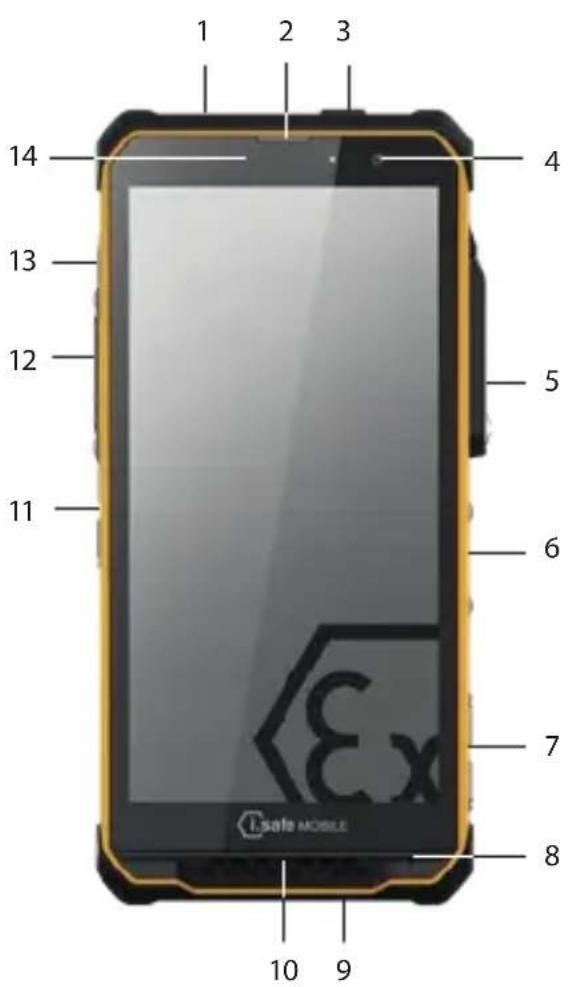
text_image
1 2 3 4 5 6 7 8 9 10 11 12 13 14 i.Safe MOBILE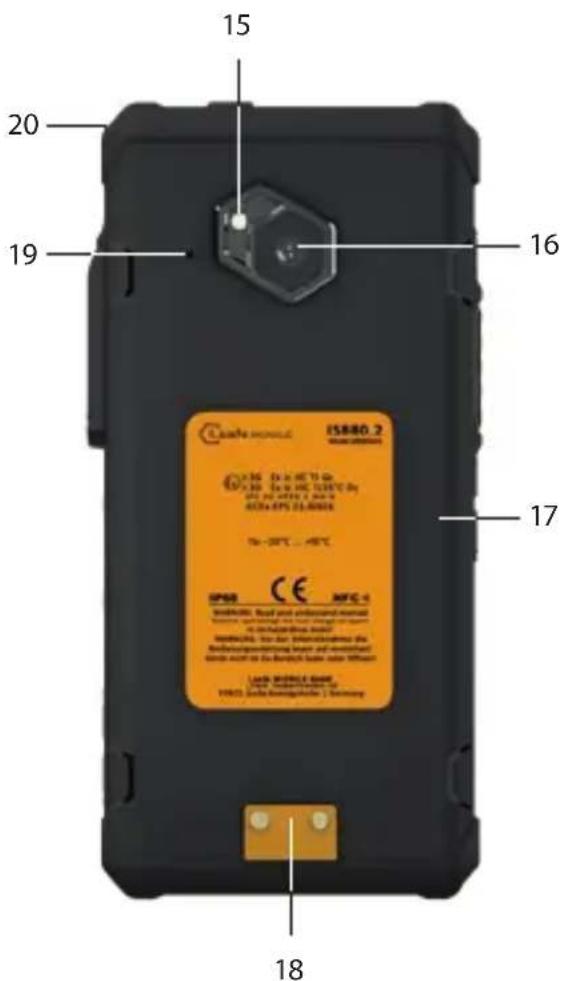
text_image
15 20 19 16 17 18 IS880.2 ISO 34-0000000000000000000000000000000000000000000000000000000000000000000000000000000 19-38°C ... -48°C SP58 CE MFC-1 ISO 34-0000000000000000 Rear your electronic manual in the circuit board, or in the circuit board or in the circuit board in the circuit board, or in the circuit board the circuit board is a device without and the circuit board is a device without the circuit board is a device without the circuit board is a device without the circuit board is a device without the circuit board is a device without the circuit board is a device without the circuit board is a device without the circuit board is a device without the circuit board is a device without the circuit board is a device without the circuit board is a device without the circuit board is a device without the circuit board is a device without the circuit board is an electronic device the circuit board is an electronic device the circuit board is an electronic device the circuit board is an electronic device the circuit board is an electronic device the circuit board is an electronic device the circuit board is an electronic device the circuit board is an electronic device the circuit board is an electronic device the circuit board is an electronic device the circuit board is an electronic device the circuit board is an electronic device the circuit board is an electronic device the circuit panel is an electronic device with the circuit panel being used to use the circuit panel on the circuit panel, or the circuit panel is used to use the circuit panel on the circuit panel, or the circuit panel is used to use the circuit panel on the circuit panel, or the circuit panel is used to use the circuit panel on the circuit panel, or the circuit panel is used to use the circuit panel on the circuit panel, or the circuit panel is used to use the circuit panel on the circuit panel, or the circuit panel is used to use the circuit panel on the circuit panel, or the circuit panel is used to use it1> FUNCTION KEY RED: Optional function, e.g. SOS - function can be assigned via Button App (system integrated).
2> LOUDSPEAKER
3>ROCKER SWITCH
4>FRONT CAMERA
5) 13-PIN ISM INTERFACE: Connection for approved accessories. Also see section "Connecting approved accessories".
6> FINGERPRINT SENSOR
7) FUNCTION KEYS M1 M2: Optional function - function can be assigned via Button App (system integrated).
8>MICROPHONE
9) USB INTERFACE: Connection for the USB-C Cable or for other equipment approved by i.safe MOBILE GmbH. Also see sections "Charging" and "Connecting approved accessories".
10> LOUDSPEAKER: Loudspeaker for hands-free function.
11> LOUDNESS CONTROL: Volume up/Volume down.
12> SIDE KEY LEFT: Optional function - function can be assigned via Button App (system integrated).
13) POWER KEY: A long press switches the device on/off. A short press switches the standby mode on/off.
14> SENSORS: Proximity sensor, light sensor.
15>LED FLASH
16>BACK CAMERA
1f7 > BATTERY COMPARTMENT COVER
18) CHARGING CONTACTS
19> NOISE CANCELLING: Noise cancelling microphone.
20 > EYELET:Eyelet for hand strap.
FUNCTION KEYS
The device has various freely programmable keys:
Function key M1
Function key M2
Function key red
Side key left
You can assign a function to the freely programmable keys via the Button App installed on the device. You will find the Button App in the menu item „Settings“.
INSERT/REMOVE SIM CARD(S)/microSD CARD
The device has a slot for two SIM cards or for one SIM card in combination with a microSD card.

DANGER
An incorrect procedure in explosion hazardous areas poses a risk of death or severe injuries! Only open the device outside of explosion hazardous areas to insert or remove SIM card(s)/microSD card.
NOTICE
Proceeding incorrectly when inserting/removing the SIM card(s)/microSD card can damage the device and the cards. Switch off the device before inserting or removing cards. Do not charge the device while inserting or removing cards.
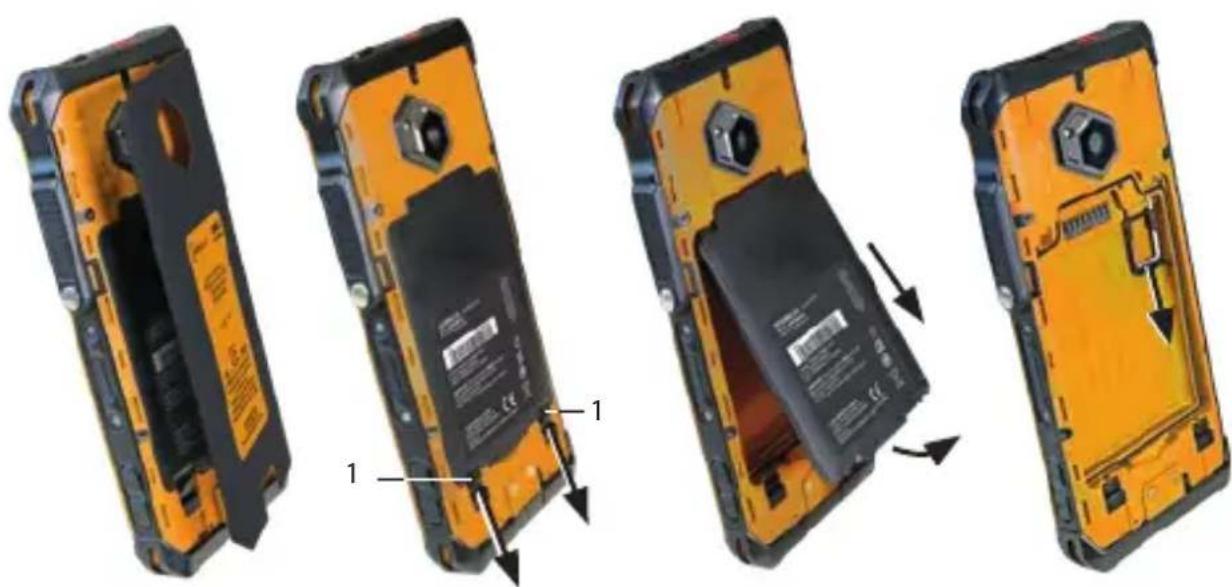
natural_image
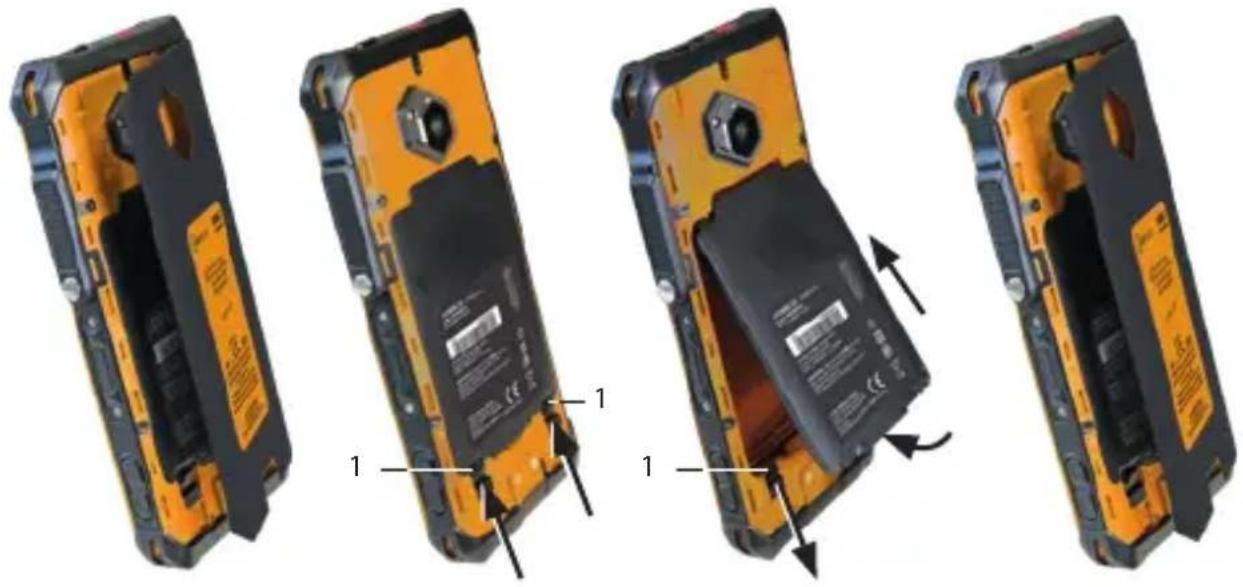
Four-panel illustration of a yellow and black mobile phone showing internal components and battery release (no text or symbols)» Remove the battery compartment cover.
» Open the battery-locks (1).
» Remove the battery from the battery compartment.
» Carefully pull the card holder out of the card slot.
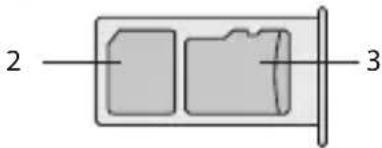
text_image
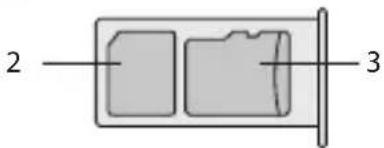
2 3» Insert the SIM card into the nano-SIM card slot (2) with the gold-coloured contacts facing down.
» Insert the microSD card into the slot (3) with the gold-coloured contacts facing down. The device has a slot for a microSD card up to 128 GB.
If you want to insert two SIM cards:
» Insert the SIM cards into the slots (2) and (3) with the gold-coloured contacts facing down.
» Carefully slide the card holder into the card slot.
»Reinstall the battery. See section "Installing the battery".
» If you have inserted two SIM cards, select a favorite card. Information on operating the device can be found at www.isafe-mobile.com/en/support/service under the menu item „FAQ“.
>INSTALLING THE BATTERY

DANGER
Installing the wrong battery in the device, poses a risk of explosion, which could result in death or serious injuries! Only fit the battery supplied or an approved replacement battery in the device outside of explosion hazardous areas. The approved replacement battery can be found on the website www.isafe-mobile.com/en/products
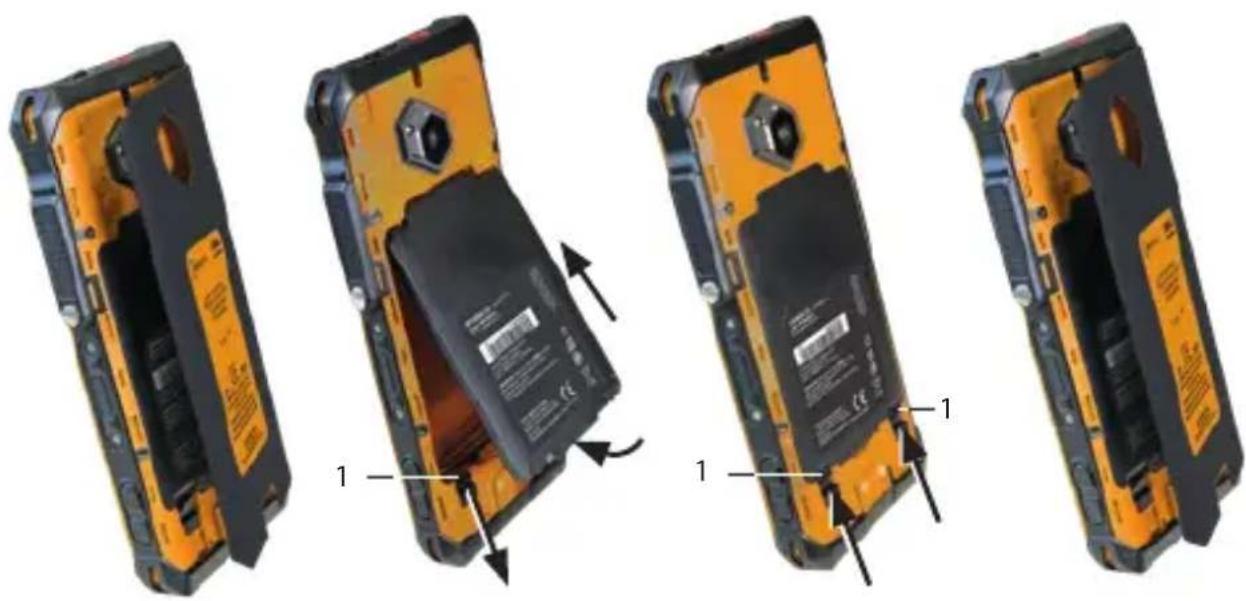
natural_image
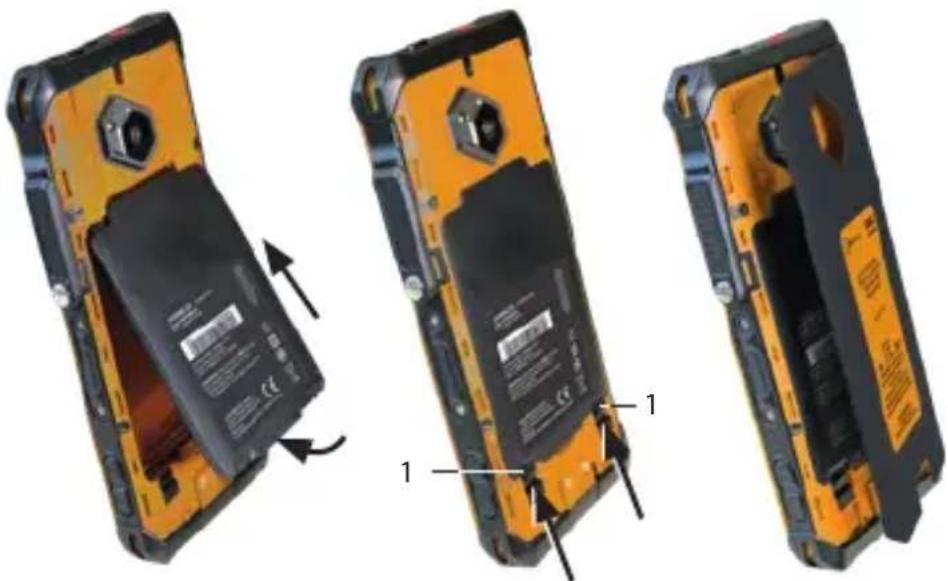
Four views of a yellow and black mobile phone showing internal battery casing changes, with arrows indicating the process (no text or symbols present)» Remove the battery compartment cover.
» Open the battery-locks (1).
» Place the battery in the battery compartment as shown.
» Close the battery-locks (1).
» Check that the battery is seated correctly and securely.
»Reinstall the battery compartment cover.
>CHARGING

DANGER
An incorrect procedure in explosion hazardous areas poses risk of death or severe injuries! Only charge the device outside of explosion hazardous areas. Do not charge the device in the vicinity of flammable substances.
NOTICE
Incorrect charging can cause damage to the device. Please note the following when charging:
»Only charge the device using the charging equipment approved by i.safe MOBILE GmbH.
»Only charge the device at ambient temperatures between 0 °C to +45 °C (+32 °F to +113 °F).
»Charge the device under dry indoor conditions only.
»Do not charge the device in environments dusty or humid.
Your device package does not contain a power supply unit. Use a 5 V/3 A power supply unit and the USB-C Cable supplied for charging.
» Connect the USB-C Cable to the power supply unit.
» Connect the USB-C Cable to the USB interface of the device.
» Connect the power supply unit to the power socket.
> SWITCHING ON/OFF
» Press and hold the power key for about 3 seconds.
» Enter the device or SIM PIN when the input dialog for the device or SIM PIN appears after switching on.
»Press and hold the power key to enter the power off menu. Select
>USING THE DEVICE

CAUTION
When using earphones or headsets at the maximum volume setting, you can damage your hearing. First set the volume control on the device to 50 % of the maximum volume. Gradually adjust the volume.
» Only use the device at ambient temperatures between -20 °C to +55 °C (-4 °F to +131 °F).
» When turning on the device for the first time, follow the instructions on the screen.
Further information on operating the device can be found at www.isafe-mobile.com/en/support/service under the menu item "FAQ".
Detailed information on operating the Android operating system can be found at: https://support.google.com/android
CONNECTING APPROVED ACCESSORIES

DANGER
Improper use poses risk of death or severe injuries!
»Only connect accessories approved by i.safe MOBILE GmbH to the device. Accessories approved by i.safe MOBILE GmbH can be found at www.isafe-mobile.com/en/products
If you need approved accessories in explosion hazardous areas, please note the following before connecting:
»Connect approved accessories to the 13-pin ISM interface of the device only outside of explosion hazardous areas.
»Never open the cover of the 13-pin ISM interface in explosion hazardous areas.
»Operate approved accessories in explosion hazardous areas only on the 13-pin ISM interface of the device. Wired connections via the USB interface are prohibited.
»Connect the plug of the accessory securely to the 13-pin ISM interface on the device.
»Only remove approved accessories from the 13-pin ISM interface outside of explosion hazardous areas.
»Close the 13-pin ISM interface with the cover provided when you are not using accessories.
13-PIN ISM INTERFACE
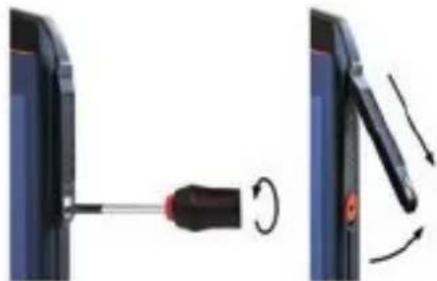
natural_image
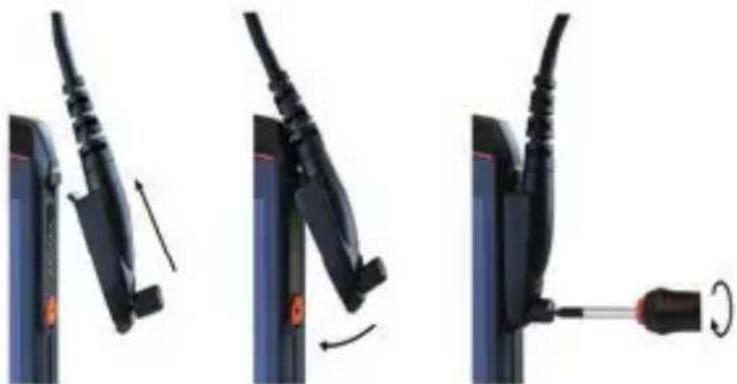
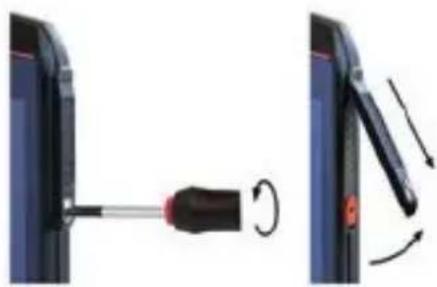
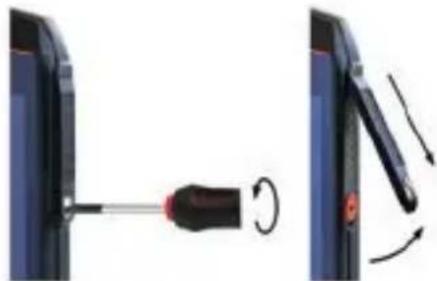
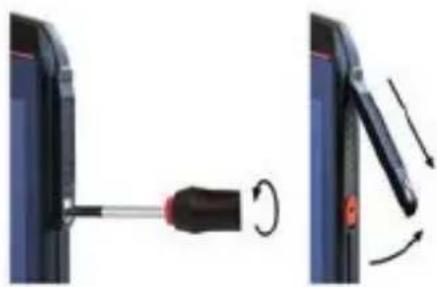
Diagram showing a screwdriver being inserted into a device, with rotation arrows indicating motion (no text or symbols)» Loosen the screw on the 13-pin ISM interface cover using the Screwdriver included in the approved accessory package. Remove the cover as shown.
natural_image
Three-step diagram showing cable installation steps: wire being inserted, fastening, and disassembly (no text or symbols)» Connect the plug of the approved accessory to the 13-pin ISM interface as shown.
» Hand-tighten the screws.
» Check that the plug is seated correctly and securely.
USB INTERFACE

DANGER
Improper use poses risk of death or severe injuries! Only use USB interface outside of explosion hazardous areas. Never open the cover of the USB interface in explosion hazardous areas.
The USB interface is used for charging and data transfer.
» Connect approved accessories or other devices to the USB interface only by using the USB-C Cable or by using other equipment approved by i.safe MOBILE GmbH.
>CHANGING THE BATTERY

DANGER
An outdated battery can overheat, inflate and cause a fire. This poses a risk of death and serious injury! If you use the device daily, replace the battery 2 years after first use, but at the latest after 500 charging cycles or when the operating time has been significantly reduced. If you have any further questions, please contact the i.safe MOBILE GmbH repair service at www.isafe-mobile.com/en/support/service

WARNING
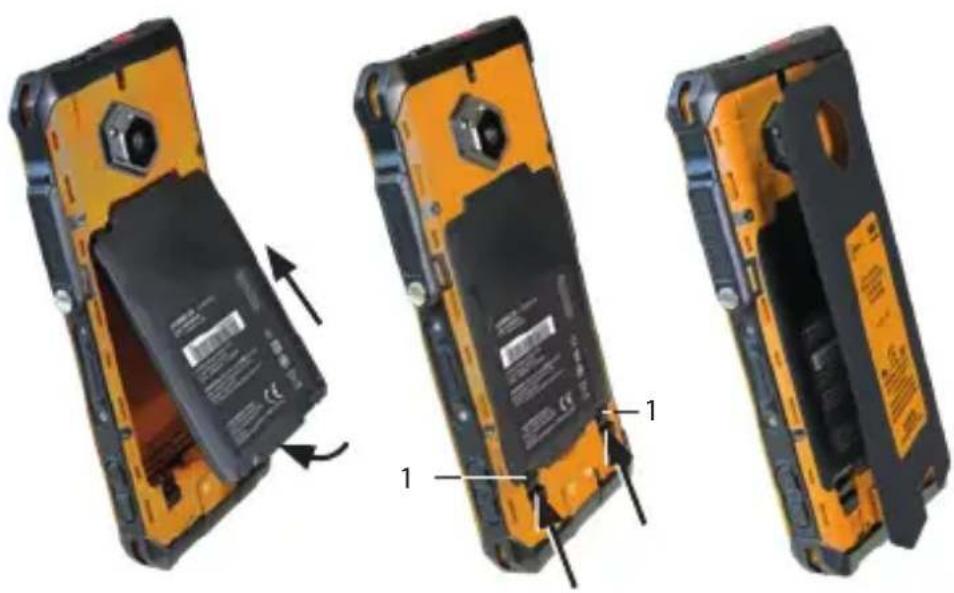
If you replace the battery with the wrong battery in the device, there is a risk of explosion, which could result in death or serious injuries! Only replace the battery with an approved replacement battery outside of explosion hazardous areas. An approved replacement battery can be found on the website www.isafe-mobile.com/en/products
natural_image
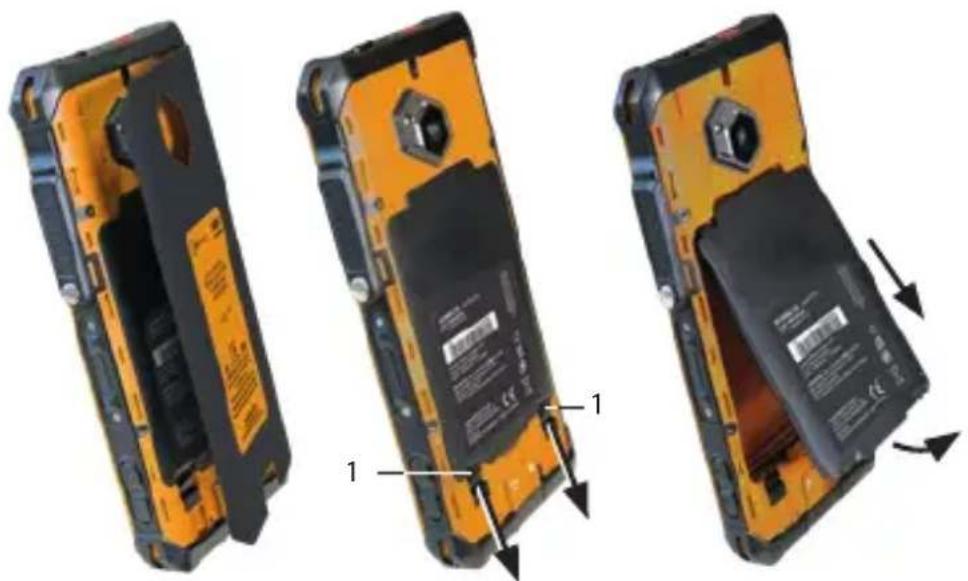
Three views of a yellow and black compact mobile phone showing internal components and battery modules (no text or symbols visible)» Remove the battery compartment cover.
» Open the battery-locks (1).
» Remove the battery from the battery compartment as shown.
natural_image
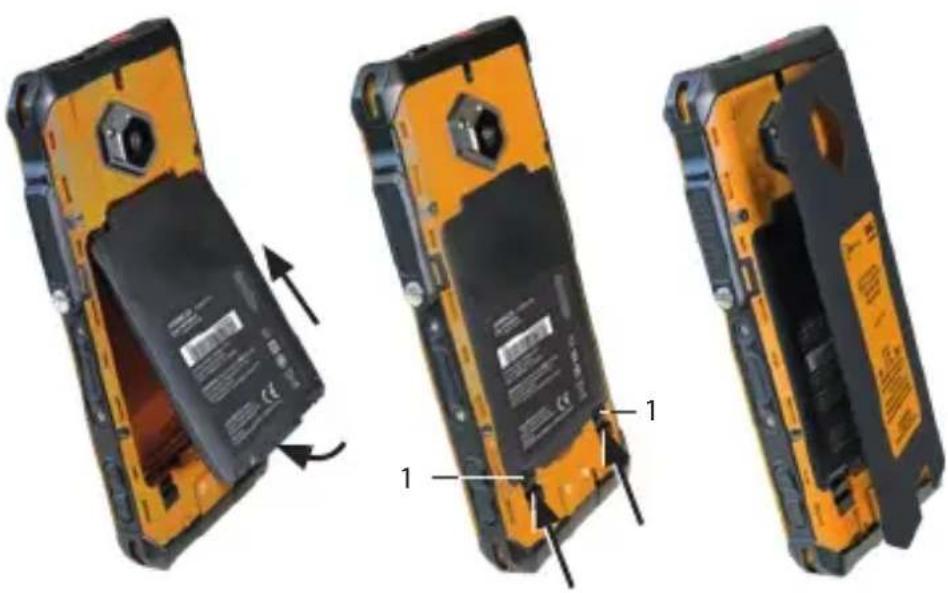
Three views of a mobile phone showing internal components and battery modules (no text or symbols visible)» Place the approved replacement battery in the battery compartment as shown.
» Close the battery-locks (1).
» Check that the battery is seated correctly and securely.
»Reinstall the battery compartment cover.
POSSIBLE DEVICE PROBLEMS
You can find information on possible device problems and how to rectify them at www.isafe-mobile.com/en/support/service under the menu item "FAQ".
If you have any further questions, please contact the i.safe MOBILE GmbH repair service at www.isafe-mobile.com/en/support/service
MAINTENANCE/REPAIR
The device itself has no serviceable parts.

WARNING
Incorrect repairs present a risk of explosion or fire, which can result in death or severe injuries! Do not open the device or carry out any repairs yourself.
» Contact the i.safe MOBILE GmbH repair service at
www.isafe-mobile.com/en/support/service if the device is not working normally, if the device needs to be repaired or if a replacement part is required.
RETURN SHIPMENT
Contact the i.safe MOBILE GmbH repair service at
www.isafe-mobile.com/en/support/service
DISTRIBUTION PARTNER
You can find the specialist distribution partner responsible for your country at www.isafe-mobile.com/en/contact
>CLEANING
NOTICE
Incorrect cleaning can cause damage to the device. Please note the following when cleaning:
» Turn off the device before cleaning.
» Do not charge the device while cleaning.
» Do not use chemical agents for cleaning.
» Clean the device with a soft, moistened antistatic cloth.
» Clean the display screen regularly with a soft, antistatic cloth.
STORAGE
NOTICE
Incorrect storage can cause damage to the device. Store the device at a humidity of 10% to 60% at the following ambient temperatures:
Up to one month: -20 °C to +45 °C (-4 °F to +113 °F)
Up to 3 months: -10 °C to +35 °C (+14 °F to +95 °F)
Over 3 months: -10 °C to +25 °C (+14 °F to +77 °F)
If you do not use the device for a longer period of time, note the following:
» Switch off the device.
» For longer storage without use, remove the battery from the device.
» Charge the battery to approx. 50 % to 70 % every 3 to 6 months to avoid deep discharge.
» Store the battery in a cool, dry place to keep it functional.
RECYCLING
NOTICE
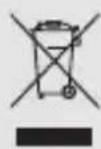
Incorrect disposal of electronic products, batteries and packaging material puts the environment at risk. Please note the following when disposing of items:
»DO NOT throw away batteries with household waste.
» Always dispose electronic products, batteries and packaging material at the appropriate collection points. This way, you prevent uncontrolled waste disposal and promote the recycling of material resources.
You can obtain further information from regional waste disposal companies, state authorities or the i.safe MOBILE GmbH service centre responsible for your country or region at www.isafe-mobile.com/en/support/service
TRADEMARKS
i.safe MOBILE GmbH and the i.safe MOBILE GmbH logo are registered trademarks of the i.safe MOBILE GmbH.
Comes with the Google™ app and Google Chrome™
Google and Google Chrome are trademarks of Google LLC.
Android is a trademark of Google LLC.
All other trademarks and copyrights are the properties of their respective owners.
DEUTSCH

text_image
15 20 19 16 17 Cusafe wireless IS880.2 SUSSE 20000000000000000000000000000000000000000000000000000000000000000000000000 18 17 SP63 CE MFC-1 MOSKONIC: Real-year electronic thermal temperature and voltage range in the circuit in the circuit board MOSKONIC: In our Internet-era the Rationalization of the system and voltage range in the circuit and the circuit have been used to the system is closed with the user's power output. Lack MOUNTED BAN 18/18/2018 (18) 18/18/2018 (18) 18/18/2018 (18)natural_image
Four views of an orange and black mobile phone showing internal components and battery casing (no text or symbols visible)natural_image
Simple diagram of a rectangular container with two internal compartments and a side outlet, labeled with numbers 2 and 3 (no text or symbols on the main diagram itself)natural_image
Four views of a yellow and black flip phone showing internal battery casing and mounting mechanism (no text or symbols visible)natural_image
Diagram showing a screwdriver being inserted into a device, with rotation arrows indicating motion (no text or symbols)natural_image
Three-step diagram showing cable fastening and screwdriver insertion (no text or symbols)natural_image
Three views of a yellow and black compact mobile phone showing internal components and battery casing (no text or symbols visible)natural_image
Three views of a mobile phone showing internal components and battery modules (no text or symbols visible)www.isafe-mobile.com/en/support/downloads
ZNAČENÍ SOUVISEJÍCÍ S NEBEZPEČÍM VÝBUCHU
ATEX:
Ea II 3G Ex ic IIC T4 Gc
⑥ II 3D Ex ic IIIC T135°C Dc
Osvědčení o shodě:
EPS 23 ATEX 1 346 X
text_image
15 20 19 16 17 IS880.2 COS 1x in HC to do 1x in HC 138°C do 100 pc APTV 1 bus in NCEx EVS 21:000A 7x - 40°C ... +90°C IPSB CE MFC-1 MINTUOEN, Boid and undesophageal material Boid and undesophageal material used in the Nanorbeding system MINTUOEN, bus as a temperature change is dequivalent temperature based and denatified body used in the battery, base or lower temperature Jock M880.2 (min) (FTSD) jock Horschaffel | Ternarynatural_image
Four views of an orange and black mobile phone showing internal components and battery packaging (no text or symbols visible)natural_image
Four views of a yellow and black mobile phone showing internal components and battery release (no text or symbols visible)https://support.google.com/android
natural_image
Diagram showing a screwdriver being inserted into a device, with motion arrows indicating rotation (no text or symbols present)natural_image
Three-step diagram showing cable fastening and disassembly process (no text or symbols)natural_image
Three views of a yellow and black mobile phone showing internal components and battery casing (no text or symbols visible)natural_image
Three views of a mobile phone showing internal components and battery modules (no text or symbols visible)www.isafe-mobile.com/en/support/downloads
www.isafe-mobile.com/en/support/downloads
TIDLIGERE MærKNINGER
> ATEX:
II 3G Ex ic IIC T4 Gc
① II 3D Ex ic IIIC T135°C Dc
Typeattest:
EPS 23 ATEX 1 346 X
CE-mærkning: 2004
>IECEx:
Ex ic IIC T4 Gc
Ex ic IIIC T135°C Dc
IECEx certifikat: IECEx EPS 23.0092X
> Temperaturområde:
-20 °C ≤ Ta ≤ +55 °C (EN/IEC 60079-0)
-10 °C ... +50 °C (EN/IEC 62368-1)
> Procuent:
i.safe MOBILE GmbH
i_Park Tauberfranken 10
97922 Lauda-Koenigshofen
Tyskland
LEVERANCENS OMFANG
text_image
15 20 19 16 17 IS880.2 COS 1x in HC to do 1x in HC 138°C do 100 px 4920 3 bus & DCa EVS 21:000A 7x - 49°C ... +9°C IPSB CE MFC-1 MINTUO, Boid and undesatant material Boid and undesatant material used in the circuit design. In the circuit design, used in the circuit design. MINTUO, Boid and undesatant materials used in the circuit design. Jude using in the circuit design for different conditions. Jude MINTUO Boid (FT82) Jude MINTUO Boid (Ternary)natural_image
Four-panel illustration of a yellow and black mobile phone showing internal components and battery packaging (no text or symbols)natural_image
Four views of a yellow and black mobile phone showing internal battery packaging and mounting hardware (no text or symbols visible)» Tag batteriholderens afdækning af.
» Åbn batterilåsene (1).
» Placer batteriet i batteriholderen som vist.
» Luk batterilåsene (1).
» Kontrollér, at batteriet sidder korrekt og sikkert.
» Montér batteriholderens afdækning.
OPLADNING

FARE
natural_image
Diagram showing a screwdriver being inserted into a device, with rotation arrows indicating motion (no text or symbols)natural_image
Three-step diagram showing cable installation steps: wire insertion, switch press, and screwdriver insertion (no text or symbols)natural_image
Three views of an orange and black mobile phone showing internal components and battery casing (no text or symbols visible)natural_image
Three views of a mobile phone showing internal components and battery modules (no text or symbols visible)text_image
15 20 19 16 17 IS880.2 COS 1x in HC to do 1x in HC 138°C do 100 px 4920 1 bus & DCa EVS 21:000A 7x - 49°C ... +9°C IPSB CE MFC-1 MINTUO, Boid and undesatant material Boid and undesatant material used in the circuit design. In the circuit design, used in the circuit design. MINTUO, Boid and undesatant materials used in the circuit design. Jude using in the circuit design for different conditions. Jude MINTUO Boid (FTB) Jude MINTUO Boid (Ternary)natural_image
Four-panel illustration of a yellow and black mobile phone showing internal components and battery casing changes (no text or symbols)natural_image
Four views of a yellow and black flip phone showing internal battery packaging and mounting features (no text or symbols visible)https://support.google.com/android
natural_image
Diagram showing a screwdriver being inserted into a device, with motion arrows indicating rotation (no text or symbols)natural_image
Three-step diagram showing cable fastening and screwdriver insertion (no text or symbols)natural_image
Three views of a yellow and black compact mobile phone showing internal components and battery modules (no text or symbols visible)natural_image
Three views of a mobile phone showing internal components and battery modules (no text or symbols visible)text_image
15 20 19 16 17 18 IS880.2 CRR 1x in MC TO do 1x in MC 15880.2 CRR 1x in MC 23-00004 Tm - 20°C ... +9°C SPB CE MFC-0 MCCNOS, Real and undetected manual user, universal, or other, with a clear temperature range MCCNOS, 1x in the temperature range MCCNOS, 1x in the temperature range MCCNOS, 1x in the temperature range MCCNOS, 1x in the temperature range MCCNOS, 1x in the temperature range MCCNOS, 1x in the temperature range MCCNOS, 1x in the temperature range MCCNOS, 1x in the temperature range MCCNOS, MCCNOS, 1x in the temperature range MCCNOS, MCCNOS, 1x in the temperature range MCCNOS, MCCNOS, 1x in the temperature rangenatural_image
Four-panel illustration of a smartphone showing internal battery casing and casing, with no visible text or symbols.natural_image
Four views of a yellow and black mobile phone showing internal components and battery release (no text or symbols visible)https://support.google.com/android
HYVÄKSYTTYJEN LISÄLAITTEIDEN LIITTÄMINEN

VAARA
natural_image
Diagram showing a screwdriver being inserted into a device, with motion arrows indicating rotation (no text or symbols present)natural_image
Three-step diagram showing cable fastening and screwdriver insertion (no text or symbols)natural_image
Three views of a mobile phone showing internal components and battery modules (no text or symbols visible)natural_image
Three views of a mobile phone showing internal components and battery modules (no text or symbols visible)DÉCLARATION DE CONFORMITÉ UE
Certification CE: 2004
>IECEx:
Ex ic IIC T4 Gc
Ex ic IIIC T135°C Dc
Certificat IECEx: IECEx EPS 23.0092X
> Plage de temperature:
-20 °C ≤ Ta ≤ +55 °C (EN/IEC 60079-0)
-10 °C ... +50 °C (EN/IEC 62368-1)
> Fabrique par:
i.safe MOBILE GmbH
i_Park Tauberfranken 10
97922 Lauda-Koenigshofen
Allemagne
ÉTENDUE DE LA LIVRAISON
natural_image
Four-panel illustration of a yellow and black mobile phone showing internal components and battery casing changes (no text or symbols)natural_image
Simple diagram of a rectangular container with two internal compartments and a side outlet, labeled with numbers 2 and 3 (no text or symbols on the main diagram itself)natural_image
Four views of a yellow and black flip phone showing internal components and battery release (no text or symbols visible)MISE EN MARCHE/ARRÊT
INTERFACE 13-PIN ISM
natural_image
Diagram showing a screwdriver inserted into a device, with motion arrows indicating rotation (no text or symbols present)natural_image
Three-step diagram showing cable fastening and screwdriver insertion (no text or symbols)natural_image
Three views of a yellow and black compact mobile phone showing internal components and battery modules (no text or symbols visible)natural_image
Three views of a mobile phone showing internal components and battery modules (no text or symbols visible)natural_image
Four-panel illustration of a yellow and black mobile phone showing internal components and battery casing changes (no text or symbols)natural_image
Simple diagram of a rectangular container with two internal compartments and a side outlet, labeled with numbers 2 and 3 (no text or symbols on the main diagram itself)natural_image
Four views of a yellow and black flip phone showing internal battery casing and adjustment mechanism (no text or symbols visible)natural_image
Diagram showing a screwdriver inserted into a device, with motion arrows indicating rotation (no text or symbols present)natural_image
Three-step diagram showing cable fastening and screwdriver insertion (no text or symbols)natural_image
Three views of a yellow and black mobile phone showing internal components and battery casing (no text or symbols visible)natural_image
Three views of a mobile phone showing internal components and battery modules (no text or symbols visible)POTENZA DI USCITA MASSIMA
| Bande di frequenza Potenza di uscita massima | Bande di frequenza Potenza di uscita massima | ||
| GSM900 | 33.20 dbm | LTE B20 | 23.17 dBm |
| GSM1800 | 30.35 dbm | LTE B28 | 22.91 dBm |
| WCDMA I | 23.27 dbm | LTE B34 | 22.81 dBm |
| WCDMA V | 23.15 dbm | LTE B38 | 22.99 dBm |
| WCDMA VIII | 23.47 dBm | LTE B40 | 23.09 dBm |
| LTE B1 | 22.83 dBm | LTE B41 | 23.18 dBm |
| LTE B3 | 22.78 dBm | CA_41C | 22.41 dBm |
| LTE B5 | 23.17 dBm | BT | 7.43 dbm |
| LTE B7 | 22.94 dBm | BLE | 7.45 dbm |
| CA_7C | 22.56 dBm | 2.4G | 15.64 dbm |
| LTE B8 | 23.10 dBm | 5.2G | 13.58 dbm |
| 5.8G | 12.37 dbm | ||
LIMITAZIONI
natural_image
Four views of an orange and black mobile phone showing internal components and battery casing (no text or symbols visible)natural_image
Four views of a yellow and black flip phone showing internal components and battery release (no text or symbols visible)natural_image
Diagram showing a screwdriver inserted into a device, with motion arrows indicating rotation (no text or symbols present)natural_image
Three-step diagram showing cable fastening and screwdriver insertion (no text or symbols)natural_image
Three views of a yellow and black mobile phone showing internal components and battery casing (no text or symbols visible)natural_image
Three views of a mobile phone showing internal components and battery modules (no text or symbols visible)www.isafe-mobile.com/en/support/downloads
EX-MARKERINGEN
> ATEX:
Ea II 3G Ex ic IIC T4 Gc
① II 3D Ex ic IIIC T135°C Dc
natural_image
Four views of an open yellow and black mobile phone showing internal components and battery casing (no text or symbols visible)natural_image
Four views of a yellow and black mobile phone showing internal components and battery casing (no text or symbols visible)natural_image
Diagram showing a screwdriver inserted into a device, with motion arrows indicating rotation (no text or symbols present)natural_image
Three-step diagram showing cable fastening and screwdriver insertion (no text or symbols)natural_image
Three views of a yellow and black mobile phone showing internal components and battery modules (no text or symbols visible)natural_image
Three views of a mobile phone showing internal components and battery modules (no text or symbols visible)www.isafe-mobile.com/en/support/downloads
EX-MERKING
> ATEX:
Ea II 3G Ex ic IIC T4 Gc
① II 3D Ex ic IIIC T135°C Dc
Samsvarssertifikat:
EPS 23 ATEX 1 346 X
CE-merke: 2004
>IECEx:
Ex ic IIC T4 Gc
Ex ic IIIC T135°C Dc
IECEx sertifikat: IECEx EPS 23.0092X
> Temperaturomrade:
-20 °C ≤ Ta ≤ +55 °C (EN/IEC 60079-0)
-10 °C ... +50 °C (EN/IEC 62368-1)
> Produsert av:
i.safe MOBILE GmbH
i_Park Tauberfranken 10
97922 Lauda-Koenigshofen
Tyskland
LEVERINGSOMFANG
text_image
15 20 19 16 17 18 IS880.2 COS (in: AC 31-6x) COS (in: AC 13.8°C 34) COS (in: AC 2.5-4.5) ACCA-EPS 23-000A Tn - 30°C ... +9°C SPB CE MFE-0 MENIPTO, Real and undetected manual Sens, Schematic of the circuit with a small voltage source MENIPTO, in the open circuit, is the current source of the DC voltage source. The circuit is not closed. If the current is open, it is closed. LATE METER 1200 STAND JUAN-Meier@Stella | Ternoroynatural_image
Four views of an open yellow and black mobile phone showing internal components and battery modules (no text or symbols visible)natural_image
Four views of a yellow and black mobile phone showing internal components and battery release (no text or symbols visible)https://support.google.com/android
TILKOBLING AV GODKJENT TILBEH∅R

FARE
Feil bruk kan føre til dødelige eller alvorlige personskader!
natural_image
Diagram showing a screwdriver inserted into a device, with motion arrows indicating rotation (no text or symbols)natural_image
Three-step diagram showing cable fastening and screwdriver insertion (no text or symbols)natural_image
Three views of a yellow and black mobile phone showing internal components and battery modules (no text or symbols visible)natural_image
Three views of a mobile phone showing internal components and battery modules (no text or symbols visible)VEDLIKEHOLD/REPARASJON
www.isafe-mobile.com/en/support/service
DETALJHANDELSPARTNER
natural_image
Four-panel illustration of a smartphone showing internal components and battery casing changes (no text or symbols)natural_image
Simple diagram of a rectangular container with two internal compartments, labeled with numbers 2 and 3 (no text or symbols on the main diagram)natural_image
Four views of a yellow and black mobile phone showing internal battery casing changes (no text or symbols visible)natural_image
Diagram showing a screwdriver inserted into a device, with motion arrows indicating rotation (no text or symbols)natural_image
Three-step diagram showing cable fastening and screwdriver insertion (no text or symbols)natural_image
Three views of an orange and black mobile phone showing internal components and battery casing (no text or symbols visible)natural_image
Three views of a mobile phone showing internal components and battery modules (no text or symbols visible)www.isafe-mobile.com/en/support/service.
text_image
15 20 19 16 17 18 ISSN 16-01/NC 31-00 ISSN 16-01/NC 15-00/NC 34 ISSN 16-01/NC 25-00/NC ISSN 16-01/NC 25-00/NC ISSN 16-01/NC 25-00/NC ISSN 16-01/NC 25-00/NC ISSN 16-01/NC 25-00/NC ISSN 16-01/NC 25-00/NC ISSN 25-00/NC 25-00/NC ISSN 25-00/NC 25-00/NC ISSN 25-00/NC 25-00/NC ISSN 25-00/NC 25-00/NC ISSN 25-00/NC 25-00/NC ISSN 25-00/NC 24-00/NC ISSN 25-00/NC 24-00/NC ISSN 25-00/NC 24-00/NC ISSN 25-00/NC 24-00/NC ISSN 25-00/NC 24-00/NC ISSN 25-00/NC 24-00/SC ISSN 25-00/NC 24-00/NC ISSN 25-00/NC 24-00/NC ISSN 25-00/NC 24-00/NC ISSN 25-00/NC 24-00/NC ISSN 25-00/NC 24-00/NC ISSN 16-37/NC ISSN 16-37/NC ISSN 16-37/NC ISSN 16-37/NC ISSN 16-37/NC ISSN 16-37/NC ISSN 16-37/NC ISSN 16-37/NC ISSN 16-37/NC ISSN 16-37/ ISSN 16-37/ ISSN 16-37/ ISSN 16-37/ ISSN 16-37/ ISSN 16-37/ ISSN 16-37/ ISSN 16-37/ ISSN 16-37/ ISSN 16-37/ ISSN 16-37/ ISSN 16-37/ IS880.2natural_image
Four views of an open yellow and black mobile phone showing internal components and battery casing (no text or symbols visible)natural_image
Four views of an orange and black flip phone showing internal battery packaging and mounting features (no text or symbols visible)INTERFACE 13-PIN ISM
natural_image
Diagram showing a screwdriver being inserted into a device, with motion arrows indicating rotation (no text or symbols present)natural_image
Three-step diagram showing cable fastening process: left panel with cable attachment, right panel with cable being inserted and rotating (no text or symbols)» Ligue a ficha do acessório aprovado à interface 13-pin ISM, como indicado.
» Aperte os parafusos manualmente.
» Verifique se a ficha está colocada de forma correta e segura.
INTERFACE USB

PERIGO
natural_image
Three views of a yellow and black compact mobile phone showing internal components and battery release (no text or symbols visible)»Remova a tampa do compartimento da bateria.
» Abra os fechos das pilhas (1).
»Remova a bateria do compartimento da bateria, como indicado.
natural_image
Three views of a yellow and black flip phone showing internal components and battery labels (no readable text or symbols)text_image
15 20 19 16 17 18 IS880.2 CRR 1x in MC TO do 1x in MC 15880.2 CRR 1x in MC 23-00004 Tm - 20°C ... +9°C SPB CE MFC-0 MCCNOS, Real and undetected manual user, universal, or other, with a no nonverbalence sensor MCCNOS, I'm the superconducting device beats and nonverbalence sensors and nonverbalence products are used to be reliable, better under protection LTD: 20000000000 STED: jahue-Mongkohu | Ternonynatural_image
Four-panel illustration of a smartphone showing internal battery casing and circuit board, with no visible text or symbols.natural_image
Simple diagram of a rectangular container with two internal compartments and a side outlet, labeled with numbers 2 and 3 (no text or symbols on the main diagram itself)natural_image
Four views of a yellow and black mobile phone showing internal battery casing changes (no text or symbols visible)INTERFACE 13-PIN ISM
natural_image
Diagram showing a screwdriver inserted into a device, with motion arrows indicating rotation (no text or symbols)natural_image
Three-step diagram showing cable fastening and screwdriver insertion (no text or symbols)» Conecte o plugue do acessório aprovado à interface 13-pin ISM, conforme exibido.
» Aperte os parafusos.
» Verifique se o plugue está encaixado corretamente e com firmeza.
INTERFACE USB

PERIGO
natural_image
Three views of an orange and black mobile phone showing internal components and battery release (no text or symbols visible)natural_image
Three views of a mobile phone showing internal components and battery modules (no text or symbols visible)» Posicione a bateria substituta aprovada no compartimento de bateria, conforme exibido.
» Feche as travas da bateria (1).
» Verifique se a bateria está encaixada corretamente e com firmeza.
» Instale a tampa do compartimento de bateria.
> POSSÍVEIS PROBLEMAS DO DISPOSITIVO
text_image
20 19 15 16 17 18 ISBRO.2 SP50 CE MFC-4 USB/MSI: Read your electronic manual SOM: 32.00000000000000000000000000000000000000000000000000000000000000000000000000000 USB/MSI: For the Internet, the Bluetooth transceiver brand and wireless system is used to be wireless power in the circuit.natural_image
Four views of an open mobile phone showing internal battery casing and casing, with no visible text or symbols.natural_image
Four views of a yellow and black mobile phone showing internal battery casing assembly (no text or symbols visible)natural_image
Diagram showing a screwdriver being inserted into a device, with rotation arrows indicating motion (no text or symbols)natural_image
Three-step diagram showing cable fastening process: wire insertion, switch press, and end cap assembly (no text or symbols)natural_image
Three views of a yellow and black mobile phone showing internal components and battery casing (no text or symbols visible)natural_image
Three views of a mobile phone showing internal components and battery modules (no text or symbols visible)text_image
15 20 19 16 17 IS880.2 COS 1x in HC to do 1x in HC 138°C do 100 px 4920 1 bus in DCa EVS 21:000A 7x - 49°C ... +9°C IPSB CE METHOLATE, Solid and undetected material diameter: 20mm x 20mm x 20mm x 20mm x 20mm x 20mm x 20mm x 20mm x 20mm x 20mm x 20mm x 20mm x 20mm x 20mm x 20mm x 20mm x 20mm x 20mm x 20mm x 20mm x 20mm Jade M380X-6 BAN (FTB) jaide Monographelle | Ternarynatural_image
Four-panel illustration of a yellow and black mobile phone showing internal components and battery casing changes (no text or symbols)natural_image
Four views of a yellow and black mobile phone showing internal components and battery release (no text or symbols visible)natural_image
Diagram showing a screwdriver being inserted into a device, with rotation arrows indicating the process (no text or symbols present)natural_image
Three-step diagram showing cable installation steps: wire insertion, switch press, and screwdriver insertion (no text or symbols)natural_image
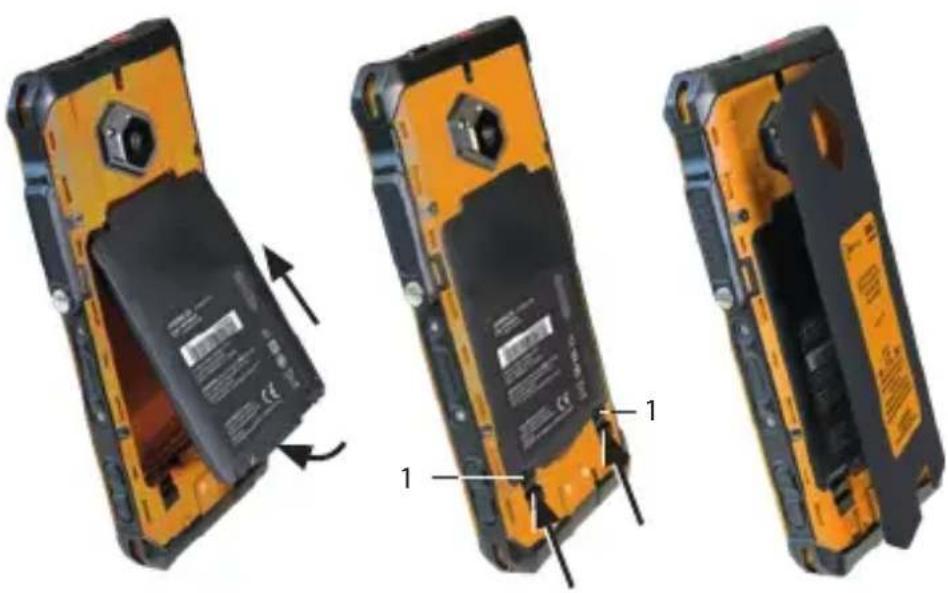
Three views of a mobile phone showing internal components and battery casing (no text or symbols visible)» Ta bort locket till batteriutrymmet.
»Öppna batterilåset (1).
» Ta bort batteriet ur batteriutrymmet som på bild.
natural_image
Three views of a mobile phone showing internal components and battery modules (no text or symbols visible)text_image
15 20 19 16 17 IS880.2 COS 1x in HC to do 1x in HC 138°C do 100 px 4920 3 bus in DCa EVS 21:000A 7x - 49°C ... +9°C IPSB CE MFC-1 MINTUOEN, Boid and undesophageal material Boid and undesophageal material used in the Nanorbeding system MINTUOEN, bus dry temperature/temperature d's dehumidurification level and conductivity busd used in the battery, base or lower temperature Jock M880.2 bus (FT82) jock Horschaffin | Ternary1> CRVENA FUNKCIJSKA TIPKA: Opcija funkcije, npr. SOS - funkcija se može dodijeliti putem Button App (integriran sustav).
2>ZVUČNIK
3 > PREKIDAČ NA PREKLOP
4) PREDNJAKAMERA
5) 13-PIN ISM SUČELJE: Spajanje za odobreni pribor. Također pogledajte odlomak „Spaja- nje odobrenog pribora“.
6) SENZOR OTISKA PRSTA
7) FUNKCIJSKA TIPKA M1 M2: Opcija funkcije - funkcija se može dodijeliti putem Button App (integriran sustav).
8> MIKROFON
9) USB SUČELJE: Priključak za kabel USB-C ili drugu opremu koji je odobrio i.safe MOBILE GmbH. Također pogledajte odlomke „Punjenje“ i „Spajanje odobrenog pribora“.
10> ZVUČNIK: Zvučnik za rad bez ruku.
11> UPRAVLJANJE GLASNOĆOM: Povećanje glasnoće/smanjenje glasnoće.
12) BOČNA TIPKA ULIJEVO: Opcija funkcije - funkcija se može dodijeliti putem Button App (integriran sustav).
13) TIPKA ZA UKLJUČIVANJE I ISKLJUČIVANJE: Dugi pritisak uključuje/isključuje uređaj. Kratki pritisak uključuje/isključuje način rada za pripravnost.
14) SENZORI: Senzor blizine, senzor svjetlosti.
15 >LEDBLJESKALICA
16>STRAŽNJAKAMERA
17) POKLOPAC PRETINCA ZA BATERIJE
18 KONTAKTZAPUNJENJE
19) OTKAZIVANJE BUKE: Mikrofon za otkazivanje buke.
20 > UŠICA: ušica za pričvršćenje trake za nošenje.
FUNKCIJSKE TIPKE
Uređaj ima različite tipke koje se može slobodno programirati:
Funkcijska tipka M1
Funkcijska tipka M2
Crvena funkcijska tipka:
Bočna tipka ulijevo
Tipkama koje se mogu slobodno programirati možete dodijeliti funkciju s pomoću Button App instaliranom na vašem uređaju. Button App možete naći u stavci izbornika „Postavke“ (Settings).
UMETNITE/UKLONITE SIM KARTICU(E)/MICROSD KARTICU
Uređaj ima mjesto za umetanje za dvije SIM kartice ili za jednu SIM karticu u kombinaciji s microSD karticom.

OPASNOST
Neodgovarajući postupak u područjima ugroženima eksplozijom predstavlja opasnost od smrti ili teških ozljeda! Uređaj otvarajte samo izvan područja opasnih od eksplozije kako biste umetnuli ili uklonili SIM karticu(e)/microSD karticu.
NAPOMENA
Neispravno postupanje prilikom umetanja/vađenja SIM kartice/microSD kartice može oštetiti uređaj i kartice. Isključite uređaj prije umetanja ili uklanjanja kartica. Nemojte puniti uređaj dok umećete ili uklanjate kartice.
natural_image
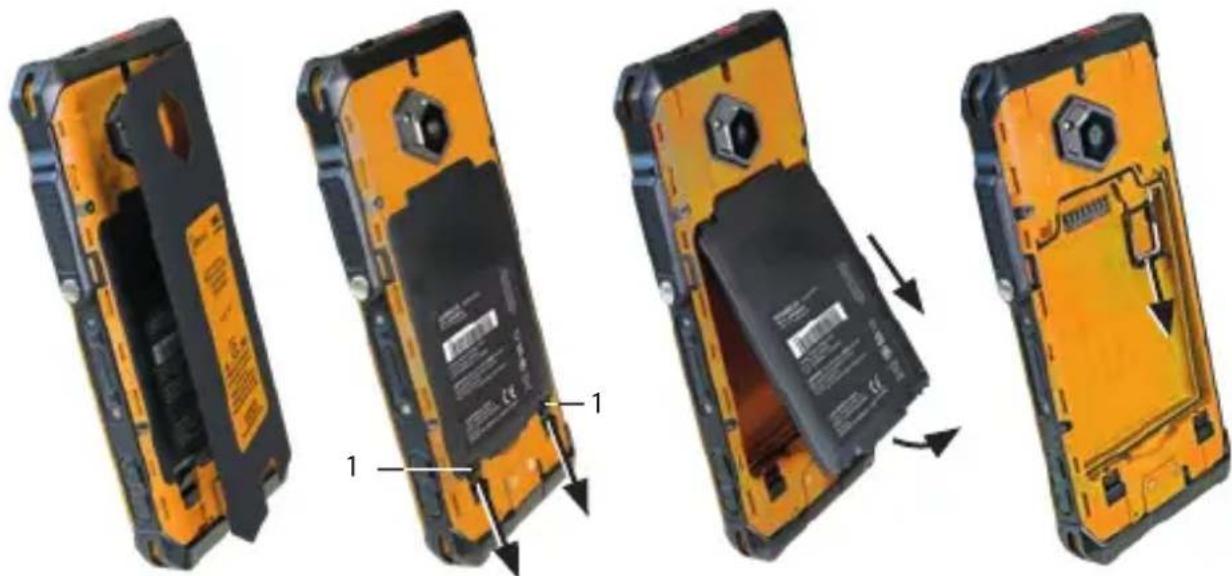
Four-panel illustration of a yellow and black mobile phone showing internal components and battery casing changes (no text or symbols)» Skinite poklopac pretinca za baterije.
» Otvorite brave baterije (1).
» Uklonite bateriju iz odjeljka za bateriju.
» Pažljivo izvucite nosač kartice iz utora za karticu.
natural_image
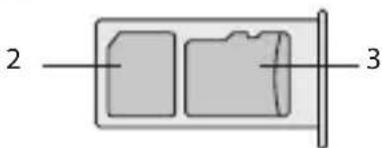
Simple diagram of a rectangular container with internal compartments and a side outlet, labeled with numbers 2 and 3 (no text or symbols on the main diagram)» Umetnite SIM karticu u utor za nano SIM karticu (2) tako da kontakti zlatne boje gledaju prema dolje.
» Umetnite mikro SD karticu u pripadajući utor (3) tako da kontakti zlatne boje gledaju prema dolje. Uređaj ima a utor za microSD karticu do 128 GB.
natural_image
Four views of a yellow and black mobile phone showing internal battery casing changes, with arrows indicating movement (no text or symbols)» Skinite poklopac pretinca za baterije.
» Otvorite brave baterije (1).
» Postavite bateriju u odjeljak za bateriju prema prikazu.
» Zatvorite brave baterije (1).
» Provjerite da je baterija pravilno učvršćena.
» Ponovo montirajte poklopac pretinca za bateriju.
PUNJENJE

OPASNOST
https://support.google.com/android
> SPAJANJE ODOBRENOG PRIBORA

OPASNOST
Neodgovarajuća uporaba može dovesti do smrti ili teških ozljeda!
» Spajajte na uređaj samo pribor koji je odobrila tvrtka i.safe MOBILE GmbH. Pribor koji je odobrila tvrtka i.safe MOBILE GmbH možete pronaći na www.isafe-mobile.com/en/products
natural_image
Diagram showing a screwdriver being inserted into a device, with motion arrows indicating rotation (no text or symbols present)natural_image
Three-step diagram showing cable fastening and screwdriver insertion (no text or symbols)» Spojite utikač odobrenog pribora na 13-pin ISM sučelje prema prikazu.
» Ručno zategnite vijke.
» Provjerite da je utikač pravilno učvršćen.
USB SUČELJE

OPASNOST
natural_image
Three views of a mobile phone showing internal components and battery casing (no text or symbols visible)» Skinite poklopac pretinca za baterije.
» Otvorite brave baterije (1).
» Uklonite bateriju iz odjeljka za bateriju prema prikazu.
natural_image
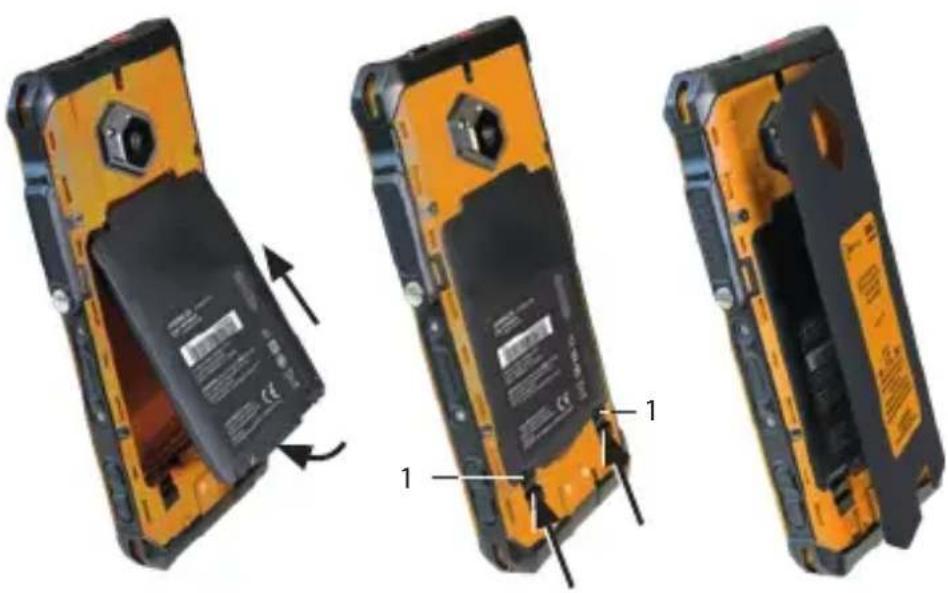
Three views of a mobile phone showing internal components and battery modules (no text or symbols visible)» Postavite odobrenu zamjensku bateriju u odjeljak za bateriju prema prikazu.
» Zatvorite brave baterije (1).
» Provjerite da je baterija pravilno učvršćena.
» Ponovo montirajte poklopac pretinca za bateriju.
>MOGUĆI PROBLEMI S UREĐAJEM
www.isafe-mobile.com/en/support/service
> MALOPRODAJNI PARTNER
Možete pronaći stručnog maloprodajnog partnera odgovornog za svoju državu na www.isafe-mobile.com/en/contact
ČIŠĆENJE
NAPOMENA
www.isafe-mobile.com/en/support/downloads
OZNAČENIA SÚVISIACE S NEBEZPEČENSTVOM VÝBUCHU
> ATEX:
II 3G Ex ic IIC T4 Gc
① II 3D Ex ic IIIC T135°C Dc
Osvedčenie o zhode:
EPS 23 ATEX 1 346 X
Označenie CE: 2004
>IECEx:
Ex ic IIC T4 Gc
Ex ic IIIC T135°C Dc
Certifikát IECEx: IECEx EPS 23.0092X
> Teplotný rozsah:
-20 °C ≤ Ta ≤ +55 °C (EN/IEC 60079-0)
-10 °C ... +50 °C (EN/IEC 62368-1)
Výrobca:
i.safe MOBILE GmbH
i_Park Tauberfranken 10
97922 Lauda-Koenigshofen
Nemecko
ROZSAH DODANIA
natural_image
Four-panel illustration of a yellow and black mobile phone showing internal components and battery packaging (no text or symbols)» Odstráňte kryt priehradky na batériu.
» Otvorte zámky batérií (1).
» Vyberte batériu z priehradky na batérie.
» Opatrne vytiahnite držiak karty zo slotu na kartu.
text_image
2 3natural_image
Four views of a yellow and black mobile phone showing internal components and battery release (no text or symbols visible)» Odstráňte kryt priehradky na batériu.
» Otvorte zámky batérií (1).
» Batériu vložte do priehradky na batérie tak, ako je to znázornené.
» Zatvorte zámky batérií (1).
» Skontrolujte, či je batéria vložená správne a pevne.
» Namontujte kryt priehradky na batériu.
NABÍJANIE

NEBEZPEČENSTVO
natural_image
Diagram showing a screwdriver being inserted into a device, with motion arrows indicating rotation (no text or symbols present)natural_image
Three-step diagram showing cable fastening and screwdriver insertion (no text or symbols)natural_image
Three views of a yellow and black mobile phone showing internal components and battery modules (no text or symbols visible)» Odstráňte kryt priehradky na batériu.
» Otvorte zámky batérií (1).
» Vyberte batériu z priehradky na batérie tak, ako je to znázornené.
natural_image
Three views of a yellow and black mobile phone showing internal components and battery modules (no text or symbols visible)text_image
15 20 19 16 17 IS880.2 COS 1x in HC to do 1x in HC 138°C do 100 px 4920 3 bus in DCa EVS 21:000A 7x - 49°C ... +9°C IPSB CE MFC-1 MINTUOEN, Boid and undesophageal material Boid and undesophageal material used in the Nanorbeding system MINTUOEN, bus dry temperature/temperature d's dehumidurification level and conductivity busd used in the battery, base or lower temperature Jock M880.2 bus (FT82) jock Horschaffin | Ternarynatural_image
Four-panel illustration of a yellow and black mobile phone showing internal components and battery packaging (no text or symbols)natural_image
Four views of a yellow and black mobile phone showing internal battery casing and charging mechanism (no text or symbols visible)natural_image
Diagram showing a screwdriver being inserted into a device, with motion arrows indicating rotation (no text or symbols present)natural_image
Three-step diagram showing cable fastening process: left panel with cable being inserted, right panel with cable being inserted and then being wrapped in a screwdriver (no text or symbols)natural_image
Three views of a mobile phone showing internal components and battery modules (no text or symbols visible)natural_image
Three views of a mobile phone showing battery disc and internal components (no text or symbols visible)text_image
15 20 19 16 17 18 USBRO.2 C: 16, 17, 18 USBRO.2 (in AC 31-40) USBRO.2 (in AC 100°C) 16 DC 20, 40°C 5, 60-6 DCX-EPS 23-800mA 7m - 80°C ... +90°C IP50 CE MFC-1 MERRADO: Read and authorized manual Service: Technology & Software In the following functions: MERRADO: Use the Interimicroscope in system processing level and normalized (+) not in the Beringen System. However [Jade WISERDA] SAGAR [Jade Konskaufrika] Germanynatural_image
Four-panel illustration of a yellow and black mobile phone showing internal components and battery casing changes (no text or symbols)natural_image
Four views of a yellow and black flip phone showing internal components and battery release (no text or symbols visible)natural_image
Diagram showing a screwdriver being inserted into a device, with motion arrows indicating rotation (no text or symbols present)natural_image
Three-step diagram showing cable fastening and screwdriver insertion (no text or symbols)natural_image
Three views of an orange and black mobile phone showing internal components and battery modules (no text or symbols visible)natural_image
Three views of a yellow and black mobile phone showing internal components and battery modules (no text or symbols visible)text_image
15 20 19 16 17 18 USBRO.2 USBRO.2 USBRO.2 (Ex 3x 4x 5x 6x) USBRO.2 (Ex 3x 4x 5x 6x) USBRO.2 (Ex 3x 4x 5x 6x) USBRO.2 (Ex 3x 4x 5x 6x) USBRO.2 (Ex 3x 4x 5x 6x) USBRO.2 (Ex 3x 4x 5x 6x) USBRO.2 USBRO.2 (Ex 3x 4x 5x 6x) USBRO.2 (Ex 3x 4x 5x 6x) USBRO.2 (Ex 3x 4x 5x 6x) USBRO.2 (Ex 3x 4x 5x 6x) USBRO.2 (Ex 3x 4x 5x 6x)natural_image
Four-panel illustration of a smartphone showing internal components and battery casing changes (no text or symbols)natural_image
Simple diagram of a rectangular container with two internal compartments and a side outlet, labeled with numbers 2 and 3 (no text or symbols on the main diagram)natural_image
Four views of a black and orange mobile phone showing internal battery casing and charging mechanism (no text or symbols visible)natural_image
Diagram showing a screwdriver being inserted into a device, with motion arrows indicating rotation (no text or symbols present)natural_image
Three-step diagram showing cable fastening and screwdriver insertion (no text or symbols)natural_image
Three views of a yellow and black mobile phone showing internal components and battery modules (no text or symbols visible)natural_image
Three views of a yellow and black mobile phone showing internal components and battery modules (no text or symbols visible)natural_image
Four-panel illustration of a yellow and black mobile phone showing internal components and battery release (no text or symbols)natural_image
Simple diagram of a rectangular container with two internal compartments and a side outlet, labeled with numbers 2 and 3 (no text or symbols on the main diagram itself)natural_image
Four views of a yellow and black flip phone showing internal battery casing and mounting hardware (no text or symbols visible)natural_image
Two-step diagram showing a screwdriver being inserted into a device, with motion arrows indicating rotation (no text or symbols)natural_image
Three-step diagram showing cable installation steps: fastening, fastening, and fastening with a screwdriver (no text or symbols)natural_image
Three views of a yellow and black mobile phone showing internal components and battery casing (no text or symbols visible)natural_image
Three views of a mobile phone showing battery disc and casing assembly (no text or symbols visible)www.isafe-mobile.com/en/support/service
natural_image
Four views of an orange and black mobile phone showing internal components and battery modules (no text or symbols visible)www.isafe-mobile.com/en/products

natural_image
Two-step diagram showing a switch being inserted into a battery, with the second step showing a screwdriver inserted (no text or symbols present)natural_image
Three-step diagram showing a cable being inserted into a connector, with no visible text or symbols.text_image
Diagram showing three views of a mobile phone with labeled components and battery modules, illustrating the process from open to closed state.natural_image
Three views of an orange and black mobile phone showing internal components, with no visible text or symbols.FOR FURTHER QUESTIONS PLEASE CONTACT OUR SERVICE CENTRE:
» i.safe MOBILE GmbH, i_Park Tauberfranken 10, 97922 Lauda-Koenigshofen, Germany
» support@isafe-mobile.com
» https://support.isafe-mobile.com
ISAFE-MOBILE.COM