
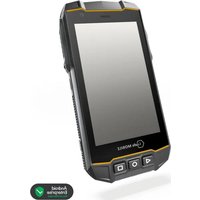
IS540.RG - Smartphone i.safe Mobile - Free user manual and instructions
Find the device manual for free IS540.RG i.safe Mobile in PDF.


| Product type | Rugged smartphone for industrial use |
| Brand | i.safe Mobile |
| Model | IS540.RG (M540A01) |
| Operating system | Android |
| Screen | Touchscreen with protection (protective film included) |
| Front camera | Yes |
| Rear camera | Yes with LED flash |
| Programmable buttons | Red button (SOS), right side button, left side button (configurable via Button App) |
| Interfaces | USB-C, 16-pin ISM interface for approved accessories |
| Connectivity | Cellular (4G/5G not specified), NFC, cell broadcast, eSIM + nano SIM |
| Expandable storage | microSD slot up to 128 GB |
| Power supply | Removable lithium-ion battery, charging via USB-C or charging contacts |
| Included accessories | USB-C cable, power adapter with country adapters, TORX screwdriver, protective film, cleaning cloth |
| Maintenance | Clean with a soft, dampened antistatic cloth, without chemicals |
| Safety | Use only outside explosion hazard areas, keep safety distance from medical implants, use approved accessories |
| Charging temperature | 0 °C to +45 °C |
| Storage | Humidity 10-60%, temperature -20 °C to +45 °C depending on duration |
| Repairability | Battery replaceable by user; no other repairable parts; contact customer service for any repair |
| Warranty | Conditions available at www.isafe-mobile.com |
| Certifications | EU Declaration of Conformity, FCC/IC |
Frequently Asked Questions - IS540.RG i.safe Mobile
User questions about IS540.RG i.safe Mobile
0 question about this device. Answer the ones you know or ask your own.
Ask a new question about this device
Download the instructions for your Smartphone in PDF format for free! Find your manual IS540.RG - i.safe Mobile and take your electronic device back in hand. On this page are published all the documents necessary for the use of your device. IS540.RG by i.safe Mobile.
USER MANUAL IS540.RG i.safe Mobile
natural_image
Exterior view of a black and gold Isafe mobile phone with visible branding (no text or symbols on body)
OPERATING MANUAL
i.safe MOBILE
IS540.RG | MODEL M540A01
Document No. 1061MM10REV00
Version: 2024-08-28
i.safe MOBILE GmbH
i_Park Tauberfranken 10
97922 Lauda-Koenigshofen
Germany
Tel. +49 9343 60148-0
info@isafe-mobile.com
www.isafe-mobile.com
(c) 2024 i.safe MOBILE GmbH Template: TEMPMM01REV10
CONTENTS
English....4
Deutsch....18
Česky 32
Dansk 46
Español....60
Suomi....74
Français....88
Magyar 102
Italiano 116
Nederlands 130
Norsk 144
Polski 158
This Operating Manual complies with these standards:
IEC 60079, IEC 82079, ANSI Z535.6
IEC 60079, IEC 82079, ANSI Z535.6
ENGLISH
READ AND UNDERSTAND THE INSTRUCTIONS

PROTECT YOUR LIFE AND READ THE OPERATING MANUAL
This Operating Manual is part of the device IS540.RG (model M540A01). This Operating Manual provides important information for safe use of the device.
» Before using the device, read this Operating Manual carefully and pay particular attention to the "Safety" section and the warnings highlighted with the warning symbol.
» Also read the Safety Instructions before using the device. You can find these at www.isafe-mobile.com/en/support/downloads
» Make sure you have access to this Operating Manual when you need it. You can find the current Operating Manual at www.isafe-mobile.com/en/support/downloads
» Follow all instructions given on the device and on the packaging.
» Follow local safety regulations.
INTENDED USE
The IS540.RG is an Internet-capable communication device for industrial use.
Only use the device as described in this Operating Manual. Any other use is considered improper and can lead to death, severe injuries and damage to the device.
The manufacturer i.safe MOBILE GmbH does not assume any liability for damage caused by improper use. The warranty expires in the event of improper use.
WARRANTY
You can and the warranty conditions at www.isafe-mobile.com/en/support/service
For any damage caused by computer viruses that you download while using the Internet functions responsibility is at your hand.
There is no right of recourse against i.safe MOBILE GmbH.
EU DECLARATION OF CONFORMITY
You will nd the EU declaration of conformity at www.isafe-mobile.com/en/support/downloads
FCC/IC STATEMENT
The FCC/IC declaration can be found at www.isafe-mobile.com/en/support/downloads
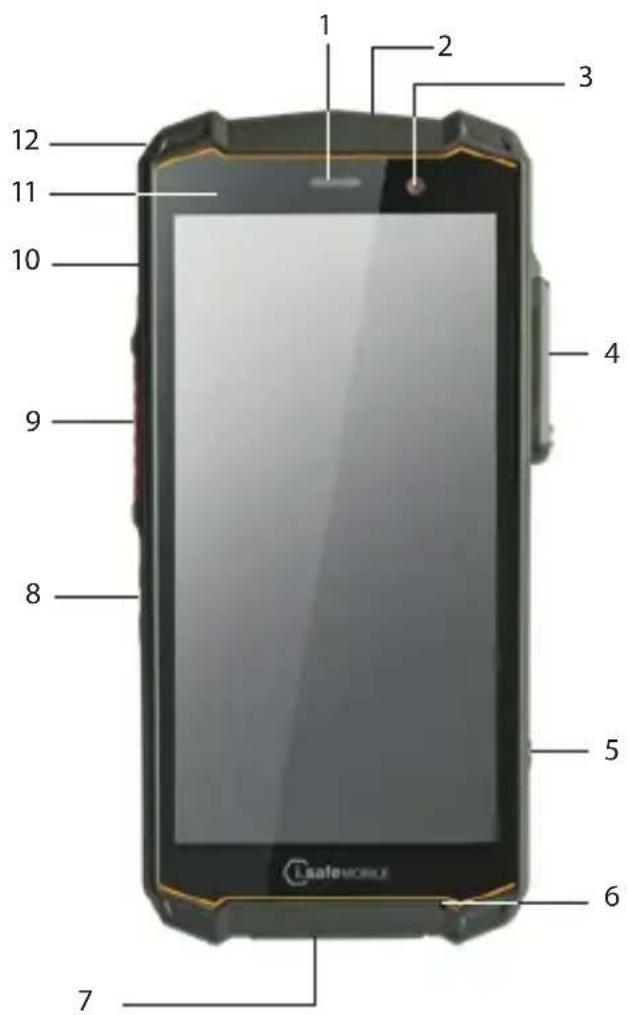
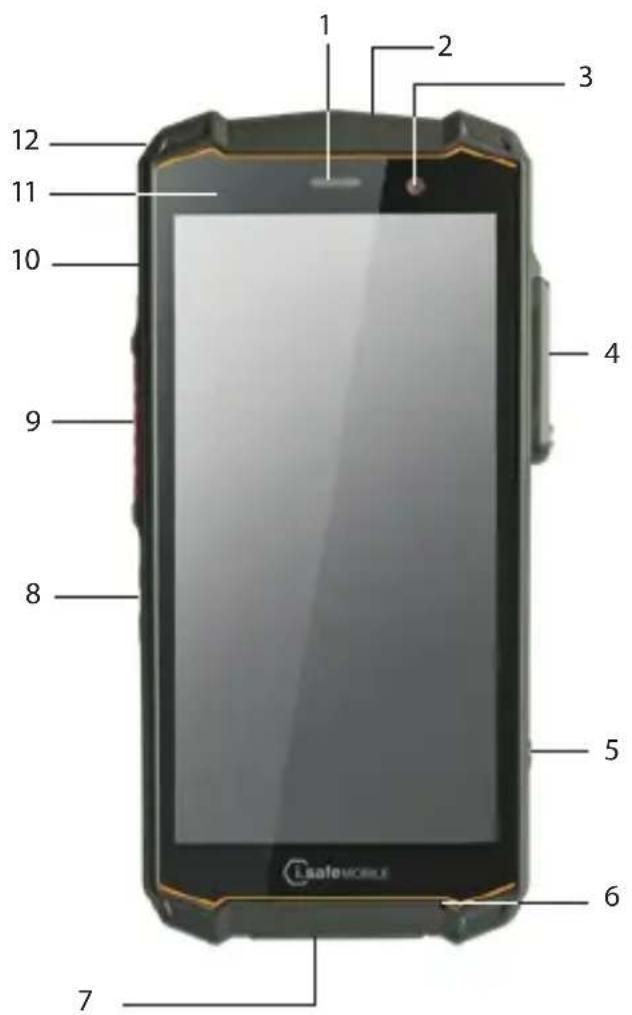
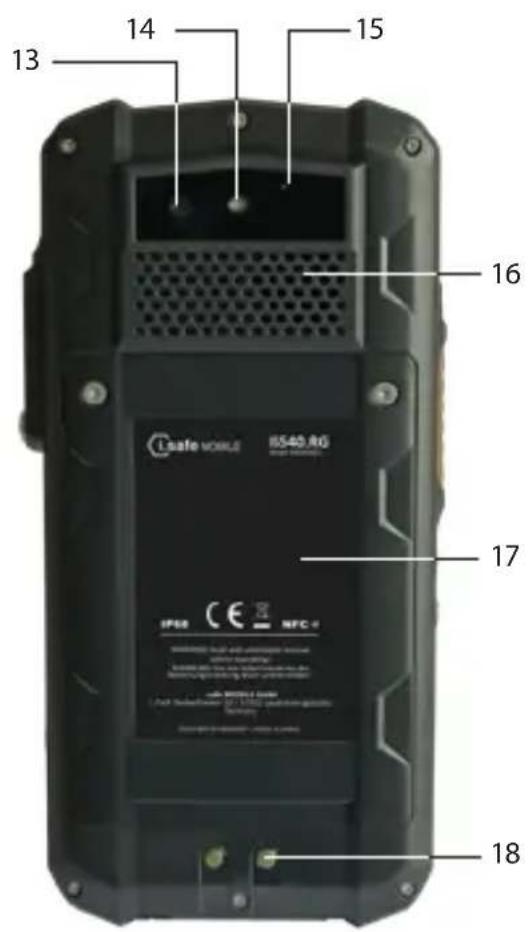
>DEVICE OVERVIEW/FUNCTIONS
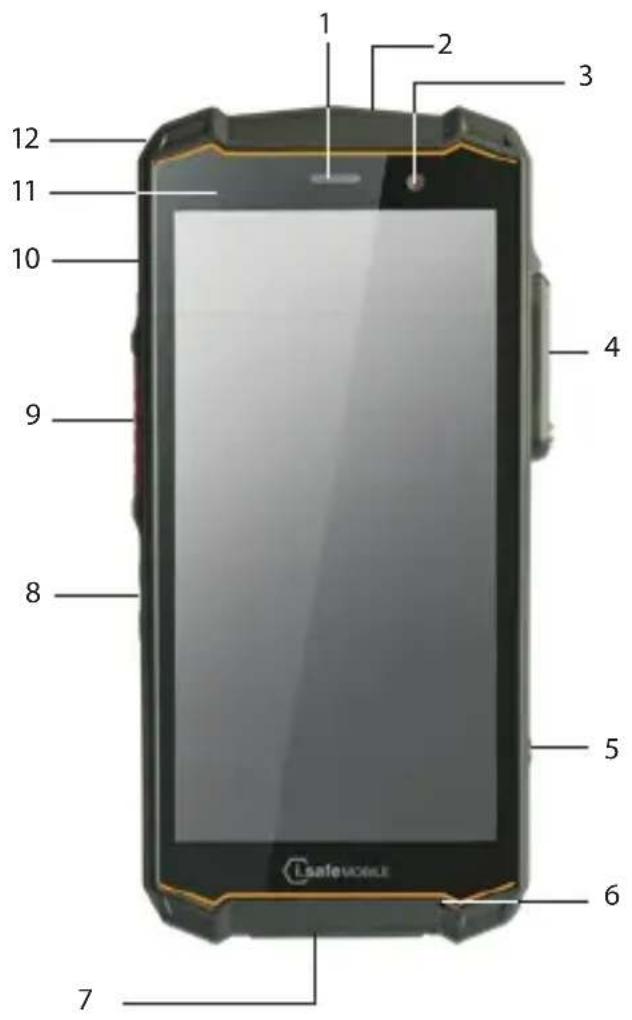
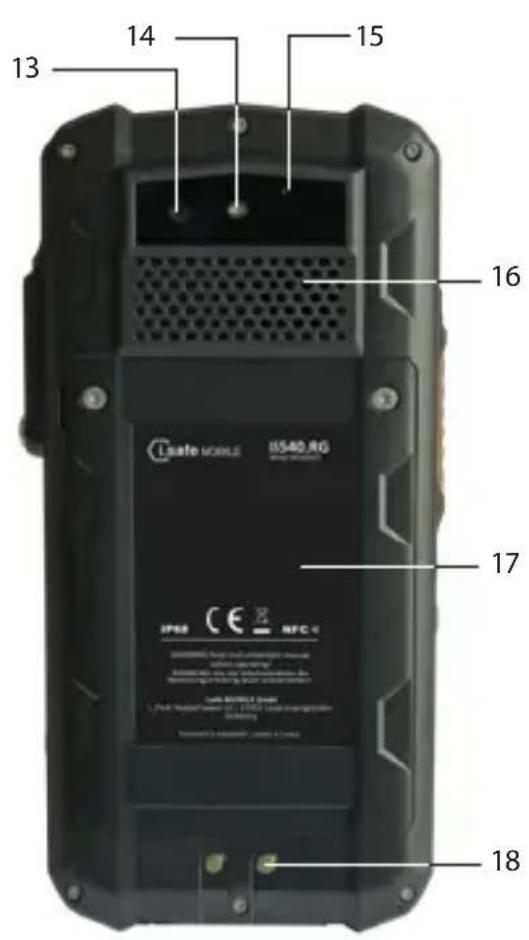
1 > LOUDSPEAKER
2> FUNCTION KEY RED: Optional function, e.g. SOS - function can be assigned via Button App (system integrated).
3>FRONT CAMERA
4) 16-PIN ISM INTERFACE: Connection for approved accessories. Also see section "Connecting approved accessories".
5> SIDE KEY RIGHT: Optional function, e.g. camera - function can be assigned via Button App (system integrated).
6>MICROPHONE
7 USB INTERFACE: Connection for the USB-C Cable or for other equipment approved by i.safe MOBILE GmbH. Also see sections "Charging" and "Connecting approved accessories".
8> LOUDNESS CONTROL: Volume up/Volume down.
9) SIDE KEY LEFT: Optional function - function can be assigned via Button App (system integrated).
10> POWER KEY: A long press switches the device on/off. A short press switches the standby mode on/off.
11) SENSORS: Proximity sensor, light sensor.
12 EYELET: Eyelet for hand strap.
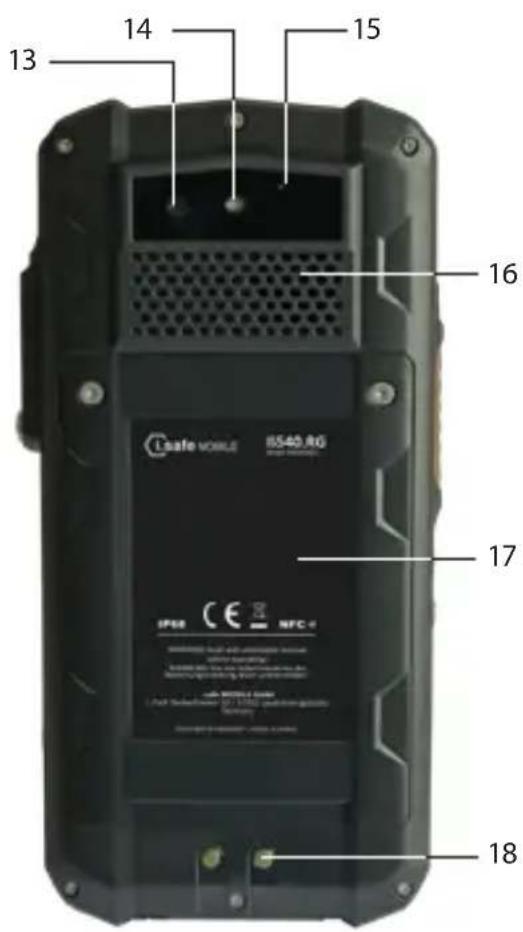
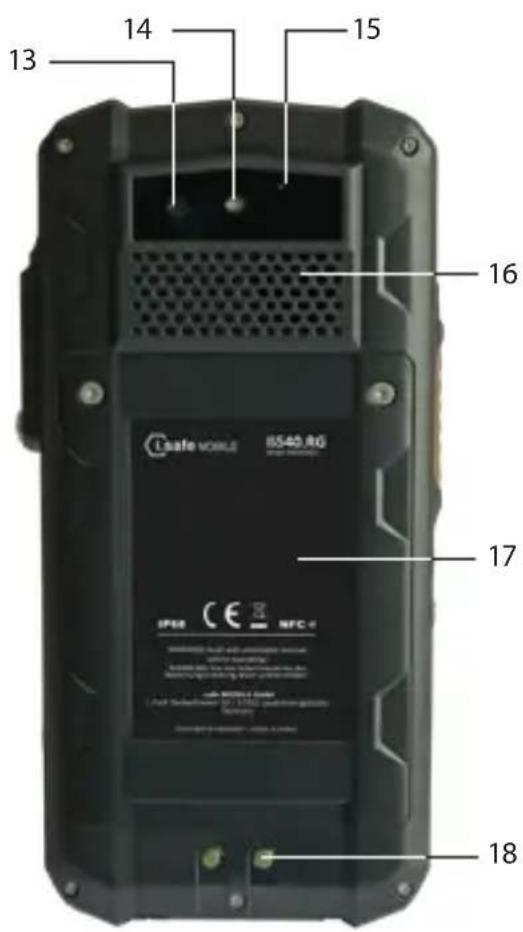
13>BACK CAMERA
14>LED FLASH
15> NOISE CANCELLING: Noise cancelling microphone.
16> LOUDSPEAKER: Loudspeaker for hands-free function.
17 >BATTERY
18 CHARGING CONTACTS
SAFETY
Read the "Safety" section of this Operating Manual carefully before using the device. If you do not follow these instructions or do not understand them, this could lead to death, severe injuries and damage to the device.
USER
Only trained users who have read and understood this Operating Manual may use this device.
USE OUTSIDE OF EXPLOSION HAZARDOUS AREAS
DANGER
Improper use can result in death or severe injuries!
Do not use the device in explosion hazardous areas.
Make sure that no gap can be seen between the two halves of the device.
Do not use the device in places where its use is prohibited.
Turn off the device in clinics or other medical facilities.
Always keep a safety distance of at least 15 cm between the device and a pacemaker or hearing aid. The device can affect the functioning of medical devices such as pacemakers and hearing aids.
When using the device while driving a motor vehicle, be sure to comply with applicable national laws.
Make sure you prevent the user errors described in the section entitled "Possible User Errors".
Only charge the device as described in the "Charging" section.
CAUTION
When using earphones or headsets at the maximum volume setting, you can damage your hearing.
First set the volume control on the device to 50 % of the maximum volume.
Gradually adjust the volume.
NOTICE
Incorrect use can damage the device.
Only use accessories approved by i.safe MOBILE GmbH, as described in the section on "Connecting approved accessories".
Protect the device and the Power Adapter from strong electrical magnetic fields as for example those emitted by induction cookers or microwave ovens, for example.
Do not touch the display with sharp objects.
POSSIBLE USER ERRORS

DANGER
Improper use can result in death or severe injuries! Follow the instructions below:
» Do not modify the device structurally.
» Do not expose the device to high temperatures.
» Do not expose the device to strong UV radiation.
» Do not expose the device to processes with high electrical charges.
» Do not expose the device to aggressive acids or bases.
>SCOPE OF DELIVERY
Your device packaging contains the following:
1 x IS540.RG
1 x Battery
1 x Safety Instructions
1 x Display Protection Foil
1 x USB-C Cable
1 x Power Adapter universal (power supply unit and various country-specific adapters)
1 x Torx Screwdriver
1 x Display cleaning cloth
CELL BROADCAST
The device supports cell broadcast. Cell broadcast is a cellular service for sending messages to all recipients within a cell.
>INSTALLING THE BATTERY
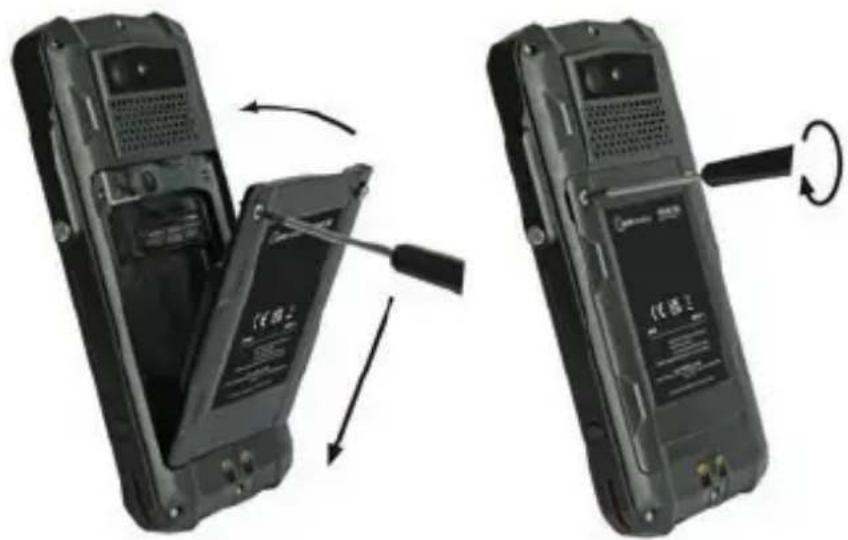
» Place the battery in the battery compartment as shown.
» Hand-tighten the screws using the Torx Screwdriver provided.
» Check that the battery is seated correctly and securely.
> INSERT/REMOVE SIM CARD
The device has a nano-SIM card slot and an additional eSIM. The eSIM is a non-removable, integrated digital SIM. eSIM is not supported by all mobile service provider.
NOTICE
Proceeding incorrectly when inserting/removing the SIM card can damage the device and the SIM card. Switch off the device before inserting or removing a SIM card. Do not charge the device while inserting or removing a SIM card.
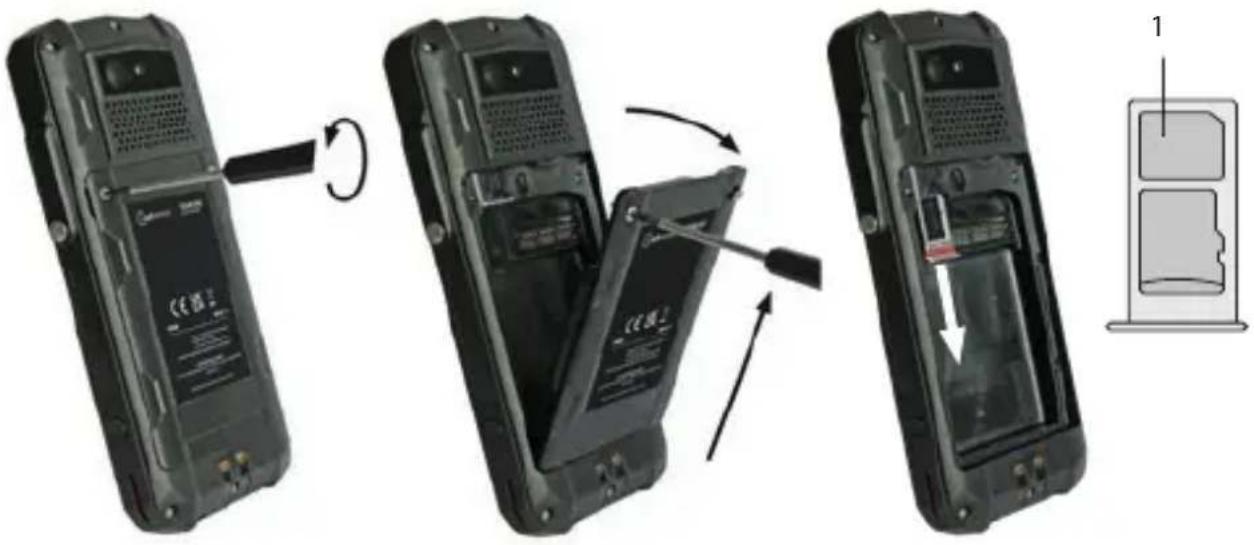
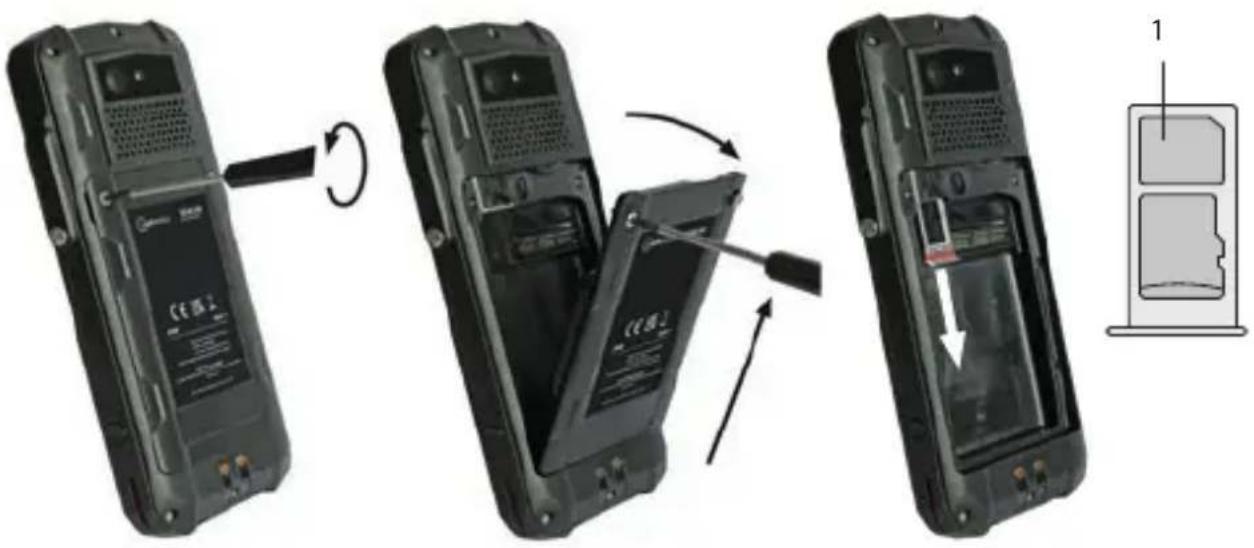
» Loosen the screws on the battery using the Torx Screwdriver provided.
» Remove the battery from the battery compartment.
» Carefully pull the card holder out of the card slot.
» Insert the SIM card into the nano-SIM card slot (1) with the gold-coloured contacts facing down.
» Carefully slide the card holder into the card slot.
»Reinstall the battery. See section "Installing the battery".
Activate eSIM
You can activate the eSIM in several ways:
- Via the Android Setup Wizard during initial device setup:
» Scan the eSIM QR code that you have received from your service provider or manually enter the eID that you have received from your service provider.
- Via the settings menu of the smartphone:
»> Settings > Network & Internet > Mobile network (add Network) > Download SIM > scan (or manually enter) eSIM QR code that you have received from your service provider.
> INSERT/REMOVE microSD CARD
NOTICE
Proceeding incorrectly when inserting/removing the microSD card can damage the device and the microSD card. Switch off the device before inserting or removing a microSD card. Do not charge the device while inserting or removing a microSD card.
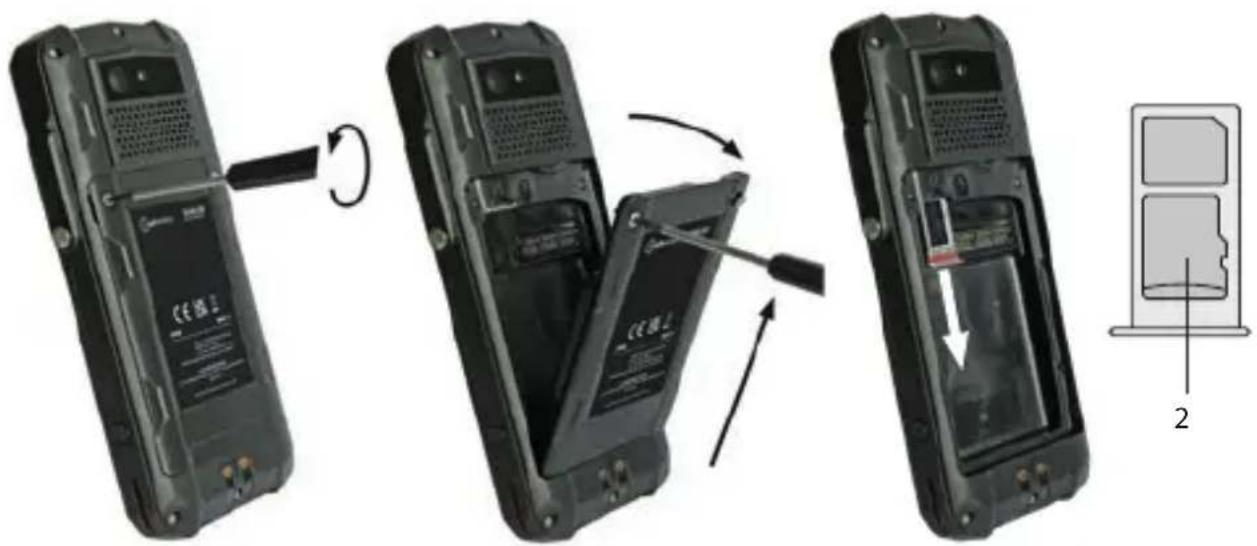
» Loosen the screws on the battery using the Torx Screwdriver provided.
» Remove the battery from the battery compartment.
» Carefully pull the card holder out of the card slot.
» Insert the microSD card into the slot provided (2) with the gold-colored contacts facing down. The device has a slot for a microSD card up to 128 GB.
» Carefully slide the card holder into the card slot.
»Reinstall the battery. See section "Installing the battery".
>CHARGING
DANGER
Improper use can result in death or severe injuries! Do not charge the device in the vicinity of flammable substances.
NOTICE
Incorrect charging can cause damage to the device. Please note the following when charging:
» Only charge the device at ambient temperatures between 0 °C to +45 °C (+32 °F to +113 °F).
» Charge the device under dry indoor conditions only.
» Do not charge the device in environments dusty or humid.
Your device package contains a power supply unit, various country-specific adapters and an USB-C Cable.
» Connect the adapter suitable for your country to the power supply unit.
» Connect the USB-C Cable to the power supply unit.
» Connect the USB-C Cable to the USB interface of the device.
> SWITCHING ON/OFF
» Press and hold the power key for about 3 seconds.
» Enter the device or SIM PIN when the input dialog for the device or SIM PIN appears after switching on.
» Press and hold the power key to enter the power off menu. Select
>USING THE DEVICE
» When turning on the device for the first time, follow the instructions on the screen.
Further information on operating the device can be found at www.isafe-mobile.com/en/support/service under the menu item "FAQ".
Detailed information on operating the Android operating system can be found at:
https://support.google.com/android
CONNECTING APPROVED ACCESSORIES
» Only connect accessories approved by i.safe MOBILE GmbH to the 16-pin ISM interface. Accessories approved by i.safe MOBILE GmbH can be found at www.isafe-mobile.com/en/products
16-PIN ISM INTERFACE
natural_image
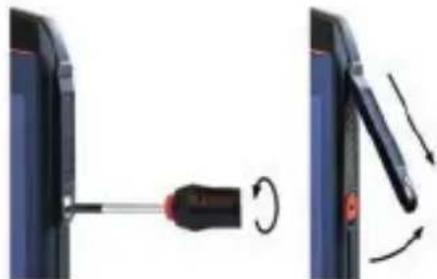
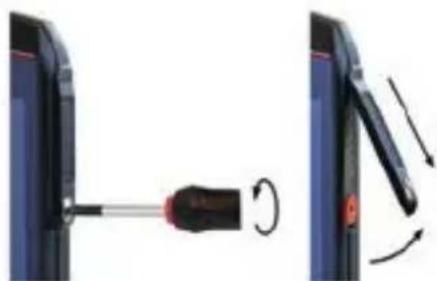
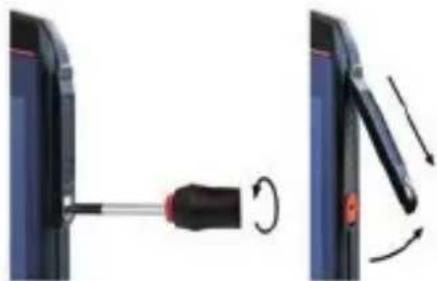
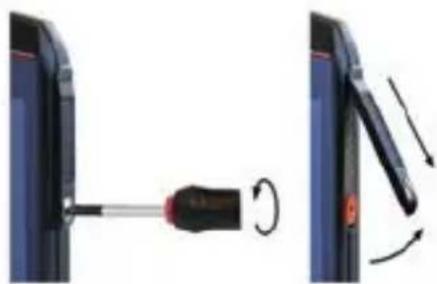
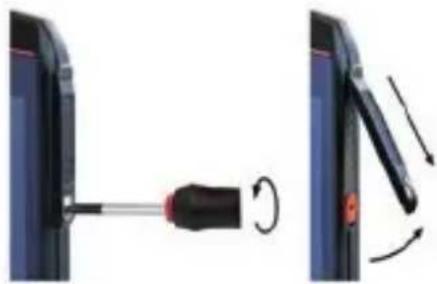
Diagram showing a screwdriver being inserted into a device, with motion arrows indicating rotation (no text or symbols present)» Loosen the screw on the 16-pin ISM interface cover using the Screwdriver included in the approved accessory package. Remove the cover as shown.
natural_image
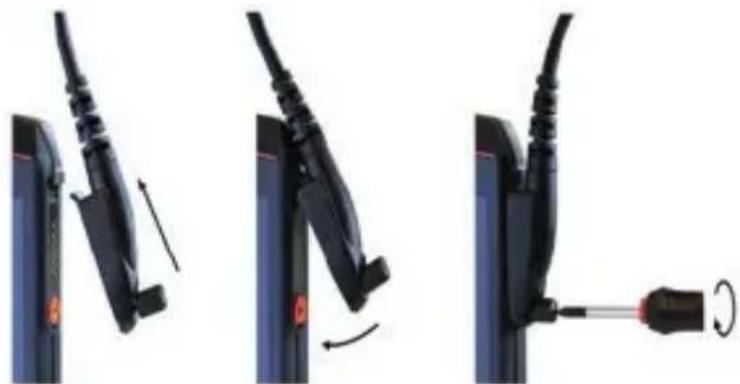
Three-step diagram showing cable fastening and disassembly process (no text or symbols)» Connect the plug of the approved accessory to the 16-pin ISM interface as shown.
» Hand-tighten the screws.
» Check that the plug is seated correctly and securely.
USB INTERFACE
The USB interface is used for charging and data transfer.
» Connect approved accessories or other devices to the USB interface only by using the USB-C Cable or by using other equipment approved by i.safe MOBILE GmbH.
>CHANGING THE BATTERY
An approved replacement battery can be found on the website www.isafe-mobile.com/en/products
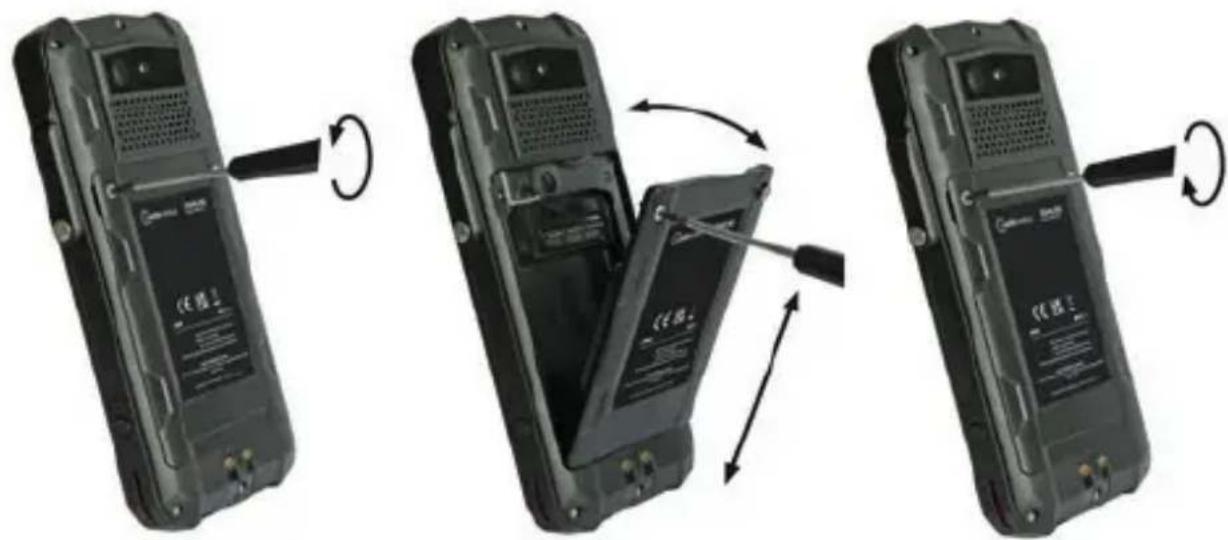
» Loosen the screws on the battery using the Torx Screwdriver provided.
» Remove the battery from the battery compartment as shown.
» Place the approved replacement battery in the battery compartment as shown.
» Hand-tighten the screws using the Torx Screwdriver provided.
» Check that the battery is seated correctly and securely.
POSSIBLE DEVICE PROBLEMS
You can find information on possible device problems and how to rectify them at www.isafe-mobile.com/en/support/service under the menu item "FAQ".
If you have any further questions, please contact the i.safe MOBILE GmbH repair service at www.isafe-mobile.com/en/support/service
MAINTENANCE/REPAIR
The device itself has no serviceable parts.
WARNING
Incorrect repairs present a risk of explosion or fire, which can result in death or severe injuries! Do not open the device or carry out any repairs yourself.
» Contact the i.safe MOBILE GmbH repair service at www.isafe-mobile.com/en/support/service if the device is not working normally, if the device needs to be repaired or if a replacement part is required.
RETURN SHIPMENT
Contact the i.safe MOBILE GmbH repair service at www.isafe-mobile.com/en/support/service
DISTRIBUTION PARTNER
You can find the specialist distribution partner responsible for your country at www.isafe-mobile.com/en/contact
CLEANING
NOTICE
Incorrect cleaning can cause damage to the device. Please note the following when cleaning:
»Turn off the device before cleaning.
» Do not charge the device while cleaning.
» Do not use chemical agents for cleaning.
» Clean the device and the Power Adapter with a soft, moistened antistatic cloth.
» Clean the display screen regularly with a soft, antistatic cloth.
STORAGE
NOTICE
Incorrect storage can cause damage to the device. Store the device at a humidity of 10 % to 60 % at the following ambient temperatures:
Up to one month: -20 °C to +45 °C (-4 °F to +113 °F)
Up to 3 months: -10 °C to +35 °C (+14 °F to +95 °F)
Over 3 months: -10 °C to +25 °C (+14 °F to +77 °F)
If you do not use the device for a longer period of time, note the following:
» Switch off the device.
» For longer storage without use, charge the device to approx. 50 % to 70 % using the USB-C Cable supplied or other charging equipment approved by i.safe MOBILE GmbH.
» Charge the device every 3 to 6 months to avoid deep discharge.
» Store it in a cool, dry place to keep the battery functional.
RECYCLING
NOTICE
Incorrect disposal of electronic products, batteries and packaging material puts the environment at risk. Please note the following when disposing of items:
» DO NOT throw away batteries with household waste.
» Always dispose electronic products, batteries and packaging material at the appropriate collection points. This way, you prevent uncontrolled waste disposal and promote the recycling of material resources.
You can obtain further information from regional waste disposal companies, state authorities or the i.safe MOBILE GmbH service centre responsible for your country or region at www.isafe-mobile.com/en/support/service

TRADEMARKS
i.safe MOBILE GmbH and the i.safe MOBILE GmbH logo are registered trademarks of the i.safe MOBILE GmbH.
Comes with the Google™ app and Google Chrome™
Google and Google Chrome are trademarks of Google LLC.
All other trademarks and copyrights are the properties of their respective owners.
DEUTSCH
natural_image
Two black flip-flops with visible internal components and a scroll wheel, shown from different angles (no text or symbols)natural_image
Diagram showing a screwdriver being inserted into a device, with motion arrows indicating rotation (no text or symbols present)natural_image
Three-step diagram showing cable fastening and disassembly process (no text or symbols)www.isafe-mobile.com/en/support/downloads
PROHLÁŠENÍ FCC/IC
www.isafe-mobile.com/en/support/downloads
PŘEHLED O ZAŘÍZENÍ/FUNKCÍCH
1>REPRODUKTOR
natural_image
Diagram showing a screwdriver inserted into a device, with rotation arrows indicating motion (no text or symbols)natural_image
Three-step diagram showing cable fastening and mounting mechanism (no text or symbols)natural_image
Diagram showing a screwdriver inserted into a device, with rotation arrows indicating motion (no text or symbols)natural_image
Three-step diagram showing cable fastening and mounting mechanism (no text or symbols)natural_image
Two black flip-flops with visible internal components and a scroll wheel, shown from different angles (no text or symbols)natural_image
Diagram showing a screwdriver being inserted into a device, with motion arrows indicating rotation (no text or symbols present)natural_image
Three-step diagram showing cable fastening process: left panel with cable attachment, right panel with cable insertion and rotation (no text or symbols)www.isafe-mobile.com/en/support/downloads
FCC-/IC-LAUSUNTO
www.isafe-mobile.com/en/support/downloads
> LAITTEEN YLEISKUVA JA TOIMINNOT
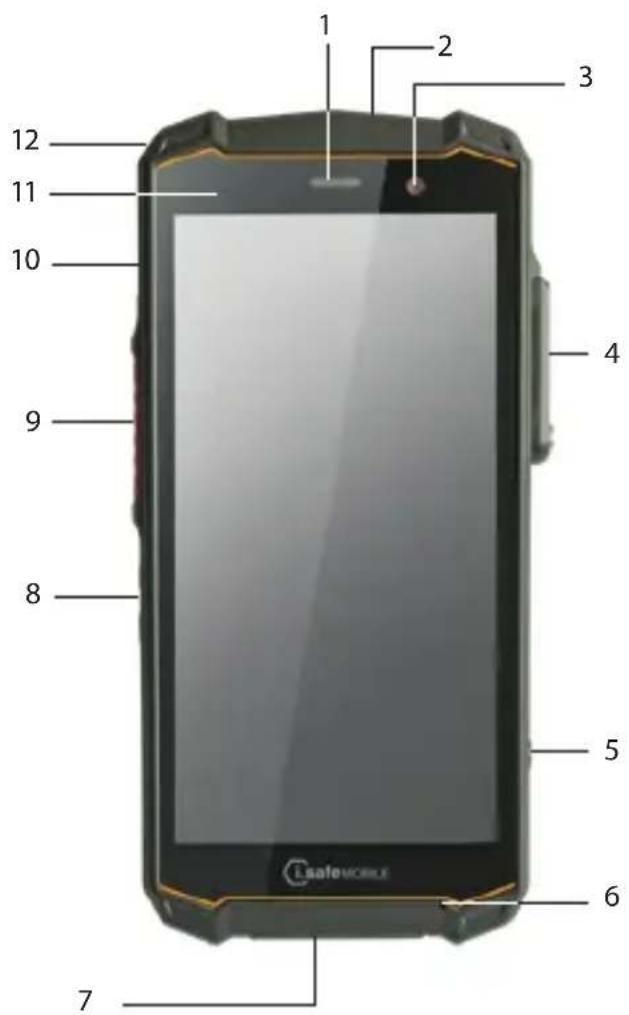
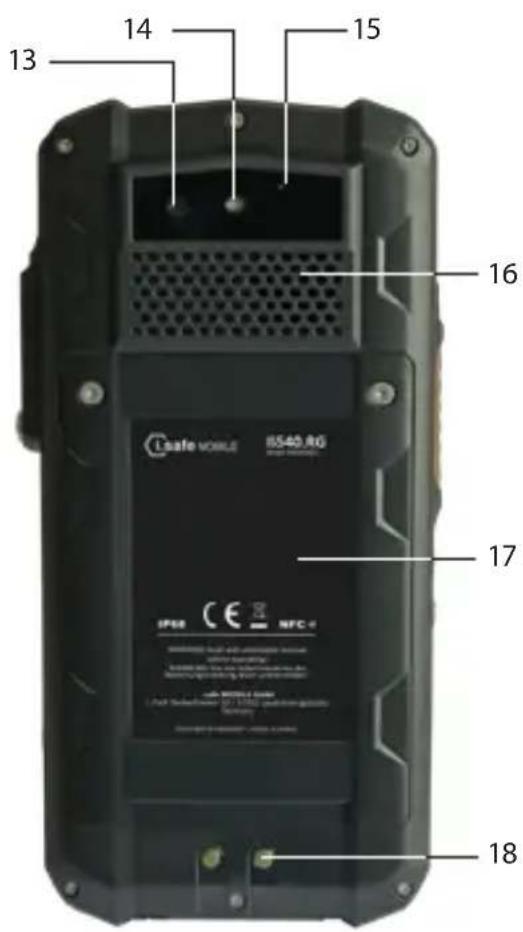
1 > KAIUTIN
natural_image
Diagram showing a screwdriver being inserted into a device, with motion arrows indicating rotation (no text or symbols)natural_image
Three-step diagram showing cable fastening process: left panel with cable attachment, right panel with cable insertion and rotation (no text or symbols)DÉCLARATION DE CONFORMITÉ UE
natural_image
Two views of a mobile phone showing the open and closed portion of its case, with a scroll wheel indicating rotation (no text or symbols visible)MISE EN MARCHE/ARRÊT
INTERFACE 16-PIN ISM
natural_image
Diagram showing a screwdriver inserted into a device, with motion arrows indicating rotation (no text or symbols)natural_image
Three-step diagram showing cable fastening and screwdriver insertion (no text or symbols)natural_image
Two black flip-flops with visible internal components and a scroll wheel, shown from different angles (no text or symbols)natural_image
Diagram showing a screwdriver being inserted into a device, with motion arrows indicating rotation (no text or symbols present)natural_image
Three-step diagram showing cable fastening and screwdriver insertion (no text or symbols)www.isafe-mobile.com/en/support/service
www.isafe-mobile.com/en/support/downloads
PANORAMICA/FUNZIONI DEL DISPOSITIVO
USO FUORI DALLE AREE A RISCHIO DI ESPLOSIONE
PERICOLO
natural_image
Two black flip-flops with a USB flash, shown from different angles (no text or symbols visible)natural_image
Diagram showing a screwdriver being inserted into a device, with rotation arrows indicating motion (no text or symbols)natural_image
Three-step diagram showing cable fastening and screwdriver insertion (no text or symbols)www.isafe-mobile.com/en/support/service
PARTNER COMMERCIALI
www.isafe-mobile.com/en/support/downloads
FCC/IC-VERKLARING
www.isafe-mobile.com/en/support/downloads
> APPARAATOVERZICHT/-FUNCTIES
https://support.google.com/android
GOEDGEKEURDE ACCESSOIRES AANSLUITEN
natural_image
Diagram showing a screwdriver being inserted into a device, with motion arrows indicating rotation (no text or symbols)natural_image
Three-step diagram showing cable fastening and screwdriver insertion (no text or symbols)natural_image
Two black flip-flops with internal components, showing a device being opened and then closed, with no visible text or symbols.https://support.google.com/android
TILKOBLING AV GODKJENT TILBEH∅R
natural_image
Diagram showing a screwdriver being inserted into a device, with motion arrows indicating rotation (no text or symbols present)natural_image
Three-step diagram showing cable fastening and screwdriver insertion (no text or symbols)VEDLIKEHOLD/REPARASJON
natural_image
Diagram showing a screwdriver being inserted into a device, with motion arrows indicating rotation (no text or symbols)natural_image
Three-step diagram showing cable fastening and screwdriver insertion (no text or symbols)www.isafe-mobile.com/en/support/service.
» Coloque a bateria no compartimento da bateria, como indicado.
» Aperte os parafusos manualmente com a chave de fendas Torx fornecida.
» Verifique se a bateria está colocada de forma correta e segura.
INTERFACE 16-PIN ISM
natural_image
Diagram showing a screwdriver inserted into a device, with rotation arrows indicating motion (no text or symbols)natural_image
Three-step diagram showing cable fastening and mounting mechanism (no text or symbols)» Ligue a ficha do acessório aprovado à interface 16-pin ISM, como indicado.
» Aperte os parafusos manualmente.
» Verifique se a ficha está colocada de forma correta e segura.
INTERFACE USB
natural_image
Two black flip-flops with attached battery plates, shown in side-by-side motion (no text or symbols visible)» Posicione a bateria no compartimento de bateria conforme exibido.
» Aperte os parafusos usando a chave Torx fornecida.
» Verifique se a bateria está encaixada corretamente e com firmeza.
>INSERIR/REMOVER CARTÃO SIM
INTERFACE 16-PIN ISM
natural_image
Diagram showing a screwdriver inserted into a device, with rotation arrows indicating motion (no text or symbols)natural_image
Three-step diagram showing cable fastening and screwdriver insertion (no text or symbols)» Conecte o plugue do acessório aprovado à interface 16-pin ISM, conforme exibido.
» Aperte os parafusos.
» Verifique se o plugue está encaixado corretamente e com firmeza.
INTERFACE USB
» Solte os parafusos da bateria utilizando a chave Torx fornecida.
»Remova a bateria do compartimento de bateria, conforme exibido.
» Posicione a bateria substituta aprovada no compartimento de bateria, conforme exibido.
» Aperte os parafusos usando a chave Torx fornecida.
» Verifique se a bateria está encaixada corretamente e com firmeza.
POSSÍVEIS PROBLEMAS DO DISPOSITIVO
www.isafe-mobile.com/en/support/service
natural_image
Diagram showing a screwdriver being inserted into a device, with motion arrows indicating rotation (no text or symbols present)natural_image
Three-step diagram showing cable fastening and screwdriver insertion (no text or symbols)natural_image
Two black flip-flops with visible internal components and a scroll wheel, shown from different angles (no text or symbols)natural_image
Diagram showing a screwdriver being inserted into a device, with rotation arrows indicating motion (no text or symbols)natural_image
Three-step diagram showing cable fastening and mounting mechanism (no text or symbols)natural_image
Two black flip-flops with visible internal components and a scroll wheel, shown from different angles (no text or symbols)» Postavite bateriju u odjeljak za bateriju prema prikazu.
» Ručno zategnite vijke isporučenim Torx odvijačem.
» Provjerite da je baterija pravilno učvršćena.
UMETANJE/UKLANJANJE SIM KARTICE
Uređaj ima utor za nano SIM karticu i dodatnu eSIM karticu. eSIM kartica je nezamjenjiva, integrirana, digitalna eSIM kartica. Karticu eSIM ne podržava svaki pružatelj usluga mobilne telefonije.
NAPOMENA
Neodgovarajući postupak pri umetanju/uklanjanju SIM kartice može oštetiti uređaj i SIM karticu. Isključite uređaj prije umetanja ili uklanjanja SIM kartice. Ne punite uređaj za vrijeme umetanja ili uklanjanja SIM kartice.
» Otpustite vijke na bateriji isporučenim Torx odvijačem.
» Uklonite bateriju iz odjeljka za bateriju.
» Pažljivo izvucite nosač kartice iz utora za karticu.
» Umetnite SIM karticu u utor za nano SIM karticu (1) tako da kontakti zlatne boje gledaju prema dolje.
» Gurnite nosač kartice pažljivo u utor za karticu.
» Ponovno ugradite bateriju. Pogledajte odlomak „Ugradnja baterije“.
AKTIVIRAJTE ESIM
» Otpustite vijke na bateriji isporučenim Torx odvijačem.
» Uklonite bateriju iz odjeljka za bateriju.
» Pažljivo izvucite nosač kartice iz utora za karticu.
» Umetnite mikro SD karticu u pripadajući utor (2) tako da kontakti zlatne boje gledaju prema dolje. Uređaj ima a utor za microSD karticu do 128 GB.
» Gurnite nosač kartice pažljivo u utor za karticu.
» Ponovno ugradite bateriju. Pogledajte odlomak „Ugradnja baterije“.
PUNJENJE
OPASNOST
Neodgovarajuća uporaba može dovesti do smrti ili teških ozljeda! Ne punite uređaj u blizini zapaljivih tvari.
NAPOMENA
Neodgovarajuće punjenje može oštetiti uređaj. Uzmite u obzir sljedeće za vrijeme punjenja:
» Punite uređaj samo na temperaturi okruženja od 0 °C do +45 °C (od +32 °F do +113 °F).
» Punite uređaj samo u suhom unutrašnjem prostoru.
» Ne punite uređaj u okruženjima koja su prašnjava ili vlažna.
Vaš paket uređaja sadrži jedinica za napajanje, različite adaptere specifične za različite države i USB-C kabel.
» Spojite adapter prikladan za svoju državu u jedinica za napajanje.
» Spojite USB-C kabel u jedinica za napajanje.
» Spojite USB-C kabel na USB sučelje uređaja.
UKLJUČIVANJE/ISKLJUČIVANJE
natural_image
Diagram showing a screwdriver inserted into a device, with rotation arrows indicating motion (no text or symbols)natural_image
Three-step diagram showing cable fastening and mounting mechanism (no text or symbols)» Spojite utikač odobrenog pribora na 16-pin ISM sučelje prema prikazu.
» Ručno zategnite vijke.
» Provjerite da je utikač pravilno učvršćen.
USB SUČELJE
» Otpustite vijke na bateriji isporučenim Torx odvijačem.
» Uklonite bateriju iz odjeljka za bateriju prema prikazu.
» Postavite odobrenu zamjensku bateriju u odjeljak za bateriju prema prikazu.
» Ručno zategnite vijke isporučenim Torx odvijačem.
» Provjerite da je baterija pravilno učvršćena.
MOGUĆI PROBLEMI S UREĐAJEM
natural_image
Two black flip-flops with visible internal components and a scroll wheel, shown from different angles (no text or symbols)» Uvoľnite skrutky na batérii pomocou dodaného skrutkovača Torx.
»Vyberte batériu z priehradky na batérie.
https://support.google.com/android
PRIPOJENIE SCHVÁLENÉHO PRÍSLUŠENSTVA
» K 16-pinovému rozhraniu ISM pripájajte len príslušenstvo schválené spoločnostou i.safe MOBILE GmbH. Príslušenstvo schválené spoločnostou i.safe MOBILE GmbH nájdete na www.isafe-mobile.com/en/products
ROZHRANIE 16-PIN ISM
natural_image
Diagram showing a screwdriver inserted into a device, with rotation arrows indicating motion (no text or symbols)natural_image
Three-step diagram showing cable fastening and mounting mechanism (no text or symbols)natural_image
Diagram showing a screwdriver inserted into a device, with rotation arrows indicating motion (no text or symbols)natural_image
Three-step diagram showing cable fastening and mounting mechanism (no text or symbols)natural_image
Two black flip-flops with visible internal components and a scroll wheel, shown from different angles (no text or symbols)natural_image
Diagram showing a screwdriver being inserted into a device, with motion arrows indicating rotation (no text or symbols present)natural_image
Three-step diagram showing cable fastening and disassembly of a plug into a battery (no text or symbols)natural_image
Two black flip-flops with visible internal components and a scroll wheel, shown from different angles (no text or symbols)natural_image
Diagram showing a screwdriver being inserted into a device, with motion arrows indicating rotation (no text or symbols present)natural_image
Three-step diagram showing cable fastening and screwdriver insertion (no text or symbols)natural_image
Two views of a mobile phone showing the open and closed states of a device, with a screwdriver inserted (no visible text or symbols)»如图所示,将电池放入电池仓中。
》使用随附的内梅花螺丝刀手动拧紧螺钉。
》检查电池已正确、牢固放置。
》插入/移除 SIM 卡
使用随附的梅花螺丝刀拧松电池上的螺钉。
》将电池从电池仓中取出。
》小心地将卡座从卡槽中拔出。
natural_image
Two-step diagram showing a screwdriver inserted into a device, with rotation arrows indicating the process (no text or symbols present)natural_image
Three-step diagram showing cable fastening and screwdriver insertion (no text or symbols)www.isafe-mobile.com/cn/support/downloads
www.isafe-mobile.com/en/support/downloads
natural_image
Two views of a black flip phone showing internal components and battery casing (no text or symbols visible)natural_image
Two-step diagram showing a device being adjusted for a screwdriver, with no visible text or symbols.natural_image
Three-step diagram showing a cable being inserted into a device, with no visible text or symbols.FOR FURTHER QUESTIONS PLEASE CONTACT OUR SERVICE CENTRE:
» i.safe MOBILE GmbH, i_Park Tauberfranken 10, 97922 Lauda-Koenigshofen, Germany
» support@isafe-mobile.com
» https://support.isafe-mobile.com
ISAFE-MOBILE.COM

- CONTENTS
- ENGLISH
- READ AND UNDERSTAND THE INSTRUCTIONS
- PROTECT YOUR LIFE AND READ THE OPERATING MANUAL
- INTENDED USE
- WARRANTY
- EU DECLARATION OF CONFORMITY
- FCC/IC STATEMENT
- >DEVICE OVERVIEW/FUNCTIONS
- SAFETY
- USER
- USE OUTSIDE OF EXPLOSION HAZARDOUS AREAS
- DANGER
- CAUTION
- NOTICE
- POSSIBLE USER ERRORS
- >SCOPE OF DELIVERY
- CELL BROADCAST
- >INSTALLING THE BATTERY
- > INSERT/REMOVE SIM CARD
- Activate eSIM
- > INSERT/REMOVE microSD CARD
- >CHARGING
- > SWITCHING ON/OFF
- >USING THE DEVICE
- CONNECTING APPROVED ACCESSORIES
- 16-PIN ISM INTERFACE
- USB INTERFACE
- >CHANGING THE BATTERY
- POSSIBLE DEVICE PROBLEMS
- MAINTENANCE/REPAIR
- WARNING
- RETURN SHIPMENT
- DISTRIBUTION PARTNER
- CLEANING
- STORAGE
- RECYCLING
- TRADEMARKS
- DEUTSCH
- PROHLÁŠENÍ FCC/IC
- PŘEHLED O ZAŘÍZENÍ/FUNKCÍCH
- 1>REPRODUKTOR
- FCC-/IC-LAUSUNTO
- > LAITTEEN YLEISKUVA JA TOIMINNOT
- > KAIUTIN
- DÉCLARATION DE CONFORMITÉ UE
- MISE EN MARCHE/ARRÊT
- INTERFACE 16-PIN ISM
- PANORAMICA/FUNZIONI DEL DISPOSITIVO
- USO FUORI DALLE AREE A RISCHIO DI ESPLOSIONE
- PERICOLO
- PARTNER COMMERCIALI
- FCC/IC-VERKLARING
- > APPARAATOVERZICHT/-FUNCTIES
- GOEDGEKEURDE ACCESSOIRES AANSLUITEN
- TILKOBLING AV GODKJENT TILBEH∅R
- VEDLIKEHOLD/REPARASJON
- INTERFACE USB
- >INSERIR/REMOVER CARTÃO SIM
- POSSÍVEIS PROBLEMAS DO DISPOSITIVO
- UMETANJE/UKLANJANJE SIM KARTICE
- NAPOMENA
- AKTIVIRAJTE ESIM
- PUNJENJE
- OPASNOST
- UKLJUČIVANJE/ISKLJUČIVANJE
- USB SUČELJE
- MOGUĆI PROBLEMI S UREĐAJEM
- PRIPOJENIE SCHVÁLENÉHO PRÍSLUŠENSTVA
- ROZHRANIE 16-PIN ISM
- 》插入/移除 SIM 卡
Brand : i.safe Mobile
Model : IS540.RG
Category : Smartphone