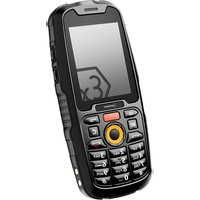
IS120.2 - Smartphone i.safe Mobile - Free user manual and instructions
Find the device manual for free IS120.2 i.safe Mobile in PDF.


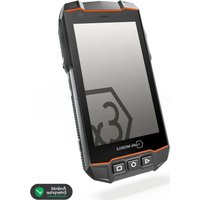
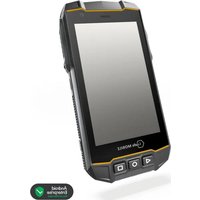
| Product type | Rugged ATEX smartphone |
| Brand | i.safe Mobile |
| Model | IS120.2 (M120A01) |
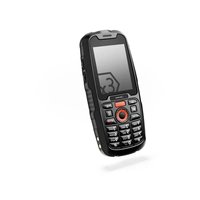
| Category | Smartphone for explosion-hazard areas (Zone 2/22) |
| Approximate dimensions | 150 x 80 x 15 mm |
| Approximate weight | 250 g |
| Power supply | Rechargeable battery, charging via USB-C (5V) |
| Charging temperature | +5 °C to +35 °C |
| Main functions | Calls, SMS, data, programmable buttons (Red Key, M1, Side Key), navigation, physical keyboard |
| Connectivity | USB-C, hands-free speaker, noise cancellation |
| Sensors | Proximity sensor, optical sensor |
| Maintenance and cleaning | Clean with a soft, damp antistatic cloth, without chemicals |
| Safety | Use in ATEX Zone 2/22 areas, do not open in explosive area, minimum distance of 15 cm from medical implants |
| Spare parts and repairability | Contact i.safe Mobile service via www.isafe-mobile.com/fr/support/service |
| Storage | Temperature +5 °C to +35 °C, humidity 10-60% |
| Recycling | Do not dispose of with household waste, recycle electronics and batteries at collection points |
Frequently Asked Questions - IS120.2 i.safe Mobile
User questions about IS120.2 i.safe Mobile
0 question about this device. Answer the ones you know or ask your own.
Ask a new question about this device
Download the instructions for your Smartphone in PDF format for free! Find your manual IS120.2 - i.safe Mobile and take your electronic device back in hand. On this page are published all the documents necessary for the use of your device. IS120.2 by i.safe Mobile.
USER MANUAL IS120.2 i.safe Mobile
Document No. 1050MM05REV00
Version: 2025-02-11
(c) 2025 i.safe MOBILE GmbH
i.safe MOBILE GmbH
i_Park Tauberfranken 10
97922 Lauda-Koenigshofen
Germany
Tel.+49 9343 60148-0
info@isafe-mobile.com
www.isafe-mobile.com Template:TEMPMM01REV10
CONTENTS
English....4
Deutsch....7
Česky....11
Dansk....14
Español....18
Suomi....22
Français....25
Magyar 30
Italiano 33
Nederlands 37
Norsk 41
Polski 44
This Quick Start Manual contains all the important health and safety instructions for using the device IS120.2 (model M120A01) safely.
»Read the "Safety" section of this Quick Start Manual carefully before using the device. If you do not follow these instructions or do not understand them, this could lead to death, severe injuries and damage to the device.
» Read the Operating Manual before using the device.
The Operating Manual with detailed information and instructions concerning the device can be found at www.isafe-mobile.com/en/support/downloads.
» Also read the Safety Instructions before using the device. These can be found in the device packaging and at www.isafe-mobile.com/en/support/downloads.
» Follow all instructions given on the device and on the packaging.
»Follow local safety regulations.
> SAFETY
USE IN EXPLOSION HAZARDOUS AREAS
» Only use the device in explosion hazardous areas of zones 2/22 or outside of explosion hazardous areas.
» Before entering a explosion hazardous area with the device,
- make sure that only approved accessories are connected to the device, see section "Connecting approved accessories",
• make sure that no gap can be seen between the two halves of the device,
• make sure the device is not damaged,
• make sure that all the labels on the device are readable,
• make sure the battery compartment is screwed tight.
» If you use the device in a explosion hazardous area,
• do not loosen the screws on the device,
- do not connect any accessories to the device,
• do not open any interface cover,
• do not charge the device,
• do not open the device,
• do not damage the device.
» Switch off the device immediately and leave the explosion hazardous area without delay if
- malfunctions occur on the device,
- you have damaged the housing of the device,
- you have exposed the device to excessive loads,
- the labels on the device are no longer readable.
USE OUTSIDE OF EXPLOSION HAZARDOUS AREAS
» Do not modify the device structurally.
» Do not expose the device to high temperatures.
» Do not expose the device to strong UV radiation.
» Do not expose the device to processes with high electrical charges.
» Do not expose the device to aggressive acids or bases.
» Do not use the device in places where its use is prohibited.
» Turn off the device in clinics or other medical facilities.
» Always keep a safety distance of at least 15 cm between the device and a pacemaker or hearing aid. The device can affect the functioning of medical devices such as pacemakers and hearing aids.
» When using the device while driving a motor vehicle, be sure to comply with applicable national laws.
DEVICE OVERVIEW/FUNCTIONS (see illustration on page 2)
1> SENSORS: Proximity sensor, light sensor.
2> LOUDSPEAKER
3> LOUDNESS CONTROL: Volume up/Volume down.
4> FUNCTION KEY (RED FUNCTION KEY): Optional key used by different apps.
5) BACK KEY: Go to the previous screen.
6) DELETE KEY: To delete characters entered incorrectly.
7) POWER KEY: A long press switches the device on/off. A short press ends a call.
8> CHARGING CONTACTS
9> NAVIGATION RING AND CONFIRMATION KEY
10>KEYPAD
11>ANSWERKEY
12) FUNCTION KEY (M1): Optional key used by different apps.
13> HOME KEY: Switch to the main screen.
14> FUNCTION KEY (SIDE KEY): Optional key used by different apps.
15> NOISE CANCELLING: Noise cancelling microphone.
16) EYELET: Eyelet for hand strap.
17) LOUDSPEAKER: Speaker for hands-free function.
18> BATTERYCOMPARTMENT
19> USB-C INTERFACE: Connection for the USB-C Cable. Also see sections "Charging" and "Connecting approved accessories".
PREPARATION
» Loosen the screws on the battery compartment using the Screwdriver provided.
» Remove the battery compartment cover.
» Insert the SIM card into the slot. The slot is marked „SIM“.
» Place the battery in the battery compartment.
» Check that the battery is seated correctly and securely.
»Reinstall the battery compartment cover and hand-tighten the screws using the Screwdriver provided.
> SWITCHING ON
» Press and hold the on/off key for about 3 seconds.
» When turning on the device for the first time, follow the instructions on the screen.
» Enter the device or SIM PIN when the input dialog for the device or SIM PIN appears after switching on.
>CHARGING
» Only charge the device outside of explosion hazardous areas.
» Do not charge the device in the vicinity of flammable substances.
» Only charge the device using the USB-C Cable supplied.
» Only charge the device at ambient temperatures between +5 °C to +35 °C (+41 °F to +95 °F).
» Charge the device under dry indoor conditions only.
» Do not charge the device in environments dusty or humid.
» Connect the adapter suitable for your country to the power supply unit.
» Connect the USB-C Cable to the power supply unit.
» Connect the USB-C Cable to the USB-C interface of the device.
> CONNECTING APPROVED ACCESSORIES
» Only connect accessories approved by i.safe MOBILE to the device. Accessories approved by i.safe MOBILE can be found at www.isafe-mobile.com/en/products.
» Only use USB-C interface outside of explosion hazardous areas.
» Under no circumstances should you open the cover of the USB-C interface in explosion hazardous areas.
Approved accessories can be connected to the USB-C interface.
The USB-C interface is used for charging and data transfer.
» Connect approved accessories or other devices to the USB-C interface only by using the USB-C Cable.
MAINTENANCE/REPAIR
» Contact the i.safe MOBILE repair service at www.isafe-mobile.com/en/support/service if the device is not working normally, if the device needs to be repaired or if a replacement part is required.
RETURN SHIPMENT
Contact the i.safe MOBILE repair service at www.isafe-mobile.com/en/support/service.
>CLEANING
» Turn off the device before cleaning.
» Do not charge the device while cleaning.
» Do not use chemical agents for cleaning.
» Clean the device and the Power Adapter with a soft, moistened antistatic cloth.
» Clean the display screen regularly with a soft, antistatic cloth.
STORAGE
» Store the device at ambient temperatures between +5 °C to +35 °C (41 °F to +95 °F) and a humidity between 10 % to 60 %.
RECYCLING
» DO NOT throw away batteries with household waste.
» Always dispose electronic products, batteries and packaging material at the appropriate collection points. This way, you prevent uncontrolled waste disposal and promote the recycling of material resources.
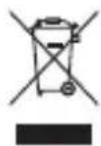
You can obtain further information from regional waste disposal companies, state authorities or the i.safe MOBILE service centre responsible for your country or region at www.isafe-mobile.com/en/support/service.
TRADEMARKS
i.safe MOBILE and the i.safe MOBILE logo are registered trademarks of the i.safe MOBILE GmbH.
All other trademarks and copyrights are the properties of their respective owners.
DEUTSCH
ZUERST
www.isafe-mobile.com/en/support/service.
RENG∅RING
USO IN AREE A RISCHIO DI ESPLOSIONE
USO FUORI DALLE AREE A RISCHIO DI ESPLOSIONE
VEDLIKEHOLD / REPARASJON
www.isafe-mobile.com/en/support/service.
LIMPEZA
natural_image
A plain gray background with a single horizontal red line at the bottom (no text or symbols)CONTACT/SERVICE CENTRE
FOR FURTHER QUESTIONS PLEASE CONTACT OUR SERVICE CENTRE:
» i.safe MOBILE GmbH, i_Park Tauberfranken 10, 97922 Lauda-Koenigshofen, Germany
» support@isafe-mobile.com
» https://support.isafe-mobile.com
natural_image
Nighttime exterior view of a large industrial chemical plant with illuminated towers and piping (no visible text or signage)WWW.ISAFE-MOBILE.COM


- CONTENTS
- > SAFETY
- USE IN EXPLOSION HAZARDOUS AREAS
- USE OUTSIDE OF EXPLOSION HAZARDOUS AREAS
- > SWITCHING ON
- >CHARGING
- > CONNECTING APPROVED ACCESSORIES
- MAINTENANCE/REPAIR
- RETURN SHIPMENT
- >CLEANING
- STORAGE
- RECYCLING
- TRADEMARKS
- DEUTSCH
- ZUERST
- RENG∅RING
- USO IN AREE A RISCHIO DI ESPLOSIONE
- USO FUORI DALLE AREE A RISCHIO DI ESPLOSIONE
- VEDLIKEHOLD / REPARASJON
- LIMPEZA
- CONTACT/SERVICE CENTRE
Brand : i.safe Mobile
Model : IS120.2
Category : Smartphone