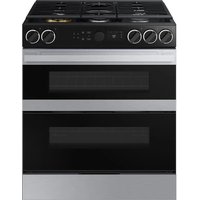
NZ85C6057KK - Cooker SAMSUNG - Free user manual and instructions
Find the device manual for free NZ85C6057KK SAMSUNG in PDF.



User questions about NZ85C6057KK SAMSUNG
0 question about this device. Answer the ones you know or ask your own.
Ask a new question about this device
Download the instructions for your Cooker in PDF format for free! Find your manual NZ85C6057KK - SAMSUNG and take your electronic device back in hand. On this page are published all the documents necessary for the use of your device. NZ85C6057KK by SAMSUNG.
USER MANUAL NZ85C6057KK SAMSUNG
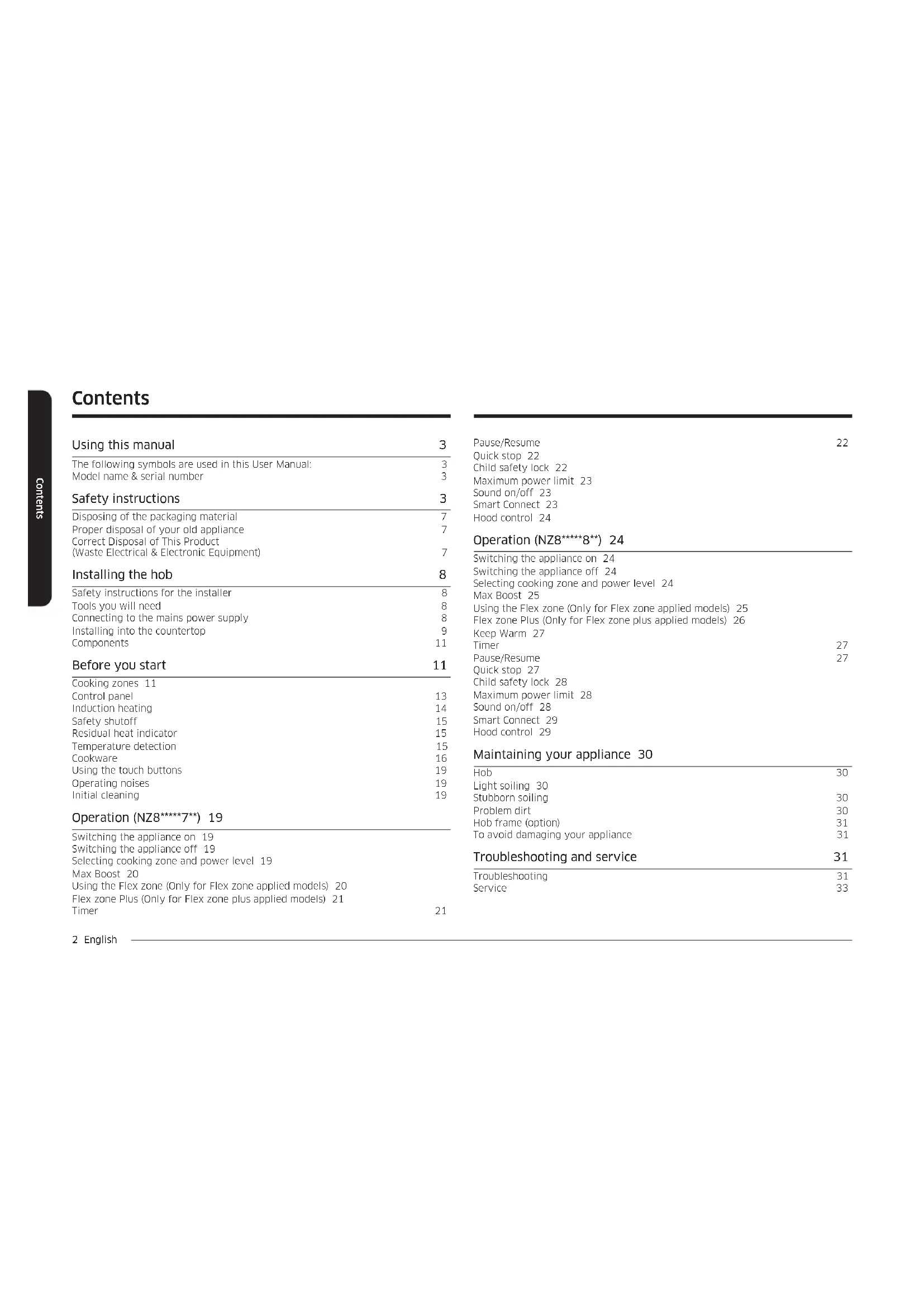
The following symbols are used in this User Manual: 3 Model name & serial number 3
Safety instructions 3
Disposing of the packaging material 7 Proper disposal of your old appliance 7 Correct Disposal of This Product (Waste Electrical & Electronic Equipment) 7
Installing the hob 8
Safety instructions for the installer 8
Tools you will need 8
Connecting to the mains power supply 8
Installing into the countertop 9
Components 11
Before you start 11
Cooking zones 11 Control panel 13 Induction heating 14 Safety shutoff 15 Residual heat indicator 15 Temperature detection 15 Cookware 16 Using the touch buttons 19 Operating noises 19 Initial cleaning 19
Operation (NZ8\*\*\*\*7\*\*) 19
Switching the appliance on 19 Switching the appliance off 19 Selecting cooking zone and power level 19 Max Boost 20 Using the Flex zone (Only for Flex zone applied models) 20 Flex zone Plus (Only for Flex zone plus applied models) 21 Timer 21
Pause/Resume 22
Quick stop 22
Child safety lock 22
Maximum power limit 23
Sound on/off 23
Smart Connect 23
Hood control 24
Operation (NZ8\*\*\*\*\*8\*\*) 24
Switching the appliance on 24 Switching the appliance off 24 Selecting cooking zone and power level 24 Max Boost 25 Using the Flex zone (Only for Flex zone applied models) 25 Flex zone Plus (Only for Flex zone plus applied models) 26 Keep Warm 27 Timer 27 Pause/Resume 27 Quick stop 27 Child safety lock 28 Maximum power limit 28 Sound on/off 28 Smart Connect 29 Hood control 29
Maintaining your appliance 30
Hob 30
Light soiling 30
Stubborn soiling 30
Problem dirt 30
Hob frame (option) 31
To avoid damaging your appliance 31
Troubleshooting and service 31
Troubleshooting 31 Service 33
Using this manual
Please take the time to read this owner's manual, paying particular attention to the safety information contained in the following section, before using your appliance. Keep this manual for future reference.
If transferring ownership of the appliance, please remember to pass the manual on to the new owner.
The following symbols are used in this User Manual:
WARNING
Hazards or unsafe practices that may result in severe personal injury or death.
CAUTION
Hazards or unsafe practices that may result in minor personal injury or property damage.
CAUTION
To reduce the risk of fire, explosion, electric shock, or personal injury when using your hob, follow these basic safety precaution.
NOTE
Useful tips, recommendations, or information that helps users manipulate the product.
Model name & serial number
Both the model name and the serial number are labeled underneath the hob base. For later use, write down the information or attach the additional product label (located on the top of the product) onto the current page.
Model Name
Serial Number
Safety instructions
The safety aspects of this appliance comply with all accepted technical and safety standards. However, as manufacturers we also believe it is our responsibility to familiarize you with the following safety instructions.
WARNING
This appliance is not intended for use by persons (including children) with reduced physical, sensory or mental capabilities, or lack of experience and knowledge, unless they have been given supervision or instruction concerning use of the appliance by a person responsible for their safety.
Children should be supervised to ensure that they do not play with the appliance.
This appliance can be used by children aged from 8 years and above and persons with reduced physical, sensory or mental capabilities or lack of experience and knowledge if they have been given supervision or instruction concerning use of the appliance in a safe way and understand the hazards involved. Children shall not play with the appliance. Cleaning and user maintenance shall not be made by children without supervision. The means for disconnection must be incorporated in the fixed wiring in accordance with the wiring rules.
Safety instructions
This Appliance should be allowed to disconnection from the supply after installation. The disconnection may be achieved by having the plug accessible or by incorporating a switch in the fied wiring in accordance with the wiring rules.
If the supply cord is damaged, it must be replaced by the manufacturer, its service agent or similarly qualified persons in order to avoid a hazard.
The method of fixing stated is not to depend on the use of adhesives since they are not considered to be a reliable fixing means.
WARNING: If the surface is cracked, power off the appliance to avoid the possibility of electric shock.
During use the appliance becomes hot. Care should be taken to avoid touching heating elements inside the hob.
WARNING: Accessible parts may become hot during use. Young children should be kept away.
A steam cleaner is not to be used.
Metallic objects such as knives, forks, spoons and lids should not be placed on the hob surface since they can get hot.
After use, power off the hob element by its control and do not rely on the pan detector.
The appliance is not intended to be operated by means of an external timer or separate remote-control system.
CAUTION: The cooking process has to be supervised. A short term cooking process has to be supervised continuously.
The appliance must not be installed behind a decorative door in order to avoid overheating.
WARNING: The appliance and its accessible parts become hot during use. Care should be taken to avoid touching heating elements. Children less than 8 years of age shall be kept away unless continuously supervised.
WARNING: Unattended cooking on a hob with fat or oil can be dangerous and may result in a fire.
NEVER try to extinguish a fire with water, but power off the appliance and then cover flame e.g. with a lid or a fire blanket.
WARNING: Danger of fire: Do not store items on the cooking surfaces.
WARNING: Use only hob guards designed by the manufacturer of the cooking appliance or indicated by the manufacturer of the appliance in the instructions for use as suitable or hob guards incorporated in the appliance. The use of inappropriate guards can cause accidents.
The surfaces are liable to get hot during use.
This appliance can be used by children aged from 8 years and above and persons with reduced physical, sensory or mental capabilities or lack of experience and knowledge if they have been given supervision or instruction concerning use of the appliance in a safe way and understand the hazards involved. Children shall not play with the appliance. Cleaning and user maintenance shall not be made by children unless they are older than 8 and supervised.
Keep the appliance and its cord out of reach of children less than 8 years.
⚠️ CAUTION
Be sure the appliance is properly installed and grounded by a qualified technician.
The appliance should be serviced only by qualified service personnel. Repairs carried out by unqualified individuals may cause injury or serious malfunction. If your appliance is in need of repair, contact your local service centre. Failure to follow these instructions may result in damage and void the warranty. Flush - mounted appliances may be operated only after they have been installed in cabinets and workplaces that conform to the relevant standards. This ensures sufficient protection against contact for electrical units as required by the essential safety standards.
If your appliance malfunctions or if fractures, cracks or splits appear:
• power off all cooking zones;
- disconnect the hob from the mains supply; and
- contact your local service centre.
If the hob cracks, turn the appliance off to avoid the possibility of electric shock. Do not use your hob until the glass surface has been replaced.
Safety instructions
Do not use the hob to heat aluminium foil, products wrapped in aluminium foil or frozen foods packaged in aluminium cookware.
Liquid between the bottom of the pan and the hob can produce steam pressure. Which may cause the pan to jump.
Always ensure that the hotplate and the base of the pan are kept dry.
The cooking zones will become hot when you cook.
Always keep small children away from the appliance.
Keep all packaging materials well out of the reach of children, as packaging materials can be dangerous to children.
This appliance is to be used only for normal cooking and frying in the home. It is not designed for commercial or industrial use.
Never use the hob for heating the room.
Take care when plugging electrical appliances into mains sockets near the hob. Mains leads must not come into contact with the hob.
Overheated fat and oil can catch fire quickly. Never leave surface units unattended when preparing foods in fat or oil, for example, when cooking chips.
Turn the cooking zones off after use.
Always keep the control panels clean and dry.
Never place combustible items on the hob, it may cause fire.
There is the risk of burns from the appliance if used carelessly.
Cables from electrical appliances must not touch the hot surface of the hob or hot cookware.
Do not use the hob to dry clothes.
Users with Pacemakers and Active Heart Implants must keep their upper body at a minimum distance of 30 cm from induction cooking zones when turned on. If in doubt, you should consult the manufacturer of your device or your doctor. (Induction hob model only)
Do not attempt to repair, disassemble, or modify the appliance yourself.
Always turn the appliance off before cleaning.
Clean the hob in accordance with the cleaning and care instructions contained in this manual.
Keep pets away from the appliance because pets may step on the controls of the appliance, causing an malfunction.
Disposing of the packaging material
WARNING
All materials used to package the appliance are fully recyclable. Sheet and hard foam parts are appropriately marked. Please dispose of packaging materials and old appliances with due regard to safety and the environment.
Proper disposal of your old appliance
WARNING
Before disposing of your old appliance, make it inoperable so that it cannot be a source of danger. To do this, have a qualified technician disconnect the appliance from the mains supply and remove the mains lead.
The appliance may not be disposed of in the household rubbish. Information about collection dates and public refuse disposal sites is available from your local refuse department or council.
Correct Disposal of This Product (Waste Electrical & Electronic Equipment)
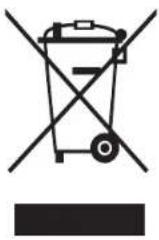
(Applicable in countries with separate collection systems) This marking on the product, accessories or literature indicates that the product and its electronic accessories (e.g. charger, headset, USB cable) should not be disposed of with other household waste at the end of their working life. To prevent possible harm to the environment or human health from uncontrolled waste disposal, please separate these items from other types of waste and recycle them responsibly to promote the sustainable reuse of material resources.
Household users should contact either the retailer where they purchased this product, or their local government office, for details of where and how they can take these items for environmentally safe recycling.
Business users should contact their supplier and check the terms and conditions of the purchase contract. This product and its electronic accessories should not be mixed with other commercial wastes for disposal.
For information on Samsung's environmental commitments and product-specific regulatory obligations, e.g. REACH, visit: www.samsung.com/uk/aboutsamsung/sustainability/environment/our-commitment/data/
Installing the hob
WARNING
Be sure the new appliance is installed and grounded only by qualified personnel. Please observe this instruction. The warranty will not cover any damage that may occur as a result of improper installation. Technical data is provided at the end of this manual.
Safety instructions for the installer
- A device must be provided in the electrical installation that allows the appliance to be disconnected from the mains at all poles with a contact opening width of at least 3 mm. Suitable isolation devices include line protecting cut - outs, fuses (screw type fuses are to be removed from the holder), earth leakage trips and contactors.
- With respect to fire protection, this appliance corresponds to EN 60335 - 2 - 6. This type of appliance may be installed with a high cupboard or wall on one side.
- The installation must guarantee shock protection.
- The kitchen unit in which the appliance is fitted must satisfy the stability requirements of DIN 68930.
- For protection against moisture, all cut surfaces are to be sealed with a suitable sealant.
- On tiled work surfaces, the joints in the area where the hob sits must be completely filled with grout.
- On natural, artificial stone, or ceramic tops, the snap action springs must be bonded in place with a suitable artificial resin or mixed adhesive.
- Ensure that the seal is correctly seated against the work surface without any gaps. Additional silicon sealant must not be applied; this would make removal more difficult when servicing.
- The hob must be pressed out from below when removed.
• A board can be installed underneath the hob. - The ventilation gap between the worktop and front of the unit underneath it must not be covered.
Tools you will need

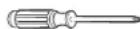
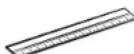
Pencil Phillips Head Screwdriver Ruler or Straightedge
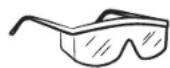
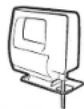
Safety Glasses Saber Saw Drill
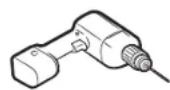
Connecting to the mains power supply
Before connecting, check that the nominal voltage of the appliance, that is, the voltage stated on the rating plate, corresponds to the available supply voltage. The rating plate is located on the lower casing of the hob.
WARNING
It should be installed suitably by a component or trained person.
Shut off power to circuit before connecting wires to circuit.
The heating element voltage is AC 230 V\~. The appliance also works perfectly on networks with AC 220 V\~ or AC 240 V\~. The hob is to be connected to the mains using a device that allows the appliance to be disconnected from the mains at all poles with a contact opening width of at least 3 mm, eg. automatic line protecting cut - out, earth leakage trips or fuse.
WARNING
The cable connections must be made in accordance with regulations and the terminal screws tightened securely.
WARNING
Once the hob is connected to the mains supply, check that all cooking zones are ready for use by briefly switching each on in turn at the maximum setting with suitable cookware.
WARNING
Pay attention (conformity) to phase and neutral allocation of house connection and appliance (connection schemes); otherwise, components can be damaged. Warranty does not cover damage resulting from improper installation.
WARNING
If the supply cord is damaged, it must be replaced by the manufacturer, its service agent or similarly qualified persons in order to avoid a hazard.
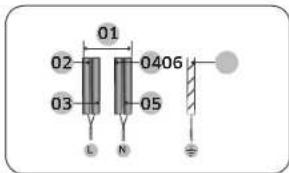
text_image
01 02 03 0406 L N Ø1N\~ (32A)
| 01 220-240 V ~ | 04 Blue |
| 02 Black 05 Gray | |
| 03 Brown 06 Green/Yellow |
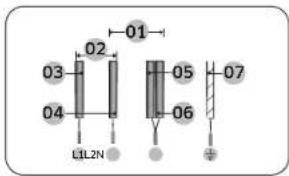
text_image
01 02 03 04 LIL2N 05 06 072N\~ (16A): Separate the 2-phase wires (L1 and L2) before connection.
| 01 220-240 V - | 05 Blue |
| 02 380-415 V - | 06 Gray |
| 03 Black 07 Green/Yellow | |
| 04 Brown |
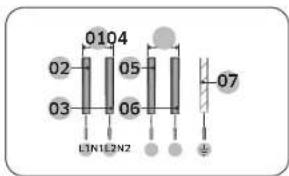
text_image
0104 02 05 03 06 L1N1L2N2 072 x 1N\~ (16A): Separate the wires before connection.
| 01 220-240 V ~ | 05 Brown |
| 02 Black 06 Gray | |
| 03 Blue 07 Green/Yellow | |
| 04 220-240 V ~ |
WARNING
For correct supply connection, follow the wiring diagram attached near the terminals.
Installing into the countertop
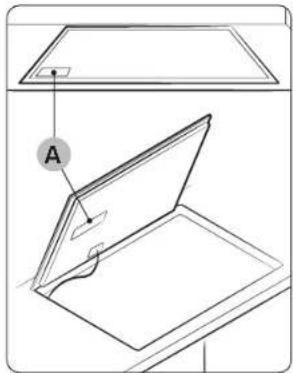
text_image
Diagram showing a device with labeled component 'A' and an open lid, likely illustrating a technical or engineering concept.A. Serial number
NOTE
Make a note of the serial number on the appliance rating label prior to installation. This number will be required in the case of requests for service and is no longer accessible after installation, as it is on the original rating plate on the upperside or underside of the appliance.
NOTE
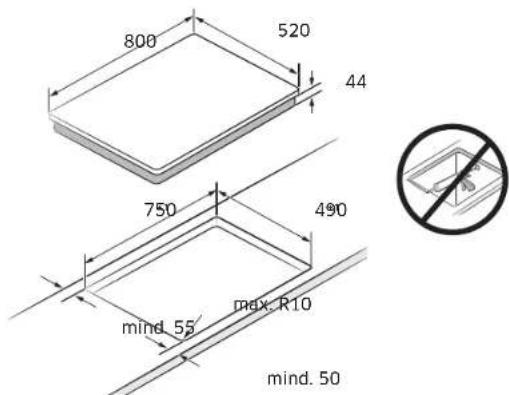
Pay special attention to the minimum space and clearance requirements.
NOTE
The bottom of the hob is equipped with a fan. If there is a drawer under the hob it should not be used to store small objects or paper, since they could damage the fan or interfere with the cooling if they are sucked into it.
Installing the hob
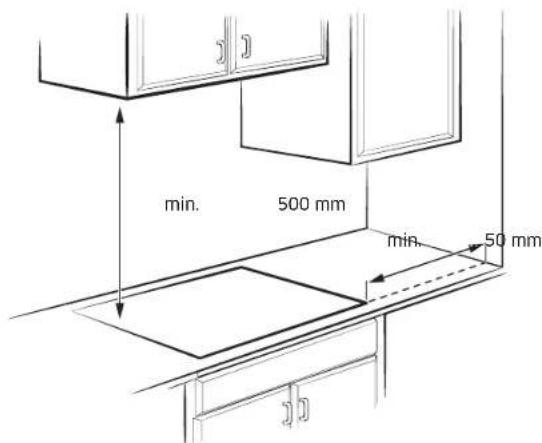
Normal Installation Type
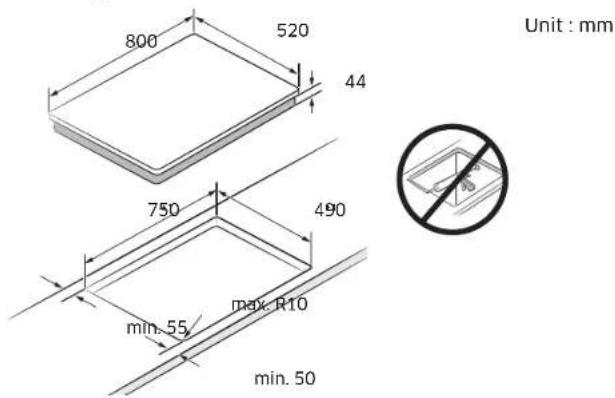
text_image
800 520 44 750 490 min. 55 Max. R10 min. 50 Unit : mm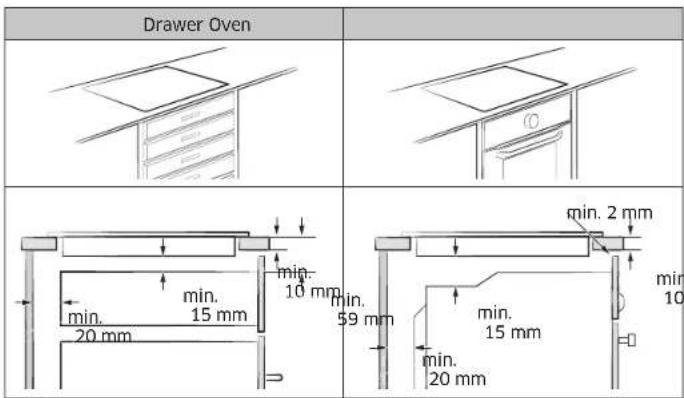
Flushed Fit Type (Only NZ8*****FK model can be installed)
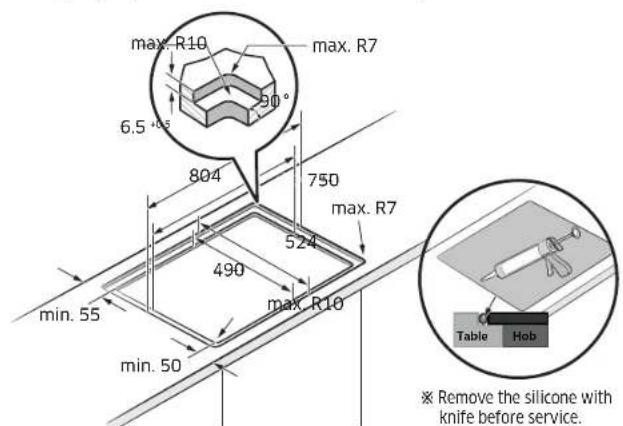
text_image
max. R10 max. R7 6.5° 804 750 max. R7 524 490 max. R10 min. 55 min. 50 Table Hob Remove the silicone with knife before service.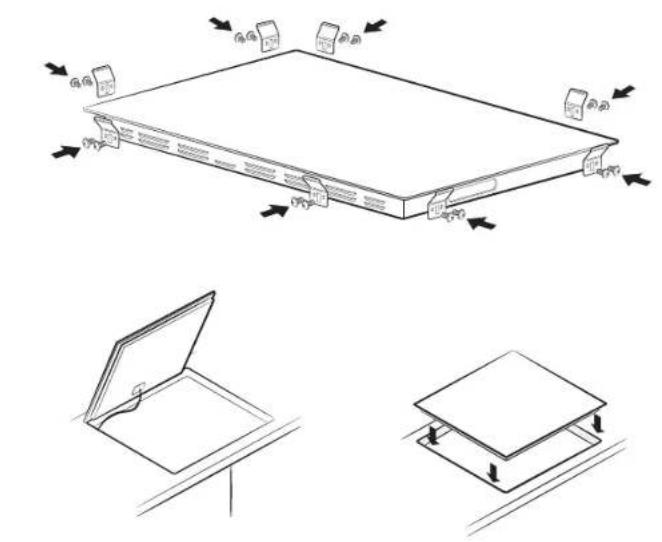
natural_image
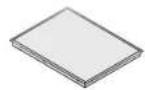
Technical line drawing of a rectangular electronic device with mounting base and side supports, showing internal components and directional arrows (no text or symbols)Components
Induction hob Bracket Springs (8) &
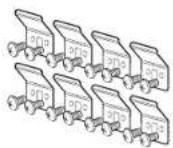
Screws (16)
Before you start
Cooking zones
NZ84C5047**
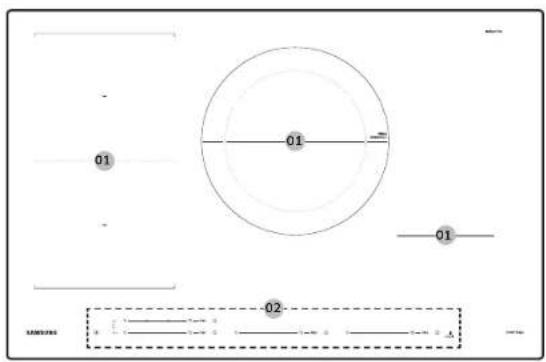
text_image
01 01 01 02NZ85C5047**
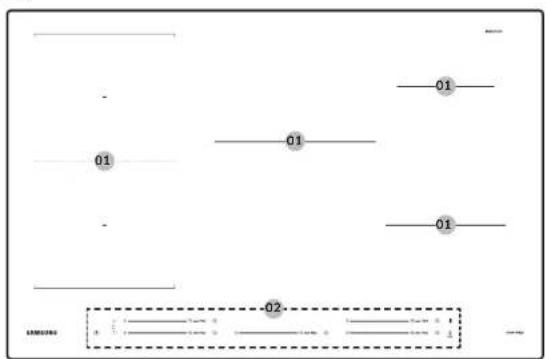
text_image
01 01 01 02Before you start
NZ84C6057 ^**
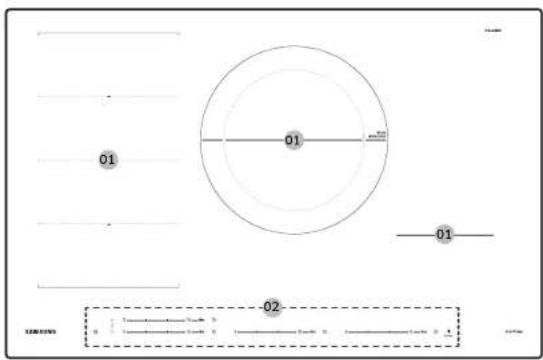
text_image
01 01 01 02NZ85C6057 ^**
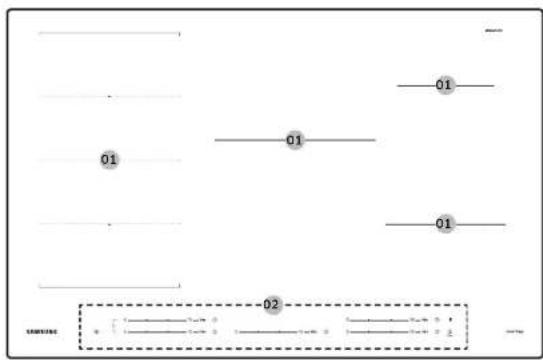
text_image
01 01 01 02NZ84C6058**
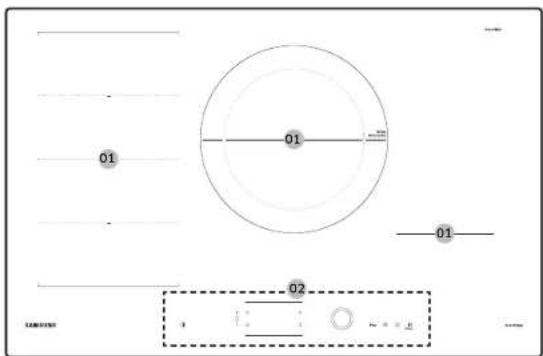
text_image
01 01 01 02 1NZ85C6058**
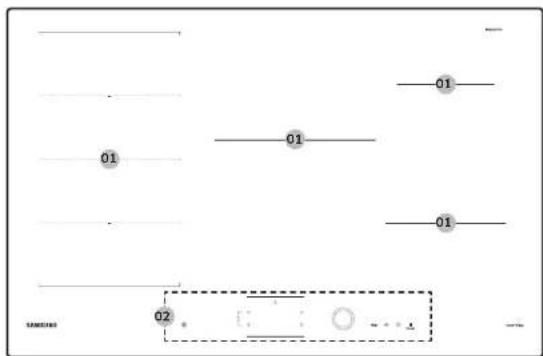
text_image
01 01 01 0201 Induction cooking zone 02 Control panel
Control panel
Control panel 1 - NZ84C5047**
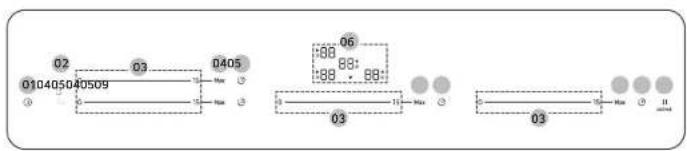
flowchart
graph TD
    A["010405040509"] --> B["03"]
    B --> C["0405"]
    C --> D["06"]
    D --> E["03"]
    E --> F["03"]
    style A fill:#f9f,stroke:#333
    style B fill:#ccf,stroke:#333
    style C fill:#cfc,stroke:#333
    style D fill:#fcc,stroke:#333
    style E fill:#cff,stroke:#333
    style F fill:#ffc,stroke:#333
Control panel 2 - NZ85C5047**
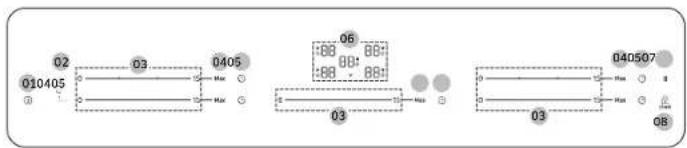
text_image
02 010405 03 0405 06 08 08 03 040507 03 08Control panel 3 - NZ84C6057**
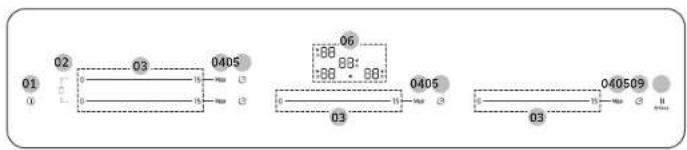
flowchart
graph TD
    A["01"] --> B["02"]
    B --> C["03"]
    C --> D["0405"]
    D --> E["06"]
    E --> F["03"]
    F --> G["040509"]
    G --> H["03"]
    style A fill:#f9f,stroke:#333
    style B fill:#ccf,stroke:#333
    style C fill:#cfc,stroke:#333
    style D fill:#fcc,stroke:#333
    style E fill:#cff,stroke:#333
    style F fill:#ffc,stroke:#333
    style G fill:#cfc,stroke:#333
    style H fill:#fcc,stroke:#333
Control panel 4 - NZ84C6058**
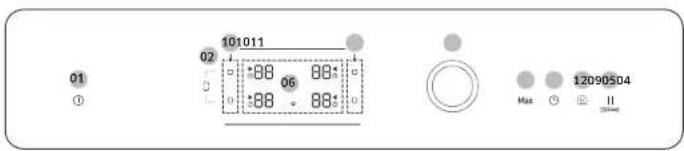
text_image
01 ① 10:10:11 02 06 08 08 12090504 Max ① IIControl panel 5 - NZ85C6057**
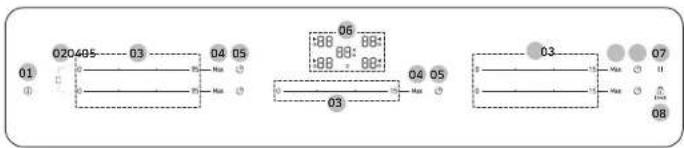
text_image
020485 03 04 05 01 03 06 88 88: 88 88: 04 05 03 07 08Control panel 6 - NZ85C6058**
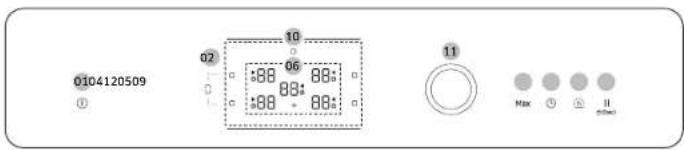
text_image
0104120509 ① 02 10 06 88: 88: 88: 88: 11 Max 0 11 00minBefore you start
| 01 On/Off To activate and deactivate the hob. | |
| 02 Flex zone To select the flex zone. | |
| 03 Control bar | To set a heat setting and increase or decrease the time. |
| 04 Max Max Boost To activate the function. | |
| 05 Timer To turn timer on or off and set timer. | |
| 06 Display | To show for heat settings, residual heat, and Wi-Fi connection. |
| 07 || Pause | To switch all cooking zones on to the low power setting. |
| 08 Lock | Press 3 seconds to lock or unlock the control panel. (Child safety lock) |
| 09 || Pause & Lock | To switch all cooking zones on to the low power setting. Press 3 seconds to lock or unlock the control panel. (Child safety lock) |
| 10 Cooking zone To select the cooking zone. | |
| 11 Control knob | To set a heat setting and increase or decrease the time. |
| 12 Keep warm To keep cooked food warm. | |
Induction heating
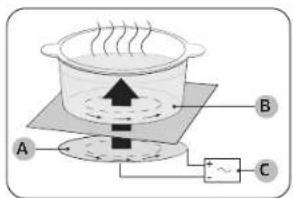
text_image
Diagram of a cooking or heating setup with labeled components A, B, and C showing heat transfer and power source.A. Induction coil
B. Induced currents
C. Electronic circuits
- The Principle of Induction Heating: When you place your cookware on a cooking zone and you turn it on, the electronic circuits in your induction hob produce "induced currents" in the bottom of the cookware which instantly raise cookware's temperature.
- Greater speed in cooking and frying: As the pan is heated directly and not the glass, the efficiency is greater than in other systems because no heat is lost. Most of the energy absorbed is transformed into heat.
Safety shutoff
If one of the cooking zones is not switched off or the power level is not adjusted after an extended period of time, that particular cooking zone will automatically switch itself off.
The cooking zones switch themselves off at the following times.
| Power level power off | |
| 1-3 After 6 hours | |
| 4-6 After 5 hours | |
| 7-9 After 4 hours | |
| 10-15 After 1.5 hours |
NOTE
If the Hob is overheated because of abnormal operation, will be displayed. And the Hob will be switched off.
NOTE
If cookware is unsuitable, too small, or no cookware has been placed on the cooking zone, will be displayed. And after 1 minute the corresponding cooking zone will be switched off.
NOTE
Should one or more of the cooking zones power off before the indicated time has elapsed, see the "Troubleshooting".
Other reasons why a cooking zone will switch itself off
All cooking zones will switch themselves off if liquid boils over on the control panel.
The automatic shutoff will also be activated if you place a damp cloth on the control panel. In both of these instances, the appliance will need to be switched on again using the On/Off ① key after the liquid or the cloth has been removed.
Residual heat indicator
When an individual cooking zone or the hob is turned off, the presence of residual heat is shown with an H(for "hot") in the corresponding cooking zone display. Even after the cooking zone has been switched off, the residual heat indicator goes out only after the cooking zone has cooled. You can use the residual heat for thawing or keeping food warm.
WARNING
As long as the residual heat indicator is illuminated, there is a risk of burns.
WARNING
If the power supply is interrupted, the B H symbol will go out and information about residual heat will no longer be available. However, it may still be possible to burn yourself. This can be avoided by always taking care when near the hob.
Temperature detection
If for any reason the temperatures on any of the cooking zones were to exceed the safety levels, the cooking zone will automatically reduce to a lower power level. When you have finished using the hob, the cooling fan will continue to run until the hob's electronics has cooled down. And the cooling fan switches itself off depending upon the temperature of the electronics.
Before you start
Cookware
natural_image
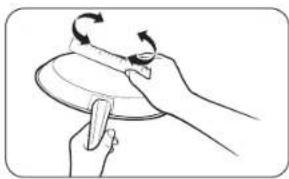
Illustration of hands performing a circular motion exercise on a plate (no text or symbols)Use flat-bottomed cookware that completely contacts the entire cooking zone. Check for flatness by rotating a ruler across the bottom of the cookware. Be sure to follow all the recommendations for using cookware.
- Use cookware made with the correct material for induction cooking.
- Use quality cookware with heavier bottoms for better heat distribution. This gives best cooking results.
- Match the cookware size to the quantity of food being prepared.
- Do not let cookware boil dry. This may cause permanent damage in the form of breakage, fusion, or marring that can affect the ceramic hob. (This type of damage is not covered by your warranty).
- Do not use dirty cookware or cookware with heavy grease buildup. Always use cookware that is easy to clean after cooking.
CAUTION
- The cooking zones may appear cooled down after they have been turned off. However, the glass surface may be hot from residual heat transferred from the cookware. The risk of burns is still present.
- Do not touch hot cookware directly with your hands. Always use oven mitts or pot holders to protect your hands from burns.
- Do not slide cookware across the hob surface. Doing so may permanently damage the hob.
Cookware for induction cooking zones
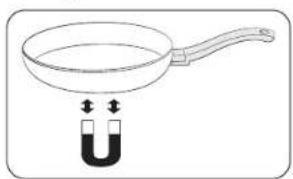
The induction burner can only be turned on when cookware with a magnetic base is placed on one of the cooking zones. You can use the cookware identified as suitable below.
| Material Suitability | |
| Steel, enameled steel, cast iron Yes | |
| Stainless steel | Yes (If magnet sticks to the bottom of the cookware) |
| Aluminum, copper, brass, glass, ceramic, porcelain | No |

NOTE
- Cookware appropriate for induction cooking is labelled as suitable by the manufacturer.
- Certain cookware can make noises when being used on induction cooking zones.
• These noises do not indicate that the hob is malfunctioning and do not affect its operation in any way. - Special stainless-steel cookware may not be suitable for induction cooking. Check if the base of the cookware is attracted by a magnet.
Cookware sizes for induction cooking zones
Induction cooking zones adapt automatically to the bottom size of the cookware up to a certain limit. However, the magnetic part of the bottom of the cookware must have a minimum diameter depending upon the size of the cooking zone. For best results, use cookware whose ferromagnetic diameter match that of a burner. If the cookware is not sensed by the burner, try a bigger sized burner.

NOTE
For Cookware diameter, please refer to the model's Cooking zones specifications.
Other induction cookware
Some cookware has thin magnetic material on the bottom to work with an induction heating hob. These cookware has weak magnetism and may not work well. (Weak magnetism means a magnet does not stick firmly or the area where the magnet sticks is small.)
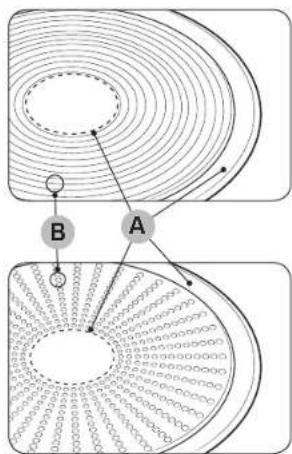
text_image
Diagram illustrating magnetic field lines around a circular structure with labeled points A and BA. Area where magnet does not stick
B. Area where magnet sticks
- Even though cookware are designed for an induction hob, the heating performance could be weak or sometimes the hob may not detect the cookware depending on the size and strength of the magnetic area on the bottom of the cookware.
When using large cookware with a smaller ferromagnetic element, only the ferromagnetic element heats up. Consequently, heat might not be uniformly distributed.
Suitability test
natural_image
Simple line drawing of a frying pan with a U-shaped magnet above it (no text or symbols)Cookware is suitable for induction cooking if a magnet sticks to the bottom of the cookware and the cookware is labelled as suitable by the cookware manufacturer.
- You can recognise good cookware by their bases. The base is supposed to be as thick and flat as possible.
- When buying new cookware, pay special attention to the diameter of the base. Manufacturers often give only the diameter of the upper rim.
- Do not use cookware which have damaged bases with rough edges or burrs. Damaged cookware can scratch the ceramic hob permanently if you slide them across the surface.
- When cold, cookware bases are normally bowed slightly inwards (concave). They must not be bent outwards (convex).
- If you want to use a special type of cookware, for example, a pressure cooker, a simmering pan, or a wok, please follow the manufacturer's instructions.
Before you start
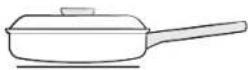
Correct positioning
| Correct Incorrect | |
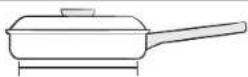 |  |
| Flat-bottomed cookware and straight sides | Cookware with curved or warped bottoms or sides |
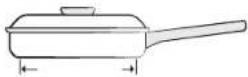 | 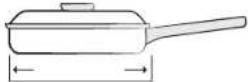 |
| The cookware meets or exceeds the recommended minimum size for the cooking zone. | The cookware does not meet the minimum size required for the current cooking zone. |
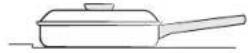 | 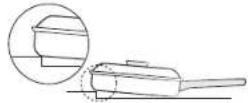 |
| The cookware rests completely on the hob surface. | The cookware rests on the hob trim or does not rest completely on the hob surface. |
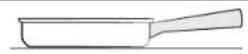 | 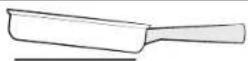 |
| The cookware is properly balanced. The | heavy handle causes the cookware to tilt. |
Energy saving tips
text_image
Illustration showing three cooking pots with checkmarks and X marks indicating cooking difficulty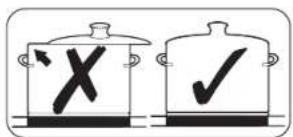
text_image
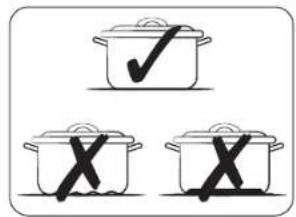
Diagram showing two cooking pots with checkmarks and an X symbol, likely indicating a cooking or inspection process.Follow these tips to save power consumption.
• Always put cookware on a cooking zone before you turn the corresponding burner on.
- Keep the cooking zones and cookware bases clean. Otherwise, more power will be consumed.
- Firmly close the cover of cookware if available. This will reduce power consumption.
- Turn the working burner off before the end of the cooking time. Use the residual heat to keep food warm.
Cookware suitability test
You can test cookware to see if they are suitable for use with the product.
- Press the On/Off ①key for 1-2 seconds to turn on the hob.
- Press the Lock 🔒 key for 3 seconds to activate the child safety lock.
- Press the right front Timer ⏻key for 3 seconds to activate the cookware suitability test mode.
- Place the cookware on the one of the cooking zones, and then press and hold the Max Boost key for 3 seconds.
| Display Description | |
| 0 Cookware is unsuitable | |
| 1 - 7 Cookware is suitable, but inefficient | |
| 8 - 10 Cookware is suitable | |
Operation (NZ8\*\*\*\*\*7\*\*)
Using the touch buttons
To operate the touch buttons, touch the desired button with the tip of your pointed finger until the relevant displays illuminate or go out, or until the desired function is activated.
Ensure that you are touching only one button when operating the appliance. If your finger is too flat on the button, an adjacent button may be actuated as well.
Operating noises
If you can hear.
- Cracking noise: cookware is made of different materials.
- Whistling: you use more than two cooking zones and the cookware is made of different materials.
• Humming: you use high power levels. - Clicking: electric switching occurs.
• Hissing, Buzzing: the fan operates.
The noise are normal and do not refer to any defects.
WARNING
Do not use cookware of different size and material.
Using cookware of different sizes or materials may cause noises and vibrations.
NOTE
Using low power levels (1-5) may cause clicking noises.
Initial cleaning
Wipe the ceramic glass surface with a damp cloth and ceramic hob glass cleaner.
WARNING
Do not use caustic or abrasive cleaners. The surface could be damaged.
Switching the appliance on
The appliance is switched on using the On/Off ① key. Press the On/Off ① key for approximately 1-2 seconds.
NOTE
After the On/Off ① key has been actuated to switch on your appliance, a power level must be selected within approximately 20 seconds. Otherwise, the appliance will switch itself off for safety reasons.
Switching the appliance off
To completely power off the appliance, use the On/Off ① key. Press the On/Off ① key for approximately 1-2 seconds.
NOTE
After switching off a single cooking zone or the entire cooking surface, the presence of residual heat will be indicated in the digital displays of the corresponding cooking zones in the form of an B-H Two steps for "hot". The temperature is lowered, B-H will be disappeared.
Selecting cooking zone and power level
- For selecting the cooking zone, press the corresponding Control bar.
- For setting and adjusting the power level, use the Control bar.
| Control bar | 0——15——Max |
| Control Knob | Max |
NOTE
If more than one key is pressed for longer than 8 seconds, a will show in the cooking zone display.
Operation (NZ8\*\*\*\*\*7\*\*)
Suggested settings for cooking specific foods
The numbers in the table below are guidelines. The power level required for various cooking methods depend on a number of variables, including the quality of the cookware being used and the type and amount of food being cooked.
| Power level Cooking method Examples for Use | ||
| 14-15 | Warming / Sautéing / Frying | Warming large amounts of liquid, boiling noodles, searing meat, browning goulash, braising meat |
| 8-11 Intensive frying | Steak, sirloin, hash browns, sausages, pancakes / griddle cakes | |
| 7-10 Frying | Schnitzel / chops, liver, fish, rissoles, fried eggs | |
| 5-7 Boiling | Cooking up to 1.5 l liquid, potatoes, vegetables | |
| 2-4 | Steaming / Stewing / Boiling | Steaming and stewing of small amounts of vegetables, boiling rice and milk dishes |
| 1-2 Melting | Melting butter, dissolving gelatine, melting chocolate | |

NOTE
You will need to adjust the power level according to specific cookware and foods.
Max Boost
The Max Boost function makes additional power available to the each cooking zones. (example: bring a large volume of water to the boil)
After Max Boost times, the cooking zones automatically sets back to the highest heat setting.

NOTE
- In certain circumstances, the Max Boost function may be deactivated automatically to protect the internal electronic components of the hob. For example, it is impossible to output max power on Flex zone rear and Flex zone front at the same time.
- Refer to your model's Cooking zones specification for Max Boost time.
Power management
The cooking zones have a maximum power available to them. If this power range is exceeded by switching on the Max Boost function, Power Management automatically reduces the power level of cooking zone. After then, the display changes from the set power level to maximum possible power level.
Using the Flex zone (Only for Flex zone applied models)
The Flex function can operate complete 1 side cooking zone for using large size cookware. (example: oval cookware, fish kettle)
- Press the Flex zone ☐ key.
- For setting and adjusting the power level, use the Control bar.

NOTE
- Press the Flex zone ☐ key during operating, Flex zone function will be off.
- If you press the Flex zone ☐ key while each burner operation different level, burner set at a high level.
Flex zone Plus (Only for Flex zone plus applied models)
flowchart
graph TD
    A["Cooking Zone 1"] --> B["Cooking Zone 2"]
    B --> C["Cooking Zone 3"]
    C --> D["Cooking Zone 4"]
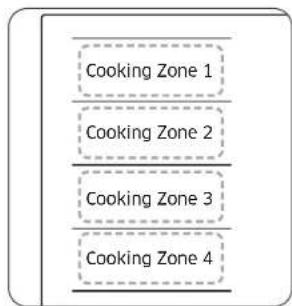
The Flex zone is the large cooking area located on the left side of the hob (see the figure left) that is specially designed to accommodate multiple pots and pans of varying shapes and sizes at once. The Flex zone has four zones that are operated by individual inductors, allowing you to cook regardless of where cookware is placed on a cooking zone.
With Flex zone Plus, you can use a combination of different cooking zones to enlarge the cooking area. Press the Flex zone ☐ key to use the cooking zone as follows.

text_image
Cooking Zone 1 Cooking Zone 1Cooking Cooking Zone 2 Cooking Zone 2Cooking Cooking Zone 3 Cooking Zone 3Cooking Cooking Zone 4 Cooking Zone 4CookingNOTE
-
When using only one cooking zone, the diameter of the bottom of the cookware must be less than 14 cm.
• The hob may take 5-10 seconds to recognise the position of cookware. -
Noises may occur while the hob recognise the cookware.
- Do not remove cookware during cooking. For safety purposes, the hob automatically stops if cookware has been removed for more than 5 seconds.
Using the Flex zone Plus (Only for Flex zone plus applied models)
- Press the Flex zone □ key.
- For setting and adjusting the power level, use the Power level key.
NOTE
• If you press the Flex zone ☐ key during operating. Flex zone function will be off.
- If you press the Flex zone ☐ key while each cooking zone is operating at different levels, it will be automatically adjusted to higher level.
- When moving or adding cookware to a new Flex zone, cancel the current operation, and then press the corresponding Cooking zone □key to activate the cooking zone.
Timer
Using the timer as a safety shutoff
If a specific time is set for a cooking zone, the cooking zone will shut itself off once. Zonen is cooking zone has elapsed. This function can be used for multiple cooking zones simultaneously.
Zone 2 Cooking Zone 2 Setting the timer
The cooking zone(s) for which you want to apply the safety shutoff must be Zone 3 Cooking Zone 3
- Press the Timer 🔒 key.
Zone2.4Cooking Zone 4 Set timer by repeatedly pressing the Timer ⏻key.
- To cancel the timer settings, hold the Timer ⏻key for 3 seconds.
NOTE
• To change the settings quicker, press and hold any of the Timer ⏻ key until the desired value is reached.
- When the timer is terminated, it sounds a beep several times. And then the cooking zone will be turned off.
Operation (NZ8\*\*\*\*\*7\*\*)
Pause/Resume
The Pause/Resume function simultaneously switches all cooking zones that are switched on to the low power setting and then back to the power level that was previously set. This function can be used to briefly interrupt and then continue the cooking process e.g. to take a telephone call.
When the Pause/Resume function is activated, all keys except for the Pause II, Lock 🔒 and the On/Off ☑ keys are disabled.
To resume cooking, press the Pause || key again.
| Control Panel Display | ||
| To Switch On | Press the Pause || key | '' |
| To Power off | Press the Pause || key | Return to previous power level |
Quick stop
This option reduces the step and time it takes to stop cooking.
To power off a cooking zone, press the Cooking zone □ key for 2 seconds.
NOTE
The Flex zone ☐ key does not support quick stop function.
Child safety lock
You can use the child safety lock to safeguard against unintentionally turning on a cooking zone and activating the cooking surface. Also the control panel, with the exception of the On/Off ① key (Only turn off control), can be locked in order to prevent the settings from being changed unintentionally, for example, by wiping over the panel with a cloth.
Switching the child safety lock On/Off
- Press the Lock 🔒 key for approximately 3 seconds. An acoustic signal will sound as confirmation.
- Press any key. 88 will appear in the displays, indicating the child safety lock has been activated.
- For switching the child safety lock off, press the Lock ☑ key again for 3 seconds. An acoustic signal will sound as confirmation.
NOTE
- Regardless of power on/off, child lock is activated.
- You can set the child safety lock during cooking. To turn off the burner with the child safety lock on, press the On/Off ① key.
Maximum power limit
This function allows you to adjust the maximum power of the unit.
- Keep the power off.
- Press the left front Max Boost key and left rear Timer ⏻ key at the same time for approximately 3 seconds.
- Press the right front Timer ⏻ key for approximately 3 seconds.
- Press the left front Timer ⏻ key for approximately 1.5 seconds. The displays will show P and current maximum power.
- You can adjust the power limit using the Lock key. (3000 W, 4000 W, 7400 W)
- Press the On/Off ① key to set the setting.
NOTE
In low-power (3000 W, 4000 W) mode, the power level will be adjusted automatically.
Sound on/off
- Press the On/Off ① key for approximately 1-2 seconds.
- Press the right front Timer ⏻ key for 2 seconds within 10 seconds after the power has turned on.
- Sound will turn off and 📄I be displayed in the display.
- To change the sound setting, repeat steps 1 and 2. Sound will turn on and will be displayed in the display.
NOTE
It is not possible to change the sound settings after 10 seconds from turning the power on.
Smart Connect
The hob has built in Wi-Fi module that you can use to sync the hob with the SmartThings app. On the phone app, you can:
- monitor the operating status and the power level settings of the hob elements.
• monitoring the timer settings.
Functions that can be operated from the SmartThings app may not work smoothly if communication conditions are poor or the product is installed in a place with a weak Wi-Fi signal.
How to connect the hob
Before you can use the remote features of your Samsung hob, you must pair it to the SmartThings app.
- Download and open the SmartThings app on your smart device.
- Press the Pause 11 key for approximately 5 seconds to turn on the "AP".
- While the connection is being made, the Wi-Fi indicator will links. Once the process is complete, the indicator glows without blinking. Now the hob is connected successfully.
- If the Smart Connect Wi-Fi indicator does not turn on, follow the instruction in the app to reconnect.
NOTE
- Make sure to set the Smart Connect function only when no hob operation is in process.
- For further instructions, refer to the web manual at www.samsung.com
Wi-Fi On/Off
To change the Wi-Fi On/Off, repeat steps 1 to 3.
- Press the On/Off ① key for approximately 1-2 seconds to turn the hob on.
- Press the Lock ☐ key for approximately 3 seconds to turn on the child safety lock.
- Press the right front Max Boost key for approximately 3 seconds.
Operation (NZ8\*\*\*\*\*8\*\*)
Hood control
This product features a Bluetooth device that you can use to connect the hob to Samsung hood control models. Through the Bluetooth connection, you can use the hood control function on the SmartThings app. To find out more about Samsung hood control enabled models, visit www.samsung.com.
To connect to a hood control model
- Follow the Bluetooth instructions of the hood control model and activate the Bluetooth connection.
- Press and hold the right front Timer ⏻ and Pause II keys simultaneously to make the Bluetooth connection. When the Bluetooth connection is successfully established, it appears on the display.
NOTE
- If the Smart Connect connection is not successful, you cannot use the SmartThings app to monitor and control the hood.
- Without a Smart Connect connection to the hob, you can use a Bluetooth connection to pair the hob with the hood and sync them. To do this, follow steps 2 and 3 above.
Operation (NZ8\*\*\*\*\*8\*\*)
Switching the appliance on
The appliance is switched on using the On/Off ①key. Press the On/Off ①key for approximately 1-2 seconds.
NOTE
After the On/Off ① key has been actuated to switch on your appliance, a power level must be selected within approximately 20 seconds. Otherwise, the appliance will switch itself off for safety reasons.
Switching the appliance off
To completely switch off the appliance, use the On/Off ① key. Press the On/Off ① key for approximately 1-2 seconds.
NOTE
After switching off a single cooking zone or the entire cooking surface, the presence of residual heat will be indicated in the digital displays of the corresponding cooking zones in the form of an □□ □□ two steps for "hot". The temperature is lowered. □□ □□ will be disappeared.
Selecting cooking zone and power level
- For selecting the cooking zone, press the corresponding Cooking zone □key.
- For setting and adjusting the power level, use the Control bar or Control key or Control knob.
| Control bar | 0——15——Max |
| Control Knob | Max |
NOTE
- The default level is set to 15 when selecting the cooking zone.
- If more than one key is pressed for longer than 8 seconds, 80 will show in the cooking zone display.
Suggested settings for cooking specific foods
The numbers in the table below are guidelines. The power level required for various cooking methods depend on a number of variables, including the quality of the cookware being used and the type and amount of food being cooked.
| Power level Cooking method Examples for Use | ||
| 14-15 | Warming / Sautéing / Frying | Warming large amounts of liquid, boiling noodles, searing meat, browning goulash, braising meat |
| 8-11 Intensive frying | Steak, sirloin, hash browns, sausages, pancakes / griddle cakes | |
| 7-10 Frying | Schnitzel / chops, liver, fish, rissoles, fried eggs | |
| 5-7 Boiling | Cooking up to 1.5 | liquid, potatoes, vegetables | |
| 2-4 | Steaming / Stewing / Boiling | Steaming and stewing of small amounts of vegetables, boiling rice and milk dishes |
| 1-2 Melting | Melting butter, dissolving gelatine, melting chocolate | |
NOTE
You will need to adjust the power level according to specific cookware and foods.
Max Boost
The Max Boost function makes additional power available to the each cooking zones. (example: bring a large volume of water to the boil) After Max Boost times, the cooking zones automatically sets back to the highest heat setting.
NOTE
- In certain circumstances, the Max Boost function may be deactivated automatically to protect the internal electronic components of the hob. For example, it is impossible to output max power on Flex zone rear and Flex zone front at the same time.
- Refer to your model's Cooking zones specification for Max Boost time.
Power management
The cooking zones have a maximum power available to them. If this power range is exceeded by switching on the Max Boost function, Power Management automatically reduces the power level of cooking zone. The display for this cooking zone alternates for some seconds between the set power level and the maximum possible power level. After then, the display changes from the set power level to maximum possible power level.
Using the Flex zone (Only for Flex zone applied models)
The Flex function can operate complete left side cooking zone for using large size cookware. (example: oval cookware, fish kettle)
-
Press the Flex zone ☐ key.
-
For setting and adjusting the power level, use the Power level key.
NOTE
- Press the Flex zone ☐ key during operating, Flex zone function will be off.
- If you press the Flex zone ☐ key while each burner operation different level, burner set at a high level.
Flex zone Plus (Only for Flex zone plus applied models)
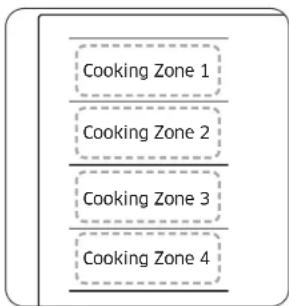
flowchart
graph TD
    A["Cooking Zone 1"] --> B["Cooking Zone 2"]
    B --> C["Cooking Zone 3"]
    C --> D["Cooking Zone 4"]
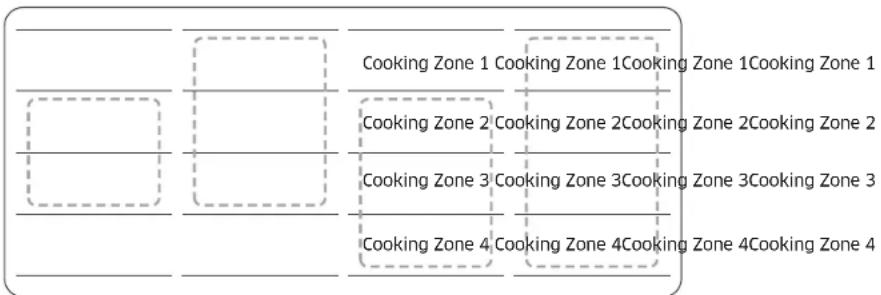
The Flex zone is the large cooking area located on the left side of the hob (see the figure left) that is specially designed to accommodate multiple pots and pans of varying shapes and sizes at once. The Flex zone has four zones that are operated by individual inductors, allowing you to cook regardless of where cookware is placed on a cooking zone.
With Flex zone Plus, you can use a combination of different cooking zones to enlarge the cooking area. Press the Flex zone ☐ key to use the cooking zone as follows.
- Noises may occur while the hob recognise the cookware.
- Do not remove cookware during cooking. For safety purposes, the hob automatically stops if cookware has been removed for more than 5 seconds.
Using the Flex zone Plus (Only for Flex zone plus applied models)
-
Press the Flex zone □ key.
-
For setting and adjusting the power level, use the Power level key.
NOTE
- If you press the Flex zone ☐ key during operating, Flex zone function will be off.
- If you press the Flex zone ☐ key while each cooking zone is operating at different levels, it will be automatically adjusted to higher level.
- When moving or adding cookware to a new Flex zone, cancel the current operation, and then press the corresponding Cooking zone □ key to activate the cooking zone.
flowchart
graph TD
    A[" "] --> B[" "]
    B --> C[" "]
    C --> D[" "]
    D --> E[" "]
    E --> F[" "]
    F --> G[" "]
    G --> H[" "]
    H --> I[" "]
    I --> J[" "]
    J --> K[" "]
    K --> L[" "]
    L --> M[" "]
    M --> N[" "]
    N --> O[" "]
    O --> P[" "]
    P --> Q[" "]
    Q --> R[" "]
    R --> S[" "]
    S --> T[" "]
    T --> U[" "]
    U --> V[" "]
    V --> W[" "]
    W --> X[" "]
    X --> Y[" "]
    Y --> Z[" "]
NOTE
- When using only one cooking zone, the diameter of the bottom of the cookware must be less than 14 cm.
- The hob may take 5-10 seconds to recognise the position of cookware.
Keep Warm
- Use this function to keep cooked food warm. Press the corresponding Cooking zone □ key.
- Press the Keep warm 🔒 key.
- The cooking zone display will be changed.
- Press the Keep warm 🔒 key again to turn off the cooking zone.
Timer
Using the timer as a safety shutoff
If a specific time is set for a cooking zone, the cooking zone will shut itself off once this period of time has elapsed. This function can be used for multiple cooking zones simultaneously.
Setting the timer
The cooking zone(s) for which you want to apply the safety shutoff must be switched on.
- Press the Timer 🔒 key.
- Set timer by repeatedly pressing the Timer ⏻ key.
- To cancel the timer settings, hold the Timer ⏻ key for 3 seconds.
NOTE
- To change the settings quicker, press and hold any of the Timer ⏻key until the desired value is reached.
- When the timer is terminated, it sounds a beep several times. However, the cooking zone will not be turned off.
Pause/Resume
The Pause/Resume function simultaneously switches all cooking zones that are switched on to the low power setting and then back to the power level that was previously set. This function can be used to briefly interrupt and then continue the cooking process e.g. to take a telephone call.
When the Pause/Resume function is activated, all keys except for the
Pause & Lock and the On/Off ☑ Keys are disabled.
To resume cooking, press the Pause & Lock ^II key again.
| Control Panel Display | ||
| To Switch On | Press the Pause & Lock _oned key | '' |
| To Switch Off | Press the Pause & Lock _oned key | Return to previous power level |
Quick stop
This option reduces the step and time it takes to stop cooking.
To switch off a cooking zone, press the Cooking zone □key for 2 seconds.
NOTE
The Flex zone ☐ key does not support quick stop function.
Operation (NZ8\*\*\*\*\*8\*\*)
Child safety lock
You can use the child safety lock to safeguard against unintentionally turning on a cooking zone and activating the cooking surface. Also the control panel, with the exception of the On/Off ① key (Only turn off control), can be locked in order to prevent the settings from being changed unintentionally, for example, by wiping over the panel with a cloth.
Switching the child safety lock On/Off
- Press the Pause & Lock 12 key for approximately 3 seconds. An acoustic signal will sound as confirmation.
- Press any key. will appear in the displays, indicating the child safety lock has been activated.
- For switching the child safety lock off, press the Pause & Lock ^II key again for 3 seconds. An acoustic signal will sound as confirmation.
NOTE
- Regardless of power on/off, child lock is activated.
- You can set the child safety lock during cooking. To turn off the burner with the child safety lock on, press the On/Off ① key or turn off the child safety lock first and then press the corresponding Cooking zone □ key.
Maximum power limit
This function allows you to adjust the maximum power of the unit.
- Keep the power off.
- Press the Pause & Lock (See) key for approximately 3 seconds to turn on the child safety lock.
- Press the left front Cooking zone □key and right front Cooking zone □key at the same time for approximately 3 seconds.
- Press the Timer ⏻ key for approximately 3 seconds. The displays will show P and current maximum power.
- You can adjust the power limit using the Pause & Lock _other key. (3000 W, 4000 W, 7400 W)
- Press the On/Off ① key to set the setting.
NOTE
In low-power (3000 W, 4000 W) mode, the power level will be adjusted automatically.
Sound on/off
- Press the On/Off ① key for approximately 1-2 seconds.
- Press the Timer ⏻key for 3 seconds within 10 seconds after the power has turned on.
- Sound will turn off and 08 will be displayed in the display.
- To change the sound setting, repeat steps 1 and 2. Sound will turn on and 08 will be displayed in the display.
NOTE
It is not possible to change the sound settings after 10 seconds from turning the power on.
Smart Connect
The hob has built in Wi-Fi module that you can use to sync the hob with the SmartThings app. On the smartphone app, you can:
• monitor the operating status and the power level settings of the hob elements.
- check and change the timer settings.
Functions that can be operated from the SmartThings app may not work smoothly if communication conditions are poor or the product is installed in a place with a weak Wi-Fi signal.
How to connect the hob
Before you can use the remote features of your Samsung hob, you must pair it to the SmartThings app.
- Download and open the SmartThings app on your smart device.
- Press the On/Off ① key for approximately 1-2 seconds to turn the hob on.
- Press the Pause & Lock key for approximately 3 seconds to turn on the child safety lock.
- Follow the app's instructions, and then press and hold the Max key for 3 seconds.
- While the connection is being made, the Wi-Fi indicator will links. Once the process is complete, the indicator glows without blinking. Now the hob is connected successfully.
- If the Smart Connect Wi-Fi indicator does not turn on, follow the instruction in the app to reconnect.
NOTE
- Make sure to set the Smart Connect function only when no hob operation is in process.
- For further instructions, refer to the web manual at www.samsung.com
Wi-Fi On/Off
To change the Wi-Fi On/Off, repeat steps 2 to 4.
Hood control
This product features a Bluetooth device that you can use to connect the hob to Samsung hood control models. Through the Bluetooth connection, you can use the hood control function on the SmartThings app.
To find out more about Samsung hood control-enabled models, visit www.samsung.com.
To connect to a hood control model
- Download and run the SmartThings app on your smartphone. Then, complete the Smart Connect procedure to connect to the hob.
- Follow the Bluetooth instructions of the hood control model and activate the Bluetooth connection.
- Press and hold the Timer ☐ and Pause & Lock II keys simultaneously to make the Bluetooth connection. When the Bluetooth connection is successfully established, happens on the display.
- Follow the instructions in the user manual of the hood control model and the App guide to use the hood control.
NOTE
- If the Smart Connect connection is not successful, you cannot use the SmartThings app to monitor and control the hood.
- Without a Smart Connect connection to the hob, you can use a Bluetooth connection to pair the hob with the hood and sync them. To do this, follow steps 2 and 3 above.
Maintaining your appliance
Hob
WARNING
Cleaning agents must not come into contact with a heated ceramic glass surface. All cleaning agents must be removed with adequate amounts of clean water after cleaning because they can have a caustic effect when the surface becomes hot. Do not use any aggressive cleaners such as grill or oven sprays, scouring pads or abrasive pan cleaners.
NOTE
Clean the ceramic glass surface after each use when it is still warm to the touch. This will prevent spillage from becoming burnt onto the surface. Remove scales, watermarks, fat drippings and metallic discolouration with the use of a commercially available ceramic glass or stainless steel cleaner.
Light soiling
- Wipe the ceramic glass surface with a damp cloth.
- Rub dry with a clean cloth. Remnants of cleaning agent must not be left on the surface.
- Thoroughly clean the entire ceramic glass cooking surface once a week with a commercially available ceramic glass or stainless steel cleaner.
- Wipe the ceramic glass surface using adequate amounts of clean water and rub dry with a clean lint - free cloth.
Stubborn soiling
natural_image
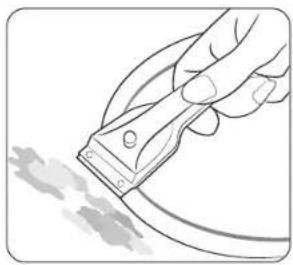
Illustration of a hand using a power tool to cut a cable or cable with a textured surface (no text or symbols)- To remove food that has boiled over and stubborn splashes, use a glass scraper.
- Place the glass scraper at an angle to the ceramic glass surface.
- Remove soiling by scraping with the blade.
NOTE
Class scrapers and ceramic glass cleaners are available from specialty retailers.
Problem dirt
natural_image
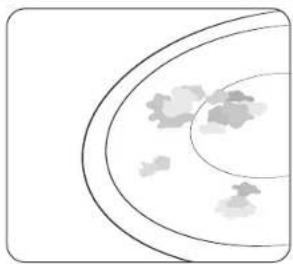
Simple line drawing of a curved surface with scattered gray shapes, no text or symbols present.- Remove burnt-on sugar, melted plastic, aluminium foil or other materials with a glass scraper immediately and while still hot.
WARNING
There is a risk of burning yourself when the glass scraper is used on a hot cooking zone:
- Clean the hob as normal when it has cooled down. If the cooking zone on which something has melted has been allowed to cool, warm it up again for cleaning.
NOTE
Scratches or dark blemishes on the ceramic glass surface, caused, for example, by a pan with sharp edges, cannot be removed. However, they do not impair the function of the hob.
Troubleshooting and service
Hob frame (option)
WARNING
Do not use vinegar, lemon juice or scale remover on the hob frame; otherwise dull blemishes will appear.
-
Wipe the frame with a damp cloth.
-
Moisten dried debris with a wet cloth. Wipe and rub dry.
To avoid damaging your appliance
- Do not use the hob as a work surface or for storage.
- Do not operate a cooking zone if there is no pan on the hob or if the pan is empty.
- Ceramic glass is very tough and resistant to temperature shock, but it is not unbreakable. It can be damaged by a particularly sharp or hard object dropping onto the hob.
- Do not place pans on the hob frame. Scratching and damage to the finish may occur.
- Avoid spilling acidic liquids, for example, vinegar, lemon juice and descaling agents, onto the hob frame, since such liquids can cause dull spots.
- If sugar or a preparation containing sugar comes into contact with a hot cooking zone and melts, it should be cleaned off immediately with a kitchen scraper while it is still hot. If allowed to cool, it may damage the surface when removed.
- Keep all items and materials that could melt, for example, plastics, aluminium foil and oven foils, away from the ceramic glass surface. If something of this nature melts onto the hob, it must be removed immediately with a scraper.
Troubleshooting
A fault may result from a minor information that you can correct yourself with the help of the following instructions. Do not attempt any further repairs if the following instructions do not help in each specific case.
WARNING
Repairs to the appliance are to be performed only by a qualified service technician. Improperly effected repairs may result in considerable risk to the user. If your appliance needs repair, please contact your customer service centre.
| Problem Possible cause Solution | ||
| What should I do if the cooking zones are not functioning? | The fuse in the house wiring is not intact. | If the fuses trip a number of times, call an authorised electrician. |
| What should I do if the cooking zones will not switch on? | The On/Off 1key was accidentally actuated.The control panel is partially covered by a damp cloth or liquid. | The appliance is properly switched on.Clean the control panel. |
| What should I do if the display except for RR RR the residual heat indicator suddenly disappears? | The On/Off 1key was accidentally actuated.The control panel is partially covered by a damp cloth or liquid. | The appliance is properly switched on.Clean the control panel. |
| What should I do if, after the cooking zones have been switched off, residual heat is not indicated in the display | The cooking zone was only briefly used and therefore did not become hot enough. | If the cooking zone is hot, please call a local service centre. |
Troubleshooting and service
| Information code | Possible cause Solution | |
| 00 | There is a problem with the burner temperature sensor. | Restart the appliance using the On/Off 1 key.If the problem continues, disconnect power for more than 30 seconds. Then, restart the appliance and try again. If the problem still continues, contact a local service centre. |
| 00 | The temperature is sensed higher than specified. | |
| 02 | There is a problem with the PBA sensor. | |
| 02 | The DC Motor fails to operate because of problems with the PCB or wiring, or electrical disturbance on the motor blade. | |
| 00 | A key is being pressed for more than 8 seconds. | Check if the key is wet or is being pressed.If the problem continues, restart the appliance using the On/Off 1 key. If the problem still continues, contact a local service centre. |
| 00 | Communications between main and sub PCBs fail. | Restart the appliance using the On/Off 1 key.If the problem continues, disconnect power for more than 30 seconds. Then, restart the appliance. If the problem still continues, contact a local service centre. |
| 02 | The touch-enabled IC communicates abnormally. | |
| 02 | It is out of normal voltage (220 ~ 240 V). | Check home power environment. |
| 00 | If the cooking container is not suitable for the induction, or operates without the cooking container, it is displayed. | Use a cooking container suitable for inductions. |
What should I do if the cooking zone will not switch on or off?
This could be because of one of the following possibilities:
- The control panel is partially covered by a damp cloth or liquid.
• The child safety lock is on. and display
What should I do if the 80 display is illuminated?
Check for the following:
- The control panel is partially covered by a damp cloth or liquid. To reset, press the On/Off ① key.
- If liquid has overflowed on control panel, please wipe the liquid.
What should I do if the □□display is illuminated?
Check for the following:
- The hob is overheated because of abnormal operation.
• After hob is cooled down, press the On/Off ① key for resetting.
What should I do if the 89 display is illuminated?
Check for the following:
- Cookware is unsuitable, too small, or no cookware has been placed on the cooking zone.
- If you use suitable cookware, displayed message will automatically disappear.
What should I do if the cooling fan runs after the hob is turned off?
Check for the following:
- When you have finished using the hob, the cooling fan runs by itself for cooling down.
- After the hob's electronics has cooled down or elapsed max time (10 minutes) the cooling fan will be turned off.
- If you request a service call because of an information made in operating the appliance, the visit from the customer service technician may incur a charge even during the warranty period.
Service
Before calling for assistance or service, please check the section "Troubleshooting". If you still need help, follow the instructions below.
Is it a technical fault?
If so, please contact your customer service centre.
Always prepare in advance for the discussion. This will ease the process of diagnosing the problem and also make it easier to decide if a customer service visit is necessary.
Please take note of the following information.
• What form does the problem take?
• Under what circumstances does the problem occur?
When calling, please know the model and serial number of your appliance. This information is provided on the rating plate as follows:
- Model description
• S/N code (15 digits)
Recommended that you record the information here for easy reference.
- Model:
- Serial number:
When do you incur costs even during the warranty period?
- If you could have remedied the problem yourself by applying one of the solutions provided in the section "Troubleshooting".
- If the customer service technician has to make several service calls because he was not provided with all of the relevant information before his visit and as a result, for example, has to make additional trips for parts. Preparing for your phone call as described above will save you the cost of these trips.
QUESTIONS OR COMMENTS?
| COUNTRY CALL OR VISIT US ONLINE AT | ||
| UK 0333 | 000 0333 www.samsung.com/uk/support | |
| IRELAND (EIRE) | 0818 717100 www.samsung.com/ie/support | |
| GERMANY 06 | 196 77 555 77 www.samsung.com/cle/support | |
| FRANCE 01 | 48 63 00 00 www.samsung.com/fr/support | |
| SPAIN 91 | 175 00 15 www.samsung.com/es/support | |
| PORTUGAL | 210 608 098 Chamada para a rede fixa nacional Dias úteis das 9h às 20h | www.samsung.com/pt/support |
| LUXEMBURG | 261 03 710 www.samsung.com/be_fr/support | |
| NETHERLANDS | 088 90 90 100 www.samsung.com/nl/support | |
| BELGIUM | 02-201-24-18 | www.samsung.com/be/support (Dutch)www.samsung.com/be fr/support (French) |
| NORWAY | 21629099 | www.samsung.com/no/support |
| DENMARK | 707 019 70 | www.samsung.com/dk/support |
| FINLAND 030 | 6227 515 www.samsung.com/fi/support | |
| SWEDEN | 0771-400 300 www.samsung.com/se/support | |
| AUSTRIA | 0800 72 67 864 (0800-SAMSUNG) | www.samsung.com/at/support |
| SWITZERLAND | 0800 726 786 | www.samsung.com/ch/support (German)www.samsung.com/ch_fr/support (French) |
| HUNGARY | 0680SAMSUNG (0680-726-7864) | www.samsung.com/hu/support |
| CZECH | 800 - SAMSUNG (800-726786) | www.samsung.com/cz/support |
| SLOVAKIA | 0800 - SAMSUNG (0800-726 786) | www.samsung.com/sk/support |
| CROATIA | 072 726 786 | www.samsung.com/hr/support |
| COUNTRY CALL OR VISIT US ONLINE AT | ||
| BOSNIA | 055 233 999 | www.samsung.com/ba/support |
| NORTH MACEDONIA | 023 207 777 | www.samsung.com/ink/support |
| MONTENEGRO | 020 405 888 | www.samsung.com/support |
| SLOVENIA | 080 697 267 (brezplačna številka) | www.samsung.com/si/support |
| SERBIA | 011 321 6899 | www.samsung.com/rs/support |
| Kosovo | 038 40 30 90 | www.samsung.com/support |
| ALBANIA | 045 620 202 | www.samsung.com/al/support |
| BULGARIA | 0800111 31 - Безплатен за всички оператори *3000 - Цена на единградски разговор или според тарифата на мобилният оператор 09-00 до 18-00 - Понеделик до Петък | www.samsung.com/bg/support |
| ROMANIA | 0800872678 - Apel gratuit ^8000 - Apel tarifat in retea Program Call Center Luni - Vineri: 9 AM - 6 PM | www.samsung.com/ro/support |
| ITALIA | 800-5AMSUNG (800.7267864) | www.samsung.com/it/support |
| CYPRUS | 8009 4000 only from landline, toll free | www.samsung.com/gr/support |
| CREECE | 80111-SAMSUNG (80111 726 7864) only from land line (+30) 210 6897691 from mobile and land line | |
| POLAND | 801 172 678* ^ (oplata wedlug taryty operatora) | http://www.samsung.com/pi/support/ |
| LITHUANIA B- | 800-77777 www.samsung.com/lt/support | |
| LATVIA | 8000-7267 | www.samsung.com/lv/support |
| ESTONIA | 800 7267 | www.samsung.com/cc/support |
text_image
Diagram showing a device with labeled component 'A' and an arrow pointing to a screen-like structureA. Numéro de série
REMARQUE:
text_image
Diagram of a cooking process showing a pot with heat source, labeled points A, B, and C, and a pressure gauge symbol.natural_image
Illustration of two hands performing a circular motion exercise with arrows indicating rotation (no text or symbols)text_image
Diagram illustrating magnetic field lines around a circular structure, labeled A and B with directional arrows and circular patterns.natural_image
Simple line drawing of a frying pan with a U-shaped magnet above it (no text or symbols)text_image
Diagram showing two cooking pots with checkmarks and an X symbol, likely indicating a cooking or inspection process.natural_image
Simple diagram with horizontal and dashed lines, no text or symbols presentnatural_image
Illustration of a hand holding a tool near a curved cable or wire (no text or symbols visible)natural_image
Abstract diagram with curved lines and scattered gray shapes, no text or symbols presenttext_image
Diagram showing a device with labeled component 'A' and directional arrows indicating movement or orientation.A. Seriennummer
HINWEIS
text_image
mind. 500 mm mind. 50 mmNormale Einbauart
text_image
800 520 44 750 490 mind. 55 max. R10 mind. 50Gerät: mm
natural_image
Technical line drawing of a rectangular electronic device with mounting base and side supports, showing internal components and directional arrows (no text or symbols)Komponenten
text_image
Diagram of a cooking or heating setup with labeled components A, B, and C showing heat transfer and power source.natural_image
Illustration of two hands performing a circular motion exercise with arrows indicating rotation (no text or symbols)text_image
Diagram illustrating magnetic field lines around a circular structure, labeled A and B with directional arrows and circular patterns.natural_image
Simple line drawing of a frying pan with a U-shaped magnet above it (no text or symbols)text_image
Illustration showing two cooking pots with checkmarks and a cross symbol, likely indicating inspection or validation.natural_image
Illustration of a hand using a power tool to cut a cable or wire (no text or symbols visible)natural_image
Simple line drawing of a curved surface with scattered gray shapes, no text or symbols present.text_image
Diagram of a cooking process showing a pot with heat source, labeled points A, B, and C, and a power source connected to a surface.natural_image
Illustration of two hands performing a circular motion exercise with arrows indicating rotation (no text or symbols)text_image
Diagram illustrating magnetic field lines around a circular structure with labeled points A and Bnatural_image
Simple line drawing of a frying pan with a U-shaped magnet above it (no text or symbols)text_image
Diagram showing two cooking pots with checkmarks and an X symbol, likely indicating a cooking or inspection process.natural_image
Illustration of a hand holding a tool near a curved cable or wire (no text or symbols visible)natural_image
Simple line drawing of a circular object with internal shapes, no text or symbols presenttext_image
Diagram showing a 3D object with labeled point A and directional arrow, likely illustrating a geometric or mechanical setup.A. Serienummer
OPMERKING
natural_image
Diagram of a rectangular electronic device with labeled ports and directional arrows indicating orientation (no text or symbols present)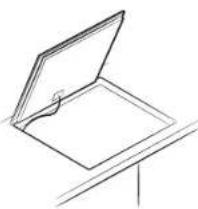
natural_image
Simple line drawing of an open book or document with a bookmark, placed on a stand (no text or symbols)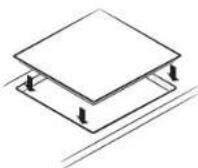
text_image
Diagram of a cooking process showing a pot with heat source, labeled points A, B, and C, and a power supply connected to a meter.natural_image
Illustration of two hands performing a circular motion exercise with arrows indicating rotation (no text or symbols)text_image
Diagram illustrating magnetic field lines around a circular structure, labeled A and B with directional arrows and circular patterns.natural_image
Simple line drawing of a frying pan with a U-shaped tube underneath, no text or symbols present.text_image
Illustration showing three cooking pots with checkmarks and X marks indicating cooking difficulty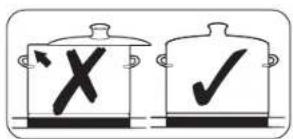
text_image
Diagram showing two cooking pots with checkmarks and a crossed X symbol, likely indicating cancellation or rejection.natural_image
Simple geometric diagram with dashed lines and rectangles, no text or symbols present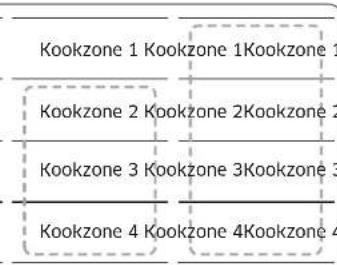
text_image
Kookzone 1 Kookzone 1Kookzone 1 Kookzone 2 Kookzone 2Kookzone 2 Kookzone 3 Kookzone 3Kookzone 3 Kookzone 4 Kookzone 4Kookzone 4OPMERKING
natural_image
Illustration of a hand using a power tool to cut a cable or cable with a visible crack (no text or symbols)natural_image
Simple line drawing of a curved surface with scattered gray shapes, no text or symbols present.text_image
Diagram showing a device with labeled component 'A' and an arrow pointing to it, likely illustrating a process or assembly.A. Sarjanumero
HUOM.
natural_image
Diagram of a rectangular electronic device with labeled ports and directional arrows indicating orientation (no text or symbols present)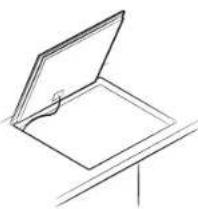
natural_image
Simple line drawing of an open book or document with a bookmark, placed on a stand (no text or symbols)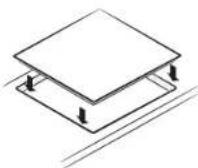
Komponentit
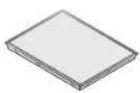
Induktioliesitaso
text_image
Diagram of a cooking process showing a pot with heat source, labeled points A, B, and C, and a pressure gauge symbol.natural_image
Illustration of two hands performing a circular motion exercise with arrows indicating rotation (no text or symbols)text_image
Diagram illustrating wave interference patterns with labeled components A and B, showing concentric wave patterns and a central circular structure.A. Alue, johon magneetti ei tartu
B. Alue, johon magnecetti tartuu
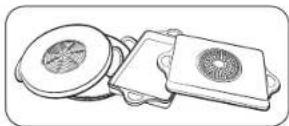
natural_image
Simple line drawing of a frying pan with a U-shaped magnet above it (no text or symbols)text_image
Illustration showing three cooking pots with checkmarks and X marks indicating cooking difficulty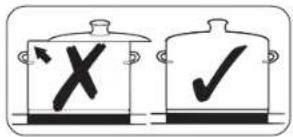
text_image
Diagram showing two cooking pots with checkmarks and an X symbol, likely indicating a cooking or inspection process.natural_image
Illustration of a hand using a power tool to cut a cable or wire (no text or symbols visible)natural_image
Simple line drawing of a curved surface with scattered gray shapes, no text or symbols present.For information on Samsung's environmental commitments and product-specific regulatory obligations, e.g. REACH, visit: www.samsung.com/uk/aboutsamsung/sustainability/environment/our-commitment/data/
Installing the hob
ADVARSEL
natural_image
Diagram of a rectangular electronic device with multiple ports and directional arrows indicating orientation (no text or symbols)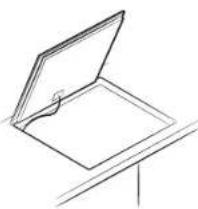
natural_image
Simple line drawing of an open book or document with a bookmark, placed on a stand (no text or symbols)
text_image
Diagram of a cooking process showing a pot with heat source, labeled points A, B, and C, and a power meter connected to the side.natural_image
Illustration of two hands performing a circular motion exercise with arrows indicating rotation (no text or symbols)text_image
Diagram illustrating magnetic field lines around a circular structure with labeled points A and Bnatural_image
Simple line drawing of a frying pan with a U-shaped magnet above it (no text or symbols)text_image
Illustration showing three cooking pots with checkmarks and X marks indicating cooking difficulty
text_image
Diagram showing two cooking pots with checkmarks and an X mark, likely indicating a cooking or inspection step.natural_image
Illustration of a hand using a power tool to cut a cable or wire (no text or symbols visible)natural_image
Simple line drawing of a curved surface with scattered gray shapes, no text or symbols present.- Fjern fastbrent sukker, smeltet plastikk, aluminiumsfolie eller andre materialer med en glasskrape straks, mens det fortsatt er varmt.
ADVARSEL
text_image
Diagram showing a device with labeled component 'A' and a screen-like structure, likely illustrating a technical or engineering concept.A. Serienummer

BEMÆRK
natural_image
Diagram of a rectangular electronic device with multiple ports and directional arrows indicating orientation (no text or symbols)
natural_image
Simple line drawing of an open book or document with a bookmark, placed on a stand (no text or symbols)
text_image
Diagram of a cooking process showing a pot with heat and a circuit with labeled components A, B, and C.| Strømindstilling Sluk | |
| 1-3 After 6 timer | |
| 4-6 After 5 timer | |
| 7-9 After 4 timer | |
| 10-15 After 1,5 timer |
BEMÆRK
natural_image
Illustration of two hands performing a circular motion exercise with arrows indicating rotation (no text or symbols)text_image
Diagram illustrating magnetic field lines around a circular structure, labeled A and B with directional arrows and circular patterns.natural_image
Simple line drawing of a frying pan with a U-shaped magnet above it (no text or symbols)text_image
Illustration showing three cooking pots with checkmarks and X marks indicating cooking difficulty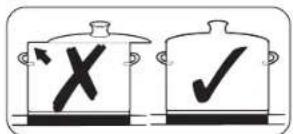
text_image
Diagram showing two cooking pots with checkmark symbols: one with an 'X' and arrow, the other with a '✓' and checkmark.natural_image
Illustration of a hand using a power tool to cut a cable or wire (no text or symbols visible)natural_image
Simple line drawing of a curved surface with scattered gray shapes, no text or symbols present.text_image
Diagram showing a device with labeled component 'A' and an arrow pointing to it, likely illustrating a process or assembly.A. Serienummer
OBS!
natural_image
Diagram of a rectangular electronic device with labeled ports and directional arrows indicating orientation (no text or symbols present)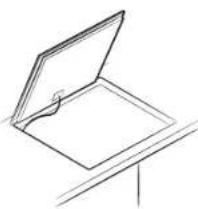
natural_image
Simple line drawing of an open book or document with a bookmark, placed on a stand (no text or symbols)
text_image
Diagram of a cooking process showing a pot with heat and a circuit with labeled components A, B, and C.natural_image
Illustration of two hands holding a plate with arrows indicating rotation (no text or symbols)text_image
Diagram illustrating magnetic field lines around a circular structure with labeled points A and Bnatural_image
Simple line drawing of a frying pan with a U-shaped magnet above it (no text or symbols)natural_image
Illustration of a hand using a power tool to remove or brush a white substance from a curved pipe (no text or symbols)natural_image
Simple line drawing of a bowl with liquid and bubbles inside, no text or symbols presenttext_image
Diagram showing a 3D object with labeled point A and directional arrow, likely illustrating a geometric or mechanical setup.A. Número de serie
NOTA
natural_image
Diagram of a rectangular electronic device with labeled ports and directional arrows indicating orientation (no text or symbols present)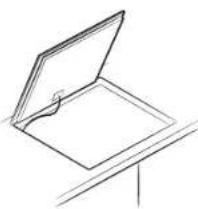
natural_image
Simple line drawing of an open book or document with a bookmark, placed on a stand (no text or symbols)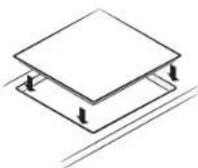
text_image
Diagram of a cooking or heating setup with labeled components A, B, and C, showing heat transfer from a pot to a surface.natural_image
Illustration of a hand holding a plate with a tool, showing a circular motion arrow (no text or symbols)text_image
Diagram illustrating magnetic field lines around a circular structure, labeled A and B with directional arrows and circular patterns.natural_image
Simple line drawing of a frying pan with a U-shaped magnet above it (no text or symbols)text_image
Diagram showing two cooking pots with checkmarks and a cross symbol, likely indicating inspection or validation status.natural_image
Illustration of a hand using a power tool to remove or brush a white substance from a curved pipe (no text or symbols)natural_image
Simple line drawing of a crescent moon with scattered clouds (no text or symbols)text_image
Diagram showing a 3D object with labeled point A and directional arrow, likely illustrating a geometric or mechanical setup.A. Număr de serie
NOTĂ
natural_image
Diagram of a rectangular electronic device with multiple ports and directional arrows indicating orientation (no text or symbols)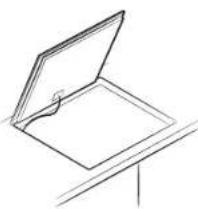
natural_image
Simple line drawing of an open book or document with a bookmark, placed on a stand (no text or symbols)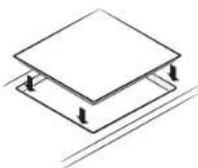
text_image
Diagram of a cooking or heating setup with labeled components A, B, and C showing heat transfer from a pot to a surface.natural_image
Illustration of two hands performing a circular motion exercise with arrows indicating rotation (no text or symbols)text_image
Diagram illustrating magnetic field lines around a circular structure, labeled A and B with directional arrows and circular patterns.natural_image
Simple line drawing of a frying pan with a U-shaped magnet above it (no text or symbols)natural_image
Illustration of a hand using a power tool to remove or brush a substance (no text or symbols)natural_image
Abstract diagram with curved lines and scattered gray shapes, no text or symbols presenttext_image
Technical diagram showing a device with labeled component 'A' and a highlighted section viewA. Сервен номер
ЗАБЕЛЕЖКА
natural_image
Line drawing of a cabinet with drawers and a tray (no text or symbols)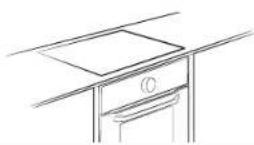
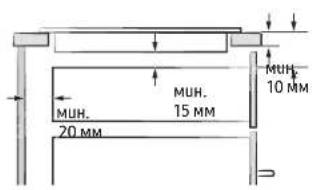
text_image
MUH. 10 MM MUH. 15 MM 20 MMMUH.
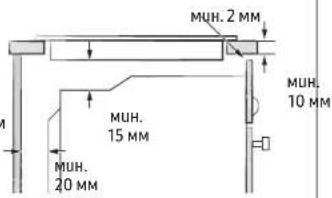
text_image
MUH. 2 MM MUH. 15 MM MUH. 20 MM MUH. 10 MMСтандартен монтаж
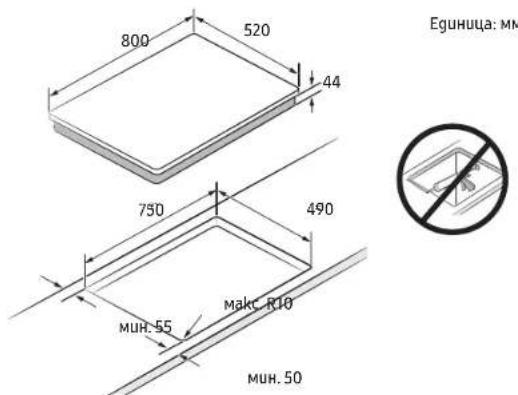
natural_image
Diagram of a rectangular electronic device with labeled ports and directional arrows indicating orientation (no text or symbols present)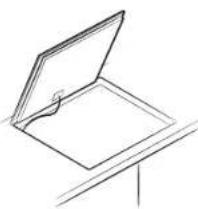
natural_image
Simple line drawing of an open book or folder with a bookmark, placed on a stand (no text or symbols)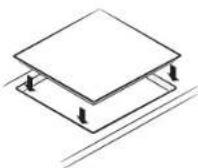
text_image
Diagram of a cooking or heating setup with labeled components A, B, and C showing heat transfer and circuit connection.natural_image
Illustration of hands performing a circular motion exercise with arrows indicating rotation (no text or symbols)text_image
Diagram illustrating magnetic field lines around a circular structure with labeled points A and Bnatural_image
Simple line drawing of a frying pan with a U-shaped magnet above it (no text or symbols)text_image
Diagram showing two cooking pots with checkmarks and an X symbol, likely indicating a cooking or inspection process.natural_image
Illustration of a hand holding a tool near a curved cable or wire (no text or symbols visible)natural_image
Simple line drawing of a curved surface with scattered gray shapes, no text or symbols present.text_image
Diagram showing a device with labeled component 'A' and an arrow pointing to it, likely illustrating a process or assembly.A. Serijos numeris
PASTABA
natural_image
Diagram of a rectangular electronic device with multiple ports and directional arrows indicating orientation (no text or symbols)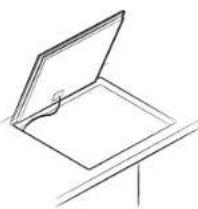
natural_image
Simple line drawing of an open book or folder with a bookmark, placed on a stand (no text or symbols)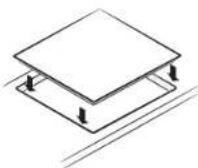
Komponentai
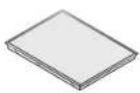
Indukciné kaitlenté
text_image
Diagram of a cooking or heating setup with labeled components A, B, and C showing heat transfer and electrical connections.A. Indukciné rité
B. Indukcinês srovés
C. Elektronines grandines
natural_image
Illustration of two hands performing a circular motion exercise with arrows indicating rotation (no text or symbols)text_image
Diagram illustrating magnetic field lines around a circular structure, labeled A and B with directional arrows and circular patterns.A. Sritis, kurioje magnetas nelimpa
B. Sritis, kurioje magnetas limpa
natural_image
Simple line drawing of a frying pan with a U-shaped magnet above it (no text or symbols)text_image
Diagram showing two cooking pots with checkmark symbols: one marked with X and the other with ✓Galite sutaupyti energijos vadovaudamiesi toliau pateikiamais patarimais.
natural_image
Illustration of a hand using a power tool to remove or brush a substance (no text or symbols)natural_image
Simple diagram showing two curved lines with scattered gray shapes inside, no text or symbols present.Kombineeritav keeduala+
text_image
Diagram showing a device with labeled component 'A' and an open lid, likely illustrating a technical or engineering concept.A. Seerianumber
MÄRKUS
natural_image
Diagram of a rectangular electronic device with labeled ports and directional arrows indicating orientation (no text or symbols present)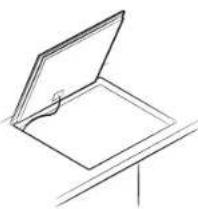
natural_image
Simple line drawing of an open book or document with a bookmark, placed on a stand (no text or symbols)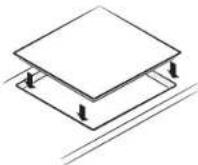
text_image
Diagram of a cooking process showing a pot with heat source, labeled points A, B, and C, and a power supply connected to a meter.natural_image
Illustration of two hands performing a circular motion exercise with arrows indicating rotation (no text or symbols)text_image
Diagram illustrating magnetic field lines around a circular structure with labeled points A and BA. Mittemagnetiline ala
B. Magnetiline ala
natural_image
Simple line drawing of a frying pan with a U-shaped magnet above it (no text or symbols)text_image
Illustration showing three cooking pots with checkmarks and X marks indicating cooking difficulty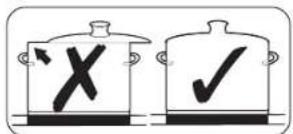
text_image
Diagram showing two cooking pots with checkmarks and a cross symbol, likely indicating a cooking or inspection process.Seade lülitatakse sisse Toitenupuga ①. Press the On/Off ① key for approximately 1-2 seconds.
MÄRKUS
natural_image
Illustration of a hand using a power tool to remove or brush a white substance from a curved pipe (no text or symbols)natural_image
Simple diagram showing a curved boundary with scattered gray shapes inside, no text or symbols present.text_image
Technical diagram showing a 3D object with labeled point A and directional arrow, likely illustrating a mechanical or architectural component.A. Sērijas numurs
PIEZIME
natural_image
Diagram of a rectangular electronic device with multiple ports and directional arrows indicating orientation (no text or symbols)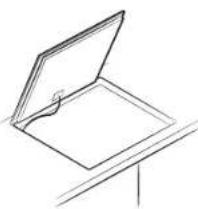
natural_image
Simple line drawing of an open book or folder with a bookmark, placed on a stand (no text or symbols)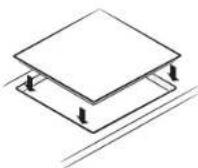
Komponentes
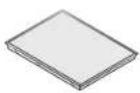
Indukcijas plits virsma
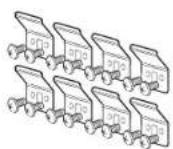
Kronšteina atsperes (8) un skrūves (16)
Pirms säkt
text_image
Diagram of a cooking or heating setup with labeled components A, B, and C showing heat transfer and electrical connections.A. Indukcijas spole
B. Inducetãs strãvas
c. Elektroniskas shēmas
natural_image
Illustration of two hands performing a circular motion exercise with arrows indicating rotation (no text or symbols)text_image
Diagram illustrating magnetic field lines around a circular structure with labeled points A and BA. Vieta, kur magnets nepielip B. Vieta, kur magnets pielip
natural_image
Simple line drawing of a frying pan with a U-shaped magnet above it (no text or symbols)text_image
Illustration showing three cooking pots with checkmarks and X marks indicating cooking difficulty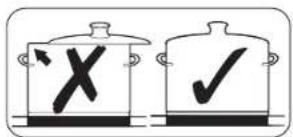
text_image
Illustration showing two cooking pots with checkmarks and a cross symbol, likely indicating cancellation or rejection.natural_image
Illustration of a hand using a power tool to remove or brush a white substance from a curved pipe (no text or symbols)natural_image
Simple line drawing of a curved surface with scattered gray shapes, no text or symbols present.text_image
Diagram showing a device with labeled component 'A' and an arrow pointing to a screen-like structureA. Numer seryjny
UWAGA
natural_image
Diagram of a rectangular electronic device with labeled ports and directional arrows indicating orientation (no text or symbols present)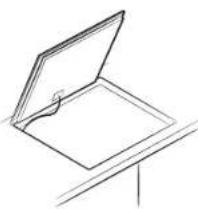
natural_image
Simple line drawing of an open book or document with a bookmark, placed on a stand (no text or symbols)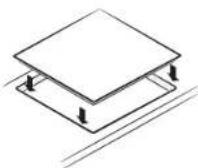
| 01 On/Off To activate and deactivate the hob. | |
| 02 ☐ Flex zone To select the flex zone. | |
| 03 Control bar | To set a heat setting and increase or decrease the time. |
| 04 Max Max Boost To activate the function. | |
| 05 ☑ Timer To turn timer on or off and set timer. | |
| 06 Display | To show for heat settings, residual heat, and Wi-Fi connection. |
| 07 || Pause | To switch all cooking zones on to the low power setting. |
| 08 🔊 Lock(See) | Press 3 seconds to lock or unlock the control panel. (Child safety lock) |
| 09 || Pause & Lock(See) | To switch all cooking zones on to the low power setting. Press 3 seconds to lock or unlock the control panel. (Child safety lock) |
| 10 ☐ Cooking zone | To select the cooking zone. |
| 11 Control knob | To set a heat setting and increase or decrease the time. |
| 12 🔑 Keep warm To keep cooked food warm. | |
text_image
Diagram of a cooking process showing a pot with heat source, labeled points A, B, and C, and a pressure gauge symbol.natural_image
Illustration of two hands performing a circular motion exercise with arrows indicating rotation (no text or symbols)text_image
Diagram illustrating magnetic field lines around a circular structure, labeled A and B with directional arrows and circular patterns.natural_image
Simple line drawing of a frying pan with a U-shaped magnet above it (no text or symbols)text_image
Diagram showing two cooking pots with checkmarks and an X symbol, likely indicating cancellation or rejection.natural_image
Illustration of a hand using a power tool to clean or store material (no text or symbols visible)natural_image
Simple line drawing of a curved surface with scattered gray shapes, no text or symbols present.text_image
Diagram showing a device with labeled component 'A' and an arrow pointing to it, likely illustrating a process or assembly.A. Serijski broj
NAPOMENA
Prije montiranja zabilježite serijski broj na naljepnici s oznakama na uredaju. Taj će vam broj trebati u slučaju potrebe za servisom i nakon montiranja više neće biti dostupan, budući da se nalazi na jedinstvenoj pločici s oznakama na gornjoj ili donjoj strani uredaja.
NAPOMENA
Posebno pripazite na zahtjeve za minimalnim prostorom.
NAPOMENA
Na dnu ploče za kuhanje nalazi se ventilator. Ako se ispod ploče za kuhanje nalazi ladica, ne smije se koristiti za pohranjivanje malih predmeta ili papira jer bi mogli ošetiti ventilator ili ometati hladenje ako ih ventilator usisa.
Postavljanje ploče za kuhanje
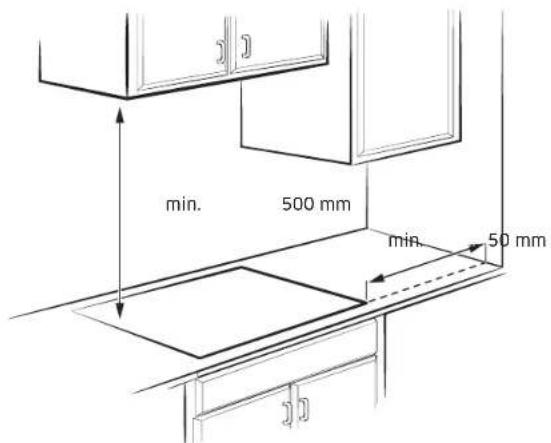
natural_image
Diagram of a rectangular electronic device with labeled ports and directional arrows indicating orientation (no text or symbols present)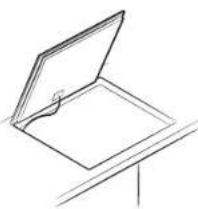
natural_image
Simple line drawing of an open book or folder with a bookmark, placed on a stand (no text or symbols)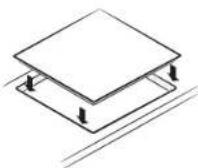
Komponente
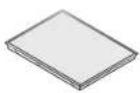
Indukcijska ploča za kuhanje
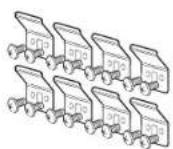
Opruge nosača (8) i
vijci (16)
Prije početka
Zone za kuhanje
NZ84C5047**
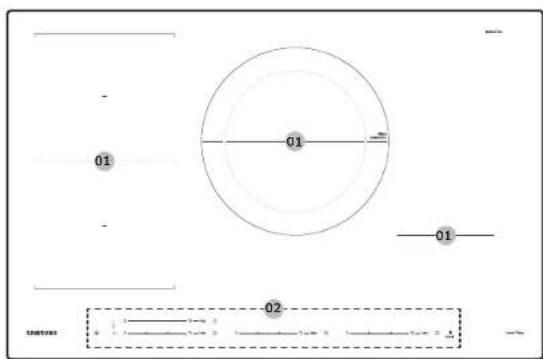
text_image
01 01 01 02NZ85C5047**
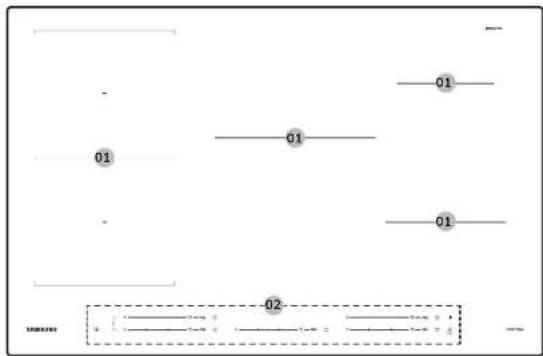
text_image
01 01 01 02Prije početka
NZ84C6057**
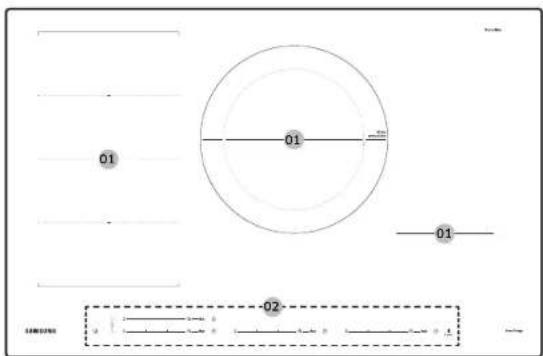
text_image
01 01 01 -02-NZ85C6057**
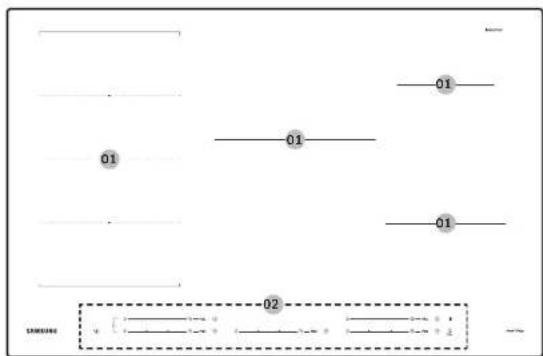
text_image
01 01 01 02NZ84C6058**
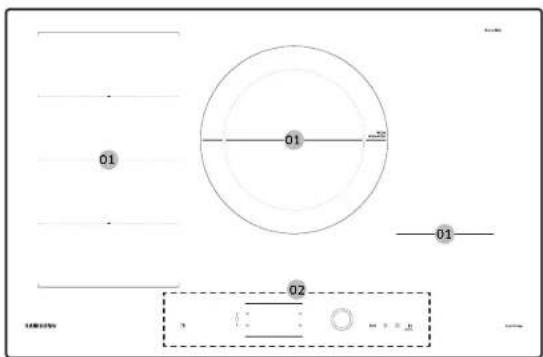
text_image
01 01 02 3NZ85C6058**
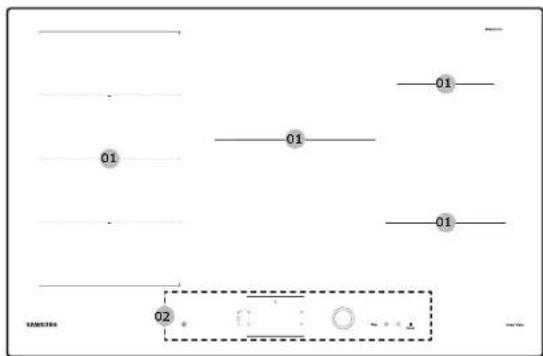
text_image
01 01 01 02text_image
Diagram of a cooking or heating setup with labeled components A, B, and C, showing heat transfer and electrical connections.A. Indukcijska zavojnica
B. Inducirana struja
c. Elektronički sklopovi
- Princip indukcijskog grijanja: kada se posuda postavi na zonu za kuhanje i zona se uključi, elektronički sklopovi u indukcijskoj ploči za kuhanje stvaraju „induciranu struju” ispod posude koja u trenu povećava temperaturu posude.
- Veća brzina kuhanja i prženja: budući da se izravno zagrijava posuda, a ne staklo, učinkovitost je veća nego kod drugih sustava jer nema gubitka topline. Većina apsorbirane energije pretvara se u toplinu.
natural_image
Illustration of two hands performing a circular motion exercise with arrows indicating rotation (no text or symbols)natural_image
Simple line drawing of a frying pan with a U-shaped magnet above it (no text or symbols)text_image
Illustration showing two cooking pots with checkmarks and an X symbol, likely indicating a cooking or inspection process.natural_image
Illustration of a hand using a power tool to remove or brush a white substance from a curved pipe (no text or symbols)- Iskipjelu hranu ili zagorjele mrlje uklonite strugaćem za staklo.
- Strugač za staklo držite pod kutom u odnosu na staklokeramičku površinu.
- Mrlju uklonite klizanjem strugača.
NAPOMENA
natural_image
Simple line drawing of a curved surface with scattered gray shapes, no text or symbols present.The cooking zones will become hot when you cook.
Otroci se ne smejo zadrževati v bližini aparata.
text_image
Diagram showing a device with labeled component 'A' and an open lid, likely illustrating a technical or engineering concept.natural_image
Diagram of a rectangular electronic device with multiple ports and directional arrows indicating orientation (no text or symbols)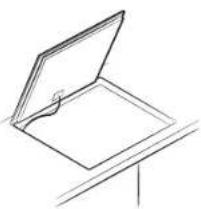
natural_image
Simple line drawing of an open book or document with a bookmark, placed on a stand (no text or symbols)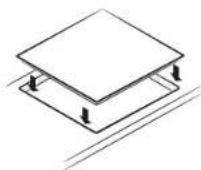
text_image
Diagram of a cooking or heating setup with labeled components A, B, and C, showing heat transfer from a pot to a surface.- Načelo indukcijskega ogrevanja: When you place your cookware on a cooking zone and you turn it on, the electronic circuits in your induction hob produce "induced currents" in the bottom of the cookware which instantly raise cookware's temperature.
| Nivo moči Izklop | |
| 1-3 After 6 hours | |
| 4-6 After 5 hours | |
| 7-9 After 4 hours | |
| 10-15 After 1.5 hours |
OPOMBA
natural_image
Illustration of two hands performing a circular motion exercise with arrows indicating rotation (no text or symbols)text_image
Diagram illustrating magnetic field lines around a circular structure with labeled points A and Bnatural_image
Simple line drawing of a frying pan with a U-shaped magnet above it (no text or symbols)text_image
Diagram showing two cooking pots with checkmarks and an X symbol, likely indicating a cooking or inspection process.Using low power levels (1-5) may cause clicking noises.
Začetno čiščenje
Aparat vklopite z uporabo tipke Vklop/izklop① Press the On/Off ① key for approximately 1-2 seconds.
OPOMBA
After the On/Off ① key has been actuated to switch on your appliance, a power level must be selected within approximately 20 seconds. V nasprotnem primeru se bo aparat iz varnostnih razlogov samodejno izklopil.
Izklop aparata
Za popoln izklop aparata uporabite tipko Vklop/izklop ① Press the On/Off ① key for approximately 1-2 seconds.
OPOMBA
After switching off a single cooking zone or the entire cooking surface, the presence of residual heat will be indicated in the digital displays of the corresponding cooking zones in the form of an B-R Two steps for "hot". Ko se temperatura zniža, bo B-R lizinil.
You will need to adjust the power level according to specific cookware and foods.
Najv. moč
natural_image
Illustration of a hand using a power tool to remove or brush a white substance from a curved pipe (no text or symbols)natural_image
Simple line drawing of a curved surface with scattered gray shapes, no text or symbols present.text_image
Technical diagram showing a 3D object with labeled point A and directional arrow, likely illustrating a mechanical or architectural component.A. Serijski broj
NAPOMENA
Pre instaliranja zabeležite serijski broj na nalepnici sa karakteristikama aparata. Ovaj broj će biti potreban u slučaju zahteva za servisiranje, a više neće biti dostupan nakon instaliranja jer se nalazi na originalnoj nazivnoj pločici na gornjoj ili donjoj strani aparata.
NAPOMENA
natural_image
Diagram of a rectangular electronic device with labeled ports and directional arrows indicating orientation (no text or symbols present)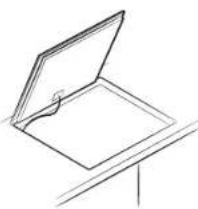
natural_image
Simple line drawing of an open book or document with a bookmark, placed on a stand (no text or symbols)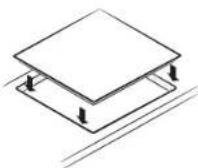
Komponente
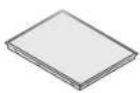
Indukciona ploča
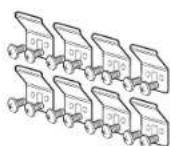
Opruge nosača (8) i zavrtnji (16)
text_image
Diagram of a cooking or heating setup with labeled components A, B, and C, showing heat transfer and electrical connections.A. Indukcioni kalem
B. Indukovane struje
c. Elektronska kola
natural_image
Illustration of two hands performing a circular motion exercise with arrows indicating rotation (no text or symbols)text_image
Diagram illustrating magnetic field lines around a circular structure with labeled points A and BA. Povrsina na koju magnet ne prianja
B. Površina na koju magnet prianja
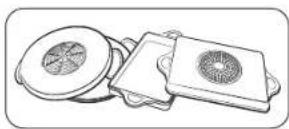
- lako je posuđe predviđeno za indukcionu ploču, performanse grejanja mogu biti slabe, odnosno, ploča ponekad neće detektovati posude, u zavisnosti od veličine i snage magnetne površine na dnu posuđa.
Kada koristite veliko posude sa manjim feromagnetnim elementom, zagreva se samo feromagnetni element. Zbog toga se toplota možda neće ravnomerno rasporediti.
Test pogodnosti
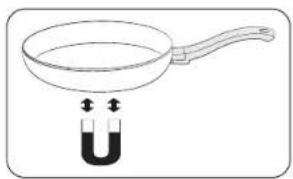
natural_image
Simple line drawing of a frying pan with a U-shaped magnet above it (no text or symbols)text_image
Illustration showing three cooking pots with checkmarks and X marks indicating incorrect cooking conditions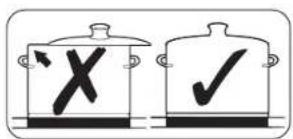
text_image
Illustration showing two cooking pots with checkmarks and an X symbol, likely indicating cancellation or rejection.Pridržavajte se ovih saveta da biste uštedeli energiju.
natural_image
Illustration of a hand using a power tool to remove or brush a white substance from a curved pipe (no text or symbols)- Koristite strugač za staklo da biste uklonili skorenu hranu i tvrdokorne mrlje.
- Postavite strugač za staklo pod uglom na keramičku staklenu površinu.
- Uklonite prljavštinu tako što ćete strugati oštricom.
NAPOMENA
Strugači za staklo i sredstva za čišćenje staklo-keramike dostupni su u specijalizovanim prodavnicama.
natural_image
Simple line drawing of a curved surface with scattered gray shapes, no text or symbols present.- Sagoreli šećer, istopljenu plastiku, aluminijumsku foliju i druge materijale uklonite strugačem za staklo odmah, dok je još vruće.
UPOZORENJE
text_image
Diagram showing a 3D object with labeled point A and directional arrow, likely illustrating a geometric or mechanical setup.A. Numri i serisë
SHËNIM
natural_image
Diagram of a rectangular electronic device with labeled ports and directional arrows indicating orientation (no text or symbols present)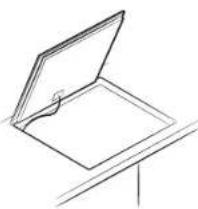
natural_image
Simple line drawing of an open book or document with a bookmark, placed on a stand (no text or symbols)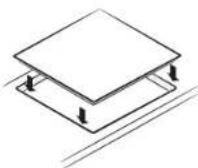
text_image
Diagram of a cooking process showing a pot with heat source, labeled points A, B, and C, and a pressure gauge symbol.A. Spiralja e induksionit
B. Rrymat e induktuara
C. Qarqet elektrike
natural_image
Illustration of two hands performing a circular motion exercise with arrows indicating rotation (no text or symbols)text_image
Diagram illustrating magnetic field lines around a circular structure, labeled A and B with directional arrows and circular patterns.natural_image
Simple line drawing of a frying pan with a U-shaped magnet above it (no text or symbols)text_image
Illustration showing three cooking pots with checkmarks and X marks indicating cooking resistance or resistance.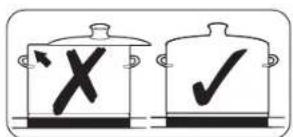
text_image
Diagram showing two cooking pots with X and ✓ symbols indicating crossed-out and checked items respectively.natural_image
Illustration of a hand using a power tool to remove or brush a white substance from a curved pipe (no text or symbols)natural_image
Simple line drawing of a curved surface with scattered gray shapes, no text or symbols present.text_image
Diagram showing a device with labeled component 'A' and an open lid, likely illustrating a technical or engineering concept.A. Sorozatszám
MEGJEGYZÉS
text_image
Diagram of a cooking process showing a pot with heat source, labeled points A, B, and C, and a pressure gauge symbol.natural_image
Illustration of two hands performing a circular motion exercise with arrows indicating rotation (no text or symbols)text_image
Diagram illustrating magnetic field lines around a circular structure, labeled A and B with directional arrows and dot positions.natural_image
Simple line drawing of a frying pan with a U-shaped tube underneath, no text or symbols present.text_image
Diagram showing two cooking pots with checkmark and cross symbols, likely indicating a cooking or inspection process.natural_image
Simple diagram with dashed lines and rectangular outlines, no text or symbols presentnatural_image
Illustration of a hand using a power tool to clean or absorb a substance (no text or symbols visible)natural_image
Abstract diagram with curved lines and scattered gray shapes, no text or symbols presentnatural_image
Line drawing of a rectangular electronic device with multiple ports and directional arrows indicating orientation (no text or symbols)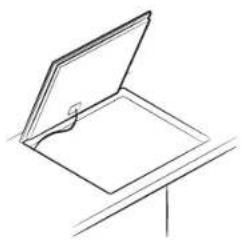
natural_image
Simple line drawing of an open book or document with a bookmark, placed on a stand (no text or symbols)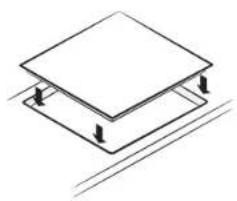
natural_image
Isometric diagram of a two-tiered platform or floor plan with support beams and diagonal lines (no text or symbols)text_image
Diagram of a cooking process showing a pot with heat source, labeled points A, B, and C, and a circuit symbol.natural_image
Illustration of two hands holding a tray with arrows indicating rotation (no text or symbols)text_image
Diagram illustrating magnetic field lines around a circular structure with labeled points A and Bnatural_image
Simple line drawing of a frying pan with a U-shaped magnet above it (no text or symbols)text_image
Diagram showing two containers with checkmarks and an 'X' symbol, likely indicating cancellation or rejection.- Press the Flex zone ☐ key during operating, Flex zone function will be off.
natural_image
Illustration of a hand using a power tool to remove or brush a white substance from a curved pipe (no text or symbols)natural_image
Abstract diagram with curved lines and scattered gray shapes, no text or symbols present- If you could have remedied the problem yourself by applying one of the solutions provided in the section "Αντιμετώπιση προβλημάτων".
text_image
Diagram showing a 3D object with labeled point A and directional arrow, likely illustrating a geometric or mechanical setup.A. Número de série
NOTA
natural_image
Diagram of a rectangular electronic device with multiple ports and directional arrows indicating orientation (no text or symbols)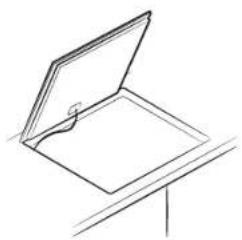
natural_image
Simple line drawing of an open book or document with a bookmark, placed on a stand (no text or symbols)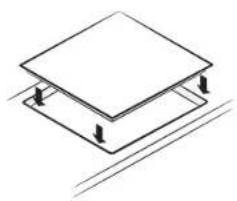
natural_image
Isometric diagram of a square frame mounted on a flat base, with diagonal lines indicating support or alignment (no text or symbols)text_image
Diagram of a cooking or heating setup with labeled components A, B, and C showing heat transfer and electrical connections.natural_image
Illustration of a hand holding a plate with a tool, showing a circular motion arrow (no text or symbols)text_image
Diagram illustrating magnetic field lines around a circular structure, labeled A and B with directional arrows and circular patterns.natural_image
Simple line drawing of a frying pan with a U-shaped magnet above it (no text or symbols)text_image
Diagram showing two cooking pots with checkmarks and an X symbol, likely indicating a cooking or inspection process.Ao ativar a função Pause/Resume (Pausar/Retomar), todas as teclas exceto as
teclas Pause (Pausar) ||, Lock (Bloquear) On/Off (Ligar/Desligar) são desativadas.
natural_image
Illustration of a hand using a power tool to cut a cable or cable with a visible smoke trail (no text or symbols)natural_image
Simple line drawing of a bowl with liquid and bubbles, no text or symbols presenttext_image
Diagram showing a device with labeled component 'A' and an open panel, likely illustrating a technical or engineering concept.
Серуску број
НАПОМЕНА
natural_image
Diagram of a rectangular electronic device with multiple ports and directional arrows indicating orientation (no text or symbols)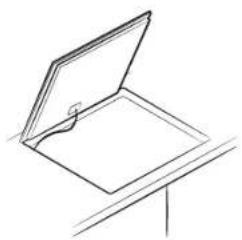
natural_image
Simple line drawing of an open book or document with a bookmark, placed on a stand (no text or symbols)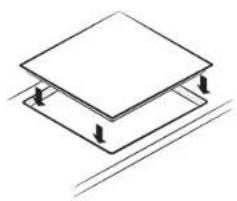
natural_image
Isometric diagram of a two-tiered platform or floor structure with no text or symbolstext_image
Diagram of a cooking process showing a pot with heat source, labeled points A, B, and C, and a circuit symbol.A. Индукциску калем
В. Индуцирани струи
С. Електронски кола
natural_image
Illustration of two hands performing a circular motion exercise with arrows indicating rotation (no text or symbols)text_image
Diagram illustrating magnetic field lines around a circular structure with labeled points A and Bnatural_image
Simple line drawing of a frying pan with a U-shaped magnet above it (no text or symbols)text_image
Diagram showing two cooking pots with checkmarks and an X symbol, likely indicating a cooking or inspection process.natural_image
Illustration of a hand using a power tool to remove or brush a white substance (no text or symbols)natural_image
Simple line drawing of a curved surface with scattered cloud-like shapes (no text or symbols)natural_image
Technical line drawing of a rectangular electronic device with mounting base and side supports, showing internal components and directional arrows (no text or symbols)Komponenty
text_image
Diagram of a cooking or heating setup with labeled components A, B, and C showing heat transfer and electrical connections.A. Indukční civka
B. Indukované proudy
c. Elektronické obvody
natural_image
Illustration of two hands performing a circular motion exercise with arrows indicating rotation (no text or symbols)text_image
Diagram illustrating magnetic field lines around a circular structure with labeled points A and Bnatural_image
Simple line drawing of a frying pan with a U-shaped magnet above it (no text or symbols)text_image
Illustration showing three cooking pots with checkmarks and X marks indicating absence or failure.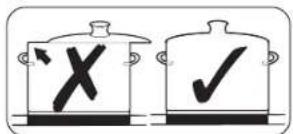
text_image
Illustration showing two cooking pots with checkmarks and a cross symbol, likely indicating a cooking or inspection process.natural_image
Illustration of a hand using a power tool to remove or brush a white substance from a curved pipe (no text or symbols)natural_image
Simple diagram showing a curved boundary with scattered gray shapes inside, no text or symbols present.text_image
Technical diagram showing a device with labeled component 'A' and a 3D view of the screen.A. Sériové číslo
POZNÁMKA
text_image
Diagram of a cooking process showing a pot with heat source, labeled points A, B, and C, and a circuit symbol.natural_image
Illustration of two hands holding a plate with arrows indicating rotation (no text or symbols)text_image
Diagram illustrating magnetic field lines around a circular structure with labeled points A and BA. Plocha, kde magnet nedrži B. Plocha, kde magnet drži