
Freiburg 200 - Car radio BLAUPUNKT - Free user manual and instructions
Find the device manual for free Freiburg 200 BLAUPUNKT in PDF.
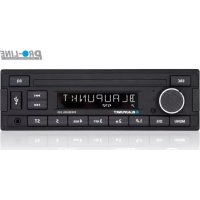



| Product type | CD/MP3/WMA car radio with FM/AM tuner, Bluetooth and USB port |
| Brand | Blaupunkt |
| Model | Freiburg 200 |
| Dimensions (W x H x D) | 178 x 50 x 160 mm (CD model) |
| Weight | Approx. 1.55 kg (CD model) |
| Power supply | 12 V DC, current consumption < 10 A during operation, < 3.5 mA in standby |
| Radio frequency ranges | FM: 87.5–108 MHz (Europe/Asia/Thailand), 87.7–107.9 MHz (USA); AM (MW): 531–1602 kHz (Europe/Asia/Thailand), 530–1710 kHz (USA) |
| RDS | Yes, with AF and regional function (Europe zone) |
| DAB (DAB model only) | Digital radio reception with ensemble and service search |
| CD player | CDDA, CD-R/RW, MP3, WMA |
| Front USB port | Yes, for FAT16/32 mass storage devices |
| Front AUX-IN input | Yes, 3.5 mm jack socket |
| Bluetooth | Hands-free and audio streaming (A2DP) |
| Preamp output | 2 channels, 1.5 V |
| Equalizer | 4 bands (Pop, Rock, Classic, Flat, Off) |
| Special functions | Travelstore, automatic scan, random play (MIX), repeat (RPT), mute |
| Sound settings | Bass, treble, balance, fader, XBASS |
| Display | Screen with day/night brightness adjustment |
| Care and cleaning | Use a dry or slightly damp cloth; clean panel contacts with cleaning alcohol |
| Safety | Automatic shutdown after 1 hour if ignition is off; volume limited to 40; class 1 laser |
| Spare parts and repairability | Repair by a specialist; Blaupunkt accessories recommended |
Frequently Asked Questions - Freiburg 200 BLAUPUNKT
User questions about Freiburg 200 BLAUPUNKT
0 question about this device. Answer the ones you know or ask your own.
Ask a new question about this device
Download the instructions for your Car radio in PDF format for free! Find your manual Freiburg 200 - BLAUPUNKT and take your electronic device back in hand. On this page are published all the documents necessary for the use of your device. Freiburg 200 by BLAUPUNKT.
USER MANUAL Freiburg 200 BLAUPUNKT
RDSCLOCK ON/ RDSCLOCK OFF:
RED, GREEN, BLUE, YELLOW, CYAN, PURPLE, WHITE:
Select memory bank or audio source Long press: Auto store
2 Rotary control
On/Off button
Short press: Switch on car sound system. In operation: Mute car sound system (Mute). Long press: Switch off car sound system
Rotary control: Volume control. In the menu: Change menu level, select menu item, change setting
3 Microphone
4 CD tray (for CD model)
5 Display
6 🏠/▶ Button
Radio mode: Set frequency,
CD/MP3/WMA mode:
Track selection, folder selection
7 △ button (Eject) (For CD model)
Eject a CD
EQ button (For MP3 model)
Change the EQ function
8 USB port
9 AUX-IN socket
10 button
Short press: Answering a call, speed dial Long press: Open the phone book of the cell phone or activate voice dialing
11 button
Ending/rejecting a phone call
12 Keys 1 - 5
13 DIS button
Short press: Switch display
Long press: Switch display brightness
14 MENU button
Short press: Call up/close menu
Long press: Start scan function
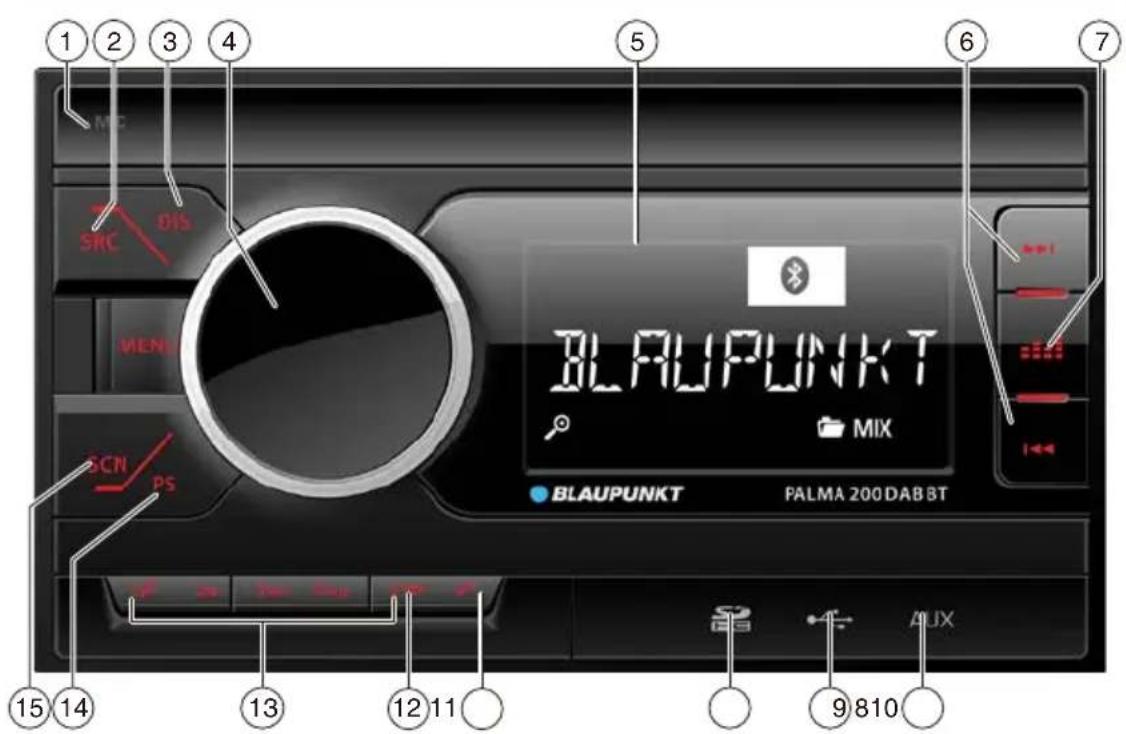
1 Microphone 2 SRC button
Select memory bank or audio source Long press: Auto store
3 DIS button
Switch display
4 Rotary control
On/Off button
Short press: Switch on car sound system. In operation: Mute car sound system (Mute). Long press: Switch off car sound system
Rotary control: Volume control. In the menu: Change menu level, select menu item, change setting
5 Display 6 🏻/▶ Button
Radio mode: Set frequency. CD/MP3/WMA mode:
Track selection, folder selection
7 EQ button
Select favorite EQ type
8 AUX-IN socket 9 USB port
0 SD card socket
11 button
Short press: Answering a call, speed dial Long press: Open the phone book of the cell phone or activate voice dialing
12 button
Ending/rejecting a phone call
13 Keys 1 - 5
14 PS button
Programme Search
15 SCAN button
Auto scan
Safety notes 5
Cleaning notes 6
Disposal notes.... 6
Scope of delivery 6
Placing the device in operation 6
Important note for radio reception.... 6
Switching on/off....6
Volume 7
Display brightness 7
Traffic information 7
Digital Radio Mode (DAB)(DAB Model only) ... 7
Changing to DAB mode or selecting a DAB memory bank 7
Tuning into ensembles/services 7
Switching the display 8
Analogue radio mode (FM/AM)....8
RDS....8
Storing stations or calling stored stations .....9
Scanning stations 9
Storing stations automatically (Travelstore)....9
CD(CD model only) /MP3/WMA/ mode ...... 9
Basic information 9
Changing to CD/MP3/WMA mode ____9
Inserting/ejecting a CD 10
Connecting/removing a USB data carrier .....10
Selecting tracks 10
Interrupting playback 10
Playing tracks in random order 10
Repeatedly playing individual tracks or directories ....10
Bluetooth ® 11
Bluetooth® menu 11
Pairing and connecting a device 11
Telephone functions....11
Bluetooth ® streaming mode....11
External audio sources 12
Front AUX-IN socket 12
User settings 12
Useful information 13
Warranty 13
Service 13
Technical data 13
Installation instructions ....14
Safety notes
The car sound system was manufactured according to the state of the art and established safety guidelines. Even so, dangers may occur if you do not observe the safety notes in these instructions.
These instructions contain important information to easily and safely install and operate the car sound system.
- Read these instructions carefully and completely before using the car sound system.
- Keep the instructions at a location so that they are always accessible to all users. • Always pass on the car sound system to third parties together with these instructions.
In addition, observe the instructions of the devices used in conjunction with this car sound system.
Symbols used
These instructions employ the following symbols:

DANGER!
Warns about injuries

CAUTION!
Warns about damaging the CD drive

DANGER!
Warns about high volume

The CE mark confirms the compliance with EU directives.
Identifies a sequencing step
• Identifies a listing
Road safety
Observe the following notes about road safety:
- Use your device in such a way that you can always safely control your vehicle. In case of doubt, stop at a suitable location and operate your device while the vehicle is standing.
- Remove or attach the control panel only while the vehicle is standing.
- Always listen at a moderate volume to protect your hearing and to be able to hear acoustic warning signals (e.g. police sirens). During mute phases (e.g. when changing the audio source), changing the volume is not audible. Do not increase the volume during this mute phase.
General safety notes
Observe the following notes to protect yourself against injuries:
- Do not modify or open the device. The device contains a Class 1 laser that can cause injuries to your eyes.
- Do not increase the volume during mute phases, e.g. when changing the audio source. Changing the volume is not audible during a mute phase.
Use as directed
This car sound system is intended for installation and operation in a vehicle with 12 V vehicle system voltage and must be installed in a DIN slot. Observe the performance limits in the technical data. Repairs and installation, if necessary, should be performed by a specialist.
Installation instructions
You may only install the car sound system yourself if you are experienced in installing car sound systems and are very familiar with the electrical system of the vehicle. For this purpose, observe the installation instructions at the end of these instructions.
Declaration of conformity
The Blaupunkt Competence Center Car Multimedia-Evo Sales GmbH declares that the devices complies with the basic requirements and the other relevant regulations of the directive 2014/53/EU.
The declaration of conformity can be found on the Internet under www.blaupunkt.com.
Cleaning notes
Solvents, cleaning and scouring agents as well as dashboard spray and plastics care product may contain ingredients that will damage the surface of the car sound system.
- Use only a dry or slightly moistened cloth for cleaning the car sound system.
- If necessary, clean the contacts of the control panel regularly using a soft cloth moistened with cleaning alcohol.
Disposal notes

Do not dispose of your old unit in the household trash!
Use the return and collection systems available to dispose of the old device.
Scope of delivery
The scope of delivery includes:
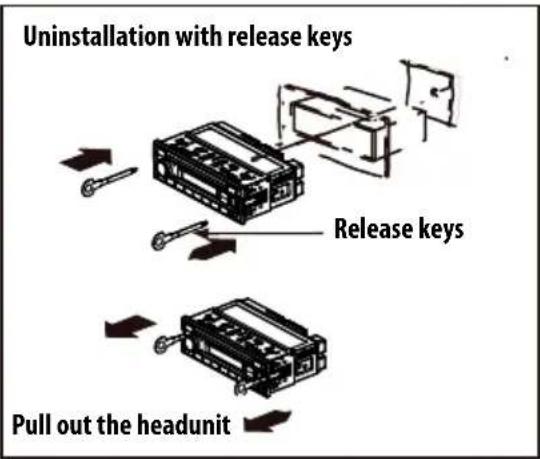
1 Car sound system 1 Operating/installation instructions 1 Antenna connection adapter 2 Disassembly tools
Optional equipment (not part of the scope of delivery)
Use only accessories approved by Blaupunkt. Information is available from your Blaupunkt specialised dealer or on the Internet under www.blaupunkt.com.
Placing the device in operation
Caution!
Transport securing screws
Before the startup of the car sound system, ensure that the transport securing screws are removed (see the chapter "Installation instructions").
Important note for radio reception
This car sound system is designed for operation in different regions with different frequency ranges and station technologies. Available reception areas are "EUROPE", "ASIA", "USA", "SOUTH AMERICA" and "THAILAND".
You may have to set a suitable reception area first for the radio reception in the user menu (see the chapter "User settings", section "Making settings in the "TUNER" menu", menu item "TUNER AREA").
Switching on/off
Switching on/off with the On/Off button
For switch-on, press the On/Off button. The car sound system switches on. To switch off the device, press and hold down the On/Off button for longer than 2 seconds. The car sound system switches off.
Note:
If you switch on the car sound system while the vehicle ignition is switched off, it automatically switches off after 1 hour to preserve the vehicle battery.
Switching On/Off via vehicle ignition
The car sound system will switch off/on simultaneously with the ignition if the device is correctly connected to the vehicle's ignition as shown in the installation instructions and you did not switch the device off by pressing the On/Off button.
Volume
Adjusting the volume
You can adjust the volume in steps from 0 (off) to 40 (maximum).
Turn the rotary volume control button to change the volume value.
Muting the car sound system (Mute)
Briefly press the On/Off button to mute the car sound system or to reactivate the previous volume.
While it is muted, the display shows "MUTE".
Notes:
If a telephone is connected with the car sound system, during communication by telephone, press the MUTE button, the display shows MUTE, but the actual mute is not active.
Display brightness
You can manually switch the display brightness between daytime mode and night-time mode.
Note:
Press the DIS button for approx. 2 seconds to change the display brightness.
Traffic information
In the reception area "EUROPE", an FM station can identify traffic reports by means of an RDS signal. If priority for traffic reports is switched on, a traffic report is automatically switched through, even if the car sound system is currently not in radio mode.
If priority is switched on, the display shows the traffic jam symbol (☐). "TRAFFIC" is displayed during a switched-through traffic announcement.
The priority is activated and deactivated in the user menu (briefly press MENU button, enter "FM TUNER", menu item "TRAF ON").
Notes:
The volume is increased for the duration of the switched-through traffic announcement. You can adjust the minimum volume for traffic announcements (see the chapter "User settings", section "Making settings in the "VOLUME" menu", menu item "TRAFFIC VOL").
Digital Radio Mode (DAB) (DAB model only)
With DAB, you can enjoy radio in digital sound quality.
In contrast with standard radio broadcasting, several programmes (services) are always broadcast over the same frequency for DAB.
These services are combined into a so-called ensemble. In some cases, the same service can be received in different ensembles.
Note:
You will need a special DAB antenna to be able to receive DAB signals. This can be a separate DAB roof/window antenna or a DAB/AM/FM combination antenna.
Changing to DAB mode or selecting a DAB memory bank
Press the SRC button repeatedly until the desired DAB memory bank is displayed: DAB1 → DAB2 → DAB3
If DAB mode is switched on, the display shows the symbol DAB.
Notes:
- Up to 5 services can be stored in each DAB memory bank.
- DAB memory banks can be activated or deactivated via the user menu (adjust "User settings", section "Making settings in the "DAB TUNER" menu, "BAND" menu item).
Tuning into ensembles/services
With DAB, several services broadcast over the same frequency are always combined into an "ensemble".
You can find new DAB using seek tuning.
Tune upwards:
Briefly press the ▶ button to change to the next SERVICE in the current ENSEMBLE. After the last SERVICE from the current ENSEMBLE, briefly press ▶ again to start a CHANNEL SCAN upwards to find the next available ENSEMBLE. The first SERVICE of the new ENSEMBLE will be played.
Press and hold the ▶ button for approximately 2 seconds to start a CHANNEL SCAN upwards to find the next available ENSEMBLE. The first SERVICE of the new ENSEMBLE will be played.
Notes:
- If the last (highest) channel is reached, tuning will change to the first (lowest) channel and continue automatically.
Tune downwards:
Briefly press the ↔ button to switch to the previous SERVICE in the current ENSEMBLE. After the first SERVICE from the current ENSEMBLE, a brief press of ↔ starts a CHANNEL SCAN downwards to find the next available ENSEMBLE. The last SERVICE of this ENSEMBLE will be played.
Press the ◀ button for approximately 2 seconds to CHANNEL SCAN down to find the next available ENSEMBLE. The last SERVICE of the new ENSEMBLE will be played.
Notes:
- If the first (lowest) channel is reached, tuning will change to the last (highest) channel and proceed further automatically.
Saving a service or calling up a saved service
Select the desired DAB memory bank. If necessary, set the desired service. Press the station button 1 - 5 for approximately 2 seconds to store the current service under the button. - Or - Briefly press the station button 1 - 5 to call up the stored service.
Switching the display
Press the DIS button to toggle between these displays:
| Display Meaning | |
| ABCDEF Service name | |
| ABCDEF Ensemble name | |
| DAB1 5CorP1 5C | DAB memory bank/frequencyorMemory location/frequency |
| DAB1 18:30orP1 18:30 | DAB memory bank/timeorMemory location/time |
Analogue radio mode (FM/AM) RDS
Many FM stations broadcast an RDS (Radio Data System) signal in addition to their programme in the reception area "EUROPE" that allows the following additional functions:
• The station name is shown on the display. - The car sound system recognises traffic announcements and news broadcasts and can automatically switch them through in other operating modes (e.g. in CD mode). - Alternate frequency: If RDS is activated, the car sound system automatically selects the best receivable frequency for the station that is currently set.
- Regional: At certain times, some radio stations divide their programme into regional programmes providing different content. If the
REGIONAL function is activated, the car sound system changes only to those alternate frequencies on which the same regional programme is being broadcast.
The functions RDS and REGIONAL are activated and deactivated in the user menu (see the chapter "User settings", section "Making settings in the "TUNER" menu", menu items "REGIONAL").
Note:
While the RDS is activated, the AF function will be activated at the same time.
If you adjust a different Radio Area than "EUROPE", RDS automatically switches off.
| Region Memory banks | |
| EUROPE | FM1, FM2, FMT, AM1, AM2,AMT |
| ASIA | |
| USA | |
| THAILAND | |
Starting station seek tuning
Long press the SRC button to start Travelstore. The display shows "FM TSTORE".
Notes:
- For the reception area "EUROPE": In the FM wave-band, only traffic information stations are turned into if the priority for traffic information ( ) is switched on.
- The sensitivity of seek tuning can be adjusted in settings (High-Low).
Tuning into stations manually
Long press the ◀◀/▶◀ button to change to manual seeking. The display shows "MANUAL". Briefly press the <</>> button to change the frequency in decrements/increments step.
Storing stations or calling stored stations
Select the desired memory bank. If necessary, set the desired station. Press the station button 1 - 5 > for approx. 2 seconds to store the current station under the button. - or - Briefly press the station button 1 - 5 > to call up the stored station.
Scanning stations
With the scan function, you can scan either every receivable station or every stored station of the current waveband.
Scanning all receivable stations of the waveband
Press the button MENU for approx. 2 seconds to start scanning. During the scan, the display shows "SCAN" and the current frequency as well as memory bank or station name. Briefly press the button 1-5 listening to the station that you request.
Storing stations automatically (Travelstore)
With Travelstore, you can automatically search for and store the 5 FM stations offering the strongest reception in the region in the FMT memory bank. Any previously stored stations in this memory bank are deleted in the process.
Select a memory bank of the desired waveband, e.g. FM1 or AM. Press the SRC button for approx. 2 seconds. The tuner starts the automatic station seek tuning; the display shows "FM TSTORE" or "AM TSTORE". After the storing is completed, the radio plays the station at memory location 1 of the FMT or AMT level.
CD (CD model only)/MP3/WMA mode
Basic information
CD (CD model only)/MP3/WMA mode
This car sound system can be used to play back audio CDs (CDDA) and CD-R/RWs with audio, MP3 or WMA files as well as MP3 or WMA files on USB data carriers.
Notes:
• To ensure proper functioning, use only CDs with the Compact-Disc logo. - Blaupunkt cannot guarantee the flawless function of copy-protected CDs and all CD blanks, USB data carriers available on the market.
Note the following information when preparing an MP3/WMA data carrier:
- Naming of tracks and directories. • CD formats: CD-R/RW, ∅: 12 cm • CD data formats: ISO 9660 Level 1 and 2, Joliet • CD burn speed: Max. 16x (recommended)
- USB format/file system: Mass storage device F. 16/32.
- File extension of audio files: .MP3/.WMA/.FLAC/.AAC/
Changing to CD/MP3/WMA Mode
Press the SRC button repeatedly until the desired audio source is displayed:
- "CD": Inserted CD. • "USB": USB data carrier connected.
- "AUX": Connected external audio source.
Notes:
- The respective audio source can be selected only if a corresponding CD is inserted or a corresponding device is connected.
- If the car sound system first has to read the data of a connected device or data carrier before playback, the display shows "READING". The duration of the reading depends on the data volume and design of the device or data carrier. If the device or data carrier is defective or the transferred data cannot be played back, a corresponding message appears on the display (e.g. "CD ERROR").
Inserting/ejecting a CD Inserting a CD

Risk of severe damage to the CD drive!
Noncircular contoured CDs (shape CDs) and CDs with a diameter of 8 cm (mini CDs) must not be used.
We accept no responsibility for any damage to the CD drive that may occur as a result of the use of unsuitable CDs.
Note:
You must not hinder or assist the drive as it automatically draws in the CD. If the inserted CD cannot be played back, "CD ERROR" is briefly displayed and the CD is automatically ejected after approx. 2 seconds.
Ejecting a CD
Press the △ button to eject an inserted CD.
Notes:
- If a CD is ejected and not removed, the drive will automatically draw it back in again after approx. 10 seconds.
- You can also eject CDs while the car sound system is switched off or while another audio source is activated.
Connecting/removing a USB data carrier
You can connect USB data carriers to the USB port at the front of the device.
Connecting a USB data carrier
Switch off the car sound system so that the data carrier will be correctly registered. Connect the USB data carrier. Turn on the car sound system. If the USB data carrier is initially selected as audio source, the data are read first.
Selecting tracks/folder
You can find new track or folder selecting.
Long press the <</▶ button for approx. 2 seconds to select previous/next folder. Short press the ◀◀/▶◀ button to select previous/next track.
Interrupting playback
Press the button ||▶ to interrupt the playback ("PAUSE") or to continue it.
Playing tracks in random order
Press the 4 MIX button to change among the playback modes. If the MIX function is switched on, the icon (mix all tracks) or MIX (mix tracks of current folder) is shown on the display.
Repeatedly playing individual tracks or directories
Press the 3 RPT button to change among the playback modes: If the REPEAT function is switched on, the icon (repeat tracks) or (Repeat folder) is shown on the display. MIX
Configuring the display
Press the DIS button once or several times to toggle between these displays: • Current playback total time. - Track name, artist and album name must be stored as ID3 tag to be able to display them. - The file and folder name is displayed only in MP3/WMA mode.
Bluetooth®
You can connect the car sound system via Bluetooth with other Bluetooth ready devices, such as cell phones or MP3 players. This allows you to use the car sound system with its integrated microphone as hand-free system for connected cell phones and control the audio output of other Bluetooth devices and play them back via loudspeakers of the car sound system (Bluetooth streaming).
Bluetooth technology is wireless is connection of short range. For this reason, Bluetooth devices must be located near the car sound system (in the vehicle) to establish and maintain a connection. To establish a Bluetooth connection, you must first pair the car sound system and the Bluetooth device. When you pair the devices, a Bluetooth connection is subsequently established automatically. This connection remains in effect as long as the Bluetooth devices is within range.
Bluetooth® menu
In the Bluetooth menu, you find all the functions for pairing, connecting and managing Bluetooth ® devices.
Calling the Bluetooth® menu
Briefly press the MENU button to open the user menu. Turn the rotary control until the "BLUETOOTH" menu item is selected. Press the rotary control to open the Bluetooth® menu. Turn the rotary control until the desired menu item is selected. - "DL P BOOK" is download phone book. - "DEL PBOOK" is delete phone book.
Pairing and connecting a cell phone
If a connection with a cell phone currently exists, this connection is automatically disconnected if you pair and connect another cell phone.
Search the car sound system from your cell phone and establish the connection. The display may show "PAIRED", followed by "CONNECTED", as soon as the car sound system and the cell phone are paired and connected.- In addition, the Bluetooth® icon ✦ashes.
Telephone functions
Answering/rejecting an incoming phone call
With an incoming call, the display alternately shows "INCOMING CALL" and the number of the caller. The current audio source is muted and a ring tone is played via the loudspeakers of the car sound system.
Press the √ button = to answer the call. "CALL" and the duration of the ongoing call are displayed. Press the button to reject the call or to end the current call. The display shows "CALL END".
Notes:
- During the call, you can adjust the volume with the volume control.
Calling an entry in the phone book
This function is available only if the phone book of the connected cell phone was transferred to the car sound system.
In the Bluetooth® menu, select the "PHONEBOOK" menu item. Turn the rotary control to select the requested phone number and press it to call out. The display shows the first phone book entry.
Speed dial for any phone number or for the number dialed last or a stored number
With speed dial, you can make a call without first selecting the corresponding number.
To call the number dialed last,
press the √ button and the display shows the number dialed last.
Bluetooth® streaming mode
Pairing and connecting a Bluetooth® streaming device
Repeatedly press the SRC button until "BT STREAM" appears. Press the ▶ button to start "BT STREAM" playing.
You can play back music from a Bluetooth® audio device via the loudspeakers of the car sound system if the audio device supports the Bluetooth® profile A2DP (Advanced Audio Distribution Profile).
Notes:
- The Bluetooth® streaming mode can be selected only if a suitable streaming device is connected.
- If a call is received during music playback, the playback is interrupted and resumes after the call.
External audio sources
Front AUX-IN socket

Danger!
Increased risk of injury from connector.
In case of an accident, the protruding connector in the front AUX-IN socket may cause injuries. The use of straight plugs or adapters leads to an increased risk of injury.
For this reason, it is recommended to use angled jack plugs.
As soon as an external audio source, such as a portable MP3 player, is connected to the front AUX-IN socket, it can be selected with the SRC button. "AUX" then appears on the display.
Making settings in the "TUNER" menu TRAFFIC INFO (traffic information) (only for reception area EUROPE)
Only possible in FM radio mode: Switching priority for traffic announcements on or off. Settings: ON, OFF.
If priority is switched on for traffic information, the display shows the icon.
BAND SELECTION
Activating or deactivating memory banks. Memory banks that can be deactivated:
| Region Memory banks | |
| EUROPE | FM2, FMT, AM, LW |
| ASIA | FM2, FMT, AM, AMT |
| USA | |
| THAILAND | |
Settings in each case: ON, OFF.
Note:
If a memory bank is deactivated, the stations stored in this memory bank are retained.
REGIONAL
(only for reception area EUROPE)
Only possible in FM radio mode: Switching REGIONAL function ON or OFF. Settings: ON, OFF.
SENSITIVITY
Setting the sensitivity of station seek tuning. Settings: LO (low), HI (high).
RDS
Switching the RDS function is On or Off. Settings: ON, OFF.
AREA (reception area)
Select the reception area for the radio reception. Settings: EUROPE, ASIA, USA, THAILAND.
DAB tuner settings (DAB models only)
The following DAB settings can be changed in the "DAB Tuner" menu:
BAND SELECTION
Activating or deactivating memory banks. Memory banks that can be deactivated:
DAB 2: ON or OFF.
DAB 3: ON or OFF.
Calling and exiting the "AUDIO" menu
Briefly press the MENU button to open the user menu. Turn the rotary control until the "AUDIO" menu item is selected.
Sound settings
The following sound settings can be changed in the "AUDIO" menu:
- Adjusting bass and treble (-7 to +7)
- Setting the left/right volume distribution (Balance) or front/rear (Fader) (F7 to R7)
- Adjusting the increase of bass at low volume (XBASS) (ON-OFF)
- Setting the 4-band equaliser (POP/ROCK/CLASSIC/FLAT/OFF)
Making settings in the "VOLUME" menu
ON VOLUME
Setting the power-on volume. Settings: ON VOLUME (power-on volume; 1-40) or LAST VOLUME (volume set last before switching off the car sound system).
TRAFFIC VOL (traffic information volume) (reception area EUROPE only)
Setting the minimum volume for announcements. Settings: 1 - 40.
BEEP (button beep)
Switching the confirmation BEEP is On or Off. Settings: ON, OFF.
Making settings in the "CLOCK" menu
HOUR MODE
Selecting the 12 or 24-hour time. Settings: 12, 24.
SET
Setting the time.
Note:
When you set the time in 12-hour mode (HOUR MODE 12), an "AM" is displayed before the time for the time before noon or a "PM" for the time after noon.
RDS CLOCK (automatic time setting)
(only for reception area EUROPE)
Switching automatic clock setting with clock data transmitted via RDS on or off. Settings: ON, OFF.
Making settings in the "VARIOUS"
menu
VERSION
Displaying the current software version of the radio.
NORMSET
Restoring the original factory settings of the car sound system.
Useful information
Warranty
The warranty terms can be called up from www.blaupunkt.com.
Service
If you ever need to use a repair service you will find information about service partners in your country under
www.blaupunkt.com.
Technical data
Voltage supply
Current consumption
In operation: < 10 A
Standby: < 3.5 mA
Tuner
Wavebands in Europe/Asia/Thailand:
FM: 87.5 - 108 MHz
AM (MW): 531 - 1,602 kHz
Tuner
Wavebands in Europe/Asia/Thailand:
FM: 87.5 - 108 MHz
AM (MW): 531 - 1,602 kHz
Wavebands in the US:
FM: 87.7 - 107.9 MHz
AM (MW): 530 - 1,710 kHz
CD
Frequency range: 20 – 20,000 Hz
Pre-amp out
2 channels: 1.5 V
Input sensitivity
Front AUX-IN: 300 mV / 10 kΩ
Dimensions and weight (CD model)
W x H x D: 178 x 50 x 160 mm
Weight: approx. 1.55 kg
Dimensions and weight (Model without CD)
W x H x D: 178 x 50 x 110 mm
Weight: approx. 0.6 kg
Dimensions and weight (2 Din MODEL)
W x H x D: 178 x 100 x 110 mm
Weight: approx. 0.7 kg
Installation instructions

Safety instructions
When carrying out installation work and making connections, please observe the following safety instructions:
- Disconnect the negative terminal of the battery! When doing so, please observe the vehicle manufacturer's safety instructions. Make sure you do not damage vehicle components when drilling any holes.
- The cross sections of the positive and negative cables must not be less than 1.5 mm².
Do not connect the vehicle's plug connectors to the radio!
You can obtain the adapter cable required for your vehicle type from any BLAUPUNKT dealer.
- Depending on the model, your vehicle may differ from the description provided here. We accept no responsibility for any damages due to incorrect installation or connection or for any consequential damages. If the information provided here is not suitable for your specific installation requirements, please contact your Blaupunkt dealer, your vehicle manufacturer or our telephone hotline. When installing an amplifier, you must first connect the device earth connections before connecting the plugs for the line-out jacks.
Earth connection of external devices may not be connected to earth of car sound system (housing).
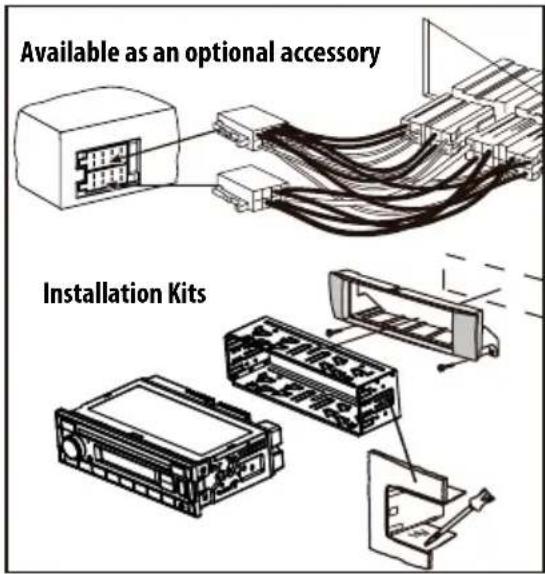
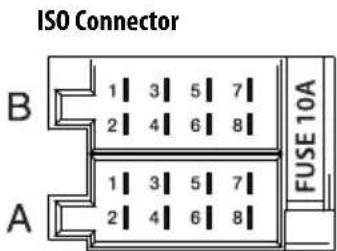
| A | B | ||
| 1 NC 1 Speaker out RR+ | |||
| 2 Telephone Mute2 Speaker out | RR- | ||
| 3 NC 3 Speaker out RF+ | |||
| 4 Permanent +12V 4 Speaker out | RF- | ||
| 5 | Auto antenna* | 5 | Speaker out LF+ |
| 6 | NC | 6 | Speaker out LF- |
| 7 | Kl.15/Ignition | 7 | Speaker out LR+ |
| 8 | Ground | 8 | Speaker out LR- |
* Switched power supply +12 V / max. 150 mA

SENSITIVITY
Analog radio mode (FM/AM)......8
RDS 8
Station scanning....9
Analog radio mode (FM/AM) RDS
Manual station setting
NORMSET (reset)
AM (MW): 531 - 1602 kHz
Tuner
Wavebands in Europe/Asia/Thailand
FM: 87.5-108 MHz
AM (MW): 531 - 1602 kHz
Wavebands in
USA:
FM: 87.7-107.9 MHz
AM (MW): 530 - 1710 kHz
CD
W x H x D: 178 x 50 x 160 mm
Weight: approx. 1.55 kg
W x H x D: 178 x 100 x 110 mm
Weight: approx. 0.7 kg

Installation
1 Microphone 2 SRC button
Controls - Palma 200 series
Analog radio mode (FM/AM)....9
RDS 9
Analog radio mode (FM/AM) RDS
DAB 2: ON or OFF.
DAB 3: ON or OFF.
AM (MW): 531 - 1,602 kHz
Tuner
AM (MW): 531 - 1,602 kHz
Frequency bands in
the United States:
FM: 87.7 - 107.9 MHz
AM (MW): 530 - 1,710 kHz
CD
W x H x D: 178x100x110 mm
Weight: approx. 0.7 kg
Installation
Installation
Installation instructions

Dimensions and weight (model 2-DIN)
W x H x D: 178x100x110 mm
Weight: approx. 0.7 kg
Installation
Installation instructions

W x H x D: 178x100x110 mm
Weight: approx. 0.7 kg
31785 Hameln/Germany
www.blaupunkt.com
DE, EN, CS, DA, ES, FI, FR, HU, IT, NL, PL, PT, SV


- RDSCLOCK ON/ RDSCLOCK OFF
- RED, GREEN, BLUE, YELLOW, CYAN, PURPLE, WHITE
- SAFETY NOTES
- SYMBOLS USED
- DANGER
- CAUTION
- ROAD SAFETY
- GENERAL SAFETY NOTES
- USE AS DIRECTED
- INSTALLATION INSTRUCTIONS
- DECLARATION OF CONFORMITY
- CLEANING NOTES
- DISPOSAL NOTES
- SCOPE OF DELIVERY
- OPTIONAL EQUIPMENT (NOT PART OF THE SCOPE OF DELIVERY)
- PLACING THE DEVICE IN OPERATION
- TRANSPORT SECURING SCREWS
- IMPORTANT NOTE FOR RADIO RECEPTION
- SWITCHING ON/OFF
- SWITCHING ON/OFF WITH THE ON/OFF BUTTON
- NOTE
- SWITCHING ON/OFF VIA VEHICLE IGNITION
- VOLUME
- ADJUSTING THE VOLUME
- MUTING THE CAR SOUND SYSTEM (MUTE)
- NOTES
- DISPLAY BRIGHTNESS
- TRAFFIC INFORMATION
- DIGITAL RADIO MODE (DAB) (DAB MODEL ONLY)
- CHANGING TO DAB MODE OR SELECTING A DAB MEMORY BANK
- TUNING INTO ENSEMBLES/SERVICES
- TUNE UPWARDS
- TUNE DOWNWARDS
- SAVING A SERVICE OR CALLING UP A SAVED SERVICE
- SWITCHING THE DISPLAY
- ANALOGUE RADIO MODE (FM/AM) RDS
- STARTING STATION SEEK TUNING
- TUNING INTO STATIONS MANUALLY
- STORING STATIONS OR CALLING STORED STATIONS
- SCANNING STATIONS
- SCANNING ALL RECEIVABLE STATIONS OF THE WAVEBAND
- STORING STATIONS AUTOMATICALLY (TRAVELSTORE)
- CD (CD MODEL ONLY)/MP3/WMA MODE
- BASIC INFORMATION
- CHANGING TO CD/MP3/WMA MODE
- INSERTING/EJECTING A CD INSERTING A CD
- RISK OF SEVERE DAMAGE TO THE CD DRIVE
- EJECTING A CD
- CONNECTING/REMOVING A USB DATA CARRIER
- CONNECTING A USB DATA CARRIER
- SELECTING TRACKS/FOLDER
- INTERRUPTING PLAYBACK
- PLAYING TRACKS IN RANDOM ORDER
- REPEATEDLY PLAYING INDIVIDUAL TRACKS OR DIRECTORIES
- CONFIGURING THE DISPLAY
- BLUETOOTH®
- BLUETOOTH® MENU
- CALLING THE BLUETOOTH® MENU
- PAIRING AND CONNECTING A CELL PHONE
- TELEPHONE FUNCTIONS
- ANSWERING/REJECTING AN INCOMING PHONE CALL
- CALLING AN ENTRY IN THE PHONE BOOK
- SPEED DIAL FOR ANY PHONE NUMBER OR FOR THE NUMBER DIALED LAST OR A STORED NUMBER
- BLUETOOTH® STREAMING MODE
- PAIRING AND CONNECTING A BLUETOOTH® STREAMING DEVICE
- EXTERNAL AUDIO SOURCES
- FRONT AUX-IN SOCKET
- INCREASED RISK OF INJURY FROM CONNECTOR
- MAKING SETTINGS IN THE "TUNER" MENU TRAFFIC INFO (TRAFFIC INFORMATION) (ONLY FOR RECEPTION AREA EUROPE)
- BAND SELECTION
- REGIONAL
- (ONLY FOR RECEPTION AREA EUROPE)
- SENSITIVITY
- RDS
- AREA (RECEPTION AREA)
- DAB TUNER SETTINGS (DAB MODELS ONLY)
- DAB 2: ON OR OFF
- DAB 3: ON OR OFF
- CALLING AND EXITING THE "AUDIO" MENU
- SOUND SETTINGS
- MAKING SETTINGS IN THE "VOLUME" MENU
- ON VOLUME
- TRAFFIC VOL (TRAFFIC INFORMATION VOLUME) (RECEPTION AREA EUROPE ONLY)
- BEEP (BUTTON BEEP)
- MAKING SETTINGS IN THE "CLOCK" MENU
- HOUR MODE
- SET
- RDS CLOCK (AUTOMATIC TIME SETTING)
- MAKING SETTINGS IN THE "VARIOUS
- MENU
- VERSION
- NORMSET
- USEFUL INFORMATION
- WARRANTY
- SERVICE
- TECHNICAL DATA
- VOLTAGE SUPPLY
- CURRENT CONSUMPTION
- TUNER
- WAVEBANDS IN THE US
- CD
- PRE-AMP OUT
- INPUT SENSITIVITY
- DIMENSIONS AND WEIGHT (CD MODEL)
- DIMENSIONS AND WEIGHT (MODEL WITHOUT CD)
- DIMENSIONS AND WEIGHT (2 DIN MODEL)
- SAFETY INSTRUCTIONS
- ANALOG RADIO MODE (FM/AM)
- ANALOG RADIO MODE (FM/AM) RDS
- MANUAL STATION SETTING
- NORMSET (RESET)
- WAVEBANDS IN
- USA
- FREQUENCY BANDS IN
- THE UNITED STATES
- FM: 87.7 - 107.9 MHZ
- W X H X D: 178X100X110 MM
- DIMENSIONS AND WEIGHT (MODEL 2-DIN)
Brand : BLAUPUNKT
Model : Freiburg 200
Category : Car radio