
BM235SYB - Microwave GORENJE - Free user manual and instructions
Find the device manual for free BM235SYB GORENJE in PDF.
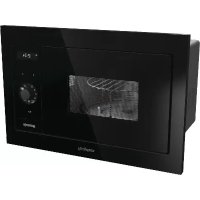



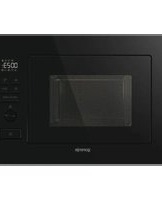
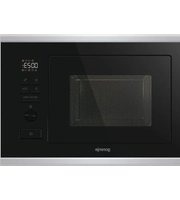
| Product type | Built-in microwave oven |
| Brand | Gorenje |
| Model | BM235SYB |
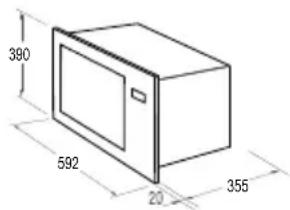
| Dimensions (W x H x D) | 592 x 390 x 375 mm |
| Net weight | 17.5 kg |
| Capacity | 23 liters |
| Power supply | 220-240 V ~ 50 Hz |
| Microwave power | 900 W |
| Grill power | 1200 W |
| Frequency | 2450 MHz |
| Noise level | < 58 dB (A) |
| Turntable | Glass, dishwasher safe |
| Main functions | Microwave, Grill, Combi, Defrost, Keep warm |
| Auto programs | Drink, Popcorn, Vegetables, Defrost, Fish, Pizza, Steak |
| Child safety | Electronic lock (long press 3s on START/STOP) |
| Eco mode | Display off in standby (simultaneous press of < and > keys) |
| Self-cleaning | Steam program (8 min with 200 ml water) |
| Delayed start | Yes, up to 24h in advance |
| Display | Digital with clock (24h) |
| Control type | Electronic with rotary selector and touch keys |
Frequently Asked Questions - BM235SYB GORENJE
User questions about BM235SYB GORENJE
0 question about this device. Answer the ones you know or ask your own.
Ask a new question about this device
Download the instructions for your Microwave in PDF format for free! Find your manual BM235SYB - GORENJE and take your electronic device back in hand. On this page are published all the documents necessary for the use of your device. BM235SYB by GORENJE.
USER MANUAL BM235SYB GORENJE
Instruction manual / Microwave oven
GB 64
Power consumption: 220-240V-50Hz, 1400W
Output power: 900W
Power consumption: 220-240V-50Hz, 1400W
Rated power: 900W
Grill: 1200W
Operating frequency: 2450MHz
External dimensions: 592mm (W) x 390mm (H) x 375mm (D)
Oven capacity: 23 liters
Weight without packaging: approximately 17.5 kg
Noise level: Lc < 58 dB (A)
We thank you for choosing our new appliance.

The appliance is intended for household use and for heating food and beverages using electromagnetic energy. Use the appliance only in enclosed spaces.
INSTRUCTIONS FOR USE
This manual is intended for the user. It describes the device and its operation. It is adapted for different types of devices, and therefore may contain descriptions of functions that your device does not have.
The manufacturer reserves the right to make changes and corrections in this user manual.
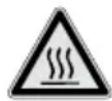
Never touch the surface of the device for ironing and ironing. It will be hot during operation. Keep your hands away from it with appropriate protection. Risk of burns.

For example: If you want to set the time on the iron to 8:30.
- When the iron is in standby mode, turn the knob to set the time.
- With the buttons you will set the timer to 8:30. With a press of the timer start/stop, confirm the number of minutes.
2. PROGRAM TIME

This function allows you to adjust the delayed start of the ironing program. Before you start using this program, always set the correct time on the timer of the iron.
RADIO INTERFERENCE (INTERFERENCE)
The microwave oven can cause interference in the reception of your radio, TV receiver and other devices. If interference occurs, you can eliminate or reduce it by taking the following measures:
a) Clean the surfaces for ventilation. b) Place the radio, TV receiver and other devices away from the microwave oven. c) For radio, TV receiver, etc., use properly placed antenna that will enable reception of the signal.
CONNECTION AND PROPER USE OF THE DEVICE.
- If the device does not work, if the display shows nothing, or if the display is damaged:
a) Check that the device is properly plugged into the electrical outlet. If not, unplug the cable from the socket, wait 10 seconds and then plug it in again. b) Check the main fuse or the circuit breaker. If the fuse is blown, replace it with a new one.
- If the microwave oven does not heat, i.e., it does not emit microwave energy:
We sincerely thank you for your purchase. We believe you will soon find ample evidence that you can really rely on our products. To make the use of the appliance easier, we attach these comprehensive instruction manual.
The instructions should aid you in getting familiar with your new appliance. Please, read them carefully before using the appliance for the first time.
In any case, please make sure the appliance was supplied to you undamaged. Should you identify and transport damage, contact your sales representative or the regional warehouse from where the product was delivered. You will find the telephone number on the receipt or delivery report.
We wish you a lot of pleasure with your new household appliance.

The appliance for household use for heating food and beverages using electromagnetic energy, for indoor use only.
INSTRUCTIONS FOR USE
These instructions are intended for the user.
They describe the cooker and how to use it. They also apply to different types of appliances, therefore you may find some descriptions of functions that may not apply to your appliance.
We reserve the right to any changes and errors in the instructions for use.
Never touch the surfaces of heating or cooking appliances. They will become hot during operation. Keep children at a safe distance. There is a risk of burning!

Microwave energy & High voltage! Do not remove the cover.
WARNING! The appliance and its accessible parts become hot during use. Care should be taken to avoid touching heating elements. Children less than 8 years of age shall be kept away unless continuously supervised. Children should be supervised to ensure that they do not play with the appliance.
This appliance can be used by children aged from 8 years and above and persons with reduced physical, sensory or mental capabilities or lack of experience and knowledge if they have been given supervision or instruction concerning use of the appliance in a safe way and understand the hazards involved. Children shall not play with the appliance. Cleaning and maintenance shall not be made by children unless they are older than 8 and supervised.
Keep the appliance and its cord out of reach of children less than 8 years.
- WARNING: When the appliance is operated in the combination mode, children should only use the oven under adult supervision due to the temperatures generated; (Only for the model with grill function)
- WARNING: If the door or door seals are damaged, the oven must not be operated until it has been repaired by a competent person;
- WARNING: It is hazardous for anyone other than a competent person to carry out any service or repair operation that involves the removal of a cover which gives protection against exposure to microwave energy;
- WARNING: liquids and other foods must not be heated in sealed containers since they are liable to explode.
- Children should be supervised to ensure that they do not play with the appliance.
- Don't remove oven's feet, do not block air events of the oven.
- Only use utensils that are suitable for use in microwave ovens.
- When heating food in plastic or paper containers, keep an eye on the oven due to the possibility of ignition;
- If smoke is observed, switch off or unplug the appliance and keep the door closed in order to stifle any flames;
- Microwave heating of beverages can result in delayed eruptive boiling, therefore care must be taken when handling the container;
- The contents of feeding bottles and baby food jars shall be stirred or shaken and the temperature checked before consumption, in order to avoid burns;
- Eggs in their shell and whole hard-boiled eggs should not be heated in microwave ovens since they may explode, even after microwave heating has ended;
- When cleaning surfaces of door, door seal, cavity of the oven, use only mild, nonabrasive soaps, or detergents applied with a sponge or soft cloth.
- The oven should be cleaned regularly and any food deposits removed.
- Failure to maintain the oven in a clean condition could lead to deterioration of the surface that could adversely affect the life of the appliance and possibly result in a hazardous situation.
- If the supply cord is damaged, it must be replaced by the manufacturer, its service agent, or similarly qualified persons in order to avoid a hazard.
- Do not let the cord hang over the edge of the table or worktop.
- Never connect this appliance to an external timer switch or remote control system in order to avoid a hazardous situation.
- Never replace the light bulb inside the oven. It must always be replaced by Gorenje service.
- Do not clean the appliance with steam cleaners, high-pressure cleaners, sharp objects, abrasive cleaning agents, abrasive sponges, or stain removers.
SAFETY INSTRUCTIONS FOR GENERAL USE
Listed below are, as with all appliances, certain rules to follow and safeguards to assure top performance from this oven:
- Always have the glass tray, roller arms, coupling, and roller track in place when operating the oven.
- Do not use the oven for any reason other than food preparation, such as for drying clothes, paper, or any other nonfood items, or for sterilizing purposes.
- Do not operate the oven when empty. This could damage the oven.
- Do not use the oven cavity for any type of storage, such as papers, cookbooks, etc.
- Do not cook any food surrounded by a membrane, such as egg yolks, potatoes, chicken livers, etc., without first being pierced several times with a fork.
- Do not insert any object into the openings on the outer case.
- Do not at any time remove parts from the oven such as the feet, coupling, screws, etc.
- Do not cook food directly on the glass tray. Place food in/on proper cooking utensil before placing in the oven.
IMPORTANT - COOKWARE NOT TO USE IN YOUR MICROWAVE OVEN
- Do not use metal pans or dishes with metal handles.
- Do not use anything with metal trim.
- Do not use paper covered wire twist-ties on plastic bags.
- Do not use melamine dishes as they contain a material which will absorb microwave energy. This may cause the dishes to crack or char and will slow down the cooking speed.
- Do not use Centura Tableware. The glaze is not suitable for microwave use. Corelle Livingware closed handle cups should not be used.
- Do not cook in a container with a restricted opening, such as a pop bottle or sealed oil bottle, as they may explode if heated in a microwave oven.
- Do not use conventional meat or candy thermometers.
- There are thermometers available specifically for microwave cooking. These may be used.
- Microwave utensils should be used only in accordance with manufacturer's instructions.
- Do not attempt to deep-fry foods in this oven.
- Please remember that a microwave oven only heats the liquid in a container rather than the container itself.
Therefore, even though the lid of a container is not hot to the touch when removed from the oven, please remember that the food/liquid inside will be releasing the same amount of steam and/or spitting when the lid is removed as in conventional cooking.
- Always test the temperature of cooked food yourself, especially if you are heating or cooking food/liquid for babies. It is advisable never to consume food/liquid straight from the oven but allow it to stand for a few minutes and stir food/liquid to distribute heat evenly.
- Food containing a mixture of fat and water, e.g., stock, should stand for 30-60 seconds in the oven after it has been turned off. This is to allow the mixture to settle and to prevent bubbling when a spoon is placed in the food/liquid or a stock cube is added.
- When preparing/cooking food/liquid, remember that there are certain foods, e.g., Christmas puddings, jam, and mincemeat, which heat up very quickly. When heating or cooking foods with a high fat or sugar content, do not use plastic containers.
- Cooking utensils may become hot because of heat transferred from the heated food. This is especially true if plastic wrap has been covering the top and handles of the utensil. Potholders may be needed to handle the utensil.
- To reduce the risk of fire in the oven cavity:
a) Do not overcook food. Carefully attend the microwave oven if paper, plastic, or other combustible materials are placed inside the oven to facilitate cooking. b) Remove wire twist-ties from bags before placing the bag in the oven. c) If materials inside the oven should ignite, keep the oven door closed, turn the oven off at the wall switch, or shut off power at the fuse or circuit breaker panel.
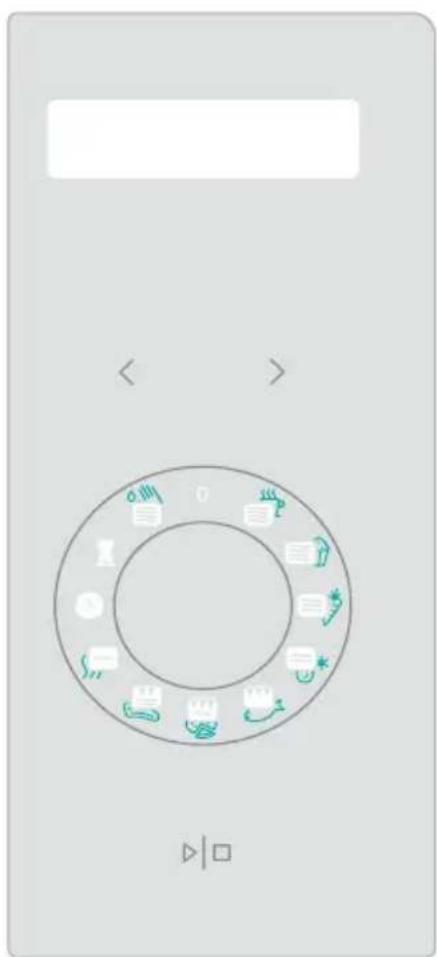
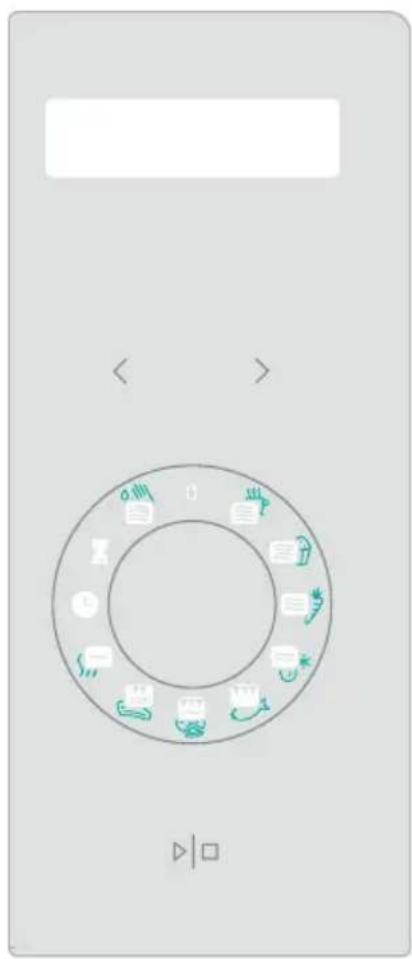
CONTROL PANEL
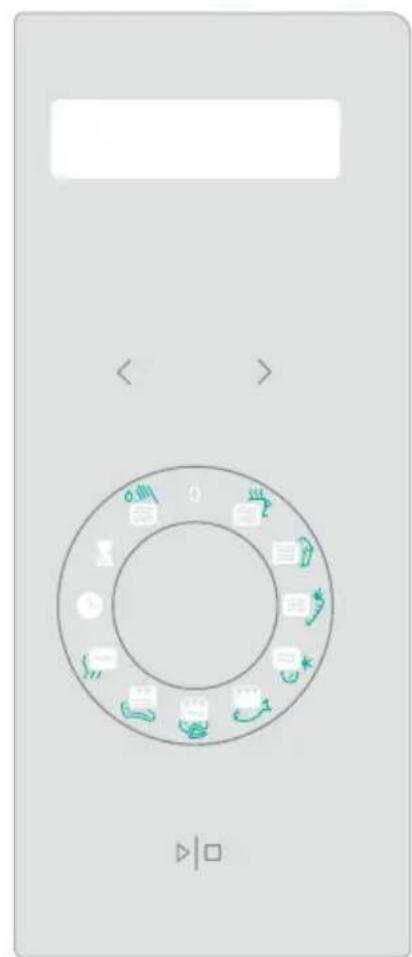
DISPLAY
(Cooking time, power, action indicators, and clock time are displayed.)

TIME
FUNCTION BUTTON SIMPLICITY

START | STOP
(Press once to start a cooking program. Press once to temporarily stop cooking. It is also used for setting child lock.)
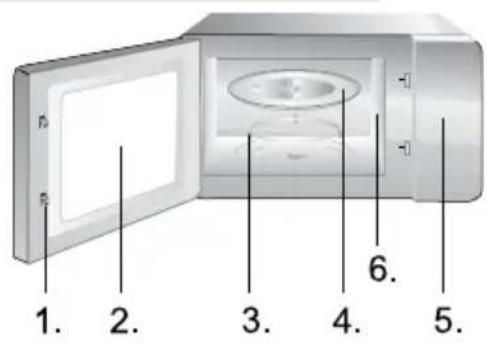
BUTTON FOR DOOR OPENING
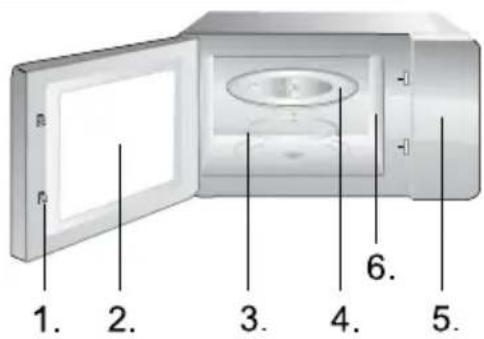
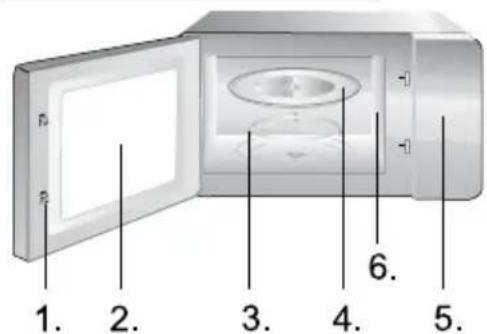
- Door Safety Lock System
- Oven Window
- Roller Ring
- Glass Tray
- Control Panel
- Wave guide (please do not remove the mica plate covering the wave guide)
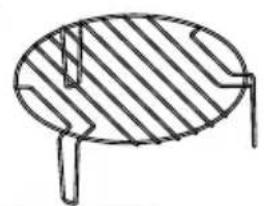
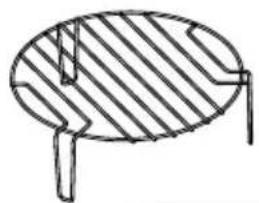
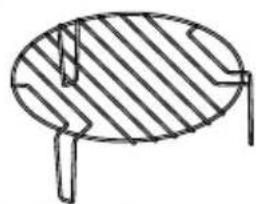
Grill rack (Only be used for grill or for combination function and be placed on glass tray)
INSTRUCTIONS FOR USE
1. CLOCK

The oven is fitted with a digital clock. When the oven is in the standby mode, the clock can be set in the 24-hour mode by pressing the CLOCK key.
For example: Suppose you want to set the oven clock time to 8:30.
- In standby mode, turn the function knob to the CLOCK position.
- Press the < and > keys to set the time to 8:30.
- Press the START | STOP button once to confirm the hour setting.
2. DELAY START

This function allows you to program a cooking program to start at a later time.
For example: Suppose the present time is 9:00, and you want the oven to start a 5-minute grill cooking program at 10:30.
- Turn the function knob to DELAY START.
- Press the < and > keys to set the time to 10:30.
- Turn the function knob to the GRILL program in a counter-clockwise direction.
- Press the < or > key directly to set the cooking time to 5:00.
- Press START | STOP to start.
NOTE:
When it reaches 10:30, the desired cooking program starts automatically.
3. CHILD LOCK
This function is used to prevent unsupervised operation of the oven by little children. The CHILD LOCK indicator will show up on the display screen, and the oven cannot be operated while the CHILD LOCK is set.
To set the CHILD LOCK: In standby mode of the oven, press the START | STOP button and hold it for 3 seconds, a beep sounds and the lock indicator lights up.
To cancel the CHILD LOCK: Press and hold the START | STOP button for 3 seconds until the lock indicator on the display turns off.
- SELF CLEAN FUNCTION

Put in a glass of water (200 ml) and turn the function button to SELF CLEAN function. Press the START/STOP button to start. After 8 minutes, remove the glass and wipe the oven with a dry cloth.
- TIME ADJUSTMENT

To shorten or extend the operating time, select the appropriate function (microwave, grill, etc.) and before confirmation adjust the time by pressing < or >.
- SIMPLICITY KNOB USAGE
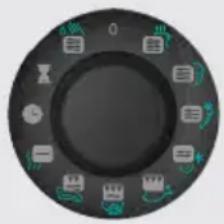
The Simplicity knob is used to set the desired function (cooking, defrost, grill, etc.). Icons on the button represent typical food for this function, but are also applicable to other, similar types of food. On the next page, the table shows in detail the meaning and usage of individual functions and pre-set times for each function. These can, of course, be customized.
The function knob is also used to STOP or CANCEL the selected function - just turn it to the start position «O». Tips for using the oven:
- ECO MODE - POWER SAVING
Press the < and > keys simultaneously. The display will turn off and the microwave is in Eco mode, which minimizes power usage.
To cancel Eco mode and turn on the display again, press any other button or open or close the door.
| Symbol | Function Meaning | Quantity Default | lt time set Hint | |||
| Microwave 100% | 1 cup - 200ml | 2 min 20 sec | For hotter drink or bigger cup increase time. | |||
| Microwave 100% | 1 bag - 100g | 3 min 30 sec | For bigger bag increase time. | |||
| Microwave 50% | 300g - carrots (sliced) | 4 min | ||||
| Microwave 30% | Defrost | Bread 0,5kg | 20 min | |||
| Grill 85% | Fish Fish | 500g 25 min | Turn fish after 12,5min, when signal beeps and press again START | PAUSE. | |||
| Microwave 30% + grill 70% | Pizza Pizza | 350g 11 min | ||||
| Microwave 40% + grill 60% | Meat steak | Meat steak 500g | 35 min | |||
| Microwave 10% | Staywarm 10 min | |||||
| ClockClock | ||||||
| Delay start Delay start | ||||||
| Microwave 100% | Self - clean | 1 cup - 200ml | 5 min | |||
- Turn the oven off and remove the power plug from the wall socket before cleaning.
- Keep the inside of the oven clean. When food splatters or spilled liquids adhere to oven walls, wipe with a damp cloth. The use of harsh detergents or abrasives is not recommended.
- The outside oven surface should be cleaned with a damp cloth. To prevent damage to the operating parts inside the oven, water should not be allowed to seep into the ventilation openings.
- Do not allow the Control Panel to become wet. Clean with a soft, damp cloth. Do not use detergents, abrasives, or spray-on cleaners on the control panel.
- If steam accumulates inside or around the outside of the oven door, wipe with a soft cloth. This may occur when the microwave oven is operated under high humidity conditions and in no way indicates malfunction of the unit.
- It is occasionally necessary to remove the glass tray for cleaning. Wash the tray in warm sudsy water or in a dishwasher.
- The roller ring and oven cavity floor should be cleaned regularly to avoid excessive noise. Simply wipe the bottom surface of the oven with mild detergent, water or window cleaner and dry. The roller ring may be washed in mild sudsy water or dishwasher. Cooking vapors collect during repeated use but in no way affect the bottom surface or roller ring wheels. When removing the roller ring from the cavity floor for cleaning, be sure to replace it in the proper position.
- Remove odors from your oven by combining a cup of water with the juice and skin of one lemon in a deep microwaveable bowl. Microwave for 5 minutes, wipe thoroughly and dry with a soft cloth.
ENVIRONMENT
Do not throw away the appliance with the normal household waste at the end of its life, but hand it in at an official collection point for recycling. By doing this, you help to preserve the environment.
INSTALLATION
- Make sure all the packing materials are removed from the inside of the door.
- Inspect the oven after unpacking for any visual damage such as:
- Misaligned Door
- Damaged Door
- Dents or Holes in Door Window and Screen
- Dents in Cavity
If any of the above are visible, DO NOT use the oven.
- This Microwave Oven weighs 17.5 kg and must be placed on a horizontal surface strong enough to support this weight.
- The oven must be placed away from high temperature and steam.
- DO NOT place anything on top of the oven.
- Keep the oven at least 20 cm away from both sidewalls and 30 cm away from rear wall to ensure the correct ventilation.
- DO NOT remove the turn-table drive shaft.
- As with any appliance, close supervision is necessary when used by children.
- Make sure that the AC outlet is easily accessible so that the plug can be removed quickly in an emergency. Otherwise, it should be possible to disconnect the device using a switch from the circuit. In this case, the existing provisions of the electrical safety standards are considered.
The product has to be correctly installed on earthed socket with a single-phase AC (230 V/50 Hz). WARNING! THIS APPLIANCE MUST BE EARTHED!
- This oven requires 1.4 KVA for its input consultation with service engineer is suggested when installing the oven.
CAUTION: This oven is protected internally by a 250V, 10 Amp Fuse.
SPECIFICATIONS
MOUNTING DIMENSIONS
Power consumption. 220-240V-50Hz, 1400W
Output power 900W
Grill heater. 1200W
Operating Frequency: 2450 MHz
Outside Dimensions: 592 mm (W) x 390 mm (H) x 375 mm (D)
Oven Capacity: 23 liters
Uncrated Weight: Approx. 17.5 kg
Noise Level: Lc < 58 dB (A)
This appliance is marked according to the European directive 2012/19/EU on Waste Electrical and Electronic Equipment (WEEE).
This guideline is the framework for a European-wide validity of return and recycling of Waste Electrical and Electronic Equipment.
MICROWAVE OVEN CABINET
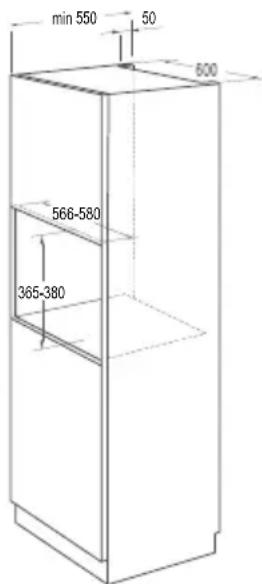
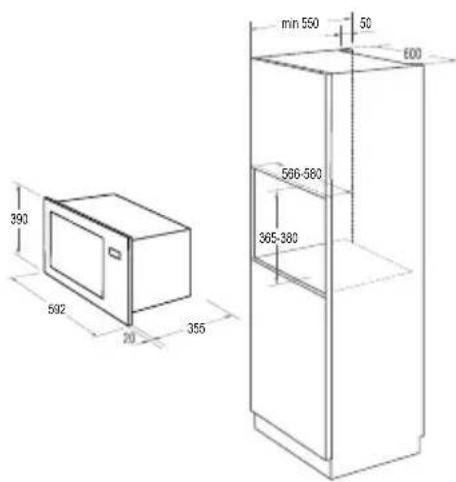
Cabinet Dimensions Requirements (see illustration):
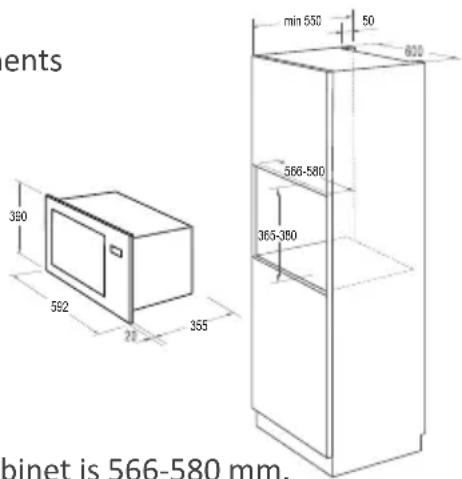
- Internal width of the cabinet is 566-580 mm.
- Internal height of the cabinet is 365 - 380 mm.
- Depth of the cabinet should not be less than 550 mm.
- The outer dimension of the cabinet should not be less than 596 mm.
- The thickness of the wooden cabinet top should not be less than 15 mm.
INSTALLATION STEPS
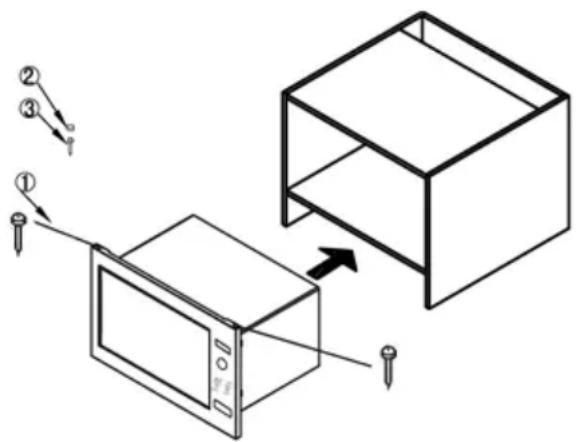
INSTALLATION KIT
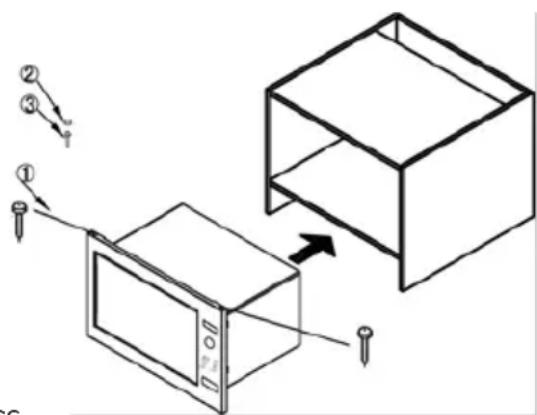
1. Bolt φ 3 × 20 mm, 2 pcs. 2. Screw cover, 1 pc. 3. Bolt φ 4 × 45 mm, 1 pc.
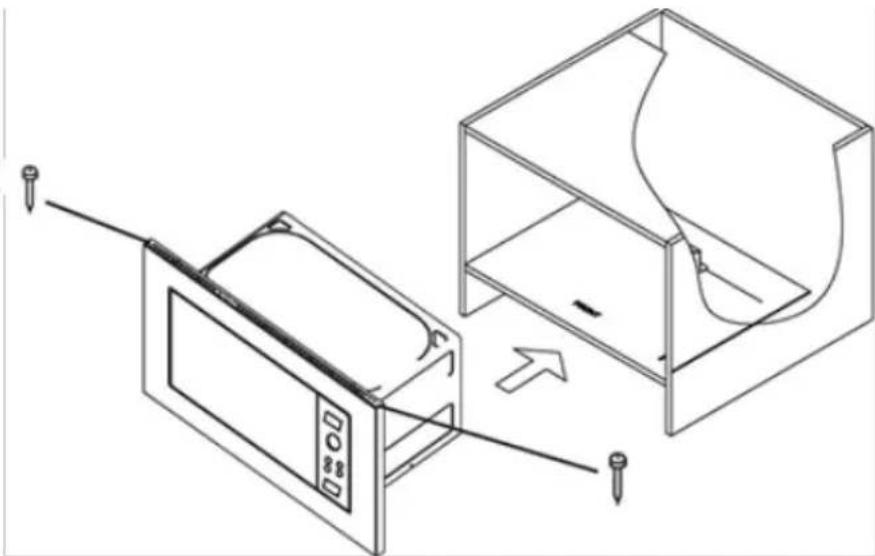
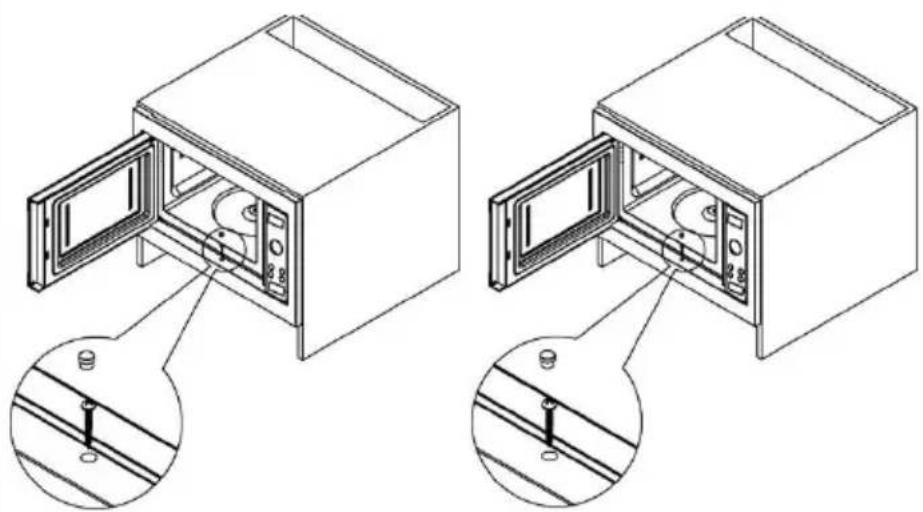
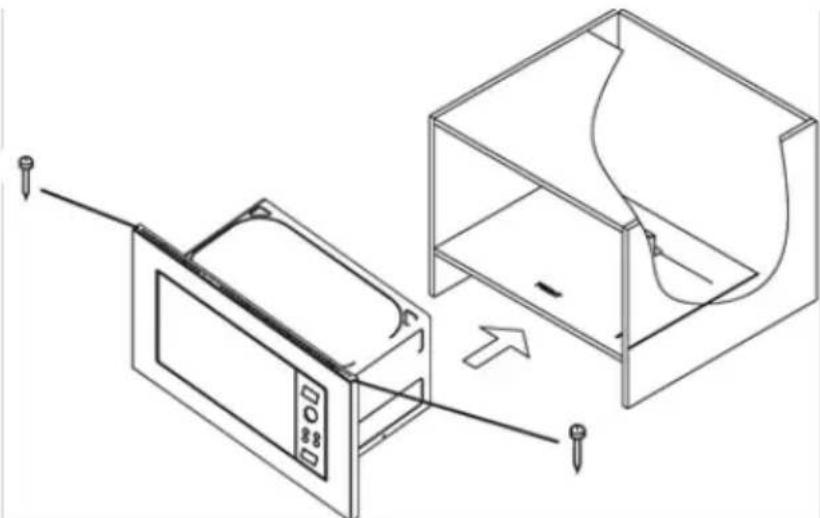
- Place the microwave in the cupboard. Keep the microwave oven in a horizontal position, with equal distance from both side walls of the cabinet. Insert the screws (component 1) into the holes on the top edge of the frame and screw them into the furniture.
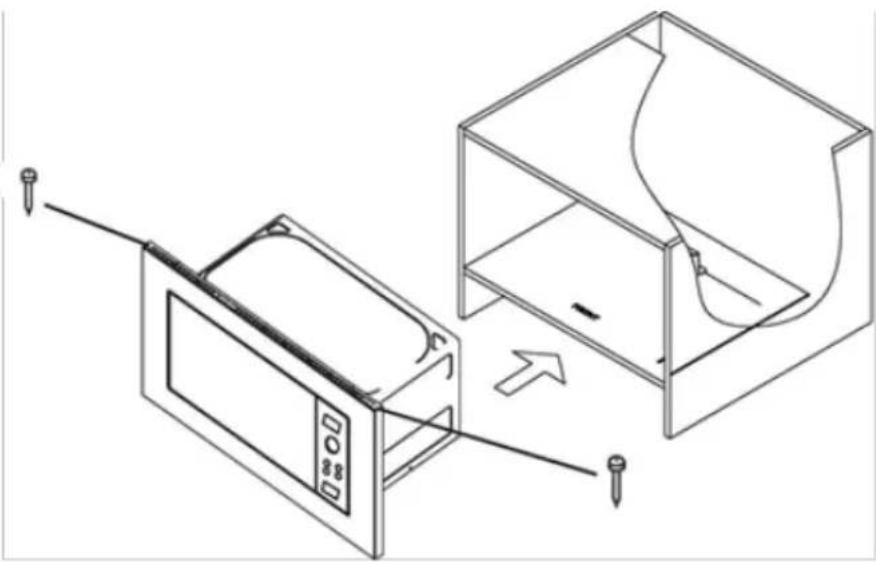
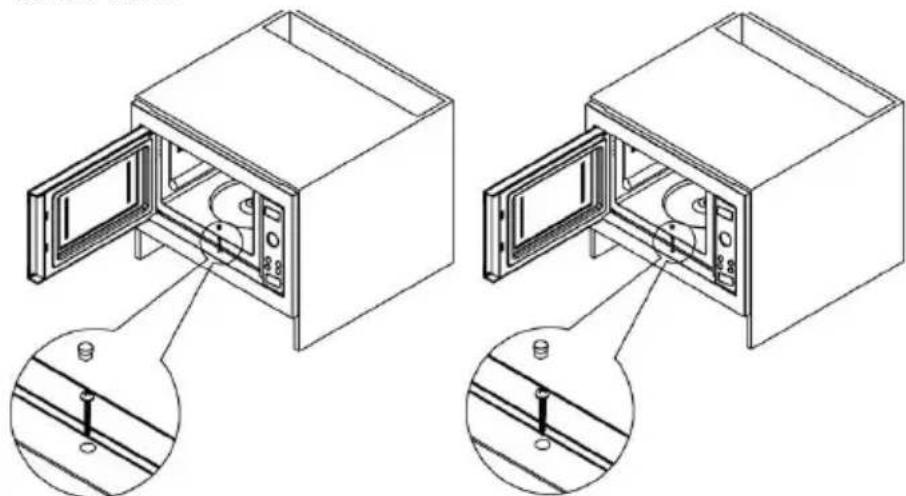
- Open the microwave door, insert the screw (component 3) into the opening and screw it into the cabinet, then install the screw cover.
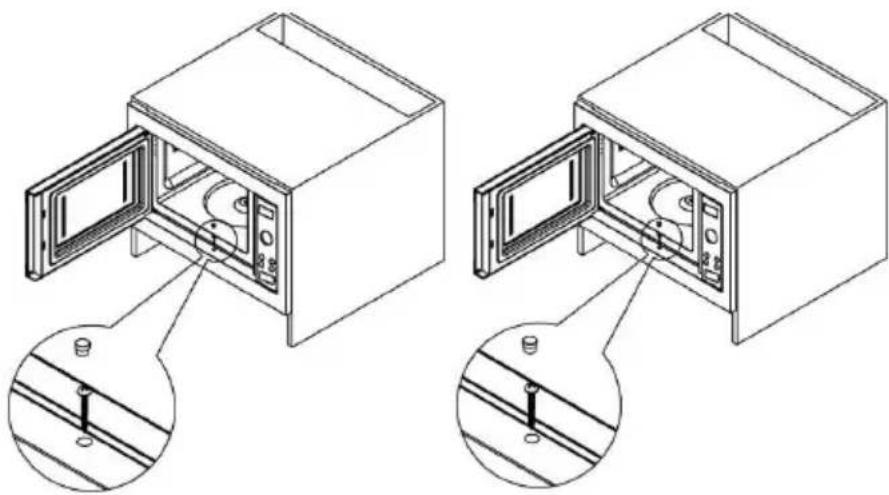
RADIO INTERFERENCE
The microwave oven may cause interference to your radio, TV, or similar equipment. When interference occurs, it may be eliminated or reduced by the following procedures.
a) Clean the door and sealing surface of the oven. b) Place the radio, TV, etc. as far away from your microwave oven as possible. c) Use a properly installed antenna for your radio, TV, etc. to get a strong signal reception.
WE RESERVE THE RIGHT TO MAKE ANY CHANGES THAT DO NOT AFFECT THE FUNCTIONALITY OF THE APPLIANCE.
BEFORE YOU CALL FOR SERVICE
- If the oven will not perform at all, the information on the display does not appear or the display disappeared:
a) Check to ensure that the oven is plugged in securely. If it is not, remove the plug from the outlet, wait 10 seconds and plug it in again securely. b) Check the premises for a blown circuit fuse or a tripped main circuit breaker. If these seem to be operating properly, test the outlet with another appliance.
- If the microwave power will not function:
a) Check to see whether the timer is set. b) Check to make sure that the door is securely closed to engage the safety interlocks. Otherwise, the microwave energy will not flow into the oven. If none of the above rectify the situation, then contact the nearest authorized service agent.
The appliance is for household use for heating food and beverages using electromagnetic energy, for indoor use only.
GUARANTEE & SERVICE
If you need information or if you have a problem, please contact the Gorenje Customer Care Centre in your country (you find its phone number in the worldwide guarantee leaflet). If there is no Customer Care Centre in your country, go to your local Gorenje dealer or contact the Service department of Gorenje domestic appliances.
Eventual mismatches in colour shades between different appliances or components within a single design line may occur due to various factors, such as different angles under which the appliances are observed, different coloured backgrounds, materials, and room illumination.
For personal use only!
Additional recommendations for cooking with microwave and useful advices can be found on web side:
http://www.gorenje.com
WISHES YOU A LOT OF PLEASURE WHILE USING YOUR APPLIANCE
5. SETTING THE TIME

To shorten or extend the operating time, select the appropriate function (microwave, grill, etc.) and before confirming, set the time by pressing the <+> or <-> buttons.
6. USING THE SIMPLICITY BUTTON
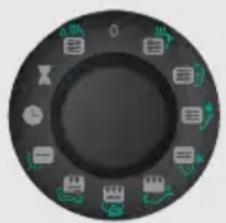
The Simplicity button is used to set a single function (defrosting, reheating, grilling, etc.). The icons on the button represent typical foods for each function, but they can also be used for similar types of food. The table on the following page shows in detail the description of each function and the recommended time for each function. They can be personalized.
The function button is used to select the desired function - the appliance starts from the initial position.
7. ECO MODE - ENERGY SAVING
The oven simultaneously activates the microwave mode with minimal energy consumption.
To stop the oven operation and to switch off the appliance, press the button and then turn the other button or close the door.
| Символ | Функция 3начени | КолочецВО | Начална настойка на Врeme | Съвет | |
| МИКРовьлни100% | Чаша ВODа/чай/ Кадурао | 1 чаша - 200ml | 2 min 20 sec | За по-толпа нанитka по �ляма чаша, увелочete ВрemeTo. | |
| МИКРовьлни100% | Пужанки | 1 пakет - 100g | 3 min 30 sec | За по-толпм пакет, увелочete ВрemeTo. | |
| МИКРовьлни 50% | Зelenчuyaи | 300р моркови (hарязани) | 4 min | ||
| МИКРовьлни 30% | Размразявае X | Яб 4,5кг 20 min | Hamалеve времeto За по-малки парчета. | ||
| trpv 85% | Риба Риба | 500 рр 25 min | Оььр havе рибatable спес 12,5min, korato ce чу сигали нати chete пak START | PAUSE. | ||
| МИКРовьлни 30% + trpv 70% | Пица Пица | 350 рр 11 min | |||
| Mikrovalovi 40% + trpv 60% | Пьржona | Пьржona 500 рр | 35 min | За по-изочени пьржona ot дvete страви haytschete 6утона START PAUSE 5 мин. пpeди края, обьр havе мecoto и haytschete OTHOBO. | |
| Mikrovalovi 10% | Задърдане на Толината | 10 min | |||
| Часовник Chasobnik | |||||
| Олloxен Stapr T | Стлoxен Stapr T | ||||
| МИКРовьлни100% | Самоночисвае | 1 чаша - 200ml | 5 min | ||
- After use, switch off the oven and remove the plug from the socket.
- Clean the interior of the oven. If food or liquids have spilled, wipe them with a damp cloth. Do not use abrasive cleaners or cleaners with abrasive particles.
- Clean the exterior surface of the oven with a damp cloth. To avoid damaging the working parts inside the oven, do not allow water to enter the ventilation openings.
- Do not allow the control panel to become wet. Clean it with a soft, damp cloth. Do not use cleaning agents, abrasive materials, or cleaning sprays for cleaning the control panel.
- If steam accumulates inside or around the outer part of the oven door, wipe it with a soft cloth. This may occur when using the oven in conditions of high humidity and does not indicate a defect.
- During the first period of use, it is necessary to clean the glass tray. Wash the tray with a mild detergent solution in a dishwasher.
- The turntable base and the interior of the oven should be cleaned regularly if you want to avoid increased noise during operation. Simply wipe the bottom surface of the oven with a cleaning agent, mild detergent, water, or a glass cleaner. The turntable base can be washed in a mild detergent solution. Food residues from the oven accumulate with regular use, but they do not affect the bottom surface or the turntable base. When removing and cleaning the turntable base from the bottom of the oven, ensure correct reinstallation afterwards.
- Remove the remaining food residues from the oven by pouring water, adding a little vinegar, and placing a lemon in a deep dish suitable for microwave ovens. Place it in the oven and run it for 5 minutes, then wipe the oven well and dry it with a dry cloth.
ENVIRONMENTAL PROTECTION
Do not dispose of this electrical appliance with normal household waste, but take it to a designated collection point for recycling. This way you help protect the environment.
INSTALLATION
- Make sure that all packaging materials are removed from the interior of the appliance.
- After unpacking the oven, check for visible defects, e.g.,
- Do not open the door - Damaged door - If the door is damaged, do not use the oven. - If the door is damaged, do not use the oven. If the door is damaged, do not use the oven.
- The microwave must be placed on a horizontal surface capable of supporting its weight.
- Place the oven away from sources of high temperature and steam.
- Do not place objects on top of the oven.
- To ensure proper ventilation, place the oven so that the side walls of the housing are at least 20 cm away, and the rear part at least 30 cm from the wall.
- Do not immerse the power cord or plug in water.
- As with any electrical appliance, its use by children requires adult supervision. WARNING - THE APPLIANCE MUST BE EARTHED
- The electrical contact must be located nearby to prevent the power cord from being damaged.
- The required input power for the oven is 1.4 kVA. Consult a service technician during installation.
WARNING: The oven is equipped with a 250V, 10A fuse for internal protection.
TECHNICAL SPECIFICATIONS
INSTALLATION DIMENSIONS
Power supply 220-240V~50Hz, 1400W
Microwave output power 900W
Power of the grill heater 1200W
YeToHa MmKpoBbAHnTe 2450MHz
BbHn pa3mepn .592mm(W) x 390mm(H) x 375mm(D)
BmectHMOCT Ha fypHaTa 23 NTpa
Tero 17,5K
Hnbo Ha yma .. Lc < 58 dB (A)
YpeDbTe o6o3HaueH cbrIaCHO EbponeNcKa AnpeKTHBa 2012/19/EU, kacaeta n3Ara3Ao ot ynoTpe6a eKeKtpnuecko n eKeKtpoHNO 6OpuyBaHe (NYE0).
AnpekTbata OuepTaBa OCHOBHTe PnHcHn, BaHdHn B Ebpona, 3a Bpbuahe n peunKlnpaHe Ha N3Ara3o ot ynoTe6a eEKePnuecko n eEKeTpOHO 6OpyDahe.
LUKAΦ 3A MUKPOBbJIHOBATA
ИЗнСКВАПЕЯ 3a Pa3мери Ha UkaФа (ВИЖ ИЛЮСТРацЯТа):
- Bbtpeunha unnpnHa Na shkaΦa 566-580 mm.
- BbtpeHb BncoUHa Ha ukaΦa 365-380 mm. 3.Дьбоунна淘汰kaфа He 6ивадe no-manka ot 550 mm.
- BbHnHnT pa3Mep Ha uKaΦa Tpr6Ba da e He no-MaNbK OT 596 mm 5.ДeбелинатаHa roрнataДьрBEHa qacT Ha uKaΦa TpЯ6Ba Da e He no-MaIka ot 15 mm
KOMNJIeKT 3A MOHTAX
1.BoJr φ 3× 20mm 2PCS 2.Kanayka 1PCS 3.BoNT φ 4× 45mm 1PCS
1.ПocTabeTe MnKpoBbJIHObAta B shKaΦa.ДрьЖte BXOpN3OHTaJIHa N03nIg H a paBHi OTCTOraHr O T dBete CTeH.N.PocTabeTe BnHTOBeTe (KOMNoHeHr 1) B dYnKInTe B TropHn KaH Na pamKaTa n 3abNtE B shKaΦa.
- Open the oven door, insert the screw (component 3) into the opening and tighten it in the cabinet, then insert the latch.
REMOVE THE PLUG
The microwave oven may cause interference with your radio, television, or similar devices. The interference can be reduced or eliminated by the following procedure:
a) Clean the door and the sealing surface of the oven. b) Place the radio, television, etc. as far as possible from the microwave oven. c) Use a properly installed antenna for your receiver to ensure good signal reception.
DELAYED START OPERATION TO APPLY THE SPECIFICATIONS TO THE OPERATION OF THE DEVICE!
BEFORE CALLING FOR SERVICE
- If the oven does not operate properly, the display does not appear or disappears:
a) Check that the oven is properly plugged into the electrical outlet. If not, unplug the power cord from the electrical outlet, wait 10 seconds and plug it back in, making sure it is properly connected. b) Check the fuse or circuit breaker for the electrical supply. If it functions correctly, check the other contacts and connections.
2. IF THE MICROWAVE OVEN DOES NOT FUNCTION:
a) Check if the timer is activated. b) Check if the door is properly closed, which activates the safety switch. If the door is not properly closed, the safety is blocked and the function cannot be activated.
If the above actions do not lead to activation, contact the nearest authorized service.
WARRANTY AND SERVICE
If you need information or have problems, contact the Gorenje customer care center in your country (the phone number can be found on the international warranty card). If there is a customer care center in your country, contact the local Gorenje appliance dealer or get in touch with the service department for Gorenje domestic appliances.
Possible discrepancies regarding the world models of different devices and components within a design line may occur due to various factors, such as different types of device observation, different lighting conditions, materials, and the state of lighting.
For household use only!
Information about the microwave oven can be found at the address:
http://www.gorenje.bg
We wish you much pleasure using the device.
gorenje
DEAR CUSTOMER!
7. ECO MODE
Press the ON/OFF button to turn off the device, and the ECO mode will be activated to save energy. To deactivate ECO mode and turn the device back on, press any button or open and close the doors.
Press the < and > keys simultaneously. The display will turn off and the microwave is in Eco mode which minimizes power usage. To cancel the Eco mode and turn on the display again press any other button or open or close the door.
The manufacturer reserves the right to make changes to the instruction manual.
Do not touch the surfaces of the appliance and its heating elements during cooking. During operation, surfaces become hot. Keep children at a safe distance. There is a risk of burns.

Microwave energy source. High voltage. Do not remove the cover.
Warning: The appliance and its parts become hot during use. Be careful not to touch the heating elements. Children under 8 years of age are not allowed to use this appliance without constant supervision. Make sure that children do not play with the appliance. This appliance can be used by children over 8 years of age; persons with reduced physical, sensory or mental capabilities; persons lacking experience or knowledge of the appliance, only under supervision and instruction by persons responsible for their safety. Make sure that children do not play with the appliance. Cleaning and maintenance should not be performed by children under 8 years of age, or without supervision. Keep the appliance and its power cord out of reach of children.
- WARNING! If using a combined cooking mode, children are not allowed to use the appliance without supervision due to high temperatures (in models with grill).
- WARNING! It is forbidden to use the oven if the door or the seal is damaged. For repair, contact an authorized service center.
- WARNING! Performing service operations related to removing the protective cover from radiation by unqualified and unauthorized personnel is dangerous.
- WARNING! Do not heat products in tightly closed containers, as they may explode.
- Make sure that children do not play with the appliance. Do not remove the microwave door, do not block the ventilation openings.
- Use only utensils and accessories that are suitable for use in microwave ovens. Do not leave the oven unattended while it is operating, especially if you use dishes made of paper, plastic, and other flammable materials, as they may ignite and catch fire.
- If you notice smoke or fire, do not open the oven door, turn off the appliance, unplug it from the power outlet, or disconnect the oven from the power supply.
- Be careful when heating liquids! If you suddenly remove a container with liquid from the microwave oven, close to the boiling temperature, it may boil over and splash onto your hands.
- After heating baby food in jars and bottles, stir thoroughly and check the temperature to ensure even heating. Before feeding, always check the temperature of the baby food. DANGER OF BURNS! Do not cook or heat eggs in the microwave oven in their shells or hard-boiled eggs, as they may explode.
- For cleaning the door, gasket, and working chamber
- Use soft, non-abrasive cleaning agents.
- soft sponges or cloths.
- Regularly clean the oven. Remove food residues from the chamber walls.
- If you do not keep the oven clean, its surfaces will deteriorate, which will lead to a reduction in the service life of the appliance, and may also cause a hazardous situation. Replacement of a damaged power cord may only be carried out by the manufacturer, an authorized service center, or a qualified specialist to prevent dangerous situations.
- Clean the area so that the network cable does not touch the edge of the table.
- And the working surface on which the device is installed. To avoid damage to the device, it is forbidden to turn on the device for additional time. Do not use steam for cleaning the device, high-pressure cleaners, sharp objects, abrasive cleaning agents, as well as abrasive sponges and brushes.
SAFETY TIPS
USEFUL SAFETY TIPS
This device operates in accordance with the established rules and safety requirements for the operation of electrical devices:
- Before using the device, install it correctly on the equipment (support on legs, rotating plate). 2. Use the oven only for cooking food. It is strictly forbidden to dry clothes, paper, and other items in the oven. Do not use the oven for sterilization.
- Do not turn on the oven empty. This can damage it.
- Do not use the oven for storing dishes, paper, etc.
- Do not use the oven for preserving food, as it is not intended for this. Improperly preserved food can spoil and become dangerous to human health.
- Do not cook eggs in their shells: they can explode. When you cook eggs, cover them with a lid and let them stand after cooking.
- Before cooking such products as sausages, fish, potatoes, pumpkin, etc. (that is, products with a shell), pierce the shell in several places.
- Do not insert objects into the openings between the door and the oven body.
IMPORTANT - DISHES NOT SUITABLE FOR MICROWAVE OVENS
- Metal pans or pots, or dishes with metal handles. - Dishes with metal elements. - Paper dishes with wire ties or plastic packaging. - Melamine dishes, as the material that makes up its composition absorbs microwave energy. This can lead to damage to the dishes and a decrease in cooking speed. - Clay dishes. - Dishes with a narrow neck. - Ordinary thermometers for food. For microwave ovens, there is a specially designed thermometer that can be used if necessary.
- Never remove the legs (feet, fasteners, screws, etc.).
- Do not cook food directly on the rotating turntable. Before cooking, place the food in suitable cookware.
- Use microwave-safe cookware only according to the manufacturer's instructions.
- Do not attempt to fry food in the microwave oven.
- In the microwave oven, food heats up faster than the container. Remember: even if the lid is not hot to the touch, the food underneath has a high temperature and will produce as much steam as on a regular stove.
- Always check the temperature of cooked food, especially if you are preparing it for a baby. It is advisable not to consume it immediately after cooking. Let it stand for a few minutes and stir to distribute the temperature evenly.
- Foods with a high water content should be left in the oven for 30-60 seconds after cooking. This allows the steam to settle and prevents the formation of bubbles.
- Some foods (e.g., Christmas pudding, jam, etc.) heat up very quickly. When cooking food that contains a lot of fat or sugar, do not use plastic cookware.
- The container holding the food can also heat up from the food. This is especially important if the cookware has plastic parts. Use oven mitts to remove the cookware from the oven.
(Cooking time, cooking power, standing time)

TIME SETTING
SIMPLICITY SWITCH

START/STOP
(sensor for confirming settings, start of operation | pause of operation)
BUTTON FOR OPENING THE DOOR
- Door locks 2. VIEWING WINDOW
- Support on rollers
- Glass tray
- Control panel
- Waveguide (do not remove the mica plate, which serves to protect the waveguide and magnetron)
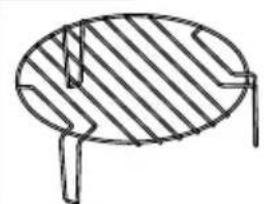
Grill rack (can be used when cooking on the grill and in combined cooking microwave + grill. Place the rack on the glass tray.)
- Clock

To set the clock, press the clock button, then you can set the clock to a 24-hour format by pressing the clock button repeatedly to select the time.
For example: if you want to set the time to 8:30.
- In standby mode, press the clock button. 2. Press the + or - buttons to set the time to 8:30.
- Press the START / STOP button to confirm the time.
- DELAY START

Use this function to set the appliance to switch on at a later time.
For example: If the current time is 9:00 and you want the appliance to switch on for 5 minutes at 10:30.
1. Turn the knob to DELAY START. 2. Press the button and set the time to 10:30. 4. Turn the knob to the program mode. 5. Press directly to select the duration of operation of the appliance 5:00. 6. Press to switch on the appliance
3. SWITCHING OFF
CAUTION:
When 10:30 arrives, the selected program switches on automatically.
Use this function to protect against children. Use it to prevent the possibility of children operating the appliance. The symbol for switching off SWITCHING OFF is displayed on the screen, as long as this function is activated, operation with the controls is impossible.
To switch on the child lock: In standby mode, press and hold the START / STOP button for about 3 seconds, which will switch on the indicator light for activated child lock. To switch off the function, press and hold the START / STOP button for about 3 seconds until the indicator light goes out.
4. SWITCHING OFF
Pour 200 milliliters of water into a glass, set the rack and automatic cleaning, press the START/STOP sensor. After the program ends, remove the glass and the glass tray from the microwave oven and wipe the chamber walls with a dry cloth.
5. TIME SETTING

If it is necessary to increase or decrease the cooking time, set the program (MICROWAVE or GRILL) and before starting, set the time using the sensors < and >.
6. DETAILED PROGRAMMING
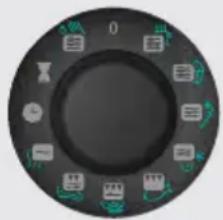
Using the selector, you can select the required programs and functions (preheating, defrosting, etc.). The symbol on the selector indicates the group of products for which the recommended program is intended, but in the microwave you can also prepare other products. The following page contains a table that describes in detail the purpose and operation of the programs and the recommended operating time for each program. The recommended program time can be changed.
Using the selector, you can start or stop a program; to do this, turn the selector to position 0.
7. ECO MODE
-ENERGY SAVING
ELECTRICITY
Simultaneously press the display sensors.
The display turns off, and the microwave enters the energy saving mode.
To exit ECO mode and turn on the display, press any other button or open or close the door.
- If the microwave mode does not work:
a) Check if the timer is set. b) Make sure the door is securely closed. Otherwise, the microwave will not operate.
IF YOU CANNOT RESOLVE THE ABOVE PROBLEMS YOURSELF, CONTACT YOUR AUTHORIZED SERVICE CENTER.
WARRANTY AND SERVICE
For more information or in case of problems, contact the customer support center in your country (the center's phone number is indicated on the warranty card). If such a center does not exist in your country, contact your local Gorenje sales organization or the customer support department of Gorenje Domestic Appliances. The addresses and phone numbers of authorized service centers are listed in the brochure "Warranty Obligations" and on the warranty card.
Possible discrepancies in color shades between different appliances or components within the same production line may occur due to various factors, such as different viewing angles, lighting, materials, and lighting in the room.
FOR HOUSEHOLD USE ONLY!
THE MANUFACTURER RESERVES THE RIGHT TO MAKE CHANGES THAT DO NOT AFFECT THE OPERATION OF THE DEVICE
gorenje
EAC


START/STOP
24 24
8:30 12
10:30 10
CHILD LOCK
| ملاoverview | الإستعمال الحرفية الحرفية الحرفية | الإستعمال الحرفية | |||
| For hotter drink or bigger cup increase time. | 2 min 20 sec | 1 cup - 200ml | Cup of water / coffee /milk / tea | Microwave 100% | |
| For bigger bag increase time. | 3 min 30 sec | 1 bag - 100g | Pop-corn | Microwave 100% | |
| 4 min | 300g – carrots (sliced) | Vegetable | Microwave 50% | ||
| Decrease time for smaller pieces. | 20 min | Bread 0,5kg | Defrost | Microwave 30% | * |
| Turn fish after 12,5min, when signal beeps and press again START | PAUSE. | FishFish | Grill 85% | |||
| PizzaPizza | Microwave 30% + grill 70% | ||||
| For crispier steak on both sides press START/PAUSE button 5 minutes before end, turn the steak and then press START/PAUSE again. | 35 min | Meat steak 500g | Meat steak | Microwave 40% + grill 60% | |
| Staywarm10 | Microwave 10% min | SSS | |||
| Clock | Clock | ||||
| Delay start | Delay start | ||||
| 5 min | 1 cup - 200ml | Self - clean | Microwave 100% | ||
1 1
INSTALLATION.
1
1
-
-
1 1
17.5 13
4
. 5
(592mm(W) x 390mm(H) x 375mm(D) Outside Dimensions
23 litres Oven Capacity
Approx. 17.5 kg Uncrated Weight
Noise level (Lc < 58 dB (A)
http://www.gorenje.com
gorenje
IMPORTANT SAFETY INSTRUCTIONS!
Read this manual carefully before using the appliance and keep it for future reference. We are not responsible for any damage caused by improper use.
If the appliance is not working properly, contact the nearest service center. Do not attempt to repair the appliance yourself. Keep the appliance and its power cord away from heat sources and moisture. When disposing of the appliance, do so in accordance with local regulations.
This appliance is intended for household use only. It is equipped with a power cord and a control panel. The appliance is designed for normal use and is not intended for commercial purposes.

To prevent electric shock, do not immerse the appliance, cord, or plug in water or any other liquid.
Read this manual carefully before using the appliance and keep it for future reference. Do not attempt to repair the appliance yourself. Keep the appliance and its power cord away from heat sources and moisture. When disposing of the appliance, do so in accordance with local regulations.
Do not use the appliance if the power cord or plug is damaged.
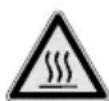
During operation, do not touch the appliance's hot surfaces or heating elements. Use the handles or knobs. Do not place the appliance on an unstable surface. Keep the appliance away from children.

Do not touch the heating elements. Risk of burns. Danger of fire.
Keep an eye on the children to prevent them from playing with the appliance. Do not allow children to use the appliance without supervision. Children under 8 years of age should be kept away from the appliance and its power cord. Do not leave the appliance unattended while it is in operation. This appliance can be used by children aged 8 and above if they have been given supervision or instruction concerning use of the appliance in a safe way and if they understand the hazards involved. Children aged 8 and above should not play with the appliance. Cleaning and user maintenance shall not be made by children unless they are older than 8 and supervised.
- WARNING! If the door or door seals are damaged, do not operate the appliance until it has been repaired by a qualified person (on models with a door).
- WARNING! If the power cord is damaged, it must be replaced by the manufacturer, its service agent or similarly qualified persons in order to avoid a hazard.
- WARNING! Do not use mechanical devices or other means to accelerate the defrosting process, other than those recommended by the manufacturer.
- WARNING! Do not damage the refrigerant circuit. It may contain flammable gas.
- Do not leave the appliance unattended while it is in operation.
- Do not touch the interior surfaces of the appliance while it is in operation; they may be hot.
- For proper operation of the appliance, use only the accessories and parts recommended by the manufacturer.
- Do not leave the appliance unattended while it is in use, especially if it contains food, plastic or other flammable materials, as they may ignite and cause a fire.
- If you notice any malfunction or damage, unplug the appliance, turn it off, and disconnect it from the power outlet, or switch it off at the circuit breaker. Be careful when unplugging! If you unplug the appliance while it is still hot, you may be burned.
- After children have finished playing, to avoid any temperature increase, unplug the appliance or switch it off. Children should not be left unattended near the appliance. KEEP OUT OF REACH OF CHILDREN!
- Do not use the appliance if the power cord or plug is damaged; have it replaced by a qualified person, as it may cause a fire.
- For cleaning the camera chamber, use only the cleaning agents and sponges recommended for the camera chamber, or use special wipes.
- Do not use the device while it is being cleaned. Remove any food residues left in the camera chamber.
- If you do not clean the device, its performance may deteriorate, and the service life may be shortened, and there is a possibility of injury or damage to property. To prevent the risk of injury, use only the original accessories or those recommended by the manufacturer or authorized service centers.
- Do not immerse the device in water or rinse it under running water.
- For cleaning, use a soft cloth slightly dampened with water and a mild detergent.
- For cleaning, use these cleaning agents, abrasive cleaning agents, sharp objects, abrasive sponges, and metal brushes are not allowed.
TROUBLESHOOTING
If the device malfunctions, check the following points before contacting the service center:
- The device does not turn on. Check the power cord, plug, and outlet. Plug the device into another outlet.
- The device turns off during operation. This is possible due to overheating.
- The device does not heat up. Check the power cord and plug.
- The device does not heat up. Check the power cord and plug. If the device does not heat up, it may be defective. Do not use the device if it is damaged.
- Do not use the device if it is damaged. Contact the service center. If the device is damaged, unplug it and wait for one minute before touching it.
- Cooked, smoked sausages, potatoes, dough dumplings, etc. These products (if any) should be stored separately, and they should be tested together with the dishes.
- The dishes should be placed between the shelves and the walls of the oven. Attention! If the dishes are too high, they may be damaged or cause a fire:
- Metal dishes or pots or metal utensils. - Metal replacement items. - Dishes with plastic handles or plastic utensils. - Metal dishes, painted or with materials that can melt at high temperatures. This can cause damage and fire hazard. - Cardboard dishes. - Wooden dishes. - Glass thermometers intended for food, they may break when heated.
- Place the dishes on the tray and then put them into the oven. Place the dishes on the tray carefully.
- Do not place dishes intended for high temperatures on the heating elements.
- Do not place dishes directly on the bottom of the oven.
- Do not place dishes in the oven container without checking. Warning: Even if the dish is not hot, the temperature of the dish underneath may be high and can cause burns.
- The temperature of the heated dish, especially if you heat it for a long time, may be high. The dish may not be hot immediately after heating. Let it cool for a few minutes and check the temperature before serving.
- After heating dishes that contain oil and water, let them stand for 30-60 seconds. This allows the temperature to equalize and prevents splattering.
- Some dishes (e.g., meat, poultry, jam, etc.) may heat up quickly. When heating dishes with oil or fat, do not use plastic dishes.
- Dishes may heat up quickly. If the dish has plastic elements, be careful. This can cause damage to the dish and may be dangerous.
DISPLAY
(Display of dishes, time indicators, power, functions, and clock settings).

YAKbit
FUNCTIONS AND CONTROLS

ON/OFF BUTTON
(Press once to turn on, press again to turn off. This button is used to turn the device on and off).
CONTROL BUTTON FOR HEATING
- Heating protection button
- Indicator
- Rod for stirring
- Base
- Control panel
- Power cord (plug into an outlet with grounding to avoid electric shock)
Designed for a specific use (designed for use with the device and its accessories)
1. SAFETY

The device is equipped with a digital display. By pressing the button, you can switch to the desired mode, 24-hour
Example: To set the time to 8:30, press the button.
- The device is designed for use with a metal brush. 2. Press the button for 8:30 format to start the timer.
- To turn off the device, press the metal brush button once.
2. START TIMER

The brush can be replaced with a new one when it is worn out.
Note: if the time is set to 9:00, then at 10:30 the brush will start rotating for 5 minutes.
- The brush rotation function starts automatically. 2. Press the button for 10:30 format to start the timer. 3. The brush rotation function will start after the timer is set.
- To turn off the device at 5:00, press the button. 5. To stop the brush, press the metal brush button.
NOTE:
If the time is set to 10:30, the brush will rotate automatically.
3. CHILD LOCK
This function is used to prevent children from accidentally turning on the device. The child lock indicator is on, and the lock is activated when the device is turned on.
To activate the child lock: press and hold the metal brush button for 3 seconds until the lock indicator lights up.
To deactivate the child lock: press and hold the metal brush button for 3 seconds until the lock indicator turns off.
4. AUTO SHUT-OFF FUNCTION

5. TURN OFF THE DEVICE

6. SIMPLICITY FUNCTION BUTTONS
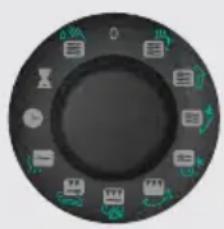
7.3 OPERATING MODES
The 200 ml cup is used to add the function of cleaning the cup. To remove the operating cup, press the REMOVE CUP/STOP button. After 3 minutes, the cup will automatically stop.
To activate or deactivate the cleaning function (micro switch, etc.), press the < or > button. To stop the cleaning function, press the STOP button. Then the function will be deactivated.
The Simplicity function is used to replace the functions (fry, boil, grill, etc.) with a single button. To use the button for frying, you need to press the function button once; for other functions, press the button again. It is better to use the functions separately, but for each function, you need to press the button again. For example, if you want to use the button again, you can press it again.
The function of adding functions is used to stop or pause the selected function. To do this, press the "O" button.
The "Start" button is pressed to start the operation. The micro switch will be activated in the eco mode. To activate the eco mode and start the operation, press the Start button or the Stop button.
Power: 900 W
Frequency: 2450 MHz
Power: 1200 W
External dimensions: 592 mm (A) x 390 mm (B) x 375 mm (W)
Weight: 23 kg
Weight: 17.5 kg
Power consumption: < 58 dB(A)
This device complies with the requirements of the European Directive 2012/19/EU on waste electrical and electronic equipment (WEEE). This Directive is applied in all EU countries for the disposal and recycling of electrical and electronic equipment.
MICROTOOLS AND CABINETS
Cabinet installation template (see figure):

1. Cabinet width 566-580 mm. 2. Cabinet inner width 365-380 mm. 3. Cabinet depth must be at least 550 mm. 4. Cabinet outer width must be at least 596 mm. 5. Distance from cabinet top to cable must be at least 15 mm.
INSTALLATION KIT
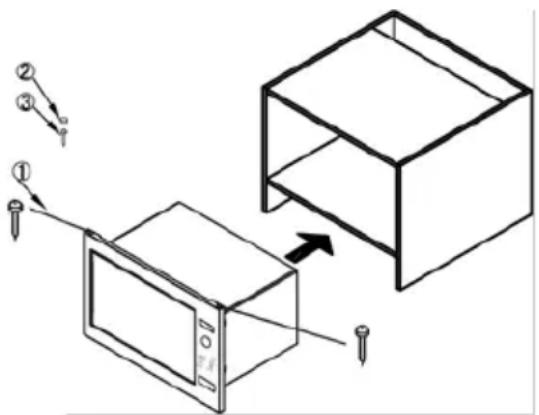
1. Bolt φ3×20mm 2 pcs. 2. Drill template 1 pc. 3. Bolt φ4×45mm 1 pc.
- Position the microtool cabinet. If the microtool is not installed, install it, and the cabinet's two mounting holes must be aligned. Insert the bolts (1 component) into the holes on the back panel and tighten them.
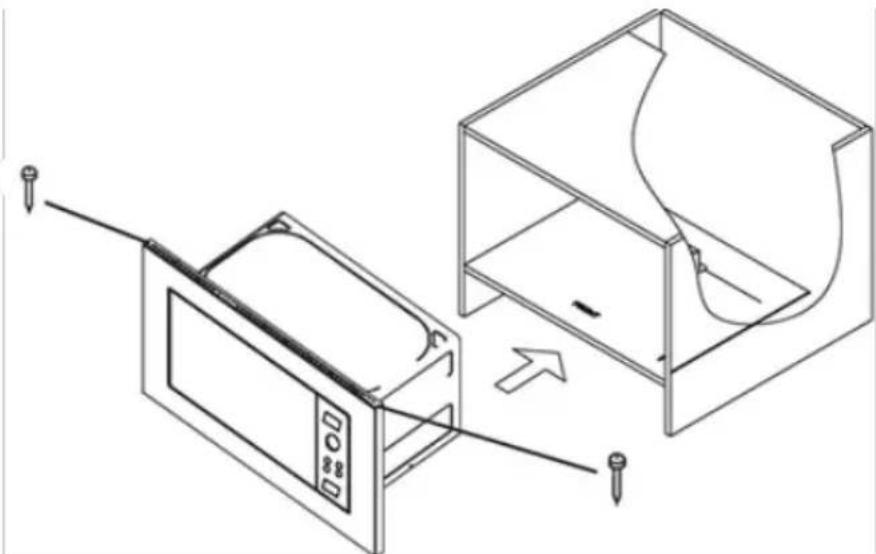
- Remove the microtool cover, insert the bolt (3 components) into the slot and tighten the cabinet, then align the bolt head properly.
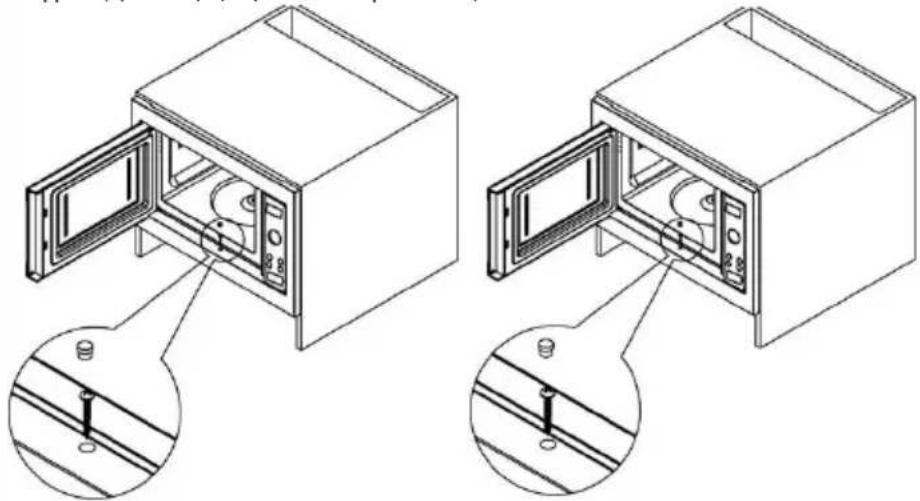
The device may interfere with your radio, TV, and other electronic devices. To reduce interference:
a) Clean the device's surface and vents. b) Place the radio, TV, and other devices away from the device. c) For better signal reception, adjust the antenna of the TV or radio.
DO NOT EXPOSE THE DEVICE TO RAIN OR MOISTURE TO PREVENT FIRE OR ELECTRIC SHOCK
- If the device does not work properly, or if it emits smoke or a burning smell:
a) Check if the power cord is properly connected. If not, unplug it from the outlet, wait 10 seconds, and plug it back in. b) Check if the power outlet is working. If it is normal, test the outlet with another device.
- If the device still does not work properly:
a) Check the timer settings. b) Check if the device is plugged in. If not, plug it in and try again.
ETEP CI3 XOFAPbIa ATAANFAH IPO5EMALAPdbI 03IH13 K08 AAMACAHbI3, EH XAKbIH OPHAACKAH ABTOPAAHdbIPbIFAH CEPBNC OPTAblFbIHXA6APAAcbiHbI3 CEHTPOM.
KENIIADIK XOHE KbI3MET KOPCETY
KocbIMwa aknapaT any ywiH HeMece npo6Maap naHa 60FaH XaFdaJa, ci3iH eAiH3eI CaTbIn aLyBbIaPbI KOaay opTaBbIFbHa xaabapacbIHb3 (opTaBbIK TeAeOHObIHbH Hemipi KeiAik TaOHObIHDa Kepcetiren). Erep ci3iH eaiH3de MyHdaJ opTaBbIK 60MaCa, Gorenje XepriAkti cayda YibMbIHb3Fa HeMece Gorenje Domestic Appliances KOMpanHraCbIHbIN CaTbIN aLyBbIApaDbI KOaay 6eAimHe xaabapacbIHb3. ABTOPaHdbIPbIAFaH cepBVC opTaBbIKTapbIHbIH MeKeHHaIaPbIMeH TeAeOHaApbl «Keniaik MInDeTTeMeAeR KITaPiAscbIHda HeMece Keniaik TaOHObIHda opHaanactbipfaH.
Bip eHdiipictik kei weriHde typi acnantap Hemece KOMnoHeHTep apacbHaFbl Tc peHaePiDeri bIKTIma CaiKec KeAmeuWiiKTep aTpki WOly 6pybiUtapbl, oH Tci, MaTePnaAadap Xane 6AMeDei XapbIK CNAKTBI Typi fakTopnapfa BaIAAhCTbl TybIHaybl MymkIn.
Yynde naaandahy ywiHa!
OHHIPYUJI ACNANTbIH JXyMbICbIH ACEP ETNEI TH 03REPICTEPdI EHI3Y KxkbIFbIH 03IHE KAALbIPADbl
gorenje
ARANHTE NEATH
Saç éuxapiotoué éliikpivá yia tny ayopá oac. Niotéuoué ɔti ouvtoa θa aioupeuté πως μπopeite πpayatika va βaoizote σta npoióvta μac. Tia va diukoluvθeite ΘN xρnontc oukeunc, επiouvàntoue auto to ekteveç, exyeiipidio odnyiw.
Oi obnyiec, 0a oac, Bonnoouv va Eoikwthetae e Tn vea oac ouokun. Papakaoue diaaboTepooekTKa piv xpoaioioiaoe Tn ouokun vi npwn opa.
AIAZTAENEI ZYNADEEHS
MICROWAVE OVEN CABINET
Cabinet Dimensions Requirements (see illustration)
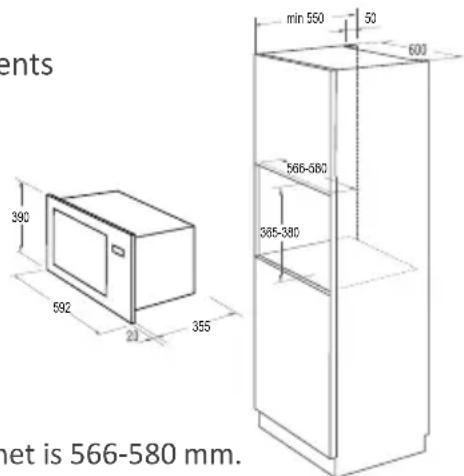
- Internal width of the cabinet is 566 - 580mm
- Internal height of the cabinet is 365 - 380mm
- Depth of the cabinet should not be less than 550 mm
- The outer dimension of the cabinet should not be less than 596 mm
- The thickness of the wooden cabinet top should not be less than 15 mm
INSTALLATION KIT
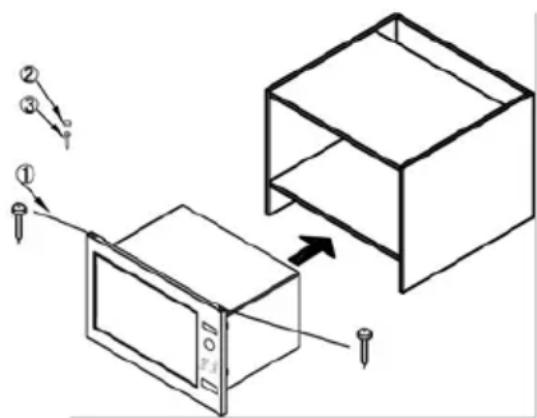
- Bolt φ3×20 mm 2 PCS
- Screw cover 1 PCS
- Bolt φ4×45 mm 1 PCS
- Put the microwave in the cupboard. Keep the microwave oven in a horizontal position, the distance from both side walls of the cabinet should be the same. Insert the screws (component 1) into the holes on the top edge of the frame and screw them into the furniture
- Open the microwave door, insert the screw (component 3) into the opening and screw it into the cabinet, then install the screw cover
The operation of the oven may cause interference to the radio, the television, or other electronic equipment. When this happens, you can reduce or eliminate the interference by taking the following measures.
a) Clean the door and the surfaces in contact with the oven. b) Place the radio, television, etc., as far as possible from the microwave oven. c) Use a properly installed antenna for the radio, television, etc., to obtain a good signal.
WE RESERVE THE RIGHT TO MAKE CHANGES THAT DO NOT AFFECT THE OPERATION OF THE DEVICE.
IPIN KAAESETE TON TEXNIKO ZEPBI

- INSTRUCTIONS FOR USE
- PROGRAM TIME
- RADIO INTERFERENCE (INTERFERENCE)
- SAFETY INSTRUCTIONS FOR GENERAL USE
- IMPORTANT - COOKWARE NOT TO USE IN YOUR MICROWAVE OVEN
- CONTROL PANEL
- DISPLAY
- FUNCTION BUTTON SIMPLICITY
- START | STOP
- BUTTON FOR DOOR OPENING
- CLOCK
- THE OVEN IS FITTED WITH A DIGITAL CLOCK. WHEN THE OVEN IS IN THE STANDBY MODE, THE CLOCK CAN BE SET IN THE 24-HOUR MODE BY PRESSING THE CLOCK KEY
- DELAY START
- THIS FUNCTION ALLOWS YOU TO PROGRAM A COOKING PROGRAM TO START AT A LATER TIME
- NOTE
- CHILD LOCK
- THIS FUNCTION IS USED TO PREVENT UNSUPERVISED OPERATION OF THE OVEN BY LITTLE CHILDREN. THE CHILD LOCK INDICATOR WILL SHOW UP ON THE DISPLAY SCREEN, AND THE OVEN CANNOT BE OPERATED WHILE THE CHILD LOCK IS SET
- INSTALLATION
- SPECIFICATIONS
- MOUNTING DIMENSIONS
- MICROWAVE OVEN CABINET
- INSTALLATION STEPS
- INSTALLATION KIT
- BEFORE YOU CALL FOR SERVICE
- GUARANTEE & SERVICE
- FOR PERSONAL USE ONLY
- SETTING THE TIME
- USING THE SIMPLICITY BUTTON
- ECO MODE - ENERGY SAVING
- TECHNICAL SPECIFICATIONS
- INSTALLATION DIMENSIONS
- LUKAΦ 3A MUKPOBBJIHOBATA
- KOMNJIEKT 3A MOHTAX
- REMOVE THE PLUG
- BEFORE CALLING FOR SERVICE
- WARRANTY AND SERVICE
- FOR HOUSEHOLD USE ONLY
- DEAR CUSTOMER
- ECO MODE
- SAFETY TIPS
- USEFUL SAFETY TIPS
- IMPORTANT - DISHES NOT SUITABLE FOR MICROWAVE OVENS
- TIME SETTING
- SIMPLICITY SWITCH
- START/STOP
- BUTTON FOR OPENING THE DOOR
- CAUTION
- DETAILED PROGRAMMING
- USING THE SELECTOR, YOU CAN START OR STOP A PROGRAM; TO DO THIS, TURN THE SELECTOR TO POSITION
- EAC
- IMPORTANT SAFETY INSTRUCTIONS
- TROUBLESHOOTING
- FUNCTIONS AND CONTROLS
- ON/OFF BUTTON
- CONTROL BUTTON FOR HEATING
- SAFETY
- THE DEVICE IS EQUIPPED WITH A DIGITAL DISPLAY. BY PRESSING THE BUTTON, YOU CAN SWITCH TO THE DESIRED MODE, 24-HOUR
- START TIMER
- THE BRUSH CAN BE REPLACED WITH A NEW ONE WHEN IT IS WORN OUT
- THIS FUNCTION IS USED TO PREVENT CHILDREN FROM ACCIDENTALLY TURNING ON THE DEVICE. THE CHILD LOCK INDICATOR IS ON, AND THE LOCK IS ACTIVATED WHEN THE DEVICE IS TURNED ON
- AUTO SHUT-OFF FUNCTION
- TURN OFF THE DEVICE
- SIMPLICITY FUNCTION BUTTONS
- OPERATING MODES
- MICROTOOLS AND CABINETS
- KENIIADIK XOHE KBI3MET KOPCETY
- YYNDE NAAANDAHY YWIHA
- ARANHTE NEATH
- AIAZTAENEI ZYNADEEHS
- IPIN KAAESETE TON TEXNIKO ZEPBI
Brand : GORENJE
Model : BM235SYB
Category : Microwave