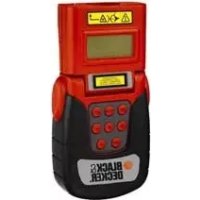
BDM100 - Rangefinder BLACK & DECKER - Free user manual and instructions
Find the device manual for free BDM100 BLACK & DECKER in PDF.



| Product type | Laser distance meter |
| Brand | Black & Decker |
| Model | BDM100 |
| Working distance | 0,61 - 12 m |
| Accuracy (at 3 m) | +/- 0,5% (relative) |
| Resolution | +/- 1 digit |
| Power supply | 9V battery |
| Weight | 0,18 kg |
| Ambient temperature | 5 - 40 °C |
| Laser wavelength | 630-675 nm |
| Laser class | 1 |
| Laser power | < 1 mW |
| Measurement functions | Distance, area, volume |
| Additional functions | Addition, subtraction, multiplication, memory, totaling |
| Display | LCD |
| Warranty | 24 months |
| Maintenance | Clean with a damp cloth, do not use solvents |
| Safety | Laser class 1, do not look into the beam |
| Repairability | Original parts, authorized technician |
| Usage | Indoor only |
Frequently Asked Questions - BDM100 BLACK & DECKER
User questions about BDM100 BLACK & DECKER
0 question about this device. Answer the ones you know or ask your own.
Ask a new question about this device
Download the instructions for your Rangefinder in PDF format for free! Find your manual BDM100 - BLACK & DECKER and take your electronic device back in hand. On this page are published all the documents necessary for the use of your device. BDM100 by BLACK & DECKER.
USER MANUAL BDM100 BLACK & DECKER
Your Black & Decker distance and space measurer has been designed for measuring distances, surface areas and volumes. This tool is intended for indoor use only. This tool is intended for consumer use only.
Safety instructions
Warning! When using battery-powered tools, basic safety precautions, including the following, should always be followed to reduce the risk of fire, leaking batteries, personal injury and material damage.
Read all of this manual carefully before operating the tool.
Retain this manual for future reference.
Keep work area clean
Cluttered areas and benches can cause accidents.
Consider work area environment
Do not expose the tool to rain. Do not use the tool in damp or wet conditions. Keep the work area well lit. Do not use the tool where there is a risk of causing fire or explosion, e.g. in the presence of flammable liquids and gases.
Keep children away
Do not allow children, visitors or animals to come near the work area or to touch the tool.
Do not overreach
Keep proper footing and balance at all times.
Stay alert
Watch what you are doing. Use common sense.
Do not operate the tool when you are tired.
Use appropriate tool
The intended use is described in this instruction manual.
Warning! The use of any accessory or attachment or performance of any operation with this tool other than those recommended in this instruction manual may present a risk of personal injury.
Check for damaged parts
Before use, carefully check the tool for damage. Ensure that the tool will operate properly and perform its intended function. Do not use the tool if any part is damaged or defective.
Store idle tools
When not in use, tools and batteries should be stored in a dry, locked up or high place, out of reach of children.
Repairs
This tool complies with relevant safety requirements. Repairs should only be carried out by qualified persons using original spare parts; otherwise this may result in considerable danger to the user.
Additional safety instructions for non-rechargeable batteries
Never attempt to open for any reason.
Do not store in locations where the temperature may exceed 40^
- When disposing of batteries, follow the instructions given in the section "Protecting the environment". Do not incinerate the batteries.
Under extreme conditions, battery leakage may occur. When you notice liquid on the batteries, proceed as follows:
- Carefully wipe the liquid off using a cloth. Avoid skin contact.
Additional safety instructions for lasers

Read all of this manual carefully.

This product is not to be used by children under 16.

Warning! Laser radiation.

Do not look into the laser beam.

Refer to the laser product characteristics.
This laser complies with class 1 according to EN 60825-1:1 2001+A11. Do not replace a laser diode with a different type. If damaged, have the laser repaired by an authorised repair agent.
Do not use the laser for any purpose other than identifying surfaces for measurement
An exposure of the eye to the beam of a class 1 laser is considered safe for a maximum of 0.25 seconds. Eyelid reflexes will normally provide adequate protection.
Never look into the laser beam directly and intentionally.
Do not use optical tools to view the laser beam.
Do not set up the tool at a position where the laser beam can cross any person at head height.
Do not let children come near the laser.
Warning! This tool is intended for indoor use only. Do not use the tool for outdoor applications.
Overview
- On/off switch
- Laser aperture
- Sonic aperture
- LCD screen
- Read button
- Key pad
- Battery cover
ENGLISH
Fig. A
- Set key
- Measurement system key
- Memory recall key
- Multiply key
12.Add key - Subtract key
- Store key
15.Sumkey
Assembly
Fitting the battery (fig. B)
Remove the battery cover (7) from the tool.
Connect the battery to the connector. The larger battery terminal connects to the smaller connector terminal.
Refit the cover and let it click into place.
Use
Setting the tool (fig. A, C & E)
The tool can show the results measured from either the front (18) or the back (19).
To switch from one measurement method to the other, press key (8).
Setting the measuring head (fig. E)
Turn the measuring head. Do not set the head at intermediate angels, as this will lead to inaccurate results.
Selecting the measurement system (fig. A & D)
The appliance can show the results both in the metrical (16) and the imperial system (17).
To switch from one measurement system to the other, press key (9).
Memory function (fig. A & D)
The use of the memory function (20) is indicated on the display.
Press key (14) to store the value on the display in the memory. The value remains stored as long as the appliance is switched on.
Press key (14) again to clear the memory.
Switching on and off (fig. B)
To switch the tool on, slide the on/off switch (1) to position I.
To switch the tool off, slide the on/off switch to position 0.
Measuring (fig. A)
Hold the tool at the required position with the measuring head aimed at the opposite surface.
Press key (5). The result appears on the display (4).
Note:
- During a measurement the laser dot helps identifying the opposite surface.
- After 15 seconds of inactivity the LCD screen will go blank. The last measurement data will not be retrieved unless it has been stored in the memory.
Measuring distances (fig. A)
Measure the first distance
Press key (12).
Measure the following distance.
Repeat the previous instruction as many times as required for the remaining distances.
Press key (15). The result appears on the display (4).
Measuring areas (fig. A)
Measure the length.
Press key (11).
Measure the width.
Press key (15). The result appears on the display (4) in square units.
Measuring volumes (fig. A)
Measure the length.
Press key (11).
Measure the width.
Press key (11).
Measure the height.
Press key (15). The result appears on the display (4) in cubic units.
Hints for optimum use
Use the tool only in an open space, without obstacles in the measuring path.
During a measurement avoid moving the tool until the distance is displayed.
To ensure a correct reading, repeat the measurement until you get at least 2 of the same readings within 3 attempts.
For successful measuring results, consider the following conditions:
- The measured object surface must be flat and hard.
- Distance measuring through glass is not possible.
- When the distance is out of the work range, the tool will beep and register an error.
Low battery indicator (fig. D)
The LCD screen will display a low battery symbol (21) when the battery is nearly empty.
Replace the battery on time.
Cleaning and maintenance
Your Black & Decker tool has been designed to operate over a long period of time with a minimum of maintenance. Regular clean the housing using a damp cloth. Do not use any abrasive or solvent-based cleaner.
Storage
When not in use, tools and batteries should be stored in a dry, locked up or high place, out of reach of children.
Protecting the environment
Tools

Should you find one day that your tool needs replacement, or if it is of no further use to you, think of the protection of the environment. Black & Decker repair agents will accept old Black & Decker tools and ensure that they are disposed of in an environmentally safe way.
Battery

If you want to dispose of the tool yourself, the battery must be removed as described above and disposed of in accordance with local regulations.
- Place the battery in a suitable packaging to ensure that the terminals cannot be short-circuited. Take the batteries to a local recycling station.
Technical data
BDM100
Voltage V 9
Working distance m 0.61 - 12
Accuracy (at 3m
relatively + / - 0.5%
no.of digits + / - 1
Environmental temperature ^ C5 - 40
Wave length nm 630-675
Laser class 1
Laser power mW < 1
Weight kg 0.18
EC declaration of conformity
BDM100
Black & Decker declares that these products conform to: 89/336/EEC, EN 60825, EN 61000
Kevin Hewitt
Director of Consumer Engineering
Spennymoor, County Durham DL16 6JG
United Kingdom
1-11-2004
Guarantee
Black & Decker is confident of the quality of its products and offers an outstanding guarantee. This guarantee statement is in addition to and in no way prejudices your statutory rights. The guarantee is valid within the territories of the Member States of the European Union and the European Free Trade Area.
If a Black & Decker product becomes defective due to faulty materials, workmanship or lack of conformity, within 24 months from the date of purchase, Black & Decker guarantees to replace defective parts, repair products subjected to fair wear and tear or replace such products to ensure minimum inconvenience to the customer unless:
The product has been used for trade, professional or hire purposes;
The product has been subjected to misuse or neglect;
The product has sustained damage through foreign objects, substances or accidents;
Repairs have been attempted by persons other than authorised repair agents or Black & Decker service staff.
To claim on the guarantee, you will need to submit proof of purchase to the seller or an authorised repair agent. You can check the location of your nearest authorised repair agent by contacting your local Black & Decker office at the address indicated in this manual. Alternatively, a list of authorised Black & Decker repair agents and full details of our after-sales service and contacts are available on the Internet at:
www.2helpU.com
Please visit our website www.blackanddecker.co.uk to register your new Black & Decker product and to be kept up to date on new products and special offers. Further information on the Black & Decker brand and our range of products is available at www.blackanddecker.co.uk
DEUTSCH
Director of Consumer Engineering
Spennymoor, County Durham DL16 6JG
United Kingdom
1-11-2004
Garantie
Spennymoor, County Durham DL16 6JG
Royaume-Uni
1-11-2004
Garantie
Spennymoor, County Durham DL16 6JG
United Kingdom
1-11-2004
Garanzia
Director of Consumer Engineering
Spennymoor, County Durham DL16 6JG
United Kingdom
1-11-2004
Garantie
Spennymoor, County Durham DL16 6JG
United Kingdom
1-11-2004
Garantía
Spennymoor, County Durham DL16 6JG
United Kingdom
1-11-2004
Garantia
Forvaras utom rackhall for barn
Varning! Laserstralining.

Kevin Hewitt
Director of Consumer Engineering
Spennymoor, County Durham DL16 6JG, United Kingdom
1-11-2004
Reservdelar / reparationer
Director of Consumer Engineering
Spennymoor, County Durham DL16 6JG
United Kingdom
1-11-2004
Director of Consumer Engineering
Spennymoor, County Durham DL16 6JG
United Kingdom
1-11-2004
Reservedele / reparationer
Director of Consumer Engineering Spennymoor, County Durham DL16 6JG,
United Kingdom
1-11-2004
Auto to epyaleio npooipzetai mvo yia epaotexvikxphon.
Odyieaopaaeia
Ppoox!KaTAnpOonepyaAeiwv,0a npEnei naVtva a lauabavovTa oI baokc npopuAeic aopaaia,c yia Tov nepioioTOU KIVDuvou npkayiac,diappocns uypou ano matapiec,OWatikwBbaewKai UIKWZmuw.
Piv xpoiooETo epyaio diaaote npooextka Tis npakatow oyniec.
ΦuaaleTe to eYxεipio auto yia ελλovtik avapopá.
AiaInpEirKaBapoToXwpoEpyaiaC
AkataotatoIxwpoI kal naykoEkykuiovov Kivduo Tpaunatou.
AaBcTe un' oyn TIC eNippaes Tou nepiBaAovToC
Mny ekTeTe nAekTpiKa epyaia o Upaia. PovTiote n
nepiox npyaoia c va evai kal aouevn. Mn xnooioieTo epyaiaov av unapxei kivuvoc va pokkne i npkayia n
ekpN,pi.x. Kovta oE uPakta uypa kai aepia.
Kpatate ta naiia o anootaon
Mny eintpene Tc naiia, eniokeTec n zwa va nnoiacouv 0to xwp epyaiaq n va ayyicouv to epyaieio.
MnokubeTnpa nla
Mn xnpaonoiieTe to epyaiao tav iote koupaevoC.
XpnooioieTo oOto epyaaleio
H evdeevyn xnpooinon avapepetai e autc TIC oonyiesxnoewc.
Ppoox! Too n xpon EApntmuatwv n npo0nkwv 000 kal npaypatonoin epyaownuou dv ouviotwta otic odnyie autec ykuovkiivduvo tpaumou.
EaeyTe eav to epyaiao aocexi 8aa8c
Piv ano m xpon, eYeTne npoektka to epyaiaio yia tuxov Znuec. Beaowte 6ti to epyaiaio aeitoupyei kavovika kai xpnoonoiitai yia to okoia yia tov onoio npooipetai. Mn xpoanoiote to epyaiaio av kaioio eEaptna tou napouiae iAattwa.
duayetyaepyaleiaoaosopaeaes
Otav xpnouoiouovta, ta epyaia kai o i npataie npenla va anoynkeuvot aE npo xwp, maepia ano ta naia.
Emokues
To epyaiao autoumuoppwvctaiue TIC oxetikc npountoeoeic aopaiaac.
OeIOKeuEc Ta npTeI va yivovtal mvo ano EIDKEUeVouc
TEXVIKOUc KAI ME Tn XpON AnokAeiTiky VmIoWv
avtaaakTKw, diaopepetkua npxTo EvdxOevo OoBapou
KIVouu YA To xpOnt.
Sigma npomegaatikcs obnyies aoopaiaac yia n enavaopropizoeves mataipes
Spennymoor, County Durham DL16 6JG, United Kingdom 1-11-2004
Eyyunon
H Black & Decker eiva aiyoun yia tvn noiota twv npoiovtwv ncs kai napexei onmuavtkiyuyunon. H napouoa ypantn eyyunon anotelepioothe dikaiwma oac kai dey zniowte ta ouvtaymuika oac diakawata. H eywnon ioxuei evtoc nsc enikpateiaq towkpatov Meawv mc Eupwaiknc Evomega cai ts Eupwaiknc Zwng Eeuehepw Suvaalayw.
επeipintwn nou kanoio npoiov nC Black & Decker npouiaoei bαaβn εaattiaac eλattwpatikwv uikwv, noiotntac epyaiaoc n Eλeiusc ouwviac μe Tc npodaypapecε vvtoc 24 muvw ano tv nuepounvia ayopac, n Black & Decker eyyuatai tv avtikataotaon twv eattwpatikwv tmuatow, tv eniokeu npoiovtwv nou exouv unootei eloym φθopa λoyxphonc n tv avtikataotaon twv npoiovtwv npokéevou va Exaopaiaei tv elaxiotn evoxnon otous πelatac nC, ektoC av:
To npoiov exi xpnoonoine i epyaiako, eayvelambdaiko nepiaalov n av exi evokiaot
Exiyivee oepaevn xpontou npoiovtoc n av exia npaaen
To npoiov exi unootei ano aaaaavtikeeva, ano ouie n loyaw atuxmuatoc
Exi yivei npooiaeia eiokeunc ano un Eouoiodotneva Kevtpa eniokeuw n ano npoownk o nou dev avnkel 0to npooikoc Black & Decker
Ia va Ioxuoei n Eyyunon, penei va unobalaete anodeli en ayopac otov nolnnt to EouaiooBto nevo kevtro Eniokeuwv. Evmupeothe iya to nnoiaotepo kevtpo Etnokcuwv tnc npioxnc oac, eikoiwovvtae μe ta ypapeia tc Black & Decker ont diubuvon nou avaypapetai oTo Eyxepidio. Enionc, ia va nnpopopopheite yia ta EouaiooBto nuevka kevtpa eoukeuwv tnC Black & Decker, tic λeTToupeiecs kai touc apuodiouc twv unpeowv nou napexovta ueta nV npopeite va avatpeETE OTO AiaiktuO stn dieuuvon: www.2helpU.com
Papakaoue va eiokeptite tv io0eia ma
www.blackanddecker.com ia va kataxwpnoet To veo oac
npoiov Black & Decker ka ia va evnepwveote ia ta vda
npoiovta kai ticldkec npoopoc. Iepioootepc
nnpopopiec oxetika m npapka Black & Decker ka t noipa
npoiovtwuac 8a bpte ot n dieuvon
www.blackanddecker.com


| Australia Black & Decker (Australia) Pty. Ltd. Tel. 03-8720 510020 Fletcher Road, Mooroolbark, Victoria, 3138 Fax 03-9727 5940 | |
| België/Belgique Black & Decker (Belgium) N.V. Tel. 015 - 47 92 11Campus Noord, Schaliënhoevedreef 20E Fax 015 - 47 92 102800 Mechelen | |
| Danmark Black & Decker Tel. 70 20 15 15Sluseholmen 2-4, 2450 København SV Fax 36 94 49 01Internet: www.blackanddecker.dk | |
| Deutschland Black & Decker GmbH Tel. 06126/21 - 0Black & Decker Str. 40, D - 65510 Idstein Fax 06126/21 29 80 | |
| Ελλάδα Black & Decker (Ελλάς) A.E. Tnλ. 210 8981616Στράβωνος 7 & Αεωφ. Bουλιαγμένης 159 Φαξ 210 8983285166 74 Γλυράδα - Αθήναwww.blackanddecker.gr | |
| Espana | Black & Decker Ibérica, S.C.A.Parque de Negocios "Mas Blau"Edificio Muntadas, c/Bergadá, 1, Of. A608820 El Prat de Llobregat (Barcelona) |
| France | Black & Decker (France) S.A.S.B.P. 21, 69571 Dardilly Cedex |
| Helvetia | ROFO AGGewerbezone Seeblick3213 Kleinbosingen |
| Italia | Black & Decker Italia SpAViale Elvezia 220052 Monza (MI) |
| Nederland | Black & Decker BeneluxJoulehof 12, 4622 RG Bergen op Zoom |
| New Zealand | Black & Decker Tel. 09 579 760081 Hugo Johnston DrivePenrose, Auckland, New Zealand |
| Norge | Black & Decker (Norge) A/SPostboks 4814, Nydalen, 0422 OsloInternet: www.blackanddecker.no |
| Österreich | Black & Decker Vertriebsges.m.b.HErlaerstraße 165, 1231 Wien |
| Portugal | Black & Decker Tel. 214667500Rua Egas Moniz 173S. João do Estoril2766-651 Estoril |
| Suomi | Black & Decker OyKeilasatama 3, 02150 EspooBlack & Decker Oy,Kägelhamnen 3, 02150 Esbo |
| Sverige | Black & Decker ABFabriksg. 7, 412 50 Göteborg |
| Türkije | İntratek Mühendislik ve Düş Tic. A.§Ortaklar Cad. No:19/280290 Mecidiyeköy / Istanbul |
| United Kingdom | Black & Decker Tel. 01753 511234210 Bath RoadSlough, Berkshire SL1 3YD |
| Middle East & Africa | Black & Decker (Overseas) A.G.PB 5420, Dubai, United Arab Emirates Fax +971 4 2826464 |
Dealer address Date of purchase
Handleradresse Kaufdatum
- Safety instructions
- Keep work area clean
- Consider work area environment
- Keep children away
- Do not overreach
- Stay alert
- Use appropriate tool
- Check for damaged parts
- Store idle tools
- Repairs
- Additional safety instructions for non-rechargeable batteries
- Additional safety instructions for lasers
- Overview
- ENGLISH
- Fig. A
- Assembly
- Fitting the battery (fig. B)
- Use
- Setting the tool (fig. A, C & E)
- Setting the measuring head (fig. E)
- Selecting the measurement system (fig. A & D)
- Memory function (fig. A & D)
- Switching on and off (fig. B)
- Measuring (fig. A)
- Note:
- Measuring distances (fig. A)
- Measuring areas (fig. A)
- Measuring volumes (fig. A)
- Hints for optimum use
- Low battery indicator (fig. D)
- Cleaning and maintenance
- Storage
- Protecting the environment
- Tools
- Battery
- Technical data
- BDM100
- EC declaration of conformity
- Guarantee
- www.2helpU.com
- DEUTSCH
- Garantie
- Garanzia
- Garantía
- Garantia
- Forvaras utom rackhall for barn
- Reservdelar / reparationer
- Reservedele / reparationer
- Odyieaopaaeia
- AiaInpEirKaBapoToXwpoEpyaiaC
- AaBcTe un' oyn TIC eNippaes Tou nepiBaAovToC
- Kpatate ta naiia o anootaon
- MnokubeTnpa nla
- XpnooioieTo oOto epyaaleio
- EaeyTe eav to epyaiao aocexi 8aa8c
- duayetyaepyaleiaoaosopaeaes
- Emokues
- Sigma npomegaatikcs obnyies aoopaiaac yia n enavaopropizoeves mataipes
- Eyyunon
Brand : BLACK & DECKER
Model : BDM100
Category : Rangefinder