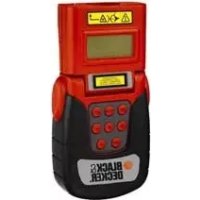
BDL100P - Rangefinder BLACK & DECKER - Free user manual and instructions
Find the device manual for free BDL100P BLACK & DECKER in PDF.



| Product Type | Laser distance meter (line projector) |
| Brand | Black & Decker |
| Model | BDL100P |
| Power supply | 3 V (2 LR6/AA batteries) |
| Laser class | 2 (IEC 60825) |
| Operating temperature | 0 °C to 40 °C |
| Weight (without batteries) | 0.06 kg |
| Main functions | Laser line projection, fixed and intermediate angles, use with protractor and square |
| Fixed angles | Parallel, left, right (see manual) |
| Included accessories | Protractor, square |
| Safety | Do not look directly at the laser beam; keep out of reach of children under 16 years |
| Maintenance | Clean with a dry cloth; do not expose to moisture |
| Repairability | Repairs by authorized technician only; use original parts |
| Warranty | 24 months (excluding professional use) |
| Certification | CE (EN 61010, EN 60825, EN 61000) |
Frequently Asked Questions - BDL100P BLACK & DECKER
User questions about BDL100P BLACK & DECKER
0 question about this device. Answer the ones you know or ask your own.
Ask a new question about this device
Download the instructions for your Rangefinder in PDF format for free! Find your manual BDL100P - BLACK & DECKER and take your electronic device back in hand. On this page are published all the documents necessary for the use of your device. BDL100P by BLACK & DECKER.
USER MANUAL BDL100P BLACK & DECKER
This Black & Decker tool has been designed to project laser lines to aid in DIY applications. This tool is intended for consumer use only.
Safety instructions
Warning! When using battery-powered tools, basic safety precautions, including the following, should always be followed to reduce the risk of fire, leaking batteries, personal injury and material damage.
Read all of this manual carefully before operating the tool.
Retain this manual for future reference.
Keep work area clean
Cluttered areas and benches can cause accidents.
Consider work area environment
Do not expose the tool to rain. Do not use the tool in damp or wet conditions. Keep the work area well lit. Do not use the tool where there is a risk of causing fire or explosion, e.g. in the presence of flammable liquids and gases.
Keep children away
Do not allow children, visitors or animals to come near the work area or to touch the tool.
Do not overreach
Keep proper footing and balance at all times.
Stay alert
Watch what you are doing. Use common sense. Do not operate the tool when you are tired.
Use appropriate tool
The intended use is described in this instruction manual.
Warning! The use of any accessory or attachment or performance of any operation with this tool other than those recommended in this instruction manual may present a risk of personal injury.
Check for damaged parts
Before use, carefully check the tool for damage. Ensure that the tool will operate properly and perform its intended function. Do not use the tool if any part is damaged or defective.
Store idle tools
When not in use, tools and batteries should be stored in a dry, locked up or high place, out of reach of children.
Repairs
This tool complies with relevant safety requirements.
Repairs should only be carried out by qualified persons using original spare parts; otherwise this may result in considerable danger to the user.
Additional safety instructions for non-rechargeable batteries
- Never attempt to open for any reason.
Do not store in locations where the temperature may exceed 40^
When disposing of batteries, follow the instructions given in the section "Protecting the environment". Do not incinerate the batteries.
Under extreme conditions, battery leakage may occur. When you notice liquid on the batteries, proceed as follows:
- Carefully wipe the liquid off using a cloth.
Avoid skin contact.
Additional safety instructions for lasers

Read all of this manual carefully.

This product is not to be used by children under 16.

Warning! Laser radiation.

Do not look into the laser beam.

Do not view the laser beam directly with optical instruments.
Refer to the laser product characteristics.
This laser complies with class 2 according to IEC 60825+A1+A2:2001. Do not replace a laser diode with a different type. If damaged, have the laser repaired by an authorised repair agent.
Do not use the laser for any purpose other than projecting laser lines.
An exposure of the eye to the beam of a class 2 laser is considered safe for a maximum of 0.25 seconds. Eyelid reflexes will normally provide adequate protection. At distances over 1m the laser complies with class 1 and thus is considered completely safe.
- Never look into the laser beam directly and intentionally.
Do not use optical tools to view the laser beam.
Do not set up the tool at a position where the laser beam can cross any person at head height.
Do not let children come near the laser.
Do not aim the laser beam at a reflective surface.
Features
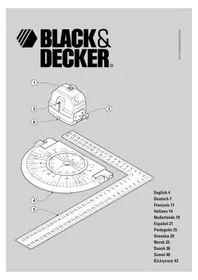
- On/off switch
- Laser aperture
-
Battery cover
-
Protractor
- Set square
- Front foot
Assembly
Warning! Make sure that the tool is switched off.
Fitting the batteries (fig. A)
Remove the battery cover (3) from the tool.
- Insert the batteries into the tool in the orientation as shown.
- Refit the cover and let it click into place.
Installing the tool (fig. B & C)
The tool can be installed on the protractor provided.
Alternatively, the tool can be installed with the protractor on the set square provided.
Fitting the tool to the protractor
Before installing the tool onto the protractor, the front foot (6) must be retracted.
Position the protractor on the workpiece.
Align the bottom of the tool with the protractor (4).
At intermediate angles, place the rear feet (7) into the circular groove (8).
At fixed/pre-set angles, place the rear feet into the corresponding holes (9).
Installing the protractor (fig. C & D)
The tool can be used with the protractor to project laser lines at a fixed/pre-set or intermediate angle, at any position on or from the edge of a workpiece. For improved accuracy, a set square (5) is provided with the tool.
Against the workpiece (fig. C)
Flip up the edge locators (10).
Align the edge locators with the edge of the workpiece.
Position the protractor (4) on the workpiece. Make sure the edge locators fit snug against the workpiece.
- Place the tool onto the protractor.
Using the set square (fig. D)
Align the set square (5) with the edge of the workpiece.
Position the set square on the workpiece.
Cling the protractor (4) on the set square. Make sure the raised edge (11) fits snug against the set square.
- Place the tool onto the protractor.
Use
Fold out the front foot (6).
If necessary, install the tool onto the protractor (4) and/or set square (5).
Slide the on/off switch (1) forward to switch the tool on.
Move the tool as necessary to position the laser line. The laser beam marks the intended line of cut.
After finishing work, always switch off the tool by sliding the on/off switch (1) backward.
Use with the protractor (fig. B)
Fixed/preset angles (fig. E)
Align the feet (7) of the tool with a combination of holes on the protractor (4). Refer to the table below for a list of fixed angles that can be selected.
Fit the feet into the holes.
Switch on the tool.
Angle
- 0^ left parallel with the edge of the workpiece.
- 30^ left
- 45^ left
- 90^ at a square angle with edge of workpiece.
- 45^ right
- 30^ right
- 0^ right parallel with the edge of the workpiece.
Intermediate angles (fig. B)
Align the feet (7) of the tool with the circular groove (8) in the protractor (4).
Fit the feet into the circular groove.
Adjust the position of the tool as necessary to position the laser line.
Switch on the tool.
Use with the set square (fig. D)
Position the set square as required on the workpiece.
Mark the starting point for the intended cut using the set square ruler.
Place the protractor (4) onto the set square. Align the 90^ indication (19) with the mark on the workpiece.
Place the tool onto the protractor.
Switch on the tool.
Protecting the environment

Separate collection. This product must not be disposed of with normal household waste.
Should you find one day that your Black & Decker product needs replacement, or if it is of no further use to you, do not dispose of it with household waste. Make this product available for separate collection.
ENGLISH

Separate collection of used products and packaging allows materials to be recycled and used again. Re-use of recycled materials helps prevent environmental pollution and reduces the demand for raw materials.
Local regulations may provide for separate collection of electrical products from the household, at municipal waste sites or by the retailer when you purchase a new product.
Black & Decker provides a facility for the collection and recycling of Black & Decker products once they have reached the end of their working life. To take advantage of this service please return your product to any authorised repair agent who will collect them on our behalf.
You can check the location of your nearest authorised repair agent by contacting your local Black & Decker office at the address indicated in this manual. Alternatively, a list of authorised Black & Decker repair agents and full details of our after-sales service and contacts are available on the Internet at: www.2helpU.com
Batteries

At the end of their useful life, discard batteries with due care for our environment.
Remove the batteries as described above.
Place the batteries in a suitable packaging to ensure that the terminals cannot be short-circuited.
Take the batteries to a local recycling station.
Technical data
BDL100P
Voltage V 3
Battery size 2 x LR6 (AA)
Laser class 2
Operating temperature ^ C0 - 40
Weight (without battery) kg 0.06
EC declaration of conformity
BDL100P
Black & Decker declares that these products conform to:
EN 61010, EN 60825, EN 61000
Kevin Hewitt
Director of Consumer Engineering
Spennymoor, County Durham DL16 6JG
United Kingdom
01-11-2005
Guarantee
Black & Decker is confident of the quality of its products and offers an outstanding guarantee. This guarantee statement is in addition to and in no way prejudices your statutory rights. The guarantee is valid within the territories of the Member States of the European Union and the European Free Trade Area.
If a Black & Decker product becomes defective due to faulty materials, workmanship or lack of conformity, within 24 months from the date of purchase, Black & Decker guarantees to replace defective parts, repair products subjected to fair wear and tear or replace such products to ensure minimum inconvenience to the customer unless:
The product has been used for trade, professional or hire purposes;
The product has been subjected to misuse or neglect;
The product has sustained damage through foreign objects, substances or accidents;
Repairs have been attempted by persons other than authorised repair agents or Black & Decker service staff.
To claim on the guarantee, you will need to submit proof of purchase to the seller or an authorised repair agent. You can check the location of your nearest authorised repair agent by contacting your local Black & Decker office at the address indicated in this manual. Alternatively, a list of authorised Black & Decker repair agents and full details of our after-sales service and contacts are available on the Internet at:
www.2helpU.com
Please visit our website www.blackanddecker.co.uk to register your new Black & Decker product and to be kept up to date on new products and special offers. Further information on the Black & Decker brand and our range of products is available at www.blackanddecker.co.uk
Director of Consumer Engineering
Spennymoor, County Durham DL16 6JG
United Kingdom
01-11-2005
Garantie
Spennymoor, County Durham DL16 6JG
Royaume-Uni
01-11-2005
Garantie
Spennymoor, County Durham DL16 6JG
United Kingdom
01-11-2005
Garanzia
Director of Consumer Engineering
Spennymoor, County Durham DL16 6JG
United Kingdom
01-11-2005
Garantie
Spennymoor, County Durham DL16 6JG
United Kingdom
01-11-2005
Garantía
Spennymoor, County Durham DL16 6JG
United Kingdom
01-11-2005
Garantia
Forvaras utom rackhall for barn
Director of Consumer Engineering
Spennymoor, County Durham DL16 6JG
United Kingdom
01-11-2005
Reservdelar / reparationer
Kevin Hewitt
Director of Consumer Engineering
Spennymoor, County Durham DL16 6JG, United Kingdom
01-11-2005
Director of Consumer Engineering
Spennymoor, County Durham DL16 6JG
United Kingdom
01-11-2005
Reservedele / reparationer
Varoitus! Lasersately.

Director of Consumer Engineering
Spennymoor, County Durham DL16 6JG
United Kingdom
01-11-2005
XpoHOnIOeIeTo oWToEpyAeio
H evbdeiyevn xnoaonoinan avapepetai e autc tic oyniecs xnoews.
Ppoox! Too n xpon EApntmuatwv n npooqkwv ooo kal npaypatonoinn epyaowv nou dev ouviotwral otic odnyie autc ekyuovi kivduvo tpaumoiou.
EaeyTe eav to epyaieio oac exi 6a6e
Piv ano m xpon, eYeTe npoeekta to epyaiaio yua tuxov Znuec. Beaawte 0ti to epyaiaio aeitoupyei kavovka kal xpnoantoietai yia to okoia tvov onio npooipctai. Mn xpnoantoieTo epyaiaio av kanoio EApTma tou napouiae iAattwa.
Uayetyaepyaleiaosaoepaegepos
Otav dev xonouoovta, ta epyaia kai o nataie npene va anoekuovtae Enpo xwp, aakpi ana ta naia.
Emokues
To epyaieio auto oumuopwveai me tic oxetikc npoutoeoi aopaiaac. OI eIOKEuEc 0a npenei va yivovta mOvo ano EbiKeuEvouc texvikoC kai me th xphon anokkietiky vnoawavtalaktkw, diapopetika unapx to evexoevo oapao kivovou ia to xphotn.
Zunnnpwpatikcs obnyies aoopaiaias yia n enavaopropizoeves mntapies
Mny Koiatae m deoun tou aeep.

Mnv kntate kateuthetaiv otn dequn Tou aeIep Kavovtac xpon onnIKWv epyaalewv.

AvatpeTe Ota xapaktnpotaTou npoiovtoq eP.
Auto to epyaaleio alecpoumuoppwveai e Tny katnyopia 2 ouppwva ie to npotuno IEC 60825+A1+A2:2001.Mnv avtikataoTnoeTe mdo oleep me aann diapopeetikou toun. Eav nae iBaa, nntote nTv enIOKeun Tc diobou alecp ano eouaoobtoevo Kevtpo eIOKEuwv.
MxnpaonoeiTe to yia oniooHnote aAlo oKoTo EKToc ano npoBoAn ypaumw AeEep.
H EkEoon maIwv oE akTiva aeIep katnyopiac 2 ev
eewpeiTai eIKivovn yia evioto xpOvo 0,25
eutepoIeTTWv. TaavakAaOTka twv bEapipow Tou
muoi napexouv enapkn npootaia. Ia anootaon navw
an1m, n aktiva aeIep ivai katnyopiac 1 kai ouvnc
eewpeiTai eVTalewscakivovn.
Noté μην KoItατε aneuaεiaç kalokonμa τδεμη λειερ.
Mx npouoioite ontik aepyaleia ia va bienet e nva krtiva aeizep.
EAAHNIKA
Mny toioeite to epyaleio oE theon onou n aktiva aleep utopei va diaoxiae i kanoio atofo sto uoc tou Kepaiou.
Mny apnve Tiaia va nnaouv to aeep.
MnV oToxEueTe Tn 8eou n aeizep oe avakaoitkn eupavia.
Xapaktnpiotiká
- Diakorttns on/off
2.△iaotaoεic λειερ - KaIupmu μnataipias
- Moipoyvomega
5.OpOoywviouεtpo - Mπροστινό πόδι
Euvapuoloynon
PpOeIOnoInon! Beaawtei e oTu to epyaleio evau anevpyoOniuevo.
Tonoetnon matarapiwv (EK.A)
ApaipoeTe to kaumu maTapiac (3) ano to epyaio.
ToonthetaTcIgntapieCeOaOToepyaleiokataTov unoekvuoevo npoaavatoiao.
Enavatonothe note to kaiuma kai apnoTe to va aopalioe otn owtou eon.
Eykaotaon rou epyaleiou (eik. B & C)
To epyaIeio mnpoei va ykataoTaOei otov npexóEv oipoyvwoio. diaopopeTKa, To epyaIeio mnpoei va EykataoTaOei me To ipoyvwoio OTo npexóEv oopoywviouEtpo.
Tooetnou epyaieou oTo poipoywovio
Piv nV EYkataoan Tou epyaieou oTo moipoywovio, To upootivo ndi (6) npentv va aceut.
ToOnoTeHOTe To oIoPooywovio OTo TePaxio EpyaiaC.
Euypauiote to katw epos tou epyaaiou e to oipoyuvovio (4).
eviolaueoc yawiec, tonoetnte to niow nod (7) 0to kukakocauaki (8).
0tahepec/ npoopioevec ywvie, tonoetne to niow nodi e avtiotoxce onec (9).
Eykaaon rou oipoyvmoviou (eK.C&D)
To epyaiao npoei va xnpaonointhe i e to oipoywovio vi a n v npoBoAn ypaumaw leiep o staepec/npooipueve c n eviaeoc ywivc, oe kte onmu o eva teuxo epyaia c n paia an to ta akpa tou. Ia bwtwuevnaqpiia, e to epyaia diatieetai eva opoywioueTpo (5).
Kata to tepaxio epyagias (EK.C)
Avebaote Touc evtontieic ywivv (10).
EuypaiaTe Touc EvtonioTeic ywivv u Tg yovics Tou Teuayiou epyacia.
TooTheTto oipoywovio (4) 0To Teayio epyaoia. Beaowte 0ti oEvtonoteic ywwv evapmuOovta kata to Teayio epyoia.
TooTheTTo epyaEio naov oTo oIpoyvmoVIO.
XpnoTnC EVDIEKTKc Luxvias (EIK.D)
Euypauioteovopoywioetpo(5)ue taakpa Tou TEaixou epyaoia.
TOnoTeMeToTovOpooywviuEptoTo Teuxoepyacia
Tepewote to oipoyvwoio (4) otov opoywvioueTpo. Baaowte ot n aveaogevc ywies (11) npoapuocovta kalka tao tv opoywvioueTpo.
Toonotote Toepaiao naw oTo oipoywovio.
Xpno
Avoieto npooTivo nod (6).
Av xpeiaotei, ykataohtote to epyaieio oTo 10ipoyvwovio (4) kai/ n oTo opOoywiouetpo (5).
OIAOHTOE To diaKoTn on/off (1) mnpoTa yia va theoTe To epyaIio 0e IeIoupyia.
Metakivote To epaaleio onwoc xpeiaetai yia va fepeTe Tynpaun aeepoTn oomega thcog. H deoun aeipop OnueiwvTynpaun konnc.
Meta to TeLoos epyaiaic, oBnoTe navTa to epyaiaio Tpaawvta niow toviakontn on/off (1).
Xpno n e to oipoyvwooio (EIK.B)
Taepc/npoopioevc ywies (EK.E)
Euuypauiote to ndi (7) Tou epyaieou eva ouvuao oonov sto moipoywovio (4).AvatpeTe otov napakatowivaka yia mla iota otaepov ywivnou mtopov va enlxtouv.
Toonoe ta noida otic onc.
Θεστε σε λειουργία το μήχάνημα.
Vvia
- 0^ apioTepa npapaaanla to akpos Tou Teuaxiou epaiaoc.
- 30^ aipotepa
- 45^ aipotepa
- 90^ oE opBia ywvia To akpoc Tou Teayaoiac
16.45°δεξα - 30^ 8Ela
- 0^ i npapalnla toakpocToueuaioEpyaiaic.
Evoiαεεγωνiε(εικ.В)
Euypauiote to nol (7) tou epyaieiou e to kukaio auak (8) oTo oipoyuovio (4).
Tono to noi oTo Kukaio auakl.
Spennymoor, County Durham DL16 6JG
United Kingdom
01-11-2005
Eyyunon
H Black & Decker eiva oiyoun yia tvn noiota twv npoiovtwv ncs kai napexei onmaavikn eyyunon. H napouoa ypantn nyuunon anotelepiopo0eTo dikaiwa aac kai dey zniwve ta ouvtaymuataocdkaawmuata. H eyynon ioxue Evtoc n c enkpatiaac twv Kpatow Meawv mEupwnaikc Evwoqkaiqz Wvns Eeuepow Suvaalayov.
επeipintwn nou kanoio npoiov nC Black & Decker napouiaoei βaβn εaattiaac eλattwataikov uikov, noiotntac epyaiaac n eaauicns ouwviac μe tic npodaypapec evtoc 24 unvaw ano tv nuepounvia ayopac, n Black & Decker eyyuatai tv avtikataotaon twv eaattwataikov tunmuatow, tv eniokeuin npoiovtwv nou exouv unooetie eloyn φθopa λoyxphongn tv avtikataotaon twv npoiovtwv npokεμevou va eaoapaioei tv elambdaiotn evoxnan otous πaletc nC, ektoc av:
To npoiov exi xpnaoioonthe i epyaiako, eayeuaatiko nepiiaovn avexevoik
Exyiveeepaevn xon ton Tou npoiovtoc n av ex npapaeyn
EAAHNIKA
To npoiov exi unootei ano aaaa avtkeieva, ano ouiae n loyaw atuxmuatos
Exi yivei npoanaeia eikunc ano n Eouoiobotmeva Kevtpa eikuwv n ano npoownk oou dve avkei oTo npoownko ts Black & Decker
Tia va ioxuoi n Eyyunon, npenlae va unobalte anodEi en ayopac otov nolnnt to Eouoiootnevo kevtro EIOKEUw. Evmuowte yta to naiotepo kevtpo EIOKEUw Tnc nepioxc oac, EIKoivwwvtae u ta ypaepia Tc Black & Decker stn diubuvon nou avaypapetai 0to Exyepidio. Eionc, ia va nnpopopntheta iya ta Eouaioohtmeva kvetpa eiokeuw tnc Black & Decker, tic aeToupeie c kal touc apoDlouc twv umpeoiw v nou napexovtai meta nV niawnon, mnpoeite va avatpeTe OTO AiaiktuO tn dEuyuvon:
www.2helpU.com
Papakaoue va eiokeptite nV IOOeIa ma
www.blackanddecker.com ia va kataxwpnoeTe TO veo oac
npoiov Black & Decker ka ia va evnepwveoTE ia ta vea
npoiovta kai tic Eikoc npoopoc. IepiooTepec
nnpoopiec oxetika m npapka Black & Decker ka m oeipa
npoiovtwu ma 8a bpite OTN dEuvon
www.blackanddecker.com
| Australia Black & Decker (Australia) Pty. Ltd. Tel. 03-8720 510020 Fletcher Road, Mooroolbark, Victoria, 3138 Fax 03-9727 5940 | |
| België/Belgique Black & Decker (Belgium) N.V. Tel. 015 - 47 92 11Campus Noord, Schaliënhoevedreef 20E Fax 015 - 47 92 102800 Mechelen | |
| Danmark Black & Decker Tel. 70 20 15 15Sluseholmen 2-4, 2450 København SV Fax 36 94 49 01Internet: www.blackanddecker.dk | |
| Deutschland Black & Decker GmbH Tel. 06126/21 - 0Black & Decker Str. 40, D - 65510 Idstein Fax 06126/21 29 80 | |
| ΕλλάδαβαBlack & Decker (Ελλας) A.E. Tηλ. 210 8981616Στράβωνος 7 & Αεωφ. Bουλιαγμένης 159 Φαξ 210 8983285166 74 Γλυράδα - Αθήναwww.blackanddecker.gr | |
| Espana | Black & Decker Ibérica, S.C.A.Parque de Negocios "Mas Blau"Edificio Muntadas, c/Bergadá, 1, Of. A608820 El Prat de Llobregat (Barcelona) |
| France | Black & Decker (France) S.A.S.B.P. 21, 69571 Dardilly Cedex |
| Helvetia | ROFO AGGewerbezone Seeblick3213 Kleinbosingen |
| Italia | Black & Decker Italia SpAViale Elvezia 220052 Monza (MI) |
| Nederland | Black & Decker BeneluxJoulehof 12, 4622 RG Bergen op Zoom |
| New Zealand | Black & Decker Tel. 09 579 760081 Hugo Johnston DrivePenrose, Auckland, New Zealand |
| Norge | Black & Decker (Norge) A/SPostboks 4814, Nydalen, 0422 OsloInternet: www.blackanddecker.no |
| Österreich | Black & Decker Vertriebsges.m.b.HErlaerstraße 165, 1231 Wien |
| Portugal | Black & Decker Tel. 214667500Rua Egas Moniz 173S. João do Estoril2766-651 Estoril |
| Suomi | Black & Decker OyKeilasatama 3, 02150 EspooBlack & Decker Oy,Kägelhamnen 3, 02150 Esbo |
| Sverige | Black & Decker ABFabriksg. 7, 412 50 Göteborg |
| Türkije | Intratek Mühendislik ve Düsseldorf A.S.Atatürk Mah. Girne Cad. No. 4534750 Küçukbkalköy Kadiköy Istanbul |
| United Kingdom | Black & Decker Tel. 01753 511234210 Bath RoadSlough, Berkshire SL1 3YD |
| Middle East & Africa | Black & Decker (Overseas) A.G.PB 5420, Dubai, United Arab Emirates Fax +971 4 2826466 |
Dealer address Date of purchase
Händleradresse Kaufdatum
- Safety instructions
- Keep work area clean
- Consider work area environment
- Keep children away
- Do not overreach
- Stay alert
- Use appropriate tool
- Check for damaged parts
- Store idle tools
- Repairs
- Additional safety instructions for non-rechargeable batteries
- Additional safety instructions for lasers
- Features
- Assembly
- Fitting the batteries (fig. A)
- Installing the tool (fig. B & C)
- Fitting the tool to the protractor
- Installing the protractor (fig. C & D)
- Against the workpiece (fig. C)
- Using the set square (fig. D)
- Use
- Use with the protractor (fig. B)
- Fixed/preset angles (fig. E)
- Angle
- Intermediate angles (fig. B)
- Use with the set square (fig. D)
- Protecting the environment
- ENGLISH
- Batteries
- Technical data
- BDL100P
- EC declaration of conformity
- Guarantee
- www.2helpU.com
- Garantie
- Garanzia
- Garantía
- Garantia
- Forvaras utom rackhall for barn
- Reservdelar / reparationer
- Reservedele / reparationer
- XpoHOnIOeIeTo oWToEpyAeio
- EaeyTe eav to epyaieio oac exi 6a6e
- Uayetyaepyaleiaosaoepaegepos
- Emokues
- Zunnnpwpatikcs obnyies aoopaiaias yia n enavaopropizoeves mntapies
- EAAHNIKA
- Xapaktnpiotiká
- Euvapuoloynon
- Tonoetnon matarapiwv (EK.A)
- Eykaotaon rou epyaleiou (eik. B & C)
- Tooetnou epyaieou oTo poipoywovio
- Eykaaon rou oipoyvmoviou (eK.C&D)
- Kata to tepaxio epyagias (EK.C)
- XpnoTnC EVDIEKTKc Luxvias (EIK.D)
- Xpno
- Xpno n e to oipoyvwooio (EIK.B)
- Taepc/npoopioevc ywies (EK.E)
- Vvia
- Evoiαεεγωνiε(εικ.В)
- Eyyunon
Brand : BLACK & DECKER
Model : BDL100P
Category : Rangefinder