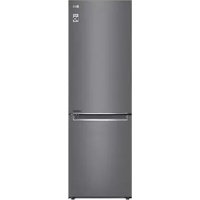
GBB61DSJMN - Fridge LG - Free user manual and instructions
Find the device manual for free GBB61DSJMN LG in PDF.


User questions about GBB61DSJMN LG
0 question about this device. Answer the ones you know or ask your own.
Ask a new question about this device
Download the instructions for your Fridge in PDF format for free! Find your manual GBB61DSJMN - LG and take your electronic device back in hand. On this page are published all the documents necessary for the use of your device. GBB61DSJMN by LG.
USER MANUAL GBB61DSJMN LG
Read this owner's manual thoroughly before operating the appliance and keep it handy for reference at all times.
EN ENGLISH ES ESPANOL IT ITALIANO PL POLSKI SR SRPSKI
BG 5bJIAPCKN ET EESTI LT LIETUVIU PT PORTUGUES SV SVENSKA
CZ CESTINA FI SUOMI LV LATVIESU RO ROMAN
DA DANSK FR FRANCAIS MK MAKEJOHCKI SK SLOVENCINA
DE DEUTSCH HR HRVATSKI NL NEDERLANDS SL SLOVENSCINA
EL EAHNIKA HU MAGYAR NO NORSK SQ SHQIP
MFL70584303
Rev.06_201210
www/lg.com
TABLE OF CONTENTS
This manual may contain images or content different from the model you purchased.
This manual is subject to revision by the manufacturer.
SAFETYINSTRUCTIONS 3
IMPORTANT SAFETY INSTRUCTIONS 3
Disposal of Your Old Appliance 10
INSTALLATION 11
Dimensions and Clearances 11
Ambient Temperature 11
Accessories 12
Reversing Doors 12
Leveling the Appliance 12
Connecting the Appliance 12
Moving the Appliance 12
OPERATION 13
Parts and Functions 13
Notes for Operation 15
Control Panel 17
Water Dispenser (^*) 19
Water Dispenser Tank 19
Ice Tray 20
Fresh Converter (^*) 20
Fresh Vegetable Printer (^*) 21
Folding Shelf 21
Other Functions 22
SMART FUNCTIONS 23
LG ThinQ Application 23
Using Smart DiagnosisTM 25
MAINTENANCE 26
Notes for Cleaning 26
Cleaning the Door Basket 26
Cleaning the Shelf 27
Cleaning the VegetableDrawer 27
Cleaning the Crisper Cover 27
Cleaning the Freezer Drawer 28
Cleaning the Water Dispenser 28
TROUBLESHOOTING 29
The following safety guidelines are intended to prevent unforeseen risks or damage from unsafe or incorrect operation of the appliance.
The guidelines are separated into 'WARNING' and 'CAUTION' as described below.

This symbol is displayed to indicate matters and operations that can cause risk. Read the part with this symbol carefully and follow the instructions in order to avoid risk.

WARNING
This indicates that the failure to follow the instructions can cause serious injury or death.

CAUTION
This indicates that the failure to follow the instructions can cause the minor injury or damage to the product.
IMPORTANT SAFETY INSTRUCTIONS

WARNING
To reduce the risk of explosion, fire, death, electric shock, injury or scalding to persons when using this product, follow basic precautions, including the following:
Children in the Household
-
This appliance is not intended for use by persons (including children) with reduced physical, sensory or mental capabilities, or lack of experience and knowledge, unless they have been given supervision or instruction concerning use of the appliance by a person responsible for their safety. Children should be supervised to ensure that they do not play with the appliance.
-
If the appliance is equipped with a lock (some models only), keep the key out of reach of children.
For use in Europe:
This appliance can be used by children aged from 8 years and above and persons with reduced physical, sensory or mental capabilities or lack of experience and knowledge if they have been given supervision or instruction concerning use of the appliance in a safe way and understand the hazards involved. Children shall not play with the appliance. Cleaning and user maintenance shall not be made by children without supervision.
Installation
-
This appliance should only be transported by two or more people holding the appliance securely.
-
Ensure that the socket outlet is properly grounded, and that the earth pin on the power cord is not damaged or removed from the power plug. For more details on grounding, inquire at an LG Electronics customer information centre.
- This appliance is equipped with a power cord having an equipment-grounding conductor and a grounding power plug. The power plug must be plugged into an appropriate socket outlet that is installed and grounded in accordance with all local codes and ordinances.
- If the power cord is damaged or the hole of the socket outlet is loose, do not use the power cord and contact an authorized service centre.
-
Do not plug the appliance into a multi socket adapter which does not have a power cable (mounted).
-
Do not modify or extend the power cable.
-
The appliance should be connected to a dedicated power line which is separately fused.
-
Do not use a multi socket outlet which is not properly grounded (portable). In case of using a properly-grounded multi socket outlet (portable), use the multi socket outlet with the current capacity of the power code rating or higher and use the multi socket outlet only for the appliance.
-
Install the appliance in a place where is easy to unplug the power plug of the appliance.
- Be careful not to point the power plug up or let the appliance lean against the power plug.
Install the appliance on a firm and level floor.
-
Do not install the appliance in a damp and dusty place. Do not install or store the appliance in any outdoor area, or any area that is subject to weathering conditions such as direct sunlight, wind, rain, or temperatures below freezing.
-
Do not place the appliance in direct sunlight or expose it to the heat from heating appliances such as stoves or heaters.
- Be careful not to expose the rear of the appliance when installing.
- Be careful not to let the appliance door fall during assembly or disassembly.
-
Be careful not to pinch, crush, or damage the power cable during assembly or disassembly of the appliance door.
-
Do not connect a plug adapter or other accessories to the power plug.
Operation
-
Do not use the appliance for any purpose (storage of medical or experimental materials or shipping) other than any domestic household food storage use.
-
Unplug the power plug during a severe thunderstorm or lightening or when not in use for a long period of time.
-
Do not touch the power plug or the appliance controls with wet hands.
-
Do not bend the power cable excessively or place a heavy object on it.
-
If water penetrates electrical parts of the appliance, disconnect power plug and contact an LG Electronics customer information centre.
-
Do not place hands or metallic objects inside the area emitting the cold air, cover or heat releasing grille on the back.
-
Do not apply excessive force or impact to the back cover of the appliance.
- Do not put animals, such as pets into the appliance.
-
Be careful of nearby children when you open or close the appliance door. The door may bump the child and cause injury.
-
Avoid the danger of children getting trapped inside the appliance. A child trapped inside the appliance can cause suffocation.
- Do not place heavy or fragile objects, containers filled with liquid, combustible substances, flammable objects (such candles, lamps, etc.), or heating devices (such as stoves, heaters, etc.) on the appliance.
-
If there is a gas leakage (isobutane, propane, natural gas, etc.), do not touch the appliance or power plug and ventilate the area immediately. This appliance uses a refrigerant gas (isobutane,R600a). Although it uses a small amount of the gas, it is still combustible gas. Gas leakage during appliance transport, installation or operation can cause fire, explosion or injury if sparks are caused.
-
Do not use or store flammable or combustible substances (ether, benzene, alcohol, chemical, LPG, combustible spray, insecticide, air freshener, cosmetics, etc.) near the appliance.
- Immediately unplug the power plug and contact an LG Electronics customer information centre if you detect a strange sound, odour, or smoke coming from the appliance.
- Fill with potable water only into icemaker or dispenser water tank.
- Do not damage the refrigerant circuit.
- Do not place any electronic appliance (such as heater and mobile phone) inside the appliance.
Maintenance
- Disconnect the power cord before cleaning the appliance or replacing the inside lamp (where fitted).
- Securely plug the power plug in the socket outlet after completely removing any moisture and dust.
- Never unplug the appliance by pulling on the power cable. Always grip the power plug firmly and pull straight out from the socket outlet.
- Do not spray water or inflammable substances (toothpaste, alcohol, thinner, benzene, flammable liquid, abrasive, etc.) over the interior or exterior of the appliance to clean it.
- Do not clean the appliance with brushes, cloths or sponges with rough surfaces or which are made of metallic material.
- Only qualified service personnel from LG Electronics service centre should disassemble, repair, or modify the appliance.
Contact an LG Electronics customer information cent move and install the appliance in a different location.
- Do not use a hair drier to dry the inside of the appliance or place a candle inside to remove the odours.
- Do not use mechanical devices or other means to accelerate the defrosting process.
Disposal
- When discarding the appliance, remove the door gasket while leaving the shelves and baskets in place and keep children away from the appliance.
- Dispose of all packaging materials (such as plastic bags and styrofoam) away from children. The packaging materials can cause suffocation.
Technical Safety
- Keep ventilation openings, in the appliance enclosure or in the built-in structure, clear of obstruction.
- Do not use electrical appliances inside the refrigerator.
- The refrigerant and insulation blowing gas used in the appliance require special disposal procedures. Consult with service agent or a similarly qualified person before disposing of them.
- Refrigerant leaking out of the pipes could ignite or cause an explosion.
- The amount of refrigerant in your particular appliance is shown on the identification plate inside the appliance.
- Never start up an appliance showing any signs of damage. If in doubt, consult your dealer.
- This appliance is intended to be used in household and similar applications only. It should not be used for commercial, or catering purposes, or in any mobile application such as a caravan or boat.
- Do not store explosive substances such as aerosol cans with a flammable propellant in this appliance.
- Children aged from 3 to 8 years are allowed to load and unload refrigerating appliances.
- This refrigerating appliance is not intended to be used as a built-in appliance.
Risk of Fire and Flammable Materials
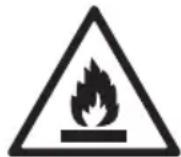
This symbol alerts you to flammable materials that can ignite and cause a fire if you do not take care.
-
This appliance contains a small amount of isobutane refrigerant (R600a), but it is also combustible. When transporting and installing the appliance, care should be taken to ensure that no parts of the refrigerating circuit are damaged.
-
If a leak is detected, avoid any naked flames or potential sources of ignition and air the room in which the appliance is standing for several minutes. In order to avoid the creation of a flammable gas air mixture if a leak in the refrigerating circuit occurs, the size of the room in which the appliance is used should correspond to the amount of refrigerant used. The room must be 1m^2 in size for every 8 g of R600a refrigerant inside the appliance.
- When positioning the appliance, ensure the supply cord is not trapped or damaged.
- Do not locate multiple portable socket-outlets or portable power supplies at the rear of the appliance.

CAUTION
To reduce the risk of minor injury to persons, malfunction, or damage to the product or property when using this product, follow basic precautions, including the following:
Installation
- Do not tilt the appliance to pull or push it when transporting.
- Make sure not to get a body part such as a hand or foot stuck while moving the appliance.
Operation
- Do not touch frozen food or the metal parts in the freezer compartment with wet or damp hands. It may cause frostbite.
- Do not place glass containers, bottles or cans (especially those containing carbonated drinks) in the freezer compartment, shelves or ice bin that will be exposed to temperatures below freezing.
- The tempered glass on the front side of the appliance door or the shelves can be damaged by an impact. If it is broken, do not touch it with hands.
-
Do not hang from the appliance doors, storage room, shelf or climb up into it.
-
Do not store an excessive amount of water bottles or containers for side dishes on the door baskets.
- Prevent animals from nibbling on the power cable or water hose.
-
Do not open or close the appliance door with excessive force.
-
If the hinge of the appliance door is damaged or operates improperly, stop using the appliance and contact an authorized service centre.
- Do not clean glass shelves or covers with warm water when they are cold.
-
Never eat frozen foods immediately after they have been taken out in the freezer compartment.
-
Make sure not to get a hand or foot stuck upon opening or closing the appliance door.
Maintenance
- Do not insert the shelves upside down. The shelves may fall.
- To remove frost from the appliance, contact an LG Electronics customer information centre.
Disposal of Your Old Appliance
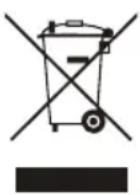
- This crossed-out wheeled bin symbol indicates that waste electrical and electronic products (WEEE) should be disposed of separately from the municipal waste stream.
- Old electrical products can contain hazardous substances so correct disposal of your old appliance will help prevent potential negative consequences for the environment and human health. Your old appliance may contain reusable parts that could be used to repair other products, and other valuable materials that can be recycled to conserve limited resources.
- You can take your appliance either to the shop where you purchased the product, or contact your local government waste office for details of your nearest authorised WEEE collection point. For the most up to date information for your country please see www/lg.com/global/recycling.
Dimensions and Clearances
Too small of a distance from adjacent items may result in the degradation of freezing capability and increased electricity costs. Allow over 50mm of clearance from each adjacent wall when installing the appliance.
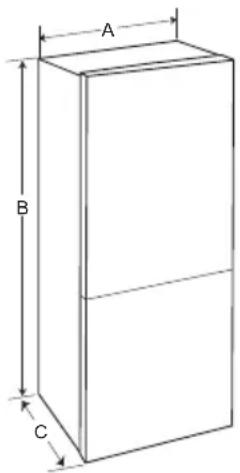
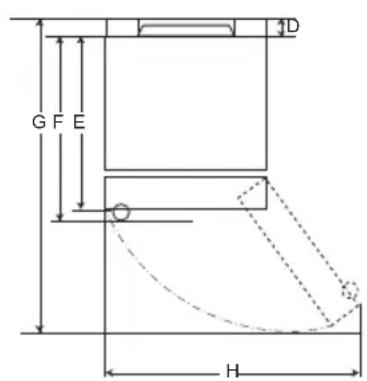
Type A
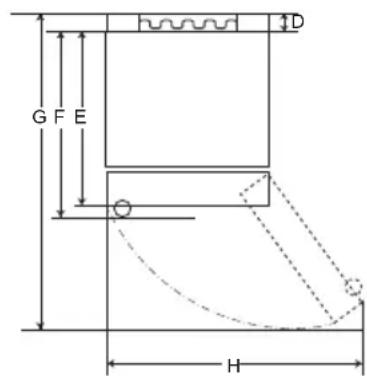
Type B
| Type A Type B | ||||||||
| Pocket Handle Bar | Handle Pocket Handle | Bar Handle | ||||||
| Size [mm] | ||||||||
| A | 595 595 5 | 95 595 595 | 595 595 595 | |||||
| B | 1860 | 2030 | 1860 | 2030 | 1860 | 2030 | 1860 | 2030 |
| C | 675 675 7 | 12 712 682 | 682 718 718 | |||||
| D | 9 | 9 | 9 | 9 | 15 | 15 | 15 | 15 |
| E | 667 667 6 | 67 667 667 | 667 667 667 | |||||
| F | - | - | 703 | 703 | - | - | 703 | 703 |
| G | 1124 | 1124 | 1124 | 1124 | 1130 | 1130 | 1130 | 1130 |
| H | 995 995 9 | 95 995 995 | 995 995 995 | |||||
Ambient Temperature
- The appliance is designed to operate within a limited range of ambient temperatures, depending on the climate zone.
- The internal temperature could be affected by the location of the appliance, the ambient temperature, the frequency of door opening and so on.
- The climate class can be found on the rating label.
| Climate Class | Ambient Temperature Range °C |
| SN (Extended Temperate) | +10 - +32 |
| N (Temperate) | +16 - +32 |
| ST (Subtropical) | +16 - +38 |
| T (Tropical) | +16 - +43 / +10 - +43* |
*Australia, India, Kenya
NOTE
The appliances rated from SN to T are intended to be used at an ambient temperature between 10^ and 43^ .
Accessories
1
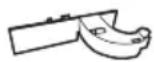
2

3

1
Hinge cover
2
Lower hinge
3
Sticker
Reversing Doors
Your appliance is designed with reversible doors, do that they may open from either the left of right hand side to suit your kitchen design.
NOTE
- Reversing the doors must be performed by the qualified personnel of LG Electronics. If not, the doors will not be covered by the warranty.
Leveling the Appliance
To avoid vibration, the unit must be leveled.
If required, adjust the leveling screws to compensate for the uneven floor.
The front should be slightly higher than the rear to aid in door closing.
Leveling screws can be turned easily by tipping the cabinet slightly.
Turn the leveling screws counterclockwise to raise the unit, clockwise to lower it.

Connecting the Appliance
After installing the appliance, connect the power plug into a socket outlet.
NOTE
- After connecting the power supply cord (or plug) to the outlet, wait 2 or 3 hours before you put food into the appliance. If you add food before the appliance has cooled completely, your food may spoil.
Moving the Appliance
1 Remove all food from inside the appliance.
2 Pull the power plug out, insert and fix it into the power plug hook at the rear or on top of the appliance.
3 Tape parts such as shelves and the door handle to prevent from falling off while moving the appliance.
4 Move the appliance with more than two people carefully. When transporting the appliance over a long distance, keep the appliance upright.
5 After installing the appliance, connect the power plug into a socket out to switch on the appliance.
Parts and Functions
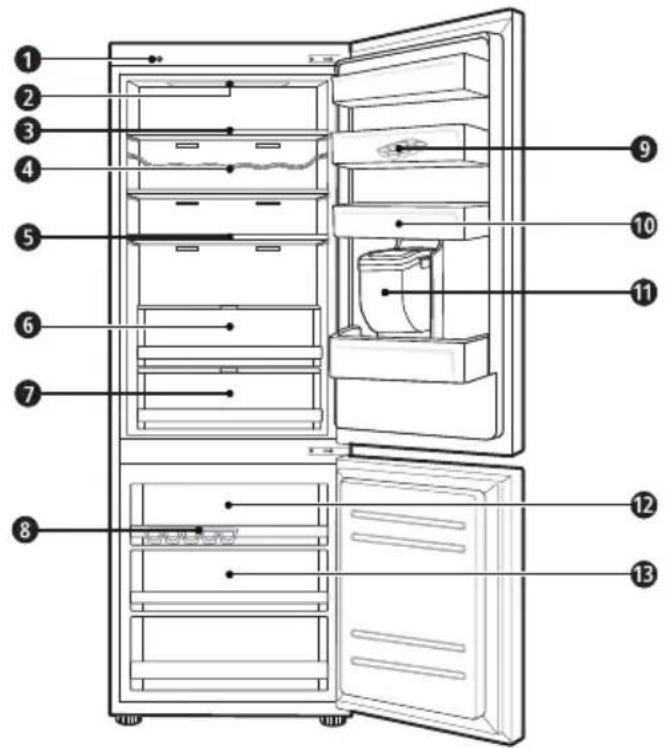
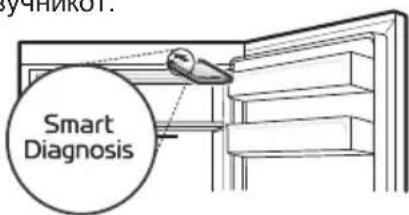
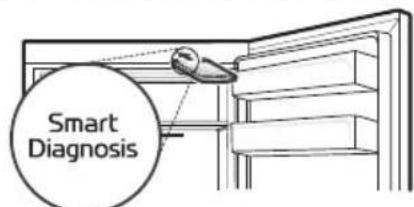
Smart Diagnosis Unit (^*)
This function is used when contacting LG Electronics customer information centre to help make an accurate diagnosis when the appliance operates abnormally or a failure occurs.
LED Lamp
The LED lamps inside the appliance light up when you open the door.
Fridge Shelf
This is where refrigerated foods and other items are stored.
- The shelf height can be adjusted by inserting the shelf in another groove of different height.
- Store the foods with higher moisture content at the front of the shelf.
The actual number of shelves will differ from model to model.
Bottle Rack (^*)
This is where drinks tall bottles or containers are stored.
Folding Shelf (^*)
This is where refrigerated foods and high items are stored.
Fresh Vegetable Painter (^*)
This is where fruits and vegetables are stored to help maintain freshness by adjusting the humidity controller.
- The appearance or components of the appliance may differ from model to model.
7 Fresh Converter (^*)
As a chill compartment, this is where meat, fish and vegetables are stored. Help maintain freshness by adjusting the humidity controller located in the back of the fridge compartment.
- For more space, you can use chill area without chill compartment drawer.
Ice Tray
This is where ice is produced and stored.
- For more space, you can remove the ice tray or ice cubes bucket.
Movable Egg Tray
This is where eggs are stored.
- You can move it to and use it at a desired position as needed. However, do not use it as the ice bin or place it on the shelf on top of the fridge or the vegetables drawer.
Fridge Door Basket
This is where small packages of refrigerated foods, drinks and sauce containers are stored.
Water Dispenser Tank (^*)
This is where water to supply the dispenser or the automatic icemaker is stored. It requires manual filling. (Non plumbed models only)
Top drawer
To freeze food items quickly, store the food in the top drawer. Food items will freeze most quickly in the drawer.
3 Freezer Drawer
This is for long-term storage of frozen items.
CAUTION
- Do not store short bottles or containers on the bottle rack. The items may fall and cause an injury or appliance damage.
NOTE
- (^*) : This feature varies depending on the model purchased.
Notes for Operation
- Users should keep in mind that frost can form. If the door is not closed completely, if the humidity is high during the summer, or if the freezer door is opened frequently.
- Ensure there is sufficient space between food stored on the shelf or door basket to allow the door to close completely.
- Opening the door for long periods can cause a significant increase of the temperature in the compartments of the appliance.
- If the refrigerating appliance is left empty for long periods, switch off, defrost, clean, dry, and leave the door open to prevent mould developing within the appliance.
Suggestion for Energy Saving
- Ensure there is sufficient space between stored foods. This allows cold air to be circulated evenly and lowers electricity bills.
-
Store hot food only after it has cooled in order to prevent dew or frost.
-
When storing food in the freezer compartment, set the freezer temperature lower than the temperature indicated on the food.
-
Do not put food near the temperature sensor of the fridge compartment. Keep a distance of at least 3cm from the sensor.
- Note that a temperature rise after defrosting has a permissible range in the appliance specifications. If you wish to minimise the impact this may have on the food storage due to a temperature rise, seal or wrap the stored food in several layers.
- The automatic defrosting system in the appliance ensures that the compartment remains free of ice buildup under normal operating conditions.
- For the most efficient use of energy, make sure that door bins, drawers and shelves are assembled properly.
Storing Foods Effectively
- Store frozen food or refrigerated food inside sealed containers.
- Check the expiration date and label (storage instructions) before storing food in the appliance.
- Do not store food for a long period of time (more than four weeks) if it spoils easily at a low temperature.
- Place the refrigerated food or frozen food in each fridge or freezer compartment immediately after purchasing.
- Place the refrigerated food or frozen food in each fridge or freezer compartment immediately after purchasing.
- Avoid refreezing any food which has been completely thawed. Freezing any food which has been completely thawed again will lower its taste and nutrition.
- Do not wrap and store vegetables with newspaper. Printing material of newspaper or other foreign substances may smear and contaminate food.
- Do not overfill the appliance. Cold air can not circulate properly if the appliance is overfilled.
- If you set an excessively low temperature for food, it may become frozen. Do not set a temperature lower than the required temperature for the food to be stored correctly.
- For more space, you can remove bottle rack, egg tray, ice tray and fresh converter drawer.
- Store raw meat and and fish in suitable containers in the refrigerator, so that it is not in contact with or drip onto other food.
Max Freezing Capacity
- The Express Freeze function will set the freezer to its maximum freezing capacity. This generally takes up to 24 hours and automatically switches off.
Express freeze must be switched on for 7 hours before fresh products are placed in the freezer compartment.
Maximum Storage
- To get better air circulation, insert all drawers.
- If large quantities of food are to be stored, all the freezer drawers shall be taken out of the appliance and the food shall be stacked directly on the freezer shelves in the freezer compartment.
NOTE
- To remove the drawers, first pick the food out of drawers. Then use the handle of drawers, pull out the drawers carefully. It may cause injury.
- The shape of each drawer may be different, insert in the right position.
Control Panel
Units and Functions
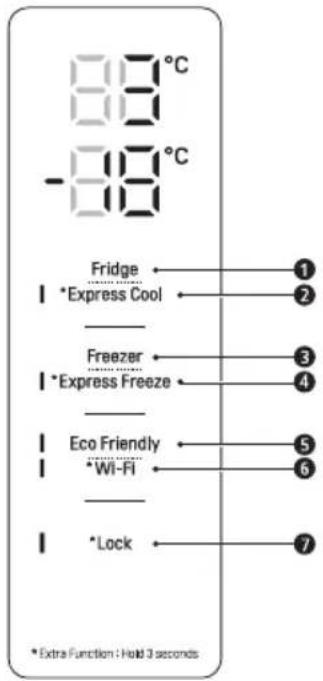
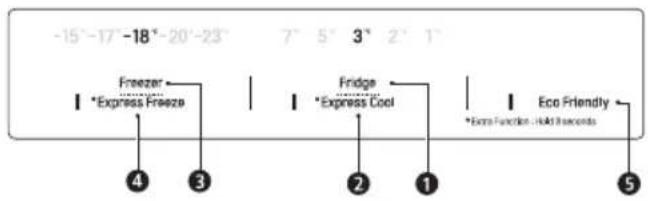
Fridge Temperature
- This sets the fridge target temperature.
^ 念 Express Cool
- This sets the Express Cool Functions.
3 Freezer Temperature
- This sets the freezer target temperature.
4 \*Express Freeze
- This sets the Express Freeze Functions.
Eco Friendly
- This controls the Power Save mode for lowering energy consumption.
\*Wi-Fi
- This sets the refrigerator to connect to your home's Wi-Fi network.
\*Lock
- This locks the buttons on the control panel.
NOTE
The actual control panel may differ from model to model.
- The control panel will turn off automatically for energy saving.
- If there is any finger or skin contacts to the control panel while cleaning it, the button function may operate.
Setting the Temperature
This sets the fridge temperature or freezer temperature.
- Press the Fridge button or Freezer button to adjust the temperature.
The temperature can be adjusted.
- Fridge: from 1^ to 7^
- Freezer: from -15 °C to -23 °C
The initial temperature is set.
- Fridge: 3^ C
- Freezer: -18 °C
The actual inner temperature varies depending on the food status, as the indicated setting temperature is a target temperature, not actual temperature within the appliance.
NOTE
- The default temperature setting may vary depending on the appliance.
- Wait until 2 or 3 hours have passed after connecting the appliance to the outlet before storing food in the appliance.
- For ice making in normal climates, the freezer temperatures should be set to -18^ or colder.
Setting Express Freeze
The function can quickly freeze a large amount of ice or frozen foods.
- When you press and hold the Express Freeze button for three seconds, the Express Freeze icon lights on the control panel.
The function is enabled and disabled in turn each time you press the button.
The Express Freeze function automatically terminates after a specific period has passed.
NOTE
- When Express Freeze is switched on, noise may occur and energy consumption may increase.
Setting Express Cool
The function can quickly cool a large amount of foods such as vegetable, fruit and so on.
-
When you press and hold the Express Cool button for three seconds, the Express Cool icon lights on the control panel.
-
The function is enabled and disabled in turn each time you press the button.
The Express Cool function automatically terminates after a specific period has passed.
NOTE
- When Express Cool is switched on, noise may occur and energy consumption may increase.
Setting Eco Friendly
- The function makes the fridge-freezer work in the power saving mode which is useful when you are away on a holiday as it reduces energy consumption.
- Pressing the Eco Friendly button starts the operation with the lamp on, and pressing it again stops the operation.
- When the Eco Friendly mode is on, the other buttons will not operate. When you finish using the Eco Friendly mode, turn it off so that other buttons work and the refrigerator returns to its previous temperature setting.
Setting and Resetting Lock
This locks the buttons on the control panel.
- Press and hold the Lock button for three seconds. When the Lock function is set, all buttons are locked.
NOTE
- You must deactivate Lock function before you can access any other functions.
High Temperature Alarm
When the freezer temperature goes too high due to power failure, the freezer temperature LED lamp blinks and an alarm sounds.
-
Press the Freezer button to stop.
If the temperature is sufficiently cold, the blinking and alarm will automatically stop.
This function operates: -
When the refrigerator is turned on.
- When the freezer compartment gets too warm.
- When there is a power outage that lasts for a long period of time.
- When large amounts of warm food are placed in the freezer compartment.
- When the freezer door is left open for too long or too frequently.
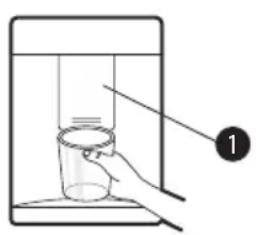
Water Dispenser (^*)
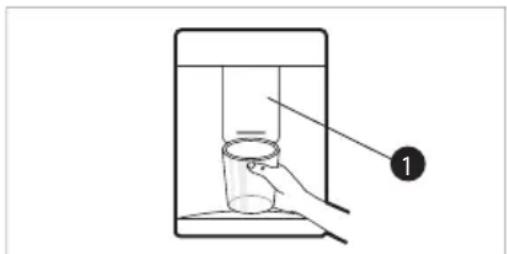
Press the lever 1 of the water dispenser to get cold water.
CAUTION
- Keep children away from the dispenser to prevent children playing with or damaging the controls.
- To clean the water dispensing system, flush the water through the dispenser about 5 minutes and throw away the first few batches of ice.
- Clean regularly surfaces that can come in contact with food and accessible drainage systems.
NOTE
- (*): This feature varies depending on the model purchased.
-
If you open the freezer door while water is being dispensed, the water supply will stop.
-
If you open the fridge door while water is being dispensed, dispensing will be paused.
- If the cup rim is small, water may splash out of the glass or miss it completely.
- Use a cup with a rim of over 68~mm in diameter when dispensing water.
Water Dispenser Tank
1 Open the cap (small cover) on the top of the water tank.
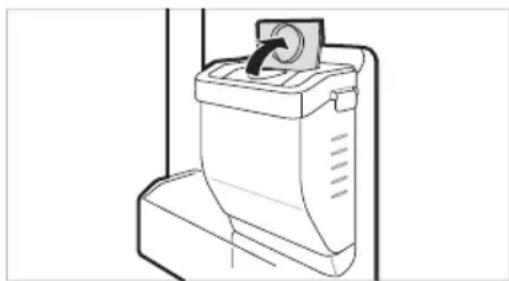
2 Fill the water tank with potable water and close the cap (small cover).
The water tank can hold up to 2.3 L.
CAUTION
- Children should not be allowed near the dispenser tank. If the child drops the water dispenser tank while it is completely filled with water, injury may occur. Do not fill the water tank with drinks other than water or fill with hot water.
- Do not apply excessive force or impact when removing or assembling the water dispenser tank. Doing so can cause appliance damage or injury.
NOTE
- Before using the water dispenser tank after installing the appliance, it should be washed before filling it with water.
-
Check if the water dispenser tank has been placed on the appliance correctly. If it is not assembled correctly, water may leak from the tank into the appliance.
-
If there is no water in the water dispenser tank, the cold water function of the dispenser cannot be used. Check if there is water in the water dispenser tank and then fill it with water if there is not.
-
Wait at least 15 seconds before removing the water tank after having dispensed water.
Sound from the water tank will be normal when supplying water to the dispenser. It is not a sign of malfunction.
Ice Tray
Fill the ice tray with water.
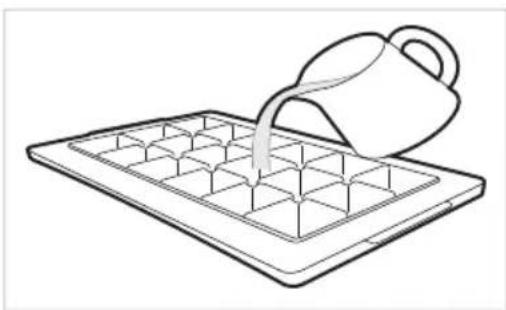
WARNING
- Fill with potable water only.
CAUTION
-
Check whether there is any ice remaining in the ice tray before putting water into it.
-
Do not slam the freezer door after filling the ice tray with water.
If you open and close the freezer door frequently, it may take longer for the water to freeze.
The time it takes for the water to freeze may vary according to the season.
-
The temperature inside the appliance can take up to 24 hours to stabilize after initial installation. Water may take longer to freeze because of this.
-
Be careful when handling the ice as the edges of the ice may be sharp.
NOTE
-
If the ice tray is overfilled, the ice may stick together and be difficult to remove.
-
Press the Express Freeze button on the control panel to make ice quickly.
-
Do not store ice that has not frozen completely. Unfrozen water could cause the ice to clump together.
-
Be careful not to use excessive force when twisting the ice tray. Doing so could break the ice tray.
-
To easily remove ice, fill water up the tray in advance.
Fresh Converter (^*)
As a chill compartment, the temperature in the fresh converter can be controlled by sliding the lever 1, where located in front of compartment, in either direction.
When keeping vegetables after setting up Meat or Fish, the cold injury may occur.
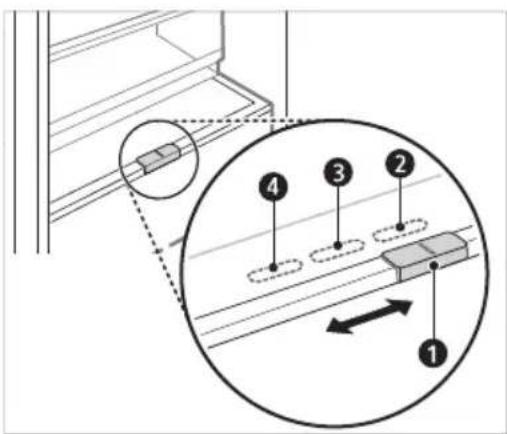
For storing vegetables.(Recommended)
For storing fish.
4 For storing meat.
NOTE
- (*): This feature varies depending on the model purchased.
Fresh Vegetable Printer ( * )
Vegetable compartment can adjust the humidity by moving the knob 1.
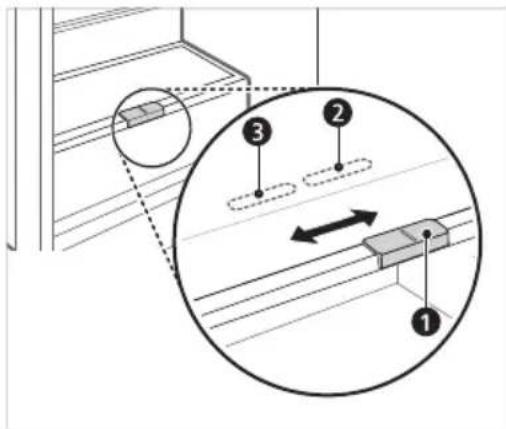
For storing vegetables.(Recommended)
For storing fruit.
NOTE
- (^*) : This feature varies depending on the model purchased.
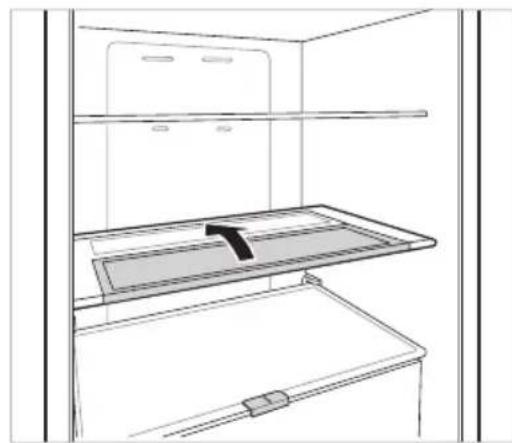
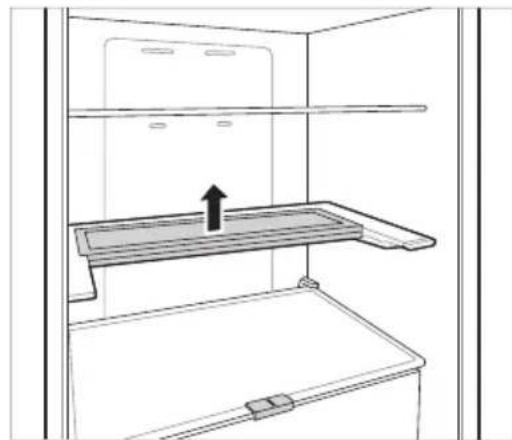
Folding Shelf
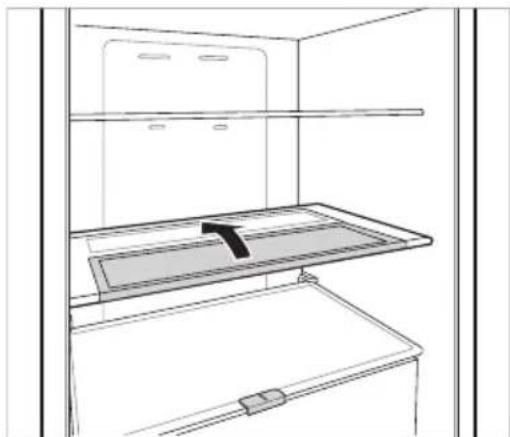
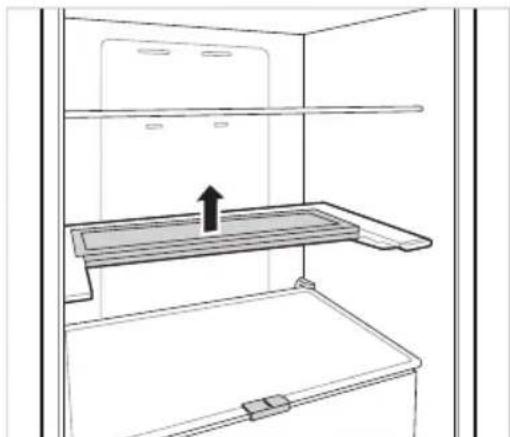
Store taller items, such as a gallon container or bottles, by pushing the front half of the shelf underneath the back half the shelf. Pull the front of the shelf forward to return to a full shelf.
1 Lift the front side of the shelf and shift it on its back side.
2 Lift the front side of the shelf and shift it under its back side. From this position, both sides of the shelf can be lifted up to free more space.
Other Functions
Door Open Alarm
The alarm sounds 3 times in a 30 seconds interval if the door (fridge compartment) is left open or not completely closed for one minute.
- Contact an LG Electronics customer information centre if the alarm sound continues even after closing the door.
Failure Detection
The appliance can automatically detect problems during the operation.
- If a problem is detected, the appliance does not operate and an error code is displayed even when any button is pressed.
- When this occurs, do not turn off the power and immediately contact an LG Electronics customer information centre. If you turn off the power, the repair technician from an LG Electronics customer information center may have difficulty finding the problem.
LG ThinQ Application
This feature is only available on models with Wi-Fi
The LG ThinQ application allows you to communicate with the appliance using a smartphone.
LG ThinQ Application Features
Communicate with the appliance from a smartphone using the convenient smart features.
Smart Diagnosis
If you experience a problem while using the appliance, this smart diagnosis feature will help you diagnose the problem.
Settings
- Allows you to set various options on the appliance and in the application.
NOTE
If you change your wireless router, internet service provider, or password, delete the registered appliance from the LG ThinQ application and register it again.
- The application is subject to change for appliance improvement purposes without notice to users.
- Functions may vary by model.
Before Using LG ThinQ Application
1 Check the distance between the appliance and the wireless router (Wi-Fi network).
- If the distance between the appliance and the wireless router is too far, the signal strength becomes weak. It may take a long time to register or installation may fail.
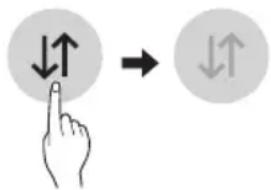
2 Turn off the Mobile data or Cellular Data on your smartphone.
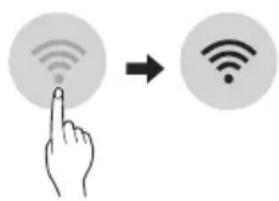
3 Connect your smartphone to the wireless router.
NOTE
To verify the Wi-Fi connection, check that the icon on the control panel is lit.
- The appliance supports 2.4 GHz Wi-Fi networks only. To check your network frequency, contact your Internet service provider or refer to your wireless router manual.
LG ThinQ is not responsible for any network connection problems or any faults, malfunctions, or errors caused by network connection.
- If the appliance is having trouble connecting to the Wi-Fi network, it may be too far from the router. Purchase a Wi-Fi repeater (range extender) to improve the Wi-Fi signal strength.
- The Wi-Fi connection may not connect or may be interrupted because of the home network environment.
- The network connection may not work properly depending on the Internet service provider.
- The surrounding wireless environment can make the wireless network service run slowly.
- The appliance cannot be registered due to problems with the wireless signal transmission. Unplug the appliance and wait about a minute before trying again.
- If the firewall on your wireless router is enabled, disable the firewall or add an exception to it.
- The wireless network name (SSID) should be a combination of English letters and numbers. (Do not use special characters.)
- Smartphone user interface (UI) may vary depending on the mobile operating system (OS) and the manufacturer.
- If the security protocol of the router is set to WEP, you may fail to set up the network. Please change it to other security protocols (WPA2 is recommended) and register the product again.
Installing the LG ThinQ Application
Search for the LG ThinQ application from the Google Play Store or Apple App Store on a smart phone.
- Follow instructions to download and install the application.
Connecting to Wi-Fi
The Wi-Fi button, when used with the LG ThinQ application, allows the appliance to connect to a home Wi-Fi network. The icon shows the status of the appliance's network connection. The icon illuminates when the appliance is connected to the Wi-Fi network.
Initial Appliance Registration
- Run the LG ThinQ application and follow the instructions in the application to register the appliance.
Re-registering the Appliance or Registering Another User
- Press and hold the Wi-Fi button for 3 seconds to temporarily turn it off. Run the LG ThinQ application and follow the instructions in the application to register the appliance.
NOTE
- To disable the Wi-Fi function, press and hold the Wi-Fi button for 3 seconds. If con will be turned off.
Open Source Software Notice Information
To obtain the source code under GPL, LGPL, MPL, and other open source licenses, that is contained in this product, please visit http://opensource.lge. com.
In addition to the source code, all referred license terms, warranty disclaimers and copyright notices are available for download.
LG Electronics will also provide open source code to you on CD-ROM for a charge covering the cost of performing such distribution (such as the cost of media, shipping, and handling) upon email request to opensource@lge.com. This offer is valid for a period of three years after our last shipment of this product. This offer is valid to anyone in receipt of this information.
Smart Diagnosis
This feature is only available on models with the @ or @logo.
Use this feature to help you diagnose and solve problems with your appliance.
NOTE
- For reasons not attributable to LGE's negligence, the service may not operate due to external factors such as, but not limited to, Wi-Fi unavailability, Wi-Fi disconnection, local app store policy, or app unavailability.
- The feature may be subject to change without prior notice and may have a different form depending on where you are located.
Using LG ThinQ to Diagnose Issues
If you experience a problem with your Wi-Fi equipped appliance, it can transmit troubleshooting data to a smartphone using the LG ThinQ application.
- Launch the LG ThinQ application and select the Smart Diagnosis feature in the menu. Follow the instructions provided in the LG ThinQ application.
Using Audible Diagnosis to Diagnose Issues
Follow the instructions below to use the audible diagnosis method.
- Launch the LG ThinQ application and select the Smart Diagnosis feature in the menu. Follow the instructions for audible diagnosis provided in the LG ThinQ application.
Display panel is on the Fridge door.
1 Close the freezer and fridge doors, then press and hold the Lock button to activate the lock function.
- If the display has been locked for over 5 minutes, you must deactivate the lock and then reactivate it.
2 Press and hold the Freezer button for 3 seconds or longer.
The control panel will be turned off, and then 3^ will be displayed on the fridge temperature display part.
3 Open the fridge door and then hold the phone near the speaker hole.
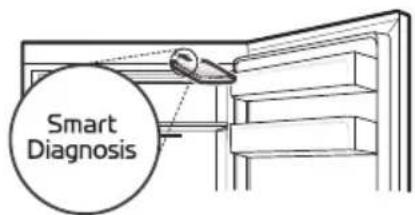
4 After the data transfer is complete, the diagnosis will be displayed in the application.
Display panel is inside the Fridge door
1 Open the fridge door.
2 Press the Eco Friendly button.
- If the door has been open for longer than 60 seconds, close the door and repeat steps 1 and 2.
3 Hold the phone near the speaker hole.
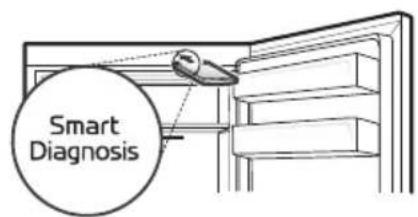
4 Press and hold the Freezer button for 3 seconds while holding your phone in front of the speaker.
5 After the data transfer is complete, the diagnosis will be displayed in the application.
NOTE
- For best results, do not move the phone while the tones are being transmitted.
Notes for Cleaning
-
When removing a shelf or drawer from inside the appliance, remove all stored foods from the shelf or drawer to prevent injury or damage to the appliance.
-
Otherwise, injury may occur due to the weight of stored foods.
-
If cleaning the outside air vents of the appliance by means of vacuuming, then the power cord should be unplugged from the outlet to avoid any static discharge that can damage the electronics or cause an electric shock.
- Detach the shelves and drawers and clean them with water, and then dry them sufficiently, before replacing them.
- Regularly wipe the door gaskets with a wet soft towel.
- Door basket spills and stains should be cleaned as they can compromise storage ability of the basket and could even be damaged.
After cleaning, check if the power cable is damaged, warm or improperly plugged. -
Keep the air vents on the exterior of the appliance clean.
-
Restricted air vents can cause fire or appliance damage.
-
When cleaning inside or outside of the appliance, do not wipe it with a rough brush, toothpaste, or flammable materials. Do not use cleaning agents containing flammable substances.
-
This may cause discoloration or damage to the appliance.
-
Flammable substances: alcohol (ethanol, methanol, isopropyl alcohol, isobutyl alcohol, etc.), thinner, bleach, benzene, flammable liquid, abrasive, etc.
-
For the appliance exterior, use a clean sponge or soft cloth and a mild detergent in warm water. Do not use abrasive or harsh cleaners. Dry thoroughly with a soft cloth.
-
Never clean the shelves or containers in the dishwasher.
The parts may become deformed due to the heat. - If the appliance is equipped with an LED lamp, do not remove lamp cover and LED lamp in any attempt to repair or service it. Please, contact an LG Electronics customer information centre.
- Clean regularly surfaces that can come in contact with food and accessible drainage systems.
Cleaning the Door Basket
Removing the Fridge Door Basket
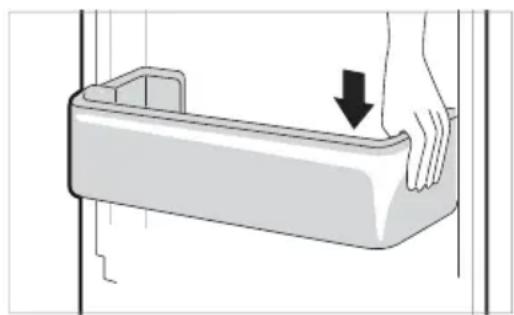
Hold both edges of the basket and remove it by lifting it upward.
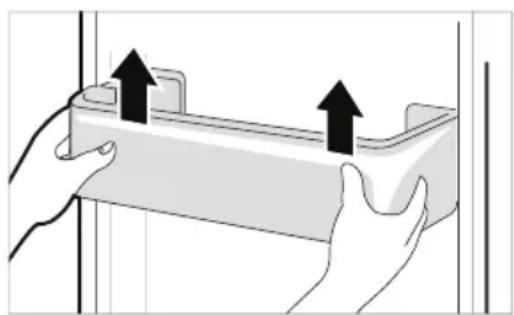
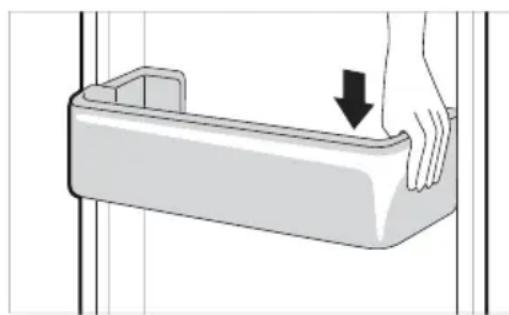
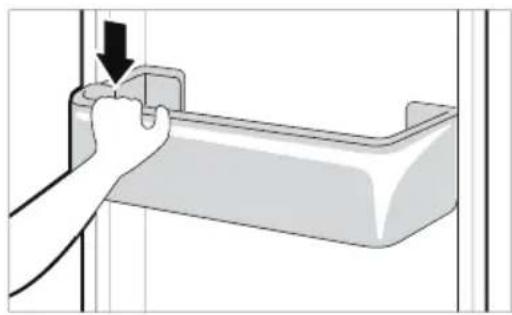
Refitting the Fridge Door Basket
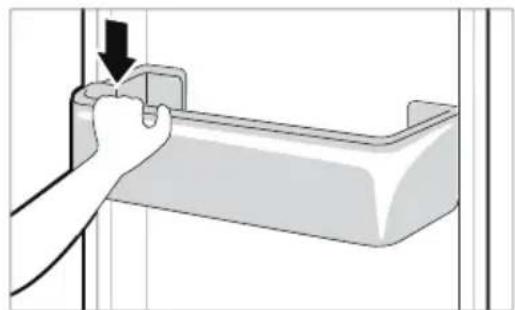
1 Hold both edges of the door basket, gently push one edge to assemble, and then in the same manner assemble the other edge.
2 After assembling, tap the door basket gently to fix it horizontally.
Cleaning the Shelf Removing the Fridge Shelf
Lift the rear edge of the fridge shelf and then pull it out.
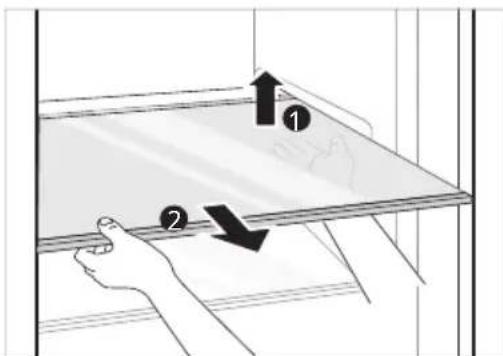
Refitting the Fridge Shelf
Refit the shelf in the reverse order of the removal process.
Cleaning the Vegetable. Drawer
Removing the Vegetable Printer
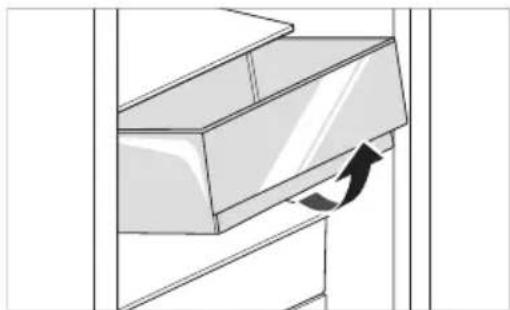
1 Remove the contents of the drawer. Hold the handle of the vegetable drawer and pull it out completely until it stops.
2 Lift the vegetable drawer up and remove it by pulling it out.
CAUTION
Note that injuries can be caused by the weight of stored foods when removing the vegetable drawer.
Refitting the Vegetable Printer
Refit the vegetable drawer in the reverse order of the removal process.
Cleaning the Crisper Cover Removing the Crisper Cover
1 After removing the vegetable drawer cover, pull the top section of the crisper cover down.
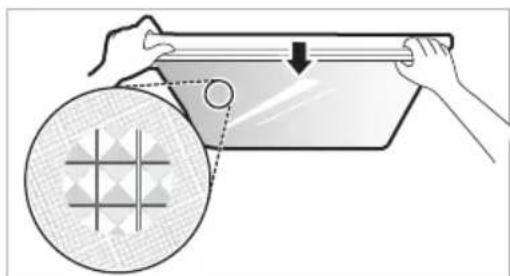
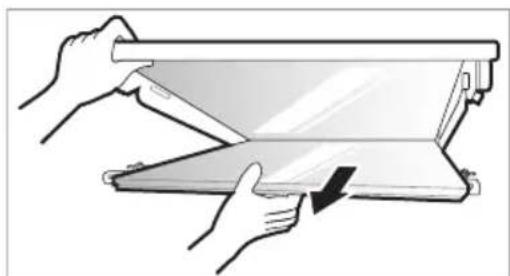
2 Remove the crisper cover by pulling it out.
Refitting the Crisper Cover
1 Place the protrusions inside the risper cover on the grooves inside the shelf.
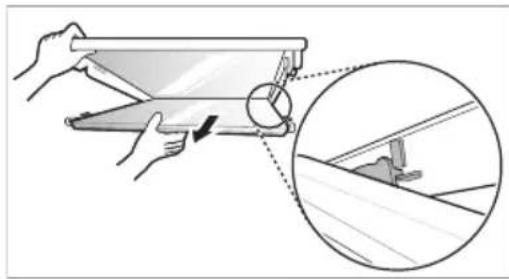
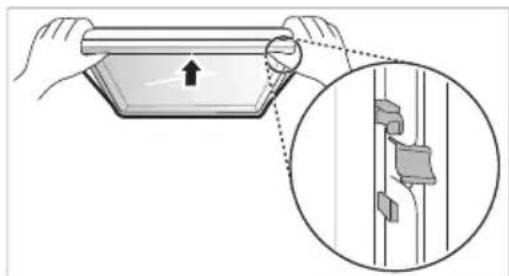
2 Insert the protrusions in front of the crisper cover into the grooves in front of the shelf and push the crisper cover up to assemble.
Cleaning the Freezer Drawer
1 Remove the contents of the drawer. Hold the handle of the freezer drawer and pull it out completely until it stops.
2 Lift the freezer drawer up and remove it by pulling it out.
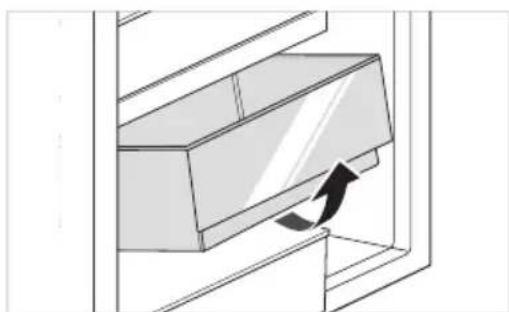
Refitting the Freezer Drawer
Refit the freezer drawer in the reverse order of the removal process.
Cleaning the Water Dispenser Cleaning the Dispenser Tray
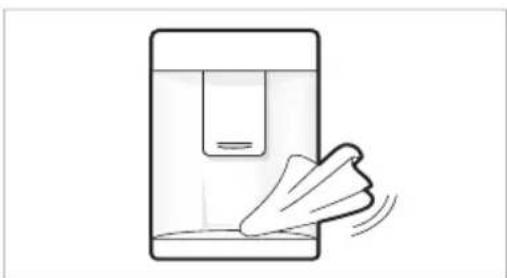
The dispenser tray may become wet easily due to spilled ice or water. Wipe the entire area with a damp cloth.
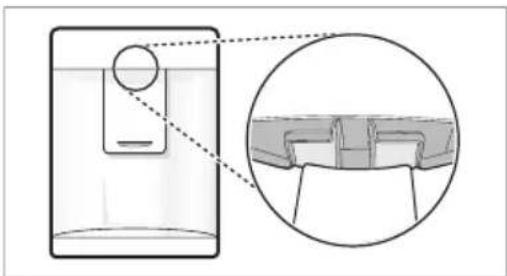
Cleaning the Water and Ice Outlet
Wipe the water or ice outlet frequently with a clean cloth as it may get dirty easily. Please note that lint from a cloth may adhere to the outlet.
| Symptoms Reason | n&Solution |
| There is no refrigeration or freezing. | Is there a power interruption?Check the power of other appliances. |
| If the power plug unplugged from the outlet?Plug the power plug in the outlet properly. | |
| A fuse in your homeOr the appliance is connected to a GFCI (Ground Fault Circuit Interrupter) outlet, and the outlet's circuit breaker has tripped.Check the main electrical box and replace the fuse or reset the circuit breaker. Do not increase fuse capacity. If the problem is a circuit overload, have it corrected by a qualified electrician.Set the circuit breaker on the GFCI. If the problem persists, contact an electrician. | |
| There is poor refrigeration or freezing. | Is the fridge or freezer temperature set to its warmest setting?Set the fridge or freezer temperature to 'Medium'. |
| Is the appliance in direct sunlight, or is it near a heat generating object such as cooking oven or heater?Check the installation area and reinstall it away from heat generating objects. | |
| Did you store hot food without cooling it first?Cool the hot food first before putting it in the fridge or freezer compartment. | |
| Did you put in too much food?Maintain an appropriate space between food. | |
| Are the appliance doors completely closed?Completely close the door and make sure that stored food is not obstructing in the door. | |
| Is there enough space around the appliance?Adjust the installation position to make enough space around the appliance. | |
| The appliance contains a bad smell. | Is the fridge or freezer temperature set to 'Warm'?Set the fridge or freezer temperature to 'Medium'. |
| Did you put in food with a strong smell?Store foods with strong smells in a sealed containers. | |
| Vegetables or fruit may have spoiled in the drawer?Throw away rotten vegetables and clean the vegetable drawer. Do not store vegetables too long in the vegetable drawer. | |
| The inside lamp in the appliance does not turn on. | Does the inside lamp in the appliance turn off?It is hard for customers to replace the inside lamp in the appliance as they are not serviceable. If the inside lamp does not turn on, please contact the LG Electronics customer information centre. |
| The appliance door is not closed tightly. | Is the appliance leaning forward?Adjust the front feet to raise the front side slightly. |
| Were the shelves properly assembled?Refit the shelves if needed. | |
| Did you close the door with excessive force?If you apply too much force or speed when closing the door, it may remain briefly open before closing. Make sure that you do not slam the door closed. Close without force. | |
| Вразата на уреда не e пьтуно за ворега. | Уреът наklонен ли e habред? • Коригирaite подоче крачета, за дамовдогге лесу п徕дана част. |
| Рафтовete правлно ли са сглобени? • Ако e hyжно, поставе отоно рафтовete. | |
| Вераяно стve за ворейн Вразата с пекомерна сима? • Ако за воряte вразата Тьрде симно лл рязко, тя може ду OCTанец оторега за мостент, пroduду се за вори. Уberе тс, чу не SFьскате вразата по за воряп. 3отварайтse 6e3 сима. | |
| It is difficult to open the appliance door. | Did you open the door right after you closed it? • If you try to open the appliance door within one minute after you closed it, you may have difficulties because of the pressure inside the appliance. Try to open the appliance door again in a few minutes so that the internal pressure stabilizes. |
| There is condensation inside the appliance or on the bottom of the vegetable drawer cover. | Did you store hot food without cooling it first? • Cool the hot food first before putting it in the fridge or freezer compartment. |
| Did you leave the appliance door open? • Although the condensation will disappear soon after you close the appliance door, you can wipe it with a dry cloth. | |
| Do you open and close the appliance door too frequently? • Condensation can form due to the temperature difference from the outside. Wipe out the dampness with a dry cloth. | |
| Did you put warm or moist food inside without sealing it in a container? • Store food in a covered or sealed container. | |
| Frost has formed in the freezer compartment. | Doors may not be closed properly? • Check if the food item inside the appliance is blocking the door and make sure that the door is tightly closed. |
| Did you store hot food without cooling it first? • Cool the hot food first before putting it in the fridge or freezer compartment. | |
| Frost has formed in the freezer compartment. | Is the air entry or exit of the freezer compartment blocked? • Make sure that air entry or exit is not blocked so that the air can circulate inside. |
| Is the freezer compartment overfilled? • Maintain an appropriate space between items. | |
| Frost or condensation has formed inside or outside the appliance. | Did you open and close the appliance door frequently or is the appliance door improperly closed? • Frosts or condensation can form if the outside air penetrates inside the appliance. |
| Is the installation environment humid? • Condensation can appear on the exterior of the appliance if the installation area is too humid or on a humid day such as a rainy day. Wipe off any moisture with a dry cloth. | |
| The appliance is noisy and generates abnormal sounds. | Is the appliance installed on a weak floor or improperly leveled? • Install the appliance on a solid and flat area. |
| Does the rear of the appliance touch the wall? • Adjust the installation position to allow enough clearance around the appliance. | |
| Are objects scattered behind the appliance? • Remove the scattered objects from behind the appliance. | |
| Is there an object on top of the appliance? • Remove the object on top of the appliance. | |
| The side or front of the appliance is warm. | There are anti condensation pipes fitted to these areas of the appliance to reduce condensation forming from around the door area. • The heat releasing pipe to prevent condensation is installed on the front and side of the appliance. You may feel it particularly hot right after the appliance is installed or during the summer. You can be assured that this is not a problem and is quite normal. |
| There is water inside or outside of the appliance. | Is there water leakage around the appliance? • Check if the water has leaked from a sink or another place. |
| Is there water on the bottom of the appliance? • Check if the water is from the thawed frozen food or a broken or dropped container. | |
| Clicking noises | The defrost control will click when the automatic defrost cycle begins and ends. The thermostat control (or appliance control on some models) will also click when cycling on and off. • Normal Operation |
| Rattling noises | Rattling noises may come from the flow of appliance, the water line on the back of the unit (for plumbed models only), or items stored on top of or around the appliance. • Normal Operation |
| Appliance is not resting evenly on the floor. • Floor is weak or uneven or leveling legs need to be adjusted. See the Door Alignment section. | |
| Appliance with linear compressor was moved while operating. • Normal operation. If the compressor does not stop rattling after three minutes, turn the power to the appliance off and then on again. | |
| Whooshing noises | Evaporator fan motor is circulating air through the fridge and freezer compartments. ·Normal Operation |
| Air is being forced over the condenser by the condenser fan. ·Normal Operation | |
| Gurgling noises | Appliance flowing through the cooling system ·Normal Operation |
| Popping noises | Contraction and expansion of the inside walls due to changes in temperature. ·Normal Operation |
| Vibrating | If the side or back of the appliance is touching a cabinet or wall, some of the normal vibrations may make an audible sound. ·To eliminate the noise, make sure that the sides and back do not make any contact with any wall or cabinet. |
| Your home appliance and smartphone is not connected to the Wi-Fi network. | The password for the Wi-Fi that you are trying to connect to is incorrect. ·Find the Wi-Fi network connected to your smartphone and remove it, then register your appliance on LG ThinQ |
| Mobile data for your smartphone is turned on. ·Turn off the Mobile data of your smartphone and register the appliance using the Wi-Fi network. | |
| The wireless network name (SSID) is set incorrectly. ·The wireless network name (SSID) should be a combination of English letters and numbers. (Do not use special characters.) | |
| The router frequency is not 2.4 GHz. ·OAI2.4 GHz router frequency is supported. Set the wireless router to 2.4 GHz and connect the appliance to the wireless router. To check the router frequency, check with your Internet service provider or the router manufacturer. | |
| The distance between the appliance and the router is too far. ·If the distance between the appliance and the router is too far, the signal may be weak and the connection may not be configured correctly. Move the location of the router so that it is closer to the appliance. |
Customer Care and Service
Contact an LG Electronics customer information centre.
To find information on LG authorized service centre, visit our website at www.lg.com.
- Only qualified service personnel from LG authorized service centre should disassemble, repair, or modify the appliance.
- To purchase spare parts, contact an LG Electronics customer information centre or our website at www/lg.com.
- Spare parts referenced in Regulation EU 2019/2019 are available for 7 years (only door gaskets are available for 10 years).
NOTE
- For more information about the energy efficiency of the appliance, visit https://ec.europa.eu and search using the model name (valid from 1st March 2021).
- Regulation EU 2019/2019, valid from 1st March 2021, is related to the Energy Efficiency classes by Regulation EU 2019/2016.
- Scan the QR code on the energy label supplied with the appliance, which provides a web link to the information related to the performance of the appliance in the EU EPREL database. Keep the energy label for reference and all other documents supplied with the appliance (valid from 1st March 2021).
- The model name can be found on the rating label of the appliance.
Memo
PьКОВОДСТВО 3A ЕКСПЛОATAЦИА
XIIADINJHNK INΦРИ3EP
IpooyetepebKOBOCTBOTO 3a ekCnloataunnoDpo6Ho, npEi da pa6oTne Cypeda, nTo cBxpaHraBaTe Ha ydo6Ho mAcTO 3a cnpaBkn no BcKo BpeMe.
CbДьРЖAHNE
Toba pBKOBOCTBO MOKe Da CbDbpKa H3o6paXeHnI NnCbDbPkaHne, pa3NnHO OT MoDeJa, KOHTO CTe 3aKynnn.
PbKOBOIDCTBOTO noJIeKn Ha peaKzna O T npOn3BOIDNTeJI.
MHCTPYKUN 3A BE3OJACHOCT. 3
BaxHN INCTpyKcnn 3a 6e3oNaChocT 3
I3XbBpJIHe Ha cTapn ypei 10
MOHTUNPAHE 11
Pazmepn n OTCOHHN 11
OkoHa TemnepaTypa 11
Akecoapu 12
PebepcnBn BpaTn 12
HnBenaunHa ypea 12
Cbbp3BaHe Ha ypeHa 12
IpeMeCTBaHe Ha ypeDa 12
EKCPILOATAU 13
Uactn u yHKun 13
Beneckn no ekcnloataaeta 15
KoHTpOJIeH nane 17
Диспенерзвога(*) 19
Pe3epBoap c nncnHcep 3a Boda 19
TabniuKa 3a IeI 20
KoHBeptop 3a npecn npOdykTn (^*) 20
YeKMeJxKe 3a CBexn 3eJeHcyu ( *) 21
CrbBaem paT 21
Дугн Функци.. 22
HHTEINIeHTHn FyHKcNn 23
PpinoxeneTo LG ThinQ 23
I3noJI3BaHe Ha Smart DiagnosisTM 25
ПОДДРьЖKA 26
3a6eKkOTHoNoHCTBaHeTo 26
PeaJIHaTbBTpESha TempeHApTa Bapnpa B 3aBncmOcT OT CbCToRHeTo Ha XpHaTa, TbI KaTO nocOeHaTa TempeHApTa 3a 3aDaBaHe e ueBeTa, a He DeiCtBnteJIHaTa TempeHApTa b ypeJa.
3ABEJIENKKA
3aandaehata TemnepaTypa no npda36upahe MoKe Da e pa3NvHa B 3aBNCIMoCT OT ypeJa.
- ⅢyakaTe Da n3MnHaT 2 nnn 3 yaca cnei KaTO CTe CBbp3aJIn ypeJa KbM KOHTaKTa, npedn Da cbxpaHbAte xpHa B Hero.
3a npon3Bexdahe Ha JieB HOpMaJeH KInmat TemnepaTpynte HaΦpna3epa Tp86Ba da ce 3aDaBat Ha-18°C nnn no-ctydeHo.
3aandahe Ha ekcnpecho 3aMpa3BaHe
Ta3nФункцmaMOke 6bP3O da reHepnpa roJMAKOJIuYeCTBOJeIeNJIIN da 3aMpa3n xpaHa.
Korato HaTnCHTe n 3aDbpxKeTe 6yToHa Express Freeze 3a TpN CEkyHn, INKoHaTa Express Freeze CBETBa Bbpxv KOHTpoJHnaHeI.
BceKN nT, KOrato HATnCHeTe 6yToHa, Ta3N cyHKcua CE BkIIOvBa nn N3KIIIOvBa.
- Φункцята „Екпесно замразаьанe" ce npекразы abTomatунсneДиNTУнeto Ha onpeдelenперnotВрeme.
3ABEJIEXKKA
KoratoФункцЯtaExpressFreezee BKNUOyeHaMOKe Da Ce NOBuMn Da ce yBeNn pa3XoDbT Ha eHepnIa.
3aandaheHaekcnpecho oxlaKaHe
3aKJIIOUbaHe Ha HacTpoIKn HynipaHe
OTyK ce 3akIIOUbAT 6yTOHInTe Ha KOHTPOJHHnaHeI.
- HatncheTe n 3aDpBxTe 6yToHa Lock 3a TpuceHydN. Korato e 3aJaDeHa yHKuYraTALock, BCnKn 6yToHc ca 3aknOueHn.
3ABEJIEXKA
Tp6Ba Da DeakTnBnPaTe yHKuNg Lock npedn da moKeTe da n3noJ3BaTe npyIn yHKuN.
Anapma 3a BncoKa Tempepatya
Korato TemnepaTypata Ha φριηερa cTaHe TBbPde BnCoka nopadi cnPpaHe Ha eNeKTpO3axpaHbAHeTo, JAmnata LED 3a TemnepaTypata npMmRbN n PpO3ByaBa anapma.
- Hatnche 6yToHa Freezer 3a cnnpaHe.
- Ako TemnepaTypata e DocTaTbUHO CTyndeHa, npMmRbaHeTo n aIapMaTa aBtOMaTHUHO Iue cnpaT.
-Функцятapa60tN:
-Korato xnaaunHKnbTe BKNIOueH.
-Korato OTdeneHneTo Ha φpnsεpa cTaHe TBbpe TOnNo.
-Korato mMa npeKbCbaHe Ha eNektpo3axpaHbAHeTo 3a npOdbIxxTeJeH nepnoD OT BpeMe.
-Korato B OTdeneHneTo Ha cPn3epa ce NOCTABRT TOnEMN KOJNUeCTBa TOnJa XpHa.
-Korato BpataHa HcPn3epa e ocTaBeHa OTBopeHa 3a TBbpDe IbJIro BpeMe INI IN TBbpDe YecTo.
Диспенецьа ВODa (^*)
HaTncheteNocta 1 Ha dncneHcep a3a BODaTa,3a Da nOnyuTe cTydeHa BOJa.
BHIMAHNE
- Na3eTe DecaTa DaJIeY OT DnCneHcepa, 3a Da He CN IrpaT C Hero NIn Da He NOBpeJr KOHTPOJHInTe KOnHeta.
3aДа NOUHCTNTE CnCTeMaTa 3a CHa6dЯBaHe C BODa, INPOMInTe C BOda B INpOdbJIxKeHne Ha OKoJIo 5 MInHyTn.
3ABeJIeXKKA
· (^) :Ta3nФункцьВapирвЗвсIMOCOT 3aKyIeHnMoJeJ.
- Ako OTbOpnte BpaTata Ha φpns3epa IDOKaTO Ce IODaBA BOda, BOIOChA6JaBaHeTo Ue cnpe.
- Ako OTbOpITE BpaTata Ha XlaIINHnKa DOkato Ce IoIaBA BOa, BOIOChA6JaBaHeTo Ⅲe HapabN nay3a.
- Ako OTBopbT Ha yawata e MaIbK, BOaTaMOKe Da ce pa3nNcKa OT yawata nIN Bbo6e Da He yuei.
-ИЗпОЛЗВаΙеЧааСДиАмЕТБРНаOTВОРа. над 68mm пи подаBAне На ВОДа.
Pe3epBoap c dncnpeHcep 3a Boda
1 OTbopete KaanaykaTa (MaiknKa nak) B rohpata Yact Ha pe3epBoapa 3a BOda.
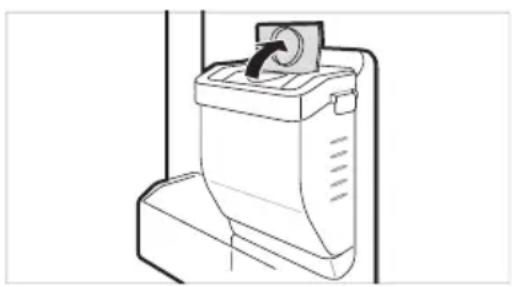
2 HanbJIHeTe pe3epBoapac nIteHa Boga n 3aTbOpTe KanaKata (MaIka KaNaUka).
- Pe3epBoapbT 3a BOda MoKe Ja cBdbpKa do 2,3 nItpa.
BHIMAHNE
- He trp6Ba da ce no3B0JyBa Ha deca da ce do6nKabat Do pe3epBoapac DncpeHcepa. Ako Deteto n3nyche BoHNya pe3epBoap c DnCneHcep aDOKaTO Toe n3qAno nbJeH C BOda, TO MOKe Da ce HapaHn.
He npunaraTe npekomepHa cna nBb3deIcTBne, KOraTO OTcTpaHraBaTe nNcrNo6BaTe pe3epBoapa 3a BOda. TOba MoKe Da npuHn NobpeDa Ha ypeDa nHapAHBaHe.
3ABEJIEXKKA
-Прелди ИЗпОлЗВаTe peЗерBoAp 3a BODa CNeД ИСТаЛИранe Ha урEDA,ТрЯБВа ДА ГИЗМЕTe,прелДи GA ro HANьНИт e C BODa.
-Пюверета Ддпpe3epBoapbT 3a BОДа e noctabeH npabnHbBpXy ypeDA.Ак He e crIIO6e HnpaBnHOb,BOdATo MOnKe Da npOTeHe OT pe3epBoapaВуpeDA.
AkoBpe3epBoapa 3a BOJa HMa B0da, cyHKnraTa Ha dncneHcep a 3a CTydeHa BOa He MoKe Da Ce n3noJ3Ba. PpOBepTe daIN mMa BOda B pe3epBoapa I Go HanbJIHeTe C BOda, Ako Hma.
-Изчakайтпонe 15 cekyнnpeДида CBaJIte pe3epBOapac BOda cIeД KaTo cTe OCBo6OДЛN BOJa.
3BykBT OT pe3epBOapa C BOda, KOrato DnCneHcepBT Ce Cha6JaBa C BOda, e HopMaJIeH. He e npn3HaK 3a HEn3npaBHOCT.
Ta6nueka 3a nei
HanbJIHeTe Ta6NIuKata 3a JeIc BOJa.
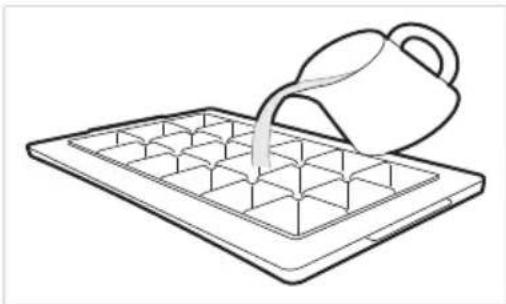
I P E D U N P E X K D E H N E
- PbHHeTa cMo C nTeHa Boga.
BHUMAHNE
- PpOBepeTe DaJIIMa OCTaHaJI NeI B Ta6JNcKata 3a JeI npeIN Da NOCTaBNTe BOda B HeJ.
He xnonBaIte BpaTata Ha qpu3epa, cneKaTo HAnbHnHTe C BODa Ta6NnuKata 3a NeD.
AkoOTbaprTe 3aTbaprTe BpTaTa Ha oepa YecTo, 3amp3BaHTo Ha BOdaTa MOKe Da OTHE MIO-DJNTO BpeMe.
BpeMeTo 3a 3ampb3BaHe Ha BOdaTa MoKe Da Bapnpa cnopei ce30Ha. - Cta6nH3npaHTo Ha TeMnepaTypaTa BbB BbTpewHOCTTa Ha ypeDa MOKe Da OTHeme Do 24 Yaca Cnei NpBBOHaayHnHO To HcTaNipaHe. Iopadn TOBa, 3ampb3BaHTo Ha BOdaTa MOKe Da OTHeme No-DbNro BpeMe.
-Бдete BHMateHn, KOrato 6opabnte c IeDa, TbN KaTo p6bOBeTe Ha NeDa MoKe da ca octpn.
3ABEJIEXKA
Ako Tabnukata 3a nea e npenbHeHa, JeBt MoKe Da 3aJeHHe 3aeDHO n da e TpydHO da ce n3BaDi.
HaTnCHHe 6yToHa Express Freeze Bbpxy KOHTpOHHa NaHJI, 3a da ce o6pa3yBa 6bp30 JeI.
He cbxpaHraBaTeJe, KOITo He e 3ampb3HaJI HaBbIHO. Pa3mpa3eHaTa B0da 6n MORna Da npuHH cIenBaHe Ha JeDa.
BHMabaiTe Da He n3no3BaTe npekomepa cnla, KOrato n3BnBaTe Ta6JnKata 3a JeI. Toba 6n MorNo da a cyyn.
3a da npemaxheTe necho neda, HanbHHeTe Ta6nukata C BODa npeBapuTeNo.
KoHBeptOp 3a npecn npOdykTN (^*)
Kato oxnaqdaa oTdeeneHne, Temnepaypata B KOHBepTopa 3a npesChi npoDyKTN MOKe da ce KOHTponpa qpe3 nIb3raHe Ha Nocta 1, HAMnpauch Ce B npedHaTa Yact Ha OTdeeneHneTo BB BCsKa Nocoka.
Korato cxbpaaBate 3eneHcyu cned kaTO cTe hactponn Meco nn Pu6a, moKe da hactbnn yBpeXdahe OT CTyda.
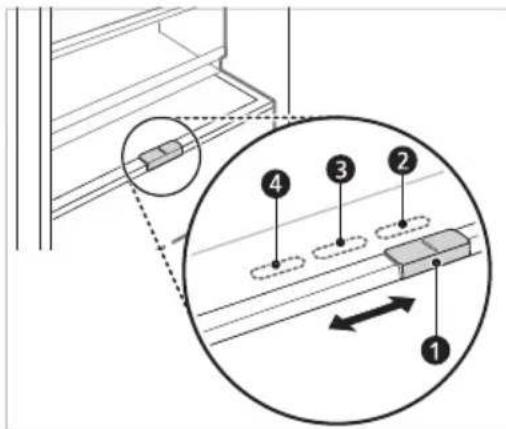
3a cbxpanHeHnHa 3eHcyu (PpenopbYBa ce)
33acbxpaHHeHHa np6a.
3a cbxpaHeHne Ha MecO.
3ABEJIEXKA
(^*) Ta3nФyHKuB Bapnpa B 3abncmocT OT 3aKynHnMoJeI.
YeKeMeJxke 3a CBeXn 3eJeHcyu (^*)
BnaKHOCTTa BOTdeneHneTo 3a 3eHeHuM OMOKe Da ce perylnupa Ype3 3aBbPtaHe Ha KOnHTo 1.
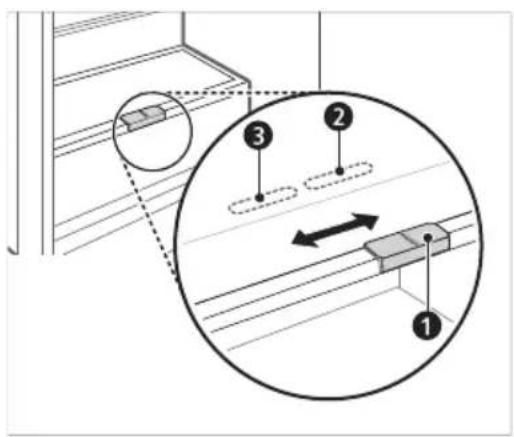
3a cbxpaHHeH He 3eJHcyu (PpenopbUba ce)
3a cbxpaHHeHa nIOdoBe.
3ABeJIeXKKA
(^*) Ta3nФyHKuB BapupaB 3aBNCMOCT O3aKynHmMoDen.
CrbBaem paT
CbxpaaBaTe NO-BnCOKn IpeDMeTn KaTo raIHOHeN KOHTeHep Hn6yTNkN, KaTO HaTNCHeTe IpeHaTa NIOBnHa Ha paTa nO3aHaTa NIOBnHa Ha paTa. DpbHete npEHaTa CtpaHa Ha paTa HAnpeD, 3a Da BbPHeTe KbM NIOXKeHne Ha NbNeH paT.
1 IOBnHHeTe npedHaTa cTpaHa Ha paΦTa n I3MeCTe Bbpxy 3aHaTa My cTpaHa.
2 NOBdHHeTe npedHaTa cTpaHa Ha paΦTa n IIN3MeCTe IOI 3aHaTa My cTpaHa. OT TOBa IIOJKeHne, DBeTe CTPaHn Ha paΦTa MORaT Da Ce NOBdHrHaT, 3a Da ce OCBO6Ou INOBeYe IpocTpaHCTBO.
Дрги Функции
AnapMa 3a OTBopeHa BpaTa
AnapMaTa npo3ByuBa 3 nTn B INTEpeBan OT 30 cekyn, ako Bpata (XnaDnHo OTdienHe) octane OTbOeHa nn He e HanbJHO 3aTbOeHa 3a eHa MNHyTa.
Cbpxte ce c ceHTbpa HOpMaun 3a KnneHn Ha LG Electronics, ako anapMeHnT cnHa npOdbJnxaba cJeD 3aTbapRHe Ha Bpata.
OTkpNbAHe Ha noBpeDa
UpeBt Moke cam da oKpNb a npo6n m no BpeMe Ha ekCnloatauia.
Ako 6bnde oTKpnt npo6nem, ypeBt Hma da pa60tn uIe ce noka3Ba kOd 3a rpeuka dopn npn HaTnCKaHe Ha HkOJ OT 6yToHInTe.
Korato TOBa Ce Cnyu, He N3KnHouBaIte 3aXpaHbAHeTo n He3a6abHc Ce CBpKeTe C ceHTbpa 3a INHOpMaunr 3a KIneHTn Ha LG Electronics. Ako N3KnUoyHe 3axpaHbAHeTo, TEXNkBT OT cEHTbPa 3a INHOpMaunr 3a KIneHTn Ha LG Electronics MoKe Da ce 3aTpydHn pRn OTKpNbAHe Ha npo6nema.
ПрилобжениTo LG ThinQ
Tazn xapaKTepeNCTnKa e HaNuHa cMoB MoJeIN C Wi-Fi.
PnnoKeHneTo LG ThinQ Bn no3Bolra Da KOMyHKnPaTe CypeDa NocpeDCTBOM CMapTFOH.
XapakTepncTnKn Ha npInJoxKeHneTo Ha LG ThinQ
Komyнкраite c ypeda ot cmaptfoH c nomoTuHa ydo6hnte yMHN xapaKtepncTNKn.
Smart Diagnosis
Ako Bb3HnKHe npo6nem DOkato N3no3BaTe npnIOxKeHneTo, Ta3n XapakTepncTnKa 3a yMHa DnaarHocTnka (smart diagnosis) ue BN nomorhe Da da nnaHocTnucnPate npo6nema.
Hactpoyn
-ДаВаВиВьзМоЖнocT3aЗдамаHeHa pa3ЛчИпОцИN BуpeDAИВпрлочeHneTO.
3ABEJIENKKA
Ako CMeHnTe CBo 6e3xKuHe npTep, OoCTaBnK Ha nHTepHe Tnn NapOJa, N3TpniTe peRnCTpnpaHny ypeD OT npNIOKeHneTo LG ThinQ n ropeRnCTpnpaTe oTHOB.
- PpInIOxKeHHeTo e npEiMeT Ha npOMeHc cen IpoIob6paBaHe Ha ypeHa, 6e3 npEiBapuTeHNO yBeIDOMBaHe Ha nOTpebTeNITe.
- ΦyHKUInTe MoKe Ja ca pa3NnHn npu pa3NnHnTe MoDeJI.
Ipei Da H3NoJ3BaTe npJIOxHeNeTo LG ThinQ
TbPBOHaayHapereNCTpaunHa ypeDa
3a Hau-do6pn pe3yntaTn, He MeCTeTe TenefoHa DOKaTO Ce N3Nb4BaT TOHOBe.
3a6eJexKn OTHoCHO nOuHCTBaHeTo
Korato cBaIaTe paTnIyueKeMdxKeOT BbTpewHOCCTHa hypeTa,IN3BaJeTe CraJaTa CbXpaHReBaHa XpaHa OT paTaNII YeKMeJKeTo,3a Da npedeOTBpaTHTe HapaHReBaHe nIIN NOBpeHa Ha ypeA.
-B npoTnBeH cnyaM MoKe Da ce noNyH HapaHbAHe NopaN TeIIOTo Ha CbxpaHbAHInTe XpaH.
AkoNoHnCTBaTe BbHUnHInTe OTBOpn 3a Bb3DyX Ha ypeJa c NOMOuTa Ha npaxOCMyKaHa, eNektpnuecknT Ka6e Tp6Ba Da Ce OTkaun OT KOHTaKa, 3a Da ce n36erHe CTatUeH pa3paHa eNektpnueCTBO, KOITo MoKe Da NobpeiN eNektpoHnKaTa nn da npnuHn eJektpnueckn ydap.
CbaIepepaTOBeTe NyeKMeJKeTaTaNrNoHCTeTe CBoa, cNeD KoETo rN 3CyUeTeDo6pe, npEn Da rN NoCTabNTe o6paTHo.
- PeIOBHO n36bpcBaIte yIJIbTHHeHnraHa bpaTata c MOKpa MeKa Kbpna.
-Nethata n pa3nBaHnraTn NO K0uHncaTa 3a Bpata Tpr6Ba Da ce NouchTbA, Tb' KaTo Te HapyuBaTcNooc6HoCTTa 3a CbXpaHeHne Ha KOUHncaTa N MORaT DOpN Da a NOBpeJr.
CneK KaTo NoHCTnTe, npOBepTe DaJIIN 3axpaHbAunrKa6eI He e NOBpeJeH, daJI IN He e TOnbI INn HEnpaBUNHO BKNIOueH.
-Плдьржайтчистп OTBOPNTe 3a Bb3dYx OT bHnHaTcTpaHa Ha ypeJa.
-3anyueHn OTBOpn 3a Bb3dyx MoRat da npuynHr noxap nn NobpeHa Ha ypeJa.
Korato noHCTBaTe ypeDa OTBbTpE nJIn OTBbH, He ro n36bpCbaIte C rpy6a YETka, nacta 3a 3b6n nn 3anaNIM BeUeCTBa. He n3noJI3BaIte NoHCTBaIu npenapatn, CbIbPkaIu 3anaJIIMM BeUeCTBa.
ToBa MoKeHpaHH OBe3cBETraHe nnIOBpeHa Ha ypeHa.
-3anaJIMMBeueCTBa:anKoxoN (etahoJ, MeaHOJ, n3OpPONn anKoxoN, n3O6ytnI aKoxoN n T.H.), pa3peiHTen, 6eHnHa, 6eH30J, 3anaJIMTeHOCn, a6pa3NBn np.T.
3a BbHnHaTa YacT Ha ypeDa n3noJ3BaIte YnCTa Tb6a uN MeKa KbpNa u Mek NoHCTBaU npenapat, pa3peDen C TOnla B0a. He n3noJ3BaIte a6pa3nBHN uN rpy6n noHCTBaU n cpeDCTBa. PocyuWeTe Do6pe C MeKa KbPna.
- Hnkora He nouchBaIte paTobete nIN CbdoBETe B MnaJIHa MaunHa.
- Yactnte Morat da ce deopmnpat npaTTOJIINHATA.
- Ako ypeBt e cha6dEn c LED lamna, He cBaIaIte kanaKa ha LED lamnata n camata lamna B ONIT da r peMOHTnpate nn 06cnyknte. CbpxTe ce c ceHTbpa 3a INHΦopMaunr 3a KIneHTn Ha LG Electronics.
- Почиствашие рedingовноьрхон'tи, конт мождд влгота В КонтсхранИС дocьнITE сnteMu 3a Дpeнж.
Noctabraye Ha KooshncaTaHa BpaTaTa Ha XlaadnHnka
1 XbaheTe Dbata KaPra Ha KoUHnuaTaHa BpaTata,JeKO 6yTHeTe eDINnHa Kpa,3a Da crIIO6nte,a NocLe No Cbunr Haunr CrIIO6eTe dpytna Kpa.
2 CneI kaTo crNoBnte, notynaiTe neko KOuHnUcaTa, 3a Da r 3akpenTe XOpN3OHTaJIHO.
IocTaBHe Ha YekMeJxKeTo Ha 6pn3epa
IocTabraHTo Ha YekMeJKeTo Ha φpns3epa ce n3BbPwBa B o6paTeH peiHa npoueca Ha cBaJIHe.
Tryk pa knappen Fridge erer Freezer for at justere temperature.
- Temperaturek an justeres.
Installation of LG ThinQ-application
Sog after LG ThinQ-appen fra Google Play Store, eller Apple's App Store pa en smartphone.
Eco-Friendly (Modo Eco)
OLULISED OHUTUSJUHISED 3
Teie vana seadme havitamine 10
PAIGALDAMINE 11
OLULISED OHUTUSJUHISED

OHT
Plateau a oeufs mobile
Application LG ThinQ
VAZNE SIGURNOSNE UPUTE 3
Zbrinjavanje starog ureda 10
POSTAVLJANJE 11
Dimenzije i slobodan prostor 11
Temperatura okoline 11
Pribor 12
Preokretanjevrata 12
VAŽNE SIGURNOSNE UPUTE

UPOZORENJE
Kako biste smanjili opasnost od eksplozije, požara, smrti, strujnog udara, ozljede ili opekotina osoba prilikom upotrebe ovog proizvoda, slijedite osnovne mjere opreza, uključujuci sljedeće:
Djeca u kućanstvu
-
Ovim se ureðajem ne bi trebale koristiti osobe (uključujuci djecu) smanjenih tjelesnih, osjetilnih ili mentalnih sposobnosti, ili s manjkom iskustva i znanja, osim ako ih osoba koja je odgovorna za njihovu sigurnost ne nadzire ili im daje upute u vezi s upotreptom ureðaja. Djecu treba nadgledati kako bi se osiguralo da se ne igraju s ureðajem.
-
Ako je urejad opremljen bravom (samo kod nekih modela), držite ključ izvan dosega djece.
Za uporabu u Europi:
HnBeIipaHe Ha ypeDoT
YpeoT Mopa da e HnBepnPaH 3a da HeMa Bn6paun.
ДOKOLKY e NOTpe6Ho, OdBpTeTe ИИЗ 3aBpTeTe Ги 3aBpTKuTe 3a ИИБeПира№ Б ДOKOLKY ypeIOT ro NOCTaByBaTe Ha HepaMeH NOd.
IpeHnOT dEHa ypeoT Tpe6a da e nocTaBeH MaIKy NOBcOKO OJ 3aDHnOT 3a NOECHO 3aTBopaHe Ha BpaTaTa.
Habane ro anapatot 3a necho da npuctannte do 3aBPTKte 3a HNBenipahe.
BpTe Tn 3aBPTKITe CnpOTuBHO Ha HAcOKaTa Ha CTpeJIKITE Ha YacOBHKnOT 3a Da ro NODIrHeTe ypeIoT, a o6paTHo 3a Da ro cnuytnte noHnCKO.
Pobp3yBaHe Ha ypeDoT
IIO nHCTaJaujata Ha ypeIoT, npNKnyeTe ro Bo WTekep npNKlyOkoT 3a HanojyBaHe.
HANOMEHA
- IIO NOBp3yBaHbETo Ha Ka6eIOT 3a HanojyBaHe (nnn npNKnyuOkOT) co uTekePOT, npueKajTe 2 nnn 3 yaca nped Da cTabNTe xpaHa BO ypeDTo. DOKONky cTabNTe xpaHa BO ypeDTo np ToJ ceNoCHO da Ce n3JaDi, XpaHaTa MOKe Da ce pacIne.
PpeMeCTyBaHbe
1 OtctpaHeTe ja ceTa xpaHa.
2 3BaTeTo npKnyOKOT 3a ctpya, BMeTHeTe To nΦnKcnpajTe To BO KyKaTa 3a npKnyOKOT Ha 3aHaTcTpaHa NJIHa roPHNOT DeI OJ anapaTOT.
3 Co nomou Ha JennBa JeHTa, 3aeneTe rH noiunTe n paKaTa Ha BpaTata 3a Da He naHaT npn npemecTyBaHbETo Ha ypeDTo.
4 IpnemecTyBaJTe cmo aKO cTe NOBeKeMnHa. Kora ro npehecyBaTe Ha noDOnrnpactoJaHnja, dpxTe ro nCnpaBeH.
5 OTKaKO ke ce noCTaBn, NOBp3eTe ro co cTpyja co npNKnyyBaHbe BO wTeKepe n BKnyteTe ro.
KapakTepncTnKn Ha anIIkaunjaTa LG ThinQ
Komyu npajTe co anapatot od namteH TelefoH co nomow Ha npakTuHnTe nameTHn yHKun.
Pametha DnjarHoctnka
Ako nckycnte npo6nem dokeka ja Kopucntte annkaunjata, onnjaata 3a naMeTHa DnjarHOCTNkKe Bn NOMORHe da ro DnjarHOCTuNPate npo6nemOT.
NoDecyBaHa
- Bn obo3moxyBa da noodeCte pa3nHn onuKaj anapaTOn BO annkaunjata.
HANOMEHA
Ako ro npomeHnte cbojoT 6e3Kuueh pyTepeBabByBaOT Ha nHTepHET ycnyr nnNnIO3HHkata, n36pniweTe ro perncTpupaHnot anapat od annkaunjata LG ThinQ n nobTopho pernctpapajre.
Annkaunjata noJnxHa npomeH 3apan noobpyBaHe Ha anapaToT,6e3 da im ce dae npedynpeDyBaBe Ha KOpNCnUTe.
- KapakTePncTnKnte MoKe Da BapuPaat Bo 3aBnCHOCT OJ MOJeNOT.
IpeД користelve на anлкauцида LG ThinQ
1 IpoBepete ro pactojaHneTo nomery anapatot n 6e3KmHnOpyTe (Wi-Fi mpeXkata).
Ako e nperoIeMo pactoJHnETo nomery anapatot n 6e3xNHyNt pyTe,doar do cna6eeHe ha cnHaIOT. MoKe da 6nDe notpe6en noD0JIr BpemeHcN nepno3a perncTpaunja,nn MoKe da DOBeJe Do HeycneuHa Hnctalaunja.
2 Ncknyte rMo6nHnTe nOaTouN nn KeNcKte nOaToUHa BaUNOT NaMeTeH TeJeOH.
3 Iobp3eTe ro Baunot nAmTeH TeJefoH co 6e3KnHnOpyTeP.
HANOMEHA
3a da ja notbprnte Wi-Fi KOHeKunjata, npoBepe DaJIncBETN IKOHATA Ha KOHTPOJHNO T NaHEn.
Anapatot noDpkyBa eHnCTBeHO 2,4 GHz Wi Fi mpeKn.3a da ja npOBepnte ppeKBeHunjata Ha BaUATA Mpexka, KOHTaKTnpajTe ro BaUNOT Ch6dyBauch CO HHTepHET ycIyH, INN NOrJeHHeTe BO yNaTcBOTO 3a BaUnOT be3xuueH pyTeP.
LG ThinQ He oOroBopeH 3a 6nIO KaKBN npo6IeMn OKOJy KOHeKTnpaHbeto Ha MPeKaTa Nn KaKBN n da 6nIO rpeuKN, DepeKTn Nn rpeuKn npedN3BnKaHN OD KOHeKTnpaHbeto Ha MPeKaTa.
- Ako anapaTOT nma npo6Iemn Okony KOHeKTIpaHBeTo Ha Wi-Fi mpeXaTa, MoKe6u e npedaleky od pyTePoT. Ha6abete Wi-Fi 3acnnyBauch (3acnnyBauch Ha doCTpeNOT) 3a da ja na noDobpnte jaunHaT ha Wi-Fi cnHaNOT.
Wi-Fi KOHeKunjata MoXe6n He ce NOBp3yBa NIMoXe6n e IpeKnHaT a nopadn OnkpykYBaHbeto Ha Domaushata Mpeka.
MpexHTo IOBp3yBaHe MoXe6n Hema Da pa6OTn npaBnHO BO 3aBnCHOCT OIpoBajdepot Ha nHTepHET ycnyrnte.
- OkonHTo 6e3KNUHO NOBp3yBaHe MoKe6n
- npDOnHeCyBa 6e3KNUHNO MpeKeH cepBnC da
- pa60Tn 6aBHo.
AnapatOT He Moke da ce peRnCTpnpa, npaPi npo6IeMn co npeHocot Ha 6e3KuHnO T CnHaI. N3BneTe To Ka6eNt Od anapaTOn n ouekajte OKJy eHa MNHyTa, nped NOBTOPO Da ce 6nnde.
Ako e OBO3MOXKeH 3aUHTTHNOt SnHa BaUNOT 6e3KHeH pyTeP, OHeBO3MOXeTe rO nIIN DOJaTeE NCKJlyQK BO HeRo.
- Imeto Ha 6e3xuHaTa MpeXa (SSID) Tpe6a da 6nde KOMbHaCuJa oJ aHrnnckn 6yKbN u 6poEBn. (He KopucTeTe rncneunjannHte kapaTepn)
KopnchNCHKNOT INHTeppejc (UI) Ha naMeTHNOT Tepeoh MOKe Da Bapnpa, BO 3aBnCHOC T Od Mo6uHNoT OnepaTHeh CnCTeM (OS) n Ipn3BODnteNoT.
Ako 6e36eHOCnOT npOTOKoHa pyTePOte noCTaBeH Ha WEP,MOKe Da He ycneete BO noDecyBaHeTo Ha MpeXata. Be monime npomHeTe ro Ha dpyrN 6e36eHocn npOTOKo (Ce npenopayBa WPA2) n NOBTOpHO perncTpnpajTe ro npOn3BOIoT.
Инста的答案 Ha anikaanjaLG ThinQ
Побapajte ja anпикauиjaTa LG ThinQ Ha Google Play Store & Apple App Store п配电у ванnotnamete6 телфон.
CneTe Tn HNCTpyKUInTE 3a npEeMaHe INHCTaINpaHBe Ha anNIkaujata.
Pobp3yBaHe co Wi-Fi
Kora ro Kopunctte koncheTo Wi-Fi co annilkaunjaT a LG ThinQ, anapaTOT MOKe da ce noBp3e co domaunata Wi-Fi mpeka. IkoHata 念 ro nokayba cTaTycot Ha mpeXhata KoHeKUnja Ha anapaTOT. IkoHata CBetn Kora anapatot e nobp3an co Wi-Fi mpekata.
PpBnuHa pernctpaunja Ha anapaTOT
- CtapTybajTe ja LG ThinQ annkaunjata n cneDeTe rHnCTpykunite BO annkaunjata, 3a da ro pernctpnpate anapatot.
Iobtopho pernctpnpaHe Ha anapaTOnnnpeurncptpnpaHe Ha dpyr KopncnK
-ПиТИСНЕТI ИДРЖЕТI GOKONЧETO WI-Fi BO TpaeHbe od 3 cekyHdN, 3a npINBpeMeHO NCKIpyBaHbe. CtrapTybajTe ja LG ThinQ aAnIIkaZiJaTaNcIeTe rN INCHTpYKUInTe BO Hea 3a dIra ng PerncTpnpaTe anapaTOT.
HANOMEHA
3a da ja ncknyuHTe cyHKnjuTata 3a Wi-Fi, npTuChTe u dpKteTo KOHceto Wi-Fi BO TpaHe be o3 cekyn. Ikonata ce ncknyu.
N3BecTyBaHbe 3a coΦTBe p Co OTBopeH KOD
3a da ro do6neTe n3BOpHnOT KoJ cnopeGPL, LGPL, MPL u npTte JnueHcN 3a OTbOpeH n3BOpEn Koj Ke KopncTn kaj OBOj npOn3BOD, nocetete ja ctpanuata http://opensource.lge.com.
Iokpaj n3BOPHNOt KOd,doCTaHn 3a Ipe3emaBe ce n cTe HabeDeHn Onde6n Ha IInceHca, OndeKyBaHa oD OndROBOPHOCT N I3BecTyBaHa 3a aBTopcN npaba.
LGE nCTO taka Ke Bn OBO3MOxN CNo6oDen KOD Ha CD-ROM 3a ueHa koJa rN NOKpINA TPOoUHTe 3a TaKBOTo IOCTaByBaHBe (kako Ha np. TPOoOn 3a MeDyMOT, PpaTKaTa N MaHInyJnatNBHN TPOoOn) No bapaHe npeky e-noTHa opensource@lge. com. OBaa NOhyda e BaJIuHa BO nepnoD od TpN roDHHNo NocneHaTaNsHa NcnpaKa Ha OBOJ npON3BOD. OBaa NOhyda Baxn 3a CeKOj PrIMATEJ Ha OBne INHOpMaun.
PametHa DnjarHocTnKa
ObaaФункиjaeДOCtanHa cMoCo MoDEJIInTe CO JIOTO 1JIN
YnoTpe6eTe ja Oba anuja 3a da njuarHocntnupate nn peunte npo6JIemn co Baunot anapat.
HANOMEHA
- OД пчнишTO He може да се прпшат кадо hemapnoct Ha LGE, усугата може дa
- He pa6OTи поади надворешни Фakтори,
- КадошTO ce, HO HeorpaHnHybajки ce Ha
- Нedingтанhoeста Ha Wi-Fi, ryбенe Ha Wi-Fi
- Конкцида, поитarkaТа Ha npodabHncaTa
- 3a anlinaquin ИИн He doctanhocta Ha
- anlinaquinja.
- Obaa cyHKunja moKe da e npedMeT ha npomeHa 6e3 npetXoJHa Hajaba N MOKe Da mA npa3nUHa cOpMa BO 3aBnCHoCT Od Toa KaDe cTe loupaHn.
KopncTeHe LG ThinQ 3a DnjarHocTnucpaHe npo6JIeMn
Ako nckcnte npo6nem co Baunot anapat onpeMeH co Wi-Fi, Toj moKe da rN nCnpaTn IpaTOuNTe 3a npo6nemOT Ha naMeTe TeneOH npeky annkaujata LG ThinQ.
Bknyte ja annkaunjata LG ThinQ n36epete ja onujata 3a naMeTHa nnjarHocnka oM MeHTo. CneTe rU ynatCTbata daeHN BO annkaunjata LG ThinQ.
KopncTeHe 3ByuHa DnjarHo3a 3a DnjarHocTnucpaIbe npo6Jemn
CnepeTe rynatcbata dony 3a da ro KopnCTnte MeTOoT Ha 3ByHa DjaarHO3a.
Bknyte ja annkaunjata LG ThinQ n 36epete ja onuja7a naMeTHa nnjarHOCTnKa oM MeHTo. CneTe r yNaTcTBata 3a 3ByHa dnjarHO3a daEHN BO annkaunjata LG ThinQ.
Panael co dincnpje Ha BpaTaTa Ha cpnKndepot.
1 PnTnCTHe ro konyeTo Lock 3a da ja aKTNBnpaTe cyHKunjata Bpaba 3a 3aKnIyUBaHbe.
Ako ekpahot e 3aknyueh NOBeke o5 MNHyTN, Mopate Da ro DeaKTNBupate 3aknyuBaHeTo n Notoa NOBTOHO da ro aKTHBnpate.
2 IpnTnCHTe ro konHeTo Freezer n npKeTe ro Tpr cekyHn nn noDOnro DoKeKa ro dpKnte BaunOT Telepon Ha 3ByuHnKOT.
3 OTbopete ja Bpaata OI cPnKnepoT n DpxKeTe ro TepeohOT 6n3y OTbOpOT Ha 3ByHnKOT.
4 IIO 3aBpyBaHe Ha TpaHcpepOT Ha NOdaTOU, INPeTCTaBHnK Od CepBnCOT Ke Bn rN o6jacn pe3yIITaTnTe od Smart DiagnosisTM.
PanaHNot Ha dncnJeJc Ce haora BO BpaTata Ha pnnKepeoT.
1 OToBopeTe ja BpaTaTa Ha pPnKnepoT.
2 PnTncHe Ha konueTo Eco Friendly.
3 Ako Bpata Ta 6nla OTBopeHa noDOnro od 60 cekyHn, 3aTbOpTe ja n nobTopeTe rN Yekopnte 1 n 2.
4 DpxkTe ro TepeHOT 6n3y OTBOPOT Ha 3ByuHKnOT. PnTncHete n DpxkTe ro KOnHTo Freezer 3ceKHydIOdeKa ro DpxkTe TepeHOT nped 3ByuHKnOT.
5 OTKaKO Ke 3aBpHn IpEHOCOT Ha nOdaTOU, DnjaH03aTa ce npKaJyBa BO anNkaunjata.
HANOMEHA
3a Hajdo6pn pe3yntatn, He nompndHybajTe ro TepehoHOT doNeKa ce npehecyBaat 3ByuTe.
Hanomehn 3a YncTeHe
Kora BaInte noJIuca nn oNOKa OJ anapaTOT, n3BaJeTe ja ceJaTa XpaHa UTo e cKnlaInpaHa Ha noJIucaTa nn oNOKaTa, 3a da cnpeUte NOBpeDa nn OwTeYBaHe Ha anapaTOT.
-Bo cnpotnbHO, MoKe Ja Dojde Do NOBpeDa nopaDi TeXHaTa Ha CKNaDnpaHaTa XpaHa.
- Ako Tn YnCTnTe HaBOpewHnTe OTBopn 3a BeHTnlaucjHa ha anapaTOT co npabOCmyKaJIka, TORaI Tpe6a Da Iro NCKnyuTe Od CTpyja 3a Da n36erHete CtaTNUKO npa3HeBe KOeWTO MOKe Da ja OWTeTu eNEkTPOHnKaTa UIN Da PpeDn3BnKa CTpyeH yap.
- N3BaTeTe rN pONuNTe nΦnOKnTE uNCyNCTeTe rN CO TOnJa BOJa, a NToTa u36pNiSeTe rN u BpaTeTe rN Ha3aJ.
- PeioBHO 6pniWte ja 3aANTnBkata Ha BpaTaTa co BnaXHa ME Ka Kpna.
- NCTeHeHata XpHaN DAMKn Ha KOpNTe OD BpaTata TpeBa Da ce YnCTaT 3aToa WTO rHaMaanyBaaT KanaCHTeTOT Ha CyBaHbE Ha KOpNaT, Na Dypn MoKe N da ja oWTeTaT.
- No yncTeHBeTo, npOBepTe daJIu Ka6eIOT 3a cTpyja e OHTeH, TOnOJI nn HnnpaBnHO BknyeH.
OdpKyBajTe rN uNCTn OTBOpNTe 3a BEHTnlauJa Ha HAnBOpEshHOCTa Ha anapaTOT.
-3aTHaTN OTBOpN 3a BEHTnlaUJia MoKe Da npEiUN3BnKaat NOXap INI Da rO OWTetAnapaTOT.
Kora ke ja uctte BHaTpeHocTa Hn HaBopeuHocTa Ha anapaT, He 6pniweTe ja co rpyba Yetka, nacta 3a 3a6n, nn He kon 3anaJIINbMaTepnjaJn. He KopncTe cpeCTBa 3a uCTeHe Kon CoDpxkat 3anaJIINbMaTePnN.
-Toa MoKe Da npeiN3BnKa npomeHa Ha 6ojata nn OwTeTyBaHe Ha anapaTOT.
-3anaanBnMaTeepn: anKoxon (etahon, MeTaHOJ, n3Opponn aIKOXON, n3Obytna anKoxon nTH.), pa3peDyBauchcpeCTBO 3a 6eHebe, 6eh3eH, 3anaanBnBa TeuHocT, abpa3NBn nTH.
3a HauBopeuHocTa Ha anapaTOT, KopnCTe Tc cyHep uN MeKa Kpna n 6nar DeTepreHT BO TOIb BODa. He KopnCTe a6pa3NBn CpeiCTBa NIN CNHN CpeiCTBa 3a YnCteHe. TemenHO n36pnWete ro co MeKa Kpna.
HnHe MjTe rN noNtte nn caOBe BO MaUNHa 3a MneHe caOBN.
-ДeJOBNTe MoKe Da ce DeΦopMnPaat nopadn TOnJIHa.
- PeioBHO YnCTeTe rN NOBpHnHnTe 3a Da He Dojat BO KOHTaKT CO XpaHaTaN CnCTeMnTe 3a DpeHaxa.
- Ako anapatot e onpeMeH co LED cBeTno, He BaIaTe ro KaIakOT Ha cBeTnOTo HHTy LED CBeTnOTo, Bo 6bI Da ro nonpaBate nn cepBucnPate. Be MoIIme cTaneTe BO KOHTaKT co LcHTapOT 3a INHΦopMaun 3a KIneHTn Ha LG Electronics.
YncTeHbe Ha Kopnata Ha BpaTaTa
BaideheHaKopnataHa φρnxndepot
UncTeHbe Ha 3aWTNTHOTOCTaKNo
BaedeHa 3aHTHTHOTo CtaKIO
1 OTKako Ke ro n3BaIte KaIakOT Ha 0nOKata 3a 3eNeHcyK, HADOny NOBneHTe Ro rOpHnot dN od 3aWNTHTOcTakNo.
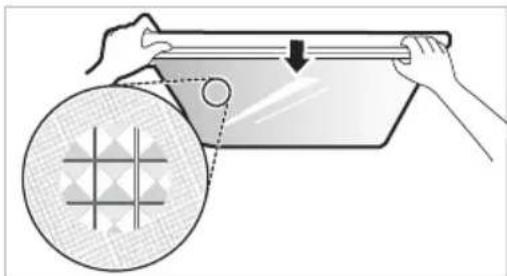
2 NOBJIeHTe rO 3aWTnTHOTo CTAKIO 3a Da rO n3BaJNTe.
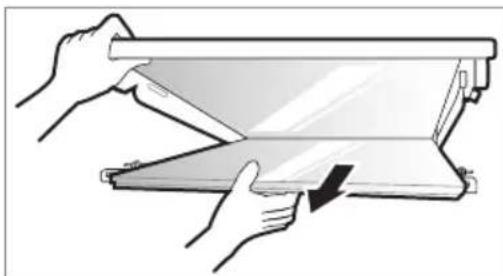
Повторно мостеные на 3аштITHOTO CTaKIO
1 Ctabete rN nCnakHaTne DeIOBn Ha 3aHTnTHOTo CTAKNO BO XJIe6OBnTe Ha nOJIucaTa.
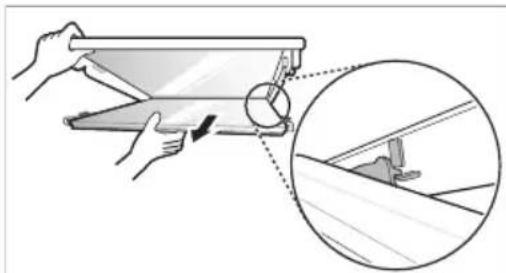
2 NocTaBete rN nCnakHaTnte DeNoBN npE3aHTHTOTo cTakNO BO XNe6oBnTe npEINuCaTa I TpyHeTe Ro 3aHTHTOTo cTakNO 3a Da rnoCTaBnTe Ha MecTO.
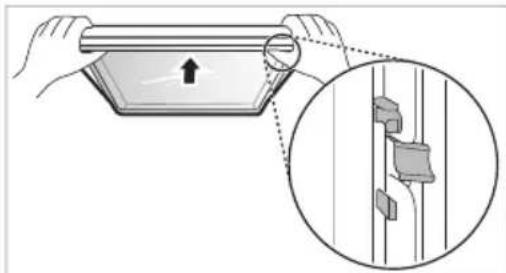
UncTeHbe HaΦnOKaTa Ha 3amp3HyBaQOT
1 N3BaTe ja coOpXnHaTa od fnoKaTa. DpKeTe ja paKaTa Ha fnoKaTa Ha 3aMp3HyBaOt n NOleKa, cIeNoCHO N3BneTe ja HAnBOp, ce DoNeKa He 3anpe.
2 IOnnHHeTe ja 0nOKaTa Ha 3amp3HyBaOHaIrope n 3BaJeTe ja NOBNeKyBajKn Ja HAdBOp.
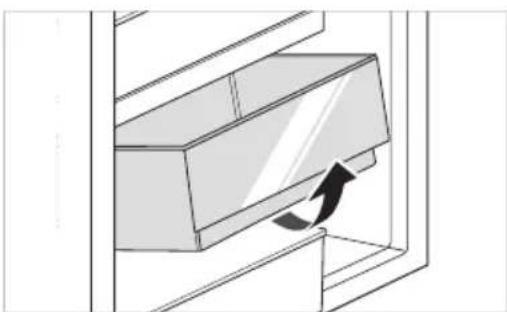
Verbinding makes met Wi-Fi
Anbefalinger for strømsparing
- Start - temperatureer innstilt.
Kjoleskap: 3^
Fryser: -18 °C
Den faktiske innvendige temperaturen varierer, avhengig av matstatus, selv om den angitte innstilte temperaturen er en mältemperatur, er det/DDke den virkelige temperaturen i Produktet.
MERK
Reverter as Portas 12
Prateleira rebativel 21
Outras Funções 22
FUNÇÖES SMART 23
Aplicacao LG ThinQ. 23
Utilizar o Smart DiagnosisTM 25
MANUTENÇA 26
Observacoes relativamente a limpeza 26
Para Inverter as portas
Limar as saidas de agua e gelo
Eco Friendly (Ecologic)
RIESENIE PROBLEMOV 29
VAŽNA BEZBEDNOSNA UPUTSTVA

UPOZORENJE
Fridge Temperature (Kyltemperatur)
- Medenna knapp stalls kylskapstemperaturen in.
^ 念 Express Cool (Snabbkylning)
Stalla in temperature
Medenna knapp stalls kylskaps-ller frystemperaturen in.
Tryck pa knappen Fridge erer knappen Freezer for att justera temperatures.
- Temperaturen kan justeras.
Kylskap: frän 1^ till 7^
Frys: frän -15 °C till -23 °C
- Den initiala temperaturen ar installd.
Kylskap: 3^
- Frys: -18 °C