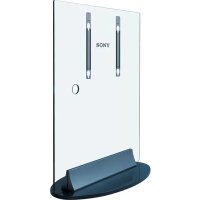
SUPF1 - Flat screen mount SONY - Free user manual and instructions
Find the device manual for free SUPF1 SONY in PDF.


| Product Type | Flat screen stand |
| Brand | Sony |
| Model | SUPF1 |
| Material | Tempered glass |
| Weight | 57 kg |
| Compatible TVs | KE-42MR1, KDE-P42MRX1, KE-P42MRX1, KE-50MR1, KDE-P50MRX1, KE-P50MRX1, KLV-L42MRX1, KDL-L42MRX1(UK) (from March 2004) |
| Number of installers required | At least 2 people |
| Included accessories | Independent stand (1), Fixing plate (2) |
| Installation type | On a flat and solid surface, vertically |
| Recommended wall anchoring | Yes, to prevent tipping over |
| Maintenance | Soft dry cloth, diluted detergent for stubborn stains. Do not use thinner or gasoline. |
| Safety | Do not lean, do not hang, do not use if cracked, do not install tilted |
Frequently Asked Questions - SUPF1 SONY
User questions about SUPF1 SONY
0 question about this device. Answer the ones you know or ask your own.
Ask a new question about this device
Download the instructions for your Flat screen mount in PDF format for free! Find your manual SUPF1 - SONY and take your electronic device back in hand. On this page are published all the documents necessary for the use of your device. SUPF1 by SONY.
USER MANUAL SUPF1 SONY
For Customers and Sony Dealers in Europe
Floating Stand
Instructions GB
Gebrauchsanweisung DE
Istruzioni IT
Mode d'emploi FR
Instructies NL
Οδηγίες GR
Yönergeler TR
Instrucciones ES
Instruções PT
Vejledning DK
Instruksjoner NO
Bruksanvisning SE
Käyttöohje FI
SU-PF1
Thank you for purchasing this product.
To Customers
This product should only be installed by qualified Sony service representatives, as it requires at least two people, special care, safety, and technique. Sony is not liable for any accidents or damages caused by incorrect installation or handling. Your Statutory Rights (if any) are not affected.
WARNING
If the safety precautions are not observed or the product is used incorrectly, it may result in serious injury or fire.
This instruction manual shows the correct handling of the product and important precautions necessary to prevent accidents. Be sure to read this manual thoroughly and use the product correctly. Keep this manual available for future reference.
For Sony dealers
Installation of a plasma TV requires two people, special care and technique. When installing a plasma TV, refer to this manual carefully. Sony is not liable for any accidents or damages caused by incorrect installation or handling. Your Statutory Rights (if any) are not affected. Please give this manual to the customer after installation.
On Safety
Products by Sony are designed with safety in mind. If the products are used incorrectly, however, it may result in a serious injury through fire, electric shock, the product toppling over, or the product dropping. Be sure to observe the precautions for safety to prevent such accidents.
CAUTION
This Floating Stand is intended for use only with the following products. Use with other apparatus is capable of resulting in instability causing possible injury.
Specified products (As of March 2004) : Flat Panel Colour TV
(KE-42MR1/KDE-P42MRX1/KE-P42MRX1/KE-50MR1/KDE-P50MRX1/KE-P50MRX1/KLV-L42MRX1/KDL-L42MRX1(UK))
We recommend installing the Floating Stand a short distance away from the wall.
WARNING
If the following precautions are not observed, serious injury or death through fire, electric shock, the product toppling over, or the product dropping can result.
Be sure to subcontract the installation to Sony dealers.
If persons other than Sony dealers do the installation work, this may result in serious injury, as the Display Unit and the stand are very heavy.
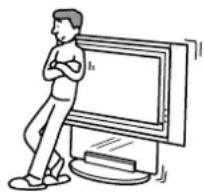
Do not lean on or hang from the stand.
The stand may topple over and cause injury.
natural_image
Illustration of a person standing next to a computer monitor (no text or symbols visible)Be sure to take measures to prevent the stand from toppling over.
If you fail to do so, the Floating Stand may topple over during an earthquake and cause injury or property damage. Anchor the stand to a wall, etc. to prevent it from toppling over.
Be sure to install the stand on a solid and flat floor.
Do not install the Floating Stand so that it leans in one direction. If you do so, the Floating Stand may topple over or the Display Unit may fall. This may cause injury.
If you install the stand on a soft surface such as a mat or a carpet, lay a board over the designated location beforehand.
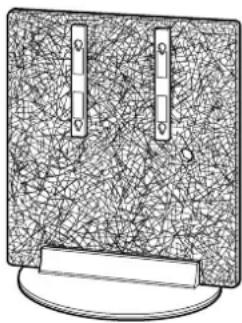
Do not use a cracked stand.
Do not use the Floating Stand if any cracks appear in it.
The glass may break and the Display Unit may fall, or the stand may topple over. This may cause injury.
natural_image
Illustration of a computer monitor with two vertical connectors and a base (no text or symbols)Cracked Stand
WARNING
If the following precautions are not observed, serious injury or death through fire, electric shock, the product toppling over, or the product dropping can result.
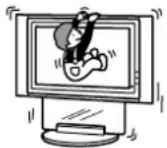
Do not lean on or hang from the stand with the Display Unit installed on it.
The stand may topple over and cause serious injury or death.
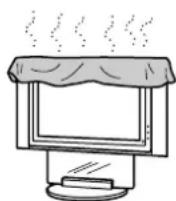
Do not cover the ventilation hole of the Display Unit.
If you cover the ventilation hole (with a cloth, etc.), heat may build up inside and cause fire.
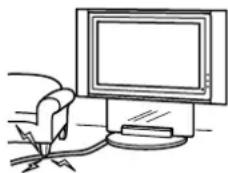
Do not allow the mains lead or the Display Interface Cable to be pinched.
- Do not allow the mains lead or the Display Interface Cable to be pinched when you install the Display Unit on the stand. If the mains lead or the Display Interface Cable is damaged, this may result in a fire or an electric shock.
- Do not step on the mains lead or the Display Interface Cable when you carry the Display Stand. The mains lead or the Display Interface Cable may be damaged, and this may result in a fire or an electric shock.
natural_image
Line drawing of a computer monitor with cables and a small electronic device (no text or symbols)CAUTION
If the following precautions are not observed, injury or property damage may occur.
Do not install any equipment other than the specified product.
This stand is designed for use with the specified product only. If you install equipment other than specified, it may fall and cause injury or property damage.
Attaching the Display Unit.
Be sure to attach the Display Unit to the stand with the supplied fixing plates. If the Display Unit is not attached securely, it may fall and cause injury.
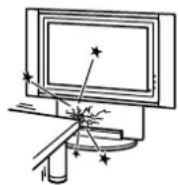
Do not apply weight to the glass or subject it to any kind of impact.
Do not apply weight to the glass with your hand when installing the Display Unit. Do not hit the glass with hard objects, such as a screwdriver, etc.
The glass may break and cause injury.
When carrying the Floating Stand
Trying to move the Floating Stand alone, or without following the proper procedures, may cause injury. To avoid this, be sure to follow the advice given below.
- Be sure that two or more persons carry the Floating Stand only after removing the Display Unit.
- Be careful not to allow your toes to be pinched under the bottom plate or the corner of the glass.
Do not subject the glass to excessive shock.
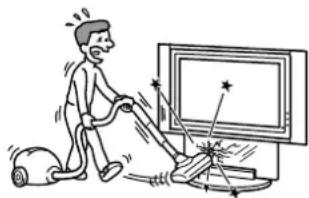
This stand is made of tempered glass, but care should be taken. If the glass breaks, glass fragments could cause injury, so observe the precautions below.
- Do not hit the glass or drop sharp-pointed objects on the glass. Avoid excessive shock.
- Do not scratch or poke the glass with sharp-edged objects.
- Do not let hard objects such as a vacuum cleaner hit the edges of the glass.
natural_image
Illustration of a person using a vacuum cleaner to clean or remove a TV (no text or symbols present)Note on installation
Install the stand on a solid and flat floor. Do not allow the stand to be installed at an angle or incline. To avoid this, observe the following precautions.
- If you install the stand on a soft surface such as a mat or a carpet, lay a board over the designated location beforehand.
- Do not install the stand in a place subject to direct sunlight or near a heater.
- Do not install the stand in a hot or humid place, or outdoors.
Note on use
To keep the stand clean, occasionally wipe the stand with a dry soft cloth. Stubborn stains may be removed with a cloth slightly dampened with diluted detergent. Then wipe the area with a dry soft cloth. Do not use any type of chemicals, such as thinner or benzine, as they may damage the finish of the stand.
For Sony dealers
Be sure to thoroughly read the safety precautions described above and pay special attention to safety during the installation, maintenance, checking, and repair of this product.
Be sure that two or more persons do the installation work.
Be sure that two or more persons install the Display Unit on the Floating Stand. If one person does the installation work alone, this may result in an accident or injury. Be sure to keep small children away during the installation.
Be sure to install the Display Unit securely, following the proper procedure. If the Display Unit is not installed securely, it may fall and cause injury.
Check the parts
| Name Quantity Name Quantity | |||
Floating Stand Fixing plate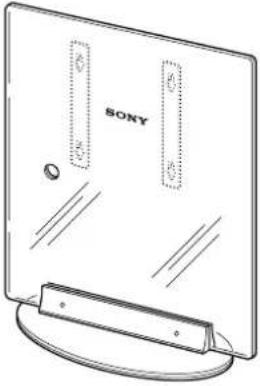 | 1 | 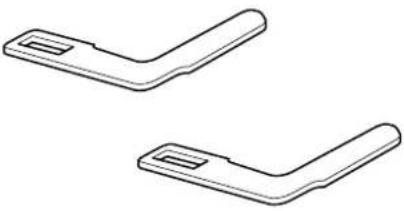 | 2 |
Install the Display Unit
WARNING
If you allow the mains lead to be pinched under or between pieces of equipment, this may result in a short circuit or an electric shock. If you stumble over the mains lead or the Display Interface Cable, the stand may topple over, and cause injury.
Draw the mains lead and the Display Interface Cable through the hole on the stand.
Decide on the installation location and lay the stand down before installing the Display Unit.
Since the Display Unit is heavy, it is recommended that you decide on the installation location beforehand and lay the stand down there before installing the Display Unit on the stand.
Note
Do not push or pull the stand while it is on the floor. The rubber footings on the base of the stand may come off.
1
Connect the mains lead and the Display Interface Cable to the Display Unit.
Tip
See the instruction manual of the Sony Flat Panel Colour Television or LCD Color Television for more details on connecting the mains lead and the Display Interface Cable.
Notes
- If the weight of the Display Unit is placed on the speakers, deformation or a loose connection of the speakers may result. To avoid this, observe the following. (KLV-L42MRX1, KDL-L42MRX1(UK) only)
- Do not hold the speakers when carrying the Display Unit.
- When connecting cables to the Display Unit, place packing material, etc. on the floor and lay the Display Unit face down on it so that the speakers on either side of the Display Unit are clear of the packing material, etc.
- Be sure to place the Display Unit stably.
- Use soft cloth to protect the screen of the Display Unit from damage or dirt.
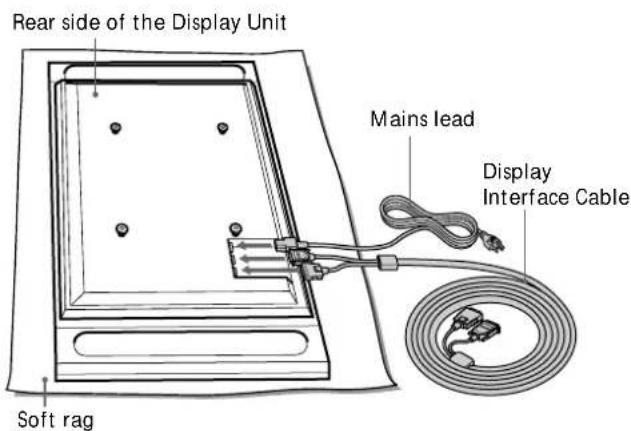
KE-42MR1/KDE-P42MRX1/KE-P42MRX1/KE-50MR1/KDE-P50MRX1/KE-P50MRX1
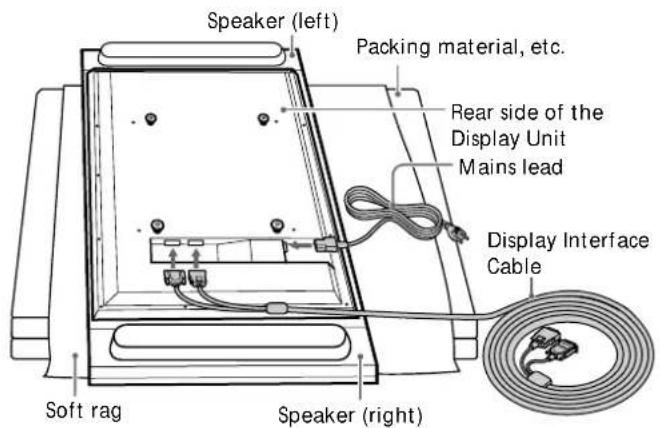
KLV-L42MRX1/KDL-L42MRX1(UK)
Illustrations without model names that appear from now on are based on the Flat Panel colour television KLV-L42MRX1, KDL-L42MRX1(UK).
2
Install the Display Unit on the stand.
①Draw the mains lead and the Display Interface Cable through the hole on the stand.
②Check the position of the four holes on the fixtures on the stand beforehand.
Fit the hooks on the rear of the Display Unit into the holes on the fixtures of the stand.
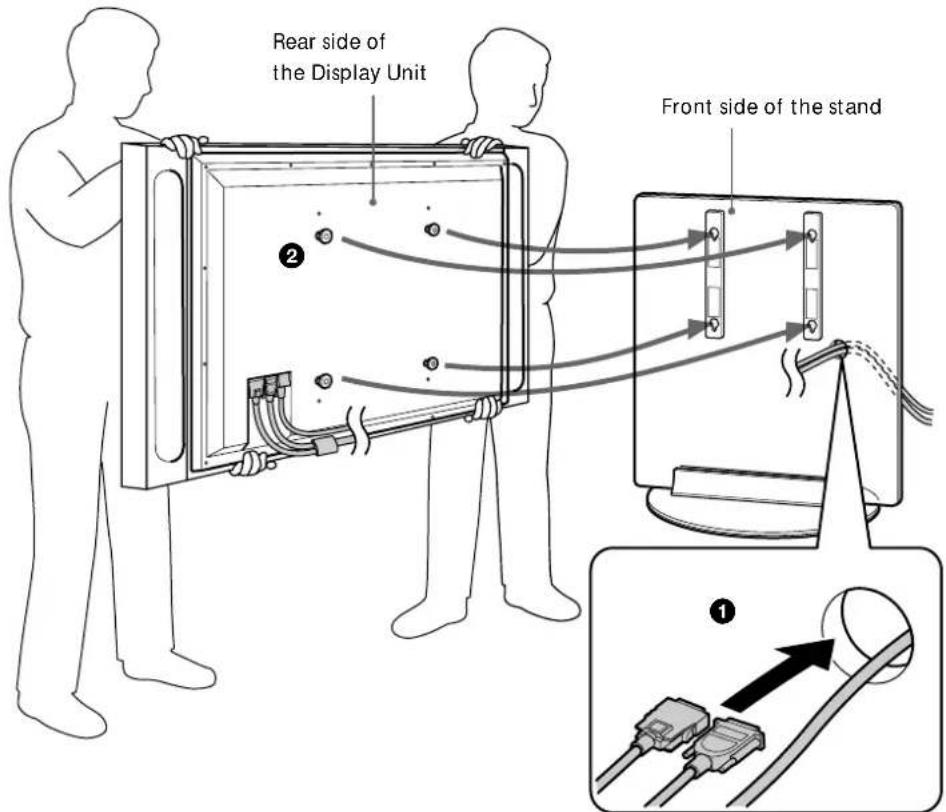
③ Confirm that the hooks on the rear of the Display Unit are completely inserted into the four holes on the fixtures. Then slide the Display Unit straight downward until it snaps on.
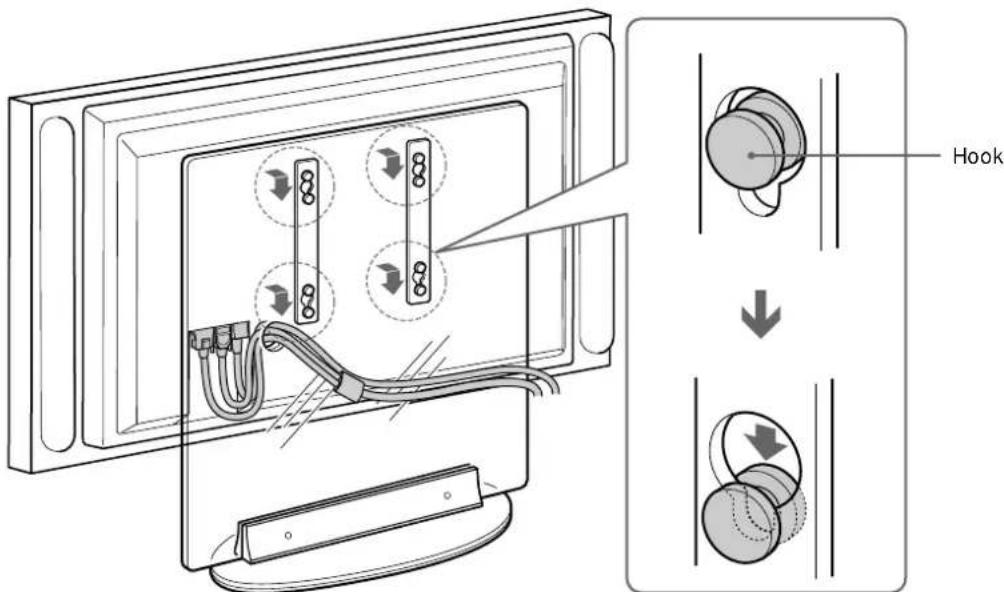
3
Take up the slack out of the mains lead and Display Interface Cable already drawn through the hole on the stand.
Pull the ends of the mains lead and Display Interface Cable already drawn through the hole on the stand and take up the slack out of the lead and the cable.
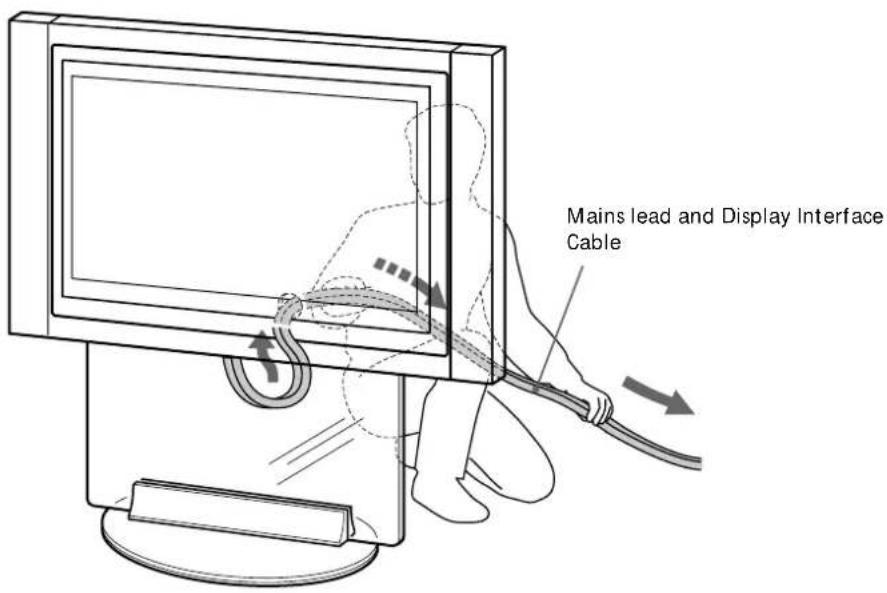
Fix the Display Unit
Attach the fixing plate to prevent the Display Unit from falling.
① Insert the fixing plate between the screw on the upper part of the fixture on the stand and the hook on the Display Unit.
②Slide the fixing plate until the corner of the L-figure hits against the screw.
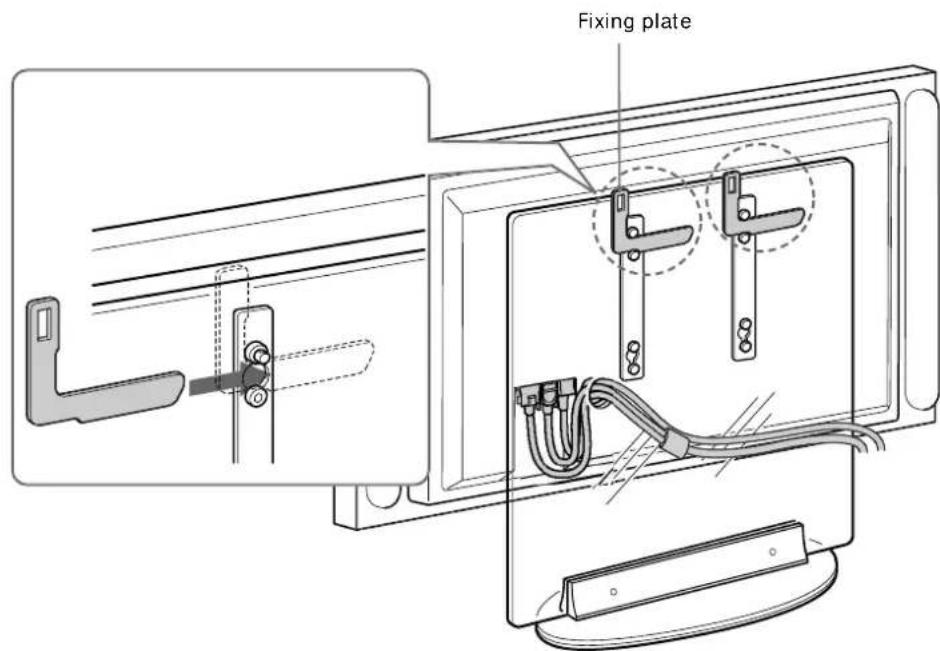
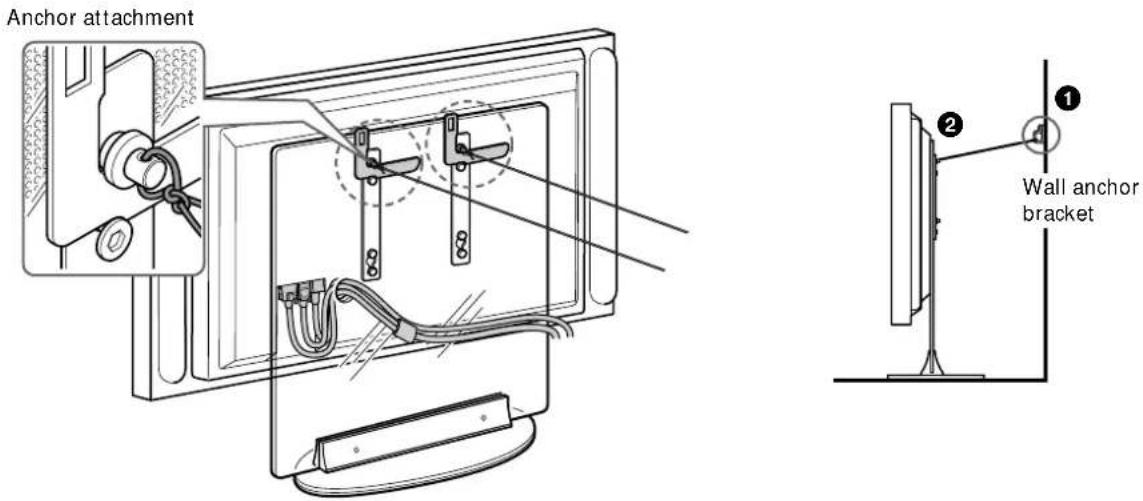
Safety measures to prevent toppling over
WARNING
Be sure to take measures to prevent the stand from toppling over. If you fail to do so, the Floating Stand may topple over during an earthquake and cause injury or property damage. Anchor the stand by using a rope or chain with fastening one end of it to the securing hook and the other end to the wall or pillar.
Prepare a commercially available rope or chain and wall anchor bracket beforehand.
①Secure the wall anchor bracket to a solid wall or pillar.
② Pass the rope or chain through both holes of the anchor attachments and then tighten the other end of the rope or chain to the wall anchor bracket.
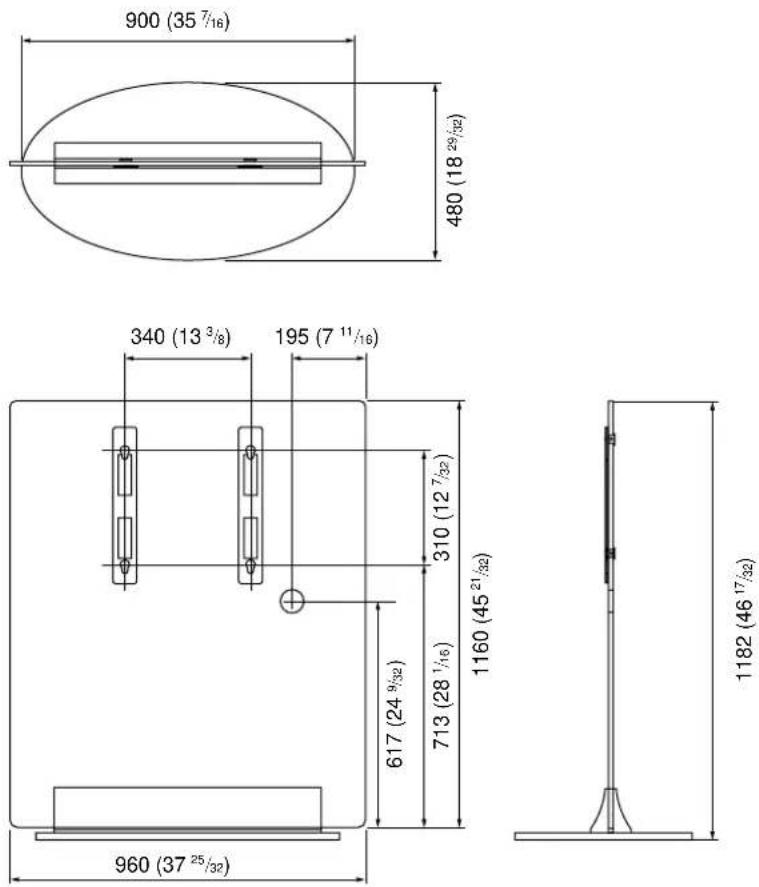
Specifications
Unit: mm (inches)
Weight: 57 kg (125 lb 11 oz)
Design and specifications are subject to change without notice.
natural_image
Illustration of a person standing next to a computer monitor (no text or symbols visible)natural_image
Illustration of a computer monitor with two vertical connectors and a blank base (no text or symbols)Gesprungenes Glas
ACHTUNG
natural_image
Line drawing of a person using a desktop computer with monitor and keyboard (no text or symbols)VORSICHT
natural_image
Illustration of a person using a vacuum cleaner to clean or remove a TV, with no text or symbols present.natural_image
Illustration of a person standing next to a computer monitor (no text or symbols visible)natural_image
Illustration of a computer monitor with two vertical connectors and a blank screen (no text or symbols)Supporto incrinato
ATTENZIONE
natural_image
Line drawing of a person using a desktop computer with monitor and keyboard (no text or symbols)AVVERTENZA
natural_image
Cartoon illustration of a person using a vacuum cleaner to clean a TV (no text or symbols present)natural_image
Illustration of a computer monitor with two vertical connectors and a base (no text or symbols)Support fissuré
AVERTISSEMENT
natural_image
Line drawing of a person sitting at a desk with a computer monitor and keyboard (no text or symbols)ATTENTION
natural_image
Cartoon illustration of a person using a vacuum cleaner to clean or watch TV (no text or symbols present)natural_image
Illustration of a computer monitor with two vertical connectors and a base (no text or symbols)Gebarsten standaard
WAARSCHUWING
natural_image
Line drawing of a desktop computer with monitor, keyboard, and mouse (no text or symbols)LET OP
natural_image
Illustration of a person using a power tool to clean or remove a TV, with no text or symbols present.natural_image
Illustration of a person standing next to a computer monitor (no text or symbols visible)natural_image
Illustration of a computer monitor with two vertical connectors and a base (no text or symbols)Ραγισμένη βάση
ΠΡΟΕΙΔΟΠΟΙΗΣΗ
natural_image
Line drawing of a hand inserting a cable into a computer monitor (no text or symbols)ΠΡΟΣΟΧΗ
natural_image
Illustration of a person using a vacuum cleaner to clean TV screens (no text or symbols present)natural_image
Illustration of a computer monitor with two vertical connectors and a base (no text or symbols)Çatlak Sehpa
UYARI
natural_image
Simple line drawing of a desktop computer with monitor, tower, and cable (no text or symbols)TEDBİR
natural_image
Cartoon illustration of a person using a vacuum cleaner to clean or operate a TV (no text or symbols present)natural_image
Illustration of a person standing next to a computer monitor (no text or symbols visible)natural_image
Illustration of a computer monitor with two vertical connectors and a base (no text or symbols)Soporte dañado
ADVERTENCIA
natural_image
Line drawing of a desktop computer setup with monitor, keyboard, and mouse (no text or symbols)PRECAUCIÓN
natural_image
Cartoon illustration of a person using a vacuum cleaner to clean or operate a TV (no text or symbols present)natural_image
Illustration of a person standing next to a computer monitor (no text or symbols visible)natural_image
Illustration of a computer monitor with two vertical connectors and a base (no text or symbols)Base rachada
AVISO
natural_image
Line drawing of a person sitting on a chair using a computer monitor (no text or symbols)ATENÇÃO
natural_image
Cartoon illustration of a person using a lawn to clean or remove a TV (no text or symbols present)natural_image
Illustration of a person standing next to a computer monitor (no text or symbols visible)natural_image
Illustration of a computer monitor with two vertical connectors and a base (no text or symbols)Revnet konsol
ADVARSEL!
natural_image
Line drawing of a person using a computer monitor with cables (no text or symbols)FORSIGTIG!
natural_image
Illustration of a person using a vacuum cleaner to clean or operate on a computer monitor (no text or symbols present)natural_image
Illustration of a person standing next to a computer monitor (no text or symbols visible)natural_image
Illustration of a computer monitor with two vertical connectors and a base (no text or symbols)Sprukket stativ
ADVARSEL
natural_image
Simple line drawing of a desktop computer with monitor, keyboard, and mouse (no text or symbols)FORSIKTIG
natural_image
Cartoon illustration of a person using a vacuum cleaner to clean or remove a TV (no text or symbols present)natural_image
Illustration of a person standing next to a computer monitor (no text or symbols visible)natural_image
Illustration of a computer monitor with two vertical connectors and a base (no text or symbols)Sprucket ställ
WARNING!
natural_image
Line drawing of a person using a computer monitor with cables (no text or symbols)WARNING!
natural_image
Illustration of a person using a vacuum cleaner to clean or operate on a computer monitor (no text or symbols present)Om installation
natural_image
Illustration of a person standing next to a computer monitor (no text or symbols visible)natural_image
Illustration of a mechanical device with two vertical slots and a base plate (no text or symbols)Murtunut jalusta
VAROITUS
natural_image
Line drawing of a computer monitor with a cable and drive, no text or symbols presentVAROITUS
natural_image
Illustration of a person using a lawnshaw to clean or watch TV, with no text or symbols present.
- For Customers and Sony Dealers in Europe
- Floating Stand
- SU-PF1
- Thank you for purchasing this product.
- To Customers
- WARNING
- For Sony dealers
- On Safety
- CAUTION
- When carrying the Floating Stand
- Do not subject the glass to excessive shock.
- Note on installation
- Note on use
- Check the parts
- Install the Display Unit
- Draw the mains lead and the Display Interface Cable through the hole on the stand.
- Note
- 1
- Tip
- Notes
- 2
- Install the Display Unit on the stand.
- 3
- Fix the Display Unit
- Safety measures to prevent toppling over
- Specifications
- ACHTUNG
- VORSICHT
- ATTENZIONE
- AVVERTENZA
- AVERTISSEMENT
- ATTENTION
- WAARSCHUWING
- LET OP
- ΠΡΟΕΙΔΟΠΟΙΗΣΗ
- ΠΡΟΣΟΧΗ
- UYARI
- TEDBİR
- ADVERTENCIA
- PRECAUCIÓN
- AVISO
- ATENÇÃO
- ADVARSEL!
- FORSIGTIG!
- ADVARSEL
- FORSIKTIG
- WARNING!
- Om installation
- VAROITUS
Brand : SONY
Model : SUPF1
Category : Flat screen mount