
MSACUS40 - Remote control SONY - Free user manual and instructions
Find the device manual for free MSACUS40 SONY in PDF.
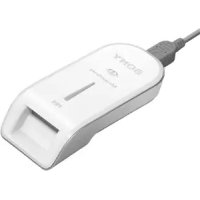



| Product Type | USB Memory Stick Reader/Writer |
| Brand | Sony |
| Model | MSACUS40 |
| Dimensions (L × H × D) | 39 × 18 × 86 mm |
| Weight | Approx. 28 g (without Memory Stick) |
| Power supply | DC 5 V (supplied via USB cable) |
| Power consumption | Max. 500 mA (during operation), max. 0.5 mA (standby) |
| Interface | Hi-Speed USB (USB 2.0) |
| Compatible Memory Stick types | Memory Stick (with/without MagicGate), MagicGate Memory Stick, Memory Stick PRO, Memory Stick Duo (with/without MagicGate), MagicGate Memory Stick Duo, Memory Stick PRO Duo (up to 4 GB) |
| Main functions | Reading and writing photos and music; data transfer; formatting; compatible with SonicStage |
| Care and cleaning | Clean the casing with a soft cloth; never use benzene, alcohol or thinner |
| Safety | Do not remove the USB cable or Memory Stick when the access indicator is flashing; use the write-protect tab to prevent data loss |
| Package contents | Reader/writer, special USB cable (1 m), CD-ROM for Windows, user manual |
| System requirements (Windows) | Windows 98SE/Me/2000 SP3+/XP; Pentium III 450 MHz; 128 MB RAM; 200 MB hard disk; USB port |
| System requirements (Macintosh) | Mac OS 9.2.2/X (v10.2-10.4); 64 MB RAM; 50 MB hard disk; USB port |
| Warranty | 1 year (repair or replacement) |
Frequently Asked Questions - MSACUS40 SONY
User questions about MSACUS40 SONY
0 question about this device. Answer the ones you know or ask your own.
Ask a new question about this device
Download the instructions for your Remote control in PDF format for free! Find your manual MSACUS40 - SONY and take your electronic device back in hand. On this page are published all the documents necessary for the use of your device. MSACUS40 by SONY.
USER MANUAL MSACUS40 SONY
取拔説明書
Thank you for purchasing. We hope you enjoy using this product.
"SonicStage" (for Windows)
"SonicStage" - Memory Stick Formatter
Operating Instructions
MSAC-US40
MEMORY STICK
English
Before operating the unit, please read these instructions thoroughly, and retain them for future reference.
For the Customers in the U.S.A.
If you have any questions about this product, you may call: Sony Customer Information Service Center, 1-800-222-7669 (SONY). The number below is for FCC related matters only. Regulatory Information
Declaration of Conformity Trade Name: SONY Model: MSAC-US40 Responsible Party: Sony Electronics Inc. Address: 16530 Via Esprillo, San Diego CA 92127 U.S.A. Telephone number: 858-942-2230 This device complies with Part 15 of the FCC Rules. Operation is subject to the following two conditions: (1) This device may not cause harmful interference, and (2) this device must accept any interference received, including interference that may cause undesired operation.
CAUTION
You are cautioned that any changes or modifications not expressly approved in this manual could void your authority to operate this equipment.
Note:
This equipment has been tested and found to comply with the limits for a Class B digital device, pursuant to Part 15 of the FCC Rules. These limits are designed to provide reasonable protection against harmful interference in a residential installation. This equipment generates, uses, and can radiate radio frequency energy and, if not installed and used in accordance with the instructions, may cause harmful interference to radio communications. However, there is no guarantee that interference will not occur in a particular installation. If this equipment does cause harmful interference to radio or television reception, which can be determined by turning the equipment off and on, the user is encouraged to try to correct the interference by one or more of the following measures:
- Reorient or relocate the receiving antenna.
- Increase the separation between the equipment and receiver.
- Connect the equipment into an outlet on a circuit different from that to which the receiver is connected.
- Consult the dealer or an experienced radio/TV technician for help.
The specified USB cable (supplied) must be used with the equipment in order to comply with the limits for a digital device pursuant to Subpart B of Part 15 of FCC Rules.
For the customers in Canada
This class B digital apparatus complies with Canadian ICES-003.
Notice
If static electricity or electromagnetism causes data transfer to discontinue midway (fail), restart the application or disconnect and connect the USB cable again.
Program©2005 Sony Corporation
Documentation©2005 Sony Corporation
"Memory Stick," "MagicGate Memory Stick," "Memory Stick Duo," "MagicGate Memory Stick Duo," "Memory Stick PRO," "MEMORY STICK PRO," "Memory Stick PRO Duo," "MagicGate," "MAGICGATE," "Open MG," OpenMG, "ATRAC3," "ATRAC3plus," "SonicStage", and SonpStage are registered trademarks or trademarks of Sony Corporation. - Microsoft and Windows are either registered trademarks or trademarks of Microsoft Corporation in the United States and/or other countries. - Pentium is a trademark or registered trademark of Intel Corporation or its subsidiaries in the United States and other countries. - Adobe and Adobe Reader are registered trademarks or trademarks of Adobe Systems, Inc. in the United States and/or other countries. - Macintosh and Mac OS are trademarks of Apple Computer, Inc., registered in the U.S. and other countries. - All other trademarks and registered trademarks are trademarks of their respective holders. Furthermore "TM" and "®" are not mentioned in each case in this manual. - CD and music-related data from Gracenote, Inc., copyright c 2000-2004Gracenote. Gracenote CDDBR Client Software, copyright 2000-2004 Gracenote. This product and service may practice one or more of the following U.S.Patents: #5,987,525; #6,061,680; #6,154,773, #6,161,132, #6,230,192,#6,230,207,#6,240,459,#6,330,593,and other patents issued or pending.
Services supplied and/or device manufactured under license for the following Open Globe, Inc. United States Patent 6,304,523. Gracenote and CDDB are registered trademarks of Gracenote. The Gracenote logo and logotype, and the "Powered by Gracenote" logo are trademarks of Gracenote.
- MPEG Layer-3 audio coding technology and patents licensed from Fraunhofer IIS and Thomson.
Precautions on use
Pay attention to the following points when using this unit.
- If the body becomes dirty, wipe with a soft cloth. Never use benzine, alcohol, paint thinner or other solvents. This unit may deform or malfunction.
- The contents of data cannot be compensated if recording or playing back is not made due to malfunctions such as "Memory Stick" error.
- To prevent recording or deletion of data on "Memory Stick" set the "Memory Stick" write-protect switch to "LOCK."
Notes
- The access lamp lights when you insert the "Memory Stick" into the unit. This blinking indicates that the data on the "Memory Stick" is being accessed. Never remove the "Memory Stick," turn off the computer or unplug the USB cable while the access lamp is blinking. Doing so may damage the data on the "Memory Stick."
- When disconnecting the USB cable, do not hold it by its cable; hold it by its connector.
Table of contents
Precautions on use 5
On "Memory Stick" 7
System requirements 9
Checking the included items 12
Supplied applications for Windows 13
Using the operating instructions and help 14
Installing the software on your computer (When Using Windows) 16
Installing the "SonicStage" software on your computer 18
Connecting this unit to your computer 19
Confirming that connections are completed 21
When the removable disk (Memory Stick icon) is not indicated 22
Copying image data recorded on "Memory Stick" to your computer .... 25
Disconnecting the unit from your computer 26
How to Use (When using Macintosh) 28
About "SonicStage" 30
Before using "SonicStage" (Be sure to read) 32
Launching "SonicStage" 34
Formatting (initialization) of "Memory Stick" 35
Precautions for use of "Memory Stick" 37
Uninstalling (Deleting) the software 38
Troubleshooting 39
Restrictions imposed by the copyright protection. 40
Specifications 41
LIMITED WARRANTY 42
On "Memory Stick"
What is "Memory Stick"?
"Memory Stick" is a compact, large-capacity IC storage media. It can be used not only for transferring data between "Memory Stick" compatible products, but also as a removable, external storage media for storing data.
"Memory Stick" is available in standard size and a smaller size called "Memory Stick Duo." When "Memory Stick Duo" is inserted into a Memory Stick Duo Adaptor, its size becomes the same as the standardized "Memory Stick," allowing it to be used with products that are compatible with the standard-sized "Memory Stick."
"Memory Stick PRO" and "Memory Stick PRO Duo" are also available for handling even larger capacity data.
What is "MagicGate"?
"MagicGate" is the generic name for a copyright-protection technology developed by Sony. After performing authentication to confirm that recording or playback can be carried out correctly between a compatible device and "Memory Stick," "MagicGate" then encrypts the data.
Copyright-protected data can only be played back on an authenticated device.
Music and other data that require copyright protection can be recorded and played back by using a combination of a "MagicGate" compatible "Memory Stick" and equipment compatible with "MagicGate," such as this unit.
Different types of data can be recorded on a single "Memory Stick." For example, it is possible to record image data on the remaining empty section of a "MagicGate" compatible "Memory Stick" containing music data.
"Memory Stick" types that can be used with this unit
| "Memory Stick" types | Data transfer/Music transfer(MP3 form) | Musictransfer(ATRAC3plus/ATRAC3form) |
| "Memory Stick" (without MagicGate) ○× | ||
| "Memory Stick" (with MagicGate) ○ | ○ | |
| "MagicGate Memory Stick" ○ | ○ | |
| "Memory Stick PRO" ○○ | ||
| "Memory Stick Duo" (without MagicGate) | ○× | |
| "Memory Stick Duo" (with MagicGate) ○ | ○ | |
| "MagicGate Memory Stick Duo" ○ | ○ | |
| "Memory Stick PRO Duo" ○ | ○ |
- Sony does not guarantee this unit to operate with all kinds of "Memory Stick." It has been checked to operate with any "Memory Stick" up to 4 GB (MSX-4GN) (as of October, 2005). Check the following URL to see which kinds of "Memory Stick" the unit supports. http://www.sony.net/memorystick/supporte/
- This unit supports parallel data transfer (High speed data transfer). The reading or writing time varies depending on the media used.
- This unit is not compatible with I/O modules.
Notes
- Formatting a "MagicGate" compatible "Memory Stick" containing data will delete all the data, including music data. Be careful not to delete important data accidentally. Sony cannot be held responsible for the data lost through formatting.
- What you record are for personal enjoyment only. Copyright laws prohibit other forms of use without the permission of the copyright holder.
- In no event will Sony be liable for the data contents in case download of recorded material is impeded or music data is corrupted or deleted due to malfunctions of this unit or the "Memory Stick."
System requirements
Recommended Windows environment
- OS: Microsoft Windows 98 Second Edition (Windows 98SE)/Windows Millennium Edition (Windows Me)/Windows 2000 Professional Service Pack 3 or later (Windows 2000)/Windows XP Home Edition/XP Professional/XP Media Center Edition 2004/XP Media Center Edition 2005 (Windows XP)
- The operating systems mentioned above must be installed on the computer when shipped from the factory.
- Operation is not guaranteed for upgraded operating systems even if they are among those mentioned above.
- Not compatible with Windows 98.
- Not compatible with Windows 2000 Professional Service Pack 1/Service Pack 2.
- CPU: Pentium III 450 MHz or faster processor recommended. RAM: 128 MB or more.
- Available hard disk space: 200 MB or more (more disk space may be required depending on the version of Windows you are using. Further space is also required for handling music data.)
- CD-ROM drive.
- Sound board (a sound board is required to use "SonicStage").
- USB port (this unit supports Hi-Speed USB (USB 2.0)).
- Display: High Color (16-bit) or higher, 800 x 480 pixels or more (800 x 600 pixels or more recommended).
Recommended Macintosh environment.
- OS: Mac OS 9.2.2/X (v10.2~10.4).
- The operating systems mentioned above must be installed on the computer when shipped from the factory.
- Operation is not guaranteed for upgraded operating systems even if they are among those mentioned above. RAM: 64 MB or more.
- Hard disk: 50 MB or more available hard-disk space.
- USB port (This unit supports Hi-Speed USB (USB 2.0).)
Notes
- Operation is not guaranteed for all computers even if they comply with the recommended environments.
- "SonicStage" does not support Macintosh. If you are using a Macintosh computer, it is not possible to transfer music data that requires copyright protection.
When using Windows 2000/Windows XP
The following restrictions apply when "SonicStage" is running under Windows 2000/Windows XP.
- Installation should take place after you log on as Administrator. For how to log on using the Administrator account, see the manual provided with your computer.
- When using the software, log on as an Administrator.
- Do not insert or remove a CD-ROM drive while "SonicStage" is running. Your important data may get lost.
- Can only be used with Windows 2000 Professional edition with Service Pack 3 or later installed.
- NTFS format can only be used when standard-installed (installed when shipped from the factory).
When using this unit on a computer with Service Pack 3 of Windows 2000 installed
Performing the following operations may cause the unit not to be recognized by your computer when using this unit on a computer with Service Pack 3 of Windows 2000 installed:
- Starting Windows with your computer on or rebooting while the products in question are connected to your computer's USB port.
- Unplugging and plugging in the USB cable that is connecting the unit and your computer after starting Windows.
The products in question will cease to be recognized by your computer.
If the USB cable is not unplugged, these issues will not occur.
To avoid these issues
When starting Windows with your computer on or when rebooting Windows, remove the USB cable that is connecting the products in question and your computer.
On System Restore and Windows XP/Windows Me
When using Windows XP or Windows Me, executing the "System Restore" item in System Tools may make it impossible to play back the songs managed by "SonicStage."
Therefore, be sure to back up the song data managed by "SonicStage" before you execute "System Restore."
After "System Restore" has been executed, the backed-up data can be restored and the songs managed by "SonicStage" can then be played back again.
For how to back up data, see the Help information for "SonicStage."
Note
An error dialog appears if playback of song data is impeded following execution of "System Restore." In this case, follow the instructions displayed on the screen.
Checking the included items
- Memory Stick USB Reader/Writer (1)
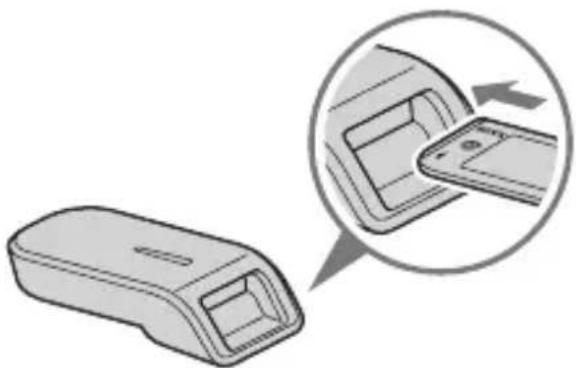
Note (The standard size of "Memory Stick"/the Duo size compatible slot)
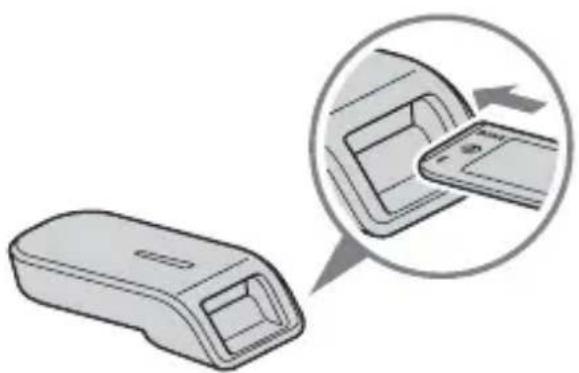
You can use both the standard sizes of "Memory Stick" and the sizes of "Memory Stick Duo" by one slot. (You cannot use both the sizes of "Memory Stick" at the same time.) When you use the sizes of "Memory Stick Duo," do not attach the Memory Stick Duo Adaptor to them.
Do not insert two or more "Memory Stick" media into the slot at the same time, and do not insert them in the wrong direction. Doing so may cause this unit to malfunction.
- Special USB cable (1 m) (1)
- CD-ROM for Windows (MSAC-US40) (1)
Note
When installing "SonicStage," select the CD-ROM that contains the language you prefer.
- The CD-ROM contains the following software programs.
Device Driver Software, "SonicStage," Memory Stick Formatter, and Operating Instructions (PDF file). The Operating Instructions for this unit (PDF file) is MSAC-US40Manual_ENG.pdf.
- Operating Instructions for this unit (1)
Supplied applications for Windows
The supplied Windows CD-ROM contains the following software programs.
Device driver (Windows)
The driver must be installed when this unit is used on a Windows computer.
For instructions on how to install the driver software, see page 16.
"SonicStage" (Windows)
"SonicStage" is comprehensive software for enjoying music. With "SonicStage," you can listen to music sources such as music CDs, or import music to your PC's hard disk for complete management of your collection. Furthermore, music data imported to your PC's hard disk can be transferred to a "Memory Stick" or "Memory Stick Duo" so that you can enjoy it outside the PC environment.
Notes
- "SonicStage" does not support Macintosh.
- This software is not compatible with writing music data to CD-RW/CD-R media. Sony will not be liable for any damage of data resulting from such operation.
- If you have a version of SonicStage other than the one supplied with this unit, carry out the following step.
If you have SonicStage Ver.3.2 or later, install the driver from the CD-ROM. If you have SonicStage Ver.3.1 or earlier, install the driver and SonicStage from the CD-ROM.
Memory Stick Formatter (Windows)
This is a software program for formatting (initialization) of "Memory Stick." Formatting deletes all the data recorded on a "Memory Stick." In order to maintain the compatibility of a "Memory Stick" when using it with compatible products, always use this software when formatting "Memory Stick" on this unit.
Note
Formatting a "Memory Stick" to which data has already been written will delete the existing data. Be careful not to delete important data by mistake.
Using the operating instructions and help
Using the Operating Instructions on the CD-ROM
For details on how to use this unit, see these Operating Instructions. Adobe Reader from Adobe Systems Incorporated is required to view PDF files.
How to use Adobe Reader is described in the following.
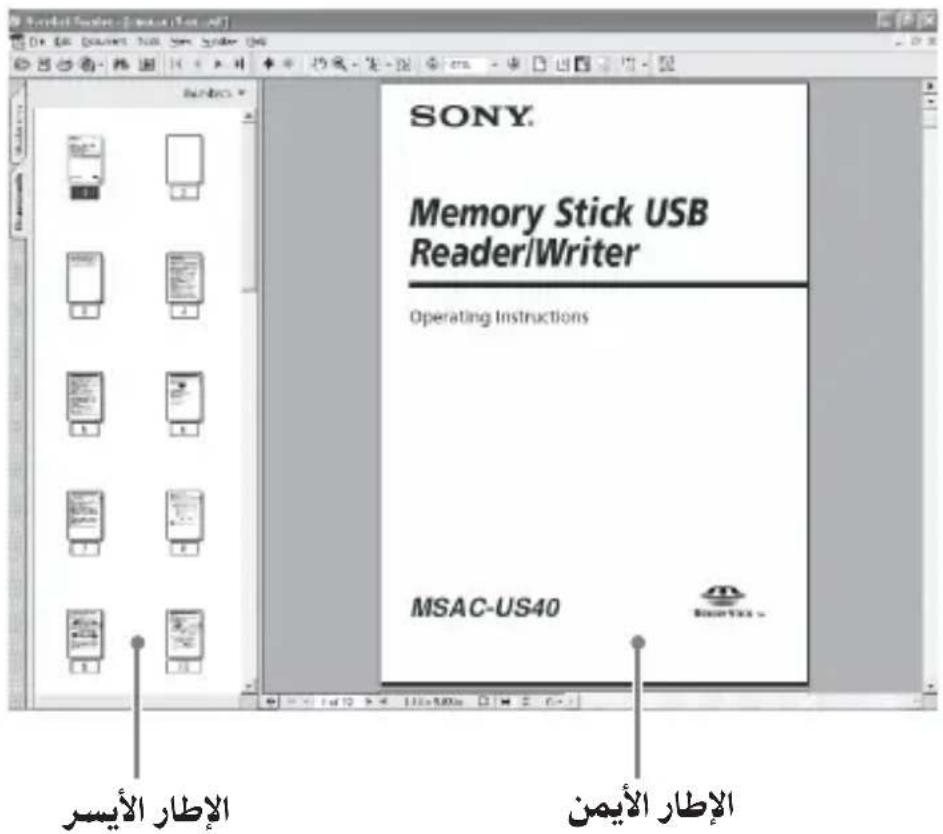
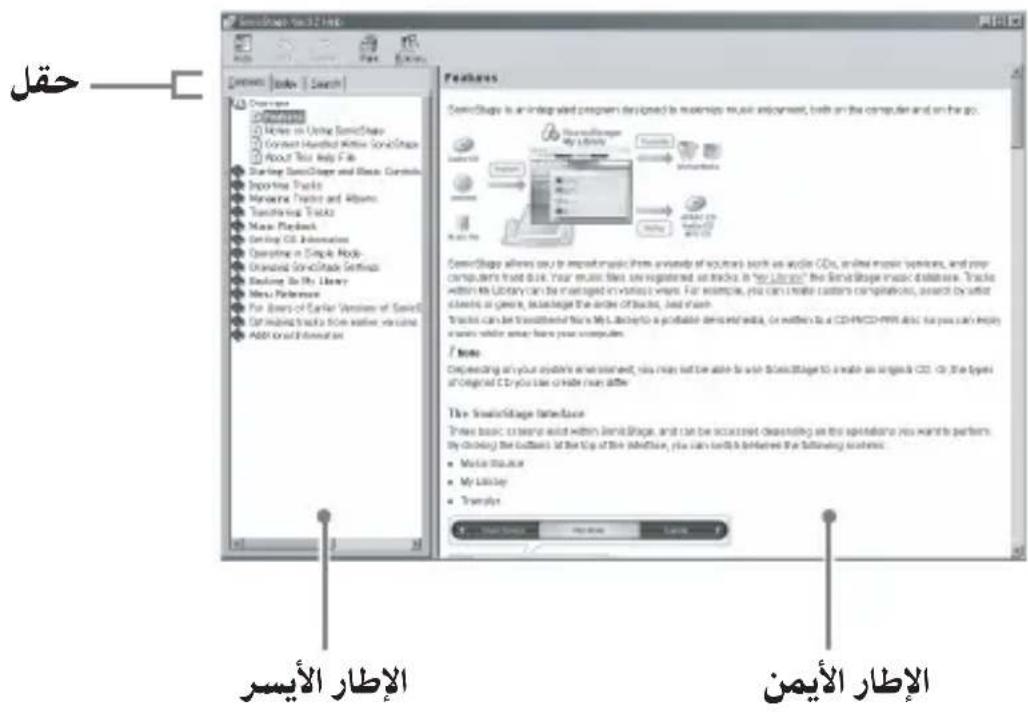
Screen view
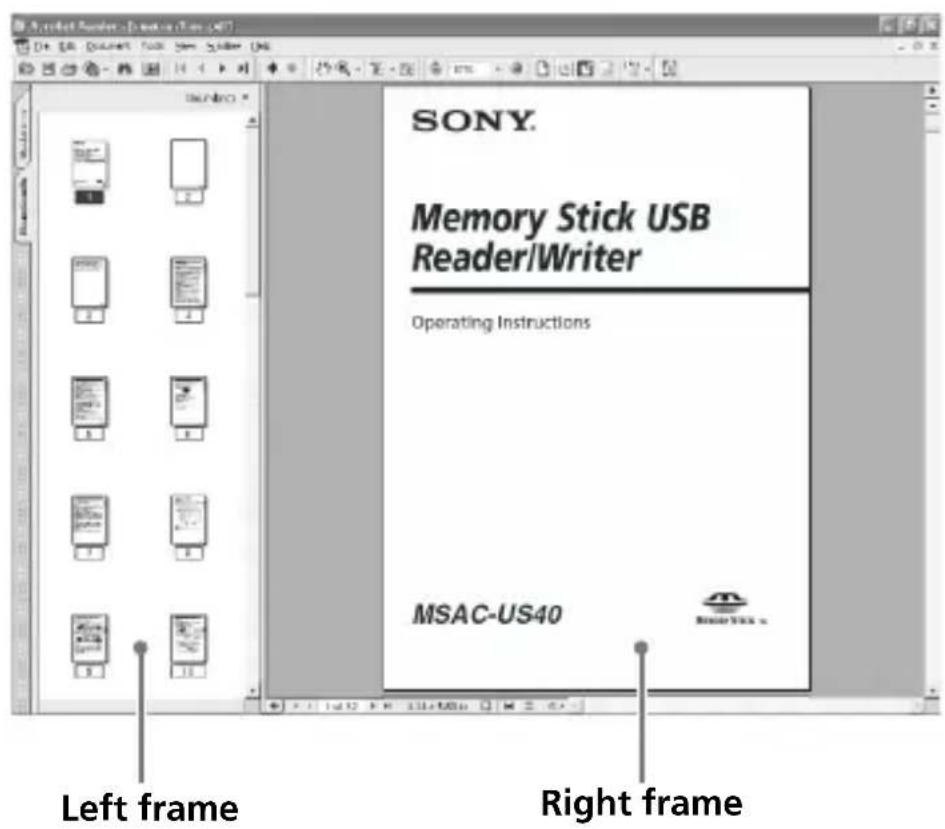
- Left frame
- Each page of the Operating Instructions appears as a thumbnail. When you click on the thumbnail corresponding to the page that you want to view, the page is shown in the "Right frame."
- Right frame Shows each page.
For details on how to use Adobe Reader, see the online Help manual for Adobe Reader.
How to use the Help (When Using Windows)
The following applications feature separate online Help manuals.
"SonicStage" Memory Stick Formatter
For details on how to use each of the application software programs, see the respective Help manuals.
How to use the Help manuals is described as follows.
Screen view

- Left frame
Contents or Keywords are displayed here.
- Right frame
Displays explanations. Clicking underlined parts in the text displays related explanations.
Installing the software on your computer (When Using Windows)
Note
Be sure to install the supplied software before you connect this unit to your computer.
Do not perform the installation while this unit is connected to your computer.
Restart your computer when installation is completed, and then connect this unit to your computer.
Use the following procedure to install the software.
A part of the installation may take place automatically.
Installing the device driver on your computer
Note
Simultaneously with the installation of the device driver, the "Memory Stick Formatter" and the operating instructions (PDF file) are also installed on your computer.
1 Turn on your computer.
At this point, do not connect this unit to your computer.
Close all running applications.
To install the device driver when you are using Windows 2000 or
Windows XP, you must log on with Administrator rights.
2 Insert the supplied CD-ROM (MSAC-US40) into the CD-ROM drive on your computer.
The Installer launcher starts up automatically.
To install a driver, click the [Driver] button in the menu.
3 Carefully read the License Agreement, and then click the [Agree] button.
When you click the [Agree] button, installation of the driver starts.
4 Click the [Next] button as prompted on the screen. 5 When you click [Finish], the driver installation is completed. 6 Following this, installation of the "Memory Stick Formatter" starts.
Select the language on the [Choose Setup Language] screen, then click the [Next] button.
Follow the instructions on the screen and click [Next].
7 When you click [Finish], installation of "Memory Stick Formatter" is completed.
To use "Memory Stick Formatter," select [Start] - [Programs] - [Memory Stick Utility] - [Memory Stick Formatter].
8 Following this, installation of the operating instructions (PDF file) is performed automatically.
When installation of the operating instructions is completed, the application selection screen returns.
To end installation of the software at this point, click [Exit].
If you do so, "SonicStage" is not installed.
To view the operating instructions, select [Start] - [Programs] - [Sony
Memory Stick Reader Writer] - [MSAC-US40 Instructions].
Note
Adobe Reader from Adobe Systems Incorporated is required for viewing the operating instructions (PDF file).
Installing the "SonicStage" software on your computer
1 Do as follows to install "SonicStage."
Click the [SonicStage] button in the menu.
2 Carefully read the License Agreement, and then click the [Yes] button. When you click the [Yes] button, installation of "SonicStage" starts. 3 Click the [Next] button as prompted on the screen. 4 Select the folder in which you want to install "SonicStage."
To change the folder suggested for the installation, click the [Browse] button and then select the folder. When the storage destination folder is decided, click the [Next] button.
5 Click the [Done] button. 6 Restart your computer.
Note
Be sure to connect this unit only after you have restarted your computer.
Connecting this unit to your computer
Note
Be sure to install the supplied software before you connect this unit to your computer. Restart your computer following installation.
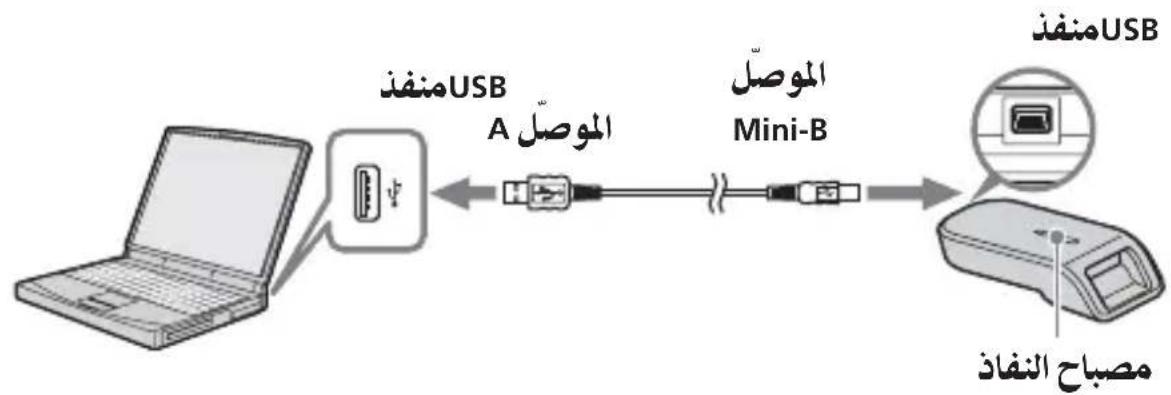
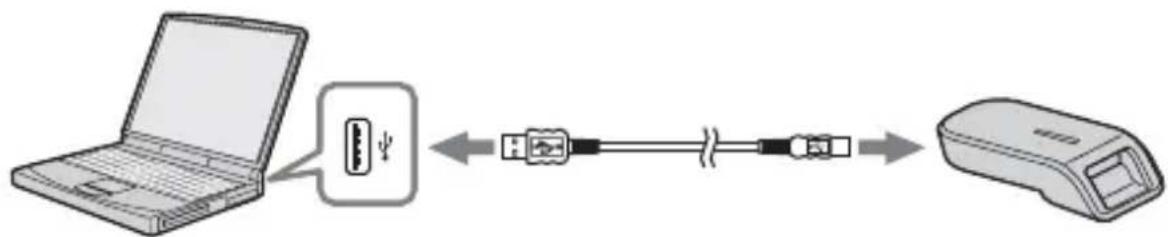
Connect the USB port on this unit to a USB port on your computer using the special USB cable supplied.
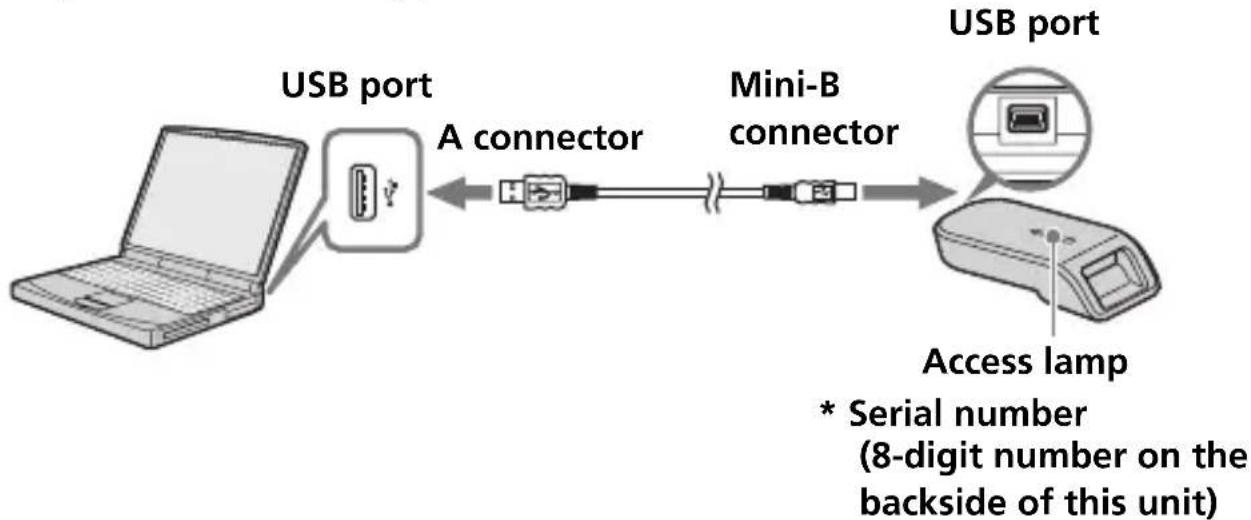
On the special USB cable
A connector: This is plugged into the USB port on the computer. Any ports can be used if the computer is provided with multiple USB ports.
Mini-B connector: This is plugged into the USB port on this unit.
1 Firmly insert the Mini-B connector of the USB cable into the USB port on this unit as far as it will go.
2 Plug the A connector of the USB cable into a USB port on your computer.
- The "Found New Hardware Wizard" starts up and installation of the driver begins. Depending on the OS, the driver installation may take place automatically.
- The location of the USB port on the computer differs with the computer used.
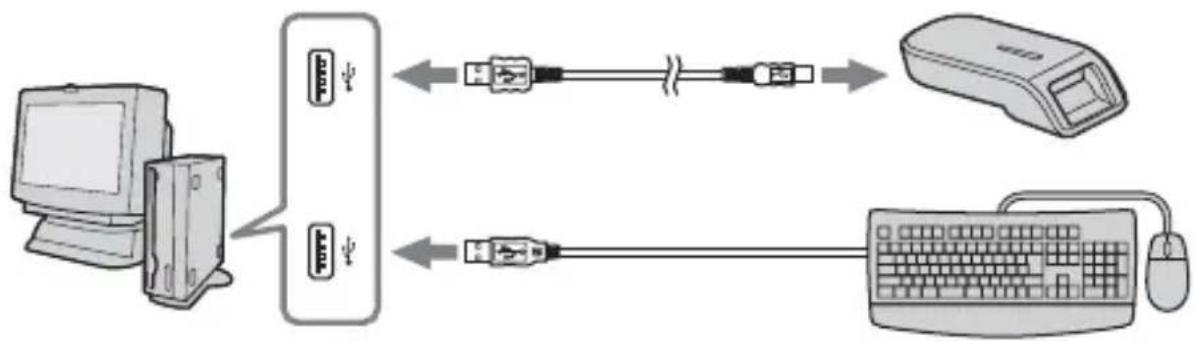
- When using a computer with multiple USB ports, do not connect other devices, with the exception of a standard mouse and keyboard, to USB ports at the same time as this unit. When using a desktop computer, use a USB port on the main unit of the computer. For details, see "Recommended ways for connecting this unit" on page 20.
Recommended ways for connecting this unit
The operation of this unit has been confirmed when connected to the computer in either of the following ways.
When this unit is connected to a USB port on the computer main unit, and nothing is connected to other USB ports on the computer main unit.

When, on a computer with a USB keyboard and mouse as standard equipment, the USB keyboard is connected to one of the USB ports on the computer main unit, and this unit is connected to another USB port on the computer main unit with the supplied USB cable.
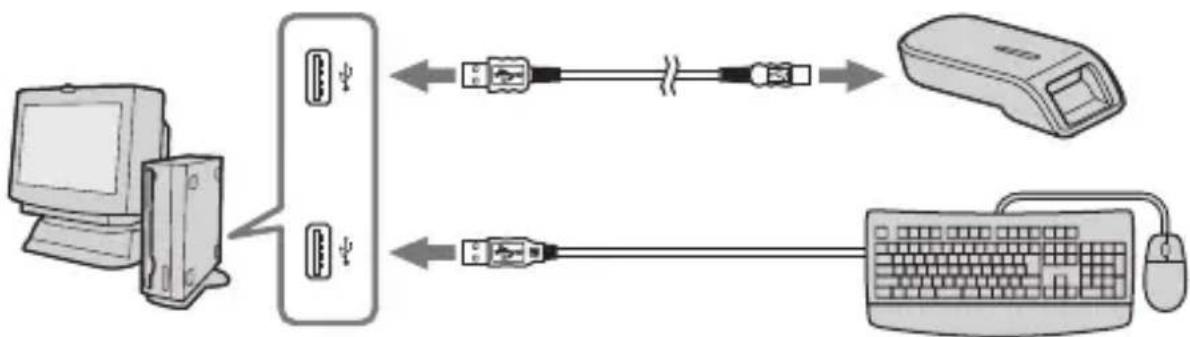
Notes
- When two or more USB devices except standard equipment are connected to one computer, and both are used simultaneously, operation is not guaranteed depending on the USB devices.
- Make sure to connect the supplied USB cable to a USB port on the computer main unit. Operation is not guaranteed if the cable is connected via the keyboard or a USB hub, etc.
- Not all operations are guaranteed on all computers running under the recommended environment.
- Make sure to use the specified USB cable (supplied) to connect to your computer.
Confirming that connections are completed
In the following, Windows XP is used for instructions. Depending on the OS type and the settings, the screens may look different.
1 Open the "My Computer" folder.
The "My Computer" folders appear.
2 Confirm that the newly recognized Memory Stick-MG(F:) icon is shown.
Note
Depending on the computer used, the drive letter (F:) may be different.
The connection is completed when the Memory Stick-MG(F:) icon is shown.
It may take a little while before the Memory Stick-MG(F:) icon appears.
Notes
- Depending on the OS type used and the "Memory Stick," the displayed icon may appear as "Removable Disk (F:)" instead of "Memory Stick-MG(F:)."
- If the Memory Stick icon is not shown, the device driver may not be installed correctly. Perform the procedures described on the following page. When using another "Removable Disk," plural "Removable Disk" icons appear.
When the removable disk (Memory Stick icon) is not indicated
A separate device driver may already have been installed. Connect this unit to your computer, and then perform the following procedure.
- When using Windows 2000/Windows XP -
Log on as Administrator or using a user ID that has administrative privilege.
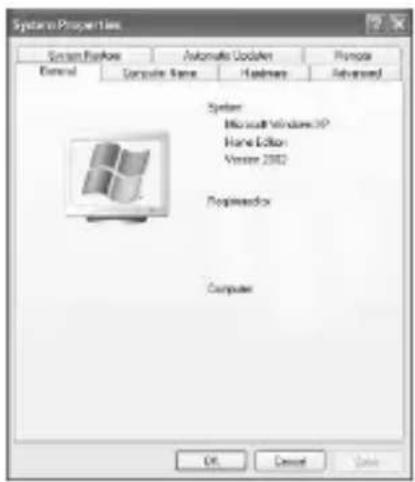
1 Double-click the "System" icon on the "Control Panel."
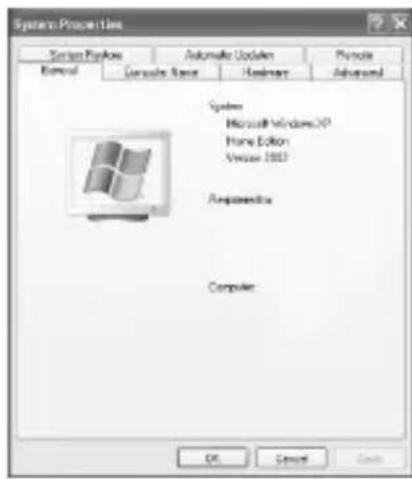
The "System Properties" screen appears.
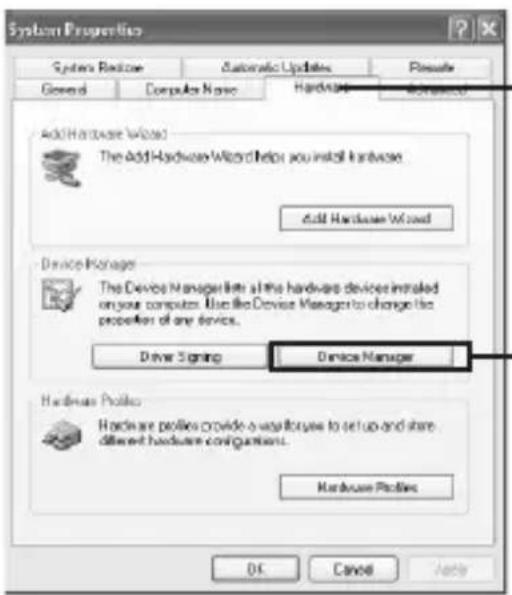
2 Check if the device driver has already been installed.

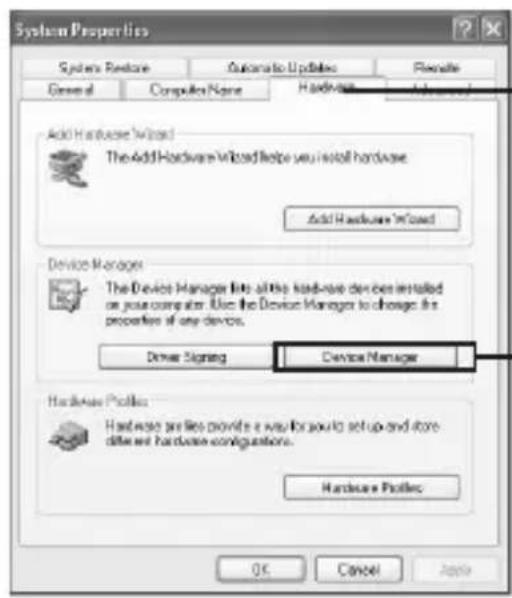
① Click the [Hardware] tab on the "System Properties" screen.
② Click [Device Manager].

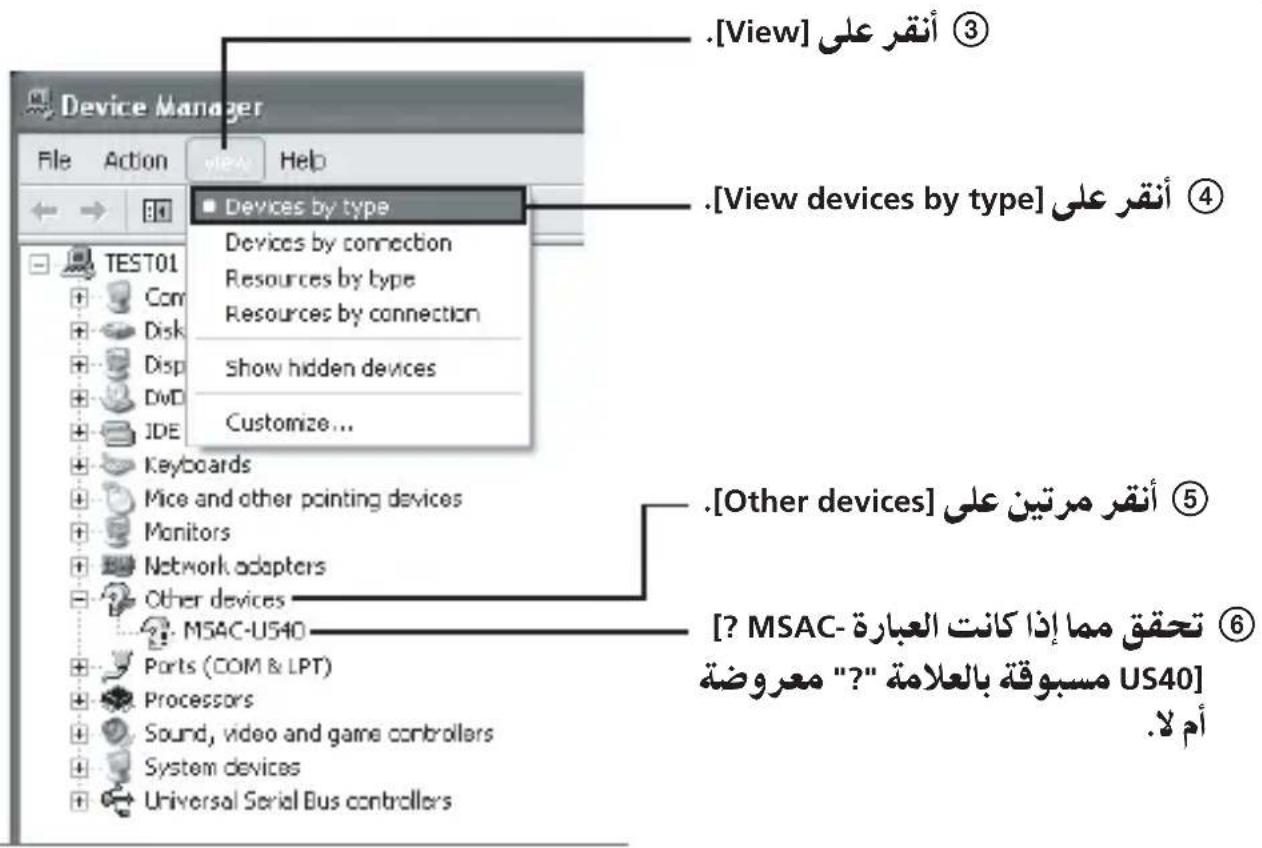
The "Device Manager" screen appears.
2 (Continued)

3 Delete the driver if installed.
If you use the procedure described in Step 2 and confirm that [? MSAC-US40] is shown under "Other devices" in the "View devices by type" display, a separate device driver has already been installed. Use the following procedure to delete this driver. Do not delete other devices than [? MSAC-US40].
① Right-click on [? MSAC-US40]. ② Click on [Remove]. The "Confirm Device Removal" screen appears. ③ Click the [OK] button. The device is removed. ④ Restart your computer after disconnecting this unit from the computer.
Install the device driver again by performing the procedure from Step 1 described on page 16.
Note
If you delete other devices than [? MSAC-US40], your computer may no longer operate normally.
- When using Windows 98SE/Windows Me -
1 Double-click the "System" icon on the "Control Panel."
The "System Properties" screen appears.
2 Check if the device driver has already been installed.
① Click the [Device Manager] tab on the "System Properties" screen. Double-click [Other devices]. ③ Check whether [? MSAC-US40] preceded by the “?” symbol is shown.
3 Delete the driver if installed.
If you use the procedure described in Step 2 and find that [? MSAC-US40] is shown under "Other devices," a separate device driver has already been installed.
Use the following procedure to delete this driver. Do not delete other devices than [? MSAC-US40].
① Click on [? MSAC-US40]. ② Click on [Remove]. The "Confirm Device Removal" screen appears. ③ Click the [OK] button. The device is removed. ④ Restart your computer after disconnecting this unit from the computer.
Install the device driver again by performing the procedure from Step 1 described on page 16.
Note
If you delete other devices than [? MSAC-US40], your computer may no longer operate normally.
Copying image data recorded on "Memory Stick" to your computer
If the USB cable used to connect this unit and your computer is disconnected, the computer will no longer be able to recognize this unit and the image data stored on the "Removable Disk ("Memory Stick")" can no longer be viewed on the computer. If you copy the image data stored on the "Memory Stick" to your computer, the image data can be displayed and processed on your computer even if this unit is not connected to your computer.
When the USB cable is disconnected, the Memory Stick-MG(F:) icon disappears.
For how to copy image data to your computer, see the manual for your computer.
Disconnecting the unit from your computer
- For customers using Windows Me/Windows 2000/Windows XP -
Perform the procedure described below before disconnecting the USB cable from the computer.
- The screens shown in Windows XP are used in the following explanations.
The screens may differ slightly depending on the type of OS used.
- Customers using Windows 98SE do not need to perform this procedure.
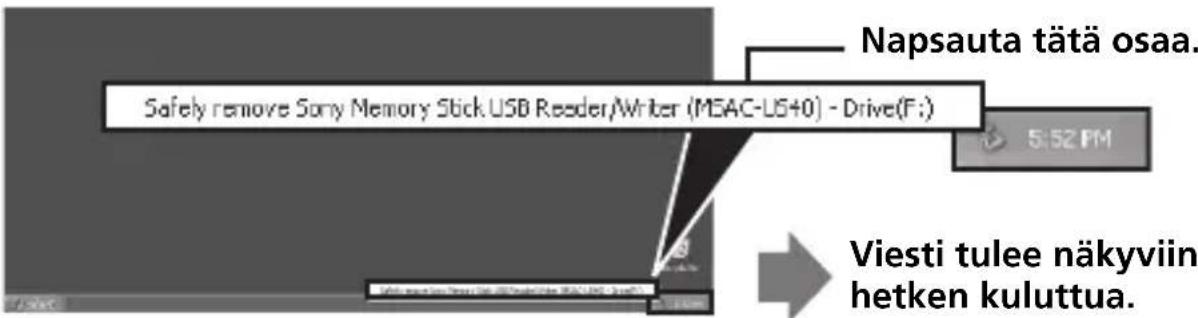
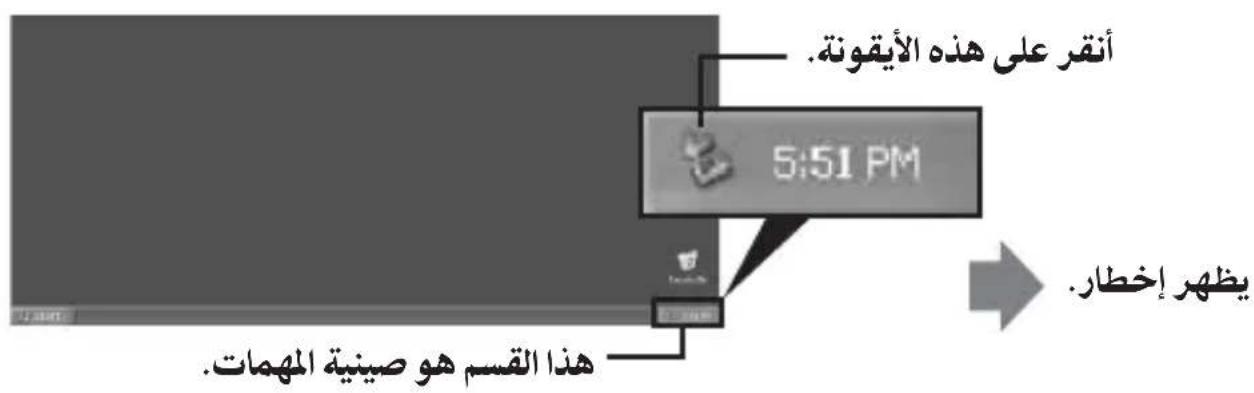
1. Click the "Unplug or Eject Hardware" icon in the task tray in the lower right corner of the screen.
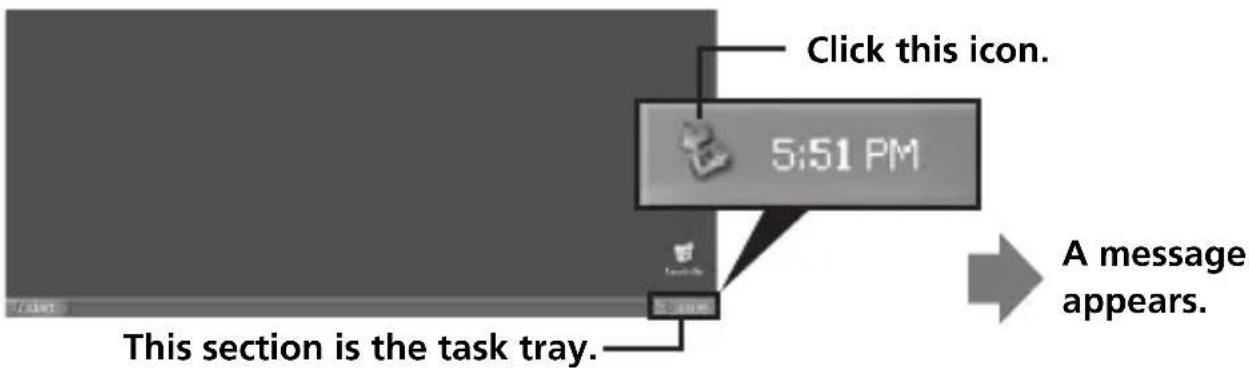
2. Click "Safely remove Sony Memory Stick USB Reader/Writer (MSAC-US40)-Drive (F:)."
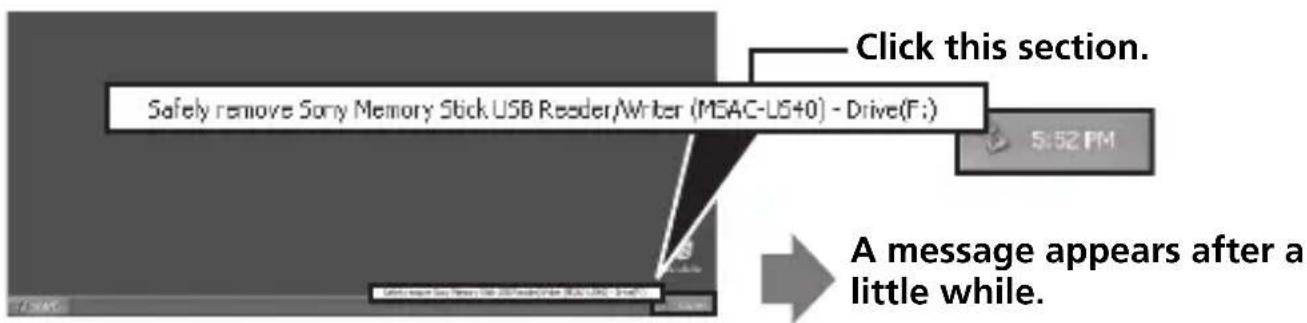
- The drive letter "(F:)," etc. differs depending on the computer used.
3. ["Sony Memory Stick USB Reader/Writer (MSAC-US40) can be safely removed.'] is displayed.
In this condition, you can safely remove this unit from your computer.
Note
The indications may be different depending on the OS that you are using.
Notes
- When you just want to remove the "Memory Stick" from this unit, the procedure described above is not required.
- Do not remove the "Memory Stick" from this unit while the access lamp is blinking. Data on the "Memory Stick" could be corrupted.
- When you carry out this operation, this unit is not recognized by your computer. To make this unit recognize again, disconnect the USB cable from your computer and connect the USB cable to your computer again.
How to Use (When using Macintosh)
You can use the driver provided as a standard feature of the OS.
Operate as described in the following.
You can use this unit without installing the driver, by simply connecting this unit to your computer.
1 Turn on your computer. 2 Insert "Memory Stick" to this unit and connect the USB port on this unit with a USB port on the computer main unit using the special USB cable supplied.
See page 19 for how to connect this unit and your computer.
3 Driver installation starts automatically and the driver is installed on the computer. 4 When driver installation is completed, a drive icon of this unit appears on the desktop and this unit can now be used.
Note
The drive icon of this unit is not displayed on the desktop when "Memory Stick" is not inserted to this unit.
Removing this unit from your computer or removing "Memory Stick" from this unit.
1 Close the software used by this unit. 2 Confirm that the access lamp is not blinking. 3 Drag the drive icon of this unit to the Trash icon.
Alternatively, place the drive icon of this unit in the selected state and select "Eject" from the "Special" menu in the upper left of the screen.
4 Remove this unit from your computer or remove "Memory Stick" from this unit.
Notes
- The access lamp lights when you insert the "Memory Stick" into the unit. This blinking indicates that the data on the "Memory Stick" is being accessed. Never remove the "Memory Stick," turn off the computer, or unplug the USB cable while the access lamp is blinking. Doing so may damage the data on the "Memory Stick."
- Unplugging the USB cable or removing the "Memory Stick" from this unit without performing the operations above may cause damage to the "Memory Stick." Unplug the USB cable or remove the "Memory Stick" only after performing these operations.
Sony will not be liable for any damage caused as a result of not following the instructions above.
About "SonicStage"
"SonicStage" is comprehensive software for enjoying music.
With "SonicStage," you can enjoy listening to music sources such as music CDs, or you can import music into the hard disk of your PC for complete management of your collection.
Furthermore, music data that has been imported into the hard disk of your PC can also be transferred to a "Memory Stick" or "Memory Stick Duo" so that they can be enjoyed outside the PC environment.
Using "SonicStage" to listen to various music sources
With "SonicStage," you can play back the following music sources using simple, integrated mouse operations:
Devices/tracks recorded on a media connected to the USB port of your PC (this is available using the main unit and "Memory Stick"). Music CDs. Music files on your PC. Music files provided by Internet music distribution services (EMD services).
Creating a music database by importing music from various music sources
"SonicStage" uses the music database "My Library" to manage music files that are stored on your PC.
Music files can be imported into "My Library" from various music sources using the following methods:
- Record tracks from a music CD into "My Library."
- Import music files already existing on your PC into "My Library."
- Download music files from an Internet music distribution service and import them into "My Library."
Transferring imported music data to another device/media for listening outside the PC environment
Music files imported into the hard disk ("My Library") of your PC can be transferred to a "Memory Stick."
Music files transferred to a "Memory Stick" can be played outside the PC environment using devices such as a portable audio player, etc.
For various uses of "SonicStage," please refer to the "SonicStage" Help.
Note
There are some WAV format, MP3 format and WMT compatible music files that cannot be imported depending on sampling rate, etc. For details concerning music files that cannot be imported, please refer to "Importable Files" in "SonicStage" Help.
Before using "SonicStage" (Be sure to read)
Before using "SonicStage," please read the following cautionary items.
Cautions concerning launching "SonicStage" and other "OpenMG" compatible software
Do not launch "SonicStage" and other "OpenMG" compatible software (software capable of running/managing "OpenMG" format files) simultaneously. Doing so may cause music files stored on the PC hard disk or devices/media to be damaged, and rendered unusable.
Cautions concerning using "SonicStage" and other software at the same time
Please note the following when running "SonicStage" and other software at the same time.
When recording tracks from a music CD using "SonicStage," do not run other software capable of music CD playback. Recording of the music CD may not perform properly.
When running other software while playing back music files using "SonicStage," the sound may pause momentarily.
Cautions when running Windows XP/Windows Me system tool "System Restore"
Running "System Restore," a system tool built into Windows XP and
Windows Me, may cause a malfunction in management data resulting in all recorded or imported files becoming unusable.
In order to prevent the loss of important music data, use the "SonicStage"
backup tool to backup music data before running "System Restore" on
your system. After using "System Restore," saved music data can be made to play back by restoring with the "SonicStage" backup tool.
For the use of the "SonicStage" backup tool, please refer to the
"SonicStage" Help.
Writing to a CD-RW/CD-R disc
The "SonicStage" supplied with this unit is not compatible with writing music data to CD-RW/CD-R media.
Sony will not be liable for any loss of data resulting from such operation.
Launching "SonicStage"
From the [Start] button of Windows, click [All Programs] - [SonicStage] - [SonicStage].
"SonicStage" is launched and the main window appears.
Tips
- When using an operating system other than Windows XP, launch "SonicStage" by clicking from the [Start] button of Windows: [Programs] - [SonicStage] - [SonicStage]. "SonicStage" can also be launched by:
- Double clicking a SonicStage icon on the desktop if displayed. (When using Windows XP, icons that have not been used for some time are deleted from the desktop depending on the setting. If the SonicStage icon does not appear on the desktop, launch from the start menu.)
- Double click music files associated for playback on "SonicStage" using Windows Explorer, etc.
For various uses of "SonicStage," please refer to the "SonicStage" Help.
Formatting (initialization) of "Memory Stick"
This deletes all the data recorded on a "Memory Stick." When formatting on this unit, be sure to use the supplied "Memory Stick Formatter" software program, following the procedures outlined below. Operation on a Handycam or other "Memory Stick" compatible products is not guaranteed for a "Memory Stick" formatted on a computer without the use of the "Memory Stick Formatter" software program. For the details on how to use the "Memory Stick Formatter," refer to the manual supplied with the "Memory Stick Formatter." You can download the "Memory Stick Formatter" at the following Web Site.
http://www.sony.net/memorystick/supporte/
Note
If you format a "Memory Stick" that contains recorded data, the already recorded data will be deleted. Be careful not to inadvertently delete important data.
1 Insert a "Memory Stick" into this unit. 2 Start "Memory Stick Formatter." 3 After confirming that the drive is selected on which the "Memory Stick" is recognized to have been mounted, click [Start formatting]. Formatting begins.
Note
Never remove this unit from the computer while formatting the "Memory Stick." The data on the "Memory Stick" may be damaged.
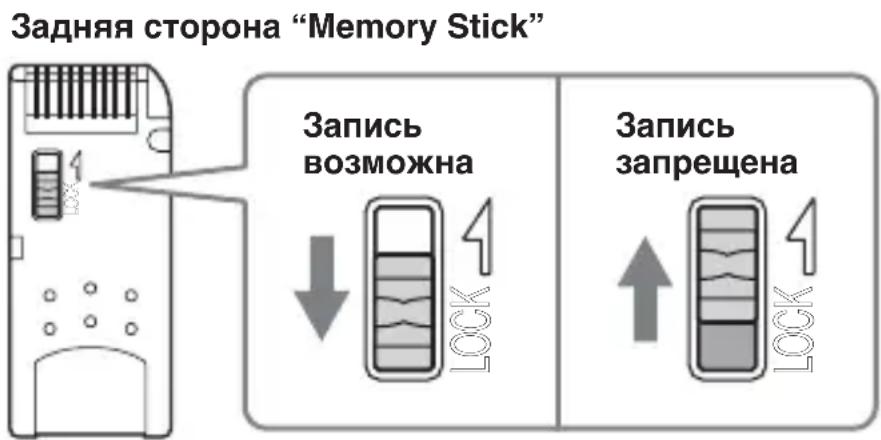
Write-protecting data
A "Memory Stick" is equipped with a write-protect switch to ensure that important data is not deleted by mistake. (Some "Memory Stick"
("Memory Stick Duo") media are not equipped with a write-protect switch. If you use a "Memory Stick" ("Memory Stick Duo") without a write-protect switch, be careful not to write or delete data by mistake.)
Sliding this switch to the left or right enables or prevents writing of data to the "Memory Stick."
- Write enable
Data can be written.
- Write protect
When the switch is moved to the right, the condition becomes one in which data cannot be written to the "Memory Stick." Data can be read out but writing is prevented.

Data read/write speed
The data read/write speed differs depending on the "Memory Stick" and product combination that you are using.
Precautions for use of "Memory Stick"
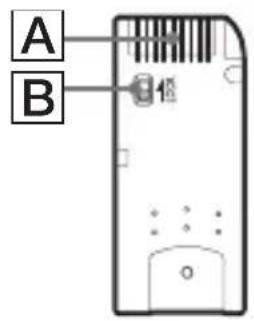
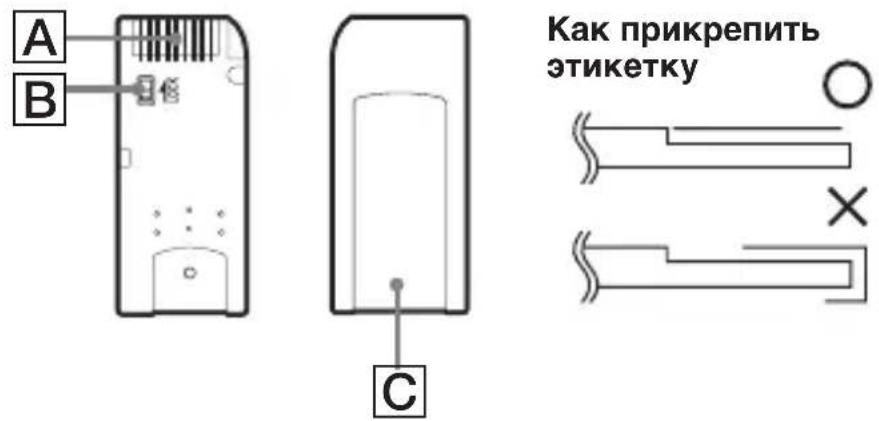
- Recording, editing and deleting are prevented when the write-protect switch is set to the "LOCK" position. [B]
- Use a pointed object to move the write-protect switch on the "Memory Stick Duo." (Some "Memory Stick" ("Memory Stick Duo") media are not equipped with a write-protect switch.)
- Never remove the "Memory Stick" while the access lamp is blinking (while data is being read/written). Data may be corrupted in the following cases.
- If the "Memory Stick" is removed or the power of this main unit is turned off while the access lamp is blinking (while data is being read/written)
- When used in a location subject to static electricity or electrical noise
- Always backup important data. Sony does not accept liability for damage of the data. We cannot accept responsibility in the event that data is lost or damaged and the unit is damaged, while using this unit.
- Data copyright protected by "MagicGate" can only be used with a "MagicGate" compatible "Memory Stick."
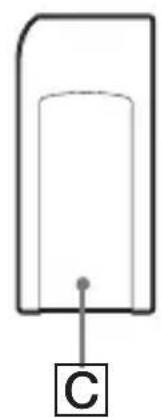
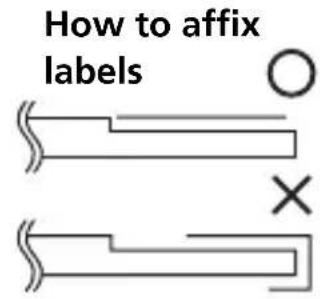
- Do not affix any label other than those specially provided to the "Memory Stick." [C]
- When affixing labels, affix these at the designated positions. Labels should not protrude from the edges of the "Memory Stick."
- Do not apply excessive force when writing in the memo area of a "Memory Stick Duo."
- When transporting or storing a "Memory Stick," place it in the supplied storage case.
- Do not touch the connector section with fingers or metallic objects. A
- Do not bend, drop or subject the "Memory Stick" to strong impacts.
- Do not attempt to disassemble or modify the "Memory Stick."
- Do not wet with water.
- Do not use or store in the following environments:
- Where the temperature is too high (in a car with closed windows during summer, in direct sunlight, near a heater, etc.)
- Humid or corrosive locations
Uninstalling (Deleting) the software
- In the case of Windows 98SE/ Windows Me -
1 Select [Settings] from the [Start] menu and then click [Control Panel].
The "Control Panel" screen appears.
2 Double-click the "Add/Remove Programs" icon.
The "Add/Remove Programs Properties" dialog box appears.
3 Select the software to be removed ("SonicStage," Memory Stick Formatter) from the list of software programs that can be automatically removed, and then click [Add/Remove].
The selected software programs are uninstalled.
-In the case of Windows 2000/Windows XP-
After logging on as Administrator, perform the procedure described below. For how to log on as Administrator, see the manual for the computer that you are using.
Using Windows 2000: Select [Settings] from the [Start] menu and then click [Control Panel].
Using Windows XP: Click [Control Panel] from the [Start] menu.
The "Control Panel" screen appears.
2 Using Windows 2000: Double-click the "Add/Remove Programs" icon.
Using Windows XP: Double-click the "Add/Remove Programs" icon.
The "Add/Remove Programs" dialog box appears.
3 Click "Change/Remove."
4 Select the software to be removed ("SonicStage," Memory Stick Formatter) from the list of "Currently installed programs," and then click [Change/Remove] ([Change and Remove] in the case of Windows XP).
The selected software programs are uninstalled.
Troubleshooting
| Symptom | Cause/Solution |
| The Memory Stick icon (Removable disk) is not displayed. | Not connected correctly. → Connect correctly. (Page 19) In addition to this unit, another device is connected to the USB port on the computer. → Disconnect other USB devices than this unit. Or turn off the power and reboot. ·The driver is not installed. → Install the driver from the supplied CD-ROM. (Page 16) |
| The “Memory Stick” cannot be accessed from Explorer or My Computer. | No “Memory Stick” inserted. → Insert a “Memory Stick.” |
| The access lamp is not on when a “Memory Stick” is inserted. | Foreign matter adhering to the connector section of the “Memory Stick.” → Check whether dust or dirt is adhering to the connector section of the “Memory Stick.” Remove any foreign matter and insert the “Memory Stick” again. |
| Music data can no longer be used on the computer | The System Restore function found in Windows Me and Windows XP have been executed. (Page 11) → When you have backup data, restore the backup data to the computer. For how to use the backup tool, see the Help manual for “SonicStage.” |
Restrictions imposed by the copyright protection
The "SonicStage" software employs "OpenMG" Sony-developed copyright protection technology to safeguard the copyright of music content. It enables you to enjoy a wide range of music via online music distribution services.
The number of times you can record or play back may be restricted due to the copyright protection of music content.
Specifications
Interface: Hi-Speed USB (USB 2.0)
General
Operating voltage DC 5 V (supplied via USB cable)
Power consumption: Max. 500 mA (during operation)
Max. 0.5 mA (PC suspend time)
External dimensions: Approx. 39 mm × 18 mm × 86 mm
(19/16 × 23/32 × 31/2 in.)
(Width × Height × Depth)
Mass: Approx. 28 g (1 oz.)
(not including "Memory Stick")
Operating conditions: Temperature 0°C to 40°C (32°F to 104°F)
condensation not allowed)
Humidity: 20% to 80%
condensation not allowed)
Design and specifications are subject to change without notice.
If you have any questions/comments related to this product, please visit our Customer Support website at
http://www.sony.net/memorystick/supporte/
LIMITED WARRANTY
Sony Electronics Inc. (in the United States) and Sony of Canada Ltd (in Canada) ("SONY") warrants this Product from defects in material and workmanship for a period of one (1) year from date of original purchase. SONY will repair or replace the Product with new or refurbished product, at its option, at no charge during the one (1) year warranty period. For purposes of this Limited Warranty, "refurbished" means a product or part that has been returned to its original specifications. To obtain warranty service within the United States, you must take the Product, or deliver the Product freight prepaid, in either its original packaging or packaging affording an equal degree of protection, to any authorized SONY service facility. To obtain warranty service within Canada, you must take the Product to the authorized SONY dealer where you purchased the Product, or to a SONY service facility. Proof of purchase is required in the form of a dated bill of sale or receipt which evidences that the Product is within the limited warranty period.
BE SURE TO REMOVE ALL SOFTWARE, FILES, OR ANY OTHER DATA STORED ON YOUR MEDIA PRIOR TO SENDING THIS PRODUCT TO SONY. SONY IS NOT LIABLE FOR ANY LOSS, DAMAGE OR CORRUPTION OF THESE ITEMS.
REPAIR OR REPLACEMENT AS PROVIDED UNDER THIS LIMITED WARRANTY IS THE EXCLUSIVE REMEDY OF THE CONSUMER. SONY SHALL NOT BE LIABLE FOR ANY INCIDENTAL, INDIRECT OR CONSEQUENTIAL DAMAGES OR OTHER DAMAGES INCLUDING BUT NOT LIMITED TO, LOSS OF PROFITS, LOSS OF REVENUE, LOSS OR CORRUPTION OF DATA, LOSS OF USE OF THE PRODUCT OR ANY ASSOCIATED EQUIPMENT, DOWNTIME AND USER'S TIME OR FOR BREACH OF ANY EXPRESS OR IMPLIED WARRANTY OR CONDITION, BREACH OF CONTRACT, NEGLIGENCE, STRICT LIABILITY OR ANY OTHER LEGAL THEORY RELATED TO THIS PRODUCT. EXCEPT TO THE EXTENT PROHIBITED BY APPLICABLE LAW, ANY IMPLIED WARRANTY/CONDITION OF MERCHANTABILITY OR FITNESS FOR A PARTICULAR PURPOSE ON THIS PRODUCT IS LIMITED IN DURATION TO THE DURATION OF THIS WARRANTY. ANY WARRANTY FOR INTELLECTUAL PROPERTY INFRINGEMENT IS HEREBY DISCLAIMED. Some states/jurisdictions do not allow the exclusion or limitation of incidental or consequential damages, or allow limitations on how long an implied warranty/condition lasts, so the above limitations or exclusions may not apply to you. This Limited Warranty gives you specific legal rights, and you may have other rights which vary from state to state, territory or province.
In the United States contact: Sony Customer Information Service Center, 12451 Gateway Blvd., Fort Myers, FL 33913; www.sony.com/service; or (800) 222-7669 (SONY). In Canada contact: Sony of Canada Ltd. 115 Gordon Baker Road, Toronto, Ontario M2H 3R6
Memory Stick USB Reader/Writer
User's Guide
MSAC-US40
MEMORYSTICKTM
French
Services supplied and/or device manufactured under license for the following Open Globe, Inc. United States Patent 6,304,523. Gracenote and CDDB are registered trademarks of Gracenote. The Gracenote logo and logotype, and the "Powered by Gracenote" logo are trademarks of Gracenote.
- MPEG Layer-3 audio coding technology and patents licensed from Fraunhofer IIS and Thomson.
Usage precautions
"SonicStage" (Windows)
"SonicStage" Memory Stick Formatter
"SonicStage" (Windows)
[Programs] - [Sony Memory Stick Reader Writer] - [MSAC-US40
Instructions].
Note
Customer support website:
http://www.sony.net/memorystick/supporte/
http://www.sony.net/
Memory Stick USB Reader/Writer
User's Guide
MSAC-US40
MEMORYSTICKTM
Dutch
- CD and music-related data from Gracenote, Inc., copyright c 2000-2004 Gracenote. Gracenote CDDBR Client Software, copyright 2000-2004 Gracenote. This product and service may practice one or more of the following U.S. Patents: #5,987,525; #6,061,680; #6,154,773, #6,161,132, #6,230,192, #6,230,207, #6,240,459, #6,330,593, and other patents issued or pending.
Services supplied and/or device manufactured under license for following Open Globe, Inc. United States Patent 6,304,523. Gracenote and CDDB are registered trademarks of Gracenote. The Gracenote logo and logotype, and the "Powered by Gracenote" logo are trademarks of Gracenote.
- MPEG Layer-3 audio coding technology and patents licensed from Fraunhofer IIS and Thomson.
"SonicStage" (Windows)
About "SonicStage"
"SonicStage" (Windows)
Services supplied and/or device manufactured under license for following Open Globe, Inc. United States Patent 6,304,523. Gracenote and CDDB are registered trademarks of Gracenote. The Gracenote logo and logotype, and the "Powered by Gracenote" logo are trademarks of Gracenote.
- MPEG Layer-3 audio coding technology and patents licensed from Fraunhofer IIS and Thomson.
About "SonicStage" 34
"SonicStage" (for Windows)
"SonicStage" Memory Stick Formatter
3 Appare ["Sony Memory Stick USB Reader/Writer (MSAC-US40) can be safely removed."].
About "SonicStage"
Services supplied and/or device manufactured under license for following Open Globe, Inc. United States Patent 6,304,523. Gracenote and CDDB are registered trademarks of Gracenote. The Gracenote logo and logotype, and the "Powered by Gracenote" logo are trademarks of Gracenote.
- MPEG Layer-3 audio coding technology and patents licensed from Fraunhofer IIS and Thomson.
"SonicStage" (Windows)
Services supplied and/or device manufactured under license for following Open Globe, Inc. United States Patent 6,304,523. Gracenote and CDDB are registered trademarks of Gracenote. The Gracenote logo and logotype, and the "Powered by Gracenote" logo are trademarks of Gracenote.
- MPEG Layer-3 audio coding technology and patents licensed from Fraunhofer IIS and Thomson.
"SonicStage" (Windows)
"SonicStage" Memory Stick Formatter
(Programmer) - [Sony Memory Stick Reader Writer] - [MSAC-US40
Instructions].
Note
3 ["Sony Memory Stick USB Reader/Writer (MSAC-US40) can be safely removed.'] is displayed.
Power consumption Max. 500mA (during operation)
Max. 0.5mA (PC sleep)
External dimensions Approx. 39mm× 18mm× 86mm
Services supplied and/or device manufactured under license for following Open Globe, Inc. United States Patent 6,304,523. Gracenote and CDDB are registered trademarks of Gracenote. The Gracenote logo and logotype, and the "Powered by Gracenote" logo are trademarks of Gracenote.
- MPEG Layer-3 audio coding technology and patents licensed from Fraunhofer IIS and Thomson.
"SonicStage" (Windows)
2 Click "Safely remove Sony Memory Stick USB Reader/Writer (MSAC-US40) - Drive (F:)"
- CD and music-related data from Gracenote, Inc., copyright c 2000-2004 Gracenote. Gracenote CDDBR Client Software, copyright 2000-2004 Gracenote. This product and service may practice one or more of the following U.S. Patents: #5,987,525; #6,061,680; #6,154,773, #6,161,132, #6,230,192, #6,230,207, #6,240,459, #6,330,593, and other patents issued or pending.
Services supplied and/or device manufactured under license for following Open Globe, Inc. United States Patent 6,304,523. Gracenote and CDDB are registered trademarks of Gracenote. The Gracenote logo and logotype, and the "Powered by Gracenote" logo are trademarks of Gracenote.
- MPEG Layer-3 audio coding technology and patents licensed from Fraunhofer IIS and Thomson.
Usage instructions
When using the adapter, please pay attention to the following points:
If the adapter case becomes dirty, wipe it with a soft cloth. Do not use benzine, thinner, or other solvents, including paint thinner. Otherwise, deformation or malfunction of the adapter may occur. - Data may not be compensated if recording is not performed due to malfunctions such as a "Memory Stick" error. - To avoid recording data on the "Memory Stick" or deleting it, the write-protect switch must be set to the "LOCK" position.
Note
- The access lamp lights up when a "Memory Stick" is inserted into the device. The blinking of the lamp indicates access to data on the "Memory Stick". Do not remove the "Memory Stick", turn off the computer power, or disconnect the USB cable while the access lamp is blinking. Failure to follow these instructions may result in data corruption on the "Memory Stick".
- When disconnecting the USB cable, hold the connector and pull it out straight.
Table of Contents
Usage instructions 4 About the "Memory Stick" memory card 6 System requirements 9 Checking the package contents 13 For Windows users 14 Using the instructions and help 16 Installing the program on your computer (For Windows) 18 Installing "SonicStage" on your computer 21 Connecting the adapter to your computer 22 Confirming the connection is complete 24 If the drive icon (Memory Stick) is not displayed .... 25 Copying data from images recorded on the "Memory Stick" to your computer 28 Disconnecting the adapter from your computer 29 How to use (For Macintosh) 31 About "SonicStage" 33 Before using "SonicStage" (Please read) 35 Starting "SonicStage" 37 Formatting (initializing) the "Memory Stick" 38 Precautions for using the "Memory Stick" 40 Deleting (uninstalling) the software 42 Troubleshooting 44 Restrictions related to copyright protection 45 Technical specifications 46
About the "Memory Stick" memory card
Turn to page 3.
For detailed information on using Adobe Reader, see the online help for Adobe Reader.
How to use the help (for Windows)
The applications listed below have separate online help.
- "SonicStage"
- Memory Stick Formatter
For detailed information on using each application, see the corresponding help manuals.
The following shows how to use the help manuals.
If you have done this, "SonicStage" will not be installed.
If you have performed step 2 and confirmed that [? MSAC-US40] is displayed under "Other devices" in the "View devices by type" window, this means that a specific device driver is already installed. Delete this driver by performing the procedure below. Do not delete any other devices except [? MSAC-US40].
①Right-click on [? MSAC-US40]. ②Click on [Remove]. The "Confirm Device Removal" dialog appears. ③Click on [OK]. The device is removed. ④Restart your computer after disconnecting the adapter from it.
If you delete any device other than [? MSAC-US40], your computer may not work properly.
The screens may differ depending on the operating system used.
Applicable.
- If you only want to remove the "Memory Stick" from the adapter, it is not necessary to perform the procedure described above. Do not remove the "Memory Stick" from the adapter while the access lamp is flashing. Data stored on the "Memory Stick" may be destroyed.
- If the above operation is performed, the adapter may not be recognized by the computer. To make the computer recognize the adapter again, disconnect the USB cable from the computer and then reconnect the USB cable to it again.
How to use (for Macintosh)
You can use the driver provided as a standard component of the OS.
Perform the operations as described below.
You can use the adapter without installing the driver, by connecting the adapter to your computer.
Starting "SonicStage"
Click [Start] in Windows, then click [All Programs] - [SonicStage] - [SonicStage].
"SonicStage" starts and the main window appears.
Tips
- When using an operating system other than Windows XP, start "SonicStage" by clicking [Start] in Windows and then [Programs] - [SonicStage] - [SonicStage]. "SonicStage" can be started in the following ways:
-Double-click the SonicStage icon on the desktop, if it is displayed. (When using Windows XP, icons that have not been used for a certain time are removed from the desktop, depending on the installation. If the SonicStage icon is not displayed on the desktop, start it from the Start menu.) -Double-click on the music files to be played on "SonicStage" using Windows Explorer, etc.
For different ways of using "SonicStage", see the help for "SonicStage".
Formatting (initializing) "Memory Stick"
This erases all data recorded on the "Memory Stick". When formatting on this adapter, it is necessary to use the supplied system program "Memory Stick Formatter", following the precautions below. Correct operation of Handycam video cameras and other "Memory Stick"-compatible devices is not guaranteed for "Memory Stick" formatted on a computer without using the system program "Memory Stick Formatter". For more details on using the "Memory Stick Formatter" program, see the separate manual supplied with "Memory Stick Formatter". "Memory Stick Formatter" can be downloaded from the Web site: http://www.sony.net/memorystick/supporte/
Note
Before formatting a "Memory Stick", be aware that all data recorded on it will be erased. Be careful not to accidentally delete important data.
1 Insert the "Memory Stick" into the adapter. 2 Start the "Memory Stick Formatter" program. 3 After confirming that the drive where the "Memory Stick" is installed has been selected, click [Start formatting].
Note
Do not remove the adapter from the computer while formatting the "Memory Stick". Data on the "Memory Stick" may be damaged.
Protecting recorded data
The "Memory Stick" is equipped with a write-protect switch that prevents accidental erasure of recorded data. (Some "Memory Stick" ("Memory Stick Duo") are not equipped with a write-protect switch. When using a "Memory Stick" ("Memory Stick Duo") without a write-protect switch, be careful not to accidentally record or erase data.) By sliding the switch to the left or right, you can select one of two positions - with or without write protection against erasing data on the "Memory Stick".
Recording possible
Data cannot be recorded.
Recording prohibited
When the switch is slid to the right, data on the "Memory Stick" cannot be recorded, and data is read from the memory but not written to it.
Data read/write speed
The data input/output speed is determined by the combination of the "Memory Stick" and the equipment used.
Precautions for using the "Memory Stick"
Recording, editing, and erasing of data are not performed when the write-protect switch is set to the "LOCK" position.
- To slide the write-protect switch on a "Memory Stick Duo", use a pointed object. (Some types of "Memory Stick" ("Memory Stick Duo") are not equipped with a write-protect switch.)
"Memory Stick" may be erased while the indicator lamp is flashing (during data read/write).
- Please note that data may be destroyed in the following cases: - when the "Memory Stick" is inserted or removed while the adapter is turned off, or during the flashing of the indicator lamp (during data read/write).
1 Select [Settings] from the [Start] menu, then click on [Control Panel].
"Control Panel" appears on the screen.
2 Double-click on the "Add/Remove Programs" icon.
The "Add/Remove Programs Properties" dialog box appears.
3 Click "Change/Remove".
4 Select the program to be removed ("SonicStage", Memory Stick Formatter) from the list of "Currently installed programs", then click on [Change/Remove] ([Change and Remove] in Windows XP).
The selected program is removed.
Troubleshooting
Interface: High-speed USB (USB 2.0)
General specifications
Operating voltage: 5 V (DC) supplied from the USB cable. Power consumption
Not more than 500 mA (in operating mode)
Not more than 0.5 mA (in standby mode)
Open type dimensions
39× 18× 86mm (W) (× × )
Open type mass
28 g (r) (excluding "Memory Stick")
Operating environment
Temperature - from 0 to 40°C
(No condensation allowed)
Humidity - from 20 to 80%
(No condensation allowed)
Some changes may be made to the construction and technical specifications without notice.
If you have any questions or comments regarding this product, please contact our Customer Support at http://www.sony.net/memorystick/supporte/
Memory Stick USB Reader/Writer
使用說明書
MSAC-US40
中文
"SonicStage" (Windows)
Services supplied and/or device manufactured under license for following Open Globe, Inc. United States Patent 6,304,523. Gracenote and CDDB are registered trademarks of Gracenote. The Gracenote logo and logotype, and the "Powered by Gracenote" logo are trademarks of Gracenote.
- MPEG Layer-3 audio coding technology and patents licensed from Fraunhofer IIS and Thomson.
Precautions before use
Please note the following when using this unit:
"SonicStage" (Windows)
Services supplied and/or device manufactured under license for following Open Globe, Inc. United States Patent 6,304,523. Gracenote and CDDB are registered trademarks of Gracenote. The Gracenote logo and logotype, and the "Powered by Gracenote" logo are trademarks of Gracenote.
- MPEG Layer-3 audio coding technology and patents licensed from Fraunhofer IIS and Thomson.
Precautions for use
1. Click the "System" icon in the "Control Panel" to open the system properties.
"System Properties" window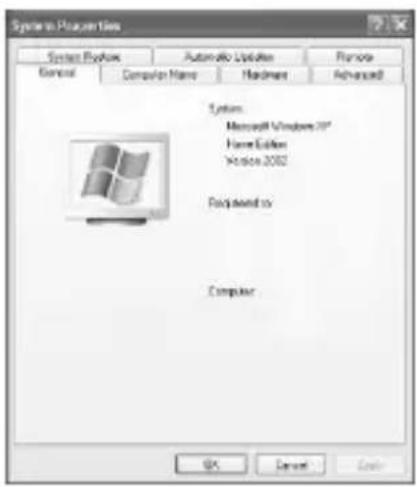
2. 2
1. Click the "System" icon in the "Control Panel" to open the system properties.
"System Properties" window
2.
"SonicStage"
In Windows, click [Start], then [All Programs], then [SonicStage], and then [SonicStage].
1. [Start] -> [Settings] -> [Control Panel] -> [Control Panel]
"Memory Stick PRO, MEMORY STICK PRO, "Memory Stick PRO", Memory Stick Duo"
"ATRAC3" OpenMG, "Open MG" MagicGate, "MagicGate" Duo
SonicStage" "ATRAC3plus"
. Sony Corporation
Microsoft Corporation Windows Microsoft
Ie g Gg Intel Corporation 5y 0 Pentium
Adobe Systems, Inc. 45
1 1
Apple Computer, Inc. Mac OS & Macintosh
- JLL11 1s
- CD and music-related data from Gracenote, Inc., copyright c 2000
2004 Gracenote. Gracenote CDDBR Client Software, copyright 2000-2004
Gracenote. This product and service may practice one or more of the following
U.S. Patents: #5,987,525; #6,061,680; #6,154,773, #6,161,132
6,230,192, #6,230,207, #6,240,459, #6,330,593, and other patents issued or pending.
Services supplied and/or device manufactured under license for following
Open Globe, Inc. United States Patent 6,304,523. Gracenote and CDDB are
registered trademarks of Gracenote. The Gracenote logo and logotype, and the
"Powered by Gracenote" logo are trademarks of Gracenote.
- MPEG Layer-3 audio coding technology and patents licensed from Fraunhofer IIS and Thomson.
"Memory Stick".
"Memory Stick"
. "LOCK" and "Memory Stick"
"Memory Stick"
"Memory Stick"
."Memory Stick".
Connect the USB cable to the USB connector.
"Memory Stick".
For Windows users: Install "SonicStage" software. For Macintosh users: Install "SonicStage" software. (For details on using "Memory Stick", refer to the manual.)
"Memory Stick"
"Memory Stick"
Insert the "Memory Stick".
Memory Stick
"Memory Stick"
"Memory Stick DUO" "Memory Stick PRO"
.
"MagicGate"
. Sony 45 123 0000000000000000000000000000000000000000 "MagicGate"
y
"MagicGate" ρ "Memory Stick" δ "Memory Stick"
- ää = 0 j = 1 1c 1bä 1g 1e 1f
Jauuuiy Ie Jg G g 1s s 10000000000000000000000000000000000000000000000000000000000000000
[{j} {k} \cdot {j} {l}\text{令}i \in a]
"Memory Stick" 513 s w y i j 1 111 1 1 1 1 1 1 1 1 1 1 1 1 1 1 1 1 1 1 1 1 1 1 1 1
"Memory Stick"
| bs: نجالدیفیک ATRAC3plus/ (ATRAC3 | / نجالدیفیک (NP3 bs): | اللهامشيره الحرفية"Memory Stick" |
| × | ○ | (MagicGate ب直升 : "Memory Stick" |
| ○ | ○ | (MagicGate م直升 : "Memory Stick" |
| "MagicGate Memory Stick" | ||
| "Memory Stick PRO" | ||
| × | ○ | (MagicGate ب直升 : "Memory Stick Duo" |
| ○ | ○ | (MagicGate م直升 : "Memory Stick Duo" |
| "MagicGate Memory Stick Duo" | ||
| "Memory Stick PRO Duo" |
"Memory Stick" oJl l Jy j 120 Sony y w s 7 (MSX- 2345 2345 2345 2345 2345 2345 2345 2345 2345 2345 2345 2345 2345 2345 2345 2345 2345 2345 2345 2345 234
"Memory Stick"
http://www.sony.net/memorystick/supporte/
"Memory Stick" "MagicGate"
V.12
Macintosh "SonicStage"
Windows 2000/Windows XP
Windows 2000/Windows XP "SonicStage"
Administrator
Administrator
"SonicStage" CD-ROM 1
Service Pack 3 Windows 2000 Professional
Therefore, \(\dot{a} = 1\)
NTFS
Windows 2000 Service Pack 3
System
"System Restore"
"SonicStage".
"SonicStage".
"System Restore"

a
"Memory Stick"
(Duo / Stick"
"Memory Stick" "Memory Stick"
(Windows "SonicStage"
"SonicStage"
1 1
111111111111111111
"Memory Stick Duo" "Memory Stick"
#
.Macintosh 1 "SonicStage"
Sony CD-RW/CD-R 1
.
CD- 1gWJn JsS Jy PdI gY Jluoyl SonicStage uJus
.ROM
SonicStage g J 1,1JOnicStage J
.CD-ROM
(Windows) Memory Stick Formatter
"Memory Stick" (JJJ: aee
."Memory Stick" 511111111111111
Joo! 1
"Memory Stick"
#
"Memory Stick"
- b : d = 1 . y l. l ≠ x.y
dcll jdg laljll
CD-RO
. 1 . . . . . . . . . . . . . . . . . . . . . . . . . . . . . . . . . . . . . . . . . . . . . . . . . . . . . . . . . . . . . . . . . . . . . . . . . . . . . . . . . . . . . . . . . . . . . . . . . . . . . . PDF 2023-05-26 Adobe Systems Incorporated 2023 Adobe Reader 2023 Adobe Reader 2023
y1j6
J 15
( xt2 + x) ( xt2 + y) = 0 ∴ y = 0
Adobe Reader
Memory
Help.
Keywords Contents
1
Windows XP Windows 2000
.Administrator (j: j)
CD-ROM CD-ROM (MSAC-US40) 2
[Driver].
[Agree] 3
[Agree].
4
[Finish] 5
"Memory Stick Formatter"
[Next] [Choose Setup Language]
[Next] 15
"Memory Stick Formatter" [Finish]
[Start] - [Programs] "Memory Stick Formatter"
- [Memory Stick Formatter] - [Memory Stick Utility]
.PDF)
1
[Exit] 1
.[Exit] 1
"SonicStage" 1
[Sony Memory Stick - [Programs] - [Start] ]
- [MSAC-US40 Instructions] - Reader Writer
Adobe 1! Adobe Reader (PDF)
. Systems Incorporated
.[Yes] jJj. . "SonicStage" [Yes]
.
"SonicStage"
[Browse] jJ 5 J U [Next] jJ 5 J
.[Done]
1
USB
1 1
()
USB
S11 15 1j 1 j 10001 j<.JgssuS1 Jgge USB dgs a
USB.
1j
.1111111 USB 1111111111111111111111111111111111
1
.
JSSS 1
2
J. "Found New Hardware Wizard"
OS.
. 1
USB
USB.
.USB 8
121 1
. USB hub 1
.
J 1 J.
My Computer" 1
Memory Stick-MG(F:) 2
.
. Memory Stick-MG(F:) 1g2y jy y Jy y Jy S. Memory Stick-MG(F:) 1y y y Jy y Jy y
"Memory Stick- " Removable Disk (F): " removable Disk (F): " . "Memory Stick" ososgOS MGG(F)" . Memory Stick. Memory Stick . "Removable Disk" . "Removable Disk"
aiee aagai) e jll lal algws 1
JIMEM
jglge jlg1110gogp. 5o
.
Windows 2000/Windows XP - Jlss
Administrator
"Control Panel" System
."System Properties"
2
"System Properties".
.[Device Manager] ②

Device Manager"
3s
[?MSAC-US40] aRg 8 o y o b1 i 1 jView devices by type" Aw "Other devices
5.
1
[?MSAC-US40]
.[?MSAC-US40]
."Confirm Device Removal".[Remove] ②
.1Jg[OK]jJ ③
J ④
17 1
[?MSAC-US40]
."Control Panel" System"
1
System Prop
250j4
."System Properties" [Device Manager] ①
.[Other devices] ②
.?" 1000 [? MSAC-US40]
15 15 15
[?MSAC-US40]
"Removable Disk ("Memory Stick")"16
"Memory Stick"
. Memory Stick-MG(F:) USB
1
-Windows Me/Windows 2000/Windows XP
USB.
. Windows XP
1
"Safely remove Sony Memory Stick USB Reader/Writer (MSAC-US40)-Drive (F:)" 2

"Memory Stick" oJ
1.
.
2
.
1
"Special" jLj "Eject" Jj (J)
3
0
"Memory Stick"
"Memory Stick" "Memory Stick" "Memory Stick" "Memory Stick" "Memory Stick" "Memory Stick" "Memory Stick" "Memory Stick" "Memory Stick" "Memory Stick" "Memory Stick" "Memory Stick" "Memory Stick" "Memory Stick" "Memory Stick" "Memory Stick" "Memory Stick" "Memory Stick" "Memory Stick" "Memory Stick" "Memory Stick" "Memory Stick" "Memory Stick" "Memory Stick" "Memory Stick" "Memory Stick"
"Memory Stick" USB USB 1 USB 2 3 4 5 6 7 8 9 10 11 12 13 14 15 16 17 18 19 20 21 22 23 24 25 26 27 28 29 30 31 32 33 34 35 36 37 38 39 40 41 42 43 44 45 46 47 48 49 50 51 52 53 54 55 56 57 58 59 60 61 62 63 64 65 66 67 68 69 70 71 72 73 74 75 76
"SonicStage" CD 1111111111111111111111111111111111111111111111111111111 "SonicStage" "SonicStage" "SonicStage" "SonicStage" "SonicStage" "SonicStage" "SonicStage" "SonicStage" "SonicStage" "SonicStage" "SonicStage" "SonicStage" "SonicStage" "SonicStage" "SonicStage" "SonicStage" "SonicStage" "SonricStage" "SonricStage" "SonricStage" "SonricStage" "Memory Stick Duo" "Memory Stick
"SonicStage" Joo
SonicStage" jol Jl. :abuJ 1 USB ggo g w g (a) /jld) a b/0j (."Memory Stick"g y lJl. ) . CD cd 1 . .
Joo 10000000000000000000000000000000000000000000000000000
"My Library"
"Memory Stick".
"Memory Stick"
"SonicStage" 1
"SonicStage" Help.
WMT 10 MP3 WAV 11
"SonicStage" Help "sclllo "importable Files"
"OicStage"
1
J"SonicSta
"SonicStage"
"OpenMG"
"SonicStage"
"SonicStage" CD-RW/CD-R
- [SonicStage] - [All Programs] Windows [Start] [SonicStage].
"SonicStage" 1 (J)
"SonicStage" "SonicStage"
http://www.sony.net/memorystick/supporte/
"Memory Stick" 5
XaI aIeauu1. 12
"Memory Stick"
1
."Memory Stick Formatter"
2
"J [Start formatting] 1
3
.
山
."Memory Stick" oJlil aiee eae 1jg jg ggl glg
."Memory Stick" 1
a
aolgllll llll jipjipjipjipjipjipjipjipjipjipjipjipjipjipjipjipjipjipjipjipjipjipjipjipjipjipjipjipjipjipjipjipjipjipjipjipjipjipjipjipjipjipjipj
"Memo
"Memory Stick Duo") "Memory Stick"
- 12.1
"Memory Stick Duo") "Memory Stick" 51
[ - 1 \leq a \leq 0]
(
. [Control Panel] [Start] [Settings] 1
. "Add/Remove Programs" 2
".Add/Remove Programs Properties"
Memory Stick "SonicStage") 3 [Add/ Remove Programs]
-Windows2000/WindowsXP
[Start] [Settings] :Windows 2000
.[Control Panel]
[Control Panel]: Windows XP 1.0 [Start]
"Control Panel"
"Add/Remove" for Windows 2000
"Programs"
Windows XP
"Add/Remove Programs".
"Add/Remove Programs"
"Change/Remove"
Memory Stick "SonicStage"
"Currently installed programs" (Formatter
Windows XP [Change and Remove] [Change/Remove]
"OpenMG" "SonicStage"
a
b1s
(USB 2.0) and USB
(USB 500)
("Memory Stick" 15)
- | x - 2| = | x + 3| .
1 1
j
http://www.sony.net/memorystick/supporte/
http://www.sony.net/
Sony Corporation
- 取拔説明書
- SONICSTAGE" (FOR WINDOWS)
- ENGLISH
- FOR THE CUSTOMERS IN THE U.S.A
- CAUTION
- NOTE
- FOR THE CUSTOMERS IN CANADA
- NOTICE
- PROGRAM©2005 SONY CORPORATION
- PRECAUTIONS ON USE
- PAY ATTENTION TO THE FOLLOWING POINTS WHEN USING THIS UNIT
- NOTES
- TABLE OF CONTENTS
- ON "MEMORY STICK
- WHAT IS "MEMORY STICK
- WHAT IS "MAGICGATE
- MEMORY STICK" TYPES THAT CAN BE USED WITH THIS UNIT
- SYSTEM REQUIREMENTS
- RECOMMENDED WINDOWS ENVIRONMENT
- RECOMMENDED MACINTOSH ENVIRONMENT
- WHEN USING WINDOWS 2000/WINDOWS XP
- WHEN USING THIS UNIT ON A COMPUTER WITH SERVICE PACK 3 OF WINDOWS 2000 INSTALLED
- TO AVOID THESE ISSUES
- ON SYSTEM RESTORE AND WINDOWS XP/WINDOWS ME
- CHECKING THE INCLUDED ITEMS
- SUPPLIED APPLICATIONS FOR WINDOWS
- DEVICE DRIVER (WINDOWS)
- SONICSTAGE" (WINDOWS)
- MEMORY STICK FORMATTER (WINDOWS)
- USING THE OPERATING INSTRUCTIONS AND HELP
- USING THE OPERATING INSTRUCTIONS ON THE CD-ROM
- SCREEN VIEW
- HOW TO USE THE HELP (WHEN USING WINDOWS)
- INSTALLING THE SOFTWARE ON YOUR COMPUTER (WHEN USING WINDOWS)
- INSTALLING THE DEVICE DRIVER ON YOUR COMPUTER
- TURN ON YOUR COMPUTER
- INSTALLING THE "SONICSTAGE" SOFTWARE ON YOUR COMPUTER
- CONNECTING THIS UNIT TO YOUR COMPUTER
- ON THE SPECIAL USB CABLE
- RECOMMENDED WAYS FOR CONNECTING THIS UNIT
- CONFIRMING THAT CONNECTIONS ARE COMPLETED
- WHEN THE REMOVABLE DISK (MEMORY STICK ICON) IS NOT INDICATED
- (CONTINUED)
- DELETE THE DRIVER IF INSTALLED
- DOUBLE-CLICK THE "SYSTEM" ICON ON THE "CONTROL PANEL
- CHECK IF THE DEVICE DRIVER HAS ALREADY BEEN INSTALLED
- COPYING IMAGE DATA RECORDED ON "MEMORY STICK" TO YOUR COMPUTER
- DISCONNECTING THE UNIT FROM YOUR COMPUTER
- ["SONY MEMORY STICK USB READER/WRITER (MSAC-US40) CAN BE SAFELY REMOVED.'] IS DISPLAYED
- HOW TO USE (WHEN USING MACINTOSH)
- REMOVING THIS UNIT FROM YOUR COMPUTER OR REMOVING "MEMORY STICK" FROM THIS UNIT
- ABOUT "SONICSTAGE
- USING "SONICSTAGE" TO LISTEN TO VARIOUS MUSIC SOURCES
- CREATING A MUSIC DATABASE BY IMPORTING MUSIC FROM VARIOUS MUSIC SOURCES
- TRANSFERRING IMPORTED MUSIC DATA TO ANOTHER DEVICE/MEDIA FOR LISTENING OUTSIDE THE PC ENVIRONMENT
- BEFORE USING "SONICSTAGE" (BE SURE TO READ)
- CAUTIONS CONCERNING LAUNCHING "SONICSTAGE" AND OTHER "OPENMG" COMPATIBLE SOFTWARE
- CAUTIONS CONCERNING USING "SONICSTAGE" AND OTHER SOFTWARE AT THE SAME TIME
- CAUTIONS WHEN RUNNING WINDOWS XP/WINDOWS ME SYSTEM TOOL "SYSTEM RESTORE
- WRITING TO A CD-RW/CD-R DISC
- LAUNCHING "SONICSTAGE
- FROM THE [START] BUTTON OF WINDOWS, CLICK [ALL PROGRAMS] - [SONICSTAGE] - [SONICSTAGE]
- TIPS
- FORMATTING (INITIALIZATION) OF "MEMORY STICK
- WRITE-PROTECTING DATA
- DATA READ/WRITE SPEED
- PRECAUTIONS FOR USE OF "MEMORY STICK
- UNINSTALLING (DELETING) THE SOFTWARE
- TROUBLESHOOTING
- RESTRICTIONS IMPOSED BY THE COPYRIGHT PROTECTION
- SPECIFICATIONS
- GENERAL
- LIMITED WARRANTY
- MEMORY STICK USB READER/WRITER
- FRENCH
- USAGE PRECAUTIONS
- DUTCH
- APPARE ["SONY MEMORY STICK USB READER/WRITER (MSAC-US40) CAN BE SAFELY REMOVED."]
- USAGE INSTRUCTIONS
- WHEN USING THE ADAPTER, PLEASE PAY ATTENTION TO THE FOLLOWING POINTS
- ABOUT THE "MEMORY STICK" MEMORY CARD
- HOW TO USE THE HELP (FOR WINDOWS)
- APPLICABLE
- HOW TO USE (FOR MACINTOSH)
- STARTING "SONICSTAGE
- FORMATTING (INITIALIZING) "MEMORY STICK
- PROTECTING RECORDED DATA
- PRECAUTIONS FOR USING THE "MEMORY STICK
- GENERAL SPECIFICATIONS
- 中文
- PRECAUTIONS BEFORE USE
- PLEASE NOTE THE FOLLOWING WHEN USING THIS UNIT
- PRECAUTIONS FOR USE
- CLICK THE "SYSTEM" ICON IN THE "CONTROL PANEL" TO OPEN THE SYSTEM PROPERTIES
- SONICSTAGE
- IN WINDOWS, CLICK [START], THEN [ALL PROGRAMS], THEN [SONICSTAGE], AND THEN [SONICSTAGE]
- AND OTHER PATENTS ISSUED OR PENDING
- MEMORY STICK
- MAGICGATE
- WINDOWS 2000/WINDOWS XP
- WINDOWS 2000 SERVICE PACK
- (WINDOWS "SONICSTAGE
- (WINDOWS) MEMORY STICK FORMATTER
- DCLL JDG LALJLL
- CD-RO
- AIEE AAGAI) E JLL LAL ALGWS
- JIMEM
- SONICSTAGE" JOO
- JOO
- OICSTAGE
- OPENMG
- A
Brand : SONY
Model : MSACUS40
Category : Remote control