Wave Bluetooth Music Adapter - Speakers BOSE - Free user manual and instructions
Find the device manual for free Wave Bluetooth Music Adapter BOSE in PDF.



User questions about Wave Bluetooth Music Adapter BOSE
0 question about this device. Answer the ones you know or ask your own.
Ask a new question about this device
Download the instructions for your Speakers in PDF format for free! Find your manual Wave Bluetooth Music Adapter - BOSE and take your electronic device back in hand. On this page are published all the documents necessary for the use of your device. Wave Bluetooth Music Adapter by BOSE.
USER MANUAL Wave Bluetooth Music Adapter BOSE
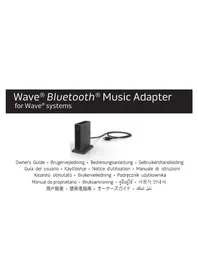
Wave® Bluetooth® Music Adapter for Wave® systems
natural_image
Black rectangular electronic device with a cable and connector, isolated on white background (no text or symbols visible)Owner's Guide • Brugervejledning • Bedienungsanleitung • Gebruikershandleiding Guía del usuario • Käyttöohje • Notice d'utilisation • Manuale di istruzioni Kezelési útmutató • Brukerveiledning • Podręcznik użytkownika Manual do proprietário • Bruksanvisning • คู่มือผู้ใช้ • 사용자 안내서 用户指南 • 使用者指南 • オーナーズガイド • دليل الملك
Important Safety Instructions
Please read this owner's guide
Please take the time to follow the instructions in this owner's guide carefully. It will help you set up and operate your system properly and enjoy its advanced features. Please save this owner's guide for future reference.
WARNINGS:
• To reduce the risk of fire or electrical shock, do not expose the product to rain or moisture.
- Do not expose this apparatus to dripping or splashing, and do not place objects filled with liquids, such as vases, on or near the apparatus. As with any electronic products, use care not to spill liquids into any part of the system. Liquids can cause a failure and/or a fire hazard.
- Do not place any naked flame sources, such as lighted candles, on or near the apparatus.
CAUTIONS:
- Make no modifications to the system or accessories. Unauthorized alterations may compromise safety, regulatory compliance, and system performance, and may void the product warranty.
- Do not use any liquid cleaning solutions, solvents, chemicals, alcohol, ammonia, or abrasives.
- Do not allow liquids to spill into any openings in the enclosure. If liquids get into the unit, turn it off immediately. Call Bose® Customer Support as soon as possible to arrange for service. See the address list included in the carton.
NOTES:
- The product label is located on the bottom of the product.
- Operating temperature range: 0 to 35^ . This product is intended for indoor use only.

Bose Corporation hereby declares that this product is in compliance with the essential requirements and other relevant provisions of Directive 2014/53/EU and other applicable Directives. The complete Declaration of Conformity can be found at: www.Bose.com/compliance
2 - English
Important Safety Instructions
To comply with FCC and Industry Canada RF radiation exposure requirements, this device must be installed to produce a separation distance of 20 cm from all persons. It must not be co-located or operating in conjunction with any other antenna or transmitter.
This product complies with the Canadian ICES-003 Class B and RSS-210 specifications. In the U.S. only, this product complies with CFR 47 Part 15 specifications.
This device complies with Industry Canada licence-exempt RSS standard(s).
Operation is subject to the following two conditions: (1) This device may not cause interference, and (2) this device must accept any interference, including interference that may cause undesired operation of the device.
NOTE: This equipment has been tested and found to comply with the limits for a Class B digital device, pursuant to Part 15 of the FCC Rules. These limits are designed to provide reasonable protection against harmful interference in a residential installation. This equipment generates, uses, and can radiate radio frequency energy and, if not installed and used in accordance with the instructions, may cause harmful interference to radio communications. However, there is no guarantee that interference will not occur in a particular installation. If this equipment does cause harmful interference to radio or television reception, which can be determined by turning the equipment off and on, the user is encouraged to try to correct the interference by one or more of the following measures:
- Reorient or relocate the receiving antenna.
- Increase the separation between the equipment and receiver.
- Connect the equipment into an outlet on a circuit different from that to which the receiver is connected.
- Consult the dealer or an experienced radio/TV technician for help.
Changes or modifications not expressly approved by Bose Corporation could void the user's authority to operate this equipment.
Additional safety information:
See the additional instructions on the Important Safety Instructions sheet (North America only) enclosed in the shipping carton.
English - 3
Regulatory Information

This symbol means the product must not be discarded as household waste, and should be delivered to an appropriate collection facility for recycling. Proper disposal and recycling helps protect natural resources, human health and the environment. For more information on disposal and recycling of this product, contact your local municipality, disposal service, or the shop where you bought this product.
| Names and Contents of Toxic or Hazardous Substances or Elements | ||||||
| Toxic or Hazardous Substances and Elements | ||||||
| Part Name Lead | (Pb) Mercury (Hg) | Cadmium (Cd) | Hexavalent (CR(VI)) | Polybrominated Biphenyl (PBB) | Polybrominated diphenylether (PBDE) | |
| PCBs X O O O O | O | |||||
| Metal parts X O | O O O O | |||||
| Plastic parts O O | O O O O | |||||
| Speakers X O O | O O O | |||||
| Cables X O O O | O O | |||||
| This table is prepared in accordance with the provisions of SJ/T 11364.O: Indicates that said hazardous substance contained in all of the homogeneous materials for this part is below the limit requirement of GB/T 26572.X: Indicates that said hazardous substance contained in at least one of the homogeneous materials used for this part is above the limit requirement of GB/T 26572. | ||||||
Date of manufacture: The eighth digit in the serial number indicates the year of manufacture; "5" is 2005 or 2015.
China Importer: Bose Electronics (Shanghai) Company Limited, Part C, Plan 9, No. 353 North Riying Road, China (Shanghai) Pilot Free Trade Zone
EU Importer: Bose Products B.V., Gorslaan 60, 1441 RG Purmerend, The Netherlands
Taiwan Importer: Bose Taiwan Branch, 9F-A1, No.10, Section 3, Minsheng East Road, Taipei City 104, Taiwan
© 2017 Bose Corporation. No part of this work may be reproduced, modified, distributed, or otherwise used without prior written permission.
4 - English
Contents
Connecting your Wave® Bluetooth® Music Adapter....6
Pairing a Bluetooth ^® device....7
Using multiple Bluetooth ^® devices....9
Listening to a Bluetooth® device....10
Troubleshooting....11
Technical Information....13
Please complete and retain for your records:
The serial and model numbers can be found on the warranty card.
Serial number
Purchase date
We suggest you keep your receipt with this owner's guide.
English - 5
Connecting your Wave® Bluetooth® Music Adapter
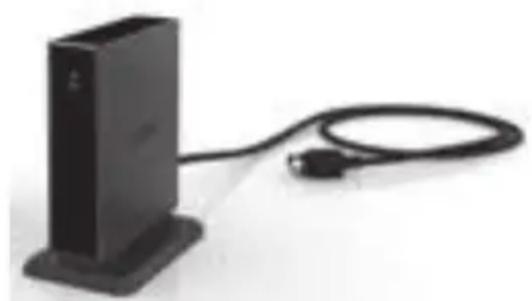
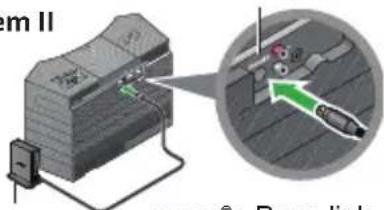
The music adapter connects directly to your Wave ^® system.
- Plug the adapter cable (with the words Bose link facing up) into the Bose link connector on the rear of the system.
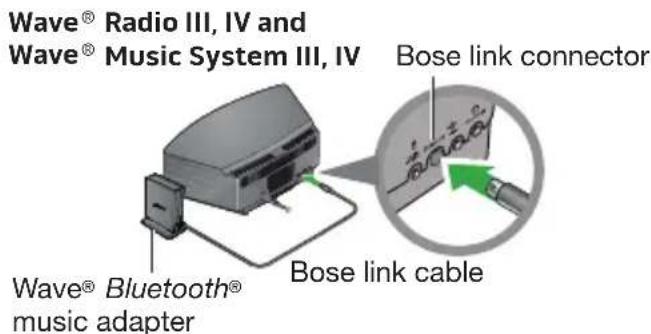
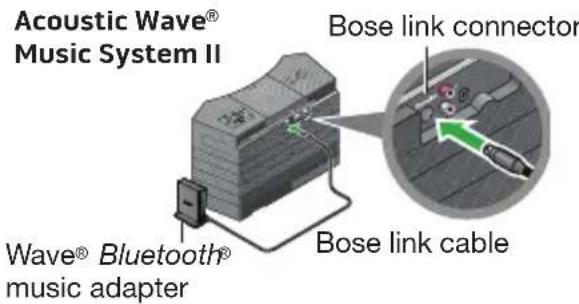
- Place the adapter in a convenient location. It does not need to be within view. If the adapter is to the left of the system (as you face it), be sure the two are at least 2 in. (5 cm) apart to eliminate any interference with AM reception.
6 - English
Pairing a Bluetooth ^® device
The Wave® Bluetooth® music adapter wirelessly connects your Wave® system to your mobile phone, tablet, computer, or other Bluetooth device.
1. Make the Wave ^® system Discoverable
- For the Wave ^® Radio III, IV and Wave ^® Music System III, IV: Using your Wave ^® system remote control, press AUX until BLUETOOTH appears on the Wave ^® system display. Press and hold down the Presets 5 button for five seconds.
- For the Acoustic Wave® Music System II: Using your Wave® system remote control, press CD until BLUETOOTH appears on the Wave® system display. Press and hold down the Presets 5 button for five seconds.
The indicator on the music adapter flashes steadily and DISCOVERABLE flashes on the Wave® system display.
2. Select Bose Adapter from the Device List
Turn on your phone, tablet, computer, or other device and locate its Bluetooth device list. Scroll through the device list and select Bose Adapter.
English - 7
Pairing a Bluetooth ^® device
3. Complete Pairing
TheWave ^® system emits a tone and BLUETOOTH appears on the display when the connection is ready for use.
Note: To pair additional devices (up to 6), repeat steps 1-3 above. Only one device can be used at a time.
If you don't hear audio from the Wave® system:
Restart the music application
If you don't hear music from the Wave® system after successfully pairing your Bluetooth device, you may need to quit and restart your music application.
Check the volume controls
For best performance, make sure:
- Your Wave® system volume is turned up and not muted.
- The volume on your Bluetooth device is turned up and not muted.
- Your music application is running and the volume is turned up and not muted.
8 - English
Using multiple Bluetooth ^® devices
If you have paired more than one Bluetooth device, remember that the Wave ^® system can only play music from one device at a time.
Disconnect one source before connecting another
- To disconnect a Bluetooth device, turn off the device's Bluetooth feature. The device remains in the Wave® system's memory and automatically reconnects when you turn on the device's Bluetooth feature.
- Wait for the Wave® system to find your device.
When powered on, the Wave ^® system scrolls through each of the Bluetooth devices in its memory. If you have multiple paired devices, there may be a short delay while the system searches through the list.
Clearing the memory
Press and hold the Presets 6 button on the remote for 10 seconds until you hear a tone. The Wave® system clears all devices from its memory and returns to discoverable mode.
English - 9
Listening to a Bluetooth® device
Wave® Music System III, IV and Wave® Radio System III, IV
Press AUX hear audio from your Bluetooth device or AUX input. Press as AUX necessary to select a Bluetooth device or AUX input.

Acoustic Wave® Music System II
Press CD hear audio from your Bluetooth device or CD source. Press aCD necessary to select a Bluetooth device or CD source.
Troubleshooting
| Problem What to do | |
| No sound when the Bluetooth® device plays music. | Select Bose Adapter in the Bluetooth device list (see page 7).Increase the volume and unmute the system.Increase the volume and unmute your Bluetooth device.Make sure your music application is running and the volume is increased and not muted.Stop other audio or video streaming applications.Restart your Bluetooth device. |
| Reception of sound from the Bluetooth device is poor or the sound is dropping out. | Move the music adapter farther from the Wave® system.Decrease the distance between the Wave® system and your Bluetooth device.Move system away from possible interference (microwaves, cordless phones, etc.). |
Troubleshooting
| Problem What to do | |
| Play/Pause and Seek buttons do not control music on the Bluetooth device. | Make sure your media player or Internet radio application is selected as the active window.Note: Not all players and Internet radio services support this form of playback control. |
Customer service
For additional help, contact Bose Customer Service. Refer to the contact sheet in the carton.
Limited warranty
Your system is covered by a limited warranty. Details of the limited warranty are provided on the quick start guide in the carton. Please refer to the warranty card for instructions on how to register. Failure to register will not affect your limited warranty rights.
The warranty information provided with this product does not apply in Australia and New Zealand. See our website at www.bose.com.au/warranty or www.bose.co.nz/warranty for details of the Australia and New Zealand warranty.
Technical Information
Dimensions
Music adapter: 3.6" H x 2.6" D x 1" W (9.1 cm H x 7.6 cm D x 2.3 cm W)
Weight
Music adapter: 0.33 lb. (150 grams +/-10 grams)
Bose ^® system requirement
Exclusive use of the Bose link connector on the rear of the Wave ^® system.
Multi-disc changers
For the Wave ^® Radio III, IV and Wave ^® Music System III, IV: The music adapter cannot be used in conjunction with a multi-disc changer because these Wave ^® systems have only one Bose link input.
For the Acoustic Wave® Music System II: The music adapter can be used in conjunction with a multi-disc changer.
Bluetooth® QD ID
Wave® Bluetooth® Music Adapter: B015665
The Bluetooth ^® word mark and logos are registered trademarks owned by Bluetooth SIG, Inc. and any use of such marks by Bose Corporation is under license.
Importor i Taiwan: Bose Taiwan Branch, 9F-A1, No.10, Section 3, Minsheng East Road, Taipei City 104, Taiwan
Taiwan-Import: Bose Taiwan Branch, 9F-A1, No.10, Section 3, Minsheng East Road, Taipei City 104, Taiwan
natural_image
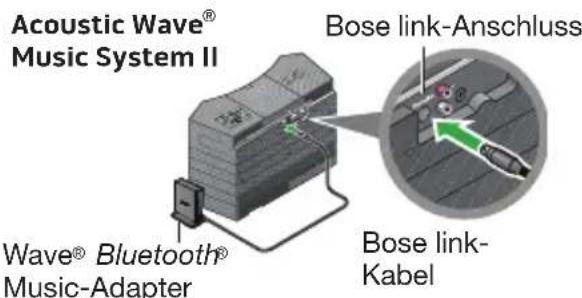
Illustration of a printer with a magnified view showing internal components (no text or symbols)Wave® Bluetooth® Music-Adapter
Importeur in Taiwan: Bose Taiwan Branch, 9F-A1, No.10, Section 3, Minsheng East Road, Taipei City 104, Taiwan
Importatore per la Cina: Bose Electronics (Shanghai) Company Limited, Part C, Plan 9, No. 353 North Riying Road, China (Shanghai) Pilot Free Trade Zone
Importatore per l'UE: Bose Products B.V., Gorslaan 60, 1441 RG Purmerend, Paesi Bassi
Importatore per Taiwan: Bose Taiwan Branch, 9F-A1, No.10, Section 3, Minsheng East Road, Taipei City 104, Taiwan
Kinai importör: Bose Electronics (Shanghai) Company Limited, Part C, Plan 9, No. 353 North Riying Road, China (Shanghai) Pilot Free Trade Zone
EU-importôr: Bose Products B.V., Gorslaan 60, 1441 RG Purmerend, The Netherlands
Tajvani importör: Bose Taiwan Branch, 9F-A1, No.10, Section 3, Minsheng East Road, Taipei City 104, Taiwan
Importor for Taiwan: Bose Taiwan Branch, 9F-A1, No.10, Section 3, Minsheng East Road, Taipei City 104, Taiwan
Importer — Tajwan: Bose Taiwan Branch, 9F-A1, No.10, Section 3, Minsheng East Road, Taipei City 104, Taiwan
Importador em Taiwan: Bose Taiwan Branch, 9F-A1, No.10, Section 3, Minsheng East Road, Taipei City 104, Taiwan
Kinaimportör: Bose Electronics (Shanghai) Company Limited, Part C, Plan 9, No. 353 North Riying Road, Kina (Shanghai) Pilot Free Trade Zone
EU-importör: Bose Products B.V., Gorslaan 60, 1441 RG Purmerend, Nederländerna
Taiwanimportör: Bose Taiwan Branch, 9F-A1, No.10, Section 3, Minsheng East Road, Taipei City 104, Taiwan
natural_image
Illustration of a printer with a magnified view showing internal components (no text or symbols)อะแคปเตอร์ Wave®
Bluetooth® music
Acoustic Wave®
Music System II
ช่องเสียบ Bose link
อะแคปเตอร์ Wave®
Bluetooth® music
สายเคเบิล Bose link
- วาง Assistable Decorated In a simple structure that is difficult to be used in the following instructions:
중국 수입업체: Bose Electronics (Shanghai) Company Limited, Part C, Plan 9, No. 353 North Riying Road, China (Shanghai) Pilot Free Trade Zone
EU 수입업체: Bose Products B.V., Gorslaan 60, 1441 RG Purmerend, The Netherlands
대만 수입업체: Bose Taiwan Branch, 9F-A1, No.10, Section 3, Minsheng East Road, Taipei City 104, Taiwan
Bose Corporation hereby declares that this product is in compliance with the essential requirements and other relevant provisions of Directive 2014/53/EU and other applicable Directives. The complete Declaration of Conformity can be found at: www.Bose.com/compliance
2 - 日本語
安全上の留意項目
To comply with FCC and Industry Canada RF radiation exposure requirements, this device must be installed to produce a separation distance of 20 cm from all persons. It must not co-located or be operating in conjunction with any other antenna or transmitter.
This product complies with the Canadian ICES-003 Class B and RSS-210 specifications.
In the U.S. only, this product complies with CFR 47 Part 15 specifications.
This device complies with Industry Canada licence-exempt RSS standard(s).
Operation is subject to the following two conditions: (1) This device may not cause interference, and (2) this device must accept any interference, including interference that may cause undesired operation of the device.
Note: This equipment has been tested and found to comply with the limits for a Class B digital device, pursuant to Part 15 of the FCC Rules. These limits are designed to provide reasonable protection against harmful interference in a residential installation. This equipment generates, uses, and can radiate radio frequency energy and, if not installed and used in accordance with the instructions, may cause harmful interference to radio communications. However, there is no guarantee that interference will not occur in a particular installation. If this equipment does cause harmful interference to radio or television reception, which can be determined by turning the equipment off and on, the user is encouraged to try to correct the interference by one or more of the following measures:
- Reorient or relocate the receiving antenna.
- Increase the separation between the equipment and receiver.
- Connect the equipment into an outlet on a circuit different from that to which the receiver is connected.
- Consult the dealer or an experienced radio/TV technician for help.
Changes or modifications not expressly approved by Bose Corporation could void the user's authority to operate this equipment.
その他のご注意:
This symbol means the product must not be discarded as household waste, and should be delivered to an appropriate collection facility for recycling. Proper disposal and recycling helps protect natural resources, human health and the environment. For more information on disposal and recycling of this product, contact your local municipality, disposal service, or the shop where you bought this product.
| Names and Contents of Toxic or Hazardous Substances or Elements | ||||||
| Toxic or Hazardous Substances and Elements | ||||||
| Part Name | Lead (Pb) | Mercury (Hg) | Cadmium (Cd) | Hexavalent (CR(VI)) | Polybrominated Biphenyl (PBB) | Polybrominated diphenylether (PBDE) |
| PCBs X O O O O O | ||||||
| Metal parts X O O O O O | ||||||
| Plastic parts O O O O O O | ||||||
| Speakers | X O O O O O | |||||
| Cables X O O O O O | ||||||
| This table is prepared in accordance with the provisions of SJ/T 11364.O: Indicates that said hazardous substance contained in all of the homogeneous materials for this part is below the limit requirement of GB/T 26572.X: Indicates that said hazardous substance contained in at least one of the homogeneous materials used for this part is above the limit requirement of GB/T 26572. | ||||||
(Shanghai) Pilot Free Trade Zone
BOSE® Better sound through research®
©2017 Bose Corporation, The Mountain, Framingham, MA 01701-9168 USA AM801032 Rev. 00