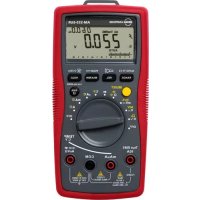
AM555 - Multimeter FLUKE - Free user manual and instructions
Find the device manual for free AM555 FLUKE in PDF.



| Product Type | TRMS Digital Multimeter |
| Brand | Fluke |
| Model | AM555 |
| Category | Multimeter |
| Weight | Approx. 354 g (battery included) |
| Power Supply | 1 9V battery (6F22) or equivalent |
| Main Functions | AC/DC voltage, AC/DC current, resistance, capacitance, frequency, duty cycle, temperature, diode, continuity, non-contact voltage detection (NCV), low impedance (Low Z), low-pass filter, dual display with bar graph, flashlight |
| AC/DC Voltage Range | 600.0 mV to 1000 V |
| AC/DC Current Range | 600.0 μA to 20 A (20 A max 30 s) |
| Resistance Range | 600.0 Ω to 60.00 MΩ |
| Capacitance Range | 60.00 nF to 60 mF |
| Frequency Range | 60.00 Hz to 60.00 MHz |
| Temperature Range | -40 °C to 1000 °C (type K) |
| Basic Accuracy (DC Voltage) | ±(0.5% + 2 digits) |
| Display | Backlit LCD 5999 counts, 61-segment bar graph |
| Safety | CAT IV 600 V, CAT III 1000 V |
| Special Functions | Data hold, MAX/MIN memory, peak, relative zero, auto/manual ranging, auto power off, hazardous voltage indicator, incorrect connection warning |
| Maintenance and Cleaning | Clean with a soft cloth and a mild solution of water and detergent. Do not use solvents. |
| Spare Parts | Fast fuse 0.5 A/1000 V (6.3x32 mm) for mA/μA; fast fuse 11 A/1000 V (10x38 mm) for A; 9V battery |
| Repairability | Repair by authorized service center. User can replace battery and fuses. |
| Supplied Accessories | Pair of test leads, 2 temperature probes, temperature adapter, Velcro strap, 9V battery, carrying case, instruction manual |
| Operating Temperature | 0 °C to 40 °C |
| Operating Humidity | ≤ 75% (0-30 °C), ≤ 50% (30-40 °C) |
| Maximum Altitude | 2000 m |
Frequently Asked Questions - AM555 FLUKE
User questions about AM555 FLUKE
0 question about this device. Answer the ones you know or ask your own.
Ask a new question about this device
Download the instructions for your Multimeter in PDF format for free! Find your manual AM555 - FLUKE and take your electronic device back in hand. On this page are published all the documents necessary for the use of your device. AM555 by FLUKE.
USER MANUAL AM555 FLUKE
AM-555-EUR Digital Multimeter
User Manual
Mode d'emploi
Bedienungshandbuch
- Manuale d'uso
- Manual de uso
- Gebruikershandleiding
Podręcznik uzytkownika
Användarhandbok
- Brukerhandbok
Käyttoohje
- Manual do utiliser
Brugervejledning
AM-555-EUR Digital Multimeter
User Manual
Limited Warranty and Limitation of Liability
Your Amprobe product will be free from defects in material and workmanship for one year from the date of purchase unless local laws require otherwise. This warranty does not cover fuses, disposable batteries or damage from accident, neglect, misuse, alteration, contamination, or abnormal conditions of operation or handling. Resellers are not authorized to extend any other warranty on the behalf of Amprobe. To obtain service during the warranty period, return the product with proof of purchase to an authorized Amprobe Service Center or to an Amprobe dealer or distributor. See Repair Section for details. THIS WARRANTY IS YOUR ONLY REMEDY. ALL OTHER WARRANTYES - WHETHER EXPRESS, IMPLIED OR STATUTORY - INCLUDING IMPLIED WARRANTYES OF FITNESS FOR A PARTICULAR PURPOSE OR MERCHANTABILITY, ARE HEREBY DISCLAIMED. MANUFACTURER SHALL NOT BE LIABLE FOR ANY SPECIAL, INDIRECT, INCIDENTAL OR CONSEQUENTIAL DAMAGES OR LOSSES, ARISING FROM ANY CAUSE OR THEORY. Since some states or countries do not allow the exclusion or limitation of an implied warranty or of incidental or consequential damages, this limitation of liability may not apply to you.
Repair
All Amprobe returned for warranty or non-warranty repair or for calibration should be accompanied by the following: your name, company's name, address, telephone number, and proof of purchase. Additionally, please include a brief description of the problem or the service requested and include the test leads with the meter. Non-warranty repair or replacement charges should be remitted in the form of a check, a money order, credit card with expiration date, or a purchase order made payable to Amprobe.
In-warranty Repairs and Replacement - All Countries
Please read the warranty statement and check your battery before requesting repair. During the warranty period, any defective test tool can be returned to your Amprobe distributor for an exchange for the same or like product. Please check the "Where to Buy" section on www.Amprobe.com for a list of distributors near you. Additionally, in the United States and Canada, in-warranty repair and replacement units can also be sent to an Amprobe Service Center (see address below).
Non-warranty Repairs and Replacement - United States and Canada
Non-warranty repairs in the United States and Canada should be sent to an Amprobe Service Center. Call Amprobe or inquire at your point of purchase for current repair and replacement rates.
USA: Canada:
Amprobe Amprobe
Everett, WA 98203 Mississauga, ON L4Z 1X9
Tel: 877-AMPROBE (267-7623) Tel: 905-890-7600
Non-warranty Repairs and Replacement - Europe
European non-warranty units can be replaced by your Amprobe distributor for a nominal charge. Please check the "Where to Buy" section on www.Beha-Amprobe.com for a list of distributors near you.
Amprobe Europe*
Beha-Amprobe
In den Engematten 14
79286 Glottertal, Germany
Tel.: +49 (0) 7684 8009 - 0
www.Beha-Amprobe.com
*Correspondence only - no repair or replacement available from this address. European customers please contact your distributor.)
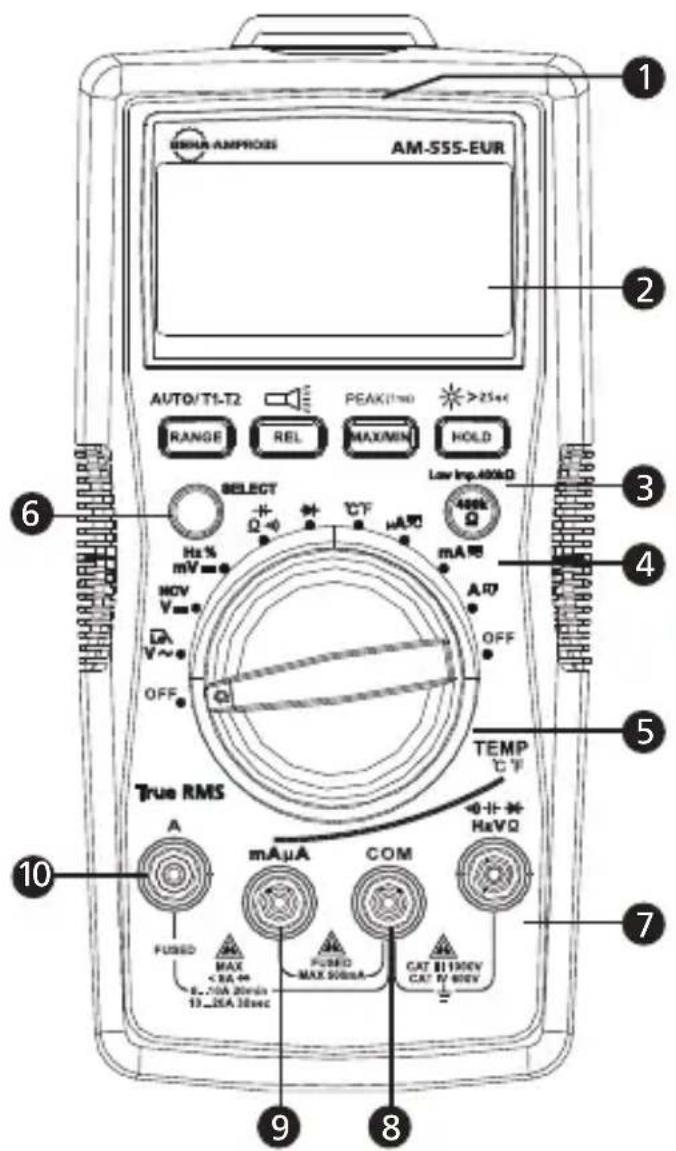
1 Flash light
LC Display
3 Push buttons (See making measurement for button functions)
4 Low-impedance button
5 Rotary switch
6 SELECT button
Input terminal for voltage, diode, capacitance, resistance, continuity and temperature measurement
COM (return) terminal for all measurements
9 Input terminal for AC/DC mA/uA measurement
10 Input terminal for AC/DC A measurement up to 20A
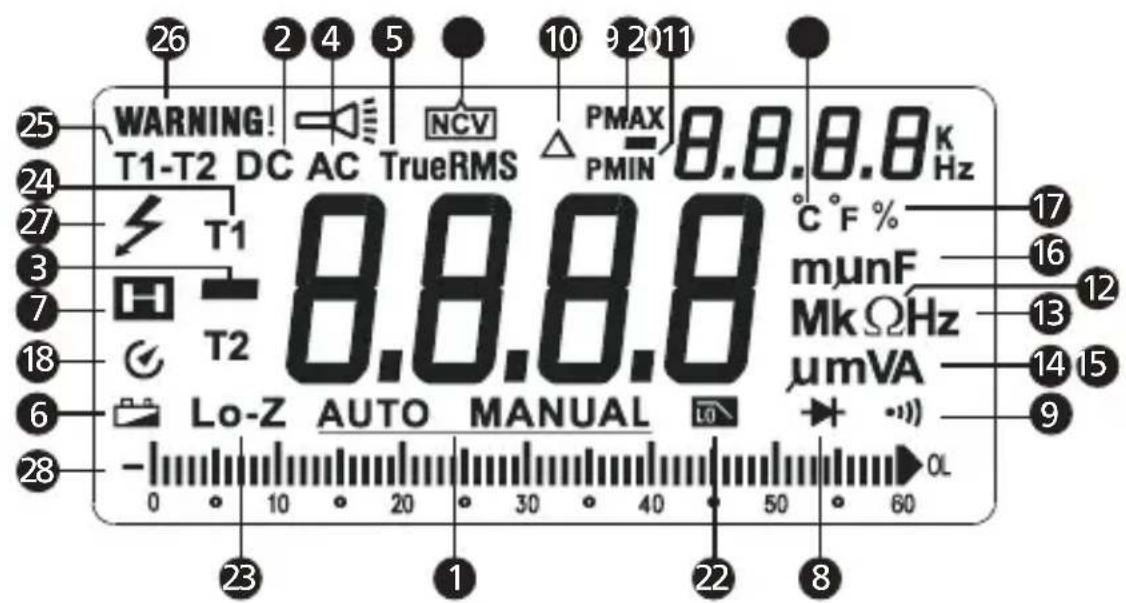
1 Auto- or Manual- range
2 Direct current
Negative reading
4 Alternate current
True-rms value
Low battery indicator
7 Data hold
8 Diode test
9 Continuity test
10 Relative zero mode
11 Non-contact Voltage detection mode
Measurement units for Resistance
Measurement units for Frequency
Measurement units for Voltage
Measurement units for Current
Measurement units for Capacitance
17 Duty cycle
18 Auto power off
Maximum / minimum reading memory
20 Positive / negative peak reading memory
21 Measurement unit for temperature
Low-pass filter
23 400KΩ low-impedance test
24 Temperature measurement T1 or T2
25 Temperature measurement T1 - T2
26 Warning for error input terminals connection for test leads
27 Hazardous Voltage presence
28 Analog bar graph display
CONTENTS
SYMBOL 2
SAFETY INFORMATION 2
UNPACKING AND INSPECTION 3
FEATURES 4
MAKING MEASUREMENT 5
Rotary Switch Positions 5
Function Buttons 6
Measuring AC and DC Voltage 8
Low Pass Filter 9
Measuring Frequency / Duty Cycle 10
Measuring AC and DC Current 12
Measuring Resistance 13
Measuring Continuity 14
Measuring Capacitance 15
Measuring Diode 16
Measuring Temperature ^ C / ^ F 16
Non-Contact Voltage Detection 17
SPECIFICATIONS 19
MAINTENANCE 24
BATTERY AND FUSE REPLACEMENT 25
SYMBOLS
| 4 | Caution! Risk of electric shock. |
| 1 | Caution! Refer to the explanation in this manual |
| ~ | Alternating Current (AC) |
| = | Direct Current (DC) |
| □ | The equipment is protected by double insulation or reinforced insulation |
| ⊥ | Earth ground |
| ●● | Audible tone |
| Battery | |
| CE | Complies with European directives |
| Conforms to relevant Australian standards | |
| C US C | Canadian Standards Association (NRTL/C) |
| × | Do not dispose of this product as unsorted municipal waste. Contact a qualified recycler. |
SAFETY INFORMATION
The meters comply with:
IEC/EN 61010-1 3rd Edition Pollution Degree 2, Measurement Category IV 600V and Measurement Category III 1000V
IEC/EN 61010-2-030
IEC/EN 61010-031 for test leads
EMC IEC/EN 61326-1
Measurement Category IV (CAT IV) is for measurements performed at the source of the low-voltage installation. Examples are electricity meters and measurements on primary overcurrent protection devices and ripple control units.
Measurement Category III (CAT III) is for measurements performed in the building installation. Examples are measurements on distribution boards, circuit-breakers, wiring, including cables, bus-bars, junction boxes, switches, socket-outlets in the fixed installation, and equipment for industrial use and some other equipment, for example, stationary motors with permanent connection to the fixed installation.
WARNING: Read before using
- To avoid possible electrical shock or personal injury, follow these instructions and use the Meter only as specified in this manual.
- Do not use the Meter or test leads if they appear damaged, or if the Meter is not operating properly. If in doubt, have the Meter serviced.
- Always use the proper function and range for measurements.
- Before rotating the function range selection switch, disconnect test probe from circuit under test.
- Verify the Meter's operation by measuring on a known voltage source.
- Do not apply more than the rated voltage, as marked on the Meter, between the test probe or between any test probe and earth ground.
- Use the Meter with caution for voltages above 30V ac rms, 42V ac peak, or 60Vdc . These voltages pose electrical shock hazards.
- Disconnect circuit power and discharge all high-voltage capacitors before testing resistance.
- Do not use the Meter around explosive gas or vapor.
- When using the test leads, keep your fingers behind the finger guards.
UNPACKING AND INSPECTION
Your shipping carton should include:
1 AM-555-EUR Multimeter
1 Pair of test leads
2 Temperature probes
1 Temperature adaptor
1 Velcro strap
1 9V (6F22) battery (installed)
1 User manual
1 Carrying case
If any of the items are damaged or missing, return the complete package to the place of purchase for an exchange.
The Beha-Amprobe AM-555-EUR is a fully featured multimeter designed for professional electricians who need to maintain service or troubleshoot advanced electrical systems. True-rms sensing accurately measures voltage on systems affected by harmonics, built-in flashlight allows you to identify wires while working in dark conditions, and non-contact voltage detection allows for quick go-no-go checks without the need for an additional tool. The AM-555-EUR also features dual input temperature measurement, a low-impedance function to detect stray voltage, and a low pass filter to accurately take measurements on variable frequency drives. Safety rated to CAT IV 600V and CAT III 1000V for use in the most demanding applications.
- Measurements: AC/DC Voltage up to 1000V, ac/dc current, Resistance, Frequency, Capacitance, Temperature, duty cycle.
- Current measurements up to 10A , 20A for up to 30 seconds
-
Special Functions:
-
Low Z - to detect "ghost" voltages
- Low pass filter for variable frequency drives
- Non-contact Voltage detection
Audible continuity -
Diode test
-
Dual reading backlight LC Display with analog bargraph
Events: -
Data hold
-MAX/MIN memory - Peak hold (crest)
- Relative zero mode
Built-in flash light
Built-in test leads storage and "third hand holder"
- Warning against improper test leads connection
- Auto and manual ranging
- Auto power off
- Low battery warning
- Velcro strap to hang a meter
- Safety: CAT IV 600V, CAT III 1000V

- Use the proper function and range for measurements.
-
To avoid possible electrical shock, personal injury or damages to the Meter, disconnect circuit power and discharge all high-voltage capacitors before testing resistance and diode.
-
Connecting test leads:
-
Connect the common (COM) test lead to the circuit before connecting the live lead;
-
After measurement, remove live lead before removing the common (COM) test lead from the circuit
-
Symbol "OL" is displayed on LCD when the measurement is out of range.
Rotary Switch Positions
| Switch Position | Measurement Function |
| V~ / L | AC voltage measurement / Low-pass filter (1kHz). Use SELECT button to select alternate function. |
| V= / NCV | DC voltage measurement / Non-contact Voltage detection.Use SELECT button to select alternate function. |
| mV= /Hz % | DC millivolt measurement / Frequency / Duty cycle Use SELECT button to select alternate function. |
| Ω / -∞ | Resistance / Capacitance / Continuity measurement. Use SELECT button to select alternate function. |
| → | Voltage measurement of diode PN junction (diode test). |
| °C °F | Temperature measurement. Use SELECT button to select temperature unit °C or °F. |
| μA mA ≈ 10A | AC or DC current measurement. Use SELECT button to select alternate function ac or dc |
Function Buttons
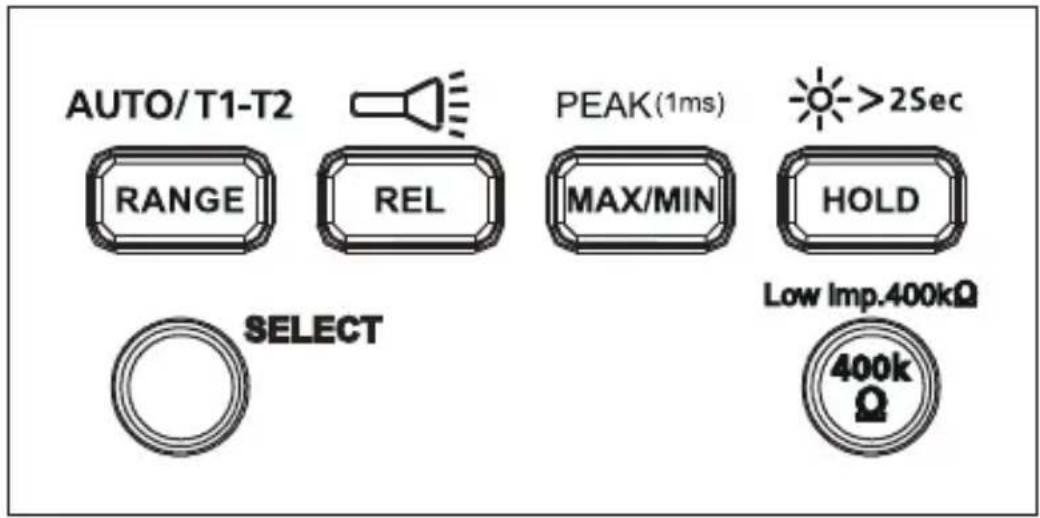
| Button MeasUREMENT Function | |
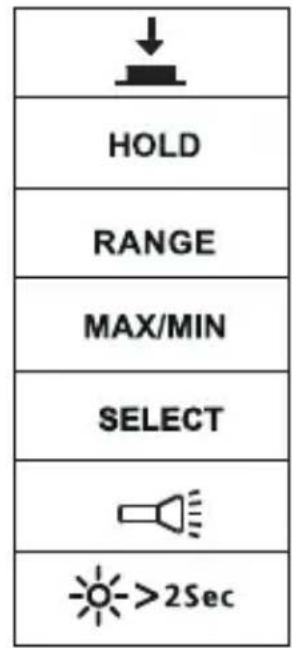
| SELECT | Press the yellow SELECT button to select alternate measurement functions on the rotary switch. |
| RANGE / AUTO T1-T2 | Manual or auto range switching for voltage current, resistance and capacitance. The default setting is Auto ranging, press to switch to manual ranging. Press for 2 seconds to return to auto-ranging. T1 or T2 or T1-T2 function switching for temperature measurement. |
| REL / | Relative mode △Press >2 seconds to turn ON or turn OFF flash light. |
| MAX/MIN / PEAK(1ms) | Press to enter Maximum / minimum reading memory mode. Press again for maximum reading; press again for minimum reading. Press >2 seconds to exit maximum/minimum reading mode. Press >2 seconds to enter Peak MAX/ Peak MIN mode. Press again for Peak MAX reading; press again for Peak MIN reading. Press >2 seconds to exit Peak MAX/ Peak MIN reading mode. |
| HOLD / >2Sec | Display freezes present reading / press >2 seconds to turn ON or turn OFF LCD backlight. |
| Low imp. 400kΩ | For voltage measurement functions only. Press and hold the button to change the input impedance of V and COM terminal to 400kΩ. Release 400kΩ button to return to normal input impedance of V and COM terminal (around 10MΩ). |
Dual Display
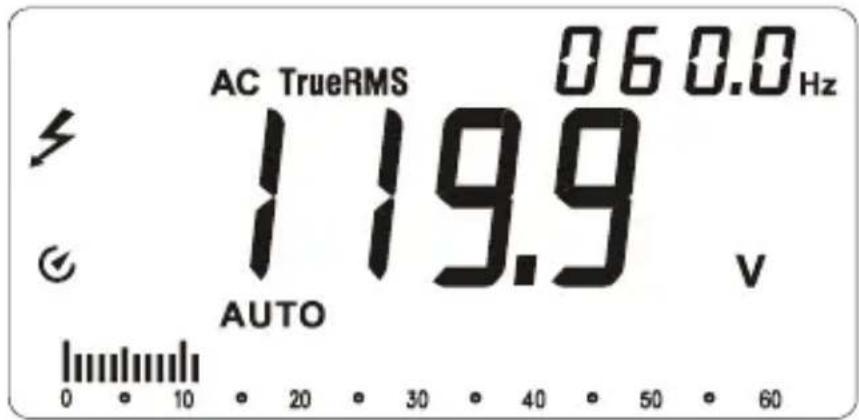
AC Voltage measurement
Primary display shows ac voltage.
Secondary display shows frequency.
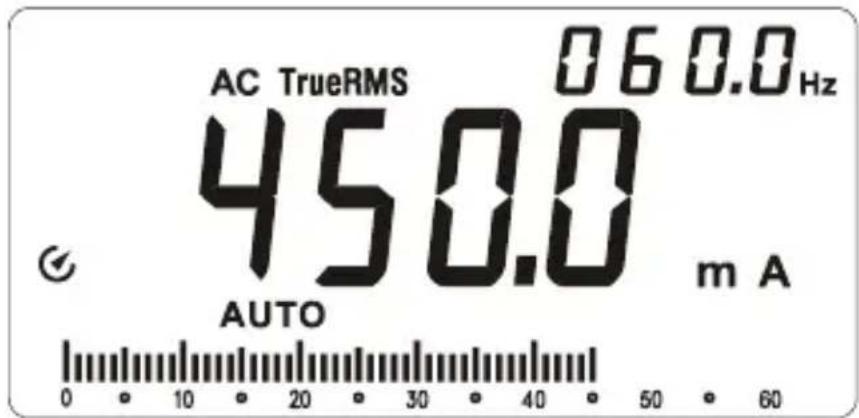
AC Current measurement
Primary display shows ac current.
Secondary display shows frequency.
Auto Power OFF
Auto power off: Approximately 15 minutes.
When the meter is in auto power off mode, press any button to resume normal operation.
REL Measurement (V, A, Ω and -Measurement)
The meter will calculate the values based on the stored value when set to related mode. Display value under REL Mode = Measured Value - Reference Value
Note: Entering relative mode is not allowed when the meter displays "OL".
Incorrect Input Terminal Connection Warning
To alert you about the incorrect connection of input terminals, the meter will display "Warning" and buzzer will sound when test leads are falsely inserted to terminals which are not for measurement of the selected functions.
| Function selected WARNING | G – Incorrect Terminal Connection |
| V, Ω, +, -, Hz, %, ∅ | 10A, mA μA |
| mA μA°C °F | 10A |
| 10A | mA μA |
Hazardous Voltage Warning
LCD screen displays when the meter detects a voltage ≥ 30 Vac or ≥ 42 V dc.
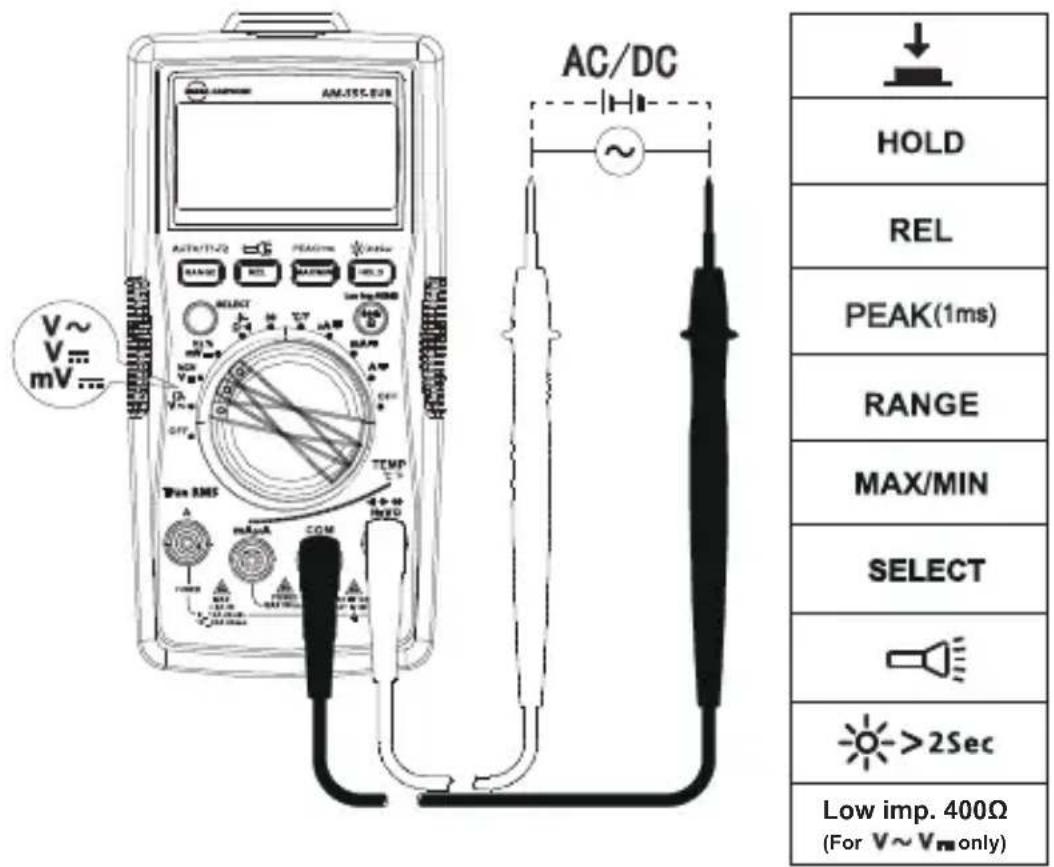
Measuring AC and DC Voltage
To avoid personal injury or damage to the meter, do not apply voltage higher than 1000V ac and 1000V dc. Buzzer will sound when detect a voltage higher than 1000V ac and 1000V dc.
Low Pass Filter
4 !
- To avoid personal injury or damage to the meter, do not use low pass filter function to verify the presence of hazardous voltage in the circuit. Always use Voltage function to verify hazardous voltages.
- Do not apply voltage higher than 1000V.
Measuring AC voltage with Low Pass Filter:
Turn rotary switch to V~ position and press SELECT button for Low Pass Filter mode, Symbol is displayed on screen.
Making measurement under ac voltage mode by a low pass filter can block voltage above 1KHz. Low pass filter can be used to measure composite sine wave signal generated by inverter and variable frequency motor drives.
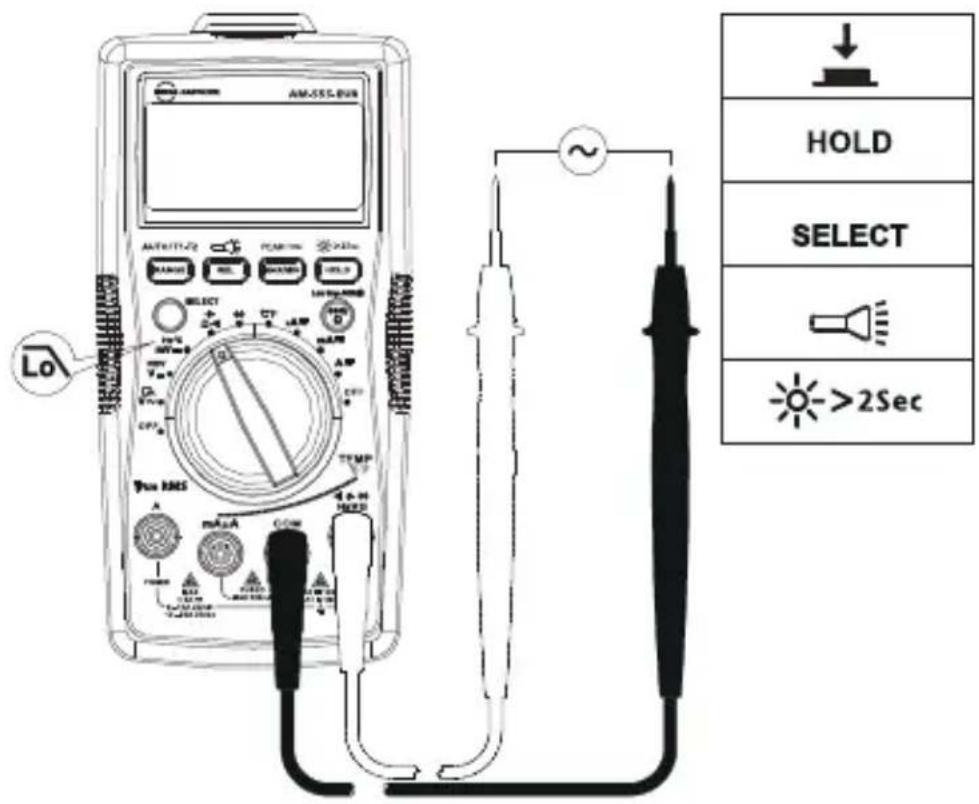
Note: The meter goes into manual mode when Low Pass Filter mode is enabled. Auto-range mode is not available for Low Pass Filter option.
Measuring Frequency / Duty Cycle
To avoid personal injury or damage to the meter, do not apply voltage higher than 1000V.
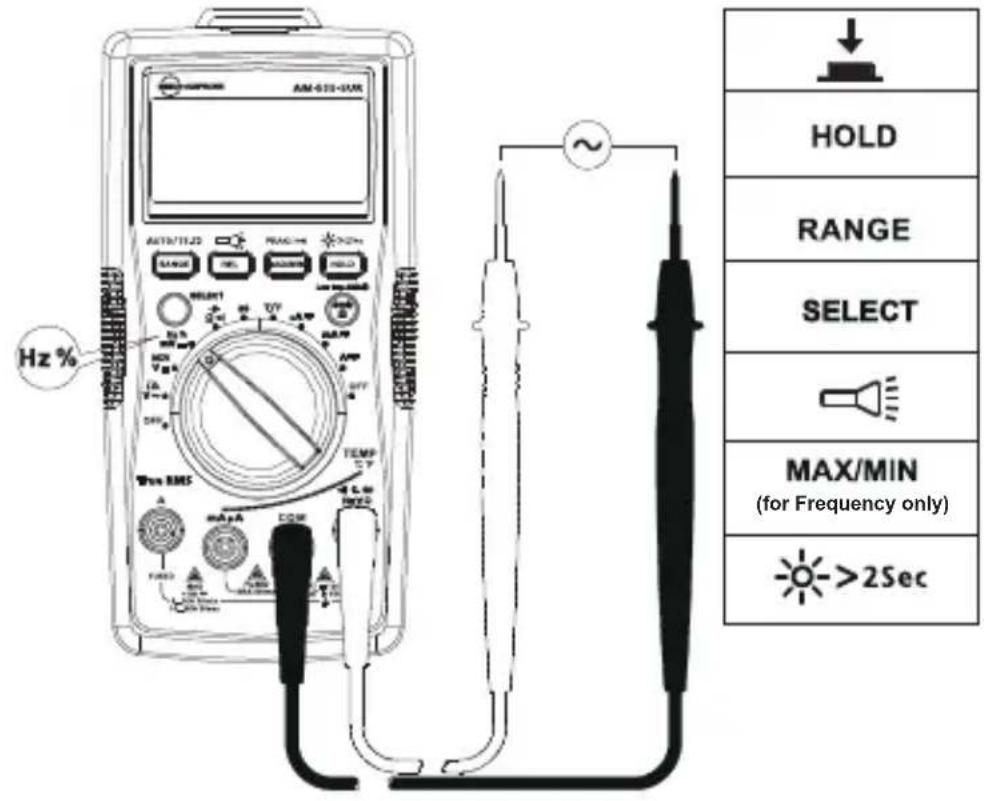
- Frequency / Duty Cycle function
Step 1: Turn the rotary switch to Hz % position. Use SELECT button for Hz or duty cycle measurement.
Step 2: Connect test leads to the circuit. See below for connecting diagram.
- Measuring Frequency by using ac Voltage function
Step 1: Turn the rotary switch to V position.
Step 2: Connect test leads to the circuit. Connect the common (COM) test lead to the circuit before connecting the live lead (connecting diagram refer to "Measuring AC Voltage").
Primary display shows ac Voltage measurement reading. Secondary display shows Frequency measurement reading.
- Measuring Frequency by using ac current function
Step 1: Turn the rotary switch to A or mA or 10A position.
Step 2: Connect the test leads to the correct input 10A / mA A current terminal and to the circuit before powering the circuit under test (connecting diagram refer to "Measuring AC Current").
Primary display shows ac current measurement reading. Secondary display shows Frequency measurement reading.
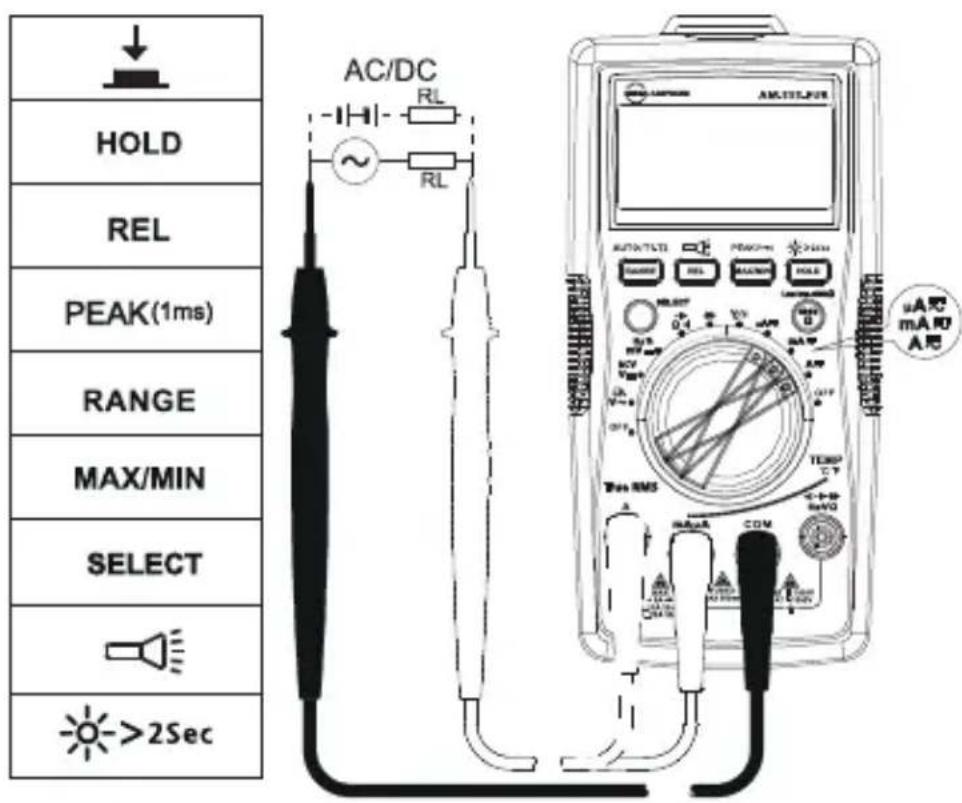
Measuring AC and DC Current
Press SELECT button to select ac or dc current measurement function.
To avoid personal injury or damage to the meter:
- Do not attempt to make an in-circuit current measurement when the open-circuit potential to earth ground exceeding 1000V
- Switch to proper function and range for your measurement.
- Do not place the test probe in parallel with a circuit when the test leads are connected to the current terminals.
- Connect the test leads to the correct input 10A / mA A current terminal and to the circuit before powering the circuit under test.
- For current range from 8-10A, do not measure current for more than 20 minutes. Wait for 10 minutes before taking another measurement
- For current range from >10 - 20A do not measure current for more than 30 seconds maximum. Wait for 10 minutes before taking another measurement.
- After measurement, switch OFF the circuit's power before removing test leads from the circuit.
Measuring Resistance
Disconnect circuit power and discharge all high-voltage capacitors before testing resistance.
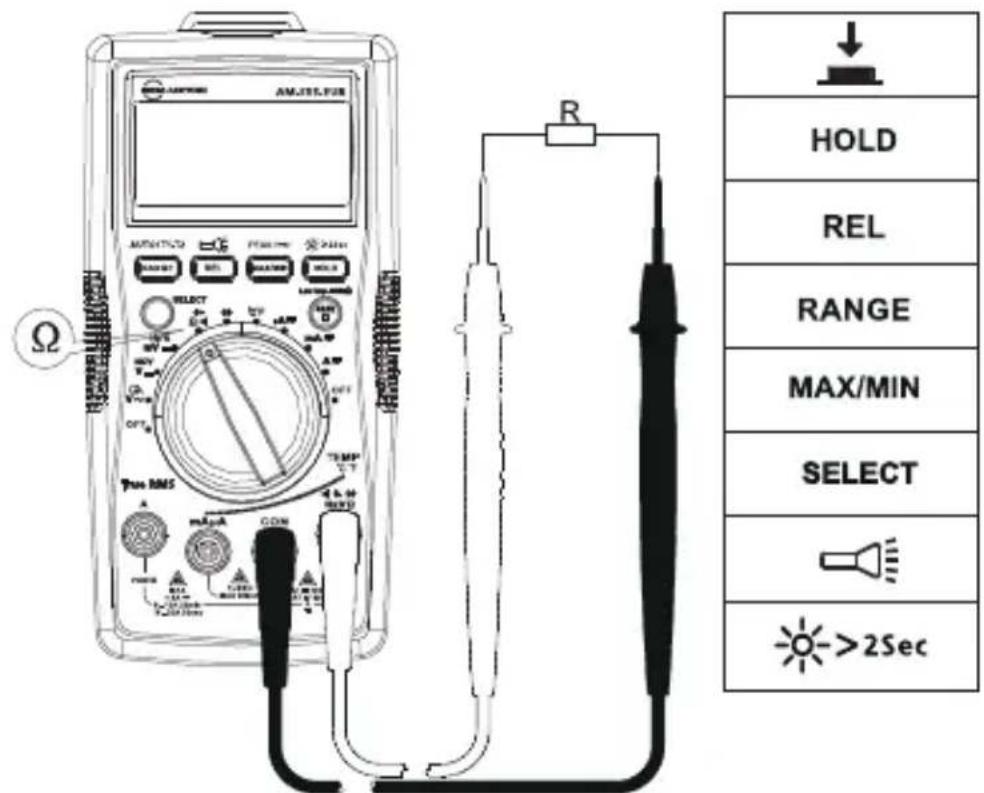
Note: On a higher resistance measurement (>1M) , the measurement may take a few seconds to get stable reading. Over range or open circuit indication: OL
Measuring Continuity
Disconnect circuit power and discharge all high-voltage capacitors before testing continuity.
Press SELECT button for continuity function.
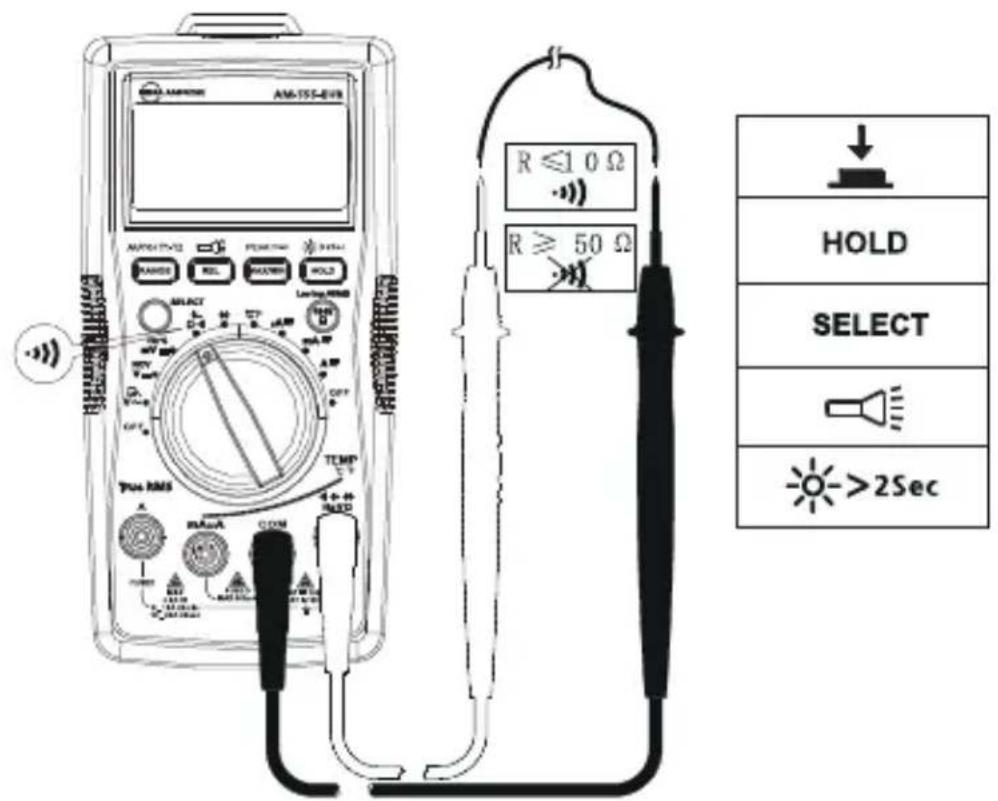
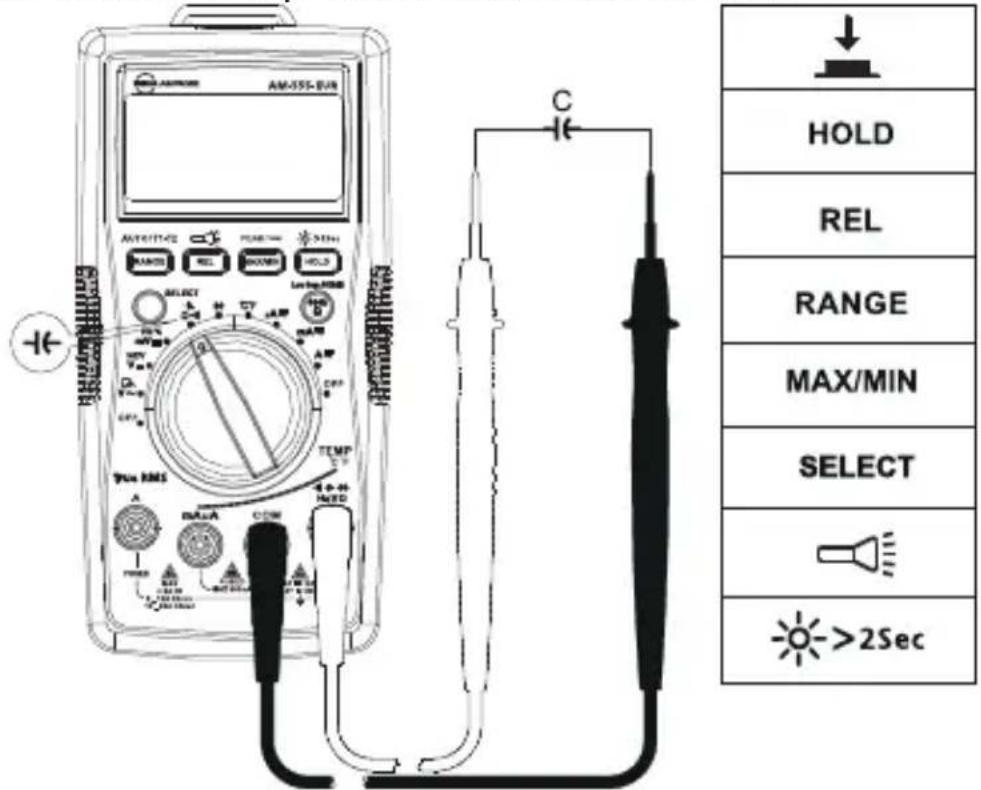
Measuring Capacitance
Disconnect circuit power and discharge all high-voltage capacitors before measuring capacitance. Use dc Voltage function to check the capacitors are discharged.
Press SELECT button for capacitance measurement function.
Measuring Diode
Disconnect circuit power and discharge all high-voltage capacitors before testing diode.
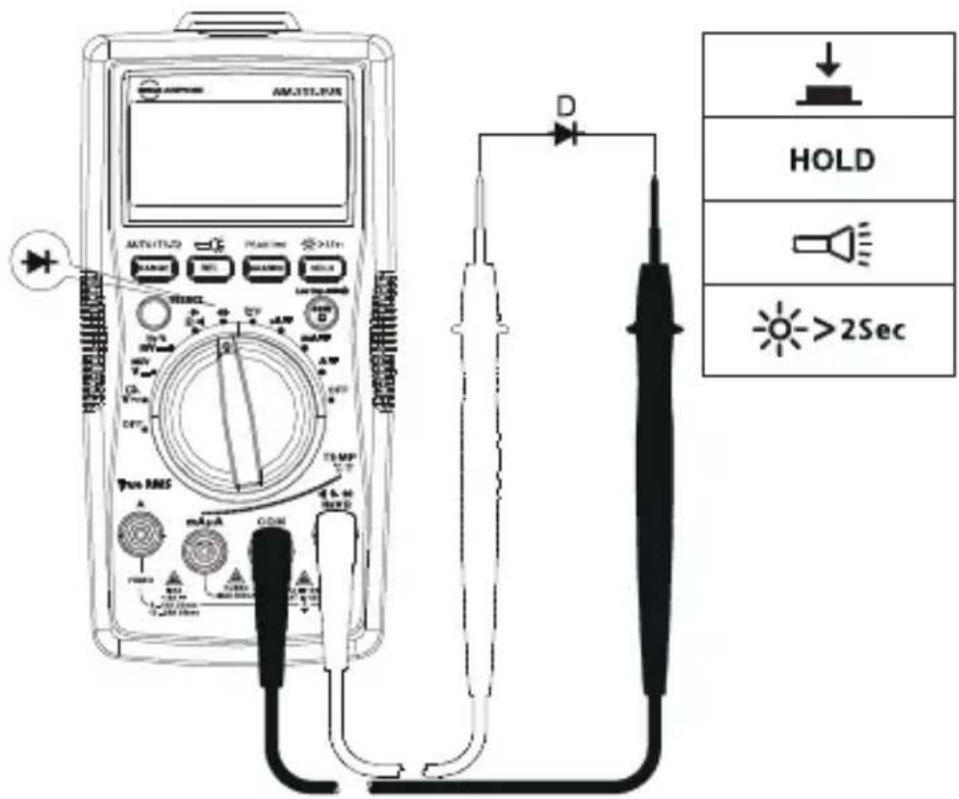
Note: A typical junction Voltage drops 0.5V to 0.8V .
Measuring Temperature ^ C / ^ F
4 !
- To avoid personal injury or damage to the meter, do not apply the temperature probe to any live conductive parts.
- Temperature sensor K-type (nickel-chromium/nichrosi) thermocouple is suitable for temperature measurement below 230^ (446^) .
Measurement steps:
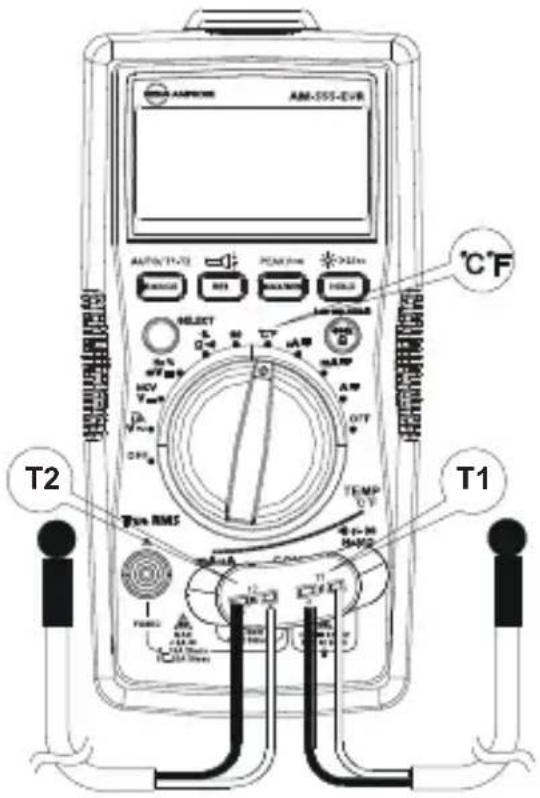
Step 1: Turn the rotary switch to ^ C / F position. The display will show "OPEN". Press SELECT button for conversion to ^ F measurement.
Step 2: Connect the temperature probe (K-type) to the Meter and to the surface to be measured. Two temperature surface points can be measured at the same time by using the provided temperature probes.
Step 3: Press RANGE button to select temperature measurement T2 or T1-T2 (the default temperature measurement is T1).
Non-Contact Voltage Detection (NCV Mode)
4 !
- To avoid personal injury or damage to the meter, do not test on uninsulated wires.
- Buzzer will sound and screen will display "OL" when detecting ac Voltage above 90V ac.
- Do not test on hazardous live wires higher than 750V ac.
- Before and after hazardous voltage measurements, test the meter by approaching to a known source such as a line ac Voltage or outlet to determine proper operation.
- At NCV mode, no test lead connections are required for NCV measurement.
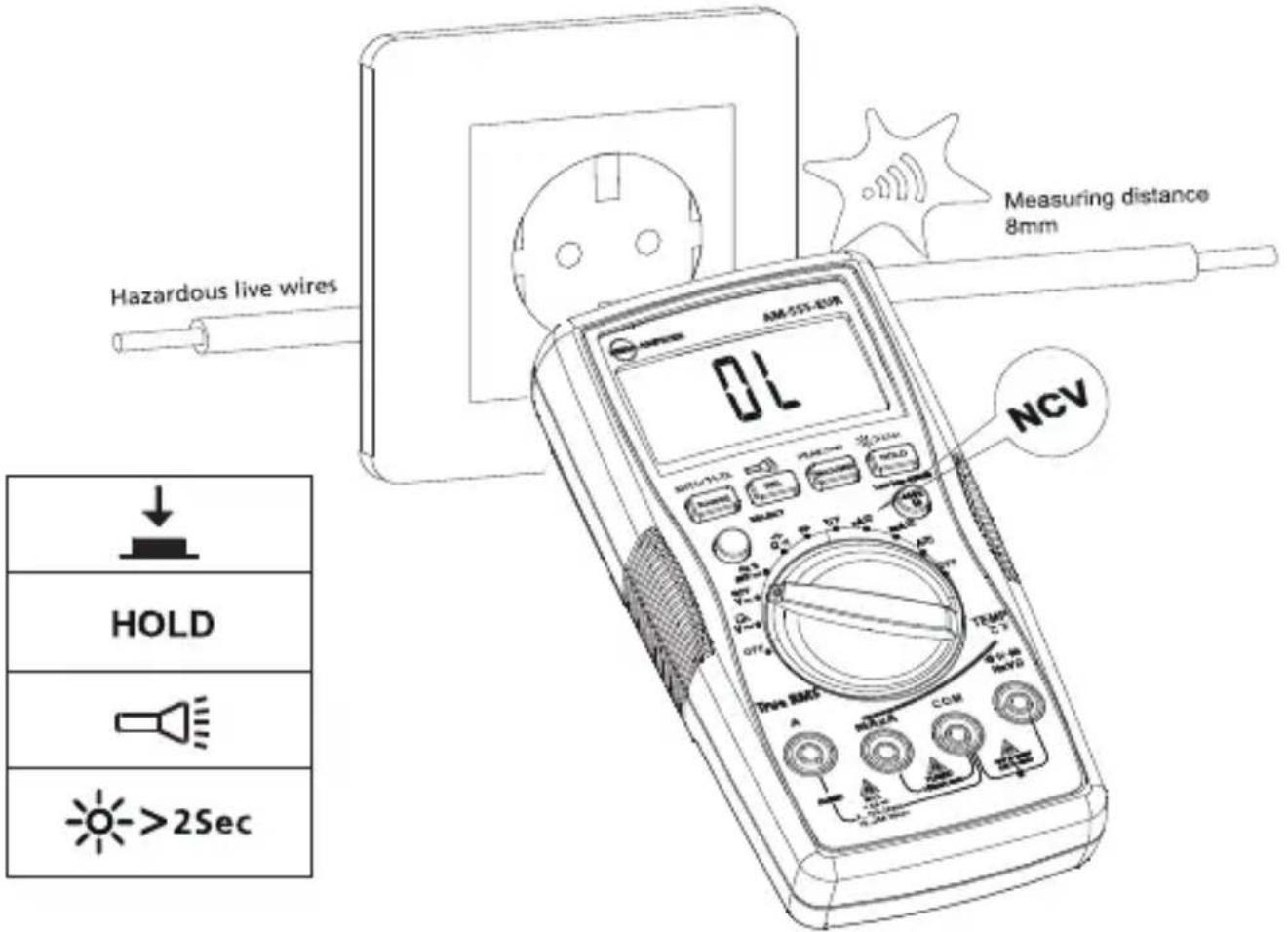
Buzzer will sound when the detected voltage is ≥ 90V , and the buzzer will be on. The distances between the wire and the meter should be ≤ 8mm .
4 !
The voltage indication in NCV mode is not sufficient to assure safety. This function is not suitable to test for absence of voltage.
Ambient temperature: 23^ ± 5^ ( 73.4^ ± 9^ ); Relative temperature: ≤ 75%
Accuracy: ± (% of reading ^+ digits)
Maximum voltage between input terminal and earth ground:
Maximum display: Digital 5999 counts, updates 3/seconds.
Analog pointer display: 61 segments. Updates 20 times/seconds.
Over-range indication: OL
Range: Automatic and Manual
Altitude: Operating ≤ 2000m
Operating temperature: 0^ +40^ ( 32^ 104^ )
Relative humidity: 0^ +30^ (32^ 86^)≤ 75% ; + 30^ +40^ (86^ 104^)≤ 50%
Storage temperature: -10^ +50^ (14°F~122°F)
Electromagnetic compatibility: In an RF filed of 1V / m = Specified accuracy ± 5%
Battery: 9V, 6F22, NEDA1604 or equivalent
Low battery indication:
Dimensions (L x W x H): 182 mm x 90 mm x 45 mm (7.2 in x 3.5 in x 1.8 in)
Weight: Approximately 354g (0.78 lb) with batteries installed
1. DC Voltage Measurement
| Range Resolution | Best Accuracy | |
| 600.0mV 0.1mV | ±(0.5%+3 LSD) | |
| 6.000V 1mV | ±(0.5%+2 LSD)60.00V 10mV | |
| 600.0V 100mV | ||
| 1000V 1V ±(1.0%+2 LSD) | ||
Input impedance: Around 10MΩ;
Overload protection: ±1000V
2. AC Voltage Measurement
| Range Resolution | Resolution | Accuracy | |
| 45Hz - 400Hz 400Hz - | 1kHz | ||
| 6.000V 1mV | ±(1.0%+3LSD) ±(2%+3LSD) | LSD) 60.00V 10mV | |
| 600.0V 100mV | |||
| 1000V 1V | ±(1.2%+3LSD) | ±(2.5%+3LSD) | |
Overload protection: 1000V rms
Input impedance: Around 10MΩ
Frequency response: 45 Hz - 1kHz
Note: Frequency (on secondary display) may not be displayed if the measured voltage is below 20% of the display voltage range.
3. Low Pass Filter
| Range Resolution | Accuracy | |
| 6.000V 0.001V | 45 to 200Hz ± (2%+40 LSD)200 to 440Hz ± (6%+40 LSD) | |
| 60.00V 0.01V | ||
| 600.0V 0.1V | ||
| 1000V 1V |
Block ac voltage signals above 1KHz
Overload protection: 1000Vp
4. Frequency Measurement
| Range Resolution | Accuracy | |
| 60.00Hz | 0.01 Hz | ±(0.1%+3 LSD) |
| 600.0Hz | 0.1 Hz | |
| 6.000kHz 1 Hz | ||
| 60.00kHz | 10 Hz | |
| 600.0 kHz | 100Hz | |
| 6.000MHz | 1KHz | ±(0.1%+3 LSD) |
| 60.00MHz | 10KHz |
Overload protection: 1000Vp
5. Duty Cycle
| Range Resolution | on Accuracy | |
| 10%~90% 0.01% | ±(1.2%+30 LSD) |
Overload protection: 1000Vp
6. DC Current Measurement
| Range Resolution | on Accuracy | ||
| μA | 600.0μA 0.1 | μA | ±(1.0%+2LSD) |
| 6000μA 1μA | |||
| mA | 60.00mA 10 | μA | ±(1.2%+3 LSD) |
| 500.0mA 0.1 | mA | ||
| A 20 | 00A [1,2,3] | 10mA ±(1.5%+3 LSD) | |
| Function | Overload Protection Overload | |
| mA /μA | F1 fuse, 0.5A H 1000V fast-fuse, (6.3×32)mm | N/A |
| A | F2 fuse, 11A H 1000V fast-fuse, (10×38)mm | 20 A overload for 30 seconds maximum, 10 minutes off minimum |
[1] 8 to 10 A up to 20 minutes, 10 minutes off minimum.
[2] >10 to 20 A overload for 30 seconds maximum, 10 minutes off minimum
[3] >10 to 20 A for 30 seconds accuracy ±(2.0%+3LSD).
7. AC Current Measurement
| Range Resolution | Accuracy | |||
| 45Hz - 400Hz 40 | 0Hz - 1KHz | |||
| μA | 600.0μA[1,2] | 0.1μA | ±(1.2%+5 LSD) ±(2%+5 LSD) | |
| 6000μA[1,2] | 1μA | |||
| mA | 60.00mA[1,2] | 10μA | ±(1.5%+5 LSD) ±(3%+5 LSD) | |
| 600.0mA[1,2] | 0.1mA | |||
| A | 20.00A[1,2,3,4,5] | 10mA | ±(2%+5 LSD) | ±(4%+5 LSD) |
| Function | Overload Protection Overload | |
| mA /μA | F1 fuse, 0.5A H 1000V fast-fuse, (6.3×32)mm | N/A |
| A | F2 fuse, 11A H 1000V fast-fuse, (10×38)mm | 20 A overload for 30 seconds maximum, 10 minutes off minimum |
[1] Frequency response: 45Hz to 1kHz
[2] Frequency (on secondary display) may not be displayed if the measured current is below 20% of the display current range.
[3] 8 to 10A up to 20 minutes, 10 minutes off minimum.
[4] >10 to 20 A overload for 30 seconds maximum, 10 minutes off minimum
[5] >10 to 20 A for 30 seconds accuracy ± (4% +5LSD)
- Resistance Measurement
| Range Resolution | Accuracy | |
| 600.0Ω 0.1Ω | ±(1.2%+2 LSD) | |
| 6.000kΩ 1Ω | ±(1.0%+2 LSD)60.00kΩ 10Ω | |
| 600.0kΩ 100Ω | ||
| 6.000MΩ 1kΩ | ±(1.2%+2 LSD) | |
| 60.00MΩ 10kΩ | ±(1.5%+2 LSD) |
Open circuit voltage: Around 0.5V
Overload protection: 1000Vp
- :Continuity Diode Measurement
| Range | Resolution | Accuracy |
| ●●● | 0.1Ω | Open circuit voltage is around -3V dc. Resistance ≥50Ω, buzzer will not sound. Resistance ≤10Ω, buzzer will sound. |
| ▲+ | 1mV | Display range is 0V to 2.8V. Normal voltage is around 0.5V to 0.8V for silicon PN junction. |
Overload protection: 1000Vp
10. Capacitance Measurement
| Range Resolution | Accuracy | |
| 60.00nF 10pF Under REL status: ±(3%+5 LSD) | ||
| 600.0nF 100pF | ±(3%+5 LSD)6.000μF 1nF | |
| 60.00μF 10nF | ||
| 600.0μF 100nF | ±(4%+5 LSD) | |
| 6000μF 1μF ±(5%+5 LSD) | ||
| 60mF 10μF Not specified | ||
Overload protection: 1000Vp
11. Temperature Measurement
| Range Resolution | on Accuracy | |
| -40 – 40°C | 1°C | ±(2%+8 LSD) |
| >40 – 400°C | ±(1%+8 LSD) | |
| >400 – 1000°C | ±2.5% | |
| -40 – 104°F | 2°F | ±(2%+12 LSD) |
| >104 – 752°F | ±(1%+12 LSD) | |
| >752 – 1832°F | ±2.5% |
K-type (nickel-chromium/nichrosi) thermocouple must be used for temperature measurements.
Overload protection: 1000Vp
If the meter fails to operate, check battery, test leads, all other accessories, and replace as necessary.
Double check the following:
- Replace the fuse or battery if the meter does not work.
- Review the operating instructions for possible mistakes in operating procedure.
Quick check on 0.5A FUSE:
Step 1: Turn the rotary switch to mA position.
Step 2: Use a multimeter with continuity function to verify the fuse continuity for the fuse of mA/μA terminal. Connect the test leads to mA/μA terminal and COM terminal.
| mA μA | ||
| ·() | - | OK |
| ·() | - - - - | OK |
Continuity buzzer activates: the fuse is OK
Continuity buzzer is not activated: the fuse is burnt. Replace the fuse as specified.
F1 0.5AH 1000V fast-fuse, (46.3× 32)mm
Quick check on 10A FUSE:
Step 1: Turn the rotary switch to A-position.
Step 2: Use a multimeter with continuity function to verify the fuse continuity for the fuse of 10A terminal. Connect the test leads to 10A terminal and COM terminal.
| A | ||
| OK | ||
| OK | ||
Continuity buzzer activates: the fuse is OK
Continuity buzzer is not activated: the fuse is burnt. Replace the fuse as specified.
F2 11AH 1000V fast-fuse, (40× 38)mm
Except for the replacement of the battery, repair of the meter should be performed only by an Authorized Service Center or by other qualified instrument service personnel.
The front panel and case can be cleaned with a mild solution of detergent and water. Apply sparingly with a soft cloth and allow to dry completely before using. Do not use aromatic hydrocarbons, gasoline or chlorinated solvents for cleaning.
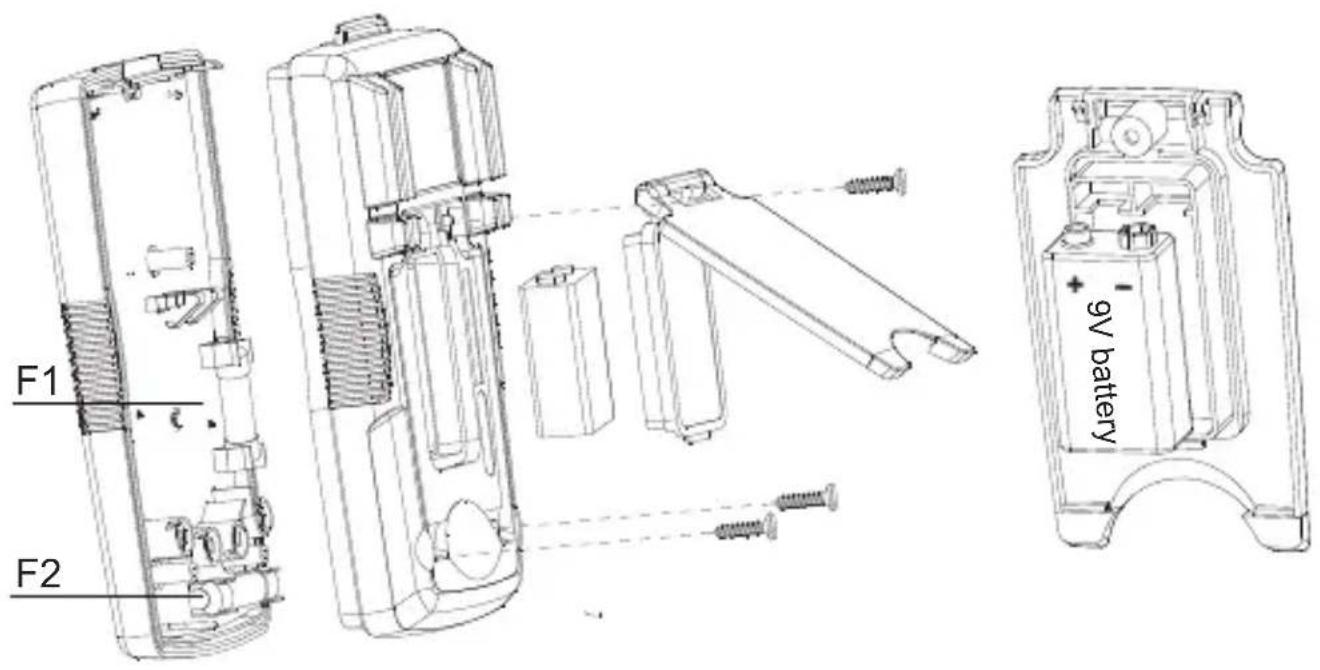
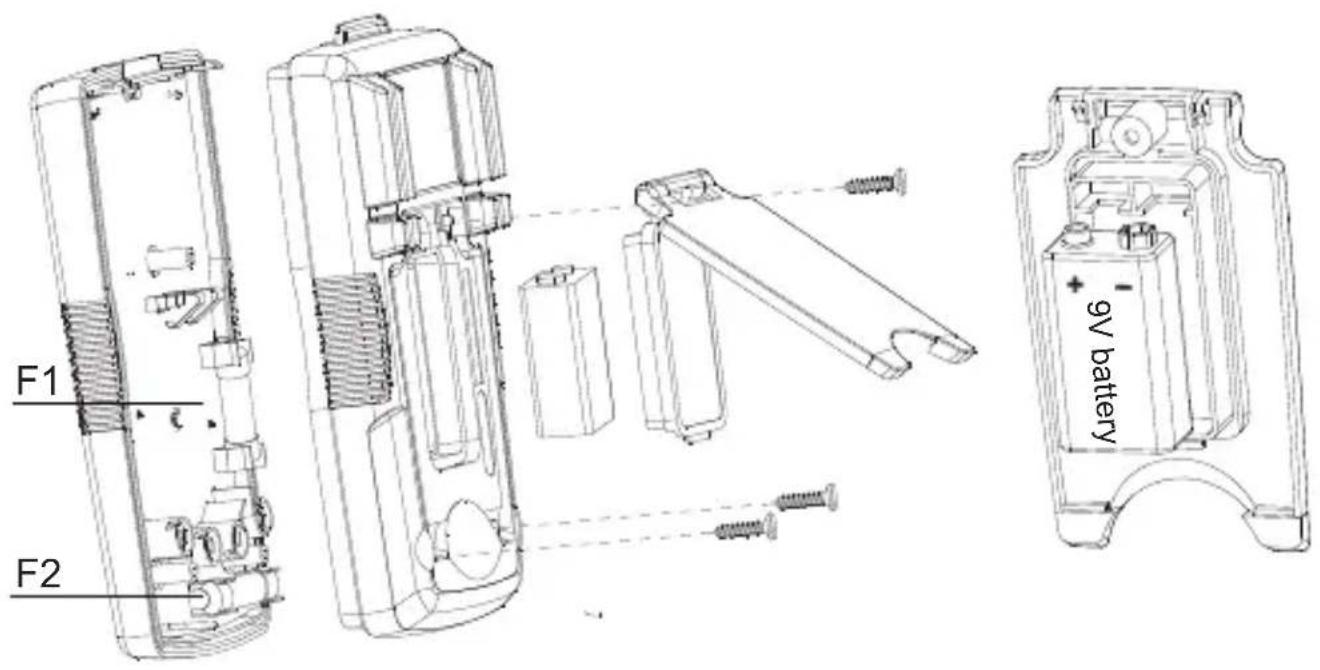
BATTERY AND FUSE REPLACEMENT
WARNING
To avoid shock, injury, or damage to the Meter: Disconnect test leads before opening case. Use ONLY fuses with the amperage, interrupt, voltage, and speed ratings specified.
Replacing BATTERY follow below steps:
- Disconnect the test lead probe from measuring circuit.
- Turn the meter to OFF position.
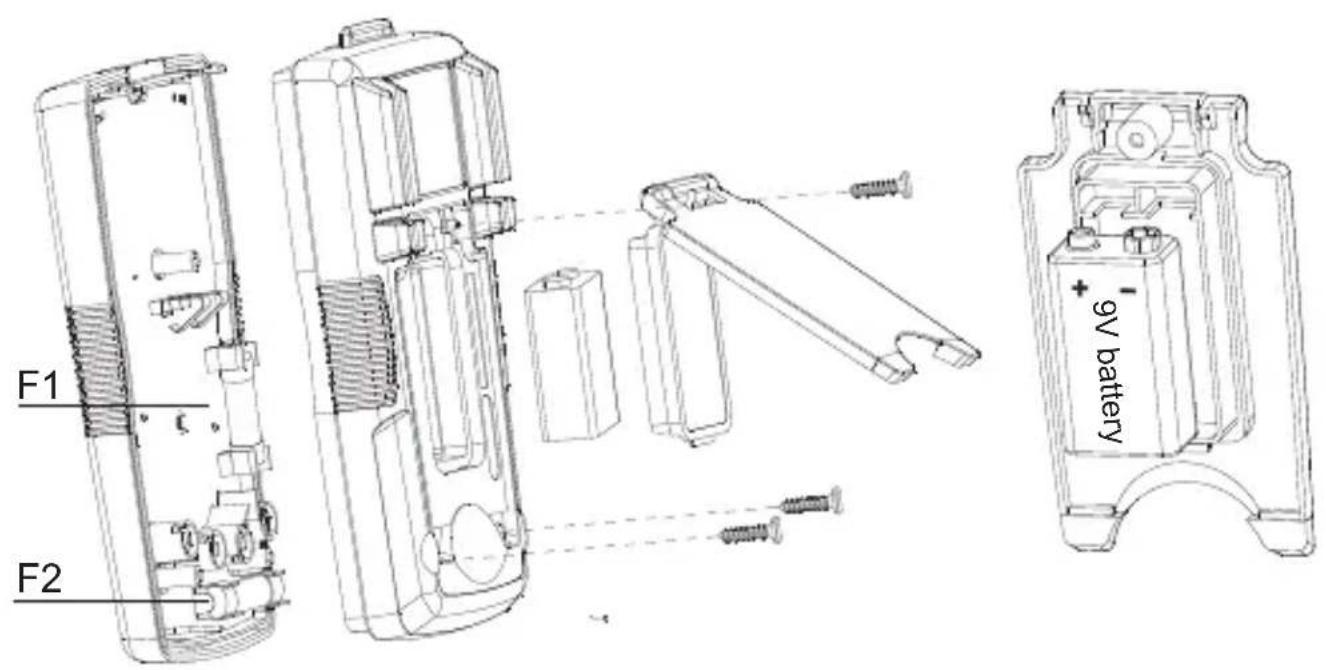
- Remove the screws from the battery cover and open the battery cover.
- Remove the batteries and replace with one 9V (6F22) or equivalent. The battery cover provides the correct polarity fitting construction design. Install the battery in the battery cover.
- Put the battery cover back and re-fasten the screw.
Battery: 9V (6F22) battery or equivalent
Replacing FUSE follow below steps:
- Disconnect the test lead probe from measuring circuit.
- Turn the meter to OFF position.
- Remove the screws from the enclosure and open the enclosure.
- Remove the broken fuse and replace with new specified fuse.
- Put the enclosure back and re-fasten the screw.
Fuse ratings:
mA /μA input terminal: F1 fuse, 0.5A H 1000V fast-fuse, (6.3×32)mm
10 A input terminal: F2 fuse, 11A H 1000V fast-fuse, (40×38)mm
Specificationer for sikring:
mA/μA indgangsterminal: F1 sikring, 0,5 A H 1000 V hurtig sikring,
(6,3×32) mm
10 A indgangsterminal: F2 sikring, 11 A H 1000 V hurtig sikring, ( 0× 38) mm
AM-555-EUR Digitales Multimeter
Bedienungshandbuch
©2015 Amprobe Test Tools.
©2015 Amprobe Test Tools.
Varning for farlig spanning
Indikation for over omrade: OL
©2015 Amprobe Test Tools.
Med enerett. Trykt i Kina.
Begrenset garanti og ansvarsbegrensning
Amprobe-produktet skal vare uten defekter i materiale og utforelse i ett ar fra kjopsdatoen med minre lokale lover krever noe annet. Denne garantien dekker icke sikringer, engangsbatterier erer skader som skyldes uhell, vanskjotsel, misbruk, endring, forurensning, erer unormale driftsforhold erer handtering. Forhandlere har icke rett til a forlenge garantier pa vegne av Amprobe. For a f service i garantiperioden ma du returnere produktet med kjopsbevis til et autorisert Amprobe-servicesenter erer til en Amprobe-forhandler erer -distribtor. Se avsnittet Reparasjon for mer informasjon. DENNE GARANTIEN ER DITT ENESTE BOTEMIDDEL. ALLE ANDRE GARANTIER -ENTEN direkTE, INDIREKTE ELLER LOVBESTEMTE - INKLUDERT UNDERFORSTATTE GARANTIER OM EGNETHET FOR ET SPESIELT FORMAL ELLER SALGBARHET, FRASKRIVES HERVED. PRODUSENTEN SKAL IKKE VARE ANSVARLIG FOR SPESIELLE, INDIREKTE, TILFELDIGE SKADER ELLER FOLGESKADER ELLER TAP, UANSETT ARSAK ELLER TEORI. Siden noen stater erer land icke tillater fraskrivelse erer begrensning av en garanti erer av tilfeldige skader erer folgeskader, er det mulig at denne ansvarsbegrensningen icke gjelder for deg.
Reparasjon
©2015 Amprobe Test Tools.
©2015 Amprobe Test Tools.
©2015 Amprobe Test Tools.
Allerettigheder forbeholds. Trykt i Kina.
Specificationer for sikring:
mA/μA indgangsterminal: F1 sikring, 0,5 A H 1000 V hurtig sikring,
(6,3×32) mm
10 A indgangsterminal: F2 sikring, 11 A H 1000 V hurtig sikring, ( 0× 38) mm
Visit www.Beha-Amprobe.com for
- Catalog
Application notes
Product specifications - User manuals
Amprobe Europe
Beha-Amprobe
In den Engematten 14
79286 Glottertal, Germany
Tel.: +49 (0) 7684 8009 - 0

Please
Recycle