SPIW4092 - Air-conditioner WHIRLPOOL - Free user manual and instructions
Find the device manual for free SPIW4092 WHIRLPOOL in PDF.



| Product type | Split air conditioner |
| Brand | Whirlpool |
| Model | SPIW4092 |
| Cooling capacity | Approximately 9000 Btu/h (estimated) |
| Operating mode | Cooling, Heating, Ventilation, Dehumidification |
| Refrigerant | R410A, GWP 2088, max charge 2.5 kg |
| Power supply voltage | 220-240 V, 50 Hz |
| Remote control | With LCD display, range up to 7 m |
| Special functions | 6th Sense, Sleep (4 levels), Jet, Super Silent, Around U, Power Save, Swing |
| Timer | Programmable on/off |
| Air filter | Washable, clean every 200 hours or 2 weeks in dusty environment |
| Filter cleaning indicator | Flashes after 720 hours of use |
| Automatic restart | Yes, adjustable via button on indoor unit |
| Minimum room area | 10 m² |
| Minimum installation height | 2.5 m |
| Packaging materials | Recyclable |
| Full manual | Available at docs.whirlpool.eu |
Frequently Asked Questions - SPIW4092 WHIRLPOOL
User questions about SPIW4092 WHIRLPOOL
0 question about this device. Answer the ones you know or ask your own.
Ask a new question about this device
Download the instructions for your Air-conditioner in PDF format for free! Find your manual SPIW4092 - WHIRLPOOL and take your electronic device back in hand. On this page are published all the documents necessary for the use of your device. SPIW4092 by WHIRLPOOL.
USER MANUAL SPIW4092 WHIRLPOOL
Instructions for use
Gebrauchsanaeisung
ENGLISH Instructions for use Page 4
PyCCKn IHCtpyKzno 3Kcnpyaatau Ctrp.180
- Download the complete instruction manual on docs.whirlpool.eu or call the phone number shown on the warranty booklet.
- Before using the appliance, read these safety instructions. Keep them nearby for future reference.
- These instructions and the appliance itself provide important safety warnings, to be observed at all times. The manufacturer declines any liability for failure to observe these safety instructions, for inappropriate use of the appliance or incorrect setting of controls.
- Very young children (0-3 years) should be kept away from the appliance. Young children (3-8 years) should be kept away from the appliance unless continuously supervised. Children from 8 years old and above and persons with reduced physical, sensory or mental capabilities or lack of experience and knowledge can use this appliance only if they are supervised or have been given instructions on safe use and understand the hazards involved. Children must not play with the appliance. Cleaning and user maintenance must not be carried out by children without supervision.
PERMITTED USE
- CAUTION: the appliance is not intended to be operated by means of an external switching device, such as a timer, or separate remote controlled system.
- This appliance is intended to be used in household and similar applications such as: hotels and working offices.
This appliance is not for professional use. - Always turn off the air conditioner by remote control first. Do not use the power supply circuit breaker or pull off the plug to turn it off. Disconnect the air conditioner from the power supply if it is to be left unused for a long period of time or during a thunder/lightning storm.
- Never insert obstacle in the air outlet-risk of injury. Keep ventilation openings clear of any obstruction.
- Do not place any other electrical products or household belongings under indoor unit or outdoor unit. Condensation dripping from the unit might get them wet, and may cause damage or malfunction of your property.
INSTALLATION
- The appliance must be handled and installed by two or more persons - risk of injury. Use protective gloves to unpack and install - risk of cuts.
-
Installation, including electrical connections, and repairs must be carried out by a qualified technician according to national wiring rules. Do not repair or replace any part of the appliance unless specifically stated in the user manual. Keep children away from the installation site. After unpacking the appliance, make sure that it has not been damaged during transport. In the event of problems, contact the dealer or your nearest After-sales Service. Once installed, packaging waste (plastic, styrofoam parts etc.) must be stored out of reach of children - risk of suffocation. The appliance must be disconnected from all remote power supply before any installation operation - risk of electric shock. During installation, make sure the appliance does not damage the power cable - risk of fire or electric shock. Only activate the appliance when the installation has been completed.
-
When moving or relocating the air conditioner, consult experienced service technicians for disconnection and reinstallation of the unit.
- The appliance shall not be installed in the laundry.
- Appliance shall be installed, operated and stored in a room with a floor area larger than 10m^2 . Mount the indoor unit at least 2.5m above floor or grade level.
- The installation of pipe-work shall be kept in a room with a floor area larger than 10m^2 in compliance with national gas regulations.
ELECTRICALWARNINGS
- The power supply must be of rated voltage with special circuitry for the appliance. The diameter of the power cord must comply with requirements.
- A multi-pole switch shall be installed in the fixed wiring in accordance with the wiring rules and the appliance must be earthed in conformity with national electrical safety standards.
- An all-pole disconnection switch having a contact separation of at least 3mm in all poles should be connected in fixed wiring in accordance national with wiring rules, and the appliance must be earthed in conformity with national electrical safety standards.
- Do not use extension leads, multiple sockets or adapters. The electrical components must not be accessible to the user after installation. Do not use the appliance when you are wet or barefoot. Do not operate this appliance if it has a damaged power cable or plug, if it is not working properly, or if it has been damaged or dropped.
- If the supply cord is damaged, it must be replaced with an identical one by the manufacturer, its service agent or similarly qualified persons in order to avoid a hazard - risk of electric shock.
- A residual current device (RCD) having rated residual operation current not exceeding 30mA shall be incorporated in fixed wiring according to national law.
- The temperature of refrigerant circuit will be high, please keep the interconnection cable away from the copper tube.
- Ensure safe grounding and a grounding wire connected with the special grounding system of the building, installed by professionals. The appliance must be fitted with electrical leakage protection switch and an auxiliary circuit breaker with sufficient capacity. The circuit breaker must also have a magnetic and a thermal tripping function to ensure protection in case of short-circuit and overload.
| Model 9K & 12K 18K 24K | |||
| Required capacity of circuit breaker 16A 20A 25A | |||
- For the connection of power cord and cable connection between indoor and outdoor units, please see the wiring diagram on the appliance.
CLEANING AND MAINTENANCE
- WARNING: Ensure that the appliance is switched off and disconnected from the power supply before performing any maintenance operation; never use steam cleaning equipment - risk of electric shock.
DISPOSAL OF PACKAGING MATERIALS
The packaging material is 100% recyclable and is marked with the recycle symbol ( The various parts of the packaging must therefore be disposed of responsibly and in full compliance with local authority regulations governing waste disposal.
DISPOSAL OF HOUSEHOLD APPLIANCES
This appliance is manufactured with recyclable or reusable materials. Dispense of it in accordance with local waste disposal regulations. For further information on the treatment, recovery and recycling of household electrical appliances, contact your local authority, the collection service for household waste or the store where you purchased the appliance. This appliance is marked in compliance with European Directive 2012/19/EU, Waste Electrical and Electronic Equipment (WEEE). By ensuring this product is disposed of correctly, you will help prevent negative consequences for the environment and human health.
The ( ) symbol on the product or on the accompanying documentation indicates that it should not be treated as domestic waste but must be taken to an appropriate collection center for the recycling of electrical and electronic equipment.
DECLARATIONS OF CONFORMITY
This product contains Fluorinated Greenhouse Gases covered by the Kyoto Protocol, the refrigerant gas being in a hermetically sealed system. (R410a, GWP 2088). The maximum refrigerant charge amount is 2.5kg . Please refer to the rating label for detailed information.
Product description
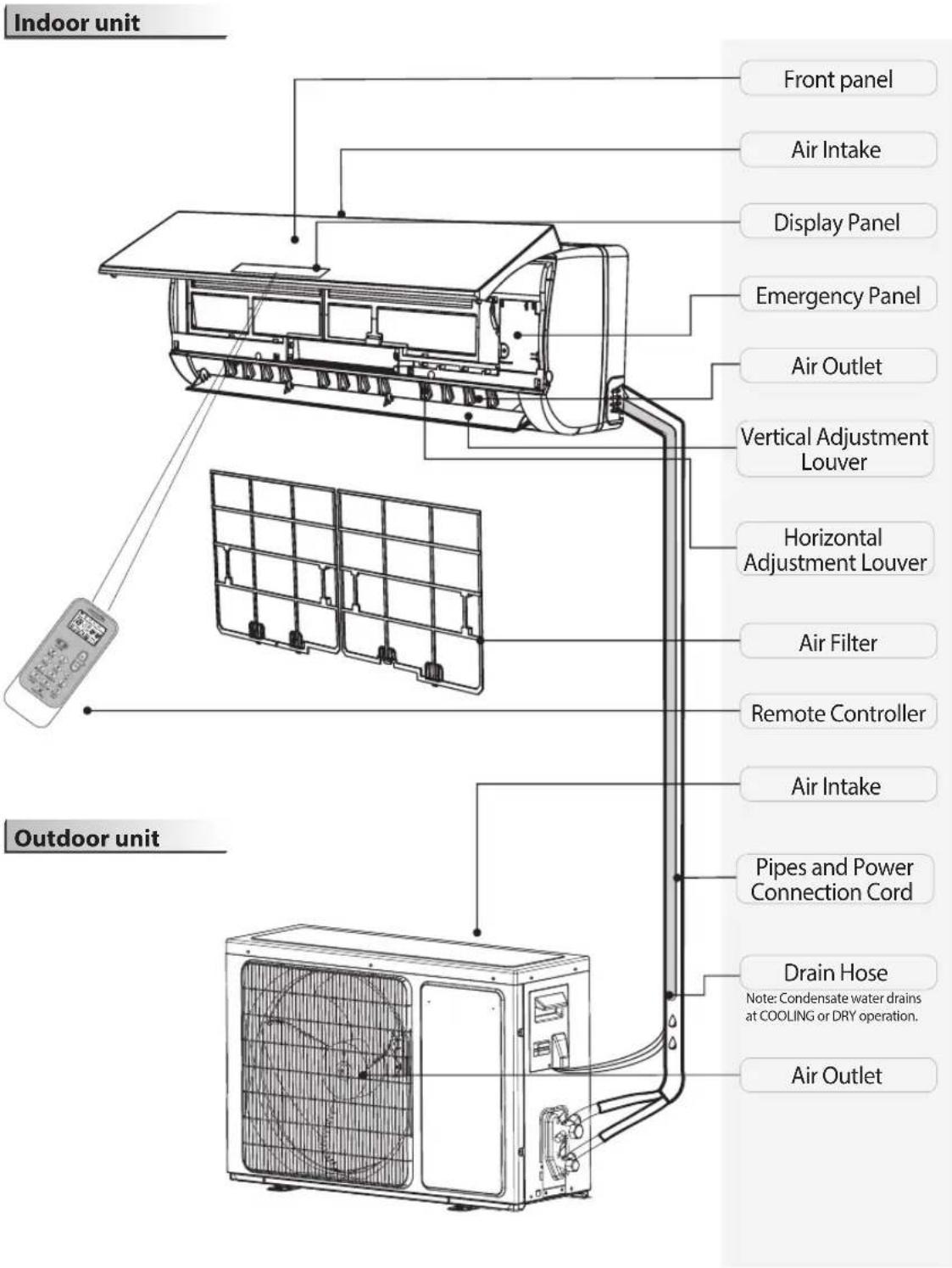
The figures in this manual are based on the external view of a standard model. Consequently, the shape may differ from that of the air conditioner you have selected.
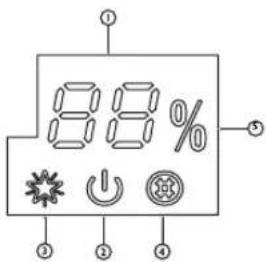
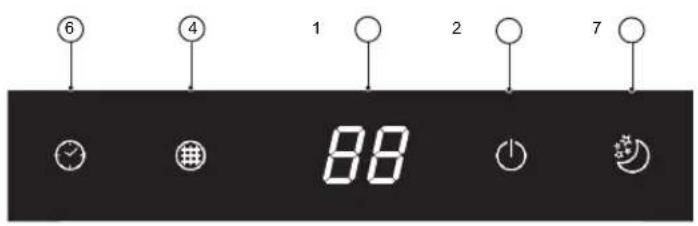
Temperature indicator (1)
08 Displays set temperature.
It shows "FC" as a reminder to clean the filter.
Running indicator (2)
It lights up during operation.
It flashes during outside unit defrosting.
6th Sence indicator (3)
It lights up when 6^th sense is on.
It goes off when 6^th sense ends.
Filter monitor indicator (4)
It flashes when the filter needs to be cleaned.
Filter monitor indicator flashes after 720 hours of usage as reminder to clean the filter.
After filter cleaning, press the filter reset button located on the indoor unit behind the front panel in order to interrupt the flashing of the filter monitor indicator.
Humidity indicator (5)
It lights up when showing the humility level.
It goes off when showing the temperature.
Timer indicator (6)
It lights up during the set time.
It goes off when timer operation ends.
Sleep indicator (7)
It lights up once sleep mode is set, "Running" indicator will flash for 10 times then the whole display will light off.
For air conditioners without Wi-Fi control, we recommend the Wpro SmartClim: a smart device to control via Wi-Fi the main settings of your appliance from your smartphone.
This accessory is not included inside the product packaging. Please contact our After-Sales Service for more details and purchase.
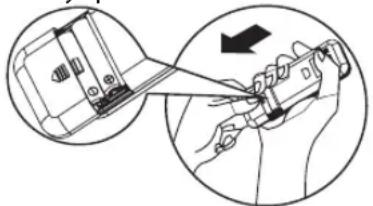
Insert the batteries into RC
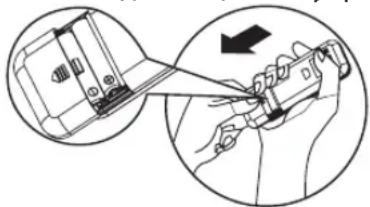
- Insert a pin and gently press down on the battery cover and push in the direction of the arrow to remove, as shown.
- Insert 2 AAA batteries (1.5V) into the compartment. Ensure that "+" and -" polarity is correctly positioned.
- Close the battery cover on the remote control.
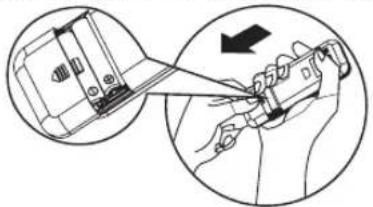
- Remote Control presetting
Each time the batteries are replaced in the remote controller, the remote controller pre-set at Heat Pump mode. The heat pump AC remote controller can be used to control the cool only AC models.
Use RC to control the appliance
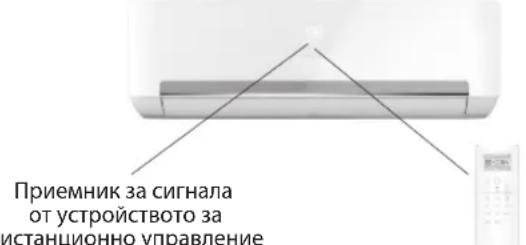
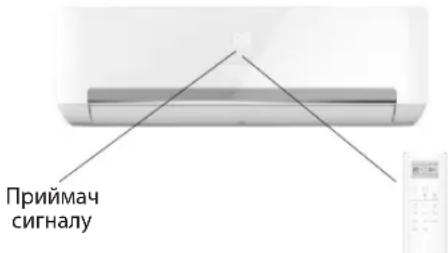
- To operate the appliance by remote control, point the remote control at the receiving device on the indoor unit, to ensure receiving sensibility.
To send a message from remote control, the symbol will flash for 1 second. On receipt of the message, the appliance will emit a beep.
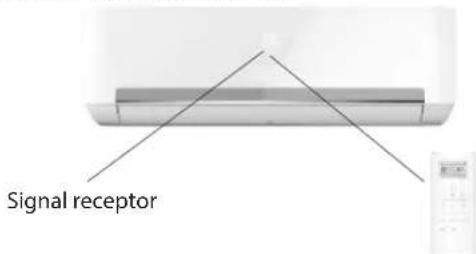
- The remote control will operate the air conditioner at a distance of up to 7m.
Each time the batteries are replaced in the remote control, the remote control is pre-set at Heat Pump mode.
Note: please follow the instruction which matches to the remote controller you receive for Air Conditioner operation.
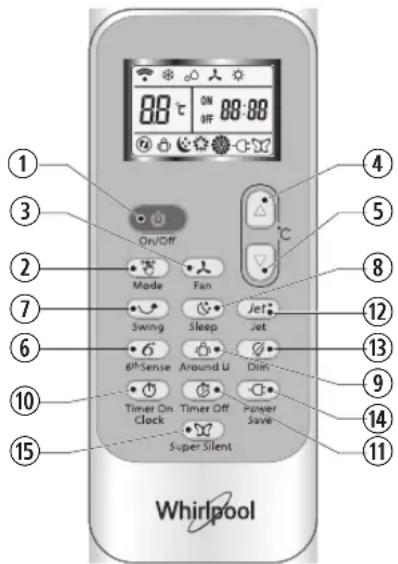
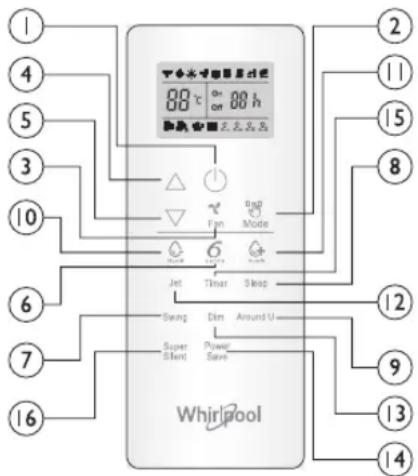
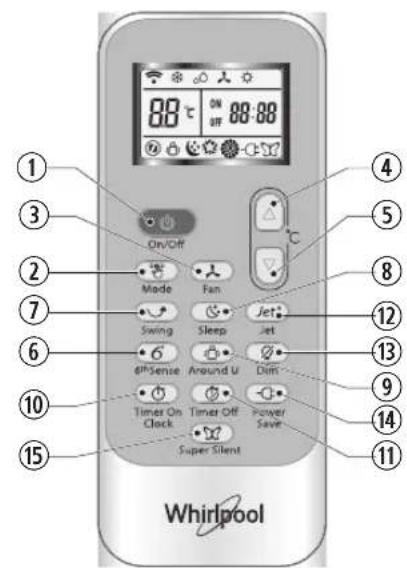
Function description of buttons (P1-04)
1. ON/OFF BUTTON
Starts or Stops the appliance by pressing this button.
3. FAN BUTTON
Used to select fan speed in sequence auto, high, medium or low.
4-5. TEMPERATURE BUTTON
Used to select the room temperature. Used to set the time in timer mode.
6. 6th SENSE BUTTON
Sets or cancels 6^th sense operation.
7. SWING BUTTON
Stops or starts horizontal adjustment louver swinging and sets the desired up/down airflow direction.
10-11. HUMIDITY BUTTON
Used to set desired humidity level, they areonly available under 6^th SENSE mode.
16. SUPER SILENT BUTTON
Used to start or stop the super silent operation to have a low noise environment.
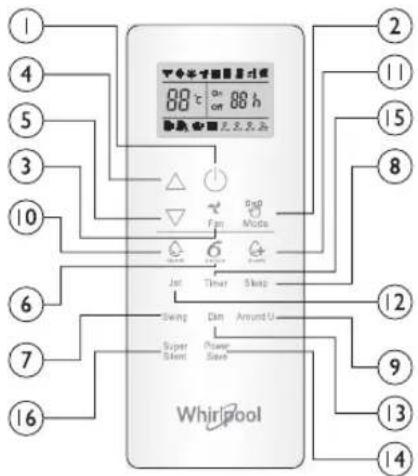
2. MODE BUTTON
Used to select the operation mode in sequence Cooling, hearing or fan.
8. SLEEP BUTTON
Used to select the sleep mode in sequence of sleep 1, sleep 2, sleep 3 sleep 4 and sleep off.
9. AROUND U BUTTON
Used to set or cancel Around U function.
12.JET BUTTON
Used to start or stop the fast cooling or heating.
13. DIM BUTTON
Used to turn on or turn off display light on indoor unit.
14. POWER SAVE BUTTON
Used to start or stop the power save operation.
15. TIMER BUTTON
Used to set the time for turn on or turn off the appliance.
Symbols on RC display
Cooling indicator Auto fan speed Sleep indicator 1

Humidity plus indicator H fan speed Sleep indicato2
Humidity minus indicator Medium fan speed Sleep
Fan only indicator Low fan speed Sleep indicator 4

Heating indicator Super silent indicator
BB Display set temperature
Around U indicator 6THSENSEindicator
88 h Display set timer
Jet indicator Power save indicator
Signal transmission
Active RC by pressing UNLOCK button
Press the button, the backlight will be lighted up and function buttons will be activated for use. Press again to lock remote controller. If no operation on remote controller for 10s, the remote controller will be locked automatically.
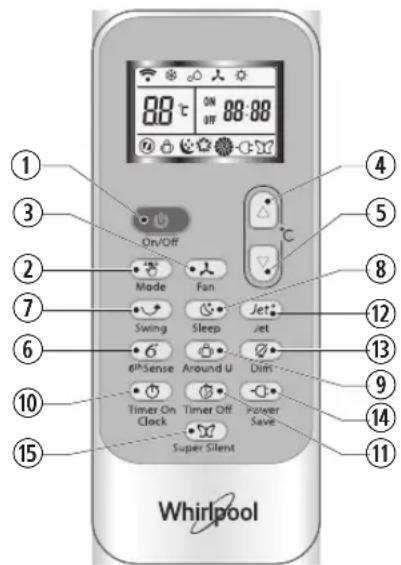
Function description of buttons (J1-3A)
1. ON/OFF BUTTON
Starts or Stops the appliance by pressing this button.
2. MODE BUTTON
Used to select the operation mode in sequence of Cooling, dry, fan only or heating.
3. FAN BUTTON
Used to select fan speed in sequence auto, high, medium or low.
4-5. TEMPERATURE BUTTON
Used to select the room temperature. Used to set time in timer mode and real time clock.
6. 6^TH SENSE BUTTON
Sets or cancels 6^th sense operation.
7. SWING BUTTON
Stops or starts horizontal adjustment louver swinging and sets the desired up/down airflow direction.
8. SLEEP BUTTON
Sets or cancels Sleep Mode operation in sequence of sleep 1, sleep 2, sleep 3, sleep 4 or sleep off.
9. AROUND U BUTTON
Used to set or cancel Around U function.
10. TIMER ON/CLOCK BUTTON
Used to set the current time.
Used to set or cancel the timer on operation.
11. TIMER OFF BUTTON
Used to set or cancel the timer off operation.
12.JET BUTTON
Used to start or stop the fast cooling or heating mode.
Symbols on RC display

Cooling indicator Sleep 1 indicator Auto fan speed Jet indicator

Dry indicator Sleep 2 indicator High fan speed Signal transmission

Fan only indicator Sleep 3 Indicator Medium fan speed

Heating indicator Sleep 4 indicator Low fan speed Display current time

6^th Sense indicator

Around U indicator

Super silent indicator
13. DIM BUTTON
Used to turn on or turn off display light on indoor unit.
14. POWER SAVE BUTTON
Used to start or stop the power save operation.
15. SUPER SILENT BUTTON
Used to start or stop the super silent operation to have a low noise environment.


88:88
Display set timer

Display set temperature

Power save indicator
PROTECTION
Operating condition
The protective device maybe trip and stop the appliance in the cases listed below.
| Heating | Outdoor air temperature is over 24°C |
| Outdoor air temperature is below -7°C | |
| Room temperature is over 27°C | |
| Cooling | Outdoor air temperature is over 43°C |
| Room temperature is below 21°C | |
| Dehumidifying | Room temperature is below 18°C |
If the air conditioner runs in COOLING or DRY mode with door or window opened for a long time when relative humidity is above 80% dew may drip down from the outlet.
Features of protection device
Wait at least 3 minutes before restarting the unit after operation stops or changing mode during operation. After connecting to power supply and turning on the appliance immediately, a delay of 20 seconds may occur before it starts to operate. If all operation has stopped, press ON/OFF button again to restart. Timer should be set again if it has been cancelled.
Features of COOLING mode
Anti-freezing
When the temperature of the indoor heat exchanger drops to 0^ or below, compressor will stop working to protect the appliance.
Features of HEATING mode
Preheating
In order to prevent cool air blowing, 2-5 minutes are necessary to preheat the indoor unit at HEATING operation start. The indoor fan will not work during preheating.
Defrosting
In HEATING operation the appliance will defrost (de-ice) automatically to raise efficiency. This procedure usually lasts 6-10 minutes. During defrosting, fan stops running and running indicator flashes.
After defrosting is completed, it returns to HEATING mode automatically.
Clean front panel of Indoor Unit
1. Disconnect from the power supply
Turn off the appliance first before disconnecting from power supply.
2. Remove the front panel
Open the front panel as shown by the arrow (Fig. A).
Pull the slots at the side of the front panel with force to take out the front panel (Fig. B).
3. Clean the front panel
Wipe it with a soft and dry cloth. Use lukewarm water (below 40^ ) to clean if the appliance is very dirty. After cleaning let it dry.
4. Refit and close the front panel
Refit and close the front panel by pushing it downward.
Note:
- Do not use substances such as gasoline or polishing powder to clean the appliance.
- Do not sprinkle water onto the indoor unit Dangerous! Electric shock!
Clean Air filter
It is necessary to clean the air filter after using it for about 200 hours. Clean the air filter every two weeks if the air conditioner operates in an extremely dusty environment.
1. Disconnect from the power supply
Turn off the appliance first before disconnecting from power supply.
2. Take out air filter (Fig.C).
- Open the front panel. 2. Press the handle of the filter gently. 3. Slide out the filter.
3. Cleaning the air filter (Fig. D)
If the filter is very dirty, clean it with a solution of lukewarm water and neutral detergent.
After cleaning let it dry.
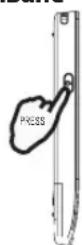
- Refit the filter, press the filter reset button (Fig.E) at right side by using a cylinder pin and close the front panel.
Note:
- To avoid injury, do not touch the fins of indoor unit with your fingers after removing the filter.
- Do not attempt to clean the inside of the air conditioner by yourself.
- Do not clean the filter in washing machine.
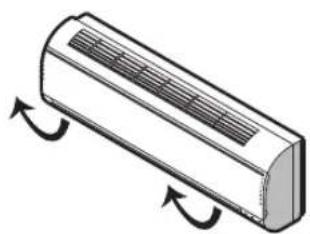
Fig.A
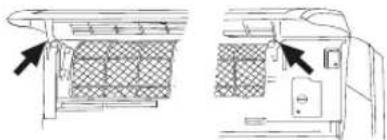
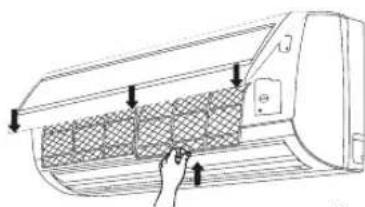
Fig.B
Fig. C
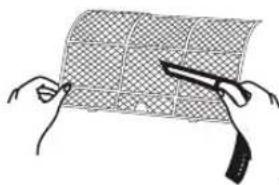
Fig. D
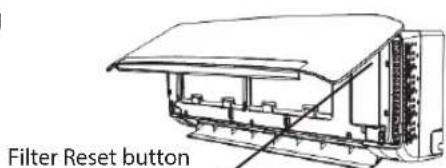
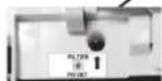
Fig. E
EMERGENCY OPERATION
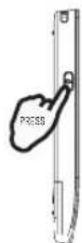
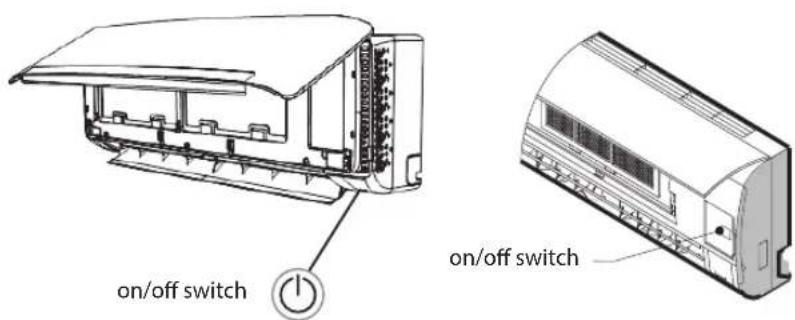
Under emergency situation or when remote control is missing, you can control the unit by pressing the on/off swith located on the indoor unit.
- Turn on the appliance: when the unit is off, press this button, it will start up and operate in 6^th SENSE mode.
- Turn off the appliance: when the unit is on, press this button, the unit will stop working.
Note: Do not press this button for a long time as it will cause malfunction.
Auto-Restart Function
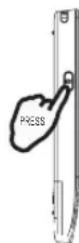
If you want to set auto_restart, switch on the power supply, press the ON/OFF button on the indoor unit and hold for over 5 seconds, auto_restart is set with buzz sound.
If the auto_restart has been set, press the ON/OFF button on the indoor unit and hold for over 5 seconds, auto_restart function will be cancelled with a buzz sound and air conditioner is on standby mode.
Disposal of the batteries
To protect natural resources and to promote material reuse, please separate batteries from other types of waste and recycle them through your local, free battery return system.
Installation instruction
Installation diagram
Distance from wall should be over 50mm
Distance from ceiling should be over 200mm
To get detail installation information, please go to: docs.whirlpool.eu
Distance from the wall should be over 50mm
Indoor unit
Distance from floor should be over 2500mm
Distance from the wall
NOTE: The figure is only a simple presentation of the unit, it may not match the external appearance of the product you purchased. Installation must be performed in accordance with the national wiring standard by authorized service people only.
Outdoor unit
Air intake distance from the wall should be over 250mm
Air intake distance from the wall should be over 250mm
Air outlet distance from the wall should be over 500mm
Over 250mm
When install interconnection cord, make sure that the color of wires and the terminal No. of outdoor unit shall be same as those in indoor unit.
Cable Specifications
Capacity (Btu/h) Power cord Power connecting cord
| Type | Normal cross - sectional area | Type | Normal cross - sectional area |
| 7K, 9K, 12K H07RN-F 1.0mm | 2X3 H07RN-F 1.0mm | 2X5 | |
| 18K H07RN-F 1.5mm | 2X3 H07RN-F 1.5mm | 2X5 | |
| 24 K H07RN-F 2.5mm | 2X3 H07RN-F 2.5mm | 2X5 | |
Operation problems are often due to minor causes, please check and refer to the following chart before contacting the service. This may save time and unnecessary expenses.
| Trouble Analysis | |
| Does not run | ·Is the protection device or fuse blown? ·Please wait for 3 minutes and start again, protection device may be preventing unit to work. ·Are the remote control batteries low? ·Is the plug not properly plugged? |
| No cooling or heating air | ·Is the air filter dirty? ·Are the intakes and outlets of the air conditioner blocked? ·Is the temperature set properly? ·Are doors or windows open? |
| Ineffective control | ·Has there been a strong interference (from excessive static electricity discharge, power supply voltage abnormality)? Note that operation will be abnormal, in this case unplug from the power supply and re-plug after 2-3 seconds. |
| Does not operate immediately | ·3 minute delay will occur when changing mode during operation. |
| Peculiar smell | ·This smell may come from another source such as furniture, cigarette etc, which is sucked in the unit and blown out with the air. |
| A sound of running water | ·Normal behaviour caused by the flow of refrigerant in the air conditioner. ·Defrosting sound in heating mode. |
| Cracking sound | ·The sound may be generated by the expansion or contraction of the front panel due to temperature changes. |
| Mist sprays from the outlet | ·Mist is present in the room with low temperature? Normal behaviour due to cool air discharged from indoor unit during COOLING or DRY operation mode. |
| Running indicator flashes but indoor fan stops | ·The unit is shifting from heating mode to defrost. The indicator will light off and return to heating mode. |
Note: If the problems still have, turn off the appliance and disconnect from power supply, then contact the nearest Whirlpool Authorized Service Center. Do not attempt to move, repair, disassemble, or modify the appliance by yourself.
AFTER SALES SERVICE
Before contacting the Customer Care Centre:
- Try to solve the problem yourself based on the descriptions given in the "Troubleshooting".
- Turn the appliance off and restart it to see if the fault persists.
If after carrying out the above checks, the fault persists, contact the Customer Care Centre.
Please give:
- a short description of the fault;
- the exact model of the air conditioner;
- the service number (this is the number found below the word Service on service sticker which is located on the side or on the bottom of the indoor unit). The service number can also be found in the warranty booklet;
- your full address;
- your telephone number.
If repair work has to be carried out, contact the
Customer Care Centre (Use of original spare parts and a proper repair is guaranteed).
You will need to present the original invoice.
Failure to comply with these instructions could compromise the safety and quality of your product.
SERVICE
0000 000 0000
Note: if you want the full manual for your appliance, please help to download it from website through below link: docs.whirlpool.eu using QR code

FONCTIONNEMENT D'URGENCE
- "6ENSE"-TOETS (TOETS ZESDE ZINTUIG)
2. "MODE"-TOETS (MODUSTOETS)
- "MODE"-TOETS (MODUSTOETS)
- "SWING"-TOETS (ZWENKTOETS)
- "SLEEP"-TOETS (SLAAPTOETS)
3. BOTAO FAN (DEVENTOINHA)
Indicator "Around U" Indicators 6
2. TASTO MODE (MODALITA)
2. TASTO MODE (MODALITA)
λeItropyiWvYiaTnXpHon.
Pntote to EaVa yia aopalion
tou nλexepioTnpiou. Av δv yivei
kaiia xipon tou nlexeiopntpiou
6th SENSE-indicator Around the indicator Supertyst lage Instability Temperature

Jet-indicator

08:88
Install timer


Energisparlage
SKYDD
Driftforhällande
RENHOLD OG VEDLIKEHOLD
3. FAN (VIFTE) KNAPP
Brukt for a velge viftens hastiget i sekvensen auto, high (hoy), medium (middels) ell low (lav).
4-5. TEMPERATUR KNAPP
Brukt for a velge romtemperaturen. Brukt for a stille inn tiden itimer modus.
6. 6 ^th SENSE KNAPP
3. FAN (VIFTE) KNAPP
Brukt for a velge viftens hastighet i sekvensen auto, high (hoy), medium (middels) ellr low (lav).
4-5. TEMPERATUR KNAPP
Indicator for Cooling (nedkjoling)

Dry indicator (torking

Sleep 1 indicator (hvile) Autofan speed (viftens hastighet)

indicator (h vile) High fan

(hoy

hastighet pa viften)

Fan only (Kun vifte) indicator

Heating (oppvarming) indicator

Sleep 3 indicator (hvile)

Den tander under drift.
1. PRZYCISK ON/OFF (WŁ./WYŁ)
Ukazatel 6th Sense (3)
Svití, je-li 6^th Sense zapnutý.
Zhasne, kdyz se 6^th Sense vypne.
Indikator sledovani filtru (4)
4-5. TLACITKO TEMPERATURE (TEPLOTY)
Toto tlacitko slouziknastaveni teplotyvmistnosti.Pouziva se k nastaveniccasu v rezimu casovace.
6. TLACITKO 6 ^th SENSE
4-5. TLACITKO TEMPERATURE (TEPLOTY)
Toto tlacitko slouzik nastaveni teploty v mistnosti.
4-5. TLACIDLO TEPLEOTY
4-5. TLACIDLO TEPLOTY
Poka3bBaet 3aHaHHyTo Tempeatypy.
Ioka3bBaet "FC" B KaueCTBe HAnOMnHaHnO Heo6xoDnMoCTn OuNCTKn 0nJbTpa.

HdkaTop pa6oeryo pexima (2)
Tognt HenpepbIBHO BO Bpem 3KcnnyaTaun.
Muraet BO Bpem BAINHHe N OTTaUNBaHn B HApxHOM 6JIOke.

INHnKaTOp yMeHbWeHnBnBnKHOCTN

HДИКaTOp pexKIma "ToJbKO BeHTnIaTOp" HДИKaTOp pexKIma "OTOnJIeHmE"

INHnKaTOp fHyKcUIM "LInpKyIaIyNBo3Dyxa"

HДнКаTOpФункцИ "Typ60"

ABTOMaTuCheckn ABb6p CKOpOCTN BEHTUNIaTopa

BbICOKaCKOpocTb BEHTNIATopa
CpeHnckOpocb BcHTINrTopa Hn3KaAckOpocb BcHTINrTopa

UHnkaTop pexma "Cyeptnxun"
HnDnKaTop pexnMa "HouHoi 4"

INDINAkOp 3aHaHHOI TEMNepaTypbl

HnDnKaTOp HAcTpOuKN TaIMepa

IpeepaCnHnaIOB
HaKMMTe KONKy, BKIOUHTcra NOCBETKa N OYHKUNOHAJIbHbIe KONKn 6dyT aKTINBPOBAHbI dJa NCnOB3OBAHnA. JIy 6blknpOBKn nylbTa DnCTaHcNOHHoro ynpabLeHnHa KaMITE KONKy eue pa3.Ecn B TeueHne 10
cekynd cnnybTa dntcaHnOHHoro ynpabneHn He 6ydt BblnoHHeHa Hn ODA ONepaun, nybt 6ydet ABTomatueckn 3a6nokipobAH.
IcnoB3yeTcIy BbI6pa HooHOro pexkMa B 3aJAHHOI nOcIeIOBaTeJIbHOCTn:"HouHOI 1", "HouHOI 2","HouHOI 3","HouHOI 4" n"HouHOI BbIK".
9. KHONKA AROUND U (ФУнкци "ЦИРКУЛЯЦИBAO3ДухА")
IcnoIb3yeTcIaBkIIOueHnIINBbIKIOueHnIyHKuN UnpKynuBO3dyxa.
10. KHONKA TIMER ON/CLOCK (BKJIIOUeyHnBbIKJIOUeyHnTAIMEPA)
NcnoB3yeTcIyHaCTpOKnTeKUeRO BpeMeHn. NcnoB3yeTcIyakTNBaCNI UIN DeaAKTNBaCNI BKJIOueHn TaIMepa.
11. KHONKA TIMER OFF (BbIKJIIOUeyHnT AINMEPA)
IcnoIb3yeTcraIaKTnBaCIN UIN DeaKTnBaCIN BblKIOUeHna TaIMepa.
12. KHONKA JET (ФУнкци «ТYPБО»)
Icnobn3yeTc IaBkIOUeHn NIN BbIKIOUeHn OYHKUN 6bICTPOTOOTONJIeHn NIN OXJaXKeHn.
13. KHOIIKA DIM'PEGYIMPOBKN IAPKOCTN) IcnoJb3yeTcI dJI BkJIIOUeHnI NJI BbIKIOUe NOCDBETKIN DCNJIeB BVHTpeHHero 6JIOKA.
14. KHOPIKA POWER SAVE (ФУнкциз 3HEPROCEPEXEHNIA)
IcnoB3yETcIg BkIOUeHnN IIN BbIKIOUeHnN FyHKuN 3HePrc6epeXeHn.
15. KHONKA SUPER SILENT (PEXKIMA "CYNEPTUXM")
IcnoB3yeTcIy BkIIOueHnNbBbIKIOueHcyneptNXOpeKIMaIJaMaKcMmaHbHO Hn3KOrOypOBH yUma.
CnmbolbHa dncnlee npbTa dntaHOnHoro ynpabHeH

Инданахт рекима"Oxлakдени"

HINIkaTop pekima "Houho4"
yHKLmN "Lnpkynna BO3dyxa"

ABTomatueckm Bbl6op CKOPOCTN BEHTWJTOpa
BbICOKaKCKOpocbBeHTNITOPa

CpeHnraCKOpocbBeHTnIaTopa

Hn3kay ckopoctb BEHTNATOTA
UHnkaTop pexma "Cyepntnxn"

HДИKaTOpФункциN "Typ6o"
PepedaCnHaNoB

BB INHdNkAToP HAcTpoNKn TaMepa
IHHIMKaTOp TeKyuIeROBpeMeHIN

HnDkaTOp 3aDaHHoN TeMnepaTpybl

HnDnKaTop pexnMa 3Heproc6epexhenia
3AUHTA
YcnoBna yHKnOHOPOBaHnA
CnCTema 3aunTb MoKet OTKJIIOUaTb N OCTaHaBnBaTa B np6Op B yKa3aHHbIX HNXe Cnyuayx.
OuNTKa BO3dyHoro 1nIbTp
OuNTky BO3dyuHoro FOJbtpa CneDyET PPOUN3BOJNTb PpIMepHO uee3 KaKdbie 200 yacob EKCnnyatauNN. Ppi EKcNpyatauNN KOHNIOHEpa B OueHb PbIbHOI cpepe peKOMeHdyetcra OUYUaTb BO3dyuHbI FOINbTp KaKdbie DBe HeJeII.
1. OToCoeMHHeHne OT NCTOCHNkA NITaHn
Ipeed OTOeDHeHnem np6opa OT NCTOuHnKa nITaHn BbIKJIOHTe erO.
2. ChyTne Bo3dUshoro funbtpa (pnc.C).
- OtkpoTe nepeHIOI naHEnb. 2. MrgKO haxMnte Ha pyuKy fNJIbTpA.3.
IVBnKeNTe nnIbTp.
3. OuNTka BO3dUshoro fHnbTpa (pnc.D)
PnCnBHom 3aqr3HeHn OunbTp aOuCTnte ero C nOMOuTo Tennoro MblbHO rpa pactbopa nn HeTpaJIbHO ructaero cpeiCTBa. DaTe BbcOXHyt.
- YctaHOBNTe fHJIbTp Ha MeCTo, HaxMMTE KHNKy c6pOca fHJIbTp a (PNC.E) c npaBOI CTOpOHbI C NOMOuBIO TOHKORO cHINHdpNueckKOrO npeDMeta, a 3aTeM 3aKpOnTe NepeDHIO IO NaHeIb.
Примechань:
- Pocne ChTnB O3DyHoro 0nIbTpA He DOTparNBaITecb pyKaMn Do nlaCTn H KaJIIO3N BHyTpeHHeo6KHe BO N36eKaHHe NOlyeHn TpaBM.
He nbItaTeCb OunuTaB BHyTpEHIO NOIOCTb KOHdIcNoHepa CaMOCTOReTbHO.
He MoTe BOzdyuHbI ΦnIbTp B nOcydOmoeHou MaunHe.
HdkaTop 6th Sense (IeTo cyBCTBO) (3)
CBeTN, KOraTo pexmblT 6h Sense e BkIoueh.
YracBa, KoraTo 6th Sense npnKnIOuN.

Hdukatop 3a cbctoHneTo Ha qntbpa (4)
Mura, Korato fntbpbT pr6Ba da ce nouuctn.
HnKaTOpBt 3a CbCToHHeTo Ha nIITbpa 3aNoUBa Da Mura cne720 pa6OTHu caca, 3a da HAnOMHn, ye e Heo6xOIMO nIITbpT da ce noHcTn.
Korato nouCTnte fHJIbpa,HaTNCHepe pa3noJoxeHna Ha BbTpEshOTo TAno 6yToH 3a HnuaN3npaHe Ha INdkaTopa, 3a da n3KnIOUHTe Mraun CnHaI.

HnKaTop 3a BnaXHoCT (5)
CBeTu, KOrato DnCnneT NOKa3Ba CToHOCCTHa HbLnXHOCTTa. He CBeTu, Korato DnCnneT NOKa3Ba Temnepaypata.

HdkaTop Ha TaMepa (6)
CBeTn npE3 3aDaeHnepnoiD.
YracBa npn n3TuHa He Ha nepNoHa TaMepa.

HnKaTop Ha pexKMa 3a cbh (7)
CBeTBA npBVKIOUBaHe Ha peXkMa 3a cbH. INHdNkaTOpBbT 3a BKNIOUeHO CbCTOARHe IpIMMIRBa DeCEt TbTN, CneI KOeTo CEINrT dncnne yracBa.
3a KInMaTnC, KOTo He MoraT Da ce ynpablaBat qpe3 Bpb3ka no Wi-Fi npenopbVame Wpro SmartClim: INHTeINrEHTHO yCTpOcTBO 3a ynpablaBaHe qpe3 Wi-Fi Ha OCHOBHnte yHKttn HA KInMaTnKa OT BaIina CMapTOH. Ta3n npHaJadJeKHOCT He E BKJIIOUeHa B KOMNKeTa Ha IOCTABAHNA KInMaTnK. 3a DOnbHHTeJIHa IHOpMaunu n 3aKynyBaHe Ce o6bpHeTe KbM HauNn OTDen 3a CneInpoJaXBeHo OcbnykBaHe Ha KIneHTn.
YcmpoUcMBo 3a duCmaHcuOHNo ynpabJeHue
IocTabaHHe Ha 6aTePmB yctpoiCTBOTO 3a DnCTaHcUHOyypabJIeHne
- BkapaIte TeIeB O TBOPa, IeKO HATnCHTe HABbTpke KanaUkata Ha OTdeJeHHeNTo 3a 6aTePunTe N a N36yTaIte No NocOka Ha CTpeKkata (Bx. fHypata), 3a Da a N3BaIte.
- NocTabete 2 6po8 6aTeepnΦopmat AAA (1,5V) B OTdJeHneTo.BHmBaAte 3a Cpa3BaHe Ha O3HaYeHaTaNOLpHOCT+“N-".
- 3aTbOpTe KaNaUkata Ha OTJeHneTo 3a 6aTePunTe Ha yCTpoIcTBOTo 3a DuctaHOnHO ynpabNeHne.
- Hayalno c6cmohue Ha ycmpoucmeomo 3a ducmahuonho ynpaenheue
PnBcKa CmHa Ha 6aTePnnte NnI npeKbCbaHe N Bb3CTaHOBBAHe Ha 3axpaHbAHeTO Ha yCTpoINCTBOTo 3a INCTaHcIOHNOHOYnpaBHeHneTO Ce yCTaHOBBA BpeKIM 3a OTONJIeHne; aKO 3aKyPeHnRT KImMaTIK MOKe Da paBOTn CaMO B peKIM Ha OXJaKaHa, To3N peKIM He paBOTn, HO MOKe Da CE IN3NOJ3Ba CbIoTO YCTPOINCTBO 3a INCTaHcIOHNOynpaBHeHne.
U3noJ3BaHe Ha yCTpoIcTBOTa dNCTaHcMOHOr ynpabJIeHne Ha KIMMaTnKa
3a KOHTpOInpaHe Ha KINMaTnKa Upe3 yCTpoNCTBOTO 3a DnCTaHcNoHHo YnpabNeHne Tpr6Ba Da HAcOuHTe YCTPOINCTBOTO KbM PnPemHnKa BbB BbTpEWHOTOTJIAO, 3a Da OCnryPnte npneMaHe Ha CnIHala.
- Pn n3npaHaHe Ha cHnHaI OT yCTpOcTBOTOCMBOJbT Mmra B npOdbJxKeHHe Ha 1 ceKyHa. PnN0nyaBaHe Ha cHnHaI ypeDbT N3daBa 3ByKOb CnHnA.
- UCTPOICTBOTO MOKe Da ynpaBnBa KInMaTnKa OT pa3CTOHHne Do 7 MeTa.
-ПиВСЯКаСМЯнHa Na 6aTePnIte YeCTpoIcTBOTo 3aДИСТаHцИОнHoУпapВлeHne ce YcTaHOBЯBa BpeЖIM3a OTOПЛeHne.
3a6eIeKka: OT npBedeHnTe no-dony yKa3aHnCna3BaTe Te3N, KOITo ca npeHa3HaueHn 3a MoJeHa YcTPOIcTBOTO, cKOEtO e DoCTaBeH 3aKynHeHr OT BAC KInMaTuK.
Функунованно onиcaнne ha 6утонт(e(P1-04)
- BYTOH 3A ON/OFF (BKJIIOUBAHE IN N3KJIIOUBAHE)
Ye3HaTnCKaHe Ha 6yToHa ype, Cc BKNIOUyBa N N3KIOUyBa.
- BYTOH 3A FAN (BEHTNIATOPA) /I3noJIbBa ce 3a npOMra Ha cKOpocTn Ha BEHTNIATOPa B CneHnR peD; ABTOMaTINHO, BMCOKA, CpeHNa, HNCKa.
4-5. BYTOHN 3A TEMPERATURE (TEMNEPATYPATA) I3noJ3BaT ce 3a 3aDaBaHe Ha TEMnepaTypata B CTAraTa.
BpeKIM C TaMep Ce n3non3BaT 3a3daBaHe Ha BpeMeTO.
- BYTOH 6 ^th SENSE
BkJIOUyBa N I3KJIIOUyBa peXIM 6thSense.
- ByTOH 3A SWING (ДВИЖЕНЕHA CTPYRTA)
Cnnpa nnBkNIOUyBa BbPteHeTo Ha XOpIN3OHTaJIHNTe HAcOVAuN Jxany3N IN 3aIaBA NOcOKaTa HbB3DyUHNJ NOTOK (Harope-HADONY).
10-11. ByTOH3A'HUMIDITY (BJIAXHOCTTA)
N3no13BaT ce 3a 3aDaBaHe Ha BnaXHoCTTa. Pa6OraT cAmo B pexm 6th Sense.
- ByTOH 3A SUPER SILENT (CBPbXTX PEXUM)
N3NoJ3Ba Ce 3a BKNIOUBAHe N N3KJIIOUBAHe Ha CBpbXTNXnpeXIM C MHORO HNCKO HNBO Ha Wyma.
CmboHn ha ekpaHa Ha yctpoNCTBOTO 3a nctaHcnoHNo ynpabHeHne
- BYTOH 3A MODE (PEXNMA HA PA5OTA)
N3PON3Ba ce 3a 3aDaBaHe Ha peXnMa Ha paBota B CJIeDnIpe: OXnJaDaHe, OToPLeHne, BEHTUNAUN.
-
BYTOH 3A SLEEP (PEXKIMA 3A CbH)
I3noJI3Ba ce 3a n36npahe Ha pexkima 3a
CBH B CneHNr pe:1,2,3,4,ИЗКЛIOUeH. -
BYTOH AROUND U
N3noJ3Ba ce 3a BkJIIOUBaHe N 13KJIIOUBaHe Ha yHKUNrTa Around U.
- BYTOH 3A JET (6bP30
OXLAJDAHE HIN 3ATONJIHE) N3PON3Ba ce 3a BKNIOUBAHe n N3KNIQUBaHe Ha fYHKUNrTa 3a 6bP3O OXLAJDAHe NIN 3aTOnJIHe
- ByTOH 3A DIM (BKJIIOUOBAHE IN N3KJIIOUOBAHE HA DnCnJIeR)
3N03Ba ce 3a BKnIOuBaHe N3KIOUBaHa Ha DCnPJIe Ha BByPeSHOTTOIIO.
- BYTOH 3A POWER SAVE (UKOHOMUHEH PEXKIM)
N3NoJ3Ba Ce 3a BKNIOUOBAHe N N3KJIIOUBAHe Ha NKOHOMNUHIN peKIM Ha pa6oTa.
- BYTOH 3A TIMER (TAMMEPA)
IVIINJ3Ba ce 3a 3aJaBaHe Ha
YACA Ha BKNIOUcBAHe N YaCa Ha
NIKIIOUcBAHe HA ypeDa.
AKTUBPAnHe Ha yCTpOiCTBTO 3a DnCTAHmOHHO ynpaBneHne Upe3 HAATNCKaHe Ha 6yToHa 3a OTKnIOUbaHe
Ha HataHCTe 6yToHa -ekpaHbT Ta CBETBa u yHKUHOHaJIHHTe
6 ByTOHn Ca rTOBOu 3a INIOJ3BaHe.
HaTNCHEtEOTHOBO,3aJa
3aKINOHUteYCTPOIeCTBOTo 3a
a DnCTaHcNHO ynpabJeHne. Ako B npOdbJxHeHne Ha 10 cekyHn He HATNCHE6yTO, yctpOcTBOTo
eTo 3a DnCTaHcNHO ynpabJeHne ce 3aKNIQyBaBtOMaTNUHO.
HndkaTop 3a peKIM Ha oxJaXkaHe
HdikKaTOp 3a NOBnueHa BnaXHOCT
HdikKaTOp 3a noHKeHaBlaXHOCT
HdNkaTOp 3a peXMM HaBeHTnlaucy
Hndkatop3apekm3a oTOnneHne
(1) INДИКaTOp Around U INДИKaTOp 6
HnIkaTOp 3a peKIma 3a6 oxJaXdaHe nn 3aTOnnrHe
A B TOMaTNUH O peryIuPae Ha CKOPOCTTa HbEHTNAtopTa 2
Bucoka ckopoc Ha BeHTnAtopa
CpeHaCKoPoCT HaBeHTnIaTopa
Hncka ckopoc Ha BHTnnaTopa
HnKATOp 3a CBpbTxnx BBpexum
^th Sense
HnKATOp 3a peXIM 3a CbH1
INHnKaTOp 3apeXIM3a CbH2
INHnKaTOp 3apeKIM 3a CbH 3
INHnKatop3a pexnM 3a cBb4
Hnikatop 3a 3aadeHaTa TemepaTpa
HnDnKaTOp 3a BpeMeToHa TaMepa
VHnDnKaTOp 3a n3NbUBaHe Ha CNrHaJ
ФУHKUOHaJIOnOпИсаHNe Ha 6yToHInTe (J1-3A)
- ByTOH 3A ON/OFF (BKJIIOUBAHE IN N3KJIIOUBAHE) Upe3 HaTnCKaHe Ha 6byToHa ypeBt Ce BKIOUBa IN N3KJIIOUBA.
- BYTOH 3A MODE (PEXNMA HA PA6OTA)
IVIIN3Ba ce 3a 3aJaBaHe Ha pexnma Ha pa6otaB CJIeHNrpei: OxJaKdHa, HAmJaRbHe Ha BNaJXHOCTTa, BeHTNuLaU, OTOpJIeHne. - BYTOH 3A FAN (BEHTNIATOPA)
I3N0JI3Ba ce 3a npOMraHa Ha CKOpOCTTa Ha
BEHTNIATOPa B CJIeDNnR peD: aBtOMaTNUHO, BUNcOKa, CpeDHa, HnCKa.
4-5. BYTOH3A TEMPERATURE (TEMNEPATYPATA) ⅠЗПОЛЗВАТе са 3аЗДАБАне Ha Temпература в Стаята.В ржим с таймр сиЗПОЛЗВАТа 3aЗДАБАне Ha BPemeto.ИЗПОЛЗВАТе си при CBеряBAHe Ha YAcoBнИka. - BYTOH 6th SENSE
BkIIOUBa n n3KJIIOUBa peXIM 6th Sense.
- ByTOH 3A SWING (ДВИЖЕНЕ HA CTPYЯТА)
Cnnpa nn BkIIOUBa BbptHeTo Ha xOpn3OHTaHnHte HacOuBaun JxJy3n N 3aDaBa NocOKaTa Ha Bb3DyHnna NOTOK (HaRope-HaOny).
- BYTOH 3A SLEEP (PEXKMA'3A CbH)
H3nOJ3Ba Ce 3a n36npaHe Ha peXmHa 3a CbH B. cnEHNr peI:1,2,3,4,n3KnIOUeH.
- BYTOH AROUND U
I3noJ3Ba ce 3a BkJIIOUbaHe N I3KJIIOUbaHe Ha cyHKunraTa Around U.
- ByTOH 3A TIMER ON/CLOCK (YACA HA BKJIIOUBAHE NJIN 3A CBEPRABAHE HA YACOBHUNKA)
I3No13Ba Ce 3a BKJIIOUBAHe I N3KJIIOUBAHe Ha DCnPJIe Ha BbTpeWHOTO TJIIO.
- ByTOH 3A POWER SAVE (UKOHOMUHEP PEXMM)
N3NoJ3Ba Ce 3a BKJIIOUbaHe N I3KJIIOUbaHe Ha IKOHOMuHnpeKIM Ha pa6Ota.
- BYTOH 3A SUPER SILENT (CBPbXTNX PEXXIM)
N3NoJ3Ba Ce 3a BkJIOUyBaHe N N3KJIOUyBaHe Ha CBpbXTNXnpeXIM C MHORO HNCKO HNB0 Ha Wyma.
CmBbHnHaekpHaHa yctpoIcTBOTa ductaHOnHO npabHeHne

HДИКaTOp 3apeXIMHa oxlaKdAHe

HdkaTop 3a pexm 3a cbh1

ABTomTuHOperyuipaHe HaCKOpocTtHa BEHTNuTopa

HnkaTop 3a pexima 3a6bp30 oxnaKaHe nn 3aTOPJIHe

HdkaTOp 3a peKIma 3a HaMaJIaBaHe Ha BnaXHOCTTa

HnDkaTOp 3a peKIM 3a cbH 2

Bucoka ckopoc Ha beHTnlaTopa

HnKaTOp 3a n3bYBaHe Ha CnHaI

HdNkatop3apeKIMHaBeHTnauqur

HnDkaTOp 3a peXIM 3a CbH 3

CpeHaCKOpocHa BHTInaTopa

3:88 INHINKaTOP 3a BpeMeToHa TaIMepa

Hndkatop 3a peKIM 3a OTONHeHne

HnKaTOp 3a peKIM 3a CbH4

Hncka ckopoct HaBeHTnlaTopa
HdNKaTOpHa CaOBHKa

Индикатop 6th Sense

UHdkaTop Around U

HdkaTop 3a CBpbxtnx peKIM

HnIkaTOp 3a 3aJaHeHaTa Tempepatya

HnIkaTOp 3a NkoHOMuYepeXIM
3AUHTA
YcnoBnaHa pa6ota
3aunTHOTO yCTPOINCTBO MOKe da cpaBOnu I Da Cnpe paBoTaHa ypea B NocouHHe Tne NO-DOny CnyuAn.
Indicator 6th Sense (3)
Se aprinde cand este activata functia 6th Sense. Se stinge cand estedezactivata functia 6th Sense.
2. BUTONUL MODE (DE MOD)
Se utilizeazapentrua selectamodul de fonctionare in ordineaRacire, Incalzire Sau Ventilare.
8. BUTONUL SLEEP (MODULUI DE VEGHE)
Se utilizeazea pentru a selecta modul de veghe in ordinea Mod de veghe 1, Mod de veghe 2, Mod de veghe 3, Mod de veghe 4 si Mod de veghe oprit.
9. BUTONUL FUNCTIEI AROUND U
- BUTONUL FUNCTIEI 6th SENSE
- BUTONUL SLEEP (MODULUI DE VEGHE)
Seateazā sau anuleazā functiOnarea in modul de veghe in ordinea Mod de veghe 1, Mod de veghe 2, Mod de veghe 3, Mod de veghe 4 si Mod de veghe oprit.
- BUTONUL FUNCTIEI AROUND U
- BUTONUL DIM (DE ILUMINARE)
IHKaTop 6th Sence (3)
Bmkaetbca, kuo 6th sense yBimKHeHO.
Bumkaetbca, kuo 6th sense BumKHeHO.

IHKaTOp KOHTpOIO fNbtpa (4)
BIn 6nmae, KOINoTpi6HO ouHCTHTN fIbTp.
IHKaTOp KOHTpIo 6nMa e nic720 roHn BnKOpncTaHHra HaraYBaHH npo Heo6xIdHicTb ouHcHn oHtpa.
Picn OunuHn HjIbTpHa TnCHItb KONky CKnJaHHa IbTp, po3TaWOBaHy Ha BHyTpIiHbOMy 6NoCi 3a nepedhboIO naneJIO, o6 npnnHHTn 6nMaHH iHdkaTopa KOHTpOIO fIbTpa.

Ihdkatop Bonorocti (5)
BIn cBItbcra, koni biO6paxaetbca pBeHb BOnorocti.
Bin 3rae, koln Biio6pkaetbca TempepaTypa.

INdkaTop TaMepa (6)
Bih cBITnbca Ha npot3i BCTaHOHeHOrO yacy.
BIn 3raCa, KOJI N Ia TaIMepa 3aKiHyETbca.

IHHkaTop pexkmy ouikybaHHa (7)
BIn CbITnTbcra nicra BCTaHOBLeHHra peKmMy OuykBaHHra, iHnKaTOp fYHKzioHyBaHHra 6IImHe 10 pa3, nicra Yoro BeCb dncnne 3rache.
BcTaHOBHeHHaTapeK B nyIbT dNCTaHciHoro KepyBaHHa
- BCTaBte ⅢnIbky i o6epeXHO HaTnCKaIe Na KpnIky 6aTapeKu Ta ⅢTOBXaIe B HApPmKy CTrpIKN, IIO6 3HrTI II, YK NOKa3aHO Ha MaJIIOHKy.
- BCTaBte 2 6aTapeKn AAA (1,5 B) y BiDcik. IpekeHaiTeCn B npaBnIbHOMy po3TaWbAHHi nOJIocIB + Ta - 6aTapeNk.
- BCTaBTe Ha Micce KpnUk Ky 6aTapeKn Ha nyIbTi DnCTaHciHOrO ynpabNInHH.
- NonepehHe HanaumyBaHH duMaHuiHo2o KepyBaHH
Uopa3y npn 3amHi 6atapeB nybTi dNCTaHcHIOHO
KepyBaHH BIN NonepeHbO BCTAHOBIOETBCB PexHM
TeNIOBOrHO HAcOcA. TeNIOBn HaCOC KOHNIOHOYBaHH
NyIbTa NCTaHcHIOHO KepyBaHH MoXHa
BVKOpNCTOByBaTn DnE KepyBaHH OXONODJKeHHM LInue
DnA MoDeNeKOHdNIOHOYBaHH.
BnKOpncTaHnnybTy DnCTaHciHoro KepyBaHHn dnyynpaBnIHn npnaDom
KepyBaTn npncTroem 3 NyIbTy dNCTaHcuiHoro KepyBaHHa HBeiB nyIbT dNCTaHciHoro KepyBaHHa npMaIbHnn npctpiHa BHyTpIHbOMy OLOci, 0o6 3a6e3neuHTn HAIHe npMaHraCnHaNo.
- Ppi BiDnpabHnI NOBIDOMeHHa 3 NylbTy DnCTaHcHOrO KepyBaHHa CmMBoN 6nMaE npotrAm 1 cekyn. Ppi OtpmaHHIOBIDOMeHHa, LyHaC 3ByKOBn CnHaN.
-Пульд,在断变HOROу npaBInHЯ 3daTHNKepyBaTN KOHNIOHEPOM 3 BiDCTaHI Do 7 M.
Lopay npn 3amhi 6atapeB nybti nctaHIOHORO KepyBaHH BIN NonepeHbO BCTaHOBIOCTbCBy PexIM TENIOBOrHaCOca.
Ppimirka:doTpmytecb iHctpykui dnynby duCTaHciHoro KepyBaHHra,akni npn3NayeHO dnyynpaBlinHHKoHDniohepm.
OnncyHKui KhoNok (P1-04)
HdNkaTOp 3MeHweHHBONTOCTI

CepenHwBnKicTb BeHTnIaTopa

Ihikatoppexmy oukybaHH3

IHnkaTop yBIMKHe JINiWe BHTNIAToT.

Hn3bKa WBNKicTBeHTnIaTopa

IHdkaTop pexmy OuykBaHn4 Rinepa

Indikatop HaripBaHH

HdNkatop 63wymhoi pobotn HndNkatop 6TH SENSE
D·BDCOPAENHACHTBAHOBJEHOT

IHNKAtop dyHKuii «Around U»

H DcNpB ECTAHOBHeHO TaMepa

Pepeda cunHaNy
BCTaHOBHeHH a6o ckacyBaHH po60Tu 6th sense.
7. KHONKA «SWING» (KOJIUNBAHHA)
3ynnnae 3aynycka e rupnOHTaIbHe pepyIOBaHH KONBAHH JauHO3iHoipeuITK Ta BCTaHOBIO6axAHn HAnpMOK NOBITPAHORo NOTOKY BROPy/BHN3.
8. KHONKA «SLEEP» (PEXKIM OUIKYBAHHA)
Po60Ty peKIMy OUYBaHHa MOxHa BCTaHOBHTn a6O CKacyBaTn B HAcTyNHIOPOCJIIOBHOCT: «PeXIM OUYBaHHA 1», «PeXIM OUYBaHHA 2», «PeXIM OUYBaHHA 3», «PeXIM OUYBaHHA 4» a6O «PeXIM OUYBaHHA BUMKHEHO.
9. KHONKA PEXKIMY «AROUND U»
BnKOpNCTOByETbCnI BCTaHOBnEHnA6O cKacyBaHHnФvHKuII «Around U».
10. KHOPIKA TIMER ON/CLOCK (YBIMK. TAIMEP/TOIINHHNK)
BnKOpNCTOByETbCnI BCTaHOBHeHHNtOuHOrO uacy.BnKOpNCTOByETbCnI DnBCTaHOBHeHHa6o CKacvBaHHN ONEpaui VBIMKHeHH TaMepa.
11. KHONKA BUMKHEHH TAIMEPA
BnKOpNCTOBycTbCnBCTaHOBHeHHa6o CkacyBaHHOnepaJIi BmKHeHH TaMepa.
CnmbonHa dncnneI npbTy nctahuiHoro KepyBaHHa

IHINKaTOPOXIOJXeHHA

IUnkaTOp pexnmy OuykYbaHn1

IHINKaTOp fYHKU BNCyUyBaHHa

IzhnkaTop pexnmy OuykvaBHn 2
HINDAKATOPYBIMKHEHNAIWE BERTNIATOPA
IIndaKatoppeKIMy OUYKaBaHH3

IHHKaTOp HarpiBaHHa IHHKa
aeppeKIMy

IHДиKaTOp 6th Sense IHДиKaTOp
yHKui «Around
3AXNCT
YMOBN3aCTOCyBaHHA
3axnchnn npncptpi moke 6ytn 3ynHHTN i BmKHyTN npnaad y BnpaKaX, HabeDeEHNX HxKue.
| Harpibahna | Temnepayps Зовнибого поитра пегвшиу€ 24°C |
| Temnepayps Зовнибого поитра нжча 3a -7°C | |
| Temnepayps y пимішени пегвшиу€ 27°C | |
| Охоложенna | Temnepayps Зовнибого поитра пегвшиу€ 43°C |
| Temnepayps y пимішени пегвшиу€ 21°C | |
| Осуш Bavannah | Temnepayps y пегмішени нжча 3a 18°C |
12. KHONKA PEXKUMY «JET»
BnKOpncTOByeTbCnIaNcKy a6o npuINHeHHpeXIMy WbNDKOro OxolndKeHHa6o HarpBaHH.
13. KHONKA «DIM»
BnKOpNCTOByeTbCnIyYBMKHeHHa6o BmKHeHHn iDCBuiyBaHHnDnCnIeHa BHyTpIiHbOMy 6NoI.
-
KHONKA «POWER SAVE» (EHEPRO36PEXEHH) BnKopncToBByeTbcIaJ3aNcKy a6o 3yINHKn peXkMMy eHepro36peXeHH.
-
KHONKA PEXKIMY «SUPER SILENT» (BE3UYMHA POBOTA)
BukopncToByeTbcn 3nycky a60 3ynHKnpeKmmy 6e3wymHOi p6oTu 3 Hn3bKmPiBHeM wymib.

ABTOMaTHHmpeXMM BCTAHOBNeHHHbNdkOcTI BEHTMTopo

BnCoka WbNkictb BHTnIaTopa

CepenHbWnDkICTb BEHTMTOPA

Hn3bKa WBNKICTb BEHTNIArTopa

IHHaTop 6e3wymHoi pOoTn

IHdkaTOpΦyHKuii«Jet

IpeepaCnHaJy

BnCnneBCTaHOBNEHOro TaMepa
BiodobpaxenHHnnoTOOHORoAAC

BidobpaeeHHBCTHNOHOHTOMTQATPO
BCTaHbSeI HdNkaTop ehepro3e
a6o HnXue, Komnpecop nepeCTaHe npauBoTa nIra 3axNCTpy npncTPO. OyHKui pexmMy «HARPIBAHH» Nonepedne nporpibahna Ioo6 3anobirtn oxonodxehno nobitpHoro CTpymEnHa, Heo6xidHO npotrrom 2-5 XBUnHnnonepdHbO harPITn BHytpiushiBnok Ha nouATky po60tnpexmMy «HARPIBAHH» Pid qac nonepedhboro HarpibaHn BHYtpiushi BeHTnAToP He npauOBaTme. Po3MopoOxyBaHH B pexmMi «HARPIBAHH» npnilad ABTomTuHNO BVKOHye po3MopoOxyBaHH (ycyuHenny o6NeDEHH) 3 MeTOIO niBnuSeHH eFeKTNBHOCTi. 3a3Bnuayu npoueDypa TpuBa 6-10 XBUnH. Pid qac po3MopoOxyBaHH BeHTnAToP 3ynHReTcBn 6bnMa e INDkAToP OyHKUiohyBaHH. Pic7aBepWeHHpo3MopoOxyBaHH, npnilad ABTomTuHNoOBepTaETbcn Do pexmMy «HARPIBAHH»
Texhivhe 06cny2oBybHaHn
OuHnHnpeHb0i naHeli BHytpiHb0r 6noky
1. BID'eHaHHB iD dKepea XnBneHHA
Cnooyatky BmKHiB npnna, a notim BiikNIOUHTb BiD Jxkepea XNBHeHHA.
2. 3Himahnna nepedhboi naheJI
BidkpniTe nepeHIO nAHenb, kNOKa3HO cTpiKoIO (MaI. A).
13 3ycuJIIM notarHITb 3a na3n 3 6okIB nepeHboi nAHeni, 0o6 BNTARHTn nepeHIO nAHenb (MaI. B).
3. OuichiennaepeHboi nahei
Ipoptiptb II hacyxo M'koIO raHupKOIO. IaKIO npuaad dyxke 3a6pydHeHn, BnKOpncTOByTe dIy OunuEHHr TENy BOy (3 TempepaTyPOI HxKue 40^ . Iicra OunuEHHcIid npocuywn naHeB.
4.YctahOBlenHnI 3aKpNBaHnNepeHbOi naHeni
BctaHObItb Ha Micce i 3akpnTe nepeHIO naHeIb, HATnCKaIOUy II DOHN3y.
PnmuTka:
- He BnKOpncToBMyTe dIry ouHneHH npuIady taKi peOBOHH, k6eH3HH a6o wIiΦyBaIbHn nopOwok.
- He po36pni3kyTe Body Ha BHytpiushin 6lok. Ze he6e3neuHo! Ze moke npn3BecTn do ypaXeHHra eNeKtpuHm cTpymom!
OuHnHn NOBITpHOro fIbTpY
Nobitpahn fInbtp noTpi6Ho ouuSyBaTu nicra BnKOpncTaHH npOTARom npn6nn3HO 200 rOOnH. Kaio KOHNpuOHe npaioe B HAd3BnuaHNO 3aHnneHomy cepedOBuCi, ouuSyte nobitpAHn fInbtp KoxHi DBA TnxHi.
1. BID'eHaHHB BiD Jxepena XuBnHn
CnoaykByBmKHiTp npuana, a notim Biiknouitb Biid Jxepena KINBHeHHa.
2. BntaryBaHHNoBirpHoro fInbtpa (maI.C).
- BiikpnTe nepeHIO nAHeIb. 2. O6epexHo HATnCHITb Ha oikcaTOp fiNbTpA. 3. BucyHbTe oInbTp.
3. Ouichienna NobitpHoro fIbtpa (MaJ.D)
KaIbTp DyK6pyHnO uNCTITb IORo po3uHOM HeITpaHOro MNIOYoro 3acoby B TeNlB ODi.
PiCra OUYeHNr C1d npocuyntn naHeJb.
- BctaHOBnEHn HcIbTpHaTncHtB Ha KhoNky IJy nobTopHoro BCTaHOBnEHn HcInbTppa (MaI.E) 3 npaBoi cToPOHn 3a DonomorOu UHHpnuHOro uTnOta i 3akpnite nepedHIO naHeb.
PnmuMitka:
- ⅢO6 yHnKHyTu TpaBm, nicIaBnaIeHHa fIbtpy He TopKaITeCn nactu HByTpuiHboro 6NOKy naIbcuMn.
HehamaraiTecra camoCTiHNO OUYBAtn BHYTpiuHNo YaCTmHy KOHNIOhepa.
He ouhnyte jinbtp B npalbni Maunhi.
ABAPIHNI PEXKIM
Y BnnaKy abapiHoiCnTyaui i 60 y pa3i BiCyTHOCTI NyIbTy DnCTaHuiHoro KepyBaHH MoKHa KepyBaTn PnICTpOeM, HaTnCKaOuN nepemKaay YBIMKHeHH/BmMKHeHH, PO3TaWOBAHn Ha BHyTpIHbomy 6loci.
- YbIMKHeHH npnlay: kkuo npncptpi BmKHeHn, HATNCiTb 10 KHOKNky, npncpti 3aynCTntbcra i 6ynde npauOBaTN B peKmI «6th SENSE>.
BIMKHeHH npnla: kuo npncptpi yBIMKHeH,HaTNCHTb 10 KONKy, npncptpi npnnHntb po6Oty.