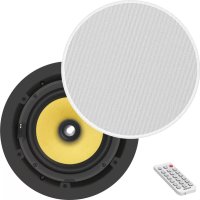
CS1900P - Speaker VISION - Free user manual and instructions
Find the device manual for free CS1900P VISION in PDF.


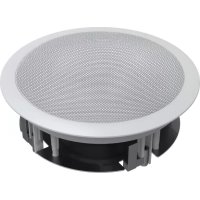
| Product Type | In-ceiling speaker for false ceiling |
| Installation | Recessed in false ceiling, cut-out diameter 198 mm (7.8 inches) |
| Wireless Connectivity | Bluetooth 5.0 (default code 0000), name and code changeable via BlueSuite software |
| Wired Connectivity | Line input (line level), master/slave connection with included speaker cable, RS-232 (baud 9600) |
| Control | IR remote control, buttons on speaker (power on/off, input selection, tone adjustments, volume, standby, mute) |
| Functions | Master/slave mode, Bluetooth priority, auto standby after 10 min, factory tone reset |
| Audio Settings | Adjustable bass and treble (+/- 1 dB per step, 14 levels), volume 36 levels |
| LED Indicators | Blue (Bluetooth), Yellow (line input), Red (standby, mute, IR reception) |
| Protection | Protection against electric shock (do not open), do not expose to moisture or rain |
| Warranty | Lifetime return-to-workshop warranty for the original purchaser |
| Maintenance | Clean with a soft dry cloth; do not use liquids or aerosols |
| Repairability | No user-serviceable parts; contact a qualified professional |
| Power Supply | Connect to household mains outlet; disconnect if not used for extended period |
| Weight | Approximately 2.5 kg (estimate) |
| Overall Dimensions | Outer diameter approx. 230 mm, depth approx. 120 mm (estimate) |
Frequently Asked Questions - CS1900P VISION
User questions about CS1900P VISION
0 question about this device. Answer the ones you know or ask your own.
Ask a new question about this device
Download the instructions for your Speaker in PDF format for free! Find your manual CS1900P - VISION and take your electronic device back in hand. On this page are published all the documents necessary for the use of your device. CS1900P by VISION.
USER MANUAL CS1900P VISION
DECLARATION OF CONFORMITY
Where applicable Vision products are certified and comply with all known local regulations to a 'CB Certification' standard. Vision commits to ensure all products are fully compliant with all applicable certification standards for sale in the EU and other participating countries.
The product described in this owner manual is in compliance with RoHS (EU directive 2002/95/EC), and WEEE (EU directive 2002/96/EC) standards. This product should be returned to the place of purchase at the end of its useful life for recycling.
WARNING



CAUTION: TO REDUCE THE RISK OF ELECTRIC SHOCK DO NOT REMOVE COVER (OR BACK). NO USER-SERVICEABLE PARTS INSIDE. REFER SERVICING TO QUALIFIED SERVICE PERSONNEL.

The lightning flash with arrowhead symbol, within an equilateral triangle, is intended to alert the user to the presence of uninsulated "dangerous voltage" within the product's enclosure that may be of sufficient magnitude to constitute a risk of electric shock to persons.

The exclamation point within an equilateral triangle, is intended to alert the user to the presence of important operating and maintenance (servicing) instructions in the literature accompanying the appliance.
WARNING: TO REDUCE THE RISK OF FIRE OR ELECTRIC SHOCK, DO NOT EXPOSE THIS APPLIANCE TO RAIN OR MOISTURE.
All products are designed and imported into the EU by 'Vision' who is wholly owned by 'Azlan Logistics Ltd.' Registered in England Nr. 04625566 at Lion House, 4 Pioneer Business Park, Clifton Moor, York, YO30 4GH. WEEE Registration: GD0046SY

DECLARATION OF ORIGIN
Vision products are made in the People's Republic of China (PRC).
USE ONLY DOMESTIC AC OUTLETS
Connecting the unit to an outlet supplying a higher voltage may create a fire hazard.
HANDLE THE POWER CORD WITH CARE
Do not disconnect the plug from the AC outlet by pulling the cord; always pull the plug itself. Pulling the cord may damage it. If you do not intend to use your unit for any considerable length of time, unplug the unit. Do not place furniture or other heavy objects on the cord, and try to avoid dropping heavy objects on it. Do not tie a knot in the power cord. Not only could the cord be damaged, but a short circuit could also be caused with a consequent fire hazard.
PLACE OF INSTALLATION
Avoid installing this product under the following conditions:
- Moist or humid places
- Places exposed to direct sunlight or close to heating equipment
- Extremely cold locations
- Places subject to excessive vibration or dust
Poorly ventilated places
Do not expose this product to dripping or splashing. DO NOT PLACE OBJECTS FILLED WITH LIQUIDS ON OR NEAR THIS PRODUCT!
MOVING THE UNIT
Before moving the unit, be sure to pull out the power cord from the AC outlet and disconnect the interconnection cords with other units.
WARNING SIGNS
If you detect an abnormal smell or smoke, turn this product off immediately and unplug the power cord. Contact your reseller or Vision.
PACKAGING
Save all packing material. It is essential for shipping in the event the unit ever needs repair.
IF ORIGINAL PACKAGING IS NOT USED TO RETURN THE UNIT TO THE SERVICE CENTRE, DAMAGE IN TRANSIT WILL NOT BE COVERED BY WARRANTY.
WATTS
The most consistent standards for measuring watts are "Program Power" and "RMS" because these measure average sustained levels.
Where loudspeakers have integrated amplifiers, then load (resistance, measured in ohms) is known so the wattage rating is fixed.
HUMIDITY
These loudspeakers are not waterproof and are not designed to work in high humidity areas.
CONNECTIVITY
Master Loudspeaker
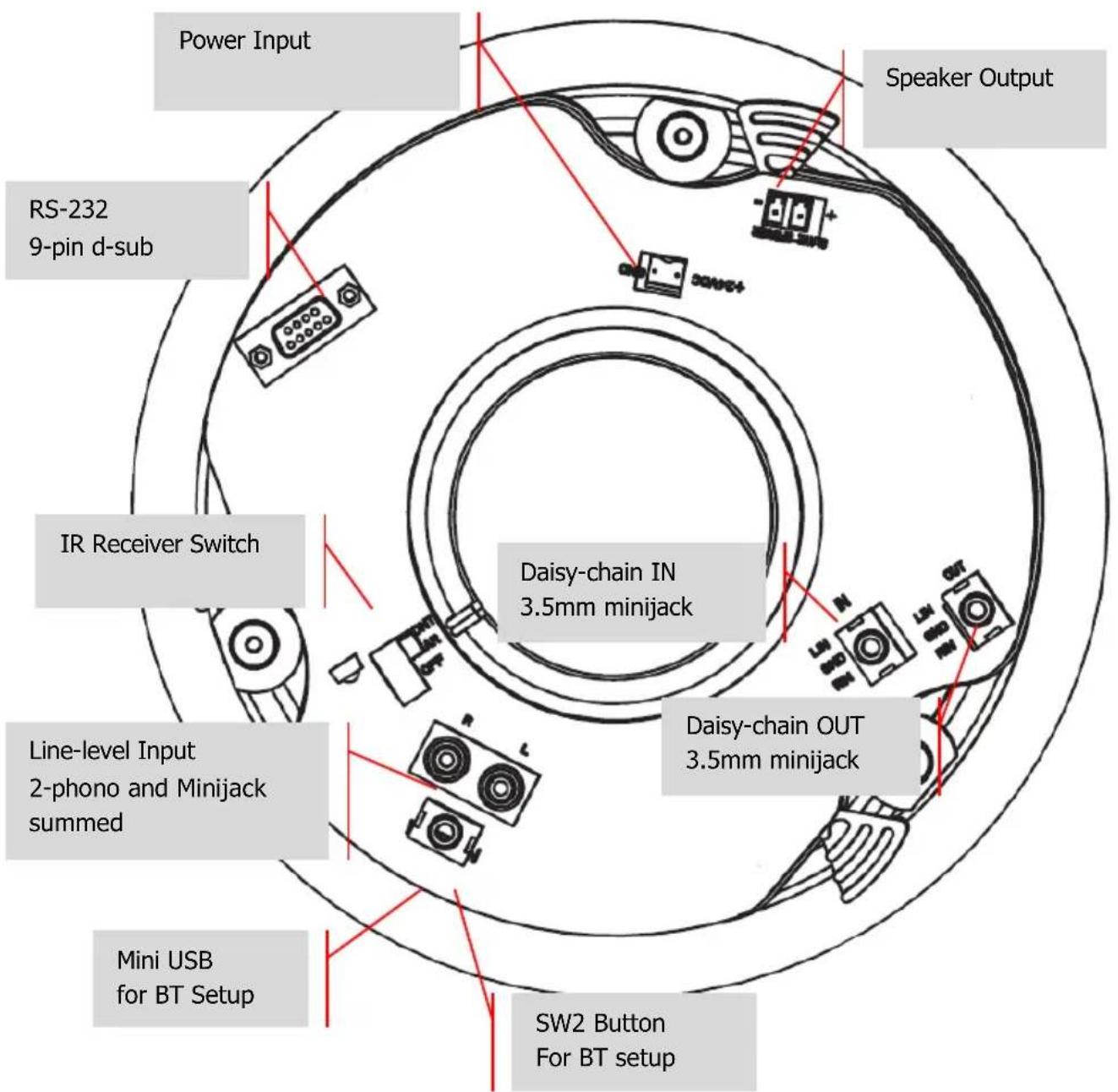
SPEAKER CABLE
Speaker cable is included to connect master to slave. You can use other speaker cable; it must be unshielded with a gauge of no less than 0.75mm. WARRANTY void IF YOU USE UNSUITABLE SHIELDED CABLE E.G. PHONO OR MINIJACK CABLE.
IR RECEIVER SWITCH
FRONT - IR receiver on front active. Remote control can be used normally
REAR -IR receiver on rear active. Front IR receiver disabled. Suitable for control system integration.
OFF - both front and rear receivers, and line-level inputs are disabled. Use in permanent daisychain mode.
DAISY-CHAIN
Connect multiple sets together in larger rooms – no limit to number of sets. The first set in chain is "master set" which switches inputs and adjusts volume.
Do not connect a laptop or phone directly to the daisy-chain input.
BLUETOOTH AUTO-SWITCHING
Use BT PRIORITY on remote control to enable auto-switching from line-level input to Bluetooth input when a Bluetooth device is paired.
With BT PRIORITY on, When a BT device is unpaired the speakers will switch back to line-level input.
AUTO STANDBY
The loudspeakers go into standby after 10 minutes of inactivity.
- Bluetooth device NOT PAIRED when it goes into standby:
o wake up when you pair a device or play audio though the line-level input.
- Bluetooth device PAIRED when it goes into standby:
if BT input was selected: only Bluetooth source will wake them up.
If line-level input was selected: only line-level input will wake them up.
STATUS INDICATORS
BLUE-Bluetooth input
Flashing slowly: Bluetooth is in pairing mode
On: Device paired
YELLOW - Line-level input
On: cable input selected
REDLED -Standby
Flashing slowly: mute activated
Flashing quickly: IR from remote control being received
On: in standby
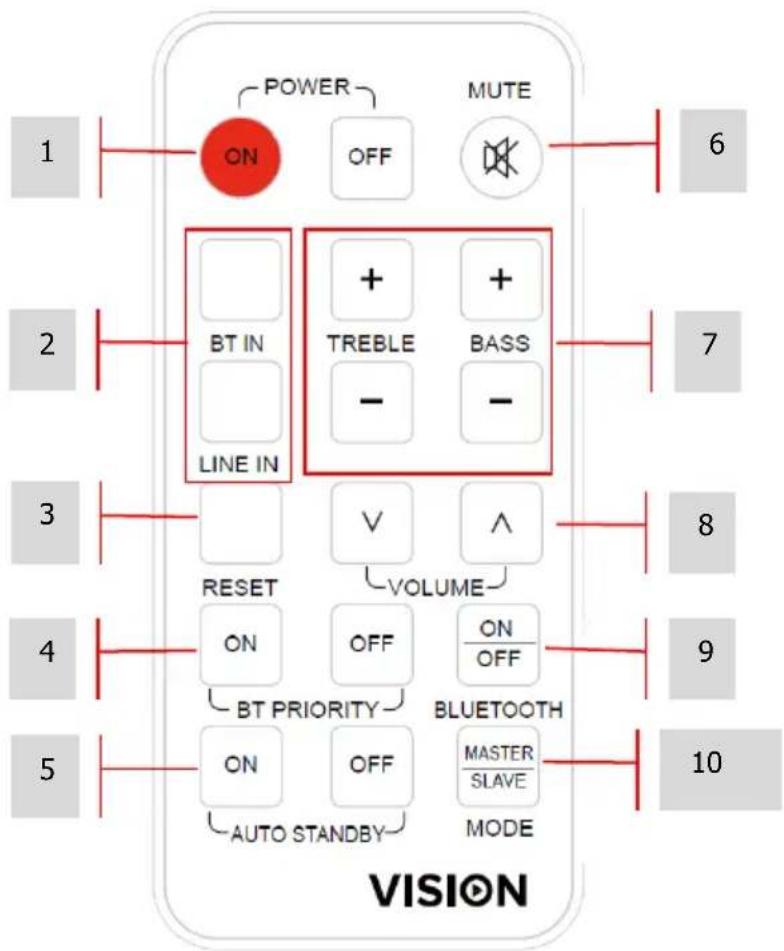
- POWER On / Off
- INPUT SELECT Bluetooth / Line-level (cabled) input
- RESET tone factory reset
- BLUETOOTH PRIORITY auto-switches when BT device paired
- AUTO STANDBY activate or deactivate
- MUTE
- TONE treble and bass
- VOLUME
- BLUETOOTH activate or deactivate
- DAISY-CHAIN MODE
a. MASTER Use when
i. Daisy-chain not in use
ii. Daisy-chain in use, this is "master" set, managing inputs and adjusting volume
b. SLAVE Use when this is a slave set in a daisy-chain.
INSTALLATION
- CUT HOLES IN CEILING TILES Draw around the cardboard template included. Cut along this line. Hole diameter 198 mm / 7.8".
NOTE: can only be fitted where there is a false ceiling.
- REMOVE GRILLE Remove from loudspeakers.
- LOOSEN CLAMPS Loosen screws shown. Turn mounting clamps in.
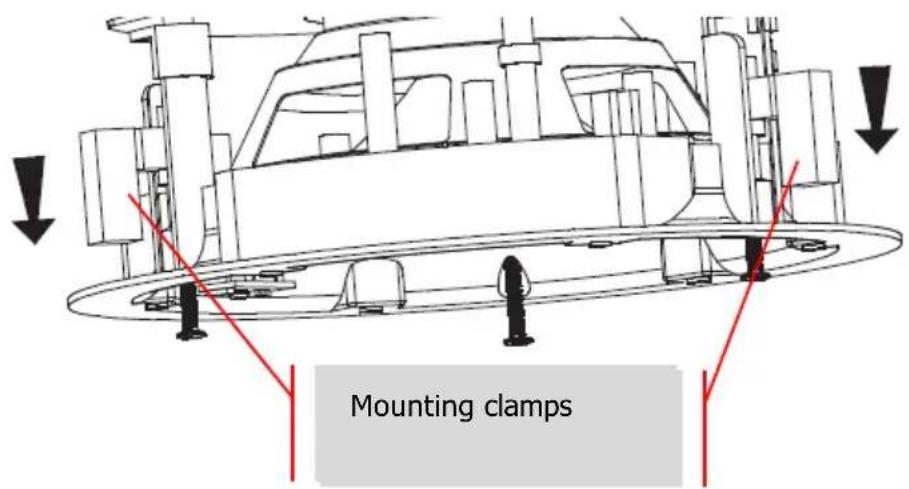
- PUT INTO CEILING TILE Tighten screws
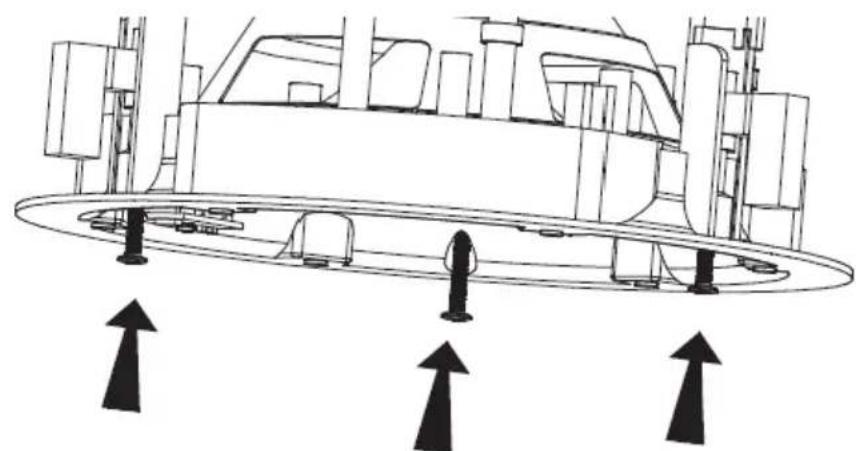
BLUETOOTH INPUT
DEFAULT PIN: 0000
If "Bluetooth Priority" is on speakers automatically switch to Bluetooth source when device is paired.
CHANGE BLUETOOTH DEVICE NAME AND PIN
- INSTALL BLUESUITE SOFTWARE
Download from https://visionaudiovisual.com/cs-1900p/ (windows only) - PAIR PHONE TO SPEAKERS
- PRESS AND HOLD SW2 BUTTON Release when Blue LED turns off.
- CONNECT PC TO SPEAKERS WITH USB CABLE (NOT INCLUDED).
- RUN PSTool. Select TRANSPORT and select USB\csr0 port
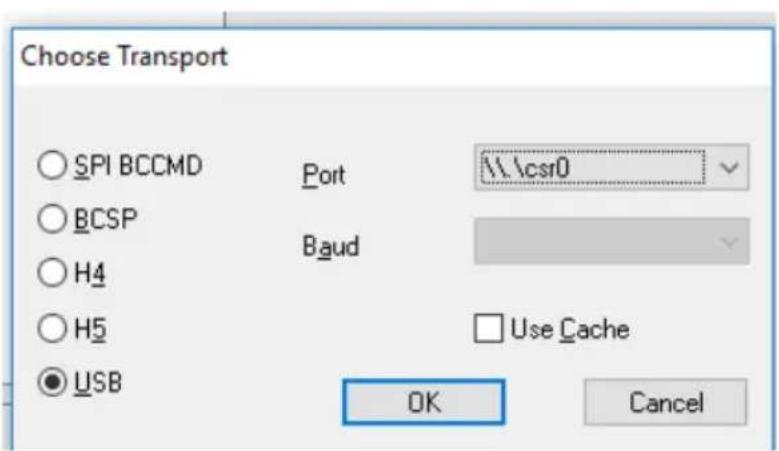
NOTE: if port not showing load drivers manually from C: |Program Files (x86)|CSR|BlueSuite 2.6.4|drivers
6. TYPE "NAME" IN FILTER Adjust then select Set
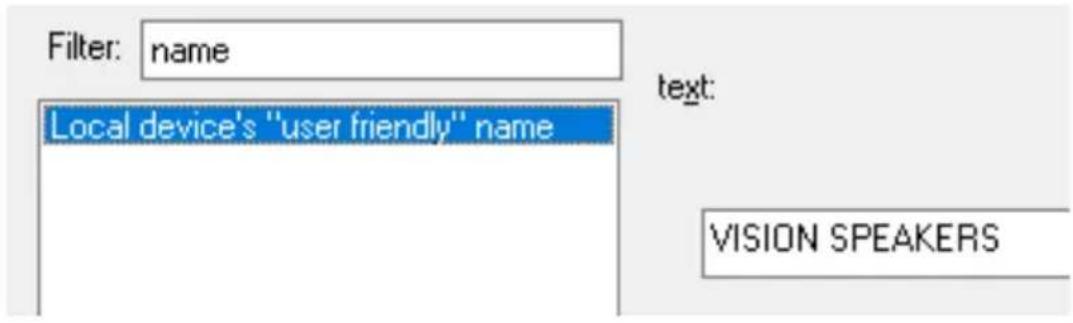
7. TYPE "FIX" IN FILTER The current PIN in this example is shown below:
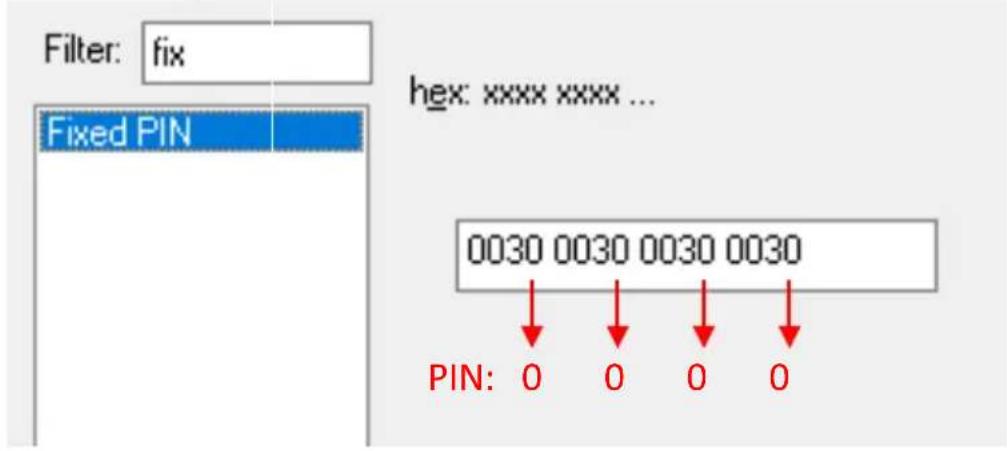
Adjust PIN (last digit of each group), then press Set and Reset BC.
RS-232 CODES
This product can be controlled with the included remote control or by a professional AV control system using RS-232 codes.
Baud Rate: 9600
Stop Bit: 1
Check digit: none
Transmission interval: more than 80 ms
Receive format: HEX
Reply format: ASCII
Pin 2 - Rx
Pin 3-Tx
Pin 5-GND
A command is structured of 99 then the command twice
e.g. turn on: send 99 then send 11 twice.
Each part of the code is preceded by "0x" so the longhand is 0x99 0x11 0x11
| HEX Codes | On Remote | Function |
| 99 11 11 | ON | Bring out of standby |
| 99 15 15 | OFF | Put into standby |
| 99 05 05 | MUTE | Mute |
| 99 DA DA | UN-MUTE | Unmute |
| 99 01 01 | BLUETOOTH | Input select "Bluetooth" |
| 99 09 09 | LINE IN | Input select "Line In" |
| 99 08 08 | TREBLE+ | Increase treble gain by +1dB |
| 99 0D 0D | TREBLE- | Decrease treble gain by -1dB |
| 99 0C 0C | BASS+ | Increase bass gain by +1dB |
| 99 12 12 | BASS- | Decrease bass gain by -1dB |
| 99 10 10 | RESET | Reset tone |
| 99 07 07 | VOL+ | volume + (also cancels mute if active) |
| 99 0B 0B | VOL- | volume - (also cancels mute if active) |
| 99 02 02 | BTPRIORITY ON | BT PRIORITY ON |
| 99 04 04 | BTPRIORITY OFF | BT PRIORITY OFF |
| 99 00 00 | AUTOSTANDBY ON | AUTO STANDBY ON |
| 99 5C 5C | AUTOSTANDBY OFF | AUTO STANDBY OFF |
| 99 5C 5C | BT_ON_OFF | Bluetooth on/off toggle |
| 99 5C 5C | MASTER_SLAVE | Mode toggle |
| 99 A0 A0 Volume Step 0 minimum | ||
| 99 A1 A1 Volume Step 1 | ||
| 99 A2 A2 Volume Step 2 | ||
| 99 A3 A3 Volume Step 3 | ||
| 99 A4 A4 Volume Step 4 | ||
| 99 A5 A5 Volume Step 5 | ||
| 99 A6 A6 Volume Step 6 | ||
| 99 A7 A7 | Volume Step 7 | |
| 99 A8 A8 Volume Step 8 | ||
| 99 A9 A9 | Volume Step 9 | |
| 99 AA AA Volume Step 10 | ||
| 99 AB AB | Volume Step 11 | |
| 99 AC AC | Volume Step 12 | |
| 99 AD AD Volume Step 13 | ||
| 99 AE AE Volume Step 14 | ||
| 99 AF AF Volume Step 15 | ||
| 99 B0 B0 Volume Step 16 | ||
| 99 B1 B1 | Volume Step 17 | |
| 99 B2 B2 | Volume Step 18 | |
| 99 B3 B3 Volume Step 19 | ||
| 99 B4 B4 Volume Step 20 | ||
| 99 B5 B5 Volume Step 21 | ||
| 99 B6 B6 Volume Step 22 | ||
| 99 B7 B7 Volume Step 23 | ||
| 99 B8 B8 Volume Step 24 | ||
| 99 B9 B9 Volume Step 25 | ||
| 99 BA BA | Volume Step 26 | |
| 99 BB BB Volume Step 27 | ||
| 99 BC BC | Volume Step 28 | |
| 99 BD BD Volume Step 29 | ||
| 99 BE BE | Volume Step 30 | |
| 99 BF BF | Volume Step 31 | |
| 99 C0 C0 | Volume Step 32 | |
| 99 C1 C1 Volume Step 33 | ||
| 99 C2 C2 Volume Step 34 | ||
| 99 C3 C3 Volume Step 35 | ||
| 99 C4 C4 | Volume Step 36 maximum | |
Note: if slave mode selected the speaker will only respond to MASTER_SLAVE CODE.
Return Codes
| HEX Codes | Name | Function | Return codes | Remarks | |
| 99 D0 D0 | STANDBY | Speaker working Status | 0 | 1 | ON/Working = 1OFF/Standby = 0 |
| 99 D1 D1 | MUTE | Mute Status | 0 | 1 | Mute Off = 0Muted = 1 |
| 99 D2 D2 | PT2314E_SELECT | Input Select Status | 0 | 1 | Bluetooth = 0Line In = 1 |
| 99 D3 D3 | PT2314E_GAIN_GET | Volume Gain Status | 0 | 36 | 36 steps total |
| 99 D4 D4 | PT2314E_B_GAIN_GET | Bass Gain Status | 0 | 14 | 14 steps total |
| 99 D5 D5 | PT2314E_T_GAIN_GET | Treble Gain Status | 0 | 14 | 14 steps total |
| 99 D6 D6 | BT_BIT | Bluetooth status | 0 | 2 | BT paired = 0BT pairing = 1BT OFF = 2 |
| 99 D7 D7 | BT_PRIORITY | BT Priority Status | 0 | 1 | BT Priority OFF = 0BT Priority ON = 1 |
| 99 D8 D8 | AUTO_STANDBY | Auto standby Status | 0 | 1 | Auto standby OFF = 0Auto standby ON = 1 |
| 99 D8 D8 | AUTO_STANDBY | Auto standby Status | 0 | 1 | Auto standby OFF = 0 |
| 99 D9 D9 | OPERATION_MODE | Master/Slave mode status | MASTER / SLAVE | ||
Note: if slave mode selected the speaker will only respond to STANDBY, AUTO_STANDBY, and OPERATION_MODE.
Replies are given in ASCII.
Example 1
99 D0 D0 = Get Standby returns
ASCII: 0 / HEX: 0X 00 = Off
ASCII: 1/ HEX: 0X 01 = On
(X in the HEX string is literal)
Example 2
99 D2 D2 = Get Input Select
ASCII: 0 / HEX: 0X 00 = Bluetooth
ASCII: 1/HEX:0X01=Line Input
Example 3
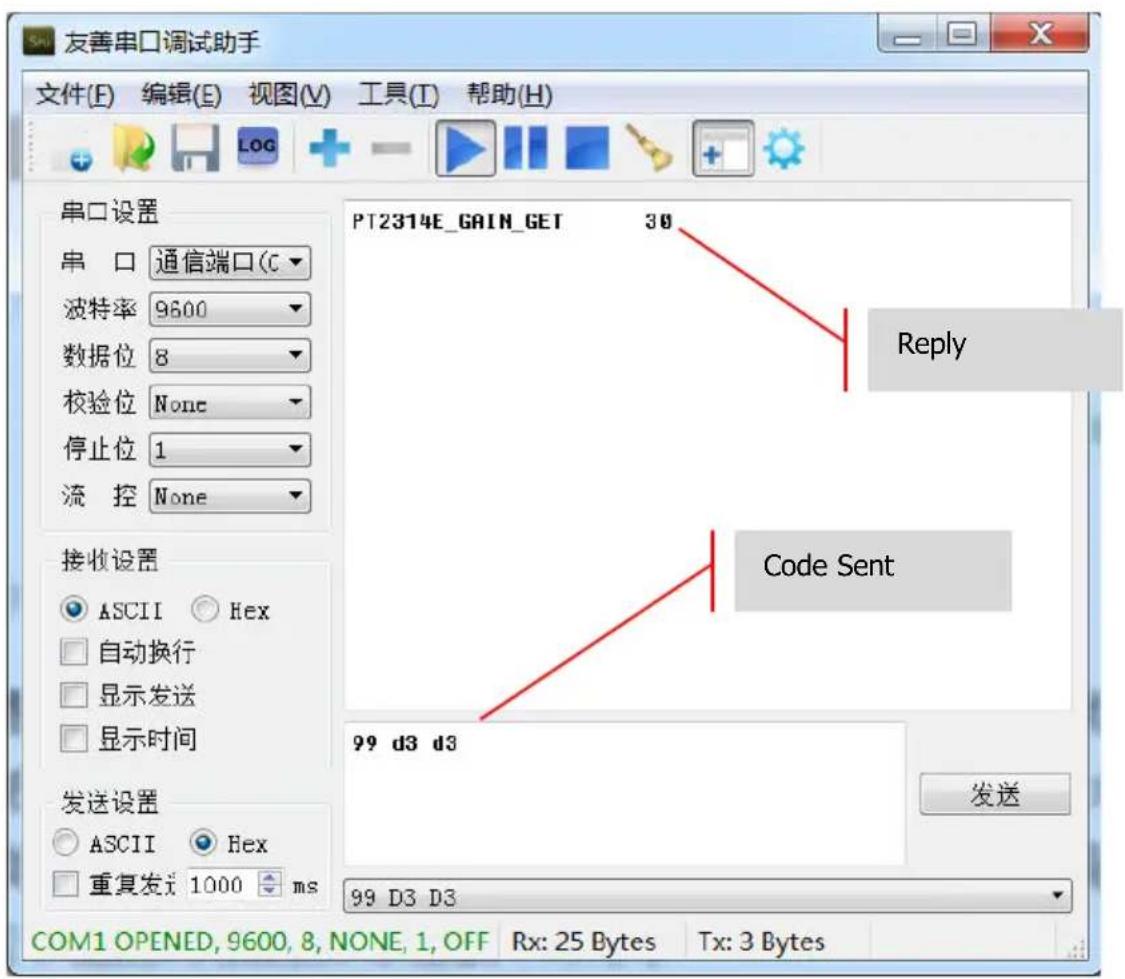
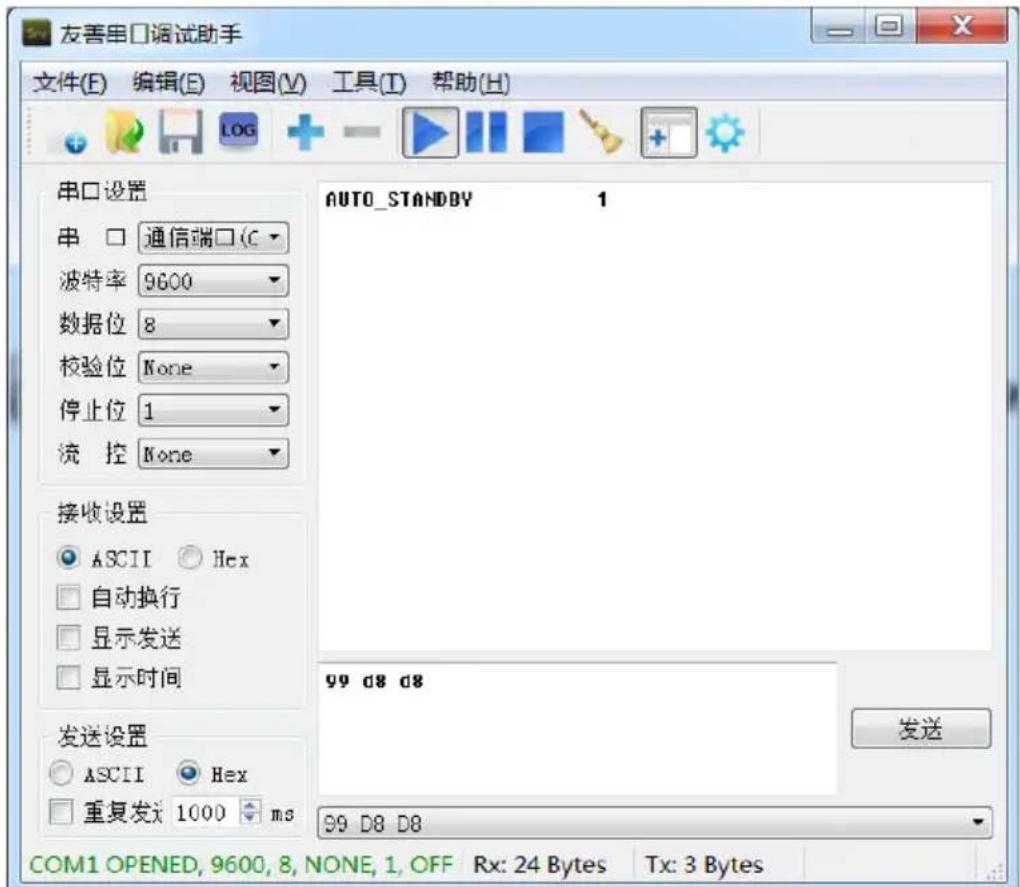
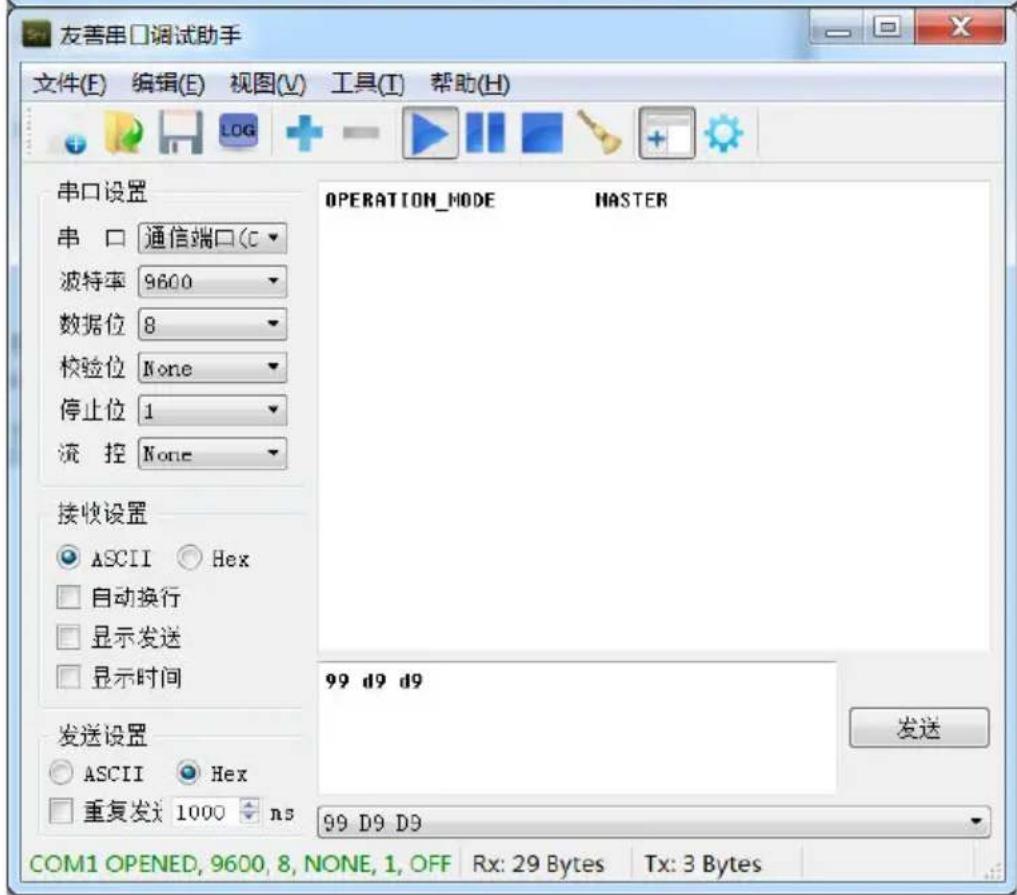
LIFETIME RETURN-TO-BASE WARRANTY
This product comes with a lifetime return to base warranty. If you have a problem you are required to provide a DETAILED DESCRIPTION of the fault.
Some Vision products are very technical and require troubleshooting all elements of the installation as it may not be the Vision product at fault. Because of this the manufacturer may refuse to replace the item if an adequate description is not provided.
This warranty applies only to the original purchaser and is not transferable.
This warranty protects you against the following:
Failure of any components, including the power supply.
Damage when the product is first removed from its packaging if reported within 24 hours of purchase.
If the product is DOA (dead on arrival), you have 21 days from purchase date to notify the national distributor via your AV reseller.
The original purchaser is responsible for shipment of the product to the Vision's appointed service centre.
- The liability of Vision is limited to the cost of replacement of the faulty unit under warranty except for death or injury (EU85/374/EEC).
If the product is end of line (EOL) the Vision will provide a credit instead of replacement.
- This warranty does not protect this product against faults caused by abuse, misuse, incorrect installation, unstable or faulty power input, or modification.
Vision aims to send a replacement item within 5 working days however this may not always be possible, in which case it will be sent as soon as practicably possible.
LEGAL DISCLAIMER: Because we are committed to improving our products, the details above may change without prior warning. This User Manual is published without warranty and any improvements or changes to the User Manual necessitated by typographical errors, inaccuracies of current information, or improvements to programs and/or equipment, may be made at any time and without notice. Such changes will be incorporated into new editions of the User Manual.
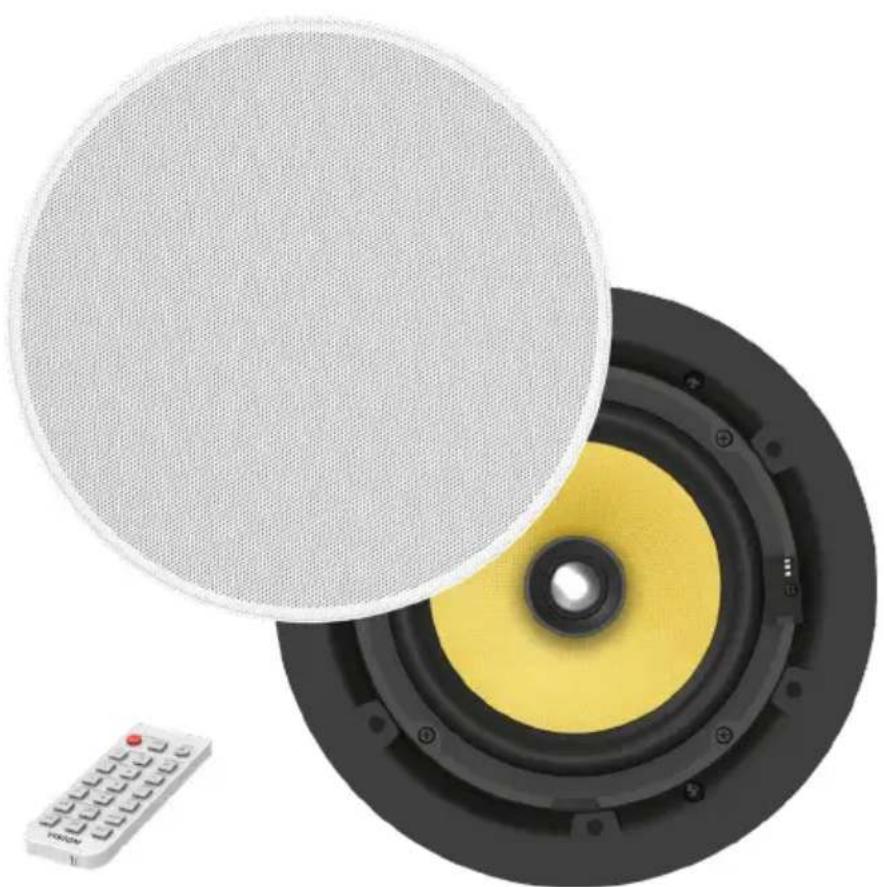
CS-1800P AKTIVLAUTSPRECHER
BEDIENUNGSANLEITUNG
www.visionaudiovisual.com/de/cs-1900p
www.visionaudiovisual.com/da/cs-1900p
KONFORMITSETERKLÄERING
När relevant, er Vision-produkter certificerede og overholder alle kende lokale regulativer iht. "CB-certificering"-standarden. Vision forpligter sig til at sikre, at alleprodukter opfylder alle relevante certificeringsstandarder for salg i EU og andre deltagende lande.
Broche 3-Tx (emetter)
www.visionaudiovisual.com/it/cs-1900p
PLAATS VAN INSTALLATIE
HET APPARAAT VERPLAATSEN
WAARSCHUWINGSSIGNALEN
www.visionaudiovisual.com/pt-pt/cs-1900p