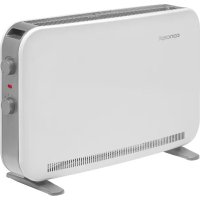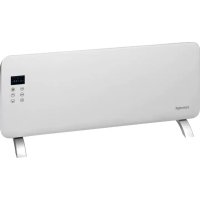
KS4000 - Pan Concept - Free user manual and instructions
Find the device manual for free KS4000 Concept in PDF.



| Brand | Concept |
| Model | KS4000 |
| Product type | Electric convector |
| Usage | Mobile or wall-mounted |
| Power supply | 220-240 V ~ 50/60 Hz |
| Rated power | 2000 W |
| Minimum power | 1000 W |
| Standby consumption | 0.41 W |
| Body material | High quality aluminum |
| Front panel | Black glass |
| Control type | Touch screen and remote control |
| Programming | 24h timer and weekly programming |
| Temperature range | 5 °C to 40 °C |
| Child lock | Yes (key lock) |
| Safety distance | 100 cm from flammable materials |
| Minimum room area | 4 m² |
| Cleaning | Damp sponge, vacuum for grilles |
| Warranty | 24 months |
| Repairability | Authorized center only |
| Standards | European Directive 2012/19/EU (WEEE) |
Frequently Asked Questions - KS4000 Concept
User questions about KS4000 Concept
0 question about this device. Answer the ones you know or ask your own.
Ask a new question about this device
Download the instructions for your Pan in PDF format for free! Find your manual KS4000 - Concept and take your electronic device back in hand. On this page are published all the documents necessary for the use of your device. KS4000 by Concept.
USER MANUAL KS4000 Concept
OCHRANA ZIVOTNEHO PROSTEDIA
- Preferujte recyklaci obalovych materiav o starych pristrojov.
- Skatuu od pristroja mozete dat do zberu triedeneho odpadu
Plastové vrecúska 2 polyetylenu (PE) odovzdajte ak o zberný opd nad na recyklaciu.
Recyclácia pristroja na konci jeho zivotnosti

Tento spotrebić je ozanězný podáva européjsk smerince 2012/19/EU o elektrikkom odpade a elektrickych ziaradeniach (WEE). Symbon va vyrobká alebo jeho obale udáva, ze tento vyrobok nepatri do domaceho opdadu Treba ho odovzdat na zberme miesto na recyklaciću elektrickych a elektronickych ziaradni. Zaistenir spravné likvidacíte totovy robrok bržaníte negativný dolskodm na zcovitne prostredie a fudské zdravie. Litváčíma musí byt yvonkán v súladeš predispimi na likvidacído opdadu. Podrobnějne informáce o recyklacićto totovy robrok zistite na pristousní miestnod urade, u sluzby na likvidacído domoveho opdadu alebo v ochode, kde ste vyrobkó kupil

Thank you for purchasing the Concept product. We want you to be satisfied with everything we make every day you use it.
Please read the instructions carefully before initial use. You should retain them for future reference. Ensure that anyone using this product is familiar with the instructions.
| Technical specifications | |
| Voltage 220-240 V - 50/60 Hz | |
| Input power 1000/2000 W | |
| Standby power 0.41 W | |
IMPORTANT
Make a visual check to ensure that the unit is intact and no damage has been done during shipping.
IMPORTANT SAFETY PRECAUTIONS
- Make sure the mains voltage corresponds to the values on the rating plate of the product. Do not connect the appliance to the hubs and extension leads.
- Do not use this appliance with a program, timer, or any other component that automatically switches the appliance on if the appliance is covered or incorrectly placed, there is a risk of fire.
- Only place the appliance on a stable, flat and heat-resistant surface away from other heat sources.
- Do not leave the appliance unattended when it is switched on or connected to the mains.
- When connecting and disconnecting the appliance from the mains, the function selector must be in the OFF (0/OFF) position.
- When disconnecting the unit from the wall outlet, never pull the power cord, grasp the plug end and disconnect it by removing it from the receptacle.
- The appliance must not be placed directly under the electrical socket.
The appliance must be positioned so that its plug is always accessible. - Observe the safe distance of the appliance at least 100cm from flammable materials such as furniture, drapes, curtains, blankets, paper, clothing etc.
- Do not use the appliance in areas under 4m^2
- Leave the air inlet and outlet grilles free (at least 100cm in front and 50cm behind the appliance).
EN
concept
concept
EN
Caution! The output grill reaches a temperature above 80^ Do not touch it, there is a risk of getting burned.
- Do not carry the appliance when it is turned on or if it is still hot.
- Do not touch the hot surface. Use the handles and buttons.
- Do not allow children or unauthorized people to handle the appliance, use it out of their reach.
- Persons with reduced mobility, reduced sensory perception, mental disadvantage or persons not familiar with the operation must use the appliance only under the supervision of responsible person, who is familiar with the instructions.
- Pay extra attention if the appliance is being used when children are present.
- Do not allow anyone to use the appliance as a toy.
- Do not cover the appliance, there is a risk of overheating. Do not use the appliance to dry the laundry.
- Do not put anything on the appliance or place anything in front of it.
- Do not use the appliance in any other way than as described in this manual.
Always use the appliance in the upright position. - Do not use the appliance near shower, bathtub, sink or pool.
- Do not use the appliance in an environment where there are explosive gases and flammable substances (solvents, varnishes, adhesives, etc.).
- Before cleaning and after use of the appliance, switch the appliance off, disconnect it from the mains and let it cool down.
- Keep the appliance clean, do not allow foreign objects to into the grid openings. It may cause short circuit, damage to the appliance or cause fire.
- Do not use coarse and chemically aggressive substances to clean the appliance.
- Do not use the appliance with a damaged cord or plug and have it repaired immediately by an authorized service centre.
- Do not use the appliance if it is not working properly, has been dropped, damaged or immersed in liquid. Have it checked and repaired by an authorized service centre.
- Do not use the appliance outdoors.
- The appliance is only suitable for home use and is not intended for commercial use.
-
Do not touch the appliance with wet hands.
-
Do not immerse the power cord or the charger in water or any other liquid.
The appliance must not be used in vehicles. - Do not repair the appliance yourself. Contact an authorized service centre.
- This appliance can be used by children aged from 8 years and above if they have been given supervision or instruction concerning the use of the appliance in a safe way and understand the hazards involved. Cleaning and user maintenance shall not be made by children unless they are older than 8 years and supervised. Children under the age of 8 must be kept away from the appliance and its power cord. Children shall not play with the appliance.
Children under 3 years of age must be prevented from accessing the appliance unless they are being permanently supervised. - WARNING: Some parts of this product can be very hot and cause burns. Take special care if vulnerable persons or children are present.
- Children between 3 and 8 years of age may switch the appliance on or off only if the appliance is in its place or installed in its usual operating position and children are being supervised or instructed how to use the appliance safely and they understand the risks that are connected with the operation. Children between 3 and 8 years of age may not connect, regulate or clean the appliance, or perform maintenance.
- This product is only suitable for well-insulated rooms or occasional use.
If you fail to follow these instructions, any possible repair cannot be recognized as a warranty repair.
NOTE
This appliance is intended for home use only. It can be used as a portable device or for wall mounting.
PRODUCT FEATURES
- Stylish black glass panel.
- High-quality aluminium heater: faster heating with better energy savings.
- Touch screen display and remote control.
- Timer from 1 to 24 hours to turn the convector heater on or off at the desired time.
- Digital display automatically showing the room temperature.
6.Free-standing or wall-mounted option.
INSTALLATION (When used on the floor as a portable appliance)
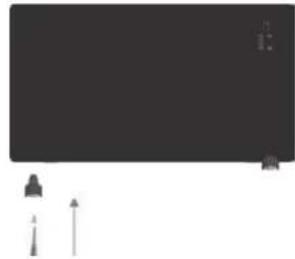
Place the legs on the convector body and fasten them with 12x4 mm supplied screws (8 pieces).
WALL MOUNTING (When using a convector as a mounted appliance)
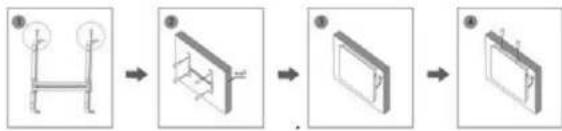
Please note that the convector must be installed at least 15 cm off the floor and 50 cm off the ceiling.
- Remove the holder from the body as shown in Figure 1.
- Drill holes into the wall on both sides and then insert plastic wall plugs into the holes. Fasten the bracket in the wall with a screw, see Figure 2.
- Place the convector in a suitable position so that the holes are aligned with the bracket.
- Tighten the screw on the top of the bracket.
concept
concept
OPERATION
Connect the plug into a suitable socket of the same current and voltage as stated on the nameplate. The touch screen buttons on the appliance match the functions of the remote control:
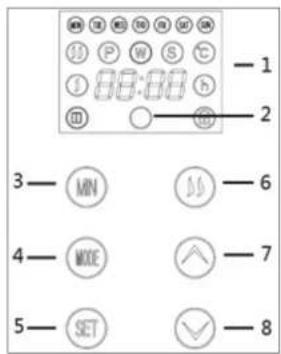
- Display
- Receiver
- Minute selection
- Mode selection
- Settings
- Heating button
- Temperature +
- Temperature
STANDBY MODE
Before you start using the appliance, turn on the switch located on the side of the appliance. Fig. 1 illustrates what the display will be showing, now the appliance is in standby mode and it does not heat. Display shows Press and hold the button to set the hours, press and hold the button to set the minutes, press and hold the button to set the days, see Fig. 1.
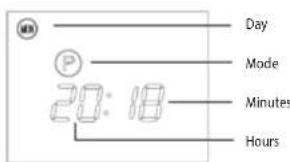
Fig. 1
OPERATION MODE
Press to change to operating mode. Fig. 2 illustrates what the display will be showing; the display will be showing
Press the button to regulate high and low heating power output, when the low power output is selected, the display will be showing 1. When the high power output is selected, the display will be showing 5, see Fig.3.
Press or to select the desired temperature in the range of 5^ - 40^ . The display will show 2 temperatures, the number on the left displays the current temperature. The number on the right displays the selected temperature, see Fig. 4.
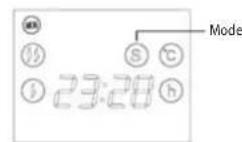
Fig. 2
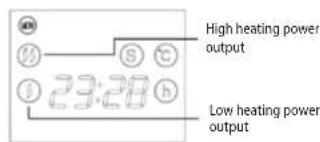
Fig.3
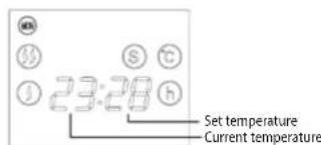
Fig.4
TIMER WEEKLY MODE
You can set a desired temperature in the operating mode (S). Press or to select the desired temperature in the range of 5^ - 40^
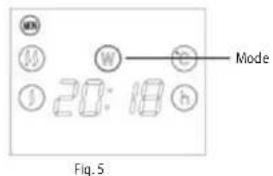
Press the button to switch to the timer's weekly mode, the display will show , see Figure 5.
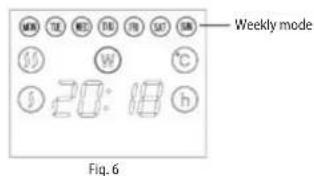
Press the button to select the weekly mode; e.g. from Monday to Friday, Monday to Saturday, Wednesday, Friday, etc., see Fig. 6.
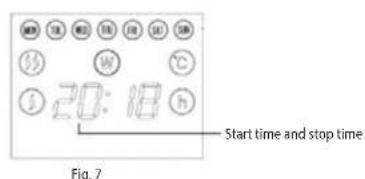
Press the button to set the start time, then press the button to set the end time of the operation. After setting the start and end time of the operation, keep pressing the button until you reach the end of the numerical series. At this point, the operation of the convector is set to the desired days, times and heating power output, see Fig. 7. For example, if you want the convector to heat at the weekend from 8:00 to 10:00, press the button to select a weekend mode (SAT, SUN), then keep pressing the button until you the display shows 8:00. After that keep pressing until the display shows 10:00. Finally keep pressing , until you reach the end of the numerical series
EN
concept
concept
EN
and current time shows up. At this point, the convector is set in the time mode.
CHILD LOCK
Press and hold and the display will show . Now the child lock is activated and no operation can be performed. To remove the child lock, press and hold the button again
REMOTE CONTROL AND CONTROL PANEL:
- SET P, W, S three modes to select and set the current week.
- MODE 24H Timer in the S mode
-
Child lock.
-
Setting the heating power output.
-
- For setting time and increasing temperature.
- For setting time and decreasing temperature.
TEMPERATURE
When the appliance is switched on, the current temperature is shown on the display. If the appliance is in the standby or heating mode, the temperature can be set. When the room temperature reaches the desired level, the high temperature power output is interrupted and low power output is activated. When the room temperature gets 2 degrees higher than the set temperature, the appliance stops working completely. The appliance starts operating again when the temperature gets 2 degrees lower than the set temperature. Mismatch of the shown temperature and the actual room temperature by < 4 degrees.
60
CLEANING AND MAINTENANCE
Always unplug the power cord from the socket before cleaning.
Make sure the appliance has cooled down properly before handling or moving.
To clean the surface of the appliance, use only a damp cloth, no detergents or hard objects, as they can damage the surface of the appliance!
Clean and inspect the input and output grilles of the appliance regularly to ensure good operation of the appliance and prevent overheating.
The dust in the appliance can be blown out or vacuumed.
Never clean the appliance under running water, do not rinse it or immerse it in water or any liquid!
SERVICE CENTRE
Extensive maintenance or repair, which requires access to internal parts of the product, has to be performed by a qualified service centre.
ENVIRONMENTAL PROTECTION
- Prefer recycling of packaging materials and old appliances.
- Packaging materials may be disposed of as sorted waste.
- Dispose the plastic bags made of polyethylene (PE) of as sorted waste.
Recycling of the appliance at the end of its lifespan

This appliance is labelled in accordance with European Directive 2012/19/EU concerning used electrical and electronic appliances (waste electrical and electronic equipment - WEEE). The symbol on the product or its packaging indicates that this product may not be treated as household waste. It is necessary to take it to a container park for the recycling of electrical and electronic equipment. By ensuring the correct disposal of this appliance you will help prevent potential negative consequences to the environment and human health, which could otherwise result from inappropriate disposal of this product. Disposal must be performed in accordance to the regulations for waste disposal. For more detailed information about recycling of this appliance see the authorized local office or service for household waste disposal or the shop, where you purchased the appliance.

The product meets all the necessary requirements of the EU directives applicable to the specific product.
Changes in text, design, and technical specifications are subject to change without notice and we reserve the right to change them.
EN
concept
concept
DE
| TABLE FOR INFORMATION REQUIREMENTS FOR ELECTRIC LOCAL SPACE HEaters | P | |||||
| Model identifier(s): KS4000 KS4010 | ||||||
| Item | Symbol | Value | Unit | Item | Unit | |
| Heat output | Type of heat input, for electric storage local space heaters only(select one) | |||||
| Nominal heat output | Pnom | 2 | kW | Manual heat charge control with integrated thermostat | [no] | |
| Minimum heat out-put (Indicative) | Pmin | 1 | kW | Manual heat charge control with room and/or outdoor temperature feedback | [no] | |
| Maximum conti-nuous heat output | Pmax | 2 | kW | Electronic heat charge control with room and/or outdoor temperature feedback | [no] | |
| Auxiliary electricity consumption | Fan assisted heat output | [no] | ||||
| At nominal heat output | elmax | 2 | kW | Type of heat output/room temperature control (select one) | ||
| At minimum heat output | elmin | 1 | kW | Single stage heat output and no room temperature control | [no] | |
| In standby mode | eISB | 0.001742 | kW | Two or more manual stages, no room temperature control | [no] | |
| With mechanic thermostat room temperature control | [no] | |||||
| With electronic room temperature control | [no] | |||||
| Electronic room temperature control plus day timer | [no] | |||||
| Electronic room temperature control plus week timer | [yes] | |||||
| Other control options (multiple selections possible) | ||||||
| Room temperature control, with presence detection | [no] | |||||
| Room temperature control, with open window detection | [no] | |||||
| With distance control option | [no] | |||||
| With adaptive start control | [yes] | |||||
| With working time limitation | [yes] | |||||
| With black bulb sensor | [no] | |||||
| Contact details: | Jindrich Valenta - ConceptVysokomytska 1800565 01 Chocen, CZECH REPUBLIC | |||||
| Remark:For electric local space heaters, the measured seasonal space heating energy efficiency ns cannot be worse than the declared value at the nominal heat output of the unit. | ||||||
| The seasonal space heating energy efficiency of all local space heaters except commercial local space heaters, % [ ] | 38 | |||||
62
KS4000/KS4010
Danksagung
CHARACTERISTIQUES DU PRODUIT
www. www.my-concept.com
concept concept
CV NTIJAST TALONS
Pardvejei plakkums Ir lepazistnpatereetaju ar izstradajuma parametriem un daribiu, kai pirnila un salasami alzpidit garantijas talonu izstradajuma pardosanas diena.
Ja nav parezi ezipildita vaI neparezi noradita nepiecesama informacja para Izstradajumu, garantjas talons ir nederig?
Razotaj (vai piegadataj) garantijas laika perioda in atbdigis par iztradajuma tehniskajam ipasibam un ta daribubu, ko paredz attieciagas tehniskas normas un nosacijumi.
Garantijas Ilambdai lqsit 23 gestne maku, sokt no pardoanata. datuma, ja zarotots (vai piegadatj) wav noteits citadi.
Pateretajam garantijas iietivaros in tiesibas uzu bezmaksas, savacigiu cnilniguzi zistradajma bojajum noveransu (skat. talak) var, ja tas neav neadekavati attlecba pret bojajuma raksturu, tiesibas uz izstradajuma bojato detalu mainu. Tiesibas uz izstradajuma mainu var pirkisanas ligma nosacijum neieverosanu var imzantot tikai tad, ja ir izpilditi visi likumigie nosacijumi, un tikai gadijum, ia izstradajums nav ticis pamenigi nolietots vai bojats.
Garantija ir spekā, ja ir izpilditi sadi nosacjumi:
- leveroti iztradajuma apkalpes Instruklijnos radijamilj.
- uzaditi visi pirkumu apieclinosie dokument un spekë esosa garantijas apieclica.
The manufacturer (or importer) is responsible for ensuring the product complies with the requirements of applicable legal regulations as well as those of the relevant technical standards. Moreover, they are responsible for ensuring the product has the properties the manufacturer described in documents related to the goods or those reasonably expected by the customer with regard to the nature of the goods or based on advertising produced by the manufacturer, and further they are responsible for ensuring the product is fit for the purpose proposed by the manufacturer or that a product of the same type is normally used for.
The quality warranty term is 24 months from product takeover by the customer.
The warranty does not apply to wear and tear caused by regular use. The customer shall not be entitled to any warranty claims if, prior to taking the product over, they knew the product contained a defect or if the defect is attributable to the customer.
The warranty specifically does not apply.
- if the product installation, operation and service conditions stipulated in the product operating manual have not been adhered to,
to malfunctions caused due to mechanical, heat or chemical damage, short circuit, over voltage or incorrect installation.
to malfunctions caused by an inexpert third-party intervention,
to malfunctions caused by natural disaster, - to malfunctions caused by insufficient or inappropriate maintenance in violation of the operating manual, including malfunctions caused by water and other sediments.
to changes in colour of the heating surface or to scratching of the surface caused as a result of using the products in an unusual manner.
to appearance and functional changes caused by exposure to sunlight, thermal radiation of water and other sediments. - if the service life of certain product parts expires, e.g. for accumulators, bulbs, etc.
The warranty does not apply to any products and services pr oided along with the product (gifts, promotional articles, etc.).
Filing a complaint
A complaint against a product defect must be filed as soon as identified, yet no later than before the end of the warranty term.
The customer must file a product complaint with the dealer from which they have purchased the product, or with any authorised service centre, a list of which is included in the product package, or available at www.my-concept.com.
While filing a product complaint, the product must be duly cleaned and securely packed so as to prevent any damage during its transport to an authorised service centre, where relevant, unless the product is delivered in person.
The customer must submit proof of having concluded a purchase contract for the product by producing the receipt.
While filing their complaint, the customer must indicate the noted defect and identify the preferred complaint application method.
Complaints processing
As long as the noted defect may be removed, the user has the right to have the defect duly removed free of charge on a timely basis.
Where such a procedure is not reasonable with regard to the nature of the defect, the user may require to be supplied a new defect-free product (replacement), or, where the defect applies to a part of the product only, replacement of the part co-nermed. However, if replacement of the product or any part thereof is not proportionate with regard to the nature of the defect, especially if the defect can be removed without undue delay, the customer has the right to have the defect removed free of charge.
If the noted defect is not removable, or if the customer becomes entitled to replacement of the product or a part thereof, yet the replacement is not possible, for example due to the product having been sold out, the customer has the right to return the product (withdrawal from the contract).
The customer shall have the right to a new product (replacement); or to replacement of a part of the product even if the defect can be removed, provided they cannot properly use the product due to repeated occurrence of the defect or due to a high number of such defects. In such a case, the customer also has the right to return the product (by withdrawing from the contract).
If the product is not returned (the customer does not withdraw from the contract), or if the customer does not apply the right to a new defect-free product (replacement), to replacement of a part thereof or to repair of the product, they may request a reasonable discount. The customer also has a right to a reasonable discount if a new defect-free product cannot be supplied to them, or if a product part cannot be replaced or the product repaired unless the situation is remedied within a reasonable time limit, or if remedying the situation would create major discomfort on the part of the customer.
The seller, authorised service centre or a staff member authorised by them must decide about each complaint immediately or within three business days in complicated cases. This term does not include a reasonable period of time, depending on the type of product concerned,
required for the defect to be assessed by an expert. A complaint, including defect removal, must be dealt with without any undue delay, yet no later than within 30 calendar days of the complaint filing date, unless the seller and the customer agree on a later deadline.
On returning the product (withdrawing from the contract) the customer must return any accessories and documents supplied along with the product.
The customer does not have the right to keep the defective parts and components of the product replaced as part of a repair of the product.
This shall be without prejudice to any other rights the customer may have in relation to the purchase of the product.
Remark: Complaints against products damaged in transport are governed by the carrier's complaints procedure.
Manufacturer
Jindrich Valenta - Concept
Vysokomytska 1800,565 01 Chocn
Czech Republic
tel:+420465471400
fax+420465473304
Company ID No.13216660
email: servis@my-concept.cz
www.my-concept.com
Product data
| Model: | |
| Production number: | |
| Date of purchase: | Seal and signature of vendor: |
concept concept
DE
GARANTIEBEDINGUNGEN
Garantie
www.www.my-concept.com
Produktdetails
C FR I T I O N S DE GARANTIE
Garantie
www.www.my-concept.com
CONCEPT POLSKA sp. z o.o.
Ostrowskiego 30, 53-238 Wroclaw
Tel.: +48 713 390 444, Fax: 713 390 414
www.my-concept.pl
Metaker Kft
2851 Kornye, Alkotmány ut 6-10.
Telefon/fax: 06 (34) 473-675, 473-550, 473-695
Verners VT Ltd.
Piedrujas iela 5a, Riga, Latvia
Tel. +371 67021021, fakss +371 67021000
e-pasts: info@verners.lv, www.ervers.lv