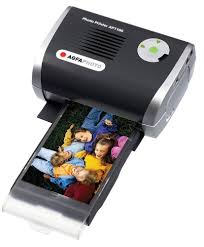
AP1100 - Photo printer SAGEM - Free user manual and instructions
Find the device manual for free AP1100 SAGEM in PDF.



| Product type | Photo printer |
| Brand | SAGEM |
| Model | AP1100 |
| Print method | Thermal sublimation |
| Resolution | 309.8 x 309.8 dpi |
| Number of colors | 16.7 million (continuous) |
| Print speed | Less than 60 seconds per photo (excluding image processing) |
| Interfaces | USB 2.0, IRDA |
| Supported image formats | JPEG (standard), TIFF, BMP, PNG (most types) |
| Max image resolution | Up to 18 million pixels |
| Paper size | 101 x 152.4 mm (excluding detachable borders) |
| Paper feed | Automatic feeder, capacity 25 sheets |
| Consumables | Three-color ribbon (yellow, magenta, cyan) + gloss, 75 prints per ribbon |
| Power supply | 230 V AC, 50/60 Hz, power adapter supplied (PF60N24AS0) |
| Power consumption | 5 W standby, 75 W printing |
| Dimensions (W x D x H) | 200 x 143 x 78 mm (excluding paper tray) |
| Weight | 1.4 kg (excluding power supply) |
| Operating temperature | 15 °C to 35 °C |
| Operating humidity | 30 % to 75 % RH |
| Optimization functions | Crystal Image (sharpness, colors, contrast), Red-eye correction |
| Supplied accessories | Power cord, power adapter, paper tray, photo paper pack (depending on model), ribbon (depending on model), CD-ROM |
| Warranty | 1 year (parts and labor), excluding consumables and normal wear |
| Head cleaning | With denatured alcohol and cotton swab, after disconnecting and cooling down |
Frequently Asked Questions - AP1100 SAGEM
User questions about AP1100 SAGEM
0 question about this device. Answer the ones you know or ask your own.
Ask a new question about this device
Download the instructions for your Photo printer in PDF format for free! Find your manual AP1100 - SAGEM and take your electronic device back in hand. On this page are published all the documents necessary for the use of your device. AP1100 by SAGEM.
USER MANUAL AP1100 SAGEM
User Guide Photo Printer AP1100
Livret Utilisateur Benutzerhandbuch Guía del usuario Manuale d'uso Gebruikershandleiding Manual do utiliser Hjälpguide Uživotelská príručka OΔHΓΟΣ XPHΣΕΩΣ Instrukcja obslugi oboДctbo повьзobateь Kullanıçıkilavuzu Felhasznalói kezikönyv
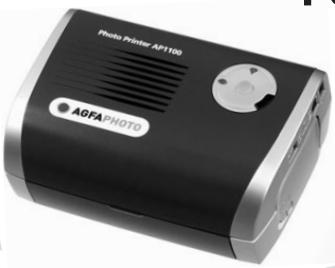
AgfaPhoto Holding GmbH, www.agfaphotographer.com, AGFAPHOTO is used under license of Agfa-Gevaert AG, produced for and sold by Sagem Communication, www.sagem.com

AGFAPHOTO

ENGLISH
Welcome
Thank you for purchasing our new photo printer. With this high quality printer you can get the most out of your digital photos.
The "Crystal Image" and "Red-eye" image optimising functions provide faultless print and copy quality of your photos.
You will also find the following on the web site www.agfaphotoprinter.com:
- print drivers for PCs,
- a list of answers to frequently asked questions [FAQ].
Safety instructions and recommendations

Do not install your photo printer in a humid room (bathroom, laundry, kitchen, etc.), or within 1.50m of a tap or water source, or outside. The printer should be operated within an ambient temperature range of 10^ to 35^ . Your printer should be used at an ambient temperature of between 15^ and 35^ for optimum printing results.
Do not set up your printer in a dusty environment as dust deposits might adversely affect the print quality of your photos.
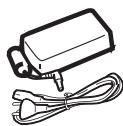
Only use the power supply that is supplied (PF60N24AS0 of Shanghai Moons' Automation Control Co., Ltd). Connect it to a mains outlet in compliance with the installation instructions in this booklet and the indications stated on the identification label located on the unit (voltage, current and frequency of the electricity network). As a precaution, in case of danger, the mains adapters act as a disconnecting mechanism for the 230V power supply. They should be placed near the device and should be easily accessible.
Never open the top cover when the printer is operating, as you risk breaking the film that may result in a printer malfunction.
After using the printer, wait a few moments after switching the printer off before opening it. To avoid injury, never touch the print head.
Only use AgfaPhoto consumables, if not you are likely to damage the equipment and invalidate the guarantee. To obtain the references of the consumables, refer to paragraph Consumables, page 7.

The CE marking certifies that the product meets the main requirements of the European Parliament and Council directive 1999/5/CE on telecommunications terminal equipment, regarding safety and health of users, and regarding electromagnetic interference.
The declaration of compliance can be consulted on the site www.agfaphotoprinter.com, or can be requested at the following address:
AGFAPHOTO is used under licence of Agfa-Gevaert AG
AP1100 is produced for Sagem Communication and distributed or sold by Sagem Communication
Sagem Communication - Customer relations department
Preservation of the environment as part of a sustainable development logic is an essential concern of AgfaPhoto. The desire of AgfaPhoto is to operate systems observing the environment and consequently it has decided to integrate environmental performances in the life cycle of its products, from manufacturing to commissioning, use and elimination.
PACKAGING

The presence of the logo (green dot) means that a contribution is paid to an approved national organisation to improve packaging recovery and recycling infrastructures.
To facilitate recycling, please respect the sorting rules set up locally for this kind of waste.
BATTERIES
If your product contains batteries, they must be disposed of at appropriate collection point
THE PRODUCT

The crossed-out waste bin stuck on the product means that the product belongs to the family of electrical and electronic equipment.
In this respect, the European regulations ask you to dispose of it selectively:
- At sales points in the event of the purchase of similar equipment.
- At the collection points made available to you locally (drop-off centre, selective collection, etc.).
In this way you can participate in the re-use and upgrading of Electrical and Electronic Equipment Waste, which can have an effect on the environment and human health.

Your printer and its accessories
Place your set in front of you. Take out the various components for your printer and check that the components shown below are present :
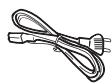
A power cable
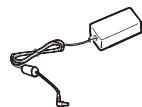
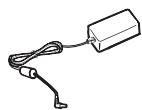
A power supply
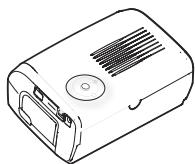
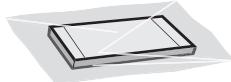
A printer
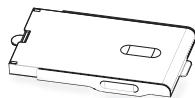
A paper tray
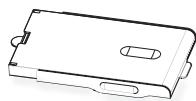
A pack of photo paper [depending on model]

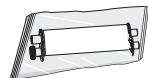
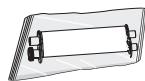
A ribbon (depending on model)
CD-Rom


Setting up the printer
: When installing your printer near a wall or some other object, keep a free space of at least 4 inches at the back of the printer, to make sure the movement of the sheet of paper being printed is not obstructed.
Note!

Plug the power cable into a wall socket that is easy to access.

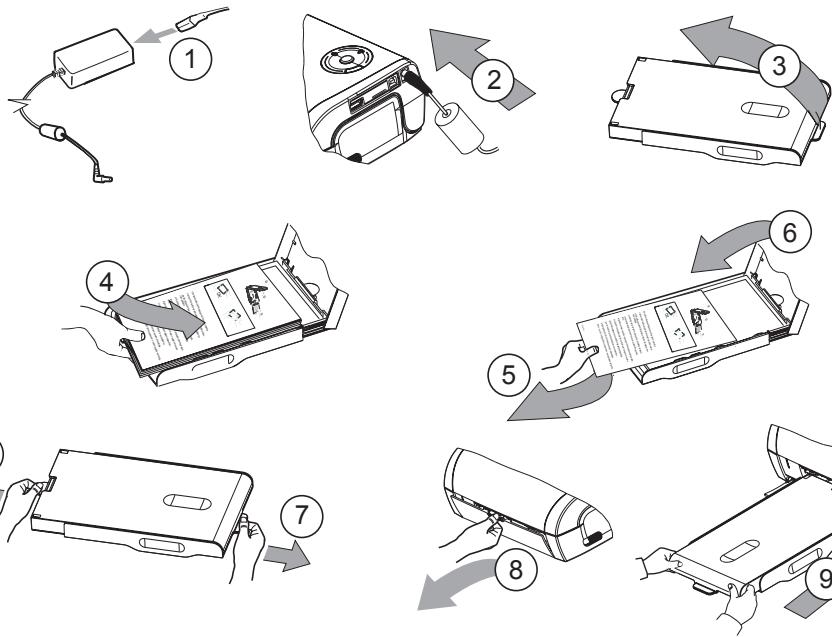
Installing the ribbon
Note!
: Use manufacturer consumables only. These are specially designed to provide optimum print quality (Refer to paragraph p. 7).
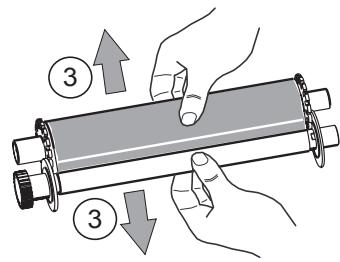
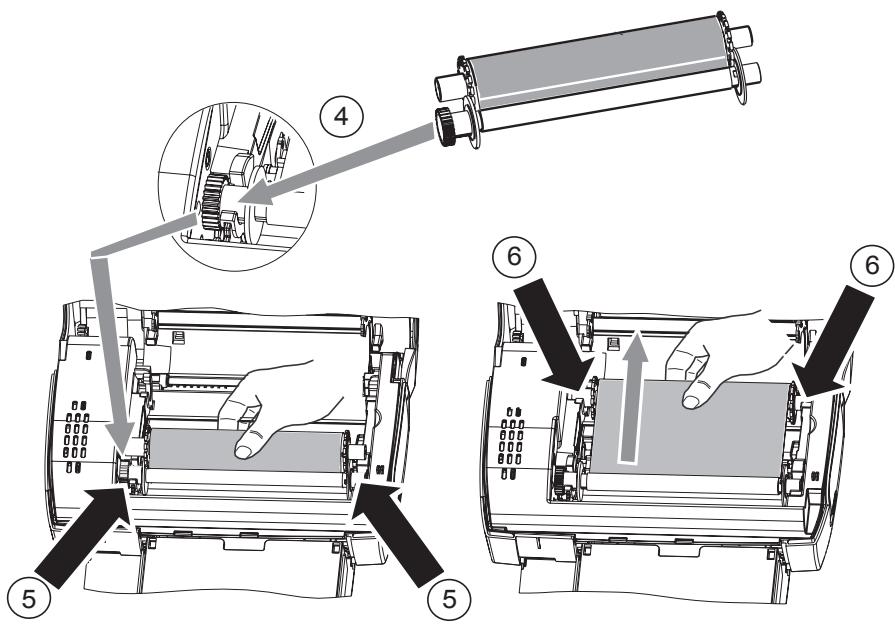

Stretch the ribbon on the roller shafts (6) and close the printer.
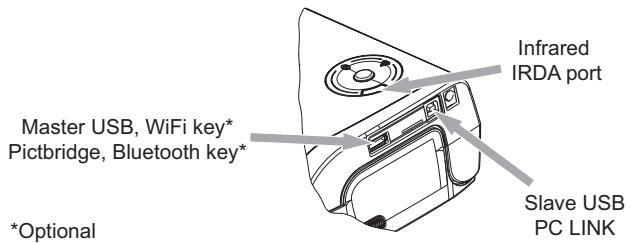
Connections
Operating
Check that the consumables (paper and ribbon) are installed.
Ensure that your printer is connected to the mains supply.
Connect your equipment, containing your files to be printed, to one of the USB ports or place the device fitted with IRDA close to the IRDA port on your printer so that it will be detected automatically.
- For WiFi key, Pictbridge and Bluetooth key connections, files are transferred automatically as soon as the connected devices are recognised.
Note! : When using Bluetooth mode, you must select your photo before you start printing. The default manufacturer code is 1234.
- For the IRDA link, check that the IRDA port on the transmitting device is activated. Move the transmitting device close to the IRDA port on the printer. As soon as it is recognised, transfer will begin.
- From a PC, print from the control panel used with your print utility or software. Select "A6 Photo Printer" to print your photos.
Note ! : "Crystal Image" and "Red-Eye" functions are not available with PC link.
When transferring data and during printing, the indicator located on the top of the printer flashes green.
Once transfer is complete, printing starts automatically.
Settings
You can improve print quality using the "Crystal Image" and "Red-Eye" functions.
"Crystal Image" makes all the necessary settings and corrections related to picture sharpness, colour management and contrast automatically to obtain the best print quality possible.
Furthermore, exposure defects will be corrected (for example, under-exposed photos will be made lighter or the portions of photo with strong contrasts will be compensated for). The "Red-Eye" correction function touches up Red-eyes on shots taken with the flash.
These functions must be activated before transfer to the printer.
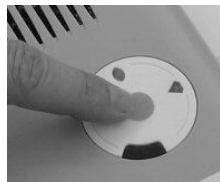
To activate these functions, press the green key located on the top of the printer as explained in the following sequence.
Press the green key once. The icon lights up and the "Crystal Image" function is activated.
Press the green key again. The icons and light up and the "Crystal Image" and "Red-Eye" functions are activated.
Press the green key again. The icon goes off and the icon lights up and the "Red-Eye" function is activated.
Press the green key again. The icons and are no longer lit and the "Crystal Image" and "Red-Eye" functions are disabled.
Consumables
The consumable items used with the photo printer (film cartridge, paper) are AgfaPhoto brand products. Consumables may be purchased in all big stores in the photography or printer sections but also on our internet site www.agfaphotoprinter.com or by using the consumables order form supplied with your printer (nature of supplies dependent on the model).
Use of any consumable items other than AgfaPhoto brand products may result in the loss of the printer's guarantee.
Film cartridge APR4200 [ribbon + paper for 75 photos]: ref. 252302798
Film cartridges APR4200D (2 ribbons + paper for 150 photos): ref. 252303013
Maintenance
Cleaning the print head
Continuous lines across the length of your photographs may be caused by dirt particles stuck to the printhead.
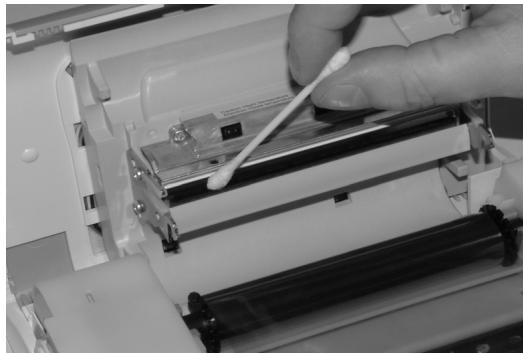
You will need a methylated alcohol (do not use corrosive chemicals, they may damage your printer) based cleaning product and some off-the-shelf cotton tips ("Q-tips").
Unplug your printer from the wall socket. Wait for five minutes since the print head operates at a high temperature, there is a risk of burning if you touch it.
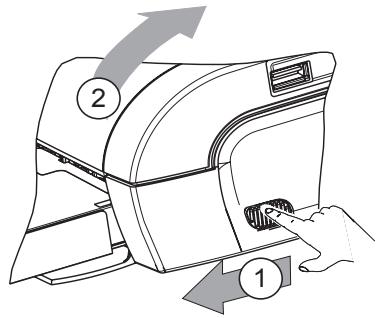
Open your printer and clean the print head as shown in the illustration below.
Caution: Never touch the print head with your fingers or any object that might scratch it.
Close the printer and plug the power cable back into the wall socket.
Paper jam
Follow this procedure if a sheet becomes stuck in the printer and cannot simply be pulled out:
Unplug your printer from the wall socket. Wait five minutes, because the print head operates at high temperature and you may hurt yourself if you touch it.
Open your printer and remove the trapped sheet of paper.
Close the printer and plug it back into the wall socket.
Caution : A photo that is already fully or partially printed must NEVER be put back in the paper tray as it may damage the ribbon.
Incidents
Note!
: The printer is fitted with an automatic time-out to prevent overheating, this can be tripped when performing large print jobs. The printer automatically restarts the current print job as soon as the temperature drops back to normal.
Error indicators
| Indicator | Cause |
| Flashing red | End of ribbon No more paper Paper jam |
| Permanently red | Data reception error Consumable not compatible File format not supported |
| PROBLEMS | SOLUTIONS |
| No mains supply | ·Check that the power supply is correctly plugged into the mains. ·Check that the power supply connector is correctly plugged into the printer. ·Check that the mains socket is working (check fuses and/or circuit breakers of your installation as necessary). |
| The printer was unplugged during a print job | ·Check that the printer is off and then reconnect the mains lead. ·Switch on the printer and wait for the initialisation phase to be completed, until the indicator associated to this function lights up green. ·If a sheet of paper is jammed, carry out the procedure (refer to paragraph Paper jam, page 8). ·Printing will resume automatically. |
| No photograph is printed on a sheet | ·Are you using sheets that meet the technical specifications (refer to paragraph Consumables, page 7). ·Have the sheets been inserted glossy face up? |
| The photograph is marked with a continuous line or a lot of spots | ·Clean the printhead (refer to paragraph Cleaning the print head, page 8). |
| No printout from your personal computer or camera | ·Check that the cable is correctly connected (PC, camera...). ·Is the printer driver installed? ·Have you validated your consumable with the smartcard supplied? |
Technical characteristics
Device name
Print method
Resolution
Colours
Print speed
Interface
Size of photos transferred from
a wireless peripheral
Image formats supported
Image resolution supported
Consumable items
Paper size
Paper tray
Mains supply
Approval
Field of use for optimum print quality
Size
Weight
Power consumption
Additional accessories
: AP1100
Dye-sublimation thermal transfer
309,8 x 309,8 dpi
16.7 million continuous
Less than 60 seconds per photo (excluding image processing)
Up to 18 million pixels
: Photo-quality paper. Film cartridge with three colours [yellow, magenta, cyan and protective coating]
101 x 152,4 mm excluding detachable borders
By automatic loader, capacity 25 sheets
230 V AC 50/60 Hz
EC
15°C to 35°C, 30% to 75% humidity
: 200 x 143 x 78 mm excluding paper tray
1.4 kg (except power supply unit)
in standby:5 W, in print mode:75 W
Bag,WiFikeyandBluetoothkey.
Visit our website www.agfaphotoprinter.com to order accessories.
All data are provided for reference purposes only. AgfaPhoto reserves the right to make any changes without prior notice.
Guarantee
GUARANTEE (UK Terms and Conditions)
In order to apply the guarantee, you should contact your dealer. Proof of purchase will be required. Should malfunctioning arise, the dealer will advise you what to do.
If you bought your equipment from Sagem Communication directly, the following shall apply :
A) Sagem Communication undertakes to remedy by repair, free of charge for labour and replacement parts, any defects in the equipment during a period of twelve (12) months from the date of original delivery of the Equipment, where those defects are a result of faulty workmanship.
During this twelve month guarantee period, the defective equipment will be repaired free of charge; the customer must however return the defective equipment at his/her own expense, to the address given by Sagem Communication After Sales Department, the phone number of which can be found on the delivery slip. Unless the customer has concluded with Sagem Communication a maintenance contract in respect of the equipment which specifically provides for repairs to be carried out at the customer's premises, the repairs will not be carried out on the equipment at the customer's premises. The following sentence applies to purchases of equipment for the customer's trade, business or profession. Except as otherwise expressly provided in this Document and to the extent permitted by law, Sagem Communication makes no representations or warranties, express or implied, statutory or otherwise, and to such extent, all terms and conditions implied by law are hereby excluded. This guarantee does not affect the Customer's statutory rights.
B) Exclusions From Guarantee
Sagem Communication shall have no liability under the guarantee in respect of :
- damage, defects breakdown or malfunction due to :
-failure to properly follow the installation process and instructions for use; or
-an external cause to the equipment (including but not limited to, lightening, fire, shock or water damage of any nature); or
-modifications made without the written approval of Sagem Communication ; or
-a failure or neglect to maintain the equipment or inappropriate maintenance; or
-unsuitable operating conditions, particularly of temperature and humidity; or
-repair or maintenance of the equipment by persons not authorised by Sagem Communication.
wear and tear from normal daily use of the equipment and its accessories - damage due to insufficient or bad packaging of equipment when returned to Sagem Communication
- supply of new versions of software
- work on any equipment or software modified or added without the prior written consent of Sagem Communication malfunctions not resulting from the Equipment or from software installed in user workstations for the purpose of use of the equipment
- communication problems related to an unsuitable environment, including :
-problems related to access and/or connection to the Internet such as interruptions by access networks or malfunction of the line used by the subscriber or his correspondent
-transmission faults (for example poor geographical coverage by radio transmitters, interference or poor line quality)
-the local network fault (wiring, servers, workstations) or the failure of the transmission network
- the normal servicing (as defined in the user guide supplied with the equipment) as well as malfunctioning due to servicing not being carried out, servicing costs are in any event always borne by the customer.
C] In the cases set forth in § B) as well as after expiry of the twelve month guarantee period, the customer must ask Sagem Communication for an estimate, and he/she must accept the estimate and agree to pay the charges mentioned in it before returning the equipment to Sagem Communication. The repair and delivery costs will be invoiced to the customer.
The foregoing shall apply unless otherwise agreed in writing with the customer and only for the UK. If any provision of this guarantee shall be held to be in whole or in part invalid or illegal due to an obligatory rule applicable to consumers pursuant to their national legislation, such invalidity or illegality shall not impair or affect the remaining provisions or parts of this guarantee.
FRANÇAIS
Bienvenue
AGFAPHOTO is used under licence of Agfa-Gevaert AG
AP1100 is produced for Sagem Communication and distributed or sold by Sagem Communication
SAGEM COMMUNICATION - Customer relations department
AGFAPHOTO is used under licence of Agfa-Gevaert AG
AP1100 is produced for Sagem Communication and distributed or sold by Sagem Communication
Sagem Communication - Customer relations department
AGFAPHOTO is used under licence of Agfa-Gevaert AG
AP1100 is produced for Sagem Communication and distributed or sold by Sagem Communication
Sagem Communication - Customer relations department
AGFAPHOTO is used under licence of Agfa-Gevaert AG
AP1100 is produced for Sagem Communication and distributed or sold by Sagem Communication
Sagem Communication - Customer relations department
AGFAPHOTO is used under licence of Agfa-Gevaert AG
AP1100 is produced for Sagem Communication and distributed or sold by Sagem Communication
SAGEM COMMUNICATION - Customer relations department
AGFAPHOTO is used under licence of Agfa-Gevaert AG
AP1100 is produced for Sagem Communication and distributed or sold by Sagem Communication
SAGEM COMMUNICATION - Customer relations department
AGFAPHOTO is used under licence of Agfa-Gevaert AG
AP1100 is produced for Sagem Communication and distributed or sold by Sagem Communication
SAGEM COMMUNICATION - Customer relations department
AGFAPHOTO is used under licence of Agfa-Gevaert AG
AP1100 is produced for Sagem Communication and distributed or sold by Sagem Communication
SAGEM COMMUNICATION - Customer relations department
15°C to 35°C, 30% vlhkost do to 75%
www.agfaphotoprinter.com, support category.
Eλληνικά
Kαλωσήρθατε
euxapiotoupeTou ayopasaTe to veo aac EKTUTWtN WTOYpapivw. Me autov Tov EKTUTWtU uynlnc TIOIOTnac mTOpEITE va exete o,TI KAUTEPO OTIS ynpiaKcS wtoypapies. OI aeIToupyie 8eALIWan6 EIKOvAs "Crystal Image" kai "Red Eye" TApexouv aooyec EKTUTWoeiC kai TIOIOTnA AVYPaPcN OTIC WTOypaPcEs OaC.
Oi leitoupyie eaiottoioan6 Eikovac "Crystal Image" kai "Red Eye", npexouv aippoaunatiotec EKTUTWoeic uynhns TIOIOTnTcTwv wOToypaiwv oac.
AGFAPHOTO is used under licence of Agfa-Geavaert AG
AP1100 is produced for Sagem Communication and distributed or sold by Sagem Communication
SAGEM COMMUNICATION - Customer relations department
Plug the power cable into a wall socket that is easy to access.
EΓΚATAΣΤΑΣH THE MEΛANOTAINIAΣ
Suvnkecs xpongs ia bEaIIOtn
TIOIOTnA EKUTIWOWNS
MéyéθoS
Bapoc
Katavalawon evepyies
AGFAPHOTO is used under licence of Agfa-Gevaert AG
AP1100 is produced for Sagem Communication and distributed or sold by Sagem Communication
SAGEM COMMUNICATION - Customer relations department
AGFAPHOTO is used under licence of Agfa-Gevaert AG
AP1100 is produced for Sagem Communication and distributed or sold by Sagem Communication
Sagem Communication - Customer relations department
(B 3aBcNcMoCTN OT MOdJIIN)
KoMaKT-DnCK
Jehnta (B)
3ABNCIMOCTNOT
MOdEJIi)


C nOmoIbI O yHKnIy "Crystal Image" u "Red-eye" moXHO yNyUuHT bKaYeCTBO neaTn.
Длгполученин haинчшero kacheстba neати Функшия "Crystal Image" abTOMaTUeCKn peanIm3yet BCE HeOBxODIMbIe hAchToPmKIn nCNPaBNeHn, CB7aHbIe C p3eKoCTbO n3ObpaKeHn, ZBeTOM IN KOHTpactHOCTbIO. KpOME TOrO, daHnHaФункшии NO3BOJTeY UcTaPaHrT bdepeKtbl KeCNo3uNn (HaNPmep, foTOrpaФnAm C HeNOCTaOuHOn 3KcNo3uMneB ydET npiDauBaTcB6OJIbIaRApKoCTb, a N3bIoTuHaN KOHTpactHOCTb NEKOTobIX FOtorpaФn BytED KOMNEHcnpoBAHa).Функшия "Red-eye" no3BOJnEET YcTaPaHnTb 3ΦΦeKT KpaChbix rna3, KOTobI obpa3yETcprn FOToRaФирВaHm CO BCbIuIKoI.
IcnoIb3OBAHnpe paXoIbIx MaTePnaIOB IpyrIx npOn3BOIoNTeJIe (6e3 3NaKa AgfaPhoto (PLC) MoKet npINBeCTN K nOtepe rapaHTn Ha npInTep.
KaptpnIXAPR4200 (IeHTa + 6ymara Ha 75ΦOTorpaФи): CcblIOUHbI HOMep 252302798.
KaptpnDxN APR4200D (2 JeHTbI + 6ymara Ha 150 fOtorpaΦn): cBbIOuHbI Homep 252303013.
TEXHnueCKOE OBCJYKINBAHNE
OuHCTKA PEAHTAHOU ETOJIOBKN
Iotppe6JemaMa MoUHOCTb
DOnonHnTeJIbHbIe pInHaIeXHoCTN
:AP1100
CybImaIgKpacntela TepMOpehOCOM
309,8x309,8ToueK/DIOHM
16,7 MUNJINHOB
:MeHbIe MmHyTbHa OndHy φoToRpaΦnO (6e3 yUeTa 0bpa6OTKn n3obpaXeHHa)
: nopT USB 2.0, IK-nopt
:do1M6
JPEG (CTaHdApTbHb ΦopMaT),TIFF,BMP,PNG (6OJIbSINHCTBO TINOB)
101x152,4MM He cHTaOtpe3hIx KpaEB
EMKOCb yCTpOCTBa aBTOMaTNUeCKo 3arpy3Kn COCTABJET25JNCTOB
230B, nepemehhby TOK, yactota 50/60 T
:EC
OT 15^ Do 35^ ,BnaxxHocTb 30% -75%
200x143x78MM,6e3yetaIOTkaIJa6yma
1,4 Kr (6e3 yye Ta 6noka nntaHna)
B pexime oXnidaHra: 5 Bt, B pexime neaTu: 75 Bt
: yexoJ, aadantepb WiFi n Bluetooth.
Дя 3akazdONOHHTeHbIX npHaJNeXHOCTe
IocTeBe6-caT www.agfaphotoprinter.com.
Bce daHbIe npedocTabJIOTc TOJIbKO B cnpaBOHybIX cIeJX. KomnaHra AgfaPhoto coxpaHre 3a co6oI npabo BVOCNTb JIObIe N3MeHEnr Be3 npedBaPITeNbHorO yBeOMJIeHn.
「APAHT」
TAPAHINHbIE YCIOBnA
Ybaxaemblnokynatelb,
BbI TOnbKO YTO npIO6peIN npInTeP Sagem Communication, M bI 6JIaOdApIM Bac 3a 3Ty NOKyNk. 3Ta npOduKuHg 6blIa N3rOToBHeNA B CTrpeMNEHN K BbICOKOMy KaueCTBy, KOtOpoe, KaK Mbl HaDeemCRA, DOJxHO doCTaBnB Bam abCOJIOTHOe yDObNETBopeHne.
Ecni, He cmotpna Hc Bce hauyn ycuiy, Bbl obnapyknn Kaok-To foabpnhB deeKt, nokayncta, o6paTntecb Mara3H, rde Bbl npno6peN ToBap. Tam Bbl nOnyuTe INHΦopMaunO daIbHeiXnDeiCTBnX.
ObopyoBaanHe, KOTOpoe BbToIbKO YTO npIOobpei (He yuHTbIBaJeHTb, bymar...r) rapaHTnpObaHO KomnHne Sagem Communication, OTHOCINTeBHO KOMIIeKTKUOnxN c6OpKn1, cornaCHO HIXKeONICAHbIM ycNOBm I npOeDpyam. TapaTnI NOKpbBaet DeEeKtI npOn3BOcCTBa, BO3NKwne B pe3yIbTaTE HeNPaBnIbHO C6OpKn IInn I3bHO Detanei, B TeeHne 12 (DbenaDaTu) MecaueB, HauHnaor OT DaTbI NOKynkN oOBpOyOBaHn (dIra AkceccyapOB: TPN (3) Mecsa, CHTaR O T DaTbI NOKyPkn). 3Ta rapaHTnI paCnpocTpaHraETcHa Na OBpOyOBaHne, IcNoJIb3OBAHHoe NODobaUcMm Obpa3om.
Y Bac noTpe6yIOT oKa3aTeJIbCTBO O nOkyIke; nO3Tomy peKOMeHdyETcXpaHITb Yek B HaNEXHOM MecTe.
ObopyoBaHne, OtpeMOHTnOBoAHHO B TeueHne Cpoka DeiCTBna rapaHTnI, rapaHTnpoBaHO KOMpaHnei Sagem Communication (detaN i c6bpKa)* do nocJeHero dHa:
- ICTeueHnBbIeUynOMaHyTOrO rapaHTmHOrO cPOKa, JIn,
- Tpex (3) Meçraçev, co ὄν yúctpañehný deφεκτa KOMπaŋneɪ Šagem Communication.
Hnkaokoe obopydobAHne He 6yTeT OOnJKeHO BO BpeM peMOHTa.
IpeTeT, kAc cTaB Ha peMOHT DeΦeKTHoe OobpyoBaHne, He 3a6yDbTe:
- Coxpahntb BCE nepcoHaJIbHble daHHble, Tak KaK OHN MOrYT 6blTb ydaJIeHb BO BpeMpeMOHTa. Kompanna Sagem Communication He HecET OTBETCTBEHOCn 3a yHNUToXKeHne BaIINx nepcoHaJIbHbIX daHHbIX n He 6yEdt 3AHIMATbcr nx nobTOPH OYcTAHOBKO HA BaIeM obOpdyOBAHN.
BIOKntb BynakOBky C o6OpyOBoaHneM Baue nMra, aDpeuT eTepeOH.
Bnojntb yynakOBky konHIO doka3aTeNbCTBa O nokynke obopyoDaHaia.
-Держпгпспсебе ВСЕ Akceccуары (провда...),pacxoньи MaTePnAnbI N Baши пчньи рпборы (Картbl NaMaTи,Иnp...)
3Ta rapaHTnHa He paCnpocTpaHReTcHa 3aKoHHbIe npBa YaCTbIX Notpe6ntenei.
HnkeJeUoee OTHocTc TOnbko K BeNkoobpTaHH. Ecn Kaok-Jinbo NyKt daHHo rapaHTm OKaXeTc qacTNUHO INI NIOHOCTBU He 3akOHEN IIN He 6ydet COOTBeCTBOBaT pImHeMReMbIM B 063aTeBHom nopAKe K NOTpeBteJAM npaBnlaM, B COOTBeCTBn C aHrJIckm 3aKHOdaTeJBCTBOM, 3Ta He3aKOHOCb INI HecOoBTcTBne npabnlaM He NOBnIyOT N He aHHyIpYOT OCTaBhIE nyKtBJ 3TOI rapaHTn.
TAPAHINHbIE NCKJIIOUeyHnA
He rapaHTnpyTcra :
-
Поломки и Ненравильhoe Фуннционоване, пунной которьх CTaJI:
-
Heco6IIOeHHe INcTpyKcUN INpoCecca INcHTaJIIpOBAHn; INI
BHEUHnΦaKTop(BKIOUOaHne OOrpaHNUBaRcB yIapAMn, N36bIToCHbIM CBETOM, YMbIuJIeHHoH nOpueH, HeOCTOPQHXbIMN DeIcTBnAIM, BO3rOpauHneM, NOBPEXDeHNMAm, Bbl3BaHHbIMn pa3NJbHbIMN XJNDKOCTaMn, HaceKOMbIMN-Napa3NTaMn HHeCOOTBeTCTByUOIm 3NeKTPnuCeKMn HaNPxKeHMe); IUN - MoDInΦuKaaun OobpyoBaHnA, CdeNaHbIe 6e3 NcBMeHHOrO pa3peSeHnKOMpaHn Sagem Communication; nnn
- HeIOCTaTOHbI eXeJdHeBbI yXoD (COrIaCHO OINcAHIO B IOKyMeHTaUIn, COnpOBoXdaUSei oBOpdyOBaHne) nJIH HeIOCTaTOHoe bepexHoe OTHOseHne; nJIH
- He6nlaonpnaTbIe yCNoBnA OKpyKaHouSeI cpebl, B OcO6eHHoCTn CB3aHHbIe C TeMnepaTyPoN I BIAJXHOCTbIO, NocIeIcTBnI pa3HnUcbl 3JIeKTPuYeCKnx HAnpJxKeHn, IpO6IeMbI 3JIeKTPuYeCKoI CETn I 3a3eMJIeHnI; INI
-
peMoHTnIOBaHne, INcPabJIeHne HEnOJIaIok (OTKpbITne INI NOnbITkn pa3o6paTb o6OpyIDOBaHne) INI INTexHnueCKoe OBCJyXnIBaHne O6OpYIOBAnHg IINzAMN, He IMeIoUIMN aBTOpI3aUm Sagem Communication;
-
Поврждени, Вьзванье OTCYCTBиЕ mупakOBи Илн He npaВиьнblm nakOBaHem obopydobAHn npin Bo3Bpate B OФицальбий Сервс-цHTP.
- I3noc nI3bTne I3 HopMaIbHOro NOBceIeBHeBHO rIOcIb3OBAHnI O6OpyDobAHnI aKCEccyapOB.
-
KommyHKaIOHbIe npoJIembl, CBraHHbIe C HeNoDxOJaUIMN ycNOBnMn OkpyKaIoSei cpebl, BKLIOUaB Y auctHOCTN:
-
npo6nembl, C8ra3aHbIe C doCTynom n/Inn PNOKIIIOueHHeM K TepeOHHO cTe (npepbIBaHne C8r3n, HeyDOBJIETBOpNTeJIbHOe fYHKUHOHINPOBaHne IINHM),
- Oшибкп пгтраимussи (нарример, перьване Илл плхоев Качев CBЯЗ),
-
Oùnúkī MeçThOù CBa3N (πρoBóda, cepBépbl, paδOue I CTaHcUIN) INI INI INI TpaHCMUCCN (BKJIQUAY I He ORpaHUNUBaRcB pεpblBaHmM paδOtbl cTeN).
-
YctaHOBka HObIx BepCn nporpaMMHOrO oecneueHn 6e3 nolueHn PpeBapntelbHOro cornaKy KOMpAHn Sagem Communication,
- JeiCTBnI, CB3aHHbIe C NOBCEHHeBHbIM IcNoJIb3OBAHHeM: IOCTaBka, yCTaHOBka paCXoIbIX MaTePnaIOB,...
- Pa60ta Ha KaKOM-ⅡIbO npOrpaMMHOM oBeCpeHn, MoInΦuPobAHHom 6e3 corIacn KOMNaHn Sagem Communication
- HenpaBnIbHoe FyHKUHOHPOBaHne npOyKuH, paXoHbIX MaTePnaIob n akceccyapOB, HecOBMeCTmblx C o6OpyIOBaHnEM.
9.ObopydOBaHne,Bo3BpaaeHnOe B OΦuIaJIbHbI CepBc-TeHTp 6e3 nOlyeHnO T Hero npedBaPntelbHoro corlacna.
******
YcIpyn, OKa3aHHbIe B pAMkX BblSeOINCAHbIX rapaHTNHBIX NCKJIIOUeHm IINI NOCE INCTeeHn 12-MecyHOro cPoka DeICTBnRA rapaHTN, DoJnxHbIb 6bITb ONJaUeHbI (IIaT a ByET yCTaHOBJeHa KOMpaHnei Sagem Communication) Notpe6nteIem do OTnpaBKn ObopyuOBAHn B OPhiuaJIbHbI CepBnC-TeHTp IINI Do peMOHTIpOBaHn.
******
PNEyPEXKDEHNE:
B COOTBeTcBnC 12-MecHNo rapaHTne npImeHaTe CJeDuOuee:
- B JIO6bOM cIyuae, noKajnyiCTa, coXpaHnTE 3a cBIOO cOBCTBeHNHy OIIaTy BaUN nepCOHaJIbHbIe daHHbIe. Sagem Communication He HecET HnKaKoN OTBeTCTBeHNcTn 3a NobpeXJeHne Baunx I nporpAMM. HnKaKne nporpAMMbI n DaHHbIe He 6yDyT BOCCTaHOBJIeHbI KOMNaHnei Sagem Communication B cIyuae IN ydaJIeHnI INI NOpeXKeDeHnI.
- Повждениные залии заименhoe obopydobaine StahOBaHne co6CTBeHHOCbIO KOMnAHIN Sagem Communication.
- Ba3npuOuIeScB O63aTeNbHOM NopJKe Ha 3aKOHOM NOCTaHOBHeHIM, BbIeONnCAHHBe rapaHTn 3TORO DOKyMeHTa npedeJIbHO JcHbI H HeoCnOpMbl. B OOC6EHocTn, Sagem Communication He daet rapaHTn OHOCInelbHO KauCtBA n pIroDnOCTn OBOpYOBAHm K KaKOMy-TO ONpeJeEHOMY IcNOJIb30BaHnIO. O63aTeNcTBa KOMpaHIN Sagem Communication no OTHOseHIO K JkaIobAm NOKyNaTeNHa yTepIO IINI NobpeXdHeNc OBOpYOBAHn, ONiCaHOrO B KOHTpAKe, DeJIKeTne I np. IINI Je H XaNAthOCTb QnPMBI-NpOn3BOUnteNl OTHOCInelbHO DOCTABKn IINI TexO6ClnykIBaHnE, He 6dyT npBeOCxOJNb CTOMMOCTb, ONPaueHHU NOKyNaTeIeM 3a OBOpYOBaHne.
Sagem Communication He 6ydt, Hn npn KaKnx 0bCToTbeTbax, HecTn OTBeTcBEHOCt b3a KaKoe-Ⅱno HaHeceHne KocBHeHoro, HamepeHHoro nIM MacuTaBHO y6bItka (BKJNoHa, HO He OrpaHnUBAraBc Notepen 3aKa3a nnCKIOK Ha TOBap, yuep6om penytaun npOdykun, IppebIbAHmE ycnyr n IpOvHX fHAnHCObIX n KomMepueckNX y6bITkoB), leXaUeR O OCHOBe rapaHTnHbIX 083aTeJIbCTB nIN DeNkTa.
- B COOTBETCTBm C NOCTaHOBJIeHJMa M 3aKOHoTaTeJbCTBa, 12-MecyHbI cPok DeiCTBn rapaHTn He MoKet 6bITb npOJHe. 12-MecyHaNra rapaHTn HnKaK He BInrEt Ha 3aKOHhIe npaba NotpeBntEn.
Ecni KaKoi-Ni6o NyHKT daHnOH rapaHTm YactuHO IIN NOJIOCTbO He 3aKoHeN IIN He COOTBcTByET
IpiMeHЯeMbIM O63aTeNbHOM Nop4Ke K NOTpeBntEjam PpaBnJaM, B COOTBeTCTBn C aHfIInckM
3aKoHOdaTeJIbCTBOM, 3Ta He3aKoHHocT b IIN HecOOTBcTCTBne PpaBnAm HE NOBnIAOT N He aHHyIpyIOT
OCTaJIbHbIe NyHKtBI 3ToI rapaHTm.
www.agfaphotoprinter.com, support category.
Hoş Geldiniz
AGFAPHOTO is used under licence of Agfa-Gevaert AG
AP1100 is produced for Sagem Communication and distributed or sold by Sagem Communication
SAGEM COMMUNICATION - Customer relations department
GARANTIYE DAHIL OLMAYANLAR
www.agfaphotoprinter.com, support category.
MAGYAR
Udvzöljuk
AGFAPHOTO is used under licence of Agfa-Gevaert AG
AP1100 is produced for Sagem Communication and distributed or sold by Sagem Communication
Sagem Communication - Customer relations department

- User Guide Photo Printer AP1100
- ENGLISH
- Welcome
- Safety instructions and recommendations
- PACKAGING
- BATTERIES
- THE PRODUCT
- Your printer and its accessories
- Setting up the printer
- Installing the ribbon
- Connections
- Operating
- Settings
- Consumables
- Maintenance
- Cleaning the print head
- Paper jam
- Incidents
- Error indicators
- Technical characteristics
- Guarantee
- GUARANTEE (UK Terms and Conditions)
- B) Exclusions From Guarantee
- FRANÇAIS
- Bienvenue
- Eλληνικά
- Kαλωσήρθατε
- EΓΚATAΣΤΑΣH THE MEΛANOTAINIAΣ
- TEXHnueCKOE OBCJYKINBAHNE
- OuHCTKA PEAHTAHOU ETOJIOBKN
- 「APAHT」
- TAPAHINHbIE YCIOBnA
- TAPAHINHbIE NCKJIIOUeyHnA
- He rapaHTnpyTcra :
- PNEyPEXKDEHNE:
- Hoş Geldiniz
- GARANTIYE DAHIL OLMAYANLAR
- MAGYAR
- Udvzöljuk
Brand : SAGEM
Model : AP1100
Category : Photo printer