IbiMaster 250e - Binder IBICO - Free user manual and instructions
Find the device manual for free IbiMaster 250e IBICO in PDF.



| Product type | Binding machine (electric punch/binder) |
| Brand | Ibico |
| Model | IbiMaster 250e |
| Dimensions (L × H × D) | 457 mm × 216 mm × 406 mm |
| Weight | 15.2 kg |
| Power supply | 230 V, 50 Hz |
| Punching capacity | 20 sheets of 80 g/m² paper per cycle |
| Binding capacity | 425 sheets or 50 mm thickness |
| Max paper size | A4 (297 mm) |
| Punch margin | 11 mm (adjustable) |
| Recommended binding diameter | Up to 25 mm (selector guide), possible up to 50 mm |
| Punching mechanism | Electric with Punch button |
| Binding mechanism | Manual lever for opening/closing rings |
| Disengageable punches | Yes (for A5 format) |
| Reset function | Yes (Reset button in case of jam) |
| Confetti bin | Removable drawer to be emptied regularly |
| Cleaning | Unplug before cleaning; wipe exterior with a damp cloth |
| Intended use | Indoor only |
| Safety | Do not open the device; risk of electric shock; do not use outdoors |
| Warranty | 1 year from date of purchase |
Frequently Asked Questions - IbiMaster 250e IBICO
User questions about IbiMaster 250e IBICO
0 question about this device. Answer the ones you know or ask your own.
Ask a new question about this device
Download the instructions for your Binder in PDF format for free! Find your manual IbiMaster 250e - IBICO and take your electronic device back in hand. On this page are published all the documents necessary for the use of your device. IbiMaster 250e by IBICO.
USER MANUAL IbiMaster 250e IBICO
GB Instruction Manual
F Manuel d'utilisation
D Bedienungsanleitung
① Manuale d'istruzioni
NL Gebruiksaanwijzing
E Manual de instrucciones
P Manual de instruções
⑤ Bruksanvisning
PL Instrukcja obsługi
© CZ Návod k obsluze
H Használati útmutató
RUS Руководство по эксплуатации
250e only - Safety instructions

YOUR SAFETY AS WELL AS THE SAFETY OF OTHERS IS IMPORTANT TO IBICO. IN THIS INSTRUCTION MANUAL AND ON THE PRODUCT ARE IMPORTANT SAFETY MESSAGES. READ THESE MESSAGES CAREFULLY.

THE SAFETY ALERT SYMBOL PRECEDES EACH SAFETY MESSAGE IN THIS INSTRUCTION MANUAL. THIS SYMBOL INDICATES A POTENTIAL PERSONAL SAFETY HAZARD THAT COULD HURT YOU OR OTHERS, AS WELL AS CAUSE PRODUCT DAMAGE OR PROPERTY DAMAGE.
The following ISO and IEC symbols appear on this product, and their meaning is as follows:
THE FOLLOWING WARNING IS FOUND ON THE BOTTOM OF THE PRODUCT.

WARNING
Electrical shock hazard. Do not open. No user servicable parts inside. Refer servicing to qualified service personnel.
This safety message means that you could be seriously hurt or killed if you open the product and expose yourself to hazardous voltage.
250e only - Important safeguards


WARNING: FOR YOUR PROTECTION DO NOT CONNECT THE IBIMASTER 250e TO ELECTRICAL POWER UNTIL YOU READ THESE INSTRUCTIONS COMPLETELY. KEEP THESE INSTRUCTIONS IN A CONVENIENT LOCATION FOR FUTURE REFERENCE. TO GUARD AGAINST INJURY, THE FOLLOWING BASIC SAFETY PRECAUTIONS MUST BE OBSERVED IN THE SET-UP AND USE OF THIS PRODUCT.
250e only - Electrical safeguards
The ibiMaster 250e must be connected to a supply voltage corresponding to the electrical rating of the machine as indicated on the serial/rating plate or in this manual.

CAUTION: THE POWER RECEPTACLE MUST BE LOCATED NEAR THE EQUIPMENT AND BE EASILY ACCESSIBLE.

CAUTION: IN CASE OF EMERGENCY, USE THE POWER CORD AS A MAIN DISCONNECT DEVICE!
- Unplug the unit before moving it, or when it is not in use for an extended period of time.
- Do not operate with a damaged supply cord or plug, if it is damaged, or malfunctions.
- Do not overload electrical outlets beyond their capacity; fire or electrical shock could result.
- Do not alter attachment plug. Plug is configured for the appropriate electrical supply.
- The unit is intended for indoor use only.
- Never push objects into this product through cabinet slots. Do not spill liquid of any kind on this product.
- Do not operate if the product has been exposed to rain or water.
General safeguards
- Use the unit only for its intended purposes.
- Do not place anything in the punch opening of the machine other than paper and cover stock.
-
Place unit on a secure, stable work area to prevent the unit from falling and possibly causing personal injury and damage to the unit.
-
Follow all warnings and instructions marked on the unit.
- Lift the machine from the bottom, not the cover.
- Do not lift the machine by the cover or paper holder wire.
250e only - Cleaning

CAUTION: Unplug this product before cleaning.
- Wipe exterior only with a damp cloth. Do not use detergents or solvents.
The following notes apply only to the units rated 230 V 50Hz.
MAIN CORDSET SELECTION (FOR 230 AV MACHINES ONLY)
When choosing a detachable line cord for use with the ibiMaster 250e, always observe the following:
The cordset consists of three components; the attachment plug, cordage and appliance inlet. Each of these components must meet European regulatory approvals for safety.
The following minimum electrical ratings for the specific cordset are published for safety purposes.
Getting started
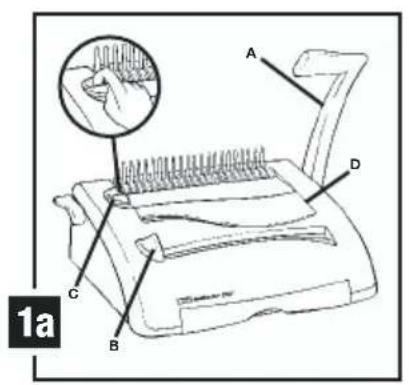
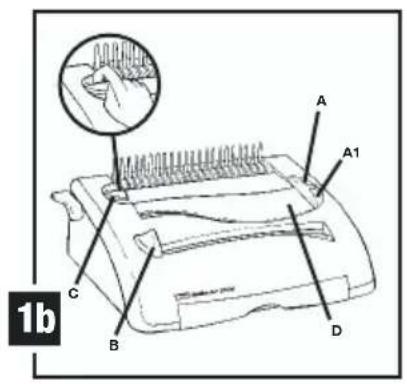
250 only: Push the handle (A) (fig. 1a) onto the punching shaft located on the right side of the machine. Align the flat spot of the handle with the flat of the shaft.
② Secure handle with screwdriver.
3 250e only: Firmly push the female end of the power cord into the power cord receptacle located at the back of the machine.

CAUTION: Make sure this step is complete prior to plugging the male end of the power cord into a power receptacle.
4 Plug the male end of the power cord into an appropriate power receptacle.
DO NOT USE CORDSETS THAT DO NOT MEET THE FOLLOWING MINIMUM ELECTRICAL REQUIREMENTS.
PLUG: 3 A, 250 Volts, 50/60 Hz, Class 1,3 conductor, European safety agency approved.
CORDAGE: Type H05W-F3G0.75, Harmonized (HAR) The “△ symbols indicate cordage approved to appropriate European standard (NOTE: "HAR" may be substituted by the approval mark of the European safety agency which approved the cordage. An example would be “VDE” ▶
APPLIANCE CONNECTOR: 3 A, 250 Volts, 50/60 Hz, European safety approved, Type IEC 320. Cordset shall not exceed 3 meters in length. Cordset with component electrical ratings greater than the minimum specified electrical ratings may be substituted.
Determine sheet width
1 Set Edge Guide (B) to paper size you wish to bind (11", 8-1/2" letter size, 11-1/4" oversized cover, A4 ring, A5, Japan A4) (see figure 1a/1b).
Determine plastic comb size
1 Slide the Binder Sizer open (c) (see figure 1a/1b).
2 Place document including covers behind Binder Sizer.
3 Release the Binder Sizer and select the comb binding element that corresponds with the size shown by guide. Only comb sizes up to 25 mm are shown. Your ibiMaster can bind documents up to 425 sheets, or 50 mm comb size. For best results, always use ibico brand covers with ibico colour-coordinating binding combs.
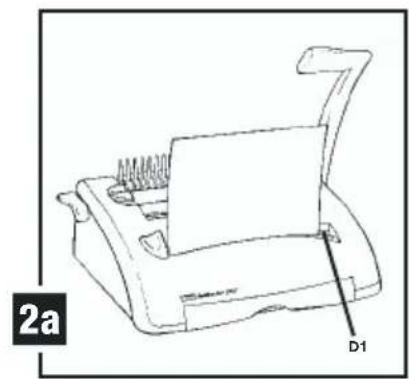
Punching paper (see figure 2)
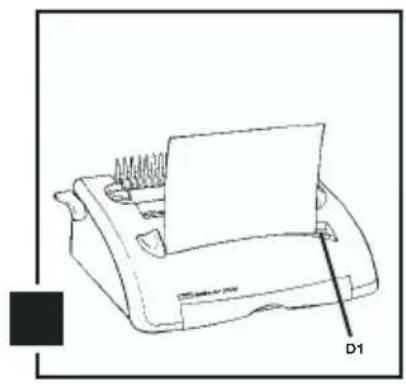
1 Align sheets or covers and insert edge to be bound into punch throat (D1) (see figure 2a/2b).
2 Jog the sheets until they are flush against the edge guide and the bottom of the punch throat.
3 250 only: To punch, pull the Punch Handle (A) (fig. 1a) toward you. Pull all the way down to punch completely through the paper. Punches up to 25 sheets of 80gram paper at once. Punch only TWO clear covers at a time to prevent jams and excessive wear.
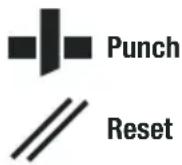
4 250e only: To punch, press the punch button (A) (fig. 1b). The ibiMaster 250e punches up to 20 sheets of 80gsm at once. Punch only TWO clear covers at a time to prevent jams and excessive wear.
5 250e only: If the punch jams, depress the reset button (A1) (fig. 1b) then press the punch button (A) (fig. 1b) again and remove the paper or covers from the punch throat (it may be necessary to punch several times in order to remove the paper). Repeat steps 1 to 3 with slightly less paper to avoid punch jams on additional lifts.
6 Disengageable punching dies: If you require to punch A5, a die can be disengaged from the punch by pulling up the selector pin situated under the lid on top of the machine (D) (see figure 1a/1b), when selector is down the punching die is engaged, once again.
7 Margin Adjustment: The width of the margin between the punched holes and the paper edge, can be adjusted, depending on the thickness of the document. Adjust the lever, situated on the left side of the ibiMaster, by pulling it out or pushing it in, according to the required margin thickness.
Binding
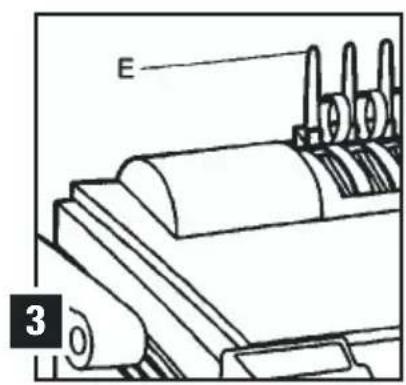
1 Place the Plastic Comb Binding Element behind the Vertical Comb (E) with open portion of element facing you (see figure 3).
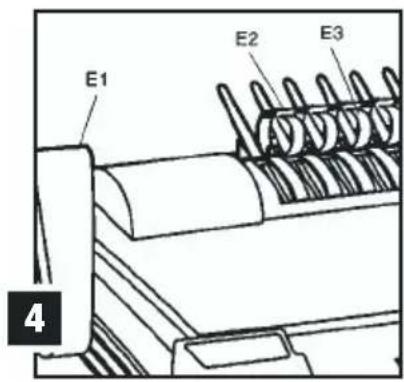
2 Rotate the Bind lever up (E1) toward you until the Comb Binding Element (E2) opens sufficiently to insert your document (see figure 4).
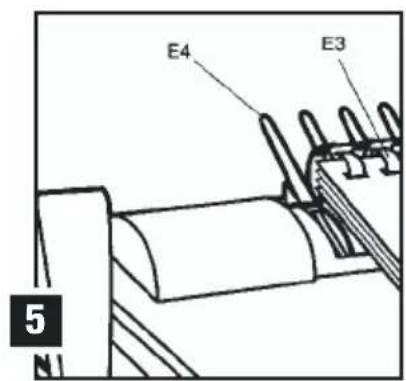
3 Thread front cover finished side facing down (see figure 5), onto open Binding Element Fingers (E3). Thread pages, front facing down, onto element. Repeat for large documents as required. Place the back cover, finished side facing upwards on open Binding Element Fingers last.
4 Push the Bind Lever away from you back to its original position to close the Binding Element.
5 Remove book by lifting upward. Your presentation is now complete!
6 Once you become familiar with your ibiMaster, you will find that you can bind as you punch, increasing your productivity.
Empty chip drawer
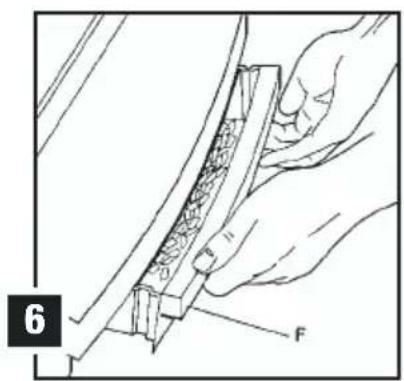
Empty Chip Drawer (F) (see figure 6) after repeated use. Pull drawer gently toward you to open. When putting back in, the drawer will snap into place.
Service
- Do not attempt to service or repair the pouch laminator yourself. Unplug the unit and contact an authorized ibico service representative for any required repairs.
Specifications
| ibico ibiMaster 250 | ibico ibiMaster 250e | |
| Dimensions | 457 mm x 216 mm x 406 mm | 457 mm x 216 mm x 406 mm |
| Weight | 11.8 kg | 15.2 kg |
| Punch Capacity | 25 sheets of 80 gm 2 paper | 20 sheets of 80 gm 2 paper |
| Bind Capacity | 425 sheets (50 mm) | 425 sheets (50 mm) |
| Maximum Sheet Width | 11.7" (297 mm A4) | 11.7" (297 mm A4) |
| Dis-engagable Pins | 11 | 11 |
Guarantee
Operation of this machine is guaranteed for one year from date of purchase, subject to normal use. Within the guarantee period, GBC will at its own discretion either repair or replace the defective machine free of charge. Defects due to misuse or use for inappropriate purposes are not covered under the guarantee. Proof of date of
purchase will be required. Repairs or alterations made by persons not authorised by GBC will invalidate the guarantee. It is our aim to ensure that our products perform to the specifications stated. This guarantee does not affect the legal rights which consumers have under applicable national legislation governing the sale of goods.
Visit www.gbceurope.com for more on binding with Ibico and GBC.



- 250E ONLY - SAFETY INSTRUCTIONS
- WARNING
- 250E ONLY - IMPORTANT SAFEGUARDS
- 250E ONLY - ELECTRICAL SAFEGUARDS
- GENERAL SAFEGUARDS
- 250E ONLY - CLEANING
- THE FOLLOWING NOTES APPLY ONLY TO THE UNITS RATED 230 V 50HZ
- MAIN CORDSET SELECTION (FOR 230 AV MACHINES ONLY)
- GETTING STARTED
- DETERMINE SHEET WIDTH
- DETERMINE PLASTIC COMB SIZE
- PUNCHING PAPER (SEE FIGURE 2)
- BINDING
- EMPTY CHIP DRAWER
- SERVICE
- GUARANTEE
Brand : IBICO
Model : IbiMaster 250e
Category : Binder