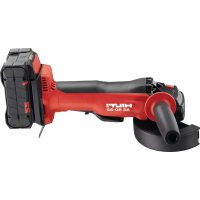
AG 23020D - Grinder HILTI - Free user manual and instructions
Find the device manual for free AG 23020D HILTI in PDF.



| Product type | Angle grinder (grinder) |
| Brand | Hilti |
| Model | AG 230-20D |
| Weight (according to EPTA 01) | 5.3 kg |
| Maximum disc diameter | 230 mm |
| No-load speed | 6,500 rpm |
| Spindle thread | M14 x 15 mm |
| Rated voltage | 230 V (according to rating plate) |
| Rated frequency | 50/60 Hz (according to rating plate) |
| Power input | 2,600 W (estimate) |
| Main functions | Cutting, grinding of metals |
| Soft start | Yes, with electronic inrush current limitation |
| Restart protection | Yes, electronic lock after power interruption |
| On/off switch | With safety trigger |
| Sound power level (LWA) | 105 dB(A) |
| Sound pressure level | 94 dB(A) with uncertainty 3 dB(A) |
| Vibrations (surface grinding) | 6.2 m/s² with uncertainty 1.5 m/s² |
| Standard accessories included | Protective guard, side handle, clamping flange, tightening nut, tightening key, operating instructions |
| Compatible accessories | Abrasive cutting discs (AC-D), abrasive grinding discs (AG-D) |
| Cleaning and maintenance | Clean ventilation slots with a dry brush; casing with a slightly damp cloth; have brushes checked by a qualified electrician |
| Manufacturer warranty | Consult your local Hilti partner |
Frequently Asked Questions - AG 23020D HILTI
User questions about AG 23020D HILTI
0 question about this device. Answer the ones you know or ask your own.
Ask a new question about this device
Download the instructions for your Grinder in PDF format for free! Find your manual AG 23020D - HILTI and take your electronic device back in hand. On this page are published all the documents necessary for the use of your device. AG 23020D by HILTI.
USER MANUAL AG 23020D HILTI
AG 230-20D
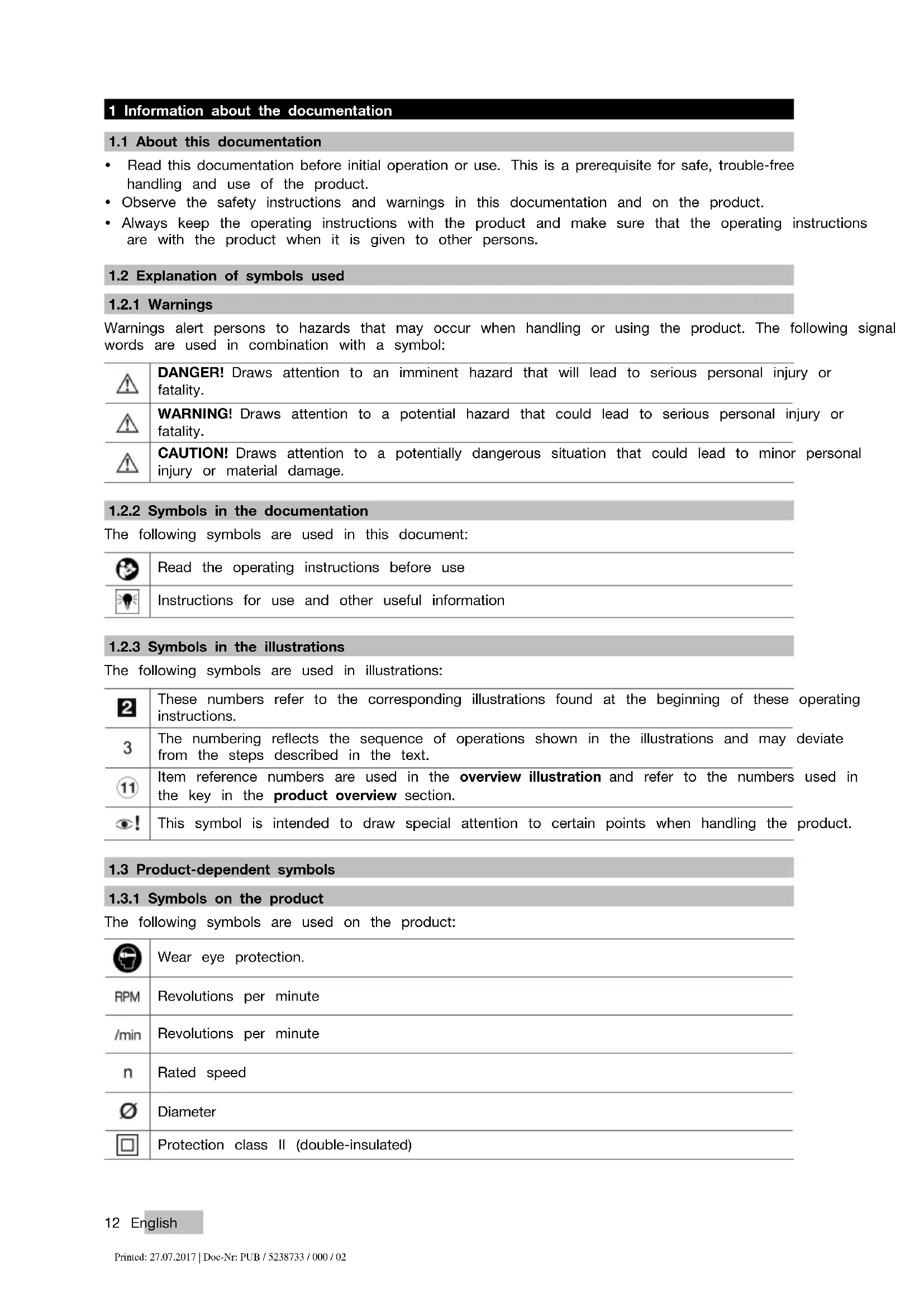
- Read this documentation before initial operation or use. This is a prerequisite for safe, trouble-free handling and use of the product.
- Observe the safety instructions and warnings in this documentation and on the product.
• Always keep the operating instructions with the product and make sure that the operating instructions are with the product when it is given to other persons.
1.2 Explanation of symbols used
1.2.1 Warnings
Warnings alert persons to hazards that may occur when handling or using the product. The following signal words are used in combination with a symbol:
| DANGER! Draws attention to an imminent hazard that will lead to serious personal injury or fatality. | |
| WARNING! Draws attention to a potential hazard that could lead to serious personal injury or fatality. | |
| CAUTION! Draws attention to a potentially dangerous situation that could lead to minor personal injury or material damage. |
1.2.2 Symbols in the documentation
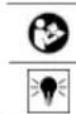
The following symbols are used in this document:
1.2.3 Symbols in the illustrations
The following symbols are used in illustrations:
| 2 | These numbers refer to the corresponding illustrations found at the beginning of these operating instructions. |
| 3 | The numbering reflects the sequence of operations shown in the illustrations and may deviate from the steps described in the text. |
| 11 | Item reference numbers are used in the overview illustration and refer to the numbers used in the key in the product overview section. |
| 6! | This symbol is intended to draw special attention to certain points when handling the product. |
1.3 Product-dependent symbols
1.3.1 Symbols on the product
The following symbols are used on the product:
| Wear eye protection. | |
| RPM | Revolutions per minute |
| /min | Revolutions per minute |
| n | Rated speed |
| ∅ | Diameter |
| Protection class II (double-insulated) |
1.4 Product information
Hilti products are designed for professional use and may be operated, serviced and maintained only by trained, authorized personnel. This personnel must be informed of any particular hazards that may be encountered. The product and its ancillary equipment can present hazards if used incorrectly by untrained personnel or if used not in accordance with the intended use.
The type designation and serial number are stated on the rating plate.
Write down the serial number in the table below. You will be required to state the product details when contacting Hilti Service or your local Hilti organization to inquire about the product.
Product information
| Angle grinder AG 230-20D | |
| Generation 03 | |
| Serial no. |
1.5 Declaration of conformity
We declare, on our sole responsibility, that the product described here complies with the applicable direct and standards. A copy of the declaration of conformity can be found at the end of this documentation. The technical documentation is filed and stored here:
2.1 General power tool safety warnings
WARNING
Read all safety warnings and all instructions. Failure to follow the warnings and instructions may result in electric shock, fire and/or serious injury.
Save all warnings and instructions for future reference.
Work area safety
- Keep work area clean and well lit. Cluttered or dark areas invite accidents.
- Do not operate power tools in explosive atmospheres, such as in the presence of flammable liquids, gases or dust. Power tools create sparks which may ignite the dust or fumes.
- Keep children and bystanders away while operating a power tool. Distractions can cause you to lose control.
Electrical safety
Power tool plugs must match the outlet. Never modify the plug in any way. Do not use any adapter plugs with earthed (grounded) power tools. Unmodified plugs and matching outlets will reduce risk of electric shock.
- Avoid body contact with earthed or grounded surfaces, such as pipes, radiators, ranges and refrigerators. There is an increased risk of electric shock if your body is earthed or grounded.
- Do not expose power tools to rain or wet conditions. Water entering a power tool will increase the risk of electric shock.
- Do not abuse the cord. Never use the cord for carrying, pulling or unplugging the power tool. Keep cord away from heat, oil, sharp edges or moving parts. Damaged or entangled cords increase the risk of electric shock.
- When operating a power tool outdoors, use an extension cord suitable for outdoor use. Use of a cord suitable for outdoor use reduces the risk of electric shock.
If operating a power tool in a damp location is unavoidable, use a residual current device (RCD) protected supply. Use of an RCD reduces the risk of electric shock.
Personal safety
- Stay alert, watch what you are doing and use common sense when operating a power tool. Do not use a power tool while you are tired or under the influence of drugs, alcohol or medication. A moment of inattention while operating power tools may result in serious personal injury.
▶ Use personal protective equipment. Always wear eye protection. Protective equipment such as dust mask, non-skid safety shoes, hard hat, or hearing protection used for appropriate conditions will reduce personal injuries.
▶ Prevent unintentional starting. Ensure the switch is in the off-position before connecting to power source, picking up or carrying the tool. Carrying power tools with your finger on the switch or energising power tools that have the switch on invites accidents.
Remove any adjusting key or wrench before turning the power tool on. A wrench or a key left attached to a rotating part of the power tool may result in personal injury.
- Do not overreach. Keep proper footing and balance at all times. This enables better control of the power tool in unexpected situations.
- Dress properly. Do not wear loose clothing or jewellery. Keep your hair, clothing and gloves away from moving parts. Loose clothes, jewellery or long hair can be caught in moving parts.
If devices are provided for the connection of dust extraction and collection facilities, ensure these are connected and properly used. Use of dust collection can reduce dust-related hazards.
Power tool use and care
- Do not force the power tool. Use the correct power tool for your application. The correct power tool will do the job better and safer at the rate for which it was designed.
- Do not use the power tool if the switch does not turn it on and off. Any power tool that cannot be controlled with the switch is dangerous and must be repaired.
- Disconnect the plug from the power source from the power tool before making any adjustments, changing accessories, or storing power tools. Such preventive safety measures reduce the risk of starting the power tool accidentally.
- Store idle power tools out of the reach of children and do not allow persons unfamiliar with the power tool or these instructions to operate the power tool. Power tools are dangerous in the hands of untrained users.
- Maintain power tools. Check for misalignment or binding of moving parts, breakage of parts and any other condition that may affect the power tool's operation. If damaged, have the power tool repaired before use. Many accidents are caused by poorly maintained power tools.
- Keep cutting tools sharp and clean. Properly maintained cutting tools with sharp cutting edges are less likely to bind and are easier to control.
▶ Use the power tool, accessories and tool bits etc. in accordance with these instructions, taking into account the working conditions and the work to be performed. Use of the power tool for operations different from those intended could result in a hazardous situation.
Service
▶ Have your power tool serviced by a qualified repair person using only identical replacement parts. This will ensure that the safety of the power tool is maintained.
2.2 General safety instructions applicable to grinding and polishing
- Do not use accessories not specifically intended and recommended for this power tool by the tool manufacturer. The fact that an accessory can be attached to the power tool does not necessarily mean that it can be used safely.
The rated speed of the accessory must be at least equal to the maximum speed marked on the power tool. Accessories running faster than their rated speed can disintegrate and fly apart.
The outside diameter and the thickness of the accessory tool must be within the ranges stated for your power tool. Incorrectly sized accessory tools cannot be adequately guarded or controlled. - Accessory tools with a threaded insert must match the thread of the drive spindle. Flange-mounted accessory tools must have a hole diameter matching the mandrel diameter of the flange. Accessory tools not correctly secured to the power tool rotate unevenly, vibrate excessively and can cause loss of control of the tool.
- Do not use damaged accessory tools. Check the condition of the accessory tool before each use, i.e. check abrasive discs for chips and cracks, and check backing pads for cracks, tears or excessive wear. If the power tool or accessory tool is dropped, inspect it for damage or use an undamaged accessory tool. After inspecting and installing an accessory tool, position yourself and bystanders away from the plane of the rotating tool and run the power tool at maximum no-load speed for one minute. If an accessory tool has been damaged it will usually break during this test period.
-
Wear personal protective equipment. Wear a face shield, eye protection or safety goggles, as appropriate to the application. As appropriate, wear a dust mask, ear protection, protective gloves and a workshop apron to protect you from flying abrasive particles and fragments of the material you are working on. Make sure your eyes are protected against the flying debris created by various machining operations. The dust mask or respirator must be capable of filtering out dust particles resulting from use of the power tool. Prolonged exposure to high-intensity noise can cause hearing loss.
-
Keep bystanders a safe distance away from the work area. Anyone entering the work area must wear personal protective equipment. Fragments of the workpiece or of a broken accessory tool may fly off and cause injury beyond the immediate area of operation.
- Hold the power tool only by the insulated gripping surfaces when carrying out work in which the accessory tool can come into contact with concealed wiring or with the power tool's own supply cord. If the accessory tool comes into contact with a live wire, metal parts of the power tool can also become live, resulting in an electric shock.
- Keep the power cord well clear of rotating accessory tools. If you lose control, the power cord could be cut or snagged and your hand or arm pulled into contact with the rotating accessory tool.
▶ Never lay the power tool down before the accessory tool has come to a complete stop. If the rotating accessory tool is allowed to touch the surface on which you place the power tool, you could control of the power tool.
▶ Never start the power tool while carrying it around. Your clothing could be snagged by the rotating accessory tool, pulling the accessory tool into your body.
Clean the ventilation slots on the power tool at regular intervals. The motor's fan draws dust into the housing and a build-up of metallic dust can cause electrical hazards. - Do not operate the power tool near flammable materials. Sparks could ignite these materials.
- Do not use accessory tools that require liquid coolants. Using water or other liquid coolants can cause electric shock.
Kickback and the applicable safety instructions
Kickback is the abrupt reaction to the sudden stalling of a pinched or snagged rotating disc, backing p or other accessory tool. Pinching or snagging causes the rotating accessory tool to come to an abrupt stop. This causes an uncontrolled power tool to be forced in the direction opposite to the accessory to direction of rotation at the point of binding.
For example, if an abrasive disc is snagged or pinched by the workpiece, the edge of the disc entering pinch point can dig into the surface of the material causing the disc to climb out or kick back. The d then skips toward or away from the operator, depending on the disc's direction of movement at the po pinching. Abrasive discs can also break under these conditions.
Kickback is the result of power tool misuse and/or incorrect operating procedures or conditions. It can be avoided by taking the proper precautions as described below.
- Maintain a firm grip on the power tool and position your body and arms to absorb kickback forces.
Always use the auxiliary handle, if provided, for maximum control over kickback forces or torque reaction during start-up. By adopting suitable precautionary measures the operator can control the kickback and reaction forces.
▶ Always keep your hand well clear of the rotating accessory tool. Kickback could cause the accessory tool to pass across your hand. - Keep your body clear of where the power tool will move if kickback occurs. Kickback will propel the power tool in the direction opposite to the disc's direction of rotation at the point of snagging.
Exercise special care when working at corners, sharp edges, etc. Avoid allowing the accessory tool to bounce off or jam in the workpiece. The rotating accessory tool has a tendency to jam at corners and sharp edges, or if it bounces off the workpiece. This causes loss of control or kickback
Special safety instructions applicable to grinding:
- Use only abrasive disc types approved for use with the power tool and the specific guard designed for the selected disc. Discs for which the power tool was not designed cannot be adequately guarded and are unsafe.
- Offset grinding discs must be fitted in such a way that their grinding face does not project past the plane of the guard edge. An incorrectly fitted grinding disc projecting past the plane of the guard edge cannot be adequately shielded.
The guard must be securely attached to the power tool and positioned for maximum safety, so that the smallest possible segment of the abrasive disc is exposed toward the operator. The guard helps protect the operator from flying fragments, accidental contact with the abrasive disc, and flying sparks that could ignite clothing.
▶ Use abrasive discs for the recommended applications only. For example: Never try to use the flat side of an abrasive cut-off disc for grinding. Abrasive cut-off discs are intended for cutting at their peripheral edge. Lateral forces applied to these discs can cause them to shatter.
▶ Always use an undamaged clamping flange of the correct size and shape for your selected grinding disc. The correct flange supports the grinding disc, reducing the risk of disc breakage. Flanges for cut-off discs can differ from those for other grinding discs.
- Do not use worn-down, originally larger-diameter grinding discs from larger power tools. Grinding discs intended for a larger power tool are not suitable for the higher speed of a smaller tool and can break.
2.3 Additional safety instructions
Personal safety
▶ Only use the product if it is in perfect working order.
▶ Never tamper with or modify the tool in any way.
- Avoid touching rotating parts - risk of injury!
▶ Wear protective gloves also when changing the accessory tool. Touching the accessory tool presents a risk of injury (cuts or burns).
Before starting work, check the hazard class of the dust that will be produced when working. Use an industrial vacuum cleaner with an officially approved protection class in compliance with the locally applicable dust protection regulations. Dust from materials such as lead-based paint, certain types of wood and concrete/masonry/stone containing quartz, minerals or metal may be harmful to health.
▶ Make sure that the workplace is well ventilated and, where necessary, wear a respirator appropriate for the type of dust generated. Contact with or inhalation of the dust may cause allergic reactions and/or respiratory or other diseases among operators or bystanders. Certain kinds of dust are classified as carcinogenic such as oak and beech dust, especially in conjunction with additives for wood conditioning (chromate, wood preservative). Material containing asbestos may be handled only by specialists.
▶ Take breaks between working and do physical exercises to improve the blood circulation in your fingers.
Exposure to vibration during long periods of work can lead to disorders of the blood vessels and nervo system in the fingers, hands and wrists.
Electrical safety
Before beginning work, check the working area for concealed electric cables or gas and water pipes. External metal parts of the power tool may give you an electric shock if you damage an electric cable accidentally.
Using and handling power tools with care
▶ Do not use cutting discs for grinding.
- Tighten the accessory tool and flange securely. If the accessory tool and flange are not tightened securely, the accessory tool may work loose from the spindle due to the braking effect of the motor at switching off.
- Comply with the manufacturer's instructions for handling and storing grinding discs.
3 Description
3.1 Product overview
| 1 | Arbor lockbutton | 9 | Clamping lever |
| 2 | Steadying rib | 10 | Clamping flange |
| 3 | On/off switch | 11 | Clamping nut |
| 4 | Safety trigger | 12 | Adjusting screw |
| 5 | Side handle | 13 | Guard |
| 6 | Threaded socket for grip | 14 | Grinding disc |
| 7 | Arbor | 15 | Pin wrench |
| 8 | Keyed locating lug |
3.2 Intended use
The product described is a hand-held electric angle grinder. It is designed for cutting and grinding metallic materials without use of water. It can be used only for dry grinding / cutting.
The tool may be operated only when connected to a power source providing a voltage and frequency in compliance with the information given on the type identification plate.
3.3 Items supplied
Angle grinder, guard, side handle, clamping flange, clamping nut, pin wrench and operating instructions. You can find other system products approved for your product at your local Hilti Center or online at:
www.hilti.group
3.4 Starting current limitation
The electronic starting current limiter reduces the starting current drawn by the power tool and thus pre- the mains fuse blowing. It also allows the power tool to start smoothly, without a jolt.
4 Consumables
For working metal, use only synthetic resin-bonded, fiber-reinforced grinding discs or cutting discs approv for use at a permissible peripheral speed of 80 m/sec.
Use only grinding discs approved for use at a rotational speed of at least 6500 rpm and having a max diameter of 230 mm.
The maximum disc thickness is:
• 6.4 mm for grinding discs
• 2.5 mm for cutting discs.
ATTENTION! When cutting or slitting with abrasive cutting discs always use the guard with cover plate, or a fully enclosing dust hood.
Discs
| Application Designation | Material | ||
| Abrasive cutting disc Cutting, slitting | AC-D Metal | ||
| Abrasive grinding disc Rough grinding | AG-D metal |
Suitability of discs for the equipment used
| Equipment AC-D AG-D AF-D AN-D | ||||
| Guard | — | X | X | X |
| Guard with cover plate | X | — | — | — |
| Side handle | X | X | X | X |
| Clamping nut | X | X | X | X |
| Clamping flange | X | X | X | X |
5 Technical data
5.1 Angle grinder

Note
For details of the rated voltage, frequency, current and input power, refer to the country-specific ty identification plate.
If the device is powered by a generator or transformer, the generator or transformer's power output must at least twice the rated input power shown on the type identification plate of the device. The operating voltage of the transformer or generator must always be within +5% and -15% of the rated voltage of the device
| Weight in accordance with EPTA procedure 01 | 5.3 kg |
| Maximum disc diameter | 230 mm |
| Thread length | 15 mm |
| Thread diameter | M14 |
5.2 Noise information and vibration values in accordance with EN 60745
The sound pressure and vibration values given in these instructions have been measured in accordance a standardized test and may be used to compare one power tool with another. They may be used for a preliminary assessment of exposure.
The data given represents the main applications of the power tool. However, if the power tool is used for different applications, with different accessory tools or is poorly maintained, the data may vary. This may significantly increase exposure over the total working period.
An accurate estimation of exposure should also take into account the times when the power tool is swi off, or when it is running but not actually being used for a job. This may significantly reduce exposure over the total working period.
Identify additional safety measures to protect the operator from the effects of noise and/or vibration, for example: Maintaining the power tool and accessory tools, keeping the hands warm, organization of work patterns.
Noise information
| Sound power level ( I_mA ) | 105 dB(A) |
| Emission sound pressure level ( I_p ) | 94 dB(A) |
| Uncertainty for the sound pressure level _pA (K) | 3 dB(A) |
Total vibration
| Surface grinding with the vibration-absorbing side handle _R,Ag (h) | 6.2 m/s ^2 |
| Uncertainty (K) | 1.5 m/s ^2 |
6 Operation
6.1 Preparations at the workplace

CAUTION
Risk of injury! Inadvertent starting of the product.
- Unplug the supply cord before making adjustments to the power tool or before changing accessories.
Observe the safety instructions and warnings in this documentation and on the product.
6.2 Fitting the side handle
- Screw the side handle into one of the threaded bushings provided.
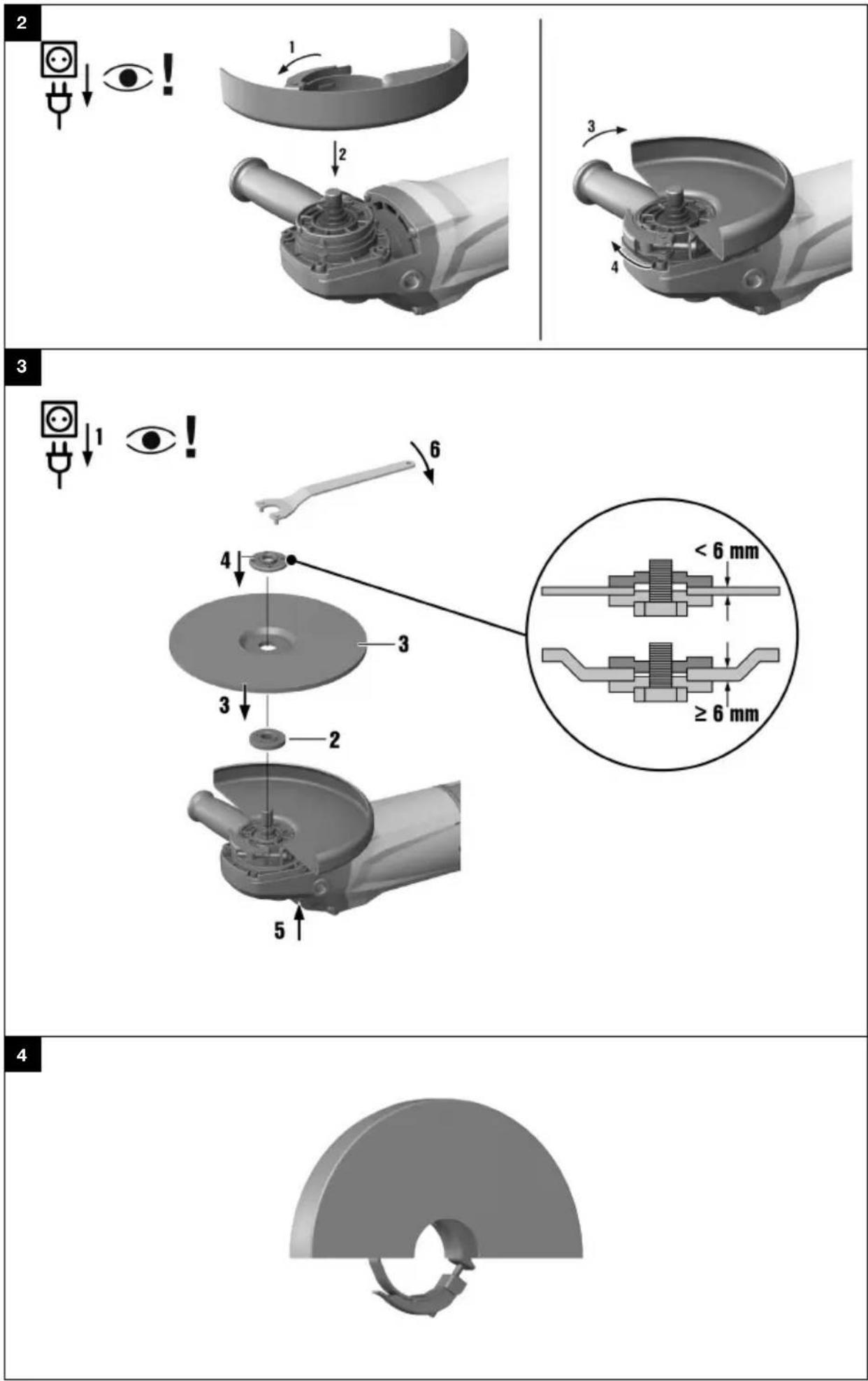
6.3 Fitting the guard 2

Note
The guard is keyed to ensure that ensure only guards of a type suitable for use with the power to can be fitted. The keyed locating lug also prevents the guard from coming into contact with the tool
- Release the clamping lever.
- Fit the guard onto the arbor collar so that the keyed locating lug engages in the recess provided.
- Turn the guard to the desired position.
- Secure the guard by closing the clamping lever.

Note
The guard is preset to the correct clamping diameter by the adjusting screw. If the tension is too whentheguardis fitted, the adjusting screw can be tightened slightly to increasethe clampingforce.
6.3.1 Adjusting the guard
- Release the clamping lever.
- Turn the guard to the required position.
- Secure the guard by closing the clamping lever.
6.3.2 Removing the guard
- Release the clamping lever.
- Rotate the guard until the keyed locating lug is aligned with the keyed locating groove and then remove the guard.
6.4 Accessory tools

CAUTION
Risk of injury. The accessory tool may be hot.
▶ Wear protective gloves when changing the accessory tool.

Note
Accessory tools have to be replaced as soon as their cutting performance fades significantly or pa of the angle grinder (not the disc) come into contact with the material you are working on. Abrasi discs must be replaced when their expiry date has been reached.
6.4.1 Fitting an accessory tool 3
- Disconnect the supply cord plug from the power outlet.
- Clean the clamping flange and the clamping nut.
- Fit the clamping flange on to the arbor.
- Fit the accessory tool.
- Screw on the clamping nut corresponding to the type of accessory tool fitted.
- Press and hold down the arbor lockbutton.
- Use the pin wrench to tighten the clamping nut securely, then release the arbor lockbutton and remove the wrench.
6.4.2 Removing the accessory tool
- Disconnect the supply cord plug from the power outlet.

CAUTION
Risk of breakage and irreparable damage. If the spindle lockbutton is pressed while the spindle is rotating, this may cause the accessory tool to work loose or detach from the power tool.
▶ Press the spindle lockbutton only when the spindle has stopped rotating.
- Press the arbor lockbutton and hold it in this position.
- Release the clamping nut by gripping it with the pin wrench and turning the nut counterclockwise.
- Release the arbor lockbutton and remove the accessory tool.
6.5 Types of work

WARNING
A damaged supply cord presents a hazard! Do not touch the supply cord or extension cord if damaged while working. Disconnect the supply cord plug from the power outlet.
- Check the appliance's supply cord at regular intervals and have it replaced by a qualified specialist if found to be damaged.
Check extension cords at regular intervals and replace them if found to be damaged.
6.5.1 Switching on
- Plug the supply cord into the power outlet.
- Press the safety trigger to unlock the on/off switch.
- Press the on/off switch as far as it will go.
The motor runs.
6.5.2 Guard with cover plate 4
ATTENTION! When cutting or slitting with abrasive cutting discs always use the guard with cover plate, or a fully enclosing dust hood.
6.5.3 Grinding

CAUTION
Risk of injury. The accessory tool may suddenly stick or stall.
▶ Use the power tool with the side handle (or optional hoop grip) fitted and always hold the power tool securely with both hands.
6.5.4 Cutting
- When cutting, apply moderate feed pressure and do not tilt the power tool or the cutting disc (when working, hold at approx. 90^ to the surface being cut).

Note
For best results when cutting profiles and square tube, start cutting at the smallest cross section.
6.5.5 Rough grinding

CAUTION
Risk of injury. The abrasive cutting disc could shatter and flying fragments may cause injury.
▶ Never use abrasive cutting discs for grinding.
▶ Move the power tool to and fro while maintaining a 5^ to 30^ angle of attack and applying moderate pressure.
This will avoid overheating and discoloration of the workpiece and help ensure an even surface finish.
6.5.6 Switching off
▶ Release the on/off switch.
7 Care and maintenance
7.1 Care and maintenance

WARNING
Danger of electric shock! Carrying out care and maintenance while the supply cord is connected to the power outlet presents a risk of serious injuries including burns.
▶ Always unplug the supply cord before carrying out all care and maintenance tasks.
Care
- Carefully remove stubborn dirt from the tool.
- Clean the air vents carefully with a dry brush.
- Use only a slightly damp cloth to clean the casing. Do not use cleaning agents containing silicone as they can attack the plastic parts.
Maintenance

WARNING
Danger of electric shock! Improper repairs to electrical components may lead to serious injuries including burns.
- Repairs to the electrical section of the tool or appliance may be carried out only by trained electrical specialists.
- At regular intervals, check all visible parts and the controls for signs of damage and make sure that the all function correctly.
- Do not operate the power tool if signs of damage are found or if parts malfunction. Have damage repair immediately by Hilti Service.
- After cleaning and maintenance, refit all guards or protective devices and check that they function correctly.
7.2 Checks after care and maintenance work
▶ After carrying out care and maintenance, check that all protective and safety devices are fitted and that they function faultlessly.
8 Transport and storage
-
Do not transport electric tools with accessory tools fitted.
• Always unplug the supply cord before storing an electric tool or appliance. -
Store tools and appliances in a dry place where they cannot be accessed by children or unauthorized persons.
- Check electric tools or appliances for damage after long periods of transport or storage.
9 Troubleshooting
If the trouble you are experiencing isn't listed in this table or you are unable to remedy the problem by yourself, please contact Hilti Service.
| Trouble or fault Possible cause Action to be taken | ||
| The tool doesn’t start. | Interruption in the electric supply. | Plug in another power tool or appliance and check whether it works. |
| The supply cord or plug is defective. | Have the supply cord and plug checked by a trained electrical specialist and replaced if necessary. | |
| The carbon brushes are worn. | Have the power tool checked by a trainedelectricalspecialist and the carbon brushes replaced if necessary. | |
| The restart interlock is active after disconnection or an interruption in the electric supply. | Switch the power tool off and then on again. | |
| The tool doesn’t work. | The tool has been overloaded. | Release the on/off switch and then press it again. Then allow the power tool to run under no load for approx. 30 seconds. |
| The tool does not achieve power. | the extension cord conductor cross section (gauge) is inadequate. | Use an extension cord with an adequate conductor cross section. |
10 Disposal
Most of the materials from which Hilti tools and appliances are manufactured can be recycled. The materials must be correctly separated before they can be recycled. In many countries, your old tools, machines or appliances can be returned to Hilti for recycling. Ask Hilti Service or your Hilti representative for further information.

- Disposal of electric tools or appliances together with household waste is not permissible.
11 Manufacturer's warranty
▶ Please contact your local Hilti representative if you have questions about the warranty conditions.
▶ Largue o interruptor on/off.
| Oprema | AC-D | AG-D | AF-D | AN-D |
| Štitnik | — | X | X | X |
| Štitnik s pokrovnim limom | X | — | — | — |
| Bočni rukohvat | X | X | X | X |
| Stezna matica | X | X | X | X |
| Stezna prirubnica | X | X | X | X |
5 Tehnički podaci
5.1 Kutna brusilica

Napomena
Dimenzionirani napon, dimenzioniranu struju, frekvenciju i dimenzioniranu potrošnju pronaći ćete na označnoj pločici koja je specifična za zemlju.
Pri radu na generatoru ili transformatoru njegova izlazna snaga mora biti najmanje dvostruko veća od dimenzionirane potrošnje navedene na označnoj pločici uređaja. Radni napon transformatora ili generatora mora u svakom trenutku biti između +5 % i -15 % dimenzioniranog napona uređaja.
Head of BA Quality and
Process-Management
BA Electric Tools & Accessories
Tassilo Deinzer
Executive Vice President
BU Electric Tools & Accessories
Hilti Corporation
LI-9494 Schaan
Tel.: +423/234 21 11
Fax: +423/234 29 65
www.hilti.group