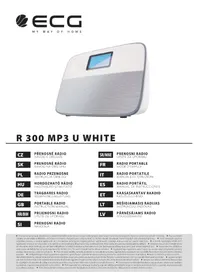
R 300 U - Radio ECG - Free user manual and instructions
Find the device manual for free R 300 U ECG in PDF.



| Product type | Radio numérique |
| Brand | ECG |
| Model | R 300 U |
| Dimensions (W × H × D) | 230 × 77 × 156 mm |
| Weight | About 600 g (with batteries) |
| Power supply | DC 5 V, 1 A via AC adapter (included) or 4 AAA batteries (1.5 V) |
| Display | LCD 65 × 40 mm, white on blue background, white LED backlight |
| FM radio | Range 87-108 MHz, 30 presets, external antenna |
| Media player | Playback from SD card and USB flash drive (up to 32 GB), MP3 and WMA formats |
| AUX input | 3.5 mm jack connector for external source |
| Speakers | 2 × 2 inches, wideband, magnetic shielding, power 2 × 3 W |
| Special features | Dual alarm, sleep timer (15-120 min), backlight setting |
| Maintenance and cleaning | Wipe with a soft, slightly damp cloth (no solvents or abrasive products) |
| Safety | Do not expose to water, temperatures >60°C, strong magnetic fields, shocks |
| Included accessories | 3.5 mm audio cable, USB cable, AC/USB power adapter |
| Repairability | Not modifiable, do not disassemble. Spare parts not specified |
| Operating temperature | -5 °C to +40 °C |
Frequently Asked Questions - R 300 U ECG
User questions about R 300 U ECG
0 question about this device. Answer the ones you know or ask your own.
Ask a new question about this device
Download the instructions for your Radio in PDF format for free! Find your manual R 300 U - ECG and take your electronic device back in hand. On this page are published all the documents necessary for the use of your device. R 300 U by ECG.
USER MANUAL R 300 U ECG
Read carefully and save for future use!
- If you will not use the device for a longer period of time, remove all batteries to prevent damage caused by battery leakage.
- Do not expose the device to temperatures over 60^ , the functioning of the components may change irreversibly and especially do not leave the product in a closed car in direct sunlight. The cover may be deformed and stop functioning.
- The speaker of this device is equipped with a powerful magnet, therefore prevent contact of the radio with magnetic cards and tickets, recorded magnetic media, watches, etc. The magnetic field of the speaker might damage them.
- Do not expose the product to strong magnetic fields of other speakers, TV sets, etc., it may change the frequency.
- Prevent shocks and falls of the device, it contains precise parts, which might be damaged.
- When listening in buildings and public transport, the best reception is at the windows. The reception will be poor in tunnels, subway, etc. The presence of large metal masses affects the reception as well.
- Do not clean the cover of the device with solvents or abrasive products, use soft cloth dipped in a weak detergent solution.
- Prevent contact of the product with insecticides, some insecticides contain chemicals, which may damage the surface.
- The front of the product is sensitive to static electricity. Do not use the product in an environment where there may be static electricity.
DESCRIPTION
Thank you for purchasing digital radio R300.
Advantages of the device
- Support of direct playback from SD cards and USB memory devices with up to 32 GB capacity, support of various MP3 formats and WMA.
- High sensitivity, professional quality of radio reception.
Highly sensitive circular antenna.
Excellent delivery, high quality natural sound. High quality two-inch broadband speakers, magnetically shielded, with clear highs and solid bass. - LCD display for user-friendly control.
Easily legible LCD display 65 × 40 mm. Easy and intuitive controls save time and eff ort. - Versatile connectivity, perfect compatibility.
Compatible with PC and digital devices, with 3,5mm audio connector.
Package contents
Digital radio R300
- Operating manual
- Stereo audio cable with 3,5mm connectors
- USB power cable
AC/USB adapter
Description of the buttons of the product
MODE Mode selection button VOLUME +/Next


Play/Pause/Auto tuning/Next VOLUME-/Previous

Alarm 1 SET Setup button

Alarm 2
SLEEP
Switch off timer
SNOOZE/ DIMMER
Backlight control/snooze Switch

INSTRUCTIONS
- Do not use the device in unsuitable environments, such as wet, dusty or smoky places.
- Protect from water and other liquids. If the device is splashed with water or other liquid, dry it with soft tea towel. Do not clean with water or chemicals. Clean the surface using soft cloth only.
- Do not use the device in direct sunlight or in very hot or very cold places.
- The voltage of the connected power source must not exceed 5V .
- Protect the device from shocks and falls and from the effects of mechanical pressure.
- Protect the device from strong magnetic fields.
- Do not disassemble or modify the device.
Buttons functions
(1)
Press this button to switch the device on or off. When the device is switched on, the display backlight turns on as well.

Play/Pause/Auto tuning/Next. The LCD display will show corresponding picture.

Press this button to switch on or off alarm clock 1. This icon indicates that the alarm is on.
When the device is on, press and hold the 1 button to switch to the alarm clock mode. An icon and the time on the display start flashing. Press the and the + buttons to set time, and then press SET to exit the set up mode. The mode will change automatically after a long period of inactivity.

Set the second alarm clock in the same way.
Tip: The alarm clock sounds for one minute. Press the alarm clock button to switch it off.
SNOOZE/ DIMMER
Backlight control. Three levels of backlight are available (bright/dimmed/off). You can postpone alarm by pressing this button. If you press this button when the alarm clock sounds, the alarm will switch off and start again 5 minutes later.

Press and hold to increase volume. The current volume will show on the display. Press this during playback to skip to next song, press this when setting the time to increase the set time.

Press and hold to lower volume. The current volume will show on the display. Press this during playback to skip to previous song, press when setting time to set the time lower.
SET Time display and calendar setup.
Setting the calendar: Press and hold the SET button to enter the calendar setup mode. The numbers for the year start flashing. Use and + to select a number, press again SET and using and + set the desired number. Set the day, hour and minute the same way and exit by pressing any button.
Time display: If the display does not show hours, you can find the current time by briefly pressing the SET button.
SLEEP
Switch off timer. You can set the timer to the following time intervals: OFF, 15, 30, 45, 60, 75, 90, 120 minutes. The default setting is OFF (timer is inactive).
Music Playing
- Press MODE to select one of four playback sources: SD card, USB drive, AUX input or FM radio.
-
SD/USB: Connect SD card or USB disk containing music. Press and + to select a song and hold and + to set volume. You can pause and restart playback by pressing The SD card and the USB disk are preferred to other sources, you can connect them any time and start playback immediately.
-
AUX: Press and to set volume.
- FM: Press and hold to start automatic tuning, press briefly to select a station and using and +/fne-tune it.
Tip: There is no pause function available in the FM and AUX mode.
FM radio reception
- Press MODE and select FM to activate the mode. Insert the included 3.5 mm jack into the "AUX in" port on the back side of the device. Press and hold for more than 3 seconds to begin the auto-tuning process.
- Press and switch through the tuned stations.
- Tuned stations will remain in the device memory until the next auto-tuning session.
PC/mobile telephone mode
- If you want to play music from an external device, connect the external device with this one using the supplied audio cable with 3.5mm connectors. Press MODE to switch to AUX mode.
Power
- You can power the device using USB connector or batteries (size AAA).
TROUBLESHOOTING
| Problem Solution | |
| The radio does not work, the LCD is not on | Check, if the batteries are inserted correctly. Check, if the power is correctly connected. Check, if the device is on, or if the backlight of the display is off. |
| SD card/USB drive | Check, if the device is switched to the playback mode. Check, if the SD card or the USB stick are correctly inserted. Check, if the SD card, or the USB drive contain songs in MP3 format. |
| FM receiver did not find any or only a few radio stations | Make sure that the device is switched to FM radio mode. Make sure that you use the device in accordance with the instructions for FM radio. Make sure that there are FM radio stations within range. |
| No audio from the AUX output | Make sure that the external device is properly connected with this one using audio cable with 3,5 connectors. |
TECHNICAL SPECIFICATIONS
| Categories Item | Description | |
| Audio playback Compatiblere memory cards SD cards | ||
| Audio format Music in MP3/WMA format with all common bitrates | ||
| Screen Type LCD display | ||
| FM radio Frequency range 87-108 MHz | ||
| Audio System | Sound Track | 2.0 |
| Speaker system | Broadband speaker, magnetic shielding | |
| Speaker units | 2×two-inch speaker | |
| Power | 2×3 W | |
| Frequency characteristic | 100 Hz ~ 20 KHz | |
| Sensitivity | 600 mV | |
| Impedance | 4 ohms | |
| Sound enhancement | SRS WOW and Microsoft effects | |
| Specifications | Audio input AUX | Standard 3.5 mm jack |
| Power | DC 5 V, 1 A (3,5 connector) | |
| Alkaline batteries | 4×AAA (1,5 V) | |
| Dimmensions (W x H x D) | 230×77×156 mm | |
| Operating temperature | -5~+40°C | |
USE AND DISPOSAL OF WASTE
Wrapping paper and corrugated paperboard - deliver to scrapyard. Packing foil, PE bags, plastic elements - throw into plastic recycling containers.
DISPOSAL OF PRODUCTS AT THE END OF LIFETIME
Disposal of electric and electronic equipment (valid in EU member countries and other Europe countries with an implemented recycling system)
The represented symbol on the product or package means the product shall not be treated as domestic waste. Hand over the product to the specified location for recycling electric and electronic equipment. Prevent negative impacts on human health and the environment by properly recycling your product.
Recycling contributes to preserving natural resources. For more information on the recycling of this product, refer to your local authority, domestic waste processing organization or store, where you purchased the product.

08/05
This product complies with EU directive requirements on electromagnetic compatibility and electrical safety.

GB
The instruction manual is available at website www.ecg-electro.eu.
Changes in text and technical parameters reserved.
SIGURNOSNEUPUTE
250 69 Klicany, Czech Rep. e-mail: ECG@kbexpert.cz
HU
250 69 Klicany, Czech Rep. e-mail: ECG@kbexpert.cz
DE
Distributor fur DE: K+B E-Tech GmbH & Co. KG
Barbaraweg 2, DE-93413 Cham
250 69 Klicany, Czech Rep. e-mail: ECG@kbexpert.cz
IT
K+B Progres, a.s.
U Expertu 91 tel.: +44 776 128 6651 (English)
250 69 Klicany, Czech Rep. e-mail: ECG@kbexpert.cz
ES
K+B Progres, a.s
U Expertu 91 tel.: +44 776 128 6651 (English)
250 69 Klicany, Czech Rep. e-mail: ECG@kbexpert.cz
ET
K+B Progres, a.s
U Expertu 91 tel.: +420 272 122 111
250 69 Klicany, Czech Rep. e-post: ECG@kbexpert.cz
LT
K+B Progres, a.s.
U Expertu 91 tel.: +420 272 122 111
250 69 Klicany, Czech Rep. el. paštas: ECG@kbexpert.cz
LV
K+B Progres, a.s
U Expertu 91 tel.: +420 272 122 111
250 69 Klicany, Czech Rep. e-pasts: ECG@kbexpert.cz

- Read carefully and save for future use!
- DESCRIPTION
- Advantages of the device
- Package contents
- Description of the buttons of the product
- INSTRUCTIONS
- Buttons functions
- SLEEP
- Music Playing
- FM radio reception
- PC/mobile telephone mode
- Power
- TROUBLESHOOTING
- USE AND DISPOSAL OF WASTE
- DISPOSAL OF PRODUCTS AT THE END OF LIFETIME
- Disposal of electric and electronic equipment (valid in EU member countries and other Europe countries with an implemented recycling system)
- SIGURNOSNEUPUTE
- HU
- DE
- IT
- ES
- ET
- LT
- LV
Brand : ECG
Model : R 300 U
Category : Radio