
Bravia KD55X7056 - Projector SONY - Free user manual and instructions
Find the device manual for free Bravia KD55X7056 SONY in PDF.
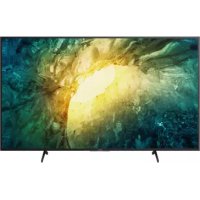



| Product type | LED 4K TV |
| Screen size | 139.7 cm (55 inches) |
| Resolution | 3840 x 2160 pixels |
| Display technology | LED |
| Smart TV | Yes (Android TV) |
| Audio power | 20 W |
| Power supply | 220-240 V AC, 50/60 Hz |
| Typical power consumption | ~100 W |
| Power adaptor | Provided |
| Weight (with stand) | ~16 kg |
| Dimensions (with stand) | 1243 x 780 x 280 mm |
| VESA wall mount | Yes (compatible SU-WL8xx) |
| HDMI connections | 4 inputs |
| USB connections | 2 ports |
| Network | Ethernet, Wi-Fi, Bluetooth |
| CI+ slot | Yes (for CAM) |
| Safety | Child lock, stabilization recommended |
| Cleaning | Soft dry cloth, avoid abrasive products |
| Remote control batteries | 2 AAA batteries |
| Repairability | Sony after-sales service |
Frequently Asked Questions - Bravia KD55X7056 SONY
User questions about Bravia KD55X7056 SONY
0 question about this device. Answer the ones you know or ask your own.
Ask a new question about this device
Download the instructions for your Projector in PDF format for free! Find your manual Bravia KD55X7056 - SONY and take your electronic device back in hand. On this page are published all the documents necessary for the use of your device. Bravia KD55X7056 by SONY.
USER MANUAL Bravia KD55X7056 SONY
Internet security caution
It is strongly recommended for security purposes to connect your TV to the Internet via a router/modem that includes router functionality. Direct connection of your TV to the Internet may expose your TV to a security threat such as extraction or tampering of content or personal information.
Internet Connection and Data Privacy
This product connects to the internet during initial setup as soon as a network is connected in order to confirm internet connection, and later to configure the Home screen. Your IP address is used in these and all other internet connections. If you do not want your IP address be used at all, do not set-up the wireless internet function and do not connect an internet cable. Please refer to the privacy information presented in the set-up screens for further details of internet connections.
WARNING
TO PREVENT THE SPREAD OF FIRE, KEEP CANDLES OR OTHER OPEN FLAMES AWAY FROM THIS PRODUCT AT ALL TIMES.
NOTICE FOR CUSTOMERS IN THE UNITED KINGDOM
A moulded plug complying with BS1363 is fitted to this equipment for your safety and convenience.
Should the fuse in the plug supplied need to be replaced with the same rating of fuse approved by ASTA or BSI to BS 1362 (i.e., marked with or) must be used.
If the plug supplied with this equipment has a detachable fuse cover, be sure to attach the fuse cover after you change the fuse.
Never use the plug without the fuse cover. If you should lose the fuse cover, please contact your nearest Sony service station.
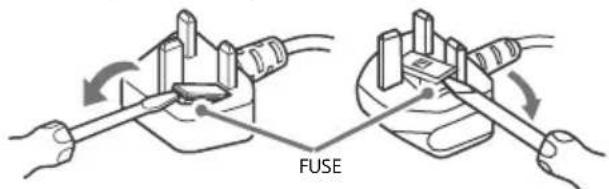
How to replace the fuse
Open the fuse compartment with a blade screwdriver, and replace the fuse.
Please refer to the illustration that actually equipped with the product.
IMPORTANT NOTICE
This product has been manufactured by or on behalf of Sony Corporation.
EU and UK Importer: Sony Europe B.V.
Inquiries to the EU Importer or related to product compliance in Europe should be sent to the manufacturer's authorized representative, Sony Belgium, bijkantoor van Sony Europe B.V., Da Vincilaan 7-D1, 1930 Zaventem, Belgium.
Inquiries to the UK Importer or related to product compliance in the UK should be sent to the manufacturer's authorized representative, Sony Europe B.V., The Heights, Brooklands, Weybridge, Surrey KT13 0XW, United Kingdom.
For applicable AC adapter model only:
Energy consumption and other information for the power supply, as required by Commission Regulation (EU) 2019/1782, is available at the following website: https://compliance.sony.eu
Safety Information
WARNING
Caution
Risk of explosion if the battery is replaced by an incorrect type. Batteries must not be exposed to excessive heat such as sunshine, fire or the like or extremely low air pressure that can result in an explosion or leakage of flammable liquid or gas.
Stability Hazard
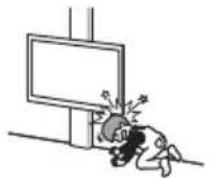
The television set may fall, causing serious personal injury or death.
WARNING
A television set may fall, causing serious personal injury or death. Many injuries, particularly to children, can be avoided by taking simple precautions such as:
- ALWAYS use cabinets or stands or mounting methods recommended by the manufacturer of the television set.
- ALWAYS use furniture that can safely support the television set.
- ALWAYS ensure the television set is not overhanging the edge of the supporting furniture.
- ALWAYS educate children about the dangers of climbing on furniture to reach the television set or its controls.
- ALWAYS route cords and cables connected to your television so they cannot be tripped over, pulled or grabbed. NEVER place a television set in an unstable location. NEVER place the television set on tall furniture (for example, cupboards or bookcases) without anchoring both the furniture and the television set to a suitable support.
- NEVER place the television set on cloth or other materials that may be located between the television set and supporting furniture.
- NEVER place items that might tempt children to climb, such as toys and remote controls, on the top of the television or furniture on which the television is placed. If your existing television set is being retained and relocated, the same considerations as above should be applied.
Installation/Set-up*
Apparatus connected to the protective earthing of the building installation through the mains connection or through other apparatus with a connection to protective earthing - and to a television distribution system using coaxial cable, may in some circumstances create a fire hazard. Connection to a television distribution system therefore has to be provided through a device providing electrical isolation below a certain frequency range (galvanic isolator, see EN 60728-11).
Ventilation
- Never cover the ventilation holes or insert anything into the cabinet.
- Leave space around the TV set as shown below.
- It is strongly recommended that you use a Sony Wall-Mount Bracket in order to provide adequate air circulation.
Installed on the wall
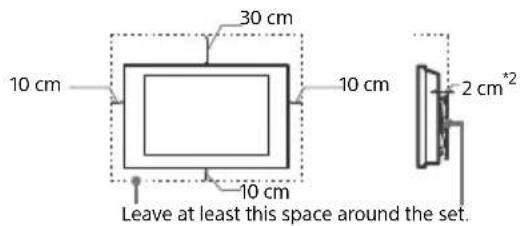
Installed with stand
Leave at least this space around the set.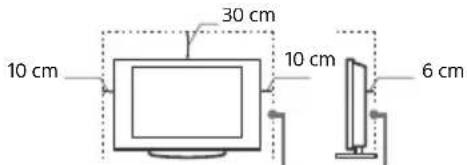
*21 cm for SU-WL8xx only. Refer to the Reference Guide to know whether your TV is compatible with this Wall-Mount Bracket.
To ensure proper ventilation and prevent the collection of dirt or dust:
- Do not lay the TV set flat, install upside down, backwards, or sideways. Do not place the TV set on a shelf, rug, bed, or in a closet.
- Do not cover the TV set with a cloth, such as curtains, or items such as newspapers, etc.
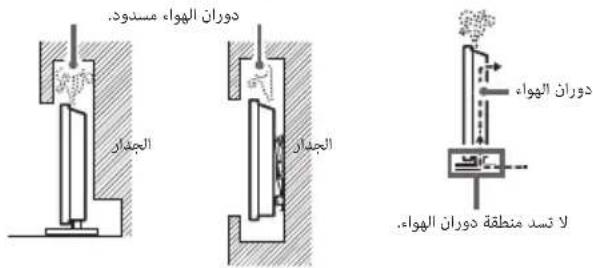
- Do not install the TV set as shown below.
Air circulation is blocked.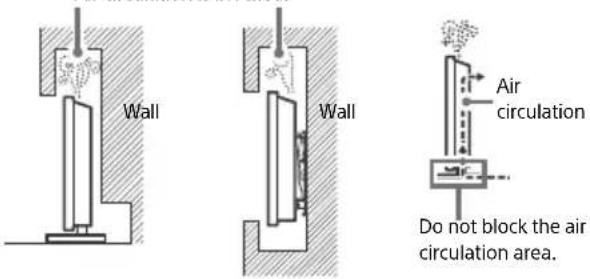
- The ventilation condition depends on your TV model. If this ventilation information is described in both the Reference Guide and Safety Information, please refer to the Reference Guide.
Mains lead
Handle the mains lead and socket as follows in order to avoid any risk of fire, electric shock, or damage and/or injuries:
- Use only mains leads supplied by Sony, not other suppliers.
- Insert the plug fully into the mains socket.
- Operate the TV set on a 220 V - 240 V AC supply only.
- When wiring cables, be sure to unplug the mains lead for your safety and take care not to catch your feet on the cables.
- Disconnect the mains lead from the mains socket before working on or moving the TV set.
- Keep the mains lead away from heat sources.
- Unplug the mains plug and clean it regularly. If the plug is covered with dust and it picks up moisture, its insulation may deteriorate, which could result in a fire.
Note
- Do not use the supplied mains lead on any other equipment.
- Do not pinch, bend, or twist the mains lead excessively. The core conductors may be exposed or broken.
- Do not modify the mains lead.
- Do not put anything heavy on the mains lead.
- Do not pull on the mains lead itself when disconnecting the mains lead.
- Do not connect too many appliances to the same mains socket.
- Do not use a poor fitting mains socket.
NOTE ON MAINS ADAPTOR (models with supplied mains adaptor only)
Warning
To reduce the risk of fire or electric shock, do not expose this apparatus to rain or moisture.
To prevent fire or shock hazard, do not place objects filled with liquids, such as vases, on the apparatus. Do not install this equipment in a confined space, such as a bookshelf or similar unit. - Please ensure that the mains socket is installed near the equipment and shall be easily accessible. - Be sure to use the supplied mains adaptor and mains lead. - Do not use any other mains adaptor. It may cause a malfunction.
- Connect the mains adaptor to an easily accessible mains socket.
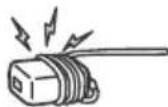
- Do not coil the mains lead around the mains adaptor. The core wire may be cut and/or it may cause a malfunction of the media receiver.
- Do not touch the mains adaptor with wet hands. If you notice an abnormality in the mains adaptor, disconnect it from the mains socket immediately.
- The set is not disconnected from the mains source as long as it is connected to the mains socket, even if the set itself has been turned off.
- As the mains adaptor will become warm when it is used for a long time, you may feel hot when touching it by hand.
Prohibited Usage
Do not install/use the TV set in locations, environments or situations such as those listed below, or the TV set may malfunction and cause a fire, electric shock, damage and/or injuries.
Locations:
- Outdoors (in direct sunlight), at the seashore, on a ship or other vessel, inside a vehicle, in medical institutions, unstable locations, near water, rain, moisture or smoke.
Environments:
- Places that are hot, humid, or excessively dusty; where insects may enter; where it might be exposed to mechanical vibration, near the source of naked flame, such as lighted candle, which is placed on a TV. The TV set shall not be exposed to dripping or splashing and no objects filled with liquids, such as vases, shall be placed on the TV.
Situations:
- Use when your hands are wet, with the cabinet removed, or with attachments not recommended by the manufacturer. Disconnect the TV set from mains socket and aerial during lightning storms.
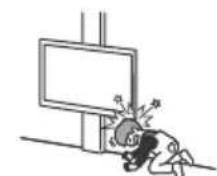
- Install the TV so that it sticks out into an open space. Injury or damage from a person or object bumping into the TV may result.
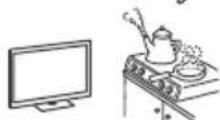
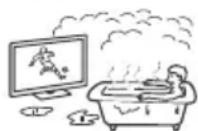
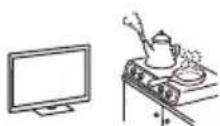
- Place the TV in a humid or dusty space, or in a room with oily smoke or steam (near cooking tables or humidifiers). Fire, electric shock, or warping may result.
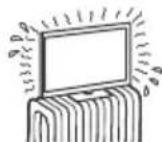
- Install the TV in places subject to extreme temperature such as in direct sunlight, near a radiator or a heating vent. The TV may overheat in such condition which can cause deformation of the enclosure and/or TV malfunction.
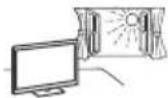
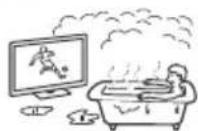
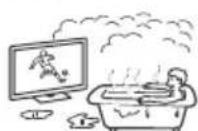
If the TV is placed in the changing room of a public bath or hot spring, the TV may be damaged by airborne sulfur, etc. - For best picture quality, do not expose the screen to direct illumination or sunlight. - Avoid moving the TV from a cold area to a warm area. Sudden room temperature changes may cause moisture condensation. This may cause the TV to show poor picture and/or poor colour. Should this occur, allow moisture to evaporate completely before powering the TV on.
Broken pieces:
- Do not throw anything at the TV set. The screen glass may break by the impact and cause serious injury.
- If the surface of the TV set cracks, do not touch it until you have unplugged the mains lead. Otherwise this may cause an electric shock.

When not in use
- If you will not be using the TV set for several days, the TV set should be disconnected from the mains for environmental and safety reasons.
- As the TV set is not disconnected from the mains when the TV set is just turned off, pull the plug from the mains socket to disconnect the TV set completely.
- Some TV sets may have features that require the TV set to be left in standby/networked standby to work correctly.
For children
- Do not allow children to climb on the TV set.
- Keep small accessories out of the reach of children, so that they are not mistakenly swallowed.
If the following problems occur...
Turn off the TV set and unplug the mains lead immediately if any of the following problems occur. Ask your dealer or Sony service centre to have it checked by qualified service personnel.
When:
- Mains lead is damaged.
- Poor fitting of mains socket.
- TV set is damaged by being dropped, hit or having something thrown at it.
- Any liquid or solid object falls through openings in the cabinet.
About TV Temperature
When the TV is used for an extended period, the panel surrounds become warm. You may feel hot when touching there by the hand.
Do not place this product close to medical devices
This product (including accessories) has magnet(s) which may interfere with pacemakers, programmable shunt valves for hydrocephalus treatment, or other medical devices. Do not place this product close to persons who use such medical devices. Consult your doctor before using this product if you use any such medical device.
Keep out of the reach of children or the supervised individuals
This product (including accessories) has magnet(s). Swallowing magnet(s) could cause serious harm, such as choking hazard or intestinal injuries. If magnets (or a magnet) were swallowed, consult a doctor immediately.
Magnetic influence
This product (including accessories) has magnet(s). Do not leave this product (e.g. terminal cover) near any objects susceptible to magnetism (cash cards, credit cards with magnetic coding, etc.).
Precautions
Viewing the TV
View the TV in moderate light, as viewing the TV in poor light or during long period of time, strains your eyes. - When using headphones, adjust the volume so as to avoid excessive levels, as hearing damage may result.
Screen (For LCD TV only):
- Although the screen is made with high-precision technology and 99.99% or more of the pixels are effective, black dots may appear or bright points of light (red, blue, or green) may appear constantly on the screen. This is a structural property of the screen and is not a malfunction.
- Do not push or scratch the front filter, or place objects on top of this TV set. The image may be uneven or the screen may be damaged.
- If this TV set is used in a cold place, a smear may occur in the picture or the picture may become dark. This does not indicate a failure. These phenomena disappear as the temperature rises.
- Ghosting may occur when still pictures are displayed continuously. It may disappear after a few moments. The screen and cabinet get warm when this TV set is in use. This is not a malfunction.
- The screen contains a small amount of liquid crystal. Follow your local ordinances and regulations for disposal.
OLED Screen (For OLED TV only):
- Although the OLED screen is made with high-precision technology and 99.99% or more of the pixels are effective, black dots may appear or bright points of light (white, red, blue, or green) may appear constantly on the OLED screen. This is a structural property of the OLED screen and is not a malfunction.
- Do not push or scratch the front filter, or place objects on top of this TV set. The image may be uneven or the OLED screen may be damaged.
- The screen and cabinet get warm when this TV set is in use. This is not a malfunction.
- When disposing of your TV, be sure to follow your local laws and regulations.
Handling and cleaning the screen surface/ cabinet of the TV set
Be sure to unplug the mains lead connected to the TV set from mains socket before cleaning.
To avoid material degradation or screen coating degradation, observe the following precautions.
- To remove dust from the screen surface/cabinet, wipe gently with a soft cloth. If dust is persistent, wipe with a soft cloth slightly moistened with a diluted mild detergent solution.
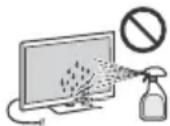
- Never spray water or detergent directly on the TV set. It may drip to the bottom of the screen or exterior parts and enter the TV set, and may cause damage to the TV set.
- Never use any type of abrasive pad, alkaline/acid cleaner, scouring powder, or volatile solvent, such as alcohol, benzene, thinner or insecticide. Using such materials in prolonged contact with rubber or vinyl material may damage the screen surface and cabinet.
Periodic vacuuming of the ventilation openings is recommended to ensure proper ventilation. - When adjusting the angle of the TV set, move it slowly so as to prevent the TV set from moving or slipping off from its table stand.
Optional Equipment
- Keep optional components or any equipment emitting electromagnetic radiation away from the TV set. Otherwise picture distortion and/or noisy sound may occur.
- This equipment has been tested and found to comply with the limits set out in the EMC Standards using a connection signal cable shorter than 3 meters.
- This equipment has been tested and found to comply with the limits set out in the EMC Standards using a RF cable shorter than 30 meters for terrestrial/satellite/CATV terminal.
Recommendation of F type plug*
Projection of the inner wire from the connection part must be less than 1.5mm
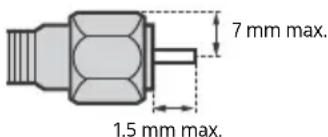
(Reference drawing of the F type plug)
- Only on limited region/country/TV model.
Wireless Function of the unit
- Do not operate this unit near medical equipment (pacemaker, etc.), as this may result in the malfunction of the medical equipment.
- Although this unit transmits/receives scrambled signals, be careful of unauthorised interception. We cannot be responsible for any trouble as a result.
- This equipment should be installed and operated keeping a separation distance of 20 cm or more between the antenna of this device and a person's body.
Caution about handling the remote control
- Observe the correct polarity when inserting batteries.
- Do not use different types of batteries together or mix old and new batteries.
- Dispose of batteries in an environmentally friendly way. Certain regions may regulate the disposal of batteries. Please consult your local authority.
- Handle the remote control with care. Do not drop or step on it, or spill liquid of any kind onto it.
- Do not place the remote control in a location near a heat source, a place subject to direct sunlight, or a damp room.
CAM (Conditional Access Module)
- Do not remove the dummy card or cover (availability depends on TV model) from TV CAM (Conditional Access Module) slot other than to insert a smart card fitted in CAM.
Disposal of the TV set
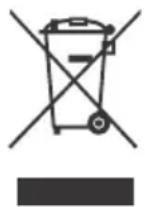
Disposal of old electrical & electronic equipment (applicable in the European Union and other countries with separate collection systems)
This symbol on the product or on its packaging indicates that this product shall not be treated as household waste. Instead it shall be handed over to the appropriate collection point for the recycling of electrical and electronic equipment.
By ensuring that this product is disposed of correctly, you will help to prevent potential negative consequences for the environment and human health, which could be caused by inappropriate waste handling of this product. The recycling of materials will help to conserve natural resources. For more detailed information about recycling of this product, please contact your local Civic Office, your household waste disposal service or the shop where you purchased the product.
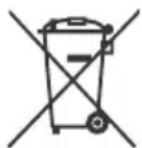
Disposal of waste batteries (applicable in the European Union and other countries with separate collection systems)
This symbol on the battery or on the packaging indicates that the battery provided with this product shall not be treated as household waste.
On certain batteries this symbol might be used in combination with a chemical symbol. The chemical symbol for lead (Pb) is added if the battery contains more than 0.004% lead. By ensuring that these batteries are disposed of correctly, you will help to prevent potentially negative consequences for the environment and human health which could be caused by inappropriate waste handling of the battery. The recycling of the materials will help to conserve natural resources. In case of products that for safety, performance or data integrity reasons require a permanent connection with an incorporated battery, this battery should be replaced by qualified service staff only. To ensure that the battery will be treated properly, hand over the product at end-of-life to the appropriate collection point for the recycling of electrical and electronic equipment. For all other batteries, please view the section on how to remove the battery from the product safely. Hand the battery over to the appropriate collection point for the recycling of waste batteries. For more detailed information about recycling of this battery, please contact your local Civic Office, your household waste disposal service or the shop where you purchased the product or battery.
This product has been manufactured by or on behalf of Sony Corporation.
Importer in the EU: Sony Europe B.V.
Claims for import or claims related to the properties of the products in accordance with the legislation of the European Union should be sent to the authorized representative of the manufacturer Sony Belgium, bijkantoor van Sony Europe B.V., Da Vincilaan 7-D1, 1930 Zaventem, Belgium.
When you do not use the device
Important safety instructions related to the safety of the room environment: we recommend that you unplug the television from the outlet when you do not plan to use it for several days. The television is not disconnected from the outlet when it is disconnected from the remote control. To completely disconnect the device, unplug the power cable from the electrical outlet. Some televisions have functions that require the device to be left in standby mode to work properly.
Relative
- Do not allow children to climb on the television.
- Place the small accessories away from children so that they are not accidentally swallowed.
If the following problems occur...
Be sure to unplug the television and remove the power cable in case of the following problems. Consult your supplier or Sony service center if the television needs to be checked by qualified service personnel.
When:
The power cable is damaged. -The plug contact is loose. The television is damaged, even if it is not emitting, after an impact has occurred on it. Liquid or solid objects have fallen into the housing opening.
Regarding the temperature of the television
When the television is used for a long time, the frame around the panel becomes hot. You may feel the heat when you touch it with your hand.
Do not place this product near medical devices
This product (including accessories) contains magnets that may interfere with pacemakers, programmable defibrillators, or other medical devices. Do not place this product near people with such devices. Consult a doctor before using this product if you use such medical devices.
Keep the product in a place where it cannot be reached by children or people who are not under supervision.
This product (including accessories) contains magnets. The strong magnets may cause serious harm, such as damage to or destruction of medical devices. If you use magnets (or a magnet), consult a doctor first.
Magnetic field influence
Keep the product (including accessories) away from magnets. Do not leave the product (for example, the cable on the stand) close to devices sensitive to magnetism (credit cards, credit cards with magnetic strips, etc.).
Precautions
Watching TV
- Watch TV in moderate lighting, as watching in low light may cause eye strain. When using headphones, adjust the volume so as to prevent hearing damage.
Screen (for LCD TV only):
Despite the screens being manufactured with high-precision technology, 99.99% of their pixels are effective, but black or bright dots (white, red, blue, or green) may appear on the screen. This is a structural feature of the screen and does not indicate a defect. Do not press, scratch, or place objects on the device. The image may be uneven, or the screen may be damaged. If you use the device in a cold place, the picture may become blurry or darker. This is not a defect. This phenomenon disappears when the temperature rises. If the screen shows still images for a prolonged period, residual images may appear. They may disappear after a few seconds. The screen and the cabinet heat up when you use the device. This is not a defect. The screen contains a small amount of liquid crystal. Follow local rules and laws for disposal of such waste.
OLED screen (for OLED TV only):
Despite the OLED screens being manufactured with high-precision technology, 99.99% of their pixels are effective, but black or bright dots (white, red, blue, or green) may appear on the OLED screen. This is a structural feature of the OLED screen and does not indicate a defect. Do not press, scratch, or place objects on the device. The image may be uneven, or the OLED screen may be damaged. The screen and the cabinet heat up when you use the device. This is not a defect. When you dispose of the TV, follow local rules and laws.
Cleaning and maintenance of the screen/cabinet surface of the TV
Make sure you have unplugged the TV and disconnected all cables before cleaning. To prevent damage to the screen coating, follow the instructions below.
To remove dust from the surface of the screen/cabinet, use a soft, dry cloth. If the dust cannot be removed, use a soft cloth slightly dampened with a mild detergent solution. Never spray water or detergent directly onto the TV. On the screen and other parts, stains may form that could run down and damage the TV's interior. Do not use abrasive cloths, cleaning agents containing alcohol/acidic bases, or cleaning powders or solvents such as alcohol, benzene, or thinners. Using such substances or prolonged contact with rubber or vinyl may damage the screen surface or the cabinet surface of the device. - Clean the ventilation openings periodically with a vacuum cleaner to ensure proper ventilation. When adjusting the TV's volume, keep the device away from walls to prevent obstruction of the TV or its stand.
Additional equipment
Do not place additional components or equipment that emit electromagnetic radiation too close to the TV. Otherwise, the picture and/or sound may be affected. This equipment has been tested and complies with EMC standards when using shielded signal cables shorter than 3 meters. This equipment naturally complies with EMC standards when using RF cables shorter than 30 meters for terrestrial/satellite/CATV input.
Recommendations for the connector type*
The inner conductor must be stripped so that the connected part is not longer than 1.5 mm.
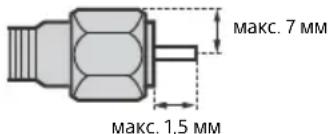
Do not place the product near medical devices
This product (class A equipment) has a magnet(s) that may interfere with pacemakers, defibrillators, and other medical devices. Do not place this product near people using such medical devices. Consult your doctor before using this product if you use such medical devices.
To prevent fire or electric shock, do not place objects filled with liquids, such as vases, on the device. Do not install this equipment in a confined space, such as a bookshelf or similar place.
Ensure that the electrical outlet is located near the device and is easily accessible. Be sure to use the supplied power adapter and power cord.
Do not use other network adapters. This may cause malfunction. - Connect the network adapter to an easily accessible electrical outlet. Do not bend the power cable around the network adapter. In this case, the wire may break at the core, which will lead to malfunction of the multimedia player. - Do not touch the network adapter with wet hands. - If you notice that the network adapter is not working properly, immediately disconnect it from the electrical outlet. While the device is connected to the electrical outlet, it is energized even if the device itself is turned off. - During prolonged use, the network adapter may heat up; this can be felt by touching it with your hand.
Prohibited installation types
To avoid fire, electric shock, damage to the TV, or injury, do not install/operate the TV in places, environments, or situations listed below.
Locations:
In the open air (under direct sunlight), on the seashore, on a ship or other vessel, in a bathroom, in medical institutions, in an unstable position, near water, or where rain, moisture, or smoke may affect it.
Environments:
In humid, dusty, or sooty rooms; in places where insects may be present; in places where the TV may be subject to mechanical vibration, near a source of open flame, such as a candle placed on the TV. Do not let any water drops or splashes fall on the TV; do not place objects containing liquid on it, such as a vase with flowers.
Situations:
Use when hands are wet; removing the cabinet or installing additional accessories not recommended by the manufacturer. During a thunderstorm, disconnect the TV from the electrical outlet and the antenna. Install the TV so that it is in an open space. Collision of a person or object with the TV may cause injury or damage. Install the TV in humid, dusty rooms or in rooms with oily smoke or steam (near kitchen tables or humidifiers). This may cause fire, electric shock, or deformation. Install the TV where there is a strong temperature rise, for example under direct sunlight, near heating appliances or heaters. In such conditions, the TV may overheat, which will lead to deformation of the cabinet and/or damage to the TV.
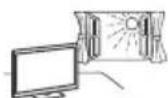
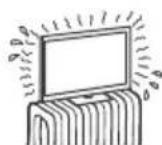
- When installing in a bathroom or near a hot water source, sulfur and other substances in the air may cause damage to the TV.
For the best picture quality, do not expose the screen to direct lighting or sunlight. The TV is recommended to be placed in a well-ventilated room. Sudden temperature changes in the room may cause condensation. This may lead to a decrease in picture quality and/or distortion of light. In this case, wait for the moisture to evaporate completely before turning on the TV.
Fragments:
Do not place any objects on the TV. The impact may cause the screen glass to break and result in serious injury. If cracks appear on the TV surface, unplug the power cable from the outlet before touching it. Otherwise, this could lead to an electric shock.
If the TV is not in use
- If you do not intend to use the TV for several days, for safety and energy saving reasons, it should be disconnected from the mains. Since the TV is not disconnected from the mains by the power button, to completely disconnect it from the mains, unplug the power cable from the outlet.
- Some TVs are equipped with functions that require the TV to be in standby or network standby mode to operate correctly.
Precautions regarding children
- Do not allow children to climb onto the TV. Keep small accessories out of reach of children to prevent them from accidentally swallowing them.
If the following malfunctions occur...
Immediately turn off the TV and unplug the power cable from the outlet in the following cases.
Contact your dealer or service center for qualified service personnel to inspect the TV.
In the event of:
- Damage to the power cable.
- The power outlet has poor contacts. The TV has been damaged due to a fall, impact, or being hit by a thrown object. Liquid or any object has entered the TV through the openings inside the cabinet.
Operating temperature of the TV
During normal use, the TV surface heats up. It becomes warm to the touch.
Do not place this device near medical equipment.
This device (including accessories) is equipped with magnet(s) that may affect the operation of pacemakers, programmable implantable devices, defibrillators, or other medical devices. Do not place this device near people using such medical devices. Consult your doctor before using this device if you use any medical device.
Keep in places inaccessible to children under supervision.
This device (including accessories) is equipped with magnet(s). Swallowing magnet(s) may lead to serious consequences, for example, choking or damage to the gastrointestinal tract. If magnets are swallowed, consult a doctor immediately.
Magnetic influence
This device (including accessories) is equipped with magnet(s). Do not leave this product (for example, the cover of the device) near objects affected by magnetism (credit cards, magnetic stripe cards, etc.).
Precautions
Viewing the viewfinder
- View the viewfinder in sufficient light; viewing in poor light or for excessively long periods tires the eyes. When using headphones, do not set the volume too high to avoid damaging your hearing.
Screen (only for XX-K-Televiewer):
Although screens are manufactured with high technology and effective pixels reach 99.99% or higher, bright or dark spots (red, blue, or green) may constantly appear on the screen. This is a structural property of the screen and is not a sign of malfunction. Do not press on the protective filter, do not scratch it, and do not place any objects on the TV. This may lead to unevenness of the image or damage to the screen. If the TV operates in a cold place, the image may be blurry or too dark. This is not a sign of malfunction. These phenomena will disappear as the temperature rises. - When using the TV, follow the local regulations and instructions.
OLED screen (only for OLED TV):
Although OLED screens are manufactured with high technology and effective pixels reach 99.99% or higher, bright or dark spots (red, blue, or green) may constantly appear on the OLED screen. This is a structural property of the OLED screen and is not a sign of malfunction. Do not press on the protective filter, do not scratch it, and do not place any objects on the TV. This may lead to unevenness of the image or damage to the OLED screen. When the TV operates, the screen and the cabinet heat up. This is not a sign of malfunction. When using the TV, follow the local regulations and instructions.
Cleaning the screen surface, the TV cabinet, and the remote control
Keep the TV away from walls.
To ensure the safety of structural materials and the TV screen coating, follow the precautions below.
To remove dust from the screen/body of the TV, gently wipe it with a soft cloth. If the dust is not completely removed, wipe the screen with a soft cloth slightly dampened in a weak solution of mild detergent.
Never spray liquid directly onto the TV. Liquid splashing onto the screen or other surfaces, or penetrating inside the TV, may cause the TV to fail.
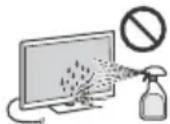
Never use any abrasive materials, alkaline/acidic cleaners, scouring powders, or volatile solvents such as alcohol, benzene, thinners, or insecticides. Using these substances or prolonged contact with rubber/vinyl products may damage the body coating or screen surface. To ensure proper ventilation, it is recommended to periodically clean the ventilation openings with a vacuum cleaner. - When adjusting the tilt angle of the TV, change its position slowly and carefully to prevent the TV from slipping off its stand.
Additional equipment
- Keep additional components or equipment that emit electromagnetic waves at a distance from the TV. Otherwise, distortion of the image and/or sound may occur. - This equipment has been tested and found to comply with the limits set by EMC standards when used with a shielded signal cable of less than 3 meters. - This equipment has been tested and found to comply with the limits set by EMC standards when used with a coaxial cable of less than 30 meters for connection to a terrestrial/satellite/CATV antenna.
Recommendations for F-type connector
The inner conductor must protrude from the connector by less than 1.5 mm.
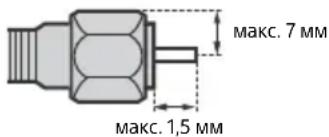
(Reference diagram of F-type connector)
*Only in certain regions/countries/models of TVs.
Wireless function of the device
Do not use the device near medical equipment (such as pacemakers) as it may cause malfunctions. Although this device transmits/receives encrypted signals, be cautious of unauthorized interception. We are not responsible for any problems of this kind. This equipment should be installed and operated with a distance of at least 20 cm between its antenna and the human body.
Warning regarding the use of the remote control
When inserting batteries, observe polarity. Do not use different types of batteries or old and new batteries together.
- Battery disposal: Please follow local regulations for battery disposal. In some regions, battery disposal may be regulated. Please contact your local authorities for this matter. Do not dispose of the battery carelessly, do not place it on a fire, and do not expose it to any sharp objects. Do not leave the battery in direct sunlight or in a humid place.
CAM (Conditional Access Module)
The cover or cap (depending on the TV model) should be removed to access the CAM (Conditional Access Module) slot only when installing a card that fits into the CAM slot.
TV disposal
Disposal of waste electrical and electronic equipment (applicable in the European Union and other countries with separate collection systems)
Disposal of used batteries (applicable in the European Union and other countries with separate collection systems)
Warranty
The warranty applies to products purchased in the countries of the Customs Union.
Warranty period (years): 1. Service life (years): 5. If manufacturing defects are found in the product during the warranty period, Sony or authorized service centers (ASC) will, at their discretion, either repair the product using new or refurbished parts, or replace the product with a new or refurbished equivalent, or refund the purchase price. It is recommended to keep the document confirming the date of purchase of the product. To maintain the warranty, you must follow the instructions for use, storage, and transportation, operate the product only for its intended personal use, not subject it to modification or unqualified repair, and not remove the label with the serial number. The Sony warranty does not restrict the rights of consumers established by applicable legislation regarding the sale of consumer goods.
Support service:
Russia 8 800 200 76 67
Belarus 8 820 0071 76 67
Kazakhstan 8 800 070 70 35
Other countries +7 495 258 76 69
e-mail info@sony.ru
Installation of the antenna and grounding: The antenna and grounding system must be connected through the grounding conductor or through other devices with a disconnecting device before the antenna grounding, as well as the television system using coaxial cable. In some areas, this can cause interference. Refer to the disconnection of the television distribution system and the system must be carried out before the device that ensures electrical isolation of the required frequency range (galvanic isolator, see EN 60728-11).
Ventilation
Never cover the ventilation openings or insert anything into the cabinet. The required space around the television is shown below. - It is recommended to use the wall-mount bracket to ensure proper ventilation.
Installation on a stand: Leave the following free space around the television.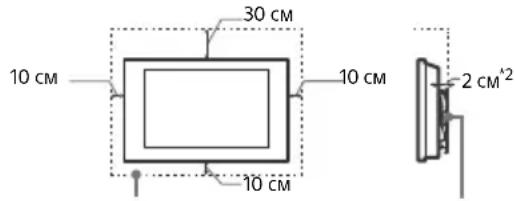
Installation with a wall-mount bracket: Leave the following free space around the television.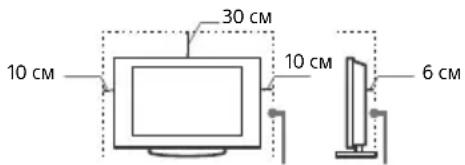
*21 cm only for SU-WL8xx. See the reference guide to find out if your TV is compatible with the wall-mount bracket. To ensure proper ventilation and prevent the accumulation of dust or dirt:
- Do not place the TV in a horizontal position, do not install it with the bottom side up, upside down, or sideways. Do not place the TV on the floor, carpet, bed, or sofa. Do not cover the TV with cloth, such as curtains, or other materials. Do not install the TV as shown below.
Air circulation area.
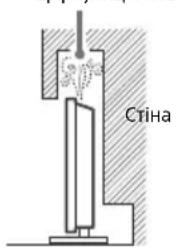
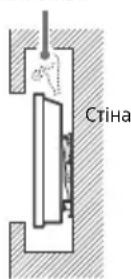
Do not cover the air circulation area.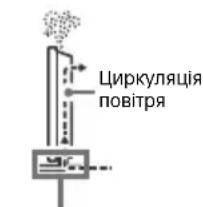
*Ventilation conditions vary depending on the TV model. For ventilation information, see the reference guide for proper operation. See the reference guide.
AC power cord
Handle the AC power cord and plug carefully to avoid the risk of fire, electric shock, and damage/injury.
Use only the AC power cord supplied by Sony Corporation, not other suppliers. Insert the plug into the power outlet completely. - Connect the TV only to a 220 V - 240 V AC mains supply. - When disconnecting cables, for your own safety, unplug the AC power cord and make sure it is not tangled. Unplug the AC power cord from the outlet before moving or cleaning the TV. - Keep the AC power cord away from heat sources. Regularly unplug the TV from the outlet and clean it. If the plug is damaged or the cord is frayed, its insulation may be damaged, which could lead to fire.
Note
Do not use the adapter in conditions other than those specified in this manual. Do not replace, bend, or twist the power cord excessively. The power cord may be damaged or broken. - Do not bend the power cord. - Do not place heavy objects on the power cord. Do not pull the power cord when disconnecting it from the electrical outlet. - Do not plug too many devices into the outlet. Do not use the electrical outlet if proper contact of the plug pins is not ensured.
NOTE FOR THE AC ADAPTER (for models that include an AC adapter in the kit)
Precautions
To reduce the risk of electric shock, do not expose this device to water or moisture. To avoid the possibility of electric shock, do not place the device on surfaces filled with water, such as a bathtub. Do not install the device in a confined space, such as a bookshelf or cabinet.
- The outlet should be located near the device and be easily accessible.
Use the AC adapter and the supplied power cord. Do not use any other AC adapter. This may cause malfunction. Connect the AC adapter to an easily accessible outlet. Do not wind the power cord around the AC adapter. This may damage the cord and cause malfunction. Do not touch the AC adapter with wet hands. - If the adapter is damaged, disconnect it from the outlet. The device is disconnected from the mains only when the adapter is unplugged. Unplug it from the outlet. - During operation, the AC adapter may become hot. You may feel this if you touch it with your hand.
Prohibited Use
Do not install or use the TV in the following places, conditions, or situations, as this may cause malfunction, fire, electric shock, damage, and/or injury.
Places:
Outdoors (in direct sunlight), on the seashore, on a ship or other vessel, inside a vehicle, in medical facilities, unstable places, near open water or water sources, in rain or fog.
Conditions:
- Garages, bathrooms, or excessively dusty places; places where insects may enter; places where the TV may be subject to mechanical vibration, near open water sources, such as a lit candle on the TV. Protect the TV from splashes of water and do not place objects filled with liquid on it, such as a bathtub.
Situations:
Install the TV so that you have dry hands, the TV cabinet is stable, and also use it with equipment recommended by the manufacturer. During a thunderstorm, disconnect the TV from the power outlet and the antenna. Install the TV so that it protrudes into the surrounding space. People or objects may be injured by impact with the TV. Install the TV in dry rooms, as well as in rooms where there is oil or grease (oil and grease with their vapors). This can cause damage, electric shock, or deformation. Install the TV in places that are not exposed to high temperatures, for example, near heating appliances or heating ventilation systems. Overheating the TV can cause deformation of the cabinet and damage to the device itself.
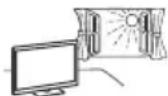
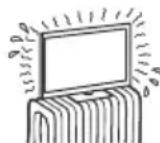
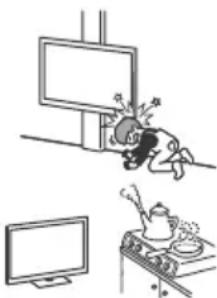
If installed in a built-in furniture niche in a corridor with gas appliances, the TV may be damaged by moisture, which contains air, etc. To improve image quality, it is recommended that the screen not be exposed to direct sunlight. Do not bring the TV from cold to warm rooms. A sharp temperature change can cause condensation. This can lead to deterioration of image quality and color reproduction. In such a case, wait until the moisture has completely evaporated and only then turn on the TV.
COMPONENT FAILURE:
Do not place anything on the TV. The screen may break from impact and cause serious injury. If the TV cabinet is damaged, do not touch it until you have unplugged the power cord from the electrical outlet. In this case, it can lead to electric shock.
When the TV is not in use
If you will not be using the TV for several days, unplug it from the electrical outlet for safety and environmental protection. Since simply turning off the TV does not mean it is disconnected from the electrical outlet, you need to unplug the power cord from the electrical outlet to turn off the TV completely.
For the TV to function properly, the TV must be connected to a broadband internet connection / network connection.
For children
- Do not allow children to climb on the TV.
- Keep small children away from the TV so that they do not accidentally knock it over.
In case of any of the following problems...
In case of any of the following problems, immediately turn off the TV and unplug the power cord from the electrical outlet.
Contact your dealer or service center for repair. Do not attempt to repair the TV yourself; only qualified personnel should do so.
When:
The power cord is damaged. - The plug does not fit well in the electrical outlet. The TV is damaged as a result of falling, impact, or foreign objects getting inside it. - Through openings in the cabinet, liquid or solid objects have entered the inside.
Temperature of the TV
To use the TV for a long time, the body may heat up. This can be seen on the back.
Do not place this device near medical devices
This device (including accessories) contains magnets that can interfere with the operation of pacemakers, programmable infusion pumps, devices intended for insulin delivery, and other medical devices. Do not place this device near the body, as such medical devices are used. If you use any of these medical devices, consult your doctor before using this device.
Keep away from children and people who need care
This device (including accessories) contains magnets.
Swallowing magnets can be a serious danger, which may cause suffocation or injury.
If you swallow magnets (or a magnet), immediately contact a doctor.
Magnet warning
This device (including accessories) contains magnets. Do not place this device (for example, near contact cards) near any objects that are sensitive to magnetism (such as credit cards, cards with magnetic strips, etc.).
Safety precautions
TV temperature
Watch TV in moderate lighting, as watching TV in poor lighting or for a long time can cause eye strain. Use the remote control to adjust the brightness level, as in this case it may cause deterioration of vision.
Screen (only for LCD TV):
Despite the fact that the screen is made using high technology, 99.99% or more pixels operate effectively, black or bright (red, blue, or green) dots may appear on it. This is a structural feature of the screen, not a sign of its malfunction. Do not touch the screen and do not place anything on this TV. The image may become uneven, or the screen may be damaged. - If the TV is used in a cold room, the image may become blurry or dark. This is not a sign of malfunction. Such phenomena disappear when the temperature rises. - When displaying a still image for a long time, a residual image may appear. It may disappear after a few minutes. The screen and body heat up during TV operation. This is not a malfunction. The screen contains a small number of liquid crystals. Please use the product correctly and dispose of it properly.
OLED screen (OLED TV):
The OLED screen is made using high-precision technology, 99.99% or more of the pixels are effectively functional, but on it may appear dots or spots (white, red, blue, or green). This is a design feature of the OLED screen, not a sign of malfunction. Do not worry and do not press or hit the screen. The image may become non-uniform, or you can damage the OLED screen. The screen and the cabinet may heat up during TV operation. This is not a malfunction. The TV's disposal regulations are determined by local laws and rules.
Cleaning the screen/cabinet of the TV
Before cleaning, be sure to unplug the TV from the electrical outlet. To avoid deterioration of materials or damage to the screen coating, follow the safety instructions below.
The warranty applies to products purchased on the territory of Ukraine.
Warranty period (years): 1. Service life (years): 5. If product defects are detected during the warranty period, the Sony service center (or authorized service center) will, at its discretion, repair or replace the product with new or refurbished parts, or replace the product with a new or refurbished one, or refund the paid cost. It is recommended to keep the document that confirms the date of purchase of the product. To preserve the warranty, it is necessary to follow the instructions for use, storage, and transportation, to use the product only for household purposes, not to subject it to modification or unqualified repair, and not to remove the label with the serial number. The Sony warranty does not restrict the rights of consumers established by other legislation regarding the sale of consumer goods.
Support service:
Ukraine 0 800 307 669
e-mail info@sony.ua
a 1000
.
aagaaagblljao daacai (g) paaay
Culjll joo jalll aolao oolal paii 1000 uu uauu aayjbo Cyljll joo jalal
aalalalalwUg
gJ 1000000000000000000000000000000000000000000
.4.15 Egj
jagai jgai jgi jia jao jao jao jao jao jao jao jao jao
a,b,d,g,l
Jlabb a
jolal jge jglgall Jabu
IabblbIgglyJg 1aBbIgUgJe Ie yaeall lalaly
aJU 13
gag gagall (yogal) 33 ygal ellg jgjzj
A
(yjlllogal)ssjllell
(y)j()23j()
e 10
agalb Cia 1aLol gJg
jajalll 0j joo
a 1000
ydy
a aal jzjy y no y jy jy y
golwglg (c)abla (clalall L) gll
y 1 y
aal 5 aol oao jagaoaouy joi yjgai gai li gai
aalll 0j0j110 jie jg pucun cui 151 gail lla iia plauai jil dduu
aalal aagaae yaaee aaal yaae ae
(OLEDjzJ)OLED
OLED OLED
:
- | x - 2| = | x| - 1 .
:
1000
50.56·a#1111111
Therefore, the area of triangle OBC equals the area of triangle COD plus the area of triangle BOC minus the area of triangle BOC.
4.5
Therefore, the area of triangle OBC equals the area of triangle COD plus the area of triangle BOC minus the area of triangle BOC.
14c
j
·jjj
aalee 1000
·jzjzjjj
aas11 0
j 8000000000000000000000000000000000000000000000
a 1
00000000000000000000000000000000000000
b.(1)


- INTERNET SECURITY CAUTION
- INTERNET CONNECTION AND DATA PRIVACY
- WARNING
- NOTICE FOR CUSTOMERS IN THE UNITED KINGDOM
- HOW TO REPLACE THE FUSE
- IMPORTANT NOTICE
- SAFETY INFORMATION
- CAUTION
- STABILITY HAZARD
- INSTALLATION/SET-UP
- VENTILATION
- INSTALLED ON THE WALL
- INSTALLED WITH STAND
- MAINS LEAD
- NOTE
- NOTE ON MAINS ADAPTOR (MODELS WITH SUPPLIED MAINS ADAPTOR ONLY)
- PROHIBITED USAGE
- LOCATIONS
- ENVIRONMENTS
- SITUATIONS
- BROKEN PIECES
- WHEN NOT IN USE
- FOR CHILDREN
- IF THE FOLLOWING PROBLEMS OCCUR
- WHEN
- ABOUT TV TEMPERATURE
- DO NOT PLACE THIS PRODUCT CLOSE TO MEDICAL DEVICES
- KEEP OUT OF THE REACH OF CHILDREN OR THE SUPERVISED INDIVIDUALS
- MAGNETIC INFLUENCE
- PRECAUTIONS
- VIEWING THE TV
- SCREEN (FOR LCD TV ONLY)
- OLED SCREEN (FOR OLED TV ONLY)
- HANDLING AND CLEANING THE SCREEN SURFACE/ CABINET OF THE TV SET
- OPTIONAL EQUIPMENT
- RECOMMENDATION OF F TYPE PLUG
- WIRELESS FUNCTION OF THE UNIT
- CAUTION ABOUT HANDLING THE REMOTE CONTROL
- CAM (CONDITIONAL ACCESS MODULE)
- DISPOSAL OF THE TV SET
- DISPOSAL OF OLD ELECTRICAL & ELECTRONIC EQUIPMENT (APPLICABLE IN THE EUROPEAN UNION AND OTHER COUNTRIES WITH SEPARATE COLLECTION SYSTEMS)
- DISPOSAL OF WASTE BATTERIES (APPLICABLE IN THE EUROPEAN UNION AND OTHER COUNTRIES WITH SEPARATE COLLECTION SYSTEMS)
- WHEN YOU DO NOT USE THE DEVICE
- RELATIVE
- REGARDING THE TEMPERATURE OF THE TELEVISION
- DO NOT PLACE THIS PRODUCT NEAR MEDICAL DEVICES
- KEEP THE PRODUCT IN A PLACE WHERE IT CANNOT BE REACHED BY CHILDREN OR PEOPLE WHO ARE NOT UNDER SUPERVISION
- MAGNETIC FIELD INFLUENCE
- WATCHING TV
- CLEANING AND MAINTENANCE OF THE SCREEN/CABINET SURFACE OF THE TV
- ADDITIONAL EQUIPMENT
- RECOMMENDATIONS FOR THE CONNECTOR TYPE
- DO NOT PLACE THE PRODUCT NEAR MEDICAL DEVICES
- PROHIBITED INSTALLATION TYPES
- FRAGMENTS
- IF THE TV IS NOT IN USE
- PRECAUTIONS REGARDING CHILDREN
- IF THE FOLLOWING MALFUNCTIONS OCCUR
- IN THE EVENT OF
- OPERATING TEMPERATURE OF THE TV
- DO NOT PLACE THIS DEVICE NEAR MEDICAL EQUIPMENT
- KEEP IN PLACES INACCESSIBLE TO CHILDREN UNDER SUPERVISION
- VIEWING THE VIEWFINDER
- SCREEN (ONLY FOR XX-K-TELEVIEWER)
- OLED SCREEN (ONLY FOR OLED TV)
- CLEANING THE SCREEN SURFACE, THE TV CABINET, AND THE REMOTE CONTROL
- RECOMMENDATIONS FOR F-TYPE CONNECTOR
- WIRELESS FUNCTION OF THE DEVICE
- WARNING REGARDING THE USE OF THE REMOTE CONTROL
- TV DISPOSAL
- WARRANTY
- THE WARRANTY APPLIES TO PRODUCTS PURCHASED IN THE COUNTRIES OF THE CUSTOMS UNION
- SUPPORT SERVICE
- AC POWER CORD
- NOTE FOR THE AC ADAPTER (FOR MODELS THAT INCLUDE AN AC ADAPTER IN THE KIT)
- PROHIBITED USE
- PLACES
- CONDITIONS
- COMPONENT FAILURE
- WHEN THE TV IS NOT IN USE
- IN CASE OF ANY OF THE FOLLOWING PROBLEMS
- TEMPERATURE OF THE TV
- DO NOT PLACE THIS DEVICE NEAR MEDICAL DEVICES
- KEEP AWAY FROM CHILDREN AND PEOPLE WHO NEED CARE
- MAGNET WARNING
- SAFETY PRECAUTIONS
- TV TEMPERATURE
- SCREEN (ONLY FOR LCD TV)
- OLED SCREEN (OLED TV)
- CLEANING THE SCREEN/CABINET OF THE TV
- THE WARRANTY APPLIES TO PRODUCTS PURCHASED ON THE TERRITORY OF UKRAINE
- A
- JLABB A
- AJU
- JAJALLL 0J JOO
- A AAL JZJY Y NO Y JY JY Y
- (OLEDJZJ)OLED
- B.(1)
Brand : SONY
Model : Bravia KD55X7056
Category : Projector